IntraMail
Features
Telephone
Programming
Programmer’s Quick
Reference
P/N 1093089
Rev 4, June 2006 Printed in U.S.A. 01.00.00
Empowered by Innovation
Cross
Reference
DSX
This manual has been developed by NEC Unified Solutions, Inc. It is intended for the use of its customers and service personnel, and should be read in its entirety before attempting to install or program the system. Any comments or suggestions for improving this manual would be appreciated. Forward your remarks to:
NEC Unified Solutions, Inc.
4 Forest Parkway Shelton, CT 06484
www.necunifiedsolutions.com
Nothing contained in this manual shall be deemed to be, and this manual does not constitute, a warranty of, or representation with respect to, any of the equipment covered. This manual is subject to change without notice and NEC Unified Solutions, Inc. has no obligation to provide any updates or corrections to this manual. Further, NEC Unified Solutions, Inc. also reserves the right, without prior notice, to make changes in equipment design or components as it deems appropriate. No
representation is made that this manual is complete or accurate in all respects and NEC Unified Solutions, Inc. shall not be liable for any errors or omissions. In no event shall NEC Unified Solutions, Inc. be liable for any incidental or consequential damages in connection with the use of this manual. This document contains proprietary information that is protected by copyright. All rights are reserved. No part of this document may be photocopied or reproduced without prior written consent of NEC Unified Solutions, Inc.
Table of Contents
Table of Contents
Telephone Programming . . . 1
Entering the Programming Mode. . . 1
Navigating through Telephone Programming . . . 2
Features . . . 5
IntraMail . . . 25
DS-Series to DSX Program Cross Reference . . . 35
DS-Series to DSX Cross Reference Chart . . . 35
Telephone
Programming
Telephone
Programming
Telephone Programming
Telephone Programming
Entering the Programming Mode
Entering the Programming Mode
From any DSX keyset:
1. Press INTERCOM.
2. Dial #*#*.
3. Enter the system password.
• 0000 = System Administrator 1 (level 1) • 9999 = System Administrator 2 (level 2) • 632379 (NECDSX) = Installer (level 3)
4. Press HOLD.
Navigating through Telephone Programming
Use the following guidelines when using the DSX telephone programming.
Navigation (Line 1)
Use this line to select the program, option, port, extension, or table you want to customize. After entering the programming mode and selecting a program (e.g. 2104-01), Navigation (line 1) shows:
• The program (2104) and option number (01). • The port’s extension number - if any (Ext-300) • The station, line, COS, or table number (Sta-001).
Navigation (Line 1)
[ ] = Soft Key
To advance to the option line (for editing data):
1. While the option is flashing (e.g., 01 in the above example), press HOLD twice.
• Pressing Volume up and Volume down will scroll through the options for the selected port.
To select another extension and advance to the option line (for entering data):
1. While the option is flashing (e.g., 01 in the above example), press HOLD + Enter extension number + HOLD.
To navigate by extension or station instead of option:
1. While the option is flashing (e.g., 01 in the above example), press [>>] or TRANSFER. • Select either the extension number or station port.
2. Press Volume Up and Volume Down to scroll through the same option for stations or extensions, depending on which you selected.
3. Press [Select] or HOLD to advance (drill down to) the option.
Key Options
HOLD or
[Select] Advance (drill down to) Options.
Sequentially back up (and out) of programming.
22- and 34-Button Keyset
Super Display Keyset Navigation
Option
Soft Keys
Telephone
Programming
Option (Line 2)
Use this line to enter data for the option selected. Option (line 2) shows: • The option selected (Actv Brightness).
• The current setting (8).
Option (Line 2)
[ ] = Soft Key
To enter new data for the option selected:
1. Do one of the following.
a. For alphanumeric entries (such as a timer value), enter the value + HOLD or [Select]. b. For list (fixed-choice) entries, do one of the following:
i Press the Feature Key (if illuminated) for the option you want.
• The key for the currently programmed entry is green - all other selections are red. • If there are more than 12 choices for an option, Feature Key selection is not available.
ii Dial the entry number.
iii Press Volume up ot Volume to scroll through the available entries.
Key Options
HOLD or
[Enter]
Initially after entering data, it returns you to the same option. Subsequent presses do one of the following: • If the option is selected in the Navigation line, advances to the next option.
- Subsequent presses eventually return you to the Navigation line for the program’s first option. • If a port, COS, or table is selected in the Navigation line, advances to the item of same type.
- Subsequent presses eventually return you to the first port, COS, or table. • If an extension is selected in the Navigation line, advances to the next extension.
- Subsequent presses eventually return you to the first extension.
SPEAKER Sequentially back up (and out) of programming.
• SPEAKER normally flashes green. In the data entry mode it flashes red.
[Back] Sequentially back up (and out) of programming.
CLEAR Does one of the following while editing alphanumeric entries:
• Clears character to the right (except at beginning and end of line). • At beginning of line, erases entire entry.
• At end of line, becomes a backspace key
Restore the previous entry,
22- and 34-Button Keyset
Super Display Keyset Navigation
Option
Soft Keys
Features
Features
Features
Features
DSX Programmer’s Quick Reference - Features (Page 1 of 19)
Feature Description Programming
A
Account Codes Categorize and/or restrict outside calls.
General Account Code Programming
1551-02: Account Codes in Speed Dial
1551-01: # to enter Account Code
1551-03: Hide Account Codes
2121-[01-24]: 26 for Account Code key
2402-[01-60]:26 for DSS Console Account Code key Forced Account Codes
2101-01: Extension Class of Service
1412-04: Enable Forced Account Codes
1412-06: Account Codes for Toll Calls Only
1551-04: Account Code Toll Restriction Level
3111-01: Disable Forced Account Codes per line Verified Account Codes
2101-04: Extension Class of Service
1412-05: Enable Verified Account Codes
36xx: Verified Account Codes Table Operation: Answer or place call + Acct Code [Acct] + Dial Code + Acct Code [Acct]
Attendant Position The system’s call processing focal point.
1501-01: Number of operators
1502-01: Operator 1
1502-02: Operator 2
1502-03: Operator 3
1502-04: Operator 4
2114-03: Station’s Operator Assignment Operation: INTERCOM + Dial 0.
Auto Redial Auto Redial can periodically retry an outside number.
1602-06: Repeat Redial Timer
Automatic Handsfree Place or answer a call Handsfree by just pressing a key.
1512-01: Enable system-wide
2112-01: Enable for extension
Operation: Automatic when you press the key.
B
Background Music Broadcast music through the tele-phone speaker.
1521-03: Select music source
2111-02: Allow for extension
Operation: Press HOLD to turn BGM on and off.
Barge In In an emergency, get through to a co-worker right away.
2102-01: Extension Class of Service
1402-02: Enable Barge In
1401-03: Enable Privacy to block Barge In Operation: Call busy extension or line + Barge In [More + Barg]
C
Call Coverage Keys Cover a co-worker’s calls from your own extension.
2121-[01-24]:06 for Immediate Ring Call Coverage key
2121-[01-24]:07 for No Ring Call Coverage key
2121-[01-24]:08 for Delay Ring Call Coverage key
2402-[01-60]:06 for DSS Console Immediate Ring Call Coverage key
2402-[01-60]:07 for DSS Console No Ring Call Coverage key
2402-[01-60]:08 for DSS Console Delay Ring Call Coverage key
1604-02: Call Cover Delay Ring Timer Operation: Press key to answer or place call to covered extension.
Call Forwarding Redirect calls to another extension. 2102-01: Extension Class of Service
1406-02: Enable Internal Call Forwarding
1601-03: Call Forward No Answer Timer
2102-04: Programming Access Level
2121-[01-24]:27 for Call Forwarding key
2402-[01-60]:27 for DSS Console Call Forwarding key
Operation: INTERCOM + *3 + Select Type + Select Destination + 2 (all calls) or 8 (outside calls only) Call Forwarding Off
Premises
A user can reroute their calls to an off-site location.
2102-01: Extension Class of Service
1406-01: Enable Call Forwarding Off-Premises
1406-02: Enable Internal Call Forwarding
2111-09: Enable Personal Speed Dial
3103-04: Enable Tandem Calls
215x: Enter Personal Speed Dial numbers Operation: INTERCOM + *3 + 3 + Select, store or view + 2 (all calls) or 8 (outside calls only) Call Timer Keep track of time on the phone. 2121-[01-24]:16+1 for Manual Call Timer key,
16+2 for Automatic Call Timer key Operation: Starts automatically (automatic timer key) or press to start (manual timer key)
Features Call Waiting / Camp-On Helps users know when they have
additional calls waiting.
2102-01: Extension Class of Service
1402-03: Camp-On to Busy Extension
1512-02: Call Waiting Tones (system-wide)
2116-01: Off Hook Signaling for incoming Inter-com Calls
1401-03: Privacy blocks Camp On Operation: Call busy extension + Dial 2
Callback
Leave a Callback request at a busy extension for a return call.
2102-01: Extension Class of Service
1402-03: Camp-On to Busy Extension
1512-02: Call Waiting Tones (system-wide)
2116-01: Off Hook Signaling for incoming Inter-com Calls
1401-03: Privacy blocks Camp On Operation: Call busy extension + Dial 2 + Hang up + Answer the Callback ring Caller ID Displays phone number and optional
name for incoming outside call.
Basic Setup
3121-01: Set line’s Caller ID type
2102-01: Extension Class of Service
1404-01: Caller ID Display
1404-04: Caller ID Display Separator
3131:01: Pass Caller ID to Voice Mail Second Call Caller ID
1404-02: Second Call Caller ID
2116-03: Off Hook Signaling for Incoming Outside Calls
Third Party Caller ID
1404-03: Third Party Caller ID Operation: Operation is automatic if enabled.
Caller ID Logging Store a caller’s name and number for each review and redialing.
Setting Up Caller ID Callbacks
3711-01: Caller ID Callback Route Type
3711-01: Caller ID Callback Route, or
3711-01: Caller ID Callback Group
3712-01: Initialize Caller ID Dial Treatment Tables
3713-[01-16]: Home Area Code Table Caller ID Logging Types
2117-01: Caller ID Logging Type
2117-01: Caller ID Log Size
2117-01: Caller ID Log Group
3112-[01-08]: Caller ID Group Membership
3701-[01-08]: Caller ID Logging Group Size Local Calling and Exception Lists
3712-02: 10-Digit Local Calls
3712-03: Home Area Code Exception List Type
3714-[01-96]: Home Area Code Exception List Table
3715-[01-96]: Foreign Area Code Exception List Table
Additional Options
9013-01: Initialize Caller ID Logs
2102-01: Extension Class of Service Operation: Calls xx [CLxx] + Follow soft keys
Central Office Calls, Answering
Outside calls ring and can be answered at system extensions.
Basic Programming
3101-01: Line Type
3101-03: DTMF Dialing
3103-03: Loop Length
2131-[01-64]: Line Access
2132-[01-64]: Line Ringing Setting Up Line and Loop Keys
2121-[01-24]: 01 for Switched Loop key
2121-[01-24]:02 + Line Group for Fixed Loop key
2121-[01-64]: 03 + Line number (1-64) for line key
2402-[01-64]: 03 + Line number (1-64) for DSS Console line key
Setting Up Transmit and Receive Gain
3103-01: Transmit Gain
3103-02: Receive Gain
Operation: Lift handset + (Without Ringing Line Preference) Press flashing line or loop key
Central Office Calls, Placing
Place outside calls from a keyset using a variety of methods.
Basic Programming
3101-01: Line Type
3101-03: DTMF Dialing
3103-03: Loop Length
2131-[01-64]: Line Access Access Code Options
1301-09: Setting up single (9) or 2-digit (90-98) access
2113-01: Dial 9 Group for extensions
2111-06: Line Dial Up (#9 + line number)
2102-01: Extension Class of Service
1402-06: Direct Line Access Line and Loop Keys
2121-[01-24]: 01 for Switched Loop key
2121-[01-24]:02 + Line Group for Fixed Loop key
2121-[01-64]: 03 + Line number (1-64) for line key
2402-[01-64]: 03 + Line number (1-64) for DSS Setting Up Transmit and Receive Gain
3103-01: Transmit Gain
3103-02: Receive Gain
Operation: Press line key, INTERCOM then line extension number (101-164), INTERCOM then 9 (or 90-98), or INTERCOM then #9 and line extension number (101-164)
Class of Service Customize features and options for extensions and outside lines.
140x: Extension Class of Service options
141x: Line Class of Service options
Operation: None
D
Delayed Ringing Helps co-workers cover each other’s calls.
2132-[01-64]: Line Ringing
1604-01: Delayed Ring Timer
Operation: None
Dial Tone detection Set up the system to detect CO dial tone.
3111-03: Dial Tone Detection
Features Direct Inward Dialing Directly dial system extensions from
outside the system.
Basic Programming
3101-01: Line type
3101-03: DTMF Dialing
3301-01: Number of DID Digits
3302-01: Incoming DID Digits
3302-01: Day Translation Destination
3302-01: Night Translation Destination
2102-01: Class of Service
1401-08: Receive DID Calls
3121-01: Caller ID Type
3121-02: ANI/DNIS Format
3121-03: ANI/DNIS Delimiter
3121-04: Number of ANI Digits
DID Overflow, Camp-On, and Intercept Options
3112-02: Enable Day Overflow
3112-03: Day Overflow Destination
3112-05: Enable Night Overflow
3112-06: Night Overflow Destination
2115-02: DID Station Intercept Destination
2115-02: DID Station Intercept Type
1601-02: DIL No Answer Timer
2102-01: Class of Service
1401-09: Receive DID Camp On
Operation: None
Direct Inward Line Lets employees know which calls are just for them.
Basic Programming
3101-01: Line Type
3101-03: DTMF Dialing
3112-01: Direct Termination in the Day
3112-04: Direct Termination at Night
2121-[01-24]:18 + CLEAR for System night key
2121-[01-24)]:18 + UCD master for UCD night key
2102-01: Class of Service
4102-05: Activate Night Mode DIL Overflow
3112-02: Enable Day Overflow
3112-03: Day Overflow Destination
3112-05: Enable Night Overflow
3112-06: Night Overflow Destination
1601-02: DIL No Answer Timer
1601-01: Line No Answer Timer Setting Up Line and Loop Keys
2121-[01-24]: 01 for Switched Loop key
2121-[01-24]:02 + Line Group for Fixed Loop key
2121-[01-64]: 03 + Line number (1-64) for line key
2402-[01-64]: 03 + Line number (1-64) for DSS Console line key
Operation: Lift handset to answer
Press DND to put your DIL in the night mode Direct Line Access Access lines directly for priority
users and testing.
2102-01: Class of Service
1402-06: Direct Line Access
Operation: INTERCOM + 1 + Line number (01-64)
Direct Station Selection (DSS)
Quickly place and transfer calls to co-workers.
2111-03: Enable DSS/BLF
2114-01: Do not enable Intercom Prime Line
2123-[01-24]: DSS/BLF Key Assignments
Operation: INTERCOM + DSS key to call
INTERCOM + DSS key + TRANSFER to Transfer Direct Station Selection
(DSS) Console
One-touch access to extensions, lines, and system features.
1202-01: Primary Station Port Assignment (301-304)
2401-01: DSS Owner
2402-[01-60]: DSS Console Keys
Operation: See Feature Handbook.
Directed Call Pickup Allows co-workers to answer each other’s calls.
2131-[01-64]: Line Access not required
Operation: INTERCOM + ** + Dial extension number
Directory Dialing Place Intercom and Speed Dial calls from a displayed list of names.
2101-02: Station Name
2151: Personal Speed Dial
1702: System Speed Dial
2201-01: Ring Group Name
2301-01: UCD Group Name
2121-[01-24]:21 for Directory Dialing key
2402-[01-60]:21 for Directory Dialing key Operation: INTERCOM + 34 (Intercom), 37 (Personal Speed Dial), or 32 (System Speed Dial) Distinctive Ringing Users can customize their
tele-phone’s ringing.
Distinctive Ring Configuration
2102-01: Class of Service
1405-01: Ring Type Configuration
2103-04: Station’s Intercom Ring Tone
2103-05: Station’s Ring Group Ring Tone
2103-06: Station’s Recall Ring Tone
2103-07: Station’s Ring “A” Tone
2103-08: Station’s Ring “B” Ring Tone
2103-09: Station’s Ring “C” Ring Tone Line Override
3112-02: Day Ring Type
3112-03: Night Ring Type
3112-04: Delay Ring Type Extension Ring Override
2102-01: Class of Service
1405-02: Station Ring Override
2103-01: Day Ring Type
2103-02: Night Ring Type
2103-02: Delay Ring Type Key Ring Override
2102-01: Class of Service
1405-03: Key Ring Override
2122: Ring Override
Ring and UC D Group Unique Ringing
2201-02: Ring Group Incoming Ring Type
2301-02: UCD Group Incoming Ring Type Initialize Distinctive Ringing
9014-01: Initialize Ring Tones
Features Do Not Disturb An extension user can work
undis-turbed by incoming calls and announcements.
2111-01: Allow Do Not Disturb
Operation: DND + Type (0=Cancel, 1=External, 2=Intercom, 3=All) Do Not Disturb
Override
Override a co-worker’s DND. 2102-01: Class of Service
1401-07: DND Override Operation: Call DND extension + DND Override [Ovrd]
Door Box
Remotely Monitor an entrance door. Basic Door Box Programming
2113-02: Ring Group (1-8)
2101-04: Door Chime Selection (0-3) 2PGDAD Module Door Box Setup
1203-01: Secondary Station Port Assignment Plug 2PGDAD into digital station port
1605-03: Door Relay Unlock Timer DSX-40 “Built-In” Door Box Setup
2101-06: Door Relay Assignment (Door 1 = 326,. Door 2=327)
Operation: At Door Box: Press Call button and speak.
At keyset: Lift handset to answer chimes + (Optional) Open or Close to control door strike
E
Extended Ringing Lets call ring longer than usual for co-worker’s that can’t readily get to their phones.
2102-01: Class of Service
1401-02: Extended Ring
1603-03: Extended Ringing Timer
Operation: None
Extension Hunting Automatically routes calls to co-workers that work closely together.
Circular and Terminal Hunting
2115-01: Hunt Type (1-4)
2115-01: Hunt Destination
1601-03: Call Forward No Answer Timer
1603-01: Transfer Recall Timer
1601-02: DIL No Answer Timer UCD Hunting
2115-01: Hunt Type (5)
2115-01: UCD Group Master Number
2302-01: UCD Group Overflow Destination
1601-04: UCD No Answer Timer
1601-03: Call Forward No Answer Timer
Operation: To remove/reinstall your extension from your UCD Group: INTERCOM + *5 + 4 (to rein-stall) or 6 (to remove) + SPEAKER
Extension Locking Secure your telephone to prevent unauthorized use.
2102-01: Class of Service
1412-03: Station Locking
2102-04: User Programming Access Level (4 or 5)
2102-05: Station PIN Code
Operation:
To lock: INTERCOM + ##5
To enter or change you PIN: INTERCOM + ##6
To unlock an extension from the attendant: INTERCOM + ##3
F
Feature Keys Simplify telephone operation. 2121-[01-24]: Feature Keys
2115-05: Key Access for Outside Lines (for line keys)
Operation: See Feature Handbook.
Flash Access CO and PBX features by interrupting line loop current.
1612-04: PBX/Centrex Flash Timer
2102-01: Class of Service
1403-01: Flash for Single Line Set
Operation: FLASH
At SLT: Hookflash + #3
Flexible Numbering Plan
Change the digits users dial for co-workers and other features.
1301-01: Function Type
1301-01: Expected Number of Digits
1313-01: Line Extension Number
1315-01: UCD Group Master Extension Number
1314-01: Ring Group Master Extension Number
Operation: None
Forced Line Disconnect
Disconnect a co-worker’s outside call in an emergency.
2102-01: Class of Service
1402-01: Forced Line Disconnect
2131-[01-64]: Line Access (option 2 or 3) Operation: Press busy line key + #
G
Group Call Pickup Easily answer a call ringing your Pickup Group.
2113-03: Pickup Group
3113-03: Pickup Group Assignment
2131-[01-64]: Line Access (option 1 or 3)
2132-[01-64]: Line Ringing
2121-[01-24]:09 + Pickup Group (1-8) for Immedi-ate Ring Group Call Pickup key
2121-[01-24]:10 + Pickup Group (1-8) for No Ring Group Call Pickup key
2121-[01-24]:11 + Pickup Group (1-8) for Delay Ring Group Call Pickup key
2402-[01-60]:09 + Pickup Group (1-8) for DSS Console Immediate Ring Group Call Pickup key
2402-[01-60]:10 + Pickup Group (1-8) for DSS Console No Ring Group Call Pickup key
2402-[01-60]:11 + Pickup Group (1-8) for DSS Console No Ring Group Call Pickup key
Operation: Press Group Call Pickup key or INTERCOM + *#. Group Listen Have your co-workers listen in on an
important call.
2112-02: Headset Mode (must be No)
Operation: While on a handset call, press SPEAKER twice (but do not hang up).
Features Group Ring Call a group of co-workers
simulta-neously.
Basic Programming
2113-02: Ring Group
2201-01: Ring Group Name
2201-02: Ring Group Incoming Ring Type Setting Up Ring Group DILs
3112-01: Direct Termination in the Day
3112-02: Enable Day Overflow
3112-03: Day Overflow Destination
3112-04: Direct Termination at Night
3112-05: Enable Night Overflow
3112-06: Night Overflow Destination
2121-[01-24]:03 + Line number (01-64) for keyset line key
2402-[01-60]:03 + Line number (01-64) for DSS Console line key
Adjusting Ring Group Timers
1601-01: Line No Answer Timer
1601-02: DIL No Answer Timer
1601-01: Line No Answer Timer
Operation:
To call: INTERCOM + Ring Group number
To Transfer: INTERCOM + Ring Group master number + TRANSFER
To answer: Lift handset
To answer for another group: INTERCOM + ** + Ring Group number
H
Handsfree and
Handsfree Answerback
Talk over the phone using the built-in speaker and microphone.
1513-01: Intercom Voice Announcements
2112-03: Voice Announcements Through Speaker
1513-02: Handsfree Reply (Handsfree Answerback)
2112-05: Handsfree Replay (Handsfree Answerback)
3103-03: Loop Length
Operation: Handsfree: Press SPEAKER
Handsfree Answerback: Speak toward phone
Headset Compatibility Have the privacy of a handset call without having to hold the handset.
2121-[01-24]:28 for Headset key.
2112-02: Headset Mode
2112-04: Voice Announcements in Headset Mode
Operation: To turn headset on or off: Press Headset key or #HS
To use: Press line key or INTERCOM. Press SPEAKER to hang up Hold Have a call wait on Hold, then pick it
up to continue the conversation.
2102-01: Class of Service
1411-03: Automatic Hold
1603-02: Hold Recall Timer
1603-03: Exclusive Hold Recall Timer
1601-01: Line No Answer Timer
Operation: Keyset: Press HOLD once for System Hold, twice for Exclusive Hold SLT: Hookflash + *7 + Hangup for Exclusive Hold
Hotline Hotline provides partner extensions with one-button calling and Transfer.
2121-[01-24]: 05 + Partner extension for Hotline key
2402-[01-60]: 05 + Partner extension for DSS Con-sole Hotline key
2116-02: Off Hook Signaling for Calls from Hot-line Partner
2102-01: Class of Service
1401-13: Hotline Automatic Transfer
Operation: To call: Press Hotline key
To Transfer call: Press Hotline key + TRANSFER
I
Interactive Soft Keys Just press a soft key for advanced features without remembering codes.
2102-01: Class of Service
1401-05: Soft Keys
Operation: Automatic when option enabled.
Intercom Call any co-worker. 1513-01: Intercom Voice Announcements
2112-03: Voice Announcements Through Speaker
1513-02: Handsfree Reply (Handsfree Answerback)
2112-05: Handsfree Reply (Handsfree Answerback)
1602-01: Interdigit Timer
Operation: INTERCOM + Dial co-worker’s extension
K
Key Ring Unanswered calls automatically ring co-worker’s extensions.
2132-[01-64]: Line Ringing
3112-01: Direct Termination in the Day (CLEAR)
3112-04: Direct Termination at Night (CLEAR)
1604-01: Delay Ring Timer
3112-02: Enable Day Overflow
3112-03: Day Overflow Destination
3112-05: Enable Night Overflow
3112-06: Night Overflow Destination
1601-01: Line No Answer Time
1603-01: Transfer Recall Timer
Operation: Operation is automatic.
L
Language Selection Set up a telephone to show displays and soft keys in English or Spanish.
2102-01: Class of Service
1401-11: Language Programming
2101-03: Station Display Language
1541-03: SMDR Language
Operation: N/A
Last Number Redial Quickly redial the last number dialed. 2131-[01-64]: Line Access
2102-01: Class of Service
1411-04: Enhanced Last Number Redial
Operation: REDIAL + Select number + SPEAKER to redial
Features Line Group Routing Dial a single code to place a call over
the first available line.
2113-01: Dial 9 Group
3201-[01-64]: Line Group
2131-[01-64]: Line Access
2133-[01-64]: Line Group Access
1301-09: Function Type
1301-09: Expected Number of Digits
Operation: INTERCOM + 9 + Dial outside number Line Groups Dial codes to access Line Groups for
outgoing calls.
3201-[-1-64]: Line Group
2131-[01-64]: Line Access
2133-[01-64]: Line Group Access
1301-01: Function Type
1301-01: Expected Number of Digits
Operation: INTERCOM + Line Group code (90-98) + Dial outside number Line Keys Press a line key for one-touch access
to an outside line.
2121-[01-64]: 03 + Line number (1-64) for keyset
2402-[01-64]: 03 + Line number (1-64) for DSS
2111-05: Key Access for Outside Lines
2131-[01-64]: Line Access (1, 2, or 3)
2132-[01-64]: Line Ringing (2, 3, or 4)
1604-01: Delay Ring Timer
Operation: Press line key to place or answer outside call Line Queuing / Line
Callback
When all lines are busy:
• Line Queuing lets you wait in line for a line to become free.
• Line Callback will automatically call you back when a line is free.
2102-01: Class of Service
1411-01: Camp-On to Busy Lines
1411-02: Line Queue Priority
Operation: Access busy line + Dial 2 + Hang up or wait for line to become free Loop Keys Loop keys simplify answering and
placing outside calls.
2121-[01-24]: 01 for Switched Loop key
2121-[01-24]:02 + Line Group for Fixed Loop key
3201-[01-64]: Line Group
2131-[01-64]: Line Access (1 or 3)
2132-[01-64]: Line Ringing (2, 3 or 4)
1604-01: Delay Ring Timer
Operation: To answer: Press loop key.
To place: Press key (Fixed Loop) or Press key + Line Group 90-98 (Switched Loop)
M
Meet-Me Conference Set up a multiple-party telephone conversation.
605-02: Meet Me Conference Join Timer
Operation: Make or hear Page to announce Conference + Meet Me nn [MTnn]
Message Waiting Without voice mail, leave a Message Waiting request for a return call.
4101-01: Voice Mail Type (0)
2102-01: Class of Service
1403-03: Special Dial Tone for Single Line Set
1403-04: High Voltage Message Waiting Lamp for Single Line Set.
1403-05: FSK Message Waiting Lamp for Single Line Set
Operation: To leave: V-MAIL (or 8)
To Answer: INTERCOM + V-MAIL (or 8)
Monitor / Silent Monitor
Silently monitor a co-worker’s phone. 2102-01: Class of Service
1402-04: Silent Monitor
Operation: Call busy co-worker + 6
Music On Hold Callers can listen to music while they wait on Hold.
1521-01: Enable Music on Hold
3103-05: Music on Hold Source
1521-05: Audio Input 1 Gain Setting
1521-06: Audio Input 2 Gain Setting
1521-02: Music on Hold for Transferred Calls
Operation: N/A
N
Names for Extensions and Lines
Names help identify lines and exten-sions.
2102-01: Class of Service
1401-10: Name Programming
2102-04: User Programming Access Level
1011-01: System Name
1702-[1-100]: System Speed Dial Bin Name
2101-02: Station Name
2151-[01-20]: Personal Speed Dial Bin Name
2201-02: Ring Group Name
2301-01: UCD Group Name
2501-[01-16]: Selectable Display messages
3101-02: Line Name
4111-01: Voice Mail Port Name
Operation: Program + Name [Prog + MORE + MORE + Name]
Night Service / Night Ring
Reroute calls after hours. 2102-01: Class of Service
1402-05: Activate Night Mode
2121-[01-24]:18+ CLEAR for System night key
2402-[01-60]:18+ CLEAR for DSS Console System night key
2132-[01-64]: Line Ringing
1604-01: Delay Ring Timer
Operation: To activate or deactivate: Press System night key
To answer a call over the Paging speakers: INTERCOM + *0
O
Off-Hook Signaling Helps important callers get through. 2116-01: Off Hook Signaling for Incoming Inter-com Calls
2116-02: Off Hook Signaling for Calls from Hot-line Partner
2116-03: Off Hook Signaling for Incoming Outside Calls
Operation: N/A
Features
P
Paging Broadcast announcements or quickly locate co-workers.
Basic Programming
2113-05: Page Group (Zone)
2112-06: Paging Through Speaker
2102-01: Class of Service
1407-01: Make All Call Page
1407-02 through 08: Make Page Into Zones 1-7
1605-01: Page Duration Timer
2121-[01 to 24]:13 + Zone number for Page key
2402-[01-60]:13 + Zone number for DSS Console Page key
Page Relay Control
2101-06: Door Relay Assignment External Paging Options
1531-01: External Page Ring Type
1532-[01-64]: External Page Line Ringing
1604-01: Delay Ring Timer
1531-03: External Page Ring Volume
1531-05: External Page Gain
1531-02: Extension Ring Over External Page
1531-04: Door Chime Over External Page
2101-04: Door Chime Selection
1521-04: Background Music over External Page
Operation: INTERCOM + *1 + Page zone (1-7 or 0 for All Call) Park Park a call in orbit so a co-worker can
pick it up.
1603-04: Park Orbit Recall Timer
2121-[01 to 24]:04 + Orbit for Park Orbit key
2402-[01 to 60]:04 + Orbit for DSS Console Park Orbit key
Operation: System: TRANSFER + * + Orbit (60-69)
Personal: TRANSFER + ** + Extension number PBX / Centrex
Compatibility
Provides unique features when con-nected to a PBX or Centrex.
3101-04: PBX Line
3401-01: PBX Access Code Digits
Operation: N/A
Prime Line Preference Get dial tone for a new outside or Intercom call just by lifting the handset.
2114-01: Prime Line Type
2114-01: Prime Line Key
2114-01: Prime Line Line
2114-01: Prime Line Group
Operation: Lift handset
Privacy Prevent interruptions at high priority extensions.
2102-01: Class of Service
1401-03: Privacy
Operation: N/A Privacy Release
Groups
Quickly join a co-worker’s outside call.
2113-04: Privacy Group
2131-[01-64]: Line Access
Operation:
To join call: Press busy line key
To prevent a member from joining your call: Place or answer call on a line key + Press line key until it turns green.
Private Line Have a line reserved exclusively for
your own use. 2131-[01-64]:2132-[01-64]: Line Access Line Ringing 1604-01: Delay Ring Timer
Operation: Press Private Line key to place or answer call, Programmable Idle
Menu Soft Keys
Customize the Super Display Tele-phone idle menu soft keys.
2124-[01-12]: Idle Menu Soft Key Assignments
Operation: #SM + Press soft key + HOLD + INTERCOM + Volume Up or Volume Down to select option + CONF + SPEAKER
Pulse to Tone Conversion
Use special services (such as tele-phone banking) over dial pulse lines.
3101-01: Line Type
3103-03: DTMF Dialing
Operation: Place call + Wait six seconds + Dial additional DTMF digits
R
Regional Defaults See Language Selection, Station Message Detail Recording, and Toll Restriction for more.
Removing Lines and Extensions from Service
Temporarily remove problem exten-sions and lines from service.
2102-01: Class of Service
1402-06: Direct Line Access
Operation: INTERCOM + #40 + Station or line extension number + 6 to remove or 4 to return + SPEAKER
Reverse Voice Over Privately call a co-worker while you’re busy on your handset.
2121-[01 to 24]:23 + Partner extension number for Reverse Voice Over key
Operation: While on a handset call, press Reverse Voice Over key to talk to partner, then release to
return to your initial call.
Ringdown Extension Call an extension, group, or Voice Mail by just lifting the handset.
2114-02: Station Ring Down Type
2114-02: Station Ring Down Destination
Operation: Lift handset Ringing Line
Preference
Just lift the handset to answer a ring-ing call.
2111-04: Ringing Line Preference
Operation: Lift handset
S
Save Number Dialed Save the number you just dialed for quick redialing.
2121-[01 to 24]:25 for Save key
2402-[01-60]:25 for DSS Console Save key
Operation: To save: Press Save key
To redial saved number: Press Save key
Selectable Display Messaging
Co-worker’s calling your extension receive personalized text messages.
2102-01: Class of Service
1406-02: Internal Call Forwarding
2501-[01-16]: Selectable Display Messages
Operation: Program + Call Forward + Message [Prog + Cfwd + MORE + Msg] Single Line
Telephones
Connect analog single line tele-phones and fax machines.
2102-01: Class of Service
1403-02: Single ring for Single Line Set
1403-06: Loop Disconnect for Single Line Set
Operation: See the DSX Telephone Feature Handbook.
Features Speed Dial Store telephone numbers and feature
codes for quick access
Setting Up Personal Speed Dial
2111-09: Personal Speed Dial
2131-[10-64]: Line Access
3201-[01-64]: Line Group
2151: Personal Speed Dial Bin Assignment Setting Up System Speed Dial
2102-01: Class of Service
1401-01: System Speed Dial Access
2102-04: User Programming Access Level (4 or 5)
1701-01: Number of System Speed Dial Bins
1702-System Speed Dial Assignment Setting Up Speed Dial Feature Keys
2121-[01-24]:15+ bin for Personal Speed Dial key,
14+bin for System Speed Dial key
2402-[01-60]: 15+ bin for DSS Console Personal Speed Dial key, 14+bin for DSS Console System Speed Dial key
Additional Speed Dial Options
1602-04: Dial Pause Timer
1612-04: PBX/Centrex Flash Timer
1602-03: Dialtone Detect Timer
Operation: #SP + Bin + HOLD + Line, Line Group, or INTERCOM + HOLD + Enter number to store + HOLD + Enter name + HOLD + SPEAKER
Split (Alternate) Switch between active calls without Conferencing the calls together.
2121-[01-24]:20 for Split key
2402-[01-60]:20 for DSS Console Split key Outside calls: First call + INTERCOM + Set up second call + Split Feature Key Station Instruments The system offers 22-Button,
34-But-ton, and Super Display keyset tele-phones.
2101-01: Station Type
2104-01: Backlight Brightness While Active
2104-02: Backlight Brightness While Idle
1605-05: Backlight Idle Timer
2104-03: Dial Pad Illumination
Operation: See the DSX Telephone Feature Handbook. Station Message Detail
Recording
Provides a record of your calls. 1541-01: SMDR Port
1101-01: Baud Rate
1541-02: SMDR Headers
3111-06: Station Message Detail Recording
1541-03: SMDR Language
Operation: N/A
System Identification Store the site name and telephone number in the system data base.
1011-01: System Name
1011-02: Telephone Number
Operation: N/A System Programming Password Protection
Control access to system program-ming.
1031-01: New Password
Operation: N/A
T
T1 Lines In DSX-80/160, provides for connec-tion to advanced digital lines.
3101-01: Line Type
3101-03: DTMF Dialing
1213-01: Number of PCM Channels
1213-02: Clock Control
1213-03: Transmit Pulse Amplitude
1213-04: Framer Type
1213-05: Zero Suppression
1213-06: Loopback Mode
3121-01: Caller ID Type
3121-02: ANI/DNIS Format
3121-03: ANI/DNIS Delimiter
3121-04: Number of ANI Digits
Operation: N/A Tandem Calls /
Unsupervised Conference
Join two callers in Conference, leave the call and let their conversation continue.
3103-04: Tandem Calls
2102-01: Class of Service
1411-05: Unsupervised Conference
Operation: Set up fist call + CONF + Set up second call + CONF + Hang up Tie Lines In DSX-80/160, link two systems
together for inter-system Intercom calling and other features.
3101-01: Line Type
3101-03: DTMF Dialing
3142-02: Tie Line Caller’s Operator Extension
3141-01: Tie Line Caller’s Outbound Dial 9 Group
3142-[01-64]: Tie Line Caller’s Outbound Line Access
3143-[01-64]: Tie Line Caller’s Outbound Line Group Access
3102-01: Line Class of Service
14xx: Class of Service
3102-02: Line Toll Level
35xx: Toll Restriction
Operation: See the DSX Telephone Feature Handbook. Time and Date Time and Date shows on telephone
displays and prints on system reports.
1021-01: System Time
1021-02: System Date
1022-01: Automatic Daylight Savings Time Setting
1511-02: Clock Display Format
2102-04: Programming Access Level 5 Operation: N/A
Features Toll Restriction Control the costs of outgoing long
distance calls.
Basic Setup
3501-01: Toll Restriction Country Type
2102-02: Station Toll Level (Day)
2102-03: Station Toll Level (Night)
3511-01: Active Dial Pad
3512-04: Allow N11 Dialing
3512-01: Allow 0 + XXX Operator Assisted Dial-ing
3512-02: Allow 011 + XXX International Dialing Equal Access Dialing Restrictions
3512-03: Allow 101x Equal Access Dialing
352x: 1010 + XXX Equal Access Dialing 1 + Long Distance Dialing Restrictions
353x: 1 + NPA/NXX Dialing 3-Digit Table
354x: 1 + NPA + NXX Dialing 6-Digit Table Long Distance Dialing Restrictions
355x: NPA/NXX Dialing 3-Digit Table
356x: NPA + NXX Dialing 6-Digit Table
Operation: N/A
Transfer Send your outside to a co-worker. Transfer Recall
1603-01: Transfer Recall Timer
1601-03: Call Forward No Answer Timer
1601-01: Line No Answer Timer
1601-04: UCD No Answer Timer Music on Hold for Transferred Callers
1521-01: Enable Music on Hold
1521-02: Music on Hold for Transferred Calls
3101-05: Music on Hold Source Hotline Automatic Transfer 2102-01: Class of Service
1401-13: Hotline Automatic Transfer
Operation: TRANSFER + Call co-worker or press V-MAIL
U
User Programmable Features
Extension users can set up their tele-phones to suit their needs.
2102-04: User Programming Access Level
Operation: See the DSX Telephone Feature Handbook.
V
Voice Mail Ends the frustration and cost of missed calls.
Basic Programming IntraMail:
Automatically install
2141-01: Station Mailbox Type (to add more) UltraMail:
Automatically installs
NVM-Series:
1202: Primary Station Ports
1203: Secondary Station Ports (Digital VANGARD only)
4101-01: Voice Mail Type Automated Attendant Answering
3112-01: Direct Termination in the Day
2121-[01 to 24]:18 + 700 for Voice Mail UCD night key
2402-[01-60]:18 + 700 for DSS Console Voice Mail UCD night key
3112-04: Direct Termination at Night
2121-[01 to 24]:18 + CLEAR for System night key
2402-[01-60]:18 + CLEAR for DSS Console Sys-tem night key
2102-01: Class of Service
1402-05: Activate Night Mode Voice Mail Overflow
3112-02: Enable Day Overflow
3112-03: Day Overflow Destination
1601-04: UCD No Answer Timer
3112-05: Enable Night Overflow
3112-06: Night Overflow Destination
1601-02: DIL No Answer Timer
2302-01: UCD Group Overflow Destination Conversation Record
2102-01: Class of Service
1401-06: Conversation Record
2121-[01-24]:17 + Extension for Conversation Record key
2402-[01-60]: 17 + Extension for DSS Console Conversation Record key
Message Center
2121-[01-24]:24 + Message Center Mailbox num-ber for Message Center key
2402-[01-60]:24 + Message Center Mailbox num-ber for DSS Console Message Center key
Operation: To call your mailbox: V-MAIL
See the DSX Telephone Feature Handbook for more.
Voice Over Get through to a co-worker busy on a handset call without interrupting their call.
2116-01: Off Hook Signaling for Incoming Intercom Calls
2116-02: Off Hook Signaling for Calls From Hotline Partner
Features Volume and Contrast
Controls
Easily adjust the volume of ringing, Paging, and other features.
2111-07: Retain Line Volume Setting
Operation: Press Volume Up or Volume Down
W
Walking Class of Service
Temporarily use your Toll Restriction and Class of Service options at a co-worker’s phone.
2102-01: Class of Service
1412-01: Walking Class of Service (Day)
1412-02: Walking Class of Service (Night)
2102-05: Station PIN Code
Operation:
To enable: INTERCOM + ##0 + Your extension + Your PIN + HOLD
To enter your PIN: INTERCOM + ##6 + Enter PIN + HOLD + Reenter PIN + Exit
To change your PIN: INTERCOM + ##6 + Enter old PIN + HOLD + Enter new PIN + HOLD + Reenter new PIN + Exit
IntraMail IntraMail
IntraMail
DSX Programmer’s Quick Reference - IntraMail (Page 1 of 10)
Feature Description Programming
Start-up Configuration IntraMail automatically assigns a mailbox to each extension in the number plan. • By default in DSX-40, only the first 8 (300-307) Subscriber Mailboxes are active/
enabled.
• By default in DSX-80/160, only the first 16 (300-315) subscriber mailboxes are active/enabled.
• The IntraMail Automated Attendant does not answer outside calls.
Start-up Programming Enable mailboxes for installed extensions.
2141-01: Mailbox Type (1 for Subscriber)
Set up the Automated Attendant to answer outside calls during the day.
3112-01: Direct Termination in the Day (700)
Set up the Automated Attendant to answer outside calls at night.
3112-04: Direct Termination at Night (700)
Check each line’s Answer Table assignment.
3131-02: IntraMail Answer Table Assignment (ini-tially leave at 1)
Leave these programs at their default settings.
1312-01: Voice Mail Extension Number (500-507)
4101-02: Voice Master Master Number (700)
4111-01: Voice Mail Port Name (VM PORT #)
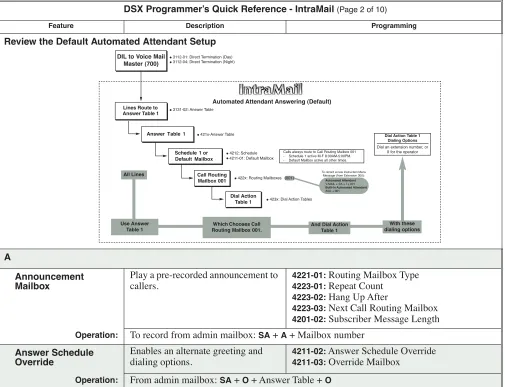
Review the Default Automated Attendant Setup
A
Announcement Mailbox
Play a pre-recorded announcement to callers.
4221-01: Routing Mailbox Type
4223-01: Repeat Count
4223-02: Hang Up After
4223-03: Next Call Routing Mailbox
4201-02: Subscriber Message Length
Operation: To record from admin mailbox: SA + A + Mailbox number Answer Schedule
Override
Enables an alternate greeting and dialing options.
4211-02: Answer Schedule Override
4211-03: Override Mailbox
Operation: From admin mailbox: SA + O + Answer Table + O
Feature Description Programming
DIL to Voice Mail Master (700)
Lines Route to Answer Table 1
Answer Table 1
Schedule 1 or Default Mailbox
Dial Action Table 1 ●3131-02: Answer Table
●421x-Answer Table
Calls always route to Call Routing Mailbox 001 - Schedule 1 active M-F 8:30AM-5:00PM. - Default Mailbox active all other times.
●423x: Dial Action Tables
Dial Action Table 1 Dialing Options
Dial an extension number, or 0 for the operator
Automated Attendant Answering (Default)
All Lines
Use Answer Table 1
Which Chooses Call Routing Mailbox 001.
And Dial Action Table 1
With these dialing options
Automated Attendant
V-MAIL + SA + I + 001
Built-In Automated Attendant
#AG + 001
●422x: Routing Mailboxes (001) ●3112-01: Direct Termination (Day)
●3112-04: Direct Termination (Night)
Call Routing Mailbox 001
●4212: Schedule ●4211-01: Default Mailbox
IntraMail Answer Tables Determines how the Automated
Attendant answers calls on each line.
Basic Setup
3131-02: IntraMail Answer Table Assignment
3112-01: Direct Termination in the Day
2121-[01-24]:18 + 700 for Voice Mail UCD night key
2402-[01-60]:18 + 700 for DSS Console Voice Mail UCD night key
3112-04: Direct Termination at Night
2121-[01-24]:18 + CLEAR for System night key
2402-[01-60]:18 + CLEAR for DSS Console Sys-tem night key
4211-01: Default Mailbox
4211-02: Answer Schedule Override
4211-03: Override Mailbox
4211-04: Next Answer Table Type 1 (Day of Week Schedule)
4212-[01-10]: Schedule Type (1)
4212-[01-10]: Routing Mailbox Number
4212-[01-10]: Schedule Start Day
4212-[01-10]: Schedule Start Time
4212-[01-10]: Schedule End Time Type 2 (Range of Days) Schedule
4212-[01-10]: Schedule Type (2)
4212-[01-10]: Routing Mailbox Number
4212-[01-10]: Schedule Start Day
4212-[01-10]: Schedule End Day
4212-[01-10]: Schedule Start Time
4212-[01-10]: Schedule End Time Type 3 (Date) Schedule
4212-[01-10]: Schedule Type (3)
4212-[01-10]: Routing Mailbox Number
4212-[01-10]: Schedule Run Day
4212-[01-10]: Schedule Start Time
4212-[01-10]: Schedule End Time
Operation: N/A Auto Attendant Do Not Disturb
Automated Attendant calls go directly to a user’s mailbox.
2144-01: Auto Attendant Do Not Disturb
Operation: G + Select Greeting + O
Auto Erase or Save After a user listens to a new message and exits, IntraMail will either save or erase the message automatically.
2143-02: Auto Erase/Save of Messages
Operation: N/A
Auto Time Stamp Automatically hear the time and date a message was left.
2143-03: Auto Time Stamp
Operation: OP + AT + O
Automated Attendant Automatically answers the telephone system’s incoming calls.
3131-02: IntraMail Answer Table
3112-01: Direct Termination in the Day
2121-[01-24]:18 + 700 for Voice Mail UCD night key
2402-[01-60]:18 + 700 for DSS Console Voice Mail UCD night key
3112-04: Direct Termination at Night
2121-[01-24]:18 + CLEAR for System night key
2402-[01-60]:18 + CLEAR for DSS Console Sys-tem night key
4201-02: Subscriber Message Length
4201-01: Non-Subscriber Message Length
Operation: After answer, voice prompts tell the caller the options to dial. Automatic Routing for
Rotary Dial Callers
Automatically route Automated Attendant callers that don’t dial.
4231: Dial Action Table Digit Assignments
Operation: N/A
C
Call Forward to a Mailbox
An extension user can forward calls to their mailbox.
1601-03: Call Forward No Answer Timer
Operation: INTERCOM + *3 + Select Type + V-MAIL + 2 (all calls) or 8 (outside calls only) Call Routing Mailbox Specified dialing options and
announcements for Automated Attendant callers.
4221-01: Routing Mailbox Type
4222-01: Dial Action Table
4222-02: Time Limit for Dialing Commands
4201-01: Non-Subscriber Message Length
Operation: To record Instruction Menu Message from admin mailbox: SA + I + Mailbox number
Call Screening A users can screen messages as they are being left in their mailbox.
2102-01: Class of Service
1401-12: Call Screening
Operation:
To screen the message: Screen [Scrn], then,
V-MAIL to intercept the call Do nothing to continue listening
Exit to exit Call Screening and record the message privately Caller ID and Voice
Provides the caller’s number and optional name.
3121-01: Caller ID Type
1611-06: Caller ID Detection Timer
3131-01: Pass Caller ID to Voice Mail
3711-01: Caller ID Callback Route Type
3711-01: Caller ID Callback Line
3711-01: Caller ID Callback Group
Operation: N/A
Centrex Transfer The Automated Attendant can trans-fer a caller from a Centrex line to an outside number using the features of that Centrex line.
4222-01: Dial Action Table
4231: Dial Action Table Digit Assignments
1702: System Speed Dial Assignment
1612-04: PBX/Centrex Flash Timer
1602-04: Dial Pause Timer
3103-04: Tandem Calls
Operation: N/A
IntraMail Conversation Record A user can record a conversation as a
message in their mailbox.
2102-01: Class of Service
1401-06: Conversation Record
2121-[01-24]:17 + Extension for Conversation Record key
2402-[01-60]: 17 + Extension for DSS Console Conversation Record key
2143-05: Recording Conversation Beep
4201-02: Subscriber Message Length
Operation: To start recording: V-MAIL, Record [MORE + Rec], or record key
To stop recording: V-MAIL or record key
D
Dial Action Table Defines the dialing options for Auto-mated Attendant callers.
4222-01: Dial Action Table
4231: Dial Action Table Digit Assignments
4222-02: Time Limit for Dialing Commands
Operation: N/A
Directory Dialing Automated Attendant caller can reach an extension by dialing the per-son’s name.
Basic Setup
4221-01: Routing Mailbox (3)
2144-05: Directory List Number
4224-01: Directory List Number to Use
4201-02: Subscriber Message Length Extension Name Programming and Routing
1511-02: Name Format
2101-02: Station Name
4224-04: Extension Name Match
4224-05: Minimum Number of Letters Required
4224-06: Transfer Options
4224-03: Screened Transfer Timeout
4224-02: Time Limit for Dialing Commands Additional Options
4224-08: Fax Detection
4224-09: Fax Transfer Extension
4224-07: Next Call Routing Mailbox
Operation: To record a Directory Dialing message from admin mailbox: SA + I + Directory Dialing
Mailbox
Directory Dialing Mailbox
The mailbox type required for Direc-tory Dialing.
4221-01: Routing Mailbox Type (3)
Operation: See Directory Dialing.
E
Extension Hunting to Voice Mail
Automatically sends unanswered calls to an extension’s mailbox.
2115-01: Hunt Type
2115-01: Hunt Destination (700)
1603-01: Transfer Recall Timer
1601-02: DIL No Answer Timer
1601-03: Call Forward No Answer Timer
4222-03: Screened Transfer Timeout
Operation: N/A
External Transfer An Automated Caller can automati-cally route to an outside telephone number.
4222-01: Dial Action Table
4231: Dial Action Table Digit Assignment
1702: System Speed Dial Assignment
3103-04: Tandem Calls
Operation: N/A
F
Fax Detection Automatically transfers incoming fax calls to a fax machine.
For Call Routing Mailboxes
4222-04: Fax Detection
4222-08: Fax Transfer Extension For Directory Dialing Mailboxes
4224-08: Fax Detection
4224-09: Fax Transfer Extension
Operation: N/A Flexible Answering
Schedules
The Automated Attendant can answer outside calls with different announce-ments and dialing options, depending on the time of day and day of week.
3131-02: IntraMail Answer Table Assignment
Operation: N/A
Flexible Mailbox Numbering Plan
If telephone extension numbers are customized, set up IntraMail mailbox numbers to match.
1301-01: Function Type
1301-01: Expected Number of Digits
1311-01: Station Extension Number
4231: Dial Action Table Digit Assignments
Operation: N/A
Forced Unscreened Transfer
Automatically converts Automated Attendant Screened Transfers to Unscreened Transfers.
2144-02: Forced Unscreened Transfer
Operation: N/A
G
Go to a Mailbox An Automated Attendant caller can dial a digit and route directly into a mailbox.
4231: Dial Action Table Digit Assignments (GOTO
mailbox, XXX, or IXXX)
Operation: Outside caller follows Instruction Menu Greeting A user can record a Greeting for their
mailbox callers to hear.
4201-02: Subscriber Message Length Enabling Remote Greeting
4231: Dial Action Table Digit Assignment (LOGON to mailbox, N, XXX, or IXXX.
Operation: G + Select Greeting
IntraMail Group Mailbox Subscribers in the same group can
share a Group Mailbox.
Programming a Ring Group Mailbox
2113-02: Ring Group
2141-01: Station Mailbox Type For a Subscriber Mailbox
2211-01: Mailbox Type (1)
221x: Subscriber Mailbox options For a Routing Mailbox
2211-01: Mailbox Type (2)
2211-01: Routing Mailbox Number
422x: Routing Mailbox Options Programming a UCD Group Mailbox Set up UCD Hunting
For a Subscriber Mailbox
2311-01: UCD Group Mailbox Type (1)
23xx: Subscriber Mailbox options For a Routing Mailbox
2311-01: Mailbox Type (2)
2311-01: UCD Group Routing Mailbox Number
422x: Routing Mailbox Options
Operation: N/A
Guest Mailbox An outside party can have their own mailbox for receiving and sending messages.
2141-01: Station Mailbox Type (1) See Subscriber Mailbox for more.
Operation: See Subscriber Mailbox for more.
H
Hang Up An automated Attendant option that immediately hangs up the outside call.
4231: Dial Action Table Digit Assignments
Operation: N/A
L
Listening to Messages While or after listening to a message, an extension user has many message handling options from which to choose.
4201-03: Message Backup/Go Ahead Time
Operation: Log onto your mailbox + L
Log Onto Voice Mail An extension user can press V-MAIL
to go onto (access) their mailbox.
Remotely Logging Onto a Mailbox through the Automated Attendant
4231: Dial Action Table Digit Assignments (LOGON + mailbox, N, XXX, or IXXX)
Operation: V-MAIL or INTERCOM + *8
M
Make Call
A Subscriber Mailbox user can dial MC to return a call without knowing their caller’s number.
3121-01: Caller ID Type
1611-06: Caller ID Detection Timer
3131-01: Pass Caller ID to Voice Mail
3711-01: Caller ID Callback Route Type
3711-01: Caller ID Callback Line
3711-01: Caller ID Callback Group
Operation: Log onto your mailbox + L + MC
Message Length Set the maximum length of a message that can be left in a user’s mailbox.
4201-02: Subscriber Message Length 4201-01: Non-Subscriber Message Length
Operation: N/A
Message Notification Dials a telephone number to let the recipient know there are new mes-sages in their mailbox.
Programming that Applies to All Types of Message Notification
4112-01: Outgoing Dial 9 Group
4111-02: Voice Mail Port Class of Service
4111-03: Voice Mail Port Toll Restriction Level (Day)
4114-04: Voice Mail Port Toll Restriction Level (Night)
4113: Voice Mail Port Outgoing Line Access
4114: Outgoing Line Group Access
4202-06: Number of Callout Attempts
2143-04: Message Waiting Lamp (Yes) Unique Programming for Non-pager Message Notification
4202-01: Wait Between Non-Pager Callout Attempts
4202-03: Wait Between Busy Non-Pager Callout Attempts
4202-04: Wait Between RNA Non-Pager Callout Attempts
4202-05: Wait for Answer Non-Pager Callout Attempts
Unique Programming for Digital Pager Message Notification
4202-08: Digital Pager Callback Number
4202-09: Delay in Dialing Digital Pager Callback Number
4202-02: Wait Between Digital Pager Callout Attempts
4202-07: Send Pager Callout Until Acknowledged
Operation: Log onto mailbox + OP + N
Message on Hold A prerecorded message can play to callers while they wait on Hold.
3103-05: Music on Hold Source (5)
4201-02: Subscriber Message Length
Operation: To record from admin mailbox: SA + 1
Message Playback Direction
An extension user can listen to their messages in either LIFO (last-in-fi rst-out) or FIFO (first-in-first-out) order.
2143-01: Message Playback Order
Operation: N/A
Message Retention Automatically deletes a mailbox’s messages after a preset time.
2142-02: Message Retention
Operation: N/A
Message Storage Limit Sets how many messages a mailbox can store.
2142-01: Number of Messages
IntraMail Message Waiting
Lamp
The Ring/Message Lamp flashes when the user has new messages waiting in their mailbox.
2143-04: Message Waiting Lamp
Operation: N/A Multiple Company
Greetings
By assigning a unique Answer Table to each line, a single IntraMail system can provide individual greetings and dialing options for several companies.
3131-02: IntraMail Answer Table Assignment
Operation: N/A
N
Next Call Routing Mailbox
Provides callers with additional dial-ing options after they leave a mes-sage in an extension’s mailbox (depending on the setting of the Next Call Routing Mailbox Dial Mode).
Programming Subscriber Mailboxes
2144-04: Next Call Routing Mailbox
2144-03: Dialing Option
Programming Announcement Mailboxes
4223-03: Next Call Routing Mailbox
4223-01: Repeat Count
4223-02: Hang Up After
Operation: N/A
Q
Quick Message Automated Attendant callers can dial a digit followed by an extension num-ber to leave a message directly in a user’s mailbox.
4231: Dial Action Table Digit Assignments (REC1
or REC2)
4201-01: Non-Subscriber Message Length
Operation: To leave a Quick Message: Dial * + Leave message
S
Screened Transfer Similar to telephone system screened transfers in which the transferring party controls the transfer.
4231: Dial Action Table Digit Assignment (1)
4222-03: Screened Transfer Timeout
Operation: N/A
Subscriber Mailbox The mailbox type normally used for telephone system extensions.
2141-01: Station Mailbox Type (1)
2143-04: Message Waiting Lamp
4201-02: Subscriber Message Length
4201-01: Non-Subscriber Message Length
Operation: N/A System Administrator
System Administrator Mailbox
The extension user that has IntraMail system administration capabilities.
2142-03: System Administrator
Operation: Log onto admin mailbox + SA
System Re-initialization
Re-initializing IntraMail returns all programmed options to their default values.
9011: System Initialization
Operation: To initialize: INTERCOM + #*#* + NECDSX + 9011 + HOLD + 1 + HOLD