Data Hiding Method in Ignored Processing Area of
Microsoft Compound Document File Format
ABDULMONEM S. RAHMA Computer Science Department, University of Technology
Baghdad, Iraq WESAM S. BHAYA College of Computer Technology, University of Babylon
Babil, Iraq DHAMYAA A. AL-NASRAWI Computer Science Department, College of Science
Kerbala University, Karbala, Iraq
Abstract:
Key words: Data Hiding, Ignored Processing Ares, Microsoft Compound Document File Format, MS-Word document.
1.
I
NTRODUCTIONSteganography is a process that involves hiding a message in a proper carrier such as image, text or voice. It is means "covered or hidden writing" in Greek. For secret communication purpose, steganography protects both messages and its destination parties so that the authenticated receiver only knows the existence of the messages that the carrier sent. There is a large amount of works being done by a variety of research in steganography (Bhattacharyya et al. 2011). Steganography is the hiding of a secret information within an ordinary information in some other media, and the extraction of it at its destination. The information to be hidden is secret message and the medium in which the information is hidden is called cover document. Stego-document is the cover document with hidden message. The used algorithms for hiding the message in the cover medium and extracting the hidden message from the stego-document at the sender and receiver end respectively is called stego system (Garg 2011).
In this paper, we use ignored processing areas in a Ms-Word document for data hiding. That will be ignored by the processing. In order to increase the security levels of proposed data hiding system, the secret message was encrypted before the embedding process by Triple_DES.
The organization of the paper is as follow: Section 2 shows the related works that have been done in the field of data hiding in text media; definition of Ms-Word file format is demonstrated in section 3; Section 4 presents the proposed data hiding method in detail; Section 5 displays the results and concludes the paper.
2.
R
ELATEDW
ORKSShifting (Kim 2003), and Line shifting (Alattar and Alattar 2004).
This paper focuses on researches which used binary file format for data hiding. L. Tsung-Yuan and T. Wen-Hsiang proposed a method for hiding by taking text segments in the document and degenerating them, mimicking to be the work of an author with inferior writing skills, with the secret message embedded in the choices of degenerations. The degenerations are then revised with the changes being tracked, making it appear as if a cautious author is correcting the mistakes. The change tracking information contained in the stego document allows the original cover, the degenerated document, and, hence, the secret message to be recovered (Tsung-Yuan and Wen-Hsiang 2007).
Amani Y. proposed a hiding method with two phases: Cover generation phase, where the cover is a document of Microsoft Word Document file format 2003 (doc) and will appear to be the product of a collaborative writing effort between authors, and the embedding phase in which the hiding text string appears in the unused block of binary file format of that cover document. The researcher concludes that the cover generation will increase the security of hidden system and the stego text will not be affected by copying or mailing the stego document, while the size of stego document is acceptable (Amani 2009).
3.
D
EFINITION OFM
S-W
ORDF
ILEF
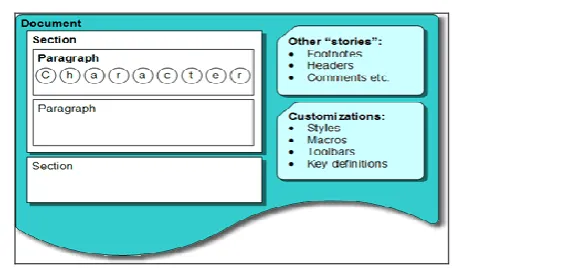
ORMATspecifications for file formats implemented in certain Microsoft Office applications (Microsoft 2013). The structure of Documents in Word is hierarchical, different types of properties applying to different units in the hierarchy: section, paragraph, characters,…etc. see figure 1:
Figure 1: Hierarchical Structure of Word Document
MS-office file is a Compound File which is Microsoft’s implementation of structure storage. Structured storage allows hierarchical storage of information within a single file. Elements of a structured storage object are storages and streams. Storages are related to directories, and streams are related to files. Compound file binary storage format is like a file system, similar to FAT. All of these data are potentially fragmented across the file in various sectors described by the internal FAT.
The Microsoft Compound Document File Format (MCDFF) 2003 is a document file format based on OLE (Object Linking and Embedding), which is used for saving various resources as an integrated document in Microsoft (Microsoft Corporation 2007).
each paragraph may have different formats, fonts and colors, there also may be pictures between paragraphs in a full file. A Word (.doc) file consists of a:
Word Document (Main stream) Summary information stream Table stream
Data stream
Custom XML storage (Added in Word 2007)
Zero or more object streams contain private data for OLE 2.0 objects embedded within the Word document (Microsoft Corporation 2007).
The root component is 'MS Word' component which contains several streams and one storage item. Different parts of the document, such as the actual contents, any table inserted, the CompObj associated with the DLL files for the objects, the Summary Information for the content, any image inserted, and the Document Summary Information, all take the form of streams under the root component. The ObjectPool is the collective storage of all the sub-storage components (Khushbu 2006).
3.1.FORMAT OF THE MAIN STREAM
The main stream of a Word binary file (complex format) consists of the Word file header (FIB), the text, and the formatting information. The header of a Word file begins at offset 0x00 in the file. This gives the beginning offset and lengths of the document's text stream and subsidiary data structures within the file. It also stores other file status information.
3.2.
C
OMPOUNDD
OCUMENTH
EADERThe compound document header (simply “header” in the following) contains all data needed to start reading a compound document file. The header is always located at the beginning of the file; this implies that the first sector (with SecID 0) always starts at file offset 512. The first 64 bits of the header form id or magic number identifier of office file (OpenOffice 2004). The header also contains an array of block numbers which refer to blocks in the file. When these blocks are read together they form the Block Allocation Table. The header also contains a pointer to the first element in the property table, also known as the root element, and a pointer to the small Block Allocation Table (SBAT) (Marc 2007).
The block allocation table or BAT, along with the property table specifies which blocks in the file system belong to which files.
3.3.
D
OCUMENTP
ARTSThe range of CPs (Character Position) in a document is separated into multiple logical parts. Many features operate within the individual parts and use CPs relative to the beginning of the part in which they operate rather than relative to the beginning of the document. This section defines the document parts and specifies the corresponding range of CPs (OpenOffice 2004).
Main Document: The main document contains all content outside any of the specialized document parts, including anchors that specify where content from the other document parts appears. The main document begins at CP zero, and is
FibRgLw97.ccpText characters long. The last character in the
main document MUST be a paragraph mark (Unicode 0x000D).
Footnotes: The footnote document contains all of the content in
the footnotes. It begins at the CP immediately following the Main Document, and is FibRgLw97.ccpFtn characters long.
Headers: The header document contains all content in headers
and footers as well as the footnote and endnote separators. It begins immediately after the footnote document and is
FibRgLw97.ccpHdd characters long.
Comments: The comment document contains all of the content
in the comments. It begins at the CP immediately following the Header Document and is FibRgLw97.ccpAtn characters long.
Endnotes: The endnote document contains all of the content in
the endnotes. It begins at the CP that immediately follows the Comment Document and is FibRgLw97.ccpEdn characters long.
Textboxes: The textbox document contains all of the content in
the textboxes whose anchors are in the Main Document. It begins at the CP immediately following the Endnote Document and is FibRgLw97.ccpTxbx characters long.
Header Textboxes: The header textbox document contains all of
4.
PROPOSED
D
ATAH
IDINGM
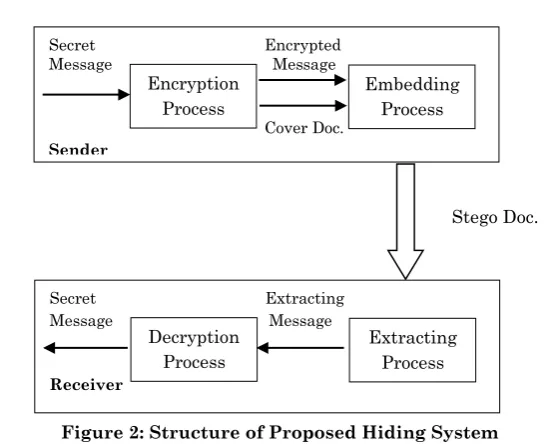
ETHODIn this method, insert the secret message in specified areas in a document that will be ignored by the processing. For example, the MS-Word document contains an 0x0D or paragraph marker, and the process will stop when it reaches the 0x0D because it is not displayed to or editable by the user, because it is outside of any document part.
The structure of proposed system is explained in figure 2.
Stego Doc.
Figure 2: Structure of Proposed Hiding System
The secret message was entered in English alphabets and then encrypted by triple_DES function built-in visual C#.net functions.
Embedding Process
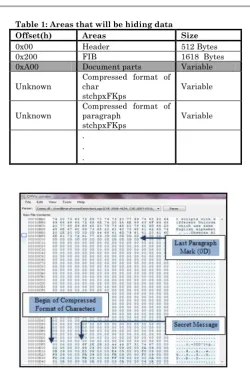
The idea of this method is to hide secret data in specified areas after document parts. Table 1. and Figure 3. show areas that will be hiding it.
Secret Encrypted Message Message
Cover Doc. Sender
Encryption Process
Embedding Process
Secret Extracting Message Message
Receiver
Decryption Process
Figure 3: Embedding Data in Binary File Format
The steps of embedding secret data are explained in the following algorithm:
The embedding process start at location CFC-1, then decreases it to embed another symbol of secret message.
Extracting Process
On the other hand, the extracting stage is implemented by many functions. Based on this method, the extracting process depends on the location of the compressed format of
Table 1: Areas that will be hiding data
Offset(h) Areas Size
0x00 Header 512 Bytes
0x200 FIB 1618 Bytes
0xA00 Document parts Variable
Unknown
Compressed format of char
stchpxFKps Variable
Unknown
Compressed format of paragraph
stchpxFKps Variable .
characters area which has previously been explained. The extracting process in this method starts from CFC-1 location. Then you have to get current symbols, decrease CFC, and repeat this until the current symbol is 0x00.
5.
R
ESULTS ANDC
ONCLUSIONSSteganographic techniques embed a message inside a cover. Many features characterize the methods depending on the application. These are: capacity, invisibility, security, and robustness.
Capacity: The total number of bits hidden and
successfully recovered by the data hiding system.
Invisibility: is based on the properties of the human
visual system. The embedded information must be imperceptible, that means the human is unable to distinguish between carriers and stego documents.
Security: It depends on the total information about the
embedded algorithm and secret key. The embedded algorithm is secure if the embedded information is not subject to removal after being discovered by the attacker.
Robustness: the ability of the embedded data to remain
unbroken if the steganographic system undergoes
transformation (Soniya 2011).
Extracting Algorithm of Binary File Format
Input : Stego document
Output : Secret Message
1. Open Stego document.
2. Get location of compressed format of characters CFC. 3. Decrease CFC
6. while current symbol not 0 - extract current symbol - decrease CFC
In this section, the experimental results are given and interpreted for all the contributions that are presented in our work. The proposed method was evaluated based on above features, as well as explaining the detecting capability of the existing hidden message.
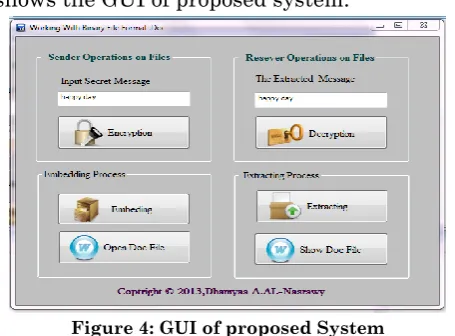
The proposed system provides friendly GUI that is easy and helpful to implement by user to manage the encryption and hiding processes. The proposed method is based on hiding data in binary file format MS-word documents with extension (.doc). Figure 4 shows the GUI of proposed system.
Figure 4: GUI of proposed System
The steps of proposed system were explained above with more details, open cover document, encryption, and hiding processes. On the other hand, the receiver implements the inverse of these steps, open stego document, extracting hidden data, and decryption data.
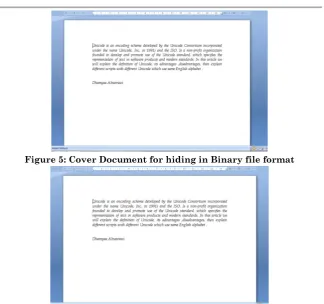
Figure 5: Cover Document for hiding in Binary file format
Figure 6: Stego Document for hiding in Binary file format
Capacity: The capacity of hiding in binary file format based on
the available area in the cover document, which is based on the document itself.
Invisibility and Security: The proposed method has an excellent
perceptual transparency because there is no difference btween the cover document and stego document when opened in the microsoft office, with a high level of security because the secret message was encrypted before the embedding process. That means that the visual detection can fail (see Figures 5 and 6).
Robustness: This method is robust to digital copy-past
The important point in this mthod is that there is no icreasing in size of the stego document.
BIBLIOGRAPHY
Alattar A., and Alattar O. 2004. “Watermarking Electronic Text Documents Containing Justified Paragraphs and Irregular Line Spacing.” Proceedings of SPIE – Vol 5306, Security, Steganography, and Watermarking of Multimedia Contents VI, 685-695.
Amani Y. 2009. Steganographic Method for Data Hiding in Microsoft Word Documents Structure by a Change Tracking
Technique. MSc. diss, University of Technology, Baghdad, Iraq.
Bhattacharyya S., Indu P., Dutta S., Biswas A., and Sanyal G. 2011. "Text Steganography using CALP with High Embedding Capacity." Journal of Global Research in Computer
Science 2(5): 29-36.
Garg, M. 2011. "A Novel Text Steganography Technique Based on Html Documents." International Journal of Advanced
Science and Technology 35: 129-138.
Khushbu, J. 2006. "Microsoft Office Security, Part one", available at: http://www.securityfocus.com/infocus/1874.
Kim Y., Moon K., and Oh I. 2003. "A Text Watermarking Algorithm based on Word Classification and Inter-word Space Statistics." Proceeding of the 7th International Conference on Document Analysis and Recognition, Aug. 3-6, IEEE Xplore Press, USA, 775-779.
Marc, J. 2007. "POIFS File System Internals", the Apache POI Project, the Apache Software Foundation.
Matthew, K. 1998. "SNOW", Darkside Technologies Pty Ltd ACN 082 444 246 Australia. Last modified 20 June 2013. http://www.darkside.com.au/snow/index.html
Microsoft 2013. "Microsoft Office File Formats",
http://msdn.microsoft.com/enus/library/cc313118(v=office.12).as px
Microsoft Corporation 2007, "Microsoft Office Word 97-2007 Binary File Format (.doc) Specification", Microsoft Open Specification Promise.
Niimi M., Minewaki S., Noda H., and Kawaguchi E. 2003. “A Framework of Text-based Steganography Using SD Form Semantics Model.” Pacific Rim Workshop on Digital Steganography. Kyushu Institute of Technology, Kitakyushu, Japan.
OpenOffice 2004. "Microsoft Compound Document File
Format". available at:
www.openoffice.org/sc/compdocfileformat.pdf
Soniya, V. 2011. "Image Steganography Based On Polynomial Functions". 2(3): 13-15.