MANUAL CHANGE
INFORM A
TION
ARTIFICIAL INTELLIGENCE MACHINES DIVISION
PRODUCT 4404 SMAil..TALK-80 INTRODUCTION USERS PART NO 070-5606-00 PRODUCT GROUP 07 CHANGE NO C15606 DATE DEC 1985
This is an ADDITION package.
1. Insert the attached addition, Smalltalk-80 Application Note (Subtask Support and Mangement) into the NOTES section of your manual.
2. Replace the title and manual revision pages at the front of your manual.
TEK
USERS MANUALFirst Printing DEC 1984 Revised DEC 1985
Part No. 070-5606-00
Product Group 07
4404
ARTIFICIAL
INTELLIGENCE
SYSTEM
INTRODUCTION TO THE
SMALL T ALK-80 SYSTEM
Please Check at the
Rear of this Manual
for NOTES and
Copyright © 1984, 1986 by Tektronix, Inc., Beaverton, Oregon. Printed in the United States of America. All rights reserved. Contents of this publication may not be reproduced in any form without permission of Tektronix, Inc.
TEKTRONIX is a registered trademark of Tektronix, Inc.
Smalltalk-80 is a trademark of Xerox Corporation.
PLEASE FORWARD ALL MAIL TO:
Artificial Intelligence Machines
Tektronix, Inc.
MANUAL REVISION STATUS
PRODUCT: 4404 Artificial Intelligence System Smalltalk-80 System
This manual supports the following versions of this product: Version T2.2.0
REV DATE DESCRIPTION
DEC 1984 Original Issue
Application Note
SUBTASK SUPPORT
AND MANAGEMENT
Support for subtasks created by the operating system is available in the Sm alltalk-80 system. Although Smalltalk has its own processes, Smalltalk can also create and communicate with subtasks created by the operating system. Smalltalk processes provide independent paths of control within Sm alltalk. All Sm alltalk processes share access to the sam e set of objects. Operating system subtasks provide access to other executable programs. These subtasks are useful for
running OS utilities and com m ands, as well as com m unicating with applications and programs written in other languages. Subtasks can be executed without leaving the Smalltalk environment. Protocol supporting subtasks is found in the classes Subtask, Pipe, PipeStream and its subclasses. The objective of this support is to make the job of creating, running and com m unicating with the subtasks
straightforward. Interfaces to OS signals, program parameters, environment variables, and subtask priorities are also supported.
OVERVIEW OF SUBTASKS AND PIPES
The operating system on the 4404 supports multi-tasking. With Smalltalk's interface to the operating system via system calls, it is possible for Smalltalk to utilize this facility. Multi-tasking is achieved by spawning new tasks. A newly spawned task is called a child task or a subtask. The original task is referred to as the parent task. The child task is a "copy" of the parent task -- it shares memory and other
resources with the parent task. Since only one task can execute at a time, cpu time is also shared, initially in a predeterm ined fashion. Com mon practice is for the spawned child task to perform some chore, and then report back to the parent task. After reporting, the child task disappears. This disappearance is known as the termination of the child task. A parent may chose to relinquish use of the CPU until a subtask term inates. It does this by an operation called waiting. While waiting, the parent task is blocked and cannot do anything else until the child task term inates.
The child task's chore is often accom plished by finding som e other program to do the work. The use of this other program is known as an exec operation (for execute). In an exec operation, the original spawned task "turns itself into" the other program, so the other program becomes the child task.
Often times, a parent task may want to communicate with a child task. Information can be sent to and from the child task by using pipes, however, each pipe can send information in only one direction. If communication in two directions is desired, two pipes must be used. Pipes are sim ilar to files with two critical differences .
• Files can be reopened many times. Pipes can only be opened once. Once a pipe is closed it is gone .
• Files can be reset and repositioned. It is not possible to reposition a pipe.
Usually the parent task creates a pipe. Each end of the pipe is assigned a file descriptor, one for reading and one for writing. When a subtask is created it
Subtask Support
pipe, it should close this unused end. The child task must also rem em ber the
appropriate file descriptor and close the file descriptor corresponding to the unused end of the pipe. Neglecting to close these unused pipe file descriptors might mean the task could run out of file descriptors, since there is a limit of 32 open file
descriptors per task.
Sometimes it is not possible for the child task to know that it should use the pipe's file descriptors for reading and writing. For instance, the child task might want to exec a program that writes on standard output. Even if the program were aware of the use of pipes, it may not be possible for the program to modify itself to use the pipe's file descriptor for writing. In this case, it is possible for the child task to redirect its I/O by mapping its pipe descriptors to known file descriptors. (This mapping is accomplished through the use of the dups system call. See the 4404
Reference Manualfor more detailS.) Once a pipe's file descriptor is mapped, it
becomes obsolete and should be closed. For example, the child task may want to write to the pipe, but the program is designed so write operations go to standard output. The write file descriptor of the pipe must be mapped to standard output's file descriptor (1), and the write file descriptor should be closed. The effect of the mapping in this exam pie is for write operations on standard output from the child task to be performed on the write end of the pipe instead.
CLASS DESCRIPTIONS
Instances of the class Subtask represent operating system child tasks. The process of creating an instance of this class includes specifying an executable program and, optionally, arguments to the program and environmental variables. A block
representing code to be executed by the child task can also be specified. Subtask contains protocol for invoking, term inating, and waiting for a child task. The
invocation of a child task may include modification of the child's priorities and environment variables. The metaclass contains protocol for managing these child tasks.
The ciass P1pe represents an operating system pipe. Instance creation causes a pipe to be created with two open file descriptors, one for each end of the pipe. Protocol exists for mapping ends of the pipe to arbitrary file descriptors.
The class PlpeStream, a subclass of ExternalStream, is an abstract class. Since instances of ExternalStream are position able and pipes are not position able, one of P1peStream 's purposes is to provide protocol for filtering out inappropriate inherited methods. It also contains a method for cloSing a P1peStream or one of its subclasses, which also closes its associated pipe file descriptor. Protocol also exists for mode changes to binary or text. P1peStream has two subclasses, P1peReadStream and P1peWr1 teStream. Each of these subclasses is created by opening on an instance of P1pe. Each has protocol appropriate for its function: P1peReadStream has protocol for stream ing over data read from a pipe.
Subtask Support
level protocol involving: • Padding
• Accessing strings, num bers and words • f1leln and f1leOu't
SUBTASK EXAMPLES
Here is an example which uses Sub 'task. Assume the existence of an executable file /bln/slmpleU't1ll 'ty, a program with no input, output, or arguments.
execu'teSlmple
-Execu'te a pre 'tend
program.-I 'task I
'task - Sub 'task fork: '/bln/slmpleU'tlll'ty' 'then: [].
'task s'tar't. 'task wal'tOn. 'task release.
The method fork: 'then: creates an instance of Sub'task. This object, assigned to the variable 'task, contains all the inform ation needed to create an
as
subtask to execute the program /bln/slmpleU't1ll'ty. However, an actual subtask is not created by this method. The method s'tar't issues the system calls vfork and exec to create and run the subtask. The method wal'tOn instructs the currently executing Smalltalk process to wait for the subtask to terminate. Release discards the Sub 'task object.Here is a somewhat more complicated example: execSys'temU't1ll'ty: aCommand
I
p1pe 'task 1nputS1de resultOfProgram p1pe- P1pe new.'task - Sub 'task fork: aCommand 'then: [
p1pe mapWr1'teTo: 1. p1pe mapWrl'teTo: 2.
p1pe closeWrl'te; closeRead]. 'task s'tar't.
plpe closeWrl'te.
1npu'tS1de - P1peReadS'tream openOn: plpe.
resul'tOfProgram - 1npu'tS1de con'ten'tsOfEn't1reFlle.
'task wal'tOn. 1npu'tSlde close. 'task release. tresul'tOfProgram
Subtask Support
system call and before the exec system call. All the rest of the code in execSystemUt1l1ty: is executed by the parent task.
Pipe connections in the child task are established in the block. In this case, the child task's standard output (file descriptor 1) and standard error (file descriptor 2) are redirected to the pipe through the use of the mapWrlteTo: method. When the child task writes to standard output or standard error, this mapping causes the write operations to be directed to the write side of the pipe. Since the write end of the pipe has been redirected, it is a good idea to close the write end with the message closeWrlte. In addition to closing redirected ends of the pipe in the child task, unused ends of the pipe should be closed in both the parent and child tasks. In this case, the pipe read end is unused in the subtask, and the pipe write end is unused in the parent task.
The net affect of all this closing and mapping is that the child task (whose code is executed in the block) closes the read side of the pipe because it is unused and closes the write side of the pipe because it has mapped the write side to standard output and standard error. The parent task closes its unused end of the pipe, which is the write side. The parent task also creates a Smalltalk object for reading from the pipe, an instance of PlpeReadStream called InputSlde. InputSlde inherits protocol from PlpeStream and consequently ExternalStream. Although other methods may be used to read from the pipe, here, the method
contentsOfEntlreFlle is used to read all the data from the pipe, and the pipe is closed after use.
The following method, found in execSystemUt1l1 ty: vI thArgs: TekSystemCall class, in addition to havinf the same functionality as the method immediately above, also has error checking and passes argum ents to the executable program,
Subtask Support
execSystemUtility: aCommand vithArgs: anOrderedCollection
I pipe task inputS1de resultOfProgram I
pipe - Pipe nev. task - Subtask
fork: aCommand
vithArgs: anOrderedCollect1on then:
[pipe mapWr1teTo: 1.
pipe mapWriteTo: 2.
pipe closeWrlte; closeRead]. task start isNll
i f True :
[pipe closeWr1te; closeRead.
self error: 'Cannot execute ' , aCommand]. p1pe closeWrlte.
Cursor execute shovWhlle:
[inputSide - P1peReadStream openOn: pipe. resultOfProgram - inputSide
contentsOfEnt1reF11e] . task vaitOn.
inputSide close.
task abnormalTermination if True:
[self error: 'Error from system utility: . (resultOfProgram copyUpTo: Character task release.
fresultOfProgram
This method contains code to
, cr)] .
• Pass argum ents to the program in the form of an OrderedCollection. • Check for failure of the child task (task start isNll).
• Test for abnorm al term ination of the child task.
Failure of the child task necessitates the closing of any pipes created for use in the subtask. The parent task which creates these Pipes is responsible for closing them. Neglecting to close these pipes might mean the Smalltalk parent task could run out of file descriptors.
Examples Using
execSyst,emUt,111 t,y: w1 t,hArgs:
Here are some exam pies that demonstrate how to use execSystemUti11ty:v1thArgs:.
Subtask Support
f1leName - 't1m1ngData'. flags - '+sa'.
TekSystemCall
. execSystemUt111ty: '/b1n/d1r'
w1thArgs: (OrderedCollect1on w1tb: f1leName w1tb: flags).
The next exam pie executes a shell with a +c option. The +c option tells the shell to read the rest of the arguments as a command to itself. The effect is a directory listing with the shell providing wildcard expansion.
pattern - '/smalltalk/de*'. nameL1st - TekSystemCal1
execSystemUt111ty: '/b1n/sbell' w1tbArgs: (OrderedCollect1on
wi tb: '+c'
w1tb: '/b1n/d1r +s •• pattern)
Besides taking advantage of the shell's wildcard expansions, you can also use aliases which are stored in the .sbeIlb1story file. (See the 4404 Reference
Manual - the sbell command for more details.) TekSystemCall
execSystemUt111ty: '/b1n/sbell'
w1tbArgs: (OrderedCollect1on w1tb: '+c' w1tb: 'df')
where df is an alias for free /dev/d1sk.
To execute a program with no arguments substitute an empty OrderedCollect1on for the second argum ent.
TekSystemCall
execSystemUt111ty: '/b1n/date' w1tbArgs: OrderedCollect1on new.
Environment Variables
execProgram: aCommand I task env I task - Subtask
fork: aCommand then: []. env - Subtask copyEnv1ronment. env at: #HOME put: '/smalltalk'. task env1ronment: env.
task start 1sNll i f True :
Subtask Support
[self error: 'Cannot execute ' . aCommand]. task wa1tOn.
task abnormalTerm1nat1on 1fTrue: (self error: 'Error from' , aCommand]. task release.
Signals
Operating system signals (colloquially referred to as interrupts) can be intercepted,
ignored, or set to a default action by using protocol in TekSystemCall class.
Usually, the default action upon receipt of an interrupt is task term ination. (See the
4404 Refence Manual - the 1nt com mand and cp1nt system call for more details.) Sometimes it is desirable for the child task to intercept, or modify, its reaction to an interrupt. Protocol to modify these reactions can be added to the block which is an argument to the Subtask instance creation methods. In our next example,
Subtask Support
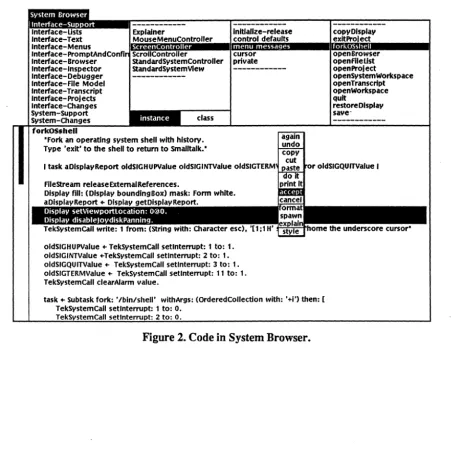
forkOSshell
·Slmpllfled for
example.-I location task oldSIGHUPValue oldSIGINTValue oldSIGQUITValue sysCall oldSIGTERMValue
I
oldSIGHUPValue - TekSystemCall setlnterrupt: 1 to: 1. oldSIGINTValue - TekSystemCall setlnterrupt: 2 to: 1. oldSIGQUITValue - TekSystemCall setlnterrupt: 3 to: 1. oldSIGTERMValue - TekSystemCall setlnterrupt: 11 to: 1. task - Subtask fork: '/bin/shell' wlthArgs:
(OrderedCollectlon with: '+1') then: [
TekSystemCall setlnterrupt: 1 to: TekSystemCall setlnterrupt: 2 to: TekSystemCall setlnterrupt: 3 to: TekSystemCall setlnterrupt: 11 to:
O. O. O. O. sysCall - TekSystemCall terminalOn. sysCall value].
error - task start. error lsNll
i f False : (task absoluteWait. task release] .
TekSystemCall setlnterrupt: 1 to: oldSIGHUPValue. TekSystemCall setlnterrupt: 2 to: oldSIGINTValue. TekSystemCall setlnterrupt: 3 to: oldSIGQUITValue. TekSystemCall setlnterrupt: 11 to: oldSIGTERMValue. sysCall - TekSystemCall terminalOff.
sysCall value.
ScheduledControllers restore.
error lsN1l 1!True: [tsel! error: 'Cannot fork shell']
Interrupt action is modified in both the parent and child tasks by using the method
setlnterrupt: to:, which returns the previous action for that interrupt. First, the parent interrupt actions are saved in tem porary variables while setting interrupt action to 1, which means to ignore the interrupt. In the subtask, these same
interrupts are reset to the default action, by making the interrupt action 0. After the subtask has com pleted, the interrupts in the parent task are set back to their
original values. This subtask runs by using the protocol previously described, but the parent task waits for the child task to term inate by using the method
absoluteWait. This method actually shuts down the Smalltalk parent task so it receives no time slice from the operating system scheduler. This strategy of waiting makes the subtask more efficient because the parent task cannot steal any
processing power. However, Sm alltalk cannot run until the child task has
Subtask Support
Priorities and Two Way Communication
Subtasks can be made to run more efficiently by changing their priorities. Sending the message priori t.y: to an instance of Subtask modifies the invocation of a subtask so that it runs at the designated priority. Here is the definition of the method Subtask priorit.y:.
priorit.y: aPriority
·Set tbe priority of tbe subtask. Acceptable values range from 0 to 26, zero being tbe bigbest and 26 being tbe lowest.·
aPriority < 0 I (aPriority> 26)
if True: [self error: 'Unacceptable priorit.y value']. priority - aPriority
The Smalltalk parent task initially has a priority of 10. If the child task is created with a higher priority than the parent task, it has a potential of taking control of the CPU. A higher priority task will not relinquish the CPU to a lower priority task unless the higher one is blocked or term inates. The next exam pie increases the child task's priority and uses two pipes for two way com m unication. It is known that the child task in this case will be blocked while waiting for input, so the parent task will have a chance to run. The class SbellInterface creates a view that com m unicates with a shell (lbin/script) interactively. (Note that this class is not contained in the standardlmage but defined in the file
Subtask Support
lnl tlal1ze
I plpeIn p1peOut sysCall command - 'command'. resul t - " asText. plpeIn - Plpe new. p1peOut - P1pe new.
shellTask - Sub task fork: '/bln/scr1pt' then:
[F11eStream releaseStdRefs. p1peIn mapWr1teTo: 1.
p1peIn mapWr1teTo: 2. p1peIn closeWr1te. plpeIn closeRead. p1peOut mapReadTo: O. p1peOut closeRead. p1peOut closeWrlteJ. shellTask enhancedPrlor1ty.
shellTask start 1sNll i f True :
[plpeIn closeWrlte; closeRead. plpeOut closeWr1te; closeRead.
self error: 'Cannot execute a shell'],
plpeOut closeRead. plpeIn closeWr1te.
shellIn - PlpeReadStream openOn: plpeIn. shellOut - PlpeWrlteStream openOn: p1peOut
release
I sysCall I
·Close pipes for interactive shell· shellOut isVal1d 1fFalse: [Iself]. shellIn close.
shellOut close. shell Task kill. shellTask waitOn. shellTask release.
TekSystemCall terminaIO!! value. TekSystemCal1 cursorOn value. Cursor cursorLink: true. Display enableCursorPanning. Display enableJoydiskPanning. Display setNormalVideo.
Subta.sk Support
Subtask Support
THE DETAILS OF STARTING A SUBTASK
Here is the start method taken from the class Sub task. This method contains low level details of how a subtask is actually exec'ed.
start
·Start the receiver by executing a vfork. code to set up the child task (mainly communication and signal processing), and execting the program. If the exec fails terminate the child task. The child task will inherit the priority of the Smalltalk
task.-I forker execer task I
forker - TekSystemCall vfork. environment isNil
if True: (execer - TekSystemCal1 exec: program with: args] if False: [execer - TekSystemCall execve: program
withArgs: args withEnv: environment]. forker value.
initBlock value.
self priority notNil if True: [(TekSystemCall setpr: priority) value]. FileStream closeExternalReferences.
execer invoke
i f False :
(TekSystemCall term: 0) value. self taskld: nil.
mil] .
self taskld: execer DOOut. ScbeduledSubtasks add: self.
self criticalSection: (self status: #running].
8ubtasks are run from 8malltalk by making two essential system calls. The vfork
system call, forker, creates a child task which shares memory with the parent task. The exec/execve system call, execer, transforms tile child task so it is no longer running 8m alltalk, but is executing the specified binary file, program. Execer
is created with either the exec system call (exec: wi th:) or with the execve system call (execve:withArgs:withEnv:), depending on whether an environment is passed to trle binary program.
Before the exec/execve invocation (execer value), com m unications and Signals must be set up. W hen an instance of Subtask is created, potentially, a block is passed as an argument containing code for setting up communications and signals in the child task. This block was stored in the instance variable, ini tBlock, which is evaluated at this point. Priorities are also assigned at this t:me, and files
belonging to the parent task 8malltalk are closed with the expression FileStream closeExternalReferences. After the child task has been spawned and control returns to the parent, the task identification num ber is recorded by the parent task
Subtask Support
call fails, the child task term inates itself with the term: method and the parent task returns nil.
At the vfork invocation (forker value), control of the Smalltalk virtual machine transfers to the child task. The child task continues executing with no access to the keyboard or the mouse until the execer call is invoked. This means that the code from forker value to execer invoke is only executed by the child task. In addition,
(TekSystemCall term: 0) value.
is executed by the child task to terminate itself if the execer call fails. Then the parent task resum es control and executes the statem ents
self taskld: nil. tnil
to indicate failure of the execer call. The next statem ents, starting with self taskld: execer DOOut, are also executed by the parent task, but only if the execer
MANUAL CHANGE INFORMA TION
ARTIFICIAL INTELLIGENCE MACHINES DIVISION
PRODUCT 4404 SMALLTALK-80 INTRODUCTION USERS PART NO 070-5606-00
PRODUCT GROUP ~ CHANGE NO C25606 DATE APR 1986
This is an ADDITION package.
1. Insert the attached Srnalltalk-80 LOS User Notes into the NOTES section of your manual.
2. Replace the title and manual revision pages at the front of your manual.
TEK
USERS
MANUAL
First Printing DEC 1984
Part No. 070-5606-00
Product Group 07
4404
ARTIFICIAL
INTELLIGENCE
SYSTEM
INTRODUCTION TO THE
SMALL T ALK-80 SYSTEM
Please Check at the
Rear of this Manual
for NOTES and
Copyright © 1984, 1986 by Tektronix, Inc., Beaverton, Oregon. Printed in the United States of America. All rights reserved. Contents of this publication may not be reproduced in any form without permission of Tektronix, Inc.
TEKTRONIX is a registered trademark of Tektronix. Inc.
Smalltalk-80 is a trademark of Xerox Corporation.
PLEASE FORWARD ALL MAIL TO:
Artificial Intelligence Machines
Tektronix, Inc.
MANUAL REVISION STATUS
PRODUCT: 4405 ARTIFICIAL INTELLIGENCE SYSTEM SMALLTALK-80 SYSTEM
This manual supports the following versions of this product: Version T2.2.0
REV DATE DESCRIPTION
DEC 1984 Original Issue
•
Table of Contents
SECTION 1 Smalltalk-80 LOS User Notes
The Conversion Procedures ... A-2 Technique 1 ... A-2 Technique 2 ... A-2 Eliminating Uncollectible Garbage ... A-3 Filing In and Using the LOSConversionTracer ... A-4 Technique 3 ... A-5
Appendix B Smalltalk-80 Version T2.2.0 Files Appendix C Changes in the Smalltalk-80 Images
LARGE OBJECT SPACE DIFFERENCES ... C-l Removed Methods ... ... ... ... ... ... ... ... ... ... ... .... ... C-I6 SMALL OBJECT SPACE CHANGES ... C-I7 Removed Methods ... C-26
Figures
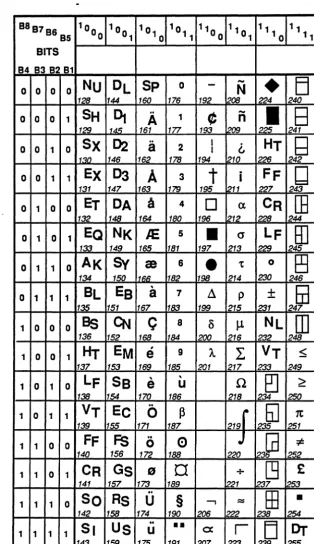
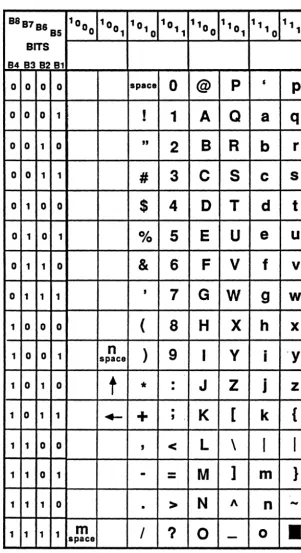
1-1. LOS Structure of an Instance of CompiledMethod. ... ... ... ... ... .... ... 1-4 1-2. Structures of Instances of MethodDictionary. .. ... 1-6 1-3. Tektronix Proportional Fonts (PellucidaSerif and PellucidaSans-Serif). . ... 1-13 1-4. Tektronix Monospaced Fonts (Pellucida Typewriter) Part 1. ... ... ... .... ... ... 1-14 1-5. Tektronix Monospaced Fonts (Pellucida Typewriter) Pan 2. .. ... 1-15
Tables
1-1 Sma1ltalk Implementation Characteristics ... 1-3
Section
1
Smalltalk-80 LOS User Notes
These notes document the significant differences between the Small Object Space (SOS) Smalltalk-801 system and the Large Object Space (LOS) Smalltalk-80 system Version T2.2.0 designed for the Tektronix 4405 and 4406 Artificial Intelligence Machines.
The version of the Smalltalk-80 system that runs on the 4404 Artificial Intelligence System (AIS) is limited to the creation of about 32,000 objects, that is, its Smalltalk interpreter - the Small Object Space (SOS) interpreter - implements object-oriented pointers (oops) as 16-bit words. This limitation has been removed in the new interpreter - the Large Object Space (LOS) interpreter - written for the 4405 and 4406 AIS machines.
ABOUT THESE NOTES
This document consists of the notes themselves and three appendices. The contents are:
• The notes themselves document the differences between the SOS and LOS Smalltalk systems. Also, significant modifications and enhancements to the LOS image are described.
• Appendix A Conversion
of
SOS to LOS Images. This tells you how to transfer work youhave done in a SOS image to a LOS image. This enables you to build upon work you have already done and also to take advantage of the LOS system performance and functional enhancements.
• Appendix B Smalltalk-80 Version T2.2.0 Files. For your convenience, you will find a list of all files associated with the LOS Version T2.2.0 release.
• Appendix C Changes in the Smalltalk-80 Images. For your convenience, you will find a list of all changes to classes and methods in the new releases of the SOS and LOS images.
The Blue Book Specification
The de facto specification for SOS Smalltalk-80 is the Addison-Wesley Smalltalk-80 book by Goldberg and Robson. (This book is sometimes colloquially referred to as the "blue book" in the Smalltalk-80 programming community.) References are made in these notes to specific chapters, sections, and pages in the Goldberg and Robson book:
• Goldberg, Adele and David Robson. Smalltalk-80: The Language and its Implementation. Addison-Wesley, 1983.
The Goldberg and Robson book is a formal explanation and description of the Smal1talk-80 language. This includes not only the syntax of the language but also the classes of objects that make up the Smalltalk-80 virtual image. In Part Four, this book contains a detailed discussion of the implementation of the SOS virtual machine. (That is, Part Four is a specification of the
SmtlllIIIlIc-80 LOS User Notes
interpreter and object memory of a Small Object Space SmaIltaIk-80 system.)
INVOKING SMALL TALK
The standard 4405 and 4406 AIM systems have resident on them two Smalitalk systems, each consisting of an interpreter and a vinual image: the SOS (Small Object Space) Smalltalk-80 system and the LOS (Large Object Space) Smalltalk-80 system. If you type:
smalltallc
at the system prompt, this brings up the LOS interpreter. (A special case exists here: if you have a 4405 machine with just 1 megabyte
of
memory, then typing smalltalk brings up the SOS interpreter and image. However, if you have more than 1 megabyte o/memory in your 4405, then typing smalltalk brings up the LOS interpreter and image just as it does on a 4406 system.)Typing
smalltallc my/mage
brings up the LOS interpreter, if my/mage is an LOS image or the SOS interpreter if my/mage is an SOS image.
Also, suppose for some reason you want to bring up the SOS interpreter on the standard SOS image, then you can type:
smalltalk +s
Finally, if you have a 4405 system with just 1 megabyte of memory and you· want to bring up the LOS image, you can type:
smalltallc +1
THE LOS INTERPRETER
The LOS (Large Object Space) interpreter differs in a number of ways from the
sos
(Small Object Space) interpreter developed for the 4404 AIM system. The principal differences are:• The LOS interpreter has no inherent limit to the number of objects in an image. The SOS interpreter, on the other hand, supplies at most 32,767 objects in a single image.
• The size of objects is not limited to 128K bytes as in the SOS interpreter.
• The LOS interpreter uses 32-bit oriented pointers (oops) instead of 16-bit object-oriented pointers.
• Smalllnteger values are in the range - 230 to 230_1.
..
Smalltalk-80 LOS User Notes
Object-Oriented Pointers
Oops (object-oriented pointers) are the values used by the interpreter to name objects. Of the 32 bits in an oop, only 29 are used to actually name objects. Thus, there is a theoretical maximum of about SOO million object in the system. A practical limit for the maximum number of objects on the 440S and 4406 systems with the LOS interpreter depends on the average size of objects and your system memory configuration. With an average object size of 50 bytes, together with a practical object memory size of 6 to 10 megabytes, the system allows approximately 120,000 to 200,000 objects.
Small Integers
In the SOS system, which uses a IS-bit integer representation, operations on 16- to 32-bit positive integers use special LargePositivelnteger primitives that are not as fast as the Small Integer
primitive operations. Thirty two bit and larger operations are forced to use code written in Smalltalk.
SmalJlntegers in the LOS system are represented with 31 bits. Operations on 16 to 31 bit integers use Smallinteger primitive operations which run much faster than SOS
LargePositive1nteger primitive operations. The LargePositivelnteger primitives are not used since Smalllntegers encompass most of the range (16 to 31 bits) in which these primitives worked. Operations on integers larger than 31 bits still use code written in Small talk.
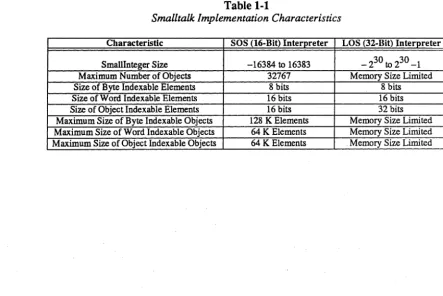
Note that Table 1-1, Smalltalk Implementation Characteristics, shows that byte indexable and word indexable elements in the SOS and LOS implementations are the same size, whereas oop size and Smallinteger size are not. The size of byte indexable, word indexable, and object indexable objects is greatly enlarged in the LOS interpreter.
Table 1-1
Smalltalk Implementation Characteristics
Characteristic SOS (16-Bit) Interpreter LOS (32-Bit) Interpreter
SmallInteger Size -16384 to 16383 - 230 to 230 _1
Maximum Number of Objects 32767 Memory Size Limited
Size of Byte Indexable Elements 8 bits 8 bits
Size of Word Indexable Elements 16 bits 16 bits
Size of Object Indexable Elements 16 bits 32 bits
Maximum Size of Byte Indexable Objects 128 K Elements Memory Size Limited
Maximum Size of Word Indexable Objects 64 K Elements Memory Size Limited
S11UJllt4llc-BO WS User Notes
LOS Interpreter Design Characteristics
The LOS interpreter has some important characteristics relevant to its overall design. In the LOS system, object management has been considerably changed from the SOS specification':'" there is no object table any longer. The class CompiledMethod has been substantially changed from that specified in Goldberg and Robson. Compiled Method now looks and behaves much more like other classes. MethodDictionaries also have a different structure.
The Object Table
In Goldberg and Robson in the chapter Formal Specification
of
Object Memory, the authors specify the structure of the object table for the SOS system. The SOS interpreter implements this 32K entry table, in which the maximum number of objects is limited to the number of entries in the object table. The LOS interpreter does not use an object table, since, with oops of 32 bits, the number of possible entries in such an object table would be impractical to manage. The benefits of eliminating an object table are:• There is no object-table limit to the number of objects in the system.
• There is no extra level of indirection involved with every single operation on objects -creation, destruction, and manipulation.
There is, however, a penalty incurred with several rarely used methods, such as, become:. See
Primitive Methods for a discussion of this.
Compiled Methods
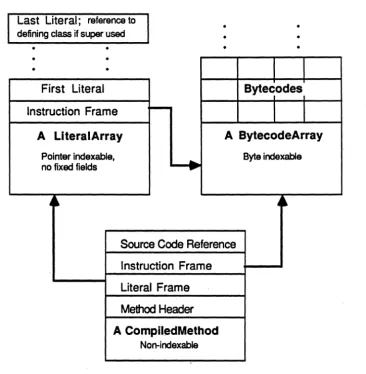
Class CompUedMethod has changed to be more consistent with the standard Smalltalk object structure. See Figure I-I, LOS Structure of an Instance
of
CompiledMethod. Instances ofCompiled Method now consist of three objects: the CompiledMethod structure itself, an instance of LiteralArray, and an instance of ByteCodeArray. Note that the Source Code
Reference field in the Compiled Method structure contains a reference to the source code on disk. The SOS implementati~n folded the source code reference into the bytecodes.
This new representation pennits the creation of subclasses of CompiledMethod. Protocol for
Compiled Method now fonnally supports access to the source code reference. The source code reference in instances of Compiled Method is divided into two fields. The three high order bits represent a zero-based reference into the global variable SourceFiles. This global contains an array of files. The remaining 27 low order bits in this Smaltlnteger represent the position of this method's source code in the file referenced by the three high order bits.
The new representation eliminates the need for special primitives
(newMethod:header:) and accessing (IiteralAt: and IiteraIAtput:) Compiled Method.
Smalltalk·80 LOS User Notes
Last Literal; reference to defining class if super used
• •
• •
•
•
First Literal
Instruction Frame
A LlteralArray
Pointer indexable. no fixed fields
4~
~
•
•• •
• •
1
T
Byte~odes,
1
I
A BytecodeArray
...
Byte indexable..
A~
Source Code Reference
Instruction Frame
Literal Frame
Method
HeaderA CompiledMethod
Non-indexable
Smalltllllc-80 WS Use,. Notes
Method Dictionaries
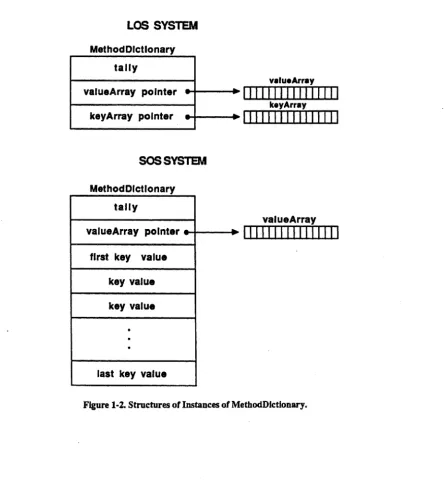
The representation of instances of MethodDictionary has changed. See Figure 1-2, Structures of
Instances of MethodDictionary. In the SOS interpreter, the instances of method dictionaries contain the keys (Compiled Method selector names) as pan of the method dictionary object itself. This has been changed in the LOS interpreter. The keys, instead of being pan of the
MethodDictionary object itself now are contained in a separate Array object that holds the selector names. This redesign was motivated primarily by the wish to eliminate the use of
become:. Previously, become: was used to accomplish an atomic update operation. Since
become: is now a relatively slow operation, the atomic update is now accomplished by methods that rely on the separation of keys.
LOS SYSTEM Method Dlctlo nary
tally
valuaArray
valueArray pOinter
.-+--+1111 " 1111111111
I---f
kayArraykeyArray pOinter
"",--+1111111" 1111111
SOSSYSTEM
MethodDlctionary tally
valueArray valueArray pointer
...
1111111111 " 111I
first key value key value key value
·
·
·
last key value
Smalltalk-80 LOS User Notes
Primitive Methods
Some Smalltalk methods are implemented by making machine language calls directly. These methods are called primitive methods. In the LOS implementaion, some of the primitive methods specified in the Goldberg and Robson book have been eliminated, others have been added to the system, and others have changed function.
Unimplemented Primitives
In the Goldberg and Robson book, the chapter Formal Specification of the Primitive Methods gives a list of primitive methods along with their associated primitive indexes. A number of these are not appplicable to the LOS system and, hence, are not implemented.
Primitives 21 through 37 are defined to perform arithmetic on 16-bit LargePositivelnteger
objects. In the LOS interpreter, primitive indexes 21 through 37 have been eliminated since the LOS interpreter uses 31-bit wide small integer values. There is no meaningful distinction for most practical applications between the instances of Smallinteger and the instances of
LargePositivelnteger and LargeNegativelnteger falling within the 31-bit limit. Thirty bit integer arithmetic operations are done at the machine language level. (Arbitrary precision arithmetical operations can still be done using Smalltalk methods for integers that cannot be expressed in 31 bits.)
Primitive indexes 68, 69, and 79, which deal with CompiledMethod have been eliminated due to the redesign of Compiled Method.
Primitive index 76 (asObject) has been eliminated in the LOS interpreter because there is no object table. In the SOS interpreter, asOop and asObject functioned as inverses. This value would typically be used as a hash code for the object. Sending asOop to an object returns an integer representing its oop - the object table reference to the object. Sending asObject to an oop (represented by a Small Integer) returns the object. Since there was a one-to-one correspondence between objects and object table reference values, you could be certain that two objects were the same object if they had the same asOop value in the SOS system. However, since the LOS interpreter does not use an object table, the asOop method returns a value with a different meaning. This value is the hash value calculated for each object at its creation. These values are not guaranteed to be unique for every object. In practice, the vast majority of hash values are unique, but since there is no longer a guaranteed unique asOop value for each object, the rationale for asObject is gone. Thus, asObject has been eliminated.
Primitive index 78 (nextlnstance) has been eliminated since there is no inherent ordering of objects in this implementation. nextlnstance was typically used in conjunction with
some Instance to obtain all existing instances of some class. In the LOS interpreter,
alllnstances has been implemented as a new primitive method.
New Primitives
The new primitives added to the LOS interpreter fall into four categories:
SlIUIlltalk .. 80 LOS User Notes
• String comparison - 1 primitive
• Instance Creation - 2 primitives
Object Management Primitives
137 Smalltalk garbageCollect: - Force a garbage collection. The argument identifies a storage grade. The virtual image is partioned into grades containing objects of corresponding ages. That is, newer objects are contained in lower grades and older objects are contained in upper grades. Valid numbers for grades are 0-7 inclusive.
138 Smalltalk core - Answer an Array containing the number of objects in the system and the number of words they occupy. Note that the count may include garbage objects which are eligible for garbage collection.
143 Behavior alllnstances - Answer an array containing of all instances of this class. This may include instances that are elibible for garbage collection.
Floating Point Primitives
155 Float arcCos - Answers arccosine x, where x is the receiver.
154 Float arcSin - Answers arcsine x, where x is the receiver.
156 Float arcTan - Answers arctangent x, where x is the receiver.
157 Float exp - Answers eX, where x is the receiver.
158 Float In - Answers In x, where x is the receiver.
159 Float log - Answers log x, where x is the receiver.
String Comparison Primitive
148 string = - Answers true if the receiver and argument contain the same ASCII characters. Answers false if not. Fails if the class of the argument is different from the class of the receiver.
Instance Creation Primitives
140 DisplayBitmap basicNew: and new: - Answer a new instance of DisplayBitmap
with the number of indexable variables specified by the argument, anlnteger.
141 ContextPart basicNew: and new: - Answer a new instance of the receiver with the number of indexable variables specified by the argument, an Integer. Use of this instantiation primitive enables the creation of subclasses MethodContext and
BlockContext.
Old Primitives That Function Differently
Smalltalk-80 LOS User Notes
72 Object become: - This method is potentially "expensive" in the sense that in the LOS system it takes a relatively long time to execute. The primary reason for this is that the SOS interpreter relied on swapping object table references where as the LOS interpreter must actually manipulate oops in memory (since there is no object table in the LOS interpreter). Many special cases are optimized to minimize execution time but in the most general case, this primitive involves examining all objects in the virtual image. In the LOS system, you may want to find alternative ways to code algorithms that in the SOS system used become:.
75 Object asOop, Object hash, Symbol hash - In the SOS system, an object's object table index (returned by asOop) is frequently used as a hash value. In the LOS system, each object is assigned a hash value at creation. This is a 16-bit value.
asOop is now defined to return this value. In a SOS system, there is a one-to-one correspondence between objects and asOop values. Since this is not true in the LOS system, asOop is no longer an invertible function as it was in a SOS system. See the earlier discussion of asObject.
112 System Dictionary coreLeft - This returns an estimate of the amount of memory
available for new objects. (Use primitive 138 instead.)
115 System Dictionary oops Left - This returns an estimate of the number of oops
remaining to be allocated based on the core left value divided by the average object size. (Use primitive 138 instead.)
116 SystemDictionary signal:atOopsLeftwordsLeft: - Since oops and memory are not practical system limits, this functions as a no-op.
IMAGE MODIFICATIONS
The LOS image has a large number of modifications (see Appendix C for a complete list). Here are some highlights.
• The classes ByteCodeArray and LiteralArray have been added to support the new definition of CompiledMethod. Classes Debugger, Compiler, and related classes have modifications pertaining to the new Compiled Method.
• Class Float has some additional class variables to support exceptional floating point values (see IEEE Floating Point Numbers). New protocol has been added to deal with these
values also.
• Many View subclasses (ListView, StandardSystemView, StringHolderView, and
TextView, for example) have been redefined for augmented access to fonts.
PopUpMenu, StrikeFont, and TextStyle classes also changed and two new classes,
StrikeFontManager and TextStyleManager, have been added. See Enhanced Font Support for more details.
• The SystemTracer class has been redefined and modified to produce a clone image in the LOS format.
Smalltalk-80 LOS User Notes
• Behavior, Class, and ClassDescription have modifications related to lazy mutation. See
Lazy Mutation for a description of the differences apparent to users.
User Interface Changes
New Window Framing
Windows now frame by letting you switch between moving the top-left and bottom-right comers until you get them placed exactly how you want them.
When you want to frame a window via the normal user interface, for example, the "top-left" cursor appears, which you may move around on the screen. When it is approximately in the right position, you press the left mouse button, causing the "bottom-right" cursor to appear. Once you have located the bottom-right comer, you have two options. The first is to remove your finger from the mouse button completely; this has the effect of selecting the rectangle just framed. The second option is for you to lift your finger from the mouse for just an instant and to immediately press it again. This has the effect of moving the cursor back to the top-left comer of the rectangle, allowing you to adjust your original placement of that comer. When you are finished with the top-left comer, you again may move back to the bottom-right comer in the same manner, etc.
The determination of whether you have "quick-clicked" or not is made by an instance of class
Delay, which is created in the method getFrame. There is a constant in this routine that specifies the time in milliseconds to wait. This constant is currently set at 250 (or 114 of a second); you can set it to another value by modifying the StandardSystemView getframe
method.
Blue Button Menu
The right button menu of StandardSystemViews has a new item - style. This allows a change of text style for a particular window, including its subviews. Available text styles are determined by the contents of StyleManager. See the System Workspace for an example of how to add text styles to your image.
Enhanced Font Support
Smalltalk has new default fonts, a larger variety of fonts, and augmented access to the fonts. Available fonts range from very small to very large, serif and sans serif, and proportional and monospaced fonts. These fonts have an additional face - bold italic. Protocol for adding fonts and text styles to an image has been defined.
Smalltalk-80 LOS User Notes
Fonts
Three properties (family, face, and size) are commonly associated with a font. Family is the intrinsic property. Families are named and frequently protected by copyright. Examples include "Helvetica" and "Times Roman". Face is the emphatic property. Examples include Basal (no emphasis), Bold, Italic, BoldItalic, and Underlined. Size is the dimensional property. It is typically specified by the height of capital "A" in points (nnds of one inch), although such a measure is more meaningful on paper than on a display.
A Smalltalk-80 font is an instance of class Strike Font, which represents a single combination of family, face, and size values with a bitmap for each character. In some cases, a face (other than Basal) is synthesized by bitmap manipulation of the Basal face. Examples include copying and offsetting (Bold), shearing (Italic), and underlining.
Available Fonts
This product release includes the families: Pellucida2 Sans-Serif, Pellucida Serif, Pellucida Typewriter, Xerox Sans-Serif, and Xerox Serif. The Pellucida Sans-Serif, Pellucida Serif, and Xerox families are proportionally spaced (individual characters within the same font have varying widths); the Pellucida Typewriter family is monospaced (individual characters within the same font have the same width). The Pellucida families are new to this product release; the Xerox families are the standard Smalltalk-80 Version 2 fonts.
Fonts are stored using a standard file format within the directory Ifonts. The name of a file in this directory should be the name of the font it holds suffixed with font.
The name of a StrikeFont is a String with three components (family, size, and face) and no embedded spaces. The family component is the family name with spaces removed; the size component is the printString of the numeric size; and the face component is a String of length zero, one, or two encoding the emphasis. The supported face codes are "" (Basal), "B" (Bold), "I" (Italic), "X" (BoldItalic),
"u"
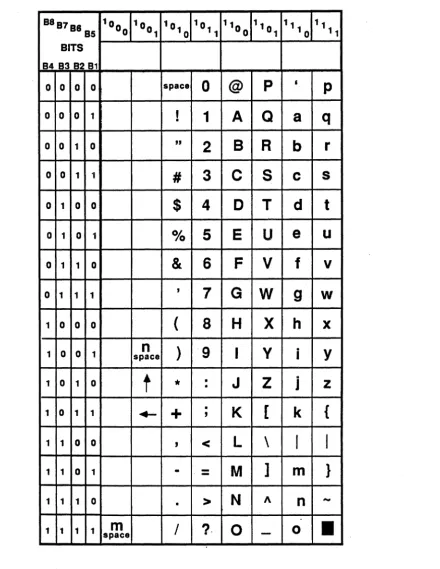
(Basal Underlined), "BU" (Bold Underlined), "IU" (Italic Underlined), and "XU" (BoldItalic Underlined). Examples of names include "PellucidaSans-SerifS", "XeroxSerif12r', and "TypewriterI8BU".The Pellucida Sans-Serif and Serif fonts are available in four non-synthetic faces (Basal, Bold, Italic, and BoldItalic) and seven sizes (8, 10, 12, 14, 18, 24, and 36 point); see Figure 1-3,
Tektronix Proportional Fonts (PellucidaSerif and PelluciaSans-Serif), for the character set ordering. The Pellucida Typewriter fonts are available in two non-synthetic faces (Basal and Bold) and four sizes (10, 12, 16, and 18 point); see Figure 1-4, Tektronix Monospaced Fonts
(Pellucia Typewriter) Part 1 and Figure 1-5, Tektronix Monospace Fonts (Pellucida Typewriter)
Part 2, for the character set ordering. The Xerox fonts are available in three non-synthetic faces (Basal, Bold, and Italic) and two sizes (10 and 12 point), although the Sans-Serif Italic 10 point font is synthetic.
SmaUtalk-80 LOS
User Notes
Interpreting Font Tables
A few notes on interpreting the font tables will be helpful in constructing an application. The spaces in the table that are blank do not have a printing character for the corresponding character code. The characters for ASCII 32 through ASCII 127 are present in both the monospaced and proportional fonts. The proportional fonts contain additional characters in ASCII 1 through ASCII 31. Many of these characters are compatible with those originally supplied by Xerox in the standard Sma1ltalk-80 Version 2 image.
tIm space" is a blank character which is the height and width of the letter m. lin space" is a blank character which is the height and width of the letter n. "em" and "en" are dashes the width of the character "m" and "n", respectively.
Reading and Writing
Smalltalk StrikeFont class has methods for reading and writing Tektronix font files. Note that whenever Smalltalk reads a Tektronix font file, it switches the character position of the uparrow character (t) and left arrow (f-) with the caret
n
and underscoreC)
characters. Thus, if you ask, for instance, the charactert
what its asciiVaJue is, you get 94.The method to write a StrikeFont takes care to switch the positions of the
t,
+-, ", and characters if the type of the strike font is either 1 (Tektronix monos paced) or 2 (Tektronix proportionally spaced). This ensures that the proportional or monos paced fonts written by Smalltalk have consistent character ordering...
Smalltalk-80 WS User Notes
B8B7B6 10 0 10 10 1 10 110 11 11 11 B5 0 0 1 0 11 0 0 1 '0 11 BITS
B4 B3 B2 B1
0 0 0 0
-
space0
@
p
•
p
v
ffi
,
A
Q
0 0 0 1
1
a
q
•
0 0 1 0
L
ffl
"
2
B
R
b
r
0 0 1 1
~
em
#
3
C
S
c s
0 1 0 0
••
fi
$
4
0
T
d
t
0 1 0 1
"
fl
%
5
E
U
e
u
0 1 1 0
ff
m
&
6
F
V
f
v
o
1 1 1,
v,
7
G W
g
w
•
1 0 0 0
I
-
(
8
H
X
h
X1 0 0 1 space
n
)
9
I
V
·
IY
0 0 •
J
Z
·
1 1 00
*
•J
z
1
o
1 1"
t
+
,
•K
[
k
{
1 1 0 0
-+-
,
<
L
\
I
I
1 1 0 1
.
•-
-
M
]
m
}
-
-
N
A1 1 1 0
•
>
n
-m
0I
?
0
0
I
1 1 1 1 space
Smalltllllc-80 LOS Use,. Notes
8887 88 10 0 10 10 1 '0 110 110 11 '1
85 0 0 1 0 11 0 1 10 11 BITS
848382 81
0 0 0 0 space
0
@
p
•
p
0 0 0 1
,
•1
A
Q
a
q
0 0 1 0
"
2
B
R
b
r
0 0 1 1
#
3
C
S
c
s
0 1 0 0
$
4
0
T
d
t
0 1 0 1
%
5
E
U
e
u
0 1 1 0
&
6
F
V
f
v
o
1 1 1,
7
G
W
9
w
1 0 0 0
(
8
H
X
h
x
0 0
n
)
9
I
V
.
Y
1 1 space I
t
·
J
Z
.
1 0 1 0
*
•J
z
1 0 1 1 ~
+
·
,
K
(
k
{
1 1 0 0
,
<
L
\
I
I
1 1 0 1 •
-
-
M
]
m
}
1 1 1 0
>
N
An
-·
1 1 1 1 space
m
I
?
0
-
0
•
•
Smalltalk-80 LOS User Notes
98S796 10 10 10 1 10 110 11 11 11
9S 00 0 1 0 1 1 0 0 1 10 11
BITS
94 938291
NU DL SP
0-
-•
El
0 0 0 0
N
128 144 160 176 192 208 224 240
SH
~
..
,J
-
J
E3
0 0 0 1
A
1n
1129 1.4..'; 161 1Zl 209 241
Sx 02-
a
2 I ~HT
B
0 0 1 0 I
113D 146 162 178 194 ~10 226 242
0 0 1 1
Ex
Da
A
3t
i
FF
Id
131 147 16:3 179 195 ~11 227 243
0 1 0 0
ET
DA
A
40
a.
CR
1218 132 148 164 180 196 '212 228
o
1 0 1EQ NK
IE.
S•
C1LF
[~JP
13:1 149 1~ 18J 197 1213 2290 1 1 0
AK
Sy
c:e
6•
t 0e3
134 150 111;1; 182 198 214 230 1246
BL EB
,d
±
12493
0 1 1 1
a
7 p135 151 167 183 199 215 231
1 0 0 0
as
CN
C
80
Jl.
NL
[JJ
136 152 168 184 200 216 232 248
HT EM
.
9A.
L
VT
~1 0 0 1
e
137 153 169 185 201 217 233 249
LF SB
, ,n
2£J
~
1 0 1 0
e
u
138_ 154 170 186 218 250
1 0 1 1
VT EC
b
~ ~12356]
1t
139 155 171 187 1219 251
FF
fS
..
<:>
"
~~
:¢:1 1 0 0 0
140 156 1~ 188 220 252
1 1 0 1
CR GS
9D
+~~
£
141 157 173 189 '221 ~
So RS
..
238
EB
U
§
==
•
1 1 1 0 -,
142 158 174 190 1206 222 254
SI Us
..
••
r
LI
Dr
1 1 1 1 U 0:
143 159 175 191 207 223 239 255
Smalltslk-80 WS. Use' Notes
The new class StrikeFontManager is a subclass of Dictionary and stores Associations between
String names and Strike Fonts. A single instance of StrikeFontManager is known as the global
FontManager. Particularly useful messages to this object include:
FontManager inspect.
FontManager fontNames: anArray.
The inspect method opens a Dictionarylnspector on FontManager.
The fontNames: method returns an Array of StrikeFonts corresponding to anArray of String
names. It attempts to load a font from the system font directory (ljOnt3) if that font is not already resident (contained within FontManager). The name of a file in this directory should be the name of the font it holds suffixed with ".font". The method further attempts to synthesize a font if it is not already resident and cannot be located within the system font directory.
Text Styles
Most text processing in Smalltalk-80 is performed not with instances of class StrikeFont in isolation but rather with instances of class TextStyle, whose properties include:
• fontArray (an Array of Strike Fonts)
• IineGrid (distance from top of text line to top of next text line)
• baseline (distance from top of text line to base of capital letters)
• additional IineGrids and baselines for lists and menus
• alignment code (flush left, flush right, centered, justified)
• indentation and tab stop parameters
These properties of a TextStyle, as its name implies, are mostly a matter of personal style and system convention. The fonts are usually members of a single family (although the system default, described below, violates this rule for historical reasons) in one or two sizes and several faces. The IineGrid (termed "leading" by typographers) is usually the height of the tallest font in the style plus a certain amount of additional white space. The baseline is shared by all of the fonts in the style so that the bases of their capital letters are aligned. Subscripts and superscripts, of course, would violate this rule, but they are not supported in this product release (although rudimentary capabilities do exist within classes Strike Font, TextStyle, and DisplayScanner).
Flush left alignment has historically been the default in Smalltalk-80, but other possibilities are certainly available.
Obvious uses of TextStyles include class ParagraphEditor and its subclasses (in Workspaces, System Transcripts, Projects, and the bottom panes of System Browsers, File Lists, and
ChangeListViews). Less obvious uses include lists, menus, and title tabs of
StandardSystemViews. Even less obvious uses include the String messages as Paragraph
and asDisplayText. This broad variety of uses prompts some common questions:
• What is the system default style?
• Can additional styles coexist?
• If so, how are they created and catalogued?
Smalltalk-SO LOS User Notes
• How can the system default style be changed?
• How can the style of a view or subview be changed?
These questions are addressed in the following paragraphs.
The system default style is mentioned in chapter three of the Goldberg ("orange") book. It contains twenty-four fonts (two families, two sizes, and six faces) ordered as follows:
• Sans-Serif 10 (Basal, Bold, Italic)
• Serif 12 (Basal, Bold, Italic)
• Serif 10 (Basal, Bold, Italic)
• Sans-Serif 12 (Basal, Bold, Italic)
• all of the above repeated but Underlined
The original Smalltalk-80 system default style used the Xerox sans serif and serif font families. This product release maintains other characteristics of that style (including the unusual mixing of sans serif and serif families) but uses the Pellucida families in the default text style.
The new class TextStyleManager is a subclass of Dictionary and stores Associations between
String names and TextStyles. A single instance of TextStyleManager is known as the global
Style Manager. Particularly useful messages to this object include:
Style Manager inspect. Style Manager
styleName: aString
fontNames: anArrayOfStrings lead: an Integer.
StyleManager
styleName: aString
baseNames: anArrayOfStrings lead: anlnteger.
The inspect message opens a Dictionarylnspector on Style Manager.
The styleName:fontNames:lead: and styleName:baseNames:lead: methods return a new style named aString. The fontNames: version accepts font names with arbitrary face codes in
anArrayOfStrings whereas the baseNames: version accepts only Basal font names and imposes the following order on the fonts:
• (anArrayOfStrings at: 1) Basal • (anArrayOfStrings at: 1) Bold • (anArrayOfStrings at: 1) Italic • (anArrayOfStrings at: 1) BoldItalic
• similar sequence(s) for other element(s) of anArrayOfStrings (if any)
• all of the above repeated but Underlined
Smalltallc-SO LOS User Notes
Thus the expression that created the system default style is:
Style Manager
styleName: 'Pellucida Default 10 and 12' fontNames: #(
'PellucidaSans-Serif10' 'PellucidaSans-Serif1 OB' 'PellucidaSans-Serif101' 'PellucidaSerif12 ' 'PellucidaSerif12B' 'PellucidaSerif12r 'PellucidaSerif1 0' 'PellucidaSerif10B' 'PellucidaSerif10r 'PellucidaSans-Serif12' 'PellucidaSans-Serif12B' 'PellucidaSans-Serif121'
'PellucidaSerif10U' 'PellucidaSerif1 OBU' 'PellucidaSerif1 0 IU' 'PellucidaSerif12U' 'PellucidaSerif12BU' 'PellucidaSerif12IU' 'PellucidaSans-Serif1 OU' 'PellucidaSans-Serif10BU' 'PellucidaSans-Serif10IU' 'PellucidaSans-Serif12U' 'PellucidaSans-Serif12BU' 'PellucidaSans-Serif12IU') lead: 3.
A similar expression using the base name technique is found in the System Workspace: Style Manager
styleName: 'Pellucida Sans-Serif 12 and 14'
baseNames: #('PelfucidaSans-Serif12' 'PellucidaSans-Serif14') lead: 3.
These expressions illustrate two style conventions. The first suggests font family and size in the style name. Mixing sans serif and serif families in one style, preferably with the font ordering convention described in the Goldberg book, is connoted by the common font family name prefix (assuming there is one!) concatenated with the word "Default". Thus the original Smalltalk-80 style name would be "Xerox Default 10 and 12". Note that embedded spaces are encouraged in style names (unlike font names, which must be storable in the filing system). The second convention is the use of three additional pixels of leading in styles mixing two near sizes of fonts. Most text in the context of the style is expected to be in one of the smaller fonts.
Expressions similar to these can be found in files in the Smalltalk text style directory
(lsmalltalkltextStyles). These files store not styles but rather expressions that create styles; this distinction is suggested by the file suffix !I.ws" (an abbreviation for ".workspace"). These files
Smalltalk-80 LOS User Notes
directory to discard all existing fonts and styles, read in small fonts, and create a new default style (useful on systems with a small screen):
Compiler evaluate:
«Disk file: ' IsmalitalkltextStyles/pruneToPeilucidaDefault08and1 O.ws') contentsOfEntireFile).
The Style Manager maintains the mapping from style names to styles for future reference when it is desired to change the system default style or the style of a view or subview. The expression:
Style Manager changeDefaultT extStyle.
pops up a menu of resident styles, waits for a style to be selected with any mouse button (or aborts if the button is released outside the menu), and then changes the default style to the selected style. This also rebuilds system menus and recomposes text in scheduled views and subviews in the current project. This capability can be added as the "style" entry of the middle button menu of class ScreenControlier by filing in:
IsmalltalklJileInladdTextStyleToSystemMenu.st
A subset of this capability (propagate the selected style to the title tab and subviews of the current view) is available as the "style" entry of the right button menu of scheduled controllers. See User Interface Changes.
An even smaller subset of this capability (propagate the selected style only to the sub view) can be added as the "style" entry of the middle button menu of class ParagraphEditor and several of its subclasses by filing in:
I smalltalklJileI nI addT extStyleT oY ellowButton.st
The methods at:, atput:, and remove Key: are useful for more pnmluve manipulation of
Style Manager; the last two automatically update the menu of resident styles. Note that changing a style in StyleManager by itself usually has no effect on any text since styles are typically copied before use. An experimental style can be tested by adding it to StyleManager
and then selecting it with the appropriate menu button.
The method initialize Menus rebuilds system menus. It references several lists that should be extended for applications with private menus.
Miscellaneous
Class StrikeFont has new instance variables ascentForStdAsciiChars and
descentForStdAsciiChars. These maintain the envelope of charact