Portions of this material have been previously copyrighted by: Bell Telephone Laboratories, Incorporated, 1980
Western Electric Company, Incorporated, 1983 Regents of the University of California
Holders of a UNIX and UniPlus + software license are permitted to copy this docu ment, or any portion of it, as necessary for licensed use of the software, provide' this copyright notice and statement of permission are included.
UNIX is a Trademark of AT&T Bell Laboratories, Inc.
\
This guide is a description of the various software "tools" that aid the UniPlus+* System V operating system user. The user should have at least 2 years of specialized training in computer-related fields such as programming or use the UniPlus+ system primarily for software system development.
This guide contains ten chapters:
• AWK: PROGRAMMING LANGUAGE
• BC: ARBITRARY PRECISION DESK CALCULATOR LANGUAGE
• DC: INTERACTIVE DESK CALCULATOR
• LEX: LEXICAL ANALYZER GENERATOR
• M4: MACRO PROCESSOR
• MAKE: MAINTAINING COMPUTER PROGRAMS
• MAKE: AUGMENTED VERSION
• SCCS: SOURCE CODE CONTROL SYSTEM
• UUCP: UNIX SYSTEM TO UNIX SYSTEM COPY
• Y ACC: YET ANOTHER COMPILER-COMPILER
Chapter 1, AWK: PROGRAMMING LANGUAGE, describes a software tool designed to make many common information retrieval and text manipulation tasks easy to state and to perform.
Chapter 2, BC: ARBITRARY PRECISION DESK CALCULATOR LANGUAGE, describes a compiler for doing arbitrary precision arith-metic on the UniPlus+ operating system.
Chapter 3, DC: INTERACTIVE DESK CALCULATOR, describes a program implemented on the UniPlus+ operating system to do arbitrary-precision integer arithmetic.
Chapter 4, LEX: LEXICAL ANALYZER GENERATOR, describes a software tool that lexically processes character input streams.
Chapter 5, M4: MACRO PROCESSOR, describes a general purpose macro processor that may be used as a front end for rational Fortran, C, and other programming languages.
Chapter 6, MAKE: MAINTAINING COMPUTER PROGRAMS, describes a software tool for maintaining, updating, and regenerating groups of computer programs. The many activities of program develop-ment and maintenance are made simpler by the make program.
Chapter 7, MAKE: AUGMENTED VERSION, describes the
modifications made to handle many of the problems within the original make program.
Chapter 8, SCCS: SOURCE CODE CONTROL SYSTEM, describes the collection of SCCS programs under the U niP Ius + operating system. The SCCS programs act as a "custodian" over the UniPlus+ system files.
Chapter 9, UUCP: UNIX SYSTEM TO UNIX SYSTEM COPY,
describes a network that provides information exchange (between UNIX
systems) over the direct distance dialing network.
Chapter 10, Y ACC: YET ANOTHER COMPILER-COMPILER, describes the yacc program. The yacc program provides a general tool for imposing structure on the input to a computer program.
Chapter 1
Chapter 2
Chapter 3
Chapter 4
Chapter 5
Chapter 6
Chapter 7
Chapter 8
Chapter 9
Chapter 10
AWK: PROGRAMMING LANGUAGE
BC: ARBITRARY PRECISION DESK CALCULATOR LANGUAGE
DC: INTERACTIVE DESK CALCULATOR
LEX: LEXICAL ANALYZER GENERATOR
M4: MACRO PROCESSOR
MAKE: MAINTAINING COMPUTER PROGRAMS
MAKE: AUGMENTED VERSION
SCCS: SOURCE CODE CONTROL SYSTEM
UUCP: UNIX SYSTEM TO UNIX SYSTEM COPY
CONTENTS
GENERAL
PROGRAM STRUCTURE
LEXICAL CONVENTION Numeric Constants String Constants Keywords Identifiers Operators.
Record and Field Tokens Record Separators
Field Separator . . . . . Multiline Records . . .
Output Record and Field Separators
Comments . . .
Separators and Brackets
PRIMARY EXPRESSIONS Numeric Constants String Constants
Vars . • . .
Function . . .
TERMS . . . Binary Terms Unary Term . . Incremented Vars . Parenthesized Terms .
,EXPRESSIONS . . . . Concatenation of Terms Assignment Expressions
USING awk
INPUT: RECORDS AND FIELDS
INPUT: FROM THE COMMAND LINE
OUTPUT: PRINTING . . . .
COMMENTS . . •
PATTERNS
BEG IN and END Relational Expressions Regular Expressions . Combinations of Patterns Pattern Ranges . . . .
ACTIONS . . . .
Variables, Expressions, and Assignments Initialization of Variables
Field Variables . . . String Concatenation . Special Variables Type . . . . Arrays. . . .
BUILT IN FUNCTIONS
FLOW OF CONTROL. .
REPORT GENERATION.
COOPERA.TION \VITH THE SHELL.
MISCELLANEOUS HINTS . . . .
LIST OF FIGURES
Figure 1.1. Strings Used as Keywords
Figure 1.2. Symbols and Descriptions for Assignment Operators . . . .
Figure 1.3. Symbols and Descriptions for Arithmetic Operators . . . .
Figure 1.4. Symbols and Descriptions for Relational Operators . . . .
Figure 1.5. Symbols and Descriptions for Logical Operators . . . .
Figure 1.7. Numeric Values for String Constants 11
Figure 1.8. String Values for String Constants . . . 12
Figure 1.9. Built-in Functions for Arithmetic and String
Operations . . . 14
A WK: PROGRAMMING LANGUAGE
GENERAL
The awk is a file-processing programming language designed to make many common information and retrieval text manipulation tasks easy to state and perform. The awk:
• Generates reports
• Matches patterns
• Validates data
• Filters data for transmission.
PROGRAM STRUCTURE
The awk program is a sequence of statements of the form
pattern {action} pattern {action}
The awk program is run on a set of input files. The basic operation of
awk is to scan a set of input lines, in order, one at a time. In each
In the awk command, either the pattern or the action is omitted, but
not both. If there is no action for a pattern, the matching line is
simply printed. If there is no pattern for an action, then the action is
performed for every input line. The null awk program does nothing. Since patterns and actions are both optional, actions are enclosed in braces to distinguish them from patterns.
For example, this awk program
Ixl {print}
prints every input line that has an "x" in it.
An awk program has the following structure:
- a <BEG IN > section
- a <record> or main section - an <END> section.
The <BEGIN> section is run before any input lines are read, and the <END> section is run after all the data files are processed. The <record> section is data driven. That is, it is the section that is run over and over for each separate line of input.
Values are assigned to variables from the awk command line. The <BEGIN> section is run before these assignments are made.
The words" BEGIN" and" END" are actually patterns recognized by
LEXICAL CONVENTION
All awk programs are made up of lexical units called tokens. In awk
there are eight token types:
l. numeric constants
2. string constants
3. keywords
4. iden tifiers
5. operators
6. record and file tokens
7. comments
8. separators.
Numeric Constants
A numeric constant is either a decimal constant or a floating
constant. A decimal constant is a nonnull sequence of digits containing at most one decimal point as in 12, 12., 1.2, and .12. A floating constant is a decimal constant followed by e or E followed by
an optional
+
or - sign followed by a non null sequence of digits as in12e3, 1.2e3, 1.2e-3, and 1.2E+3. The maximum size and precision of a numeric constant are machine dependent.
String Constants
A string constant is a sequence of zero or more characters
Keywords
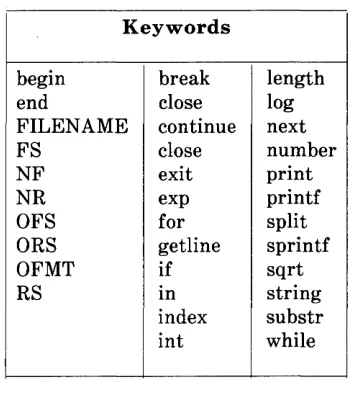
Strings used as keywords are shown in Figure 1.1.
Keywords
begin break length
end close log
FILENAME continue next
FS close number
NF exit print
NR exp printf
OFS for split
ORS getline sprintf
OFMT if sqrt
RS in string
index substr
int while
Figure 1.1. Strings U sed as Keywords
Identifiers
Identifiers in awk serve to denote variables and arrays. An identifier
is a sequence of letters, digits, and underscores, beginning with a letter or an underscore. Uppercase and lowercase letters are different.
Operators
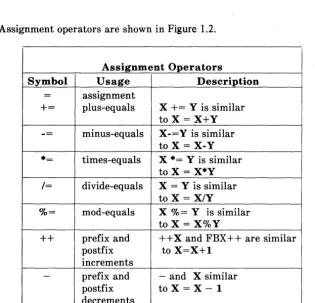
Assignment operators are shown in Figure 1.2.
Assignment Operators
Symbol Usage Description
= assignment
+= plus-equals X += Y is similar
toX=X+Y
--
minus-equals X-= Y is similarto X = X-Y
*= times-equals X *= Y is similar
to X = X*Y
/= divide-equals X = Y is similar
toX=X/Y
0/0= mod-equals X%=Y is similar toX=X%Y
++ prefix and ++X and FBX++ are similar
postfix to X=X+1
increments
- prefix and - and X similar
postfix to X = X - 1
decrements
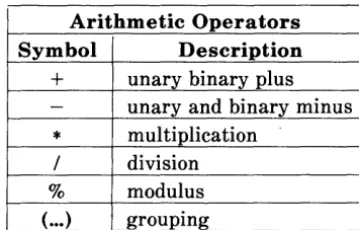
Arithmetic operators are shown in Figure 1.3.
Arithmetic Operators
Symbol Description
+
unary binary plus- unary and binary minus
*
multiplication/ division
% modulus
(
...
) groupingRelational operators are shown in Figure 1.4.
Relational Operators
Symbol Description
< less than
<= less than or equal to
- - equal to
!= not equal to
>= greater than or equal to
> grea ter than
Figure 1.4. Symbols and Descriptions for Relational Operators
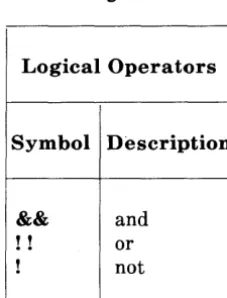
Logical operators are shown in Figure 1.5.
Logical Operators
Symbol Description
&&
and! ! or
! not
Regular expression matching operators are shown in the Figure 1.6.
Regular Expression Pattern Matching Operators I
Symbol Description
- matches
!- does not match
Figure 1.6. Symbols and Descriptions for Regular Expression Pattern
Record and Field Tokens
The $0 is a special variable whose value is that of the current input record. The $1, $2 ... are special variables whose values are those of the first field, the second field , . . . , respectively, of the current
input record. The keyword NF (Number of Fields) is a special
variable whose value is the number of fields in the current input
records. Thus $NF has, as its value, the value of the last field of the
current input records. Notice that the field of each record is
numbered 1 and that the number of fields can vary from record to
record. None of these variables is defined in the action associated with a BEG IN or END pattern, where there is no current input record.
Record Separators
The keyword RS (Record Separators) is a variable whose value is the
current record separator. The value of RS is initially set to newline,
indicating that adjacent input records are separated by a newline.
Keyword RS is changed to any character c by including the
assignment statement RS = "c" in an action.
Field Separator
The keyword FS (Field Separator) is a variable indicating the
current field separator. Initially, the value of FS is a blank,
indicating that fields are separated by white space, i.e., any nonnull
sequence of blanks and tabs. Keyword FS is changed to any single
character c by including the assignment statement F = "c" in an
action or by using the optional command line argument -Fc. Two
values of c have special meaning, space and t. The assignment
statement FS =" " makes white space in field separator; and on the
command line, -Ft makes tab the field separator.
If the field operator is not a blank, then there is a field in the record
on each side of the separator. For instance, if the field separator is 1,
the record lXXXl has three fields. The first and last are null. If the
field separator is blank, then fields are separated by white space, and none of the NF fields are null.
Multiline Records
The assignment RS =" " makes an empty line the record separator
and makes a non null sequence (consisting of blanks, tabs, and possibly a newline) the field separator. With this setting, none of the first NF fields of any record are null.
Output Record and Field Separators
The value of OFS (Output Field Separator) IS the output field
separator. It is put between fields by print. The value of ORS
(Output Record Separators) is put after each record by print. Initially
ORS is set to a newline and OFS to a space. These values may
Comments
A comment is introduced by a
#
and terminated by a newline. Forexample:
# part of the line is a comment
A comment can be appended to the end of any line of an awk program.
Separators and Brackets
Tokens in awk are usually separated by nonnull sequences of blank, tabs, and newlines, or by other punctuation symbols such as commas
and semicolons. Braces { ... } surround actions, slashes / .. j surround
regular expression patterns, and double quotes" ... " surround strings.
PRIMARY EXPRESSIONS
In awk7 patterns and actions are made up of expressions. The basic
building blocks of expressions are the primary expressions:
numeric constants
var function
Each expression has both a numeric and a string value, one of which is usually preferred. The rules for determining the preferred value of an expression are explained below.
Numeric Constants
The format of a numeric constant was defined previously in
LEXICAL CONVENTIONS. Numeric values are stored as
Numeric values for string constants are in Figure 1.7.
Numeric Constants
Numeric Numeric String
Constant Value Value
0 0 0
1 1 1
.5 0.5 .5
.5e2 50 50
Figure 1.7. Numeric Values for String Constants
String Constants
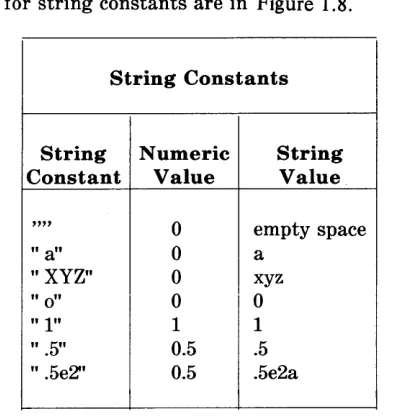
The format of a string constant was defined previously in LEXICAL
String values for string constants are in Figure 1.8.
String Constants
String Numeric String
Constant Value Value
""
0 empty space" a" 0 a
"XYZ" 0 xyz
" 0" 0 0
" 1" 1 1
" .5" 0.5 .5
" .5e2" 0.5 .5e2a
Figure 1.8. String Values for String Constants
Vars
A var is one of the following:
identifier
iden tifier { expression} $term
The numeric value of any uninitialized var is 0, and the string value
is the empty string.
An identifier by itself is a simple variable. A var of the form
identifier {expression} represents an element of an associative array
named by identifier. The string value of expression is used as the
index into the array. The preferred value of identifier or identifier
The var $0 refers to the current input record. Its string and numeric
values are those of the current input record. If the current input
record represents a number, then the numeric value of $0 is the number and the string value is the literal string. The preferred value of $0 is string unless the current input record is a number. The $0 cannot be changed by assignment.
The var $1, $2, ... refer to fields 1, 2, ... of the current input record.
The string and numeric value of $i for 1<=i<=NF are those of the ith field of the current input record. As with $0, if the ith field represents a number, then the numeric value of $i is the number and the string value is the literal string. The preferred value of $i is string unless the ith field is a number. The $i is changed by assignment. The $0 is then changed accordingly.
In general, $term refers to the input record if term has the numeric
value 0 and to field i if the greatest integer in the numeric value of
term is i. If i<O or if i>=100, then accessing $i causes awk to
produce an error diagnostic. If NF <i <= 100, then $i behaves like an
uninitialized var. Accessing $i for i > NF does not change the value
of NF.
Function
The awk has a number of built-in functions that perform common
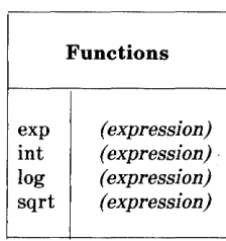
The arithmetic functions are in Figure 1.9.
Functions
exp (expression)
int (expression) .
log (expression)
sqrt (expression)
Figure 1.9. Built-in Functions for Arithmetic and String Operations
These functions (exp, int, log, and sqrt) compute the exponential, integer part, natural logarithm, and square root, respectively, of the
numeric value of expression. The (expression) may be omitted; then
String functions are shown in Figure 1.10.
String Functions getline
index (expressionl, expression2)
length (expression)
s-'Plit (expression, identifier)
split (expressionl, identifier, expression2)
sprintf (format, expressionl, expression2 ... )
substr (expressionl, expression2)
substr (expressionl, expression2, expression3)
Figure 1.10. Expressions for String Functions
The function getline causes the next input record to replace the
current record. It returns 1 if there is a next input record or a 0 if
there is no next input record. The value of NR is updated.
The function index (el,e2) takes the string value of expressions el and e2 and returns the first position of where e2 occurs as a
substring in el. If e2 does not occur in el, index returns O. For
example, index (" abc" , " be" )=2 and index (" abc" , " ae" )=0.
The function length without an argument returns the number of characters in the current input record. With an expression argument, length (e) returns the number of characters in the string value of e. For example, length (" abc" )=3 and length (17)=2.
The function split (e array, sep) splits the string value of expression e
into fields that are then stored in array [1J, array [2J, ... , array [nJ
using the string value of sep as the field separator. Split returns the
number of fields found in e. The function split (e, array) uses the
The function splitf (f, el, e2 . . . ) produces the value of expressions
e 1, e2 . . . in the format specified by the string value of the
expression f. The format control conventions are those of the printf
statement in the C programming language [KR].
The function substr (string, posY returns the suffix of string starting
at position pos. The function substr (string, pos, length) returns the
substring of string that begins at position pos and is length
characters long. If pos
+
length is greater than the length of stringthen substr (string, pos, length) is equivalent to substr (string, pos).
For example, substr (" abc", 2, 1) = "b" , substr (" abc", 2, 2) =
" be", and subtr (" abc", 2, 3) = "be". Positions less than 1 are
taken as 1. A negative or zero length produces a null result.
The preferred value of sprintf and substr is string. The preferred value of the remaining string functions is numeric.
TERMS
Various arithmetic operators are applied to primary expressions to
"' ... "'r!",...o 1<:> ... 0'.0 ... ",un+",,..+;,.. nn;+", ,..",l1.or! fDrl'Yl'" All ",.,..;+1,1'\""1.0+;,.. ;'" r!",n.o ;n p.l..V\,A.\A ... ""'.1.0 ... .1. UJ.l.A.ILI"''-'ILI.I.. ... \A..I...I..I.\lU '""""'.1..1. ... "",-,.I.A.I..I.IJ • .L..1..I..I. ""' ... .I.lJ..&..I..I..I..I.. ... "' ... .I.IJ ... "'.1..1.'-' .1..1..1.
floating point. A term has one of the following forms:
primary expression term binop term unop term incremented var (term)
Binary Terms
In a term of the form
term 1 binop term2
binop can be one of the five binary arithmetic operators +, -,
*
applied to the numeric value of the operand term1 and term2, and the result is the usual numeric value. This numeric value is the preferred
value, but it can be interpreted as a string value (see Numeric
Constants). The operators
* , /,
and % have higher precedence than+
and -. All operators are left associative.Unary Term
In a term of the form
unop term
unop can be unary
+
or -. The unary operator is applied to thenumeric value of term, and the result is the usual numeric value
which is preferred. However, it can be interpreted as a string value.
Unary
+
and - have higher precedence than *, /, and %.Incremented Vars
An incremented var has one of the forms
+ +
var - - varvar
+ +
var
-The
+ +
var has the value var+
1 and has the effect of var = var+
1. Similarly, - - var has the value var - 1 and has the effect of var
= var - 1. Therefore, var
+ +
has the same value as var and has theeffect of var = var
+
L Similarly, var - - has the same value as varand has the effect of var = var - L The preferred value of an
incremented var is numeric.
Parenthesized Terms
EXPRESSIONS
An awk expression is one of the following:
term
term term ...
var asgnop expression
Concatenation of Terms
In an expression of the form terml term2 ... , the string value of the
terms are concatenated. The preferred value of the resulting expression is a string value that can be interpreted as a numeric
value. Concatenation of terms has lower precedence than binary
+
and -. For example, 1 +2 3=4 has the string (and numeric) value 37.
Assignment Expressions
An assignment expression is one of the forms
var asgnop expression
where asgnop is one of the six assignment operators:
+=
*=
/= %=
The preferred value of var is the same as that of expression.
In an expression of the form
var = expression
var op = expression
is equivalent to
var = var op expression
where op is one of; +, -, *, I, %. The asgnops are right associative
and have the lowest precedence of any operator. Thus, a += b *= c-2 is equivalent to the sequence of assignments
b = b
*
(0-2)a = a+2
USING awk
There are two ways in which to present your awk program of
pattern-action statements to awk for processing:
1. If the program is short (a line or two), it is often easiest to make
the program the first argument on the command line:
awk' program' files
where" files" is an optional list of input files and" program" is
your awk program. Note that there are single quotes around the
program in order for the shell to accept the entire string
(program) as the first argument to awk. For example, write to
the shell
awk ' Ixl {print} , files
to run the awk script Ixl {print} on the input file" files" . If no
input files are specified, awk takes input from the standard input
a wk 'program' files
-looks for input from "files" and from stdin and processes first from" files" and then from stdin.
2. Alternately, if your awk program is long, it is more convenient to put the program in a separate file, awkprog, and tell awk to fetch it from there. This is done by using the" -f" option after the
a wk command as follows:
awk -f awkprog files
where" files" is an optional list of input files that may include
stdin as is indicated by a hyphen (-).
For example:
awk' BEGIN {
prints
hello, world
print" hello, world" exit
on the standard output when given to the shell. Recall that the word " BEG IN" is a special pattern indicating that the action following in braces is run before any data is read. Words" print" and" exit" are both discussed in later sections.
This awk program couJd be run by putting
BEGIN {
in a file named awkprog , and then the command
awk -f awkprog
given to the shell. This would have the same effect as the first procedure.
INPUT: RECORDS AND FIELDS
The awk reads its input one record at a time unless changed by you.
A record is a sequence of characters from the input ending with a newline character or with an end of file. Thus, a record is a line of
input. The awk program reads in characters until it encounters a
newline or end of file. The string of characters, thus read, is assigned to the variable $0. You can change the character that indicates the end of a record by assigning a new character to the
special variable RS (the record separator). Assignment of values to
variables and these special variables such as RS are discussed later.
Once awk has read in a record, it then splits the record into" fields" .
A field is a string of characters separated by blanks or tabs, unless you specify otherwise. You may change field separators from blanks or tabs to whatever characters you choose in the same way that record separators are changed. That is, the special variable FS is assigned a different value.
Sample Input File" countries" :
Russia 8650 262 Asia
Canada 3852 24 North America
China 3692 866 Asia
USA 3615 219 North America
Brazil 3286 116 South America
Australia 68 14 Australia
India 1269 637 Asia
Argentina 72 26 South America
Sudan 968 19 Africa
Algeria 920 18 Africa
The wide spaces are tabs in the original input and a single blank separates North and South from America. We use this data as the input for many of the awk programs in this guide since it is typical of the type of material that awk is best at processing (a mixture of words and numbers separated into fields or columns separated by blanks and tabs).
Each of these lines has either four or five fields if blanks and/or tabs separate the fields. This is what awk assumes unless told otherwise. In the above example, the first record is
Russia 8650 262 Asia
When this record is read by awk, it is assigned to the variable $0. If
you want to refer to this entire record, it is done through the variable, $0.
For example, the following input:
{print $O}
prints the entire record. Fields within a record are assigned to the
variables $1, $2, $3, and so forth; that is, the first field of the present
the present record is referred to as $2 by the awk program. The ith
field of the present record is referred to as $i by the awk program.
Thus, in the above example of the file countries, in the first record;
$1 is equal to the string" Russia" $2 is equal to the integer 8650 $3 is equal to the integer 262 $4 is equal to the string" Asia" $5 is equal to the null string
... and so forth.
To print the continent, followed by the name of the country, followed
by its population, use the following awk script:
{print $4, $1, $3}
Note that awk does not require type declarations.
INPUT: FROM THE COMMAND LINE
It is possible to assign values to variables from within an awk
program. Because you do not declare types of variables, a variable is created simply by referring to it. An example of assigning a value to a variable is:
x=5
This statement in an awk program assigns the value 5 to the variable
x. It is also possible to assign values to variables from the command
line. This provides another way to supply input values to awk
programs.
will print the value 5 on the standard output. The minus sign at the end of this command is necessary to indicate that input is coming from stdin instead of a file called" x=5". Similarly if the input comes from a file named" file" , the command is
awk' {print x}' file
It is not possible to assign values to variables used in the BEGIN
section in this way.
If it is necessary to change the record separator and the field
separator, it is useful to do so from the command line as in the following example:
awk -f awk.program RS=":" file
Here, the record separator is changed to the character "." This
causes your program in the file" awk.program" to run with records separated by the colon instead of the newline character and with
input coming from the file, "file". It is similarly useful to change
the field separator from the command line.
This operation is so common that there is yet another way to change the field separator from the command line. There is a separate
option" -Fx" that is placed directly after the command a wk. This
changes the field separator from blank or tab to the character" x" .
For example
awk-F: -f awk.program file
changes the field separator FS to the character" :". Note that if the field separator is specifically set to a tab, (that is, with the -F option or by making a direct assignment to FS) then blanks are recognized by awk as separating fields. However, even if the field separator is
specifically set to a blank, tabs are STILL recognized by awk as
separating fields.
Using the input file (" countries" described earlier) write an awk
script that prints the name of a country followed by the continent that it is on. Do this in such a way that continents composed of two words (e. g., North America) are processed as only one field and not two.
OUTPUT: PRINTING
An action may have no pattern; in this case, the action is executed for all lines as in the simple printing program
{print}
This is one of the simplest actions performed by awk. It prints each
line of the input to the output. More useful is to print one or more fields from each line. For instance, using the file" countries" , that was used earlier,
awk '{ print $1, $3 }' countries
prints the name of the country and the population:
Russia 262 Canada 24 China 866
USA 219
Brazil 116 Australia 14 India 637 Argen tina 14
Sudan 19
Algeria 18
Note that the use of a semicolon at the end of statements in awk
programs is optional. A wk accepts
{print $1; }
equally and takes them to mean the same thing. If you want to put
two awk statements on the same line of an awk script, the semicolon
is necessary. For example, the following semicolon is necessary if you want the number 5 printed:
{x=5; print x }
Parentheses are also optional with the print statement.
print $3, $2
is the same as
print ($3, $2 )
Items separated by a comma in a print statement are separated by the current output field separators (normally spaces, even though the
input is separated by tabs) when printed. The OFS is another special
variable that can be changed by you. These special variables are summarized in a later section.
An exercise:
Using the input file, " countries" , print the continent followed by the country followed by the population for each input record. Then pipe the output to the UNIX operating system command" sort" so that all countries from a given continent are printed together.
Print also prints strings directly from your programs with the awk
script
{print" hello, world" }
from an earlier section.
An exercise:
"Population of Largest Countries" followed by headers to the columns that follow describing what is in that column; for example, Country or Population.
As we have already seen, awk makes available a number of special
variables with useful values; for example, FS and RS. We now
introduce another special variable in the next example. NR and NF
are both integers that contain the number of the present record and the number of fields in the present record, respectively. Thus,
{print NR, NF, $O}
prints each record number and the number of fields in each record followed by the record itself. Using this program on the file, "countries" yields:
1 4 Russia 8650 262 Asia
2 5 Canada 3852 24 North America
34 China 3692 866 Asia
45 USA 3615 219 North America
5 5 Brazil 3286 116 South America
6 4 Australia 2968 14 Australia
74 India 1269 637 Asia
8 5 Argentina 1072 26 Sou th America
94 Sudan 968 19 Africa
104 Algeria 920 18 Africa
and the program
{print NR, $1 }
1 Russia
2 Canada
3 China
4 USA
5 Brazil
6 Australia 7 India 8 Argentina 9 Sudan 10 Algeria
This is an easy way to supply sequence numbers to a list. Print, by itself, prints the input record. Use
print" "
to print the empty line.
A wk also provides the statement printf so that you can format output
as desired. Print uses the default format" % .6g" for each variable
printed.
printf format, expr, expr, ...
formats the expressions in the list according to the specification in the string, format, and prints them. The format statement is exactly that of the printf in the C library. For example,
{ printf " % lOs % 6dO, $1, $2, $3 }
Russia 8650 262
Canada 3852 244
China 3692 866
USA 3615 219
Brazil 3286 116
Australia 2968 14
India 1269 637
Argentina 1072 26
Sudan 968 19
Algeria 920 18
With printf, no output separators or newlines are produced automatically. You must add them as in this example. In the C
library version of printf, the various escape characters"
\n" ,
"\t" ,"\b" (backspace) and"
\r"
(carriage return) are valid with the awkprintf.
There is a third way that printing can occur on standard output when a pattern is specified but there is no action to go with it. In this case, the entire record $0 is printed. For example, the program
Ixl
prints any record that contains the character" x" .
There are two special variables that go with printing, OFS and ORS.
These are by default set to blank and the newline character,
respectively. The variable OFS is printed on the standard output
when a comma occurs in a print statement such as
{ x=" hello" ; y=" world" print x,y
}
However, without the comma in the print statement as
{ x=" hello" ; y=" world" print x y
}
you get
helloworld
To get a comma on the output, you can either insert it in the print statement as in this case
{ x=" hello" ; y=" world" print x" ," y
}
or you can change OFS in a BEG IN section as in
BEGIN {OFS=","}
{ x=" hello" ; y=" world" print x, y
}
both of these last two scripts yields
hello, world
OUTPUT: TO DIFFERENT FILES
The UNIX operating system shell allows you to redirect standard output to a file. The awk program also lets you direct output to many different files from within your awk program. For example, with our input file" countries" , we want to print all the data from countries of Asia in a file called" ASIA" , all the data from countries in Africa in a file called" AFRICA" , and so forth. This is done with the following a wk program:
{ if ($4 == " Asia" ) print> " ASIA"
}
if ($4 == " Europe" ) print> ,I EUROPE"
if ($4 == " North" ) print> " NORTH_AMERICA"
if ($4 == " South" ) print> " SOUTH_AMERICA"
if ($4 == " Australia" ) print> " AUSTRALIA"
if ($4 == " Africa" ) print> " AFRICA"
The flow of control statements (for example, "if") are discussed later.
In general, you may direct output into a file after a print or a printf statement by using a statement of the form
print> "FILE"
where FILE is the name of the file receiving the data, and the print statement may have any legal arguments to it.
Notice that the file names are quoted. Without quotes, the file names are treated as uninitialized variables and all output then goes to the same file.
If > is replaced by», output is appended to the file rather than
overwri ting it.
OUTPUT: TO PIPES
It is also possible to direct printing into a pipe instead of a file. For
example,
{
}
if ($2 == " XX" ) print I " mail mary"
where" mary" is someone's login name, any record is sent (with the second field equal to " XX") to the user, mary, as mail. Awk waits until the entire program is run before it executes the command that was piped to, in this case the" mail" command.
For example:
{
print $1 I " sort"
}
takes the first field of each input record, sorts these fields, and then prints them. The command in parentheses is any UNIX operating system command.
An exercise:
Write an awk script that uses the input file to
• List countries that were used previously
• Print the name of the countries
• Print the population of each country
• Mail the resulting list to yourself.
Another example of using a pipe for output is the following idiom which guarantees that its output always goes to your terminal:
print ... I " cat -u > / dev /tty"
Only one output statement to a pipe is permitted in an awk program. In all output statements involving redirection of output, the files or pipes are identified by their names, but they are created and opened only once in the entire run.
COMMENTS
Comments are placed in awk programs; they begin with the character
# and end with the end of the line as in
print x, Y # this is a comment
PATTERNS
A pattern in front of an action acts as a selector that determines if the action is to be executed. A variety of expressions are used as patterns:
• Regular expressions
• Arithmetic relational expressions
• String valued expressions
BEGIN and END
The special pattern, BEGIN, matches the beginning of the input before the first record is read. The pattern, END, matches the end of the input after the last line is processed. BEGIN and END thus provide a way to gain control before and after processing for initialization and wrapping up.
An example:
As you have seen, you can use BEGIN to put column headings on the output
BEGIN {print" Country" , " Area" , " Population" , " Continent" } {print}
which produces
Country Area Population Continent
Russia 8650 262 Asia
Canada 3852 24 l\Tnrt'h A ~.n ... ;.nn
... "v ... ..,.I..1. .L:L.lJ.1.-':;.J.J.\,...a
China 3692 866 Asia
USA 3615 219 North America
Brazil 3286 116 South America
Australia 2968 14 Australia
India 1269 637 Asia
Argentina 1072 26South America
Sudan 968 19 Africa
Algeria 920 18 Africa
Formatting is not very good here; printf would do a better job and is usually mandatory if you really care about appearance.
Recall also, that the BEGIN section is a good place to change special
Example:
BEGIN { FS=" "
print" Countries" , " Area" , " Population" , " Continent"
}
{print}
END {print" The number of records is" , NR}
In this program, FS is set to a tab in the BEG IN section and as a
result all records (in the file countries) have exactly four fields.
Note that if BEGIN is present it is the first pattern; END is the last if it is used.
Relational Expressions
An awk pattern is any expression involving comparisons between strings of characters or numbers. For example, if you want to print only countries with more than 100 million population, use
$3 >100
This tiny awk program is a pattern without an action so it prints each line whose third field is greater than 100 as follows:
Russia 8650 262 Asia
China 3692 866 Asia
USA 3615 219 North America
Brazil 3286 116 South America
India 1269 637 Asia
$4 == "Asia" {print $1}
which produces
Russia China India
The conditions tested are <, <=, ==, !=, >=, and >. In such
relational tests if both operands are numeric, a numerical comparison is made. Otherwise, the operands are com pared as strings. Thus,
$1 >=" S"
selects lines that begin with S, T, U, and so forth which in this case
is
USA 3615 219
Sudan 968 19
North America Africa
In the absence of other information, fields are treated as strings, so
the program
$1 == $4
Australia 2968 14 Australia
If fields appear as numbers, the comparisons are done numerically.
Regular Expressions
Awk provides more powerful capabilities for searching for strings of characters than were illustrated in the previous section. These are regular expressions. The simplest regular expression is a literal string of characters enclosed in slashes.
/ Asia/
This is a complete awk program that prints all lines which contain
any occurrence of the name" Asia" . If a line contains" Asia" as part
of a larger word like" Asiatic" , it is also printed (but there are no such words in the countries file.)
A wk regular expressions include
• Regular expression forms found in the text editor
• ed and the pattern finder
• grep in which certain characters have special meanings.
For example, we could print all lines that begin with A with
or all lines that end with "ia" with
/ia$/
In general, the circumflex () indicates the beginning of a line. The
dollar sign ($) indicates the end of the line and characters enclosed in
brackets ,{}, match anyone of the characters enclosed. In addition,
awk allows parentheses for grouping, the pipe (I) for alternatives, +
for "one or more" occurrences, and ? for " zero or one" occurrences. For example,
/xly/ {print}
prints all records that contain either an "x" or a " y" .
/ax+b/ {print}
prints all records that contain an "a" followed by one or more" x's" followed by a " bIt . For example, axb, Paxxxxxxxb, QaxxbR.
/ax?b/ {print}
The two characters"." and" *" have the same meaning as they have
in ed: namely, "." can stand for any character and" *" means zero or
more occurrences of the character preceding it. For example,
la.bl
matches any record that contains an "a" followed by any character followed by a " bIt . That is, the record must contain an "a" and a" bIt
separated by exactly one character.' For example, la.bl matches axb,
aPb and xxxxaXbxx, but NOT ab, axxb.
lab*cl
matches a record that contains an "a" followed by zero or more " bl! 's followed by a " cIt . For example, it matches
ac abc
pqrabbbbbbbbbbc901
Just as in ed~ it is possible to turn off the special meaning of these
metacharacters such as "~,, and" *" by preceding these characters
with a backslash An example of this is the pattern
I \ 1.*\ I I
which matches any string of characters enclosed in slashes.
prints all countries whose name ends in " ia" :
Russia Australia India Algeria
that is indeed different from lines which end in " ia" .
Combinations of Patterns
A pattern is made up of similar patterns combined with the
operators II (OR), &&(AND), ! (NOT), and parentheses. For example,
$2 >= 3000 &&$3 >=100
selects lines where both area AND population are large. For example,
Russia China USA Brazil
while
8650 3692 3615 3286
262 Asia
866 Asia
219 North America
116 South America
$4 == "Asia" II $4 == " Africa"
$1 -/A (AsiaIAfrica»$/
&& and II guarantee that their operands are evaluated from left to right; evaluation stops as soon as truth or falsehood is determined.
Pattern Ranges
The" pattern" that selects an action may also consist of two patterns separated by a comma as in
pattern1, pattern2 { ... }
In this case, the action is performed for each line between an occurrence of pattern1 and the next occurrence of pattern2 (inclusive). As an example with no action
/ Canada/ ,IBrazil/
prints all lines between the one containing "Canada" and the line containing" Brazil". For example,
Canada China USA Brazil
while
3852 3692 3615 3286
24 North America
866' Asia
219 North America
does the action for lines 2 through 5 of the input. Different types of patterns are mixed as in
/Canada/, $4 == " Africa"
and prints all lines from the first line containing" Canada" up to and including the next record whose fourth field is " Africa" .
Users should note that patterns in this form occur OUTSIDE of the action parts of the awk programs (outside of the braces that define
awk actions). If you need to check patterns inside an awk action
(inside the braces), use a flow of control statement such as an "if" statement or a "while" statement. Flow of control statements are discussed in the part" BUILT-IN FUNCTIONS" .
ACTIONS
An awk action is a sequence of action statements separated by newlines or semicolons. These action statements do a variety of bookkeeping and string manipulating tasks.
Variables, Expressions, and Assignments
The awk provides the ability to do arithmetic and to store the results in variables for later use in the program. However, variables can also store strings of characters. You cannot do arithmetic on character strings, but you can stick them together and pull them apart as shown. As an example, consider printing the population density for each country in the file countries.
{print $1, (1000000
*
$3)/($2*
1000) }Russia 30.289 Canada 6.23053 China 234.561 USA 60.5809 Brazil 35.3013 Australia 4.71698 India 501.97 Argentina 24.2537 Sudan 19.6281 Algeria 19.5652
The formatting is bad; so using printf instead gives the program
{printf" % lOs % 6.1fO, $1, (1000000
*
$3)/($2*
1000) }and the output
Russia 30.3
Canada 6.2
China 234.6
USA 60.6
Brazil 35.3
Australia 4.7
India 502.0
Argentina 24.3
Sudan 19.6
Algeria 19.6
Arithmetic is done internally in floating point. The arithmetic
operators are
+. -,
*, / and % (mod or remainder)./ Asia/
END
{ pop = pop + $3; n = n + 1 }
{print" total population of" , n, " Asian countries is" , pop}
which produces total population of three Asian countries is 1765.
Actually, no experienced programmer would write
{pop = pop + $3; n = n + 1 }
since both assignments are written more clearly and concisely. The better way is
{pop += $3; ++n }
Indeed, these operators, ++, --, /=,
*
=, +=, and % = areavailable in awk as they are in C. Operator x += y has the same effect as x = x + y but += is shorter and runs faster. The same is true of the ++ operator; it adds one to the value of a variable. The
increment operators ++ and -- (as in C) is used as prefix or as
postfix operators. These operators are also used in expressions.
Initialization of Variables
In the previous example, we did not initialize pop nor n; yet, everything worked properly. This is because (by default) variables are
initialized to the null string which has a numerical value of
o.
Thismaxpop < $3 {
maxpop = $3
country = $1
}
END {print country, maxpop}
which produces
China 866
Field Variables
Fields in a wk share essentially all of the properties of variables. They
are used in arithmetic and string operations and may be assigned to and initialized to the null string. Thus, divide the second field by
1000 to convert the area to millions of square miles by
{ $2 /= 1000; print}
or process two fields into a third with
BEG IN {FS = " " }
{ $4 = 1000
*
$3 / $2; print}or assign strings to a field as in
which replaces USA by United States and prints the effected line
United States 3615 219 North America
Fields are accessed by expressions; thus, $NF is the last field and $(NF -1) is the second to the last. Note that the parentheses are needed since $NF -1 is 1 less than the values in the last field.
String Concatenation
Strings are concatenated by writing them one after the other as in the following example:
{ x =" hello" x = x " , world" print x
}
prints the usual
hello, world
With input from the file" countries" , the following program:
I AI { s = s" " $1 }
END { print s }
prints
Variables, string expressions, and numeric expressions may appear in concatenations; the numeric expressions are treated as strings in this case.
Special Variables
Some variables in awk have special meanings. These are detailed here and the complete list given.
NR
NF
FS
RS
$i
$0
OFS
ORS
OFMT
Number of the current record.
Number of fields in the current record.
Input field separator, by default it is set to a blank or tab.
Input record separator, by default it IS set to the
newline character.
The ith input field of the current record.
The entire current input record.
Output field separator, by default it is set to a blank.
Output record separator, by default it is set to the newline character.
The format for printing numbers, with the / print
statement, by default is " % .6g" .
FILENAME The name of the input file currently being read. This is useful because awk commands are typically of the form
Type
Variables (and fields) take on numeric or string values according to context. For example, in
pop += $3
pop is presumably a number, while in
country = $1
country is a string. In
maxpop < $3
the type of maxpop depends on the data found in $3. It is determined
ur},pn t},p ..
---
----
nr{)O'r~m lQ rnn~- -~-
----
-~ ----.
In general, each variable and field is potentially a string or a number or both at any time. When a variable is set by the assignment
v = expr
its type is set to that of expr. (Assignment also includes +=, ++, -=,
and so forth.) An arithmetic expression is of the type, "number" ; a
concatenation of strings is of type" string". If the assignment is a
simple copy as in
then the type of vl becomes that of v2.
In comparisons, if both operands are numeric, the comparison IS
made numerically. Otherwise, operands are coerced to strings if necessary and the comparison is made on strings.
The type of any expression is coerced to numeric by subterfuges such as
expr
+
0and to string by
expr ""
This last expression is string concatenated with the null string.
Arrays
As well as ordinary variables, a wk provides l-dimensional arrays. Array elements are not declared; they spring into existence by being
mentioned. Subscripts may have any null value including
non-numeric strings.
As an example of a conventional numeric subscript, the statement
x[NR] = $0
{ x[NR] = $0 }
END { ... program ... }
The first line of this program records each input line into the array x. In particular, the following program
{ x[NR] = $1}
(when run on the file countries) produces an array of elements with
x[l] = " Russia" x[2] = " Canada" x[3] = " China"
... and so forth.
Arrays are also indexed by non-numeric values that give awk a capability rather like the associative memory of Snobol tables. For example, we can write
/ Asia/ {pop[" Asia" ] += $3 }
/ Africa/ {pop[Africa] += $3 }
END print" Asia=" pop[" Asia" ], " Africa=" pop[" Africa" ] }
which produces
Asia= 1765 Africa=37
area[$l] = $2
uses the first field of a line (as a string) to index the array area.
BUILT IN FUNCTIONS
The function
length
is provided by awk to compute the length of a string of characters. The following program prints each record preceded by its length.
{print length, $0 }
In this case (the variable) length means length($O), the length of the present record. In general, length(x) will return the length of x as a string.
Example:
With input from the file countries, the following awk program will print the longest country name:
length($l) > max {max = length($l); name = $1 }
END {print name}
split
split (s, array) assigns the fields of the string "s" to successive elements of the array, " array" .
For example,
spli t(" Now is the time" , w)
assigns the value" Now" to w[l], "is" to w[2], "the" to w[3] and "time" to w[4]. All other elements of the array w[], if any, are set to
the null string. It is possible to have a character other than a blank
as the separator for the elements of w. For this, use split with three elements.
n = split(s, array, sep)
This splits the string s into array[l], ... , array[n]. The number of
elements found is returned as the value of split. If the sep argument
is present, its first character is used as the field separator; otherwise, FS is used. This is useful if in the middle of an awk script, it is necessary to change the record separator for one record.
Also provided by the a wk are the
Math Functions
sqrt,
log, exp
int,
functions are the same as those of the C library (int corresponds to
the libc floor function) and so they have the same return on error as
those in libc. (See UNIX System User Reference Manual.)
The subtract function
substr
substr(s,m,n) produces the substring of s that begins at position m
and is at most n characters long. If the third argument (n in this
case) is omitted, the substring goes to the end of s. For example, we could abbreviate the country names in the file countries by
{ $1 = substr($l, 1, 3); print }
which produces
Rus 8650 262 Asia
Can 3852 24 North America
Chi 3692 866 Asia
USA 3615 219 North America
Bra 3286 116 South America
Aus 2968 14 Australia
Ind 1269 637 Asia
Arg 1072 26 Sou th America
Sud 968 19 Africa
Alg 920 18 Africa
If s is a number, substr uses its printed image;
su bstr( 123456789,3,4 )=3456.
index (sl,s2) returns the leftmost position where the string s2 occurs in sl or zero if s2 does not occur in s1.
The function
sprintf
formats expressions as the printf statement does but will assign the resulting expression to a variable instead of sending the results to stdout. For example,
x = sprintf( " % lOs %6d " , $1, $2 )
sets x to the string produced by formatting the values of $1 and $2. The x is then used in subsequent computations.
The function
getline
immediately reads the next input record. Fields NR and $0 are all set but control is left at exactly the same spot in the awk program. Getline returns 0 for the end of file and a 1 for a normal record.
FLOW OF CONTROL
The awk provides the basic flow of control statements
• if-else
• while/fR
with statement grouping as in C language.
The if statement is used as follows:
if ( condition) statementl else statement2
The condition is evaluated; and if it is true, statementl is executed; otherwise, statement2 is executed. The else part is optional. Several statements enclosed in braces ({,}) are treated as a single statement. Rewriting the maximum population computation from the pattern section with an if statement results in
if (maxpop < $3) {
maxpop= $3 country= $1
}
}
END { print country, maxpop }
There is also a while statement in awk.
while ( condition) statement
i = 1
while (i <= NF) {
pint $i
++i
}
Another example is the Euclidean algorithm for finding the greatest common divisor of $1 and $2:
{printf" the greatest common divisor of" $1" and" , $2, " is" while ($1 != $2) {
if ($1 > $2) $1 = $1 - $2
else $2 = $2 - $1
}
printf $1 "0
}
The for statement is like that of C.
for ( expression1 ; condition; expression2 ) statement
has the same effect as
so
expressionl
while (condition) { statement expression2
for (i=l ; i <= NF; i++) print $i
is another awk program that prints all input fields one per line.
This is an alternate form of the or statement that is suited for accessing the elements of an associative array as is in awk.
for (i in array) statement
executes statement with the variable i set in turn to each subscript of array. The subscripts are each accessed once but in random order. Chaos will ensue if the variable i is altered or if any new elements are created within the loop. For example, you could use the" for" statement to print the record number followed by the record of all input records after the main program is executed.
{ x[NR] = $0 }
END { for(i in x) { print i, x[i] }
A more practical example is the following use of strings to index arrays to add the populations of countries by continents:
BEGIN {FS=""}
{population[$4] =+ $3}
END {for(i in population)
and so forth until all the possible values of i are exhausted; that is, until all the strings of names of countries are used. Note, however,
the order the loops are executed is not specified. If the loop
associated with" Canada" is executed before the loop associated with the string" Russia" , such a program produces
South America 26 Africa 16
Asia 637 Australia 14 North America 219
Note that the expression in the condition part of an if, while, or, for
statement can include relational operators like <, <=, >, >=, ==,
and 1=; it can include regular expressions that are used with the
"matching" operators - and !-; it can include the logical operators II,
&&, and !; and it also includes parentheses for grouping.
The break statement (when it occurs within a while or for loop)
causes an immediate exit from the while or for loop.
The continue statement (when it occurs within a while or for loop)
causes the next iteration of the loop to begin.
The next statement in an awk program causes awk to skip immediately to the next record and begin scanning patterns from the top of the program. (Note the difference between getline and next. Getline does not skip to the top of the awk program.)
If an exit statement occurs in the BEGIN section of an awk
program, the program stops executing and the END section is not executed (if there is one).
An exit in the END section causes execution to terminate at 'Chat
point.
REPORT GENERATION
The flow of control statements in the last section are especially
useful when awk is used as a report generator. Awk is useful for
tabulating, summarizing, and formatting information. We have seen
an example of awk tabulating in the last section with the tabulation
of populations. Here is another example of this. Suppose you have a file" prog.usage" that contains lines of three fields; name, program, and usage:
Smith draw 3
Brown eqn 1
Jones nroff 4
Smith nroff 1
Jones spell 5
Brown spell 9
Smith draw 6
The first line indicates that Smith used the draw program three
times. If you want to create a program that has the total usage of
each program along with the names in alphabetical order and the
total usage, use the following program, called list. a:
{ use[$l "" $2] += $3}
END {for (np in use)
print np " " use[np] I" sort +0 +2nr" }
This program produces the following output when used on the input
Brown eqn 1
Brown spell 9
Jones nroff 4
Jones spell 5
Smith draw 9
Smith nroff 1
If you would like to format the previous output so that each name is
printed only once, pipe the output of the previous awk program into the following program, called" format. a:
{ if ($1 != prev) {
}
print $1 " :" rev = $1
}
print" " $2" " $3
The variable prev prints the unique values of the first field. The command
awk -f list.a prog.usage I awk -f format.a
Brown:
eqn 1
spell 9 Jones:
nroff 4 spell 5 Smith:
draw 9
nroff 1
It is often useful to combine different awk scripts and other shell
commands such as sort as was done in the last script.
COOPERATION WITH THE SHELL
Normally, an awk program is either contained in a file or enclosed within single quotes as in
awk '{print $1}' ...
A wk uses many of the same characters that the shell does, such as $ and the double quote. Surrounding the program by , ... ' ensures that the shell passes the awk program to awk intact.
Consider writing an awk program to print the n