ISSN(Online): 2320-9801
ISSN (Print): 2320-9798
I
nternational
J
ournal of
I
nnovative
R
esearch in
C
omputer
and
C
ommunication
E
ngineering
(An ISO 3297: 2007 Certified Organization)
Vol. 3, Issue 6, June 2015
PC Applications on Android Mobile for
Remote Desktop Control
Abhijit.P.Shisode1, M.R.Dhotre2
Department of Electronics and Communication, Govt. College of Engineering, Jalgaon, India1
Assistant Professor, Department of Electronics and Communication, Govt. College of Engineering, Jalgaon, India2
ABSTRACT: Now a day’s Smartphone’s and PC’s are the essential parts of everyone life. In this paper we will introduce the process to access the Remote Desktop computer(server) using android mobiles(client),this can be done with the help of VNC(Virtual Network Computing)architecture.VNC server must be installed on Remote desktop and VNC viewer will be provided on android mobiles. But, IP address of remote desktop must be known. As we know that Java and android both are open sources hence server application is implemented in Java and client in android. In this project we can access Remote desktop using android mobile phones within the Wi-Fi range but for controlling remote desktop controller from any location of the world we use cloud computing .there are several functions are provided on android phones just like keyboard shortcuts ,type on the fly, open application, FTP(file transfer protocol),PC to mobile transfer, E-mail and Mouse
KEYWORDS: VNC, Android, IP address, JAVA, Remote Desktop.
I. INTRODUCTION
Now a days smart phones are not used only for communication purpose but also for home automation, television control etc. As we know that android is open source so there is more chance to experiment and study. android is based on arm based architecture. in this paper we describe the system to access the remote desktop within the Wi-fi range but we can do this with cloud computing also rather than with Wi-fi this can be done with the help of virtual network computing(VNC) architecture for that VNC server must be installed on Remote Desktop and VNC viewer will be provided on Android mobile for secure communication it first required IP address of Server (Remote Desktop) then OTP(one time password is given by server to client) then only after authentication we got access of remote Desktop. VNC can be used on irrespective of various platforms like windows, mac or linux. The image of the desktop is compressed before it is transmitted to the cellular phone.
ISSN(Online): 2320-9801
ISSN (Print): 2320-9798
I
nternational
J
ournal of
I
nnovative
R
esearch in
C
omputer
and
C
ommunication
E
ngineering
(An ISO 3297: 2007 Certified Organization)
Vol. 3, Issue 6, June 2015
Figure 1 Remote desktop access on android mobile
II. LITERATURE SURVEY
First time wiser (1991) predicted that computers can be used globally in everyone’s life There have been a number of research projects for controlling remote desktop using android mobiles. Android Debug Bridge or java socket are used mostly for communication between targeted PC and Android mobile. Remote Desktop Protocol (RDP) and Virtual Networking Computing (VNC) are also used, deference between them mainly lies on the features Specific to the
protocols. Researcher also used J2ME and Dual Tone Multi Frequency (DTMF) method for controlling targeted Remote Desktop . web services or PHP also used by researcher for accessing remote database
III. SYSTEM ARCHITECTURE
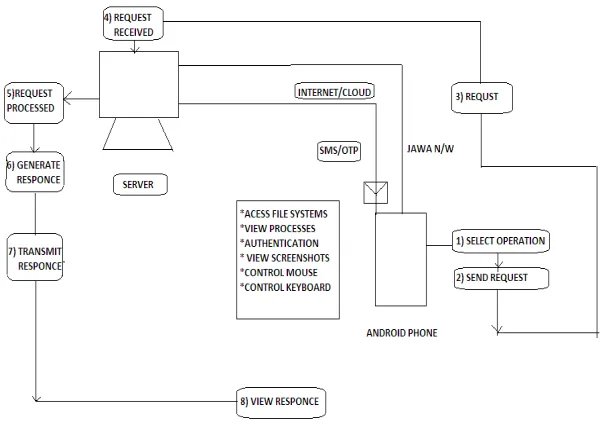
Virtual Network Computing is a graphical desktop sharing system, we can seen in the block diagram that server(remote desktop) and Android phone are connected with internet/cloud when client select any operation for example FTP then client send request to server then server processed that request and generate response and then transmit, we have different functions like keyboard shortcuts, FTP,E-mail, PC to mobile transfer, Open applications,
ISSN(Online): 2320-9801
ISSN (Print): 2320-9798
I
nternational
J
ournal of
I
nnovative
R
esearch in
C
omputer
and
C
ommunication
E
ngineering
(An ISO 3297: 2007 Certified Organization)
Vol. 3, Issue 6, June 2015
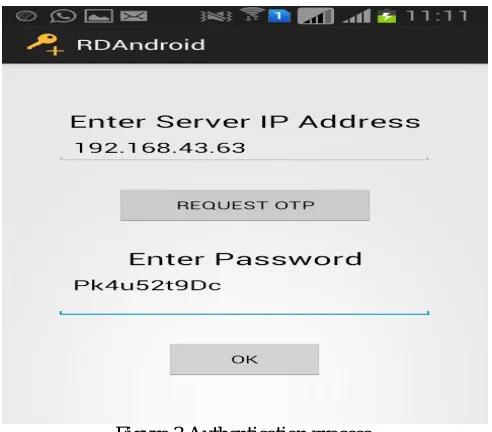
Authentication is set by asking the IP address of the remote system. If the IP address is incorrect it displays an error message and if the IP address is correct. With the help of the HTTP proxy, the client is connected to the server which is our remote desktop and then it send OTP
Figure 3 Authentication process
IV. DESIGN OF THE SYSTEM
We have different PC applications on Android mobile function of each module is define below
Figure 4 Different Functionality Modules
A)KEYBOARD SHORTCUTS
ISSN(Online): 2320-9801
ISSN (Print): 2320-9798
I
nternational
J
ournal of
I
nnovative
R
esearch in
C
omputer
and
C
ommunication
E
ngineering
(An ISO 3297: 2007 Certified Organization)
Vol. 3, Issue 6, June 2015
command, and also we can remove such commands using function remove command. after command propagate we can close module and can go back to another module.in the figure we can see Keyboard PC application on Android moile.
Figure5 Keyboard Shortcut Module
B)TYPE ON THE FLY
In this module suppose Any one want to type any word on the remote desktop then he should type that word through this module on android mobile and it open in the notepad on the remote desktop then we can save that text document or edit that text through module .in the following figure we see that PC application on Android mobile.
ISSN(Online): 2320-9801
ISSN (Print): 2320-9798
I
nternational
J
ournal of
I
nnovative
R
esearch in
C
omputer
and
C
ommunication
E
ngineering
(An ISO 3297: 2007 Certified Organization)
Vol. 3, Issue 6, June 2015
After entering the text on the android mobile it will appear on the remote desktop through Notepad.
Figure7 Text Appear On The Remote Desktop
C) OPEN APPLICATION
In this applications we can create shortcut list. suppose we frequently required one of the file then we can create shortcut of that folder and after propagating that folder through android mobile then it direct open that file on remote desktop for example suppose we most time open My movie folder then using simply this android module we directly open that folder in this we just required to give address path of that file.
ISSN(Online): 2320-9801
ISSN (Print): 2320-9798
I
nternational
J
ournal of
I
nnovative
R
esearch in
C
omputer
and
C
ommunication
E
ngineering
(An ISO 3297: 2007 Certified Organization)
Vol. 3, Issue 6, June 2015
D) FILE TRANSFER PROTOCOL
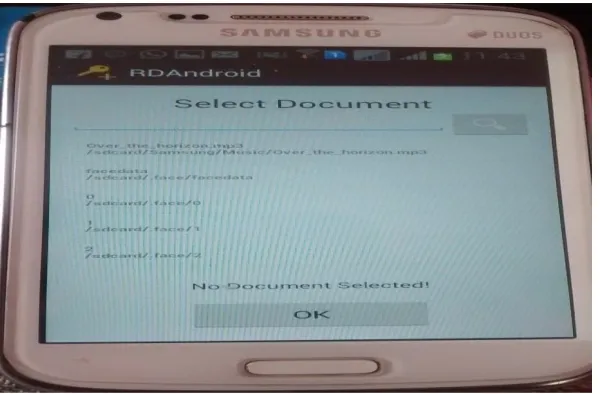
This is one of the most important module of android mobile. through this module suppose we want to transfer some important documents or file of android mobile to remote desktop then by just selecting that documents we can send that documents to remote desktop through this module.In the fig we see that how that module is work, in this we can select documents through different folders of android mobiles or we can search documents and transfer to remote desktop
Figure 9 File Transfer Protocol Module
E) E-MAIL
This is also one of the most important feature of android module when we got access of remote desktop (server) on android mobile (client) then through client we can send email to anyone
ISSN(Online): 2320-9801
ISSN (Print): 2320-9798
I
nternational
J
ournal of
I
nnovative
R
esearch in
C
omputer
and
C
ommunication
E
ngineering
(An ISO 3297: 2007 Certified Organization)
Vol. 3, Issue 6, June 2015
F) PC TO MOBILE TRANSFER
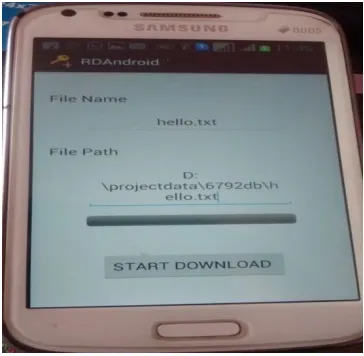
This is also one of the important activity for two way communications we have to write down file name which we want to transfer to client(android mobiles) from server (remote desktop) and after that file path means address of that file, and then we can transfer that file to android mobile from PC
Figure11 PC to Mobile Transfer
The advantage of this activity is that suppose we are outside from our location and we urgently required one of the file which is in the remote desktop then using this activity we can download or transfer that file from PC to our android mobile
G) MOUSE
when we go mouse activity of android mobile then after pressing the Right Click that window we seen on mobile.
Figure 12 Mouse Activity of android module
In that activity we can right click of mouse, mouse press and mouse release and back towards another module After doing activity on the client same things appear on the server.
ISSN(Online): 2320-9801
ISSN (Print): 2320-9798
I
nternational
J
ournal of
I
nnovative
R
esearch in
C
omputer
and
C
ommunication
E
ngineering
(An ISO 3297: 2007 Certified Organization)
Vol. 3, Issue 6, June 2015
V. PROTOCOLS USED IN VNC
The communication between client and server using RFB protocol consist different phases .Handshake ,initialization and Normal interaction. Handshake phase determines the RFB protocol version and type of security to be used, initialization phase involves the exchange of initialization message between the client and the server for that we use ClientInit and ServerInit messages. the ClientInit message sent from the client specifies if the server should share the desktop with other clients then upon receiving the clientInit message the server replies the client with a serverInit message that consist of the width and height of the servers framebuffer, it’s pixel format and name associated with the desktop. and in the final phase client send any request to server and receive framebuffer updates from server.there is number of encoding types of RFB protocol Raw ,Copy-Rect, RRE, TRLE, Hextile and ZRLE but ZRLE,TRLE and copy-Rect encodings offer the best compression for typical desktop [6]
VI . CONCLUSION
Any persons at out of workstations and urgently require some document from remote desktop then using our application we can transfer document from PC to Android mobile and vice versa and also Using our application IT administrator are able to troubleshoot and to solve problem of Remote desktop
REFERENCES
1. Android. http://www.android.com Retrieved March 1st, 2011. 2. www.realvnc.com/docs/rfbproto.pdf, reviewed on June 20th,2011
3. Remote Control of Mobile Devices in Android Platform Angel, Gonzalez Villan , Student Member, IEEE and josep jorba esteve Member IEEE.
4. Global Telecommunications Conference GLOBECOM 2010), 2010 IEEE.
5. VNC architecture based remote desktop access through android mobile phones,by Archana Jadhav ,Vipul Oswal,Sagar Madane ,Harshal Zope,Vishal Hatmode International Journal of Advanced Research in Computer and Communication Engineering Vol. 1, Issue 2, April 2012 6. Richardson, T., and Levine, J. The Remote Framebuffer Protocol.RFC 6143, Internet Engineering Task Force (IETF), March 2011.
7. The RFB Protocol,Tristan Richardson,RealVNC Ltd(formerly of Olivetti Research Ltd / AT&T Labs Cambridge) ,Version 3.8,Last updated 26 November 2010
8. Ha-Young Ko, Jae-Hyeok Lee, Jong-Ok Kim, “Implementation and Evaluation of Fast Mobile VNC Systems”, IEEE Transactions on Consumer Electronics, Vol. 58, No. 4, 2012.