555-710-110
Comcode 108343336
Issue 1
October 1999
Release 1.0
Notice
Every effort has been made to ensure that the information in this guide is complete and accurate at the time of printing. Information, however, is subject to change. See Appendix A, “Customer Support Information,” in System Programming for important information.
Your Responsibility for Your System’s Security
Toll fraud is the unauthorized use of your telecommunications system by an unauthorized party—for example, persons other than your company’s employees, agents, subcontractors, or persons working on your company’s behalf. Note that there may be a risk of toll fraud associated with your
telecommunications system, and, if toll fraud occurs, it can result in substantial additional charges for your telecommunications services.
You and your System Manager are responsible for the security of your system, such as programming and configuring your equipment to prevent unauthorized use. The System Manager is also
responsible for reading all installation, instruction, and system administration documents provided with this product in order to fully understand the features that can introduce risk of toll fraud and the steps that can be taken to reduce that risk. Lucent Technologies does not warrant that this product is immune from or will prevent unauthorized use of common-carrier telecommunication services or facilities accessed through or connected to it. Lucent Technologies will not be responsible for any charges that result from such unauthorized use. For important information regarding your system and toll fraud, see Appendix A, “Customer Support Information,” in System Programming.
Federal Communications Commission Statement
This equipment has been tested and found to comply with the limits for a Class A digital device, pursuant to Part 15 of the FCC Rules. These limits are designed to provide reasonable protection against harmful interference when the equipment is operated in a commercial environment. This equipment generates, uses, and can radiate radio frequency energy and, if not installed and used in accordance with the instruction manual, may cause harmful interference to radio communications. Operation of this equipment in a residential area is likely to cause harmful interference, in which case the user will be required to correct the interference at their own expense. For further FCC information, see Appendix A, “Customer Support Information,” in System Programming.
Canadian Department of Communications (DOC) Interference Information
This digital apparatus does not exceed the Class A limits for radio noise emissions set out in the radio interference regulations of the Canadian Department of Communications.
Le Présent Appareil Numérique n’émet pas de bruits radioélectriques dépassant les limites applicables aux appareils numériques de la classe A préscrites dans le réglement sur le brouillage radioélectrique édicté par le ministère des Communications du Canada.
Year 2000 Compliance
The MERLIN MAGIX Integrated System is certified to be Year 2000 compliant. Additional information on this certification, and other issues regarding Year 2000 compliance, is available online at
MLS-18D, MLS-34D, SYSTIMAX, TransTalk, and Voice Power are registered trademarks and 4ESS, Intuity, Lucent Technologies, MERLIN MAGIX, and ProLogix are trademarks of Lucent Technologies in the U.S. and other countries.
Acculink, ACCUNET, MEGACOM, MulitiQuest, MLX-5, MLX-5D, MLX-16DP, MLX-10D, MLX-10DP, and NetPROTECT are registered trademarks of AT&T.
Microsoft, Windows, Windows NT, and MS-DOS are registered trademarks of Microsoft Corporation. ProComm and ProComm Plus are registered trademarks of DataStorm Technologies, Inc.
Supra, Supra NC, StarSet, and Mirage are registered trademarks of Plantronics, Inc. UNIX is a registered trademark of UNIX System Laboratories, Inc.
PagePac is a registered trademark and Powermate and Zonemate are trademarks of DRACON, a division of Harris Corporation.
Okidata is a registered trademark of Okidata Corporation. Pipeline is a trademark of Ascend Communications, Inc.
Intel and Pentium are registered trademarks of Intel Corporation. Apple and Macintosh are registered trademarks of Apple Computer, Inc. IBM is a registered trademark of International Business Machines, Inc. Novell and NetWare are registered trademarks of Novell Corporation. CLASS is a servicemark of Bellcore.
Ordering Information
For more information about Lucent Technologies documents, refer to the section entitled “Related Documents” in “About This Guide” in System Programming.
Call: BCS Publications Center
Voice 1 800 457-1235 International Voice 317 322-6791 Fax 1 800 457-1764 International Fax 317 322-6699
Write: BCS Publications Center 2855 North Franklin Road Indianapolis, IN 46219-1385
continental U.S., contact your local Lucent Technologies authorized representative. Network Engineering Group
For assistance in designing a private network with DEFINITY ECS or DEFINITY ProLogix, call the Network Engineering Group at 1 888 297-4700.
Lucent Technologies Corporate Security
Whether or not immediate support is required, all toll fraud incidents involving Lucent Technologies products or services should be reported to Lucent Technologies Corporate Security at 1 800
821-8235. In addition to recording the incident, Lucent Technologies Corporate Security is available
for consultation on security issues, investigation support, referral to law enforcement agencies, and educational programs.
Lucent Technologies Fraud Intervention
If you suspect you are being victimized by toll fraud and you need technical support or assistance, call BCS National Service Assistance Center at 1 800 628-2888.
Warranty
The exclamation point in an equilateral triangle is intended to alert the user to the presence of important operating and maintenance (servicing) instructions in the literature accompanying the product.
To reduce the risk of fire, electrical shock, and injury to persons, follow these basic safety precautions when installing telephone equipment:
■ Read and understand all instructions.
■ Follow all warnings and instructions marked on or packed with the product. ■ Never install telephone wiring during a lightning storm.
■ Never install a telephone jack in a wet location unless the jack is specifically designed for wet locations.
■ Never touch uninsulated telephone wires or terminals unless the telephone wiring has been disconnected at the network interface.
■ Use caution when installing or modifying telephone lines.
■ Use only Lucent Technologies-manufactured MERLIN MAGIX Integrated System circuit
modules, carrier assemblies, and power units in the MERLIN MAGIX Integrated System control unit.
■ Use only Lucent Technologies-recommended/approved MERLIN MAGIX Integrated System accessories.
■ If equipment connected to the MLX telephone modules (008 MLX, 408 GS/LS-MLX, 408 GS/LS-ID-MLX, and 016 MLX) or the ETR telephone module (016 ETR) is to be used for in-range out-of-building (IROB) applications, IROB protectors are required.
■ Do not install this product near water—for example, in a wet basement location. ■ Do not overload wall outlets, as this can result in the risk of fire or electrical shock.
■ The MERLIN MAGIX Integrated System is equipped with a 3-wire grounding-type plug with a third (grounding) pin. This plug will fit only into a grounding-type power outlet. This is a safety feature. If you are unable to insert the plug into the outlet, contact an electrician to replace the obsolete outlet. Do not defeat the safety purpose of the grounding plug.
■ The MERLIN MAGIX Integrated System requires a supplementary ground.
■ Do not attach the power supply cord to building surfaces. Do not allow anything to rest on the power cord. Do not locate this product where the cord will be abused by persons walking on it. ■ Slots and openings in the module housings are provided for ventilation. To protect this equipment
from overheating, do not block these openings.
■ Do not operate telephones if chemical gas leakage is suspected in the area. Use telephones located in some other safe area to report the trouble.
■ To eliminate the risk of personal injury due to electrical shock, DO NOT attempt to install or remove an MFM from your MLX telephone. Opening or removing the module cover of your telephone may expose you to dangerous voltages.
■ ONLY an authorized technician or dealer representative shall install, set options, or repair an MFM.
SAVE THESE INSTRUCTIONS
Contents
Contents
vii
List of Figures
xii
List of Tables
xiv
About This Guide
xvii
Intended Audience . . . xvii
How to Use This Guide. . . xvii
Terms and Conventions Used . . . xix
Security. . . xx
Related Documents . . . xx
How to Comment on This Guide. . . xxii
Features
Overview. . . 1Index of Feature Names . . . 2
Index of Features by Activity. . . 13
Abbreviated Ring . . . 27
Account Code Entry/Forced Account Code Entry. . . 28
Alarm . . . 35
Alarm Clock . . . 38
Allowed/Disallowed Lists . . . 40
Authorization Code . . . 48
Auto Dial . . . 55
Automatic Line Selection and Ringing/Idle Line Preference . . . 62
Automatic Maintenance Busy . . . 68
Automatic Route Selection . . . 70
Barge-In . . . 86
Basic Rate Interface (BRI) . . . 90
Call Waiting. . . 100
Callback . . . 106
Caller ID . . . 115
Calling Restrictions . . . 121
Camp-On . . . 128
Centralized Voice Messaging . . . 132
Centrex Operation . . . 133
Conference . . . 145
Coverage . . . 157
CTI (Computer Telephony Integration) Link . . . 188
Digital Data Calls . . . 201
Direct Station Selector . . . 216
Direct Voice Mail. . . 233
Directories. . . 237
Display . . . 244
Do Not Disturb . . . 284
Drop . . . 289
Extension Status. . . 290
Fax Extension . . . 295
Feature Button . . . 298
Forced Account Code Entry . . . 299
Forward and Follow Me . . . 300
Group Calling . . . 321
Hands-Free Answer Intercom (HFAI) . . . 356
Headset Options . . . 357
Hold . . . 365
HotLine . . . 374
Idle Line Preference . . . 378
Inside Dial Tone . . . 379
Inspect . . . 380
Labeling . . . 384
Language Choice . . . 389
Line Request. . . 394
Messaging . . . 397
Microphone Disable . . . 411
Multi-Function Module . . . 413
Music-On-Hold . . . 420
Night Service . . . 424
Notify. . . 435
Paging. . . 436
Park . . . 445
Personal Lines . . . 451
Personalized Ringing . . . 459
Pickup . . . 460
Pools. . . 467
Power-Failure Transfer . . . 474
Primary Rate Interface (PRI) and T1 . . . 476
Privacy . . . 515
Programming . . . 518
Queued Call Console (QCC) . . . 527
Recall/Timed Flash . . . 552
Redial . . . 559
Reminder Service . . . 563
Remote Access. . . 567
Ringing Options . . . 582
Saved Number Dial. . . 590
Second Dial Tone Timer . . . 594
Service Observing . . . 596
Signal/Notify . . . 609
Speed Dial . . . 613
Station Message Detail Recording (SMDR) . . . 621
System Access/Intercom Buttons . . . 635
System Renumbering . . . 647
Tandem Switching . . . 659
Timed Flash . . . 671
Timer. . . 672
Toll Type . . . 673
Touch-Tone or Rotary Signaling. . . 675
Transfer . . . 682
Uniform Dial Plan Features. . . 700
Voice Announce . . . 715
Volume . . . 719
A
Customer Support Information
A-1
Support Telephone Number . . . A-1 Federal Communications Commission (FCC)
Electromagnetic Interference Information. . . A-1 Canadian Department of Communications
(DOC) Interference Information . . . A-1 FCC Notification and Repair Information . . . A-2 Installation and Operational Procedures. . . A-3 DOC Notification and Repair Information . . . A-4 Renseignements sur la Notification du
Ministère des Communications du Canada et
la Réparation . . . A-5 Security of Your System: Preventing Toll Fraud. . . A-7 Toll Fraud Prevention . . . A-8 Other Security Hints . . . A-13 Limited Warranty and Limitation of Liability . . . A-16 Remote Administration and Maintenance. . . A-18
B
Features and Planning Forms
B-1
D
General Feature Use and Telephone Programming
D-1
General Feature Use Information . . . D-1 Telephone and Operator Features . . . D-3 Telephone Programming . . . D-32
E
System Programming Menu Hierarchy
E-1
F
Sample Reports
F-1
G
Button Diagrams
G-1
4400-Series Telephones. . . G-1 MLX Telephones. . . G-3 ETR and MLS Telephones . . . G-6 TransTalk MDW 9031 Telephone. . . G-15 Business Cordless 905 Telephone . . . G-16
H
Programming Special Characters
H-1
4400 and Single-Line Telephones . . . H-1 4400D and Multiline 4400-Series Telephones . . . H-2 MLX-10 and MLX-5 Non-Display Telephones . . . H-3 MLX Display Telephones . . . H-3 ETR and MLS Non-Display Telephones. . . H-4 ETR and MLS Display Telephones. . . H-4
I
Applications
I-1
Organization of Descriptions. . . I-2 System Support for Applications. . . I-2 Supported Printers . . . I-3 PassageWay Direct Connection Solution . . . I-4 Voice Messaging Systems . . . . I-5 MERLIN Messaging System. . . I-8 Octel 100 Messaging . . . I-9 MERLIN MAGIX Enhanced Customer Care Solution . . . I-10 MERLIN Integrated Network Access . . . I-11 Call Accounting System . . . I-11 Call Accounting Terminal . . . I-13 MERLIN MAGIX Reporter. . . I-16 WinSPM . . . I-21 Intuity . . . I-22 Intuity CONVERSANT . . . I-23 TransTalk 9000 Digital Wireless System . . . I-24 Business Cordless 905 Telephone . . . I-24 Videoconferencing . . . I-25 ISDN Terminal Adapter. . . I-31
GL Glossary
GL-1
List of Figures
Features
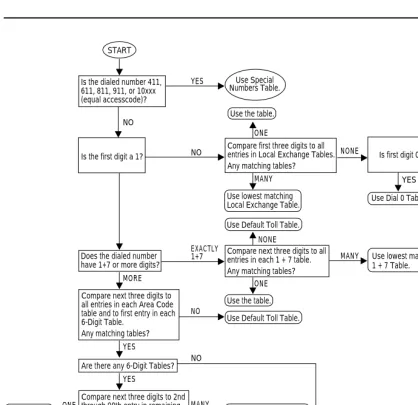
1 ARS Table Selection . . . 78
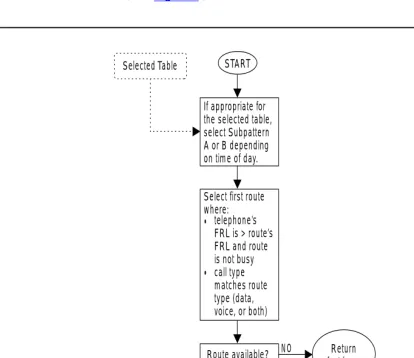
2 ARS Route Selection within a Table . . . 79
3 Subpattern Selection . . . 80
4 Full Centrex Service . . . 135
5 Limited Centrex Service . . . 136
6 Group Coverage Only or All Individual Coverage Receivers Unavailable . . . 169
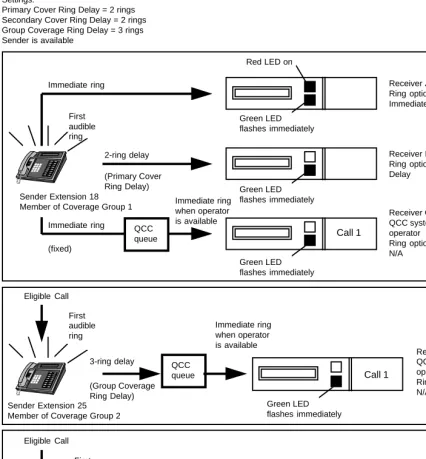
7 Individual (Primary and Secondary) and Group Coverage Ringing Patterns . . . 170
8 Cover to Voice Mail with Escape to System Operator . . . 171
9 Primary Coverage . . . 172
10 Phantom Calling Groups . . . 174
11 Phantom Extensions . . . 175
12 Coverage and Direct Voice Mail . . . 176
13 Direct Station Selector (DSS) . . . 218
14 2-Line Display Home Screen with Posted Message . . . 251
15 7-Line MLX Telephone Display Home Screen . . . 252
16 2-Line Display Menu Screen . . . 253
17 7-Line MLX Display Menu Screen . . . 253
18 2-Line Display Inspect Screen for Programmed Button . . . 255
19 7-Line Display Inspect Screen for Programmed Button . . . 255
20 Home Calling Group with a Support Calling Group . . . 331
21 Two Calling Groups Supporting Each Other . . . 331
22 Multiple Home Groups Sharing a Support Group . . . 332
23 A Support Calling Group with its Own Support Calling Group . . . 333
24 PRI Lines and B-Channel Groups . . . 483
25 PRI Call Processing (Non-Tandem Only) . . . 497
26 4424LD+ Telephone . . . 520
27 MLX-20L Telephone . . . 521
28 4424LD+ System Programming Console Overlay . . . 522
29 MLX-20L System Programming Console Overlay . . . 522
30 SPM Display . . . 524
31 QCC Button Assignments for a 4424LD+ Telephone . . . 533
32 QCC Button Assignments for an MLX-20L Telephone . . . 533
33 Sample SMDR Report in ISDN Format . . . 623
34 2-Digit Numbering Plan . . . 649
35 3-Digit Numbering Plan . . . 651
36 Set Up Space Numbering Plan . . . 653
G Button Diagrams
G-7 MLX 5- and 10-Button Telephones (Hybrid/PBX Mode) . . . G-4 G-8 MLX-20L and MLX-28D Telephones (Key and Behind Switch Modes) . . . G-4 G-9 MLX-16DP Telephone (Key and Behind Switch Modes) . . . G-5 G-10 MLX 5- and 10-Button Telephones (Key and Behind Switch Modes) . . . G-5 G-11 ETR-34D Telephone (Hybrid/PBX Mode) . . . G-6 G-12 ETR-18/18D Telephones (Hybrid/PBX Mode) . . . G-6 G-13 ETR-6 Telephone (Hybrid/PBX Mode) . . . G-7 G-14 MLS-34D Telephone (Hybrid/PBX Mode) . . . G-7 G-15 MLS-18D Telephone (Hybrid/PBX Mode) . . . G-7 G-16 MLS-12/12D Telephones (Hybrid/PBX Mode) . . . G-8 G-17 MLS-6 Telephone (Hybrid/PBX Mode) . . . G-8 G-18 ETR-34D Telephone (Key Mode) . . . G-9 G-19 ETR-18/18D Telephones (Key Mode) . . . G-9 G-20 ETR-6 Telephone (Key Mode) . . . G-10 G-21 MLS-34D Telephone (Key Mode) . . . G-10 G-22 MLS-18D Telephone (Key Mode) . . . G-10 G-23 MLS-12/12D Telephones (Key Mode) . . . G-11 G-24 MLS-6 Telephone (Key Mode) . . . G-11 G-25 ETR-34D Telephone (Behind Switch Mode) . . . G-12 G-26 ETR-18/18D Telephone (Behind Switch Mode) . . . G-12 G-27 ETR-6 Telephone (Behind Switch Mode) . . . G-13 G-28 MLS-34D Telephone (Behind Switch Mode) . . . G-13 G-29 MLS-18D Telephone (Behind Switch Mode) . . . G-13 G-30 MLS-12/12D (Behind Switch Mode) . . . G-14 G-31 MLS-6 Telephone (Behind Switch Mode) . . . G-14 G-32 TransTalk MDW 9031 Telephone (Hybrid/PBX Mode) . . . G-15 G-33 TransTalk MDW 9031 Telephone (Key Mode) . . . G-15 G-34 TransTalk MDW 9031 Telephone (Behind Switch Mode) . . . G-15 G-35 Business Cordless 905 Telephone (Hybrid/PBX Mode) . . . G-16 G-36 Business Cordless 905 Telephone (Hybrid/PBX Mode) . . . G-16 G-37 Business Cordless 905 Telephone (Hybrid/PBX Mode) . . . G-16
H Programming Special Characters
I
Applications
List of Tables
Features
1 Special Characters for Outside Auto Dial . . . 56
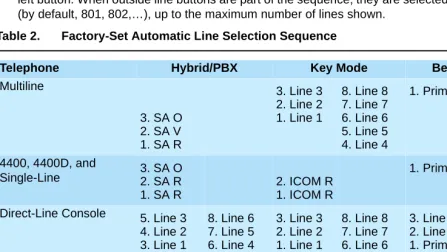
2 Factory-Set Automatic Line Selection Sequence . . . 64
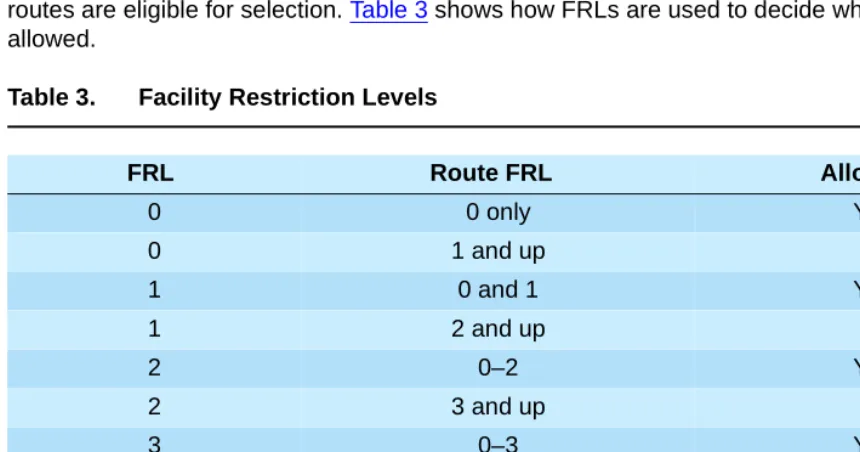
3 Facility Restriction Levels . . . 80
4 Ring Delays Affecting Coverage . . . 161
5 Ringing on Individual Coverage (Receiver) Buttons . . . 162
6 Calls Eligible and Calls Ineligible for Coverage. . . 165
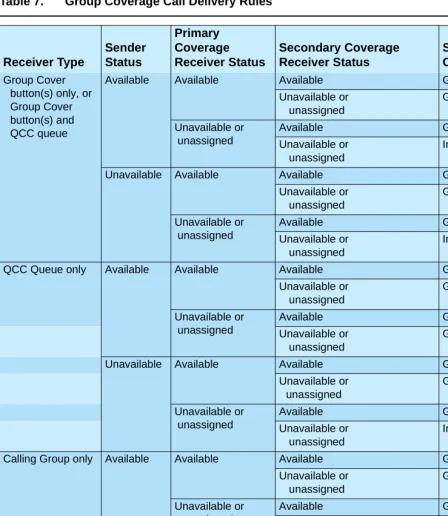
7 Group Coverage Call Delivery Rules . . . 168
8 Results of Pressing DSS Button while Active on a Call: DLC Position with One-Touch Hold . . . 220
9 Results of Pressing DSS Button while Active on a Call: DLC Position with One-Touch Transfer . . . 221
10 LED Meanings for Normal Call-Handling Operation . . . 222
11 LED Meanings for Supervisor Operation without Message Status Active . . . 223
12 LED Meanings for Hotel Extension Status Operation without Message Status Active . . . 224
13 LED Meanings for Hotel Extension Status Operation with Message Status Active . . . 225
14 LED Meanings for Supervisor or Hotel Extension Status Operation with Message Status Active . . . 226
15 Call Handling Displays . . . 247
16 Menu Screen Options . . . 252
17 Feature Screen Options . . . 254
18 Extension Status for Hotel Mode. . . 292
19 Extension Status for Group Calling Supervisor Mode. . . 292
20 Forwarded Call Ringing. . . 307
21 Eligibility of Calling Group Calls for Queue Control. . . 328
22 Checking the Effectiveness of Delay Announcements . . . 342
23 Factory-Set Posted Messages and Their Codes . . . 386
24 Receiving Messages Functions . . . 401
25 Message-Waiting Display Identifiers . . . 402
26 Posted Messages . . . 404
27 Call Types and Transfer Audible. . . 421
28 Types of Pickup – Individual . . . 461
29 Line Compensation Settings . . . 491
30 Sample PRI Dial Plan Routing Table . . . 499
31 Sample Network Selection Table . . . 502
32 .Sample Special Services Selection Table . . . 502
33 Sample Call-by-Call Services Table . . . 504
35 Features Available at Call Progress Stages . . . 532
36 Assigned QCC Buttons . . . 534
37 Remote Access Routing . . . 573
38 Distinctive Ringing. . . 585
39 Error Tones . . . 598
40 Renumbering Extensions . . . 654
41 System Requirements for TTRs . . . 677
42 TTRs Required by Voice Messaging Systems/Auto Attendants . . . 678
43 TTRs Required for Primary Delay Announcement Devices When Using Prompt-Based Overflow . . . 678
44 TTRs Required for Secondary Delay Announcement Devices When Using Prompt-Based Overflow . . . 679
45 Modules with TTRs . . . 680
B Features and Planning Forms
B-1 Alphabetical List of Features. . . B-1
C System Features
C-1 Availability by Mode . . . C-1
D General Feature Use and Telephone Programming
D-1 Telephone and Operator Features for MLX Telephones . . . D-4 D-2 Telephone and Operator Features for Multiline 4400-Series Telephones . . . D-13 D-3 Telephone Features for 4400, 4400D, and Single-Line Telephones . . . D-22 D-4 Telephone Features for ETR and MLS Telephones . . . D-25 D-5 Programming 4406D+ Telephones . . . D-33 D-6 Programming 4412D+, 4424D+, and 4424LD+ Telephones by Using the
Display . . . D-33 D-7 Programming MLX-10 and MLX-5 Nondisplay Telephones . . . D-36 D-8 Programming MLX Telephones by Using the Display. . . D-36 D-9 Programming ETR and MLS Telephones . . . D-38 D-10Programming TransTalk MDW 9000 Telephones. . . D-39
F Sample Reports
H Programming Special Characters
H-1 Special Characters for 4400 and Single-Line Telephones . . . H-1 H-2 Special Characters for 4400D and Multiline 4400-Series Telephones . . . H-2 H-3 Special Characters for MLX-10 and MLX-5 Non-Display Telephones . . . H-3 H-4 Special Characters for MLX Display Telephones . . . H-3 H-5 Special Characters for ETR and MLS Non-Display Telephones. . . H-4 H-6 Special Characters for ETR and MLS Display Telephones . . . H-4
I
Applications
x
About This Guide
0The MERLIN MAGIX Integrated System is an advanced digital switching system that integrates voice and data communications features. Voice features include traditional telephone features, such as Transfer and Hold, and advanced features, such as Group Coverage, Direct Voice Mail, and Tandem Switching. Data features allow both voice and data to be transmitted over the same system wiring.
Intended Audience
This book provides detailed information about system features, extension features, and system applications of the MERLIN MAGIX Integrated System. It is intended as a reference for anyone needing such information, including support personnel, sales representatives, System Managers, and account executives. It is also intended for technicians who are responsible for system installation, maintenance, and troubleshooting.
How to Use This Guide
The section entitled ‘‘Index of Feature Names,’’ on page 2, is provided to help you to find the appropriate feature name for the function that you want described. You can then quickly find the description of the feature or features using the page numbers provided. If you do not know the name of a feature that interests you, the ‘‘Index of Features by Activity,’’ on page 13, provides a list of functions and the features that provide them, along with the page numbers where you can find descriptions.
Each entry in the guide explains a feature or set of features in great detail.
“At a Glance,” a boxed table at the beginning of each feature description, summarizes, as applicable, the following aspects of the feature or feature group:
■ Users Affected. Shows what category of users is affected by a feature. For example, “Auto
Dial” lists telephone users and Direct-Line Console (DLC) operators as those affected by the feature. [From this you can conclude that Queued Call Console (QCC) operators cannot use Auto Dial.]
■ Reports Affected. Cites the Station Message Detail Recording (SMDR) reports in which you
can find information relating to the feature.
■ Programming Code(s). As appropriate, lists the programming code(s) used to program the
feature on a button or to turn it on or off.
■ Feature Code(s). Lists the feature code(s) you can use to activate the feature or turn it off. ■ 4400-Series and MLX Display Label(s). Lists the feature name as it appears on 4400-Series
and MLX display telephones.
■ System Programming. If applicable, summarizes the system programming procedure(s) that
control the feature.
■ Maximum(s). If applicable, tells you what maximum numbers apply to the feature.
■ Factory Setting(s). Shows you the default programming, that is, how the system sets the
feature when no one programs it.
Following each “At a Glance” table is a full description of the feature or feature group, telling you how it works for those who have different types of equipment or programmed positions. Following the description, feature entries include (as applicable) each of these sections:
■ Considerations and Constraints. An explanation of exceptions and unusual conditions
pertaining to the feature. This section can help you troubleshoot a problem with the feature. ■ Mode Differences. An explanation of variations in the use of the feature in the different modes
supported by the system.
■ Telephone Differences. An explanation of variations in the use of the feature with different
telephones.
■ Feature Interactions. A list of issues and considerations to be aware of when using another
feature in conjunction with the main feature described. The list is arranged alphabetically by feature.
‘‘Related Documents’’ on page xx provides a complete list of system documentation together with ordering information.
In the USA only, Lucent Technologies provides a toll free customer Helpline 24 hours a day. Call
the Helpline at 1 800 628-2888 (consultation charges may apply), or contact your Lucent Technologies representative if you need assistance when installing, programming, or using your system.
Outside the USA, if you need assistance when installing, programming, or using your system,
Terms and Conventions Used
The terms described here are used in preference to other, equally acceptable terms for describing systems.
Lines, Trunks, and Facilities
Facility is a general term that designates a communications path between a telephone system and
the telephone company central office. Technically, a trunk connects a switch to a switch—for example, the MERLIN MAGIX Integrated System to the central office. Technically, a line is a loop-start facility or a communications path that does not connect switches—for example, an intercom line or a Centrex line. In actual usage, however, the terms line and trunkare often applied interchangeably. In this guide, we use line/trunk and lines/trunks to refer to facilities in general. Specifically, we refer to digital facilities. We also use specific terms such as Personal Line,
ground-start trunk, Direct Inward Dialing (DID) trunk, and so on. When you talk to personnel at your local
telephone company central office, ask them which terms they use for the specific facilities they connect to your system.
Typographical Conventions
Certain type fonts and styles act as visual cues to help you rapidly understand the information presented:
Product Safety Advisories
Throughout these documents, hazardous situations are indicated by an exclamation point inside a triangle and the word CAUTION or WARNING.
WARNING:
Warning indicates the presence of a hazard that could cause death or severe personal injury if the hazard is not avoided.
Convention Example
Italics or bold indicates emphasis. It is very important that you follow these steps. WARNING: Do not remove modules from the carrier without following proper procedures. Italics also sets off special terms. The part of the headset that fits over one or
both ears is called a headpiece. Plain constant-width type indicates text that
appears on the telephone display or PC screen, as well as characters you dial at the telephone or type at the PC.
CAUTION:
Caution indicates the presence of a hazard that could cause minor personal injury or property damage if the hazard is not avoided.
Security
Certain features of the system can be protected by passwords to prevent unauthorized users from abusing the system. You should assign passwords wherever possible and limit distribution of such passwords to three or fewer people.
Nondisplaying authorization codes and telephone numbers provide another layer of security. For more information, see Appendix A, ‘‘Customer Support Information.”
Throughout this guide, toll fraud security hazards are indicated by an exclamation point inside a triangle and the words SECURITY ALERT.
SECURITY ALERT:
Security Alert indicates the presence of a toll fraud security hazard. Toll fraud is the
unauthorized use of your telecommunications system, or use by an unauthorized party (e.g., persons other than your company’s employees, agents, subcontractors, or persons working on your company’s behalf). Be sure to read ‘‘Your Responsibility for Your System’s Security’’
on the inside front cover of this guide and ‘‘Security of Your System: Preventing Toll Fraud’’ in
Appendix A, “Customer Support Information.”
Related Documents
The documents listed in the following table are part of the MERLIN MAGIX documentation set. Within the continental United States, contact the Lucent Technologies BCS Publications Center by calling 1 800 457-1235.
Document No. Title
System Documents:
555-710-100 Customer Documentation Package:
Consists of paper versions of the System Manager’s Quick Reference, the Feature Reference, and System Programming 555-710-110 FeatureReference
555-710-111 System Programming
555-670-112 MERLIN LEGEND® Communications System, Release 7.0, System Planning
System Documents:
555-710-113 System Planning Forms
555-710-119 System Manager’s Quick Reference
555-610-150 MERLIN LEGEND® Communications System, Release 6.1, Network Reference
555-710-800 Customer Reference CD-ROM:
Consists of the System Manager’s Quick Reference, the Feature Reference, System Programming, and the Network Reference
Telephone User Support:
555-710-123 (U.S. English)
4400/4400D Telephone User’s Guide
555-710-123FRC (Canadian French)
4400/4400D Telephone User’s Guide
555-710-127 (U.S. English)
4406D+, 4412D+, 4424D+, and 4424LD+ Telephone User’s Guide
555-710-127FRC (Canadian French)
4406D+, 4412D+, 4424D+, and 4424LD+ Telephone User’s Guide
555-660-122 MLX Display Telephone User’s Guide
555-630-150 MLX- 5D®, MLX-10D ®and MLX-10DP® Display Telephone Tray Cards (5 cards)
555-630-152 MLX-28D® and MLX-20L® Telephone Tray Cards (5 cards) 555-660-124 MLX-5® and MLX-10® Nondisplay Telephone User’s Guide 555-630-151 MLX-5® and MLX-10® Nondisplay Telephone Tray Cards (6 cards) 555-630-155 MLX-16DP® Display Telephone Tray Cards (5 cards)
555-670-151 MLS and ETR Telephone Tray Cards
555-670-152 MLS and ETR Telephone Tray Cards (16 cards) 555-660-126 Single-Line Telephones User’s Guide
555-660-138 MDC and MDW Telephones User's Guide
System Operator Support:
555-710-134 Digital Direct LIne Console Operator’s Guide 555-710-136 Digital Queued Call Console Operator’s Guide
How to Comment on This Guide
0We welcome your comments, both positive and negative. Please use the feedback form on the next page to let us know how we can continue to serve you. If the feedback form is missing, write directly to:
Documentation Manager Lucent Technologies
211 Mount Airy Road, Room 2W-330 Basking Ridge, NJ 07920
Miscellaneous User Support:
555-661-130 Calling Group Supervisor and Service Observer User Guide 555-650-105 Data and Video Reference
Documentation for Qualified Technicians:
555-661-140 MERLIN LEGEND® Communications System, Release 6.1, Installation, SPM, Maintenance and Troubleshooting
555-710-142 Installation, SPM, Maintenance and Troubleshooting Supplement 555-710-116 Pocket Reference
Toll Fraud Security:
555-025-600 BCS Products Security Handbook
Features
Overview
This guide provides both summary and detailed information about the features of the MERLIN MAGIX Integrated System. For each feature, the following types of information are provided, as applicable:
■ At a Glance. Summary information about the feature, including users affected, telephones supported, programming codes, and factory settings. Display names without brackets are those that appear on 7-line displays; display names inside brackets are those that appear on 2-line displays.
■ Description. A detailed description of the functions/uses of the feature.
■ Considerations and Constraints. An explanation of exceptions and unusual conditions pertaining to the feature.
■ Mode Differences. An explanation of variations in the use of the feature in the different modes supported by the system.
■ Telephone Differences. An explanation of variations in the use of the feature with different telephones supported by the system.
■ Feature Interactions. A list of issues and considerations that you should know about when using one feature in conjunction with another.
MLX, ETR, and MLS telephones have a fixed Feature button, which you press when you want to use a feature. There is no fixed Feature button on 4400-Series telephones; you can program a Feature button on the multiline 4400-Series telephones.
For easy reference, features are covered in alphabetical order. The ‘‘Index of Feature Names,’’
which follows, shows where information can be found about features and other system
Index of Feature Names
Feature Name. .. See... Page #...
#
2B Data Digital Data Calls.
See also Data/Video Reference
201
A
Account Code Account Code Entry/Forced Account Code Entry 28
Administration Programming
See also System Programming
518
Alarm Alarm 35
Alarm Clock Alarm Clock 38
Allowed List Allowed/Disallowed Lists Night Service
40 424
Area Code Tables Automatic Route Selection 70
Attendant Barge-In Barge-In 86
Attendant Console—Display Display 244
Attendant Console—Switched Loop Queued Call Console 527
Attendant DSS Direct Station Selector 216
Attendant Message Waiting Messaging 397
Authorization Code Authorization Code 48
Auto Dial Auto Dial 55
Auto Login/Logout (Calling Group) Group Calling Extension Status
321 290
Automatic Callback Callback Remote Access
106 567
Automatic Completion Transfer 682
Automatic Extended Call Completion Queued Call Console 527
Automatic Hold or Release Queued Call Console Hold
527 365
Automatic Line Selection Automatic Line Selection and Ringing/Idle Line Preference
62
Automatic Maintenance Busy Automatic Maintenance Busy 68
Automatic Route Selection (ARS) Automatic Route Selection 70
Automatic Route Selection (ARS) over Private Networks
Automatic Route Selection and Tandem Switching
See also Network Reference
70 659
Autoqueuing Callback Remote Access
B
Barge-In Barge-In 86
Barrier Codes Remote Access 567
Basic Rate Interface Basic Rate Interface
See also Data/Video Reference
90
Behind Switch Operation Recall/Timed Flash Centrex Operation
552 133
Bridging of Station Lines on Multiline Telephones
Personal Lines
System Access/Intercom Buttons
451 635
C
Call Accounting System (CAS) Appendix I 11
Call Accounting Terminal (CAT) Appendix I 13
Call-by-Call Services Table Primary Rate Interface (PRI) and T1 See also Data/Video Reference
476
Call Completion Transfer, One-Touch 682
Call Coverage Coverage 157
Call Forward(ing)/Follow me Forward and Follow Me 300
Call Park Park 445
Call Pickup Pickup 460
Call Pickup—Directed Pickup 460
Call Pickup—Group Pickup 460
Call Records Station Messaging Detail Recording (SMDR)
621
Call Restrictions Calling Restrictions 121
Call Waiting Call Waiting 100
Callback Callback 106
Callback Queuing Callback 106
Caller ID Caller ID 115
Calling Group Group Calling 321
Calls-in-Queue Alarm Group Calling Queued Call Console
321 527
Camp-On Camp-On 128
Cancel Delivered Message Messaging 397
CAT (Call Accounting Terminal) Appendix I 13
Centralized Telephone Programming Programming
See also System Programming
518
Centralized Voice Messaging Centralized Voice Messaging See also Network Reference
132
Centrex Centrex Operation 133
Centrex Transfer via Remote Call Forwarding
Forward and Follow Me 300
Class of Restriction Remote Access 567
Computer Telephony Integration CTI Link 188
Conference Conference 145
Consultation Transfer Transfer 682
CONVERSANT® Appendix I 23
Coverage Coverage 157
Coverage Delay Interval Coverage 157
Coverage Group Coverage 157
Coverage Inhibit Coverage 157
Coverage On/Off Coverage 157
CTI Link CTI Link 188
D
Data Hunt Groups See Data/Video Reference Data Privacy Privacy
See also Data/Video Reference
515
Data Status See Data/Video Reference Data Transmission Speed See Data/Video Reference
Default Local and Toll Tables Automatic Route Selection 70
Delay Announcement Group Calling 321
Delay Ring Ringing Options 582
Delete Message Messaging 397
Deliver Message Messaging 397
Dial by Name (Display Feature) Directories 237
Dial Plan System Renumbering 647
Dial Plan: Non-Local Uniform Dial Plan (UDP) Features See also NetworkReference
700
Dial Plan Routing Table Primary Rate Interface (PRI) and T1 See also Data/Video Reference
476
Dial Tone Inside Dial Tone 379
Dialed Number Display 244
Digital Data Ports Digital Data Calls
See also Data/Video Reference
201
Digits in Extension System Renumbering 647
Direct Dept. Calling (Hunting, Hunt Groups) Group Calling 321
Direct Facility Termination (DFT) Personal Lines 451
Direct Group Calling (DGC) Group Calling 321
Direct Inward System Access (DISA) Remote Access 567
Direct-Line Console Direct-Line Console 208
Direct Pool Termination (DPT) Pools 467
Direct Station Selector Direct Station Selector 216
Direct Voice Mail Direct Voice Mail 233
Directory Built into PBX Directories 237
Directory of Extension Numbers Directories 237
Directory of System Speed Dial Numbers Speed Dial 613
Disallowed Lists Allowed/Disallowed Lists 40
Display Display 244
Display Preference Display 244
Display Prompting Display 244
Display of Name Associated with Station Labeling 384
Distinctive Ringing Ringing Options 582
Do Not Disturb Do Not Disturb 284
Drop Conference 145
E
Executive Barge-In Barge-In 86
Extended Call Completion Queued Call Console 527
Extended Station Status Extension Status 290
Extension Auto Dial Auto Dial 55
Extension Directory Directories 237
Extension Pickup Pickup 460
Extension Programming Programming 518
Extension Status Extension Status Group Calling
290 321
F
Facility Alpha/Number for Incoming Calls Labeling 384
Facility Restriction Levels (FRLs) Automatic Route Selection Uniform Dial Plan (UDP) Features
See also Network Reference
70 700
Fax Extension Fax Extension 295
Fax Message Waiting Messaging 397
Feature Button Feature Button 298
Feature feedback Display 244
Flexible Numbering System Renumbering 647
Follow Me Forward and Follow Me 300
Forced Account Code Entry Account Code Entry/Forced Account Code Entry 28
Forward Forward and Follow Me 300
G
General Pickup Pickup 460
Group Assignment Night Service 424
Group Call Pickup Pickup 460
Group Calling Group Calling Extension Status
321 290
Group Coverage Coverage 157
Group Paging (Speakerphone) Paging 436
Group Pickup Pickup 460
H
Hands-Free Answer Intercom Hands-Free Answer Intercom (HFAI) 356
Handset Mute Headset Options 357
Headset Auto Answer Headset Options 357
Headset Disconnect Headset Options 357
Headset/Handset Mute Headset Options 357
Headset Hang Up Headset Options 357
Headset Operation Headset Options 357
Headset Options Headset Options 357
Headset Status Headset Options Queued Call Console
357 527
HFAI Hands-Free Answer Intercom (HFAI) 356
Hold Hold 365
Hold Reminder Station Display 244
Hold Return Queued Call Console 527
Hotel mode Extension Status 290
HotLine HotLine 374
Hunt Groups Group Calling 321
Hunt Type Group Calling 321
I
ICOM buttons System Access/Intercom Buttons 635
Identification of Stations Being Covered on Covering Party’s Display
Display 244
Idle Line Preference Automatic Line Selection and Ringing/Idle Line Preference
62
Immediate Ring Ringing Options 582
Incoming Call Line Identification (ICLID) Caller ID 115
Individual Coverage Coverage 157
Individual Paging Paging 436
Individual Pickup Pickup 460
Inside Auto Dial Auto Dial 55
Inside Dial Tone Inside Dial Tone 379
Inspect Inspect 380
Inspect Screen Display 244
Intercom (ICOM) Buttons System Access/Intercom Buttons 635
Intercom Dialing System Access/Intercom Buttons 635
Intercom Dialing over Private Networks Uniform Dial Plan (UDP) Features See also Network Reference
700
Intuity™ Appendix I 22
Intuity CONVERSANT Appendix I 23
ISDN/BRI Interface Basic Rate Interface
See also Data/Video Reference.
90
ISDN/PRI Interface Primary Rate Interface (PRI) and T1 See also Data/Video Reference
476
ISDN Terminal Adapter Digital Data Calls Appendix I
See also Data/Video Reference
201 31
L
Labeling Labeling 384
Language Choice Language Choice 389
Last Number Dial Redial 559
Leave Message Messaging 397
Leave Word Calling Messaging 397
Line Pickup Pickup 460
Line Request Line Request 394
Line/trunk Pool Button Access Pools 467
Line/trunk Queuing Callback 106
Loudspeaker Paging Paging 436
LS-ID Delay Option Caller ID 115
M
Maintenance Alarm Alarm 35
Maintenance Busy Automatic Maintenance Busy 68
Manual Signaling Signal/Notify 609
Menu-Based Feature Activation Display 244
Menu-Based Station Programming Programming 518
MERLIN MAGIX Reporter Appendix I I-16
MERLIN Messaging System Appendix I I-8
Message (Fax) Messaging 397
Message Center Operation Queued Call Console 527
Message Indicator Messaging 397
Message Status (Operator) Messaging 397
Message Waiting Receiver Group Calling Messaging
321 397
Messaging Messaging 397
Microphone Disable Microphone Disable 411
Missed Reminder Reminder Service 563
Multi-Function Module Multi-Function Module 413
Music-On-Hold Music-On-Hold 420
Mute Microphone Disable 411
Mute, Headset/Handset Headset Options 357
N
N11 Table Automatic Route Selection 70
Name/Number of Internal Caller Display 244
Networked Systems Uniform Dial Plan (UDP) Features See also Network Reference
700
Next Message Messaging 397
Night Service Night Service 424
No Ring Option Ringing Options 582
Notify Signal/Notify 609
Numbering Plan System Renumbering 647
O
On- or Off-Hook Queuing Callback 106
One-Touch Hold Transfer 682
One-Touch Transfer Transfer 682
Operator Automatic Hold Hold 365
Operator Hold Timer Hold 365
Originate Only System Access/Intercom Buttons 635
Outside Auto Dial Auto Dial 55
Outward Restriction Calling Restrictions Night Service
121 424
P
Page All Paging 436
Paging Paging 436
Park Park 445
PassageWay® Direct Connection Solution Appendix I 4
PassageWay Telephony Services CTI Link
See also PassageWay Telephony Services Network Manager’s Guide
188
Patterns Automatic Route Selection 70
Personal Directory Directories 237
Personal Lines Personal Lines 451
Personal Speed Dial Speed Dial 613
Personalized Ring Ringing Options 582
Pickup Pickup 460
Pickup, Call Waiting Call Waiting 100
Pool Dial-Out Code Restriction Calling Restrictions 121
Pool Routing Automatic Route Selection 70
Pool Routing: Private Network Trunks Uniform Dial Plan (UDP) Features 700
Pools Pools 467
Position Busy Backup Queued Call Console 527
Posted Messages Messaging 397
PRI Primary Rate Interface (PRI) and T1 See also Data/Video Reference
476
Primary Coverage Coverage 157
Primary Rate Interface (PRI) Primary Rate Interface (PRI) and T1 See also Data/Video Reference
476
Prime Line Centrex Operation 133
Principal User Personal Lines
System Access/Intercom Buttons
451 635
Printer Station Message Detail Recording (SMDR) 621
Priority Call Ringing Ringing Options 582
Privacy Privacy 515
Programming Programming 518
Q
Queued Call Console (QCC) Queued Call Console 527
Queue Priority Queued Call Console 527
R
Recall Recall/Timed Flash 552
Redial Redial 559
Reminder Service Reminder Service 563
Remote Access Remote Access 567
Remote Administration See System Programming
Remote Call Forwarding Forward and Follow Me 300
Remote Programming See System Programming
Restrictions Calling Restrictions 121
Retrieve Message Messaging 397
Return Call Messaging 397
Return Ring Interval Queued Call Console 527
Ring Buttons System Access/Intercom Buttons 635
Ring Timing Options Ringing Options 582
Ringback (Transfer Audible) Transfer 682
Ringing/Idle Line Preference Automatic Line Selection and Ringing/Idle Line Preference
62
Ringing Options Ringing Options 582
Rotary Signaling Touch-Tone or Rotary Signaling 675
Routes per Pattern Automatic Route Selection 70
Routing by Dial Plan Primary Rate Interface (PRI) and T1 476
S
SA Buttons System Access/Intercom Buttons 635
Saved Number Dial Saved Number Dial 590
Scroll Messaging 397
Second Dial Tone Timer Second Dial Tone Timer 594
Secondary Coverage Coverage 157
Selective Callback Callback 106
Send All Calls Do Not Disturb 284
Send/Remove Message Messaging 397
Send Ring Ringing Options 582
Service Observing Service Observing 596
Set-Up Space System Renumbering 647
Shared System Access System Access/Intercom Buttons 635
Signaling Signal/Notify 609
Six-Digit Screening Automatic Route Selection 70
SMDR Station Message Detail Recording (SMDR) 621
Speakerphone Paging Paging 436
Special Numbers Pattern Automatic Route Selection 70
Special Services Selection Table Primary Rate Interface (PRI) and T1 476
Speed Dial Auto Dial Directories Speed Dial
55 237 613
SPM Programming
See also System Programming
518
Station Conference—External Parties Conference 145
Station Conference—Total Parties Conference 145
Station DSS Auto Dial Direct Station Selector 216
Station Lines System Access/Intercom Buttons 635
Station Message Detail Recording Station Message Detail Recording (SMDR) 621
Station Programming Programming 518
Station-to-Station Messaging Messaging Signal/Notify
397 609
Supplemental Alert Adapter Multi-Function Module 413
Switched 56 Primary Rate Interface (PRI) and T1 See also Data/Video Reference
476
Switched Loop Console Queued Call Console 527
Switchhook (Flash) Recall/Timed Flash 552
Switch Identifiers for Non-Local Networked Systems
Tandem Switching
See also Network Reference
659
System Access Buttons System Access/Intercom Buttons 635
System Directory Directories 237
System Numbering, Non-Local Extensions Uniform Dial Plan (UDP) Features 700
System Programming Programming
See also System Programming
518
System Programming and Maintenance Programming
See also System Programming
518
System Renumbering System Renumbering 647
System Speed Dial Speed Dial 613
T
T1 Interface (DS1) Primary Rate Interface (PRI) and T1 See also Data/Video Reference
476
Tandem Switching Tandem Switching 659
Three-Digit Numbering System Renumbering 647
Time-Day-Date (Display) Display 244
Timed Flash Recall/Timed Flash 552
Time-of-Day Routing Automatic Route Selection 70
Timer Timer 672
Toll Restriction Calling Restrictions 121
Toll Type Toll Type 673
Touch-Tone Receivers (TTRs) Touch-Tone or Rotary Signaling 675
Touch-Tone Signaling Touch-Tone or Rotary Signaling 675
Transfer Transfer 682
Transfer Audible Transfer 682
Transfer Return Identification Display 244
Transfer Return Interval Transfer 682
Trunk Pools Pools 467
Trunk-to-Trunk Transfer Transfer 682
TTRs Touch-Tone or Rotary Signaling 675
Two-Digit Numbering System Renumbering 647
U
UDC/DDC Group Calling 321
UDP Features Uniform Dial Plan (UDP) Features 700
Unrestricted Restriction Calling Restrictions 121
V
Videoconferencing Digital Data Calls Appendix I
See also Data/Video Reference
201 25
Voice Announce Paging 436
Voice Announce Disable Voice Announce 715
Voice Announce Inside Calls Paging
System Access/Intercom Buttons
436 635
Voice Announce on Busy Stations Voice Announce 715
Voice-Announced Transfer Transfer 682
Voice Buttons System Access/Intercom Buttons 635
Voice Mail Message Waiting Messaging 397
Voice Mail Systems Appendix I I-5
Voice Messaging Interface (VMI) Ports Group Calling 321
Voice Messaging Systems Appendix I I-5
Volume Volume 719
Index of Features by Activity
The tables in this section index system features according to the activities that people typically perform. Operator features are not covered exhaustively here because they are described in detail in the entries: ‘‘Direct-Line Console (DLC)’’ on page 208, ‘‘Direct Station Selector’’ on page 216, and ‘‘Queued Call Console (QCC)’’ on page 527. This index lists features according to the following categories:
■ Basic Calling and Answering Features — Answering calls
— Conferencing and joining calls — Dialing
— Paging
— Putting a call on hold
— Using the system from an outside telephone ■ Call Coverage Features
— Covering calls
— Having your calls covered ■ Timekeeping Features
■ Calling Privileges and Restrictions Features — Preventing people from making calls — Allowing calls
— Other calling privileges ■ Messaging Features
— Leaving messages — Receiving messages — Controlling messaging
■ System Manager Features (via the 4424LD+ or MLX-20L telephone, or via WinSPM) — Customizing your system
— Managing directories — Monitoring messages — Obtaining reports
— Allocating lines and trunks — Assisting operators — Troubleshooting
Basic Calling and Answering Features
Activity... For... Feature Name ... Page # ...
Answering calls:
And seeing who is calling you from another extension
Display telephones
Display 244
And seeing who is calling you from an extension on a remote networked system (Hybrid/PBX mode)
Display telephones
Display 244
And seeing who is calling you from outside
Display telephones
Display Caller ID
Primary Rate Interface
244 115 476
And identifying the type of call according to the ring
All Ringing Options 582
And transferring to another extension All Transfer 682
And transferring to an outside number All except 4400, 4400D, and single-line
Transfer 682
And transferring to a non-local extension (Hybrid/PBX mode)
All Uniform Dial Plan (UDP) Features
700
At another extension All Pickup 460
At a line not on your telephone All Pickup 460
At a line you share with others All System Access/Intercom Buttons Personal Lines Centrex Operation 635 451 133
For another person or group of people All Coverage Personal Lines
System Access/Intercom Buttons
Forward/Follow Me Queued Call Console Direct-Line Console Group Calling 157 451 635 300 527 208 321
If you are a Calling Group supervisor for people answering calls
DLC operators only
Direct-Line Console Direct Station Selector Group Calling Extension Status 208 216 321 290
If you are an operator DLC and QCC operators only
Direct-Line Console Queued Call Console Direct Station Selector
208 527 216
If you are part of a group All Group Calling Extension Status
Waiting for you, after you hear the Call Waiting tone
All Call Waiting 100
That come to your extension while you are at another extension
All Forward/Follow Me 300
And then disconnecting, without using the handset or Speaker button
All Recall/Timed Flash 552
Using a headset Multiline 4400-Series and MLX
Headset Options 357
Conferencing and joining calls:
Conferencing inside and outside parties where the inside parties do not share a line
All Conference 145
Joining calls of inside parties who share a line
All System Access/Intercom Buttons Personal Lines Centrex Operation 635 451 133
Preventing others from joining your calls All except QCC Privacy 515
Joining a caller and the extension he or she wants to reach
All except operators
Transfer 682
Dialing:
An inside call All System Access/Intercom Buttons
Centrex Operation
635
133
An inside call to an extension on a networked system (Hybrid/PBX mode)
All Uniform Dial Plan (UDP) Features
700
An outside call All System Access/Intercom Buttons Pools Personal Lines Centrex Operation 635 467 451 133
An inside or outside number with one touch
All except 4400, 4400D,
single-line, and QCC
Auto Dial 55
An inside or outside number with one touch
Operators with 4400-Series or MLX telephones only
Direct Station Selector 216
A call from another extension, using your own calling privileges
All Authorization Code 48
An inside call to anyone in a group All Group Calling 321
Basic Calling and Answering Features — Continued
An Account Code, for billing to a project or client, during or before a call
All Account Code Entry/Forced Account Code Entry
28
By entering a 3-digit code for a party that people in your company call often
All Speed Dial 613
By entering a 2-digit code for a party you call often (telephones with 10 or fewer buttons)
All Speed Dial 613
By selecting a name from the display All Directories 237
A person who has left a message on your display, with one touch
Display telephones only
Messaging 397
Outside of normal office hours All Night Service 424
A number you dialed before All except QCC Redial
Saved Number Dial
559 590
A busy extension to reach it when it is available
All except QCC Callback Camp-On
106 128
A busy line to have your call placed when the line is available
All except QCC (and single-line and cordless or wireless, for Line Request)
Callback Line Request
106 394
When you want to interrupt a call at a busy extension or one with Do Not Disturb on
Operators only Barge-In 86
Using a special long-distance service to which your company subscribes, such as MEGACOM® WATS
System Managers (to set up)
Primary Rate Interface Pools
Automatic Route Selection
476 467 70
Using a line/trunk that originates at another system in your private network
System Managers (to set up)
Tandem Switching Automatic Route Selection
659 70
A voice mail box All Direct Voice Mail 233
Use a Personal Directory listing 4424LD+ and MLX-20L telephones
Directories 237
Use an Extension Directory listing 4412D+, 4424D+, 4424LD+, and MLX telephones
Directories 237
Use a System Directory listing 4412D+, 4424D+, 4424LD+, and MLX telephones
Directories 237
Basic Calling and Answering Features — Continued
Paging:
One person at your company who has a speakerphone and is not a QCC operator or at a single-line telephone
All System Access/Intercom Buttons
635
Several people at your company who have speakerphones and are not QCC operators or at single-line telephones
All Paging Pickup
436 460
All the people at your company who have speakerphones and are not QCC operators or at single-line telephones
All Paging Pickup
436 460
Over your company’s loudspeaker system
All Paging Pickup
436 460
Prevent or allow voice-announced calls from coming in over your speakerphone
All except 4400, 4400D, and single-line
Voice Announce 715
Putting a call on hold:
At your own extension, so that you can pick it up
4400 and single-line
Flash/Recall/Timed Flash 552
At your own extension, so that you can pick it up
All except 4400 and single-line
Hold 365
At your own extension, so that you or someone who shares a line can pick it up
All Hold
System Access/ Intercom Buttons Personal Lines Centrex Operation 365 635 451 133
At your own extension, so that anyone can pick it up after you page them
All except QCC Park 445
At one of several reserved extensions, so that anyone can pick it up after you page them
Operators only Park 445
Automatically DLC operators only
Hold
Direct-Line Console
365 208
Using the system from an outside telephone:
To gain access to the system as if you were on an inside extension
N/A Remote Access 567
To receive calls that come to your system extension
N/A Forward/Follow Me 300
Basic Calling and Answering Features — Continued
Call Coverage Features
Activity... For ... Feature Name...
Page #. ..
Covering calls:
As an operator DLC and QCC operators only
Direct-Line Console Queued Call Console Direct Station Selector
208 527 216
As a calling supervisor for people covering calls
DLC and QCC operators only
Direct-Line Console Queued Call Console Direct Station Selector Group Calling Extension Status 208 527 216 321 290
As a member of a group All Group Calling Coverage
321 157
And you want to adjust the ringing options at the button where calls come in
All except 4400, 4400D, and single-line Coverage Ringing Options 157 582
Having your calls covered:
By someone who shares a line All System Access/Intercom Buttons 635
Occasionally All Forward/Follow Me 300
Occasionally, and you wish to change forwarding options from any multiline telephone in the system
All Forward/Follow Me Authorization Code
300 48
By voice mail All Coverage 157
Regularly All Coverage 157
And you want to adjust or remove the ringing options at the button(s) where covered calls arrive
All except 4400, 4400D, and single-line Coverage Ringing Options 157 582
At an outside number (for example, your home office)
All Forward/Follow Me 300
At a number outside the MERLIN MAGIX Integrated System, for calls arriving on Centrex lines
Timekeeping Features
Activity... For... Feature Name... Page #...
To set:
Others’ telephones to ring at a certain time as a reminder
DLC operators only
Reminder Service 563
Your own telephone to ring at a certain time as a reminder
All Reminder Service 563
The alarm clock on your telephone Display telephones only
Alarm Clock 38
The timer for calls or other activities Display telephones only
Timer 672
The system-wide time System Managers only
See System Programming
Calling Privileges and Restrictions Features
Activity... For... Feature Name... Page # ...
Preventing people from making calls:
To your extension All except operators
Privacy Do Not Disturb
515 284
To your extension when your telephone is too busy to take any more calls or you must be away from your telephone
QCC only Queued Call Console 527
To outside numbers System Managers only
Calling Restrictions Toll Type
121 673
To toll numbers System Managers only
Calling Restrictions Automatic Route Selection Pools Toll Type 121 70 467 673
To certain numbers or area codes System Managers only
Allowed/Disallowed Lists 40
Outside of normal business hours System Managers only
Night Service 424
On certain outside lines in a Hybrid/PBX system
System Managers only
Automatic Route Selection Pools
Toll Type
Allowing calls:
To certain numbers or area codes System Managers only
Allowed/Disallowed Lists Speed Dial (System Speed Dial)
40 613
Outside of normal business hours System Managers only
Night Service 424
Other calling privileges:
To use your own calling privileges at others’ extensions
All Authorization Code 48
To enter your password for off-hours calls
All Night Service 424
Messaging
Activity... For ... Feature Name ... Page #...
Leaving messages:
Turn an extension’s Message light on or off to indicate that you have a message for the party
Operators only Messaging
(Send/Remove Message)
397
Call and let a co-worker with a display telephone know that you have called
All Messaging (Leave Message)
397
Let a co-worker with a display telephone know that you wish to speak with him or her, without calling
All except QCC Messaging (Leave Message) Signal/Notify
397
609
Let a co-worker with a multiline telephone know that you wish to speak with him or her, without calling
All except QCC Signal/Notify 609
Post a specific message (such as,
OUT TO LUNCH) for co-workers who have display telephones
Display telephones
Messaging
(Posted Messages)
397
Cancel a message left for a co-worker who has a display telephone
All Messaging (Leave Message)
397
Calling Privileges and Restrictions Features — Continued
Receiving messages:
Read messages Display telephones only
Messaging 397
Turn off Message light All Messaging 397
Delete messages Display telephones
Messaging 397
Return a call from a co-worker who has left a message
Display telephones, except the 4400D
Messaging 397
Controlling messaging:
Change the posted messages from which users can choose
System Managers only
Labeling 384
Change the extension information that appears on display telephones that have messages
System Managers only
Labeling 384
Set up voice messaging system to take calls
System Managers only
Group Calling 321
Set up extensions to receive messages from a fax machine that has a delivery for them
System Managers only
Messaging 397
Set up Calling Groups to receive messages from co-workers
System Managers only
Messaging 397
Messaging — Continued
System Manager Features
Activity. .. For... Feature Name... Page #...
Customizing your system:
Set up account codes so that calls can be billed or tracked to a specific client or project
N/A Account Code Entry/Forced Account Code Entry
28
Set up which line is selected when a user lifts the handset or presses the Speaker button
All telephones Automatic Line Selection and Ringing/Idle Line Preference
62
Change extension numbers for extensions, adjuncts, lines, telephones, ranges of extensions on a DSS, ARS, Calling Groups, Idle Line Access, Listed Directory Number (LDN), Paging Groups, Park Zones, Pools, or Remote Access
All System Renumbering 647
Add or change ranges of non-local dial plan extension numbers so that local users can dial them as if they were connected to the local system
All Uniform Dial Plan (UDP) Features
700
Change the overall system numbering plan; for example, change to 2-, 3-, or a variable number of digits for extension numbers
All System Renumbering 647
Modify the line buttons (SA or ICOM) available on a user’s telephone: change, add, or delete
All System Access/Intercom Buttons 635
Set up a single-line telephone so that it dials a specific inside extension or outside number as soon as someone lifts the handset For single-line only HotLine Speed Dial 374 613
Adjust the ringing options at an extension All Ringing Options Coverage
582 157
Set up special telephones to be used for incoming and outgoing calls during a commercial power failure
N/A Power-Failure Transfer 474
Adjust the system dial tone to accommodate a voice messaging system or modem
N/A Inside Dial Tone 379
Control what a caller hears while waiting for the system (during transfer, while on hold, or during other operations where the caller must wait)
Set up an adapter connected to an MLX extension to support a fax machine, modem, or other device
N/A Multi-Function Module 413
Change the language (U.S. English, Canadian French, or Latin American Spanish) used in WinSPM software
System Manager or programmer
Labeling 384
Change the language (U.S. English, Canadian French, or Latin American Spanish) used in Station Message Detail Recording (SMDR) and programming reports
N/A Labeling 384
Change the language used (U.S. English, Canadian French, or Latin American Spanish) system-wide or at an extension; this also changes the clock, which is 12-hour for U.S. English and 24-hour for Canadian French or Latin American Spanish
4400-Series, MLX, and ETR display telephones
Language Choice 389
In Hybrid/PBX mode, change the display of caller information for non-local dial plan calls
Display telephones
Uniform Dial Plan (UDP) Features
700
Set up the Transfer feature for one-touch Transfer or automatic Hold
All Transfer 682
Control extensions with software running on an associated worktop PC, on a local area network (LAN) running Novell NetWare® 3.12, 4.1, or 4.11
MLX CTI Link 188
Managing Directories:
Change the Personal Directory to accommodate new or changed extensions
System Manager
Labeling 384
Change the Extension Directory to accommodate new or changed extensions
System Manager
Labeling 384
Change the names listed with System Directory entries to accommodate business needs
N/A Labeling 384
Monitoring Messages:
Change the posted messages that users can choose from
N/A Labeling 384
Change the extension information that appears on display telephones with inside calls and messages
N/A Labeling 384
System Manager Features — Continued
Set up a group of fax machines to take calls
N/A Group Calling 321
Set up voice messaging system to take calls
N/A Group Calling 321
Obtaining reports:
Obtain a report on incoming and outgoing calls, including account codes, if programmed
N/A Station Message Detail Recording
621
Get a report on the way the system is programmed
N/A Station Message Detail Recording
621
Allocating lines and trunks:
In Hybrid/PBX mode, route calls for maximal cost savings, security, and efficiency
All ARS 70
In Hybrid/PBX mode, allow non-local users to access PSTN trunks connected to your local system, to save toll costs
All Tandem Switching Remote Access
659 567
In Hybrid/PBX mode, allow local users to access PSTN trunks connected to another system in your network, to save toll costs
All Tandem Switching ARS
659 70
Take an outside line out of service when there is a problem with it
N/A Automatic Maintenance Busy 68
In Hybrid/PBX mode, assign lines that can be answered without operator involvement
All telephones Personal Lines 451
In Behind Switch mode, allow
Conference, Transfer, and Drop buttons to access host features
N/A Recall/Timed Flash 552
Assisting Operators:
Allow a QCC operator to join callers and extensions more rapidly
N/A