Dual DSU-DP
Option Module & Plug-On Board
Option Module PN 1200127L1#HS
Plug-On Board PN 1200128L1
901 Explorer Boulevard P.O. Box 070020 Huntsville, AL 35807 Phone: (205) 971-8000
Fax: (205) 971-8699
© 1996 ADTRAN, Inc. All rights reserved.
FEDERAL COMMUNICATIONS COMMISSION
RADIO FREQUENCY INTERFERENCE STATEMENT:
This equipment has been tested and found to comply with the limits for a Class A digital device, pursuant to Part 15 of the FCC Rules. These limits are designed to provide reasonable protection against harmful interference when the equip-ment is operated in a commercial environequip-ment. This equipequip-ment generates, uses, and can radiate radio frequency energy and, if not installed and used in accordance with the instruction manual, may cause harmful interference to radio frequencies. Operation of this equipment in a residential area is likely to cause harmful interference in which case the user will be required to correct the interference at his own expense.
Table of Contents
Table of Contents
Chapter 1 Introduction
Product Overview ... 1
DDS Overview ... 3
Switched 56 Overview ... 3
Chapter 2 Installation ... 5
Unpack and Inspect ... 5
Shipped by ADTRAN ... 5
Adapter Cables ... 5
Provided by Customer ... 5
Installing the Option Module ... 6
Placement of the Option Module ... 6
Power Connection ... 6
Attaching the Plug-On Board ... 7
Rear Panel ... 8
DTE Data Connection ... 9
Main DTE Data Connection/Primary DTE ... 9
Configuration ... 11
Configuration Methods ... 12
AT Commands ... 12
V.25 bis Commands ... 13
SDLC Option ... 13
Character Format ... 13
Command Structure ... 13
Bi-Sync Option ... 14
Character Format ... 14
Command Structure ... 14
Asynchronous Option ... 14
Character Format ... 14
Command Structure ... 14
Table of Contents
DIC (Disregard Incoming Call) ... 18
PRN (Program Number) ... 18
RLN (Request List of Numbers) ... 18
Chapter 3 Operation Overview ... 19
Menu Structure ... 19
MenuOperation ... 21
Chapter 4 Configuration Configuration Overview ... 23
Local and Remote Configuration ... 23
Configuration Menu ... 23
Configuring Network Options ... 25
Network Options ... 25
Network Rate ... 25
Network Address ... 27
Remote Configuration Option ... 28
Network Type ... 29
Configuring DTE Options ... 30
DTE Rate ... 30
Data Format ... 32
DTE Command Option ... 33
Transmit Clock ... 34
CS Options ... 36
Anti-Stream ... 39
CD Options ... 41
TR Options ... 42
SR Options ... 43
Test Options ... 44
Test Timeout ... 44
Remote Digital Loopback ... 45
Configuring Dial Options ... 46
Phone Number ... 46
Auto Answer ... 47
Manual Command ... 48
Chapter 5 Dialing Dialing Overview ... 51
1. No Call Active ... 52
Table of Contents
Chapter 6 Testing & Troubleshooting
Test Overview ... 55
Initiating a Test ... 56
DSU-DP Test Operation ... 57
Tests Using the TEST Pattern Generator... 57
Remote Test ... 60
Troubleshooting ... 61
Messages from the DSU/CSU ... 61
Troubleshooting New Installs... 62
Test Sequence for Troubleshooting New Installs or Existing Circuits ... 63
Local Unit Diagnostics ... 64
DTE and NET ... 65
Test Description ... 65
Test Purpose ... 65
Initiating ... 66
Interpreting Test Results ... 66
NET Only (RT) ... 67
Test Purpose ... 67
Initiating ... 67
Interpreting Test Results ... 68
DTE Only ... 69
Test Purpose ... 69
Initiating ... 70
Interpreting Test Results ... 70
DTE with Test Pattern ... 71
Test Purpose ... 71
Initiating ... 71
Interpreting Test Results ... 72
TP to Network ... 73
Test Purpose ... 73
Initiating ... 73
Interpreting Test Results ... 74
Exit Test ... 74
Table of Contents
Chapter 7 Status Selection
STATUS Display ... 77
DSU Operational Status ... 78
DDS Network Status ... 78
Network Rate ... 79
DTE Rate/Mode ... 79
DTE Control Leads and Status ... 80
Appendix A AT Commands ... 81
Appendix B Default Configuration Profiles ... 83
Default Configuration Profiles ... 83
Profile 1 ... 83
Profile 2 ... 83
Appendix C DSU to Modem Interconnect ... 85
Modem Tail Circuit Application ... 85
Appendix D EIA-232 Connector ... 87
56 and 64 kbps Application ... 87
Appendix E DSU-DP Configuration Menu Tree ... 89
Appendix F Troubleshooting Supplement ... 93
TSU History Buffer Alarms ... 93
OUT OF SERVICE (OOS) ... 93
DTE Streaming ... 94
When Alarms Clear ... 94
Non-Alarm Conditions in History Buffer ... 94
OCU LB BY CO ... 94
CSU LB BY CO ON ... 94
DSU LB BY CO ON ... 94
IN RDL BY FAR ... 94
SLAVED RMT CNF ... 94
EIA LLB ON ... 94
LOCAL TEST ON ... 95
REMOTE TEST ON ... 95
REMOTE CONF ON ... 95
TEST OFF ... 95
Table of Contents
Figures
Figure 1-1 Sample Point-to-Point Application for Dual DSU-DP ... 2
Figure 2-1 Installing the Option Module ... 6
Figure 2-2 Attaching the Plug-On Board ... 7
Figure 2-3 DSU-DP Option Module Rear View ... 8
Figure 3-1 TSU 100 Main Menu ... 20
Figure 4-1 Setting Network Rate Options ... 25
Figure 4-2 Setting the Network Address ... 27
Figure 4-3 Enabling/Disabling Remote Configuration ... 28
Figure 4-4 Setting Network Type Options ... 29
Figure 4-5 DTE Rates for 56 or 64 kbps Network Rate ... 30
Figure 4-6 Selecting Asynchronous or Synchronous Data Format ... 32
Figure 4-7 Selecting the DTE Command Option ... 33
Figure 4-8 Transmit Clock Options ... 34
Figure 4-9 Selecting CS Options ... 36
Figure 4-10 Anti-Stream Options ... 39
Figure 4-11 Selecting CD Options ... 41
Figure 4-12 Selecting TR Options ... 42
Figure 4-13 Setting SR Options ... 43
Figure 4-14 Setting Test Timeout Option ... 44
Figure 4-15 Remote Digital Loopback ... 45
Figure 4-16 Editing Stored Phone Numbers ... 46
Figure 4-17 Enabling/Disabling the Auto Answer Function... 47
Figure 4-18 Manual Command ... 48
Figure 5-1 Menu Path to Initiate a Call ... 51
Figure 6-1 Normal Operation Before Initiating Loopback Test ... 55
Figure 6-2 Initiating a Test ... 56
Figure 6-3 Complete Test Menu ... 58
Figure 6-4 Remote Test Example ... 60
Figure 6-5 DTE & Net Test ... 65
Figure 6-6 Initiating a DTE & Net Test ... 66
Figure 6-7 Loop Only Test ... 67
Figure 6-8 Initiating a Net Only Test ... 67
Figure 6-9 DTE Only Test Diagram ... 69
Table of Contents
Figure C-1 DSU to Modem Interconnet ... 85
Figure D-1 EIA-232 Connector ... 87
Figure E-1 DSU-DP Configuration Menu Tree ... 91
Tables Table 2-A Pin Assignments for Primary EIA-232 Cable ... 9
Table 2-B Pin Assignments for Primary V.35 Cable ... 10
Table 2-C Configuration Methods ... 12
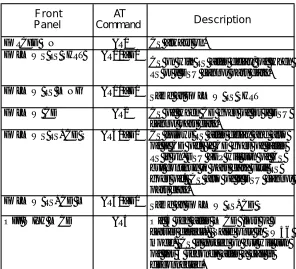
Table 4-A Loop Rate Commands ... 26
Table 4-B Network Address Command ... 27
Table 4-C Remote Configuration Commands ... 28
Table 4-D Network Type Commands ... 29
Table 4-E DTE Rate AT Commands ... 31
Table 4-F Data Format Commands ... 32
Table 4-G Transmit Clock AT Commands ... 34
Table 4-H CS Options AT Commands ... 37
Table 4-I Short and Long Delays at Different Operating Speeds ... 38
Table 4-J Anti-Stream AT Commands ... 40
Table 4-K CD Options AT Commands ... 41
Table 4-L TR Options AT Commands ... 42
Table 4-M SR Options AT Commands ... 43
Table 4-N Test Timeout AT Commands ... 44
Table 4-O Remote Digital Loopback AT Commands ... 45
Table 4-P AT Commands for Storing Phone Numbers ... 46
Table 4-Q AT Commands for Auto Answer ... 47
Table 4-R Manual Commands ... 49
Table 6-A Values for TST ERR=XXXX ... 58
Table 6-B Messages from the DSU-CSU ... 61
Table 6-C Troubleshooting New Installs ... 62
Table 6-D Test AT Commands ... 64
Table 6-E Remote Tests and AT Commands ... 75
Table A-A AT Commands ... 81
Table A-B Test Pattern Commands ... 82
Chapter 1. Introduction
Chapter 1
Introduction
PRODUCT OVERVIEW
The ADTRAN Dual DSU-DP provides a reliable, high speed data connection for customer data terminal equipment (DTE) through the ADTRAN TSU/HSU DS0 port. It provides compatibility with digital data service (DDS), or Switched 56 network (SW56) services. The Dual DSU-DP supports both synchronous and asynchro-nous data communication over the DDS or Switched 56 networks.
This unit is an all rate DSU, supporting services from 2.4 to 64 kbps including 19.2 and 38.4 kbps services. The Dual DSU-DP may be used in either point-to-point or multi-point circuits.
Chapter 1. Introduction
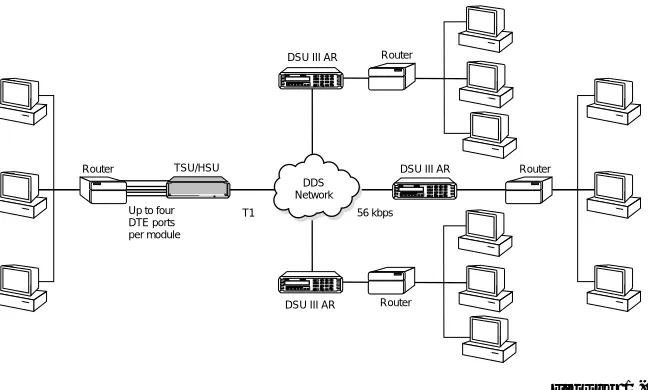
Figure 1-1 shows a sample point-to-point application for the Dual DSU-DP.
Figure 1-1 Sample Point-to-Point Application for Dual DSU-DP
ENTERENTER123 456 789
#
0
*
CANCEL CANCELSHIFTSHIFT SHIFTSHIFT
D A E B F C
R S C S T D R D C D A L M T S T R S C S T D R D C D A L M T S T
DSU III DBU DSU III DBU
F
DDS Network
Router DSU III AR
56 kbps
Router TSU/HSU
T1
ENTERENTER123 456 789
#
0
*
CANCEL CANCELSHIFTSHIFT SHIFTSHIFT
D A E B F C
R S C S T D R D C D A L M T S T R S C S T D R D C D A L M T S T
DSU III DBU DSU III DBU
Up to four DTE ports per module
ENTERENTER123 456 789
#
0
*
CANCEL CANCELSHIFTSHIFT SHIFTSHIFT
D A E B F C
R S C S T D R D C D A L M T S T R S C S T D R D C D A L M T S T
DSU III DBU DSU III DBU
DSU III AR
DSU III AR Router
Chapter 1. Introduction
DDS Overview
Digital Data Service (DDS) is a nationwide service that allows interconnection and transport of data at speeds up to 64 kbps. The local exchange carriers provide the local loop service to DDS customers and may provide data for routing Inter-LATA to an interexchange carrier. In DDS mode, the Dual DSU-DP supports all DDS service rates yielding DTE rates of 2.4, 4.8, 9.6, 19.2, and 38.4 (sync or async); and 56 and 64 kbps (sync only). An additional rate of 57.6 kbps is available in async mode. At the service rates of 56 kbps and 64 kbps, the unit can be configured to run slower DTE rates (async or sync).
Switched 56 Overview
Chapter 2. Installation
Chapter 2
Installation
UNPACK AND INSPECT
Carefully inspect the option module or plug-on board for any shipping damages. If damage is suspected, file a claim immediately with the carrier and contact ADTRAN Customer Service. If possible, keep the original shipping container for use in shipping the Dual DSU-DP for repair or for verification of damage during shipment.
Shipped by ADTRAN
The following items are included in the ADTRAN ship-ment:
• The Dual DSU-DP Option Module or Dual DSU-DP Plug-On Board
• The user manual (to be inserted into the main TSU/HSU user manual)
Adapter Cables
Two cables must be purchased separately from ADTRAN:
Chapter 2. Installation
INSTALLING THE OPTION MODULE
It is not necessary to turn off the power to the TSU/HSU when installing the option module because it is hot swappable. The plug-on board must be attached to a hot swappable option module if you wish to install it while the TSU/HSU is powered on.
Placement of the Option Module
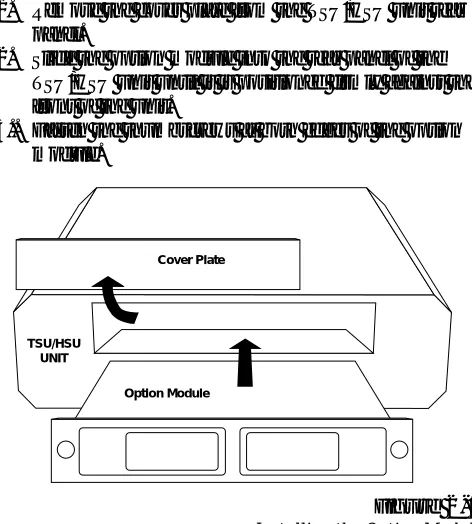
Figure 2-1 is representative of the action required for proper placement of the option module. Perform the following steps to install the option module:
1. Remove the cover plate from the TSU/HSU unit rear panel.
2. Slide the option module into the rear panel of the TSU/HSU unit until it is positioned firmly against the front of the unit.
3.. Fasten the thumbscrews at both edges of the option module.
Figure 2-1 Installing the Option Module
Power Connection
Each option module derives power from the base TSU/
TSU/HSU UNIT
Chapter 2. Installation
Attaching the Plug-On Board
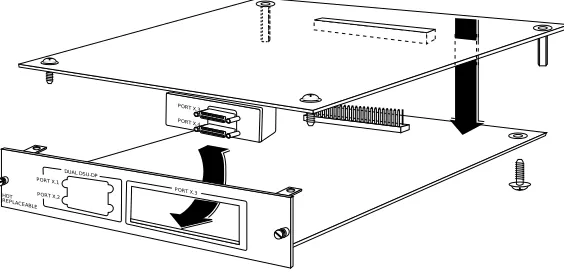
Figure 2-2 is representative of the action required for proper attachment of a plug-on board to the option module. Perform the following steps to install the plug-on board:
1. Hold the plug-on board above the option module. 2. Using a downward and right-to-left motion, slip the
plug-on board connector into the opening in the option module back panel.
3. Moving the plug-on board downward, secure the connection of the header pins at the front of the boards.
4. Install two 4-40 screws at both front edges of the option module.
5. Install two 4-40 screws on each of the standoffs on the rear of the plug-on module.
Figure 2-2 Attaching the Plug-On Board PORT X.2
PORT X.1
PORT X.4 PORT X.3
HOT REPLACEABLE
DUAL DSU-DP
Chapter 2. Installation
REAR PANEL
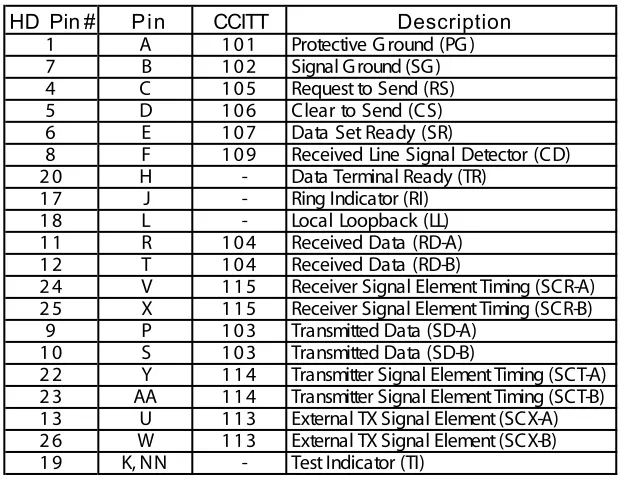
The rear panel contains two high-density subminiature DTE connectors which provide V.35 or EIA-232 inter-faces via custom cables. Pin assignments for the DTE connections are listed in the section DTE Data Connec-tion in this chapter. The DSU-DP rear panel is shown in Figure 2-3.
Figure 2-3 DSU-DP Option Module Rear View
PORT X.2 PORT X.1
1 - Cutout for plug-on board interfaces 2 - Screw receptacles for plug-on board 3 - Plug-on board header
1
2 3
2
DUAL DSU-DP
HOT REPLACEABLE
Chapter 2. Installation
DTE DATA CONNECTION
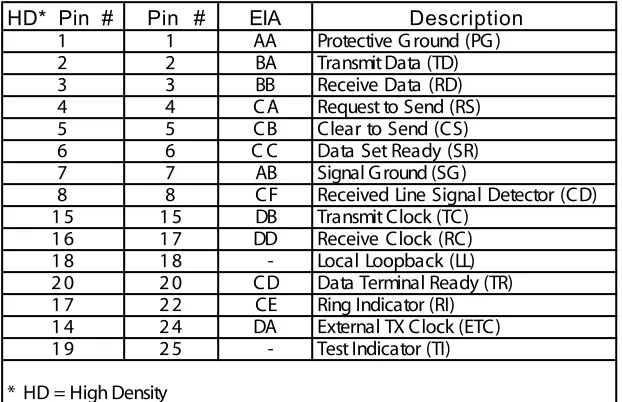
T he DT E should be connected to either the EIA-232 DT E cable or the CCIT T V.35 DT E cable. T he maximum cable lengths recommended are 50 feet for the EIA-232, and 100 feet for the CCIT T V.35 (note: ADT RAN-adapter cables are six feet in length). T he pin assignments for the cables are listed in Tables 2-A and 2-B.
T he V.35 cable is recommended for use with data rates above 19.2 kbps. T he EIA-232 cable works up to 56 kbps with a low capacitance cable or with the external transmit clock option selected. T he DT E rate may be configured from the front panel or via the T-Watchª Management Program. T he DT E can operate in asynchronous or synchronous modes.
To prevent possible radio frequency interference emissions, a shielded cable is required.
HD* Pin # Pin # EIA Description
1 1 AA Protective G round (PG )
2 2 BA Transmit Data (TD)
3 3 BB Receive Data (RD)
4 4 CA Request to Send (RS)
5 5 CB Clear to Send (CS)
6 6 C C Data Set Ready (SR)
7 7 AB Signal Ground (SG)
8 8 CF Received Line Signal Detector (CD)
1 5 1 5 DB Transmit Clock (TC)
1 6 1 7 DD Receive Clock (RC)
1 8 1 8 - Local Loopback (LL)
Chapter 2. Installation
Table 2-B Pin Assignments for Primary V.35 Cable
Description
ing Indicator (RI) ocal Loopback (LL)
HD Pin # Pin CCITT
1 A 101 Protective G round (PG )
7 B 102 Signal Ground (SG)
4 C 105 Request to Send (RS)
5 D 106 Clear to Send (CS)
6 E 107 Data Set Ready (SR)
8 F 109 Received Line Signal Detector (CD)
2 0 H - Data Terminal Ready (TR)
1 7 J - R
1 8 L - L
1 1 R 104 Received Data (RD-A)
1 2 T 104 Received Data (RD-B)
2 4 V 115 Receiver Signal Element Timing (SCR-A) 2 5 X 115 Receiver Signal Element Timing (SCR-B)
9 P 103 Transmitted Data (SD-A)
1 0 S 103 Transmitted Data (SD-B)
Chapter 2. Installation
CONFIGURATION
T he Dual DSU-DP option module contains two different user profiles (sets of configuration options) that are stored in read only memory. T hese profiles are listed in the appendix Default Configuration Profiles. T he unit is shipped from the factory with profile 1 (default configura-tion) loaded into the nonvolatile configuration memory. If profile 1 matches the desired system requirements, no additional configuration is required to put the unit into service. If profile 1 does not match the desired system requirements, modify the default configuration or select another profile more closely matching the desired con-figuration and modify
W hen a new profile is loaded or the existing profile is modified, it is stored in the nonvolatile configuration memory. T he Dual DSU-DP is then configured with that profile every time power is turned on or reset.
Chapter 2. Installation
Configuration Methods
T he Dual DSU-DP provides methods for both local and
r
emote configuration. T hese methods are shown in Table 2-C and are discussed in the following sections.
Table 2-C
Configuration Methods
AT Commands
T he Dual DSU-DP can be configured and controlled with in-band AT commands from an asynchronous DT E port just as modems are.
To exit the data mode and enter the command mode, the asynchronous DT E device must transmit a proper escape sequence or three pluses (+++) to the Dual DSU-DP. A specified time delay must occur between the last data character and the first escape sequence character. T his is the guard time delay, and it can be changed by writing a value to the S12 register. T he default value for the guard time is one second. For a valid escape sequence to occur,
METHOD STAND ALONE
Local Remote
AT Commands Yes Yes
V.25 Commands Yes Yes
Front Panel Yes Yes
DATAMATE No Yes
VT 100 No Yes
the DT E must transmit the escape code character three times in succession with delay between each character being less than the guard time.
Chapter 2. Installation
T he command line may contain a single command or a series of commands after the AT attention code. W hen a series of commands is used, the individual commands may be separated with spaces for readability. T he maxi-mum length for a command line is 40 characters. Each command line is executed by the Dual DSU-DP upon receipt of a terminating character. T he default terminat-ing character is a carriage return (ASCII 013), but it can be changed by writing a different value to register S3. Before the terminating character is transmitted, the command line can be edited by using the backspace character (ASCII 008) to erase errors so the proper commands can be entered. Valid AT commands for the Dual DSU-DP are listed in the appendix AT Commands.
V.25 bis Commands
W hen configured for the V.25 bis option, the Dual DSU-DP accepts in-band dialing and configuration commands from both synchronous and asynchronous DT E ports. T he V.25 bis option supports the following protocols: ¥ SDLC (Synchronous Data Link Control)
¥ BI-SYNC
¥ ASYNCHRONOUS
SDLC Option
Character Format
¥ Data bits - 8 ¥ Parity bit - Ignored
Command Structure
Chapter 2. Installation
Bi-Sync Option
Character Format
¥ Data bits - 7 ¥ Parity bit - Odd
Command Structure
[SYN][SYN][STX][V.25 bis COMMAND][ETX]
Asynchronous Option
Character Format
¥ Start bit - 1 ¥ Data bits - 7 ¥ Parity bit - Even ¥ Stop bit - 1
Command Structure
[V.25 bis COMMAND][CR][LF]
Command Descriptions
Chapter 2. Installation
ADT RAN V.25 bis command set follows: C I C Connect incoming call C NL Configuration local C NR Configuration remote C RN Call request with number C RS Call request using stored number DI C Disregard incoming call
PRN Program number
RLN Request list of numbers
T he following list contains possible responses to V.25 bis commands:
VAL Valid V.25 command processed C FI ET Call failed on switched network - busy
detected
C FI DE Call failed on switched network - no wink detected
C FI NS Call failed - no dial string in specified register
I NV C U Unknown command detected I NV PS Invalid parameter syntax I NV PV Invalid parameter value I NV BL Invalid local password I NV BM Invalid remote password I NC Incoming call
C NX Call connected
If verbose (wordy) responses are disabled (AT V0), the following list of three-character responses are the only ones returned:
Chapter 2. Installation
Syntax and Possible Responses
CIC (Connect Incoming Call)
T his command causes the DSU to go on-line. For dial backup units, this command hangs up the dial backup line and initiates an attempt to reestablish the main (DDS) line. T here are no parameters associated with this command. Possible indications include VAL, CNX, and CFIxx
CNL (Configuration Local)
T his command is used to pass AT commands to the local modem via the V.25 bis command processor. T his allows the Dual DSU-DP to be configured with AT commands via a synchronous interface. T he command has the following format:
CNL[LOCAL PASSWORD;]AT[ONE OR MORE AT COMMANDS]
A local password may not be required depending on the present configuration of the unit. Responses to CNL commands are returned in the data format currently configured. Possible responses include VAL and INVn.
CNR (Configuration Remote)
T his command is used to pass AT commands over the network to the remote DSU via the V.25 bis command processor. T his allows a remote Dual DSU-DP to be configured from a synchronous interface. T he commandÕs format is as follows:
CNR[REMOTE PASSWORD;]AT[ONE OR MORE AT COMMANDS]
Chapter 2. Installation
Switched 56 Operation
CRN (Call Request with Number)
W hen the Dual DSU-DP is configured for SW 56 opera-tion, the CRN command causes the DSU to dial the supplied number. T he commandÕs format follows:
CRN[NUMBER TO BE DIALED]
If no number is included in the command, the number stored in dial register number 1 is dialed. If no number is provided and no number is stored in dial register number 1, the Dual DSU-DP responds with the call failure indica-tion CFINS (Call Failure Indicaindica-tion Not Stored).
For a DBU unit, this command initiates dialing on the backup circuit. If the number supplied contains non-dialable digits, they are ignored and only the non-dialable digits are dialed. Possible responses include VAL, CNX, and CFIxx.
CRS (Call Request Using Stored Number)
T he CRS command causes the Dual DSU-DP to dial the number stored in the specified register. T he format of this command is as follows:
CRS[OPTIONAL SPACE][REGISTER NUMBER 1-10]
Chapter 2. Installation
DIC (Disregard Incoming Call)
T his command causes the V.25 bis processor to return to command mode even if there is an incoming call pending. T his allows local commands to be issued and incoming calls to be ignored. T here are no parameters associated with this command. T he DSU responds with VAL.
PRN (Program Number)
T his command stores the supplied number into the specified register. T he command has the following format:
PRN REGISTER NUMBER;[NUMBER TO BE STORED]
If this command is entered with no parameters, the INVPS response is returned. If no register number is included in the command or if it is invalid, the INVPV response is returned. T his response is also returned if the number to be stored contains invalid characters. T he characters 1, 2, 3, 4, 5, 6, 7, 8, 9, 0, P, T, and & are valid dial characters. If no digits are issued with this command, the specified register is cleared. T he DSU responds with VAL.
RLN (Request List of Numbers)
T his command causes the Dual DSU-DP to return the number stored in the specified register. T he format of this command follows:
RLN [REGISTER NUMBER]
If the register number is invalid, the INVPV response is returned. W hen a correct register number is entered, the following response is returned:
LSN [REGISTER NUMBER];[NUMBER STORED]VAL
Chapter 3. Operation
Chapter 3
Operation
OVERVIEW
The Dual DSU-DP Option Module and Plug-On Board are both controlled as part of the TSU/HSU using the methods described in their respective manuals.
Refer to the appropriateTSU/HSU User Manual for descriptions of front panel indicators and buttons.
Menu Structure
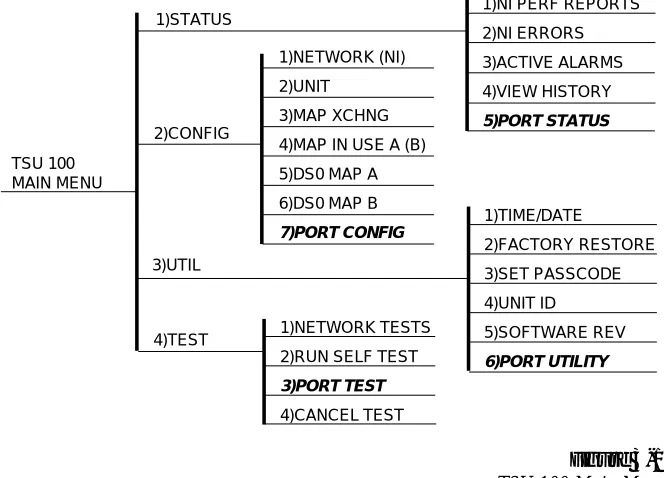
The TSU 100 menu tree is used for illustrative purposes.
Chapter 3. Operation TSU 100 MAIN MENU 1)STATUS 2)CONFIG 3)UTIL
1)NI PERF REPORTS
2)NI ERRORS 3)ACTIVE ALARMS 4)VIEW HISTORY 5)PORT STATUS 1)TIME/DATE 2)FACTORY RESTORE 3)SET PASSCODE 4)UNIT ID 5)SOFTWARE REV 6)PORT UTILITY 1)NETWORK TESTS
2)RUN SELF TEST 3)PORT TEST 4)CANCEL TEST 4)TEST 1)NETWORK (NI) 2)UNIT 3)MAP XCHNG
4)MAP IN USE A (B)
5)DS0 MAP A
6)DS0 MAP B 7)PORT CONFIG
Figure 3-1 TSU 100 Main Menu
The Dual DSU-DP menus are all submenus found under TSU/HSU menu items:
1)STATUS -> 5)PORT STATUS 2)CONFIG -> 7)PORT CONFIG 3)UTIL -> 6)PORT UTIL 4)TEST -> 3)PORT TEST
Chapter 3. Operation
Menu Operation
The Dual DSU-DP menus are accessed from and operate the same as menus for the TSU 100. Each of the Dual DSU-DP submenu items are discussed in this manual.
Operation
With the cursor on one of the four Main menu choices:
Press: ENTER or the number key
Results: Display of the first two submenu items with the cursor on the first item
Use: The down scroll key to place the cursor on the desired item
Press: ENTER
Chapter 4. Configuration
Chapter 4
Configuration
CONFIGURATION OVERVIEW
Local and Remote Configuration
The DSU-DP option module and/or plug-on board (DSU-DP) can be configured locally using the front panel or remotely by establishing communications with another ADTRAN DSU product. The front panel of the local TSU/HSU can also be used to configure the remote DSU. During remote configuration, the DSU-DP prompts for the remote address before continuing to the Configuration (CONFIG) menus.
Configuration Menu
The Configuration menu consists of five sub-menus relating to a specific interface or function of the DSU-DP that requires setup. These functions and their corre-sponding functions are:
Chapter 4. Configuration
The DSU-DP contains two different user profiles (sets of configurations options) that are stored in read only memory (see the appendix, Default Configuration Profiles). The unit is shipped from the factory with profile number 1 (default configuration) loaded into the current (nonvolatile configuration) memory. If profile 1 matches requirements for the system, no additional configuration is required to put the unit into service. If profile 1 does not match system requirements, it can be modified, or the other profile that more closely matches the system requirements can be loaded into current memory. When a different profile is loaded, or the existing profile is modified, it is stored in the current (nonvolatile configuration) memory. The DSU-DP is then configured with that profile every time power is turned on or until the unit is reset.
Chapter 4. Configuration
CONFIGURING NETWORK OPTIONS
Network Options
The NETWORK OPTIONS configuration parameters control the network operation of the DSU-DP.
Network Rate
The Network Rate option sets the network operating speed. The unit should be set to the rate required by the DDS Service. The DSU DP also supports subrate DTE data over a 56 kbps or 64 kbps loop. The network rate must be set independently of the DTE rate.
Seven network rate selections are available (see Figure 4-1).
Figure 4-1 Setting Network Rate Options
2.4K 4.8K 9.6K
1)NETWORK RATE:19.2K 38.4K 56K
1)NETWORK OPTS 64K 2)NETWORK ADDR: 3)REMOTE CONFIG:
1)LOCAL 4)NETWORK TYPE:
5)PORT CONFIG 2)DTE OPTIONS PORT: 0.1 NX56/64 2)REMOTE ENTER ADDRESS 3)TEST OPTIONS
PORT: 1.2 DSU-DP 4)DIAL OPTIONS
Chapter 4. Configuration
Network commands are provided in Table 4-A.
Table 4-A Loop Rate Commands
Front Panel AT Command
Chapter 4. Configuration
Network Address
A two-digit decimal address can be assigned to each DSU-DP. This addressing capability makes it possible to perform remote configuration and testing in point-to-point and multi-drop networks. Figure 4-2 shows the menu path used to change the network address. The factory default setting is 0.
Figure 4-2 Setting the Network Address
Table 4-B shows the AT command used to set the network address Table 4-B
Table 4-B Network Address Command
Front Panel
A T
Command Description
XX (Decimal) _N=xx Assigns a 2 digit Network Address
1)NETWORK RATE:
1)NETWORK OPT.
2)NETWORK ADDR: XX
1)LOCAL 3)REMOTE CONFIG:
5)PORT CONFIG 4)NETWORK TYPE:
PORT: 0.1 NX56/64 2)REMOTE 2)DTE OPTIONS PORT: 1.2 DSP-DP 3)TEST OPTIONS PORT: 1.1 DSP-DP 4)DIAL OPTONS
Chapter 4. Configuration
Remote Configuration Option
This option sets up the DSU-DP to accept or reject remote configuration commands. Figure 4-3 shows the menu path for enabling/disabling remote configura-tion. The factory default setting is ENABLED.
Figure 4-3 Enabling/Disabling Remote Configuration
Table 4-C shows the equivalent AT commands used to enable or disable remote configuration.
Table 4-C Remote Configuration Commands
1)NETWORK RATE: 2)NETWORK ADDR:
1)NETWORK OPT.
DISABLED
3)REMOTE CONFIG: ENABLED 5)PORT CONFIG 1)LOCAL 4)NETWORK TYPE:
PORT: 0.1 NX56/64 2)DTE OPTIONS
1.2 NX56/64 2)REMOTE 3)TEST OPTIONS
1.1 NX56/64 4)DIAL OPTIONS
5)MANUAL COMMAND
Front Panel
AT
Command Description
Chapter 4. Configuration
Network Type
This option configures the DSU-DP for the specific type of network being used. The factory default setting is DEDICATED (see Figure 4-4).
Figure 4-4 Setting Network Type Options
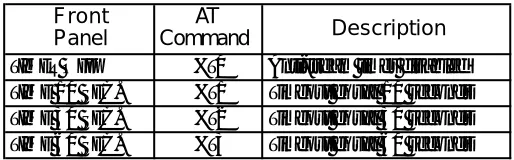
Table 4-D shows the equivalent AT commands that perform the same configuration functions.
Table 4-D Network Type Commands
Front Panel
AT
Command Description
DEDICATED &L0 Any 4-wire DDS Network AT&T/MCI SW 56 &L1 AT&T/MCI Switched 56 Service US SPRINT SW 56 &L2 US SPRINT Switched 56 Service
1)NETWORK RATE: 2)NETWORK ADDR:
1)NETWORK OPT. 3)REMOTE CONFIG:
4)NETWORK TYPE: DEDICATED
1)LOCAL AT&T/MCI SW56
5)PORT CONFIG US SPRINT SW56
PORT: 0.1 NX56/64 2)REMOTE 2)DTE OPTIONS
PORT: 1.2 DBU-DP 3)TEST OPTIONS
PORT: 1.1 DBU-DP 4)DIAL OPTIONS
Chapter 4. Configuration
CONFIGURING DTE OPTIONS
The DTE OPTIONS menu is used to select the configu-ration parameters that control the opeconfigu-ration of the DSU-DP DTE Interface such as the DTE rate, data format, DTE command options, transmit clock, CS options, anti-stream, and CD options.
DTE Rate
The selectable DTE rates over a 56 or 64 kbps network are shown in Figure 4-5. If a slower network rate is selected, the DTE rate automatically matches the network rate. If an attempt is made to set the DTE rate for network rates slower than 56 kbps, the DSU-DP will automatically change the option setting to SAME AS NET. The factory default setting is 56K.
If asynchronous mode is set, the 56K option is actually 57.6 kbps.
Figure 4-5 DTE Rates for 56 or 64 kbps Network Rate
The equivalent AT commands for setting the DTE rate
2.4K
4.8K
1)NETWORK OPTS 9.6K
19.2K
1)DTE RATE: 38.4K
5 6 K
64K
64K SCRAMBLED 2)DATA FORMAT: SAME AS NET
1=LOCAL 3)DTE CMD OPTION:
2)DTE OPTIONS 4)TRANSMIT CLOCK:
5)PORT CONFIG 5)CS OPTIONS:
PORT: 0.1 NX56/64 2=REMOTE 6)ANTI-STREAM:
PORT: 1.2 DSU-DP 7)CD OPTIONS:
PORT: 1.1 DSU-DP 8)TR OPTIONS:
9)SR OPTIONS: 3)TEST OPTIONS
Chapter 4. Configuration
Table 4-E DTE Rate AT Commands
For 64 kbps clear channel operation, there is a possibility that the DTE data sequences might mimic network loop maintenance functions and erroneously cause other network elements to activate loopbacks. To prevent this, the 64K SCRAMBLER option should be selected for both the local and remote DSU.
Front Panel
AT
Command Description
DTE 2.4K %K3 DTE rate 2.4K sync and async DTE 4.8K %K4 DTE rate 4.8K sync and async DTE 9.6K %K5 DTE rate 9.6K sync and async DTE 19.2K %K6 DTE rate 19.2K sync and async DTE 38.4K %K7 DTE rate 38.4K sync and async DTE 56K %K8 DTE rate 56K sync or 57.6 async
64K %K9 - F0 DTE rate 64K
Chapter 4. Configuration
Data Format
The DATA FORMAT option is used to select either the synchronous or asynchronous mode of operation for the DTE interface. The factory default setting is SYN-CHRONOUS (see Figure 4-6). If asynchronous is chosen, the length of the data bytes must be selected.
Figure 4-6 Selecting Asynchronous or Synchronous Data Format
Table 4-F shows the AT commands that can be used to set the DATA FORMAT.
Table 4-F Data Format Commands
For AT command set, the async word length must be set via the front panel.
1)NETWORK OPTS 1)DTE RATE:
2)DATA FORMAT: SYNCHRONOUS
ASYNC 9 BITS
2)DTE OPTIONS ASYNC 10 BITS
3)DTE CMD OPTION: ASYNC 11 BITS
1)LOCAL 4)TX CLOCK:
5)CS OPTIONS:
5) PORT CONFIG 6)ANTI-STREAM:
PORT: 0.1 NX56/642)REMOTE 7)CD OPTIONS:
PORT: 1.2 DSU-DP 8)TR OPTIONS:
PORT: 1.1 DSU-DP 9)SR OPTIONS:
3)TEST OPTIONS 4)DIAL OPTIONS 5)MANUAL COMMAND
Front Panel
AT
Command Description
For asynchronous options, select the length of the data bytes. SYNCHRONOUS &Q2 Always synchronous
Chapter 4. Configuration
DTE Command Option
The DTE COMMAND option is used to enable AT commands from the DTE, enable V.25 bis SDLC (syn-chronous data link control) commands, enable V.25 (bisync and async), or disable all DTE command modes (see Figure 4-7).
Figure 4-7 Selecting the DTE Command Option
When the unit is in DTE CMD OPTION mode (idle in SW56 mode, forced with TR option, or from escape sequence in AT mode) with AT COMMAND SET or V.25 SYNC selected, the DTE format is independent of the DATA FORMAT option. However, if V.25 BSC/ASYNC is selected, the unit will use V.25 BISYNC (BSC) commands for synchronous data format or V.25 ASYNC commands for asynchronous data format.
1)NETWORK OPTS
1)DTE RATE: 2)DATA FORMAT:
3)DTE CMD OPTION: D I S A B L E D
AT COMMAND SET
2)DTE OPTIONS V.25 SYNC
V.25 BSC/ASYNC
1=LOCAL 4)TX CLOCK:
5)CS OPTIONS:
5)PORT CONFIG 6)ANTI-STREAM:
PORT: 0.1 NX56/64 2=REMOTE 7)CD OPTIONS:
PORT: 1.2 DSU-DP 8)TR OPTIONS:
PORT: 1.1 DSU-DP 9)SR OPTIONS:
Chapter 4. Configuration
Transmit Clock
The TRANSMIT CLOCK option is used to select the source of the clock used to transfer data from the DTE into the DSU-DP. Figure 4-8 shows the menu path used to set the TRANSMIT CLOCK option.
Figure 4-8 Transmit Clock Options
Table 4-G shows the AT commands used to set the Transmit Clock option.
Table 4-G Transmit Clock AT Commands
The EXTERNAL clock option is normally used in modem tail circuit applications. A DSU-to-modem interconnect diagram for this application is shown in the appendix, DSU-to-Modem Interconnect.
Front Panel
AT
Command Description
NORMAL &X0 TX clock from DSU selected EXTERNAL &X1 ETC clock from DTE selected
1)NETWORK OPTS
1)DTE RATE: 2)DATA FORMAT: 3)DTE CMD OPTION:
4)TX CLOCK: NORMAL
2)DTE OPTIONS EXTERNAL
5)CS OPTIONS: 1)LOCAL 6)ANTI-STREAM: 7)CD OPTIONS:
5)PORT CONFIG 8)TR OPTIONS:
PORT: 0.1 NX56A/642)REMOTE 9)SR OPTIONS: PORT: 1.2 DSU-DP 3)TEST OPTIONS
Chapter 4. Configuration
The EXTERNAL clock option is also recommended when the EIA-232 connector is used for 56 kbps and 64 kbps applications. A special DSU cable diagram for this application is shown in the appendix, EIA-232 Connector.
Chapter 4. Configuration
CS Options
The CS (clear to send) OPTIONS menu is used to select one of seven different control modes for the CS lead. Figure 4-9 shows the menu path used to access the CS OPTIONS menu. The default factory setting is FOLLOWS RS with CS DELAY SHORT.
Figure 4-9 Selecting CS Options
If one of the options chosen involves request to send (RS), then the delay from RS to CS must be selected. Table 4-H shows the AT Commands used to set the CS OPTIONS.
1)NETWORK OPTS 1)DTE RATE:
2)DATA FORMAT:
2)DTE OPTIONS 3)DTE CMD OPTION: 4)TRANSMIT CLOCK:
1)LOCAL 5)CS OPTIONS: FORCED ON
6)ANTI-STREAM: FOLLOW RS SHRT
5)PORT CONFIG 7)CD OPTIONS: FOLLOW RS LONG
PORT: 0.1 NX56/64 2)REMOTE 8)TR OPTIONS: FOLLOW CD
PORT: 1.2 DSU-DP 9)SR OPTIONS: FOLLOW RS+CD S
PORT: 1.1 DSU-DP 3)TEST OPTIONS FOLLOW RS+CD L
4)DIAL OPTIONS OFF WITH LOC D
Chapter 4. Configuration
Table 4-H CS Options AT Commands
Front Panel
AT
Command Description
FORCED ON &R0 CS always on. FOLLOWS RS SHRT &R1/_D0
CS on with RS after delay; off when RS or if DSU cannot pass data. FOLLOW RS LONG &R1/_D1
Same as FOLLOW RS SHRT
FOLLOW CD &R2 CS off when CD goes off or if DSU cannot pass data.
FOLLOWS RS+CD S &R3/_D0 CS follows RS after delay and also off if CD off. If CD goes off after RS is on, DSU _DP will turn off CS but continue to pass data until RS goes off. CS also off if DSU cannot pass data.
FOLLOW RS+CD L &R4/_D1 Same as FOLLOW RS+CD S OFF WITH LOCD &R4 Off 5 sec after LOCD (loss of
Chapter 4. Configuration
Specified times for the short and long delays at the different operating speeds are shown in Table 4-I.
Table 4-I Short and Long Delays at Different Operating Speeds
Rate Short
Option
Long
Option Tolerance
64K 1.1ms 16.1ms ±.4ms
56K 1.1ms 16.1ms ±.4ms
38.4K 1.5ms 16.5ms ±.4ms
19.2K 1.5ms 16.5ms ±.4ms
9.6K 1.5ms 16.5ms ±.4ms
4.8K 1.9ms 16.9ms ±.7ms
Chapter 4. Configuration
Anti-Stream
The ANTI-STREAM option is used to select the anti-stream timeout. Figure 4-10 shows the menu path used to access the ANTI-STREAM options menu. The anti-stream timeout is the maximum time the DSU-DP transmits data into the network from the DTE. This feature prevents one DTE device on a multi-drop network from continuously tying up the transmit circuit back to the master DSU.
The anti-stream timer is reset to zero when RS changes to the active state and is updated every second while RS is active. When the anti-stream timeout expires, the DSU-DP stops transmitting DTE data into the network but continues to accept data from it. This condition exists until the DTE deactivates the RS input.
Figure 4-10 Anti-Stream Options
1)NETWORK OPTS 1)DTE RATE:
2)DATA FORMAT: 3)DTE CMD OPTION: 4)TX CLOCK:
2)DTE OPTIONS 5)CS OPTIONS: TIMER OFF 6)ANTI-STREAM TIME 10 SEC
1)LOCAL 7)CD OPTIONS: TIME 30 SEC
8)TR OPTIONS: TIME 60 SEC
5)PORT CONFIG 9)SR OPTIONS:
PORT: 0.1 NX56/64 2)REMOTE
PORT: 1.2 DSU-DP 3)TEST OPTIONS
PORT: 1.1 DSU-DP 4)DIAL OPTIONS
Chapter 4. Configuration
The factory default setting is TIMER OFF. Table 4-J shows the available options and their AT commands.
Table 4-J Anti-Stream AT Commands
Front Panel
AT
Command Description
Chapter 4. Configuration
CD Options
The CD OPTIONS menu is used to select one of three different control modes for the receive line signal detector (CD) lead. The default factory setting is NORMAL (see Figure 4-11).
Figure 4-11 Selecting CD Options
Table 4-K shows the equivalent AT commands for setting CD options.
Table 4-K CD Options AT Commands
Front Panel
AT
Command Description
FORCED ON &C0 On all the time.
NORMAL &C1 On only when data present on network.
OFF WITH LOCD &C2 On except after disconnect in Switched 56 application.
1)NETWORK OPTS 1)DTE RATE:
2)DATA FORMAT: 3)DTE CMD OPTION: 4)TX CLOCK:
2)DTE OPTIONS 5)CS OPTIONS 6)ANTI-STREAM:
1=LOCAL 7)CD OPTIONS: FORCED ON
8)TR OPTIONS: NORMAL
5)PORT CONFIG 9)SR OPTIONS: OFF WITH LOCD
PORT: 0.1 NX56/64 2=REMOTE
PORT: 1.2 DSU-DP 3)TEST OPTIONS
PORT: 1.1 DSU-DP 4)DIAL OPTIONS
Chapter 4. Configuration
TR Options
The TR OPTIONS menu is used to select the DSU-DP response to the data terminal ready (TR) lead. The factory default setting is IGNORED (see Figure 4-12).
Figure 4-12 Selecting TR Options
Table 4-L shows the equivalent AT commands for setting TR OPTIONS.
Table 4-L TR Options AT Commands
For IDLE WHEN OFF option: In SW56 mode, TR Off causes the DSU to go On Hook (Idle). The unit also will not dial out if TR is off. In dedicated mode, the DSU goes into DTE command mode when TR goes off. When TR goes on, if the DSU does not receive a command in the number of
Front Panel
AT
Command Description
IGNORE &D0 Ignore the TR input. IDLE WHEN OFF &D2 See the following Note.
OFF>ON DIAL #1 &D3 Dial Stored #1: TR goes off to on (SW56 only).
OFF>ON DIAL #2 &D4 Dial Stored #2: TR goes off to on (SW56 only).
1)NETWORK OPT.
1)DTE RATE: 2)DATA FORMAT: 3)DTE CMD OPTION:
2)DTE OPTIONS 4)TX CLOCK: 5)CS OPTIONS:
1)LOCAL 6)ANTI-STREAM: 7)CD OPTIONS:
5)PORT CONFIG 8)TR OPTIONS: IGNORED
PORT: 0.1 NX56/64 2)REMOTE 9)SR OPTIONS: IDLE WHEN OFF
PORT: 1.1 DSU-DP OFF->ON DIAL #1
PORT: 1.2 DSU-DP 3)TEST OPTIONS OFF->ON DIAL #2
Chapter 4. Configuration
SR Options
The SR OPTIONS menu is used to select the operating mode for the data set ready (SR) lead. The factory default setting is OFF W/TEST + OOS (shown in Figure 4-13).
Figure 4-13 Setting SR Options
Table 4-M shows the AT commands for setting SR OPTIONS.
Table 4-M SR Options AT Commands
1)NETWORK OPTS
1)DTE RATE) 2)DATA FORMAT: 3)DTE CMD OPTION:
2)DTE OPTIONS 4)TX CLOCK: 5)CS OPTIONS:
1)LOCAL 6)ANTI-STREAM: 7)CD OPTIONS:
5)PORTCONFIG 8)TR OPTIONS: FORCED ON
PORT: 0.1 NX56/64 2)REMOTE 9)SR OPTIONS: OFF W/OOS ONLY
PORT: 1.2 DSU-DP OFF W/LOCD
PORT: 1.1 DSU-DP 3)TEST OPTIONS OFF W/TEST
4)DIAL OPTIONS OFF W/TEST+OOS
5)MANUAL OFF W/TST+LOCD
Front Panel
AT
Command Description
FORCED ON &S0 Always on.
OFF W/OOS ONLY &S1
Off when network Out Of Service (OOS).
OFF W/LOCD &S3
Off 5 seconds after disconnect (SW56 only).
Chapter 4. Configuration
TEST OPTIONS
The TEST OPTIONS menu enables or disables different test modes and specifies the maximum test time allowed.
Test Timeout
The TEST TIMEOUT option sets the length of time a DSU-DP remains in a test mode before automatically returning to the data mode. Enter the timeout from 0 to 255 seconds. The factory default setting is off (0). Figure 4-14 shows the menu path used to access TEST TIMEOUT.
Figure 4-14 Setting Test Timeout Option
Table 4-N shows the equivalent AT command for setting the TEST TIMEOUT.
Table 4-N Test Timeout AT Command
1)NETWORK OPTS 2)DTE OPTIONS
1)LOCAL 1)TEST TIME: XX 3)TEST OPTIONS 2)RDL TEST:
5)PORT CONFIG
PORT: 0.1 NX56/64 2)REMOTE
PORT: 1.2 DSU-DP 4)DIAL OPTIONS PORT: 1.1 DSU-DP 5)MANUAL COMMAND
Front Panel
AT
Command Description
Chapter 4. Configuration
Remote Digital Loopback
The RDL (Remote Digital Loopback) option specifies whether or not the DSU-DP responds to an RDL request from the far end of the circuit. The factory default setting is RDL ENABLED. Figure 4-15 shows the menu path used to access this option.
Figure 4-15 Remote Digital Loopback
Table 4-O shows the equivalent AT commands for setting the RDL option.
Table 4-O Remote Digital Loopback AT Commands
Front Panel
AT
Command Description
RDL DISABLED &T5 RDL request from remote DSU ignored RDL ENABLED &T4 RDL request accepted
1)NETWORK OPTS 2)DTE OPTIONS
1=TEST TIME: ENABLED 3)TEST OPTIONS 2=RDL TEST: DISABLED 1)LOCAL
5)PORT CONFIG
Chapter 4. Configuration
CONFIGURING DIAL OPTIONS
The DIAL OPTIONS menu stores up to two phone numbers and defines the AUTO ANSWER operation of the DSU-DP when it is configured for Switched 56 operation.
Phone Number
The DSU-DP stores up to two numbers of 36 digits each. Edit a phone number by reentering the entire number. This process overwrites the previously stored number. Figure 4-16 shows the menu path used to access the PHONE NUMBERS option.
Figure 4-16 Editing Stored Phone Numbers
Table 4-P shows the AT Command for storing phone numbers.
Table 4-P AT Command for Storing Phone Numbers
AT
Command Description
&Zn= Store Phone Number
1)NETWORK RATE 2)DTE OPTIONS
1)LOCAL 3)TEST OPTIONS
STORED NUMBER TO
5)PORT CONFIG 1)PHONE NUMBERS EDIT: (1-2) NNNNNNN
PORT: 0.1 NX56/64 2)REMOTE 4)DIAL OPTIONS
Chapter 4. Configuration
Auto Answer
The AUTO ANSWER option is used to specify how incoming calls are to be answered. If ENABLED, incoming calls are automatically answered by the DSU-DP. If DISABLED, an incoming call can be answered manually by an AT or V.25 command from the DTE, or by raising TR from the DTE. Figure 4-17 shows the menu path used to enable or disable this option. The default setting is AUTO ANSWER ENABLED.
Figure 4-17 Enabling/Disabling the Auto Answer Function
Table 4-Q show the AT Commands available for the AUTO ANSWER option.
Table 4-Q AT Commands for Auto Answer
Front Panel
AT
Command Description
DISABLED _J0 Auto Answer disabled
ENABLED _J1 Auto Answer enabled
1)NETWORK TYPE 2)DTE OPTIONS 1)LOCAL 3)TEST OPTIONS
5)PORT CONFIG 1)PHONE NUMBER
PORT: 0.1 NX56/64 2)REMOTE 4)DIAL OPTIONS
Chapter 4. Configuration
MANUAL COMMAND
The MANUAL COMMAND option is a shortcut method for entering configuration and control commands for the DSU-DP.
The first display prompts the user to enter the command number.
COMMAND:00
Figure 4-18 shows the menu path for MANUAL COM-MAND. The available manual commands are listed in Table 4-R.
Figure 4-18 Manual Command
Use the number keys to enter the hexadecimal com-mand number. Press Enter to complete. Once the command number is entered, the display shows both the command number and the present value or setting for the command. The command value can be edited or reissued with the existing value.
COMMAND: XX VALUE: YY
Use the number keys to enter the hexadecimal value. Press Enter to complete. The system briefly displays COMMAND ACCEPTED and returns to the active menu.
1)NETWORK OPTS
1)LOCAL 2)DTE OPTIONS 3)TEST OPTIONS
5) PORT CONFIG 4)DIAL OPTIONS
PORT: 0.1 NX56/64 2)REMOTE COMMAND:XX
PORT: 1.2 DSU-DP 5)MANUAL COMMAND COMMAND:XX VALUE:YY
Chapter 4. Configuration
Table 4-R Manual Commands
Command Description Command Value
AT Command Echo
Disable 82 00
Enable 82 01
AT Result code
Enable 85 00
Disable 85 01
AT Long or Short code
Short form 86 00 to FF
Long form 86 00 to FF
AT Escape Character 2 00 to FF
AT CR Character 3 00 to FF
AT LF Character 4 00 to FF
AT BS Character 5 00 to FF
AT Escape Char. Timer 0C 00 to FF
Abort Call Timer 7 00 to FF
DTR Recognize Delay (x 2.5ms) 19 00 to FF DTR Initiated Command Timeout (seconds) 28 00 to FF Load Factory Opt.
Option Set #1 8A 00
Option Set #2 8A 01
Store User Profile
Save to Profile 0 91 00
Save to Profile 1 91 01
Select User Profile
Power Up Profile 0 93 00
Power Up Profile 1 93 01
Network Address Lock
Network Addr. Unlock C3 00
Chapter 5. Dialing
Chapter 5
Dialing
DIALING OVERVIEW
In Switched 56 mode (SW56) the DSU-DP operates as a 4-wire Switched 56 DSU. Call initiation and termination can be accomplished through either the TSU/HSU front panel or the DTE interface via the AT command set or V.25 bis. The AT command set and V.25 bis are covered in other chapters. This chapter covers dialing via the front panel.
Figure 5.1 describes the menu path used to initiate a call.
1)TIME/DATE 2)FACT RESTORE 3)SET PASSCODE 3 ) U T I L 4)UNIT I.D.
5)SOFTWARE REV 1=DIAL STORED #
6)PORT UTILITY 1)CALL/HANG-UP 2=ENTER DIAL #
1.X DSU-DP 2)DSU-DP REV? 3=REDIAL LAST #
Chapter 5. Dialing
Once you enter the CALL/HANG-UP menu, one of three menus appears based on the status of the SW56 net-work. These three menus are discussed in this chapter.
1. No Call Active
If no call is active the DSU-DP is idle and the screen displays the menu shown in Figure 5.1.
• To dial a stored telephone number, press 1 (for DIAL STORED #) followed by Enter. The unit displays the two stored telephone numbers. Enter 1 or 2 for the desired stored number and press Enter to initiate dialing.
• To dial a telephone number not already stored, press 2 (for ENTER DIAL #) followed by Enter. The screen goes blank and the cursor is flashing in the upper left hand corner. Begin entering your telephone number and press Enter to intiate dialing.
• To dial the previous number that was called, press 3 (for REDIAL LAST #) followed by Enter. The DSU initiates dialing the last telephone number dialed.
Once dialing has been initiated, the DSU-DP turns on the status messages. The first status message is DIAL-ING followed by each digit of the telephone number to dial as it is being dialed out. If the network fails to send a wink (SW56 equivalent of a dial tone), the status message displayed is NO WINK FROM CO for approxi-mately five (5) seconds followed by IDLE.
If the SW56 network is working properly, the DIALING message persists until the distant DSU answers the call, upon which the status message changes to DATA MODE. Press the CANCEL button to exit from the status
Chapter 5. Dialing
2. Call Is Active
If a call is active (DSU-DP status = DATA MODE) upon entering the CALL/HANG-UP menu, the following is displayed:
1 = HANG UP (Flashing) 2 = STAY ON LINE
Press 1 (for HANG-UP) followed by Enter to disconnect the call. The display backs out to PORT UTILITY. To see status messages, press 2 (for STAY ON-LINE) and the status messages are displayed. Press Cancel to stop viewing status messages.
3. Receiving an Incoming Call with Auto Answer Disabled
If the DSU is receiving an incoming call and Auto Answer is disabled, upon entering the CALL/HANG-UP menu the following is displayed:
1 = ANSWER CALL (Flashing) 2 = STAY IDLE
Chapter 6. Testing & Troubleshooting
Chapter 6
Testing & Troubleshooting
LOCAL DSU/DP
REMOTE DSU/CSU
DTE DTE
RD TD
Rx Tx
Rx Tx
Rx Tx
Rx Tx
RD
TD TELCO
TSU-XXX
T1
TEST OVERVIEW
The DSU-DP performs a variety of diagnostic functions that isolate portions of the circuit to identify the problem source. Tests may be initiated and terminated from the front panel or the DTE interface. In asynchronous mode, AT commands can control the testing from the DTE interface. For synchronous operation, V.25 bis commands can provide test control (see Figure 6-1).
Chapter 6. Testing & Troubleshooting
Initiating a Test
Initiate tests using the following procedure:
1. Select Test from the Main menu by pressing 4, then press Enter.
2. Select PORT TEST and then select the desired DSU-DP port.
3.. Specify local or remote by selecting the correspond-ing number, followed by Enter.
4. Use the Up and Down Arrows to view test options. 5. Select a test from the available options by pressing
the corresponding number twice or select the test option and press Enter.
The example in Figure 6-2 shows the menu path for initiating a local DTE and Network test.
Figure 6-2 Initiating a Test
Once the test is initiated the screen displays
A. DTE & NETWORK <ENTER > TO EXIT
and the TEST LED for the specified module will turn On. 1)EXIT TEST 2)DTE & NET (LL) 3)NET ONLY (RT) 4)DTE ONLY 5)TEST PATTERN 3)PORT TEST 1)LOCAL UNIT 6)DTE W/TP
PORT: 0.1 NX56/64 7)TP TO NETWORK
PORT: 1.2 DSU-DP
Chapter 6. Testing & Troubleshooting
DSU-DP Test Operation
Pressing Enter will exit the tests and the unit will momentarily display:
B. EXITING TEST PLEASE WAIT
followed by:
C. <ENTER> TO START DTE & NET TEST
Pressing Enter causes the test to restart and screen A. is again displayed. Another test may be chosen by press-ing Cancel to return to the previous menu.
If you have initiated a test and wish to back out of the test screen without exiting the test, press Cancel and the unit will return to the previous menu.
Both NET ONLY (RT) and DTE ONLY operate in the same manner.
Tests Using the TEST Pattern Generator
Chapter 6. Testing & Troubleshooting
Figure 6-3 Complete Test Menu
Once the desired test pattern has been selected, choose either DTE with TP or TP TO NETWORK (Figure 6-2) and press ENTER and the unit will display:
DTE WITH TP (or TEST PATTERN) TST ERR = XXXX
To inject an error into the test pattern generator, press 2; to clear the error count, press 1.
Table 6-A describes the different values for TST ERR=XXXX.
Table 6-A Values for TST ERR=XXXX
1)EXIT TEST 2)DTE & NET (LL)
3)NET ONLY (RT) 1)2047 PATTERN
4)DTE ONLY 2)511 PATTERN
5)TEST PATTERN 3)STRESS PTRN#1
3)PORT TEST 1)LOCAL UNIT 6)DTE W/TP 4)STRESS PTRN #2
PORT: 0.1 NX56/64 7)TP TO NETWORK 5)STRESS PTRN #3
PORT: 1.2 DSU-DP 6)STRESS PTRN #4
PORT: 1.1 DSU-DP 2)REMOTE UNIT ENTER TEST UNIT ADDRESS:0
XXXX Meaning
Chapter 6. Testing & Troubleshooting
To exit the test, press Enter and the bottom line will briefly display <ENTER> TO EXIT. Press Enter again and the unit will briefly display:
EXITING TEST PLEASE WAIT
followed by:
<ENTER> TO START
DTE W/TP TEST (or TP TO NET TEST)
Chapter 6. Testing & Troubleshooting
Remote Test
To place the far-end DSU into a loopback, choose the
2)REMOTE UNIT option and follow the diagram in Figure 6-4. The test unit address is the network address of the far-end DSU. When selecting the test pattern, if
7)DATA FROM DTE is chosen some BERT-type device should be connected to the DTE interface.
Figure 6-4 Remote Test Example
The test pattern mode works the same as the other test pattern modes:
• 2 to inject error • 1 to clear error count
• <ENTER> twice to exit test (see test pattern generator)
1)LOCAL UNIT
3)PORT TEST
PORT: 0.1 NX56/64 2)REMOTE UNIT ENTER TEST UNIT
PORT: 1.2 DSU-DP ADDRESS:0 Continued Below PORT: 1.1 DSU-DP
1)2047 PATTERN 2)511 PATTERN 3)STRESS PTRN#1
4)STRESS PTRN#2 PLEASE WAIT
5)STRESS PTRN#3 REMOTE WITH TP 6)STRESS PTRN#4 TST ERR=XXXX 7)DATA FROM DTE
PLEASE WAIT
Chapter 6. Testing & Troubleshooting
TROUBLESHOOTING
This section is intended to pr ovide a quick and easy means of diagnosing suspected problems associated with local or r emotely attached ADTRAN DSU/CSUs. Two separate troubleshooting sections are provided; one focuses on new installs, the other on existing cir cuits.
See Troubleshoting Supplement appendix for information on the TSU Alarm and History Buffer. Two errors are discussed there: EPROM errors and DTE streaming.
Messages from the DSU/CSU
The DSU-DP displays messages on the LCD display and LEDs concerning the status of the unit and the local loop. If the Alarm LED is On, one or more of the messages shown in Table 6-B is displayed on the LCD.
The Status menu must be selected in order for the unit to display status messages. Return to the Main menu where STATUS can be selected. Then select PORT STATUS and the needed DSU-DP.
Table 6-B
Messages from the DSU-CSU
Message Meaning Probable Cause Action
NET IS NORMAL
OOS/OOF FROM NET
Good signal being received from the telco.
Unit detects an Out of Service or Out of Frame condition from the telco.
Telco is having problems with DDS circuit or remote unit is turned off or disconnected
Check remote unit. Contact telco service provider. If a problem persists, contact telco provider.
Indicates good connection through telco network. Alarm LED is off.
Chapter 6. Testing & Troubleshooting
Troubleshooting New Installs
Before initiating diagnostics on a newly installed unit and/or DDS circuit and before contacting ADTRAN Technical Support, please check the items in Table 6-C to ensure the unit is configured properly.
After verifying the items listed in Table 6-C the unit should operate properly and display the following:
DATA MODE NET IS NORMAL
If a status message other than DATA MODE NET IS NORMAL is shown, begin performing diagnostics described in the section Test Sequence for Troubleshooting New Installs or Existing Circuits.
Table 6-C Troubleshooting New Installs
Configuration
Item to Check Option Selection Action
Network Rate 2.4 to 64 kbps Select the network rate of the DDS service from the configuration menu.
Data Format Async or Sync Select the type of data to be used from the Configuration menu.
DTE Cable N/A Verify DTE cable connection to the proper DTE port on the DSU-DP.
Chapter 6. Testing & Troubleshooting
Test Sequence for Troubleshooting New Installs or Existing Circuits
If your DSU .... Do this...
Is suspected of having Perform a Self Test to
problems determine if the unit is
in good health.
Is receiving excessive errors Perform a DTE with requiring retransmission Test Pattern to
of data determine if the
unit’s internal transmitter and receiver is
operating error free.
Is receiving excessive Perform a Remote Test errors requiring to verify the connection retransmission of data between the local and
remote unit is error free. Run the test using all available test patterns.
If an external BERT tester is available these additional tests may be performed:
• DTE & Loop Test • DTE Only Test • Loop Only Test
Chapter 6. Testing & Troubleshooting
LOCAL UNIT DIAGNOSTICS
The local DSU-DP can perform six different tests; see Table 6-D.
Table 6-D Test AT Commands
Front
Panel Display CommandAT Description
DTE & Net (LL) &T10 TD/RD and RX/TX Loopbacks
Net Only (RT) &T11 RX/TX Loopback at Network Interface DTE Only &T1 TX/RX Loopback at DTE Interface DTE with TP &T8 TX/RX Loopback with Test Pattern TP to Network &T9 Transmit/Receive Test Pattern
Self Test Z Check Internal Components (Resets Unit) Exit Test &T0 Stops test, returns to data mode
Chapter 6. Testing & Troubleshooting
DTE & NET
Test Description
The DTE & Net test splits the DSU-DP into two separate DTE and network interface sections and then loops the receive data of each interface back to its respective transmit data. The DTE & NET test provides a bidirec-tional loopback at the DSU-DP. Figure 6-5 illustrates the loopback points and the signal paths for this test.
Figure 6-5 DTE & Net Test
Test Purpose
The DTE & Net test is used for the following purposes:
• Verify integrity of the DTE interface and cable. • Provide a loopback for network tests.
LOCAL
DSU-DP
DTE
Rx Tx
Rx Tx
Rx Tx
T1
Chapter 6. Testing & Troubleshooting
Initiating
Follow the menu path outlined in Figure 6-6 to initiate a DTE & Loop Test.
Figure 6-6 Initiating a DTE & Net Test
Interpreting Test Results
A BERT tester must be used to interpret the test results of a DTE & Net test.
1)EXIT TEST
2)DTE & NET(LL) 3)NET ONLY (RT) 4)DTE ONLY 5)TEST PATTERN
1)LOCAL UNIT 6)DTE W/TP
4)TEST / 3)PORT TEST 7)TP TO NETWORK PORT: 0.1 NX56/64 2)REMOTE UNIT
Chapter 6. Testing & Troubleshooting
NET Only (RT)
The Net Only (RT) test allows the T1 interface and a major portion of the DTE interface for the local DSU-DP to be tested from the remote site over the actual commu-nication circuit. Figure 6-7 illustrates the loopback point and the signal paths for this test.
Figure 6-7 Loop Only Test
Test Purpose
The Net Only test is used to provide a loopback for network tests.
Initiating
Follow the menu path outlined in Figure 5-8 to initiate a Net Only test.
LOCAL
DSU-DP
Rx Tx
Rx Tx
TELCO
DTE
Interface
1)EXIT TEST 2)DTE & NET (LL)
3)NET ONLY (RT)
4)DTE ONLY 5)TEST PATTERN
Chapter 6. Testing & Troubleshooting
Interpreting Test Results
Chapter 6. Testing & Troubleshooting
DTE Only
The DTE Only test provides a method for testing both the DTE interface drivers and receivers of the local DSU-DP (see Figure 6-9). This test can be used to verify proper operation between the local DTE and the local DSU-DP .
When this test is implemented, the far unit receives an OOS/ OOF message from the network and enters an alarm state.
Figure 6-9 DTE Only Test Diagram
Test Purpose
The DTE Only test is used for the following purposes:
• Verify integrity of the DTE interface
• Verify integrity of connection between DTE and DSU-DP
DTE
DSU-DP
LOCAL
Rx Tx
Rx Tx
Chapter 6. Testing & Troubleshooting
Initiating
Follow the menu path outlined in Figure 6-10 to initiate a DTE Only test.
Figure 6-10 Initiating a DTE Only Test
Interpreting Test Results
A BERT tester must be used to interpret the test results of a DTE Only test.
1)EXIT TEST 2)DTE & NET(LL) 3)NET ONLY (RT)
4)DTE ONLY
5)TEST PATTERN
1)LOCAL UNIT 6)DTE W/TP
4)TEST / 3)PORT TEST 7)TD TO NETWORK PORT: 0.1 NX56/64 2)REMOTE UNIT
Chapter 6. Testing & Troubleshooting
DTE with Test Pattern
The DTE with TP (test pattern) test is similar to the DTE Only test described previously except the test pattern is generated using the DSU-DP internal test pattern generator. This test can be used to detect deficiencies within the internal drivers and receivers of the DSU-DP . Figure 6-11 illustrates the loopback point and the data paths for this test.
Figure 6-11 DTE with Test Pattern
Test Purpose
A DTE test using a test pattern is used for the following purposes:
• Verify integrity of the DTE interface.
• Verify integrity of connection between DTE and DSU-DP.
Initiating
DTE
LOCAL
DSU-DP
Rx Tx
Rx Tx
Rx Tx
Test Pattern Generator Error
Inject
Test Pattern Detector Error
Chapter 6. Testing & Troubleshooting
Figure 6-12 Initiating a DTE Test with Test Pattern
Interpreting Test Results
If the unit is functioning properly, the DSU-DP displays:
DTE WITH TP TST ERR=XX
The first line of the display indicates the type of test being performed while the second line of the display indicates the number of errors accumulated by the test pattern detector.
If errors occur during this test, the test error count can be reset to zero by pressing 1. To verify proper operation of this test, single bit errors can be injected into the transmitted test pattern by pressing 2. These errors appear on the TEST ERR display.
1)EXIT TEST 2)DTE & NET (LL)
3)NET ONLY (RT) 1)2047 PATTERN
4)DTE ONLY 2)511 PATTERN
5)TEST PATTERN 3)STRESS PTRN#1
4)TEST 3)PORT TES