IMUX-56/64 Module
User Manual
Part Number 1200262L1
901 Explorer Boulevard P.O. Box 140000 Huntsville, AL 35814-4000
(256) 963-8000 © 1999 ADTRAN, Inc.
iii
ADTRAN Year 2000 (Y2K) Readiness Disclosure
ADTRAN has established a Year 2000 program to ensure that our products will correctly function in the new millennium. ADTRAN warrants that all products meet Year 2000 specifications regardless of model or revision. Information about ADTRAN's Year 2000 compliance program is available at the fol-lowing:
Federal Communications Commission Radio Frequency Interference Statement:
This equipment has been tested and found to comply with the limits for a Class A digital device, pur-suant to Part 15 of the FCC Rules. These limits are designed to provide reasonable protection against harmful interference when the equipment is operated in a commercial environment. This equipment generates, uses, and can radiate radio frequency energy and, if not installed and used in accordance with the instruction manual, may cause harmful interference to radio frequencies. Operation of the is equipment in a residential area is likely to cause harmful interference in which case the user will be required to correct the interference at his own expense.Product Matrix www.adtran.com/y2kfax.html E-mail [email protected]
Faxback Document Line (256) 963-8200
Y2K plans and product certifications are listed in the Product Matrix (see above).
Y2K Project Line (256) 963-2200
61200262L1-1A IMUX-56/64 Module User Manual v
Table of Contents
List of Figures ...vii
List of Tables... ix
Chapter 1. Introduction... 1-1
IMUX-56/64 Module Overview ... 1-1 Configuring an Endpoint to use BONDING ... 1-1 Functional Description ... 1-2 Features ... 1-2 Physical Description ... 1-3
Chapter 2. Installation... 2-1
Unpack and Inspect ... 2-1 Contents of ADTRAN Shipment ... 2-1 Installing The IMUX-56/64 Module ... 2-1 Power-Up and Initialization ... 2-2 Failed Self-Test ... 2-2 Warranty and Customer Service ... 2-2
Chapter 3. Operation ... 3-1
Table of Contents
vi IMUX-56/64 Module User Manual 61200262L1-1A
Part Number ... 3-6 Serial Number ... 3-6 Board Revision ... 3-6 Firmware Revision ... 3-6 Status ... 3-7 Status ... 3-7 NumBChannels ... 3-8 Data Rate ... 3-8 Bonded Ep ... 3-8 Configuration ... 3-8 ATLAS Features used with IMUX-56/64 Module Options ... 3-8 Factory Restore ... 3-9 System Self-Test ... 3-9
61200262L1-1A IMUX-56/64 Module User Manual vii
List of Figures
List of Figures
61200262L1-1A IMUX-56/64 Module User Manual ix
List of Tables
List of Tables
61200262L1-1A IMUX-56/64 Module User Manual 1-1
Chapter 1
Introduction
IMUX-56/64 MODULE OVERVIEW
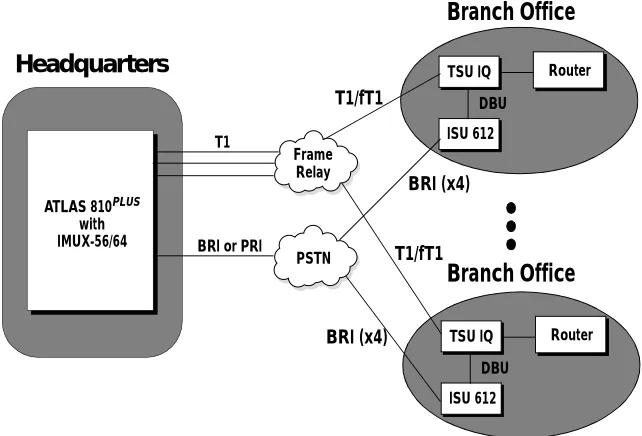
The IMUX-56/64 Module combines with other ATLAS components to pro-vide a flexible disaster recovery system in the ATLAS Integrated Access Sys-tem. The IMUX-56/64 Module, which occupies a single slot in the ATLAS chassis, supports multiple, independent BONDING sessions with each ses-sion having the potential to use a different bandwidth. The IMUX-56/64 Module can use either 56Kbps or 64Kbps data lines (i.e., channels) for any given BONDING session. The IMUX-56/64 Module can establish a BOND-ING session using as few as 2 or as many as 32 channels. Figure 1-1 shows an example application of the IMUX-56/64 Module.
Figure 1-1. ATLAS Remote Access Application
CONFIGURING AN ENDPOINT TO USE BONDING
How an endpoint is configured to use BONDING is unique to each type of endpoint. Typically, it will be a reference to the number of DS0s, with
men-tion of BONDING in the help line. See the ATLAS 800 or 800 PLUS manuals
for more information on endpoint configuration. Information may also be ATLAS 810PLUS
with IMUX-56/64
Headquarters
Frame Relay PSTN T1BRI or PRI
Chapter 1. Introduction
1-2 IMUX-56/64 Module User Manual 61200262L1-1A
found in the help menus under the endpoint’s Dial plan Interface configura-tion.
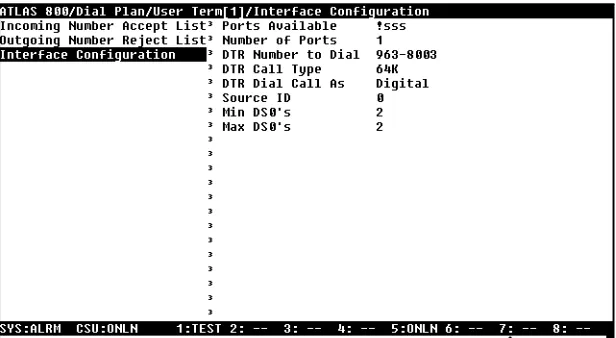
For example, to configure an Nx endpoint for BONDING, set Max DS0s and Min DS0s to something other than 1 under the Nx Dial Plan interface config-uration (see Figure 1-2).
Figure 1-2. Interface Configuration Example
FUNCTIONAL DESCRIPTION
The IMUX-56/64 Module installs into any available slot in the ATLAS chas-sis. The status of the module itself can be viewed from the ATLAS front pan-el. Additional status information is available via the terminal menu, accessible through either a VT-100 terminal connected to the ATLAS Base Unit’s control port or via a Telnet session established through the Base Unit’s Ethernet port. The IMUX-56/64 Module can be configured and application software can be downloaded using the terminal menu.
Features
• Compliant with TIA/EIA-619 Standard (BONDING)
- Up to (32) 128Kbps BONDING sessions per module
- Up to (8) 512Kbps BONDING sessions per module
- Up to (2) 2.048Mbps BONDING sessions per module
• Event-driven dial-backup of frame relay or T1 circuits
• Support for 56K or 64K circuits
• Video Conferencing
Chapter 1. Introduction
61200262L1-1A IMUX-56/64 Module User Manual 1-3
PHYSICAL DESCRIPTION
The IMUX-56/64 Module has no external interfaces. Both the network and DTE interfaces are provided on other ATLAS components. Information is passed to and from the IMUX-56/64 Module via ATLAS’ internal bussing scheme. Figure 1-3 illustrates the IMUX-56/64 Module card as seen from the rear panel.
Figure 1-3. IMUX-56/64 Module
Chapter 1. Introduction
61200262L1-1A IMUX-56/64 Module User Manual 2-1
Chapter 2
Installation
UNPACK AND INSPECT
Carefully inspect the IMUX-56/64 Module for shipping damages. If damage is suspected, file a claim immediately with the carrier and then contact ADTRAN Technical Support. If possible, keep the original shipping container for use in returning the IMUX-56/64 Module for repair or for verification of shipping damage.
Contents of ADTRAN Shipment
The following items are included in the ADTRAN shipment:
• IMUX-56/64 Module
• IMUX-56/64 Module User Manual (insert into main ATLAS User Manual)
INSTALLING THE IMUX-56/64 MODULE
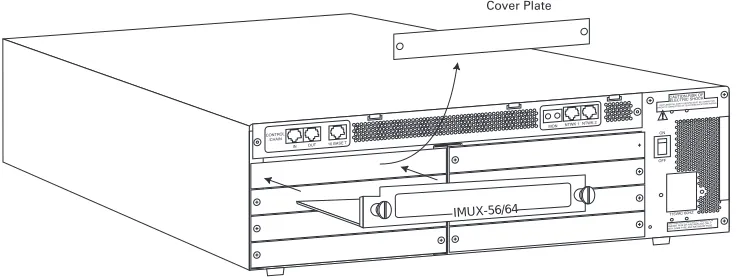
The installation procedure is described below, and Figure 2-1 shows the proper placement of the option module.
Instructions for Installing theIMUX-56/64 Module Step Action
1
Remove the cover plate (corresponding to the slot into which the IMUX-56/64 Module will be installed) from the ATLAS chassis rear panel.
2 Slide the IMUX-56/64 Module into the ATLAS chassis until the module is positioned firmly against the front of the ATLAS unit. 3 Fasten the thumbscrews at both edges of the option module. 4 Complete installation of remaining modules and Base Unit as
Chapter 2. Installation
2-2 IMUX-56/64 Module User Manual 61200262L1-1A
Figure 2-1. Installing the IMUX-56/64 Module
POWER-UP AND INITIALIZATION
When the IMUX-56/64 Module is inserted into the ATLAS chassis, the front panel STATUS indicator blinks red, yellow, and green for a time. Previously configured settings for the IMUX-56/64 Module are automatically restored upon power-up. When the IMUX-56/64 Module is ready for operation, the
STATUS indicator remains solid green. At this time, a system self-test can be invoked, as described in ATLAS User Manual.
Failed Self-Test
The terminal menu self-test log records self-test failures for the IMUX-56/64 Module.
WARRANTY AND CUSTOMER SERVICE
ADTRAN will replace or repair this product within five years from the date of shipment if the product does not meet its published specification, or if it fails while in service. For detailed warranty, repair, and return information, refer to the ADTRAN Equipment Warranty and Repair and Return Policy Procedure (see the last page of this manual for pertinent information). A return material authorization (RMA) is required prior to returning equip-ment to ADTRAN. For service, RMA requests, or more information, see the last page of this manual for the toll-free contact number.
IMUX-56/64
61200262L1-1A IMUX-56/64 Module User Manual 3-1
Chapter 3
Operation
OVERVIEW
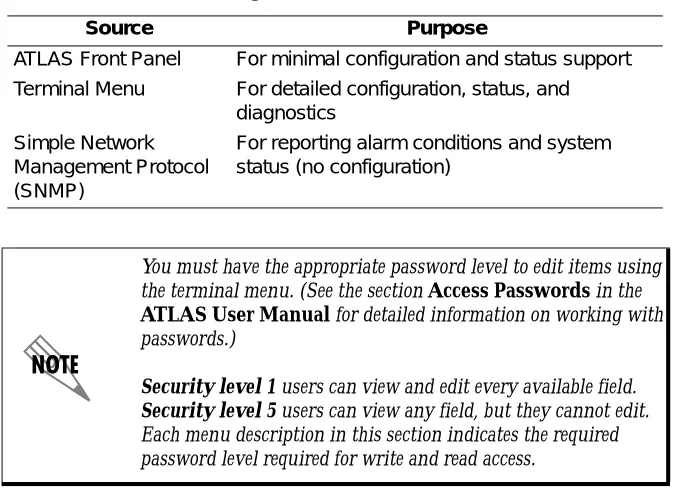
You can configure and control the IMUX-56/64 Module from several sourc-es, as shown in Table 3-1. The ATLAS User Manual provides detailed in-structions on operating each of the supported management approaches. The remainder of this chapter describes the menu items available for managing the IMUX-56/64 Module using the terminal menu.
TERMINAL MENU STRUCTURE
ATLAS uses hierarchical menus to access all of its features. The top-most menu level leads to submenus which are grouped by functionality. All sub-menu options display in the VT-100 terminal window.
You can use the Modules terminal menu to configure and control the
IMUX-56/64 Module. The Modulesmenu option, Type, shows the IMUX-56/
64 Module as IMUX (see Figure 3-2). The following sections describe the
Mod-ules menu and its submenus.
Table 3-1. Management Methods for the IMUX-56/64 Module Source Purpose
ATLAS Front Panel For minimal configuration and status support Terminal Menu For detailed configuration, status, and
diagnostics Simple Network
Management Protocol (SNMP)
For reporting alarm conditions and system status (no configuration)
You must have the appropriate password level to edit items using the terminal menu. (See the section Access Passwords in the
ATLAS User Manual for detailed information on working with passwords.)
Chapter 3. Operation
3-2 IMUX-56/64 Module User Manual 61200262L1-1A
MENU ACCESS
The ATLAS System Controller automatically detects the presence of the IMUX-56/64 Module when it is installed in the system. To access menus and submenus, use the keyboard arrow keys to scroll to the appropriate row and column; then press Enter on the keyboard.
For example, to view the Menus submenu for IMUX, use the keyboard arrow
keys to move to the row IMUX and the column Menu; then press Enter on
the keyboard.
SYSTEM
CONFIG
The IMUX-56/64 Module includes a BONDING Config submenu under the
System Config menu. The following paragraphs describe this submenu.
BONDING Config
Write security: 5; Read security: 5Displays the configuration submenus available for the IMUX-56/64 Mod-ules. This configuration is shared among all IMUX-56/64 Modules (see Fig-ure 3-1).
Figure 3-1. BONDING Config Submenu
TXINIT Timer Write security: 3; Read security: 5
Specifies the length of time the originating endpoint attempts to detect the BONDING negotiation pattern from the answering endpoint before decid-ing the BONDING call has failed.
TXFA Timer Write security: 3; Read security: 5
Specifies the length of time both endpoints attempt to detect the BONDING frame pattern when a call is connected before deciding the BONDING call has failed. When interoperating with other manufacturers' BONDING
Chapter 3. Operation
61200262L1-1A IMUX-56/64 Module User Manual 3-3
equipment, it may be necessary to change this time so that it matches TXADD01.
TXADD01 Timer Write security: 3; Read security: 5
Specifies the length of time both endpoints wait for additional calls to be connected at the end of negotiation before deciding that the BONDING call has failed. The factory default setting is sufficient for most calls to connect, although when dialing overseas it may be necessary to lengthen this timer to allow for slower call routing.
TXDEQ Timer Write security: 3; Read security: 5
Specifies the length of time both endpoints attempt to equalize the network delay between the bearer channels before deciding the BONDING call has failed.
TANULL Timer Write security: 3; Read security: 5
Specifies the length of time the answering endpoint attempts to detect the BONDING negotiation pattern from the originating endpoint before decid-ing the BONDING call has failed. It may be necessary to shorten this timer if the DTE equipment using the BONDING module also has timer con-straints for completing non-BONDING parameter negotiation.
TCID Timer Write security: 3; Read security: 5
Specifies the length of time both endpoints attempt to negotiate an agree-able value for bearer channels and channel capacities before deciding the BONDING call has failed.
Call Stagger Write security: 3; Read security: 5
Specifies the amount of delay between placing calls for outgoing BOND-ING sessions. Table 3-2 defines the call stagger values.
Table 3-2. Call Stagger Values Display value Meaning
No Stagger There is no delay between the call dialing of a BONDING session.
Chapter 3. Operation
3-4 IMUX-56/64 Module User Manual 61200262L1-1A
MODULES
The following paragraphs (Slt (slot), Type, Menu, Alarm, State, Status, and Rev (revision)) describe the IMUX-56/64 Modules fields (see Figure 3-2).Figure 3-2. Modules Menu
Slt
Read security: 5(Slot) Displays the number of available slots in the ATLAS chassis. Slot 0 refers to the ATLAS Base Unit.
Type
Write security: 3; Read security: 5Displays the module type currently installed in the slot or the module type you plan to install in the slot. If an IMUX-56/64 Module is installed, the Type field automatically defaults to IMUX (the IMUX-56/64 Module). You can use this field to preconfigure the system before installing modules by specifying the module that you want to install into each slot.
Menu
Read security: 5Displays additional status and configuration submenus for the
IMUX-56/64 Module. (To access the submenus for this item, use the arrow keys to scroll to the Menu column for the module you want to edit, and press Enter.)
Alarm
Read security: 5Displays whether there is an alarm condition on the IMUX-56/64 Module. Press Enter in this field to activate the Alarm menu.
Chapter 3. Operation
61200262L1-1A IMUX-56/64 Module User Manual 3-5
State
Read security: 5Displays whether the module is online or offline. Even though a module is physically installed, it must be marked Online for it to be considered an available resource. Marking an installed module Offline may be useful in system troubleshooting. If you choose Offline, the module will not be in alarm condition, but will display Offline.
Status
Read security: 5Displays status information on the IMUX-56/64 Module. Table 3-3 describes status messages that may appear and their meanings.
Rev
Read security: 5(Hardware Revision) Displays the hardware revision of the IMUX-56/64 Module.
Only if State reads Online, can the ATLAS use an installed module for any data bandwidth.
Table 3-3. Status Messages
Message Meaning Comments
Online The module is enabled and is responding to the system controller’s status polls.
This is the normal response of the system.
No Response The module is enabled but is not responding to the
system controller’s status polls.
This response indicates either a problem in the system or the module is not installed.
Empty The system controller has not detected the presence of a module in the option slot, nor has a module been manually enabled for this option slot.
Offline The module is installed but has been taken Offline
by a user.
The module is still responding to controller polls.
Offline / No Response
The module is installed but has been taken Offline by a user. The module is not responding to polls.
This response indicates either a problem in the system or the module is not installed.
Not Ready The module is installed and performing startup
initialization.
Chapter 3. Operation
3-6 IMUX-56/64 Module User Manual 61200262L1-1A
IMUX MENU
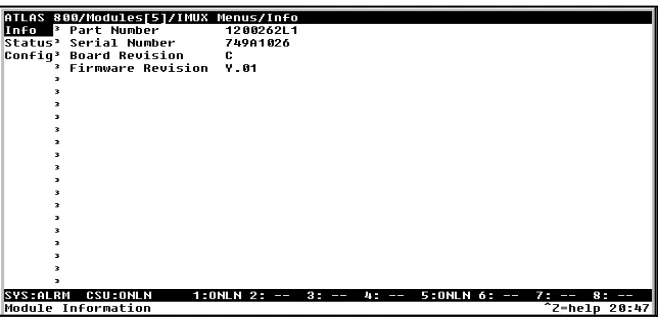
The IMUX Menu fields include Info, Status, and Configuration (see Figure3-3).
Figure 3-3. IMUX-56/64 Module Submenus
Info
Read security: 5Displays module and software information for the option module.
Part Number Read security: 5
Displays the IMUX-56/64 Module part number in a read-only field.
Serial Number Read security: 5
Displays the IMUX-56/64 Module serial number in a read-only field.
Board Revision Read security: 5
Displays the printed circuit board revision of the IMUX-56/64 Module in a read-only field.
Firmware Revision Read security: 5
Chapter 3. Operation
61200262L1-1A IMUX-56/64 Module User Manual 3-7
Status
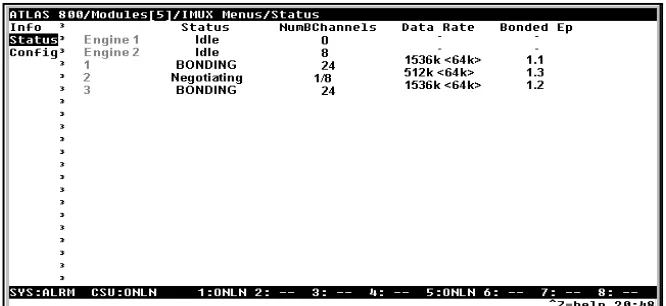
Read security: 5Displays the Status submenus for BONDING resources available on both BONDING engines on the IMUX-56/64 Module (see Figure 3-4).
The list entries Engine 1 and Engine 2 in the status list display the BOND-ING resources available for incoming and outgoing BONDBOND-ING calls on the separate BONDING engines.
Figure 3-4. IMUX-56/64 Module Status Menu
Status Read security: 5
Indicates the current status of a particular BONDING session. Table 3-4 defines the possible status display values.
Table 3-4. BONDING Status Display Values Display Value Meaning
Idle Indicates the number of Idle BONDING resources for a particular BONDING engine.
Reserved BONDING resources reserved for a BONDING session that is in the process of coming up.
Negotiating A single channel is connected and negotiating the BONDING call for a particular BONDING session.
Add Channels The initial BONDING negotiation was successful, and the IMUX-56/64 Module is in the process of adding channels to the BONDING session.
BONDING The remaining channels were brought up successfully, and the BONDING session is now ready to pass data.
Chapter 3. Operation
3-8 IMUX-56/64 Module User Manual 61200262L1-1A
NumBChannels Read security: 5
Displays the number of bearer channels used in this BONDING session. When the number is displayed in the format X/Y, Y is the number of BONDING resources reserved for this session, and X is the number of calls belonging to this session that are up. If just a number is displayed, then all calls are up, and the number displayed is the number of BONDING resources in use for this session.
Data Rate Read security: 5
Displays the data rate for this BONDING session. The number in the paren-thesis is the data rate of the individual bearer channels.
Bonded Ep Read security: 5
Displays the slot and port of the terminating endpoint that is using this BONDING session.
Configuration
Read security: 5Displays the configuration submenus available for the IMUX-56/64 Mod-ule (see Figure 3-5).
Figure 3-5. IMUX-56/64 Module Config Menu
For a description of the individual timers, see BONDING Config on page 3-2.
ATLAS FEATURES USED WITH IMUX-56/64 MODULE OPTIONS
In addition to the IMUX-56/64 Module menu items, two additional ATLAS menu items may be operated in conjunction with the IMUX-56/64 Module. These are Factory Restore and System Self-test.
Chapter 3. Operation
61200262L1-1A IMUX-56/64 Module User Manual 3-9
Factory Restore
Individual IMUX-56/64 Modules do not have independent configurations; there is one configuration for all IMUX-56/64 Modules in an ATLAS. This configuration can be returned to factory default by pressing F while the cur-sor is positioned over the BONDING Config submenu, found in the System Config menu.
Factory defaulting an individual IMUX-56/64 Module will not affect the configuration.
System Self-Test
System Self-test, a submenu of the ATLAS main menu item System Utility, executes both the IMUX-56/64 Module internal test and the ATLAS internal test. The results of the self-test are displayed in the self-test log.
Chapter 3. Operation
61200262L1 IMUX-56/64 Module User Manual Index-1
Index
A
accessing menus 3-2
ALARM 3-4
ATLAS features 3-8
ATLAS system controller 3-2
B
BOARD REVISION 3-6
BONDED EP 3-8
BONDING CONFIG 3-2
BONDING status display values 3-7
C
CALL STAGGER 3-3
call stagger values 3-3
configuring Modem-16 Module 3-1
D
DATA RATE 3-8
F
factory restore 3-8
failed self-test 2-2
FCC statement iii
FIRMWARE REVISION 3-6
H
hardware revision 3-5
I
IMUX MENU 3-6
INFO 3-6
initialization 2-2
installing the modem 2-1
items included in shipment 2-1
M
MENU 3-4
menu
structure 3-1
modem
description 1-1, 1-3
features 1-2
MODULES 3-4
N
NUMBCHANNELS 3-8
O
offline state 3-5
online state 3-5
P
PART NUMBER 3-6
password levels 3-1
R
repair 2-2
return information 2-2
REV 3-5
RMA requests 2-2
S
self-test, system 3-9
SERIAL NUMBER 3-6
service 2-2
shipping contents 2-1
Index
Index-2 IMUX-56/64 Module User Manual 61200262L1
SLT 3-4
STATE 3-5
STATUS 3-5, 3-7
status messages for Modem-16 3-5
SYSTEM CONFIG 3-2
system self-test 3-8, 3-9
T
TANULL TIMER 3-3
TCID TIMER 3-3
terminal menu navigating 3-2
terminal menu structure 3-1
tests
power up 2-2
self-test, failed 2-2
system self-test 3-8
TXADD01 TIMER 3-3
TXDEQ TIMER 3-3
TXFA TIMER 3-2
TXINIT TIMER 3-2
TYPE 3-4
type menu 3-4
W
warranty 2-2
Product Support Information
Presales Inquiries and Applications Support
Please contact your local distributor, ADTRAN Applications Engineering, or ADTRAN Sales:
Applications Engineering (800) 615-1176
Sales (800) 827-0807
Post-Sales Support
Please contact your local distributor first. If your local distributor cannot help, please contact ADT-RAN Technical Support and have the unit serial number available.
Technical Support (888) 4ADTRAN
Repair and Return
If ADTRAN Technical Support determines that a repair is needed, Technical Support will coordinate with the Customer and Product Service (CAPS) department to issue an RMA number. For information regarding equipment currently in house or possible fees associated with repair, contact CAPS directly at the following number:
CAPS Department (256) 963-8722
Identify the RMA number clearly on the package (below address), and return to the following address: ADTRAN Customer and Product Service