MERLIN LEGEND
®
Communications System
Basic Rate interface
Printed in U.S.A. October 1994 Notice
Every effort was made to ensure that the information in this book was complete and accurate at the time of printing. However, information is subject to change.
See Appendix B, “Customer Support Information,” for important information.
Security of Your System: Preventing Toll Fraud
As a customer of a new telephone system, you should be aware that there exists an increasing problem of telephone toll fraud. Telephone toll fraud can occur in many forms, despite the numerous efforts of telephone companies and
telephone equipment manufacturers to control it. For Important information regarding your system and toll fraud, see Appendix B, “Customer Support Information. ”
Federal Communications Commission Statement
This equipment has been tested and found to comply with the limits for a Class A digital device, pursuant to Part 15 of the FCC Rules. These limits are designed to provide reasonable protection against harmful interference when the equipment is operated in a commercial environment. This equipment generates, uses, and can radiate radio frequency energy and, if not installed and used in accordance with the instruction manual, may cause harmful interference to radio communications. Operation of this equipment in a residential area is likely to cause harmful interference, in which case the user will be required to correct the interference at his own expense. For further FCC information, see Appendix B, “Customer Support Information.”
Trademarks
5ESS, MERLIN, MERLIN LEGEND, MLX-10, MLX-10D, MLX-20L, MLX-28D, and Magic On Hold are registered trademarks; AUDIX Voice Power, FAX Attendant System, HackerTracker, MERLIN MAIL, PassageWay, PictureTel, and Vistium are trademarks of AT&T in the U.S. and other countries.
Ordering Information
The ordering number for this document is 555-601-111. To order this document, call the AT&T GBCS Publication Fulfillment Center at 1-800-457-1235 or fax your request to 1-800-457-1764. For more information about AT&T
documents, refer to the section entitled, “Related Documents” in “About This Book. ” The Pocket Reference, listed in that section, provides full ordering information for replacement parts, accessories, and other compatible equipment; or, contact your AT&T representative.
Support Telephone Number
In the continental US., AT&T provides a toll-free customer helpline 24 hours a day. Call the AT&T Helpline at 1-800-628-2888 if you need assistance when installing or using your system.
Outside the continental U. S., contact your local AT&T representative.
Warranty
About this Book
■ Intended Audience xi
■ Conventions Used xi
■ Related Documents xii
■ How to Comment on This Document xiv
Overview
■ Introduction
■ ISDN and BRI
■ System Overview
■ Applications
■ Modes of Operation
■ Call Handling
■ BRI Features
1-2 1-3 1-4 1-8 1-10 1-11 1-14
Equipment and Operation
■ Equipment Requirements for MERLIN LEGEND BRI System 2-2
■ 800 CO-BRI Module 2-3
■ Installation of Equipment 2-7
■ Upgrading the
■ Telephones
■ Adjuncts
■ Applications
MERLIN LEGEND System 2-9
2-13 2-14 2-15
Features
■ All-Call Privacy/Per-Call Privacy 3-2
■ Automatic Callback 3-6
■ Automatic Recall 3-10
■ Calling Party Number/Billing Number 3-13
■ CO Transfer 3-15
■ Customer Originated Trace
Planning
■ Planning Overview 4-1
■ System Planning Forms 4-2
■ Control Unit Planning 4-5
■ Line Connections 4-7
■ Line Options 4-8
■ Assigning Telephone Buttons 4-16
■ Features 4-17
System Programming
■ Basic Programming Considerations 5-2
■ Service Profile Identifier (SPID) 5-3
■ Clock Synchronization 5-6
■ BRI Timers 5-10
■ BRI Access Button 5-13
■ System Programming Reports 5-19
Maintenance
■ BRI Maintenance 6-2
■ Accessing Maintenance Screens 6-3
■ Demand Tests 6-4
■ BRI Module and Clock Synchronization 6-13
■ Port Screens — Digital Subscriber Lines 6-16
A
Planning Forms
A-1B
Customer Support Information
B-1AB
Abbreviations
AB-IGL
Glossary
GL-1Overview
1-1 1-2 1-3 1-4 1-5
MERLIN LEGEND BRI Capabilities 1-2
PRI VS. BRI 1-3
800 CO-BRI Module 1-5
Directory Number Mapping 1-6
Placement of BRI Access Button on an MLX Telephone 1-7
Equipment and Operation
2-1 800 CO-BRI Module 2-4
2-2 LEDs on an 800 CO-BRI Module 2-5
2-3 Installing the 800 CO-BRI Module 2-8
2-4 Installing the 2.B Feature Module 2-10
Features
3-1 MLX Display Telephone Calling Party Number Information 3-14
System Programming
Equipment and Operation
2-1 2-2 2-3
2-4
800 CO-BRI Module Specifications 2-3
800 CO-BRI Module LEDs 2-5
Pin Assignments for 8-Position Jack on an
800 CO-BRI Module 2-6
800 CO-BRI Module LEDs 2-5
Planning
4-1 System Planning Forms Needed for BRI Planning 4-3
4-2 Timers 4-12
System Programming
5-1 BRI Timer Settings 5-3
5-2 Timers 5-12
Maintenance
6-1 Error Conditions 6-2 BRI Error Messages
The exclamation point in an equilateral triangle is intended to alert the user to the presence of important operating and maintenance (servicing) instructions in the literature accompanying the product.
IMPORTANT SAFETY INSTRUCTIONS
When installing telephone equipment, always follow basic safety precautions to reduce the risk of fire, electrical shock, and injury to persons, including:
Read and understand all instructions.
Follow all warnings and instructions marked on or packed with the product.
Never install telephone wiring during a lightning storm.
Never install a telephone jack in a wet location unless the jack is specifically designed for wet locations.
Never touch uninsulated telephone wires or terminals unless the telephone wiring has been disconnected at the network interface.
Use caution when installing or modifying telephone lines.
Use only AT&T-manufactured MERLIN LEGEND Communications System circuit modules, carrier assemblies, and power units in the MERLIN LEGEND Communications System control unit.
Use only
AT&T-recommended/approved MERLIN LEGEND
Communications System accessories.If equipment connected to the analog extension modules (008, 408, 408 GS/LS) or to the MLX telephone modules (008 MLX, 408 GS/LS-MLX) is to be used for in-range out-of-building (IROB) applications, IROB
protectors are required.
Do not install this product near water, for example, in a wet basement location.
Do not overload wall outlets, as this can result in the risk of fire or electrical shock.
Do not attach the power supply cord to building surfaces. Do not allow anything to rest on the power cord. Do not locate this product where the cord will be abused by persons walking on it.
Slots and openings in the module housings are provided for ventilation. To protect this equipment from overheating, do not block these openings.
Never push objects of any kind into this product through module
openings or expansion slots, as they may touch dangerous voltage points or short out parts, which could result in a risk of fire or electrical shock. Never spill liquid of any kind on this product.
Unplug the product from the wall outlet before cleaning. Use a damp cloth for cleaning. Do not use cleaners or aerosol cleaners.
Auxiliary equipment includes answering machines, alerts, modems, and fax machines. To connect one of these devices, you must first have a
Multi-Function Module (MFM).
Do not operate telephones if chemical gas leakage is suspected in the area. Use telephones located in some other safe area to report the trouble.
WARNING:
For your personal safety, DO NOT install an MFM yourself.
ONLY an authorized technician or dealer representative shall install, set options, or repair an MFM.
To eliminate the risk of personal injury due to electrical shock, DO NOT attempt to install or remove an MFM from your MLX telephone. Opening or removing the module cover of your telephone may expose you to
dangerous voltages.
This document is a supplement to the standard documentation for the MERLIN LEGEND®
Communications System and provides the user with information specific to the use of a MERLIN LEGEND Basic Rate Interface (BRI) system. This information includes the equipment, features, programming procedures,
planning procedures, and maintenance procedures that differ from the standard MERLIN LEGEND system.
Intended Audience
This book is intended for use as a reference by anyone needing such information, including support personnel, sales representatives, system
managers, and users of the MERLIN LEGEND BRI system. It is also intended for system technicians who are responsible for system installation, maintenance and troubleshooting.
Conventions Used
Certain type fonts and styles act as visual cues to help you rapidly understand the information presented:
If you press the Feature button on an MLX display telephone, the display lists telephone features you can select. A programmed Auto Dial button gives you instant access to an inside or outside number.
Choose Ext Prog from the display screen.
To activate Call Waiting, dial *11.
Product Safety Labels
The names of fixed-feature, factory-imprinted buttons appear in bold. The names of programmed buttons are printed as regular text.
Plain constant-width type indicates text that appears on the telephone display or PC screen.
Constant-width type in italics indicates characters you dial at the telephone or type at the PC,
Throughout these documents, hazardous situations are indicated by an exclamation point inside a triangle and the word caution or warning.
A
WARNING:
Warning indicates the presence of a hazard that could cause death or severe personal injury if the hazard is not avoided.
A
CAUTION:
Caution indicates the presence of a hazard that could cause minor personal injury or property damage if the hazard is not avoided.
Related Documents
in addition to this book, the documents listed below are part of the
documentation set. Within the continental United States, these documents can be ordered from the GBCS Publications Fulfillment Center by calling 1-800-457-1235.
Document Title
System Documents
555-601-110 BRI Access Button Quick Reference 555-601-111 BRI Supplemental Reference 555-601-112 BRI Provisioning and Planning 555-620-110 Feature Reference
555-620-115 Equipment and Operations Reference 555-640-141 Installation
555-620-116 Pocket Reference 555-620-111 System Programming 555-620-112 System Planning 555-620-113 System Planning Forms
Telephone User Support
555-601-110 BRI Access Button Quick Reference 555-620-122 MLX-10D, MLX-28D, and MLX-20L
Display Telephones User’s Guide 555-620-123 MLX-10D, MLX-28D, and MLX-20L
Display Telephones Quick Reference
555-620-150 MLX- 10D Display Telephone Tray Cards (6 cards) 555-620-152 MLX-28D and MLX-20L Telephone Tray Cards (5 cards) 555-620-124 MLX-10 Nondisplay Telephone User’s Guide
555-620-151 MLX-10 Nondisplay Telephone Tray Cards (6 cards) 555-620-120 Analog Multiline Telephones User’s Guide
555-620-121 Analog Multiline Telephones Quick Reference 555-620-126 Single-Line Telephones User’s Guide
555-620-127 Single-Line Telephones Quick Reference 555-620-128 MLC-5 Cordless Telephone Quick Reference
System Operator Support
Document
I
TitleSoftware-Linked Information Products ST-21 29-72 Vistium PV 1200 Installation Guide ST-2129-73 Vistium PV 1200 User’s Guide ST-2130-88 Vistium PV 1300 Installation Guide ST-2130-89 Vistium PV 1300 User’s Guide
Documentation for Qualified Technicians
555-620-140 Installation, Programming, & Maintenance (lP&M) Binder (consists of 555-620-141, 555-620-142, 555-620-143, and 555-620-144
555-620-141 Installation
555-620-142 System Programming & Maintenance (SPM) 555-620-143 Maintenance & Troubleshooting
555-620-144 Programming Summary
How to Comment on This Document
We welcome your comments, both good and bad. Please use the feedback form on the next page to let us know how we can continue to serve you. If the
feedback form is missing, write directly to:
Documentation Manager AT&T
211 Mount Airy Road Room 2W226
Basking Ridge, NJ 07920.
Title: MERLIN LEGEND BRI Communications System Supplemental Reference Order No.: 555-601-111 Date: October 1994
1.
2.
3
4
Please rate the effectiveness of this book in the following areas:
Excellent Good Fair Poor Not
Applicable
Ease of Use I ! !
Clarity Completeness Accuracy Organization Amearance Examples
Illustrations Overall Satisfaction
Please check ways you feel we could improve this book:
Improve the overview ◆ Add more examples ◆ Add troubleshooting information
Improve the table of contents ◆ Add more detail ◆ Make it less technical Improve the organization ◆ Make it more concise ◆ Add more/better quick
reference aids
Include more illustrations ◆ Add more step-by-step procedures ◆ Improve the index/glossary Other
What did you like most about this book?
Feel free to write any comments below or on an attached sheet.
If we may contact you about your comments, please complete the following:
Name: Telephone Number:
This chapter introduces the MERLIN LEGEND®
BRI Communications System. In
addition to a short discussion of Integrated Services Digital Network (ISDN) and
Basic Rate Interface (BRI), the chapter covers the basic hardware and software
requirements and the functions and features of the system. Also included are
brief descriptions of the BRI features supported by the MERLIN LEGEND BRI
system.
Introduction
To obtain faster rates and precise data, equipment must be able to transmit digitally. Like Primary Rate Interface (PRI), BRI is a standard protocol for accessing Integrated Services Digital Network (ISDN) services. By using BRI, the MERLIN LEGEND Communications System can connect with the speed and accuracy of ISDN services.
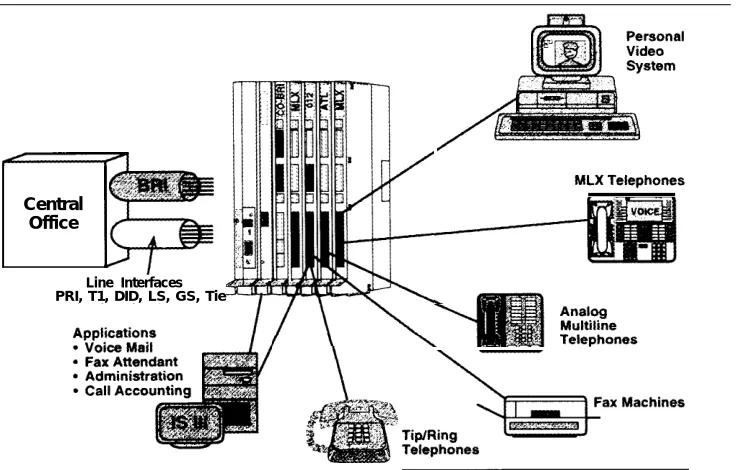
BRI lines offer the capability of voice, high-speed data, local area network (LAN) interconnection, and video transmission (see Figure 1-1). In addition to the standard features offered by other releases of the MERLIN LEGEND Communications System, the MERLIN LEGEND BRI system offers the ability to subscribe to several BRI features. Other BRI features have applications specific to Federal Government telephone networks.
Central Office
Line Interfaces PRI, T1, DID, LS, GS, Tie
Figure 1-1. MERLIN LEGEND BRI Capabilities
ISDN and BRI
To understand the BRI option, the user should be familiar with the Integrated Services Digital Network (ISDN) and the Basic Rate Interface (BRI).
ISDN
The Integrated Services Digital Network (ISDN) is a digital network interface used worldwide for the transmission of voice, data, video, and other services simultaneously over standard telephone wires. It is the leading standard in the world for digital transmission.
With ISDN, a user can talk on the telephone while receiving and sending faxes or data. Because it is digital, ISDN has faster and more accurate data
transmission, calling information, and more reliable establishment of calls. ISDN is excellent for video, teleconferencing, and telemarketing.
BRI
Basic Rate Interface (BRI) is a protocol within the ISDN standard. Because it is a station-side protocol, BRI also offers access to other groups of services, such
as central office (CO) Transfer and Local Area Signaling
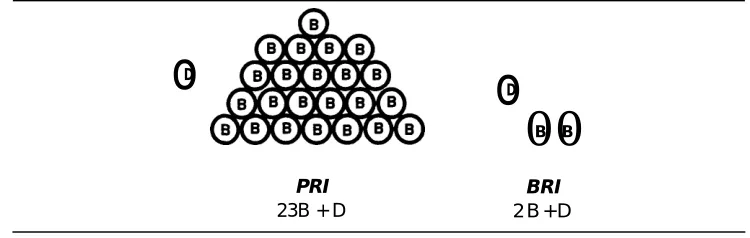
Services (LASS) features, which are described later.While a Primary Rate Interface (PRI) line consists of 23 bearer channels (B-channels) and one data channel (D-channel), a BRI line has two B-channels and one D-channel. The B-channels carry the user information (including data), and the D-channel controls the B-channel communication and initializes ISDN lines. Each B-channel on a BRI line has a capacity of 64 Kbps, and each D-channel has a capacity of 16 Kbps. (See Figure 1-2.)
o
Do
D00
B BPRI BRI
23B + D 2 B + D
Figure 1-2. PRI vs. BRI
System Overview
A MERLIN LEGEND BRI system has specific requirements and components different from a standard MERLIN LEGEND system.
Hardware and Software Requirements
A MERLIN LEGEND system must have an 800 CO-BRI module to connect to BRI facilities. This module is the interface that connects BRI lines from a 5ESS®
G8 central office to the MERLIN LEGEND system. In addition, the Processor module must contain the 2. B Feature module.
NOTE:
If a new MERLIN LEGEND BRI system has been purchased, the 2.B Feature module already resides in the Processor module. If a MERLIN LEGEND system is upgraded to a MERLIN LEGEND BRI system, the 2.B Feature module must be installed in the existing Processor module. (See “installing the 2.B Feature Module” in Chapter 2.)
The MERLIN LEGEND BRI system supports connectivity to a 5ESS Custom Central Office switch servicing the AT&T Custom BRI protocol. The 5ESS central office (CO) must be running 5ESS Generic 8 Custom (5E8) or later software.
The MERLIN LEGEND system must be a base of Release 2.0 or higher to be upgraded to MERLIN LEGEND BRI software release 2.B, and to operate properly with an 800 CO-BRI module. However, a 2.B Feature module can be used in
a Release 1.0 Processor module if the Release 1.0 software is
upgraded by using the Convert utility of the System Programming and
Maintenance (SPM) software.
Ordering BRI Lines
Also at the time of subscription, the type of terminal configuration, in this case Type D, is specified. Although the 5ESS Generic 8 Custom (5E8) software supports two types of services over BRI lines (Point and Point-to-Multipoint), the MERLIN LEGEND system only supports Point-to-Multipoint.
800 CO-BRI Module
The 800 CO-BRI (Central Office-Basic Rate Interface) module is the MERLIN LEGEND system interface to BRI lines from the central office. At least one 800 CO-BRI module must be in the system for the system to be connected to BRI lines. Up to five 800 CO-BRI modules can be placed in a system (or any combination of line modules up to the system maximum of 80 lines).
Because of limitations with the 391A, 391A 1, and 39IA2 power supplies, the number of 800 CO-BRI modules plus 100D modules cannot exceed three per carrier.
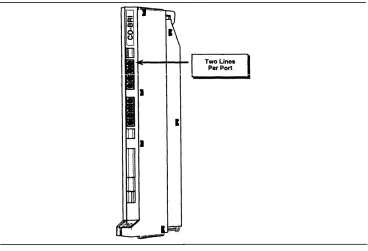
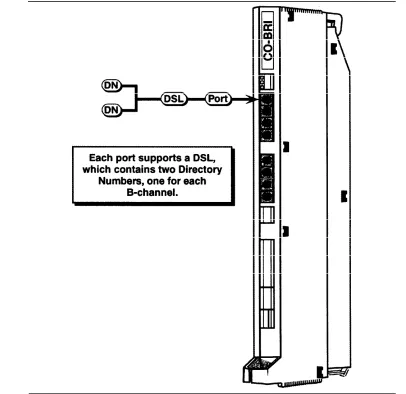
Each 800 CO-BRI module has eight ports; each port supports two MERLIN LEGEND lines, for a total of 16 lines per module (see Figure 1-3).
Figure 1-3. 800 CO-BRI Module
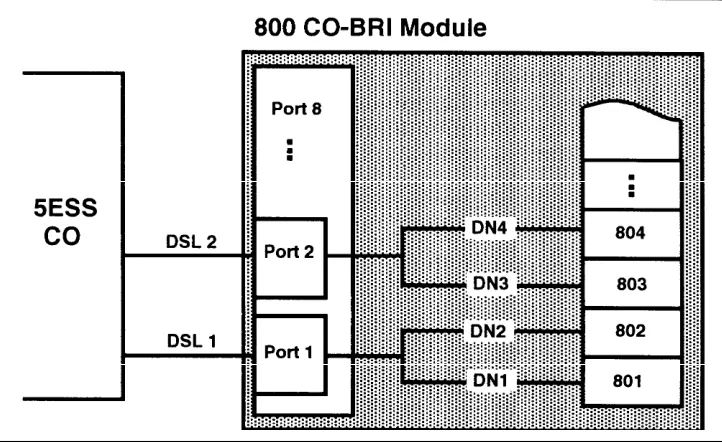
Each BRI line, called a Digital Subscriber Line (DSL), coming into the MERLIN LEGEND system contains two Directory Numbers (DNs), one for each B-channel. Usually the Directory Number is the number that is dialed to reach the destination.
The MERLIN LEGEND system maps the Directory Number (DN) to a line number in the Dial Plan. For example, if the 800 CO-BRI module is the first module in the system, DN1 is mapped to Line 801, the first line in the MERLIN LEGEND system. DN2 is mapped to 802, and soon for each DN (see Figure 1-4). A telephone with Line 801 rings any time a call arrives to DN1. Subsequent calls to the same DN can be handled by the 5ESS Multi-Line Hunt Group feature (if the user has subscribed to this feature).
Figure 1-4. Directory Number Mapping
BRI Access Button
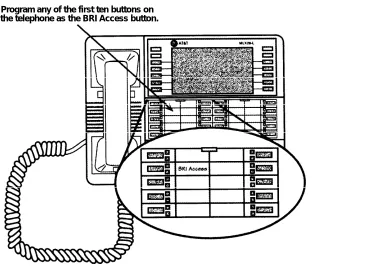
The BRI Access button is a button programmed on the telephone console in the same way as a System Access or Intercom button. The BRI Access button is used to initiate a CO Transfer and to identify the last BRI line that placed or received a call. Administered via Centralized Telephone Programming (see Chapter 5, “System Programming”), the BRI Access button can be
programmed on any of the first ten buttons on an analog multiline or digital multiline (MLX) telephone (see Figure 1-5).
NOTE:
There can be only one BRI Access button on a telephone.
This identification is used for Local Area Signaling Services (LASS) features (see the section “BRI Features” in this chapter).
Program any of the first ten buttons on the telephone as the BRI Access button.
Figure 1-5. Placement of BRI Access Button on an MLX Telephone
Applications
The MERLIN LEGEND BRI system supports almost all of the applications
supported by a standard MERLIN LEGEND system. These applications include:
AT&T Attendant
DOS Call Accounting System (CAS)
CAS for Windows
Call Accounting Terminal (CAT)
Call Management System (CMS)
Conversant Voice Information Systems (CVIS) INTRO
HackerTracker™ System
Integrated Solution II Release 1.0
- Integrated Voice Power Automated Attendant Release 1.1
- AUDIX™ Voice Power (AVP) 2.1
—
MERLIN LEGEND Call Accounting System (CAS) Release 1.0
Integrated Solution Ill
AUDIX Voice Power (AVP) Release 2.1.1
AT&T FAX Attendant™ System (FA) Release 2.1.1
—
MERLIN LEGEND Integrated Solution Call Accounting System (CAS)
Release 1.0
System Programming and Maintenance (SPM) Release 3.18
– Integrated Administration
MERLIN Identifier
MERLIN MAIL™
MERLIN MAIL Multi-Lingual Release
PassageWay™
NOTE:
PassageWay Release 1.0 does not recognize the BRI Access button.
Release
2.0 is recommended.
PictureTel™ 4000 Group Video system
Vistium™ 1200/1300 Personal Video system
Modes of Operation
The MERLIN LEGEND BRI system operates in Key mode and, with limitations, in
Hybrid/PBX mode. Behind Switch mode is not supported.
Key Mode
The MERLIN LEGEND BRI system was developed primarily to work in Key
mode. Consequently, it functions fully in Key mode with the following exception:
BRI lines will not default on stations or Direct Line Consoles (DLCs). They must
be assigned during system programming.
Hybrid/PBX Mode
BRI is supported in Hybrid/PBX mode with these limitations:
Queued Call Consoles (QCCs) cannot have BRI Access buttons and
therefore cannot initiate CO Transfer (see the “BRI Features” section in
this chapter),
BRI lines in pools should not be mixed with other types of lines
(loop-start, ground-(loop-start, PRI, etc.).
All BRI lines in a pool should be configured by the central office (CO) the
same way. In other words, the User Service Order Profile should be the
same. Otherwise, the user can get confused.
Since there is no way to identify the last Directory Number used for a call
on System Access or Pool buttons, Local Area Signaling Services (LASS)
features should not be used on calls made to or from these buttons.
LASS features should be used only on Personal Lines (see the “BRI
Features” section in this chapter).
Call Handling
Placing and receiving calls on a BRI line is the same as placing and receiving
calls on loop-start or ground-start lines. Making BRI digital data calls is the
same as making Primary Rate Interface (PRI) digital data calls.
Incoming Calls
An incoming call to a BRI line can terminate on Personal Line buttons, Direct
Pool Termination (DPT) buttons, Calling Groups, and the Queued Call Console
(QCC) queue.
Outgoing Calls
When a user lifts the receiver and presses a BRI line button on a telephone, the
MERLIN LEGEND system sets up a call to the 5ESS central office (CO). The
button’s light-emitting diode (LED) turns to green to show that the line is active.
The CO provides dial tone. As the user dials digits, they are sent to the CO.
Like other lines, a BRI line can be accessed via a DPT button or via a System
Access button through pool access codes.
Like other lines, a BRI line can be accessed via Automatic Route Selection
(ARS). ARS routes calls over outside lines according to the number dialed and
the lines available. As with PRI facilities, a user can take advantage of ARS
routing for the type of call (voice or data). For example, if data is frequently sent
to a particular number in another area of the country, ARS can route calls to that
number over high-speed data lines.
H o l d
An active call on a BRI line can be placed on hold by using the MERLIN
LEGEND Hold feature. All call appearances (such as LEDs) are the same as for
other non-BRl lines.
Conference
Calls on BRI lines can be part of a conference call, but the conference is
processed by the MERLIN LEGEND system, not by the 5ESS central office
(CO). The MERLIN LEGEND system determines the number of active parties on
the call.
Like a standard MERLIN LEGEND system, the MERLIN LEGEND BRI system
supports up to five people on a conference: two within the system, two outside
the system, and the call originator.
NOTE:
If a MERLIN LEGEND user is part of a conference established by an outside
party via the CO Conference feature, the MERLIN LEGEND system may play
MOH (if so programmed) when the MERLIN LEGEND user puts the call on hold.
Transfer
A user can transfer calls two ways on a MERLIN LEGEND BRI system. One way
is to transfer calls by using the standard MERLIN LEGEND Transfer feature. The
MERLIN LEGEND Transfer feature works the same with BRI lines as with other
lines. With this Transfer feature a user can transfer the following calls:
■
Intercom call to a MERLIN LEGEND station
■
CO call to a MERLIN LEGEND station
■
Intercom call to a station outside the system
■
CO call to a station outside the system
This last transfer, called Trunk-to-Trunk Transfer, ties up both CO facilities
involved in the transfer.
Recall
Recall is not recognized by the 5ESS central office (CO) on BRI lines. Therefore, pressing the recall button on a telephone is ignored by the CO.
Remote Access
BRI lines can be programmed to use the Remote Access feature.
BRI Features
By using Basic Rate Interface (BRI) lines, the MERLIN LEGEND system can use
features offered by the 5ESS central office. The BRI features described below
are supported by the MERLIN LEGEND system. The Multi-Level Precedence and
Preemption (MLPP) feature can be used only on a private configured network
and, therefore, is used primarily by the Federal Government.
NOTE:
All BRI features are ordered from the central office (CO) at the time of
subscription for BRI lines. Depending on the CO, the features may be available
under a different name and voice prompts may vary.
All-Call Privacy/Per-Call Privacy
The All-Call Privacy feature prevents or allows the Calling Party Number/Billing
Number (CPN/BN) to be sent by the central office when an outgoing call is made
on a BRI line. If All-Call Privacy is activated for that line, the CPN/BN is not sent.
If All-Call Privacy is not activated, the CPN/BN is sent.
Per-Call Privacy overrides the All-Call Privacy status for the next call only. For
example, if Per-Call Privacy is used on a line that has All-Call Privacy activated
(preventing a number being sent), the number is sent for the next call only.
Calling Party Number/Billing Number
The Calling Party Number/Billing Number (CPN/BN) feature provides incoming
calling party number information that identifies the originator of a call in the
call-handling displays of MLX telephones. If the MERLIN LEGEND system
subscribes to this BRI feature, each incoming call to the system over a BRI line
can be accompanied either by the calling party number or by the billing number
of the calling party supplied by the network. The billing number is the telephone
billing number for the department or company.
CO Transfer
When a BRI call comes in from the 5ESS central office (CO) and the user needs
to transfer the call back outside the MERLIN LEGEND system, he or she can
press the Transfer button, press the BRI Access button, and then dial the
destination station, The user presses the Transfer button again to complete the
transfer or hangs up. Once the transfer is complete, the BRI line to the MERLIN
LEGEND system is free for additional call handling. By contrast, the standard
MERLIN LEGEND Transfer feature ties up both the incoming and outgoing lines
for the duration of the call.
Local Area Signaling Services Features
Local Area Signaling Services (LASS) features are a group of central office
features that use BRI lines to provide MERLIN LEGEND users with
call-management capabilities. The MERLIN LEGEND BRI system provides access to
three LASS features:
■
Automatic Callback
■
Automatic Recall
■
Customer Originated Trace
Automatic Callback
The Automatic Callback feature allows a user to call back the last number
received on a given BRI line. If the far-end is busy, the 5ESS CO “camps” or
queues the call and calls the user when the call can be completed. To access
Automatic Callback, the user dials a feature access code provided by the CO.
Automatic Recall
The Automatic Recall feature allows a user to call back the last outgoing call he
or she dialed on a given BRI line. If the far-end is busy, the 5ESS CO “camps” or
queues the call and calls the user when the call can be completed. To access
Automatic Recall, the user dials a feature access code provided by the CO.
Customer Originated Trace
The Customer Originated Trace feature allows a user to trace the origin of the
last call received on a given BRI line. This information is stored at the 5ESS CO.
To retrieve it, the user must contact a CO representative.
NOTE:
Use of the Customer Originated Trace feature depends upon the practices of the
local law-enforcement agencies. The local telephone company should be
contacted for details on the availability and use of this feature.
Multi-Level Precedence and Preemption
By using the Multi-Level Precedence and Preemption (MLPP) feature, the calling
party can identify certain calls as priority calls. Such calls ring with a priority ring
and, by government convention, must be answered by either the called party or
a designated backup station. At the CO, an MLPP call can “tear down” or
preempt a non-priority call to complete the priority call.
NOTE:
This chapter describes the hardware used in and with the MERLIN LEGEND
BRIsystem and outlines the procedures for installation.
Except as noted, a MERLIN LEGEND
BRIsystem supports the same telephones
and adjuncts as a standard MERLIN LEGEND Communications System.
Equipment Requirements for a
MERLIN LEGEND BRI System
The hardware unique to a MERLIN LEGEND BRI system consists of:
■
800 CO-BRI module
■
Feature module with 2.B software
If the entire MERLIN LEGEND BRI system is purchased new, the Feature module
is already placed in the new Processor module. For procedures for installing a
BRI module, refer to the section “installation of Equipment. ”
800 CO-BRI Module
The 800 CO-BRI module serves as the Integrated Services Digital Network
(ISDN) Basic Rate, two-wire U-interface between the MERLIN LEGEND system
and the central office (CO) Basic Rate Interface (BRI) lines (see Figure 2-1).
The 800 CO-BRI module consists of eight ports. Each port supports a BRI line
(also called a Digital Subscriber Line or DSL). Each DSL maps to two MERLIN
LEGEND lines and supports two Directory Numbers, for a total of 16 lines or
Directory Numbers per 800 BRI module (see Figure 2-1). Up to five 800
CO-BRI modules can exist in a system (80 lines). The system supports a maximum
of two 100D modules.
Because of limitations with the 391A, 391A 1, and 391A2 power supplies,
the number of 800 CO-BRI modules plus 100D modules in a carrier cannot
exceed three.
Each DSL operates at 160 kbps with the following allocation:
■
Two 64-kbps B-channels
■One 16-kbps D-channel
■
16 kbps for framing, maintenance, and synchronization
Table 2-1 shows the basic specifications for the 800 CO-BRI module.
Table 2-1.800 CO-BRI Module SpecificationsModule
Line/
Trunk Type
Specifications
800 CO-BRI
BRI
Capacity: 8 ports support 16 lines
Signaling: BRI
Loop range: 3.4 miles
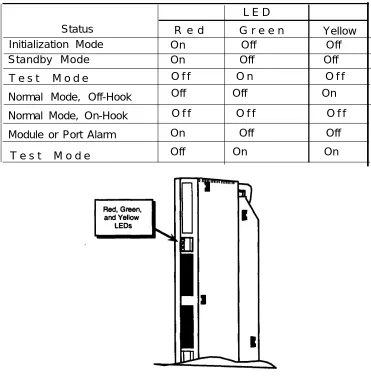
Red, green, and yellow LEDs indicate the status of the module (see Table 2-2):
■
A lit red LED indicates an active alarm on one or more of the eight active
Digital Subscriber Lines (DSLs), or indicates that the module is out of
service.
■
A lit green LED indicates the module is in a test condition.
■
A lit yellow LED indicates an active call on the module.
Table 2-2.800 CO-BRI Module LEDsL E D
Status
R e d
G r e e n
Yellow
Initialization Mode
On Off Off
Standby Mode
On Off Off
T e s t M o d e
O f f O n O f f
Normal Mode, Off-Hook
Off Off On
Normal Mode, On-Hook
O f f O f f O f f
Module or Port Alarm
On Off Off
T e s t M o d e
Off On On
Figure
2-2. LEDs on an 800 CO-BRIModule
Wiring the 800 CO-BRI Module
The wiring running from the network interface to the 800 CO-BRI module is the
same as that for other line modules, which is usually a D8W cord. However, this
depends upon the network interface used. See the MERLIN LEGEND
Communications System Installation manual (555-620-1 41) for complete
information.
As mentioned, the 800 CO-BRI module is a two-wire interface. This means that
the interface operates on two-wire, twisted-pair cables of mixed gauges. The two
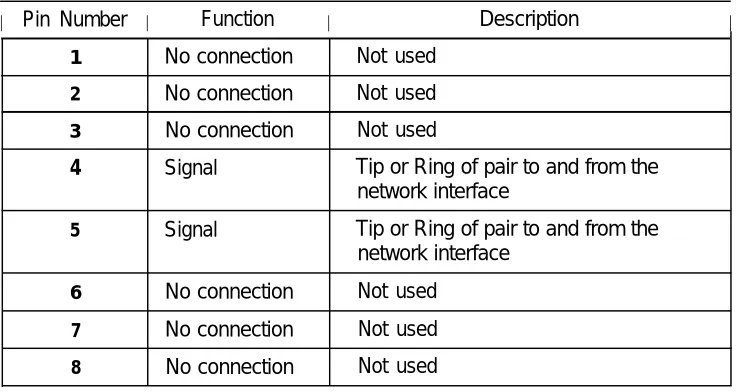
wires are reversible—they are not polarity sensitive. Table 2-3 shows the pin
assignments for an 8-position jack connected to the 800 CO-BRI module.
Table 2-3. Pin Assignments for 8-Position Jack on an 800 CO-BRI Module
I Pin Number I
Function
I
Description
I
1
No connection
Not used
2No connection
Not used
3No connection
Not used
4
Signal
Tip or Ring of pair to and from the
network interface
5
Signal
Tip or Ring of pair to and from the
network interface
Installation of Equipment
As previously discussed, the hardware for a MERLIN LEGEND BRI system
consists of an 800 CO-BRI module and a 2.B Feature module. If the entire
MERLIN LEGEND BRI system is new, the Feature module is already installed in
the Processor module. If the MERLIN LEGEND system is being upgraded to a
MERLIN LEGEND BRI system, the old Feature module must be replaced with the
2.B Feature module.
Installing the 800 CO-BRI Module
The installation is similar to installing any line module. Do not leave empty slots
between modules in the carrier. The system ignores any modules installed
beyond an empty slot.
To prevent damage from electrostatic discharge (ESD), avoid touching
leads, connectors, pins, and other components. Use a properly grounded
wrist strap.
Follow these steps to install an 800 CO-BRI module in the control unit. See the
MERLIN LEGEND Communications System Installation manual (555 -620-1 41) for
more information.
1. Review the system planning form to verify the slot placement for the
module.
CAUTION:
Remove the protective cover from the module’s gold-finger connector
before installing the module into the carrier,
Lower the module onto the rod on the carrier in the appropriate slot.
Swing the module into the slot. Be sure that the connector on the module
mates properly with the connector on the carrier, and firmly push the
module into the carrier until it locks into place (see Figure 2-3).
2.3.
Figure 2-3. Installing
the
800 CO-BRI ModuleNOTE:
If the module is difficult to install, check it for alignment problems. Inspect the carrier for damage. If no damage is present, the module should snap into place. If the carrier is damaged, it should be replaced. Contact your authorized
Upgrading the MERLIN LEGEND System
If you presently have a MERLIN LEGEND system, you need to upgrade your
system. Upgrading a MERLIN LEGEND system includes the following tasks:
■
Backing up your current system’s programming
■
Upgrading your hardware
■
Upgrading your system’s software
■
Adding new modules (optional)
■
Programming your upgraded system for BRI
Backing Up Your System’s Programming
To backup your existing system’s programming, you need to run the backup
program from the System Programming and Maintenance (SPM) utility. Verify
that your backup was successful and that you have all the necessary records
reprogram the system.
to
For more information on how to back up your MERLIN LEGEND system, refer to
the System Programming and Maintenance Guide (555-620-1 42).
Upgrading Your Hardware
To upgrade your MERLIN LEGEND system, you need to install the 2.B Feature
module.
Installing the 2.B Feature Module
Follow these steps to remove the old Feature module and install the 2.B Feature
module. See the MERLIN LEGEND Communications System Installation Guide
(555-620-1 41) for more information.
CAUTION:
Make sure that you have all the necessary records to reprogram the
system before you replace the Feature module. When the Feature module
is replaced, all system memory is lost and the system must be
reprogrammed or restored.
1.
Shut the system power off.
a. Turn off the power at the power supply module in the basic carrier.
b. Turn off the power at the power supply modules in the expansion
carriers.
c. Unplug any auxiliary power units. Because the power supply modules
are already off, the sequence for removing auxiliary power cords is not
important.
2.
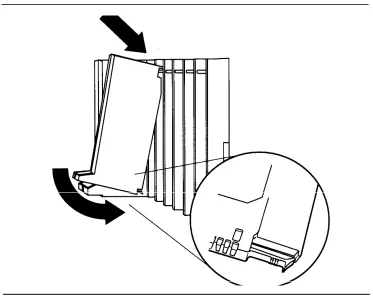
Remove the Processor module from the carrier.
a. Press up on the tab on the bottom of the module.
b. Pull the bottom of the module away from the carrier.
c. Lift upward to disengage the module from the rod on the top of the
carrier.
3.
Lay the Processor module on its left side.
4.
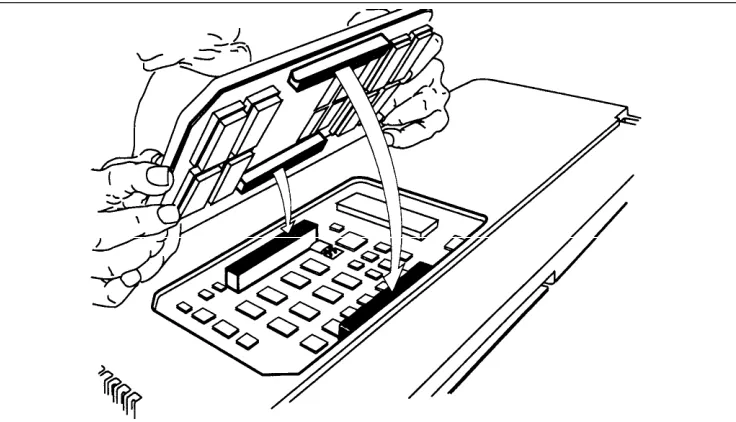
Grasp the metal rings on the outside of the Feature module and pull up.
5.Align the connectors on the 2.B Feature module with the connectors in the
Processor module (see Figure 2-4).
6.
Firmly press the 2.B Feature module into the Processor module
7.Insert the Processor module back into the carrier.
8.
Turn the power on.
a. Plug in any auxiliary power units.
b. Set the power switch on the power supply modules in all expansion
carriers to ON.
The green LED on each expansion carrier’s power supply module
lights.
c. Set the power switch on the basic carrier’s power supply module to
ON.
The green LED on the basic carrier’s power supply module lights. The
red LED on the Processor module lights for 15 to 45 seconds and then
goes off.
Figure 2-4. Installing the 2.B Feature Module
Upgrading System Software
To upgrade your system software:
■ If the system software you backed up is prior to MERLIN LEGEND Release 2.0, you need to upgrade to MERLIN LEGEND 2.B software. Run the Convert feature of the SPM utility, version 3.18, to upgrade Release 1.xx software translations for system programming to Release 2.0. Complete steps 1 and 2.
■ If you are installing a new MERLIN LEGEND system, Release 2.0 or later, complete this procedure:
1. Run the Restore program to “restore” the system software to the 2.B Processor module.
2. Run the system backup program to save your upgrade.
For more information on the System Programming and Maintenance (SPM) software and performing a system backup, refer to the System Programming and Maintenance Guide (555-620-1 42).
Adding Optional Modules
Once you have performed a complete restoration, depending on your system’s configuration, install your BRI module(s) and any additional modules to your system’s carrier. See the previous section, “installing the 800 CO-BRI Module.”
For more information on installing modules, refer to the /nsta//ation Guide (555-620-1 41). For information on assigning lines and trunks, refer to the System Programming Guide (555-620-111).
Programming your Upgraded System
Once you complete installing any additional hardware, perform a complete system backup. You are ready to administer your BRI system.
Telephones
The MERLIN LEGEND BRI system supports the same telephones as a MERLIN LEGEND Communications System without BRI with the following exceptions:
Analog multiline telephones cannot receive Calling Party Number/Billing Number information on their displays.
A single-line telephone cannot have a BRI Access button, and therefore, cannot initiate a CO Transfer of a call.
NOTE:
It is possible to access a BRI line and dial a 5ESS feature code to access the Local Area Signaling Services (LASS) features. However, the user should not use a single-line telephone because the correct Directory Number needed to activate the LASS features cannot be identified.
The Secure Telephone Unit Ill (STU Ill) 1100 and 1150 series telephones are supported but cannot program a BRI Access button and therefore, cannot use the CO Transfer feature. The STU Ill 1100M series telephone are fully supported and can program a BRI Access button.
NOTE:
Tip/ring ports and stations cannot have a BRI Access button, and therefore, cannot initiate a CO Transfer of a call.
Adjuncts
The following adjuncts cannot be connected to a port on the 800 CO-BRI module:
■ Universal Paging Access Module (UPAM) ■ Loudspeaker paging equipment
■ Music-On-Hold™ (MOH) software
Applications
Applications that run on other releases of the MERLIN LEGEND system run on a system with an 800 CO-BRI module. Exceptions are:
■ Applications connected to Voice Messaging Interface (VMI) ports cannot access the CO Transfer feature because CO Transfer requires the use of a BRI Access button. However, BRI lines are still terminated at these locations and can be answered. This applies to:
— Automated Attendant (COBOT)
— AT&T Attendant (COBOTYX)
— Integrated Solution AUDIX Voice Power (AVP)
— MERLIN MAIL Voice Messaging System
■ CO-based Octel Voice Messaging Systems are not supported.
■ System Programming and Maintenance (SPM) utility-The Convert feature can upgrade all MERLIN LEGEND software prior to Release 2.0 to a MERLIN LEGEND BRI system.
■ Release 1.0 of the PassageWay software does not recognize the BRI Access button. Release 2.0 is recommended.
In addition to the standard features offered by other releases of the MERLIN LEGEND Communications Systems, the MERLIN LEGEND BRI system offers the ability to subscribe to several special Basic Rate Interface (BRI) features. Each of the BRI features is described in this chapter. Refer to the Feature Reference, (555-620-1 10), for a description of standard MERLIN LEGEND features.
NOTE:
Feature operation may vary in different central offices. Contact the local telephone company for information about feature availability and operation.
For each feature (ordered alphabetically), information is presented under the following sub-headings as applicable:
■ Description - detailed description of the feature, its functions, and
typical applications
■ Feature Use - instructions on how to use the feature
■ Mode Differences - functional differences of the feature in the Key or Hybrid/PBX mode of operation
■ Considerations and Constraints - capacities, constraints, and other
information to consider before using or programming the feature
■ Telephone Differences - the variations in the use of the feature with different telephones
All-Call Privacy/Per-Call Privacy
Description
All-Call
All-Call
On outgoing calls, the All-Call Privacy (ACP) feature capability allows or prevents the delivery of the calling party number/billing number (CPN/BN) associated with each BRI line to the destination station. The All-Call Privacy feature should be ordered for each BRI line and specified as either activated or not activated. The Per-Call Privacy (PCP) feature is used to override the All-Call Privacy feature.
NOTE:
For Primary Rate Interface (PRI) users, CPN/BN is known as the station identification (SID) number.
Privacy Activated
When the All-Call Privacy feature has been activated at subscription time, the CPN/BN for the BRI line is not sent to the destination station when the BRI line is used to place an outside call. Using the Per-Call Privacy feature causes the CPN/BN for the BRI line to be sent for the next call only.
Privacy Not Activated
If the All-Call Privacy feature has not been activated, the CPN/BN for the BRI line is sent to the destination station when the BRI line is used to place an outside call. Using the Per-Call Privacy feature prevents the CPN/BN for the BRI line from being sent for the next call only.
Feature Use
All-Call Privacy Activated
When the All-Call Privacy feature is activated, the calling party number/billing number (CPN/BN) for the BRI line is not sent to the destination station when a call is placed. Follow these steps to use Per-Call Privacy to override All-Call Privacy and send the CPN/BN for the BRI line for the next call only:
1. While the handset is on-hook, press the Personal Line button or Pool button associated with the BRI line on which the All-Call Privacy feature is assigned.
The red LED next to the line button lights, indicating that the line button will be used to make the call.
2. Lift the handset or, if the telephone is equipped with a speakerphone, press the Speakerphone button.
The green LED lights.
You hear a dial tone.
3. Dial the feature code assigned by the local telephone company to activate Per-Call Privacy.
You hear the confirmation tone (three-burst tone) followed by a dial tone.
4, Dial the number for your outside call.
All-Call Privacy Not Activated
When the All Call Privacy feature is not activated, the CPN/BN for the BRI line is . sent to the destination station when a call is placed on the line. Follow these
steps to use Per-Call Privacy to override All-Call Privacy and prevent the CPN/BN for the BRI line from being sent for the next call only:
1. While the handset is on-hook, press the Personal Line button or Pool button associated with the BRI line on which the All-Call Privacy feature is assigned.
The red LED next to the line button lights, indicating that the line button will be used to make the call.
2. Lift the handset or, if the telephone is equipped with a speakerphone, press the Speakerphone button.
The green LED lights.
You hear a dial tone.
3. Dial the feature code assigned by the local telephone company to activate Per-Call Privacy.
You hear the confirmation tone (three-burst tone) followed by a dial tone.
4. Dial the number for your outside call.
The CPN/BN associated with the BRI line used to make the call is not sent to the destination station for the current call only.
Considerations and Constraints
Since some BRI lines have the All-Call Privacy feature activated while others have the All-Call Privacy feature not activated, stations should be assigned Personal Line buttons that have the same All-Call Privacy status. This way the user always knows whether using the Per-Call Privacy feature allows or prevents the CPN/BN from being sent to the destination station.
Mode Differences
In the Hybrid/PBX mode, BRI lines with different All-Call Privacy status should not be assigned to the same pool.
Feature Interactions
Auto Dial
The feature code assigned to Per-Call Privacy by the local telephone company can be programmed on an Outside Auto Dial button.Directory
The feature code assigned to Per-Call Privacy by the local telephone company can be programmed as an entry in the Personal or System Directory on an MLX-20L telephone.Automatic Callback
Description
Automatic Callback is one of the Local Area Signaling Services (LASS) features. With the Automatic Callback feature, the user can automatically place a call to the last telephone number from which a call was received on a BRI line, even if the caller’s telephone number is not known.
Automatic Callback can be activated on any multiline telephone with a Personal Line button for the BRI line on which the call was received. The telephone from which Automatic Callback is activated does not have to be the telephone used to answer the call.
N OTE:
Depending on the local central office, Automatic Callback may be available under a different name and voice prompts may vary.
Feature Use
Line Button
Call Received Is Known
If you know the BRI Personal Line button on which the call was received, follow these steps to activate the Automatic Callback feature:
1. While the handset is on-hook, press the Personal Line button associated with the last BRI line used to receive the call.
The red LED next to the line button lights, indicating that the line button will be used to make the call.
2. Lift the handset or, if the telephone is equipped with a speakerphone, press the Speakerphone button.
The green LED lights.
You hear a dial tone.
3. Dial the feature code assigned by the local telephone company to activate Automatic Callback.
Wait for the confirmation tone (a three-burst tone) to ensure that the feature was activated correctly.
The telephone number from which the last call was received on the BRI line is automatically dialed by the central office.
If the telephone number being called is available, you hear ringback.
If the telephone number being called is busy, the central office “camps” or queues the recall attempt at the called number. When the number becomes available, the central office calls you back on the BRI line used to place the call. All telephones sharing the Personal Line button ring with a priority ring (four-burst ring for MLX telephones and three-burst ring for analog telephones) to indicate the completed call.
Line Button Call Received Is Not Known
If more than one BRI line is assigned as a Personal Line button on the telephone and you do not know which Personal Line button received the last BRI call, follow these steps to activate the Automatic Callback feature:
1. While the handset is on-hook, press the programmed BRI Access button.
The green LED next to the BRI Access button flashes.
If the telephone is an MLX display telephone, the following prompt is shown:
Dial 4 for In, 6 for Out
2, Dial a 4, which represents the letter “I” for incoming call.
The red LED moves to the last Personal Line button used to receive an incoming call on a BRI line.
The green LED next to the BRI Access button goes off.
3. Lift the handset or, if the telephone is equipped with a speakerphone, press the Speakerphone button.
4. Dial the feature code assigned by the local telephone company to activate Automatic Callback.
Wait for the confirmation tone (a three-burst tone) to ensure that the feature was activated correctly.
The telephone number from which the last call was received on the BRI line is automatically dialed by the central office.
If the telephone number being called is available, you hear ringback.
If the telephone number being called is busy, the central office “camps” or queues the recall attempt at the called number. When the number becomes available, the central office calls you back on the BRI line used to place the call. All telephones sharing the Personal Line button ring with a priority ring (four-burst ring for MLX telephones and three-burst ring for analog multiline telephones) to indicate the completed call.
Considerations and Constraints
Automatic Callback should be used for calls received on Personal Line buttons only.
Mode Differences
In the Hybrid/PBX mode, Automatic Callback should not be activated for calls received on any type of System Access button or on a Pool button, because there is no way to identify the last BRI line used to receive a particular call.
Telephone Differences
Automatic Callback should not be used on line telephones since a single-Iine telephone user cannot identify the BRI line on which an incoming call was received.
Feature Interactions
Auto Dial
The feature code assigned to Automatic Callback by the local telephone company can be programmed on an Outside Auto Dial button.Directory
The feature code assigned to Automatic Callback by the local telephone company can be programmed as an entry in the Personal or System Directory on an MLX-20L telephone.Automatic Recall
Description
Automatic Recall is one of the Local Area Signaling Services (LASS) features. With the Automatic Recall feature, the user can automatically place a call to the last telephone number the user called from a BRI Personal Line button without manually redialing the number.
NOTE:
Depending on the local central office, Automatic Recall may be available under a different name and voice prompts may vary.
Feature Use
Line Button on Which Call Was Placed Is Known
If you know which BRI Personal Line button was used to place the last call, follow these steps to activate the Automatic Recall feature:
1. While the handset is on-hook, press the Personal Line button associated with the last BRI line used to place the call.
The red LED next to the line button lights, indicating that the line button will be used to make the call.
2. Lift the handset or, if the telephone is equipped with a speakerphone, press the Speakerphone button.
The green LED lights.
You hear a dial tone.
3. Dial the feature code assigned by the local telephone company to activate Automatic Recall.
Wait for confirmation tone (a three-burst tone) to ensure that the feature is activated correctly.
The last number dialed on the Personal Line button is automatically dialed by the central office.
If the telephone number being called is available, you hear ringback.
If the telephone number being called is busy, the central office “camps” or queues the recall attempt at the called number. When the number becomes available, the central office calls you back on the BRI line used to place the call. All telephones sharing the Personal Line button ring with a priority ring (four-burst ring for MLX telephones and three-burst ring for analog multiline telephones) to indicate the completed call.
Line Button on Which Call Was Placed Is Not
Known
If more than one BRI line is assigned as a Personal Line button on the telephone and you do not know which Personal Line button was used to make the last BRI call, follow these steps to activate the Automatic Recall feature:
1. While the handset is on-hook, press the programmed BRI Access button.
The green LED next to the BRI Access button flashes.
If the telephone is an MLX display telephone, the following prompt is shown:
Dial 4 for In, 6 for Out
2. Dial a 6, which represents the letter “O” for outside.
The red LED moves to the last Personal Line button used to make an outgoing call (excluding calls made on a BRI Access button to initiate a CO Transfer).
The green LED next to the BRI Access button goes off.
3. Lift the handset or, if the telephone is equipped with a speakerphone, press the Speakerphone button.
The green LED lights.
You hear a dial tone.
4. Dial the feature code assigned by the local telephone company to activate Automatic Recall.
If the telephone number being called is busy, the central office “camps” or queues the recall attempt at the called number. When the number becomes available, the central office calls you back on the BRI line used to place the call. All telephones sharing the Personal Line button ring with a priority ring (four-burst ring for MLX telephones and three-burst ring for analog multiline telephones) to indicate the completed call.
Considerations and Constraints
Automatic Recall should be used for calls placed from Personal Line buttons only.
Mode Differences
In the Hybrid/PBX mode, Automatic Recall should not be activated for calls made from any type of System Access button or from a Pool button because there is no way to identify the last BRI line used for a particular call.
Telephone Differences
Automatic Recall should not be used on single-line telephones since a single-line telephone user cannot identify the BRI line on which an incoming call was
placed.
Feature Interactions
Auto Dial
The feature code assigned to Automatic Recall by the local telephone company can be programmed on an Outside Auto Dial button.Directory
The feature code assigned to Automatic Recall by the local telephone company can be programmed as an entry in the Personal or System Directory on an MLX-20L telephone.Speed Dial
The feature code assigned to Automatic Recall by the local telephone company can be programmed as a System or Personal Speed Dial code.Calling Party Number/Billing Number
Description
The Calling Party Number/Billing Number feature allows an MLX display telephone user to see the caller’s calling party number (CPN) or billing number (BN) on the display. The CPN/BN is used by the central office to identify lines. The caller can specify if the CPN/BN should be private.
NOTE:
For Primary Rate Interface (PRI) users, CPN is known as the station identification (SID) number.
On the receiving end, the calling information shown on the display depends on how the MERLIN LEGEND BRI service is configured at the central office:
Only CPN is displayed, if available
Only BN is displayed, if available
CPN is the preference and is displayed, if available; otherwise, BN is displayed, if available
BN is the preference and is displayed, if available; otherwise, CPN is displayed; if available
NOTE:
Depending on your central office, restrictions may prevent the delivery of either or both of these numbers.
The CPN/BN information is shown only on MLX display telephones, and not on analog multiline display telephones or single-line telephones. However, when a call is received on a BRI line, the analog display telephone shows the label programmed for the BRI line.
When the caller’s Calling Party Number information is available from the 5ESS central office, the information is shown on page 1 of the MLX display telephone. The number the caller dialed to reach the MERLIN LEGEND system is shown on page 2.
NOTE:
Figure 3-1. MLX Display Telephone Calling Party Number Information
Telephone Differences
The Calling Party Number information is shown only on MLX display telephones, and not on analog multiline display telephones or single-line telephones.
CO Transfer
Description
Similar to the MERLIN LEGEND Trunk-to-Trunk Transfer feature, the Central Office (CO) Transfer feature allows a user to transfer an outside call to an outside destination. For example, a user can connect the caller to a branch location in a distant city or can redirect a misdialed number to the correct telephone number.
To use the CO Transfer feature, the user must select a new programmable button — the BRI Access button. The caller uses the BRI Access button to dial the outside number to complete the transfer of the call. The central office processes the transfer and the lines to the MERLIN LEGEND BRI system are freed immediately for additional call handling. In contrast, the standard MERLIN LEGEND Trunk-to-Trunk Transfer ties up the lines for the duration of the call.
Feature
Use
When a call is made or received on a BRI line, you can initiate a CO Transfer on a multiline telephone by following these steps:
NOTE:
The CO-Transfer feature can be programmed to be used for outgoing calls only, incoming calls only or both, depending on programming at the central office. In addition, the CO may impose restrictions to some destinations. Contact the local telephone company for information.
1. While a call is in progress on a BRI line, press the Transfer button.
As in the MERLIN LEGEND Transfer feature, the system puts the BRI call on hold for transfer.
The green LED next to the line button with the held transfer call flutters to indicate that the call is on hold. On other stations that share the line button, the green LED next to the line button with the held transfer is lit to indicate that the line is in use.
2. Press the programmed BRI Access button,
The red and green LEDs next to the BRI Access button go on.
You hear dial tone. The outside caller being transferred hears silence while the call is being connected.
3. Dial the outside telephone number.
4. To
NOTE:
Do not use Automatic Route Selection (ARS) or pool dial-out code to dial the outside number even if the system is operating in the Hybrid/PBX mode.
If you receive no answer or a busy signal at the destination telephone number, you can return to the call being held for transfer by pressing the line button associated with the call. This action removes the transfer request and connects you with the original call.
complete the transfer press the MERLIN LEGEND Transfer button, select another line button, or hang up.
Depending on your CO, the party to receive the transferred call must answer the call, or the call must ring at the destination number to complete the transfer, otherwise the call is disconnected.
The LEDs next to both the original BRI line and the BRI Access button go off to indicate that both line buttons are available for use.
Considerations and Constraints
When transferring a call by using the CO Transfer feature, the user should advise the caller that Music-On-Hold or ringback will be heard for a short time and then will stop during the transfer. This prevents the caller from assuming the call is disconnected.
If the user selects any button other than the BRI Access button to initiate the transfer — for example, a System Access (SA) button or Personal Line button, (even with a BRI line assigned) – a MERLIN LEGEND Trunk-to-Trunk Transfer is initiated and both lines used to complete the transfer are in use for the duration of the call.
NOTE:
This feature may operate differently depending on programming at the central office. Contact the local operating telephone company for instructions,
If the BRI caller being transferred hangs up while the CO Transfer is in progress, all transfer conditions are removed. The call to the destination on the BRI Access button is no longer a transfer. The following conditions occur:
The LEDs next to the line button of the call being transferred goes off to indicate that the call was disconnected. The LEDs next to the BRI Access button and any other shared assignments of the line remain onto indicate that the BRI line is busy with the transfer destination call.
Incoming calls to the line receive a busy condition unless the Multi-Line Hunt Group (MLHG) feature is assigned. When the MLHG feature is assigned, new incoming calls to the line hunt to the next available line in the group until the call on the BRI Access button is completed.
The call on the BRI Access button can be put on hold. However, activation of standard features such as Conference or Transfer are blocked for the duration of the call.
If the user selects another line button (for example, to answer a call) before the transfer is complete, the CO Transfer request is removed. The call on hold for transfer remains on hold on the original BRI line button. To reinitiate the CO Transfer, the user must press the button next to the held call and begin the transfer procedure from step 1. If the user tries to press the BRI Access button without first returning to the held call, the system ignores the button press and the call remains on hold.
Users with shared appearances of the BRI line cannot bridge onto a call on hold for a CO Transfer. If another user tries to join the call, the attempt is blocked.
Mode Differences
In the Hybrid/PBX mode, do not use an Automatic Route Selection (ARS) or pool dial-out code to dial the destination telephone number on the BRI Access button during a CO Transfer.
Telephone Differences
Feature Interactions
Allowed Lists
If a restricted user attempts to dial an outside number on a BRI AccessBarge-In
Calling
Restrictions
Conference
Coverage
Direct-Line
Console
(DLC)
Directory
Disallowed
Lists
button and the number is not on an Allowed List assigned to the telephone, the user hears a reorder tone. The call held for transfer remains on hold, and the user must press the associated line button to return to the call.
Barge-In cannot be used to join a call on the BRI Access button, While a CO Transfer is in progress, Barge-In cannot be used to join the call on hold for transfer on the BRI line button.
If a user attempts to dial an outside number on a BRI Access button on an outward-restricted telephone, the user hears a reorder tone. The call held for transfer remains on hold, and the user must press the associated line button to return to the call.
A user cannot join the call on hold for transfer, the destination call, or establish a three-way conference as with the standard Trunk-to-Trunk Transfer feature. If the user presses the Conference button while a CO Transfer is in p