M A X I M I Z I N G RO I W I T H M R M
S e l e c t i n g t h e R i g h t M o b i l e R e s o u r c e
M a n a g e m e n t S o l u t i o n
A Frost & Sullivan
White Paper
M A X I M I Z I N G RO I W I T H M R M
S e l e c t i n g t h e R i g h t M o b i l e R e s o u r c e
M a n a g e m e n t S o l u t i o n
TABLE OF CONTENTS
I. Executive Summary 3
II. Market Overview 4
Today’s MRM Marketplace 4
Purchase Drivers and Barriers 4
Comparing Today’s Solutions 5
III. Features and Functionality 6
What to Look For 6
Comparing Solutions 7
IV. Integration and Customization Capabilities 11
What to Look For 11
Comparing Capabilities 12
V. Service and Support 13
What to Look For 13
Comparing Support 14
VI. Pricing 14
What to Look For 14
Comparing Prices 15
VII. Summary of Findings 16
FIGURES AND CHARTS
I.1. MRM Capabilities Comparison 3
I.2. MRM Price/Feature Value Comparison 3
III-1. MRM Feature Comparison 8
VI.1. MRM Price Point Comparison (Monthly Per User) 15
VII.1. MRM Price/Feature Value Comparison 17
The information presented in this publication is based on research and interviews conducted solely by Frost & Sullivan and therefore is subject to fluctuation. Frost & Sullivan takes no responsibility for any incorrect information supplied to us by manufacturers or end users. TA B L E O F
C O N T E N T S
I. EXECUTIVE SUMMARY
Handheld Mobile Resource Management (MRM) services are receiving increasing attention from businesses that want to improve the visibility and efficiency of their field efforts. The value proposition behind these handset-based solutions is compelling; however, the sheer breadth of MRM product choices and capabilities can be difficult for an interested customer to sort through. In this paper, Frost & Sullivan examines three of today’s popular MRM solutions, utilizing the key purchase criteria that have emerged in this sector. These criteria are as follows: Features and Functionality, Integration and Customization Capabilities, Post-Sale Service and Support, and Pricing.
Comparing the handheld MRM offers from Gearworks (etrace), TeleNav (TeleNav Track™), and Xora (GPS TimeTrack for Workers) results in the following ratings:
The choice of which MRM solution works best for a particular customer will vary depending upon that customer’s unique mobile worker and business scenario. This paper provides a method for examining today’s MRM alternatives and, in the process, uncovers the strengths and weaknesses in each of the three solutions discussed.
Based on a review of current capabilities, Xora’s GPS TimeTrack for Workers service is especially suited for smaller companies, while both the Gearworks and TeleNav solutions
MRM Capabilities Comparison GearWorks etrace TeleNav Track Xora Time Track Wireless Forms Timecards Navigation and Maps
ڝ
ڙ
ڝ
ڝ
Geo-fencing Integration/ Customization Service and Supportڙ
ڙ
ڝ
ڝ
ڝ
ڙ
ڙ
Scheduling and Dispatchڙ
ڝ ڝ
ڜ
ڜ
Source: Frost & Sullivan
ڙ
Ease of Useڝ
ڙ
Chart I.1 MRM Capabilities Comparison MRM Price/Feature Value GearWorks etrace TeleNav Track Xora Time Track Entry Level (~$20 w/ data) Mid-Tier (~$15 w/o data) Top-Tier (~$20 w/o data)ڝ
ڙ
ڝ
ڙ
ڝ
Source: Frost & Sullivanڝ
ڝ
Chart I.2
II. MARKET OVERVIEW
Today’s MRM Marketplace
Frost & Sullivan defines “Mobile Resource Management” as a category of business solutions designed to maximize the productivity of mobile work forces by more effectively managing mobile workers, mobile tasks, and mobile assets.
In past years, MRM was synonymous with “fleet management”, i.e., tracking and monitoring local and long haul trucks via expensive in-vehicle systems and dedicated servers. However, the economics of MRM have changed considerably. Today’s “Next-Generation MRM” solutions leverage less expensive GPS-equipped handhelds and web-based tracking systems to creatively manage mobile resources across a number of different industries.
Using new functions such as wireless forms, timecards, and geo-fencing, MRM services can monitor employee location, enhance and automate dispatch capabilities, capture field data, and feed those data to a customer’s back-office systems. MRM’s ROI story is
straightforward and impressive, with customers reporting significant reductions in operating costs, increased employee productivity, and improved customer relationships. For the purposes of this paper, the prime MRM candidate is a business or organization that employs a number of field personnel, particularly in the following industries: Transportation and Logistics, Field Services, Utilities, Construction, Public Sector, and Health Care.
MRM services appeal to all sizes of companies, with the Small and Medium Business (SMB) segment typically focused on instant connectivity, basic back-office integration, and fast ROI. Larger businesses are interested in richer workflows, scalability, and more robust integration with one or more back-end systems. By 2013, Frost & Sullivan forecasts over 11 million MRM users in the U.S. alone.
Purchase Drivers and Barriers
There are a number of factors driving today’s MRM market:
• Attractive, hard dollar ROI: Application vendors and carriers describe ROI in glowing terms – and have the customer case studies to prove it. Hard-dollar financial benefits include: Reduced overtime, fuel and labor costs due to increased dispatch and scheduling efficiencies, improved job completion rates, tighter control over spare parts inventory, and higher insurance policy discounts. The promise of these types of tangible productivity gains has captured the attention of both CIOs and CFOs. These executives often feel that when it comes to field activity, their companies are working in the dark without a true grasp of workforce economics.
• Affordable entry points: In previous years, proprietary MRM systems required customized design, dedicated servers and software packages, and hundreds of thousands of dollars to deploy. The ability to now monitor and track from any Internet-capable PC and the explosion of low-cost GPS-enabled mobile devices has injected affordability and flexibility into today’s MRM purchase decision. Monthly subscription pricing of these hosted services is designed to appeal to even the stingiest IT budgets.
• Competitive advantage with customers: In addition to hard-dollar ROI, MRM can positively impact a company’s customer satisfaction and customer retention metrics. Optimized dispatch ensures that deliverers/technicians respond and arrive in a timely manner. Also, up-to-date information regarding the customer situation can be relayed to the worker’s handheld prior to arrival, resulting in a prepared tech and an increased first call resolution rate.
While strong purchase drivers are at work, there are also key MRM barriers operating in today’s MRM market. One of the most significant inhibitors is a lack of customer
education. Customer awareness of MRM remains exceedingly limited. And, even after learning about MRM and its benefits, many prospects can find it difficult to sort through the plethora of solutions that are currently available.
Comparing Today’s Solutions
The purpose of this paper is to evaluate three top-tier MRM solutions based on the following key purchase criteria:
1. Features and Functionality
2. Integration and Customization Capabilities
3. Service and Support
4. Pricing
In today’s fractured MRM environment, there are a multitude of products available to evaluate — many of which are designed to address only highly-specialized business situations. These finely-targeted solutions are not the focus of this paper. Rather, Frost & Sullivan will examine the capabilities and trade-offs of three established, enterprise-grade MRM applications:
• Gearworks - etrace
• TeleNav – TeleNav Track™
III. FEATURES AND FUNCTIONALITY
What to Look For
The popularity and adoption of MRM applications depends heavily on both the specific functions provided and the seamlessness in their interplay. The key MRM products that are available today typically include at least the following capabilities:
• GPS location, tracking, monitoring
• GPS navigation and optimized routing
• Timecard recording and reporting
• Work order management
• Alerts and Geo-fencing
• Data collection
• Reports
GPS location, tracking, monitoring – The ability to know where workers and assets are, using web-based maps, can drive significant increases in productivity. Worker location can be provided on a real-time and historical basis, with tracking that is typically refreshed every 15 or five minutes. One-minute and even 15-second refresh are also available from selected vendors, and are designed for those verticals that have a higher need for immediate responsiveness. Positioning information can become particularly robust when integrated with tools such as Google Earth. However, no matter how robust the tracking mechanism, this function can break down when the worker travels outside the carrier’s wireless network coverage. In these instances, the application can compensate with a store-and-forward or satellite modem arrangement. While privacy concerns do exist around GPS tracking, they continue to be negotiated at both the industry and individual customer levels.
GPS navigation and optimized routing – Text-based turn-by-turn driving directions are a minimum capability; however, audible turn-by-turn navigation is being offered by leading suppliers. Enhancements include 3-D moving maps, truck-friendly routing, automatic re-routing instructions in the case of traffic, construction or accidents, and point-of-interest/landmark information.
Timecard recording and repor ting– Time tracking provides mobile workers with the ability to remotely clock in and out of work shifts, allowing companies to track the time required to complete tasks and to also gather timesheet reports. This capability can reduce errors in payroll and invoices, avoiding customer challenges and ensuring the worker’s compliance re: work hours, breaks, overtime, etc. Some applications simply record time entries, while others provide a more complete system for time and labor management – including timecard review and approval, reports, and data storage. GPS tagging can be utilized on a sub-set of card events, or every time a worker punches
in/out. “Supervisor” time cards allow a foreman to log in/out multiple workers on his/her phone, eliminating the need for each worker to have his or her own phone.
Work order management (including scheduling and dispatch)– Dispatchers transmit real-time job details out to the company’s mobile workers, with the specific job allocated on the basis of one or more of the following criteria: job type, job priority, worker skill set, worker location and transit time to the job site, mobile inventory levels. Dispatchers can quickly reassign or reschedule jobs if a worker is running late or a high priority request comes in. The mobile workers provide status on their job progress using their handset – at a minimum, accepting or rejecting a job assignment, recording arrival at the job site, and recording completion of the job. Workflow applications can automatically react to worker events – logging workers in/out of jobs, starting and completing specific jobs, etc. Aler ts and Geo-fencing – Geo-fencing defines a virtual geographical area to ensure
employees or vehicles follow approved routes. If a designated boundary is crossed, managers or employees receive a notification with a time, date and location stamp. Reverse geo-fences also can be configured to alert managers to assets that enter an area designated as restricted. Exception monitoring is preferred by many customers, due to the simple danger of information overload. Stop intervals, pending overtime violations, job running late, and speeding are common alert categories. Companies can receive geo-fencing alerts when workers enter or leave a designated area. Geo-fences can also be used to trigger a timecard punch or initiate a workflow process involving capture of required data.
Data collection – Mobile workers are able to collect multiple forms of data in the field, enter the information directly on their handhelds, and transmit it to a central location. Methods of information capture include barcode scanning, electronic signatures,
image/photo capture, and wireless forms. The quality and usability of the wireless forms can vary dramatically, with the best being designed to be free form in structure, able to capture mobile processes and information onsite, and able to support hundreds of different fields of varying types (free text, pick list, etc.). Scalability and flexibility are key requirements.
Repor ts – The report generation capability is very important from a manageability standpoint, since it determines how the final information is presented to users and impacts how quickly the information can be acted upon. Simple report generation can be limited to time-stamping (job start-job finish) and event recording. More sophisticated reporting capabilities are highly customizable by business segment or specific department. Reports can be scheduled to be delivered via email at predetermined times.
Well-designed reports allow management to define and adjust key cost factors in order to increase worker efficiencies.
Comparing Solutions
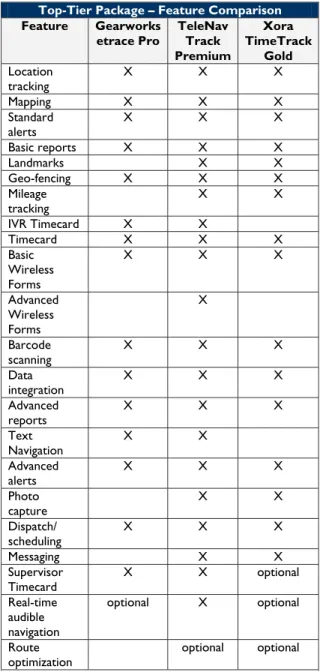
Strict “apples to apples” feature comparisons are not always possible with MRM solutions. However, the following chart provides an overview of the key services each vendor provides in its premium offer package:
Figure III-1
MRM Feature Comparison – Top-Tier Solution Packages from Gearworks, TeleNav, Xora
Source: Frost & Sullivan
Frost & Sullivan
Top-Tier Package – Feature Comparison
Feature Gearworks etrace Pro TeleNav Track Premium Xora TimeTrack Gold Location tracking X X X Mapping X X X Standard alerts X X X Basic reports X X X Landmarks X X Geo-fencing X X X Mileage tracking X X IVR Timecard X X Timecard X X X Basic Wireless Forms X X X Advanced Wireless Forms X Barcode scanning X X X Data integration X X X Advanced reports X X X Text Navigation X X Advanced alerts X X X Photo capture X X Dispatch/ scheduling X X X Messaging X X Supervisor Timecard X X optional Real-time audible navigation optional X optional Route optimization optional optional
An examination of these capabilities exposes various areas of strength for each vendor:
Gearworks
Gearworks promotes the location tracking, electronic timecard, and job dispatch capabilities of its etrace solution. Its location capabilities include a geo-fencing service that provides not only enter/exit information, but also the actual time interval an employee spends within a pre-defined work zone. Gearworks also places priority on automating the MRM experience when possible – for example, allowing a manager to schedule reports for automatic email at certain times of the day or building a location-driven workflow capability that automatically acts on worker events and monitors by starting and completing jobs, logging workers in/out, etc.
Gearworks recently shifted its focus from standalone solutions such as etrace to creating and promoting its new “appmosphere™” mobile application platform. While etrace and its white-label cousin remain a high-priority item for the company, the realignment in corporate strategy may explain the absence of features that are included in similarly priced TeleNav and Xora packages. For example, Landmarks, Photo/image capture, and a Route Optimization option are noticeably absent. Interestingly, Dispatch/Scheduling capability is not available in Gearworks’ mid-tier “Enhanced” offer, yet is a key mid-tier component for both of Gearworks’ closest rivals, Xora and TeleNav.
TeleNav
As shown in Figure III-1, TeleNav Track offers the most comprehensive set of capabilities. In addition to providing a high price/feature value proposition, TeleNav Track performs very strongly in two key areas: Navigation and Wireless Forms. Navigation is a traditional TeleNav strength, and the company’s high standards are built into its Track navigation capability with clear, colorful graphics, a very user-friendly interface, audible address entry, larger/louder driving instructions, and map overlay and zooming. The MRM Wireless Forms capability is receiving increasing attention from customers, and TeleNav’s offering is impressive. TeleNav Track offers hundreds of fields, free-form capability, and a variety of services – including, signature capture, attachments, decision tree, and multi-scan barcode. The TeleNav Track product is also being wrapped more tightly around individual vertical industry needs, with the company creating vertical-specific forms, reports, and tracking intervals. TeleNav Track also offers an optional Route Optimization service for a separate additional fee.
TeleNav has recently enhanced its Timecard capability, introducing a Supervisor Timecard service and improving the desktop interface. Time and labor management within the application allows customers to set rules for overtime and view labor reports.
Xora
Xora has made wireless timecards its specialty area, offering a robust capability that other vendors have worked to emulate. TimeTrack is also unique in that it includes Mileage Tracking as part of its entry-level Lite package. In addition, Xora provides an easy mechanism that allows workers to send silent alerts for urgent assistance via email or text message (TeleNav Track recently added this same capability). TimeTrack also offers an optional Route Optimization Service.
Xora’s Navigation and Wireless Forms capabilities seem to be a work-in-progress. The company offers a basic Navigation offering that lacks voice prompt capability, extensive POI, and out-of-coverage navigation. Xora’s EZNav™ real-time audible navigation service is only available for an extra fee, unlike TeleNav Track which includes this service as a standard feature in its top-tier package. TimeTrack’s wireless forms service can also be described as basic, with fewer fields, functional capabilities, and flexibility.
In summary, each vendor has strengths that may appeal to different segments of
customers. When evaluating individual MRM features and functions, the vendor’s ability to satisfy the following requirements is proving to be an excellent indicator of solution quality and accompanying user experience:
Tracking
• Tracking frequency – 1-minute vs. 5-minute vs. 15-minute
• Location accuracy
• Tracking possible from both desktop and handset
• The number of standardized reports available
• Report customization capability GPS Navigation
• User-friendliness – clarity, volume, number of clicks required to obtain information
• POI/landmark information
• Yellow Pages
• Voice entry
• Semi truck routing capabilities Timecards
• Geo-stamping
• Supervisor Timecard
• IVR option
• Complete time and labor management system – timecard review/approval, reports, data storage
Alerts
• Quantity and quality of alerts that are possible – speeding, geo-fencing, job running late, etc.
Wireless Forms
• Number of fields
• Flexibility - free form or standardized?
• Barcode entry
• Replicate/copy customer’s existing forms
• Branching based on answer
• Attachments capability
IV. INTEGRATION AND CUSTOMIZATION CAPABILITIES
What to Look For
As companies expand their mobilization efforts, they expect to scale technology beyond core MRM tracking capabilities. Companies not only want the ability to monitor their workforces, but also want to automate and accelerate key processes such as billing, payroll, dispatch, and data collection. The ability to integrate MRM capabilities and information with a customer’s back-office systems is crucial to optimizing the value of both the customer’s in-house and field-based applications. Integration helps to remove administrative bottlenecks that slow operations, raise costs, and prevent business growth. A solution’s capacity to integrate with back-office systems — including customer
relationship management (CRM), payroll and invoicing, and other systems — should be a key consideration in selecting and deploying an MRM service.
Businesses tend to roughly fall into one of three camps when it comes to their MRM customization/integration requirements:
• Simple Configuration – The customer requires only service configuration/customization. Back-office integration is not required.
• Configuration and Integration – MRM application software is configured and integrated with the customer’s internal applications and back-end systems, utilizing the MRM vendor’s adapters, templates, and Professional Services expertise.
• Complete Customization – The largest companies prefer to utilize open developer tools and APIs that allow them to create proprietary in-house applications.
Comparing Capabilities
Vendors vary in their approach to integrating and/or customizing their applications. All three solutions enable integration between their service and the customer’s back-office applications by providing Web services and an API stack to partners who have expertise in a particular area (typically ISVs).
In addition, Xora’s TimeTrack has out-of-the-box integration software available for business applications such as QuickBooks, ADP, Sage Master Builder; however, this is available at an additional fee. The company also offers a Data Shuttle capability designed primarily for smaller businesses. This integration tool moves job information between Xora and the customer’s data bases and mobile phones. Xora has purposely not built up a Professional Services group, preferring to let its partners handle the integration and customization demands of complex deployments.
Gearworks etrace is configured to immediately integrate with QuickBooks and
salesforce.com. The vendor is actively pursuing other partnerships of this type with key ISVs. Gearworks also has created a Professional Services unit to handle integration and customization work for its larger enterprise customers.
TeleNav Track provides out-of-the-box integration with ADP, QuickBooks, and other systems – and is in active discussions with additional ISV partners. TeleNav also employs an IBM Gold Certified Professional Services team as part of its standard element of enterprise deployments, helping TeleNav successfully address more complex customization and integration projects. This certification can be a significant asset when dealing with: 1) The larger enterprise-class applications and engagements, and 2) Extensive CRM applications and other back office applications that are spread across multiple departments and geographies.
For custom integration, TeleNav provides two options. The first is the TeleNav Enterprise Server or TES. Using TES, customers can interface with the TeleNav backend using flat files or an ODBC/JDBC database, so no web services/XML programming is required. Available functionality includes job/work order dispatch, extract wireless forms data, GPS location, alerts, timesheet information, and mileage data.
The second option is a web-services integration platform called TeleNav Data Exchange. For customers that want more control, this platform can be used to extend and exchange various types of data (listed above) between TeleNav Track and the customer’s back-office systems.
V. SERVICE AND SUPPORT
What to Look For
MRM tools and applications are only effective if they are operating properly and can be relied on in every business situation. Carriers are available to assist with support issues, but often prefer that their vendor partners handle customer troubles. When choosing an MRM solution, business customers need to evaluate the post-sale service and support capabilities of the vendor and demand high-quality technical coverage.
Almost every MRM application vendor offers some level of initial start-up and deployment support, including onsite and/or web-based training, software provisioning, project
management, etc.
On an ongoing basis, 24/7 customer support can be made available by telephone, email, and/or online – although the typical arrangement is 20x5 coverage via telephone, with web-based support available as back-up during non-business hours. In certain instances, SLAs (Service Level Agreements) can be negotiated. Larger customers may have a dedicated support representative available during business hours. Also, selected vendors have deliberately chosen not to outsource their support function to another country or provider and instead are maintaining their service and support facilities near their U.S. headquarters.
Comparing Support
Every one of our three MRM vendors promises its customers 24 x 7 support; however, only TeleNav provides non-stop 24 x 7 telephone coverage for all customers. This capability can be especially important to a customer that does business on the weekends. Gearworks provides 24 x 5 support by phone, and relies on web-based or email
responses during off-hours. Xora provides 24 x 5 phone support for Sprint customers and 24 x 7 support for its AT&T customers. These two vendors also rely on their wireless carrier partners to assist with Tier 1 issues during non-business hours.
Large customers are well taken care of. All three vendors provide their larger enterprise customers with dedicated 24 x 7 support via telephone.
If warranted, TeleNav will assemble an internal “SWAT Team” comprised of engineering, customer care, and product management representatives to resolve customer issues. The company also has a Strategic Enterprise Account Team (SEAT) that project manages large deployments from pilots to final rollout. The SEAT unit serves as the key point of contact for TeleNav Track enterprise customers on an ongoing basis. The company’s service and
Gearworks will put SLAs in place at the customer’s request. These SLAs typically mirror those with the carrier and address trouble response rates and infrastructure reliability. The vendor also provides launch support on Day 2, Day 15, and Day 30 of a customer’s etrace deployment, basically acting as the customer’s advocate if any carrier-related issues arise.
VI. PRICING
What to Look For
The major cost components of a complete handset-based MRM deployment include:
• Mobile devices
• The carrier data communications package
• MRM application software
• Any required systems integration work
Today’s handset-based MRM services tend to be deployed on a SaaS (Software as a Service) basis, meaning that:
• The service is a fully-hosted solution
• The service is priced and billed on a monthly subscription basis
• Software updates are administered automatically across all subscribers and companies This approach allows customers to avoid having to build out their own IT infrastructure and/or hire their own mobilization experts. This approach is specifically designed to attract a wide variety of businesses, with the results being lower costs and quicker time-to-market for the MRM customer.
The wireless carriers will grant “bill on behalf of ” status to a sub-set of “preferred” MRM services, and will include these services on the carrier’s monthly customer bill. Non-partner MRM solutions must be billed directly by the MRM application developer. Monthly rates typically start at $10 per user for bare-bones GPS location and tracking – and cluster in the $10-$25 range as specific MRM functions are added in. A one-time per-user activation or set-up fee for an MRM application is common, and is usually in the $20-$25 range.
The carrier’s data plan tends to be priced separately from the MRM service – although some exceptions do exist. Carriers offer a number of standard domestic and
international data packages that may or may not include data limits.
MRM discounting opportunities are rare, with monthly service pricing remaining sacrosanct. Carriers believe in keeping their monthly rates intact. However, volume discounts may be available on required handsets. Occasionally, service activation fees will be waived or reduced.
Comparing Prices
All three of the vendors analyzed in this paper have multiple pricing tiers for their products. Gearworks markets three price points, TeleNav provides four pricing levels (depending on the wireless carrier its customers work with), and Xora’s GPS TimeTrack for Workers is available at five different price points (a Supervisor module is the fifth choice).
On the Sprint network, each vendor prices their entry-level “Lite” service at around $20 per phone per month ($19.95 for Gearworks; $19.99 for TeleNav and Xora). TeleNav and Gearworks charge one bundled price that covers both the application and the carrier’s data plan. This is the only level at which application software and data plan charges are bundled. Xora splits its “Lite” pricing into $9.99 for the application + $10.00 for the carrier data plan.
Two of the three vendors include a module priced between their Lite and Mid-Tier feature packages. TeleNav offers its “Basic” version of TeleNav Track at $9.99/month and Xora offers its “Standard” package at $11.99/month. Remember that these prices do not include the carrier data plan charges.
At the Mid-Tier, all three vendors aim at the $15/month price point. Gearworks’ etrace Standard is priced at $14.95 (and does not include a dispatching capability). TeleNav Track Enhanced customers are charged $15.99. And Xora TimeTrack Business Plus costs $15.98. TeleNav, with
Xora as a distant second, provides the richest set of capabilities at this price point. A key reason that TeleNav Track breaks away from the pack at the mid-tier level is the company’s Wireless Forms service. This Forms function provides very robust data capture capabilities — including picture capture — which are commonly
$19.95 $19.99 $19.99 $14.95 $15.99 $15.98 $19.95 $21.99 $19.99 Entry-Level Mid-Tier Top-Tier TeleNav Track Xora TimeTrack Gearworks etrace MRM Price Points
(Monthly Per User)
Standard Business Plus Enhanced Pro Premium Gold Lite Lite Lite Also: TeleNav Basic $9.99; Xora Standard $11.99 Also: Xora Supervisor $19.99
Chart VI.1
The Top-Tier per-month price point target for our three MRM solutions is approximately $20. Xora GPS TimeTrack Gold is priced at $19.99, while etrace Pro customers pay $19.95 per month. TeleNav Track Premium comes in highest at $21.99. It should be noted, however, that TNT Premium includes real-time Navigation in its monthly fee – a service for which Xora and Gearworks continue to charge $6 and $5 extra, respectively. Xora also offers a separate, Supervisor version of its product for $19.99/phone/month. One-time per-user activation fees are $24.99 for Xora, $25.00 for Gearworks, and $19.99 for TeleNav (20% lower).
Optional services at add-on prices include:
• Audible Driving Directions — Included as a standard feature by TeleNav at the Premium package level; $6/month for Xora across all packages; $5/month for Gearworks across all packages
• WeatherBug Severe Weather Alerting from Xora for $3.99/month
• Route Optimization from both Xora (XRoutes) and TeleNav at $24.99/month.
VII. SUMMARY OF FINDINGS
When it comes to handset-based MRM solutions, there is no single out-of-the-box service that can meet every company’s mobile resource management requirements. As a result, it is important to choose a solution that is flexible enough to satisfy today’s needs and also anticipate a growing business’ future requirements. It is also imperative to identify the level of service and support capability that best matches individual customer conditions. As noted in the Features and Functionality discussion, each of the three vendors analyzed – Gearworks, TeleNav, and Xora – have managed to build differentiating features into their various solution modules.
Based on analysis of the individual feature packages, the “MRM Price/Feature Value” chart below awards highest value scores to the TeleNav Track modules.
Chart VII.1
MRM Price/Feature Value Comparison
The trade-offs between features and price point can become very granular – for example: Mileage Tracking or Geo-fencing? Dispatch or Navigation? Messaging vs. Advanced Alerts? Individual customer pain points, mobile worker readiness, and available budget will all play a role in determining the optimal MRM feature set. However, to put these feature vs. price discussions into perspective, the days of having to spend thousands of dollars for embedded in-vehicle solutions are now over. Clearly, the customer is the ultimate winner in the MRM market’s transition to handheld devices – not just in terms of pricing, but in becoming the beneficiary of a vastly improved mobile capability in the field. When choosing an MRM solution, the vendor’s integration and customization capabilities should also be closely considered. While out-of-the-box integration with popular business software solutions is becoming increasingly common, those MRM providers that maintain an internal, certified Professional Services staff can quickly go beyond plug-and-play integration and tailor their products to the needs of individual customers and industries.
Day-to-day post-sale service and support is a final key consideration. Depending upon a business’ work demands and mission-critical activities, the need for around-the-clock 24/7 coverage may be paramount. Geographic location, SLAs, and the availability of a dedicated point of contact should also be vetted.
Today’s MRM solutions can offer customers an impressive ROI, clear competitive differentiation, and long-term strategic advantage. Market-savvy businesses would be advised to utilize the purchase criteria and information discussed in this paper as they explore the many and varied MRM solutions available in today’s marketplace.
In summary, an analysis of the three targeted MRM solutions reinforces the need for each customer to take an honest inventory of its specific requirements and budget. The Xora GPS TimeTrack for Workers service is positioned as ideal for the smaller business, while
MRM Price/Feature Value GearWorks etrace TeleNav Track Xora Time Track Entry Level (~$20 w/ data) Mid-Tier (~$15 w/o data) Top-Tier (~$20 w/o data)
ڝ
ڙ
ڝ
ڙ
ڝ
Source: Frost & Sullivanڝ
ڝ
877.GoFrost [email protected] http://www.frost.com
Silicon Valley
2400 Geng Road, Suite 201 Palo Alto, CA 94303 Tel 650.475.4500 Fax 650.475.1570
San Antonio
7550 West Interstate 10, Suite 400, San Antonio, Texas 78229-5616 Tel 210.348.1000 Fax 210.348.1003
London
4, Grosvenor Gardens, London SWIW ODH,UK Tel 44(0)20 7730 3438 Fax 44(0)20 7730 3343
C O N TAC T U S
ABOUT FROST & SULLIVAN
Frost & Sullivan, the Growth Partnership Company, partners with clients to accelerate their growth. The company's TEAM Research, Growth Consulting, and Growth Team Membership™ empower clients to create a growth-focused culture that generates, evaluates, and implements effective growth strategies. Frost & Sullivan employs over 45 years of experience in partnering with Global 1000 companies, emerging businesses, and the investment community from more than 30 offices on six continents. For more information about Frost & Sullivan’s Growth
Palo Alto New York San Antonio Toronto Buenos Aires Sao Paulo London Oxford Frankfurt Paris Israel Beijing Chennai Kuala Lumpur Mumbai Shanghai Singapore Sydney