Migration Guide
Contents
Legal Notices
...4
Document Information
...5
Chapter 1: Overview
...6
What is HERE Routing API?...7
Why Switch to HERE Routing API?...7
Chapter 2: Differences By Feature
...9
Basic Differences...10 Isolines...11 Truck Routing...12Chapter 3: API Differences
...16
Calculate Route...17 Summary...17 Request Parameters...20 Get Route...22 Summary...23Get Link Info...25
Summary...25 Calculate Isoline...26 Summary...26 Calculate Matrix...27 Summary...27 Request Parameters...28 Response Attributes...30
Common Request Parameters...31
Common Response Attributes...33
Dynamic Speed Info...33
Link...33
Meta Info...35
Summary by Country...36
Truck Restrictions...37
Legal Notices
© 2015 HERE. All rights reserved.
This material, including documentation and any related computer programs, is protected by copyright controlled by HERE. All rights are reserved. Copying, including reproducing, storing, adapting or translating, any or all of this material requires the prior written consent of HERE. This material also contains confidential information, which may not be disclosed to others without the prior written consent of HERE.
Trademark Acknowledgements
HERE and Nokia are trademarks or registered trademarks of Nokia Corporation.
Other product and company names mentioned herein may be trademarks or trade names of their respective owners.
Disclaimer
This content is provided "as-is" and without warranties of any kind, either express or implied, including, but not limited to, the implied warranties of merchantability, fitness for a particular purpose, satisfactory quality and non-infringement. HERE does not warrant that the content is error free and HERE does not warrant or make any representations regarding the quality, correctness, accuracy, or reliability of the content. You should therefore verify any information contained in the content before acting on it.
To the furthest extent permitted by law, under no circumstances, including without limitation the negligence of HERE, shall HERE be liable for any damages, including, without limitation, direct, special, indirect, punitive, consequential, exemplary and/ or incidental damages that result from the use or application of this content, even if HERE or an authorized representative has been advised of the possibility of such damages.
Document Information
Product
Name: Routing API
Version: Version 7.2.59
Document
Name: Routing API Migration Guide
Id: 9341653-1438761031
Status: DRAFT
Chapter
1
Overview
Topics:
• What is HERE Routing API?
• Why Switch to HERE Routing API?
This guide describes the changes required to migrate successfully from HERE Enterprise Routing API to Routing API APIs. It provides information on the differences between HERE Routing API and Enterprise Routing API and the advantages in migrating to Routing API. The intended audience for this guide includes users of
Enterprise Routing API, HERE technical customer support engineers and any stakeholders involved in a Routing API switch.
The guide covers:
• Feature-by-feature descriptions of the differences • Descriptions of changes in the API, including behavioral
aspects
• Examples showing the differences between the two API versions
What is HERE Routing API?
HERE Routing API provides access to core routing functionality. There are two versions of the API: • 6.2 API is the legacy API and is referred to as Enterprise Routing API
• 7.2 API is the new API and is referred to as Routing API
Table 1: Overview of Routing Features Availability
Feature Description Version 6.2 Version 7.2
Public Transport Routing Obtain a route to be traversed by public transport.
- +
Car Routing Obtain a route to be traversed by car. + +
Pedestrian Routing Obtain a route to be traversed on foot. + +
Truck Routing Obtain a route to be traversed by truck.
+ +
GetRoute Update a route along a current route. + +
GetLinkInfo Retrieve specific link information, such as nearest links to a waypoint.
+ BETA
Calculate Isoline Retrieve a polyline that connects the end points of multiple routes.
+ +
Calculate Reverse Flow Retrieve a set of links from which a given destination point is reachable in a specified travel time or travel distance.
+
-Matrix Routing Obtain routes between M x N locations. + + In the table above:
+ indicates that a feature is available - indicates that a feature is unavailable
Why Switch to HERE Routing API?
HERE Routing API offers the following benefits: • Improved performance
• Weekly map updates • Alternative routes • Reverse Isoline Routing
• Extended range of Isoline Routing • Extended range of Pedestrian Routing • New mode Public Transport
• Capability to avoid seasonal closures
• Conditional truck restrictions (time or trailer dependent) • Weight dependent truck speed limits
Chapter
2
Differences By Feature
Topics: • Basic Differences • Isolines • Truck RoutingThe articles in this section describe some highlighted differences between Routing API and Enterprise Routing API from the feature description.
Basic Differences
The following section discusses the changes expected when you migrate your code to Routing API, starting with the basic topics. On the basic level, the APIs do not differ much. However, there are some changes for improved API usability and performance.
The basic differences between Enterprise Routing API and Routing API are:
• Routing API does not support the same app_id/app_code credentials used in Enterprise
Routing API. Using credentials from Enterprise Routing API will return errors.
• The generated RouteId is not compatible between APIs. In case you are using RouteId in your
request, please generate a new id.
• In Enterprise Routing API the CalculateRoute responses include RouteId by default. You can
disable this behavior by setting the request parameter calcRouteId=false.
As calculating RouteId decreases performance, Routing API does not provide it by default. It has
to be requested explicitly using the parameter routeattributes=routeId. Routing API does
not support the calcRouteId parameter.
Note: In both versions of the API, calculating the RouteId increases the calculation and
the response time.
• In Routing API, TrafficMode is disabled by default.
Basic Request Example
The following example demonstrates a simple request of a fastest route by car between two waypoints with optimization for current traffic conditions disabled.
Enterprise Routing API
..http://route.st.nlp.nokia.com/routing/6.2/calculateroute.json ?app_id={YOUR_APP_ID} &app_code={YOUR_APP_CODE} &waypoint0=geo!52.5,13.4 &waypoint1=geo!52.5,13.45 &mode=fastest;car;traffic:disabled Routing API ..http://route.cit.api.here.com/routing/7.2/calculateroute.json ?app_id={YOUR_APP_ID} &app_code={YOUR_APP_CODE} &waypoint0=geo!52.5,13.4
&waypoint1=geo!52.5,13.45
&mode=fastest;car;traffic:disabled
Isolines
Isoline routing provides the area (isoline or isochrone) from a given location which can be reached by driving for a given time or distance.
Using both Enterprise Routing API and Routing API, one can retrieve a polyline that connects the end points of multiple routes. However, the isoline algorithm for calculating polygons in Routing API, offers greater precision and allows the request to stipulate different levels of details.
For example, in Routing API, each isoline can contain multiple polygons (known as components). To retrieve one polygon, as in the Enterprise Routing API implementation, add the parameter
singlecomponent=true to the request.
Moreover, in Routing API, customizing the isoline quality or limiting the amount of points in the returned isoline reduces response times. .
Feature Availability
The table below compares availability of isoline functionality. Table 2: Overview of Isoline Feature Availability
Feature
Enterprise Routing API
Routing API
Isolines based on distance + +
Isolines based on travel time + +
Isolines for cars + +
Isolines for pedestrians + +
Isolines for trucks + +
Calculation mode fastest + +
Calculation mode shortest + +
Calculation mode scenic +
-Penalizing certain types of roads + +
-Feature
Enterprise Routing API
Routing API
Avoid links +
-Avoid areas +
-Traffic awareness + +
Time awareness + +
Customizable isoline resolution - +
Customizable isoline components
- +
Customizable number of maximum points returned
- +
Customizable isoline quality - +
API Differences
See Summary on page 26 for details of the differences between the two versions of the API.
Truck Routing
Truck Routing supports a truck specific route calculation using dedicated truck data such as height/ width restrictions and hazardous goods restrictions.
Using both Enterprise Routing API and Routing API, one can obtain a route traversable by truck. In addition, the following behaviors are found in Routing API:
• Evaluation of weight-dependent truck speed limits takes into account the weight condition. • Itinerary warnings are provided for applicable time-dependent truck restrictions on a route. If a route includes links with time-dependent truck restrictions, the Routing API provides an itinerary warning note in the attributes of the affected maneuver (see also Time Aware Routing in the Routing
API Developers Guide). The warning notes can be of the following types:
• restriction – is issued when a driver, while following a route, executes a maneuver that would
otherwise be subject to a restriction at a time when the restriction does not apply
• violation – is issued when a driver, while following a route, executes a maneuver that is subject to
The example below shows a violation note.
<Maneuver ...> <Note>
<Type>violation</Type>
<Code>timeDependentRestriction</Code>
<Text>Road may be temporarily closed</Text> </Note>
</Maneuver>
Feature Availability
The table below compares availability of truck routing functionality. Table 3: Overview of Truck Routing Feature Availability
Feature
Enterprise Routing API
Routing API
Truck specific road network + +
Physical restrictions + +
Hazardous goods restrictions + +
Restrictions on tunnel categories
+ +
Restrictions on trailers + +
Restrictions on semi-trailers - +
Time dependent restrictions + +
Conditional restrictions - +
Truck specific speed limits + +
Weight dependent speed limits - +
Truck speed profiles + +
Historical speed patterns + +
Traffic aware routing + +
Avoidance of long term closures + +
Avoidance of seasonal closures + +
Feature
Enterprise Routing API
Routing API
Shortest route calculation +
-Scenic route calculation +
-Alternative routes calculation - +
Penalizing certain types of roads + +
Favouring certain types of roads +
-Itinerary warnings + +
Avoid links + +
Avoid areas + +
CO2 emission calculation + +
Toll roads distance + +
Toll prices +
-Isolines for trucks + +
API Differences
Truck routing implementation touches many parts of the API. Hence the API differences specific to truck routing are summarized here as a feature in addition to the documentation in the API Differences on page 16.
Request Differences
Request parameters hasTrailer, trailerWeight and permittedGrossWeight are obsolete in
Routing API. The use of these parameters results in an error response.
Therefore, in Routing API, use the parameter trailersCount to specify that a vehicle has a trailer
and limitedWeight parameter to specify the vehicle weight.
New request parameters available in Routing API are trailersCount and truckType. Refer to the
Routing API Developers Guide for details. Response Differences
In Routing API, permittedGrossWeight and trailerWeight, which are sub-elements of the
attribute truckRestrictions, are obsolete. Vehicle weight restrictions are now expressed only
In Enterprise Routing API, links forbidden for trucks are indicated using permittedGrossWeight
with the value 0. Routing API does not provide this information.
Routing API extends the link truckRestrictions with the sub-element(s) named
conditionalRestriction. This makes it possible to express such restrictions as weight limits
dependent on the trailer type or time dependent on access restrictions.
The example below shows a part of a Routing API response with restrictions that apply to a single link:
<TruckRestrictions> <LimitedWeight>10</LimitedWeight> <ConditionalRestriction> <LimitedWeight>15</LimitedWeight> <TruckProfile> <TrailersCount>1</TrailersCount> </TruckProfile> </ConditionalRestriction> <ConditionalRestriction> <AccessForbidden>true</AccessForbidden> <TimeDependent>true</TimeDependent> </ConditionalRestriction> </TruckRestrictions>
In plain text, these are:
• "No vehicles with weight over 10 tonnes"
• "No vehicles with trailers and weight over 15 tons" • "No trucks during certain periods"
Chapter
3
API Differences
Topics: • Calculate Route • Get Route• Get Link Info
• Calculate Isoline
• Calculate Matrix
• Common Request Parameters
• Common Response Attributes
The articles in this section describe the differences between Routing API and Enterprise Routing API from the API view point. For a summary of API differences specific to truck routing, see also in the Truck Routing section.
Calculate Route
The articles in this section describe differences in the calculateRoute service.
Summary
The sections below describe three types of API differences: • request differences
• response differences
• behavioral differences
Request Differences
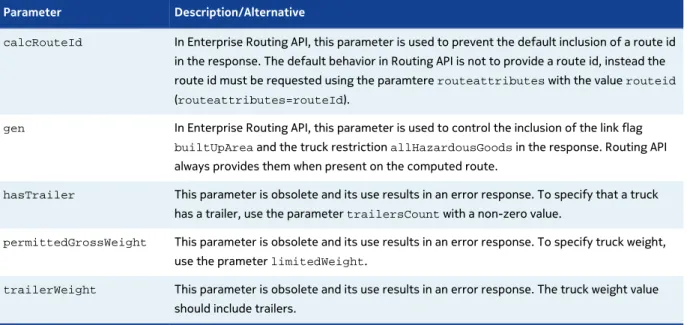
Routing API does not support the following parameters: Table 4: Unsupported parameters
Parameter Description/Alternative
calcRouteId In Enterprise Routing API, this parameter is used to prevent the default inclusion of a route id
in the response. The default behavior in Routing API is not to provide a route id, instead the route id must be requested using the paramtere routeattributes with the value routeid
(routeattributes=routeId).
gen In Enterprise Routing API, this parameter is used to control the inclusion of the link flag builtUpArea and the truck restriction allHazardousGoods in the response. Routing API
always provides them when present on the computed route.
hasTrailer This parameter is obsolete and its use results in an error response. To specify that a truck
has a trailer, use the parameter trailersCount with a non-zero value.
permittedGrossWeight This parameter is obsolete and its use results in an error response. To specify truck weight,
use the prameter limitedWeight.
trailerWeight This parameter is obsolete and its use results in an error response. The truck weight value
should include trailers.
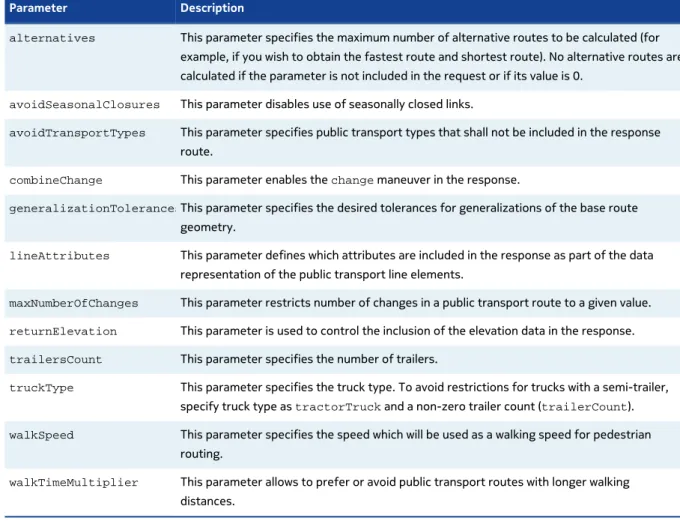
Parameter Description
alternatives This parameter specifies the maximum number of alternative routes to be calculated (for
example, if you wish to obtain the fastest route and shortest route). No alternative routes are calculated if the parameter is not included in the request or if its value is 0.
avoidSeasonalClosures This parameter disables use of seasonally closed links.
avoidTransportTypes This parameter specifies public transport types that shall not be included in the response
route.
combineChange This parameter enables the change maneuver in the response.
generalizationTolerancesThis parameter specifies the desired tolerances for generalizations of the base route
geometry.
lineAttributes This parameter defines which attributes are included in the response as part of the data
representation of the public transport line elements.
maxNumberOfChanges This parameter restricts number of changes in a public transport route to a given value. returnElevation This parameter is used to control the inclusion of the elevation data in the response. trailersCount This parameter specifies the number of trailers.
truckType This parameter specifies the truck type. To avoid restrictions for trucks with a semi-trailer,
specify truck type as tractorTruck and a non-zero trailer count (trailerCount). walkSpeed This parameter specifies the speed which will be used as a walking speed for pedestrian
routing.
walkTimeMultiplier This parameter allows to prefer or avoid public transport routes with longer walking
distances.
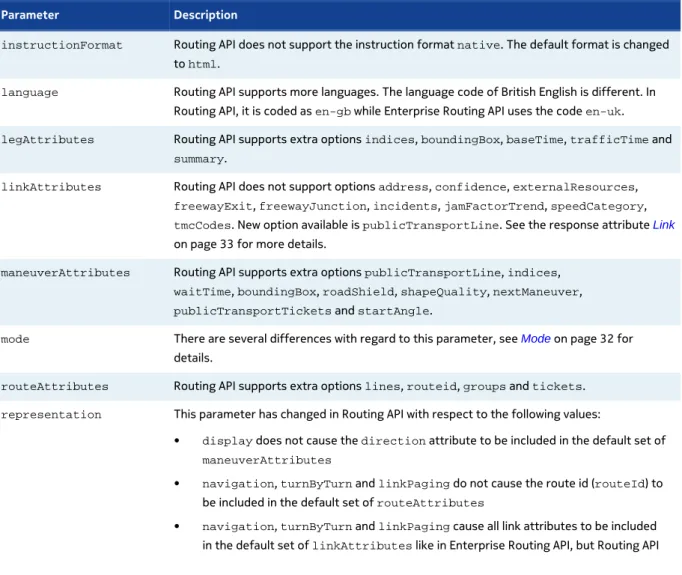
Differences in request parameters: Table 6: Differences in request parameters
Parameter Description
instructionFormat Routing API does not support the instruction format native. The default format is changed
to html.
language Routing API supports more languages. The language code of British English is different. In
Routing API, it is coded as en-gb while Enterprise Routing API uses the code en-uk. legAttributes Routing API supports extra options indices, boundingBox, baseTime, trafficTime and
summary.
linkAttributes Routing API does not support options address, confidence, externalResources, freewayExit, freewayJunction, incidents, jamFactorTrend, speedCategory, tmcCodes. New option available is publicTransportLine. See the response attribute Link
Parameter Description
maneuverAttributes Routing API supports extra options publicTransportLine, indices, waitTime, boundingBox, roadShield, shapeQuality, nextManeuver, publicTransportTickets and startAngle.
mode There are several differences with regard to this parameter, see Mode on page 32 for
details.
routeAttributes Routing API supports extra options lines, routeid, groups and tickets. representation This parameter has changed in Routing API with respect to the following values:
• display does not cause the direction attribute to be included in the default set of maneuverAttributes
• navigation, turnByTurn and linkPaging do not cause the route id (routeId) to
be included in the default set of routeAttributes
• navigation, turnByTurn and linkPaging cause all link attributes to be included
in the default set of linkAttributes like in Enterprise Routing API, but Routing API
does not support all options, see differences in linkAttributes mentioned above for
details.
waypoint There are several differences with regard to this parameter in some use cases, see Waypoint
on page 21 for details.
Response Differences
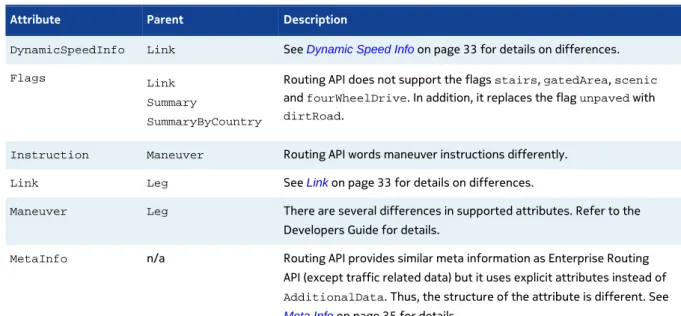
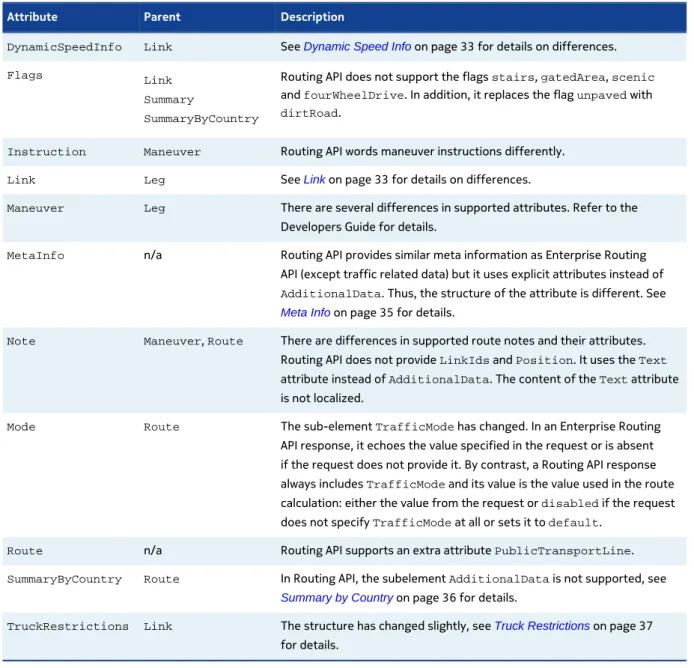
Differences in response attributes: Table 7: Differences in response attributes
Attribute Parent Description
DynamicSpeedInfo Link See Dynamic Speed Info on page 33 for details on differences.
Flags Link Summary
SummaryByCountry
Routing API does not support the flags stairs, gatedArea, scenic
and fourWheelDrive. In addition, it replaces the flag unpaved with dirtRoad.
Instruction Maneuver Routing API words maneuver instructions differently. Link Leg See Link on page 33 for details on differences.
Maneuver Leg There are several differences in supported attributes. Refer to the
Developers Guide for details.
MetaInfo n/a Routing API provides similar meta information as Enterprise Routing
API (except traffic related data) but it uses explicit attributes instead of
AdditionalData. Thus, the structure of the attribute is different. See
Note Maneuver, Route There are differences in supported route notes and their attributes.
Routing API does not provide LinkIds and Position. It uses the Text
attribute instead of AdditionalData. The content of the Text attribute
is not localized.
Mode Route The sub-element TrafficMode has changed. In an Enterprise Routing
API response, it echoes the value specified in the request or is absent if the request does not provide it. By contrast, a Routing API response always includes TrafficMode and its value is the value used in the route
calculation: either the value from the request or disabled if the request
does not specify TrafficMode at all or sets it to default. Route n/a Routing API supports an extra attribute PublicTransportLine. SummaryByCountry Route In Routing API, the subelement AdditionalData is not supported, see
Summary by Country on page 36 for details.
TruckRestrictions Link The structure has changed slightly, see Truck Restrictions on page 37
for details.
Behavioral Differences
Differences in behavior:1. Routing API does not include the attribute RouteId in the response by default. It has to be
requested explicitly with the option routeId of the routeAttributes parameter.
2. In Routing API, responses always include the attribute TrafficMode.
3. In Routing API, parameters hasTrailer, trailerWeight and permittedGrossWeight are
obsolete. Requests using these parameters result in an error response.
4. In Routing API, the route calculation takes the weight condition into account if weight-dependent truck speed limits apply.
5. In Routing API, time-dependent truck restrictions along the route result in itinerary warnings in the response.
6. In Routing API, seasonally closed roads are avoided if the computed route would pass them during a closure period.
7. In Routing API, if the computed route passes through a built-up area, the response always includes the link flag builtUpArea. (In Enterprise Routing API, the request parameter gen is
used to control the inclusion of this flag in the response.)
Request Parameters
Waypoint
There are several use cases where the usage of the parameter waypoint has changed between
Enterprise Routing API and Routing API. We describe the differences in the tables in the following sections.
Common Components of Waypoint
The table below describes the differences in the common components of waypoint.
Table 8: Differences in common waypoint components
Parameter component Description
Entity Attributes Routing API does not support the components entityType and entityDetails. To
customize the start or end instruction for stop-over waypoints, use userLabel.
User Label userLabel is a new component introduced in Routing API. It is used to assign a custom
name to waypoints for easier identification. It also affects the start and end instructions on
stopOver waypoints.
Series Enterprise Routing API requires waypoint0 and waypoint1; if any intermediate waypoints
are missing, they are extrapolated to enable a route calculation. By contrast, Routing API requires a complete sequence of waypoints, otherwise it produces an error response.
Waypoint Parameter
geoThe table below describes the differences in the waypoint parameter geo.
Table 9: Differences in waypoint parameter geo
Parameter component Description
Type In Enterprise Routing API, the default type of intermediate waypoints depends on transitRadius. If transitRadius is specified for intermediate waypoints, they are
considered to be passThrough by default. In Routing API, the default type of all waypoints
is stopOver even if transitRadius is used, passThrough waypoints must be defined
explicitly.
Transit Radius Enterprise Routing API returns an error when the position of a waypoint cannot be matched inside the transit radius. Routing API tries to match waypoint position outside the transit radius if it cannot match in transit radius range.
Waypoint Parameter
streetParameter component Description
Street Positions Routing API does not support multiple StreetPositions in a street waypoint.
Waypoint Parameter
linkThe table below describes the differences in the waypoint parameter link.
Table 11: Differences in waypoint parameter link
Parameter component Description
Display position Routing API allows you to omit the display position in the link ('link!<linkId>').
LinkId Enterprise Routing API supports linkId with a positive ('+' or no sign) and negative ('-')
direction.
Routing API supports linkId with a positive ('+') direction, negative ('-') direction or either/
unspecified ('*'). The prefix for LinkId cannot be omitted.
Spot In Enterprise Routing API the default spot value of a link waypoint is 0 if it is the first
waypoint of the route. Otherwise, the default spot value is 1.
In Routing API, the default spot value of a link waypoint is 0.5 if the request does not provide spot and display position. If the waypoint in the request includes only a display position, an
attempt to match to the position on the link does not take spot into account.
spot specifies the distance from the link reference node. In Enterprise Routing API, the
waypoint position is mapped to the beginning of the link by default, while in Routing API, it is mapped to the middle of the link or to the position on the link closest to the provided display position.
Side of Street In Enterprise Routing API, an end action and instruction takes into account the
SideOfStreet sub-element of the waypoint parameter specified in the request.
Routing API does not support the SideOfStreet component nor does it override the real
side of street. To indicate the intended side of street, use linkId with the appropriate sign.
The routing engine derives the correct side of street from the travel direction and the link properties, and includes it in the end instructions if the end instructions are stipulated.
Get Route
Summary
The sections below describe three types of differences between Enterprise Routing API and Routing API:
• request differences
• response differences
Request Differences
Differences in request parameters: Table 12: Differences in request parameters
Parameter Description
instructionFormat Routing API does not support the instruction format native. The default format is changed
to html.
language Routing API supports more languages. The language code of British English is different. In
Routing API, it is coded as en-gb while Enterprise Routing API uses the code en-uk. legAttributes Routing API supports extra options indices, boundingBox, baseTime, trafficTime and
summary.
linkAttributes Routing API does not support options address, confidence, externalResources, freewayExit, freewayJunction, incidents, jamFactorTrend, speedCategory, tmcCodes. New option available is publicTransportLine. See the response attribute Link
on page 33 for more details.
maneuverAttributes Routing API supports extra options publicTransportLine, indices, waitTime, boundingBox, roadShield, shapeQuality, nextManeuver, publicTransportTickets and startAngle.
mode There are several differences with regard to this parameter, see Mode on page 32 for
details.
routeAttributes Routing API supports extra options lines, routeid, groups and tickets. representation This parameter has changed in Routing API with respect to the following values:
• display does not cause the direction attribute to be included in the default set of maneuverAttributes
• navigation, turnByTurn and linkPaging do not cause the route id (routeId) to
be included in the default set of routeAttributes
• navigation, turnByTurn and linkPaging cause all link attributes to be included
does not support all options, see differences in linkAttributes mentioned above for
details.
Response Differences
Differences in response attributes: Table 13: Differences in response attributes
Attribute Parent Description
DynamicSpeedInfo Link See Dynamic Speed Info on page 33 for details on differences.
Flags Link Summary
SummaryByCountry
Routing API does not support the flags stairs, gatedArea, scenic
and fourWheelDrive. In addition, it replaces the flag unpaved with dirtRoad.
Instruction Maneuver Routing API words maneuver instructions differently. Link Leg See Link on page 33 for details on differences.
Maneuver Leg There are several differences in supported attributes. Refer to the
Developers Guide for details.
MetaInfo n/a Routing API provides similar meta information as Enterprise Routing
API (except traffic related data) but it uses explicit attributes instead of
AdditionalData. Thus, the structure of the attribute is different. See
Meta Info on page 35 for details.
Note Maneuver, Route There are differences in supported route notes and their attributes.
Routing API does not provide LinkIds and Position. It uses the Text
attribute instead of AdditionalData. The content of the Text attribute
is not localized.
Mode Route The sub-element TrafficMode has changed. In an Enterprise Routing
API response, it echoes the value specified in the request or is absent if the request does not provide it. By contrast, a Routing API response always includes TrafficMode and its value is the value used in the route
calculation: either the value from the request or disabled if the request
does not specify TrafficMode at all or sets it to default. Route n/a Routing API supports an extra attribute PublicTransportLine. SummaryByCountry Route In Routing API, the subelement AdditionalData is not supported, see
Summary by Country on page 36 for details.
TruckRestrictions Link The structure has changed slightly, see Truck Restrictions on page 37
Get Link Info
The articles in this section describe differences in the getLinkInfo service.
Summary
The sections below describe three types of API differences: • request differences
• response differences
Note: In Routing API to get detailed link information it is recommended to use HERE Platform Data Extension (PDE) service.
Request Differences
Routing API does not support the following parameters: Table 14: Unsupported parameters
Parameter Description/Alternative
routeId This parameter is not supported in Routing API referenceTime This parameter is not supported in Routing API waypoint This parameter is not supported in Routing API
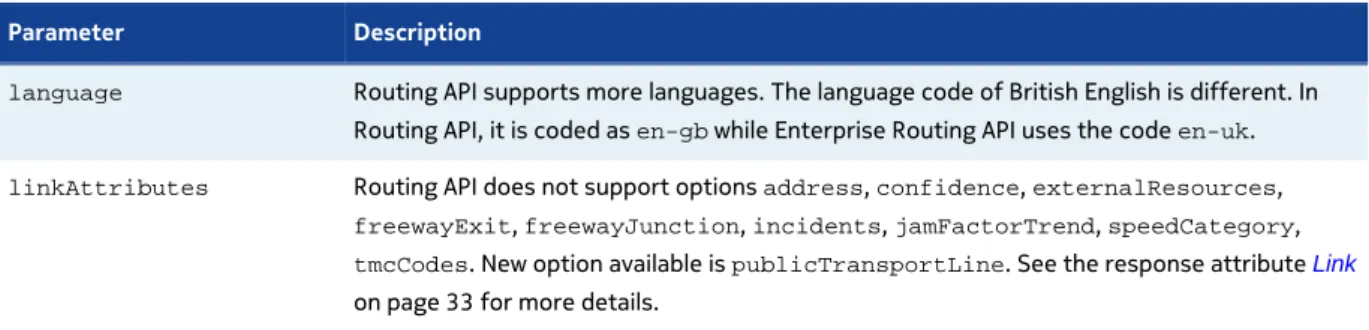
Differences in request parameters: Table 15: Differences in request parameters
Parameter Description
language Routing API supports more languages. The language code of British English is different. In
Routing API, it is coded as en-gb while Enterprise Routing API uses the code en-uk. linkAttributes Routing API does not support options address, confidence, externalResources,
freewayExit, freewayJunction, incidents, jamFactorTrend, speedCategory, tmcCodes. New option available is publicTransportLine. See the response attribute Link
on page 33 for more details.
Response Differences
Attribute Parent Description
DynamicSpeedInfo Link See Dynamic Speed Info on page 33 for details on differences.
Flags Link Summary
SummaryByCountry
Routing API does not support the flags stairs, gatedArea, scenic
and fourWheelDrive. In addition, it replaces the flag unpaved with dirtRoad.
Link Leg See Link on page 33 for details on differences.
MetaInfo n/a Routing API provides similar meta information as Enterprise Routing
API (except traffic related data) but it uses explicit attributes instead of
AdditionalData. Thus, the structure of the attribute is different. See
Meta Info on page 35 for details.
TruckRestrictions Link The structure has changed slightly, see Truck Restrictions on page 37
for details.
Calculate Isoline
The articles in this section describe differences in the calculate isoline service.
Summary
Request Differences
The size of an isoline was previously specified either through the parameter distance or through time. In Routing API, this mechanism is replaced with a combination of range and rangetype
parameters. rangetype=distance indicates that the value of range is specified in meters, while rangetype=time means that range is defined in seconds. In addition, the isoline service supports a
number of new parameters, please see the user guide documentation for details.
Response Differences
In Routing API, the response structure has been completely replaced with a new simpler structure. Please see the user guide documentation for details.
Behavioral Differences
In Routing API, each isoline can contain multiple polygons. To force a result with only one polygon (as in the previous implementations), add the parameter singlecomponent=true to the request. In
Routing API, the isoline service uses a new algorithm for calculating polygons, which offers greater precision and allows the request to stipulate different levels of details.
Calculate Matrix
The articles in this section describe differences of the calculate matrix service.
Summary
The sections below describe three types of API differences: • request differences
• response differences
• behavioral differences
Request Differences
Routing API does not support the following parameters: Table 17: Unsupported parameters
Parameter Description/Alternative
hasTrailer This parameter is obsolete and its use results in an error response. To specify that a truck
has a trailer, use the parameter trailersCount with a non-zero value.
trailerWeight This parameter is obsolete and its use results in an error response. The truck weight value
should include trailers.
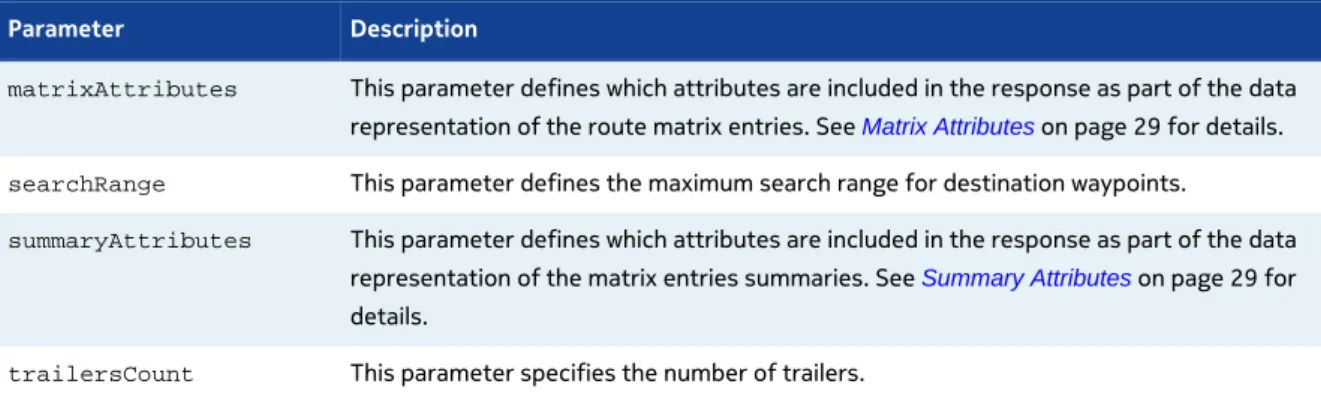
The new parameters in Routing API are: Table 18: New parameters
Parameter Description
matrixAttributes This parameter defines which attributes are included in the response as part of the data
representation of the route matrix entries. See Matrix Attributes on page 29 for details.
searchRange This parameter defines the maximum search range for destination waypoints.
summaryAttributes This parameter defines which attributes are included in the response as part of the data
representation of the matrix entries summaries. See Summary Attributes on page 29 for
details.
truckType This parameter specifies the truck type. To avoid restrictions for trucks with a semi-trailer,
specify truck type as tractorTruck and a non-zero trailer count (trailerCount).
Differences in request parameters: Table 19: Differences in request parameters
Parameter Description
mode • Routing API does not support combination of the mode type shortest with the truck
transport mode
• Routing API additionally supports transport types carHOV and pedestrian
• In Routing API, traffic mode is disabled by default
• Routing API does not support route features HOVLane and stairs
• Routing API does not support the feature weight prefer
POST Request Differences
There are differences in the supported syntax of a POST request. In Routing API, POST payload may contain only start and destination waypoints as in the example below.
Routing API POST payload example:
start0=52.60,13.24&destination0=52.61,13.25
Response Differences
Differences in response attributes: Table 20: Differences in response attributes
Attribute Parent Description
MatrixEntry n/a See Matrix Entry on page 30 for details on differences.
MetaInfo n/a Routing API provides similar meta information as Enterprise Routing
API (except traffic related data) but it uses explicit attributes instead of
AdditionalData. Thus, the structure of the attribute is different. See
Meta Info on page 35 for details.
Request Parameters
Matrix Attributes
The request parameter matrixAttributes is new in Routing API. It affects the contents of the
element MatrixEntry in the response to a CalculateMatrix routing request (see also Matrix Entry on
page 30).
Routing API parameter matrixAttributes supports the following values:
• indices – enables matrix indices of MatrixEntry
• summary – enables summary of MatrixEntry
• none – disables all subelements of MatrixEntry
Note: Requests disabling summary are considered invalid. • all – enables all available subelements of MatrixEntry
The example below demonstrates how to optimize the response by requesting only summary information of resulting matrix entries. Matrix indices are not included in the response.
Routing API Request
http://route.cit.api.here.com/routing/7.2/calculatematrix.xml? app_code={YOUR_APP_CODE} &app_id={YOUR_APP_ID} &start0=52.6160539,13.2490323 &destination0=52.6168201,13.2503942 &mode=fastest;car &matrixattributes=none,summary
Routing API Response
<MatrixEntry> <Summary> <Distance>320</Distance> <TravelTime>334</TravelTime> </Summary> </MatrixEntry>
Summary Attributes
The request parameter summaryAttributes is new in Routing API. The parameter affects the
content of the Summary element in the response to the CalculateMatrix routing request.
• costfactor – enables CostFactor element in Summary
• distance – enables Distance element in Summary
• none – disables all fields of Summary
• all – enables all fields of Summary
Note that costfactor is enabled by default.
The example below demonstrates how to request multiple summary elements with a single request.
Routing API Request
http://route.cit.api.here.com/routing/7.2/calculatematrix.xml? app_code={YOUR_APP_CODE} &app_id={YOUR_APP_ID} &start0=52.6160539,13.2490323 &destination0=52.6168201,13.2503942 &mode=fastest;car &matrixattributes=none,summary,indices &summaryattributes=traveltime,costfactor,distance
Routing API Response
<MatrixEntry> <StartIndex>0</StartIndex> <DestinationIndex>0</DestinationIndex> <Summary> <Distance>320</Distance> <TravelTime>334</TravelTime> <CostFactor>334</CostFactor> </Summary> </MatrixEntry>
Response Attributes
The articles in this section describe differences between the two versions of the API in response attributes.
Matrix Entry
The contents of the MatrixEntry attribute in Routing API responses are customizable (see Matrix Attributes on page 29). Routing API does not support the Route subelement of MatrixEntry. It
Routing API brings a number of changes in the Summary attribute:
• New sub-elements CostFactor and TravelTime
• By default, the summary includes only CostFactor
• Travel time provided in TravelTime attribute instead of BaseTime
• Values of the distance and the travel time do not include a fractional part • Attribute content customizable (see Summary Attributes on page 29)
The examples below demonstrate the differences.
Routing API Response
<MatrixEntry> <StartIndex>0</StartIndex> <DestinationIndex>1</DestinationIndex> <Summary> <Distance>149191</Distance> <TravelTime>119353</TravelTime> <CostFactor>121353</CostFactor> </Summary> </MatrixEntry>
Enterprise Routing API Response
<MatrixEntry> <StartIndex>0</StartIndex> <DestinationIndex>1</DestinationIndex> <Route> <Summary> <Distance>149191.0</Distance> <BaseTime>119353.0</BaseTime> </Summary> </Route> </MatrixEntry>
Common Request Parameters
The articles in this section describe differences between Enterprise Routing API and Routing API related to common request parameters.
Mode
The use of the parameter mode remains largely unchanged, but notable differences exist. The table
below details them.
Table 21: Differences in the parameter mode
Parameter component Differences
modeN (multiple modes) In Routing API, it is possible to specify only one routing mode in a request. Numbered mode
parameters such as mode0 or mode1 are not supported. To calculate a route with several
modes, a separate request has to be used for each mode.
In Enterprise Routing API, multiple modes are commonly used to request the fastest route and its shortest alternative. To obtain alternative routes through the Routing API, use the parameter alternatives (see also description in the table with new parameters in Summary
on page 17).
Mode Type Routing API does not support the mode type scenic and the convenience modes fastestNow and directDrive. The traffic mode and departure time must be specified
explicitly.
Transport Type Enterprise Routing API uses an implicit transport type car, when the transport
type is not specified in the mode parameter. Routing API requires an explicit specification of the transport type. Mode values such as mode=fastest or mode=fastest;;traffic:enabled are considered as invalid.
Routing API supports the transport type truck only with mode fastest. To obtain
alternative routes, use the parameter alternatives (see new parameters in Summary on
page 17).
If the request transport type is pedestrian in an Enterprise Routing API request, the length
of the route is limited to a certain threshold. Routing API does not use thresholds to limit the route length.
Routing API supports extra types carHOV, publicTransport and publicTransportTimeTable.
Traffic Mode In Routing API, the traffic mode is disabled by default. To calculate a route, taking into
consideration live traffic, always enable the traffic mode explicitly (traffic:enabled). Feature The route feature HOVLane is not supported. HOV lanes are not used with transport types
other than carHOV if an alternative route is available.
The route feature stairs is not supported. Links with stairs are not used with the transport
types car, carHOV and truck.
The weighting feature prefer is not supported. The most common use case in Enterprise
Routing API is to specify a preference for motorways (motorway:1). Routing API
automatically favors motorways with the mode type fastest because they allow higher
Common Response Attributes
The articles in this section describe differences between Enterprise Routing API and Routing API related to the common response attributes.
Dynamic Speed Info
This part of migration guide describes differences in the DynamicSpeedInfo attributes.
Table 22: Differences in the DynamicSpeedInfo attributes
Attribute Description
BaseSpeed In Enterprise Routing API, the base speed on the link depends on a speed category and
the speed limit on that link. Routing API uses a static free flow speed instead of the speed category which tends to be more adequate. This affects how speed profiles for trucks are handled in Routing API. A truck base speed is now a function of a car base speed. However, Routing API applies the same constraints on the truck speeds as Enterprise Routing API.
Confidence This attribute is not supported.
JamFactor Enterprise Routing API does not include this attribute in the response if its value is not
known. Routing API includes JamFactor with value -1 in such cases. JamFactorTrend This attribute is not supported.
Link
This part of migration guide describes differences in the response attribute Link with regard to:
• unsupported attributes
• new attributes
• dynamic speed info
• truck restrictions
• public transport
Unsupported Attributes
Link Attribute Description/Alternative
Address This attribute is not supported. To obtain address information, use the Geocoder service (see
Geocoder API documentation).
ExternalResources This attribute is not supported.
FreewayExit This attribute is available in the response in the Maneuver attribute. FreewayJunction This attribute is available in the response in the Maneuver attribute. Incident This attribute is not supported.
SpeedCategory This attribute is not supported. In Routing API, the base speed does not directly depend on
the speed category. See BaseSpeed in Dynamic Speed Info on page 33 for more details
on the speed criteria.
TMCCodes This attribute is not supported.
New Attributes
The new link attributes in Routing API are: Table 24: New link attributes
Link Attribute Description
Consumption This attribute provides the amount of energy or fuel consumed while traversing the link. FirstPoint This attribute provides the index pointing to the point in the route shape that is the first
point of the link.
LastPoint This attribute provides the index pointing to the point in the route shape that is the last point
of the link.
See also new link attributes specific to public transport documented in the section Public Transport
on page 35.
Dynamic Speed Info
For details on differences in the DynamicSpeedInfo attribute, see Dynamic Speed Info on page
33.
Truck Restrictions
For details on differences in the TruckRestrictions attribute, see Truck Restrictions on page
Public Transport
Routing API uses a custom type of the Link attribute in case of the Public Transport routing modes.
The table below describes the new link attributes that are specific to the public transport. Table 25: Public transport link attributes
Link Attribute Description
Line This attribute provides the reference to the relevant Line attribute included the Route. NextStopId This attribute provides the list of intermediate stops.
NextStopName This attribute provides the the name of the stop at the end of the link.
Meta Info
Routing API uses explicit attributes instead of AdditionalData elements in MetaInfo. The data
provided is similar to the one in Enterprise Routing API except traffic-related meta information. Routing API provides the time of traffic last update in the response header
X-LastUpdateFromTrafficUpdater.
Enterprise Routing API contains the following elements:
<MetaInfo> <Timestamp>2015-01-29T10:51:24.481Z</Timestamp> <AdditionalData key="CurrentTrafficLastUpdate">2015-01-29T10:50:00.152+0000</ AdditionalData> <AdditionalData key="CurrentTrafficElementsCount">10417917</ AdditionalData> <AdditionalData key="LongTermClosureLastUpdate">2015-01-29T10:50:00.008+0000</ AdditionalData> <AdditionalData key="LongTermClosureElementsCount">24483</ AdditionalData> <AdditionalData key="ShortTermClosureLastUpdate">2015-01-29T10:50:00.008+0000</ AdditionalData> <AdditionalData key="ShortTermClosureElementsCount">3807</ AdditionalData> <AdditionalData key="Map0">2014Q1</AdditionalData> <AdditionalData key="Module0">routeserver,9.3-2014.07.11</ AdditionalData> <AdditionalData key="Module0ExecTime">26</AdditionalData> <AdditionalData key="Module0ExecTimeMicro">26269</AdditionalData> <AdditionalData key="Service">routing-route-service,6.2.36.0</ AdditionalData> </MetaInfo>
<MetaInfo> <Timestamp>2015-01-30T11:12:34Z</Timestamp> <MapVersion>8.30.57.150</MapVersion> <ModuleVersion>7.2.53.0-1127_1</ModuleVersion> <InterfaceVersion>2.6.7</InterfaceVersion> </MetaInfo>
Summary by Country
The sub-element AdditionalData is obsolete in the Routing API. Please note:
• TollRoadDistance is now an explicit attribute
• EcoTax is obsolete
• TollPrice is obsolete; to obtain toll cost information, use the Toll Cost Extension (see TCE
documentation)
Example
The example below demonstrates the difference in how the responses generated by the two versions of the API convey TollRoadDistance.
Enterprise Routing API Response:
<SummaryByCountry> <Distance>384582.0</Distance> <TrafficTime>16667.0</TrafficTime> <BaseTime>16667.0</BaseTime> <Flags>tollroad</Flags> <AdditionalData key="TollRoadDistance">361864.0</AdditionalData> <Country>FR</Country> </SummaryByCountry>
Routing API Response:
<SummaryByCountry> <Distance>385110</Distance> <TrafficTime>17183</TrafficTime> <BaseTime>16759</BaseTime> <Flags>tollroad</Flags> <TravelTime>16759</TravelTime> <Country>FRA</Country> <TollRoadDistance>362509</TollRoadDistance>
</SummaryByCountry>
Truck Restrictions
The attributes permittedGrossWeight and trailerWeight are obsolete in Routing API. Vehicle
weight restrictions are expressed using the limitedWeight attribute.
Routing API extends link truckRestrictions with conditionalRestrictions. The extension
makes it possible to express such restrictions as weight limits dependent on a trailer type and many others.
Example
The example below demonstrates how restrictions applicable to a single link are expressed in a Routing API response. The restrictions in the example are:
• "No vehicles with a weight over 10 tons"
• "No vehicles with trailer and a weight over 15 tons" • "No trucks at a certain period of time"
<TruckRestrictions> <LimitedWeight>10</LimitedWeight> <ConditionalRestriction> <LimitedWeight>15</LimitedWeight> <TruckProfile> <TrailersCount>1</TrailersCount> </TruckProfile> </ConditionalRestriction> <ConditionalRestriction> <AccessForbidden>true</AccessForbidden> <TimeDependent>true<TimeDependent> </ConditionalRestriction> </TruckRestrictions>
Waypoint
This part of migration guide describes three changes in the response attributes relating to a waypoint:
• new waypoint attributes
• originalposition
New waypoint attributes
Routing API extends a waypoint with several new attributes: • Spot • SideOfStreet • MappedRoadName • Label • UserLabel • ShapeIndex
Example of new waypoint attributes
The examples below demonstrate the structure of new waypoint attributes in a response, first from Enterprise Routing API, then from Routing API.
Enterprise Routing API Response:
<Waypoint> <LinkId>-930905264</LinkId> <MappedPosition> <Latitude>52.4973412</Latitude> <Longitude>13.2873411</Longitude> </MappedPosition> <OriginalPosition> <Latitude>52.4973427</Latitude> <Longitude>13.2873413</Longitude> </OriginalPosition> <Type>stopOver</Type> </Waypoint>
Routing API Response:
<Waypoint> <LinkId>-1609300590142096890</LinkId> <MappedPosition> <Latitude>52.4973427</Latitude> <Longitude>13.2873414</Longitude> </MappedPosition> <OriginalPosition> <Latitude>52.4973427</Latitude> <Longitude>13.2873413</Longitude> </OriginalPosition> <Type>stopOver</Type> <Spot>0.2760736</Spot> <SideOfStreet>left</SideOfStreet> <MappedRoadName>Bornstedter Straße</MappedRoadName> <Label>Bornstedter Straße</Label>
<UserLabel>UserLabel Test</UserLabel> <ShapeIndex>0</ShapeIndex>
</Waypoint>
OriginalPosition
Routing API always provides the response field OriginalPosition for a Waypoint attribute. In
case of the waypoint specified with link postion with no DisplayPosition, OriginalPosition
has the same value as the field MappedPostion.
Matching
Enterprise Routing API matches the waypoints for intersections from the beginning of the closest link in the direction towards the destination. When the start link is in the middle of or close to an intersection then the start waypoint is matched to the nearest link outside the intersection. When
the destination link is in the middle or close to an intersection, then the stop waypoint is matched
to the last link before the intersection. This is illustrated by the figure below. Figure 1: Enterprise Routing API Waypoint Matching
Routing API matches intersection waypoints with greater precision. The process takes a number of steps. First, the most visible (visible at lower zoom levels) street segment is selected. If the request specifies TransitRadius with a value greater than zero, the closest segment to the waypoint is
chosen. Otherwise, a segment with the lowest impact on the cost of the route is chosen (its selection causes the smallest change to the route). Next, the selected segment is used to search for links around that segment. The last step verifies whether the waypoint is close to one of the endpoints
of the segment and that endpoint is near a junction which consists of only two adjacent links, then it remains unchanged. If the waypoint is close to an endpoint of the segment, but is close to a junction, then it is moved to the junction.