©Nemertes Research 2013 www.nemertes.com 888-‐241-‐2685 DN2504 1
Networking for the BYOD Enterprise
By Philip Clarke
Research Analyst, Nemertes Research
Executive Summary
For many companies, the transition to Bring Your Own Device (BYOD) and provisioning the right supporting infrastructure presents significant challenges. The enterprise device population of yesteryear was largely BlackBerry, homogenous, company-‐purchased, and accordingly, more readily managed. With employees bringing various consumer-‐
oriented devices to work, managing mobility and securing company assets have become more difficult tasks for IT professionals. The influx of consumer-‐oriented iOS and
Android devices into the enterprise continues unabated, placing unprecedented demands on companies’ WLANs and network infrastructures. IT staffs need simple but powerful BYOD-‐targeted tools that secure corporate assets, provide the basis for highly scalable architecture, and unify wireless and wired networks. This report will provide technology professionals with the tools necessary to structure their wireless networks to reflect the requirements of a new mobile workforce.
The Issue
IT professionals are facing tremendous challenges integrating employee-‐ owned mobile devices into existing policy, network, and regulatory frameworks. In order to enable employees’ device choices without compromising corporate data and infrastructure, 84% of companies plan to implement Mobile Device Management (MDM) by 2014, up from 46% today. However, MDM tools alone do not fully meet the evolving needs of the mobile workforce or address the more fundamental
requirements mobile devices place on underlying network infrastructure. Enterprises should evaluate network-‐management solutions that integrate wired, wireless, and device access functionality to complement the app, data, and device configuration tools incorporated into MDM technologies. Employees often try to access the WLAN with their personal devices without first contacting their IT departments. Without intelligent network-‐management tools for the WLAN, IT professionals are unable to determine what types of employee-‐owned devices are accessing the network, who is using them, or establish relevant policies.
In addition to security concerns, the complexity of managing multiple,
©Nemertes Research 2013 www.nemertes.com 888-‐241-‐2685 DN2504 2
unify device, network, and policy management greatly improve initial BYOD setup and ongoing management. An integrated management workflow ensures policy settings will correctly propagate throughout enterprise networks and to devices.
Furthermore, simplified network management saves IT resources, provides better transparency into network and device activity, and allows for otherwise complex changes to be completed efficiently and correctly.
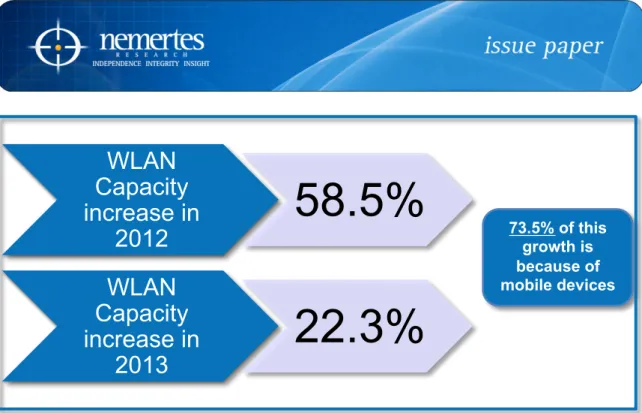
Security and simplicity are both fundamental tenants that allow IT staffs to create successful network architecture for today’s mobile devices and BYOD. Equally as important are capacity and scalability. The longevity of an enterprise network and its tools are tied to their ability to scale without undermining security capabilities or simplicity of operation. Companies expect to increase their WLAN capacity by 80% by the end of 2013. Work-‐related and personal usage of mobile devices are straining network resources, a fact underlined by companies provisioning 73.5% of their WLAN capacity growth for smartphones and tablets.
Securing Mobile Devices
The mobile device paradigm has shifted rapidly over the last five years, catapulted by the success of iOS and Android within consumer and enterprise markets. To support, enable, and secure these new, consumerized mobile devices, companies must shift infrastructure accordingly. Before iOS was released, supporting infrastructure for BlackBerry simply required companies to deploy a BlackBerry Enterprise Server (BES) to manage these devices and corporate data.
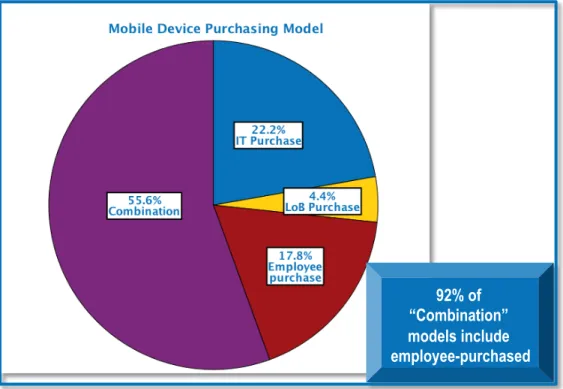
Figure 1: Mobile Device Purchasing Model
92% of “Combination” models include employee-purchased
©Nemertes Research 2013 www.nemertes.com 888-‐241-‐2685 DN2504 3
Today’s device population is much different. The average company’s devices are 45.3% iOS, 30.3% BlackBerry, and 24% Android. The consumer-‐oriented nature of iOS and Android has forced companies to adopt MDM for security and management capabilities. As MDM addresses device management, IT departments also need
network-‐management tools that address the effects of increased capacity, latency, and security requirements on enterprise networks. In addition, BYOD continues to grow in popularity as a device-‐purchasing model because of cost savings and employee flexibility. Specifically, 69% of enterprises use BYOD as part of a larger purchasing model and 18% use it as their sole purchasing strategy. (Please see Figure 1.)
Safeguarding corporate resources requires WLAN management tools that match the increasing features of mobile devices.
Mobile device utility has grown significantly, driven by much more rapid
consumer purchasing cycles and resulting in near-‐PC processing power, extensive app catalogues, true browsers, and a variety of form factors. This growth in utility has been particularly influential for companies reviewing tablets for use within the enterprise. IT professionals expect 25.5% of employees will use tablets for work purposes by the end of 2014. Almost 10% of employees within companies reporting this trend have completely replaced their PCs or laptops with tablets. As tablet functionality reaches parity with laptops for more roles, mobile operating systems will become increasingly popular: 47% of companies expect tablet-‐as-‐primary-‐device will increase by about 5% in 2013.
Figure 2: What Percentage of Employees Use Tablets for Work Purposes? !!"#$%&
!'"($%&
)*"*$%&
!"!!#$ %"!!#$ &!"!!#$ &%"!!#$ '!"!!#$ '%"!!#$ (!"!!#$
)$!)& )$!+& )$!'&
,-./&012314/.51&67&89:;6<11=&>=1&?.@;1/=&762&,62A& 0B2:6=1=C&
©Nemertes Research 2013 www.nemertes.com 888-‐241-‐2685 DN2504 4
Before mobile devices become even more widespread, IT staffs must develop a solid, forward-‐looking security strategy. MDM, today’s primary device security
solution, is typically a client-‐side approach to device management, requiring an agent on the smartphone or tablet.
But a growing number of unknown, personal devices connect to the network without IT’s knowledge or approval—so they can’t possibly have the client loaded. Network tools developed specifically for BYOD provide companies with capabilities that are complementary to MDM, including automated device recognition and policy enforcement. Solutions that include these network tools reduce the demands of BYOD on companies, simultaneously freeing IT personnel for other tasks while securing network, corporate infrastructure, and device assets. These network tools include the following:
Fingerprinting – Network-‐based device security prevents devices from
accessing corporate resources unless they meet predetermined metrics. For example, device fingerprinting significantly reduces the likelihood that IT must spend time addressing access privileges for each new device. Fingerprinting generally inspects characteristics including device type, OS, and browser version. Because employees rarely bring devices to IT prior to accessing the WLAN, fingerprinting lets IT simplify, secure, and scale device onboarding.
Network Access Controls – Network Access Controls (NAC) helps IT further
automate device management by determining the security stance of mobile devices. NAC provides a deep inspection of the device to validate security apps, such as intrusion prevention, anti-‐virus, anti-‐spam, anti-‐spyware, and anti-‐malware, are installed. If a device isn’t equipped with the right set of security software, NAC can limit access to corporate resources based on preset rules. NAC capabilities vary by vendor, but they’re most effective when integrated into the network management system, improving the amount and quality of access decision criteria. Android is particularly well known for being vulnerable to malware in its ecosystem, and even iOS’ tightly vetted app store has begun to let some bad apps slip through.
Authentication – Once fingerprinting has determined the device type and NAC
has validated the health of its security software, authentication establishes user identity. For user authentication over the WLAN, most companies use the widely accepted 802.1x standard. Companies use a variety of implementations for additional verification, ranging from login and password combination to keycard, token, or biometric solutions. The combination of fingerprinting, NAC and authentication provides network management systems with a comprehensive view of user identity, device type, and health information.
Many vendors today sell overlay solutions for network security that are BYOD-‐ optimized. IT professionals reviewing network security solutions should evaluate
©Nemertes Research 2013 www.nemertes.com 888-‐241-‐2685 DN2504 5
these overlay solutions compared with those integrated into their WLAN/network tools. Integrated solutions offer advantages, including convenience and bundled cost savings, along with the ability to incorporate the radio signature of a connecting device into the fingerprinting process to distinguish an authorized device from an imposter. Overlay solutions often focus entirely on wireless security, so they may offer new techniques or features that network vendors don’t yet have available. However, their integration into a unified network management platform is unlikely, particularly if they are using proprietary detection methods. Hosted or managed overlay solutions can be of particular value to highly distributed companies, allowing IT staffs secure access from any location, while integrated solutions generally require the IT personnel be within the private network for configuration.
The biggest task for any WLAN security system is Wireless Intrusion
Prevention System (WIPS). WIPS automatically detects unauthorized wireless access, including rogue APs, Media Access Control (MAC) spoofing, Denial of Service (DoS) and many other methods hackers use to break into WLANs.
Mobile devices impose a different set of requirements on the WLAN than
devices on a wired LAN. PCs and many laptops are basically stationary workstations that are tied to a specific location or Ethernet port. This component of location adds a layer of security, as a network can know with a relative certainty that a device is where it says it is, belonging to one person. With mobility, devices traverse multiple networks, including cellular, WLAN, home, or non-‐enterprise Wi-‐Fi, and require specialized network management tools to track usage and modify access. An increasing percentage of companies have employees that use wireless as their sole means of access. Today, this number is a modest 9.6% of employees, but companies expect a small but measurable growth to 11.3% by the end of 2013. This number will invariably grow as mobile devices converge with and/or replace traditional PCs and laptops.
For some companies, wireless-‐only has emerged as a strategy, driven by their work and device requirements, as well as financial advantages from not building a redundant wired network. “Due to the capacity requirements of our mobile devices, we are building a new office that is scheduled to be occupied in the 2015-‐16
timeframe. The current plans for that building are wireless only,” says the director of IT strategy and architecture at a very large global financial-‐services company.
In addition to an increasingly mobile workforce, companies must evaluate how BYOD affects their industry regulatory requirements. For instance, both Health
Insurance Portability and Accountability Act (HIPAA) and Payment Card Industry (PCI) regulations require that companies safeguard their client data. BYOD creates a new dynamic, since employees can bring a personal device into the office and gain access to restricted data, save it, and unwittingly break these regulations. IT staffs can use the combination of fingerprinting and NAC to conclude that although an
©Nemertes Research 2013 www.nemertes.com 888-‐241-‐2685 DN2504 6
Simplifying Device and Network Management
Despite the fact that 56% of companies expect flat or decreasing IT budgets, mobility budgets are on the rise, with 65.7% of companies expecting a 20% increase. IT staffs must use the overall (and typically flat or declining) IT budgets efficiently to upgrade the network to support growing mobility requirements. One way to do that is to evaluate single management platforms that automate and enforce all network and device policies, ultimately reducing manual IT intervention and increasing IT staff productivity.
A single interface that provides everything from app usage to router latency to device health eases the burden on the IT staff. New employee-‐owned devices will have a myriad of connectivity options, including Wi-‐Fi, cellular, and for the foreseeable future, wired options (laptops and hybridized tablets in particular). Meanwhile, networks must fluently integrate new infrastructure, as companies use more private and public cloud services along with traditional on-‐premises solutions. (Enterprises already use cloud solutions to support mobility, with 38% using cloud or hybrid models for MDM.) An ideal network platform should integrate a company’s existing firewall, routing, optimization, Quality of Service (QoS) polices, and WLAN features into a simple management console.
Training or hiring specialists simply to integrate old or cloud solutions can cost more than the business upside. Accordingly, network-‐management tools should be highly capable at providing this capability with little or no human interaction. As stated, most IT budgets are flat or declining, so decision-‐makers should evaluate any tools that save time.
Automated, intelligent network management tools also can improve the security models. Today, 68% of companies use an identity-‐centric model to define device access privileges, and 32% use location-‐centric security. For some companies, location-‐centric security makes sense because they are non-‐mobile or non-‐
distributed. But most companies using location-‐centric security are simply ill equipped to integrate identity-‐centric security across multiple systems. IT
departments can run ragged trying to get proprietary technology to communicate, often resulting in siloed, redundant, expensive, and non-‐scalable network
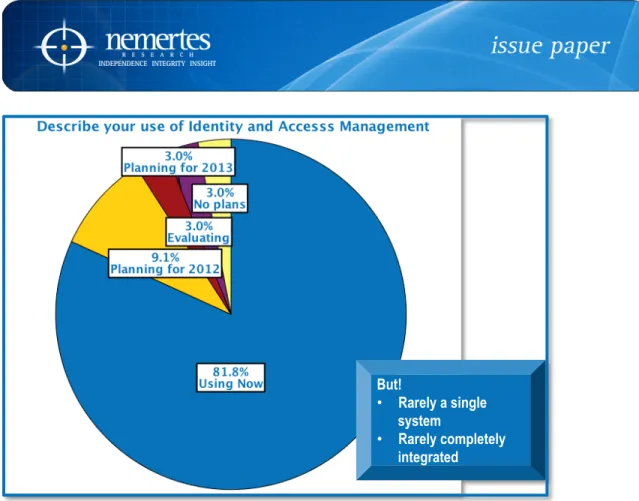
architectures. Eighty-‐two percent of companies use identity and access-‐management tools today, but they are rarely a single system or completed integrated.
An often-‐overlooked but important aspect of any technology deployment is licensing. For a WLAN, many vendors require a per-‐AP licensing fee, primarily to cover the costs of software upgrades. This process should be painless for IT staffs, not only to maintain operational simplicity but also to help with the scalability of the solution. If IT must go through a lengthy licensing process to purchase, install or upgrade a new AP, IT professionals’ time is effectively wasted.
©Nemertes Research 2013 www.nemertes.com 888-‐241-‐2685 DN2504 7
Figure 3: Describe Your Use of Identity and Access Management
Scalability
With a growing population using WLAN and/or cellular as their primary or
sole access technology, employees demand performance on par with wired Ethernet. This translates to WLAN technologies that scale without losing capability. When smartphones were email machines, with limited browsers and processing power, their impact on the WLAN was minimal. However, smartphones today can render full Web pages as quickly as most PCs and more importantly, are platforms for high-‐ bandwidth apps, such as video. Accordingly, companies are provisioning 73.5% of their WLAN capacity growth to account for increased mobile device functionality (vs. other factors, such as more employees). As more companies deploy collaboration and IP telephony apps, such as Microsoft Lync or Skype, they expect half of their mobile WLAN capacity will be consumed by voice and the other half by miscellaneous apps.
As companies plan for additional WLAN capacity, network-‐management tools
and more intelligent APs can help optimize capacity and latency through features including QoS, airtime sharing, and radio management. Many APs can preferentially forward latency-‐sensitive apps, such as IP telephony, at the RF front end and through the entire network, leveraging unified management tools. Airtime sharing is an approach for dealing with the different speeds of varying 802.11x endpoints; it partitions Wi-‐Fi airtime so that faster devices using 802.11n get on and off the frequency quickly, freeing up airtime for the slower transmitting 802.11a/b/g devices. Radio management tools allow information collected from site surveys to
But!
• Rarely a single
system
• Rarely completely integrated
©Nemertes Research 2013 www.nemertes.com 888-‐241-‐2685 DN2504 8
Figure 4: WLAN Capacity Increase
manually or automatically optimize radio features including interference detection, dynamic channel assignment, and more. IT staffs use these tools to optimize and improve WLAN performance and reliability. They also help to mitigate a common issue called “clustering,” where a large population of employees and their devices move into a location and overload the local AP(s). APs and/or their controllers manage clustering and other device density issues by throttling traffic or extending the reach of nearby APs to provide temporarily improved coverage. By using network tools to conduct a site survey, IT personnel can plan AP placement in likely clustering locations, such as cafeterias, conference rooms, and lobbies.
As enterprises add new APs to meet demand, network architecture scalability will become an even more pressing issue. Vendor solutions are typically fat-‐AP or thin-‐AP, with highly scalable controllers. Regardless of the exact architecture, vendors are pushing network intelligence and decision-‐making capabilities out from the core network. This allows the aforementioned features to be implemented at the AP or the controller without having to traverse all the way back to the core of the network. With fat-‐APs, each AP acts as a controller and can communicate with peers to optimize features like airtime usage, channelization, and devices roaming/handoffs. In a controller-‐based WLAN, the controller directs its “child” APs. Top vendors can support 100,000 devices with a single controller orchestrating its APs.
Neither technology is inherently superior to the other, as they are both
addressing the same issue of future-‐proofing WLANs and providing enterprises with highly scalable solutions. However, a controller in every AP is expensive at scale; enterprises with a large number of APs are likely to save money by going with a controller-‐based architecture. Conversely, companies with a smaller AP population can save money with fat-‐APs because they don’t need to purchase a separate
controller. Regardless, the WLAN industry’s trend of pushing intelligence to the edge is great for companies who need to expand their throughput. The modular nature of
WLAN
Capacity
increase in
2012
58.5%
WLAN
Capacity
increase in
2013
22.3%
73.5% of this growth is because of mobile devices
©Nemertes Research 2013 www.nemertes.com 888-‐241-‐2685 DN2504 9
scalable controllers and fat-‐APs reduces the likelihood companies will face large expenditures to upgrade WLANs.
IT professionals also should investigate the value of modular AP and/or
controller chassis to support the forthcoming 802.11ac standard. Other
considerations when upgrading or purchasing a new WLAN should include the capability of the controllers and APs that use Power over Ethernet (PoE) to avoid running another line for power.
Conclusions and Recommendations
The security and capacity demands of mobile devices have changed the
requirements of enterprise networking for IT professionals, largely due to the popularity of BYOD. Networking tools that automatically determine device type, security stance, and user identity are efficient and address security and management issues. Enterprise infrastructure is widely varied, including wired and wireless
networks, on-‐prem, cloud and managed services. Integrating these disparate solutions along with the inherent complexity of BYOD requires networking tools that can take a highly complex architecture and present IT professionals with simple, unified
management environment. Concurrently, the capacity requirements created by BYOD and their apps demands that WLANs are highly scalable to both reduce the costs and
difficulty of adding new APs.
Evaluate your mobility security.
o Do third-‐party pen testing to develop a strategy for improving security.
o Compare WLAN access logs to uncover unknown devices.
o Look at app usage with network tools; determine usage.
o Use an identity-‐centric security model for mobility.
Evaluate level of infrastructure integration.
o Which appliances/cloud services/devices are currently visible in a
unified way?
o Which appliances or cloud services are old and/or proprietary and
unlikely to integrate with a unified management system?
Are these worth the trouble? What do they bring to the table that
a virtualized appliance couldn’t?
o Estimate potential people-‐hours savings from IT staffs using a unified
wired/wireless network management tool with integrated components.
Evaluate expense for specialists to integrate older appliances.
How big is the company’s “mobile” population?
o How many and how often do employees telecommute?
o How many and how often are employees in the field?
o Depending on population and frequency, look at adding mobile-‐focused
VPN capabilities.
©Nemertes Research 2013 www.nemertes.com 888-‐241-‐2685 DN2504 10
o Inventory device types, form factors and operating systems.
o Do a site survey to determine current usage geographies/hotspots.
o How much WLAN capacity will be needed in 2013 and 2014? Factor in
expected growth of tablet and smartphone usage.
Evaluate any VoIP or similar latency sensitive app programs in
development or and build into WLAN requirements.
Evaluate 802.11ac. If expecting to use 802.11ac, develop costs,
architecture/AP/controller requirements.
About Nemertes Research: Nemertes Research is a research-‐advisory and strategic-‐ consulting firm that specializes in analyzing and quantifying the business value of emerging technologies. You can learn more about Nemertes Research at our Website,