Payflow Pro
Developer’s Guide
For Professional Use Only
Currently only available in English.
A usage Professional Uniquement
Document Number: 200010.en_US-200709
© 2007 PayPal, Inc. All rights reserved. PayPal is a registered trademark of PayPal, Inc. The PayPal logo is a trademark of PayPal, Inc. Other trademarks and brands are the property of their respective owners.
The information in this document belongs to PayPal, Inc. It may not be used, reproduced or disclosed without the written approval of PayPal, Inc. PayPal (Europe) Ltd. is authorised and regulated by the Financial Services Authority in the United Kingdom as an electronic money institution. PayPal FSA Register Number: 226056.
Notice of non-liability:
PayPal, Inc. is providing the information in this document to you “AS-IS” with all faults. PayPal, Inc. makes no warranties of any kind (whether express, implied or statutory) with respect to the information contained herein. PayPal, Inc. assumes no liability for damages (whether direct or indirect), caused by errors or omissions, or resulting from the use of this document or the information contained in this document or resulting from the application or use of the product or service described herein. PayPal, Inc. reserves the right to make changes to any information herein without further notice.
Contents
Preface . . . 7
Intended Audience . . . . 7
Organization of This Document . . . . 7
Where to Go for More Information . . . . 8
How to Contact Customer Service . . . . 8
Revision History . . . . 8
Chapter 1
Introduction . . . 9
About Payflow Pro . . . . 9
Host Addresses . . . . 9
How Payflow Pro Works . . . . 9
Payflow Pro Advantages. . . 10
Supported Processing Platforms. . . 10
Payflow Pro Recurring Billing Service . . . 10
About Security . . . 11
Chapter 2
Installing and Configuring the Payflow APIs . . . . 13
Preparing the Payflow Client Application . . . 13
Chapter 3
Performing Credit Card Transactions . . . . 15
About Credit Card Processing . . . 15
Obtaining an Internet Merchant Account . . . 16
Planning Your Payflow Pro Integration . . . 16
Complying With the E-commerce Indicator (ECI) . . . 17
Handling Credit Card Type Information . . . 17
Contents of a Transaction Request . . . 18
PARMLIST Syntax Guidelines . . . 18
When To Use a Sale Transaction . . . 24
Additional Parameters for Sale Transactions . . . 24
Typical Sale Transaction Parameter String . . . 24
Submitting Authorisation/Delayed Capture Transactions . . . 25
When To Use Authorisation/Delayed Capture Transactions. . . 25
Required Authorisation Transaction Parameters . . . 25
Typical Authorisation Transaction Parameter String . . . 26
Required Delayed Capture Transaction Parameters . . . 26
Delayed Capture Transaction: Capturing Transactions for Lower Amounts . . . 27
Delayed Capture Transaction: Capturing Transactions for Higher Amounts . . . 27
Delayed Capture Transaction: Error Handling and Retransmittal . . . 28
Submitting Voice Authorisation Transactions . . . 28
When to Use a Voice Authorisation Transaction. . . 28
Required Voice Authorisation Transaction Parameters . . . 28
Voice Authorisation Parameter String . . . 28
Submitting Credit Transactions . . . 29
Required Credit Transaction Parameters . . . 29
Credit Transaction Parameter Strings . . . 30
Submitting Void Transactions . . . 30
When To Use a Void Transaction . . . 30
Required Void Transaction Parameters . . . 31
Example Void Transaction Parameter String . . . 31
Submitting Inquiry Transactions . . . 32
When To Use an Inquiry Transaction . . . 32
Required Parameters When Using the PNREF . . . 32
Inquiry Transaction Parameter String Using the PNREF . . . 33
Required Parameters When Using the CUSTREF . . . 33
Inquiry Transaction Parameter String Using the CUSTREF . . . 33
Recharging to the Same Credit Card (Reference Transactions). . . 33
When To Use a Reference Transaction . . . 33
Transaction Types that Can Be Used as the Original Transaction . . . 34
Fields Copied From Reference Transactions . . . 34
Example Reference Transaction. . . 35
Submitting Card-Present (SWIPE) Transactions. . . 36
Supported Processing Platforms . . . 36
Card-present Transaction Syntax . . . 36
Card Security Code Validation . . . 37
Processing Platforms and Credit Cards Supporting Card Security Code . . . 37
Card Security Code Results . . . 38
Example CVV2 Request Parameter String . . . 38
Chapter 4
Responses to Credit Card Transaction Requests . . . . 41
Contents of a Response to a Credit Card Transaction Request . . . 41
PNREF Value . . . 42
PNREF Format . . . 42
RESULT Codes and RESPMSG Values . . . 43
RESULT Values for Transaction Declines or Errors . . . 43
RESULT Values for Communications Errors . . . 48
Chapter 5
Testing Payflow Pro Credit Card Transactions . . . . 51
Testing Guidelines . . . 51
Credit Card Numbers Used for Testing . . . 51
Result Code Responses . . . 52
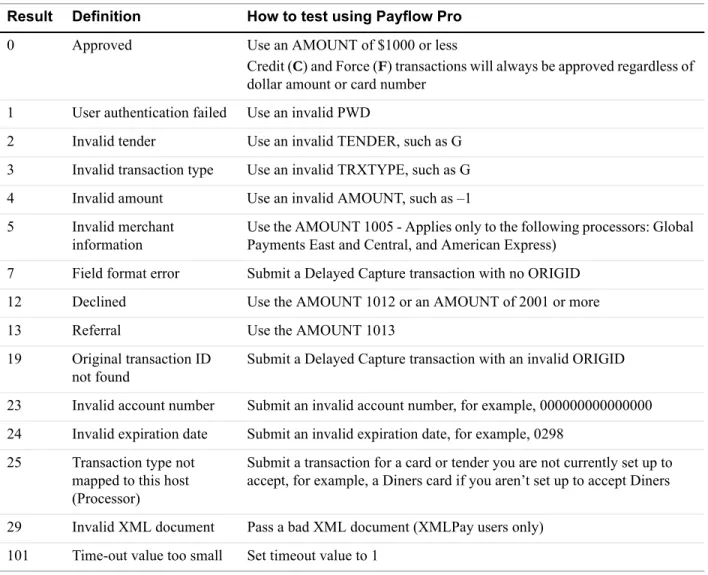
Testing Result Code Responses. . . 52
Result Codes Returned Based on Transaction Amount . . . 52
Alternative Methods for Generating Specific Result Codes . . . 53
Testing Card Security Code . . . 54
Chapter 6
Activating Your Payflow Pro Account . . . . 55
Appendix A Processor Details . . . . 57
Contacting Citibank Singapore (CSIN) . . . 57
Supported Card Types . . . 57
Supported Currencies . . . 57
Supported Transaction Types . . . 58
Setting Up the Citibank Singapore Processor . . . 58
Settlement Time . . . 59
Contacting First Data International . . . 60
Supported Card Types . . . 60
Appendix B Verbosity: Viewing Processor-Specific
Transaction Results . . . . 63
Supported Verbosity Settings . . . 63
Changing the Verbosity Setting . . . 65
Setting the Default Verbosity Level for All Transactions . . . 65
Setting the Verbosity Level on a Per-Transaction Basis . . . 65
Appendix C Additional Reporting Parameters . . . . 67
Appendix D XMLPay . . . . 69
About XMLPay . . . 69
Payflow Pro XMLPay Developer’s Guide . . . 69
Preface
Payflow Pro is a high performance TCP/IP-based Internet payment solution. Payflow Pro is pre-integrated with leading e-commerce solutions and is also available as a downloadable software development kit (SDK).
Intended Audience
This guide assumes that its readers:
z Are experienced web or application developers z Have a background in payments services
Organization of This Document
This document is organized as follows:
z Chapter 1, “Introduction,” describes the Payflow Pro internet payment solution. z Chapter 2, “Installing and Configuring the Payflow APIs,” shows a typical Payflow
installation procedure for Windows NT and UNIX.
z Chapter 3, “Performing Credit Card Transactions,” discusses credit card transaction syntax
and parameters and describes how to perform transactions.
z Chapter 4, “Responses to Credit Card Transaction Requests,” describes the responses to
credit card transaction requests.
z Chapter 5, “Testing Payflow Pro Credit Card Transactions,” describes how to test your
Payflow Pro integration for credit card transactions.
z Chapter 6, “Activating Your Payflow Pro Account,” specifies the steps you follow when
you are ready to accept live transactions with Payflow.
z Appendix A, “Processors Requiring Additional Transaction Parameters,” lists processors
and their processor-specific parameters.
z Appendix B, “Verbosity: Viewing Processor-Specific Transaction Results,” describes how
you can use the Payflow Verbosity parameter to control the kind and level of information you want returned in a transaction response.
Where to Go for More Information
Where to Go for More Information
PayPal Manager online help describes the use of PayPal Manager—the web-based
administration tool that you use to process transactions manually, issue credits, and generate reports.
For answers to specific questions about Payflow products, search PayPal’s Knowledge Base at the following URL: http://knowledge.paypal.com/.
How to Contact Customer Service
For problems with transaction processing or your connection to the server, contact Customer Service at [email protected].
Revision History
Revision history for Payflow Pro Developer’s Guide.
TABLEP.1 Revision History
Date Description
1
Introduction
Payflow Pro is a high performance TCP/IP-based internet payment solution. It is
pre-integrated with leading e-commerce solutions and is also available as a downloadable software development kit (Payflow SDK).
About Payflow Pro
Payflow Pro resides on your computer system. It available from the PayPal Manager
Downloads page as a .NET or Java library, or you can build your own API by posting directly to the Payflow servers via HTTPS.
Payflow Pro is multi-threaded and allows multiple concurrent transactions from a single client. It can be integrated as a web-based or a non-web-based application.
Host Addresses
Unless you are using a V3 software development kit (SDK), use the new HOSTADDRESS values:
z For live transactions, use payflowpro.verisign.com z For testing purposes, use pilot-payflowpro.verisign.com
Otherwise (you are using a V3 SDK in the process of being phased out), continue to use the host addresses below:
z For live transactions, use payflow.verisign.com z For testing purposes, use test-payflow.verisign.com
How Payflow Pro Works
Payflow Pro uses a client/server architecture to transfer transaction data from you to the processing networks, and then returns the authorisation results to you. Payflow Pro can process real-time credit card transactions and other transaction types to most of the financial processing centres in the United States and Australia.
1. The Payflow client encrypts each transaction request using the latest Secure Sockets Layer (SSL) encryption and establishes a secure link with the Payflow server over the internet.
Supported Processing Platforms
1
3. The response (approved/declined, and so on) is received from the financial network and is returned in the same session to the Payflow client.
4. The Payflow client completes each transaction session by transparently sending a transaction receipt to the server before disconnecting the session.
The entire process is a real-time synchronous transaction. Once connected, the transaction is immediately processed and the answer returned in about three seconds. Processing
transactions through the Payflow service does not affect or define the time periods of authorisations, nor does it influence the approval or denial of a transaction by the issuer. When integrating with Payflow Pro, you need only be concerned with passing all the required data for transaction authorisation.
Payflow Pro Advantages
z Configurable to any e-commerce application. Payflow Pro is ideal for enterprise
merchants who require complete customizability for a controlled buyer experience.
z Downloadable from PayPal Manager Downloads page, the Payflow SDK can be easily
integrated into a customized e-commerce solution in a matter of hours.
z Integration versatility. Payflow Pro can be integrated as an application library or can be
run using CGI scripts.
Supported Processing Platforms
Payflow Pro supports the following processing platforms: American Express Asia Pacific (APA)
Citibank Singapore (CSIN)
First Data Resources International (FDI)
See Appendix A, “Processor Details,” for more information.
Payflow Pro Recurring Billing Service
The Recurring Billing Service is a scheduled payment solution that enables you to
automatically bill your customers at regular intervals—for example, a monthly fee of $42 for 36 months with an initial fee of $129.
You enroll separately for the Payflow Pro Recurring Billing Service. Using Payflow Pro to define and manage recurring transactions is described in Payflow Pro – Recurring Billing Service User’s Guide and in PayPal Manager online help.
About Security
1
About Security
It is your responsibility to protect your passwords and other confidential data and to
implement security safeguards on your website and in your organization, or to ensure that your hosting company or internal web operations team is implementing them on your behalf.
IMPORTANT:To enable testing of Payflow Pro, PayPal provides sample transaction scripts that you customize with your Payflow Pro account information and password. Because the password is initially stored in the text of the program, it is vulnerable.
Do not use the test scripts in your production environment. To minimize fraud, machine passwords should always be encrypted. You must write a program that encrypts and decrypts your Payflow Pro account password.
About Security
2
Installing and Configuring the
Payflow APIs
The Payflow software development kit (SDK) is available either as a standalone client that you can integrate with your web store using CGI scripts or as a set of APIs for direct integration with your application.
This chapter provides instructions for downloading the SDK appropriate to your platform.
IMPORTANT:Full API documentation is included with each SDK.
Supported Platforms
Payflow Pro is available on all major web server platforms in a variety of formats to support your integration requirements. Payflow Pro is available as a .NET or Java library, or you can build your own API by posting directly to the Payflow servers via HTTPS.
Preparing the Payflow Client Application
Follow these steps to download and install the Payflow application. Step 1 Download the Payflow SDK
From the Download section of PayPal Manager, download the Payflow SDK appropriate for your platform.
Step 2 Extract the files to a local directory Step 3 Configure your firewall
If you have a stateful firewall, enable outbound traffic for SSL (port 443). The firewall keeps state on the connection, and automatically permits the inbound response from PayPal.
If you do not have a stateful firewall, enable inbound and outbound traffic for SSL (port 443). Outbound traffic permits the initial request by Payflow Pro, while inbound permits the response from PayPal.
Step 4 Read the Readme.txt file
Preparing the Payflow Client Application
3
Performing Credit Card
Transactions
This chapter describes performing credit card transactions.
Responses to transaction requests are described in Chapter 4, “Responses to Credit Card Transaction Requests.”
In This Chapter
z “About Credit Card Processing” on page 15 z “Contents of a Transaction Request” on page 18 z “How To Format a Transaction” on page 19
z “Parameters Used in Credit Card Transactions” on page 19 z “Values Required by All Transaction Types” on page 23 z “Submitting Sale Transactions” on page 24
z “Submitting Authorisation/Delayed Capture Transactions” on page 25 z “Submitting Credit Transactions” on page 29
z “Submitting Void Transactions” on page 30 z “Submitting Inquiry Transactions” on page 32
z “Recharging to the Same Credit Card (Reference Transactions)” on page 33 z “Submitting Card-Present (SWIPE) Transactions” on page 36
z “Card Security Code Validation” on page 37
About Credit Card Processing
Credit card processing occurs in two steps — a real-time Authorisation and a capture (settlement) of the funds that were authorised. As discussed below, you perform these two steps either as a single transaction or as two transactions, depending on your business model. For an Authorisation, the server sends the transaction information to a credit card processor who routes the transaction through the financial networks to the cardholder’s issuing bank. The issuing bank checks whether the card is valid, evaluates whether sufficient credit exists, checks values such as card security codes (discussed below), and returns a response:
About Credit Card Processing
3
NO TE:You cannot remove a hold on funds through the processing networks—you must contact the card issuing bank to lift a hold early.
Capturing a transaction (also known as settling a transaction) actually transfers the funds to your bank. At least once a day, PayPal gathers all transactions that are flagged to be settled and sends them in a batch file to the processor. The processor then charges the issuing bank and transfers the funds to your bank. It typically takes a few days before the money is actually available in your account, depending on your bank.
Obtaining an Internet Merchant Account
To accept credit cards over the internet, you need a special account called an Internet Merchant Account. Your account provider or merchant (acquiring) bank works with a PayPal-supported credit card processor, such as First Data Resources International or American Express Asia Pacific. To use Payflow Pro to accept live credit cards, you must provide certain details about your account to PayPal during the “Go Live” part of the enrolment process.
NO TE:An Internet Merchant Account is a different type of merchant account than a merchant account used for face-to-face (in-person) retail transactions. It has additional risks associated with card-not-present (e-commerce) transactions. You need to obtain an Internet Merchant Account even if you already accept credit cards at your location. To apply for an Internet Merchant Account, contact your merchant (acquiring) bank.
Planning Your Payflow Pro Integration
In designing your Payflow Pro integration, you should evaluate the following:
z Whether to use a one-step or two-step transaction process. One-step: Submit a Sale
transaction, which performs the Authorisation and (if successful) then flags the transaction for settlement. Two-step: Perform an Authorisation-only transaction and then later perform a Delayed Capture transaction. The Delayed Capture transaction can be for the same amount as the original transaction or for a lower amount. (In the case of a split shipment, you can perform a Delayed Capture transaction for the initial shipment and a reference transaction for the final payment. These transaction types, plus the details of performing a Delayed Capture for an amount higher than the original, are described in “Submitting Authorisation/Delayed Capture Transactions” on page 25.)
According to card association rules, most physical goods merchants should use a two-step process, since settlement should occur when the goods are fulfilled or shipped. A two-step process is also useful if you want to evaluate information in the response, such as whether the issuer verifies the billing address, and so on. Electronic goods merchants, who fulfill the order immediately, can use the one-step process. Check with your Internet Merchant Account provider for suggestions on the best method for you.
z Whether or how to use risk management tools such as card security code.
Card security code refers to a 3- or 4-digit number that appears on the back of most credit cards. On American Express, the number appears above and to the right of the embossed card number. Card security code is known by other names, such as CVV2, depending on
About Credit Card Processing the type of card. If card security code data is submitted, the issuer can notify you whether the number matches the number assigned to the card. Card security code is described on
page 37.
It may also be possible to implement additional safeguards yourself or to use a fraud service. You might want to discuss risk management with your Internet Merchant Account provider.
z Store information in your local database or use PayPal Manager reports to manage the data.
You may want to store shipping information in your system, or you may prefer to send the information to PayPal with the transaction and report on it later.
NO TE:PayPal recommends that you do not store credit card numbers. If you must store numbers, encrypt and store them behind properly configured firewalls. You should also consider whether and how to use the merchant-defined fields COMMENT1 and COMMENT2 to help tie reports to your orders/customers or to report on other information about the transaction.
z If or how you want to integrate with other systems, such as order fulfillment, customer
service, and so on. You may wish to connect these systems directly to Payflow Pro for capturing funds, issuing refunds/credits, and so on. Alternatively, you may prefer to perform these steps manually using PayPal Manager. Either way, PayPal recommends that you monitor transaction activity using PayPal Manager.
z You may want to discuss, with your Internet Merchant Acquirer, practices that help you to
obtain the most advantageous rates.
Complying With the E-commerce Indicator (ECI)
Some processors support a software flag called E-commerce Indicator (ECI) that indicates that the associated transaction is an internet transaction. Payflow Pro complies with ECI basic requirements for all supported processors.
If you use the Buyer Authentication Service, then the ECI values reflects the Authentication status. See Payflow Pro Fraud Protection Service User’s Guide.
Handling Credit Card Type Information
The Payflow SDK does not check the credit card types that you are accepting. If a customer uses a card type that you are not signed up to accept, the Payflow SDK responds with RESULT code 23, “Invalid account number,” or the processor returns a message that the customer is not signed up for the card type. For details on RESULT codes and response messages, see Chapter 4, “Responses to Credit Card Transaction Requests.” Optionally, you can provide your customer with a list of the card types that you accept (in a drop-down list or menu, for example).
Contents of a Transaction Request
3
the card to your Payflow Pro account through PayPal Manager. See PayPal Manager online help for details.
Contents of a Transaction Request
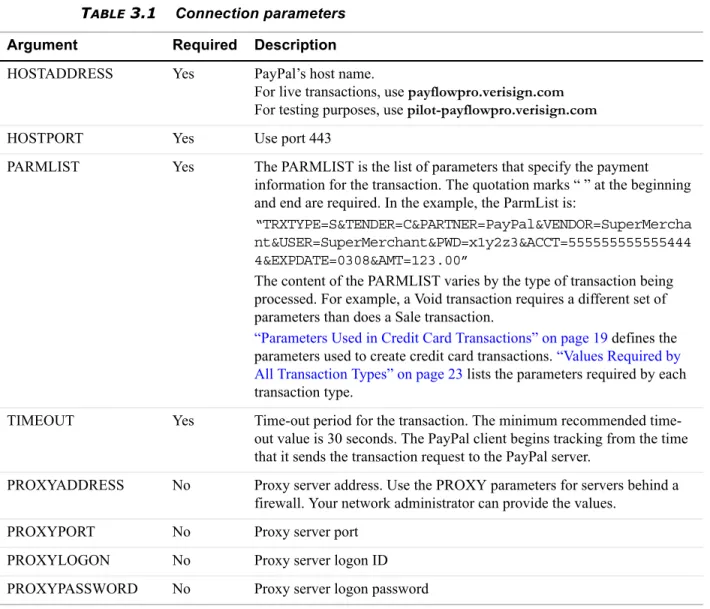
Table 3-1 describes the connection parameters that you need to pass when submitting a transaction request to the Payments gateway. Pass them in the format and syntax required by the SDK and programming language that you are using. See your integration documentation for details.
PARMLIST Syntax Guidelines
Follow these guidelines when creating the PARMLIST:
TABLE3.1 Connection parameters
Argument Required Description
HOSTADDRESS Yes PayPal’s host name.
For live transactions, use payflowpro.verisign.com
For testing purposes, use pilot-payflowpro.verisign.com
HOSTPORT Yes Use port 443
PARMLIST Yes The PARMLIST is the list of parameters that specify the payment information for the transaction. The quotation marks “ ” at the beginning and end are required. In the example, the ParmList is:
“TRXTYPE=S&TENDER=C&PARTNER=PayPal&VENDOR=SuperMercha nt&USER=SuperMerchant&PWD=x1y2z3&ACCT=555555555555444 4&EXPDATE=0308&AMT=123.00”
The content of the PARMLIST varies by the type of transaction being processed. For example, a Void transaction requires a different set of parameters than does a Sale transaction.
“Parameters Used in Credit Card Transactions” on page 19 defines the parameters used to create credit card transactions. “Values Required by All Transaction Types” on page 23 lists the parameters required by each transaction type.
TIMEOUT Yes Time-out period for the transaction. The minimum recommended time-out value is 30 seconds. The PayPal client begins tracking from the time that it sends the transaction request to the PayPal server.
PROXYADDRESS No Proxy server address. Use the PROXY parameters for servers behind a firewall. Your network administrator can provide the values.
PROXYPORT No Proxy server port PROXYLOGON No Proxy server logon ID PROXYPASSWORD No Proxy server logon password
How To Format a Transaction
z Spaces are allowed in values.
z Enclose the PARMLIST in quotation marks (“”).
z Quotation marks (“”) are not allowed within the body of the PARMLIST. z Separate all name-value pairs in the PARMLIST using an ampersand (&).
z Set the VERBOSITY transaction parameter to MEDIUM (default is LOW) if you want the
response to return more detailed information. For details on VERBOSITY, see
Appendix B, “Verbosity: Viewing Processor-Specific Transaction Results
Using Special Characters in Values
Because the ampersand (&) and equal sign (=) characters have special meanings in the PARMLIST, name-value pairs like the following examples are not valid:
NAME=Ruff & Johnson COMMENT1=Level=5
To use special characters in the value of a name-value pair, use a length tag. The length tag specifies the exact number of characters and spaces that appear in the value. The following name-value pairs are valid:
NAME[14]=Ruff & Johnson COMMENT1[7]=Level=5
NO TE:Quotation marks (“”) are not allowed even if you use a length tag.
How To Format a Transaction
For details on how to format a transaction based on the above information, refer to the examples and the supporting documentation provided with your SDK.
Parameters Used in Credit Card Transactions
All credit card processors accept the parameters listed in Table 3.2 (required and optional parameters are noted). “Values Required by All Transaction Types” on page 23 lists the parameters required for each transaction type.
NO TE:Some processors require yet additional parameters. See the following sections:
z Appendix A, “Processors Requiring Additional Transaction Parameters,” provides
Parameters Used in Credit Card Transactions
3
z Appendix C, “Additional Reporting Parameters,” provides a list of parameters that you can
pass for reporting purposes.
TABLE3.2 Credit-card transaction parameters
Parameter Description Required Type
Max. Length
ACCT Credit card or purchase card number.
This value may not contain spaces, non-numeric characters, or dashes. For example,
ACCT=5555555555554444
Yes1 Numeric 19
AMT Amount (US Dollars) U.S. based currency.
Specify the exact amount to the cent using a decimal point—use 34.00, not 34. Do not include comma separators—use 1199.95 not 1,199.95.
Your Internet Merchant Account provider may stipulate a maximum amount.
Yes1 Numeric 10
AUTHCODE AUTHCODE is returned only for approved Voice Authorisation transactions. AUTHCODE is the approval code obtained over the telephone from the processing network. req’d for Voice Authorisat ion only. Alpha-numeric 6
COMMENT1 Merchant-defined value for reporting and auditing purposes.
No Alpha- numeric
128 COMMENT2 Merchant-defined value for reporting and auditing
purposes.
No Alpha- numeric
128 CURRENCY One of the following three-character currency
codes:
z USD (US dollar) z EUR (Euro) z GBP (UK pound) z CAD (Canadian dollar) z JPY (Japanese Yen) z AUD (Australian dollar)
NO T E:CURRENCY is applicable only to processors that support transaction-level currency. It is not applicable to Australian Payflow Pro merchants.
Parameters Used in Credit Card Transactions
CUSTREF Merchant-defined identifier for reporting and auditing purposes. For example, you can set CUSTREF to the invoice number.
You can use CUSTREF when performing Inquiry transactions. To ensure that you can always access the correct transaction when performing an Inquiry, you must provide a unique CUSTREF when submitting any transaction, including retries. See STARTTIME and ENDTIME.
No Alpha- numeric
12
CVV2 A 3- or 4-digit code that is printed (not imprinted) on the back of a credit card. Used as partial assurance that the card is in the buyer’s possession. See “Card Security Code Validation” on page 37.
No Alpha- numeric
4
ENDTIME Optional for Inquiry transactions when using CUSTREF to specify the transaction.
ENDTIME specifies the end of the time period during which the transaction specified by the CUSTREF occurred. See STARTTIME. ENDTIME must be less than 30 days after STARTTIME. An inquiry cannot be performed across a date range greater than 30 days.
If you set ENDTIME, and not STARTTIME, then STARTTIME is defaulted to 30 days before ENDTIME.
If neither STARTTIME nor ENDTIME is specified, then the system searches the last 30 days.
Format: yyyymmddhhmmss
No Numeric 14
EXPDATE Expiration date of the credit card in mmyy format. For example, 0308 represents March 2008.
Yes1 Numeric 4 NAME or
FIRSTNAME
Account holder's name. This single field holds all of the person’s name information.
No, but recom-mended Alpha-numeric uppercase 30
ORIGID The ID of the original transaction that is being referenced. This ID is returned by the PNREF parameter and appears as the Transaction ID in PayPal Manager reports.
This value is case-sensitive.
Yes1 Alpha- numeric
12
TABLE3.2 Credit-card transaction parameters(Continued)
Parameter Description Required Type
Max. Length
Parameters Used in Credit Card Transactions
3
PARTNER The ID provided to you by the authorised PayPal Reseller who registered you for the Payflow Pro service. If you purchased your account directly from PayPal, use VSA.
This value is case-sensitive.
Yes Alpha- numeric
12
PWD The 6- to 32-character password that you defined while registering for the account.
This value is case-sensitive.
Yes Alpha- numeric
32
STARTTIME Optional for Inquiry transactions when using CUSTREF to specify the transaction.
STARTTIME specifies the beginning of the time period during which the transaction specified by the CUSTREF occurred. See ENDTIME.
If you set STARTTIME, and not ENDTIME, then ENDTIME is defaulted to 30 days after
STARTTIME.
If neither STARTTIME nor ENDTIME is specified, then the system searches the last 30 days.
Format: yyyymmddhhmmss
No Numeric 14
STREET The cardholder’s street address (number and street name).
No Alpha- numeric
30 SWIPE Used to pass the Track 1 or Track 2 data (the card’s
magnetic stripe information) for card-present transactions. Include either Track 1 or Track 2 data—not both. If Track 1 is physically damaged, the POS application can send Track 2 data instead.
NO T E:The track data includes the disallowed = (equal sign) character. To enable you to use the data, the SWIPE parameter must include a length tag specifying the number of characters in the track data. For this reason, in addition to passing the track data, the POS application must count the characters in the track data and pass that number. Length tags are described in “Using Special Characters in Values” on page 19.
Required only for card- present transac-tions Alpha- numeric
TENDER The tender type (method of payment). C = Credit card
Yes Alpha 1
TABLE3.2 Credit-card transaction parameters(Continued)
Parameter Description Required Type
Max. Length
Values Required by All Transaction Types
Values Required by All Transaction Types
All transaction types require values for the following parameters:
TRXTYPE A single character indicating the type of transaction to perform. Values are:
S = Sale transaction C = Credit
A = Authorisation D = Delayed Capture V = Void
F = Voice Authorisation I = Inquiry
Yes Alpha 1
USER If you set up one or more additional users on the account, this value is the ID of the user authorised to process transactions. If, however, you have not set up additional users on the account, USER has the same value as VENDOR.
The examples in this document use USER=SuperMerchant.
This value is case-sensitive.
Yes Alpha- numeric
64
VENDOR Your merchant login ID that you created when you registered for the Payflow Pro account.
The examples in this document use VENDOR = SuperMerchant.
This value is case sensitive.
Yes Alpha- numeric
64
VERBOSITY LOW or MEDIUM.
LOW is the default setting—normalized values. MEDIUM returns the processor’s raw response values.
See Appendix B, “Verbosity: Viewing Processor-Specific Transaction Results.”
No Alpha
ZIP Account holder’s 5- to 9-digit ZIP (postal) code. Do not use spaces, dashes, or non-numeric characters.
No Alpha 9
1. Some transaction types do not require this parameter. See “Values Required by All Transaction Types” on page 23
TABLE3.2 Credit-card transaction parameters(Continued)
Parameter Description Required Type
Max. Length
Submitting Sale Transactions
3
USER PWD
Each transaction type has additional parameter requirements, as listed in the following sections. Transaction responses are described in Chapter 4, “Responses to Credit Card Transaction Requests.”
Submitting Sale Transactions
The Sale transaction (TRXTYPE=S) charges the specified amount against the account, and marks the transaction for immediate fund transfer during the next settlement period. PayPal submits each merchant’s transactions for settlement on a daily basis.
When To Use a Sale Transaction
A Sale transaction is best suited to businesses that provide immediate fulfillment for their products or services. If your business does not provide immediate fulfillment, then credit card association rules recommend that you use an Authorisation and a Delayed Capture transaction. For details, see “Submitting Authorisation/Delayed Capture Transactions” on page 25. If you need to recharge a credit card and you are not storing the credit card information in your local database, you can perform a new reference transaction based on a Sale transaction. For details, see “Submitting Authorisation/Delayed Capture Transactions” on page 25.
Additional Parameters for Sale Transactions
To perform a Sale transaction, you are required to pass the following parameters: ACCT
AMT EXPDATE
NO TE:The pinless debit tender type requires essentially the same parameters as a credit card transaction. In addition to the values required by all transactions, you must pass values for the ACCT and AMT parameters.
Typical Sale Transaction Parameter String
The following is a typical PARMLIST string passed in a Sale transaction.
"TRXTYPE=S&TENDER=C&USER=SuperUser&PWD=SuperUserPassword&VENDOR=SuperUser &PARTNER=PayPal&ACCT=5105105105105100&EXPDATE=1209&CVV2=123&AMT=99.00& FNAME=Bill&LNAME=Smith&STREET=123 Main
St.&CITY=Anywhere&STATE=CA&ZIP=12345&COMMENT1=Reservation&INVNUM=1234567 890&PONUM=C12345&CVV2=567&VERBOSITY=MEDIUM"
Note that, besides the required parameters that you pass in a Sale transaction, this string includes other typical parameters. The COMMENT1 (and COMMENT2) fields help to track
Submitting Authorisation/Delayed Capture Transactions transaction information. CVV2 is needed for card security code validation. For details on card security code, see the following sections:
z “Submitting Card-Present (SWIPE) Transactions” on page 36 z “Card Security Code Validation” on page 37
Submitting Authorisation/Delayed Capture Transactions
An Authorisation (TRXTYPE=A) transaction places a hold on the cardholder’s open-to-buy limit, lowering the cardholder’s limit by the amount of the transaction. It does not transfer funds.
A Delayed Capture (TRXTYPE=D) transaction is performed after an Authorisation to capture the original Authorisation amount. The Delayed Capture is scheduled for settlement during the next settlement period.
Because Visa and MasterCard regulations prohibit capturing credit card transaction funds until a product or service has shipped to the buyer, most processing networks implement an Authorisation transaction followed by a Delayed Capture transaction.
When To Use Authorisation/Delayed Capture Transactions
If your business does not provide immediate fulfillment of products or services, you should use this two-stage transaction solution, also known as Delayed Capture processing, because it enables you to capture credit card transaction funds when your are ready to collect them.
NO TE:If you signed up for the PayPal processor with Fraud Protection Services, you must use delayed capture processing for all sale transactions.
If your business provides immediate fulfillment and you are not using the PayPal processor with Fraud Protection Services, you can use a simple Sale transaction instead. For details, see
“Submitting Sale Transactions” on page 24. If you need to recharge a credit card and you are not storing the credit card information in your local database, you can perform a new reference transaction based on a Sale. For details, see “Submitting Authorisation/Delayed Capture Transactions” on page 25.
IMPORTANT:Only one Delayed Capture transaction is allowed per Authorisation transaction.
Required Authorisation Transaction Parameters
Submitting Authorisation/Delayed Capture Transactions
3
Typical Authorisation Transaction Parameter String
A typical parameter string passed in an Authorisation transaction is the same as a Sale transaction string. The only difference is that the TRXTYPE value is A in an Authorisation. "TRXTYPE=A&TENDER=C&USER=SuperUser&PWD=SuperUserPassword&VENDOR=SuperUser &PARTNER=PayPal&ACCT=5105105105105100&EXPDATE=1209&CVV2=123&AMT=99.00& FNAME=Bill&LNAME=Smith&STREET=123 Main
St.&CITY=Anywhere&STATE=CA&ZIP=12345&COMMENT1=Reservation&INVNUM=1234567 890&PONUM=C12345&CVV2=567&VERBOSITY=MEDIUM"
Required Delayed Capture Transaction Parameters
To perform a Delayed Capture transaction, you are required to pass the following parameter: ORIGID
Set ORIGID to the PNREF (Transaction ID in PayPal Manager reports) value returned from the original transaction. (For details on PNREF, see Chapter 4, “Responses to Credit Card Transaction Requests) In addition, if the amount of the capture differs from the amount of the Authorisation, you also must pass a value for AMT.
Fields Copied From the Authorisation Transaction into the Delayed Capture Transaction
The following fields are copied from the Authorisation transaction into the Delayed Capture transaction (if they exist in the original transaction). If you provide a new value for any of these parameters when submitting the Delayed Capture transaction, then the new value is used. (Exceptions are ACCT, EXPDATE, and SWIPE. These parameters retain their original values.)
Step 1 Perform the Authorisation transaction
The Authorisation transaction uses the same parameters as Sale transactions, except that the transaction type is A.
ACCT AMT CITY COMMENTt1
COMMENT2 COMPANYNAME BILLTOCOUNTRY CUSTCODE
CUSTIP DL DOB DUTYAMT
EMAIL EXPDATE FIRSTNAME FREIGHTAMT INVNUM LASTNAME MIDDLENAME PONUM
SHIPTOCITY SHIPTOCOUNTRY SHIPTOFIRSTNAME SHIPTOLASTNAME SHIPTOMIDDLENAME SHIPTOSTATE SHIPTOSTREET SHIPTO ZIP
SS STATE Street SWIPE
Submitting Authorisation/Delayed Capture Transactions The return data for an Authorisation transaction is the same as for a Sale transaction. To capture the authorised funds, perform a Delayed Capture transaction that includes the value returned for PNREF, as described in Step 2 on page 27.
EXAMPLE3.1 Example Authorisation Transaction Parameter String Issue Authorisation-only Transaction
"TRXTYPE=A&TENDER=C&PWD=x1y2z3&PARTNER=PayPal
&VENDOR=SuperMerchant&USER=SuperMerchant&ACCT=5555555555554444&EXPDATE=0308 &AMT=123.00&COMMENT1=Second purchase
&COMMENT2=Low risk customer&INVNUM=123456789&STREET=5199 MAPLE&ZIP=94588"
EXAMPLE3.2 Example Authorisation Response
(Response parameters are described in detail in Chapter 4, “Responses to Credit Card Transaction Requests”)
RESULT=0&PNREF=VXYZ01234567&RESPMSG=APPROVED&AUTHCODE=123456 &AVSADDR=Y&AVSZIP=N
Step 2 Perform the Delayed Capture transaction
Set ORIGID to the PNREF value returned in the original Authorisation transaction response string. (There is no need to retransmit the credit card or billing address information—it is stored at PayPal.)
If the capture succeeds, the amount of the Capture is transferred to the merchant’s account during the daily settlement process. If the capture does not succeed, the hold on the cardholder’s open-to-buy is still in effect.
EXAMPLE3.3 Example Delayed Capture Transaction Parameter String
"TRXTYPE=D&TENDER=C&PWD=x1y2z3&PARTNER=PayPal&VENDOR=SuperMerchant &USER=SuperMerchant&ORIGID=VXYZ00887892"
EXAMPLE3.4 Example Delayed Capture Response
RESULT=0&PNREF=VXYZ00895642&AUTHCODE=25TEST&AVSADDR=Y&AVSZIP=N
Delayed Capture Transaction: Capturing Transactions for Lower Amounts
You can perform a Delayed Capture transaction for an amount lower than the original Authorisation amount (useful, for example, when you make a partial shipment).
Submitting Voice Authorisation Transactions
3
Delayed Capture Transaction: Error Handling and Retransmittal
If an error occurs while processing a Delayed Capture transaction, it is safe to retry the capture with values that allow the PayPal server to successfully process it. Conversely, if a capture for a previous Authorisation succeeds, subsequent attempts to capture it again will return an error.
Submitting Voice Authorisation Transactions
A Voice Authorisation (TRXTYPE=F) transaction is a transaction that is authorised over the telephone from the processing network.
When to Use a Voice Authorisation Transaction
Some transactions cannot be authorised over the internet (for example, high dollar amounts) and require manual authorisation. These transactions generate Result Code 13 and are called Referral transactions.
In these situations, you contact the customer service department of your merchant bank and provide the payment information as requested. If the transaction is approved, the bank provides you with a voice Authorisation code (AUTHCODE) for the transaction. You include this AUTHCODE as a parameter in a Voice Authorisation transaction.
Once a Voice Authorisation transaction has been approved, it is treated like a Sale transaction and is settled with no further action on your part.
Like Sale transactions, approved Voice Authorisation transactions can be voided before settlement occurs.
Required Voice Authorisation Transaction Parameters
To submit a Voice Authorisation, you need to pass the following parameters: AUTHCODE
ACCT EXPDATE AMT
Voice Authorisation Parameter String
The following is an example Voice Authorisation transaction parameter string:
"TRXTYPE=F&TENDER=C&PARTNER=PayPal&VENDOR=SuperMerchant&USER=SuperMerchant& PWD=x1y2z3&AUTHCODE=AB34RT56&ACCT=5555555555554444&EXPDATE=0308&AMT=123.00"
Submitting Credit Transactions
Submitting Credit Transactions
The Credit transaction (TRXTYPE=C) refunds the specified amount to the cardholder.
Required Credit Transaction Parameters
The required parameter data for a Credit transaction depends on the Allow non-referenced credits security setting for your Payflow Pro account. A non-referenced credit is a Credit transaction that does not use the credit card information from an existing transaction. Credit card information must be supplied. As an example, Sally Smith calls you on the telephone to cancel an order from your business. To refund her money, you credit her credit card by submitting a non-referenced Credit transaction.
NO TE:The PayPal processor does not support non-referenced credits.
Guidelines and parameter requirements for Credit transactions differ depending on whether or not non-referenced credits are allowed.
Non-Referenced Credits Not Allowed
When non-referenced credits are not allowed (the setting recommended by PayPal), then Credit transactions are permitted only against existing Sale, Delayed Capture, and Voice Authorisation transactions. To submit a Credit transaction when non-referenced credits are not allowed, you must pass the following parameter:
ORIGID
Set the value of ORIGID to the PNREF value returned for the original transaction. (PNREF is displayed as the Transaction ID in PayPal Manager reports. For details on PNREF, see
Chapter 4, “Responses to Credit Card Transaction Requests.”) If you do not specify an amount, then the amount of the original transaction is credited to the cardholder. Non-Referenced Credits Allowed
When non-referenced credits are allowed, then Credit transactions are permitted in any amount up to the transaction limit for the credit card account that you specify. To submit a Credit transaction when non-referenced credits are not allowed, you must pass values for the following parameters:
ACCT EXPDATE AMT
IMPORTANT:The default security setting for Payflow Pro accounts is Allow
non-referenced credits = No, so sending the ORIGID is the preferred method for performing Credit transactions. Using the ACCT, EXPDATE, or AMT parameters for such accounts leads to Result code 117 (failed the security
Submitting Void Transactions
3
Fields Copied From the Original Transaction into the Credit Transaction The following fields are copied from the original transaction into the Credit transaction (if they exist in the original transaction). If you provide a new value for any of these parameters when submitting the Credit transaction, then the new value is used. (Exceptions are ACCT, EXPDATE, and SWIPE. These parameters retain their original values).
NO TE:These fields are not copied for referenced credits: TAXAMT, TAXEXEMPT, DUTYAMT, FREIGHTAMT, and (for American Express only) DESC4.
NO TE:For processors that use the RECURRING parameter: If the RECURRING parameter was set to Y for the original transaction, then the setting is ignored when forming the Credit transaction.
Credit Transaction Parameter Strings
This is an example Credit transaction string (non-referenced credits not allowed): "TRXTYPE=C&TENDER=C&PARTNER=PayPal&VENDOR=SuperMerchant
&USER=SuperMerchant&PWD=x1y2z3&ORIGID=VPNE12564395"
This is an example Credit transaction string (non-referenced credits allowed): "TRXTYPE=C&TENDER=C&PARTNER=PayPal&VENDOR=SuperMerchant
&USER=SuperMerchant&PWD=x1y2z3&ACCT=5555555555554444&EXPDATE=0308 &AMT=123.00"
Submitting Void Transactions
The Void transaction (TRXTYPE=V) prevents a transaction from being settled but does not release the Authorisation (hold on funds) on the cardholder’s account.
When To Use a Void Transaction
Follow these guidelines:
ACCT AMT CITY COMMENT1
COMMENT2 COMPANYNAME BILLTOCOUNTRY CUSTCODE
CUSTIP DL DOB EMAIL
EXPDATE FIRSTNAME INVNUM LASTNAME
MIDDLENAME PONUM SHIPTOCITY SHIPTOCOUNTRY SHIPTOFIRSTNAME SHIPTOLASTNAME SHIPTOMIDDLENAME SHIPTOSTATE
SHIPTOSTREET SHIPTOZIP SS STATE
Submitting Void Transactions
z You can void Delayed Capture, Sale, Credit, Authorisation, and Voice Authorisation
transactions. You cannot void a Void transaction.
z You can only use a Void transaction on a transaction that has not yet settled. To refund a
customer’s money for a settled transaction, you must submit a Credit transaction.
Required Void Transaction Parameters
To submit a Void transaction, you must pass the following parameter: ORIGID
Set ORIGID to the PNREF (Transaction ID in PayPal Manager reports) value returned for the original transaction. (For details on PNREF, see Chapter 4, “Responses to Credit Card Transaction Requests.”)
Fields Copied From the Original Transaction into the Void Transaction
The following fields are copied from the original transaction into the Void transaction (if they exist in the original transaction). If you provide a new value for any of these parameters when submitting the Void transaction, then the new value is used. (Exceptions are ACCT,
EXPDATE, and SWIPE. These parameters retain their original values).
NO TE:For processors that use the RECURRING parameter: If the RECURRING parameter was set to Y for the original transaction, then the setting is ignored when forming the Void transaction.
Example Void Transaction Parameter String
This is an example Void transaction parameter string:
ACCT AMT CITY COMMENT1
COMMENT2 COMPANYNAME BILLTOCOUNTRY CUSTCODE
CUSTIP DL DOB DUTYAMT
EMAIL EXPDATE FIRSTNAME FREIGHTAMT
INVNUM LASTNAME MIDDLENAME PONUM
SHIPTOCITY SHIPTOCOUNTRY SHIPTOFIRSTNAME SHIPTOLASTNAME SHIPTOMIDDLENAME SHIPTOSTATE SHIPTOSTREET SHIPTOZIP
SS STATE STREET SWIPE
Submitting Inquiry Transactions
3
Submitting Inquiry Transactions
An Inquiry transaction (TRXTYPE=I) returns the result and status of a transaction.
When To Use an Inquiry Transaction
You perform an inquiry using a reference to an original transaction—either the PNREF value returned for the original transaction or the CUSTREF value that you specified for the original transaction.
While the amount of information returned in an Inquiry transaction depends upon the VERBOSITY setting, Inquiry responses mimic the verbosity level of the original transaction as much as possible. (For details on VERBOSITY, see Appendix B, “Verbosity: Viewing Processor-Specific Transaction Results.”)
Required Parameters When Using the PNREF
To submit an Inquiry transaction when using the PNREF, you must pass the following parameter:
ORIGID
Set ORIGID to the PNREF (Transaction ID in PayPal Manager reports) value returned for the original transaction. (For details on PNREF, see Chapter 4, “Responses to Credit Card Transaction Requests.”)
Recharging to the Same Credit Card (Reference Transactions)
Inquiry Transaction Parameter String Using the PNREF
This is an example Inquiry transaction parameter string using the ORIGID parameter set to the PNREF value:
"TRXTYPE=I&TENDER=C&PARTNER=PayPal&VENDOR=SuperMerchant &USER=SuperMerchant&PWD=x1y2z3&ORIGID=VPNE12564395"
Required Parameters When Using the CUSTREF
To submit an Inquiry transaction when using the PNREF, you must pass the following parameter:
CUSTREF
Optionally, specify the STARTTIME and ENDTIME parameters.
CAUTION! If there are multiple transactions with a particular CUSTREF value, then the Inquiry transaction returns only the last transaction with the specified
CUSTREF. So, to ensure that you can always access the correct transaction, you must use a unique CUSTREF when submitting any transaction, including retries.
Inquiry Transaction Parameter String Using the CUSTREF
This is an example Inquiry transaction parameter string using the CUSTREF: "TRXTYPE=I&TENDER=C&PARTNER=PayPal&VENDOR=SuperMerchant
&USER=SuperMerchant&PWD=x1y2z3&CUSTREF=Inv00012345"
Recharging to the Same Credit Card (Reference Transactions)
If you need to recharge a credit card and you are not storing the credit card information in your local database, you can perform a reference transaction. A reference transaction takes the existing credit card information that is on file and reuses it.
When To Use a Reference Transaction
Say that Joe Smith purchases a holiday gift from your web site store and requests that it be sent by UPS ground service. That evening, Joe becomes concerned that the item might not arrive in time for the holiday. So he calls you to upgrade shipping to second-day air. You obtain his approval for charging an extra $10 for the upgrade. In this situation, you can create a reference
Recharging to the Same Credit Card (Reference Transactions)
3
If you attempt to perform a reference transaction in an account for which reference transactions are disallowed, result code 117 is returned. See PayPal Manager online help for instructions on setting reference transactions and other security features.
Sale and Authorisation transactions can make use of a reference transaction as a source of transaction data. PayPal looks up the reference transaction and copies its transaction data into the new Sale or Authorisation transaction. With the exception of dollar amount data, which triggers a filter if out of range, reference transactions are not screened by Fraud Protection Services filters.
IMPORTANT:When PayPal looks up the reference transaction, neither the transaction being referenced nor any other transaction in the database is changed in any way. That is, a reference transaction is a read-only operation—only the new transaction is populated with data and acted upon. No linkage is maintained between the reference transaction and the new transaction.
You can also initiate reference transactions from PayPal Manager. See PayPal Manager online help for details.
Transaction Types that Can Be Used as the Original Transaction
You can reference the following transaction types to supply data for a new Sale or Authorisation transaction:
z Authorisation (To capture the funds for an approved Authorisation transaction, be sure to
perform a Delayed Capture transaction—
not
a Reference transaction.)z Credit
z Delayed Capture z Sale
z Voice Authorisation (The Voice Authorisation code is not copied to the new transaction)
z Void
Fields Copied From Reference Transactions
The following fields are copied from the reference transaction into the new Sale or
Authorisation transaction (if they exist in the original transaction). If you provide a value for any of these parameters when submitting the new transaction, then the new value is used.
ACCTTYPE STREET
ACCT CITY
EXPDATE STATE
Recharging to the Same Credit Card (Reference Transactions)
Example Reference Transaction
In this example, you authorise an amount of $100 for a shipment and charge $66 for the first partial shipment using a normal Delayed Capture transaction. You charge the $34 for the final part of the shipment using a reference transaction to draw credit card and shipping address information from the initial Authorisation transaction.
Step 1 Submit the Initial transaction (Authorisation in this example)
You use an Authorisation transaction for the full amount of the purchase of $100, for example: "TRXTYPE=A&TENDER=C&PWD=x1y2z3&PARTNER=PayPal&VENDOR=SuperMerchant&USER=Sup erMerchant&ACCT=5555555555554444&EXPDATE=0308&AMT=100.00&INVNUM=123456789&S TREET=5199 MAPLE&ZIP=94588"
Note the value of the PNREF in the response:
RESULT=0&PNREF=VXYZ01234567&RESPMSG=APPROVED&AUTHCODE=123456&AVSADDR=Y&AVSZ IP=N
Step 2 Capture the authorised funds for a partial shipment of $66 When you deliver the first $66 worth of product, you use a normal Delayed Capture transaction to collect the $66. Set ORIGID to the value of PNREF in the original Authorisation, for example:
"TRXTYPE=D&TENDER=C&PWD=x1y2z3&PARTNER=PayPal&VENDOR=SuperMerchant&USER=Sup erMerchant&ORIGID=VXYZ01234567&AMT=66.00"
RESULT=0&PNREF=VXYZ01234568&AUTHCODE=25TEST&AVSADDR=Y&AVSZIP=N
Step 3 Submit a new Sale transaction of $34 for the rest of the shipment Once you have shipped the remainder of the product, you can collect the remaining $34 in a Sale transaction that uses the initial Authorisation as a reference transaction. (This is a Sale transaction because only one Delayed Capture transaction is allowed per Authorisation.) For example:
"TRXTYPE=S&TENDER=C&PWD=x1y2z3&PARTNER=PayPal&VENDOR=SuperMerchant&USER=Sup erMerchant&ORIGID=VXYZ01234567&AMT=34.00"
RESULT=0&PNREF=VXYZ01234569&AUTHCODE=25TEST&AVSADDR=Y&AVSZIP=N
MIDDLENAME BILLTOCOUNTRY LASTNAME SWIPE
Submitting Card-Present (SWIPE) Transactions
3
Submitting Card-Present (SWIPE) Transactions
Payflow Pro supports card-present transactions (face-to-face purchases).
Follow these guidelines to take advantage of the lower card-present transaction rate:
z Contact your merchant account provider to ensure that they support card-present
transactions.
z Contact PayPal Customer Service to request having your account set up properly for
accepting and passing swipe data.
z If you plan to process card-present as well as card-not-present transactions, set up two
separate Payflow Pro accounts. Request that one account be set up for card-present transactions, and use it solely for that purpose. Use the other for card-not-present transactions. Using the wrong account may result in downgrades.
z A Sale is the preferred method to use for card-present transactions. Consult
with your acquiring bank for recommendations on other methods.
Supported Processing Platforms
PayPal is certified to submit card-present transactions for the following processing platforms: American Express APA
Citibank Singapore (CSIN)
First Data Resources International (FDI)
Card-present Transaction Syntax
Use the SWIPE parameter to pass the Track 1 or Track 2 data (the card’s magnetic stripe information). Include either Track 1 or Track 2 data—not both (up to 80 alphanumeric characters). If Track 1 is physically damaged, the POS application can send Track 2 data instead.
The track data includes the disallowed = (equal sign) character. To enable you to use the data, the SWIPE parameter must include a length tag specifying the number of characters in the track data. For this reason, in addition to passing the track data, the POS application must count the characters in the track data and pass that number. Length tags are described in
“Using Special Characters in Values” on page 19. The length tag in the following example is [40].
Do not include the ACCT or EXPDATE parameters in card-present transactions, as this data is included in the SWIPE value.
Example Card-present Transaction Parameter String
Card Security Code Validation “TRXTYPE=S&TENDER=C&PARTNER=PayPal&USER=SuperMerchant&PWD=SuperMerchant&SWI PE[40]=;4912000033330026=15121011000012345678?&AMT=21.00”
Card Security Code Validation
The card security code is a 3- or 4-digit number (not part of the credit card number) that is printed on the credit card. Because the card security code appears only on the card and not on receipts or statements, the card security code provides some assurance that the physical card is in the possession of the buyer.
NO TE:Check with your acquiring bank to determine whether they support card security code validation.
This fraud prevention tool has various names, depending on the payment network. Visa calls it CVV2 and MasterCard calls it CVC2. To ensure that your customers see a consistent name, PayPal recommends use of the term card security code on all end-user materials.
IMPORTANT:To comply with credit card association regulations, do not store the CVV2 value.
On most cards, the card security code is printed on the back of the card (usually in the signature field). All or part of the card number appears before the card security code (567 in the example). For American Express, the 4-digit number (1122 in the example) is printed on the front of the card, above and to the right of the embossed account number. Be sure to explain this to your customers.
Processing Platforms and Credit Cards Supporting Card Security Code
TABLE3.4 Processing platforms supporting card security code
Processing Platform
American
Express JCB Diners
Master
Card Visa
Card Security Code Validation
3
Even though your processor may be certified for card security code, they may not be certified for all card types (for example, Visa CVV2 or MasterCard CVC2). The list will change as PayPal continues to enhance its service offering.
Card Security Code Results
If you submit the transaction request parameter for card security code (that is, the CVV2 parameter), the cardholder’s bank returns a Yes/No response in the CVV2MATCH response parameter, as described in the first table below. Card security code results vary depending on your processing platform, as described in the next table.
NO TE:Check with your acquiring bank to determine how they handle CVV2MATCH.
Example CVV2 Request Parameter String
This example request parameter string includes the CVV2 parameter:
"TRXTYPE=A&TENDER=C&PWD=x1y2z3&PARTNER=PayPal&VENDOR=SuperMerchant&USER=Sup erMerchant&&ACCT=5555555555554444&EXPDATE=0308&AMT=123.00&CVV2=567"
EXAMPLE3.1 Example CVV2MATCH Response
TABLE3.6 CVV2MATCH response values
CVV2MATCH Value Description
Y The submitted value matches the data on file for the card.
N The submitted value does not match the data on file for the card.
X The cardholder’s bank does not support this service.
TABLE3.7 Card security code results
Processing Platform Results
American Express APAC
Card security code mismatches cause a non-approved result (RESULT = 114).
No CVV2MATCH value is returned.
First Data International Transactions that have card security code mismatches can come back as an approved transaction (RESULT = 0).
The match or mismatch information is indicated in the CVV2MATCH value.
As with AVS, if the Authorisation was successful, you must make a decision based on the CVV2MATCH value whether or not to proceed with the order.
Card Security Code Validation In this example result, the card security code value matches the value in the bank’s records. RESULT=0&PNREF=VXW412345678&RESPMSG=APPROVED&AUTHCODE=123456&CVV2MATCH=Y
Card Security Code Validation
4
Responses to Credit Card
Transaction Requests
This chapter describes the contents of a response to a credit card transaction request. When a transaction finishes, PayPal returns a response string made up of name-value pairs. For example, this is a response to a credit card Sale transaction request:
RESULT=0&PNREF=VXYZ01234567&RESPMSG=APPROVED&AUTHCODE=123456 &CVV2MATCH=Y
Contents of a Response to a Credit Card Transaction Request
All transaction responses include values for RESULT, PNREF, RESPMSG. A value for AUTHCODE is included for Voice Authorisation transactions. Table 4.1 describes the values returned in a response string.
TABLE4.1 Transaction response values
Field Description Type Length
PNREF PayPal Reference ID, a unique number that identifies the transaction. PNREF is described in
“PNREF Format” on page 42.
Alpha- numeric
12
RESULT The outcome of the attempted transaction. A result of 0 (zero) indicates the transaction was approved. Any other number indicates a decline or error. RESULT codes are described in
“RESULT Codes and RESPMSG Values” on page 43.
Numeric Variable
CVV2MATCH Result of the card security code (CVV2) check. The issuing bank may decline the transaction if there is a mismatch. In other cases, the
transaction may be approved despite a mismatch.
Alpha Y, N, X, or no response
1
RESPMSG The response message returned with the transaction result. Exact wording varies. Sometimes a colon appears after the initial RESPMSG followed by more detailed
information. Response messages are described in
“RESULT Codes and RESPMSG Values” on
Alpha- numeric
PNREF Value
4
PNREF Value
The PNREF is a unique transaction identification number issued by PayPal that identifies the transaction for billing, reporting, and transaction data purposes. The PNREF value appears in the Transaction ID column in PayPal Manager reports.
z The PNREF value is used as the ORIGID value (original transaction ID) in Delayed
Capture transactions (TRXTYPE=D), Credits (TRXTYPE=C), Inquiries (TRXTYPE=I), and Voids (TRXTYPE=V).
z The PNREF value is used as the ORIGID value (original transaction ID) value in reference
transactions for Authorisation (TRXTYPE=A) and Sale (TRXTYPE=S).
NO TE:The PNREF is also referred to as the Transaction ID in PayPal Manager.
PNREF Format
The PNREF is a 12-character string of printable characters, for example:
z VADE0B248932 z ACRAF23DB3C4
NO TE:Printable characters also include symbols other than letters and numbers such as the question mark (?). A PNREF typically contains letters and numbers only.
The PNREF in a transaction response tells you that your transaction is connecting to PayPal. Historically, the contents of a PNREF indicated a test or a live transaction:
z For test servers, the first and fourth characters were alpha characters (letters), and the
second and third characters were numeric, for example: V53A17230645.
z For live servers, the first four characters were alpha characters (letters), for example:
VPNE12564395.
However, this is not always the case, and as a rule, you should not place any meaning on the contents of a PNREF.
AUTHCODE Returned for Sale, Authorisation, and Voice Authorisation transactions. AUTHCODE is the approval code obtained over the telephone from the processing network.
AUTHCODE is required when submitting a Force (F) transaction.
Alpha- numeric
6
TABLE4.1 Transaction response values(Continued)