1
Microsoft SharePoint 2010
Evaluation Guide
Beta version
2
SHAREPOINT 2010 OVERVIEW TABLE OF CONTENTS
Abstract
4
Introduction
4
SharePoint 2010
5
Sites
7
User Interface
9
Easy Web Editing
9
Multilingual
9
Audience Targeting
10
Web Parts and Personalization
11
Standards Compliance and Accessibility
11
Compliance and Validation
12
Going Offline with SharePoint Workspace 2010
12
Office Web Applications
13
Communities
14
My Sites - the Hub for Interacting with People
14
Wikis
17
User Blogs and Team Blogs
19
Content
20
Document Management
21
Document Sets
24
Records Management
25
Web Content Management
26
Search
28
New Capabilities in SharePoint Server 2010 search
29
Search User Experience
30
Social Search
32
Finding People
33
Mining and Discovering Expertise
33
Improving Search based on Social Behavior
34
FAST Search for SharePoint preview
34
Insights
36
New & Improved!
37
Excel Services
38
PerformancePoint Services, Dashboards and Scorecards
40
Visio Services
42
Composites
43
3
Cross-Product Solutions
45
Rapid Solutions
47
IT Control
48
Access Data Services
50
Interoperability
50
Business Connectivity Services
51
REST
51
Web Services
51
WSRP
52
IT Pro & Developer Management and Extensibility Opportunities
52
4
ABSTRACT
This evaluation guide is designed to give you a solid understanding of the design goals and feature set for Microsoft SharePoint 2010 and a familiarity with the product implementation. It provides an overview of the solutions and benefits provided by SharePoint 2010, along with descriptions of new and improved features in the areas of SharePoint sites, social networking, search technologies, business intelligence, enterprise content management and composite applications. It also provides a tour of the product’s main feature areas and concludes with useful information for administrators and developers.
The ultimate goal of this guide is to aid the reader in performing a thorough and effective evaluation of SharePoint 2010. This guide is intended for anyone who is interested in learning more about SharePoint 2010.
For the latest information about SharePoint 2010, go to http://www.sharepoint2010.microsoft.com. For other product information and related resources, refer to the “Resources Available for Evaluating SharePoint 2010” section in this guide.
INTRODUCTION
Welcome to the evaluation guide for Microsoft SharePoint 2010. The goal of this guide is to help you gain sufficient knowledge and understanding of SharePoint 2010 to evaluate this product from Microsoft. SharePoint 2010 is The Business Collaboration Platform for the Enterprise and the Web. For every business scenario in which people need to interact with other people, with content and information, or with line-of-business data, the SharePoint platform includes a rich set of integrated capabilities that is ready to be used out-of-the-box, but can also be customized to address specific business needs and integrated with other products and solutions. The SharePoint platform can be deployed both inside the enterprise (Intranets), and outside of the firewall (Extranets, Internet-facing sites), to enable interaction with employees, customers and business partners, while using the same set of capabilities and tools. SharePoint 2010 helps you to:
CONNECT AND EMPOWER PEOPLE by letting them work together in ways that are most effective for them. Whether through the PC, browser or mobile phone, SharePoint 2010 offers an intuitive and familiar user experience and enables people to use SharePoint’s integrated set of capabilities in addition to new ways of improving business collaboration with Microsoft Office 2010. Users of the 2010 wave of products can use multiple types of browsers and be even more productive when offline.
CUT COSTS WITH A UNIFIED INFRASTRUCTURE that offers enterprise-scale manageability and availability. Whether deployed on-premises or as hosted services, SharePoint 2010 lowers total cost of ownership by offering an integrated set of features and by allowing organizations to consolidate their business-productivity solutions on top of SharePoint. This leads to a reduction in costs related to maintenance, training and infrastructure management.
5
RAPIDLY RESPOND TO BUSINESS NEEDS with dynamic and easily deployed solutions. Whether it’s a business user, a power user or a professional developer, SharePoint 2010 offers the tools and capabilities to design and create business solutions that can be integrated with existing enterprise data, tools and processes.
The section “SharePoint 2010” details the new and enhanced features for this release of Microsoft SharePoint 2010.
With this knowledge you will be able to properly evaluate these new features and readily describe their capabilities to your colleagues, clients, and business partners. This paper will briefly cover Microsoft SharePoint Foundation 2010 technology and move beyond that to introduce the many additional capabilities introduced in SharePoint 2010.
The full spectrum of functionality and business value contained within SharePoint 2010 is immense and a detailed accounting of each feature is well beyond the scope of this document. This document focuses on evaluating the capabilities of SharePoint 2010 in a very broad way, highlighting the major functional areas that deliver the greatest business value. The next section will explore SharePoint 2010 as a whole and then dive into each of six business-collaboration areas.
Many deeper features will become self-evident through the course of evaluating and using the software, while other features demand a deeper and more technical consideration. It is suggested that you review the resources listed in the section “Resources Available for Evaluating SharePoint 2010” for more information.
SHAREPOINT 2010
SharePoint 2010 is The Business Collaboration Platform for the Enterprise and the Web. This release of SharePoint facilitates business collaboration in the broadest possible sense by using its rich set of integrated capabilities to enable colleagues, partners and customers to work together in new and effective ways. The capabilities of SharePoint 2010 are enhanced even further by being designed to work better with Microsoft Office 2010 and additional products such as Project Server 2010, Visio 2010 and more.
SHAREPOINT FOUNDATION
SharePoint Foundation 2010 is the new version of Microsoft Windows SharePoint Services (WSS). It employs operating system and database services to support requirements ranging from a team site for a workgroup to large enterprise portal solutions serving hundreds of thousands of employees and staff, and to a corporate Internet site supporting millions of viewers.
Microsoft SharePoint 2010 builds on top of SharePoint Foundation 2010 to provide a comprehensive solution with enterprise-scale capabilities to meet critical needs such as managing content and business processes while simplifying how people find and share information across boundaries.
6
SharePoint Foundation 2010 provides the following scalable, reliable, high-performance capabilities for site management:
Storage - Allowing content such as documents (Office documents, PDFs, custom binary files), Web pages, lists, and other types of information to reside in a common data repository (Microsoft SQL Server™) with full data management capabilities, version control, metadata, and site-level search.
Management - Enabling centralized and delegated administrative facilities for SharePoint sites from operational and application perspectives, in addition to ongoing site monitoring.
Deployment - Providing an architecture that supports flexible, distributed, and scalable deployment architectures, across Web and database servers; enabling configuration and site feature
management.
Site Model - Providing a template-based infrastructure for deployment of custom sites, providing automated navigation and a consistent user interface while allowing for extensive and flexible customization of site formatting and layout.
Extensibility – Delivering a comprehensive application programming interface (API) that allows custom applications to be built on the SharePoint Foundation 2010 architecture, employing use of XML Web services and REST APIs, and providing event handlers for cross-integration with other applications and methods for migrating content into SharePoint sites.
From a business perspective, SharePoint Foundation 2010 provides the following foundational business-collaboration features:
Document collaboration
Wikis and blogs
RSS support
Discussion boards
Project task management
Contacts, calendars, and tasks
E-mail storing and management
Better design for working with Microsoft Office 2010
Richer offline support using SharePoint Workspace 2010
These collaboration features are essential elements for building rich business productivity applications; Microsoft SharePoint 2010 employs and extends these features while adding many more levels of capabilities in building rich business-productivity solutions. It is these additional capabilities that are the primary focus of this paper.
7
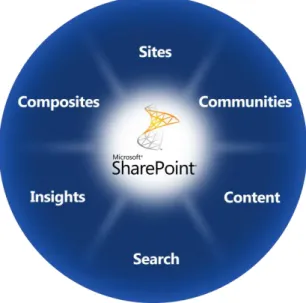
When considering SharePoint 2010 for enterprise business-collaboration solutions, there are six major capability areas to explore:
Figure 01: Capability areas of Microsoft SharePoint 2010
Sites – The basic capabilities required to use SharePoint sites to engage employees, partners and customers in en effective manner, both inside and outside the firewall.
Communities – The ability to easily access expertise and interact with other people in new and creative ways across the enterprise through both formal and informal networks.
Content – The facilities for the creation, review, publication and disposal of content while conforming to defined compliance rules, whether the content exists as traditional documents or as Web pages. SharePoint 2010’s content-management capabilities include document management, records management, and Web-content management.
Search – With more content existing online and involving the collaboration of multiple participants, it is critical that people can quickly and easily locate relevant content across SharePoint lists, sites and external systems and data sources, such as file shares, Web sites or line-of-business applications.
Insights – Information workers need the ability to not only rapidly deliver and share information that is critical to the success of the business but also to turn raw data into actionable conclusions and to drive business results through sharing data-driven analysis.
Composites – Business users of all roles need the ability to quickly create customized solutions without involving corporate IT in each request. At the same time, the IT staff needs the capability to empower business users to create these applications while ensuring the environment’s stability and availability. The next section will review each of these capability areas.
8
SHAREPOINT SITES
Share information and expertise with employees, partners & customers
User Interface
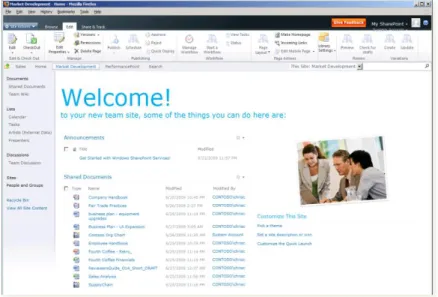
Customers familiar with the previous version of SharePoint will notice some major changes to the user interface in SharePoint 2010. The popular Office Ribbon User Interface available in the Office 2007 and Office 2010 desktop applications provides a streamlined, results-driven user interface. This user interface concept has been adopted by SharePoint 2010 to provide a seamless, familiar and responsive user experience across the Client and Server. The Ribbon UI, pinned to the top of a page even when the page scrolls, ensures people will always have contextual awareness visible regardless of what they are doing at any given moment. The Ribbon UI is also extensible and can be customized to address specific business and usability needs.
Figure 02: New SharePoint Ribbon Menu within a Firefox browser
New and Improved
• Adoption of the Office Ribbon User Interface
• Cross-browser support and improved mobile experience
• Offline experience with SharePoint Workspace 2010
• Multilingual User Interface (MUI)
9
Easy Web Editing
Microsoft has improved the control people have over sites by changing SharePoint sites to be more page-focused rather than a collection lists. Sites in SharePoint 2010 still contain the same lists and libraries as previous versions of SharePoint, but the site is now a collection of pages. These pages can be easily and quickly modified by people with appropriate permissions using the Ribbon UI menus. People can also easily create new pages within the site and get a live preview of the changes they’ve made prior to publishing these changes. In addition, making the user experience richer is significantly easy with the new Silverlight Web Part that provides a simple way to use Silverlight applications to create an engaging SharePoint site, without requiring any code to be written.
In addition, it is now easier for business users to theme their SharePoint environment using a theming engine. This capability includes a set of default themes for people to choose from, but also offer the option to import a theme from an existing PowerPoint deck and then apply it to a SharePoint site.
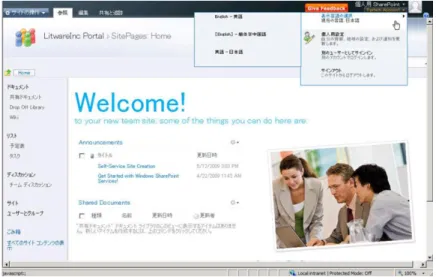
Multilingual User Interface (MUI)
Many organizations, not just those that are global or multinational, have employees who speak different native languages. Another feature of SharePoint Sites is the out-of-the-box support for multilingual experiences. Not only is the SharePoint experience multilingual in areas such as the Ribbon UI, menus and site navigation, but site owners can also configure fields within lists to support multiple languages. Additionally, when people create new content they can submit translations of the content they are entering.
10
Audience Targeting
By using audience targeting, content can be targeted in a site for viewing by one or more specific audiences. SharePoint 2010 supports targeting using rules-based audiences, SharePoint groups and distribution-list memberships. These audiences can span one or more sites in a given deployment. In addition, SharePoint 2010 provides the ability to target any list item, not just the lists. This means that virtually any individual item within the site — documents, events, custom list items, and even entire sites — may now be targeted to specific audiences.
Web Part content can be targeted in two different ways: 1) Web Parts can be targeted so that members of different audiences see different Web Parts on a page, and 2) by using Web Parts that recognize audience membership, items or links in a list can be targeted to one or more audiences, so that only members of those audiences can view the targeted items within the Web Parts. For example, in a default area called Human Resources a site administrator or manager of the area could add a news item within the News Web Part; this item could be targeted to an audience composed of all new employees, directing them to the New Employee Benefits site.
Audiences are created through the SharePoint farm’s Central Administration site. They are defined and managed from within the Profile service application. Administrators can configure one or more rules that define the people who belong to the audience. Once the audience is configured with the proper rules, it is compiled so that a scheduled process looks at the user profile database and finds all people whose profiles match the defined rules. For more complex rules, SharePoint 2010 provides the Audience object model, which can be accessed programmatically to create and modify audiences.
Web Parts and Personalization
SharePoint 2010 includes a variety of Web Parts that are designed to allow people to find and share content quickly and easily. There is a very comprehensive set of additional Web Parts that are suitable for a wide range of additional applications in areas such as business data access, RSS Feed monitoring, Key Performance Indicators (KPIs), summary links, and searches — to name only a few. For more details on the full complement of pre-built Web Parts, consult the SharePoint 2010 documentation.
All SharePoint sites are a collection of pages. These pages are editable inline by people with appropriate permissions enabling rapid content generation and updates for people. Authors can also insert Web Parts within content blocks on the page as well as create lists on-the-fly during the editing of the page. The contents of the list can then be displayed using one of the out-of-the-box list Web Parts.
Furthermore, while all pages have a “shared” view, participants can create personalized views of the pages. A user could close a Web Part or add a new Web Part to their personalized view of a page without affecting the presentation of the page everyone else in the organization sees.
11
Standards Compliance and Accessibility
Microsoft has also made significant improvements to how the SharePoint user interface is implemented. These changes include an implementation that follows industry Web development standards (XHTML) which delivers a more accessible interface (WCAG 2.0 AA conformant) for those with disabilities, as well as broader support for the major browsers used today.
Compliance and Validation
Based on customer requests for more robust compliance features, Microsoft has improved the validation capabilities of lists and libraries. Validation is now supported at both list and item levels. For instance, a list owner can configure a validation to disallow the start date of an event item (stored in one column) to be after the end date of the event (stored in another column). If a user enters a start date that is later than the specified end date they will be presented with an error message when he or she attempts to save the item. In another example, people can specify a column in a list as unique so that a contact list may not contain two entries with the same email address.
Going Offline with SharePoint Workspace 2010
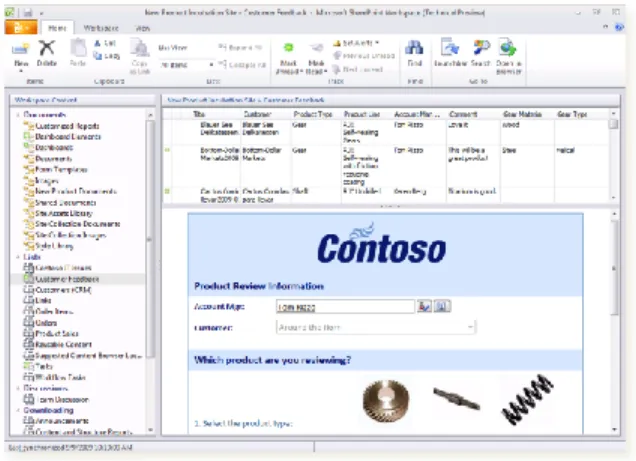
SharePoint Workspace 2010 is the rich desktop client for SharePoint 2010 that enables people to
collaborate and be productive even when they’re not connected. When online, SharePoint Workspace will reflect any changes made within the client immediately in the corresponding SharePoint site. If
SharePoint Workspace detects the user is offline and thus disconnected from the SharePoint site, it will cache any changes and automatically synchronize the changes made (deltas only), once the user is online and can connect to the SharePoint site again. SharePoint Workspace 2010 enables taking offline entire site contents, including custom lists and line-of-business data, and supports the usage of InfoPath Forms for richer data entry and data validation.
12
Office Web Apps
When people are on the go, they may not have ready access to the Office Client applications such as Word or Excel. SharePoint 2010 features a rich out-of-the-box capability of working with Web versions of the most popular Office Client applications so people can access documents, spreadsheets, presentations and notes without worrying about whether the machine they are on has the latest Office Client installed. The full-featured Office desktop applications provide fully functional Office document editing in both online and offline modes, while the Office Web Apps provide flexible browser-based editing capabilities when client software is not available.
To learn more about the Office Web Apps, go to http://www.microsoft.com/office/2010/.
SHAREPOINT COMMUNITIES
Empower people to work together in new ways
Enabling people to share knowledge and information has been a central element of SharePoint
technologies since their inception; modern businesses recognize that it is people working together who drive positive business results. SharePoint 2010 continues to build on this focus in order to provide best-of-breed, broad capabilities to help transform the way people and organizations work together to speed market responsiveness and foster innovation. SharePoint 2010 has augmented its strengths as a content-based collaboration platform with many more social- and people-focused collaboration features. This latest release enables people to collaborate in ways that are most comfortable and natural to them, whether it is through blogs, wikis, status updates or team sites. SharePoint 2010 offers a comprehensive and flexible collaboration platform that promotes transparency across the organization and encourages workforce engagement and participation. This helps organizations who are looking to innovate, drive productivity gains, consolidate IT spending and achieve a sustainable competitive advantage through business agility.
My Sites - the Hub for Interacting with People
Since 2003, SharePoint has offered an individual SharePoint site, called a “My Site”, where people can customize the content and design, and specify their profile details such as contact information and colleagues. My Sites in SharePoint 2010 have been dramatically enhanced to be the social networking hub for individuals in an organization.
New and Improved
• My Sites and knowledge mining
• Social tagging
13
While the words social networking usually strike terror into the hearts of corporate executives, SharePoint takes the Internet concepts popularized by MySpace and Facebook and transforms them into tools to improve the ways that people and groups can effectively interact within an organization. Inside of SharePoint, the following features help stitch a collection of users into a rich social fabric.
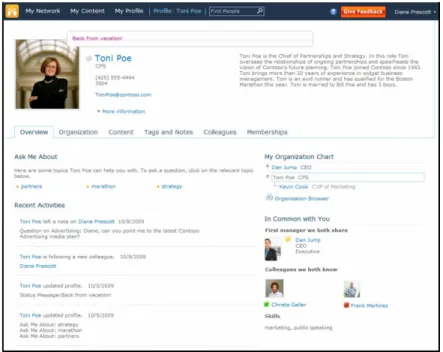
My Sites and User Profiles: The core of any social application is the user profile. This is where each user is able to define their personal attributes and whether or not these attributes are publically available or should be private. A user’s My Site is a secure site which exposes their profile details and exposes a host of social functionality such as a new organizational browser, colleagues and contacts, and more.
Figure 05: My Site Profile
Status updates and activity feeds: In recent years the social networking trend taking the Internet by storm is micro-blogging, as characterized by Twitter and the status updates on Facebook.
SharePoint 2010 introduces this type of capability with deliberate status updates that fit together with an automatic activity monitor. This combination allows SharePoint to offer an activity feed for each user which helps community members keep track of work progress and their colleagues.
Knowledge Mining: A user is able to identify which keywords or tags they are interested in keeping track of and which keywords or tags they are willing to answer questions about on their profile. The key phrases are mined through the user’s Sent box from Outlook 2010 and proposed to the user when he/she edits his/her profile. This allows the user to keep the profile updated and active while requiring less effort on the user’s part.
14
Social Tagging
Social feedback is a new addition to the SharePoint 2010 experience. These new features take the social experience of SharePoint to a whole new level of user participation and interaction, allowing users to discover content and what other users think of that content.
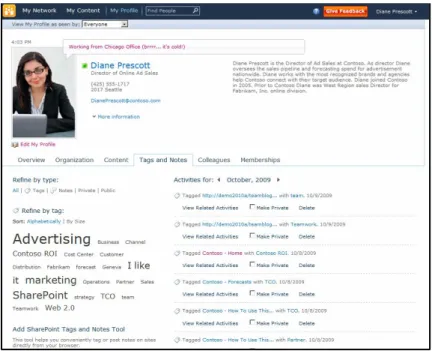
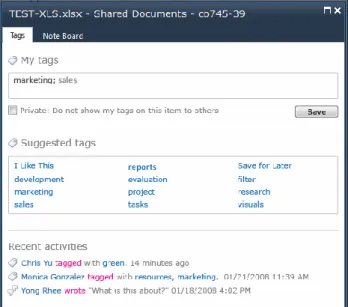
Tags: The act of tagging content is the assignment of descriptor words or categories to that content. There are two types of tagging, social tagging and expertise tagging. Social tagging refers to content and adds metadata to content to describe what it is, what it contains, or what it does. Expertise tagging is related to individuals and describes them, such as what they do, which projects they work on, or what special skills they have. Where social tagging of content allows users to organically flex and grow a portal’s information architecture over time, expertise tagging helps build relationships and connections to other people in the organization.
Figure 06a: Tags and notes
Bookmarks: Internet users familiar with tools such as Delicious will recognize “social bookmarking” as the practice of sharing bookmarks with a community of users to help build the knowledge and perspective of the community as a whole. Bookmarks in SharePoint replace the 2007 My Links feature and allow a user to define how a link is shared and categorized. SharePoint bookmarks also support the inclusion of non-SharePoint content, through the use of bookmarklets. This feature allows any piece of Internet content to be included in a community’s set of social bookmarks.
15
Figure 06b: Tagging and bookmarking
Feedback: A popular social internet activity is to rate and comment on the activities and contributions of other users. SharePoint incorporates the ability to rate content with a 5 star metaphor and to comment on that content much the same way a user can comment on a blog post. This user feedback then becomes a searchable extension on the original content.
Note board: Users of Facebook know how easily they can communicate with each other via the Wall. SharePoint 2010 builds this concept of a communication accelerator into its Note board
application. Note boards are available for use on an individual user’s profile page, a tag’s page, and an organization’s page. Profiles and organizations are covered in more detail in the next section.
Wikis
Wikis became available in SharePoint 2007 as a Windows SharePoint Services 3.0 site template. SharePoint 2007 wikis were a popular feature, frequently used as a dynamic knowledge base and as a mechanism to turn static documents into dynamic and living knowledge repositories. Teams found they could use wikis to easily collaborate with each other.
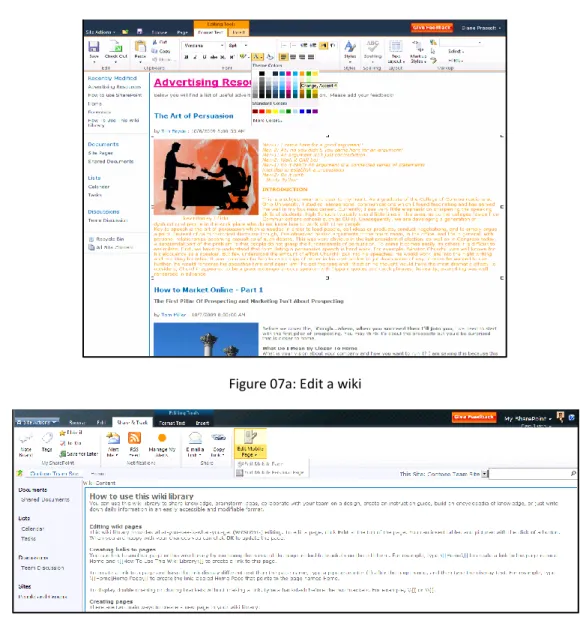
One of the enhancements in SharePoint 2010 is the ability to edit team sites as if they were editing a wiki. This means that users can see a live preview of the changes made to the team site with a wiki experience. Editing the content on a page becomes as simple as clicking the edit tab and typing in the page. In addition it is easier to insert images, SharePoint lists, and Web parts into the team site.
Microsoft focused significant attention on transforming the user experience in SharePoint 2010 into a lightweight collaborative authoring experience. For wikis, along with blogs and discussion forums, there is a consistent rich text editor that employs the SharePoint Ribbon.
16
Figure 07a: Edit a wiki
Figure 07b: “Wikis everywhere” – Edit for Mobile
The “wikis everywhere” approach to SharePoint sites is a great asset to information workers who already have enough to do without having to adapt to new collaborative procedures. Now SharePoint 2010 team sites can fit into the flow of their work rather than introducing an extra set of requirements complete with extra sets of skills which must be learned. As sharing content and knowledge with team members
becomes easier, the likelihood that sharing will occur goes up. The SharePoint 2010 wiki experience helps make team collaboration a smoother process.
17
Figure 07c: “Wikis everywhere” – Easy editing
User Blogs and Team Blogs
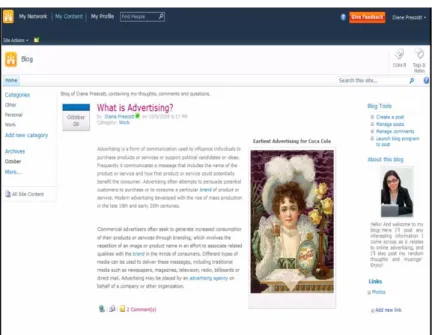
Each user within the organization can have their personal blog linked to their My Site making it easy for other people to find. New blog posts are added to the Recent Activity section of the user’s My Site homepage.
The new blog site template in SharePoint 2010 features blog-oriented navigation. Navigation elements have been enhanced to allow sorting posts by category and date. The content itself features an AJAX-based page experience when toggling the comment view on and off. There is also a “About this blog” content area that explains the purpose of the blog and introduces the blog author(s).
The editing experience for the SharePoint 2010 blog takes advantage of the new rich text editor. The author is able to use the SharePoint Fluent User Interface, or the Ribbon, complete with Live Preview functionality and streamlined image insert capabilities to write and edit content online. The user can also launch an external blogging program such as Microsoft Word or Windows Live Writer for the editing experience.
In addition to individual blogs, SharePoint 2010 also has team blogs which allows multiple people to publish blog posts. These can be used for teams working on a project to notify internal customers or other teams who are interested in the status or progress of a project and to provide more self-service for those people within the organization.
18
Figure 08: Blogs
SHAREPOINT CONTENT
Manage content lifecycle from creation to disposition
SharePoint 2010 delivers a broad and deep set of content-management capabilities for organizations to manage the content lifecycle from creation to dissemination, whether dealing with documents, Web content or records. Records management capabilities have been extended across the entire platform enabling people to use ECM capabilities in a simple and more intuitive manner. This allows more people to participate in contributing content into an ECM solution as well as making it easier for records managers to control and manage the environment.
New and Improved
• Metadata everywhere
• Document Sets
• Document IDs
• In-place records managment
• Advanced routing
19
SharePoint 2010 features the following capabilities that encourage participation by more people within the organization and provide more management tools and control for records managers:
Managed Metadata – The ability to centrally define taxonomies that can be leveraged within and across farms to classify and find content quickly.
Unique Document IDs – The ability to assign a document a unique identification number people can use to retrieve the document later, even if it is moved.
Document Sets – The capability to group multiple work items into one consolidated entity and then apply operations and policies once for the combined set, instead for each separate content item.
Advanced Routing – The ability of people to submit documents to SharePoint sites and let the system determine which library and/or folder it should be saved to using the document’s metadata and other rules.
In-Place Records Management – Allows a document to be flagged as an official file or record within collaboration sites, thus prohibiting any future changes. These official records can now reside within the same document libraries that contain other documents people are collaborating on.
Web Content Management – The set of capabilities that enable the hosting of a content-centric site that is easily consumable without requiring any specific collaboration tools to be used or deployed. Such sites are complete with a robust publishing workflow that ensures that only the people with the required permissions can add and edit content on the site.
SharePoint 2010 contains a robust list of rich features that brings Enterprise Content Management (ECM) to more people within an organization. Most notable is the fact that many records-management
capabilities in the previous version of SharePoint that were locked to specific site templates are now encapsulated in features, enabling their use in any SharePoint site.
Another improvement benefiting content-centric sites built with SharePoint 2010 Web Content
Management (WCM) is a cleaner implementation of the user interface. As mentioned previously (in the SharePoint Sites section), the reduction of markup and the attention to a standards-based
implementation result in less out-of-the-box effort for customers creating new WCM sites. As well, the addition of the new Ribbon UI and the reduction of full-page refreshes make one-click content authoring simple and quick.
Document Management
Microsoft has significantly improved document management capabilities in SharePoint 2010. Metadata is now everywhere in SharePoint 2010, as well as the ability to assign unique identifiers to documents and combining multiple documents to be managed as a single entity.
20
Metadata Everywhere
In today’s increasingly connected world, more people are storing and collaborating online with tools like SharePoint. As more and more content is saved and kept in online repositories, it becomes increasingly challenging to find the desired content with simple search keyword terms. However, when content owners tag documents with metadata it is easier for others to locate that content. SharePoint 2010 encourages people to tag content with metadata, offers tools to extract metadata automatically from new content, and facilitates peer-to-peer collaboration using content tagging. By using this metadata, SharePoint 2010 makes the process of finding content much easier and more effective. Searching for content based on metadata breaks-down the boundaries of folders, lists and document libraries, sites and site collections.
One of the ways SharePoint 2010 handles metadata is by automatically extracting and promoting metadata from images uploaded to the central Asset Library. This includes details such as EXIF data and other details stored with images. This metadata can be used by people in search queries or when browsing the Asset Library using specific criteria. In addition, folders within lists and libraries can be configured to automatically tag content with specific metadata such as adding a “year=2010” tag to all documents within the “2010” folder.
Content rating is another useful feature for content consumers as they vote for which content item is more helpful than other items. SharePoint 2010 includes a content rating capability that can be leveraged in search queries or custom search solutions to find the most popular content as defined by the people in the organization.
SharePoint 2010 offers two ways to add metadata to content: taxonomies and folksonomies. Taxonomies are hierarchical organizations of content tags that are centrally managed and used by content owners in selecting predefined tags when modifying content. These can be leveraged using the new Managed Metadata field type (which also offers auto-completion of tags) or in the Office clients like Word, Excel or PowerPoint. Administrators can add translations or synonyms to tags to make them easier to use. Folksonomies are another type of decentralized and unmanaged metadata tagging. A folksonomy differs from a taxonomy in that the tags that populate their hierarchies are not centrally defined or managed. Instead, people freely add tags to content or reuse tags other people have submitted. Both the managed taxonomies and unmanaged folksonomies are managed using the new Enterprise Managed Metadata (EMM) service from Central Administration. The new service architecture allows administrators to extend and share the metadata configuration across SharePoint sites or even across multiple SharePoint farms within an organization. This enables organizations to establish and control the enterprise taxonomy for all content within the organization.
21
Figure 09: Taxonomy Tag Hierarchy
Throughout an organization there are specific types of content, referred to as Content Types in
SharePoint 2010. Content types allow people to specify the content fields, policies, workflows and other rules for a specific kind of content such as a press release. Content types are also extendable in that one content type inherits from another; for example, an organization could have a Press Release content type and another one for Product Division Press Release. The latter content type shares some characteristics of the Press Release content type but adds additional fields or workflows specific to the product division. New in SharePoint 2010 is the ability to define content types in one site collection and reuse them across SharePoint sites within a farm or across farms as Enterprise Content Types. The EMM service empowers administrators to publish enterprise content types throughout or across SharePoint farms using the new service architecture. Once an enterprise content type is published to a site collection, it cannot be changed within the site collection but site owners are free to extend it by creating a new content type that inherits from the enterprise content type.
Unique Document IDs
In a heavily used and adopted collaboration environment, one challenge people face is when content is reorganized or moved in the typical course of business. Hyperlinks emailed between team members that point to a document are no longer relevant which causes frustration and loss of efficiency. SharePoint 2010 offers a new capability to assign documents a unique identification number. This unique ID, embedded within a special URL, can then be used to retrieve the document regardless of where it is moved to within the site collection.
22
Document Sets
People often create multiple documents that support a single project or task. SharePoint 2010 includes a feature that enables people to group all of these documents together into a single entity. All documents in a Document Set share the same metadata and the entire Document Set can be versioned as a whole and downloaded as a compressed ZIP file with all contents included. People can also initiate a workflow on the entire Document Set instead of individual workflows for each document. Each Document Set has a Welcome Page which displays the metadata shared across all documents in the set as well as a list of all documents. People can customize the Document Set Welcome Page as any other Web Part Page to meet specific business requirements.
Figure 10: Document Set Welcome Page and Ribbon Menu
Records Management
Microsoft has listened and responded to customer feedback in the area of records management. SharePoint 2010 encourages more people to participate in records management solutions and, at the same time, makes it easier for records managers to interact, manage and monitor records management solutions.
Advanced Routing
People participating in ECM solutions usually face a common challenge: where should new content be saved? SharePoint 2010 addresses this challenge with advanced and configurable routing. Site owners can configure advanced routing by using the document’s metadata to determine where the content should be saved within the site, such as which document library as well as which folder within the library.
23
In-Place Records Management
Based on customer feedback, SharePoint 2010 changes the approach where records management capabilities have been abstracted from specific site templates but are not implemented as SharePoint Features. This change allows site administrators to pick and choose in an “a-la-carte” fashion which records management capabilities are used within a site collection.
For example, to add the ability to utilize Document Sets or the Unique Document ID capabilities in SharePoint 2010, a site collection owner simply needs to activate the respective SharePoint site collection feature.
Another improvement encouraging the participation of more people in a records management solution is in-place records. When enabled, people with the appropriate permissions can designate any document in a library as a record or official file. Once this is done, the document is locked from future editing. Official files are indicated with a lock image overlay on the file icon. These official files can reside side-by-side within any SharePoint site in the same document library or folder as other documents people continue to collaborate on.
Web Content Management
SharePoint 2010 Web Content Management (WCM) offers the ability to host content-centric sites that are managed and maintained using a robust publishing infrastructure. WCM sites differ from traditional SharePoint collaboration sites in that the primary users of the site are content consumers who mostly read content on a site rather that collaborate. SharePoint empowers content owners to easily create new content pages on a site while enabling content mangers to establish who can create, edit and approve publishing requests on different areas of the site.
We have improved the authoring of content with a much faster and streamlined process. The introduction of the Ribbon UI and an emphasis on limiting the number of full-page refreshes combine to dramatically reduce the time required to create new pages.
24
Figure 11: WCM Content Page Creation Screen
In addition, WCM sites have improved support for rich media such as images and video. Video is delivered through a Silverlight player that can be skinned and that developers can customize to look like the rest of the site’s branding. Content owners can easily add images to content pages by searching through a central asset library using the image’s metadata in the filtering criteria.
Another key component of a WCM solution is the ability of site owners to accurately monitor the usage and size of a site. In SharePoint 2010 Microsoft has introduced a Web Analytics service that reports on site traffic, inventory, and how search is being used. The analysis reports can be configured to show activity for an entire Web application or as granular as a single SharePoint WCM site. New out-of-the-box Web Parts use the reports generated by the Web Analytics service to display popular content, search queries and the results of popular queries.
25
SHAREPOINT SEARCH
Find people and information anywhere
Microsoft’s search solutions change the way people interact with information. This may be in customer-facing applications such as site search or e-Commerce, where engaging search experiences drive revenue. Or it may be in employee-facing applications — helping them process vast amounts of information so they can get things done efficiently and effectively. In either case, search is quickly becoming essential to business.
With SharePoint Server 2010, Microsoft has made a major leap forward in Enterprise Search. This includes a range of choices, since great search is not a ‘one-size-fits-all’ endeavor. Options include:
Entry-level - Search Server 2010 Express is a free, downloadable standalone search offering. It incorporates many enhancements over its predecessor, Search Server 2008 Express.
Infrastructure - SharePoint Server 2010 includes a robust search capability out-of-the-box with many improvements from the previous version.
High-End – Along with SharePoint Server 2010, a new product, FAST Search for SharePoint 2010, is being introduced – using technology from a strategic acquisition of FAST, an industry leading search-technology company.
The introduction of FAST Search for SharePoint provides a new choice: best-in-market enterprise search capabilities (based on FAST’s premier search product, FAST ESP), that is closely integrated with SharePoint and offers low total cost of ownership (TCO.
New Capabilities in SharePoint Server 2010 search
The amount of content and the degree of collaboration in organizations continue to increase rapidly; so does the challenge of finding the relevant information you need. Search is becoming essential to getting your daily job done – as opposed to the time-consuming and inefficient process of hunting through a document library or site to find the desired document. SharePoint Server 2010 offers a best-in-class robust search solution integrated within the vast SharePoint infrastructure. It enables searching both structured and unstructured content – content stored within SharePoint as well as content in file shares, Web sites, Microsoft Exchange folders, databases, and even line-of-business systems.
New and Improved
• Improved user experience
• People and Expertise Search
• Deployment and manageability
• Extensibility
26
This version provides many significant enhancements for both end users and IT, including:
User experience: enhancements in the core search experience, relevance ranking, and addition of new query and exploration capabilities provide rich user experiences out-of-the box
People search: enhancements to people search as well as new expertise search capabilities help you amplify the impact of your organization’s knowledge and expertise. Social behavior, i.e. recent tags and search by teammates, etc., is also used to improve search quality.
Deployment and manageability: architectural advances have eliminated bottlenecks and provide improved performance, scalability, and fault tolerance. A range of enhancements make
deployment, manageability and connectivity simpler and easier. These allow you to deploy search with industrial strength scale and manageability.
Extensibility and developer view: developer access and APIs have been enhanced, as well as related tools. These allow developers to build great applications while taking advantage of the search capabilities in SharePoint 2010 search. One of the areas in which SharePoint 2010 is continuously building its
leadership is the ability to deepen the end user search experience by extending and developing custom search-driven applications. This is a major area of investment in SharePoint 2010 and one that we think will resonate very well with customers and partners. Microsoft has taken search and removed the covers – making it much easier for developers to use tools and a platform they already know to produce game-changing, mission-critical applications built on search.
Search User Experience
The SharePoint Sever 2010 search core results page offers a very user-friendly and intuitive user interface. People can use simple and familiar keyword queries, and get results in a rich and easy-to-navigate layout. A search center site template is provided as well as a simple search box that can be available on every page in a SharePoint Server 2010 site.
Figure 13: SharePoint Server 2010 Search Results Page, including: refinement pane, people matches and previews
27
Search results are straightforward to browse and understand, and include several features to help in understanding and exploring the result set. Snippets are included with each result, and metadata fields are provided, together with preview links, in order to make it easier to locate the most relevant results. ‘Did you mean’ suggestions appear to help with misspelled and ambiguous queries, and acronyms are expanded – searching “ECM” will return results for “Enterprise Content Management” & vice-versa. Results are returned with sub-second response time, and are available in a variety of contexts (in a browser, on a Smartphone device, or via inclusion of results from desktop search from Windows 7). People can mark a search in several ways to save time in monitoring topics or repeating searches. They can quickly create an alert that will rerun the query at scheduled intervals and notify the user via an email or a text message (SMS) alert of changes to the results. They can also subscribe to an RSS feed of the search results and bookmark a search for later re-use.
SharePoint Server 2010 provides more relevant results than ever before. The query syntax has been enhanced to allow more expressive queries. Advanced search continues to be available for those ‘power users’ who want to express queries in more complex ways. Significant enhancements have also been made to the core relevance ranking – using additional text fields, taking advantage of the structure of content, and optimizing ranking of the search engine. Linguistics coverage has also been enhanced to provide better results across more languages.
SharePoint Server 2010 also provides a new way to explore information via search refiners. These refiners are displayed down the left-hand side of the page, to the side of the core search results. They provide people with self-service drill-down capabilities in filtering the search results returned. Refinements are automatically determined by SharePoint Server 2010 using tags and metadata entered (and indexed) on the search results return set. Out-of-the-box, SharePoint 2010 comes with refiners based on the type of content (webpage, document, spreadsheet, presentation, etc.), location, author, last modified date, metadata tags and more.
While the out-of-the-box user interface is very intuitive and useful for most people, power users can create their own search experiences. SharePoint Server 2010 includes many search-related Web Parts that enable power users to create customized search experiences that implement automatic filtering, best bets, a refinement panel, featured content or offer pre-defined queries:
28
Social Search
A significant aspect to people’s daily lives in an organization is interacting with others and finding the right people to connect with who have specific skills and talents. This can be a daunting challenge in a large organization. SharePoint Server 2010 addresses this challenge through search, and connects this search to the social capabilities in SharePoint. A people search center provides specific capabilities for connecting with people and expertise.
Figure 15: People Search result page
Finding People
SharePoint Server 2010 provides an address book-style name lookup experience making it easier to find people by name, title and organizational structure. This includes phonetic name matching that will return names that are phonetically similar to what the user has typed as a query. SharePoint 2010 also matches nicknames & their bases (for example: “Robert” will match with “Rob,” “Bert,” “Bob,” “Robby,” etc.). The use of wildcards is also supported, adding to the ease of using search with SharePoint 2010.
The refinement panel provided in the keyword search results page is also standard for people search, but instead of document-related refinement, we refine based on information relevant to user profiles. Real-time presence is included through Office Communication Server, making it easy to immediately connect with the results of a people search query.
Mining and Discovering Expertise
29
memberships, which are used to organize people search results based on social distance. Users can manually submit or automatically generate a list of colleagues mined from Outlook, analogous to a Friends list in Facebook. Automatically generated lists of colleagues are a way of rapidly inferring social relationships throughout the organization, speeding the adoption and usefulness of people search results. SharePoint Server 2010 also infers expertise — automatically suggesting topics mined from the user’s activity (tags, keywords, etc.) and Outlook inbox, and suggesting additions to their expertise profile in their My Site. This makes it easy to populate My Site profiles and means that more people have well-populated profiles and get the benefits of this in both SharePoint Search and SharePoint Communities.
Improving Search based on Social Behavior
For many organizations, SharePoint has become the gathering place where people create, share and interact with information. Social behavior is taken into account in order to provide high quality search results in several ways. First, the relevance ranking for people search takes social distance into account: a direct colleague will appear before someone 3 degrees removed. Second, SharePoint Server 2010 supports social tagging and rating of content, and this social feedback can influence the relevance of content in search results. People’s day-to-day usage of information in SharePoint and Microsoft Office can have a measurable impact on search relevance, helping the organization harness the collective wisdom of its people. Finally, Click-through on search results is used for relevance ranking; knowing that you clicked on a person in the last similar search means this is more likely to be the one you are looking for this time.
Preview of FAST Search for SharePoint
FAST Search for SharePoint is a new offering made available as a result of the strategic acquisition of FAST in 2008. FAST Search for SharePoint combines the extensive search capabilities of FAST ESP with
SharePoint Server 2010. FAST Search for SharePoint and SharePoint Server 2010 share common search APIs, provide a common developer experience, and share the same IT Pro foundation.
FAST Search for SharePoint extends the SharePoint Server 2010 search experience by providing a much more conversational and visual user experience. Search results include visual cues such as thumbnails and previews, allowing users to quickly recognize content they are seeking and to browse through content quickly during a search. The refiners are ‘deep refiners’ that include counts of results across the entire result set, and refiners are available for any managed property. Sorting options, similarity search and multiple relevance ranking profiles provide richer and more relevant search results as well as easier exploration. Metadata for search, refiners, and sorting can be created based on the contents of
documents, using property extractors that identify the names of people, places, and organizations as well as date, time, email addresses, etc. – providing much richer and more fully populated metadata and a much richer search experience.
30
Figure 16: FAST Search for SharePoint core search result page
FAST Search for SharePoint also provides precise control over the user experience. This includes the use of user context to tailor experience – a sales professional might need a different experience than an
engineering professional, or a user in France might need a different experience than a user in Brazil. Search administrators can control result presentation, including promotion and demotion of results, best bets, and visual best bets. They can also provide end users with control over their own experience – since users know best what’s relevant to them. Deep linguistics capabilities are included with FAST Search for SharePoint, as well as richer relevance-ranking profiles. By shaping the user experience you can maximize productivity.
FAST Search for SharePoint also provides benefits and opportunities for IT Professionals and Developers. These include a high degree of platform flexibility, ability to scale to extreme size, and powerful content-processing capabilities. These allow you to satisfy the most challenging search requirements and deploy customized search applications.
31
SHAREPOINT INSIGHTS
Make informed, better business decisions
SharePoint Insights delivers powerful new business intelligence capabilities, including rich scorecards, dynamic dashboards and easy-to-use Chart Web Parts, alongside improved capabilities previously available in SharePoint Server 2007. People now have complete flexibility in getting the data they need in the format that’s right for them, with IT managing the infrastructure under a single SharePoint platform. SharePoint Insights also offers more self-service and collaborative capabilities so that business users can turn raw data into actionable reports without the involvement of developers or server administrators. The familiar decentralized nature and user interface in SharePoint 2010 enables people to be more productive and make timelier and more informed business decisions. People can interact with data, slice and dice key performance indicators and analytics, and create their own dashboards using Excel Services or the new Chart Web Parts. In addition, native SharePoint capabilities such as search, personalization and content targeting, contribute to the self-service nature of business intelligence with SharePoint Insights.
SharePoint 2010 includes all the business intelligence capabilities available in the previous version, Office SharePoint Server 2007, but Microsoft has made them more accessible and available throughout the platform as a whole. Business intelligence is not constrained to a specific type of SharePoint site template but rather enables business users to implement all the business-intelligence-related capabilities in any SharePoint site. For example, people can place KPI Web Parts within a standard Team Site to report on the status of unfinished tasks in a Task list, create charts from SharePoint List data, or place items from Microsoft Excel or their PerformancePoint Services dashboard on their own sites.
Business intelligence with SharePoint 2010 is closely tied to Office Excel 2010, as the rich client is commonly used as the authoring environment for analytics solutions both big and small. Excel 2010 contains many significant updates such as a new 64-bit client option which enables very large
spreadsheets; people are no longer limited to Excel’s 2GB memory limitation. Excel 2010 also contains new data visualizations such as Sparklines and improvements to data bars to aide in making more educated business decisions. While these changes affect the Excel 2010 rich client, Microsoft has updated Excel Services in SharePoint 2010 to maintain parity with these changes. This means that new data visualizations are available not only in the client, but also when rendered via Excel Services in the browser. In addition, Excel Services has been the subject of performance improvements to support the larger spreadsheets people can build with the new Excel 2010 64-bit client.
New and Improved
• Excel Services
• PerformancePoint Services
• Visio Services
32
A new addition is PerformancePoint Services, a contextual dashboard and balanced scorecard solution, which allows power users/IT to create dynamic and highly interactive dashboards that display
information, from strategy to operations. PerformancePoint Services allows you to combine multiple data sources and content, providing a single view of the business. People can perform iterative analysis with rich displays such as a decomposition tree, KPI details displaying ownership and accountability, and the ability to drill into details showing the underlying raw data.
Excel Services
More and more people in organizations use Excel to enter, store and analyze data. As the use of Excel has increased, so has the need to share the results, or spreadsheets, with colleagues and customers. The sharing of spreadsheets usually means they are sent as a copy via email: Joe emails a spreadsheet to Ursula who makes a change and forwards it on to Phillip; Phillip then makes another change to the spreadsheet and sends it to someone else.
This sharing of spreadsheets causes a problem: a loss of control. Not only does the original author lose control of the content in the spreadsheet, but they lose control of the intellectual property in the spreadsheet that may include formulas that are not meant to be distributed.
Excel Services addresses this challenge by balancing the needs of the business users to use Excel 2010 the same way they have always created and modified spreadsheet. By using Excel Services, people can now maintain control over the spreadsheets in more flexible and powerful ways.
People can take spreadsheets created in Excel 2010 and publish them to SharePoint 2010 Excel Services. Once the spreadsheet’s location is trusted, other SharePoint people can view the spreadsheet in the browser. The author can also protect the intellectual property, such as formulas, embedded in the spreadsheet by preventing their display in the Web-rendered version via the browser.
Figure 17: Publishing Excel 2010 Workbooks to SharePoint 2010 Excel Services through the new Office 2010 Backstage
33
When spreadsheets are published to SharePoint 2010, the author can specify what pieces of the spreadsheet are rendered in the browser by Excel Services, enabling people to secure parts of a spreadsheet while exposing others. This technique can be used to display only the aggregated revenue figures for regional sales information while hiding the detailed revenue figures for each salesperson in the region that the aggregated financial details are based on.
Excel Services enables the browser-based viewing of spreadsheets uploaded to SharePoint 2010 with the rich fidelity found in the client. People can interact with PivotTables, drilling into the details, and sorting using the new visual slicers to discover the insights needs to make the right business decisions.
Figure 18: Viewing Excel Workbooks with Excel Services
SharePoint 2010 Excel Services also provides two new rich applications programming interfaces (API) to enable the creation of rich solutions in SharePoint Server 2010. These include a new JavaScript Object Model (JSDOM) for creating dynamic applications, and REST API for easily accessing spreadsheet information, as well as an improved Web services for automating and managing the system.
Excel 2010 introduces some new data visualizations and conditional formatting capabilities available to spreadsheet authors. These include negative data bars, multiple icon sets and right-aligned data bars. Another new visualization in Excel 2010 is a Sparkline - a tiny chart with an intensity of visual distinction between that of words or letters. When placed in an Excel cell, they dramatically improve the data visualization for fast comparison. Excel Services in SharePoint 2010 can render these new data visualizations and conditional formatting capabilities when rendering spreadsheets in the browser.
34
PerformancePoint Services
Almost every business intelligence implementation includes the use of scorecards and dashboards. Scorecards are collections of Key Performance Indicators (KPIs) and objectives that are used to measure multiple performance factors in a business. A dashboard is a group of related scorecards and report views organized in a way that is easy for a business user to quickly get a pulse on the organization’s
performance. Dashboards may also contain filters that all scorecards and KPIs use to control the context of the reports and visualizations. PerformancePoint Services enables the business to manage key drivers of the business, gaining visibility into the key drivers of the business and tying this to their corporate strategy.
New features in PerformancePoint Services work with SharePoint Security and Administration and store all content in SharePoint Lists. This allows for seamless setup and deployment, using the rich SharePoint architecture for scalability and availability. Rich new visualizations like the Decomposition Tree - a unique and extremely intelligent view of the key dimensions that impact your business - enable users to further analyze the relevant data and make key decisions. Scorecards now contain rich KPI details highlighting ownership, date stamps, and thresholds providing complete transparency into key strategic initiatives and processes. New filtering and sorting capabilities (such as Top/Bottom filtering, switching measures and drilling across dimensions) make it easier for users to find the right information they need.
Dashboard Designer has been updated to simplify deployment with one-click publishing to SharePoint Server 2010 for deployment of rich dashboards. Dashboard Designer allows IT Pros and Power Users to create rich and dynamic interactive dashboards to display the right information, combining data from various sources such as Excel, SQL Server Analysis Services, SharePoint Lists, content from SQL Server Reporting Services, Excel Services, Visio Services, and through any Web-page to combine the right assets in order to display and become interactive for users. All of this is rendered through a Web browser allowing IT to deploy Business Intelligence seamlessly and easily across the organization, enabling users to access the content they need when they need it.
No longer a stand-alone product, PerformancePoint Services is now tightly integrated and included as part of SharePoint 2010 (with the Enterprise Client Access License). This allows business users to quickly assemble dashboards using the various data sources available across SharePoint, Microsoft Office and Microsoft SQL Server for reporting, analytics, scorecards and dynamic dashboards. Server administrators, developers or data warehouse professionals can create sophisticated cubes in SQL Server Analysis Services, which can be used by technical business users in creating dashboards.
35
Figure 19: PerformancePoint Services KPIs
Visio Services
In the same way that Excel Services delivers browser access to Excel spreadsheets, Microsoft has introduced Visio Services in SharePoint 2010 to enable the capability of rendering Visio diagrams and charts within the browser. Business users can use one of the existing out-of-the-box filter Web Parts to apply filtering criteria to a diagram to restrict what is and is not rendered.
SharePoint 2010 treats Visio files as first class document types just like Word, Excel or PowerPoint files. This means that people can easily open a Visio diagram from a document library using the context menu. In addition, SharePoint 2010 Search will index the contents of the Visio diagram so they will be fully accessible within search results.
36
Business users can use Visio 2010 to create sophisticated data visualizations to transform raw data into more actionable diagrams. People can also use SharePoint 2010 Excel Services in Visio 2010 as a data source when creating visualizations. This means that published spreadsheets, SQL Server database cubes and SharePoint lists can be used as a data source for Visio 2010 visualizations (more in next section).
SHAREPOINT COMPOSITES
Rapidly create dynamic business solutions.
Virtually all companies have a need for custom solutions that meet the needs of their specific lines of business. These solutions are usually defined by business decision makers who know what they need, but may not have the ability to build a custom software solution to meet their needs. In order to satisfy these requirements, decision makers usually turn to their developers or the company’s IT staff to build these solutions for them. Some even reach outside the organization and hire external contractors or vendors to build these applications. Oftentimes, this results in a bottleneck within the company: the IT staff.
Every company’s IT group has a limited amount of resources in terms of funds, servers and, most importantly, available skilled professionals. Even when decision makers reach outside the organization to a contractor or vendor, the solution they develop must usually go back through the company’s IT staff to be validated, deployed and maintained.
This common scenario most often results in a backlog of increasingly unmet needs in the IT group. In addition, the business users and decision makers become increasingly frustrated and dissatisfied with their company’s own abilities to react to its requirements. Unfortunately, the result of these two processes is a loss of productivity, and thus a loss of business opportunities.
A new area in SharePoint 2010 addresses this common bottleneck issue in companies: Composites. Composites are solutions created using out-of-the-box SharePoint components and tools to create robust business-collaboration solutions without the need of involving the corporate IT group for development of custom code solutions or deployment. SharePoint composites empower business users and decision makers by leveraging existing enterprise data and processes to compose engaging and dynamic solutions quickly, without custom code. By enabling users and decision makers to create composite solutions and enable innovation, it becomes easier to improve productivity along with the satisfaction in the
organization of the company’s IT staff.
New and Improved
• Enhanced end-user tools for automation and design
• Read-write interaction with LOB data
37
Another key benefit to this minimal-code approach is that it focuses the IT resources on higher priority initiatives and improves the return on existing application investments. The company’s IT group benefits from this approach as out-of-the-box solutions are easier to maintain, require less management and also enable administrators to deploy and maintain a predictable infrastructure to support such composites. There are four fundamental characteristics of a SharePoint composition that facilitate the benefits outlined above:
Engaging Experiences – Creating rich and interactive user experiences that promote productivity and high levels of user adoption.
Rich Data Connectivity – The ability to easily incorporate data from external systems and facilitate a seamless offline story.
Rapid Solutions – The ability to quickly create real business solutions using the out-of-the-box SharePoint components and tools.
IT Control – Giving IT staff the ability to empower people to create out-of-the-box solutions and easily monitor, manage and isolate custom solutions to ensure the platform’s availability.
Engaging Experiences
SharePoint 2010 includes many tools and components available to business users that can be used to create engaging experiences. First and foremost, composite applications can be consumed in many different ways. Custom composite applications can be consumed using any of the popular Web browsers on a laptop or PC or, for those business users who need instant access on the go, through a mobile device. In addition, the Office 2010 client applications (such as Word, Excel, Access and Outlook) can be
customized by a developer to interact with composite applications.
While many business users are always connected using common Web browsers or mobile devices, there are many who will need to be productive when they are not connected. SharePoint 2010 composites can also extend an offline scenario using tools such as SharePoint Workspace 2010, which is part of the extended Office Suite.
In addition, SharePoint 2010 also includes out-of-the-box support for Silverlight-based user interfaces for eye-popping visualizations and rich client applications hosted in the browser.
New to SharePoint 2010 is the capability to create Visio-based visualizations via Visio Services which are rendered by a browser and improve the process of conveying the status of a process or flowchart to business users and key decision makers.