C. Marshall Stroscio. The State of Academic Library Websites: A Usability Study. A Master's Paper for the M.S. in L.S. degree. November, 2012. 42 pages. Advisor: Robert Capra
Although much has been learned about good web design principles since academic library websites became commonplace, the changing landscape of the web makes it is necessary to periodically test the usability of library websites to assess how effectively they provide services and information to users. Moreover, with users accessing library services remotely via the web more than ever before, the importance of library websites has increased proportionally. This is especially true for music library websites, as users increasingly access scores and recordings through music libraries’ websites. This paper describes a task-based usability test designed to gather both quantitative and qualitative data about a university music library website. The study was successful in identifying areas where the website could be improved and generating recommendations to make these changes.
Headings:
World Wide Web
Web sites – Evaluation
User-interfaces – testing
THE STATE OF ACADEMIC MUSIC LIBRARY: A USABILITY STUDY
by
Marshall Stroscio
A Master's paper submitted to the faculty of the School of Information and Library Science of the University of North Carolina at Chapel Hill
in partial fulfillment of the requirements for the degree of Master of Science in
Library Science.
Chapel Hill, North Carolina
April, 2010
Approved by:
________________________
Table of Contents
Introduction ... 4
Literature Review ... 4
Methodology ... 9
Evaluation Measures ... 10
Results ... 12
Time-on-Task ... 12
Success Rate ... 13
Error Rate ... 14
Users’ Subjective Satisfaction ... 15
Mouse Clicks ... 18
Mouse Movement ... 18
Comments, responses, and observations ... 19
Discussion ... 22
Recommendations ... 24
Conclusion ... 26
References ... 27
Appendices ... 28
Appendix A: Video Release Form ... 28
Appendix B: Recruiting Script ... 29
Appendix C: Observation Script ... 30
Appendix D: Observation Guide ... 33
Introduction
In the fall of 2011the Duke University East Campus Libraries Web Assessment
Group was formed (ECL WAG) to assess the use and performance of the Lilly Library
and the Music Library websites. Among the initiatives approved by ECL WAG was a
task-based usability test. After analyzing usage of the sites using Google analytics and
completing an environmental scan of comparable institutions’ library websites and a
literature review, members of ECL WAG determined what the core functions of each site
were and completed a cognitive walkthrough of these tasks. Through this process, the
committee identified potential points of failure in the ability of the system to aid in the
completion of the tasks deemed to be essential to the sites’ intended function. The
committee also appointed the author of this paper to design and implement the testing of
the Music Library site. Thus, this paper presents the findings of the task-based usability
testing of the Duke University Music Library. The data presented here will be used to
redesign the site and will hopefully contribute to the understanding of the current state
and usage of library websites and music library websites.
Literature Review
For Nielson (2010), the term usability refers to the level of ease with which users
• success rate (whether users can perform the task at all)
• the time a task requires
• the error rate
• users' subjective satisfaction
Recognizing that there are other important qualities, Nielson (2010) cites utility as
an attribute that is equally as important as usability. Utility refers to whether or not
something provides the functions that one needs. If something is to be useful, it must be
have both qualities: utility and usability.
Cockrell & Jayne (2002), employing user-centered design, examined the ability of
undergraduate students to find scholarly articles on their library’s website and noted that
students often searched the libraries online catalog to find such information. In
interpreting user behavior and assessing the Western Michigan University Library’s
website, Cockrell & Jayne (2002) point out that the organization of materials and
information in digital environments is of the utmost importance. That is, the
categorization, labeling, presentation, and prominence—i.e., information architecture—of
content are key factors in creating effective, usable systems. The authors, drawing on the
work of Battleson, Booth, Weintrop, and Nielson (2010) point out the merits of
user-centered design’s emphasis on users’ ability to perform specific tasks rather than
attempting to discover what ought to work. Cockrell & Jayne (2002) also point out that usability is often is also affected by users’ understanding—or lack of understanding—of
as “serials”, “periodicals”, and “ILL” need to be clearly defined. Such definitions are
essential for users to understand how these resources are categorized.
Blandford et al. (2004) also point to the need to use terminology that is easily
understandable. Moreover, Blandford et al. (2004) cite Kuhlthau in emphasizing the
importance of qualitative factors in assessing usability. Blandford et al. (2004) argue that
Kuhlthau’s six stages of the information-seeking process (ISP) apply to digital
environments as well as physical libraries. The authors argue that researchers need to
augment empirical data with qualitative data and an understanding of the affective
motivations behind user behavior. In their study, Blandford et al. (2004) compare four
different evaluative techniques. The first of these techniques is heuristic evaluation (HE)—as developed by Nielson (Blandford et al. 2004). While Blandford et al.(2004),
found HE to be useful for addressing the types of concerns we have been discussing such
as the use of ambiguous terminology and nebulous categorization of information, the
authors argued that HE was not an effective method for establishing an understanding of
users’ motivations and underlying, affective responses.
The next technique explored by Blandford et al. (2004) is Cognitive Walkthrough
(CW). CW also a user-centered, task specific approach that prompts users to answer
specific questions as they attempt to complete each task. The authors concluded that CW
is also useful for assessing “surface features” but fails to account for the cognitive and
affective factors of query formation and interaction with content. Claims Analysis (CA)
is similar to CW in that it presents users with scenarios (cf. tasks) designed to give users
was valuable as a tool for assessing usability both quantitatively and qualitatively.
Concept-based Analysis of Surface and Structural Misfits (CASSM), the fourth method discussed by Blandford et al. (2004) was found to be useful for analyzing how well web
interfaces correspond to users’ experience in physical environments. In summary, the
authors found that HE and CW are useful for assessing the effectiveness of surface
features of design such as categories and use of terminology, and CA and CASSM may
be useful for gathering insights into the underlying structures of user concepts vis-à-vis
site organization and the overall design and layout of web interfaces.
Dougan & Fulton (2009), who like Cockrell & Jayne (2002), sought to obtain
qualitative data by encouraging users to verbally express their thoughts as they completed
tasks also found that terminology, such as the use of acronyms in database titles, served
to impede ease of use. Moreover, Dougan & Fulton (2009) also found that the
terminology used can often inhibit users’ability to find information. Thus, the authors
posited that it may be helpful to provide definitions of terms used on the site.
Additionally, Dougan & Fulton (2009) cite text-heavy pages and unnecessarily complex
navigation schemes as obstacles to efficient navigation. For Dougan & Fulton (2009),
well-designed categories are of utmost importance in designing usable interfaces. The
authors found that users do not mind having to click more times if content is organized
into clear categories.
Wu (2000), like Cockrell & Jayne (2002) and Dougan & Fulton (2009), used
software to record participants using a “think aloud” protocol. Twenty users were asked
focused on heavily travelled sections of the site that received heavy traffic and that had
design features that were similar to other pages on the site.
In the Wu study (2000), twenty users were given nineteen tasks; of the nineteen
tasks, users completed an average of 16.1 tasks. Tasks involving use of the online
catalog, research guides, internet resources, and the Biology Library Website were the
most problematic. In the case of the resource guides, Wu (2000) concluded that that their
substantial use and overall importance indicated that they should be featured more
prominently. Wu’s (2000) conclusion that tasks involving the online catalog would have
been improved if users had bothered to avail themselves of the instructions provided
echoes Cockrell & Jayne’s (2002) and Dougan & Fulton’s (2009) call for the inclusion of
instructional materials and definitions of terminology. Yet, the fact that users were, in
fact, provided with instructions and failed to use them begs the question: if instructions
and terminology are provided, will users actually take the time to read them? Wu’s
(2000) finding that the manner in which resources are categorized also resonates with
Dougan & Fulton (2009). Another theme consistent with Dougan & Fulton (2009) was
that a surfeit of text inhibited users’ ability to find pertinent information.
Blandford & Green (1997) explored Ontological Sketch Modeling (OSM) as a
means of evaluating the usability of the New Zealand Digital Library Music Library
(NZDL ML). Using the core concepts of OSM, namely, entities, actions, attributes, and
relationships, the authors sought to identify misfits in website design and the conceptual categories in the minds of users. OSM may be particularly pertinent for pinpointing
Questions were composed to determine how well users’ concepts matched the
organization of information on the NZDL ML. The study was able to identify several
misfits. One misfit was found in the categorization of melodies on the site that did not
necessarily correspond to users’ categorizations. Other misfits were identified in
mismatches of file types of retrieved melodies and the available software available for
playback on users’ personal computers. Another misfit, which corresponded to the
findings of Dougan & Fulton (2009) and Cockrell & Jayne (2002) was the use of
undefined terms such as “pitch”, “method”, and “tuning” which were interpreted
differently, even by sophisticated users. The authors concluded than OSM was more
useful than heuristic evaluation for identifying high-level concepts relevant to usability
rather than the “details of user-system interaction”. Like the other studies discussed
above, the authors recommended clearly defining terms and categories.
Methodology
With an eye toward assessing how effectively and efficiently users outside of the
Duke University Department of Music were able to navigate the Duke University Music
Library’s homepage, participants were recruited at the Bryan University Center and asked
to perform seven tasks. A total of nine subjects took part in the study: seven
undergraduates outside of the Music Department, one undergraduate music major, and
one graduate student. All participants had never used the site.
Subjects completed the study in approximately fifteen minutes and were offered a
complete a set of seven tasks selected based on a cognitive walkthrough of the
homepage. In the cognitive walkthrough these tasks were deemed as central functions of
the page. Users were asked to:
1) navigate to the Music Library homepage from the main Duke University Libraries homepage
2) identify whom to contact for questions regarding fines
3) locate the loan periods for compact discs
4) find the hours of the Music Library
5) navigate to an online database of classical music recordings
6) navigate to an online database of music reference materials, and
7) access the online catalog.
After completing each task, subjects were asked to (verbally) to either strongly
agree, agree, neither agree nor disagree, disagree, or strongly disagree with the following
two statements:
1) This information was easy to find and
2) This information was in a place you expected.
Upon completing all of the tasks participants responded verbally to a series of closing
questions:
1) Now that you’ve had a chance to look at the webpages, what’s not on the page
2) What are the 2 or 3 most useful things on the site? In general, what do you like
about the site?
3) Is there anything about our site that you find confusing and/or difficult?
4) Do the headings and groupings of information make sense to you? If not, how
would you change them?
5) Are there kinds of information/features that you don’t see on our site now that
you would like to see in the future?
Evaluation Measures
The following measures were used to assess how efficiently subjects were able to
complete each task. The data were gathered using Morae software.
Time-on-task: The amount of time users spent on each task.
Success rate: Whether or not the task was completed or not.
Error rate: Errors are defined as deviations from optimal navigation paths. There
may be more than one optimal navigation path for a given task. For example, in
locating the hours of the Music Library, there are two optimal paths. One could
click on “Hours” under “About Us” or locate the hours in the sidebar on the
left-hand side of the page. For the purposes of this study, however, using the search
Users’ subjective satisfaction: This was measured by users’ level of agreement
with the statements read to them after each task: 1) This information was easy to
find 2) This information was in a place I expected.
Mouse Clicks:The number of times users clicked the mouse for each task.
Mouse Movement:The number of pixels the mouse moved over while completing
a task.
Comments, responses, and observations: User comments and responses were
gathered from recordings as they thought “out loud” while completing tasks and
from their responses to direct questions. Observations are insights noted by
facilitator or recorded by video/audio recordings.
Results
Time-on-Task
Times that users took to complete each of the seven tasks were averaged together.
Eight of the nine subjects averaged less than thirty seconds on all of the tasks. Only one
user (music2) averaged over thirty seconds per task. This average (47.13) was
significantly higher than the others (17.89 seconds higher). All of the other eight
averages were within ten seconds of one another—the lowest time being 18.82 and the
highest being 29.24. Excluding the abnormally high average time of the second
participant, the average time each participant spent on each task was 23.95 seconds.
Three tasks took users an average of more than thirty seconds to perform (see
Figure 2): finding who to contact for more information about a fine (Task 2), locating
information on CD loan periods (Task 3), and navigating to a resource for listening to
classical music online ( Task 5). Finding the hours of the Music Library (Task 4)
required the least amount of time on average (approximately 10.5 seconds) followed by
finding a link to the catalog (approximately 11 seconds). Task 6, finding a link to the
music reference database, Oxford Music Online took the third least amount of time for
users to complete, on average (approximately 16 seconds). The fourth and final task that
took users an average of less than 30 seconds to complete was Task 1, navigating to the
Music Library homepage from the Duke University Libraries homepage.
Task 5, which instructed users to locate an online database for listening to
classical music, took the longest time on average (approximately 49 seconds)—over ten
seconds more than the next longest task (Task 2) which asked subjects to identify who to
contact with questions about a CD fine. Tasks 1 and 3, navigating to the Music Library
homepage from the main Duke University Libraries homepage and finding information
on compact disc loan periods, respectively, were within ten seconds of Task 2.
Success rate
Figure 3 shows the number of participants that completed each task. Three
participants failed to complete a total of three tasks. One subject gave up on locating
contact information for inquiring about fines for an overdue compact disc. However, the
subject happened to glance upon the phrase “Policies and Fines” while completing
another task, and asked if following that link would lead to information on whom to
contact regarding fines; indeed it was. Two other users had to be prompted to return to
the homepage after trying unsuccessfully to listen to classical music using Oxford Music
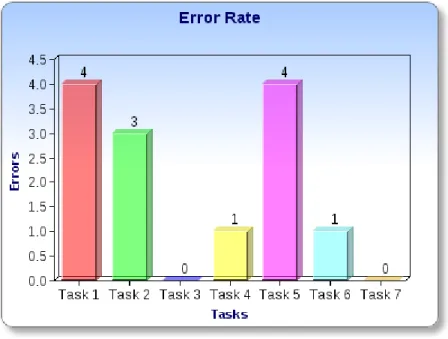
Deviations From Optimal Path
As stated above, errors were defined as deviations from optimal navigation paths
provided. For Task 1, navigating to the Music Library homepage from the main Duke
University Libraries homepage, there was one preferred path. This route required users
to scroll down to the bottom of the page and click on a link to the Music Library. Figure 4
shows that four of nine participants did not take this route but found some other way of
navigating to the Music Library homepage. Three of these used the search box, and one
found the link via the “catalog” page, which does not require one to scroll down. For
Task 2 (finding contact information to ask about fines), the optimal path was to click on
“Policies and Fines” and find the relevant contact information. There were a total of
three errors for this task. In all of these cases, users found someone to contact, but it was
not, however, the Music Library staff member in charge of fines. In finding the hours of
occurred. The two optimal pathways were 1) click on the hours link 2) read the hours
listed on the sidebar. The subject that deviated clicked on the “Facilities” link rather than
performing one of the preferred actions listed above. Task 5, listening to classical music
online, tied Task 1 for the highest number of errors (4). In all four of these cases, users
attempted to use Oxford Music Online, displayed prominently at the top of the page,
rather than scrolling down to “Online Listening” which was located just below the fold.
There was only one error for finding Oxford Music Online, which users were asked to do
directly after locating the link classical music online. The subject that made this error
attempted to use the catalog to locate this database. Only Task 3 (finding information on
compact disc loan periods and Task 7 (locating the “Catalog” link) were performed by all
subjects without error.
Users’ subjective satisfaction:
In assessing users’ level of agreement or disagreement with the statement “This
information was easy to find”, values were assigned as follows: strongly agree=5,
agree=4, neither agree nor disagree=3, disagree=2, strongly disagree=1. Subjects were
asked to rate their level of agreement with this task for all tasks except Task 1, for which
these data were not gathered. Thus, for Tasks 2-7, which were performed by nine users
each, a total of 45 points was possible. Both Task 6 and 7, locating Oxford Music Online
and a link to the catalog, respectively, received a score of 44. For both of these tasks the
same user (Music 5), agreed that the information was easy to find. All other respondents
strongly agreed that the information was easy to find. Finding someone to ask about a
respectively) both received a score of 42. Three participants agreed rather than strongly
agreed that finding someone to contact about compact disc fines was easy to find. One
participant agreed rather than strongly agreed that the hours were easy to find, and one
user neither agreed nor disagreed that the hours were easy to find. Identifying how long
one may checkout a compact disc (Task 3) received a score of 41, with two respondents
agreeing and one respondent neither agreeing nor disagreeing that the information was
easy to find. All other respondents strongly agreed that the hours were easy to find. Task
5 (navigating to classical audio online) received the lowest score (34). Two respondents
strongly agreed that this information was easy to find, five respondents agreed that agreed
that the information was easy to find, and two disagreed that the information was easy to
find.
Scores were assigned in the same manner for subjects’ level of agreement with
the statement, “This information was in a place I expected”. Again, these data were not
collected for Task 1. Task 2 (finding a contact for compact disc fines) received a score of
39. Four subjects agreed that this information was in an expected place, and one subject
neither agreed nor disagreed that the contact information was in an expected place. The
other four respondents strongly agreed that the information was in an expected place.
Finding compact disc loan information (Task 3) received a score of 42, with one subject
agreeing and one subject neither agreeing nor disagreeing that this information was in an
expected place. Locating the hours of the Music Library hours received a score of 38.
Two users neither agreed nor disagreed that the information was in an expected place,
while one disagreed. All others strongly agreed that this information was in an expected
place. The lowest score was 38, garnered by Task 5 (locating an online database for
online listening). One respondent strongly disagreed that this information was in an
expected place. This was the only “strongly disagree” response to either statement read
to respondents after completing each task. Another user neither agreed nor disagreed,
while three agreed that this information was in an expected place. Three participants
strongly agreed that the database for listening to classical music online was in an
expected place. Task 6 (locating the reference database, Oxford Music Online) received
a score of 44. Only one respondent agreed, rather than strongly agreed, that the link to
this resource was in an expected place. Locating a link to the catalog, the final task,
received a score of 41. One respondent neither agreed nor disagreed that the link to the
Mouse Clicks
Task 5 (finding a resource for listening to classical music online) required the most
mouse clicks, an average of 5.56. Task 1 (navigating to the Music Library homepage)
from the main Duke Libraries homepage required the second most mouse clicks, on
average (3.44). Locating information about fines (Task 2) required the third most clicks,
followed closely by Task 6 and Task 3, locating Oxford Music Online and finding loan
periods for compact discs, respectively. Task 4 (locating the hours) required the least
Mouse Movement
Finding a resource for listening to classical music online (Task 5) required the
highest average mouse movement (over 6000 pixels). Finding information about
compact disc loan periods and fines (Tasks 3 and 2, respectively), required significantly
less mouse movement, in the mid-three-thousand range, followed by navigating to the
Music Library homepage (Task 1). This task along with locating Oxford Music Online
(Task 6), finding a link to the catalog (Task 7), and identifying the hours of the Music
Comments, responses, and observations
Finding content below the fold
There were two tasks that required finding content located below the fold, the
point where one cannot read content on the bottom part of the page without scrolling
down. These tasks were navigating to the Music Library homepage (Task 1) and finding
a resource for listening to classical music online (Task 5). Subject four disagreed that the
online listening was easy to locate, as there was “scrolling involved”. Subject seven also
disagreed that online listening was easy to find because it was too far down the page.
The only instances where subjects had to be redirected altogether occurred during this
task as well (Task 5). The third subject, however, commented that the “first thing I
would do would be scroll down”. However, the data (e.g. time on task, number of errors)
shows that subject three’s attitude was an anomaly and that, for the majority of users,
finding content was hindered by its being located below the fold.
Navigation pathways and the amount of text on the homepage
Subjects seven and nine opted to call the phone number provided on the sidebar,
rather than attempting to “sift through” the information on the page to find the contact
information for the staff member responsible for fines. Similarly, although subject eight
initially started out on the optimal navigation pathway by clicking the “Policies and
Fines” link, the subject finally decided to navigate back to the Music Library homepage
and send an email to the general music library email address provided on the sidebar,
contact information for the correct staff member. Subject seven commented that there
were “a lot of links” on the page and that it “feels like you need to read them all to find
what you’re looking for”. In these examples and comments, the abundance of text was a
barrier to completing the task.
Overall organization/appearance
Subjects one, two, and eight commented that there was “not really” anything
confusing or difficult about the site. Subject eight, commented that the headings and
groupings seemed “reasonable”. Others (subjects five, six and nine) agreed that the
headings and groupings made sense. Subject five however stated that having three
columns required a lot of “jumping around” and suggested that the headings could be
“more linear”. Participant eight thought that the links “could be sorted in a more ordered
way” and was unsure whether the “academic” categories would be useful to all users,
including researchers from other disciplines. Subject eight also noted that the site seemed
“familiar” because of its similarity to other Duke University websites. The common
theme that emerged in these comments is the need to visually organize the headings and
groupings in a way that is easier to navigate.
Subject four commented that s/he was drawn to the manuscript image on the left
hand sidebar and that s/he wished that “it would tell me what it was”. Subject four also
liked the variation in color of the sidebar and the “pretty music notes”; “plain text would
be boring”, s/he noted. S/he also commented on the image on the right hand side of the
such a thing as a physical music library at Duke?”, s/he commented. Of course, it could
be argued that this question was meant to be rhetorical. The picture is a valuable cue that
there is indeed a physical music library.
Subject eight compared the site to iTunes and commented that a visual discovery
tool similar to the one for browsing through albums on iTunes would be useful. This
participant also suggested that “mini-visuals” might be used as a means of providing
users with a visual method of sorting through the information on the page and that
capabilities for searching by genres, such as classical, or jazz be expanded. These
comments indicating a preference for visual cues and means of organization are
consistent with the comments discussed above indicating that the amount of text on the
homepage is rather cumbersome and a that there is a need for an alternative means of
spatial organization of content.
Usefulness of content
The highest number of participants (four) stated that online listening was among
the most useful things on the homepage (subjects one, three, five, & six). Three users
(seven, nine, and four) stated that the search bar was among the most useful things on the
page. Two subjects (seven and nine) stated that the contact information was one of the
most useful items on the page. More specifically, subject eight liked that the contact
information was in a separate location in the sidebar. Two users also said that music
databases were among the most useful things on the site (subject one & four). For each
page: Policies, Fines, Loan Periods, Music Research Guide, Digital Scores, Hours, library
location, Useful Links, and New at the Music Library. Any redesign of the homepage
should take these findings into account and organize resources accordingly. Of course,
one should keep in mind that only one music major took part in this study and that
regular users of the site (e.g. music majors and faculty) might have different needs than
the users represented in this sample. For example, the lone music major in the sample
indicated that s/he judged digital scores (along with online listening) to be among the
most useful things on the site. Future studies might do well to focus on the needs of these
core users.
Discussion
Users had the most trouble finding a resource for listening to classical music
online (Task 5): more users failed to complete the task than any other task; this task tied
with Task 1 (navigating to the Music Library page) for the most errors; users spent the
most time on this task; this task required the most clicks and mouse movement; and
users’ expressed the least subjective satisfaction with their ability to complete the task.
Locating contact information for inquiring about compact disc fines (Task 2),
required the second most amount of time of any task and elicited the second highest
number of errors, and the second highest number of failures. This task ranked third in
average mouse movement and average number of clicks.
Navigating to the Music Library page (Task 1) was also problematic for users.
of the page. In terms of mouse clicks, this task required the second most number of
clicks, on average, after finding classical music online. Mouse movement was also
relatively high, fourth highest overall.
Although finding loan periods for compact discs (Task 3) required the second
highest mouse movement on average, the third highest amount of time on average, there
was a 100% success rate and zero errors. Users’ gave it the second lowest score overall
in terms of agreeing that the loan periods were easy to find. Interestingly, it received the
second highest level of agreement with the statement that it was in a place the
information was easy to find.
Locating the link Oxford Music Online (Task 6), had a one hundred percent
success rate an only one error. This task required the third lowest number of
mouse-clicks and mouse movement. This task received the highest level of agreement from
users that the link was in an expected place and also received, along with Task 7, the
highest level of agreement that it was easy to find. This task immediately followed the
other task (Task 5) that prompted subjects to look for the phrase “music online”, and all
four of the errors committed on that task consisted of participants attempting to use the
Oxford Music Online link rather than the link to classical music under “Online
Listening”. Thus, the high success rate, ease of completion, and high subjective
satisfaction may be due in part to users having already located this resource on the
Finding the online catalog was fairly unproblematic for users (Task 7). This task
required the second least amount of time, was completed by all subjects, and elicited no
errors. However, this task received only the third highest level of agreement from users
that the link to the catalog was in an expected place, and required an average of 1.67
clicks. As the primary means of locating materials in a library is through the catalog,
users should not need more than one click to locate a catalog search box which they are
used to seeing on the home page of library websites.
Finding the hours of the Music Library required the least time, mouse movement,
and mouse clicks. All subjects completed this task.
Recommendations
• Given the difficulty that subjects had navigating to the Music Library homepage
from the main libraries homepage and the fact that all subjects had never used the
site before, including the only Music major, it is recommended that a link to the
Music Library, and other campus Libraries be featured more prominently on the
Duke University Libraries homepage. Specifically, the link should be above the
fold and in larger text than the current link. Given Dougan & Fulton’s (2009)
finding that users preferred to make more clicks using well-designed categories
over text-heavy pages that require fewer clicks, it is recommended that the links
• As some users had difficulty finding contact information for inquiring about fines,
it is suggested that this information be moved to the top of the Fines & Policies
page and that the amount of text on the page be reduced.
• In light of users’ comments that links to online listening were among the most
useful resources on the site and that finding these resources required the most
time and elicited the most errors, it is recommended that links to online listening
be moved above the fold, so that they are more easily located.
• To cut down on the amount of text on the Music Library homepage, it is
recommended that the Useful Links category be moved to its own page and be
linked to by a prominently featured link on the homepage. The suggestion that
this resource be featured prominently is supported by users’ comments that they
believed these resources to be among the most useful.
• Currently, the main Duke University Libraries website is set as the default
homepage when one opens a browser in the physical Music Library. Bearing in
mind that the lone Music major in our sample had never used the Music Library
website, it is recommended that the default page be set to the Music Library
website so as to increase visibility and raise awareness.
• Based on user comments, it is suggested that alternative methods of categorization
and spatial organization on the page be explored. Additionally, incorporating
some system of visual cues should be investigated as a means of making pages
Conclusion
The usability study of the Music Library website revealed some significant design
issues that need to be addressed, as stated above. Analysis of the data has led ECL WAG
to: 1)make providing access to online scores a priority by featuring these resources more
prominently; 2) continue to provide links to other online resources but move them to a
separate page; 3) reduce the amount of text on the homepage and other pages; 4) explore
alternative means of navigation; 5) increase visibility of the site and awareness of its
existence. As the Duke University website is typical of academic library websites, in
general, and Music Library websites, in particular, we hope that our findings will be of
References
Blandford, A., Keith, S., Connell, I., & Edwards, H. (2004). Analytical usability
evaluation for digital libraries. Proceedings of the 2004 joint ACM/IEEE conference
on Digital libraries - JCDL ’04, 27. New York, New York, USA: ACM Press. doi:10.1145/996350.996360=GALE%7CA174640908&v=2.1&u=unc_main&it=r& p=AONE&sw=w
Cockrell, B. J., & Jayne, E. A. (2002). How Do I Find an Article? Insights from a Web
Usability Study. Journal of Academic Librarianship, 28(3), 122-132. Retrieved from
http://ehis.ebscohost.com.libproxy.lib.unc.edu/ehost/pdfviewer/pdfviewer?sid=6278 ba98-ea09-4128-8daa-1ae6669ca484@sessionmgr112&vid=4&hid=120
Dougan, K., & Fulton, C. (2009). Side by Side: What a Comparative Usability Study
Told Us About a Web Site Redesign. Journal of Web Librarianship, 3(3), 217-237.
doi:10.1080/19322900903113407
Iain, W. C., Blandford, A. E., & Green, T. R. G. (1997). Usability of a Music Digital
Library : an OSM Case Study.Main.
Nielson, J. (2001). Usability Metrics (Jakob Nielsen’s Alertbox). Alertbox. Retrieved
October 8, 2012, from http://www.useit.com/alertbox/20010121.html
Wu, J.-Q. (2000). Towards a More Usable Academic Library Web Site: A Case Study.
Appendix A
Duke University Music Library Website Usability
Video Release Form
Thank you for participating in this usability interview for the Music Library web site . We will be recording this session to allow project staff who cannot be present to benefit from your feedback. Please read the statement below and sign where indicated.
Video recordings made during this study will be used for research and development. Therefore, I understand that my work during the evaluation will be recorded and viewed by the staff of Duke University Libraries. I further understand that Duke University Libraries may wish to use segments of these recordings to illustrate presentations offered to library staff for the improvement of web services.
I give my consent to the researchers to use my recorded image and voice for these purposes, with the provision that my name will not be associated with the recording and that these recordings will not be released to any broadcast or publication media.
I freely and voluntarily consent to participate in the Duke Music Library Website Usability Study. I understand that my participation in this
evaluation is completely voluntary. I also understand that I may withdraw my consent and discontinue my participation at any time without penalty or prejudice to me.
I have read and understood the foregoing and understand that I may receive a copy of this form, upon request, on the day of the study.
Print Name: ________________________________
Sign Name: ________________________________
Appendix B
Recruiting Script
Hello, my name is Marshall Stroscio, and I’m a graduate student at the University of
North Carolina at Chapel Hill. We’re doing some testing on the Duke University Music
Library Website and I was wondering if you could spare about 15 – 25 minutes to
participate in a research study. We are asking participants to perform seven tasks on our
website and to answer several questions about the site. I will also be writing a paper to
fulfill a requirement for my Master’s degree in Library Science at the University of North
Carolina at Chapel Hill. However, no identifying information will be included in the
paper. We are offering your choice of several candy bars to say thank you for your time
Appendix C
Observation Script
Hi, my name is _Marshall Stroscio and I’m a Master’s student at UNC Chapel Hill________ . I’m going to be reading from my script to ensure that we uniformly administer this research study for all our subjects.
Thanks for agreeing to take part. During this session, you will be asked questions about our web site. There are no right or wrong answers. Please feel free to stop me at any time for a question or concern. The Duke University Libraries appreciate your assistance in helping us improve our web presence.
We are using software called Morae to record this session. All notes, screen capture, and recording are for library staff to review the session so that I don’t have to write everything down and will not be released to the general public; however, we might share our findings with the staff of Duke University Libraries for the purpose of
improving web services.
What’s really most helpful is for to you share your thoughts and observations with me as you are completing the tasks, so please try to think out loud as much as you can.
Before we start the test, there’s some paperwork I’m going to ask you to fill out. [Hand subject 2 copies of consent form] This is a consent form stating the information will be kept confidential and that your name will not be associated with the recording. We have 2 copies of the form here—one for you to keep and one for our records. I’ll give you some time to read and sign it. If you have any questions, please let me know. [Take signed copy and leave unsigned copy for them]
Now that we’ve gotten the paperwork out of the way, do you have any questions
before we start? [Pause for questions] I am now going to start recording our session.
[Start recording the test by clicking on the Morae red button]
I am going to start by askingyou some questions about yourself and your use of
library web sites
• What is your affiliation with Duke? Undergraduate, Graduate student, Faculty or
Staff Member?
• Have you used the Music/Lilly Library website?
• Using the Libraries’ main home page, how would find the Lilly/Music page?
Tasks for Music Webpage:
(Reset browser after each task)
• You checked your online library account and you have a CD fine. You have
questions about the fine. Who would you contact for more information? o The information was easy to find. Ask the participant to rank the
statement: Strongly disagree; Disagree; Neither agree nor disagree; Agree; Strongly agree
o The information was in a place you expected. Ask the participant to rank the statement: Strongly disagree; Disagree; Neither agree nor disagree; Agree; Strongly agree
• How long can you check out a CD?
o The information was easy to find. Ask the participant to rank the statement: Strongly disagree; Disagree; Neither agree nor disagree; Agree; Strongly agree
o The information was in a place you expected. Ask the participant to rank the statement: Strongly disagree; Disagree; Neither agree nor disagree; Agree; Strongly agree
• What are the hours for the Music library?
o The information was easy to find. Ask the participant to rank the statement: Strongly disagree; Disagree; Neither agree nor disagree; Agree; Strongly agree
o The information was in a place you expected. Ask the participant to rank the statement: Strongly disagree; Disagree; Neither agree nor disagree; Agree; Strongly agree
• Your professor has asked you to listen to classical music online. Find a useful
link to online music.
o The information was easy to find. Ask the participant to rank the statement: Strongly disagree; Disagree; Neither agree nor disagree; Agree; Strongly agree
o The information was in a place you expected. Ask the participant to rank the statement: Strongly disagree; Disagree; Neither agree nor disagree; Agree; Strongly agree
• Your professor has asked you to start your research by using Oxford Music
o The information was easy to find. Ask the participant to rank the statement: Strongly disagree; Disagree; Neither agree nor disagree; Agree; Strongly agree
o The information was in a place you expected. Ask the participant to rank the statement: Strongly disagree; Disagree; Neither agree nor disagree; Agree; Strongly agree
• You need to look up a title of a book. Can you find the link to the catalog?
o The information was easy to find. Ask the participant to rank the statement: Strongly disagree; Disagree; Neither agree nor disagree; Agree; Strongly agree
o The information was in a place you expected. Ask the participant to rank the statement: Strongly disagree; Disagree; Neither agree nor disagree; Agree; Strongly agree
Closing Questions:
• Now that you’ve had a chance to look at the webpages, what’s not on the page
that you would expect to be here?
• What are the 2 or 3 most useful things on the site? In general, what do you like
about the site?
• Is there anything about our site that you find confusing and/or difficult?
• Do the headings and groupings of information make sense to you? If not, how
would you change them?
• Are there kinds of information that you don’t see on our site now that you would
Appendix D
Observation Guide
The study will be implemented by investigators working in pairs. One investigator will
serve as a moderator. The other investigator will serve as a note taker and observer.
The moderator will:
• Ensure the comfort and safety of study subjects
• Use the interview script to
o explain the task
o ask background and follow-up questions
o guide subjects
• Refrain from prompting or interrupting the participant unless it becomes clear that
the subject does not understand the task, in which case the moderator will read the task again to clarify the
The note taker/observer will:
• Focus on observation and listening
Appendix E
University of North Carolina at Chapel Hill Consent to Participate in a Research Study Adult Participants affiliates of Duke University
Consent Form Version Date: 06/14/2012
IRB Study # 12-0787
Title of Study: Duke Music Library Website Usability Study
Principal Investigator: Marshall Stroscio
Principal Investigator Department: School of Info & Libr Science
Principal Investigator Phone number: 9193818790
Principal Investigator Email Address: [email protected]
Co-Investigators: Laura Williams, Kelley Lawton, Carol Terry, Lauren Crowell
Faculty Advisor: Rob Capra
Faculty Advisor Contact Information: [email protected], 919 962-9978
What are some general things you should know about research studies?
You are being asked to take part in a research study. To join the study is voluntary.
You may refuse to join, or you may withdraw your consent to be in the study, for any reason,
without penalty.
may help people in the future. You may not receive any direct benefit from being in
the research study. There also may be risks to being in research studies.
Details about this study are discussed below. It is important that you understand
this information so that you can make an informed choice about being in this research
study.
You will be given a copy of this consent form. You should ask the
researchers named above, or staff members who may assist them, any questions
you have about this study at any time.
What is the purpose of this study?
The purpose of this research study is to assess the functionality and ease of use of the Duke University Music Library's website.
You are being asked to be in the study because you are affiliated with Duke University.
Are there any reasons you should not be in this study?
You should not be in this study if you are not over the age of 18.
How many people will take part in this study?
A total of approximately 15 people will take part in this study.
How long will your part in this study last?
This study will take no more than twenty-five minutes.
What will happen if you take part in the study?
You will be asked to confirm your affiliation with Duke University.
Your voice and image will be recorded.
You will be asked about your use of the Duke University Music Library website.
You will be asked to complete a set of tasks.
After each task, you will be asked a short set of questions about that task.
After completing all the tasks, you will be asked some general questions about the
website and the tasks you were asked to perform.
You are not required to answer any of the questions or complete any of the tasks.
If you do not complete all tasks and questions, none of the data gathered as a result of your participation will be used.
What are the possible benefits from being in this study?
Research is designed to benefit society by gaining new knowledge. You will not benefit personally from being in this research study.
What are the possible risks or discomforts involved from being in this study?
There are no right or wrong answers. Your performance and responses are not being judged, rather the functionality of the site is being evaluated. There is no need for any stress, embarrassment, or any other discomfort.
How will your privacy be protected?
Your name will not be linked to your image or voice.
Any identifying data will only be accessed by the investigators listed above for the purposes stated in this form.
The consent form is the only part of this study where your name will be used. You will beidentified by an ID number that will be incorporated into the name of the file that contains your data.
Participants will not be identified in any report or publication about this study. Although every effort will be made to keep research records private, there may be times when federal or state law requires the disclosure of such records, including personal information. This is very unlikely, but if disclosure is ever required, UNC-Chapel Hill will take steps allowable by law to protect the privacy of personal information. In some cases, your information in this research study could be reviewed by representatives of the University, research sponsors, or government agencies (for example, the FDA) for purposes such as quality control or safety.
The recordings and other data collected in this study will be deleted. Prior to deletion, the data may be used by Duke University for the improvement of their websites and so that Duke University staff who are not present can benefit from your work and feedback.
Check the line that best matches your choice:
OK to record me during the study
not OK to record me during the study
What if you want to stop before your part in the study is complete?
You can withdraw from this study at any time, without penalty. The
investigators also have the right to stop your participation at any time. This could be because you have had an unexpected reaction, or have failed to follow instructions, or because the entire study has been stopped.
Will you receive anything for being in this study?
You will be receiving a candy bar for completing this study.
Will it cost you anything to be in this study?
It will not cost you anything to be in this study.
You have the right to ask, and have answered, any questions you may have about this research. If you have questions about the study (including payments), complaints, or concerns, you should contact the researchers listed on the first page of this form.
What if you have questions about your rights as a research participant?
All research on human volunteers is reviewed by a committee that works to protect your rights and welfare. If you have questions or concerns about your rights as a research subject, or if you would like to obtain information or offer input, you may contact the
Institutional Review Board at 919-966-3113 or by email to [email protected].
Participant’s Agreement:
Thank you for participating in this usability study for the Duke Music Library web site . We will be recording this session to allow project staff who cannot be present to benefit from your feedback. Please read the statement below and sign where indicated.
Video recordings made during this study will be used for research and development. Therefore, Iunderstand that my work during the evaluation will be recorded and viewed by the staff of Duke University Libraries.
I give my consent to the researchers to use my recorded image and voice for these purposes, with the provision that my name will not be associated with the
recording and that these recordings will not be released to any broadcast or publication media.
I freely and voluntarily consent to participate in the Duke University Music Library Website Usability Study. I understand that my participation in this evaluation is completely voluntary. I also understand that I may withdraw my consent and discontinue myparticipation at any time without penalty or prejudice to me.
I have read the information provided above. I have asked all the questions I have at this time. I voluntarily agree to participate in this research study.
I have read and understood the foregoing and understand that I may receive a copy of this form, upon request on the day of the study.
Signature of Research Participant Date
Signature of Research Team Member Obtaining Consent Date