2011. 42 pages. Advisor: Gary Marchionini
The purpose of this study was to investigate the reasons that made WordPress a
successful weblog publishing system and winning the battle against Movable Type. A
detailed comparison was conducted in three main areas: Ease of Use, Programming
Language, and the Ecosystem. Results indicated that the simplicity of using
WordPress in terms of system installation, content management and maintenance are
the top reasons that users choose WordPress instead of Movable Type. Choosing Perl
as the programming language also made Movable Type difficult to use because of the
long learning curve. Although Movable Type was started years before WordPress, it
lacks openness as an open source system, and does not have enough support from its
community. The results of this study could provide insights for open source
community contributors and Content Management System (CMS) users to better
maintain and use open source technologies.
Headings:
Content Management System
Open Source Software
A COMPARISON OF WORDPRESS AND MOVABLE TYPE: TWO MAIN OPEN SOURCE CONTENT MANAGEMENT SYSTEMS
by Lu Gao
A Master's paper submitted to the faculty of the School of Information and Library Science of the University of North Carolina at Chapel Hill
in partial fulfillment of the requirements for the degree of Master of Science in
Information Science.
Chapel Hill, North Carolina March, 2011
Approved by:
Table of Contents
Introduction ... 2
Literature Review ... 4
Open Source Software vs. Proprietary Software ... 4
Overview of Content Management Systems ... 6
Introduction of WordPress and Movable Type ... 7
Comparison of WordPress and Movable Type ... 11
1. Ease of Use ... 14
1) System Requirements ... 14
2) Installation ... 14
3) User Interface ... 15
4) Content Management ... 17
2. Programming Language ... 22
3. Ecosystem ... 25
1) Open Source License ... 25
2) WordPress.com and TypePad ... 25
3) Community ... 29
4) Customization and Extension ... 32
Conclusion ... 37
Introduction
Content Management Systems (CMS) nowadays are mainly used to manage complex
publications on the web. Wikipedia defined it as “the collection of procedures used to
manage work flow in a collaborative environment”. CMS separates content, presentation,
and workflow management from each other. In a CMS, data can be defined as documents,
movies, pictures, etc. CMSs are frequently used for storing, controlling, revising,
semantically enriching, and publishing documentations [1].
WordPress is an open source CMS that is often used as a blog publishing application, and
has the largest user base of any self-hosted blogging tool. Users can set up a blog on
WordPress.com or on a self-hosted server. In the past, the user base of WordPress has
been steadily growing and it probably is the most popular blogging platform on the web.
This popularity of WordPress is due to a number of factors, most notably its ease of use,
and customization. Installation of the software takes just minutes and a blogger with very
little technical background can set it up and get it running in very little time. Once
installed, WordPress offers a huge amount of customization options from the default
modifications to custom themes and plugins.
The objective of this paper is to analyze and identify possible reasons that made
battle against WordPress. To accomplish this objective, a detailed comparison between
WordPress and Movable Type was conducted in three main areas: Ease of Use,
Literature Review
Open Source Software vs. Proprietary Software
“The term ‘open source’ describes practices in production and development that promote
access to the end product's source materials”[2]. Lots of phrases have been used to
describe the concept of “open source” before the community adopted this term, and the
rise of the Internet, and the need of adjusting and reusing the source code helped “open
source” to get accepted.
“Open source” should not be confused with another term, “free software”, and they are
not synonymous. Normally free software refers to the price of the software. For example,
Google’s Gmail is an example of a free, closed source application. However, open source
is a matter of users’ freedom to run, copy, distribute, study, change, and improve the
software. More precisely, it refers to four types of freedom, for the users of the software
[3]:
1) The freedom to run the program, for any purpose;
2) The freedom to study how the program works, and adapt it to your needs (Access
to the source code is a precondition for this);
4) The freedom to improve the program, and release your improvements to the
public, so that the whole community benefits (Access to the source code is a
precondition for this).
In contrast, proprietary software is licensed under exclusive legal right of the copyright
holder. The licensee is given the right to use the software under certain conditions, but
restricted from other uses, such as modification, further distribution, or reverse
engineering [4]. In other words, proprietary software is closed-source, therefore the
source code of application is not released to the users. For example, Microsoft, which
owns and develops Windows and Microsoft Office, has been proponents of this business
model.
Many free open source systems such as WordPress are released under GNU’s General
Public License (GPL), which is intended to guarantee the freedom to share and change all
versions of a program, and to make sure it remains free software for all its users. GPL
also allows any user to modify or redistribute the source code and all derivative works.
Open source and proprietary content management systems both have advantages and
disadvantages. Open source content management systems are free in many ways. People
can do all they need to do with the product and the code behind it, such as customization
and integration with other systems. Users do not need to spend a lot of time in
implementing and maintaining the system. Furthermore, there is no license fee. Anyone
can download and install an open source CMS on a web server without any cost.
survival relies on the strength of the user community and dedication of the developers.
On the other hand, proprietary CMSs are created, distributed, and maintained by a
business, which often carries more premium features, and provides guaranteed support
from the original developers. The drawbacks of proprietary CMS are that it requires a
commercial license that can be very expensive, and the source code is restricted in usage
and not accessible to wide audiences. Website designers and administrators have to
evaluate these tradeoffs and make a decision before taking any further steps.
Overview of Content Management Systems
The practice of creating websites requires writing multiple HTML pages that contain both
content and design elements. HTML (HyperText Markup Language) is the main markup
language for creating web pages,and is the basic building-blocks of websites. HTML is
written in the form of HTML elements consisting of tags. Web browsers read HTML
documents and translate them into visual or audible Web pages without displaying the
HTML tags, but use these tags to interpret the content of the page. Besides HTML, CSS
(Cascading Style Sheets) is also used in designing websites. CSS is designed primarily to
enable the separation of document content written in HTML from document presentation.
A HTML document is linked to a style sheet, which is imported as a CSS document. The
information about the web page layouts, colors, and fonts is encapsulated in the CSS
document [5].
While CSS makes the separation of content and style possible, a content management
CMS, for example, if designers want to post some news and need to show them in two
different pages on the website, they have to do the same job twice to add these contents in
two places. Using a CMS, on the other hand, they only need to post the news once, and
any other staff members can create and maintain this website regardless of their technical
expertise. CMS allows a news publisher to update pages without modifying any code.
Content management systems use scripting languages such as PHP, Perl, or Ruby to fuse
the CSS, HTML, and backend database together. A lot of website features, such as cloud
tags, event calendar, and related post links, can be implemented by adding plugins,
therefore website designers do not need to design and develop these features by
themselves. What the designers or developers need to do is to just download the plugins
from the community, then upload them to the CMS in the administration panel. It makes
building and maintaining websites a much easier job. The system can then pull the
content out and show it on appropriate pages based on the rules of structures that were set
up in advance.
Introduction of WordPress and Movable Type
WordPress
WordPress is a personal publishing platform that was built on platforms with PHP and
MySQL, and licensed under GPL. As an open source content management system,
well as other features such as user management and profiles, easy installation and
upgrade, and internationalization and localization.
Matt Mullenweg and Mike Little were co-founders of the WordPress project. The core
contributing developers include Ryan Boren, Mark Jaquith, Matt Mullenweg, Andrew
Ozz, and Peter Westwood [6]. The community, including a group of WP Testers who had
early access to nightly builds, beta versions, and release candidates, also contributed to
the development of WordPress. WordPress is closely associated with Automattic, the
company founded by Matt Mullenweg. Automattic manages the servers, the distribution
and the management of the product. They also operate WordPress.com, which is a hosted
version of WordPress. If users of WordPress don’t have their own server or don’t have
web development background, they could sign up on WordPress.com and get an account
Figure 1 - The sign up page at WordPress.com
WordPress.org, on the other hand, is the official home of the WordPress software, from
which users can download the latest version (WordPress 3.1, at the time of this writing)
of WordPress, plugins, themes, and get access to documentation, which is also known as
the Codex [7]
Movable Type is a weblog publishing software developed by Ben Trott and Mena Trott,.
Ben and Mena Trott are also co-founders of Six Apart, the company behind Movable
Type and the TypePad hosting service. Notable features of Movable Type include the
ability to host multiple weblogs and standalone content pages, manage files, user roles,
templates, tags, categories, and trackback links [8].
The first version of Movable Type (Version 1.0) was released on October 8th, 2001.
Movable Type has a free edition under the GPLv2 license. In addition to the free version,
users can purchase support and commercial, education, or nonprofit licenses, which come
with support contracts, author limits, and unlimited blogs.
Movable Type is written in Perl, and supports storage of the weblog's content and
associated data within MySQL natively. It stores posts, comments, and the like in a
database just like WordPress does, but it creates static HTML pages from that data. This
arrangement makes Movable Type a little leaner when serving up content, but publishing
a post can take more time because each index page needs to be rebuilt. Movable Type has
Comparison of WordPress and Movable Type
Although started almost two years later than Movable Type, WordPress is arguably the
most popular blog publishing system nowadays. WordPress 3.0 was downloaded over 30
million times in the first 7 months after its release [9], and the latest version (3.1) had
been downloaded over 300,000 times in the first 24 hours of its release [10]. WordPress
has been listed as the #2 “Top Overall Skills in Demand” by Elance.com in their Online
Employment Report [11], while the top 5 includes PHP, WordPress, Article Writing,
HTML, and Graphic Design.
Figure 2 – Logo of WordPress
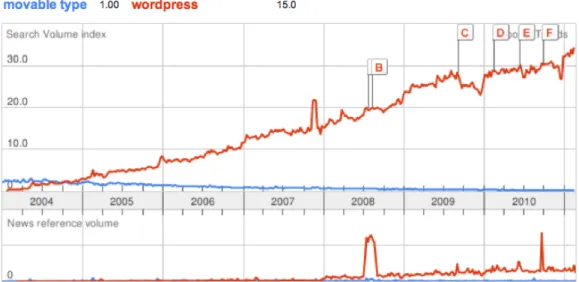
Figure 4 shows the traffic trends for both WordPress and Movable Type. The data is
based on the average search traffic of the terms (“WordPress” and “Movable Type”). In
this graph, the numbers on top of the graph (WordPress 15.0, Movable Type 1.0) are
corresponding to the average worldwide traffic for searches of these two terms. From
these graphs we can tell that WordPress has been searched far more often than Movable
Figure 4 – Comparison of average worldwide traffic between WordPress and Movable
Type from Google Trends
Movable Type used to be a popular blogging system, and has been used for personal and
enterprise blogs. However, as we can see in Figure 4, it has been exceeded by WordPress
in mid 2004, and traffic has been decreasing since then. Question has been raised about
why the popularity of WordPress and Movable Type are heading two different directions.
Many people have tried to answer this question [12] from several different perspectives,
and among these answers, the following factors are remarkably consistent:
• Movable Type’s license changed in 2004;
• WordPress is open source, while Movable Type was not very open in the
beginning;
This section will take these factors into account, and compare WordPress and Movable
Type from different point of views.
1. Ease of Use
1) System Requirements
WordPress requires PHP version 4.3 or greater, and MySQL 4.1.2 or greater. It runs on
any web server that supports PHP and MySQL, but Apache and Nginx are generally
recommended. The end user needs to use FTP or SFTP protocols to upload content (text
files, images, etc.) to the server, therefore the web hosting provider has to support these
protocols.
Movable Type also requires a web server to run it, however, since it is written in Perl, the
selected web server has to be able to execute CGI scripts written in Perl. Starting from
Movable Type 5, it dropped support for database systems such as SQLite and
PostgreSQL, and MySQL 5.0 or greater is recommended. For Perl, it requires 5.8.1 or
greater.
2) Installation
WordPress provides the latest version of the software as a compressed package, using
either zip or tar file. The documentation site has a “Famous 5-Mintue Install” instruction
to guide the installation of the system. For users with minimum technical background,
with the help of this instruction, they could easily have an up and running website setup
As mentioned in the previous section, Movable Type requires CGI support on the web
server. The Common Gateway Interface (CGI) is a standard that defines how web
server software can delegate the generation of web pages to a stand-alone application, an
executable file. Web hosting service providers tend to configure their CGI support on the
web server differently, which makes it difficult to have a standardized install instruction.
Taking information security into consideration, system administrators develop many
limitations enforced by the web server, such as only some directories on users’ web
servers can run CGI scripts.
Besides the limitations of CGI scripts, the installation of Movable Type also requires
more technical expertise and more configuration changes, because Perl applications have
a different deployment model from PHP applications.
3) User Interface
The “Dashboard” (Figure 5), which is the administration panel in WordPress, is very well
designed and easy to use. The simplicity of using the dashboard to perform regular tasks
is one of the reasons that users choose WordPress instead of Movable Type. By default,
the dashboard provides users with plenty of useful information at a glance, such as recent
posts, recent comments, incoming links, plugin updates, etc. The left side admin panel is
very clear and easy to navigate to do jobs such as adding new articles, managing visitors’
Figure 5 – Dashboard of WordPress
Movable Type also has a clean and easy to understand user interface. Similar to
WordPress, Movable Type also presents users with a contextually oriented menu system
in the left sidebar, which contains nine main groups: Entries, Pages, Assets, Tags,
Comments, Members, Design, Settings, and Tools. These groups integrate very smoothly
and are a pleasure to use (Figure 6).
4) Content Management
Typical tasks that are performed using a content management system include adding new
web pages, adding new posts (news article, image gallery, video clips, etc.), and so on.
Simplicity is one of the most important factors that need to be considered while
performing these tasks.
Both WordPress and Movable Type provide features to allow end users to easily create
and manage content. WordPress mainly has two types of content: post and page. A post is
what is normally called “blog”, while a page is generally used to show personal bio info,
company info, and others. Both posts and pages can contain text, images, and embedded
rich media such as audio and video. Using WordPress, users can choose to list posts
chronologically (Figure 7), and choose to archive, search, and sort posts.
Both systems also have templates for users to easily create new web pages. Templates in
Movable Type are very easy to find and to edit, and the template module (Figure 8)
Figure 7 - Dates filter for pages
Figure 8 – Template Modules of Movable Type
Templates in WordPress retrieve information from the MySQL database and generate
as many templates as they need. Each template could be configured to use under specific
situations, such as blog posts, people directory, etc. Compared to Movable Type,
WordPress does a better job with basic template customization (Figure 9).
Another advantage of WordPress regarding content management is the widgets. In
WordPress, users can add widgets to sidebar, footer, header, and even the body of a page.
For example, a Calendar widget could be added to the sidebar to show popular events in a
calendar view (Figure 10).
For basic page and post editing, WordPress provides two modes: Visual and HTML. In
Visual mode (Figure 11), user can use a WYSIWYG (What You See Is What You Get)
editor to add or update content, which is very convenient for regular users. For advanced
users with HTML expertise, the HTML editor (Figure 12) will be very helpful to
customize the page easily and efficiently.
Figure 11 – Visual style of Page Edition
Movable Type has similar functionality like this, but is not quite as easy to use. Movable
break out the templates into different pages – Index Templates, Archive Templates and
System Templates, which make the setting panel very clean and tidy (Figure 13).
However, it has no clear hierarchical template list on the menu bar (Figure 14). When
users are editing certain template, they cannot see the clear templates list and understand
which one is being edited right now. And once they click “Template” button on the Menu
bar, the page will take them back to “Manage Website Template” page again, rather than
the template category.
Figure 14 – Menu bar of Movable Type
To sum up, WordPress and Movable Type have similar features, and the both of their
user interfaces are easy to understand and easy to use. However, from installation, theme
customization, to content management, WordPress is relatively easier to use comparing
to Movable Type.
2. Programming Language
As discussed in previous sections, WordPress is written in PHP, while Movable Type is
written in Perl.
PHP and Perl are both scripting languages that could be used for web development, as
well as system administration scripting. However, there are some major differences
PHP is generally considered easier to learn from the web development point of view. It’s
easier to learn than C, Python, Java, and most other programming languages used in web
development. In PHP, web pages are constructed like HTML pages, with standard HTML
markup. PHP code is inserted into the page and executed when the page is requested.
This makes it very fast to code web pages and fast to deploy a new site, thus speeding up
Web development. Conversely, Perl scripts are run as stand-alone programs and create
HTML pages when the script is run.
“An important code management technique for programmers is separating code from data.
This allows us to make changes to the code or data without affecting the other.” [14]
PHP uses tags such as “<?php” and “?>” to indicate there is PHP code embedded the
HTML, therefore it is very easy to modify the code or data without affecting each other.
However, Perl programmers use print statements to generate HTML, which makes it
more difficult, if not impossible, to separate code and HTML.
One of the philosophies of Perl is “There’s more than one way to do it”, which means for
a given problem, there are always several ways to write the program to solve it. Therefore,
the portability of Perl programs is very poor, which means the code that was written by a
programmer may be very hard to understand by another, if possible at all.
Because of these differences, PHP is very popular in the web development field. Figure
15 shows the comparison of PHP and Perl in Google Trends, from which we can
Figure 15 – Comparison of PHP and Perl based on Google Trends
The differences between PHP and Perl have a big impact on the popularity of WordPress
and Movable Type. First of all, since PHP is easier to learn and use, most users tend to
choose WordPress because it takes less time to become an experienced website developer
or designer than using Movable Type. Second of all, PHP has a very big community, and
so does WordPress, therefore a large number of developers contribute to the development
of PHP and WordPress, while the user base of Perl and Movable Type is relatively small.
Lastly, most web hosting service providers support PHP by default, while few of the
support Perl, therefore users will have to install and configure themselves, if possible (not
3. Ecosystem
1) Open Source License
WordPress was released under the GPLv2 license from the Free Software Foundation,
and has remained open source ever since then, and has become a popular open source
blogging and publishing platform. The 2009 Open Source CMS Market Share Report
reached the conclusion that WordPress enjoyed the greatest brand strength of any open
source content management systems [13], and the huge open source community can be
one very crucial reason that why WordPress grows so rapidly. All of the technical
support and contribution in the long run to WordPress is the most valuable asset.
Movable Type was first released as free software in 2001. In 2004, Six Apart announced
that they would be making changes to the Movable Type licensing, which mostly places
restrictions on its use without paying a licensing fee. This action triggered lots of
criticisms from its users, and eventually made some users migrate to the then-new open
source blogging tool WordPress. Although Six Apart quickly responded to the criticisms
and restored the ability of Movable Type to create unlimited weblogs at all licensing
levels, and finally relicensed Movable Type as open source software under the license of
GNU GPL, users had already been lost.
2) WordPress.com and TypePad
WordPress.com hosts WordPress blogs for free. Hosting a blog on WordPress.com frees
users from having to get their own hosting space and making sure that the users’ web
upgrading software. But The URL of the blog will be something like www.
blogname.wordpress.com. WordPress.com offers some advanced features such as domain
mapping, which allows user to point any domain to a blog hosted on WordPress.com.
However, if using the free server service of WorPress.com, given the nature of
WordPress.com, users have no access to their blog’s code. They can’t modify the way
their theme looks without paying a little extra, also can’t upload their own custom theme,
or upload their own plug-ins.
Before WordPress 3.0 was released, WordPress.com actually ran a special version of the
system called WordPress Multi-User (WPMU), which allows multiple users to operate a
hosted blog in one system. Automattic gains profit by offering upgrades and occasional
advertisements on WordPress.com. Figure 16 shows the homepage of WordPress.com.
Six Apart also has its own blogging service, TypePad, which was originally launched in
October 2003 (Figure 17). TypePad is based on the Movable Type platform and shares
technology with Movable Type such as templates and APIs.
Figure 17 – TypePad homepage
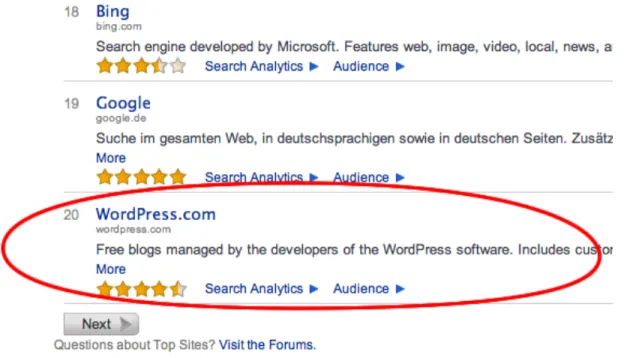
Although the services provided by WordPress.com and TypePad are somewhat similar,
traffic to these two sites are dramatically different. Figure 18 shows the search trends for
both sites from Google Trends, and Figure 19 shows a comparison of the 3-month global
Alexa.com traffic for the 2 sites, from which we can tell that WordPress is ranked at 20,
Figure 19 – Comparison between WordPress.com and Typepad at Alexa website rating
3) Community
and Developer. Figure 20 shows a screenshot of the list of Lead Developers and
Contributing Developers. This structure is very useful for keeping the community
developers motivated in trying to contribute more to the development of the WordPress
system.
Figure 20 – Developers at WordPress open source community
Everything on the WordPress.org site, “from the documentation to the code it self, was
created by and for the community”. Besides the core developers, there is also a mature
community that makes tremendous contributions to the WordPress system. Users of
WordPress could connect with the open source community by discussing in WordPress
conference that is focused on everything WordPress. Figure 21 shows a list of active
members in the WordPress open source community.
Figure 21 – A list of names of people in the WordPress open source community
Although Six Apart relicensed Movable Type and made it open source, the community
around Movable Type has not been well developed. One of the reasons is the use of Perl
programming language to write Movable Type and its plugins and themes, because
compared to PHP, Perl developers are rare, especially for Perl web developers. Another
reason is probably because Six Apart has not been very open since the beginning.
The difference of open source community between WordPress and Movable Type has
strength and effort to develop the community, on the contrary, some decisions that
Movable Type made have weakened its community.
4) Customization and Extension
Both WordPress and Movable Type are customizable and extendable by using themes
and adding plugins. A theme is a preset package that contains codes, scripts, style sheets,
and images that are used to control the general looking of a web site. A plugin, on the
other hand, is used to extend the system to do things that are not possible with the core
system.
“One of the core philosophies of WordPress is to keep the core code as light and fast as
possible but to provide a rich framework for the huge community to expand what
WordPress can do”. This is listed on the WordPress official website, and has been
realized by the great selection of plugins, themes, and other extensions to the core
WordPress system. Currently 13,412 plugins, and 1,330 themes are listed on the site and
are freely available to all users. Some of them has been downloaded hundreds of
thousands times, for example, Contact Form 7, which is a simple plugin that allows site
administrators to easily add a contact form to a website, has been downloaded over 3
million times. Figure 22 and figure 23 shows the free theme directory and plugin
Figure 22 - Free theme directory on WordPress.org
Besides the free themes and plugins listed on WordPress.org that are contributed by the
community, many third party companies also play an important role in the WordPress
ecosystem. These companies provide WordPress consulting, premium theme designing,
paid website building, and other services. Themes and plugins that are created by third
party companies normally have more features and have better quality than free ones.
WooThemes (Figure 24) and Premium WordPress (Figure 25) are two examples of such
companies:
Figure 25 - Best Premium WordPress Themes Collection
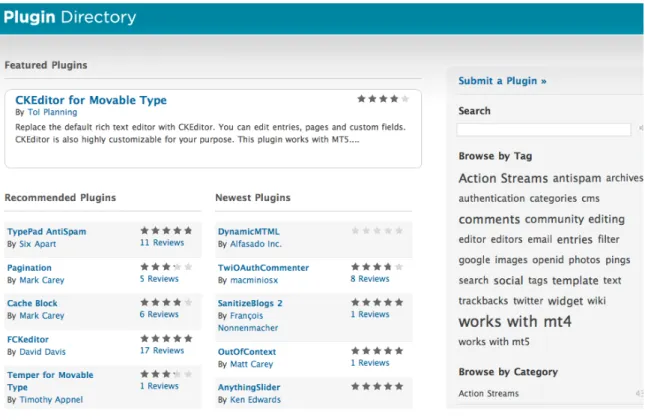
Movable Type, on the other hand, doesn’t have a big selection of themes and plugins. No
themes could be found on Movable Type’s official website. There is a library of plugins
for Movable Type on the site (Figure 26), however the total number is only about 1,000
WordPress’ 13,412. Moreover, third party service providers for Movable Type are very
limited.
Conclusion
This paper discussed the factors that made WordPress win a large number of users and
becoming a successful weblog publishing system, while Movable Type has been losing
users despite the fact that it is a great product. The study focused on comparing the ease
of use, the programming language used to develop the system, as well as the ecosystem
generated by the community. Reasons for WordPress’ success over Movable Type
include:
1) Ease of Use: WordPress is easier to setup and maintain, users don’t need lots of
technical expertise.
2) Programming Language: WordPress uses PHP, which has a larger user base and
better support by web hosting companies.
3) Ecosystem: the openness of WordPress is better, and it has a strong and mature
community that contributes to the development of the system.
It should be noted that this paper is not a thorough comparison of the two content
management systems, and studies in other areas could be conducted, for example the
business model. This paper also does not guide people to choose a CMS as blogging or
ncluding WordPress and Movable Type, all have their strengths. However, the results
from the comparison did provide insights in maintaining an open source project, as well
References
1. "What Is a CMS? — Plone CMS: Open Source Content Management." Plone CMS: Open Source Content Management. 2010. Web. 26 Jan. 2011. <http://plone.org/documentation/faq/what-is-a-cms>.
2. "Open source." Wikipedia, the free encyclopedia. 2011. 26 Jan. 2011 <http://en.wikipedia.org/wiki/Open_source>.
3. "The Free Software Definition - GNU Project - Free Software Foundation (FSF)." The GNU Operating System. 12 Dec. 2010. 26 Jan. 2011 <http://www.gnu.org/philosophy/free-sw.html>.
The GNU Manifesto - GNU Project - Free Software Foundation (FSF), Retrieved 20 January, 2011,< http://www.gnu.org/gnu/manifesto.html>;
4. "Proprietary software." Wikipedia, the free encyclopedia. 2011. 20 Jan. 2011 http://en.wikipedia.org/wiki/Proprietary_software;
5. "HTML & CSS - W3C." World Wide Web Consortium (W3C). 2010. 27 Jan. 2011 http://www.w3.org/standards/webdesign/htmlcss#whatcss;
6. WordPress. "WordPress › About." WordPress › Blog Tool and Publishing Platform. 2011. 27 Jan. 2011 http://wordpress.org/about/;
7. Ta'eed, Collis, Collis Ta’eed. How to be a rockstar freelancer: from setting up to getting paid. Sydney, Australia: Elevate Pr., 2007;
"Movable Type: MT News Blog." Movable Type: Movable Type: Business blog software combined with social networking. 2011. 27 Jan. 2011 http://www.movabletype.com/blog;
8. Hacker, Scott. "Put Weblogs to Work." Apple, Mac, iPhone, iPad, and iPod Reviews, Help, Tips, and News | Macworld. 1 July 2003. 27 Jan. 2011 http://www.macworld.com/article/24901/2003/07/putweblogstowork.html;
10. "WordPress 3.1 downloaded over 300,000 times in first 24 hours | WPCandy." WPCandy | A blog all about WordPress. Yes, we're a bit meta. 24 Feb. 2011. 03 Mar. 2011 http://wpcandy.com/reports/wordpress-3-1-downloaded-over-300k-in-24-hours;
11. "Online Employment Report | Employment Situation Trends Not Reported By the U.S. Bureau of Labor Statistics | Elance." Elance | Outsource to freelance professionals, experts, and consultants - Get work done on Elance. 2011. 28 Feb. 2011 http://www.elance.com/p/online-employment-report.html;
12. Reese,, Byrne. "How did WordPress win?" Majordojo. Feb. 2011. 28 Feb. 2011 <http://www.majordojo.com/2011/02/how-did-wordpress-win.php>.;
13. "Open Source CMS Market Share Report 2009." Open Source CMS Market Share Report 2009. Dec. 2009. Cmswire.com. 16 Feb. 2011 http://www.cmswire.com/downloads/cms-market-share/;
14. "PHP versus Perl Comparison." Netconcepts : Website Optimization, SEO Ecommerce for Online Retail. 2002. Web. 12 Mar. 2011.