A USABILITY STUDY OF THE INTELLIGENT ASSISTANT FOR SENIOR CITIZENS TO SEEK HEALTH INFORMATION
By Silu (Lucy) Hu
Senior Honors Thesis
School of Information and Library Science University of North Carolina at Chapel Hill
April 24th, 2019
Approved:
____________________________ Dr. Javed Mostafa, Thesis Advisor Dr. Ryan Shaw, Reader
Table of Contents
Acknowledgements ... 3
1. Introduction ... 4
2. Literature review ... 7
2.1 THE EFFECTIVENESS AND USABILITY OF VOICE-BASED INTELLIGENT ASSISTANTS IN INFORMATION SEARCH ... 8
2.2 FROM UNIMODAL TO MULTIMODAL INTELLIGENT ASSISTANTS ... 9
2.3 THE INTERACTION BETWEEN SENIOR CITIZENS AND INTELLIGENT ASSISTANTS ... 11
2.4 HEALTH-RELATED TASK-BASED INFORMATION SEARCH WITH INTELLIGENT ASSISTANTS FOR SENIOR CITIZENS ... 13
3. Methodology ... 14
3.1 PARTICIPANTS ... 14
3.2 TASK SELECTION ... 15
3.3 DEVICES AND ENVIRONMENT ... 16
3.4 PROCEDURE ... 17
3.5 FULL SCHEDULE FOR STUDY TIMESLOT ... 19
4. Findings ... 21
4.1 ABOUT AMAZON ECHO SPOT ... 21
4.2 PRE-STUDY QUESTIONNAIRE RESULTS ... 22
4.3 TASK RESULTS ... 23
4.4 POST-STUDY QUESTIONNAIRE RESULTS ... 27
4.5 INTERVIEW RESUTLS ... 29
5. Discussion ... 36
5.1 EVALUATING USABILITY ... 36
5.2 USABILITY MEASUREMENT OF VOICE-BASED DESIGN AND MULTIMODAL INTERFACES ... 39
5.3 DIRECTION FOR FUTURE IMPROVEMENTS ... 41
5.4 LIMITATIONS ... 43
6. Conclusion ... 46
7. References ... 48
8. Appendices ... 51
8.1 RECRUITMENT FLYER ... 51
8.2 INFORMED CONSENT FORM ... 52
8.3 PRE-STUDY QUESTIONNAIRE ... 53
8.4 TASK LIST ... 54
8.5 POST-STUDY QUESTIONNAIRE ... 55
8.6 INTERVIEW QUESTIONS ... 56
Acknowledgement
1.
Introduction
Online web information search tools have been studied widely in literature, including the functionality of screen-based visualization and prompt response of conversation programs like chatbots. In recent years, a new generation of intelligent assistants has grabbed the attention of the market, introducing the public with voice-based services and even multimodal interfaces including the combination of text, voice and touch. The big name technology companies have contributed great inputs in the recent decades and launched projects to research and develop the intelligent assistants, like Apple’s Siri, Amazon’s Echo, Google Now, and Microsoft’s Cortana. To define the intelligent assistant, it is the software that has been designed to assist people with basic tasks, in most cases, offering information based on the natural language processing (Jiang, et al., 2015). Based on the definition, the target audience of people and the types of tasks that the intelligent assistants can help with carry a wide variety of possibilities. It is worth conducing research and analysis to dig into the specific categories.
By taking a look at the product innovation of intelligent assistants, the core value of the innovation is undoubtedly around the advancement of modality. According to Bernsen, the scholar who proposed the Modality Theory for the first time in 1993, modality is “the mode or way of exchanging information between humans or between humans and machines in some medium”. Linguistic, analogue, arbitrary and static-dynamic are the properties of modality. And later in 2002, Bernsen refined his theory and proposed the expressions of modality as graphics, acoustics and haptics (Bernsen, 2002). The expression can be translated into the manifestations of text, voice and touch, the combination of which, in other words, is multimodality.
public access to health information, and the most popular choice for the general public to search for health information is via online search systems (Czerwinska, 2017). Therefore, there should be more tools or search methods to help support health information seeking. It demands the attention of researchers, since the health information search is relevant to everyone at certain stages of their lives. It is also well-known that the older adults have difficulties using advanced technologies and information tools. In addition, older adults are the types of people who are in the concentrated demand of need for having advanced technologies assist them in seeking health information. Thus, based upon the significance of health information search, the increasing need in tools, and old people’s difficulties with technologies, the motivations of enhancing the user experience of tools like intelligent assistants with their modalities to better assist the need of old people are solid.
Clearly, the evaluation of usability, including the five quality components – learnability, efficiency, memorability, error rates and subjective satisfaction – is a fundamental part of
development of any intelligent assistant, as well as traditional web search tools (Bickmore, et al., 2018). The ability to measure the usability offers an understanding of the direction to take in order to refine the system in the next steps. With this being said, it is utmost important to conduct research evaluating the usability of intelligent assistants for old people to seek health
information. Concretely, my main research question is:
How can the use of intelligent assistants help older adults to seek health information?
I break down my general research question into two specific research questions.
RQ1: Can intelligent assistants’ voice-based design help lower the barriers for old
The voice-based design of intelligent assistants as an add-on modality revolutionizes the text-based design, which introduces new opportunity and possibility to analyze the effectiveness and usability of seeking health information with further research.
RQ2: How can multimodal interfaces affect the usability of health information seeking
for old people?
As I mentioned before, the voice-based design is the single modality of intelligent assistants that attracts the attention in the technological trend to evaluate the effectiveness and usability of it. With the development of intelligent assistants being progressed into a more advanced and complicated phase, the attention is going to be shifted from the unimodal design to the multimodal design, combining interfaces like text, voice, and touch.
2.
Literature Review
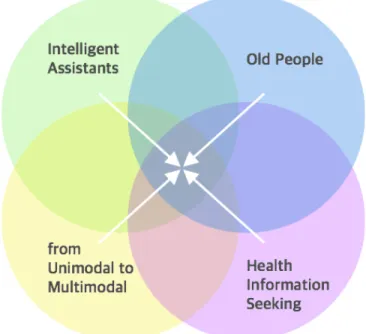
This section discusses four major areas of the previous work within the field of health related information search via intelligent assistants or chatbots to better help understand the findings of this research paper in context. The first part of this section focuses on the effectiveness of the voice-based intelligent assistants and their usability in the information search. The second part of this section covers the trend of the development from unimodal to multimodal intelligent assistants in terms of the information search. The third part of the section pays attention to the elderly as the old users in the human computer interaction with the
intelligent assistants. The fourth and final part of the section identifies the gap between the previous study on the involvement of old people with both unimodal and multimodal intelligent assistants and the specific health-related task-based information search.
2.1 The Effectiveness and Usability of Voice-based Intelligent Assistants in Information Search
The voice-based intelligent assistants, such as Apple’s Siri, Google Now, and Microsoft’s Cortana, are popular on mobile devices to help users quickly conduct the simple tasks like chat and web search in today’s world. Instead of typing the text, the users are able to vocalize their search queries through voice-based intelligent assistants. To define the intelligent assistant, it is the software that has been designed to assist people with basic tasks, in most cases, offering information based on the natural language processing (Jiang, et al., 2015). Based on the
foundation of the theory of voice-based intelligent assistants, the previous study has conducted diverse tests and experiments with different target groups to discuss further in the effectiveness and usability of the voice-based intelligent assistants in the recent five years (Kiseleva, et al., 2016).
voice-based intelligent assistants with an emphasis on the interaction signals, which turns out to be the involvement of interaction signals like physical touch gestures and voice commands will enhance the user satisfaction of the information search with voice-based intelligent assistants (Kiseleva, et al., 2016). The other way to improve the information retrieval to be efficient and effective has also been proposed at the same period of time, which is to have a tighter integration between document search and conversational processes in order to refine the cognitive
limitations and transient nature of audio (Trippas, 2016).
As for the search tasks that are more complex than the simple basic queries, voice-based intelligent assistants that are able to understand high-level task with multiple applications have been proposed. From the experiments, the potentials and possibilities can be deduced as the high-level task understanding will enhance the user satisfaction and efficiency with voice-based intelligent assistants (Sun, Chen, & Rudnicky, 2016). This year, the research on the usability of voice-based intelligent assistants have been applied to the home environment (Park, Kang, & Seo, 2018). The focus of research is around building a framework to develop an entire task-oriented dialogue system by voice-based intelligent assistants, which sets a foundation for the further research on the improved experience with voice-based intelligent assistants at home settings and in daily-life use.
2.2 From Unimodal to Multimodal Intelligent Assistants
With a series of research and study in effectiveness and usability of voice-based
of functionality, ranging from single modality to multi-modality. Back to 1993, Niels Ole Bernsen first introduced and defined the Modality Theory, and in 2002 he took his theory a step further. In Bernsen’s definition, modality means “mode or way of exchanging information between humans or between humans and machines in some medium”, and the basic properties of the modalities are linguistic, analogue, arbitrary, static-dynamic and their expressions are
graphics, acoustics, and haptics (Bernsen, 2002). Therefore, the voice-based intelligent assistants are unimodal chatbots and the multimodal application is to combine the text, voice and touch together. In 2004, Bernsen and his team evaluated the usability of both unimodal (spoken
language dialogue) and multimodal system, and they concluded that with important progress has been made to the unimodal in spoken language dialogue, the trend and new challenges turn to the multimodal system (Dybkjaer, Bernsen, & Minker, 2004). In the same year, two modalities, spoken and written (voice and text) were taken into comparison in terms of the efficiency in information search, and the results show that each one of the modality has certain advantages (Bigot, Jamet, & Rouet, 2004).
As for the research focusing on multimodal interaction, another multimodal interaction design researcher published research in 1999 on revealing the myths of multimodal interaction to the public, which claims that the multimodal interfaces are highly synergistic blend, being able to “provide users with greater expressive power, naturalness, flexibility, and portability” (Oviatt, 1999). Later, with the further development of multimodal interfaces, Oviatt and two other researchers built the theoretical foundation and summarized the practical modeling of
Oviatt, 2009). Based on the framework of multimodal interaction, researchers are optimistic about the driving direction of the design and its revolutionary impact on users’ interface interaction experience, while they are aware that the potential difficulties when applying the multimodal interfaces to the practical world.
The comparison between voice and text modality has been further analyzed in the realm of search query. As for the factors that influence the selection of text or voice, the length of the query is a major one, for which typing has a higher probability than speaking in longer queries (Kamvar & Beeferman, 2010). According to the findings, actions like typing to correct bad performing queries or removing a word to stop exploring a subtask are taken by users to help improve the search by the voice modality (Jiang & Ni, 2016). Therefore, based on the literature, the action to combine two or more modalities in the intelligent assistants is conducive to provide users with a more efficient, satisfactory search experience. In addition, under the trend of
exploring the multimodal intelligent assistants, there are teams that took actions to compare the virtual intelligent assistants like chatbots with the real person this year. One of the study shows that the emotional disclosures are equivalent whether towards chatbots or real person (Ho, Hancock, & Miner, 2018). The other study shows that users are less negative effect in the interaction with a simpler text chatbot than a more complex avatar one (Ciechanowski,
Przegalinska, Magnuski, & Gloor, 2018). The comparison among simple text chatbot, complex chatbot, and real person will help to shape the development direction of multimodal intelligent assistant application in the future.
Though the literature review in the intelligent assistants and modality has a lot to explore, the study that focuses on the audience group of old users is scarce. The first relevant one that can be dated is in 2004, a design that provides the theory and rationale of multimodal interface to support independent living by older people, especially in healthcare. The design combines the text and graphic information, audio alert of emergency, and sensors to trigger sequences of interaction with the residents (Perry, Dowdall, Lines, & Hone, 2004). In 2010, a study shows the findings and analysis of old users’ interaction with touch, speech, and motion control to seek for a way to better include the old users in this type of multimodal interaction with the smart system (Naumann, Wechsung, & Hurtienne, 2010). It points out that the major promise of multimodal user interfaces of the smart system for old users is to have the choices of input modalities that suit their capabilities and needs, which is also the reason why multimodal intelligent assistant is the trend for old users.
2.4 Health-related Task-based Information Search with Intelligent Assistants for Senior Citizens
The study pertaining to the information search with intelligent assistants in health-related topics is very rare and limited, and most of them are around mental health. Two of the most relevant ones were conducted last year. One study is about the user interaction with the conversational chatbots to promote the mental health, for which the high engagement and adherence of the interaction does bring benefits to the users’ mental health (Ly, Ly, &
Andersson, 2017). The other one is also about the mental health interventions with one-on-one written conversational chatbots, but this one has a larger groups of participants and reviewed articles covered. It shows that the dialogue chatbots bring significant and sustained improvement in mental health outcomes rather than the text-based interventions, but not as helpful as the face-to-face talks (Hoermann, Mccabe, Milne, & Calvo, 2017).
Research has shown that one of the major usage of the web or online search systems is to search for health information by the general public (Morahan-Martin, 2003), but the recent research on the quality of health information search available on the Internet also shows that it is still under-appreciated and under-leveraged (Czerwinska, 2017). Based on my literature review above, it’s easy to see that while the voice-based and multimodal intelligent assistant is in the technological trend to increase the effectiveness of human lives, the specific target group, old people, and their specific concerned task, health-related information have not been fully
3.
Methodology
This section introduces the approach, features and procedure of conducting usability evaluation of intelligent assistants for old people to seek health information, with data collection and analysis leading up to the implications of the research. This usability study was conducted in the Manning Hall in March of 2019. The general experimental design methodology that has been implemented through this study is a within-subjects design, for which the same participant tests all three task scenarios. This design method is aimed to minimize the random noise and require fewer participants and cheaper to run. In my research study, all participants completed the same set of tasks and were asked the same questions in the questionnaire and interview section. I’ve collected both qualitative and quantitative data. The qualitative data includes the pre-study questionnaire, post-study questionnaire, and semi-structure interviews. The quantitative data includes the time to complete task, the number of errors, and the number of steps taken by participants (perceived difficulty).
3.1 Participants
I planned to recruit 5 to 8 participants, and ended up with 7 participants completing the study. I recruited the 7 participants through in-person talks, emails sent to the mailing list of UNC staff and adjunct faculty pool and posters put on the notice board on campus within the departments. The full recruitment information can be seen in Appendix 8.1. In order to be eligible for this study, participants have to be over 60 years old with basic knowledge of
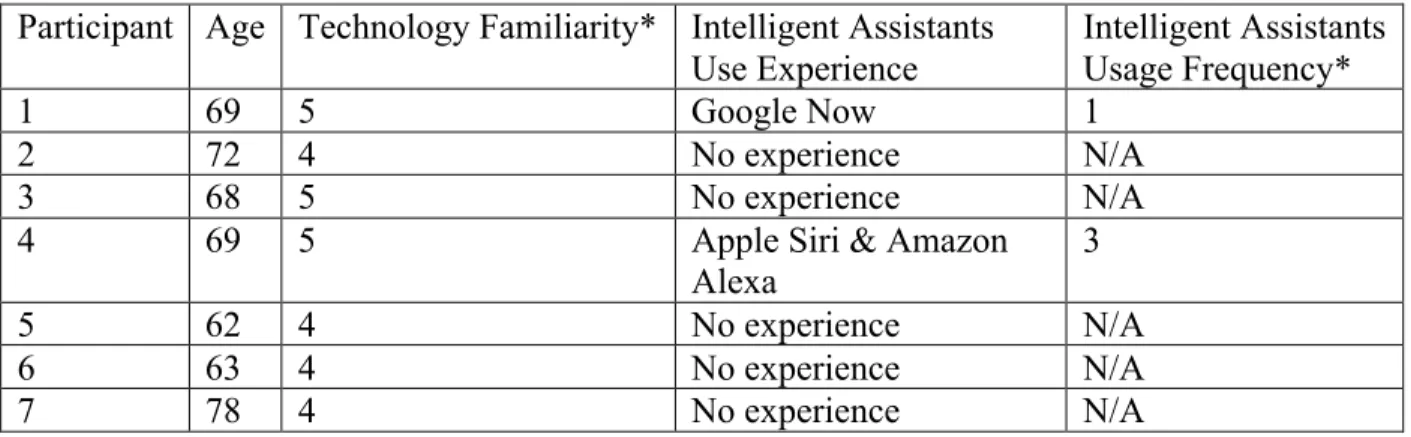
Table 1: Participant Demographics
Participant Age Technology Familiarity* Intelligent Assistants Use Experience
Intelligent Assistants Usage Frequency*
1 69 5 Google Now 1
2 72 4 No experience N/A
3 68 5 No experience N/A
4 69 5 Apple Siri & Amazon
Alexa
3
5 62 4 No experience N/A
6 63 4 No experience N/A
7 78 4 No experience N/A
*Technology Familiarity Coding: from 1 to 5 à Not Familiar to Experienced *Intelligent Assistants Usage Frequency Coding: from 1 to 5 à Not Frequently to Always
The reason of choosing this recruitment method was to get senior citizens of diverse experience levels with the intelligent assistants. To have participants from different experience levels is intended to gather information from a more inclusive and constructive perspective. There was an interesting thing found in the participant demographics that all 7 participants have rated that their familiarity with technology is pretty high, which indicates that they have
confidence in their use of technology. Since my target audience of the participants focuses on the university faculty who have daily access to certain amounts and levels of technology, one
limitation of the testing will be that it is unavoidable the results represent the group of old people who are well-educated and have technology knowledge above the average instead of the average older adults.
3.2 Task Selection
tasks, including 1 easy-level task, 1 medium-level task, and 1 hard-level task. The design of having training test task is aimed to help participants familiarize themselves with the device and interacting with it. The selection of task scenarios is based on the top questions in the field of health information that senior citizens search online. The topic of the test task scenario is fitness. The topics of the formal task scenarios are find medicine, show place and direction, and self-diagnosis. The “find medicine” and “show place and direction” tasks had exact answers that could be found within the simple search of the database of the intelligent assistant. The “self-diagnosis” task was more open-ended and was designed intentionally to see how participants interacted with the device to explore. There was no exact set answer for the final task.
The wordings of the task list are as follows:
First, try to use the test task to familiarize yourself with the device and interact with it.
(Test Task) Scenario N (Fitness): Look for recommendations to devise fitness workout plans for senior citizens. (5 minutes)
Ready for the three tasks? Let’s do it!
Scenario A (Find Medicine): You just happened to burn your hand while cooking. Find out the treatment and medicine you can take to deal with a burn. (5 minutes)
Scenario B (Self-Diagnosis): You recently have symptoms of blurry vision, acid reflux, and itching of the skin, so you are trying to conduct a brief self-diagnosis with Amazon Echo Spot before going to the healthcare center. (5 minutes)
Scenario C (Show Place): After you conduct a self-diagnosis, you decide to go to a health center/ hospital to make an appointment. Find out the closest and best health center/ hospital near you. (5 minutes)
3.3 Devices and Environment
characteristics that have been taken into consideration include voice input and output, natural language, intelligent interpretation and agency (Bickmore, et al., 2018). Amazon Echo Spot is an Alexa-enabled speaker with screen produced by Amazon.
The usability study research was conducted in a quiet room, either the participant’s office or study room in the Health Science Library, in order to avoid the disturbance of environment noise. Although the real-life experiences of the interactions with intelligent assistants often involves noise and interruption, I’ve got rid of those factors to simplify the testing.
3.4 Procedure
The participants were asked to sign the informed consent form at first, and then they were asked to fulfill a background data collection pre-study questionnaire. Next, they watched a brief introduction video (total length: 1 minute 41 seconds) introducing the device and get themselves familiarize with the device by completing the test task. Then, they were asked to work on the three formal tasks in sequence. They had 5 minutes for each task and they could move on to the next one once they think they have accomplished it. Finally, they were asked to answer a post-study questionnaire (System Usability Scale) and an interview with eight interview questions. The total usability testing time is about an hour, and the entire process has been audio recorded for the future references and records. The informed consent form and task list were printed on separate sheets of paper, and the pre-study and post-study questionnaires were required to be completed on Google Forms online.
whatever they were looking at, thinking, doing and feeling, as they were dealing with their tasks. As the observer, I took notes objectively of everything the participants said, without attempting to interpret their actions and words.
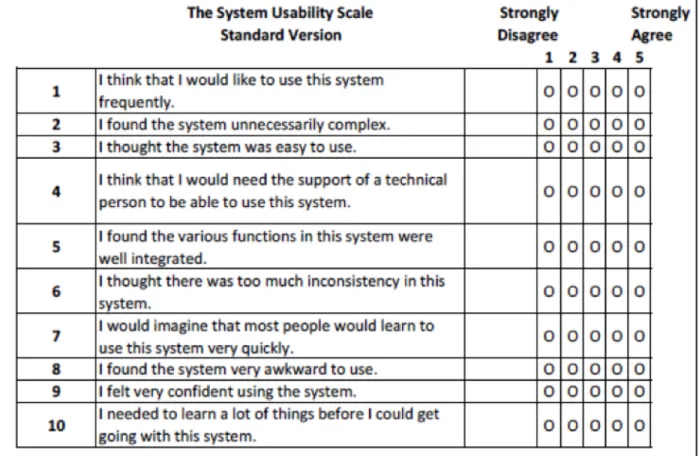
For the post-study questionnaire, participants were asked to complete System Usability Scale (SUS), the most commonly used reliable tool for measuring the usability. An exact copy of the SUS questionnaire can be seen in Table 2.
Table 2: System Usability Scale (SUS)
measures the first four quality components of the definition of usability by Jakob Nielsen,
including learnability, efficiency, memorability, and error rates (Drew, Falcone & Baccus, 2018). For the interview, participants were asked to describe the satisfaction level on the
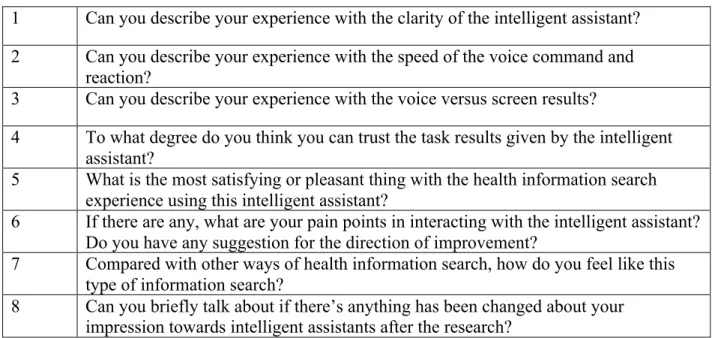
performance of the intelligent assistants in seeking health information. The intent of interview is to measure the last quality component of usability, subjective satisfaction. The interview
questions included the clarity and speed of the intelligent assistant’s language, the voice versus screen results, and participants’ trust in the task results, the pain points they encountered,
comparison with other ways of health information search, and the change of impression towards intelligent assistants. The full text of the interview questions can be seen in Table 3.
Table 3: Interview Questions
1 Can you describe your experience with the clarity of the intelligent assistant? 2 Can you describe your experience with the speed of the voice command and
reaction?
3 Can you describe your experience with the voice versus screen results?
4 To what degree do you think you can trust the task results given by the intelligent assistant?
5 What is the most satisfying or pleasant thing with the health information search experience using this intelligent assistant?
6 If there are any, what are your pain points in interacting with the intelligent assistant? Do you have any suggestion for the direction of improvement?
7 Compared with other ways of health information search, how do you feel like this type of information search?
8 Can you briefly talk about if there’s anything has been changed about your impression towards intelligent assistants after the research?
3.5 Full Schedule for Study Timeslot
Video introduction of the device: 2 minutes Test task: 5 minutes
Three formal tasks: 15 minutes Post-study questionnaire: 5 minutes Interview: 10 minutes
4.
Findings
This section first builds a common understanding of the device, Amazon Echo Spot by talking about its design. Then, I present and analyze the results and data collected in the study, including both quantitative and qualitative data.
4.1 About Amazon Echo Spot
Before presenting the analysis of the task results and data, it is crucial to first introduce and explain the device for people to have a better understanding of the data. Amazon Echo Spot is a multimodal ball-shaped, home-based intelligent assistant device, and the description used in its marketing is said to be “Alexa-enabled Speaker with 2.5-inch screens”. The cloud-based voice service has a wide variety of usages, and it can be used to retrieve information in its database and answer the questions. In terms of the functionality, people can touch the screen, type the text, talk to Alexa, and watch the information (text, image, video, etc.) shown on the screen (Berger, 2018). To use the device, people need to say a sentence starting with the word “Alexa” to wake it up, and on the screen there will be a blue and green neon color circle to indicate people that Alexa is listening their query. There are three buttons on the top of the Echo Spot, one is the Mics/ Camera Button, one is the Volume Up Button, and the other one is the Volume Down Button. In the back are the Power Port and 3.5 mm Audio Output.
Figure 3: Echo Spot Design Layout
4.2 Pre-Study Questionnaire Results
The data collected in the pre-study questionnaire was used for learning about the background demographics of participants, and the exact data was shown in the Table 1:
participant demographics in the 3.1 Participant. Below is the data analysis of the pre-study questionnaire.
Table 4: Age Result
Age Technology Familiarity*
Intelligent Assistants Usage*
Intelligent Assistants Usage Frequency*
Average 68.71 4.43 0.29 1.67
Min 62 4 0 1
Max 78 5 1 3
*Technology Familiarity Coding: from 1 to 5 à Not Familiar to Experienced *Intelligent Assistant Usage Coding: 0 to 1 à Have Never Used to Have Used *Intelligent Assistants Usage Frequency Coding: from 1 to 5 à Not Frequently to Always
Based on the data collection, it’s interesting to see that most participants were confident about their familiarity with the technology. I was surprised to see that the previous usage of intelligent assistants was low, and the usage frequency was also pretty low.
4.3 Task Results
Complete tables containing all quantitative date collected for each participant can be found in Appendix 8.7.
Task 1: Find Medicine Summary Statistics:
Completion Rate: 100% (7 completed out of 7)
Table 5: Task 1 Results
Time (Sec) # of Errors
Average 66.43 3.14
Standard Deviation 35.40 1.35
Max 143 5
This was the first task after giving the participants time to familiarize themselves with the test task, and the difficulty level set for this task was easy. The scenario was intentionally
designed to be straightforward and single task. This task had no failure, and every participant retrieved the right answers after making several attempts. The time they spent on this task varied from less a minute to over two minutes, but the number of errors was pretty close that everyone had run into a few errors before they got the right one.
There are two main problems participants usually ran into. The first one always happened at the beginning that participants tried to describe the scenario as clearly as they could, but unfortunately what they got after a long sentence description was answers like “I don’t know that one” and “Sorry I’m not sure” from Echo Spot. The second problem happened to some was to be redirected to the dictionary to get information about the medical explanation of burns. Based on the errors made by participants, it’s safe to say that the ways to phrase the question query simple and use the right key words were key to success. In addition, since this was the first task, some participants were often easy to forget starting their questions with “Alexa”, but once they waited a few seconds and got no reaction from the Echo Spot, they were able to realize what had been neglected by them.
Task 2: Self-Diagnosis Summary Statistics: Completion Rate:
• Individual Task: 71.43% (5 completed out of 7) • Combination Task: 0 (0 completed out of 7)
Table 6: Task 2 Results (Individual Task)
Time (Sec) # of Errors
Average 192.7 7
Standard Deviation 85.81 4.51
Max 300 14
Min 101 1
The second task was supposed to be the hardest one among the three tasks, so the difficulty level was hard. This task was a combination task that required the participants to diagnose three symptoms through interacting with Echo Spot. Sadly, no one was able to complete the combination task, since the memory state of Echo Spot was unable to process the complex, combined query, especially targeted the relationship of the three symptoms. However, five of the participants successfully figured out the way to retrieve the answers for all three individual symptoms, and surprisingly two participants did it in a right way without making more than one error. The range of time spent on the individual task varied from no more than two minutes to almost five minutes. The number of errors on the individual task was also hugely different, ranging from one error to eleven errors.
retrieve information that needs to deal with the relationship between the two or three core factors. Therefore, they broke down the combination manually and switched to simpler question mode by putting the individual factor into question one by one. One participant learned from the first task that Echo Spot did way better in receiving the short, simple query than long, complex one, so she tried the individual question first and made attempts for the combination query after receiving the correct information retrieval results for the individual task. Sadly, the rest of the two participants got stuck in the combination task with over twenty attempts and failed to complete when the five-minute task time ended.
The combination task was intentionally designed to see how participants would adjust their ways of approaching Echo Spot once they could not get the results as expected. From the task designer’s point of view, the process of observing and analyzing different ways participants chose to tackle the task was more valuable than having them complete the task itself.
Task 3: Locate Place Summary Statistics:
Completion Rate: 100% (7 completed out of 7)
Table 7: Task 3 Results
Time (Sec) # of Errors
Average 97.86 3.57
Standard Deviation 66.61 2.37
Max 205 7
Min 15 1
task, and it’s interesting to see that the time participants spent and number of errors were different from one to another. The fastest one spent only 15 seconds with one error completing the task, while the slowest one spent over three minutes with 7 errors figuring out the right way to find the location and direction of nearby hospitals. According to my observation, it was not hard to get the hospital list recommended by Echo Spot based on Yelp’s ratings, but it was harder to make Echo Spot recommend healthcare center or hospital based on real-time location.
Though everyone managed to complete this task, there are still challenges along the way. Some participants found it hard to make Alexa give recommendations or suggestions based on personal case scenario. The list given by Echo Spot was too general, and when they tried to add more details into the question and make a more personal query, Echo Spot was not able to provide them with the ideal results. It’s worth noticing that one of the participants tried to make Echo Spot call the hospital or physician to make appointments, but Echo Spot was only able to contact people from the user’s existing contact list instead of calling the phone number on the information screen it displayed. In addition, the source Echo Spot used to come up with the hospital list was Yelp, a rating source that most participants were not really satisfied and did not give much trust. When they asked Alexa to switch to another source, it seems that it didn’t have other alternatives. Besides, two participants ran into a problem that they could see the screen displayed the basic information of the hospitals but they didn’t realize that they could scroll down the screen to see more information like the ratings of the hospital until they’ve tried to ask Alexa for several times and expected to hear the answer via the voice.
After the participants finished the task session, I instructed them to complete a post-study questionnaire, which was SUS questionnaire used to evaluate the usability of the system. The average score was 46.43, with a range of 10-80 and a standard deviation of 22.27. According to the SUS Scores Interpretation shown below, based on Bangor’s scales, using Echo Spot to search health information for senior citizens is tend to be put into the range of Poor-Ok and not
acceptable situation.
Figure 4: SUS Scores Interpretation
Figure 4. Adapted from “Determining What Individual SUS Scores Mean: Adding an Adjective Rating Scale,” by A. Bangor, P. Kortum, and J. Miller, 2009, Journal of Usability Studies, 4(3), p. 121. I have put the measured SUS score of this study to the figure to help interpret what numeric score means.
Sadly, it’s clear that the SUS score was not pleasing and the results have indicated the problems involved in the usability design of Echo Spot to be used in the field of health
for the design team of multimodal devices for health information search to make efforts to achieve better scores and usability experience.
4.5 Interview Results
For the interview session, I selected the semi-structured format so that I could make sure I got the major questions covered and at the same time had the flexibility to add more questions based on participants’ answers and the direction of the conversation. I designed eight questions, which were able to get the subject opinions towards the usability of the device and the potential change of attitudes involved.
Q1 Describe experience with the clarity of the intelligent assistant.
Overall, most participants agreed on the fact that the voice quality was pretty clear and as participants they could hear the voice well. The words they used to describe their feelings of the clarity of voice were “impressive”, “pleasing”, and “easily understood”. One of the participants made a comparison with previous impression and made a comment that it was better than thought. In terms of the screen, two participants mentioned their experiences, but the opinions were divided. One had a positive attitude that the resolution of the screen was high and it was a nice piece of digital product. The other participant pointed out the struggles that the clarity of the screen was not satisfied due to the fact that the text was kind of small and limited, as the
As for the clarity of the responses in information retrieval, sadly no one was satisfied at all. The common words they used to describe were “disappointed” and “frustrated”. Based on what most people expressed, the unexpected ambiguity showed up because questions were understandable in Echo Spot’s system but never seemed to have a good match with what it delivered. For instance, two of the participants gave similar examples that they were surprised by the number of words that they thought mean one thing but being interpreted by Alexa as another thing, so they were redirected to irrelevant categories like movie, music, and shopping.
Moreover, participants complained that the device seemed have very little conversational state so they could not really ask follow-up questions. According to their task experiences, Echo Spot could not process the complex phrases and questions with two or more combinations well.
Q2 Describe experience with the speed of the voice command and reaction.
All the participants reached an agreement on the point that the speed and pace of Echo Spot was perfectly fine. The delay in information delivery was very minor, and there were no long pauses after completing the query. The response was pretty quickly. In particular, one of the participants mentioned that he liked the circle at the edge of the screen shown up once Alexa heard the question because it implied that Alexa was listening and thinking. In terms of the potential waiting time for the follow-up questions, one participant raised a question that it would be worth also testing how long Echo Spot could wait for a follow up response. It was consistent with my observation on the task session that the response came back fast.
For the comparison between the voice information display and screen information
display, participants have different perspectives on it. Among the seven participants, five thought that they could live with the voice alone because the screen seemed to matter but not that much. For the rest of the two participants, one thought it didn’t make that much sense to have the display of duplicated information in voice and screen, and the other one thought both were pretty equal and almost the same to him. In general, the screen was helpful because normally people could read faster than the voice. However, in this case the five participants who thought the screen didn’t matter was due to the fact that even though in the task it showed the text from the Mayo Clinic, while it read aloud, what mattered was the voice. Based on their description of experience, the screen was small to read, so it was easier to just listen without paying much attention to the screen. If the screen was larger, one of the participants predicted that there would be more interaction with the screen itself.
One of the participants pointed out that “split between what would show and what would speak didn’t make a lot of senses to me”. In his point of view, anytime with the task that
retrieved information from the source of Mayo Clinic, the text and voice were the same and duplicated. However, for the task that relied on the source of Yelp to provide information with the nearby hospitals, there was no mention in voice for the ratings. But for the one participant who thought the screen was actually helpful, he said especially for the hospital list, people could get much more information from the screen that from the voice, which means one of the
advantages of the screen was to display more information at once for reference.
The perspectives shared in this question were dramatically various. One participant gave a very positive answer that it seemed entirely trustworthy. Except for it, the other six participants had concerns about the task results and source of information retrieval of health-related data to different extent, and two of them had extremely negative opinions towards Echo Spot’s database and didn’t trust it at all. According to their description, the concerns included redirection to other irrelevant categories like shopping site, not knowing much information about the users, the reputation and trustworthiness of the sources like Yelp, and limitations on information display without making efforts to solve problems.
According to one participant who thought she could differentiate the true fact and
digressive information, she said it was clear that “when it’s wrong, it’s dramatically wrong”. For the first task, it was frustrating to get the Alexa answer the treatment of the burn question, and she would either get “Sorry I don’t know” or the answers with unnecessary burns. For the second task on self-diagnosis, the answer was reasonable piece by piece since it went along with what she already knew, but it never worked when being asked together. For the third task on nearby hospital, she was aware that the hospitals on the list recommended by Echo Spot were not the same type of hospitals, and Yelp was not necessary for the hospital ratings. All in all, most participants touched on the same point that if they asked Echo Spot something that they didn’t know, this was just the first-step search since for the next step they would go on web search like Google to collect information from more sources and verify.
Q5 Most satisfying thing using Echo Spot to search health information.
participants mentioned that the video popped up from Washington Post for the test task was funny to watch, and they could even imagine themselves doing stuff recommended by the video. Except for it, the fact that once you used the correct words to form the questions they would immediately retrieve the corresponding information was pleasing. It didn’t take many tries to do one thing at a time was great, though most of the time the participants couldn’t figure out how to make the combination work.
Q6 Pain points interacting with the intelligent assistant.
In terms of the struggles participants have encountered, most of the complaints were centered around the sources and database that Echo Spot used to retrieve information. All
participants agreed that for simple questions like “show me a list of nearby hospitals”, Echo Spot could easily find the correct information in its database, but for more complex questions like a combination of over two symptoms, Echo Spot had a hard time understanding the query and parsing the syntax. Therefore, the participants suggested that for the complex questions, Echo Spot should either specify its searching category into the actual field, for instance, WebMD in the field of health information, or have a system that could automatically complete the query and could be adjusted in a type-based system for clarification.
actually it cannot”. It was okay for locating certain things, but unfortunately it was not effective on solving problems.
Q7 Comparison among other ways of health information search.
All participants had very similar answers for their opinions on comparing the experience with other searching approaches. Everyone mentioned type-based web search, especially Google and DuckDuckGo searching engines, to be their top choice. The reasons they gave for their preference on web search were the autonomy and clarity of the text-based query and a wide variety and large number of results it could show up within seconds. Then they could compare the results and look for the repeatable ones to trust. One described the experience with Echo Spot as “pretty close to useless”, and another participant even went to more extremely negative side and described it as “worse than useless”. Besides, another way suggested by participants that they would specifically choose to go to for medical questions were to visit the professionals directly because the answers they got from Echo Spot were not the real too general for serious health information.
Q8 The change of impression towards intelligent assistants after the study.
For participants who had intelligent assistants at home and used them on a daily basis, they were aware that the reaction of Echo Spot was prompted and it had commercial bias. In addition, in their perspectives, the need and motivation of intelligent assistants was to alert people and do fact retrieval. Thus, according to their previous knowledge and experience, they concluded that for simple, straightforward, and non-technical tasks, everyone was happy with the results they got. However, for something obscure, complex and on the multiple combination level, frustration went up. It was a little bit surprise to some to figure out Echo Spot’s inability to compare and show different sources at the same time for people to check.
5.
Discussion
This paper aimed to answer the following main research question: How can the use of intelligent assistants help older adults to seek health information?, by evaluating the usability experience of senior citizens interacting with Echo Spot to search health information.
The usability study is an effective way to see how good or bad the device performed for the specific user need. In this case, the user need is to help older adults search for health
information. In this section, I’ll discuss the main research question along with RQ1 and RQ2 based on the analysis of the research process performance and research results. Then, based on the performance, I'll propose areas for improvement as well as limitation that the research might have.
5.1 Evaluating Usability
To answer my research questions, I need to first measure the usability of intelligent assistants relying on the three metrics: effectiveness, efficiency, and satisfaction.
First of all, as for the effectiveness, it can be calculated by measuring the completion rate and number of errors. Statistics have shown that the completion rates for the three tasks in the order of difficulty level from easy to hard are 100%, 100%, and 71.43%. Also, it’s worth
The average number of errors for the three tasks in the order of difficulty level from easy to hard is 3.14, 3.57, and 6, from which it shows a trend that the harder the task, the more
number of errors would be encountered. The types of errors that participants usually encountered involve redirecting to other searching categories, no reaction, and extracting wrong phrases to process the query. The number of errors was high compared to the average error rates in the usability study, which indicates that the user might have a hard time finding the experience to be effective since they may not be able to get the correct information retrieval until they receive several wrong results or no reaction.
Therefore, to take both completion rates and rate of errors into consideration, the effectiveness for using Echo Spot to retrieve health information for older adults is not bad. For the simple, easy questions the effectiveness might be higher, but sadly, for the complicated, hard questions the effectiveness is pretty low.
Secondly, as for the efficiency of the system, it can be calculated by measuring the task time. For the easy-level task, the average task time was 66.43 sec with a range of 42-143 sec. For the middle-level task, the average task time was 97.86 sec with a range of 15-205 sec. For the hard-level task, the average task time was 192.7 sec with a range of 101-300 sec. I’ve tested myself doing the task and calculated the time to use for the benchmark study. For the easy-level task, the benchmark time was 18 seconds; for the middle-level task, the benchmark time was 25 seconds; for the hard-level task, the benchmark time was 62 seconds.
According to the line chart, the time spent for completing tasks is in a positive correlation with the difficulty level of the tasks, but the time spent on the same task for different participants varies a lot from one to another. Overall, the time spent on completing tasks was much longer than expected. Compared with web search, it takes much longer time to retrieve information than text-based searching engines. However, since the web search does not involve dialogues and conversations, it can make a huge difference for the time spent via different ways of information retrieval. Still, the efficiency of using Echo Spot to search health information is not that good compared to other ways of information retrieval like online web search.
adjective ratings were in the Poor-Ok range, slightly linear towards okay, which indicates that the common subjective feelings towards this system were mediocre, not obviously positive or negative.
Qualitatively, according to the interview, there are two questions specifically targeted at the satisfaction level of the system. One was the satisfying moment when using Echo Spot to search health information, and the other one was the pain points encountered in the process. To analyze the answers that being collected, it’s not hard to tell that participants had a hard time thinking of the pleasant moment but were easy to give examples to express their difficulties in information retrieval. For the satisfying moment, things people talked about are minor, like the entertaining quality of the videos it retrieved. The only one thing that being mentioned is important was the fact that it was easy to learn to use this device. As for the pain points and challenges, the range of elements being mentioned were larger and more relevant to the core quality of the health information search behavior. Things like how to phrase the question query for the device to be able to understand correctly were challenging to many, since the design of its in-built database and language processing system were not able to take multiple factors at the same time. Therefore, the qualitative data has shown that the satisfaction of using Echo Spot to search health information was comparatively low.
All in all, based on the three usability metrics above, it’s surprisingly unexpected that the usability of conducting health information retrieval on intelligent assistants like Echo Spot by senior citizens is not ideal as the design concept showed.
My first research question was: RQ1: Can intelligent assistants’ voice-based design help lower the barriers for old people to search and find health information? Compared with text-based web search, the voice-text-based design of Echo Spot is only able to help retrieve simple and basic health information like finding medicine and locating hospitals with voice interactions and dialogues, but unexpectedly the efficiency and effectiveness are pretty low. What is worse, as for the complex, multi-element health information like symptom self-diagnosis, the voice-based design is unable to help lower the barriers for older adults to search and find the correct answers, because it cannot process the query correctly in its language processing system. In terms of the subjective feelings, though the participants have reached an agreement that the voice-based design does help to add another layer of interactivity to information search behavior, unfortunately it does not help enhancing the satisfaction on information search at all.
According to the qualitative data collected in the interview session, the multimodal design does have influences on the usability. From the research observer’s point of view, it’s interesting to see the participants’ reactions in how they chose the modality, in particular when they switched to touch the screen and when did they switch back to the voice. Participants have noticed that sometimes Echo Spot’s voice and screen chose to show the same information at the same time, but sometimes the voice showed part of the information while the screen showed the rest of it. However, for most participants they chose to focus more on the voice and paid less attention to the screen, even though normally to read was faster than to hear. Because the screen size was pretty small for them and the dialogue system was intentionally designed to be the major communication approach. Therefore, the unequal distribution of the weights in speaking, typing and touching led to unequal distribution of attention and thus, unbalanced experiences of various modes of information retrieval.
Based on the research results from using Echo Spot to conduct tasks and retrieve health information, it’s reasonable to conclude that the multimodal interfaces of current design and development of Echo Spot do have an influence on users’ information search behavior and usability. However, it’s confusing and frustrating for them to figure out how to efficiently and effectively tackle the behaviors of user query and information retrieval with the multimodal interfaces. It cannot be denied that the roles different modalities play and how they work together to complement each other for an advanced experience in the multimodal intelligent assistants should be further improved and clarified.
Although the quantitative data analyzed from the results of usability study seems to drive the discussion into the direction that currently intelligent assistants are not helpful in enhancing the user experience in health information search, the potentials hidden in the design and
development of multimodal intelligent assistants are still huge. The unimodality might not help improve the usability, but the combination of multiple modalities might have better chances in future endeavors. Based on the qualitative data collected from the interview, it could be possible that after learning how to use the intelligent assistants and knowing the intelligent assistants’ syntax processing habits, the usability of retrieving simple task would be enhanced largely. It was mentioned by some participants that to imagine having a home-based intelligent assistant and wake up with it is a lovely thing. Once the multimodal interfaces have a clear division of tasks that they need to be responsible of, the cooperation of speaking, touching and typing
modality would have the potentials to be capable of delivering the messages and information in a more time-efficient, effective and satisfactory manner.
sources and database, and the wide range of information that is able to be retrieved are the most necessary features that participants agreed they wish the intelligent assistants could have.
For the world of theory, the research shows both the qualitative and quantitative
measurement of the usability senior citizens have experienced for using intelligent assistants to search health information, which can be able to open the door for the entry-level analysis on how to use the multimodal interfaces well to improve the usability in terms of the efficiency,
effectiveness and subjective satisfaction. For the world of practice, the research analyzes the detailed challenges and concerns users might have when interacting with the multimodal intelligent assistants, which have paved ways for the next-level redesign to revolutionize the products for a better user experience with multimodal interfaces in health information search.
5.4 Limitations
Though I tried to be as unbiased as possible when designing the research, there are certain restraints that were unable to avoid in the research design but would have an impact on the outcomes. The major constraints that being discussed in the below are task selection and design, think-aloud protocol, the sequence of tasks, participants’ familiarity with technology and intelligent assistants, and participant recruitment limitations.
First of all, the task selection and design might be a major factor that affect the scores and usability of using Echo Spot to search health information. When I designed the tasks, I
usability, I designed the three tasks to be varied in the degrees of difficulty. Therefore, the tasks were designed to be under three different topics and three diverse difficulty levels. However, normally researchers chose to either put three same topics under different difficulty levels or three different topics under the same difficulty levels. For my research task design, there are two major variables involved, topics and degrees of difficulty, that would affect the search results and usability. Because of the two variables, when discussing the data collected and the correlation of the trend, it’s hard to determine which one has a dominant effect and which one has a minor influence.
Secondly, the think-aloud protocol could be a reason that influences the accuracy of the metrics. As for the research study with seven participants individually, there are time when participants forgot to think aloud and the observer were not allowed to interrupt the session so that the feedback from think-aloud was not enough to be taken into consideration. In addition, for participants who remembered to think aloud, the time they spent to talk about their thoughts and difficulties was included in the time they used to complete the task, so the time spent on each task was supposed to be longer than the scenarios when they solely focused on the task without talking and sharing thoughts. Therefore, even though think-aloud protocol is a useful tool to help researcher understand the users’ way of thinking and determine the exact issues the participants are facing, it should be taken into consideration that this protocol is a limitation on collecting the accurate data to be used to compare and measure the efficiency parameters.
outcomes because participants tend to be more familiar with the interactions after they completed the earlier tasks. The test task before the formal ones was intentionally designed to help
minimize the effect of the task order, but according to the observation on participants’ reactions, they used things they learned from earlier attempts to be more efficient in later ones.
Fourthly, the participants’ familiarity with technology, especially multimodal interfaces and intelligent assistants, had an impact on their experience. Though most of the participants were first-time users of intelligent assistants, two of the participants were pretty experienced in interacting with intelligent assistants. I have asked them to rate their familiarity with technology before the study, and according to the data collected, every participant said they were pretty familiar with the technology use. However, based on what I have observed during the study, the scale of self-ratings was not the same to every participant’s understanding, which I didn’t specify in the choices. Two of the participants who have rated “5” for familiarity with technology use had different difficulty when making attempts in interact with the voice and screen modalities. Therefore, the difference in experience levels with technology as well as intelligent assistants would be one of the limitations that affect the outcomes.
6. Conclusion
This research study expands earlier works on the usability performance of multimodal intelligent assistants in the field of health information search by senior citizens. Intelligent assistants are able to bring the health information search to an advanced level by having
conversations and touch interactions with the device instead of text-based searching engine. It is important to have usability evaluation of system and device to push the design and development of the information search and retrieval experience to be better. With the growth of the market and user need in the field of multimodal intelligent personal assistants, it is absolutely necessary to conduct research to understand the performance of the current system and figure out the present weaknesses and direction for future improvements.
My main research question was: How can the use of intelligent assistants help older adults to seek health information? Through the process of conducting usability study with recruited participants individually, I collected qualitative and quantitative data from pre-study questionnaires, formal task sessions, post-study questionnaires, and semi-structured interviews. Based on the data analysis, it clearly shows that the potentials for the use of intelligent assistants to help older adults to seek health information are huge, but the usability with current devices like Echo Spot are not as efficient, effective and satisfying as expected. With a better
understanding and prediction of user satisfaction gained from this research study, it is promising that the outcomes from this research can help further improve the dialogue system and type and touch interactions of multimodal intelligent assistants.
After measuring the performance and usability, I evaluated RQ1: Can intelligent assistants’ voice-based design help lower the barriers for old people to search and find health
information retrieval, it is safe to say that in today’s world, the intelligent assistants’ voice-based design like Alexa for Echo Spot, does not help much in senior citizens’ health information seeking behaviors. Moreover, I discussed RQ2: How can multimodal interfaces affect the usability of health information seeking for old people? In terms of the multimodality theory, the multimodal interfaces design has brought voice, touch and type interactions into one device to provide users with information in various ways. However, currently the development and design of multimodal interfaces are not matured enough so it’s confusing to many, which prevent senior citizens from getting health information accurately and timely compared to other ways of
information retrieval like online web search. Therefore, the usability research of applying intelligent assistants to health information search like this is valuable for next-level redesign and revolution of products. It is promising that with the data and results collected from similar research, the multimodal interfaces will be able to reach the high efficiency, effectiveness, and satisfaction level as the theory proposed.
Overall, this research study has important implications for both theory and industry, and the implications of usability testing evaluation with multimodal intelligent assistants are varied in the dichotomy. For the world of theory, the results from the evaluation are able to offer
supporting data and analysis to the improvement of the theoretical foundation of the human computer interaction in health information search with advanced technologies and modalities. For the world of practice, the measurement of evaluation for voice-based design and multimodal intelligent assistants provide the research and development department of the technology
7.
References
Bangor, A., Kortum, P., & Miller, J. A. (2009). Determining what individual SUS scores mean: adding an adjective rating scale. Journal of Usability Studies, 4(3), p. 121. Berger, A. A. (2018). The Amazon Echo. Perspectives on Everyday Life, 79-82.
doi:10.1007/978-3-319-99795-7_11
Bernsen, N. O. (2002). Multimodality in Language and Speech Systems — From Theory to Design Support Tool. Text, Speech and Language Technology Multimodality in Language and Speech Systems, 93-148. doi:10.1007/978-94-017-2367-1_6
Bickmore, T. W., Trinh, H., Olafsson, S., Oleary, T. K., Asadi, R., Rickles, N. M., & Cruz, R. (2018). Patient and Consumer Safety Risks When Using Conversational Assistants for Medical Information: An Observational Study of Siri, Alexa, and Google Assistant (Preprint). doi:10.2196/preprints.11510
Bigot, L. L., Jamet, E., & Rouet, J. (2004). Searching information with a natural language dialogue system: A comparison of spoken vs. written modalities. Applied
Ergonomics,35(6), 557-564. doi:10.1016/j.apergo.2004.06.001
Ciechanowski, L., Przegalinska, A., Magnuski, M., & Gloor, P. (2018). In the shades of the uncanny valley: An experimental study of human–chatbot interaction. Future Generation Computer Systems. doi:10.1016/j.future.2018.01.055
Czerwinska, M. (2017). Quality Of Health Information Available On The Internet In The Opinion Of Internet Users. ICERI2017 Proceedings. doi:10.21125/iceri.2017.1682
Drew, M. R., Falcone, B., & Baccus, W. L. (2018). What Does the System Usability Scale (SUS) Measure? Design, User Experience, and Usability: Theory and Practice Lecture Notes in Computer Science,356-366. doi:10.1007/978-3-319-91797-9_25
Dumas, B., Lalanne, D., & Oviatt, S. (2009). Multimodal Interfaces: A Survey of Principles, Models and Frameworks. Lecture Notes in Computer Science Human Machine Interaction,3-26. doi:10.1007/978-3-642-00437-7_1
Dybkjaer, L., Bernsen, N. O., & Minker, W. (2004). Evaluation and usability of multimodal spoken language dialogue systems. Speech Communication, 43(1):33–54.
doi:10.1016/j.specom.2004.02.001
Hoermann, S., Mccabe, K. L., Milne, D. N., & Calvo, R. A. (2017). Application of Synchronous Text-Based Dialogue Systems in Mental Health Interventions: Systematic Review. Journal of Medical Internet Research,19(8). doi:10.2196/jmir.7023
Jeng, Wei and He, Daqing and Jiang, Jiepu (2013) Users’ Perceived Difficulties and
Corresponding Reformulation Strategies in Voice Search. The 7th Annual Symposium on Human-Computer Interaction and Information Retrieval.
Jiang, J., Awadallah, A. H., Jones, R., Ozertem, U., Zitouni, I., Kulkarni, R. G., & Khan, O. Z. (2015). Automatic Online Evaluation of Intelligent Assistants. Proceedings of the 24th International Conference on World Wide Web - WWW 15. doi:10.1145/2736277.2741669 Jiang, J., Jeng, W., & He, D. (2013). How do users respond to voice input errors? Proceedings of
the 36th International ACM SIGIR Conference on Research and Development in Information Retrieval - SIGIR 13. doi:10.1145/2484028.2484092
Jiang, J., & Ni, C. (2016). What Affects Word Changes in Query Reformulation During a Task-based Search Session? Proceedings of the 2016 ACM on Conference on Human
Information Interaction and Retrieval - CHIIR 16. doi:10.1145/2854946.2854978 Kamvar, Maryam and Beeferman, Doug (2010) Say What? Why Users Choose to Speak Their
Web Queries. The 11th Annual Conference of the International Speech Communication Association.
Kiseleva, J., Williams, K., Awadallah, A. H., Crook, A. C., Zitouni, I., & Anastasakos, T. (2016). Predicting User Satisfaction with Intelligent Assistants. Proceedings of the 39th International ACM SIGIR Conference on Research and Development in Information Retrieval - SIGIR 16. doi:10.1145/2911451.2911521
Ly, K. H., Ly, A., & Andersson, G. (2017). A fully automated conversational agent for
promoting mental well-being: A pilot RCT using mixed methods. Internet Interventions, 10, 39-46. doi:10.1016/j.invent.2017.10.002
Mcgee-Lennon, M., Smeaton, A., & Brewster, S. (2012). Designing Home Care Reminder Systems: Lessons Learned Through Co-Design with Older Users. Proceedings of the 6th International Conference on Pervasive Computing Technologies for Healthcare.
doi:10.4108/icst.pervasivehealth.2012.248684
Morahan-Martin, J. (2003). How Internet Users Find, Evaluate, and Use Online Health Information. PsycEXTRA Dataset. doi:10.1037/e353942004-001
Oviatt, S. (1999). Ten myths of multimodal interaction. Communications of the ACM, 42(11), 74-81. doi:10.1145/319382.319398
Park, Y., Kang, S., & Seo, J. (2018). An Efficient Framework for Development of Task-Oriented Dialog Systems in a Smart Home Environment. Sensors,18(5), 1581.
doi:10.3390/s18051581
Perry, M., Dowdall, A., Lines, L., & Hone, K. (2004). Multimodal and Ubiquitous Computing Systems: Supporting Independent-Living Older Users. IEEE Transactions on Information Technology in Biomedicine, 8(3), 258-270. doi:10.1109/titb.2004.835533
Sun, M., Chen, Y., & Rudnicky, A. I. (2016). An Intelligent Assistant for High-Level Task Understanding. Proceedings of the 21st International Conference on Intelligent User Interfaces - IUI 16. doi:10.1145/2856767.2856818
Teixeira, A., Hämäläinen, A., Avelar, J., Almeida, N., Németh, G., Fegyó, T., . . . Dias, M. S. (2014). Speech-centric Multimodal Interaction for Easy-to-access Online Services – A Personal Life Assistant for the Elderly. Procedia Computer Science, 27, 389-397. doi:10.1016/j.procs.2014.02.043
8.
Appendices
8.1 Recruitment Flyer Hello friends,
Research Study on Usability Evaluation of Intelligent Assistants for
Old People to Seek Health Information
• Are you at least 60 years of age?
• Do you have basic knowledge of technology use?
• Are you interested in learning the coolest Alexa-enable speaker device to search
for health information?
If you answered YES to all the questions above, you are invited to participate in the following usability testing research by researchers at the University of North Carolina at Chapel Hill who are conducting a study to find out solutions on how can the use of intelligent assistants help older adults to seek health information.
The main purpose of this study is to add to the growing understanding of usability of major intelligent assistants for health information search and offer directions for the next-step improvement the online search functions for the elderly, and the entire study won’t be longer than an hour.
This research has been reviewed and approved by the UNC Office of Human Research Ethics (Study #:240398) on Feb 27. The data collected will only be used for the research and will be kept confidential. Once the project is completed, the data will be deleted. If you have any questions about your rights as a research participant, please contact the IRB Office by calling (919)966-3113 or by email [email protected].
If you are the participant we’re looking for or you have any question, please feel free to contact Lucy Hu at [email protected].