B
RUCE
P
ERENS
’ O
PEN
S
OURCE
S
ERIES
http://www.phptr.com/perensJava™ Application Development on Linux® Carl Albing and Michael Schwarz C++ GUI Programming with Qt 3
Jasmin Blanchette and Mark Summerfield
Managing Linux Systems with Webmin: System Administration and Module Development Jamie Cameron
The Linux Book David Elboth
Understanding the Linux Virtual Memory Manager Mel Gorman
PHP 5 Power Programming
Andi Gutmans, Stig Bakken, and Derick Rethans Linux® Quick Fix Notebook
Peter Harrison
Linux Desk Reference, Second Edition Scott Hawkins
Implementing CIFS: The Common Internet File System Christopher Hertel
Open Source Security Tools: A Practical Guide to Security Applications Tony Howlett
Apache Jakarta CommonsReusable Java™ Components Will Iverson
Embedded Software Development with eCos Anthony Massa
Rapid Application Development with Mozilla Nigel McFarlane
Subversion Version Control: Using the Subversion Version Control System in Development Projects
William Nagel
Linux Assembly Language Programming Bob Neveln
Intrusion Detection with SNORT: Advanced IDS Techniques Using SNORT, Apache, MySQL, PHP, and ACID
Rafeeq Ur Rehman
Cross-Platform GUI Programming with wxWidgets Julian Smart and Kevin Hock with Stefan Csomor
Samba-3 by Example: Practical Exercises to Successful Deployment John H. Terpstra
The Official Samba-3 HOWTO and Reference Guide John H. Terpstra and Jelmer R. Vernooij, Editors Real World Linux Security, Second Edition
Cross-Platform GUI Programming
with wxWidgets
Julian Smart and Kevin Hock
with Stefan Csomor
Many of the designations used by manufacturers and sellers to distinguish their products are claimed as trademarks. Where those designations appear in this book, and the publisher was aware of a trademark claim, the designations have been printed with initial capital letters or in all capitals.
The authors and publisher have taken care in the preparation of this book, but make no expressed or implied warranty of any kind and assume no responsibility for errors or omissions. No liability is assumed for incidental or consequential damages in connection with or arising out of the use of the information or programs contained herein.
The publisher offers excellent discounts on this book when ordered in quantity for bulk purchases or special sales, which may include electronic versions and/or custom covers and content particular to your business, training goals, marketing focus, and branding interests. For more information, please contact:
U. S. Corporate and Government Sales (800) 382-3419
For sales outside the U. S., please contact:
International Sales
This Book Is Safari Enabled
The Safari Enabled icon on the cover of your favorite technology book means the book is available through Safari Bookshelf. When you buy this book, you get free access to the online edition for 45 days. Safari Bookshelf is an electronic reference library that lets you easily search thousands of technical books, find code samples, download chapters, and access technical information when ever and wherever you need it.
To gain 45-day Safari Enabled access to this book:
•Go to http://www.awprofessional.com/safarienabled •Complete the brief registration form
•Enter the coupon code 33G2-XGSI-ZFYZ-D7IV-B9HE
If you have difficulty registering on Safari Bookshelf or accessing the online edition, please e-mail [email protected].
Visit us on the Web: www.phptr.com
Library of Congress Catalog Number: 2005924108
Copyright © 2006 Pearson Education, Inc.
Printed in the United States of America.
This material may be distributed only subject to the terms and conditions set forth in the Open Publication License, v1.0 or later (the latest version is presently available at http://www.opencontent.org/openpub/).
ISBN 0-13-147381-6
Foreword by Mitch Kapor . . . .xxiii
Preface . . . .xxv
Acknowledgments . . . .xxxiii
About the Authors . . . .xxxv
1 Introduction . . . .1
What Is wxWidgets? . . . .1
Why Use wxWidgets? . . . .2
A Brief History of wxWidgets . . . .5
The wxWidgets Community . . . .6
wxWidgets and Object-Oriented Programming . . . .7
License Considerations . . . .7
The wxWidgets Architecture . . . .8
wxMSW . . . .8
wxGTK . . . .8
wxX11 . . . .9
wxMotif . . . .10
wxMac . . . .10
wxCocoa . . . .10
wxWinCE . . . .10
wxPalmOS . . . .12
wxOS2 . . . .12
wxMGL . . . .12
Internal Organization . . . 12
Summary . . . .13
2 Getting Started . . . .15
A Small wxWidgets Sample . . . .15
The Application Class . . . .16
Contents
The Frame Class . . . .17
The Event Handlers . . . .18
The Frame Constructor . . . .19
The Whole Program . . . .20
Compiling and Running the Program . . . .22
Program Flow . . . .23
Summary . . . .23
3 Event Handling . . . .25
Event-Driven Programming . . . .25
Event Tables and Handlers . . . .26
Skipping Events . . . .29
Pluggable Event Handlers . . . .29
Dynamic Event Handlers . . . .30
Window Identifiers . . . .31
Defining Custom Events . . . .34
Summary . . . .37
4 Window Basics . . . .39
Anatomy of a Window . . . .39
The Concept of a Window . . . .40
Client and Non-Client Areas . . . .40
Scrollbars . . . .41
Caret and Cursor . . . .41
Top-Level Windows . . . .41
Coordinate System . . . .41
Painting . . . .41
Color and Font . . . .42
Window Variant . . . .42
Sizing . . . .42
Input . . . .42
Idle Time Processing and UI Updates . . . .42
Window Creation and Deletion . . . .43
Window Styles . . . .44
A Quick Guide to the Window Classes . . . .44
Base Window Classes . . . .45
Top-Level Windows . . . .45
Container Windows . . . .45
Non-Static Controls . . . .45
Static Controls . . . .46
Menus . . . .46
Control Bars . . . .46
Base Window Classes . . . .46
wxWindow . . . .47
wxWindowStyles . . . .47
wxWindowEvents . . . .49
wxWindowMember Functions . . . .50
wxControl . . . .54
wxControlWithItems . . . .54
wxControlWithItemsMember Functions . . . .54
Top-Level Windows . . . .55
wxFrame . . . .55
wxFrameStyles . . . .58
wxFrameEvents . . . .59
wxFrameMember Functions . . . .60
Non-Rectangular Frames . . . .61
Mini-Frames . . . .63
wxMDIParentFrame . . . .63
wxMDIParentFrameStyles . . . .64
wxMDIParentFrameMember Functions . . . .65
wxMDIChildFrame . . . .65
wxMDIChildFrameStyles . . . .65
wxMDIChildFrameMember Functions . . . .66
wxDialog . . . .66
wxDialogStyles . . . .69
wxDialogEvents . . . .70
wxDialogMember Functions . . . .71
wxPopupWindow . . . .71
Container Windows . . . .72
wxPanel . . . .72
wxPanelStyles . . . .72
wxPanelMember Functions . . . .72
wxNotebook . . . .72
Notebook Theme Management . . . .74
wxNotebookStyles . . . .74
wxNotebookEvents . . . .75
wxNotebookMember Functions . . . .75
Alternatives to wxNotebook . . . .76
wxScrolledWindow . . . .76
wxScrolledWindowStyles . . . .78
wxScrolledWindowEvents . . . .78
wxScrolledWindowMember Functions . . . .79
Scrolling Without Using wxScrolledWindow . . . .80
wxSplitterWindow . . . .81
wxSplitterWindowStyles . . . .83
wxSplitterWindowEvents . . . .83
wxSplitterWindowMember Functions . . . .84
Sizing Issues with wxSplitterWindow . . . .84
Alternatives to wxSplitterWindow . . . .85
Non-Static Controls . . . .86
wxButton . . . .86
wxButtonStyles . . . .86
wxButtonEvents . . . .87
wxButtonMember Functions . . . .87
wxButtonLabels . . . .87
wxBitmapButton . . . .89
wxBitmapButtonStyles . . . .90
wxBitmapButtonEvents . . . .90
wxBitmapButtonMember Functions . . . .90
wxChoice . . . .90
wxChoiceStyles . . . .91
wxChoiceEvents . . . .91
wxChoiceMember Functions . . . .91
wxComboBox . . . .91
wxComboBoxStyles . . . .92
wxComboBoxEvents . . . .93
wxComboBoxMember Functions . . . .93
wxCheckBox . . . .93
wxCheckBoxStyles . . . .94
wxCheckBoxEvents . . . .95
wxCheckBoxMember Functions . . . .95
wxListBoxand wxCheckListBox . . . .95
wxListBoxand wxCheckListBoxStyles . . . .97
wxListBoxand wxCheckListBoxEvents . . . .97
wxListBoxMember Functions . . . .98
wxCheckListBoxMember Functions . . . .98
wxRadioBox . . . .98
wxRadioBoxStyles . . . .99
wxRadioBoxEvents . . . .100
wxRadioBoxMember Functions . . . .100
wxRadioButton . . . .100
wxRadioButtonStyles . . . .101
wxRadioButtonEvents . . . .101
wxRadioButtonMember Functions . . . .101
wxScrollBar . . . .101
wxScrollBarStyles . . . .102
wxScrollBarEvents . . . .102
wxScrollBarMember Functions . . . .103
wxSpinButton . . . .103
wxSpinButtonStyles . . . .104
wxSpinButtonEvents . . . .104
wxSpinButtonMember Functions . . . .104
wxSpinCtrl . . . .104
wxSpinCtrlStyles . . . .105
wxSpinCtrlEvents . . . .105
wxSpinCtrlMember Functions . . . .106
wxSlider . . . .106
wxSliderStyles . . . .106
wxSliderEvents . . . .107
wxSliderMember Functions . . . .107
wxTextCtrl . . . .107
wxTextCtrlStyles . . . .109
wxTextCtrlEvents . . . .110
wxTextCtrlMember Functions . . . .110
wxToggleButton . . . .111
wxToggleButtonStyles . . . .112
wxToggleButtonEvents . . . .112
wxToggleButtonMember Functions . . . .112
Static Controls . . . .112
wxGauge . . . .112
wxGaugeStyles . . . .113
wxGaugeEvents . . . .113
wxGaugeMember Functions . . . .113
wxStaticText . . . .113
wxStaticTextStyles . . . .114
wxStaticTextMember Functions . . . .114
wxStaticBitmap . . . .114
wxStaticBitmapStyles . . . .115
wxStaticBitmapMember Functions . . . .115
wxStaticLine . . . .115
wxStaticLineStyles . . . .115
wxStaticLineMember Functions . . . .116
wxStaticBox . . . .116
wxStaticBoxStyles . . . .116
wxStaticBoxMember Functions . . . .116
Menus . . . .116
wxMenu . . . .117
wxMenuEvents . . . .118
wxMenuMember Functions . . . .120
Control Bars . . . .122
wxMenuBar . . . .122
wxMenuBarStyles . . . .123
wxMenuBarEvents . . . .123
wxMenuBarMember Functions . . . .123
wxToolBar . . . .124
Tool Bitmap Colors Under Windows . . . .125
wxToolBarStyles . . . .126
wxToolBarEvents . . . .126
wxToolBarMember Functions . . . .127
wxStatusBar . . . .128
wxStatusBarStyles . . . .129
wxStatusBarEvents . . . .129
wxStatusBarMember Functions . . . .129
Summary . . . .130
xii Contents
5 Drawing and Printing . . . .31
Understanding Device Contexts . . . .131
Available Device Contexts . . . .132
Drawing on Windows with wxClientDC . . . .133
Erasing Window Backgrounds . . . .134
Drawing on Windows with wxPaintDC . . . .135
Drawing on Bitmaps with wxMemoryDC . . . .138
Creating Metafiles with wxMetafileDC . . . .138
Accessing the Screen with wxScreenDC . . . .139
Printing with wxPrinterDCand wxPostScriptDC . . . .139
Drawing Tools . . . .140
wxColour . . . .141
wxPen . . . .142
wxBrush . . . .143
wxFont . . . .145
wxPalette . . . .147
Device Context Drawing Functions . . . .148
Drawing Text . . . .150
Drawing Lines and Shapes . . . .152
Drawing Splines . . . .156
Drawing Bitmaps . . . .157
Filling Arbitrary Areas . . . .159
Logical Functions . . . .159
Using the Printing Framework . . . .161
More on wxPrintout . . . .163
Scaling for Printing and Previewing . . . .165
Printing under Unix with GTK+ . . . .167
3D Graphics with wxGLCanvas . . . .168
Summary . . . .170
6 Handling Input . . . .171
Mouse Input . . . .171
Handling Button and Motion Events . . . .173
Handling Mouse Wheel Events . . . .174
Handling Keyboard Events . . . .175
An Example Character Event Handler . . . .178
Key Code Translation . . . .179
Modifier Key Variations . . . .179
Accelerators . . . .180
Handling Joystick Events . . . .181
wxJoystickEvents . . . .183
wxJoystickEventMember Functions . . . .184
wxJoystickMember Functions . . . .184
7 Window Layout Using Sizers . . . .187
Layout Basics . . . .187
Sizers . . . .188
Common Features of Sizers . . . .190
Programming with Sizers . . . .192
Programming with wxBoxSizer . . . .193
Programming with wxStaticBoxSizer . . . .196
Programming with wxGridSizer . . . .197
Programming with wxFlexGridSizer . . . .198
Programming with wxGridBagSizer . . . .200
Further Layout Issues . . . .201
Dialog Units . . . .202
Platform-Adaptive Layouts . . . .202
Dynamic Layouts . . . .204
Summary . . . .204
8 Using Standard Dialogs . . . .205
Informative Dialogs . . . .205
wxMessageDialog . . . .205
wxMessageDialogExample . . . .207
wxMessageBox . . . .207
wxProgressDialog . . . .208
wxProgressDialogExample . . . .209
wxBusyInfo . . . .210
wxBusyInfoExample . . . .210
wxShowTip . . . .210
wxShowTipExample . . . .211
File and Directory Dialogs . . . .212
wxFileDialog . . . .212
wxFileDialogStyles . . . .214
wxFileDialogFunctions . . . .215
wxFileDialogExample . . . .215
wxDirDialog . . . .216
wxDirDialogFunctions . . . .218
wxDirDialogExample . . . .218
Choice and Selection Dialogs . . . .218
wxColourDialog . . . .218
wxColourDataFunctions . . . .221
wxColourDialogExample . . . .221
wxFontDialog . . . .221
wxFontDataFunctions . . . .223
Font Selector Example . . . .224
wxSingleChoiceDialog . . . .224
wxSingleChoiceDialogExample . . . .225
wxMultiChoiceDialog . . . .225
wxMultiChoiceDialogExample . . . .226
Entry Dialogs . . . .227
wxNumberEntryDialog . . . .227
wxNumberEntryDialogExample . . . .227
wxTextEntryDialogand wxPasswordEntryDialog . . . .227
wxTextEntryDialogExample . . . .228
wxFindReplaceDialog . . . .228
Handling Events from the Dialog . . . .229
wxFindDialogEventFunctions . . . .230
Passing Data to the Dialog . . . .230
wxFindReplaceDataFunctions . . . .230
Find and Replace Example . . . .231
Printing Dialogs . . . .232
wxPageSetupDialog . . . .232
wxPageSetupDataFunctions . . . .235
wxPageSetupDialogExample . . . .235
wxPrintDialog . . . .235
wxPrintDialogDataFunctions . . . .238
wxPrintDialogExample . . . .238
Summary . . . .239
9 Writing Custom Dialogs . . . .241
Steps in Creating a Custom Dialog . . . .241
An Example:PersonalRecordDialog . . . .242
Deriving a New Class . . . .243
Designing Data Storage . . . .243
Coding the Controls and Layout . . . .244
Data Transfer and Validation . . . .247
Handling Events . . . .249
Handling UI Updates . . . .250
Adding Help . . . .251
Tooltips . . . .251
Context-Sensitive Help . . . .251
Online Help . . . .252
The Complete Class . . . .253
Invoking the Dialog . . . .253
Adapting Dialogs for Small Devices . . . .254
Further Considerations in Dialog Design . . . .255
Keyboard Navigation . . . .255
Data and UI Separation . . . .256
Layout . . . .256
Aesthetics . . . .257
Alternatives to Dialogs . . . .257
Contents xv
Using wxWidgets Resource Files . . . .257
Loading Resources . . . .258
Using Binary and Embedded Resource Files . . . .259
Translating Resources . . . .261
The XRC Format . . . .261
Writing Resource Handlers . . . .262
Foreign Controls . . . .263
Summary . . . .264
10 Programming with Images . . . .265
Image Classes in wxWidgets . . . .265
Programming with wxBitmap . . . .267
Creating a wxBitmap . . . .268
Setting a wxMask . . . .269
The XPM Format . . . .270
Drawing with Bitmaps . . . .271
Packaging Bitmap Resources . . . .272
Programming with wxIcon . . . .272
Creating a wxIcon . . . .273
Using wxIcon . . . .274
Associating an Icon with an Application . . . .274
Programming with wxCursor . . . .275
Creating a wxCursor . . . .276
Using wxCursor . . . .278
Using wxSetCursorEvent . . . .278
Programming with wxImage . . . .279
Loading and Saving Images . . . .280
Transparency . . . .282
Transformations . . . .284
Color Reduction . . . .284
Manipulating wxImageData Directly . . . .285
Image Lists and Icon Bundles . . . .285
Customizing Art in wxWidgets . . . .288
Summary . . . .290
11 Clipboard and Drag and Drop . . . .291
Data Objects . . . .291
Data Source Duties . . . .292
Data Target Duties . . . .292
Using the Clipboard . . . .293
Implementing Drag and Drop . . . .294
Implementing a Drag Source . . . .294
1. Preparation . . . .295
3. Dragging . . . .295
4. Processing the Result . . . .296
Implementing a Drop Target . . . .297
1. Initialization . . . .297
2. Dragging . . . .298
3. Drop . . . .298
Using Standard Drop Targets . . . .298
Creating a Custom Drop Target . . . .299
More on wxDataObject . . . .300
Deriving from wxDataObject . . . .301
The wxWidgets Drag and Drop Sample . . . .302
Drag and Drop Helpers in wxWidgets . . . .311
wxTreeCtrl . . . .311
wxListCtrl . . . .312
wxDragImage . . . .313
Summary . . . .316
12 Advanced Window Classes . . . .317
wxTreeCtrl . . . .317
wxTreeCtrlStyles . . . .319
wxTreeCtrlEvents . . . .320
wxTreeCtrlMember Functions . . . .321
wxListCtrl . . . .322
wxListCtrlStyles . . . .323
wxListCtrlEvents . . . .324
wxListItem . . . .325
wxListCtrlMember Functions . . . .327
Using wxListCtrl . . . .329
Virtual List Controls . . . .330
wxWizard . . . .331
wxWizardEvents . . . .331
wxWizardMember Functions . . . .332
wxWizardExample . . . .332
wxHtmlWindow . . . .338
wxHtmlWindowStyles . . . .341
wxHtmlWindowMember Functions . . . .342
Embedding Windows in HTML Pages . . . .343
HTML Printing . . . .344
wxGrid . . . .346
The wxGridSystem of Classes . . . .348
wxGridEvents . . . .349
wxGridMember Functions . . . .350
Functions for Creation, Deletion, and Data Retrieval . . . .350
Presentation Functions . . . .351
Functions for Setting and Getting wxGridMetrics . . . .352
Contents xvii
Selection and Cursor Functions . . . .352
Miscellaneous wxGridFunctions . . . .353
wxTaskBarIcon . . . .354
wxTaskBarIconEvents . . . .358
wxTaskBarIconMember Functions . . . .358
Writing Your Own Controls . . . .359
The Custom Control Declaration . . . .360
Adding DoGetBestSize . . . .362
Defining a New Event Class . . . .363
Displaying Information on the Control . . . .363
Handling Input . . . .364
Defining Default Event Handlers . . . .364
Implementing Validators . . . .365
Implementing Resource Handlers . . . .367
Determining Control Appearance . . . .367
A More Complex Example:wxThumbnailCtrl . . . .369
Summary . . . .371
13 Data Structure Classes . . . .373
Why Not STL? . . . .373
Strings . . . .374
Using wxString . . . .374
wxString, Characters, and String Literals . . . .375
Basic wxStringto C Pointer Conversions . . . .375
Standard C String Functions . . . .376
Converting to and from Numbers . . . .377
wxStringTokenizer . . . .378
wxRegEx . . . .379
wxArray . . . .379
Array Types . . . .379
wxArrayString . . . .380
Array Construction, Destruction, and Memory Management . . . .381
Array Sample Code . . . .381
wxListand wxNode . . . .383
wxHashMap . . . .385
Storing and Processing Dates and Times . . . .387
wxDateTime . . . .388
wxDateTimeConstructors and Modifiers . . . .388
wxDateTimeAccessors . . . .388
Getting the Current Time . . . .389
Parsing and Formatting Dates . . . .389
Date Comparisons . . . .389
Date Arithmetic . . . .389
Helper Data Structures . . . .391
wxLongLong . . . .392
wxPointand wxRealPoint . . . .392
wxRect . . . .392
wxRegion . . . .393
wxSize . . . .394
wxVariant . . . .394
Summary . . . .395
14 Files and Streams . . . .397
File Classes and Functions . . . .397
wxFileand wxFFile . . . .397
wxTextFile . . . .399
wxTempFile . . . .400
wxDir . . . .400
wxFileName . . . .401
File Functions . . . .402
Stream Classes . . . .403
File Streams . . . .403
Memory and String Streams . . . .405
Reading and Writing Data Types . . . .405
Socket Streams . . . .406
Filter Streams . . . .407
Zip Streams . . . .407
Virtual File Systems . . . .408
Summary . . . .411
15 Memory Management, Debugging, and Error Checking . . . .413
Memory Management Basics . . . .413
Creating and Deleting Window Objects . . . .413
Creating and Copying Drawing Objects . . . .415
Initializing Your Application Object . . . .415
Cleaning Up Your Application . . . .416
Detecting Memory Leaks and Other Errors . . . .416
Facilities for Defensive Programming . . . .418
Error Reporting . . . .419
wxMessageOutputVersus wxLog . . . .423
Providing Run-Time Type Information . . . .424
Using wxModule . . . .426
Loading Dynamic Libraries . . . .427
Exception Handling . . . .428
Debugging Tips . . . .429
Debugging X11 Errors . . . .429
Simplify the Problem . . . .430
Debugging a Release Build . . . .430
Summary . . . .431
16 Writing International Applications . . . .433
Introduction to Internationalization . . . .433
Providing Translations . . . .434
poEdit . . . .434
Step-by-Step Guide to Using Message Catalogs . . . .435
Using wxLocale . . . .437
Character Encodings and Unicode . . . .438
Converting Data . . . .439
wxEncodingConverter . . . .440
wxCSConv (wxMBConv) . . . .440
Converting Outside of a Temporary Buffer . . . .441
Help Files . . . .442
Numbers and Dates . . . .443
Other Media . . . .443
A Simple Sample . . . .444
Summary . . . .446
17 Writing Multithreaded Applications . . . .447
When to Use Threads, and When Not To . . . .447
Using wxThread . . . .448
Creation . . . .449
Specifying Stack Size . . . .450
Specifying Priority . . . .450
Starting the Thread . . . .450
How to Pause a Thread or Wait for an External Condition . . . .450
Termination . . . .451
Synchronization Objects . . . .451
wxMutex . . . .451
Deadlocks . . . .452
wxCriticalSection . . . .453
wxCondition . . . .453
wxConditionExample . . . .453
wxSemaphore . . . .456
The wxWidgets Thread Sample . . . .456
Alternatives to Multithreading . . . .457
Using wxTimer . . . .457
Idle Time Processing . . . .459
Yielding . . . .460
Summary . . . .460
18 Programming with wxSocket . . . .463
Socket Classes and Functionality Overview . . . .464
Introduction to Sockets and Basic Socket Processing . . . .464
The Client . . . .465
The Server . . . .466
xx Contents
Connecting to a Server . . . .467
Socket Addresses . . . .468
Socket Clients . . . .468
Socket Events . . . .469
Socket Event Types . . . .469
wxSocketEventMajor Member Functions . . . .469
Using Socket Events . . . .470
Socket Status and Error Notifications . . . .470
Sending and Receiving Socket Data . . . .471
Reading . . . .471
Writing . . . .472
Creating a Server . . . .472
wxSocketServerMajor Member Functions . . . .472
Handling a New Connection Event . . . .472
Socket Event Recap . . . .473
Socket Flags . . . .473
Blocking and Non-Blocking Sockets in wxWidgets . . . .474
The Impossible Socket Combination . . . .475
How Flags Affect Socket Behavior . . . .475
Using wxSocketas a Standard Socket . . . .476
Using Socket Streams . . . .476
File Sending Thread . . . .477
File Receiving Thread . . . .478
Alternatives to wxSocket . . . .479
Summary . . . .480
19 Working with Documents and Views . . . .481
Document/View Basics . . . .481
Step 1: Choose an Interface Style . . . .483
Step 2: Create and Use Frame Classes . . . .483
Step 3: Define Your Document and View Classes . . . .486
Step 4: Define Your Window Classes . . . .495
Step 5: Use wxDocManagerand wxDocTemplate . . . .497
Other Document/View Capabilities . . . .500
Standard Identifiers . . . .500
Printing and Previewing . . . .500
File History . . . .500
Explicit Document Creation . . . .501
Strategies for Implementing Undo/Redo . . . .501
Summary . . . .503
20 Perfecting Your Application . . . .505
Single Instance or Multiple Instances? . . . .506
Modifying Event Handling . . . .510
Contents xxi
Implementing Online Help . . . .513
Using a Help Controller . . . .515
Extended wxWidgets HTML Help . . . .517
Authoring Help . . . .518
Other Ways to Provide Help . . . .519
Context-Sensitive Help and Tooltips . . . .520
Menu Help . . . .521
Parsing the Command Line . . . .521
Storing Application Resources . . . .523
Reducing the Number of Data Files . . . .523
Finding the Application Path . . . .524
Invoking Other Applications . . . .525
Running an Application . . . .525
Launching Documents . . . .525
Redirecting Process Input and Output . . . .527
Managing Application Settings . . . .529
Storing Settings . . . .530
Editing Settings . . . .531
Application Installation . . . .532
Installation on Windows . . . .532
Installation on Linux . . . .534
Shared Library Issues on Linux . . . .535
Installation on Mac OS X . . . .535
Following UI Design Guidelines . . . .538
Standard Buttons . . . .538
Menus . . . .538
Icons . . . .539
Fonts and Colors . . . .539
Application Termination Behavior . . . .539
Further Reading . . . .540
Summary . . . .540
A Installing wxWidgets . . . .543
B Building Your Own wxWidgets Applications . . . .559
C Creating Applications with DialogBlocks . . . .575
D Other Features in wxWidgets . . . .585
E Third-Party Tools for wxWidgets . . . .593
F wxWidgets Application Showcase . . . .601
xxii Contents
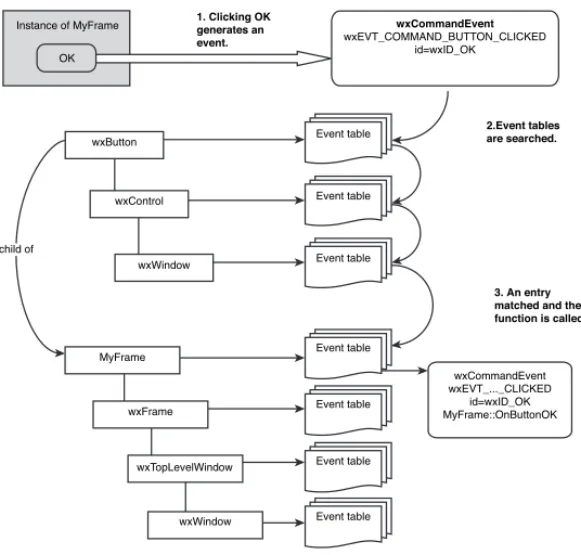
H How wxWidgets Processes Events . . . .613
I Event Classes and Macros . . . .617
J Code Listings . . . .627
K Porting from MFC . . . .643
Glossary . . . .657
It's a pleasure to introduce you to Cross-Platform GUI Programming with wxWidgets, the first book on wxWidgets since it was originally released more than a decade ago.
wxWidgets is a first-class, open source response to the need for portability in an increasingly heterogeneous computing world. Being tied to specific hard-ware or a single operating system is often undesirable and sometimes impermis-sible, hence the well-understood need for cross-platform GUI frameworks. Given the long life of open source products and the often-transient nature of proprietary solutions, developers are wise to base their applications on an infrastructure that is going to survive long-term, as wxWidgets has and will continue to do.
wxWidgets combines countless years’ worth of hard-earned wisdom con-tributed by developers worldwide, abstracting functionality and finding solu-tions for platform-specific issues. You, the developer, are protected both from shifts in computing trends and from the intricacies and frustrations of each platform’s native API.
Becoming a wxWidgets user is an invitation into a community that spans individuals, startups, government organizations, large companies, and open source projects. When you contribute, you are forging a connection between yourself and a community that is broadly representative of the reach of infor-mation technology in the 21st century. wxWidgets-based applications may be found not just in the software industry but also in medicine, archaeology, physics, astronomy, processor manufacturing, education, geological exploration, the transport industry, space exploration, and many other fields as well.
"Chandler," the Personal Information Manager now under development at the Open Source Applications Foundation, uses wxWidgets to run under Windows, Mac OS X, and Linux. Some of our developers have become active contributors to the wxWidgets project, following the virtuous circle of open source development.
We look forward to having you join us in the ever-growing community of developers using wxWidgets, and I personally wish you all the best with your wxWidgets projects.
Mitch Kapor, Chair OSAF
June 2005 xxiii
Preface
W
HOT
HISB
OOKI
SF
ORThis book is a guide to using wxWidgets, an open-source construction kit for writing sophisticated C++ applications targeting a variety of platforms, including Windows, Linux, Mac OS X, and Pocket PC. With help from this book, a competent programmer can create multi-platform applications with confidence. Developers already familiar with wxWidgets should also find it useful for brushing up their knowledge.
This book is accessible to developers with a variety of experience and backgrounds. You may come from a Windows or Unix perspective; you may previously have experience in MFC, OWL, Win32, Mac OS, Motif, or console-mode Unix programming. Or perhaps you have come from a different career entirely and are looking for a way to get up to speed on multiple platforms. The book can’t specifically cover the details of the C++ language, but it’s com-mon for people to successfully learn C++ and wxWidgets at the same time, and the straightforward nature of the wxWidgets API makes this process easier. The reader does not need to know more advanced C++ techniques like tem-plates, streams, and exceptions. However, wxWidgets does not prevent you from using these techniques.
Managers will find the book useful in discovering what wxWidgets can do for them, particularly in Chapter 1, “Introduction.” The combination of the book and the resources on the accompanying CD-ROM will give your staff all they need for getting started on cross-platform programming projects. You’ll see how wxWidgets puts tools of tremendous power into your hands, with ben-efits that include:
☞ Cost savings from writing code once that will compile on Windows, Unix, Mac OS X, and other platforms.
☞ Customer satisfactionfrom delivering stable, fast, attractive applica-tions with a native look and feel.
xxvi Preface
☞ Increased productivity from the wide variety of classes that wxWidgets provides, both for creating great GUIs and for general appli-cation development.
☞ Increased market sharedue to support for platforms you may not have previously considered, and the ability to internationalize your applica-tions.
☞ Supportfrom a large, active wxWidgets community that answers ques-tions helpfully and provides prompt bug fixing. The sample of third-party add-ons listed in Appendix E, “Third-Party Tools for wxWidgets,” is evi-dence of a thriving ecosystem.
☞ Access to the sourcefor enhancement and trouble-shooting.
This is a guide to writing wxWidgets application with C++, but you can use a variety of other languages such as Python, Perl, a BASIC variant, Lua, Eiffel, JavaScript, Java, Ruby, Haskell, and C#. Some of these bindings are more advanced than others. For more information, please see Appendix E and the wxWidgets web site at http://www.wxwidgets.org.
We focus on three popular desktop platforms: Microsoft Windows, Linux using GTK+, and Mac OS X. However, most of the book also applies to other platforms supported by wxWidgets. In particular, wxWidgets can be used with most Unix variants.
T
HECD-ROM
The CD-ROM contains example code from the book, the wxWidgets 2.6 distri-bution for Windows, Linux, Mac OS X, and other platforms, and several tools to help you use wxWidgets, including the translation tool poEdit. For Windows users, we supply three free compilers you can use with wxWidgets: MinGW, Digital Mars C++, and OpenWatcom C++.
In addition, we provide you with DialogBlocks Personal Edition, a sophis-ticated rapid application development (RAD) tool for you to create complex windows with very little manual coding. You can use it to compile and run samples that accompany the book as well as to create your own applications for personal use, and it also provides convenient access to the wxWidgets ref-erence manual.
Updates to the book and CD-ROM can be obtained from this site: http://www.wxwidgets.org/book
H
OW TOU
SET
HISB
OOKwxWidgets,” early on. MFC programmers will find it useful to read Appendix K, “Porting from MFC,” as a point of reference.
Because this book is not a complete API reference, you’ll find it useful to keep the wxWidgets reference manual open. The reference manual is available in a number of formats, including Windows HTML Help and PDF, and it should be in your wxWidgets distribution; if not, it can be downloaded from the wxWidgets web site. You can also refer to the many samples in the wxWidgets distribution to supplement the examples given in this book.
Note that the book is intended to be used in conjunction with wxWidgets 2.6 or later. The majority of the book will apply to earlier versions, but be aware that some functionality will be missing, and in a small number of cases, the behavior may be different. In particular, sizer behavior changed somewhat between 2.4 and 2.5. For details, please see the topic “Changes Since 2.4.x” in the wxWidgets reference manual.
C
ONVENTIONSFor code examples, we mostly follow the wxWidgets style guidelines, for example:
☞ Words within class names and functions have an initial capital, for exam-ple MyFunkyClass.
☞ The m_prefix denotes a member variable,s_ denotes a static variable,g_ denotes a global variable; local variables generally start with a lowercase letter, for example textCtrl.
You can find more about the wxWidgets style guidelines at http://www. wxwidgets.org/standard.htm.
Sometimes we’ll also use comments that can be parsed by the documen-tation tool Doxygen, such as:
/*! A class description */
/// A function description
Classes, functions, identifiers, variables, and standard wxWidgets objects are marked with a teletype fontin the text. User interface commands, such as menu and button labels, are marked in italics.
xxviii Preface
C
HAPTERS
UMMARYChapter 1: Introduction
What is wxWidgets, and why use it? A brief history; the wxWidgets commu-nity; the license; wxWidgets ports and architecture explained.
Chapter 2: Getting Started
A small wxWidgets sample: the application class; the main window; the event table; an outline of program flow.
Chapter 3: Event Handling
Event tables and handlers; how a button click is processed; skipping events; pluggable and dynamic event handlers; defining custom events; window iden-tifiers.
Chapter 4: Window Basics
The main features of a window explained; a quick guide to the commonest window classes; base window classes such as wxWindow; top-level windows; con-tainer windows; non-static controls; static controls; menus; control bars.
Chapter 5: Drawing and Printing
Device context principles; the main device context classes described; buffered drawing; drawing tools; device context drawing functions; using the printing framework; 3D graphics with wxGLCanvas.
Chapter 6: Handling Input
Handling mouse and mouse wheel events; handling keyboard events; key-codes; modifier key variations; accelerators; handling joystick events.
Chapter 7: Window Layout Using Sizers
Preface xxix
Chapter 8: Using Standard Dialogs
Informative dialogs such as wxMessageBoxand wxProgressDialog; file and direc-tory dialogs such as wxFileDialog; choice and selection dialogs such as wxColourDialogand wxFontDialog; entry dialogs such as wxTextEntryDialogand wxFindReplaceDialog; printing dialogs:wxPageSetupDialogand wxPrintDialog.
Chapter 9: Writing Custom Dialogs
Steps in creating a custom dialog; an example:PersonalRecordDialog; deriving a new class; designing data storage; coding the controls and layout; data trans-fer and validation; handling events; handling UI updates; adding help; adapt-ing dialogs for small devices; further considerations in dialog design; usadapt-ing wxWidgets resource files; loading resources; using binary and embedded resource files; translating resources; the XRC format; writing resource han-dlers; foreign controls.
Chapter 10: Programming with Images
Image classes in wxWidgets; programming with wxBitmap; programming with wxIcon; programming with wxCursor; programming with wxImage; image lists and icon bundles; customizing wxWidgets graphics with wxArtProvider.
Chapter 11: Clipboard and Drag and Drop
Data objects; data source duties; data target duties; using the clipboard; implementing drag and drop; implementing a drag source; implementing a drop target; using standard drop targets; creating a custom drop target; more on wxDataObject; drag and drop helpers in wxWidgets.
Chapter 12: Advanced Window Classes
wxTreeCtrl; wxListCtrl; wxWizard; wxHtmlWindow; wxGrid; wxTaskBarIcon; writing your own controls; the control declaration; defining a new event class; display-ing information; handldisplay-ing input; defindisplay-ing default event handlers; implement-ing validators; implementing resource handlers; determining control appearance.
Chapter 13: Data Structure Classes
xxx Preface
Chapter 14: Files and Streams
wxFileand wxFFile;wxTextFile;wxTempFile;wxDir;wxFileName; file functions; file streams; memory and string streams; data streams; socket streams; filter streams; zip streams; virtual file systems.
Chapter 15: Memory Management, Debugging, and Error Checking
Creating and deleting window objects; creating and copying drawing objects; initializing your application object; cleaning up your application; detecting memory leaks and other errors; facilities for defensive programming; error reporting; providing run-time type information; using wxModule; loading dynamic libraries; exception handling; debugging tips.
Chapter 16: Writing International Applications
Introduction to internationalization; providing translations; using message catalogs; using wxLocale; character encodings and Unicode; converting data; help files; numbers and dates; other media; an example.
Chapter 17: Writing Multithreaded Applications
When to use threads, and when not to; using wxThread; thread creation; start-ing the thread; how to pause a thread or wait for an external condition; termi-nation; synchronization objects; wxMutex; deadlocks; wxCriticalSection; wxCondition;wxSemaphore; the wxWidgets thread sample; alternatives to multi-threading:wxTimer, idle time processing, and yielding.
Chapter 18: Programming with wxSocket
Socket classes and functionality overview; introduction to sockets and basic socket processing; connecting to a server; socket events; socket status and error noti-fications; sending and receiving socket data; creating a server; socket event recap; socket flags; blocking and non-blocking sockets in wxWidgets; how flags affect socket behavior; using wxSocket as a standard socket; using socket streams; alternatives to wxSocket.
Chapter 19: Working with Documents and Views
Preface xxxi
Chapter 20: Perfecting Your Application
Single instance versus multiple instances; modifying event handling; reducing flicker; using a help controller; extended wxWidgets HTML help; authoring help; other ways to provide help; parsing the command line; storing applica-tion resources; invoking other applicaapplica-tions; launching documents; redirecting process input and output; managing application settings; application installa-tion on Windows, Linux and Mac OS X; following UI design guidelines.
Appendix A: Installing wxWidgets
Downloading and unpacking wxWidgets; configuration/build options; Windows—Microsoft Visual Studio and VC++ command-line; Windows— Borland C++; Windows—MinGW with and without MSYS; Unix/Linux and Mac OS X—GCC; customizing setup.h; rebuilding after updating wxWidgets files; using contriblibraries.
Appendix B: Building Your Own wxWidgets Applications
Windows—Microsoft Visual Studio; Linux—KDevelop; Mac OS X—Xcode; makefiles; cross-platform builds using Bakefile; wxWidgets symbols and head-ers; using wx-config.
Appendix C: Creating Applications with DialogBlocks
What is DialogBlocks? Installing and upgrading DialogBlocks; the DialogBlocks interface; the sample project; compiling the sample; creating a new project; creating a dialog; creating a frame; creating an application object; debugging your application.
Appendix D: Other Features in wxWidgets
Further window classes; ODBC classes; MIME types manager; network func-tionality; multimedia classes; embedded web browsers; accessibility; OLE automation; renderer classes; event loops.
Appendix E: Third-Party Tools for wxWidgets
xxxii Preface
Appendix F: wxWidgets Application Showcase
Descriptions of notable wxWidgets applications, such as AOL Communicator and Audacity.
Appendix G: Using the CD-ROM
Browsing the CD-ROM; the CD-ROM contents.
Appendix H: How wxWidgets Processes Events
An illustrated description of how event processing works.
Appendix I: Event Classes and Macros
A summary of the important event classes and macros.
Appendix J: Code Listings
Code listings for the PersonalRecordDialogand the wxWizardexamples.
Appendix K: Porting from MFC
Acknowledgments
wxWidgets owes its success to the hard work of many talented people. We would like to thank them all, with special consideration for that essential support network: our long-suffering families and partners. wxWidgets sup-porters and contributors include the following (apologies for any uninten-tional omissions):
Yiorgos Adamopoulos, Jamshid Afshar, Alejandro Aguilar-Sierra, Patrick Albert, Bruneau Babet, Mitchell Baker, Mattia Barbon, Nerijus Baliunas, Karsten Ballueder, Jonathan Bayer, Michael Bedward, Kai Bendorf, Yura Bidus, Jorgen Bodde, Borland, Keith Gary Boyce, Chris Breeze, Sylvain Bougnoux, Wade Brainerd, Pete Britton, Ian Brown, C. Buckley, Doug Card, Marco Cavallini, Dmitri Chubraev, Robin Corbet, Cecil Coupe, Stefan Csomor, Andrew Davison, Gilles Depeyrot, Duane Doran, Neil Dudman, Robin Dunn, Hermann Dunkel, Jos van Eijndhoven, Chris Elliott, David Elliott, David Falkinder, Rob Farnum, Joel Farley, Tom Felici, Thomas Fettig, Matthew Flatt, Pasquale Foggia, Josep Fortiana, Todd Fries, Dominic Gallagher, Roger Gammans, Guillermo Rodriguez Garcia, Brian Gavin, Wolfram Gloger, Aleksandras Gluchovas, Markus Greither, Norbert Grotz, Stephane Gully, Stefan Gunter, Bill Hale, Patrick Halke, Stefan Hammes, Guillaume Helle, Harco de Hilster, Kevin Hock, Cord Hockemeyer, Klaas Holwerda, Markus Holzem, Ove Kaaven, Mitch Kapor, Matt Kimball, Hajo Kirchoff, Olaf Klein, Jacob Jansen, Leif Jensen, Mark Johnson, Bart Jourquin, John Labenski, Guilhem Lavaux, Ron Lee, Hans Van Leemputten, Peter Lenhard, Jan Lessner, Nicholas Liebmann, Torsten Liermann, Per Lindqvist, Jesse Lovelace, Tatu Männistö, Lindsay Mathieson, Scott Maxwell, Bob Mitchell, Thomas Myers, Oliver Niedung, Stefan Neis, Ryan Norton, Robert O'Connor, Jeffrey Ollie, Kevin Ollivier, William Osborne, Hernan Otero, Ian Perrigo, Timothy Peters, Giordano Pezzoli, Harri Pasanen, Thomaso Paoletti, Garrett Potts, Robert Rae, Marcel Rasche, Mart Raudsepp, Andy Robinson, Robert Roebling, Alec Ross, Gunnar Roth, Thomas Runge, Tom Ryan, Dino Scaringella, Jobst Schmalenbach, Dimitri Schoolwerth, Arthur Seaton, Paul Shirley, Wlodzimierz Skiba, John Skiff, Vaclav Slavik, Brian Smith, Neil
Smith, Stein Somers, Petr Smilauer, Kari Systä, George Tasker, Austin Tate, Arthur Tetzlaff-Deas, Paul Thiessen, Jonathan Tonberg, Jyrki Tuomi, Janos Vegh, Andrea Venturoli, David Webster, Michael Wetherell, Otto Wyss, Vadim Zeitlin, Xiaokun Zhu, Zbigniew Zagórski, Edward Zimmermann. Thanks also to Dotsrc.org and SourceForge for hosting project services.
Thanks are due in particular to Vadim Zeitlin, Vaclav Slavik, Robert Roebling, Stefan Csomor, and Robin Dunn for permission to adapt some of their contributions to the wxWidgets reference manual.
Special thanks go to Stefan Csomor who contributed Chapter 16 and Chapter 17, and to Kevin Ollivier who wrote the Bakefile tutorial in Appendix B. We would also like to thank Mitch Kapor for writing the foreword.
We are very grateful to Mark Taub for his patience and advice through-out. A big thank you goes to Marita Allwood, Harriet Smart, Antonia Smart, Clayton Hock, and Ethel Hock for all their love, support, and encouragement. A debt is also owed to all those who have reviewed and suggested improve-ments to the book, including: Stefan Csomor, Dimitri Schoolwerth, Robin Dunn, Carl Godkin, Bob Paddock, Chris Elliott, Michalis Kabrianis, Marc-Andre Lureau, Jonas Karlsson, Arnout Engelen, Erik van der Wal, Greg Smith, and Alexander Stigsen.
Finally, we hope that you enjoy reading this book and, most importantly, have fun using wxWidgets to build great-looking, multi-platform applications!
Julian Smart and Kevin Hock June 2005
About the Authors
Julian Smart has degrees from the University of St. Andrews and the University of Dundee. After working on model-based reasoning at the Scottish Crop Research Institute, he moved to the Artificial Intelligence Applications Institute at the University of Edinburgh, where he founded the wxWidgets project in 1992. Since starting Anthemion Software in 1996, Julian has been helping other companies deploy wxWidgets, and he sells tools for program-mers, including DialogBlocks and HelpBlocks. He has worked as a consultant for various companies including Borland and was a member of Red Hat's eCos team, writing GUI tools to support the embedded operating system. In 2004, Julian and his wife Harriet launched a consumer product for fiction writers called Writer’s Café, written with wxWidgets. Julian and Harriet live in Edinburgh with their daughter Toni.
Kevin Hockhas degrees from Miami University (Oxford, Ohio) in Computer Science and Accounting and has taught courses at Miami in both Java and client-server systems. In 2002, he started work on an instant messaging sys-tem and founded BitWise Communications, LLC, in 2003, offering both profes-sional and personal instant messaging. During the course of developing BitWise using wxWidgets, Kevin became a wxWidgets developer and has pro-vided enhancements to all platforms. Kevin lives in Oxford, Ohio.
Stefan Csomor is director and owner of Advanced Concepts AG, a company that specializes in cross-platform development and consulting. In addition to being a qualified medical doctor, he has more than 15 years of experience in object-oriented programming and has been writing software for 25 years. Stefan is the main author of the Mac OS port of wxWidgets.
C H A P T E R
1
Introduction
In this chapter, we answer a few basic questions about what wxWidgets is and what sets it apart from other solutions. We outline the project’s history, how the wxWidgets community works, how wxWidgets is licensed, and an overview of the architecture and available parts.
W
HATI
S WXW
IDGETS?
wxWidgets is a programmer’s toolkit for writing desktop or mobile applica-tions with graphical user interfaces (GUIs). It’s a framework, in the sense that it does a lot of the housekeeping work and provides default application behav-ior. The wxWidgets library contains a large number of classes and methods for the programmer to use and customize. Applications typically show windows containing standard controls, possibly drawing specialized images and graph-ics and responding to input from the mouse, keyboard, or other sources. They may also communicate with other processes or drive other programs. In other words, wxWidgets makes it relatively easy for the programmer to write an application that does all the usual things modern applications do.
While wxWidgets is often labeled a GUI development toolkit, it is in fact much more than that and has features that are useful for many aspects of application development. This has to be the case because allof a wxWidgets application needs to be portable to different platforms, not just the GUI part. wxWidgets provides classes for files and streams, multiple threads, applica-tion settings, interprocess communicaapplica-tion, online help, database access, and much more.
W
HYU
SE WXW
IDGETS?
One area where wxWidgets differs from many other frameworks, such as MFC or OWL, is its multi-platform nature. wxWidgets has an Application Programming Interface (API) that is the same, or very nearly the same, on all supported platforms. This means that you can write an application on Windows, for example, and with very few changes (if any) recompile it on Linux or Mac OS X. This has a huge cost benefit compared with completely rewriting an application for each platform, and it also means that you do not need to learn a different API for each platform. Furthermore, it helps to future-proof your applications. As the computing landscape changes, wxWidgets changes with it, allowing your application to be ported to the latest and greatest systems supporting the newest features.
Another distinguishing feature is that wxWidgets provides a native look and feel. Some frameworks use the same widget code running on all platforms, perhaps with a theme makeover to simulate each platform’s native appear-ance. By contrast, wxWidgets uses the native widgets wherever possible (and its own widget set in other cases) so that not only does the application look native on the major platforms, but it actually is native. This is incredibly important for user acceptance because even small, almost imperceptible dif-ferences in the way an application behaves, compared with the platform stan-dard, can create an alienating experience for the user. To illustrate, Figure 1-1 shows a wxWidgets application called StoryLines, a tool to help fiction writers plot their stories, running on Windows XP.
2 Introduction Chapter 1
It’s recognizably a Windows application, with GUI elements such as tabs, scrollbars, and drop-down lists conforming to the current Windows theme. Similarly, Figure 1-2 shows StoryLines as a Mac OS X application, with the expected Aqua look and feel. There is no menu bar attached to the StoryLines window because it follows the Mac OS convention of showing the current win-dow’s menu bar at the top of the screen.
Why Use wxWidgets? 3
Finally, Figure 1-3 shows StoryLines as a GTK+ application running on Red Hat Linux.
Why not just use Java? While Java is great for web-based applications, it’s not always the best choice for the desktop. In general, C++-based applica-tions using wxWidgets are faster, have a more native look and feel, and are easier to install because they don’t rely on the presence of the Java virtual machine. C++ also allows greater access to low-level functionality and is eas-ier to integrate with existing C and C++ code. For all these reasons, very few of the popular desktop applications that you use today are built with Java. wxWidgets allows you to deliver the high-performance, native applications that your users expect.
4 Introduction Chapter 1
wxWidgets is an open sourceproject. Naturally, this means that it costs nothing to use wxWidgets (unless you feel like generously donating to the project!), but it also has important philosophical and strategic significance. Open source software has a habit of outlasting its proprietary equivalents. As a developer using wxWidgets, you know that the code you rely on will never disappear. You can always fix any problems yourself by changing the source code. It can also be a lot more fun to take part in an open source community than trying to get hold of corporate support staff. Participants in open source projects tend to be there because they love what they’re doing and can’t wait to share their knowledge, whereas corporate support staff members are not always so idealistically motivated. When you use wxWidgets, you tap into an astonishing talent pool, with contributors from a wide range of backgrounds. Many aspects of application development that you might otherwise have to laboriously code yourself have been encapsulated by these developers in easy-to-use classes that you can plug into your code. An active user community will assist you on the mailing lists, and you’ll enjoy discussions not only about wxWidgets but often other matters close to the hearts of both experienced and inexperienced developers as well. Perhaps one day you’ll join in the success of wxWidgets and become a contributor yourself!
others. wxWidgets encompasses the whole spectrum of users, from single developer software outfits to large corporations, from computer science depart-ments to medical research groups, and from ecological research to the telecom-munications industry. It’s also used by a myriad of open source projects, such as the Audacity audio editor and the pgAdmin III database design and man-agement system.
People use wxWidgets for many different reasons, whether simply as an elegant MFC replacement on a single platform, or to allow them to move easily from (say) Microsoft Windows to Unix and Mac OS X. wxWidgets is addressing the challenges of mobile platforms, too, with ports for embedded Linux, Microsoft Pocket PC, and (soon) Palm OS.
A B
RIEFH
ISTORY OF WXW
IDGETSThe wxWidgets project started life in 1992 when Julian Smart was working at the University of Edinburgh on a diagramming tool called Hardy. He didn’t want to choose between deploying it either on Sun workstations or PCs, so he decided to use a cross-platform framework. Because the range of existing cross-platform frameworks was limited, and the department didn’t have a budget for it anyway, there was little choice but to write his own. The univer-sity gave him permission to upload wxWidgets 1.0 to the department’s FTP site in September 1992, and other developers began to use the code. Initially, wxWidgets targeted XView and MFC 1.0; Borland C++ users complained about the requirement for MFC, so it was rewritten to use pure Win32. Because XView was giving way to Motif, a Motif port quickly followed.
Over time, a small but enthusiastic community of wxWidgets users was established and a mailing list created. Contributions and fixes were sent in, including an Xt port by Markus Holzem. wxWidgets gradually picked up more and more users from all over the world: individuals, academics, government departments, and—most gratifying of all—corporate users who found that wxWidgets offered a better product and better support than the commercial products they had looked at or used.
In 1997, a new wxWidgets 2 API was designed with help from Markus Holzem. Wolfram Gloger suggested that wxWidgets should be ported to GTK+, the up-and-coming widget set being adopted for the GNOME desktop environ-ment. Robert Roebling became the lead developer for wxGTK, which is now the main Unix/Linux port of wxWidgets. In 1998, the Windows and GTK+ ports were merged and put under CVS control. Vadim Zeitlin joined the proj-ect to contribute huge amounts of design and code, and Stefan Csomor started a Mac OS port, also in 1998.
1999 saw the addition of Vaclav Slavik’s impressive wxHTML classes and the HTML-based help viewer. In 2000, SciTech, Inc. sponsored initial development of wxUniversal, wxWidgets’s own set of widgets for use on platforms
that have no widget set of their own. wxUniversal was first used in SciTech’s port to MGL, their low-level graphics layer.
In 2002, Julian Smart and Robert Roebling added the wxX11 port using the wxUniversal widgets. Requiring only Unix and X11, wxX11 is suitable for any Unix environment and can be used in fairly low-spec systems.
In July 2003, wxWidgets started running on Windows CE, and Robert Roebling demonstrated wxGTK applications running on the GPE embedded Linux platform.
In 2004, wxWidgets was renamed from the original moniker “wxWindows,” after objections from Microsoft based on its Windows trademark.
Also during 2004, Stefan Csomor and a host of other contributors completely revamped wxMac for OS X, significantly improving the appearance and function-ality of OS X applications. A port using Cocoa was also steadily improved, led by David Elliot, and William Osborne won our challenge to deliver an embryonic Palm OS 6 port that supports the wxWidgets “minimal” sample. Version 2.6 was released in April 2005, incorporating major improvements to all ports.
Future plans for wxWidgets include
☞ A package management tool, to make it easier to integrate third-party components
☞ Improved support for embedded applications
☞ Alternative event handling mechanisms
☞ Enhanced controls, such as a combined tree and list control
☞ wxHTML 2, with full web capabilities on all platforms
☞ Further compatibility with standards such as STL
☞ A full Palm OS port
T
HE WXW
IDGETSC
OMMUNITYThe wxWidgets community is a vibrant one, with two mailing lists: wx-users (for users) and wx-dev (for contributors). The web site has news, articles, and links to releases, and there is also the wxWidgets “Wiki,” a set of web pages where everyone can add information. A forum is also available for developers and users alike. Here’s a list of the web addresses for these resources:
☞ http://www.wxwidgets.org: the wxWidgets home page ☞ http://lists.wxwidgets.org: the mailing list archives ☞ http://wiki.wxwidgets.org: the wxWidgets Wiki ☞ http://www.wxforum.org: the wxWidgets forum
As with most open source projects, wxWidgets is developed using a CVS repository, a source management system that keeps track of code history. In order to prevent a chaotic free-for-all, a small number of developers have write
access to CVS, and others can contribute by posting bug reports and patches (currently handled by SourceForge’s trackers). Development occurs on two main branches: the “stable” branch, where only binary-compatible bug fixes are allowed, and the “development” branch (CVS head). So-called stable releases are even-numbered (for example, 2.4.x) and development releases are odd-numbered (for example, 2.5.x). Users can wait for new releases or down-load the source from the appropriate branch by anonymous CVS.
Decisions about API changes and other technical issues are made by con-sensus, usually by discussion on the wx-dev list. As well as the main wxWidgets community, many projects have spun off and enjoy their own communities— for example wxPython and wxPerl (see Appendix E, “Third-Party Tools for wxWidgets”).
WX
W
IDGETS ANDO
BJECT-O
RIENTEDP
ROGRAMMINGLike all modern GUI frameworks, wxWidgets benefits from heavy use of object-oriented programming concepts. Each window is represented as a C++ object; these objects have well-defined behavior, and can receive and react to events. What the user sees is the visual manifestation of this interacting system of objects. Your job as a developer is to orchestrate these objects’ collective behavior, a task made easier by the default behaviors that wxWidgets implements for you. Of course, it’s no coincidence that object-oriented programming and GUIs mesh well—they grew up together. The object-oriented language Smalltalk designed by Alan Kay and others in the 1970s was an important milestone in GUI history, making innovations in user interface technology as well as lan-guage design, and although wxWidgets uses a different lanlan-guage and API, the principles employed are broadly the same.
L
ICENSEC
ONSIDERATIONSThe wxWidgets license (officially, the “wxWindows License” for legal and his-torical reasons) is L-GPL with an exception clause. You can read the license files in detail on the web site or in the docsdirectory of the distribution, but in summary, you can use wxWidgets for commercial or free software with no roy-alty charge. You can link statically or dynamically to the wxWidgets library. If you make changes to the wxWidgets source code, you are obliged to make these freely available. You do nothave to make your own source code or object files available. Please also consult the licenses for the optional subordinate libraries that are distributed with wxWidgets, such as the PNG and JPEG libraries.
The source code that accompanies this book is provided under the wxWindows License.
T
HE WXW
IDGETSA
RCHITECTURETable 1-1 shows the four conceptual layers: the wxWidgets public API, each major port, the platform API used by that port, and finally the underlying operating system.
8 Introduction Chapter 1
Table 1-1 wxWidgets Ports
wxWidgets API
wxWidgets Port
wxMSW wxGTK wxX11 wxMotif wxMac wxCocoa wxOS2 wxPalmOS wxMGL
Platform API
Win32 GTK+ Xlib Motif/ Lesstif
Carbon Cocoa PM Palm OS Protein APIs
MGL
Operating System
Windows/ Windows
CE
Unix/Linux Mac OS 9/ Mac OS X
Mac OS X OS/2 Palm OS Unix/ DOS
The following are the main wxWidgets ports that exist at the time of writing.
wxMSW
This port compiles and runs on all 32-bit and 64-bit variants of the Microsoft Windows operating system, including Windows 95, Windows 98, Windows ME, Windows NT, Windows 2000, Windows XP and Windows 2003. It can also be compiled to use Winelib under Linux, and has a configuration that works on Windows CE (see “wxWinCE”). wxMSW can be configured to use the wxUniversal widgets instead of the regular Win32 ones.
wxGTK
The wxWidgets Architecture 9
Figure 1-4 The wxWidgets “Life!” demo under GPE on an iPAQ PDA
wxX11
wxWidgets for X11 uses the wxUniversal widget set and runs directly on Xlib with no native widget set. This makes the port suitable for embedded systems, but it can also be used for desktop applications where it is undesirable to link with GTK+. This is supported on any Unix system running X11. wxX11 is not as mature as the wxGTK port. Figure 1-5 shows the Life! demo compiled under wxX11 and running on Familiar Linux / TinyX on an iPAQ PDA.
wxMotif
This port can use Motif, OpenMotif, or Lesstif on most Unix systems. Sun Microsystems is putting its weight behind GNOME and GTK+, so Motif is no longer an attractive option for most developers and users.
wxMac
wxMac targets Mac OS 9 (from 9.1 upwards) and Mac OS X (from 10.2.8 upwards). For Mac OS 9 builds, you need the Metrowerks CodeWarrior tools, and for Mac OS X, you can use either Metrowerks CodeWarrior or Apple tools. When using Apple’s tools, you should use Xcode 1.5 or higher, or—if you are just using command line tools—GCC 3.3 or higher.
wxCocoa
A port in progress, this targets the Cocoa API of Mac OS X. Although the func-tionality of Carbon and Cocoa is similar, this port has the potential for sup-porting GNUStep running on platforms other than a Mac.
wxWinCE
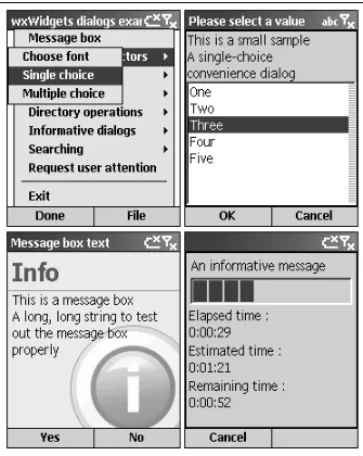
The Windows CE port encompasses various SDKs based on the Windows CE platform, including Pocket PC and Smartphone. The bulk of this port consists of the wxMSW Win32 port, with some omissions and additions for the smaller platform. Figure 1-6 shows the wxWidgets Life! demo running on the Pocket PC 2003 emulator. Figure 1-7 shows four screens from the wxWidgets dialog demo running on Smartphone 2003 with a 176 ×220 pixel display. User inter-face adaptations done by wxWidgets for this restricted platform include con-structing a nested menu in place of the usual menu bar because Smartphone only supports two menu buttons. Some additional application hints are required, such as calling SetLeftMenu and SetRightMenuinstead of adding con-ventional OK and Cancel buttons to a dialog.
The wxWidgets Architecture 11
Figure 1-6 The wxWidgets “Life!” demo on Pocket PC 2003
12 Introduction Chapter 1
Figure 1-8 A wxWidgets sample under Palm OS 6
wxPalmOS
This is a port to Palm OS 6 (Cobalt). At the time of writing, the port is in its infancy but can be used to compile and run a simple sample in the Palm OS 6 simulator (see Figure 1-8).
wxOS2
wxOS2 is a Presentation Manager port for OS/2 or eComStation.
wxMGL
This port targets the MGL low-level graphics layer from SciTech Software, Inc., and uses the wxUniversal widget set.
Internal Organization
Internally, the wxWidgets code base is broadly separated into six layers:
1.Common code is used in all ports. It includes data structure classes, run-time type information, and the base classes, such as wxWindowBase, which are used to factor out code common to all implementations of a class.
2.Generic codeimplements advanced widgets independently of any plat-form, allowing emulation of controls and other functionality not present on a given platform.wxWizardand wxCalendarCtrlare examples of generic controls.