Exam 70-432: Microsoft SQL Server 2008—
Implementation and Maintenance
0BJECTIVE LOCATION IN BOOK
INSTALLING AND CONFIGURING SQL SERVER 2008
Confi gure additional SQL Server components. Chapter 1, Lessons 3 and 4 Chapter 5, Lessons 1, 2 and 3
Confi gure SQL Server instances. Chapter 1, Lesson 3
Confi gure SQL Server services. Chapter 1, Lesson 3
Install SQL Server 2008 and related services. Chapter 1, Lesson 3 Chapter 5, Lessons 1, 2 and 3
Implement database mail. Chapter 1, Lesson 4
Confi gure full-text indexing. Chapter 5, Lessons 1, 2 and 3
MAINTAINING SQL SERVER INSTANCES
Manage SQL Server Agent jobs. Chapter 10, Lesson 2
Manage SQL Server Agent alerts. Chapter 10, Lesson 4
Manage SQL Server Agent operators. Chapter 10, Lesson 3
Implement the declarative management framework (DMF). Chapter 8, Lessons 1 and 2
Back up a SQL Server environment. Chapter 9, Lessons 1, 2 and 3
MANAGING SQL SERVER SECURITY
Manage logins and server roles. Chapter 11, Lesson 3
Manage users and database roles. Chapter 11, Lesson 3
Manage SQL Server instance permissions. Chapter 11, Lesson 4
Manage database permissions. Chapter 11, Lesson 4
Manage schema permissions and object permissions. Chapter 11, Lesson 4
Audit SQL Server instances. Chapter 11, Lesson 5
Manage transparent data encryption. Chapter 11, Lesson 6
Confi gure surface area. Chapter 8, Lessons 1, 2 and 3
0BJECTIVE LOCATION IN BOOK MAINTAINING A SQL SERVER DATABASE
Back up databases. Chapter 2, Lesson 1
Chapter 9, Lesson 1
Restore databases. Chapter 9, Lessons 2 and 3
Manage and confi gure databases. Chapter 2, Lessons 2, 3 and 4
Manage database snapshots. Chapter 9, Lesson 3
Maintain database integrity. Chapter 2, Lesson 4
Maintain a database by using maintenance plans. Chapter 9, Lesson 1 PERFORMING DATA MANAGEMENT TASKS
Import and export data. Chapter 7, Lessons 1, 2, 3 and 4
Manage data partitions. Chapter 6, Lessons 1, 2, 3 and 4
Implement data compression. Chapter 3, Lesson 1
Maintain indexes. Chapter 4, Lesson 3
Chapter 5, Lessons 1, 2 and 3
Manage collations. Chapter 2, Lesson 3
MONITORING AND TROUBLESHOOTING SQL SERVER
Identify SQL Server service problems. Chapter 12, Lesson 4
Identify concurrency problems. Chapter 12, Lesson 2
Identify SQL Agent job execution problems. Chapter 10, Lesson 1
Locate error information. Chapter 12, Lesson 1
OPTIMIZING SQL SERVER PERFORMANCE
Implement Resource Governor. Chapter 13, Lesson 6
Use the Database Engine Tuning Advisor. Chapter 13, Lesson 4 Collect trace data by using SQL Server Profi ler. Chapter 12, Lesson 2 Collect performance data by using Dynamic Management Views (DMVs). Chapter 13, Lesson 5 Collect performance data by using System Monitor. Chapter 12, Lesson 1
Use Performance Studio. Chapter 13, Lesson 7
IMPLEMENTING HIGH AVAILABILITY
Implement database mirroring. Chapter 15, Lessons 1, 2 and 3
Implement a SQL Server clustered instance. Chapter 14, Lessons 1 and 2
Implement log shipping. Chapter 16, Lessons 1, 2 and 3
Implement replication. Chapter 17, Lessons 1, 2 and 3
PUBLISHED BY Microsoft Press
A Division of Microsoft Corporation One Microsoft Way
Redmond, Washington 98052-6399
Copyright © 2009 by Mike Hotek
All rights reserved. No part of the contents of this book may be reproduced or transmitted in any form or by any means without the written permission of the publisher.
Library of Congress Control Number: 2008940530
Printed and bound in the United States of America.
1 2 3 4 5 6 7 8 9 QWT 4 3 2 1 0 9
Distributed in Canada by H.B. Fenn and Company Ltd.
A CIP catalogue record for this book is available from the British Library.
Microsoft Press books are available through booksellers and distributors worldwide. For further infor mation about international editions, contact your local Microsoft Corporation offi ce or contact Microsoft Press International directly at fax (425) 936-7329. Visit our Web site at www.microsoft.com/mspress. Send comments to [email protected].
Microsoft, Microsoft Press, Excel, IntelliSense, Internet Explorer, MSDN, MSN, SharePoint, Silverlight, SQL Server, Visual Studio, Windows, and Windows Server are either registered trademarks or trademarks of the Microsoft group of companies. Other product and company names mentioned herein may be the trademarks of their respective owners.
The example companies, organizations, products, domain names, e-mail addresses, logos, people, places, and events depicted herein are fi ctitious. No association with any real company, organization, product, domain name, e-mail address, logo, person, place, or event is intended or should be inferred.
This book expresses the author’s views and opinions. The information contained in this book is provided without any express, statutory, or implied warranties. Neither the authors, Microsoft Corporation, nor its resellers, or distributors will be held liable for any damages caused or alleged to be caused either directly or indirectly by this book.
Acquisitions Editor: Ken Jones
Developmental Editor: Laura Sackerman Project Editor: Denise Bankaitis
Editorial Production: S4Carlisle Publishing Services
Technical Reviewer: Steve Kass and Umachandar Jayachandran; Technical Review services provided by
Content Master, a member of CM Group, Ltd.
Cover: Tom Draper Design
Contents at a Glance
Introduction xxvii
CHAPTER 1 Installing and Confi guring SQL Server 2008 1
CHAPTER 2 Database Confi guration and Maintenance 37
CHAPTER 3 Tables 61
CHAPTER 4 Designing SQL Server Indexes 85
CHAPTER 5 Full Text Indexing 111
CHAPTER 6 Distributing and Partitioning Data 135
CHAPTER 7 Importing and Exporting Data 161
CHAPTER 8 Designing Policy Based Management 177
CHAPTER 9 Backing up and Restoring a Database 197
CHAPTER 10 Automating SQL Server 233
CHAPTER 11 Designing SQL Server Security 251
CHAPTER 12 Monitoring Microsoft SQL Server 307
CHAPTER 13 Optimizing Performance 367
CHAPTER 14 Failover Clustering 407
CHAPTER 15 Database Mirroring 451
CHAPTER 16 Log Shipping 483
CHAPTER 17 Replication 513
Glossary 553
Answers 561
What do you think of this book? We want to hear from you!
Microsoft is interested in hearing your feedback so we can continually improve our books and learning resources for you. To participate in a brief online survey, please visit:
Contents
Introduction
xxvii
Chapter 1 Installing and Confi guring SQL Server 2008
1
Before You Begin . . . .1
Lesson 1: Determining Hardware and Software Requirements . . . .3
Minimum Hardware Requirements 3
Supported Operating Systems 4
Software Requirements 5
Lesson Summary 6
Lesson Review 6
Lesson 2: Selecting SQL Server Editions . . . .8
SQL Server Services 8
SQL Server Editions 11
Lesson Summary 15
Lesson Review 15
Lesson 3: Installing and Confi guring SQL Server Instances . . . .17
Service Accounts 17
Collation Sequences 18
Authentication Modes 18
SQL Server Instances 19
SQL Server Confi guration Manager 19
Lesson Summary 27
Lesson Review 27
Lesson 4: Confi guring Database Mail . . . .28
Lesson Summary 31
Lesson Review 31
Chapter Review . . . .33
Chapter Summary 33 Key Terms 33 Case Scenario 33 Suggested Practices . . . .34
Installing SQL Server 34 Managing SQL Server Services 34 Take a Practice Test . . . .35
Chapter 2 Database Confi guration and Maintenance
37
Before You Begin . . . .37Lesson 1: Confi guring Files and Filegroups . . . .39
Files and Filegroups . . . .39
Transaction Logs . . . .42
FILESTREAM data . . . .43
tempdb Database . . . .44
Lesson Summary 45 Lesson Review 45 Lesson 2: Confi guring Database Options . . . .46
Database Options . . . .46
Recovery Options 46 Auto Options 48 Change Tracking 50 Access 50 Parameterization 51 Collation Sequences . . . .52
Lesson Summary 53 Lesson Review 53 Lesson 3: Maintaining Database Integrity . . . .54
Database Integrity Checks . . . .54
Lesson Review 56
Chapter Review . . . .57
Chapter Summary 57
Key Terms 57
Case Scenario 57
Suggested Practices . . . .59
Confi guring Databases 59
Take a Practice Test . . . .60
Chapter 3 Tables
61
Before You Begin . . . .61
Lesson 1: Creating Tables . . . .63
Schemas 63
Data Types 64
Column Properties 69
Computed Columns 72
Row and Page Compression 72
Creating Tables 73
Lesson Summary 75
Lesson Review 76
Lesson 2: Implementing Constraints . . . .77
Primary Keys 77
Foreign Keys 77
Unique Constraints 78
Default Constraints 78
Check Constraints 78
Lesson Summary 80
Lesson Review 80
Chapter Review . . . .81
Chapter Summary 81
Key Terms 81
Case Scenario 81
Suggested Practices . . . .82
Creating Constraints 83
Take a Practice Test . . . .83
Chapter 4 Designing SQL Server Indexes
85
Before You Begin . . . .85
Lesson 1: Index Architecture . . . .87
Index Structure 87
Balanced Trees (B-Trees) 88
Index Levels 89
Lesson Summary 91
Lesson Review 91
Lesson 2: Designing Indexes . . . .93
Clustered Indexes 93
Nonclustered Indexes 95
Index Options 97
XML Indexes 99
Spatial Indexes 99
Lesson Summary 102
Lesson Review 102
Lesson 3: Maintaining Indexes . . . .104
Index Management and Maintenance 104
Disabling an index 105
Lesson Summary 107
Lesson Review 107
Chapter Review . . . .108
Chapter Summary 108
Key Terms 108
Case Scenario 108
Suggested Practices . . . .110
Creating Indexes 110
Take a Practice Test . . . .110
Chapter 5 Full Text Indexing
111
Lesson 1: Creating and Populating Full Text Indexes . . . .113
Full Text Catalogs 113
Full Text Indexes 114
Change Tracking 115
Language, Word Breakers, and Stemmers 116
Lesson Summary 118
Lesson Review 118
Lesson 2: Querying Full Text Data . . . .120
FREETEXT 120
CONTAINS 121
Lesson Summary 125
Lesson Review 126
Lesson 3: Managing Full Text Indexes . . . .127
Thesaurus 127
Stop Lists 128
Populate Full Text Indexes 128
Lesson Summary 131
Lesson Review 131
Chapter Review . . . .132
Chapter Summary 132
Key Terms 132
Case Scenario 132
Suggested Practices . . . .133
Create a Full Text Index 133
Query a Full Text Index 133
Create a Thesaurus File 134
Create a Stop List 134
Take a Practice Test . . . .134
Chapter 6 Distributing and Partitioning Data
135
Before You Begin . . . .135
Lesson 1: Creating a Partition Function . . . .137
Partition Functions 137
Lesson Review 141
Lesson 2: Creating a Partition Scheme . . . .142
Partition Schemes 142 Lesson Summary 144 Lesson Review 144 Lesson 3: Creating Partitioned Tables and Indexes . . . .146
Creating a Partitioned Table 146 Creating a Partitioned Index 147 Lesson Summary 149 Lesson Review 149 Lesson 4: Managing Partitions . . . .150
Split and Merge Operators 150 Altering a Partition Scheme 150 Index Alignment 151 Switch Operator 151 Lesson Summary 156 Lesson Review 156 Chapter Review . . . .157
Chapter Summary 157 Key Terms 157 Case Scenario 157 Suggested Practices . . . .160
Partitioning 160 Take a Practice Test . . . .160
Chapter 7 Importing and Exporting Data
161
Before You Begin . . . .161Lesson 1: Importing and Exporting Data . . . .163
Bulk Copy Program . . . .163
TheBULK INSERT command . . . .165
The SQL Server Import and Export Wizard 166
Lesson Summary 172
Chapter Review . . . .173
Chapter Summary 173 Key Terms 173 Case Scenario 173 Suggested Practices . . . .175
Import and Export Data 175 Take a Practice Test . . . .176
Chapter 8 Designing Policy Based Management
177
Before You Begin . . . .177Lesson 1: Designing Policies . . . .179
Facets. . . .179
Conditions . . . .180
Policy Targets . . . .180
Policies . . . .181
Policy Categories . . . .181
Policy Compliance . . . .181
Central Management Server 183 Import and Export Policies . . . .183
Lesson Summary 191 Lesson Review 191 Chapter Review . . . .193
Chapter Summary 193 Key Terms 193 Case Scenario 193 Suggested Practices . . . .196
Implement Policy Based Management 196 Take a Practice Test . . . .196
Chapter 9 Backing up and Restoring a Database
197
Before You Begin . . . .197Backup Types . . . .199
Full Backups 200 Transaction Log Backups 203 Differential Backups 204 Filegroup Backups 205 Partial Backups . . . .205
Page Corruption . . . .206
Maintenance Plans . . . .206
Certifi cates and Master Keys . . . .207
Validating a Backup . . . .209
Lesson Summary 211 Lesson Review 211 Lesson 2: Restoring Databases . . . .212
Transaction Log Internals . . . .212
Database Restores . . . .214
Restoring a Full Backup 214 Restoring a Differential Backup 216 Restoring a Transaction Log Backup 216 Online Restores 217 Restore a Corrupt Page 217 Restoring with Media Errors 218 Lesson Summary 222 Lesson Review 222 Lesson 3: Database Snapshots . . . .223
Creating a Database Snapshot . . . .223
Copy-On-Write Technology 224 Reverting Data Using a Database Snapshot . . . .225
Lesson Summary 227 Lesson Review 227 Chapter Review . . . .228
Chapter Summary 228
Key Terms 228
Suggested Practices . . . .231
Backing up a Database 231
Restoring a Database 231
Take a Practice Test . . . .231
Chapter 10 Automating SQL Server
233
Before You Begin . . . .233
Lesson 1: Creating Jobs . . . .234
Job Steps 234
Job Schedules . . . .235
Job History . . . .235
Operators . . . .236
Lesson Summary 240
Lesson Review 240
Lesson 2: Creating Alerts . . . .242
SQL Server Agent Alerts. . . .242
Lesson Summary 245
Lesson Review 245
Chapter Review . . . .246
Chapter Summary 246
Key Terms 246
Case Scenario 246
Suggested Practices . . . .248
Create Jobs 248
Create Alerts 248
Take a Practice Test . . . .249
Chapter 11 Designing SQL Server Security
251
Before You Begin . . . .251
Lesson 1: TCP Endpoints . . . .252
Endpoint Types and Payloads 252
TCP Endpoints . . . .253
TCP Protocol Arguments 253
Database Mirroring and Service Broker Common Arguments 254
Database Mirroring–Specifi c Arguments 255
Service Broker–Specifi c Arguments 255
Lesson Summary 257
Lesson Review 257
Lesson 2: Confi guring the SQL Server
Surface Area . . . .259
Surface Area Confi guration 259
Lesson Summary 261
Lesson Review 262
Lesson 3: Creating Principals . . . .263
Logins 263
Fixed Server Roles 265
Database Users 266
Loginless Users 266
Fixed Database Roles 267
User Database Roles 268
Lesson Summary 269
Lesson Review 270
Lesson 4: Managing Permissions . . . .271
Securables 272
Permissions 272
Metadata Security 273
Ownership Chains 274
Impersonation 275
Master Keys 275
Certifi cates 276
Signatures 277
Lesson Summary 283
Lesson Review 283
Lesson 5: Auditing SQL Server Instances. . . .285
DDL Triggers 285
C2 Auditing 288
Lesson Summary 290
Lesson Review 291
Lesson 6: Encrypting Data . . . .292
Data Encryption 292 Hash Algorithms 293 Symmetric Keys 294 Certifi cates and Asymmetric Keys 294 Transparent Data Encryption 294 Encryption Key Management 296 Lesson Summary 300 Lesson Review 300 Chapter Review . . . .302
Chapter Summary 302 Key Terms 302 Case Scenario: Designing SQL Server Security 303 Suggested Practices . . . .304
Manage Logins and Server Roles 304 Manage Users and Database Roles 305 Manage SQL Server Instance Permissions 305 Manage Database Permissions 305 Manage Schema Permissions and Object Permissions 305 Audit SQL Server Instances 305 Manage Transparent Data Encryption 305 Take a Practice Test . . . .305
Chapter 12 Monitoring Microsoft SQL Server
307
Before You Begin . . . .307Lesson 1: Working with System Monitor. . . .309
System Monitor Overview . . . .309
Capturing Counter Logs . . . .310
Performance Counters . . . .312
Lesson Summary 315
Lesson 2: Working with the SQL Server Profi ler . . . .317
Defi ning a Trace. . . .317
Specifying Trace Events . . . .320
Selecting Data Columns . . . .322
Applying Filters . . . .323
Managing Traces . . . .324
Correlating Performance and Monitoring Data . . . .325
Lesson Summary 330 Lesson Review 331 Lesson 3: Diagnosing Database Failures . . . .332
SQL Server Logs . . . .332
Database Space Issues . . . .334
Lesson Summary 338 Lesson Review 339 Lesson 4: Diagnosing Service Failures . . . .340
Finding Service Startup Failures . . . .340
Confi guration Manager 340 Lesson Summary 349 Lesson Review 349 Lesson 5: Diagnosing Hardware Failures . . . .351
Disk Drives . . . .351
Memory and Processors . . . .352
Lesson Summary 353 Lesson Review 353 Lesson 6: Resolving Blocking and Deadlocking Issues . . . .355
Locks . . . .355
Transaction Isolation Levels . . . .356
Blocked Processes . . . .357
Deadlocks . . . .358
Lesson Summary 362
Chapter Review . . . .363
Chapter Summary 363
Key Terms 363
Case Scenario 363
Suggested Practices . . . .366
Creating a Trace Using SQL Server Profi ler to
Diagnose Performance and Deadlock Issues 366
Create a Counter Log Using System Monitor to
Diagnose Performance, Deadlock, and System Issues 366
Take a Practice Test . . . .366
Chapter 13 Optimizing Performance
367
Before You Begin . . . .367
Lesson 1: Using the Database Engine Tuning Advisor . . . .369
Database Engine Tuning Advisor . . . .369
Lesson Summary 375
Lesson Review 375
Lesson 2: Working with Resource Governor . . . .376
Resource Governor . . . .376
Lesson Summary 386
Lesson Review 386
Lesson 3: Using Dynamic Management Views and Functions . . . .387
DMV Categories . . . .387
Database Statistics 388
Query Statistics 389
Disk Subsystem Statistics 390
Hardware Resources 391
Lesson Summary 393
Lesson Review 394
Lesson 4: Working with the Performance Data Warehouse . . . .395
Performance Data Warehouse . . . .395
Lesson Summary 400
Chapter Review . . . .402
Chapter Summary 402
Key Terms 402
Case Scenario 403
Suggested Practices . . . .405
Using the Performance Data Warehouse to Gather Data
for Performance Optimization 405
Using Database Engine Tuning Advisor to Gather Data
for Performance Optimization 405
Using Dynamic Management Views to Gather Data
for Performance Optimization 405
Take a Practice Test . . . .406
Chapter 14 Failover Clustering
407
Before You Begin . . . .407
Lesson 1: Designing Windows Clustering . . . .410
Windows Cluster Components 410
Types of Clusters 412
Security Confi guration 413
Disk Confi guration 413
Network Confi guration 414
Cluster Resources 415
Cluster Groups 416
Lesson Summary 428
Lesson Review 429
Lesson 2: Designing SQL Server 2008 Failover Cluster Instances . . . .430
Terminology 431
Failover Cluster Instance Components 431
Health Checks 433
Cluster Failover 433
Lesson Summary 444
Lesson Review 444
Chapter Review . . . .445
Chapter Summary 445
Key Terms 445
Suggested Practices . . . .448
Windows Clustering 448
SQL Server Failover Clustering 449
Take a Practice Test . . . .449
Chapter 15 Database Mirroring
451
Before You Begin . . . .451
Lesson 1: Overview of Database Mirroring . . . .452
Database Mirroring Roles 452
Principal Role 453
Mirror Role 453
Witness Server 453
Database Mirroring Endpoints 454
Operating Modes 455
Caching 458
Transparent Client Redirect 458
Database Mirroring Threading 459
Database Snapshots 459
Lesson Summary 462
Lesson Review 462
Lesson 2: Initializing Database Mirroring . . . .464
Recovery Model 465
Backup and Restore 465
Copy System Objects 466
Lesson Summary 469
Lesson Review 469
Lesson 3: Designing Failover and Failback Strategies . . . .471
Designing Mirroring Session Failover 471
Designing Mirroring Session Failback 472
Lesson Summary 474
Lesson Review 475
Chapter Review . . . .476
Chapter Summary 476
Key Terms 476
Suggested Practices . . . .480
Establishing Database Mirroring 480
Creating a Database Snapshot Against a Database
Mirror 480
Take a Practice Test . . . .481
Chapter 16 Log Shipping
483
Before You Begin . . . .483
Lesson 1: Overview of Log Shipping . . . .484
Log Shipping Scenarios 484
Log Shipping Components 485
Types of Log Shipping 487
Lesson Summary 487
Lesson Review 488
Lesson 2: Initializing Log Shipping . . . .489
Log Shipping Initialization 489
Lesson Summary 499
Lesson Review 499
Lesson 3: Designing Failover and Failback
Strategies . . . .500
Log Shipping Failover 501
Log Shipping Failback 502
Lesson Summary 505
Lesson Review 505
Chapter Review . . . .506
Chapter Summary 506
Key Terms 506
Case Scenario 507
Suggested Practices . . . .511
Initiating Log Shipping 511
Failover and Failback Log Shipping 512
Chapter 17 Replication
513
Before You Begin . . . .513
Lesson 1: Overview of Replication . . . .514
Replication Components 514
Replication Roles 515
Replication Topologies 516
Replication Agents 517
Agent Profi les 518
Replication Methods 519
Data Confl icts 521
Lesson Summary 524
Lesson Review 525
Lesson 2: Transactional Replication . . . .526
Change Tracking 526
Transactional Options 528
Transactional Architectures 530
Monitoring 532
Validation 532
Lesson Summary 536
Lesson Review 537
Lesson 3: Merge Replication . . . .538
Change Tracking 538
Validation 541
Lesson Summary 543
Lesson Review 543
Chapter Review . . . .545
Chapter Summary 545
Key Terms 545
Case Scenario 546
Suggested Practices . . . .550
Transactional Replication 550
Merge Replication 551
Glossary 553
Answers 561
Acknowledgements
Introduction
T
his training kit is designed for information technology (IT) professionals who plan to take the Microsoft Certifi ed Technology Specialist (MCTS) Exam 70-432, as well as database administrators (DBAs) who need to know how to implement, manage, and troubleshoot Microsoft SQL Server 2008 instances. It’s assumed that before using this training kit, you already have a working knowledge of Microsoft Windows and SQL Server 2008, and you have experience with SQL Server or another database platform.By using this training kit, you learn how to do the following: Install and confi gure SQL Server 2008
Create and implement database objects
Implement high availability and disaster recovery Secure instances, databases, and database objects Monitor and troubleshoot SQL Server instances
Using the CD and DVD
A companion CD and an evaluation software DVD are included with this training kit. The companion CD contains the following:
Practice tests You can reinforce your understanding of how to implement and maintain SQL Server 2005 databases by using electronic practice tests that you can customize to meet your needs from the pool of Lesson Review questions in this book. Alternatively, you can practice for the 70-432 certifi cation exam by using tests created from a pool of about 200 realistic exam questions, which will give you enough different practice tests to ensure that you’re prepared.
Practice fi les Not all exercises incorporate code, but for each exercise that has code, you fi nd one or more fi les in a folder for the corresponding chapter on the companion CD. You can either type the code from the book or open the corresponding code fi le in a query window.
eBook An electronic version (eBook) of this training kit is included for use at times when you don’t want to carry the printed book with you. The eBook is in Portable Document Format (PDF), and you can view it by using Adobe Acrobat or Adobe Reader. You can use the eBook to cut and paste code as you work through the exercises.
Evaluation software The evaluation software DVD contains a 180-day evaluation edition of SQL Server 2008 in case you want to use it instead of a full version of SQL Server 2008 to complete the exercises in this book.
Digital Content for Digital Book Readers: If you bought a digital-only edition of this book, you can enjoy select content from the print edition’s companion CD.
Visit http://go.microsoft.com/fwlink/?LinkId=139187 to get your downloadable content. This content is always up-to-date and available to all readers.
How to Install the Practice Tests
To install the practice test software from the companion CD to your hard disk, perform the following steps:
1. Insert the companion CD into your CD-ROM drive and accept the license agreement that appears onscreen. A CD menu appears.
NOTE ALTERNATIVE INSTALLATION INSTRUCTIONS IF AUTORUN IS DISABLED If the CD menu or the license agreement doesn’t appear, AutoRun might be disabled on your computer. Refer to the Readme.txt fi le on the companion CD for alternative installation instructions.
2. Click Practice Tests and follow the instructions on the screen.
How to Use the Practice Tests
To start the practice test software, follow these steps:1. Click Start and select All Programs, Microsoft Press Training Kit Exam Prep. A window appears that shows all the Microsoft Press training kit exam prep suites that are installed on your computer.
2. Double-click the lesson review or practice test that you want to use.
Lesson Review Options
When you start a lesson review, the Custom Mode dialog box appears, enabling you to confi gure your test. You can click OK to accept the defaults, or you can customize the number of questions you want, the way the practice test software works, which exam objectives you want the questions to relate to, and whether you want your lesson review to be timed. If you are retaking a test, you can select whether you want to see all the questions again or only those questions you previously skipped or answered incorrectly.
After you click OK, your lesson review starts. You can take the test by performing the following steps:
1. Answer the questions and use the Next, Previous, and Go To buttons to move from question to question.
2. After you answer an individual question, if you want to see which answers are correct, along with an explanation of each correct answer, click Explanation.
3. If you would rather wait until the end of the test to see how you did, answer all the questions and then click Score Test. You see a summary of the exam objectives that you chose and the percentage of questions you got right overall and per objective. You can print a copy of your test, review your answers, or retake the test.
Practice Test Options
When you start a practice test, you can choose whether to take the test in Certifi cation Mode, Study Mode, or Custom Mode.
Certifi cation Mode Closely resembles the experience of taking a certifi cation exam. The test has a set number of questions, it is timed, and you cannot pause and restart the timer.
Study Mode Creates an untimed test in which you can review the correct answers and the explanations after you answer each question.
Custom Mode Gives you full control over the test options so that you can customize them as you like.
In all modes, the user interface that you see when taking the test is basically the same, but different options are enabled or disabled, depending on the mode. The main options are discussed in the previous section, “Lesson Review Options.”
When you review your answer to an individual practice test question, a “References” section is provided. This section lists the location in the training kit where you can fi nd the information that relates to that question, and it provides links to other sources of information. After you click Test Results to score your entire practice test, you can click the Learning Plan tab to see a list of references for every objective.
How to Uninstall the Practice Tests
Microsoft Certifi ed Professional Program
Microsoft certifi cations provide the best method to prove your command of current Microsoft products and technologies. The exams and corresponding certifi cations are developed to validate your mastery of critical competencies as you design and develop or implement and support solutions with Microsoft products and technologies. Computer professionals who become Microsoft-certifi ed are recognized as experts and are sought after industry-wide. Certifi cation brings a variety of benefi ts to the individual and to employers and organizations.
MORE INFO LIST OF MICROSOFT CERTIFICATIONS
For a full list of Microsoft certifi cations, go to http://www.microsoft.com/learning/mcp/ default.mspx.
Technical Support
Every effort has been made to ensure the accuracy of this book and the contents of the companion CD. If you have comments, questions, or ideas regarding this book or the
companion CD, please send them to Microsoft Press by using either of the following methods: E-mail
Postalt Mail:
• Microsoft Press
Attn: MCTS Self-Paced Training Kit (Exam 70-432): Microsoft SQL Server 2008 Implementation and Maintenance Editor
One Microsoft Way
Redmond, WA, 98052-6399
For additional support information regarding this book and the companion CD ( including answers to commonly asked questions about installation and use), visit the Microsoft Press Technical Support Web site at http://www.microsoft.com/learning/support/books. To connect directly to the Microsoft Knowledge Base and enter a query, visit http://support.microsoft.com/search. For support information regarding Microsoft software, please connect to http://support.microsoft.com.
MORE INFO LIST OF MICROSOFT CERTIFICATIONS
Evaluation Edition Software
The 180-day evaluation edition provided with this training kit is not the full retail product and is provided only for the purposes of training and evaluation. Microsoft and Microsoft Technical Support do not support this evaluation edition.
C H A P T E R 1
Installing and Confi guring
SQL Server 2008
T
his chapter will prepare you to install Microsoft SQL Server instances. You will learn about the capabilities of each SQL Server edition as well as the hardware requirements to install SQL Server. At the end of this chapter, you will be able to confi gure services and SQL Server components. You will also learn how to confi gure Database Mail, which will be used for a variety of notifi cation tasks.Exam objectives in this chapter:
Install SQL Server 2008 and related services .Confi gure SQL Server instances .
Confi gure SQL Server services.
Confi gure additional SQL Server components .
Implement Database Mail .
Lessons in this chapter:
Lesson 1: Determining Hardware and Software Requirements 3
Lesson 2: Selecting SQL Server Editions 8
Lesson 3: Installing and Confi guring SQL Server Instances 17
Lesson 4: Confi guring Database Mail 28
Before You Begin
To complete the lessons in this chapter, you must have both of the following:
A machine that meets or exceeds the minimum hardware and software requirements as outlined in Lesson 1
REAL WORLD
Michael Hotek
S
QL Server 2008 is not simply a database, but is instead a complete database platform consisting of numerous services and hundreds of capabilities. All too frequently, organizations simply “point and click” to install SQL Server and then start loading data. Prior to installing, you need to determine how the SQL Server computer is going to be used, as well as the hardware resources required.Not too long ago, I was working with a company that just installed servers running SQL Server and depended upon being able to change confi gurations as they went. Unfortunately, no one did the homework for a new application the company was deploying. SQL Server was installed, and the DBA team deployed the database structure and started to load data. Suddenly, the load procedures aborted and the database was no longer accessible. They had undersized the disk drives and had run out of space during the load process. After they allocated more disk space and started the load process again, they encountered another error, which made SQL Server unavailable. Although they had allocated additional disk space to the database, Tempdb had now run out of space. After multiple retries, they fi nally got the data loaded, only to fi nd out that the design specifi cations called for replication, service broker, and CLR capabilities.
After installing replication support and confi guring service broker and the CLR routines, the system went into production, 16 days behind schedule. In less than one day, all the users were complaining about slow response times. The DBA team planned to have only 20 concurrent users in the application, the maximum number they had ever seen before; yet more than 2,000 people were trying to use the new application. The single processor machine with 2 GB of RAM was insuffi cient to handle 2,000 concurrent users attempting to access more than 400 GB of data.
After taking the application off-line, buying new hardware, and redeploying the system, the new application went back online, 43 days behind their scheduled date. Most of the users had moved on to other systems deployed by competitors. The company wasted millions of dollars of holiday advertising due to lack of planning at both the installation and deployment stages.
REAL WORLD
Michael Hotek
S
QL Server 2008 is not simply a database, but is instead a complete database platform consisting of numerous services and hundreds of capabilities. All too frequently, organizations simply “point and click” to install SQL Server and then start loading data. Prior to installing, you need to determine how the SQL Server computer is going to be used, as well as the hardware resources required.Not too long ago, I was working with a company that just installed servers running SQL Server and depended upon being able to change confi gurations as they went. Unfortunately, no one did the homework for a new application the company was deploying. SQL Server was installed, and the DBA team deployed the database structure and started to load data. Suddenly, the load procedures aborted and the database was no longer accessible. They had undersized the disk drives and had run out of space during the load process. After they allocated more disk space and started the load process again, they encountered another error, which made SQL Server unavailable. Although they had allocated additional disk space to the database, Tempdb had now run out of space. After multiple retries, they fi nally got the data loaded, only to fi nd out that the design specifi cations called for replication, service broker, and CLR capabilities.
After installing replication support and confi guring service broker and the CLR routines, the system went into production, 16 days behind schedule. In less than one day, all the users were complaining about slow response times. The DBA team planned to have only 20 concurrent users in the application, the maximum number they had ever seen before; yet more than 2,000 people were trying to use the new application. The single processor machine with 2 GB of RAM was insuffi cient to handle 2,000 concurrent users attempting to access more than 400 GB of data.
Lesson 1: Determining Hardware and Software
Requirements
SQL Server 2008 has very minimal hardware and software requirements. This lesson explains the minimum hardware requirements along with operating system versions and additional software necessary to run SQL Server 2008 instances.
IMPORTANT MINIMUM HARDWARE REQUIREMENTS
This lesson outlines the minimum requirements for installing SQL Server. Production systems usually require signifi cantly more hardware to meet performance and capacity expectations. You need to apply the knowledge from subsequent chapters in this book to help you determine the memory, disk storage, and processor requirements that may be required by a given application.
After this lesson, you will be able to: Verify minimum hardware requirements
Verify operating system support
Verify additional software required
Estimated lesson time: 20 minutes
Minimum Hardware Requirements
SQL Server 2005 had a variety of requirements that depended upon the edition of SQL Server as well as whether it was a 32-bit or 64-bit version. SQL Server 2008 simplifi es the minimum hardware requirements for a SQL Server instance.
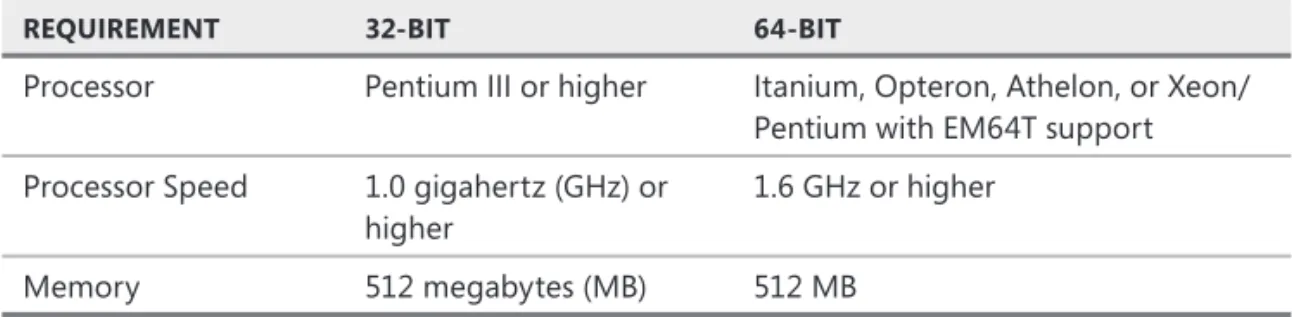
The minimum hardware requirements are listed in Table 1-1.
TABLE 1-1 Hardware Requirements
REQUIREMENT 32-BIT 64-BIT
Processor Pentium III or higher Itanium, Opteron, Athelon, or Xeon/ Pentium with EM64T support
Processor Speed 1.0 gigahertz (GHz) or higher
1.6 GHz or higher
Memory 512 megabytes (MB) 512 MB
The amount of disk space consumed by the installation depends upon the services and utilities that are installed. To determine the amount of disk space required, please
IMPORTANTT MINIMUM HARDWARE REQUIREMENTS
This lesson outlines the minimum requirements for installing SQL Server. Production systems usually require signifi cantly more hardware to meet performance and capacity expectations. You need to apply the knowledge from subsequent chapters in this book to help you determine the memory, disk storage, and processor requirements that may be required by a given application.
After this lesson, you will be able to: Verify minimum hardware requirements
Verify operating system support
Verify additional software required
refer to the SQL Server Books Online article, “Hardware and Software Requirements for Installing SQL Server 2008,” at http://technet.microsoft.com/en-us/library/ms143506.aspx.
IMPORTANT ADDITIONAL HARDWARE COMPONENTS
SQL Server Books Online lists a mouse, CD/DVD drive, and monitor with at least 1024 x 768 resolution as requirements for installation. However, it is possible to install SQL Server to a computer that does not have any of these devices attached, which is very common within a server environment. A CD/DVD drive is required only if you are installing from a disk. A monitor is required only if you are using the graphical tools.
Supported Operating Systems
SQL Server 2008 is supported on 32-bit and 64-bit versions of Microsoft Windows. The 64-bit version of SQL Server can install only to a 64-bit version of Windows. The 32-bit version of SQL Server can be installed to either a 32-bit version of Windows or to a 64-bit version of Windows with Windows on Windows (WOW) enabled.
The operating systems supported for all editions of SQL Server are : Windows Server 2008 Standard or higher
Windows Server 2003 Standard SP2 or higher
The operating systems supported for SQL Server Developer, Evaluation, and Express are: Windows XP Professional SP2 or higher
Windows Vista Home Basic or higher SQL Server Express is also supported on:
Windows XP Home Edition SP2 or higher Windows XP Home Reduced Media Edition Windows XP Tablet Edition SP2 or higher Windows XP Media Center 2002 SP2 or higher Windows XP Professional Reduced Media Edition
Windows XP Professional Embedded Edition Feature Pack 2007 SP2 Windows XP Professional Embedded Edition for Point of Service SP2 Windows Server 2003 Small Business Server Standard Edition R2 or higher
EXAM TIP
SQL Server 2008 is not supported on Windows Server 2008 Server Core. Windows Server 2008 Server Core is not supported because the .NET Framework is not supported on Server Core. SQL Server 2008 relies on .NET Framework capabilities to support FILESTREAM, SPATIAL, and DATE data types, along with several additional features.
IMPORTANTT ADDITIONAL HARDWARE COMPONENTS
Software Requirements
SQL Server 2008 requires .NET Framework 3.5. Although the installation routine installs the required versions of the .NET Framework, you need to have Windows Installer 4.5 on the computer prior to the installation of SQL Server.
IMPORTANT .NET FRAMEWORK
NET Framework 2.0 includes Windows Installer 3.1, so if you have .NET Framework 2.0 already installed, you meet the minimum requirements. However, to minimize the amount of time required for installation, it is recommended that you install all versions of the .NET Framework through version 3.5 on the machine prior to installing SQL Server.
The SQL Server setup routine also requires :
Microsoft Data Access Components (MDAC) 2.8 SP1 or higher Shared Memory, Named Pipes, or TCP/IP networking support Internet Explorer 6 SP1 or higher
Quick Check
1. What edition of Windows Server 2008 is not supported for SQL Server 2008 installations?
2. Which operating systems are supported for all editions of SQL Server?
Quick Check Answers
1. Windows Server 2008 Server Core is not supported for SQL Server 2008 installations.
2. Windows Server 2003 Standard SP2 or higher, Windows Server 2008 Standard RC0 or higher.
PR ACTICE
Verify Minimum Requirements
In the following practices, you verify that your machine meets the minimum hardware, operating system, and supporting software requirements for a SQL Server installation.
PR ACTIC E 1 Verify Hardware and Operating System Requirements
In this practice, you verify that your computer meets the minimum hardware and operating system requirements to install SQL Server 2008.
1. Click Start, right-click My Computer, and select Properties.
2. On the General tab under System, verify that your operating system meets the minimum requirements.
IMPORTANTT .NET FRAMEWORK
NET Framework 2.0 includes Windows Installer 3.1, so if you have .NET Framework 2.0 already installed, you meet the minimum requirements. However, to minimize the amount of time required for installation, it is recommended that you install all versions of the .NET Framework through version 3.5 on the machine prior to installing SQL Server.
Quick Check
1. What edition of Windows Server 2008 is not supported for SQL Server 2008 installations?
2. Which operating systems are supported for all editions of SQL Server?
Quick Check Answers
1. Windows Server 2008 Server Core is not supported for SQL Server 2008 installations.
2. Windows Server 2003 Standard SP2 or higher, Windows Server 2008 Standard RC0 or higher.
3. On the General tab under Computer, verify that your computer meets the minimum hardware requirements.
PR ACTIC E 2 Verify Supporting Software Requirements
In this practice, you verify that you have the appropriate supporting software installed. 1. Click Start, and then select Control Panel.
2. Double-click Add/Remove Programs.
3. Verify that you have the minimum versions of Windows Internet Explorer and the .NET Framework installed by performing the following steps:
a. Click Start, and then select Run. b. Enter regedit in the text box.
c. When the Registry Editor opens, browse through the navigation pane to HKEY_LOCAL_ MACHINE\Software\Microsoft\DataAccess.
4. Verify the MDAC version in the FullInstallVer key.
Lesson Summary
SQL Server 2008 is supported on both 32-bit and 64-bit operating systems.
You can install all editions of SQL Server 2008 on either Windows Server 2003 Standard Edition SP2 and higher or Windows Server 2008 Standard and higher.
You cannot install SQL Server 2008 on Windows Server 2008 Server Core.
Lesson Review
The following questions are intended to reinforce key information presented in Lesson 1, “Determining Hardware and Software Requirements.” The questions are also available on the companion CD if you prefer to review them in electronic form.
NOTE ANSWERS
Answers to these questions and explanations of why each answer choice is right or wrong are located in the “Answers” section at the end of the book.
1. You are deploying a new server within Wide World Importers that will be running a SQL Server 2008 instance in support of a new application. Because of the feature support that is needed, you will be installing SQL Server 2008 Enterprise. Which operating systems will support your installation? (Choose all that apply.)
A. Windows 2000 Server Enterprise SP4 or higher
B. Windows Server 2003 Enterprise
C. Windows Server 2003 Enterprise SP2
D. Windows Server 2008 Enterprise
NOTEE ANSWERS
2. You are deploying SQL Server 2008 Express in support of a new Web-based application that will enable customers to order directly from Coho Vineyards. Which operating system does NOT support your installation?
A. Windows XP Home Edition SP2
B. Windows Server 2008 Server Core
C. Windows Server 2003 Enterprise SP2
Lesson 2: Selecting SQL Server Editions
SQL Server 2008 is available is several editions, ranging from editions designed for mobile, embedded applications with a very small footprint to editions designed to handle petabytes or data being manipulated by millions of concurrent users. This lesson explains the services available within the SQL Server 2008 database platform and the differences between the SQL Server editions.
After this lesson, you will be able to:
Understand the differences between SQL Server 2008 Enterprise, Workgroup, Standard, and Express
Understand the role of each service that ships within the SQL Server 2008 data platform
Estimated lesson time: 20 minutes
SQL Server Services
SQL Server 2008 is much more than a simple database used to store data. Within the SQL Server 2008 data platform are several services that can be used to build any conceivable application within an organization.
Within the core database engine, you will fi nd services to store, manipulate, and back up and restore data. The core database engine also contains advanced security capabilities to protect your investments, along with services to ensure maximum availability. Your data infrastructure can be extended to handle unstructured text along with synchronizing multiple copies of a database. Many of these capabilities are discussed in subsequent chapters in this book.
Service Broker
Service Broker was introduced in SQL Server 2005 to provide a message queuing system integrated into the SQL Server data platform. Based on user-defi ned messages and processing actions, you can use Service Broker to provide asynchronous data processing capabilities. Not only is Service Broker a capable message queuing system, you can also provide advanced business process orchestration with Service Broker handling data processing across a myriad of platforms, all without requiring the user to wait for the process to complete or affecting the user in any other way.
SQL Server Integration Services
SQL Server Integration Services (SSIS) features all the enterprise class capabilities that you can fi nd in Extract, Transform, and Load (ETL) applications while also allowing organizations to build applications that can manage databases and system resources, respond to database and system events, and even interact with users.
After this lesson, you will be able to:
Understand the differences between SQL Server 2008 Enterprise, Workgroup, Standard, and Express
Understand the role of each service that ships within the SQL Server 2008 data platform
SSIS has a variety of tasks to enable packages to upload or download fi les from File Transfer Protocol (FTP) sites, manipulate fi les in directories, import fi les into databases, or export data to fi les. SSIS can also execute applications, interact with Web services, send and receive messages from Microsoft Message Queue (MSMQ), and respond to Windows Management Instrumentation (WMI) events. Containers allow SSIS to execute entire tasks and workfl ows within a loop with a variety of inputs from a simple counter to fi les in a directory or across the results of a query. Specialized tasks are included to copy SQL Server objects around an environment as well as manage database backups, re-indexing, and other maintenance operations. If SSIS does not ship with a task already designed to meet your needs, you can write your own processes using the Visual Studio Tools for Applications or even design your own custom tasks that can be registered and utilized within SSIS.
Precedence constraints allow you to confi gure the most complicated operational
workfl ows, where processing can be routed based on whether a component succeeds, fails, or simply completes execution. In addition to the static routing based on completion status, you can combine expressions to make workfl ow paths conditional. Event handlers allow you to execute entire workfl ows in response to events that occur at a package or task level, such as automatically executing a workfl ow to move a fi le to a directory when it cannot be processed, log the details of the error, and send an e-mail to an administrator.
Package confi gurations enable developers to expose internal properties of a package such that the properties can be modifi ed for the various environments in which a package will be executing. By exposing properties in a confi guration, administrators have a simple way of reconfi guring a package, such as changing database server names or directories, without needing to edit the package.
SQL Server Reporting Services
Organizations of all sizes need to have access to the vast quantities of data stored throughout the enterprise in a consistent and standardized manner. Although it would be nice to expect everyone to know how to write queries against data sources to obtain the data that is needed or to have developers available to write user interfaces for all the data needs, most organizations do not have the resources. Therefore, tools need to be available to create standardized reports that are made available throughout the organization, as well as providing the ability for users to build reports on an ad hoc basis.
SQL Server Reporting Services (SSRS) fi lls the data delivery gap by providing a fl exible platform for designing reports as well as distributing data throughout an organization. The IT department can build complex reports rapidly, which are deployed to one or more portals that can be accessed based on fl exible security rules. The IT department can also design and publish report models that allow users to build their own reports without needing to understand the underlying complexities of a database. Reports built by IT as well as by users can be deployed to a centralized reporting portal that allows members of the organization to access the information they need to do their jobs.
Users can access reports which are either generated on the fl y or displayed from cached data that is refreshed on a schedule. Users can also confi gure subscriptions to a report which allow SSRS to set up a schedule to execute the report and then send it to users on their preferred distribution channel formatted to their specifi cations. For example, a sales manager can create a subscription to a daily sales report such that the report is generated at midnight after all sales activity is completed, have it rendered in a Portable Document Format (PDF) format, and dropped in his e-mail inbox for review in the morning.
SSRS ships with two main components, a report server and a report designer.
The report server is responsible for hosting all the reports and applying security. When reports are requested, the report server is responsible for connecting to the underlying data sources, gathering data, and rendering the report into the fi nal output. Rendering a report is accomplished either on demand from a user or through a scheduled task which allows the report to be run during off-peak hours.
SQL Server Analysis Services
As the volume of data within an organization explodes, you need to deploy tools that allow users to make business decisions on a near-real-time basis. Users can no longer wait for IT to design reports for the hundreds of questions that might be asked by a single user. At the same time, IT does not have the resources to provide the hundreds of reports necessary to allow people to manage a business.
SQL Server Analysis Services (SSAS) was created to fi ll the gap between the data needs of business users and the ability of IT to provide data. SSAS encompasses two components: Online Analytical Processing (OLAP) and Data Mining.
The OLAP engine allows you to deploy, query, and manage cubes that have been designed in Business Intelligence Development Studio (BIDS). You can include multiple dimensions and multiple hierarchies within a dimension, and choose a variety of options such as which attributes are available for display and how members are sorted. Measures can be designed as simple additive elements as well as employing complex, user-defi ned aggregations schemes. Key Performance Indicators (KPIs) can be added which provide visual queues for users on the state of a business entity. Cubes can contain perspectives which defi ne a subset of data within a single cube to simplify viewing. The built-in metadata layer allows you to specify language translations at any level within a cube so that users can browse data in their native language.
The Data Mining engine extends business analysis to allow users to fi nd patterns and make predictions. Utilizing any one of the several mining algorithms that ship with SQL Server, businesses can examine data trends over time, determine what factors infl uence buying decisions, or even reconfi gure a shopping experience based on buying patterns to maximize the potential of a sale.
MORE INFO SQL SERVER SERVICES
For a detailed discussion of each feature available within the SQL Server 2008 data platform, please refer to the book Microsoft SQL Server 2008 Step by Step (Microsoft Press, 2008), which provides overview chapters on every SQL Server 2008 feature.
SQL Server Editions
SQL Server 2008 is available in the following editions:
Enterprise Designed for the largest organizations and those needing to leverage the full power of the SQL Server 2008 platform.
Standard Designed for small and midsized organizations that do not need all the capabilities available in SQL Server 2008 Enterprise.
Workgroup Suitable for small departmental projects with a limited set of features.
Express A freely redistributable version of SQL Server that is designed to handle the needs of embedded applications as well as the basic data storage needs for server-based applications, such as Web applications with a small number of users.
MORE INFO SQL SERVER SERVICES
Compact Designed as an embedded database.
Developer Designed for use by developers in creating SQL Server applications. SQL Server 2008 Developer has all the features and capabilities as SQL Server 2008 Enterprise, except that it is not allowed to be used in a production environment.
Evaluation Designed to allow organizations to evaluate SQL Server 2008. SQL Server 2008 Evaluation has all the features and capabilities as SQL Server 2008 Enterprise, except that it is not allowed to be used in a production environment and it expires after 180 days.
NOTE SQL SERVER EDITIONS
The Developer Edition of SQL Server is designed for developers to create new SQL Server applications. The Evaluation Edition of SQL Server is designed to allow organizations to evaluate the features available in SQL Server. Both the Developer and Evaluation editions contain the same functionality as the Enterprise Edition of SQL Server; the only exception being that the Developer and Evaluation editions are not licensed to run in a production environment. For the purposes of this book, we will discuss only the editions that can be deployed into production environments: Express, Workgroup, Standard, and Enterprise.
The main differences between the SQL Server editions are in the hardware and feature set that is supported. The tables below provide a basic overview of the differences between the editions in the various areas.
TABLE 1-2 Hardware Support
HARDWARE STANDARD WORKGROUP EXPRESS COMPACT
# of CPUs 4 4 1 1
Database size Unlimited Unlimited 4 GB 4 GB
RAM Unlimited Unlimited 1 GB 1 GB
TABLE 1-3 Database Engine Support
FEATURE STANDARD WORKGROUP EXPRESS COMPACT
SQL Server Management Studio
Yes Yes Separate
download No
Full Text Search Yes Yes Advanced services only
No
Partitioning No No No No
Parallel Operations No No No No
NOTEE SQL SERVER EDITIONS
TABLE 1-3 Database Engine Support
FEATURE STANDARD WORKGROUP EXPRESS COMPACT
Multiple Instances No No No No
Database Snapshots No No No No
Scalable Shared Databases
No No No No
Indexed Views No No No No
Log Compression No No No No
Clustering 2 nodes No No No
Database Mirroring Single-thread No No No
Online Operations No No No No
Resource Governor No No No No
Backup Compression No No No No
Hot Add Memory/CPU No No No No
Data Encryption Limited Limited Limited Password-based only
Change Data Capture No No No No
Data Compression No No No No
Policy-Based Management
Yes No No No
Performance Data Collection
Yes No No No
CLR Yes
XML Native Native Native Stored as
text
Spatial data Yes
Stored procedures, triggers, and views
Yes Yes Yes No
Merge Replication Yes Yes Subscriber only
Subscriber only
Transactional Replication Yes Subscriber only
Subscriber only
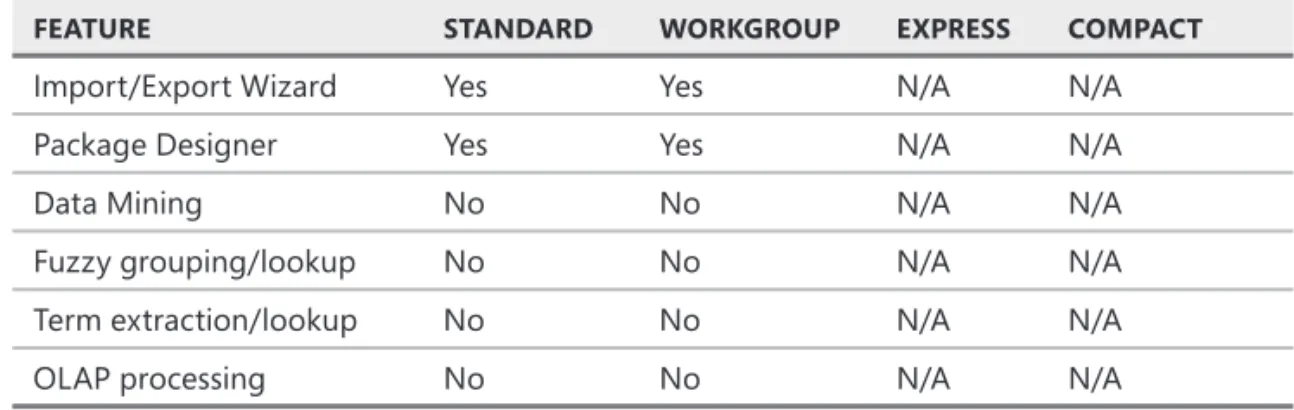
TABLE 1-4 SSIS Support
FEATURE STANDARD WORKGROUP EXPRESS COMPACT
Import/Export Wizard Yes Yes N/A N/A
Package Designer Yes Yes N/A N/A
Data Mining No No N/A N/A
Fuzzy grouping/lookup No No N/A N/A
Term extraction/lookup No No N/A N/A
OLAP processing No No N/A N/A
TABLE 1-5 SSRS Support
FEATURE STANDARD WORKGROUP EXPRESS COMPACT
Microsoft Offi ce Integration Yes Yes Advanced services only
N/A
Report Builder Yes Yes Advanced
services only N/A
Scale-out reporting No No No N/A
Data-driven subscriptions No No No N/A
TABLE 1-6 SSAS—OLAP Support
FEATURE STANDARD WORKGROUP EXPRESS COMPACT
Linked measures/dimensions No No N/A N/A
Perspectives No No N/A N/A
Partitioned cubes No No N/A N/A
TABLE 1-7 SSAS—Data Mining Support
FEATURE STANDARD WORKGROUP EXPRESS COMPACT
Time series No No N/A N/A
Parallel processing and prediction No No N/A N/A
Advanced mining algorithms No No N/A N/A
EXAM TIP
Quick Check
1. Which editions support the entire feature set available within the SQL Server data platform? Of these editions, which editions are not licensed for production use?
2. Which editions of SQL Server are designed as storage engines for embedded applications with limited hardware and feature support?
Quick Check Answers
1. Enterprise, Developer, and Evaluation editions have the entire set of features available within the SQL Server 2008 data platform. Developer and Evaluation editions are not licensed for use in a production environment.
2. Express and Compact editions are designed as storage engines for embedded applications and support only a single CPU, up to 1 GB of RAM, and a maximum database size of 4 GB.
Lesson Summary
SQL Server 2008 is available in Enterprise, Standard, Workgroup, Express, and Compact editions for use in a production environment.
In addition to the core database engine technologies, SQL Server 2008 Enterprise supports Service Broker for asynchronous processing.
Lesson Review
The following questions are intended to reinforce key information presented in Lesson 2, “Selecting SQL Server Editions.” The questions are also available on the companion CD if you prefer to review them in electronic form.
NOTE ANSWERS
Answers to these questions and explanations of why each answer choice is right or wrong are located in the “Answers” section at the end of the book.
1. Margie’s Travel is opening a new division to offer online travel bookings to their customers. Managers expect the traffi c volume to increase rapidly, to the point where hundreds of users will be browsing offerings and booking travel at any given time. Management would also like to synchronize multiple copies of the database of travel bookings to support both online and face-to-face operations. Which editions of SQL Server 2008 would be appropriate for Margie’s Travel to deploy for their new online presence? (Choose all that apply.)
A. Express
B. Standard C. Enterprise D. Compact
Quick Check
1. Which editions support the entire feature set available within the SQL Server data platform? Of these editions, which editions are not licensed for production use?
2. Which editions of SQL Server are designed as storage engines for embedded applications with limited hardware and feature support?
Quick Check Answers
1. Enterprise, Developer, and Evaluation editions have the entire set of features available within the SQL Server 2008 data platform. Developer and Evaluation editions are not licensed for use in a production environment.
2. Express and Compact editions are designed as storage engines for embedded applications and support only a single CPU, up to 1 GB of RAM, and a maximum database size of 4 GB.
Q
NOTEE ANSWERS
2. Margie’s Travel decided to minimize the cost and deploy SQL Server 2008 Standard to support the new online division. After a successful launch, managers are having a hard time managing business operations and need to deploy advanced analytics. A new server running SQL Server will be installed. Which edition of SQL Server needs to be installed on the new server to support the necessary data analytics?
A. SQL Server 2008 Standard
B. SQL Server 2008 Express with Advanced Services C. SQL Server 2008 Workgroup