Sqlbase Database Administrator's Guide Page 1
SQLBase Database
Administrator’s Guide
Sqlbase Database Administrator's Guide Page 2
Trademarks
Gupta, the Gupta logo, Gupta Powered, the Gupta Powered logo, Centura, Centura Ranger, the Centura logo, Centura Web Developer, Fast Facts, Object Nationalizer, Quest, Quest/Web, QuickObjects,
SQL/API, SQLBase, SQLConsole, SQLGateway, SQLHost, SQLNetwork, SQLRouter, SQLTalk, and Team Object Manager are trademarks of Gupta Technologies and may be registered in the United States of America and/or other countries. SQLWindows is a registered trademark and TeamWindows,
ReportWindows and EditWindows are trademarks exclusively used and licensed by Gupta Technologies. Team Object Manager, Web Developer, QuickObjects, Object Nationalizer, Report Builder,
Connectivity Administrator, Development Kit, Component Development Kit, SQLBase Resource Manager, and SQLConsole are names of products from Gupta Technologies.
Adobe is a trademark of Adobe Systems, Incorporated.
IBM, OS/2, NetBIOS, and AIX are registered trademarks of International Business Machines Corporation. Linux is a trademark of Linus Torvalds.
Red Hat is a trademark of Red Hat, Incorporated. Novell and Netware are trademarks of Novell, Inc. SUSE is a trademark of SUSE LINUX AG.
Java, JavaScript, and Solaris are trademarks of Sun Microsystems, Incorporated. Microsoft, Outlook, PowerPoint, Visual C++, Visual Studio, Internet Explorer,
Internet Information Server, DOS, Win 32, Windows, ActiveX, MSDN, SQL Server, and Visual Basic are either registered trademarks or trademarks of Microsoft Corporation in the United States of America and/or other countries.
This product includes software developed by the OpenSSL Project for use in the OpenSSL Toolkit. (http://www.openssl.org/).
All other product or service names mentioned herein are trademarks or registered trademarks of their respective owners.
Copyright
Sqlbase Database Administrator's Guide Page 3
Table of Contents
SQLBase Database Administrator’s Guide ... 1
Trademarks... 2
Copyright ... 2
Table of Contents ... 3
Chapter 1 SQLBase Migration Wizard ... 9
Migration Wizard Instructions ... 9
Running the Migration Wizard in Windows 7 ... 15
Chapter 2 RDBMS Windows concepts ... 17
Database administrator (DBA) ... 17
Relational databases ... 18
How SQL organizes data ... 21
System catalog tables ... 24
Databases and networks ... 24
Chapter 3 Communication ... 28
Overview ... 28
Supported protocols ... 29
Configuring SQL.INI ... 29
Connectivity Administrator ... 32
Anonymous pipes ... 37
TCP/IP ... 38
Database drivers and providers ... 38
COM+ and the SQLBase Resource Manager ... 38
Chapter 4 Configuration: SQL.INI and the Registry... 40
Sqlbase Database Administrator's Guide Page 4
Configuration entries ... 43
When do keyword changes take effect? ... 44
Keyword list ... 45
Keyword descriptions ... 50
The Registry... 92
Chapter 5 Databases ... 93
About databases ... 93
Database cache ... 96
Database files ... 97
Partitions ... 104
Database auditing ... 108
Lock Table Statements ... 116
Auto-Increment Option ... 117
Chapter 6 DBA Interfaces ... 121
Client programs ... 121
SQLConsole ... 122
Character-based server interface ... 123
SQLBase Server Console ... 129
SQLBase Management Console (SMC)... 138
Chapter 7 DBA Operations ... 143
Starting and stopping SQLBase... 144
Creating a database ... 146
Deleting a database... 147
Deinstalling a database ... 148
Sqlbase Database Administrator's Guide Page 5
Loading and unloading a database ... 150
Creating a read-only database ... 155
Partitioning a database ... 155
Maintaining a partitioned database ... 158
Reorganizing a database ... 160
Checking database integrity ... 161
Running multiple versions of SQLBase ... 162
SQLBase Debug Tracing ... 163
Chapter 8 Security and Authorization ... 166
Database authority... 166
External Authentication ... 170
Table and view privileges ... 171
Roles ... 174
Synonyms ... 175
SQLTalk examples ... 177
Views ... 177
Execute privileges for stored procedures ... 180
System catalog ... 180
Server security ... 181
Database page encryption ... 185
Database page alteration protection ... 186
ALTER DBSECURITY ... 187
ALTER EXPORTKEY ... 188
Transmission security ... 188
Sqlbase Database Administrator's Guide Page 6
Remote file protection ... 190
Creating an SSL Certificate ... 191
Tutorial ... 192
Chapter 9 Backing Up and Restoring Databases ... 198
Making a backup plan ... 198
Backing up a database... 199
SQLTalk commands ... 202
Restoring a database ... 203
Examples ... 206
Backing up and restoring partitioned databases ... 209
Chapter 10 Distributed Transactions ... 212
What is a distributed transaction? ... 212
Setting up a distributed transaction ... 213
Two-phase commit ... 217
Failure recovery ... 223
Performance issues ... 224
Chapter 11 National Language Support ... 225
NLS configuration files ... 225
country.sql directives ... 227
Building a database with NLS ... 231
Chapter 12 Running SQLBase Server as a Windows Service ... 233
About service programs ... 233
Installing SQLBase Server for Windows ... 234
Administering service programs ... 234
Sqlbase Database Administrator's Guide Page 7
Service information in the Windows Registry... 235
Installing & Administering the Service Using the DBNTSRV.EXE Command Line ... 236
Windows Application Event Log ... 237
Shutting down SQLBase Server for Windows ... 238
Running SQLBase as an application program ... 239
Appendix A System Catalog Tables ... 240
System catalog summary ... 241
SYSADM.SYSCOMMANDS ... 243
SYSADM.SYSPARTTRANS ... 249
SYSADM.SYSPKCONSTRAINTS ... 250
SYSADM.SYSTRIGGERS ... 254
System table operations ... 255
System catalog views ... 256
Server-independent system catalog views ... 256
MAIN database system tables ... 258
SYSADM.AREAS ... 260
MAIN database system views ... 261
MAIN stored commands ... 262
Appendix B SQLBase Procedures ... 266
SQLBase-supplied procedures ... 266
Appendix C System Utility Tables ... 268
System utilities table summary ... 269
Appendix D Supported Collations ... 270
Collations... 271
Sqlbase Database Administrator's Guide Page 9
Chapter 1
SQLBase Migration Wizard
Migration Wizard Instructions
You can migrate a SQLBase 10.0 database to SQLBase 11.5 using the SQLBase 10 Migration Wizard. The wizard (sb10mgwz.exe) is located in the Gupta\SQLBase11.7\migration directory. There’s also a shortcut menu item that the installation adds.
Conversions
The following table describes the conversions that take place during a migration.
SQLBase 10.0 SQLBase 11.5
CHAR <= 127 (column length) NCHAR VARCHAR <= 127 (column length) NVARCHAR
NCHAR <= 127 (column length)
UCHAR <= 127 (column length)
NCHAR
No additional conversion needed. NVARCHAR <= 127 (column length)
UVARCHAR <= 127 (column length)
NVARCHAR
Sqlbase Database Administrator's Guide Page 10 SQLBase 10.0 SQLBase 11.5
CHAR > 127 (column length)
VARCHAR > 127 (column length)
NCHAR > 127 (column length)
UCHAR > 127 (column length)
NVARCHAR > 127 (column length)
UVARCHAR > 127 (column length)
LONG VARCHAR
BINARY LONG VARBINARY
LONG VARBINARY LONG VARBINARY
No additional conversion needed.
LONG VARCHAR LONG
LONG CHARACTER CLOB
LONG NVARCHAR NCLOB
LONG VARCHAR
Data will be converted to ANSI character set in the case of LONG NVARCHAR or NCLOB
Other data types No conversion needed.
collations Collations in the unload file will be
ignored except for an index or primary key that has one or more collations listed in its column list. These keys/ indexes will be created using the collation of the first column listed. Mixed collations are not supported in 11.5.
Long usernames and long passwords Any long user names will be truncated.
Since there is no way to obtain the original password, the current password hash will be used. In case of a long password, this means that the user will be unable to log in unless the password is changed by an administrator.
Sqlbase Database Administrator's Guide Page 11
Migrating
To migrate from a SQLBase 10.0 database to a SQLBase 11.5 database: Ensure that the server for the database is running.
Start the migration wizard by either double-clicking b10mgwz.exe or selecting the SQLBase 10 Migration Wizard from the shortcut menu.
The SQLBase 10.0 Migration Wizard starts.
Specify the directory that the migration wizard will use for temporary files during the migration and then click Next.
Sqlbase Database Administrator's Guide Page 12 Use either the default path that appears or enter a different path. After clicking
Next, the migration wizard displays the following:
Specify the database to migrate, enter the username and password for that database, and then click
Next.
The default username and password are both sysadm. After clicking Next, the wizard displays a dialog
asking if you want to unload your SQLBase 10.0 database from the server.
You must first unload your database before you can migrate it.
Sqlbase Database Administrator's Guide Page 13 The migration wizard unloads the SQLBase 10 database and displays the following status message:
Click Next.
Sqlbase Database Administrator's Guide Page 14 Use this screen to specify details about the SQLBase 11.5 version of your database.
Enter the desired database name, username and password, and then click Next.
The migration wizard automatically populates these fields for you. It’s recommended that you use the same username and password for the SQLBase 11.5 version that you used for the SQLBase 10.0 version. Use the Open Script button to view the SQL statement that the wizard will use to migrate your database. After clicking Next, the wizard displays a dialog asking if you want to load the 11.5 version of your database.
Click Yes.
The migration wizard loads the SQLBase 11.5 version of your database onto the server. The system displays a message dialog when it completes.
Sqlbase Database Administrator's Guide Page 15 Click Next.
The migration wizard displays the following screen:
You’re migration is complete. You have the option of removing the temporary files that the wizard generated during the migration (set by default). The wizard will remove these files when you click Finish if the checkbox is set.
Click Finish.
Running the Migration Wizard in Windows 7
In order to run the SQLBase Migration Wizard in Windows 7, go to:Start / All Programs / Gupta / SQLBase11.7 / SQLBase10MigrationWizard
Right click on SQLBase10MigrationWizard to display the SQLBase10 Migration Wizard Properties dialog box. On the "Compatibility" tab, check 'Run this program as an administrator' under Privilege Level. See example image below.
Sqlbase Database Administrator's Guide Page 17
Chapter 2
RDBMS Windows concepts
This chapter briefly explains some concepts that you need to understand in order to use SQLBase software:
• A DBA's responsibilities.
This section discusses the responsibilities of a Database Administrator.
• Databases and networks.
This section describes client/server terminology as it applies to SQLBase.
Database administrator (DBA)
As a DBA, you ensure the smooth operation of one or more databases and you are responsible for the design, planning, installation, configuration, security, management, maintenance, and operation of a database management system (DBMS) and its supporting network.
A good way to ensure that the databases meet the needs of your organization is by becoming familiar with the organization’s applications: who are its users, what data is stored and accessed, and what types of transactions occur.
A DBA's specific responsibilities include:
• Keeping the database servers running on a daily basis. • Diagnosing and resolving system problems.
• Installing both database server and client software. • Creating databases.
• Backing up and recovering databases.
• Controlling security and access to the database and its objects.
• Monitoring and tuning the performance of a database as well as the applications that access it. • Managing communications.
• Managing disk space and estimating storage needs.
• Advising developers about table, index, and view design, multi-user considerations, networking, and loading, converting, and unloading data.
• Ensuring data availability, accuracy, completeness, integrity, and consistency. • Auditing the use of a database.
• Administering the system catalog. • Helping database application users.
Sqlbase Database Administrator's Guide Page 18
Organizing the DBA function
There are two SQLBase authority levels that a DBA can have: SYSADM
This is the most powerful authority level. There can only be one user with SYSADM authority. This user can designate one or more other users as DBAs.
DBA
A user with this authority level has privileges on all database objects and can grant, change, or revoke the object privileges of any user but SYSADM.
Access to the SYSADM and DBA accounts should be tightly controlled.
On an organizational level, your company needs to determine the number of people required to maintain its databases and applications. Depending on the size of the databases and the applications, you may have one or more DBAs. They, in turn, may specialize in maintaining databases or applications, or they may support both a database and the applications that access it.
If you work in a large organization, you are likely to have one user with SYSADM authority who designates several users with DBA authority level and privileges. The DBAs would then share the responsibility for the database maintenance tasks.
If you work in a small organization, the user with SYSADM authority may be the DBA as well. Read Chapter 8, Security and Authorization for more information on authority levels.
Relational databases
Users need data that is easy to access and that they can use in both ad- hoc queries and daily transaction processing. The data structures should be flexible.
A relational database reduces data to its most basic level in simple, two-dimensional tables that contain columns and rows of data values. Tables are easy to visualize. Users can explain their needs in easy-to-understand terms. Data modeling is flexible.
Representing relationships
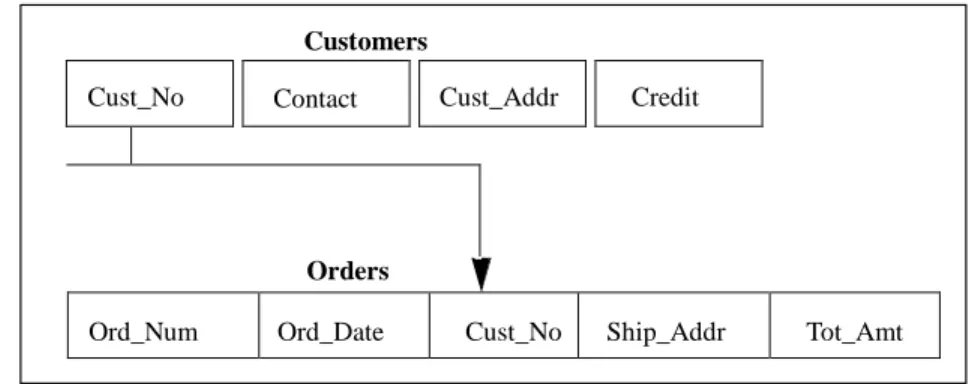
A collection of tables can represent complex data relationships. The relationship between two tables is defined by a column that both tables contain. This makes the links between the tables easy to see and understand.
Sqlbase Database Administrator's Guide Page 19
Cust_No Contact Cust_Addr
Credit
For example, in an order entry system, the customer information is stored in a separate table than the order information. The two tables are related by the existence of a common column: customer number (Cust_No).
Customers
Orders
Ord_Num Ord_Date Cust_No Ship_Addr Tot_Amt
Customers and Orders tables in an order entry system
This link enables SQLBase to match a row in the Orders table to its associated row in the Customers table, allowing you to find the customer name and address for each order.
Terminology
The terms used to refer to database objects vary from system to system. The following table shows how the terms relate to each other. Gupta uses the “Relational database” terms.
Relational database
Set theory
Conventional data processing
Table Relation File or data set
Row Tuple Record
Column Attribute
Domain
Field
The word relation comes from the study of data structures done by E.F. Codd and others at IBM. Codd used set theory. A set is a group of objects with a defining rule that enables you to tell whether a given object is in the set or not. For example, the set of white rabbits is a subset of all rabbits with the defining property that the animal has white fur.
A relational system produces a result set by retrieving a set of rows from one or more tables. You can, in turn, operate on this result set instead of operating against the tables from which you originally retrieved the rows. This set-at-a-time approach means that a single relational command can retrieve, update, or delete multiple rows stored in the database.
The sequence (left-to-right or up-to-down) of data in a table holds no information about the data itself. Part of the flexibility of a relational database comes from this property; no information is “hidden” in the physical layout of the database.
In a relational system, the meaning of a column or row does not depend on its order relative to the other columns and rows. This means that you can retrieve data from a select number of columns without
Sqlbase Database Administrator's Guide Page 20 having to retrieve data from all columns. The same goes for rows: you can retrieve data from a subset of rows without having to retrieve all the rows.
Relational databases reduce the storage of redundant data. This has three benefits:
• You can rearrange data and combine it easily into new relationships; it is not locked into certain relationships because of the way it is stored.
• You can more easily update data because there are fewer instances of the data • This reduces the likelihood of errors arising from a failure to update all instances. • It reduces disk space requirements.
Relational operations
Codd's relational algebra defined three key data retrieval operations.
Selection
Selection is the process of retrieving all rows of a table which meet some specified criterion. Note that this is a very narrow definition of selection, and should not be confused with the SQL SELECT command, which does more than just selection.
Projection
Projection is the process of retrieving one or more columns from a table in a specified order and removing any duplicate rows.
Join
Joining is the process of retrieving columns from different tables where the values of a common column in each table are equal.
The ability to join two or more tables is powerful. The join operation distinguishes relational systems from non-relational systems.
The SQL SELECT command performs selection, projection, and join operations.
Comparison to other models
Hierarchical and network database models are procedural and record-at-a-time. To find a record, you have to navigate or find a path to the record you want and give multiple procedural commands that tell the system to walk down that path, step-by- step. You need a detailed understanding of how the data is stored. Once you have created a database and loaded data into it, it can be difficult to change.
In contrast, a relational system provides automatic navigation. You do not have to know how the
database stores data in order to retrieve, change, or destroy that data. This makes it easy to access data. Hierarchical and network database systems store some data as values and other data as pointers. For example, in a network system, the data that order #123 comes to a total of $58.00 would be stored as a value in a field. The data that order #123 belongs to customer #345 would be stored as a pointer from the order record to the corresponding customer record.
You must use pointers to associate records to one another in a network or hierarchical database. You must decide whether to store data as a pointer or as a value when you define the database. Network and hierarchical systems use relationships that are pointer-based and predefined or static.
Sqlbase Database Administrator's Guide Page 21 In contrast, relational database systems can use any value to link one table to another, and you define relationships between values when you query the data, not when you create the tables. This gives you maximum flexibility to create spontaneous queries.
How SQL organizes data
SQL objects include:• Databases
• Tables
• Columns
• Indexes
• Views
• Synonyms
• Stored commands
• Stored procedures
• External functions
• Triggers
Databases, tables, and columns
A database is a set of SQL objects. When you create a database, you are actually naming an eventual
collection of tables, associated indexes, and views.
A single database can contain all the data associated with one application or with a group of related applications. Collecting data into a single database lets you enable or prevent access to all the data in just one operation.
A database contains one or more tables. Each table has a name and contains a specific number of
columns and rows. Each column in a row is related in some way to the other columns in the same row.
COLUMN Cust_No =======
46372986 ROW
12162344 98121735 89923942
Each column has a name and a data type. Data values exist at the intersection of a row and a column.
Data uniqueness
In theory, no row should be a duplicate of any other row in the same table. Consider a sales order table with columns for the date, product code, quantity, and customer ID. If a customer orders ten widgets in the morning and then another ten in the afternoon, this would create two duplicate rows in the table, one for each order.
Sqlbase Database Administrator's Guide Page 22 To ensure the creation of unique rows, you might create an additional column to store the time at which the order was placed, or to store a uniquely-generated sequence number (such as an invoice number). A table can have a primary key which is a column or a group of columns whose value uniquely identifies each row. Another table can have a foreign key which is a column or a group of columns whose values are equal to those of the first table’s primary key. One of the rules of referential integrity is that the value of a table’s foreign key must match the value of another table’s primary key.
Changing the database structure
SQLBase has SQL commands that enable you to add new columns to existing tables and make existing columns wider. These changes take effect immediately and no database reorganization is necessary.
Indexes
An index is an ordered set of pointers to the data in a table. It is based on the data values in one or more
columns of the table. SQLBase stores indexes separately from tables.
SQLBase decides whether or not to use an index when accessing a table and users need not be aware that SQLBase is using an index.
An index provides two benefits:
• It improves performance because it makes data access faster.
• It ensures uniqueness. A table with a unique index cannot have two rows with the same values in the column or columns that form the index key.
Views
A view is an alternate way of representing data that exists in one or more tables. A view can include all or
some of the columns from one or more base tables. You can also base a view on other views or on a combination of views and tables.
A view looks like a table and you can use it as though it were a table. You can use a view name in a SQL command as though it were a table name. You cannot do some operations through a view, but you do not need to know that an apparent table is actually a view.
A table has a storage representation, but a view does not. When you store a view, SQLBase stores the definition of the view in the system catalog, but SQLBase does not store any data for the view itself because the data already exists in the base table or tables.
A view lets different users see the same data in different ways. This allows programmers, database administrators, and end users to see the data as it suits their needs. For example, employees might have access to columns containing general information about office locations and phone extensions, while administrators might have access to additional columns containing more confidential information such as employees’ home addresses and phone numbers.
Sqlbase Database Administrator's Guide Page 23
Synonyms
A synonym is another name for a table, view, or external function. When you access a table, view, or
external function created by another user (once you have been granted the privilege), you must fully-qualify the table name by prefixing it with the owner's name, unless a synonym for the table or view is available. If one is available, you can refer to the user’s table or view without having to fully qualify the name.
Stored commands and procedures
A stored command is a compiled query, data manipulation command, or procedure that is stored for
later execution. SQLBase stores the commands or procedure’s execution plan as well, so subsequent execution is very fast.
A SQLBase procedure is a set of Scalable Application Language (SAL) and SQL statements that is assigned a name, compiled, and optionally stored in a SQLBase database. Procedures reduce network traffic and simplify your applications since they are stored and processed on the server. They also provide more flexible security, allowing end users access to data which they otherwise have no privilege to access. SQLBase procedures can be static or dynamic. Static procedures must be stored (at which time they are parsed and precompiled) before they are executed. Dynamic procedures contain dynamic embedded SQL statements, which are parsed and compiled at execution time.
SQLBase also provides preconstructed procedures as useful tools to help you maintain your database.
See Appendix B for a description of SQLBase-supplied procedures.
External functions
An external function is a user-defined function that resides in an “external” DLL (Dynamic Link Library)
that is invoked within a SQLBase stored procedure. SQLBase accepts external functions in the language of your choice, such as C and C++. The SQLBase server converts data types of parameters that are declared in stored procedures into their external representation.
Using external functions enhances the power of the SQLBase server, allowing you to achieve maximum flexibility and performance with minimal programming effort. It extends the functionality of stored procedures with no impact on the application or the server. When external functions are called, they are dynamically plugged in and behave like built-in functions. For details, read Chapter 8, External Functions
in the SQLBase SQL Language Reference.
Triggers
A trigger activates a stored or inline procedure that SQLBase automatically executes when a user
attempts to change the data in a table. You create one or more triggers on a table, with each trigger defined to activate on a specific command (an INSERT, UPDATE, or DELETE). You can also define triggers on stored procedures.
Sqlbase Database Administrator's Guide Page 24 Triggers allow actions to occur based on the value of a row before or after modification. Triggers can prevent users from making incorrect or inconsistent data changes that can jeopardize database integrity. They can also be used to implement referential integrity constraints. For details on referential integrity, read Chapter 6, Referential Integrity in the SQLBase SQL Language Reference.
For details on the trigger execution order before a single data manipulation statement is executed, read the Section DML Execution Model in Chapter 1 of the SQLBase SQL Language Reference.
System catalog tables
SQLBase maintains a system catalog, or data dictionary, in every database. The system catalog contains tables that store information about the database’s tables, views, columns, indexes, execution plans, and security privileges.
When you create, change, or drop a database object, SQLBase modifies rows in the system catalog tables that describe the object and how it is related to other objects.
The system catalog also contains the name, size, type, and valid values of each table’s columns. You can query the system catalog tables just like any other table.
Read Appendix A, System Catalog Tables for detailed information about the data dictionary tables.
Concurrency and consistency
To guarantee the integrity of data, SQLBase uses page locks to prevent users from changing data while another user is reading or changing data on the same page. Locks prevent lost updates from occurring and ensure that data does not change while you are reading it or changing it yourself.
SQLBase stores data in 1K pages, and can lock both base table pages and index pages. For details, read the section Database locking in Chapter 4, About Databases.
Databases and networks
This section describes client/server terminology as it applies to SQLBase.
Distributed processing
The term distributed processing describes the placement of computers where they are needed, whether on the floor of a manufacturing facility, in an accounting department, in a laboratory, at a field location, or in an executive office. A network links computers so that they can exchange information, share
resources, and perform distributed processing.
A distributed processing network allows information to originate anywhere in the network. You can place systems where they are needed while still having access to the facilities of other widely dispersed
systems. Information can be exchanged among all parts of an organization.
The term distributed processing had been used for several years to label network configurations where remote computers exchanged data. Two developments in the
1980s brought a new meaning to the term: PCs (Personal Computers) and LANs (Local Area Networks).
Sqlbase Database Administrator's Guide Page 25 PCs supplied solutions to many simple information processing requirements. The user interface on PCs became sophisticated with bit-mapped displays that used windowing and graphics, and a mouse. This made applications easy to use.
With a LAN, PCs could communicate with each other and share resources such as databases. Users began to wonder if they could move some transaction processing systems, which had traditionally run on minicomputers and mainframes, onto PCs. They also began to think about new types of applications that had not been possible before.
The client-server model
Client-server technology is a form of distributed processing where computing activities are shared among cooperating, networked computers. An application is functionally split into two or more
programs which execute on different computers and communicate with each other by passing messages across the network.
The client programs run on users' PCs. Server programs run on more powerful computers. The client sends a request to a server and when the server receives the request, it processes it and sends the results back to the client.
Typically, a local-area network contains more clients than servers. Client computers cannot share their resources or use the resources of other client computers.
Through client-server architecture, users gain access to capabilities available on a server computer which are not available locally on their desktop computer. A client- server application has the capabilities of both the client and the server.
Servers are usually the most powerful computers on the local area network. Certain criteria make some systems better suited to be servers, such as a high input/output transfer rate and network throughput (the speed at which a server processes network tasks). High disk capacity and multiple disk controllers are other criteria. A server is usually multi-tasking so that it can serve multiple clients simultaneously.
Sqlbase Database Administrator's Guide Page 26
Cooperative processing
When the processing duties are shared by a client and server in a sophisticated manner, it is called
cooperative processing. An example of cooperative processing is a distributed database system. A client
takes user input and submits processing requests to the server. Database processing, such as retrieving and sorting data, is centralized at a database server. Application processing is distributed between the clients and the server.
The client and server cooperate to do a job. The client manages the screen display and graphics, carries on an interactive dialogue with the user, validates data, does some local computation, and provides a network interface that communicates with the server. The database server is responsible for data storage, security and integrity, and input/ output.
In a cooperative processing environment, components of an application run where they are best suited. Data-intensive applications suffer performance problems when all computing happens on the client. The idea is to off-load time- and data-intensive tasks to the database server while doing as much processing on the client as possible. It is often the case that requests are processed faster and more economically on a shared high-performance database server than on a stand-alone client computer.
By their nature, some applications are suited to cooperative processing. For example, a network-intrinsic
application is one that does not make sense on a stand-alone system. Communications is an integral part of the overall process of completing the application. Distributed database is a good example of a
network-intrinsic application because it uses the network to provide shared access to data for many users.
Distributed database
Database software has evolved. At first, database software was monolithic and ran on one large computer accessed by dumb terminals. Later, database software become more sophisticated and split the database function into two components: the client (frontend) and the server (backend). Note that both components still ran on the same mainframe or minicomputer at this time.
The difference from file servers
Database servers are different from file servers. File servers are responsible for storing, not processing, data files. Application processing is the client’s responsibility and a client’s request for data results in the file server sending an entire database across the network to the client. As the number of clients making requests for data increases, so does the likelihood of network performance degradation and bottlenecks. In contrast, a relational database system has the flexibility and functionality necessary to work across networked computer systems. A client application uses SQL to talk to a database server. The client is responsible for executing the application and formatting a compact SQL command which it then sends across the network to the database server. The database server is responsible for parsing and executing the SQL command and sending data and a status code back to the client.
Unlike a file server, a database server sends only a part (subset) of the database back to the requesting PC. Most database servers use SQL because it is a convenient language for specifying logical subsets of data.
Sqlbase Database Administrator's Guide Page 27 Client
Database Server (Multi-user)
SQL Commands
Query Data and Status
Frontend Backend
Cooperative processing: a client and server communicating via SQL
Benefits of distributed databases
The benefits of distributed databases are:
• Location independence. The location of a client application is independent of the location of the data.
• Location transparency. Users can access a database without having to know its location, and you can move a database with no affect on users or applications.
• Incremental application growth. You can upgrade an application by adding more clients or by purchasing a more powerful database server machine.
• Site autonomy. You can maintain each database separately from other databases and you can administer the shared data and allow programmers to support the applications.
• You can distribute and secure data to match individual departmental needs.
• Hardware and software independence. You can use hardware and software from different manufacturers, and you can match them to the requirements of your applications.
• Distributed processing. You can distribute the processing and storage of data among many computers.
• Increased availability and reliability. If a database server goes down, only its clients are affected, not your entire organization.
Sqlbase Database Administrator's Guide Page 28
Chapter 3
Communication
Although it is not usually a DBA’s responsibility to configure network software, you do need to know how SQLBase uses network resources and how to configure SQLBase for various communication options.
Overview
SQLBase software consists of both client and server components. Client-side software is:
• Applications (like SQLTalk)
• SQL/API
• Communication libraries
• Database drivers and providers Server-side software is:
• Single and multi-user database servers
• Communication libraries
You can connect a client application to a local or remote SQLBase database. Local means that the client application and database reside on the same computer, while remote means that they reside on different computers.
You run an application and communication library on the client side, and a database server and
communication library on the server side. The communication libraries on both sides enable Gupta client applications and SQLBase servers to communicate with each other over a network.
Communication libraries provide network protocol support and specify how an application and a database server communicate. Communication can take place between an application and a database server on the same computer (interprocess communication) or between an application and a database server across a network.
Local connection
In a local connection, you need only one computer. You run an application and a database server on the same machine. The database server accesses local databases only.
Remote connection
In a remote connection, you need at least two computers because a server and its clients are separate nodes on a network. The client and the server communicate with each other through a protocol such as TCP/IP.
Sqlbase Database Administrator's Guide Page 29 The remote connection depends on your having installed network software on both the client and server computers. You should verify that the network software is loaded and working before attempting to connect a client and server.
Supported protocols
SQLBase supports these network protocols:• Anonymous pipes
• TCP/IP
TCP/IP is the dominant protocol used by SQLBase servers and clients, both on the Windows platform and on Linux. A second protocol, anonymous pipes, can be used on the Windows platform only when both the client and the server components are located on the same physical machine.
Configuring SQL.INI
The main configuration file for SQLBase is usually referred to as SQL.INI. Beginning with version 8.5, that file could actually have any name, but the documentation still uses SQL.INI when referring to the file. (In Linux, which has case sensitivity, the default file name SQL.INI is actually in lowercase.) You will find much more information about other parts of SQL.INI in chapter 3 of this book. For now, this section will discuss SQL.INI only in terms of how communication protocols are implemented in that file.
You configure communication through Connectivity Administrator or by editing SQL.INI directly with a text editor. Through SQL.INI, you control the communication libraries that are loaded, the protocols used, and settings for those protocols.
The file SQL.INI is structured in different sections. This basic structure is the same for both clients and servers (referred to here generically as “platform”).
A client or server has a main section:
[platform]
parm1=setting1 parm2=setting2
The names of the platforms are:
Platform Section name Description
Clients [win32client] Windows
[linuxclient] Linux (SQL/API application) Windows servers
Linux servers
[dbntsrv] All versions (all numbers of users)
Sqlbase Database Administrator's Guide Page 30
Loading communications libraries in Windows
A different section that is named by appending *.dll to the platform name specifies the communication libraries to load.
[platform.dll]
comdll=sqlapipe comdll=sqlws32
If you specify two or more comdll keywords in the [*.dll] section, then a client tries each communication library in turn until it finds the database. In the example above, the application first looks for the
database locally because sqlapipe.dll is a local communication library. If it is unsuccessful, it then looks remotely, searching the network via TCP/IP because sqlws32.dll is a TCP/IP-specific communication library.
For most of the communication libraries, you optionally have a different section that specifies
parameters for the protocol. The section is named by appending the comdll name (without the “sql”) to the platform name:
[platform.ws32]
parm1=setting1 parm2=setting2
The statements below show the sections for a single user server:
[dbnt1sv]
...
dbname=ISLAND,sqlapipe,sqlws32 servername=server1,sqlapipe,sqlws32 ...
[dbnt1sv.dll] comdll=sqlapipe comdll=sqlws32 ...
[dbnt1sv.ws32]
...
The dbname statement specifies the protocols that a specific database uses for connections. The servername statement specifies protocols available for the server to use. In the example above, the server listens for connections using the anonymous pipes and TCP/IP protocols. The [dbnt1sv.dll] section specifies communication libraries to load when the server starts. In the example above, the server loads the communication libraries for anonymous pipes and TCP/IP when it starts.
The statements below show the sections for a client:
[win32client]
Sqlbase Database Administrator's Guide Page 31 ... [win32client.apipe]
... [win32client.ws32] ...
The [winclient32.dll] section shows the communication libraries that the client loads when it first tries to connect to a database. In the example above, the client loads the communication libraries for
anonymous pipes and TCP/IP when it starts. The table below shows the name of the communication libraries and the associated comdll statements, the SQL.INI section, and the parameters.
Protocol Platform Library name comdll statement SQL.INI
section Parameters
TCP/IP
Anonymous pipes
Windows servers sqlws32.dll comdll=sqlws32 [*.ws32] listenport serverpath serverpath Win32 client and
server sqlapipe.dll comdll=sqlapipe [*.apipe]
Handling communications in Linux
SQLBase for Linux communicates only through TCP/IP. Instead of loading separate DLLs, as in Windows, the communication routines are built directly into the database engine (such as dblxsrv) and are handled for clients through component libsqltcpip.so.
Despite this fact, the SQL.INI file used on Linux machines will still contain some references to "comdll". That’s because this string has significance for the low-level communication routines in the database engine and "comdll" acts as a placeholder for those routines when they parse SQL.INI.
Note: We use SQL.INI throughout this book in uppercase, but in Linux this filename would ordinarily be in lowercase.
For the server-related portion of SQL.INI, typical entries would look like this:
[dblxsrv.dll]
comdll=sqltcpip
[dblxsrv.tcpip]
listenport=2155
The dblxsrv.dll section identifies the protocol and the dblxsrv.tcpip section identifies more specific settings such as the listening port.
The client-related portion of SQL.INI, for Linux applications using libsqlbapl.so, would look similar to this:
[linuxclient.dll]
comdll=sqltcpip
[linuxclient.tcpip]
Sqlbase Database Administrator's Guide Page 32 The "linuxclient.dll" section is a sort of placeholder to identify the communication protocol (always TCP/IP). The "linuxclient.tcpip" section provides more detail about communicating with specific database servers. If the client application was expected to communicate with several database servers, then there would be several "serverpath" statements in this section. In our example, the server named "server1" located on machine "mymachine" listens on TCP/IP port 2155. The asterisk means that the client can attempt to connect to any database on that server. If we wanted to restrict communication to a single database such as ISLAND, the line would look like:
serverpath=server1,mymachine,2155/ISLAND
Remember, SQL.INI can hold lots of configuration information (see chapter 3). We are only looking at entries related to communications here.
Connectivity Administrator
This section shows the basic steps to using Connectivity Administrator to configure communication on client and server platforms. For more about Connectivity Administrator, read the online help.
After you configure SQL.INI with Connectivity Administrator, you can open SQL.INI with a text editor to see the changes.
Note: Currently Connectivity Administrator does not work with SQL.INI files on Linux database servers.
You must use a text editor to change such files.
Beginning with version 8.5 Connectivity Administrator allows you to edit a configuration file by any name, in any location. This documentation still uses the name SQL.INI, but your actual file name is under your control. You can have multiple
configuration files for multiple clients and servers, and you can tell Connectivity Administrator which file you wish to edit by typing or browsing a file name, as shown in the highlighted text below.
Sqlbase Database Administrator's Guide Page 33
Configuring servers
1. Start Connectivity Administrator.
2. Click the Server tab, if it is not already displayed. 3. Click on one of the server nodes.
4. Expand the Listening Protocols branch. 5. Select a protocol and click the Enable button.
6. With the protocol selected, click the Properties button.
Note: When a protocol is selected, you can also right-click and select from a popup menu to enable a
Sqlbase Database Administrator's Guide Page 34 7. A dialog appears where you can set the protocol’s settings.
Configuring clients
1. Start Connectivity Administrator.
2. Click the Connectivity tab if it is not already displayed. 3. Expand SQLBase at the bottom of the list.
Sqlbase Database Administrator's Guide Page 35 5. Click Properties.
Sqlbase Database Administrator's Guide Page 36 6. A dialog appears where you can set the protocol’s settings.
Sqlbase Database Administrator's Guide Page 37 Note: After enabling TCP/IP on a client for the first time, you must click Add and fill in the dialog shown below. Connectivity Administrator uses this information to create a serverpath statement in SQL.INI.
When multiple servers are installed on a single computer, and two or more servers are using the TCP/IP listening protocol, it will be necessary to alter the listening port for the servers, as shown above, so that only one is using the default port of 2155, and the others have their own unique port numbers.
Remember that port 2156 is reserved for use by the SQLBase Resource Manager.
Anonymous pipes
On Windows, an anonymous pipe enables clients and database servers on the same computer to transfer information back and forth as if they are reading and writing a file. Anonymous pipes cannot be used across a network.
Sqlbase Database Administrator's Guide Page 38
TCP/IP
TCP/IP (Transmission Control Protocol/Internet Protocol) is a collection of networking protocols that have been used to construct the global Internet. TCP/IP is also widely used to build intranets, which are private networks modeled on the same protocols as the global Internet. Intranets, often used exclusively by one organization, may or may not be connected to the global Internet. .
On Windows, SQLBase uses winsock (Windows sockets) to communicate via TCP/IP. On Linux, TCP/IP communication is part of the server executable, and is handled by libsqltcpip.so on the client side. If you enable TCP/IP on a client, you must also specify a serverpath statement in SQL.INI.
Database drivers and providers
SQLBase provides industry-standard drivers and providers for client applications to use when
communicating with SQLBase. In such cases the client need not be concerned about the specifics of other communication components, only about the correct use of the drivers and providers themselves. These drivers and providers are explained in detail in the book Guide to Connecting to SQLBase. The supported standards are:
ODBC database driver JDBC database driver OLE DB data provider .NET data provider
COM+ and the SQLBase Resource Manager
Beginning with version 8.0, SQLBase transactions in Windows can be integrated into larger COM+ transactions through the use of the SQLBase Resource Manager (SQLBRM). SQLBRM is the component that enables COM+ transactions against SQLBase. It is notified by the Microsoft Distributed Transaction Coordinator (DTC) when a COM+ component initiates a transaction against the SQLBase server. When an application running under COM+ issues a command to commit or abort a transaction, DTC notifies SQLBRM, which causes the command to be executed in SQLBase. If the SQLBase server fails during a transaction, SQLBRM notifies DTC, and later plays back and commits the transaction when the SQLBase server restarts.
SQLBRM.EXE is installed by default as a Windows service. You can run the executable directly instead, but ordinarily you would use it as a service. It takes three parameters:
SQLBRM /ListenPort=2156 /LogDir=c:\windows\temp /Autostart=yes The values shown are the default values used when SQLBRM is installed as a service (presuming that “windows” is the directory where your Windows operating system is installed.)
The Autostart parameter controls whether SQLBRM will start SQLBase if it's not already running. If SQLBRM is a service, it will start SQLBase only as a service, presuming that SQLBase has been configured to allow this.
Sqlbase Database Administrator's Guide Page 39
Configuring servers and clients
To use SQLBRM with COM+, you must specify the SQLMPIPE protocol in the section of SQL.INI that relates to the database engine:
[dbntsrv]
dbname=ISLAND,sqlmpipe servername=server1,sqlmpipe …
[dbntsrv.dll]
comdll=sqlmpipe …
The SQL.INI settings related to clients require that you use sqlws32 as the
communication protocol when running against database engines using sqlmpipe:
[win32client.dll]
comdll=sqlws32
[win32client.ws32]
serverpath=server1,yourhostname,2156/* …
Note the use of 2156 as the default listen port for SQLBRM, as contrasted with the default listen port of 2155 for the ordinary SQLBase TCP/IP protocol. This port number must match the port number used when SQLBRM is started.
Shutting down SQLBase Resource Manager
When running as a service, Resource Manager can be shut down from the Windows Services administrator, or from SQLBase Management Console (described below). When Resource Manager receives a request to shut down, it waits until any existing users have disconnected from SQLBase.
Sqlbase Database Administrator's Guide Page 40
Chapter 4
Configuration: SQL.INI and the
Registry
This chapter describes:
• The structure and organization of Gupta’s configuration file (SQL.INI) and the configuration keywords
• The registry entries that SQLBase uses
SQLBase configuration file
SQLBase saves configuration information in a file with the default name of SQL.INI. All Gupta client and server software products read this file when they start.
Beginning with version 8.5, SQLBase permits multiple installations to exist and operate simultaneously. One of the effects of this feature is that you may rename SQL.INI to any other name you wish, and may store it in any path on disk that you wish. Note that this feature is optional.
Note: For purposes of this documentation, we will always refer to the SQLBase configuration file as SQL.INI, even though the actual name of the file on your computer may be different.
The name and the location of the configuration file for a particular installation are stored in the registry, under these two keys:
HKEY_CURRENT_USER\ Software\Gupta\SQLBase\servername\ConfigFileName HKEY_CURRENT_USER\ Software\Gupta\SQLBase\servername\ConfigFilesDirectory
The term servername refers to whatever name you assigned the database server upon installation. Server name can also be changed using the SQLBase Management Console or the Connectivity Administrator.
Finding the configuration files
When a server starts or when a client attempts to connect to a server three important configuration files must be found or an error message is issued. These are the main configuration file, referred to as SQL.INI throughout the documentation, and files error.sql and message.sql, which influence messaging between server and client.
Sqlbase Database Administrator's Guide Page 41 Earlier versions of SQLBase used several methods of locating the main configuration file. Version 8.5 and later is more straightforward. Each server executable accepts an optional command-line argument that contains the file name (and, optionally, the path) of the configuration file. The name might be something other than SQL.INI. An example of a command line specifying the argument is:
dbntsrv.exe “ini=c:\my work directory\myconfigfile.cfg”
If the command-line argument is left blank when the executable starts, it is presumed that the configuration file is named SQL.INI (lowercase sql.ini on Linux systems) and that it resides in the same directory as the executable itself.
When SQLBase is running as a Windows service, the command-line argument will not be blank. The path and name of the configuration file are part of the service information and will be passed as a command-line argument when the service is started.
Three other important configuration files, country.sql, error.sql, and message.sql, must reside in the same directory as the server executable.
Logic for clients
If a client application connects to the database using the API function sqliniEx, then it supplies the explicit name and location of the configuration file and the API will simply attempt to open that file. No other searching will be done. Some Gupta client tools, such as SQLTalk, can accept a command-line argument specifying the configuration file, and if such an argument is specified then the sqliniEx method of connecting is used.
If no explicit configuration file is named, the SQLBase API attempts to locate a file named SQL.INI (lowercase sql.ini on Linux), looking in the following locations:
1. The directory named in the SQLBASE environment variable. 2. Current directory.
3. \SQLBASE (for Windows) or /SQLBASE (for Linux) directory on the current drive. 4. Root directory on the current drive.
5. Directories specified by the PATH environment variable.
Note: If the SQLBASE environment variable is set, SQLBase looks only in the directory to which it points. It does not continue to follow the search order outlined above.
Client logic for error.sql and message.sql
Once the configuration file (default name SQL.INI) has been located, two other important files must be located. The search logic for error.sql and message.sql is very similar to that for SQL.INI, with one
Sqlbase Database Administrator's Guide Page 42 important difference. Since SQL.INI has already been located, we can check for the CLIENTRUNTIMEDIR keyword in that file. If the keyword exists and has a value, then only the directory named by that value will be searched for error.sql and message.sql. If there is no value for that keyword in Windows, the search logic shown in steps 1 through 5 above is used to locate these two files. If there is no value for that keyword in Linux, the default Linux logic is used, which will search directories that are specified in configuration file /etc/ ld.so.conf. error.sql and message.sql must be located in the same directory that contains the client shared library libsqlbapl.so.
Editing SQL.INI
You can edit SQL.INI in two ways:
• You can use the Gupta Connectivity Administrator utility if you are running Windows. For examples of using Connectivity Administrator, read Connectivity Administrator in chapter 3 and the Tutorial in chapter 8. Note that the Connectivity Administrator online help contains topics for all the keywords documented in this chapter.
• You can use your choice of text editor to edit SQL.INI directly. Gupta recommends that you use Connectivity Administrator for editing.
SQL.INI format
SQL.INI is divided into sections, each starting with a section identifier enclosed in square brackets. Each section identifier corresponds to a particular client or server platform.
In most cases, section identifiers are based on executable or DLL names. For example, the section corresponding to SQLBase Server for Windows, whose executable name is dbntsrv.exe, is [dbntsrv]. For a list of SQL.INI section names for each client and server platform, read Configuring SQL.INI in chapter 3.
Communications
For information about configuring SQL.INI for communication, read Chapter 3, Communication.
dbdfault section
There is one section which does not fit into either of the two cases (platforms and communications) already mentioned.
Section Description
[dbdfault] Saves the defaultdatabase, defaultuser, and defaultpassword settings for Win32 clients.
Sqlbase Database Administrator's Guide Page 43
Configuration entries
Each section of SQL.INI contains keywords and values:
[section identifier]
keyword1=value
keyword2=value1,value2,. . . keyword3=value1,. . .
The number of values differs for each keyword. For example:
[dbntsrv]
cache=300
servername=server1,sqlnpipe,sqlntnbi dbname=DEMO1,sqlnpipe,sqlntnbi Keywords are described later in this chapter.
Command line keywords
You can also set the value of some keywords when you start SQLBase. Specify a keyword and its value on the command line to override a SQL.INI configuration entry.
For example, the following command starts SQLBase Server for Windows and specifies the database home directory (dbdir) as d:\test\db. This overrides a dbdir configuration entry in SQL.INI.
dbntsrv dbdir=d:\test\db
You can specify more than one keyword on the command line, each separated by a space, for example: dbntsrv dbdir=d:\test\db log=d:\test\dblog
Any keyword found in the server section of SQL.INI is available for use as a command line argument.
Syntax rules
Use the following rules when creating configuration entries:
Specify keywords in any order.
For example, configuring the servername and dbname keywords in this order: servername=server1,sqlapipe,sqlws32 dbname=DEMO1,sqlapipe,sqlws32 is functionally equivalent to configuring them in this order:
dbname=DEMO1,sqlapipe,sqlws32 servername=server1,sqlapipe,sqlws32
List keyword values in the order required by the keyword.
Sqlbase Database Administrator's Guide Page 44 servername=server1,sqlapipe,sqlws32
to:
servername=sqlapipe,sqlws32,server1
because the servername keyword expects the value of the server name to be listed first, followed by one or more communication libraries.
Use a comma (,) to separate multiple keyword values.
For example:
dbname=DEMO1,sqlapipe,sqlws32
Note that the exception to this rule is the dbdir keyword which uses semicolons to separate path names.
Use a semi-colon (;) to start a comment line. The rest of the line is ignored.
For example:
; This specifies the name of a database as well as the ; protocols on which the server listens for clients
; making connection requests to that database. dbname=DEMO1,sqlapipe,sqlws32
Limit each entry to the length of one line.
SQLBase gets an error if you allowed a comment line, for example, to span multiple lines: ; This comment line is too long to fit on one line, and ends up spanning multiple lines...
Keywords are case-independent.
For example:
servername=server1,sqlapipe,sqlws32 is functionally equivalent to:
SERVERNAME=server1,sqlapipe,sqlws32
When do keyword changes take effect?
Most SQL.INI keywords can be changed at any time, and their changed behavior will take effect the next time the associated database server or client is started. There is one exception to this rule: keyword
country. This keyword relates to the National Language Support feature in SQLBase. If you use National
Sqlbase Database Administrator's Guide Page 45 of this keyword are associated with the new starter database (for example, germany.dbs) at that time. Any database that is then created on that server will use the starter database as its basis, and the remembered value of country will be permanently incorporated in that new database throughout its physical lifetime, regardless of how the SQL.INI keywords are altered after start.dbs is created.
You must not change the country setting after database creation, either in the server portion of SQL.INI or the client portion. Doing so would lead to error messages about “invalid codepages”.
If you decide that you wish to safely use a different setting for country, you must unload the affected databases, follow all the steps outlined in Building a database with NLS and then load the contents back into those newly built databases.
Keyword list
The following table lists and provides a brief description of each configuration keyword:
Keyword Brief Description
ansijoinsyntax Indicates whether SQL99 ANSI syntax can be used in queries for purposes
of joining tables.
audit Specifies the path and directory name for the audit file managed in the
SQL.INI file by the START AUDIT and STOP AUDIT commands.
autolocktable This controls whether SQLBase will automatically acquire a temporary
exclusive table lock.
AUTORC Allows RL and RC isolation levels to be remapped without changing the
client applications.
autostartserverpath Specifies the full name and location of the SQLBase server executable, for
use with the WS32, APIPE, and MPIPE protocols.
batchpriority Allows you to change the priority level SQLBase sets for itself. You can
lower the priority from the default high priority to “normal” Windows priority level.
cache Specifies the number of pages in the database cache. Page size is 1
kilobyte. Minimum value is 15, maximum is 1,000,000.
centurydefaultmode Changes the two-digit default century values that SQLBase stores in a
database.
cmdtimeout Specifies the amount of time to wait for a command to complete
execution.
clientcheck Instructs the server to send the client a RECEIVE message upon receipt of
Sqlbase Database Administrator's Guide Page 46
clientname Specifies the name that the server displays in the CLIENT NODE field on its
Server Status display when a client connects to a database.
clientruntimedir Specifies the location of SQLBase client binary files.
cmdtimeout Specifies the amount of time to wait for a command to complete
execution.
collation Specifies the collation for the server.
comdll Specifies the communication libraries to load.
commitserver Enables a server to act as the commit server for distributed transactions.
connectpauseticks Number of seconds that the client waits before deciding that an attempt
to connect to the server has failed.
connecttimeout Specifies the total time allowed, in seconds, for the client to repeatedly
attempt to connect to the server before a timeout message is issued.
consoleport This is an integer value that goes under the [dbntsrv] section. This value
indicates the port number that the server will listen on for connections to the console, used for its IPC. The default value is 2696
country Instructs SQLBase to use the settings in the specified section of the
country.sql file.
dbdir Specifies the drives, paths, and directory names for the home database
directories.
dbname Specifies a database name and, optionally, communication libraries that
clients use to access the database.
dbwin Determines the status of the Databases subwindow.
defaultdatabase Specifies the default database name, overriding the default of ISLAND.
defaultpassword Specifies the default password, overriding the default of SYSADM.
DEFAULTRC Specifies which RC level (1, 2, or 3) will take effect when in RC mode.
Sqlbase Database Administrator's Guide Page 47
defaultwrite Controls whether changes to the values of the defaultdatabase,
defaultpassword, or defaultuser keywords are written to SQL.INI.
disablelogspacecheck Allows you disable checking for log file space availability before a new log
file is opened.
displevel Specifies the level of information (0-4) displayed on the Process Activity
window.
errorfile Specifies a file that contains entries to translate standard SQLBase return
codes into user-defined return codes.
extdll Specifies the pre-loading of DLLs at server start-up time.
groupcommit Specifies the maximum number of commits that SQLBase groups together
before physically writing them to disk.
groupcommitdelay Specifies the maximum number of system ticks that SQLBase waits before
performing a commit.
ipv4listenaddress Specifies the tcp listen address and port(s) for ipv4.
ipv6listenaddress Specifies the tcp listen address and port(s) for ipv6.
listenport Identifies the port number on which a server listens for connections.
listenretry Specifies the number of times a server should retry a listen when an
attempt to listen on the network fails.
locks Specifies the maximum number of lock entries to allocate.
locktimeout Specifies how long to wait when acquiring a lock.
log Writes all the messages that appear on the server’s Process Activity display to a specified file.
logdir Redirects the transaction logs to the specified drive and directory.
logfileprealloc Enables and disables transaction log file preallocation.
Sqlbase Database Administrator's Guide Page 48
maxnestinglevel Specifies the maximum nesting level for recursing stored procedures.
namedpipes Specifies options for named pipes interface in SQLBase 11.7 and later.
negotiateapi Enables secure 7.1 routers to connect to servers that do not support
transmission security.
netcheck Enables and disables a checksum feature that detects transmission errors
between a client and a server.
netchecktype Specifies the algorithm SQLBase uses when netcheck is enabled.
numconnectionecb Adjusts the number of connection Event Control Blocks (ECBs).
numlistenecb Used to adjust the number of listen Event Control Blocks (ECBs).
optimizefirstfetch Sets the optimization mode for a result set.
optimizerlevel Determines the optimizing techniques that SQLBase uses for all clients
that connect to a server.
Oracleouterjoin Turns on and off Oracle-style outer join processing.
osavgwindow Sets the number of samples of the operating system statistics to keep for
determining average value.
ossamplerate Sets the frequency at which operating system statistics are gathered.
outmessage Sets the size of the output message buffer.
partitions Enables access to partitioned databases
password Sets a password for the server.
procwin Determine the status of the Process Activity subwindow.