P/N VA8005D3CS
July 2007
Varian System Server
This document provides information about the DICOM Conformance of the Varian System Server product family, i.e. ARIA 8.0/8.1, Eclipse 8.0/8.1 and Acuity 8.0/8.1.
Abstract
Manufacturer: European Representative:
Manufacturer and European
Representative Varian Medical Systems, Inc. Ltd. 3100 Hansen Way, Bldg. 4A
Palo Alto, CA 94304-1030, U.S.A.
Varian Medical Systems UK Ltd. Gatwick Road, Crawley
West Sussex RH10 9RG United Kingdom
Information in this document is subject to change without notice and does not represent a commitment on the part of Varian. Varian is not liable for errors contained in this document or for incidental or consequential damages in connection with the furnishing or use of this material.
Notice
This document contains proprietary information protected by copyright. No part of this document may be reproduced, translated, or transmitted without the express written permission of Varian Medical Systems, Inc.
Varian Medical Systems, Oncology Systems products are designed and manufactured in accordance with the requirements specified within this federal regulation.
FDA 21 CFR 820 Quality System Regulations (CGMPs)
Varian Medical Systems, Oncology Systems products are designed and manufactured in accordance with the requirements specified ISO 13485 quality systems standards.
ISO 13485
Varian Medical Systems, Oncology Systems products meet the requirements of Council Directive MDD 93/42/EEC.
CE
Varian’s products and services are specifically designed to include features that help our customers comply with the Health Insurance Portability and
Accountability Act of 1996 (HIPAA). The software application uses a secure login process, requiring a user name and password, that supports role-based access. Users are assigned to groups, each with certain access rights, which may include the ability to edit and add data or may limit access to data. When a user adds or modifies data within the database, a record is maintained of the data that was changed, the users ID and the date and time the changes were made. This establishes an audit trail that can be examined by authorized system administrators.
Trademarks ARIA®, Eclipse®, Varian and VMS® ® are registered trademarks
Acuity™, ARIA , BrachyVision , Eclipse and On-Board Imager™ ™ ™ ™ are
trademarks of Varian Medical Systems, Inc.
Microsoft®, Windows NT® and Windows® are registered trademarks of Microsoft Corporation.
All other trademarks or registered trademark are the property of their respective owners.
If you have access to the Varian Intranet, you can download additional Varian internal documents from the PSE Web.
Contacting Support
To order additional hardcopies of documents, call your local office administrator If you cannot find the required information in this document nor on the PSE Web, please contact the appropriate service listed below.
Web
PSE Website http://pse.oscs.varian.com
North America
National Technical Support (NTS), telephone support 800-455-3351
NTS Hardware Support [email protected]
PSE [email protected]
Europe
European telephone support +41 41-749-8700
Eclipse & CadPlan support [email protected]
ARIA, VARiS Vision & technical support [email protected]
Brachy Help [email protected]
PSE iLab in Switzerland [email protected]
PSE Crawley [email protected]
For updates to this document, please contact PSE iLab in Switzerland.
Updates
Copyright© 2007 Varian Medical Systems Inc., Oncology Systems All rights reserved. Edited in Switzerland.
Document History
8.0.05 July 07, 2007 Updated product names DAG
8.0.04 March 28,
2007 Changes requested by document review. Ordered first three chapters according to DICOM Part 2. DAU
Adjustments prior to PDF creation DAG
8.0.03 March 16,
2007 Fixed heading styles. DAU
February 19,
2007 Document reformatted based on latest template PSE Service Manual C.dot. The strings of the elements in the footer are very long this time. As a result, nonbreaking spaces (shortcut: Ctrl+Shift+Spacebar) together with tabs had to be used in some cases to position the elements in the footer.
GABO
8.0.02 January 17,
2007 Changes requested by document review DAU
October 19,
2006
Added B.1.2 Manual Import of DICOM Media Files DAU
October 19,
2006 Merged in relevant changes received from MBU. DAU
September 7,
2006
Minor enhancements on: UBU
4.2.3.4.1.6 SOP Specific Conformance for RT Structure Set Storage 4.2.3.4.1.4 SOP Specific Conformance for RT Image Storage 4.2.3.4.1.7 SOP Specific Conformance for RT Dose Storage
September 1,
2006 Introduced chapter 2 to ensure standard numbering for easier readability UBU Re-sequenced section 3.2 Remarks (start text should not sound
kind of pessimistic). 8.0.01 August 4,
2006
Contents
Contents ... v
List of Figures... viii
List of Tables ... viii
1. Conformance Statement Overview ... 1
2. Table of Contents... 5
3. Introduction ... 7
...7
3.1 Revision History ...7
3.2 Audience ...7
3.3 Remarks ...7
3.4 Definitions, Terms and Abbreviations ...8
3.5 References
4. Networking... 9
...9
4.1 Implementation Model ...9
4.1.1 Application Data Flow ...11
4.1.2 Functional Definition of AE’s ...12
4.1.3 Sequencing of Real World Activities ...13
4.2 AE Specifications ...13
4.2.1 RadOnc Client Application Entity ...35
4.2.2 File Daemon Application Entity ...39
4.2.3 DB Daemon Application Entity ...56
4.3 Network Interfaces ...56
4.3.1 Physical Network Interfaces ...56
4.3.2 Additional Protocols ...56
4.4 Configuration ...56
4.4.1 AE Title/Presentation Address Mapping ...57
4.4.2 Parameters
5. Media Interchange... 59
6. Support of Character Sets... 61
...61
6.1 Overview ...61
6.2 Display Behavior
7. Security ... 63
...63
7.1 Security Profiles ...63
7.2 Association Level Security ...63
7.2.1 RadOnc Client ...63
7.2.2 File Daemon and DB Daemon ...63
7.3 Application Level Security ...63
7.3.1 RadOnc Client ...63
7.3.2 File Daemon and DB Daemon
Appendix A
Specialization ... 1
...1
A.1 IOD Contents ...1
A.1.1 Created SOP Instances ...1
A.1.2 Usage of Attributes from received IOD’s ...1
A.1.3 Attribute Mapping ...1
A.1.4 Coerced/Modified Fields ...1
A.2 Data Dictionary of Private Attributes ...2 A.2.1 Private Attributes used by all Application Entities
...4
A.2.2 Private Attributes used by DB Daemon Application Entity in Archive Service Mode ...4
A.3 Coded Terminology and Templates ...4
A.3.1 Context Groups ...4
A.3.2 Template Specifications ...5
A.3.3 Private Code Definitions ...5
A.4 Grayscale Image Consistency ...5
A.5 Standard Extended/Specialized/Private SOP Classes ...5
A.5.1 Private LTArchive RT Treatment Record Storage SOP Class ...5
A.6 Private Transfer Syntaxes
Appendix B
Object Matching Criteria... 7
...7
B.1 General Matching Criteria ...7
B.1.1 Manual Import using RadOnc Client Query/Retrieve SCU ...8
B.1.2 Manual Import of DICOM Media Files ...8
B.1.3 Automatic Import using DB Daemon Storage SCP ...8
B.2 IOD Specific Matching Criteria ...8
B.2.1 RT Plan and RT Ion Plan
Appendix C
IOD Details... 11
C.1 Supported IODs...11
C.1.1 Computed Radiography Image – A.2.3...11
C.1.2 Computed Tomography Image – A.3.3...12
C.1.3 Magnetic Resonance Image – A.4.3...12
C.1.4 Ultrasound Image – A.6.4...13
C.1.5 Secondary Capture Image – A.8.1.3...14
C.1.6 X-Ray Angiographic Image – A.14.3...14
C.1.7 Spatial Registration – A.39.3...15
C.1.8 Positron Emission Tomography Image – A.21.3...16
C.1.9 RT Image – A.17.3...17
C.1.10 RT Dose – A.18.3...17
C.1.11 RT Structure Set – A.19.3...18
C.1.12 RT Beams Treatment Record – A.29.3...19
C.1.13 RT Plan – A.20.3...19
C.1.14 RT Treatment Summary Record – A.31.3...20
C.1.15 RT Ion Plan – A.49.2...21
C.1.16 RT Ion Beams Treatment Record – A.50.2...21
C.2 Modules and Attributes...23
C.2.1 Patient – C.7.1.1...23
C.2.2 General Study – C.7.2.1...27
C.2.3 General Series – C.7.3.1...34
C.2.4 Frame of Reference – C.7.4.1...50
C.2.5 General Equipment – C.7.5.1...51
C.2.6 General Image – C.7.6.1...54
C.2.7 Image Plane – C.7.6.2...67
C.2.8 Image Pixel – C.7.6.3...69
C.2.9 Multi-Frame – C.7.6.6...74
C.2.10 CR Series – C.8.1.1...74
C.2.11 CR Image – C.8.1.2...77
C.2.12 CT Image – C.8.2.1...82
C.2.13 MR Image – C.8.3.1...90
C.2.14 SC Equipment – C.8.6.1...99
C.2.15 SC Image – C.8.6.2...100
C.2.16 X-Ray Image – C.8.7.1...102
C.2.17 RT Series – C.8.8.1...108
C.2.18 RT Image – C.8.8.2...118
C.2.19 RT Dose – C.8.8.3...134
C.2.20 RT DVH – C.8.8.4...141
C.2.22 ROI Contour – C.8.8.6...149
C.2.23 RT ROI Observations – C.8.8.8...152
C.2.24 RT General Plan – C.8.8.9...158
C.2.25 RT Prescription – C.8.8.10...162
C.2.26 RT Tolerance Tables – C.8.8.11...166
C.2.27 RT Patient Setup – C.8.8.12...168
C.2.28 RT Fraction Scheme – C.8.8.13...174
C.2.29 RT Beams – C.8.8.14...180
C.2.30 RT Brachy Application Setups – C.8.8.15...215
C.2.31 Approval – C.8.8.16...228
C.2.32 RT General Treatment Record – C.8.8.17...230
C.2.33 RT Treatment Machine Record – C.8.8.18...232
C.2.34 RT Beams Session Record – C.8.8.21...233
C.2.35 RT Treatment Summary Record – C.8.8.23...258
C.2.36 RT Ion Tolerance Tables – C.8.8.24...263
C.2.37 RT Ion Beams – C.8.8.25...265
C.2.38 PET Series – C.8.9.1...302
C.2.39 PET Image – C.8.9.4...309
C.2.40 Curve – C.10.2...317
C.2.41 Modality LUT – C.11.1...319
C.2.42 VOI LUT – C.11.2...321
C.2.43 SOP Common – C.12.1...322
C.2.44 Common Instance Reference – C.12.2...333
C.2.45 Spatial Registration Series – C.20.1...335
C.2.46 Spatial Registration – C.20.2...335
Appendix D
Extended Interface ... 341
D.1 RT Plan / RT Ion Plan...341
List of Figures
Figure 4-1: SCU Role Application Data Flow Diagram ...9
Figure 4-2: SCP Role Application Data Flow Diagram...10
Figure 4-3: Sequencing of Activities – RadOnc Client Query/Retrieve...18
Figure 4-4: Sequencing of Activities – RadOnc Client Print Images...28
Figure 4-5: Sequencing of Activities – DB Daemon Handling Query Requests...47
Figure 4-6: Sequencing of Activities – DB Daemon Handling Retrieval Requests ...48
List of Tables
...2Table 1-1: Network Services ...2
Table 1-2: Media File SOP Classes ...13
Table 4-1: SOP Classes for RadOnc Client Application Entity ...14
Table 4-2: DICOM Application Context for RadOnc Client Application Entity ...14
Table 4-3: Number of Associations initiated for RadOnc Client Application Entity ...14
Table 4-4: DICOM Implementation Class and Version for RadOnc Client Application Entity ...15
Table 4-5: Object Categories used by RadOnc Client Storage SCU Application Entity ...16
Table 4-6: Proposed Presentation Contexts for RadOnc Client Storage SCU Application Entity ...16
Table 4-7: RadOnc Client C-STORE Response Status Handling Behavior ...17
Table 4-8: RadOnc Client Storage SCU Communication Failure Behavior ...19
Table 4-9: Proposed Presentation Contexts for RadOnc Client Q/R SCU Application Entity ...20
Table 4-10: RadOnc Client C-FIND Response Status Handling Behavior ...21
Table 4-11: RadOnc Client Q/R C-FIND SCU Communication Failure Behavior ...22
Table 4-12: Study Root Request Identifier for RadOnc Client Q/R C-FIND SCUU ...23
Table 4-13: RadOnc Client C-MOVE Response Status Handling Behavior ...24
Table 4-14: RadOnc Client Q/R C-MOVE SCU Communication Failure Behavior ...24
Table 4-15: Study Root Request Identifier for RadOnc Client Q/R C-MOVE SCU Table 4-16: Acceptable Presentation Contexts for RadOnc Client Temporary Storage SCP Application Entity and Receive Storage Request ...25
....26
Table 4-17: Response Status of RadOnc Client Temporary Storage SCP and Receive Storage Request ...29
Table 4-18: Proposed Presentation Contexts for RadOnc Client Print SCU Application Entity ...30
Table 4-19: Printer SOP Class N-EVENT-REPORT Behavior ...30
Table 4-20: Basic Film Session SOP Class N-CREATE Request Attributes ...31
Table 4-21: Basic Film Session SOP Class N-CREATE Response Status Handling Behavior ...31
Table 4-22: Basic Film Session SOP Class N-DELETE Response Status Handling Behavior ...31
Table 4-23: Basic Film Session SOP Class N-ACTION Response Status Handling Behavior ...32 Table 4-24: Basic Film Box Session SOP Class N-CREATE Request Attributes
...33 Table 4-25: Basic Film Box SOP Class N-CREATE Response Status Handling Behavior
...33 Table 4-26: Basic Film Box SOP Class N-DELETE Response Status Handling Behavior
...33 Table 4-27: Basic Film Box SOP Class N-ACTION Response Status Handling Behavior
...34 Table 4-28: Basic Grayscale Image Box SOP Class N-SET Request Attributes
...35 Table 4-29: Basic Grayscale Image Box SOP Class N-SET Response Status Handling Behavior
...36 Table 4-30: SOP Classes for File Daemon Application Entity
...36 Table 4-31: DICOM Application Context for File Daemon Application Entity
...36 Table 4-32: Number of Associations accepted for File Daemon Application Entity
...37 Table 4-33: DICOM Implementation Class and Version for File Daemon Application Entity
...37 Table 4-34: DICOM Implementation Class and Version for Media Files
Table 4-35: Acceptable Presentation Contexts for File Daemon Application Entity and Receive Storage Request ...37
...38 Table 4-36: Response Status of File Daemon Storage SCP and Receive Storage Request
...39 Table 4-37: SOP Classes for DB Daemon Application Entity
...40 Table 4-38: DICOM Application Context for DB Daemon Application Entity
...40 Table 4-39: Number of Associations accepted for DB Daemon Application Entity
...40 Table 4-40: DICOM Implementation Class and Version for DB Daemon Application Entity
Table 4-41: Acceptable Presentation Contexts for DB Daemon Application Entity and Receive Storage Request ...41
...42 Table 4-42: Response Status of DB Daemon Storage SCP and Receive Storage Request
...43 Table 4-43: Portal Dose Image Type Values and their Meaning
...49 Table 4-44: Acceptable Presentation Contexts for DB Daemon Application Entity and Query/Retrieve
...52 Table 4-45: Study Root C-FIND SCP Supported Elements for DB Daemon
...53 Table 4-46: Response Status of DB Daemon Storage SCP and Receive Query Request
...54 Table 4-47: Response Status of DB Daemon Storage SCP and Receive Retrieval Request
...56 Table 4-48: AE Title Configuration Table
...58 Table 4-49: Configuration Parameters Table
...1 Table A-1: Coerced/Modified Fields
...2 Table A-2: Private Creator Identification Strings
...4 Table A-3: Private Attributes used in all Application Entities
...4 Table A-4: Private Attributes used by DB Daemon Application Entity in Archive Service Mode
...5 Table A-5: LTArchive RT Treatment Record Storage SOP Class
...8 Table B-6: Patient Matching Criteria for Storage SCP of RadOnc Client Q/R SCU
...8 Table B-7: Patient Matching Criteria for DB Daemon Storage SCP
...10 Table B-8: RT Plan and RT Ion Plan Component Matching
...11 Table C-9: Computed Radiography Image IOD Modules Support
...12 Table C-10: Computed Tomography Image IOD Modules Support
...13 Table C-11: Magnetic Resonance Image IOD Modules Support
...13 Table C-12: Ultrasound Image IOD Modules Support
...14 Table C-13: Secondary Capture Image IOD Modules Support
...15 Table C-14: X-Ray Angiographic Image IOD Modules Support
...16 Table C-15: Spatial Registration Image IOD Modules Support
...16 Table C-16: Positron Emission Tomography Image IOD Modules Support
...17 Table C-17: RT Image IOD Modules Support
...18 Table C-18: RT Dose IOD Modules Support
...18 Table C-19: RT Structure Set IOD Modules Support
...19 Table C-20: RT Beams Treatment Record IOD Modules Support
...20 Table C-21: RT Plan IOD Modules Support
...20 Table C-22: RT Treatment Summary Record IOD Modules Support
...21 Table C-23: RT Ion Plan IOD Modules Support
...22 Table C-24: RT Ion Beams Treatment Record IOD Modules Support
...344 Table D-25: RT Plan / RT Ion Plan Extended Interface XML Structure
...346 Table D-26: RT Beams Treatment Record Extended Interface XML Structure
1. Conformance
Statement
Overview
The Varian System Server product family is a comprehensive suite of integrated applications which cover all aspects of radiotherapy. This includes especially treatment planning, virtual simulation, simulation, electronic chart and treatment review. To support those functions the following DICOM services for receiving and sending diagnostic imaging modalities as well as all radiotherapy objects are supported by all applications of this product family.
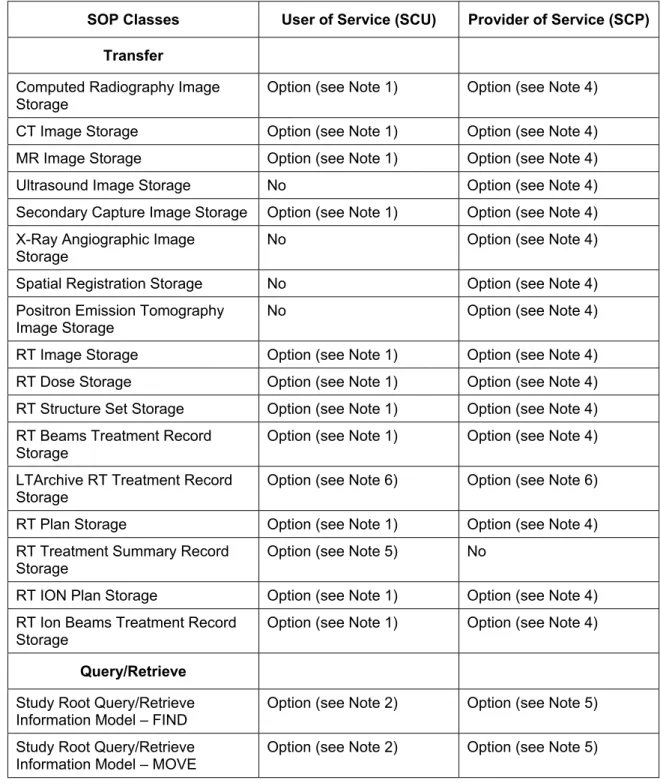
Table 1-1 lists network services supported by the Varian System Server product family.
SOP Classes User of Service (SCU) Provider of Service (SCP)
Transfer
Computed Radiography Image
Storage Option (see Note 1) Option (see Note 4)
CT Image Storage Option (see Note 1) Option (see Note 4) MR Image Storage Option (see Note 1) Option (see Note 4)
Ultrasound Image Storage No Option (see Note 4)
Secondary Capture Image Storage Option (see Note 1) Option (see Note 4) X-Ray Angiographic Image
Storage No Option (see Note 4)
Spatial Registration Storage No Option (see Note 4) Positron Emission Tomography
Image Storage
No Option (see Note 4)
RT Image Storage Option (see Note 1) Option (see Note 4) RT Dose Storage Option (see Note 1) Option (see Note 4) RT Structure Set Storage Option (see Note 1) Option (see Note 4) RT Beams Treatment Record
Storage Option (see Note 1) Option (see Note 4)
LTArchive RT Treatment Record
Storage Option (see Note 6) Option (see Note 6)
RT Plan Storage Option (see Note 1) Option (see Note 4) RT Treatment Summary Record
Storage Option (see Note 5) No
RT ION Plan Storage Option (see Note 1) Option (see Note 4) RT Ion Beams Treatment Record
Storage
Option (see Note 1) Option (see Note 4)
Query/Retrieve
Study Root Query/Retrieve
Information Model – FIND Option (see Note 2) Option (see Note 5) Study Root Query/Retrieve
SOP Classes User of Service (SCU) Provider of Service (SCP) Print Management
Basic Grayscale Print Management
Meta SOP Class Option (see Note 3) No
Table 1-1: Network Services
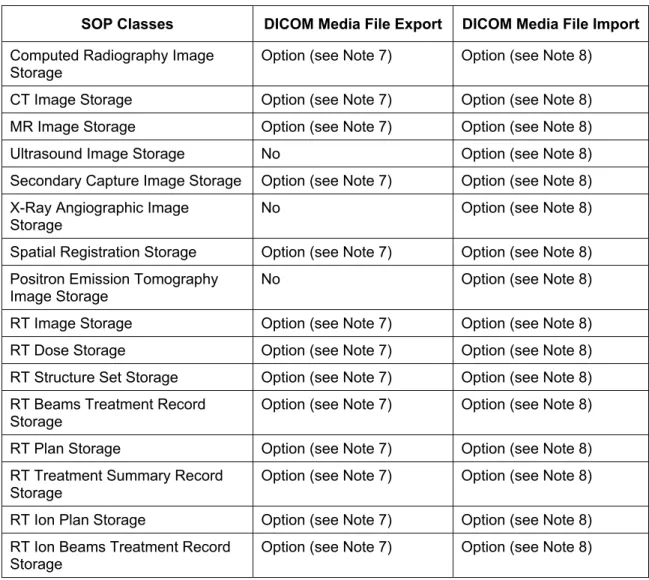
Table 1-2 lists Media File SOP Classes supported for file based export and import by.
SOP Classes DICOM Media File Export DICOM Media File Import
Computed Radiography Image
Storage Option (see Note 7) Option (see Note 8)
CT Image Storage Option (see Note 7) Option (see Note 8) MR Image Storage Option (see Note 7) Option (see Note 8)
Ultrasound Image Storage No Option (see Note 8)
Secondary Capture Image Storage Option (see Note 7) Option (see Note 8) X-Ray Angiographic Image
Storage No Option (see Note 8)
Spatial Registration Storage Option (see Note 7) Option (see Note 8) Positron Emission Tomography
Image Storage No Option (see Note 8)
RT Image Storage Option (see Note 7) Option (see Note 8) RT Dose Storage Option (see Note 7) Option (see Note 8) RT Structure Set Storage Option (see Note 7) Option (see Note 8) RT Beams Treatment Record
Storage
Option (see Note 7) Option (see Note 8) RT Plan Storage Option (see Note 7) Option (see Note 8) RT Treatment Summary Record
Storage Option (see Note 7) Option (see Note 8)
RT Ion Plan Storage Option (see Note 7) Option (see Note 8) RT Ion Beams Treatment Record
Storage Option (see Note 7) Option (see Note 8)
Table 1-2: Media File SOP Classes
Note 1 Requires Storage SCU Export Filter and associated licenses or DB Daemon configured as Query/Retrieve SCP.
Note 2 Requires Query/Retrieve Import Filter and associated licenses. Note 3 Requires DICOM printer configuration set up.
Note 4 Requires DB Daemon or File Daemon that is configured as Storage SCP. Note 5 Requires DB Daemon that is configured as Query/Retrieve SCP.
Note 6 Requires DB Daemon that is configured for Archive Service Mode (Varian proprietary)
Note 7 Requires DICOM Media File Export Filter. Note 8 Requires DICOM Media File Import Filter.
The following products are in the scope of this Conformance Statement: • RadOnc Client (including Eclipse)
• DB Daemon • File Daemon
The Varian System Server product family runs on Microsoft Windows 2000 and Windows XP platforms.
2. Table
of
Contents
The table of contents, the list of figures and the list of tables are located at the top of the document.
3. Introduction
3.1 Revision
History
The document history is located at the top of the document.
3.2 Audience
This document is intended for the following groups of persons:
• Customers and hospital staff who want to use DICOM with Varian System Server applications
• System integrators of medical equipment • Other vendors offering interfacing via DICOM • Marketing and sales persons
It is assumed, that the reader is familiar with the DICOM standard.
The document is structured firmly along the template definition as specified in Part 2 of the DICOM standard.
3.3 Remarks
The scope of this Conformance Statement is to facilitate communication with Varian System Server applications and other vendor’s medical equipment. The Conformance Statement should be read and understood in conjunction with the DICOM standard [1].
The DICOM standard in the current version evolved in 1993 with DICOM 3.0. The definition of DICOM standard for radiotherapy data started in 1994 and has now reached a productive state. Nowadays DICOM is the primary choice for exchanging data with an open standard protocol for the majority of vendors and institutions. Varian Medical Systems is committed to this notion of standard-based cross-vendor interoperability as well as making use of the DICOM protocol among its own products.
DICOM, by itself, does not guarantee interoperability. However, the Conformance Statement facilitates a first-level validation for interoperability between different applications supporting the same DICOM functionality.
This Conformance Statement is not intended to replace validation with other DICOM equipment to ensure proper exchange of information intended.
Because the DICOM standard is subject to ongoing changes, enhancements and improvements, Varian Medical Systems reserves the right to advance their products by making use of upcoming DICOM features without prior announcement.
3.4
Definitions, Terms and Abbreviations
This section provides the definitions of terms, acronyms, and abbreviations which are used throughout the document. An arrow sign (Æ) left of a word indicates that it can be looked up in this table.
AE Application Entity (ÆDICOM term)
ANAP Attribute Not Always Present
Daemon Collective term for Windows services accepting ÆDICOM Associations
DB Database
DICOM Digital Imaging and Communications in Medicine, a standard on image communications in medical applications
DIMSE DICOM Message Service element
DNS Domain Name System
EMPTY Attribute is sent without a value
IE Information Entity
IOD Information Object Definition (ÆDICOM term)
Management System Collective term including ÆDaemon and ÆRadOnc Client Multi-frame Image Image that contains multiple two-dimensional pixel planes NEMA National Electrical Manufacturers Association
PDU Protocol Data Unit (ÆDICOM term)
RadOnc Radiation Oncology Client Applications, including Eclipse
SCU Service Class User (ÆDICOM term)
SCP Service Class Provider (ÆDICOM term)
SOP Service-Object-Pair, a definition of an information object (like an image) and of a service (like storage) that can be
performed for the object (ÆDICOM term)
TCP/IP Transmission Control Protocol / Internet Protocol, a widely used computer networking protocol
UID Unique Identifier used to identify an object by a worldwide unique identifier (ÆDICOM term)
VNAP Value Not Always Present (attribute sent zero length if no value is present)
VR Value Representation, a data encoding method in ÆDICOM
3.5 References
[1] Digital Imaging and Communications in Medicine (DICOM), Parts 1-18 (2006), National Electrical Manufacturers Association (NEMA)
Rosslyn, VA
4. Networking
4.1 Implementation
Model
4.1.1
Application Data Flow
Storage SCU (RadOnc Client)
DICOM Standard Interface Export object
Remote Store SCP receives
object
Query/Retrieve SCU (RadOnc Client) Search and
Retrieve object
Remote Q/R SCP receives
Query or Retrieve command
Print SCU (RadOnc Client) Print images
Remote DICOM Print SCP receives
and prints selected
images Temporary
Storage SCP (RadOnc Client)
Remote Storage SCU
sends requested
objects Import object
Figure 4-2: SCP Role Application Data Flow Diagram RadOnc Client Storage SCU Application Entity
The Storage SCU Application Entity is invoked by the user from within a RadOnc Client Application to export selected images and RT objects or to export all objects of a whole patient to any configured remote Application Entity.
RadOnc Client Query/Retrieve SCU Application Entity
The Query/Retrieve Application Entity is invoked by the user from within a RadOnc Client Application to import images or RT objects from any configured remote Application Entity, typically a PACS.
RadOnc Client Temporary Storage SCP Application Entity
A temporary Storage SCP Application Entity is created by the Query/Retrieve SCU Application Entity to receive objects requested from a remote Query/Retrieve SCP. It is tightly coupled with the Query/Retrieve Application Entity.
RadOnc Client Print SCU Application Entity
The Print SCU Application Entity is invoked by the user from within a RadOnc Client Application to send a single image or any number of selected images to a DICOM printer. Various options for layout and scaling of these images can be selected.
File/DB Daemon Storage SCP Application Entity
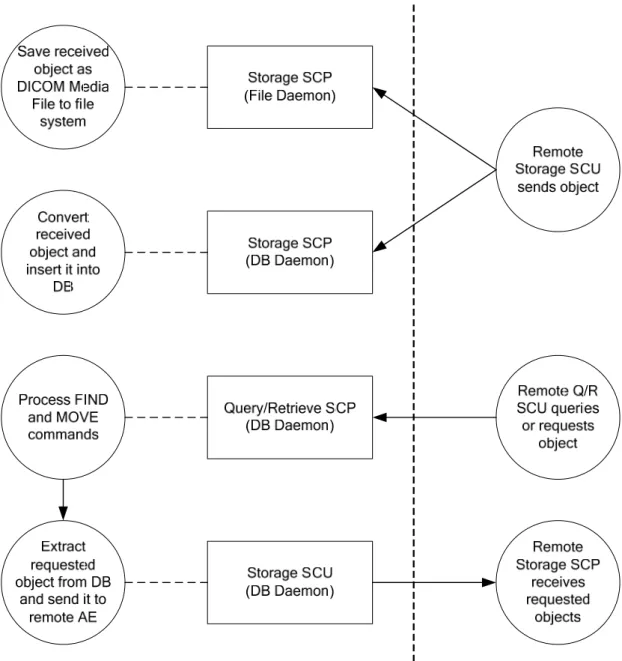
Two different Storage SCPs are part of the Varian System Server product family. File Daemon provides a simple Storage SCP that saves any incoming object of known type as DICOM Media File to a configurable directory on the file system (see Table 1-1). A DICOM Media File header is therefore prepended to the incoming DICOM stream. DB Daemon can optionally be configured to work as Storage SCP. As opposed to File Daemon it is connected to the Varian System database and inserts received objects directly to the DB. File Daemon’s and DB Daemon’s Storage SCPs are invoked by a remote Storage SCU.
DB Daemon Query/Retrieve SCP Application Entity
DB Daemon can optionally be configured to work as Query/Retrieve SCP. It provides access to all DICOM objects stored on the Varian System database. DB Daemon’s Query/Retrieve SCP is invoked by a remote Query/Retrieve SCU searching for and retrieving objects.
DB Daemon Storage SCU Application Entity
DB Daemon’s Storage SCU is invoked by DB Daemon’s Query/Retrieve SCP to transfer requested objects to a remote Storage SCP.
4.1.2
Functional Definition of AE’s
4.1.2.1
Functional Definition of RadOnc Client Application Entity
The RadOnc Client Application Entity can serve as Storage SCU, Query/Retrieve SCU and Print SCU. Any of those SCUs mentioned above are invoked by user interaction.
Storage SCU and Query/Retrieve SCU are available as DICOM Storage Service export filter and DICOM Query Retrieve Service import filter. Parameters for the desired remote AE have to be configured when setting up such a filter. Multiple different configurations of the same import or export filter can exist in parallel, allowing the user to quickly access any previously configured remote SCP. Storage SCU and Query/Retrieve SCU can handle objects of types listed in Table 1-1.
The user can send images to any DICOM Printer SCP via the print menu entry. In the print dialog the user can select among various layout and display options. Connection Settings for any number of remote DICOM Print SCPs have to be configured in advance.
4.1.2.2
Functional Definition of File Daemon Application Entity
The File Daemon Application Entity is running continuously as a service and is responsible for handling incoming association requests of other Application Entities. It accepts Storage requests of SOP Classes listed in Table 1-1. When receiving data, objects are stored as DICOM
Media files in a configurable directory from which they can be imported into the DB via the RadOnc Client’s import function later on.
Multiple File Daemons can be running in parallel when configured as different Application Entities, listening on different TCP/IP ports.
4.1.2.3
Functional Definition of DB Daemon Application Entity
The DB Daemon Application Entity is running continuously as a Windows service and is responsible for handling incoming association requests of other Application Entities. It accepts Storage and Query/Retrieve requests of SOP Classes listed in Table 1-1. Received objects are stored directly to the DB, queries for objects are answered based on objects stored in the DB, and requested objects are extracted from the DB and sent to the requestor. However, only “copies” of objects are exported, they will not be removed from the database.
Storage SCP and Query/Retrieve SCP services can be configured and activated/deactivated separately and are designed to be supported in parallel by the same Application Entity which technically is identical to the same instance of the DB Daemon service.
Multiple DB Daemons can be running in parallel when configured as different Application Entities, listening on different TCP/IP ports.
4.1.3
Sequencing of Real World Activities
Not applicable because importing and exporting objects can happen in any sequence and independent of each other.
4.2 AE
Specifications
4.2.1
RadOnc Client Application Entity
4.2.1.1 SOP
Classes
The RadOnc Client Application Entity provides Standard Conformance to the following SOP Classes.
SOP Class Name SOP Class UID SCU SCP
(Note 1)
Computed Radiography Image
Storage 1.2.840.10008.5.1.4.1.1.1 Yes Yes
CT Image Storage 1.2.840.10008.5.1.4.1.1.2 Yes Yes
MR Image Storage 1.2.840.10008.5.1.4.1.1.4 Yes Yes
Secondary Capture Image Storage 1.2.840.10008.5.1.4.1.1.7 Yes Yes Spatial Registration Storage 1.2.840.10008.5.1.4.1.1.66.1 No Yes RT Image Storage 1.2.840.10008.5.1.4.1.1.481.1 Yes Yes
RT Dose Storage 1.2.840.10008.5.1.4.1.1.481.2 Yes Yes
RT Structure Set Storage 1.2.840.10008.5.1.4.1.1.481.3 Yes Yes RT Beams Treatment Record
Storage 1.2.840.10008.5.1.4.1.1.481.4 No Yes
RT Plan Storage 1.2.840.10008.5.1.4.1.1.481.5 Yes Yes RT Ion Plan Storage 1.2.840.10008.5.1.4.1.1.481.8 Yes Yes RT Ion Beams Treatment Record
Storage 1.2.840.10008.5.1.4.1.1.481.9 No Yes
Study Root Query/Retrieve Information Model – FIND
1.2.840.10008.5.1.4.1.2.2.1 Yes No Study Root Query/Retrieve
Information Model – MOVE 1.2.840.10008.5.1.4.1.2.2.2 Yes No Basic Grayscale Print Management
Meta SOP Class 1.2.840.10008.5.1.1.9 Yes No
Table 4-1: SOP Classes for RadOnc Client Application Entity
Note 1 Temporary Storage SCP used to receive Instances requested by Query/Retrieve SCU.
4.2.1.2 Association
Policies
4.2.1.2.1 General
The DICOM standard application context name for DICOM 3.0 is always proposed.
Application Context Name 1.2.840.10008.3.1.1.1
Table 4-2: DICOM Application Context for RadOnc Client Application Entity
4.2.1.2.2 Number of Associations
RadOnc Client Application Entity initiates one Association at a time because this happens only through a user interface action. Only one Association can be handled at a time and no new Association will be initiated as long as another Association is still active.
Maximum number of simultaneous Associations 1
Table 4-3: Number of Associations initiated for RadOnc Client Application Entity
RadOnc Client Application Entity does not accept any Associations. 4.2.1.2.3 Asynchronous Nature
RadOnc Client Application Entity does not support asynchronous communication. 4.2.1.2.4 Implementation Identifying Information
The implementation information for this Application Entity is defined in the following table. Storage SCU Implementation Class UID 1.2.246.352.70.2.1.3
Query/Retrieve SCU Implementation Class UID 1.2.246.352.70.2.1.5 Print SCU Implementation Class UID 1.2.246.352.70.2.1.8
Implementation Version Name (not used)
Table 4-4: DICOM Implementation Class and Version for RadOnc Client Application Entity
4.2.1.3
Association Initiation Policy
4.2.1.3.1 Activity – Store
4.2.1.3.1.1 Description and Sequencing of Activities
The user can select one or more objects to be exported. The Storage SCU will be invoked and attempts to initiate a new Association. If multiple objects shall be transferred then multiple C-STORE requests will be issued over the Association.
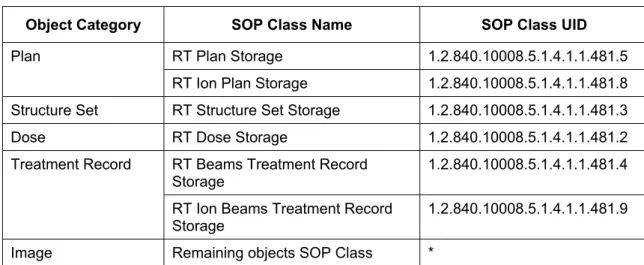
Objects to be transferred are sorted among their category as defined in Table 4-5 and transferred in the following order (object categories as defined in Table 4-5):
1. Objects in category “Plan”
3. Objects in category “Structure Set”
4. Objects in category “Dose”
5. Objects in category “Treatment Record”
Object Category SOP Class Name SOP Class UID
RT Plan Storage 1.2.840.10008.5.1.4.1.1.481.5 Plan
RT Ion Plan Storage 1.2.840.10008.5.1.4.1.1.481.8 Structure Set RT Structure Set Storage 1.2.840.10008.5.1.4.1.1.481.3
Dose RT Dose Storage 1.2.840.10008.5.1.4.1.1.481.2
RT Beams Treatment Record
Storage 1.2.840.10008.5.1.4.1.1.481.4
Treatment Record
RT Ion Beams Treatment Record
Storage 1.2.840.10008.5.1.4.1.1.481.9
Image Remaining objects SOP Class *
Table 4-5: Object Categories used by RadOnc Client Storage SCU Application Entity
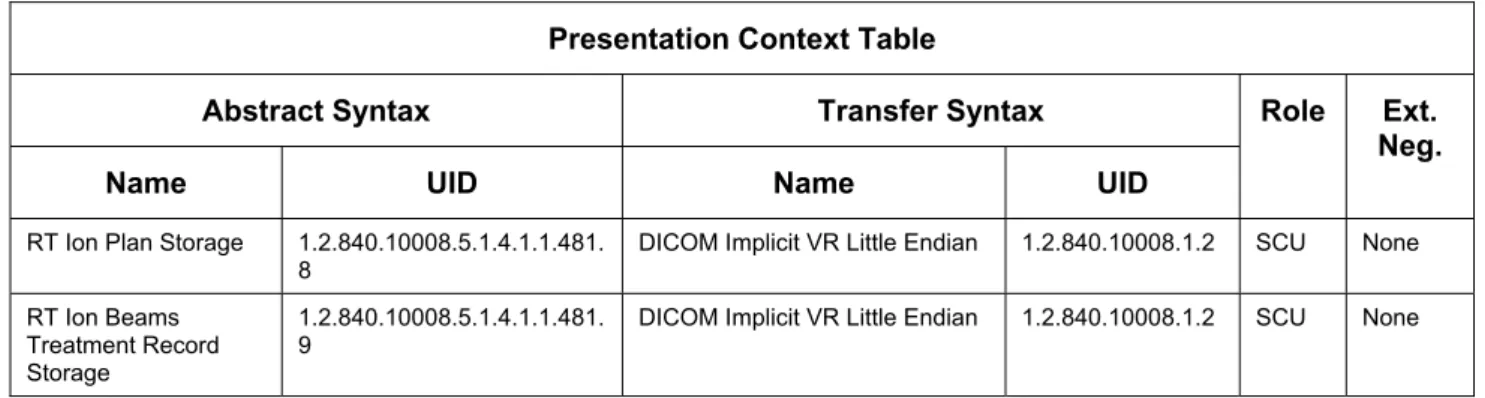
4.2.1.3.1.2 Proposed Presentation Contexts
RadOnc Client Storage SCU is capable of proposing the Presentation Contexts shown in the following table.
Presentation Context Table
Abstract Syntax Transfer Syntax Role
Name UID Name UID
Ext. Neg. Computed
Radiography Image Storage
1.2.840.10008.5.1.4.1.1.1 DICOM Implicit VR Little Endian 1.2.840.10008.1.2 SCU None
CT Image Storage 1.2.840.10008.5.1.4.1.1.2 DICOM Implicit VR Little Endian 1.2.840.10008.1.2 SCU None MR Image Storage 1.2.840.10008.5.1.4.1.1.4 DICOM Implicit VR Little Endian 1.2.840.10008.1.2 SCU None Secondary Capture
Image Storage
1.2.840.10008.5.1.4.1.1.7 DICOM Implicit VR Little Endian 1.2.840.10008.1.2 SCU None
Spatial Registration
Storage 1.2.840.10008.5.1.4.1.1.66.1 DICOM Implicit VR Little Endian 1.2.840.10008.1.2 SCU None RT Image Storage 1.2.840.10008.5.1.4.1.1.481.
1
DICOM Implicit VR Little Endian 1.2.840.10008.1.2 SCU None
RT Dose Storage 1.2.840.10008.5.1.4.1.1.481. 2
DICOM Implicit VR Little Endian 1.2.840.10008.1.2 SCU None
RT Structure Set
Storage 1.2.840.10008.5.1.4.1.1.481.3 DICOM Implicit VR Little Endian 1.2.840.10008.1.2 SCU None RT Beams Treatment
Record Storage
1.2.840.10008.5.1.4.1.1.481. 4
DICOM Implicit VR Little Endian 1.2.840.10008.1.2 SCU None
RT Plan Storage 1.2.840.10008.5.1.4.1.1.481. 5
Presentation Context Table
Abstract Syntax Transfer Syntax Role
Name UID Name UID
Ext. Neg. RT Ion Plan Storage 1.2.840.10008.5.1.4.1.1.481.
8
DICOM Implicit VR Little Endian 1.2.840.10008.1.2 SCU None
RT Ion Beams Treatment Record Storage
1.2.840.10008.5.1.4.1.1.481. 9
DICOM Implicit VR Little Endian 1.2.840.10008.1.2 SCU None
Table 4-6: Proposed Presentation Contexts for RadOnc Client Storage SCU Application Entity
When requesting an Association, only the Presentation Contexts of a selection of Abstract Syntaxes will be proposed to the SCU, corresponding to the SOP Classes of objects to be transferred.
4.2.1.3.1.3 SOP Specific Conformance for all Storage SOP Classes
The behavior of RadOnc Client Storage SCU when encountering status codes in a C-FIND response is summarized in Table 4-7 below.
Service
Status Further Meaning Error Code Behavior
Refused Out of Resources A7xx Data Set does not
match SOP Class A9xx
The user is informed that the C-STORE request has failed. Status (0000,0900) and Status Comment (0000,0902) are logged and displayed along with additional error
information. Failure
Cannot understand Cxxx Coercion of Data
Elements B000
Warning
Data Set does not
match SOP Class B007
The SCP has successfully stored the SOP Instance. The user is informed that the C-STORE request has been performed successfully with warnings. Status (0000,0900) and Status Comment
(0000,0902) are logged and displayed along with additional information.
Elements Discarded B006
Success Success 0000 The SCP has successfully stored the SOP Instance. If all SOP Instances that have been selected to be transferred together have been stored successfully the user gets a success message.
* * Any other
status code.
Depending on the type of the Error Code it is either handled like a Failure or Warning. However, Error Codes other than listed above in this table should not occur, as they are not defined for C-STORE (see [1], PS 3.4, Table B.2-1).
Table 4-7: RadOnc Client C-STORE Response Status Handling Behavior
After sending all SOP Instances, either successfully or not, the Association is released using A-RELEASE and the results are presented to the user. All events required to extract the SOP Instances from the DB and send them to the SCP are logged.
Exception Behavior
Timeout The Association is released using A-RELEASE and the whole task of sending SOP Instances is aborted. The user is informed about the timeout and available information about it is logged.
Association aborted by the SCP or
network layers The whole task of sending SOP Instances is aborted.
Table 4-8: RadOnc Client Storage SCU Communication Failure Behavior
4.2.1.3.1.4 SOP Specific Conformance for RT Structure Set Storage
See section 4.2.3.4.2.6.
4.2.1.3.1.5 SOP Specific Conformance for RT Dose Storage
See section 4.2.3.4.2.7.
4.2.1.3.1.6 SOP Specific Conformance for RT Plan Storage
See section 4.2.3.4.2.8.
Planned Verification Image
Because the size of a verification image to be taken is not known in advance a width and height of zero pixels is assumed; as a consequence for RT Image Position (3002,0012), in Planned Verification Image Sequence (300A,00CA), the position of the image receptors center is used. This is because these coordinates are the same as those of the upper left hand corner of an image with zero number of pixels in x and y directions.
4.2.1.3.1.7 SOP Specific Conformance for RT Image Storage
See section 4.2.3.4.2.9.
4.2.1.3.2 Activity – Query/Retrieve
4.2.1.3.2.1 Description and Sequencing of Activities
The user invokes the DICOM Query/Retrieve Service import filter. At this time an Association is requested. When closing the dialog the Association is released again using A-RELEASE.
Figure 4-3: Sequencing of Activities – RadOnc Client Query/Retrieve
A possible sequence of interactions between RadOnc Client Query/Retrieve SCU and a remote Query/Retrieve Server (e.g. retrieving SOP Instances of a patient) is illustrated in Figure 4-3:
1. The RadOnc Client Query/Retrieve SCU opens an Association with the Query/Retrieve Server. If it succeeds a temporary local Storage SCP is created.
2. A first C-FIND command with Query Level STUDY is issued containing, possibly empty, Patient Name and Patient ID. The result of this query is used to show a list of available patients matching the Patient Name and Patient ID query entered by the user.
3. The user selects a patient and again a C-FIND command with Query Level STUDY is issued containing the full Patient Name and Patient ID. This query is used to retrieve a list of all Studies of the selected patient.
4. The user selects a Study which triggers a C-FIND command with Query Level SERIES to get all Series that are contained in the selected Study. This step may be repeated for other Studies if user actions require retrieving information about another sub-tree of the object hierarchy.
5. The user selects a Series which triggers a C-FIND command with Query Level IMAGE to get all Series that are contained in the selected Series. This step may be repeated for other Series if user actions require retrieving information about another sub-tree of the object hierarchy.
6. The user selects one or more objects to be retrieved. When initiating retrieve operation a C-MOVE command for every SOP Instance to be retrieved is sent to the remote
Query/Retrieve Server.
7. Upon receipt of a C-MOVE command the remote Query/Retrieve Server will open a new Association with the local Storage SCP.
8. For every C-MOVE command received from RadOnc Client Query/Retrieve SCU the remote Query/Retrieve Server will send via the remote Storage SCU a C-STORE command to the local Storage SCP.
9. When all objects have been transferred, whether successfully or not, and the user did not cancel the transfer then RadOnc Client Query/Retrieve SCU will release the Association using A-RELEASE and also shutdown it’s temporary local Storage SCP.
10. The temporary local Storage SCP releases the Association using A-RELEASE if not already done by the remote Storage SCU.
4.2.1.3.2.2 Proposed Presentation Contexts
RadOnc Client Query/Retrieve SCU is capable of proposing the Presentation Contexts shown in the following table.
Presentation Context Table
Abstract Syntax Transfer Syntax Role
Name UID Name UID
Ext. Neg. Study Root Query/Retrieve
information model – FIND
1.2.840.10008.5.1.4.1.2.2.1 DICOM Implicit VR Little Endian
1.2.840.10008.1.2 SCU None
Study Root Query/Retrieve information model – MOVE
1.2.840.10008.5.1.4.1.2.2.2 DICOM Implicit VR Little Endian
1.2.840.10008.1.2 SCU None
Table 4-9: Proposed Presentation Contexts for RadOnc Client Q/R SCU Application Entity
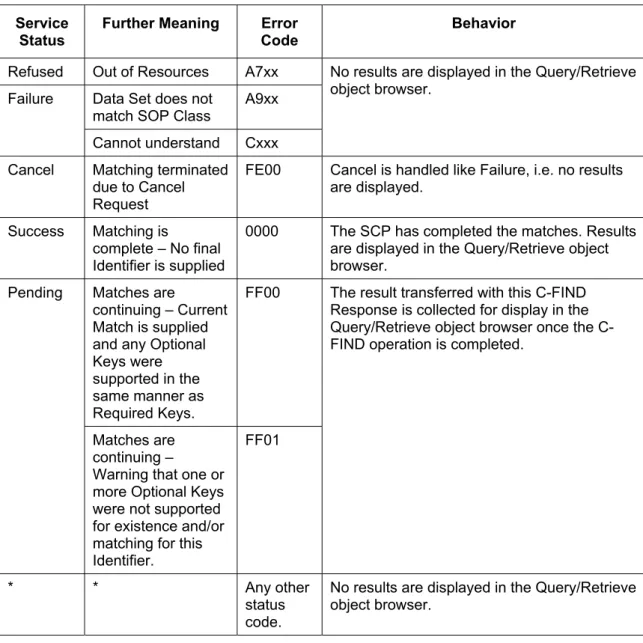
4.2.1.3.2.3 SOP Specific Conformance for C-FIND SOP Classes
The behavior of RadOnc Client Query/Retrieve SCU when encountering status codes in a C-FIND response is summarized in Table 4-10 below.
Service Status
Further Meaning Error Code
Behavior
Refused Out of Resources A7xx Data Set does not
match SOP Class A9xx
No results are displayed in the Query/Retrieve object browser.
Failure
Cannot understand Cxxx Cancel Matching terminated
due to Cancel Request
FE00 Cancel is handled like Failure, i.e. no results are displayed.
Success Matching is complete – No final Identifier is supplied
0000 The SCP has completed the matches. Results are displayed in the Query/Retrieve object browser.
Matches are
continuing – Current Match is supplied and any Optional Keys were supported in the same manner as Required Keys.
FF00
Pending The result transferred with this C-FIND
Response is collected for display in the Query/Retrieve object browser once the C-FIND operation is completed.
Matches are continuing –
Warning that one or more Optional Keys were not supported for existence and/or matching for this Identifier.
FF01
* * Any other
status code.
No results are displayed in the Query/Retrieve object browser.
Table 4-10: RadOnc Client C-FIND Response Status Handling Behavior
No C-CANCEL-FIND requests are ever issued. Relational-queries are not supported.
Specific Character Set is not supported. It is not included in a query and will be ignored when present in the response.
Exception Behavior
Timeout The user is informed that the operation (FIND or C-MOVE) has timed out and can choose to retry the operation.
Association aborted by the SCP or
network layers When the Association is aborted during a C-MOVE operation the user is informed and failure details are displayed. The user can choose to retry the operation.
Table 4-11: RadOnc Client Q/R C-FIND SCU Communication Failure Behavior
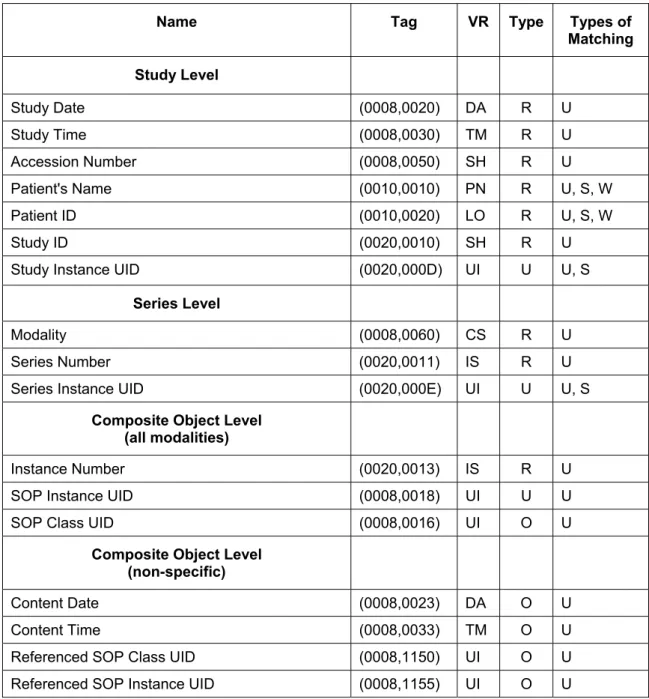
Table 4-12 below lists the Attributes supported by the C-FIND SCU. Only a subset of the Attributes in this table will be sent in a specific C-FIND request, depending on Query Level and, if applicable, Modality.
Name Tag VR Type Types of
Matching Study Level
Study Date (0008,0020) DA R U
Study Time (0008,0030) TM R U
Accession Number (0008,0050) SH R U
Patient's Name (0010,0010) PN R U, S, W
Patient ID (0010,0020) LO R U, S, W
Study ID (0020,0010) SH R U
Study Instance UID (0020,000D) UI U U, S
Series Level
Modality (0008,0060) CS R U
Series Number (0020,0011) IS R U
Series Instance UID (0020,000E) UI U U, S
Composite Object Level (all modalities)
Instance Number (0020,0013) IS R U
SOP Instance UID (0008,0018) UI U U
SOP Class UID (0008,0016) UI O U
Composite Object Level (non-specific)
Content Date (0008,0023) DA O U
Content Time (0008,0033) TM O U
Referenced SOP Class UID (0008,1150) UI O U
Name Tag VR Type Types of Matching
Referenced Beam Number (300C,0006) IS O U
Composite Object Level (RT (ION) Plan specific)
Plan Label (300A,0002) SH O U
Plan Date (300A,0006) DA O U
Plan Time (300A,0007) TM O U
Number of Beams (300A,0080) IS O U
Composite Object Level (RT Dose specific)
Referenced SOP Class UID (0008,1150) UI O U
Referenced SOP Instance UID (0008,1155) UI O U
Referenced Beam Number (300C,0006) IS O U
Number of Frames (0028,0008) IS O U
Composite Object Level
(RT (ION) Beams Treatment Record specific)
Referenced SOP Class UID (0008,1150) UI O U
Referenced SOP Instance UID (0008,1155) UI O U
Treatment Date (3008,0250) DA O U
Treatment Time (3008,0251) TM O U
Referenced Fraction Group Number (300C,0022) IS O U
Table 4-12: Study Root Request Identifier for RadOnc Client Q/R C-FIND SCU
The Types of Matching column in the above table should be read as follows: S Single Value Matching
L List of UID Matching U Universal Matching W Wild Card Matching R Range Matching
4.2.1.3.2.4 SOP Specific Conformance for C-MOVE SOP Classes
The behavior of RadOnc Client Query/Retrieve SCU when encountering status codes in a C-MOVE response is summarized in the following table.
Service Status
Further Meaning Error Code
Behavior
Out of Resources – Unable to calculate number of matches
A701
Refused None of the requested SOP Instances could
be retrieved. The user will be informed about the failure and can choose to retry retrieval. Out of Resources –
Unable to perform sub-operations
A702
Move Destination
unknown A801
Identifier does not match SOP Class
A900 Failure
Unable to Process Cxxx Cancel Sub-operations
terminated due to Cancel Indication
FE00 Cancel is handled like Failure.
Warning Sub-operations complete – One or more Failures
B000 Some or all SOP Instances have not been transmitted successfully. The user is informed and can choose to retry retrieval of the remaining SOP Instances.
Success Sub-operations complete – No Failures
0000 All SOP Instances have successfully been transmitted. The user is informed that all objects have been retrieved successfully. Pending Sub-operations are
continuing
FF00 Transferring requested SOP Instances is continuing. This message is ignored.
* * Any other
status code.
Any other status code is handled like Failure.
Table 4-13: RadOnc Client C-MOVE Response Status Handling Behavior
After having received all requested SOP Instances or when the user aborts the operation the Association is released using A-RELEASE. All events occurring during querying and retrieving SOP Instances are logged. If any log entries are marked with internal category Warning or Error they will be shown to the user automatically.
Exception Behavior
Timeout The user is informed that the operation (FIND or C-MOVE) has timed out and can choose to retry the operation.
Association aborted by the SCP or
network layers When the Association is aborted during a C-MOVE operation the user is informed and failure details are displayed. The user can choose to retry the operation.
Table 4-14: RadOnc Client Q/R C-MOVE SCU Communication Failure Behavior
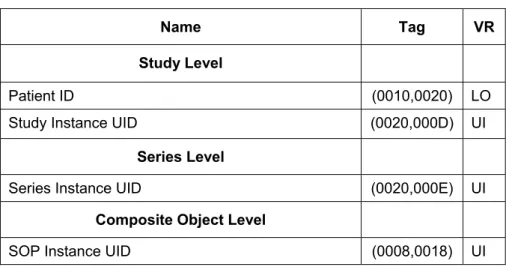
Currently the same Attributes are used in a C-MOVE request as defined in Table 4-12 in section 4.2.1.3.2.3. This is a known non-conformity and will be fixed with RadOnc Client Service Pack 1.
The table below lists the Attributes that will be sent by the C-MOVE SCU if RadOnc Client Service Pack 1 or higher is applied. Only a subset of the Attributes in this table will be sent in a specific C-MOVE request, depending on Query Level.
Name Tag VR
Study Level
Patient ID (0010,0020) LO
Study Instance UID (0020,000D) UI
Series Level
Series Instance UID (0020,000E) UI
Composite Object Level
SOP Instance UID (0008,0018) UI
Table 4-15: Study Root Request Identifier for RadOnc Client Q/R C-MOVE SCU
4.2.1.3.3 Activity – Receive Storage Request
4.2.1.3.3.1 Description and Sequencing of Activities
For a sequence diagram and complete sequencing of activities in the Query/Retrieve context see Figure 4-3. Received Instances are saved to temporary files and will be converted to the internal data model and imported into DB in a separate step.
4.2.1.3.3.2 Accepted Presentation Contexts
RadOnc Client Temporary Storage SCP Application Entity accepts Presentation Contexts shown in the following table.
Presentation Context Table
Abstract Syntax Transfer Syntax Role Ext.
Neg.
Name UID Name UID
DICOM Implicit VR Little Endian 1.2.840.10008.1.2 All Storage SOP
Classes in
All Storage SOP Classes in
SCP None Table 4-1 Table 4-1
DICOM Explicit VR Little Endian 1.2.840.10008.1.2.1
Table 4-16: Acceptable Presentation Contexts for RadOnc Client Temporary Storage SCP Application Entity and Receive Storage Request
4.2.1.3.3.3 SOP Specific Conformance for all Storage SOP Classes
RadOnc Client Temporary Storage SCP Application Entity conforms to storage service classes at level 0 (local) where not stated otherwise. Therefore it is guaranteed that at least all Type 1 Attributes are stored in the DB. Other Attributes are mainly supported but may be discarded in certain cases.
4.2.1.3.3.3.1 Presentation Context Acceptance Criterion
RadOnc Client Temporary Storage SCP accepts all Presentation Contexts for all SOP Classes and Transfer Syntaxes supported by RadOnc Client Temporary Storage SCP. If more than one proposed Presentation Context is supported by the same Abstract Syntax all of them will be accepted.
4.2.1.3.3.3.2 Transfer Syntax Selection Policies
If offered a choice of Transfer Syntaxes in a Presentation Context, RadOnc Client Temporary Storage SCP will select the first Transfer Syntax that is listed in the Presentation Context. RadOnc Client Temporary Storage SCP will accept duplicate Presentation Contexts, that is, if it is offered multiple Presentation Contexts, each of which offers acceptable Transfer Syntaxes, it will accept all Presentation Contexts, applying the same rule for selecting a Transfer Syntax for each as described above.
4.2.1.3.3.3.3 Response Status
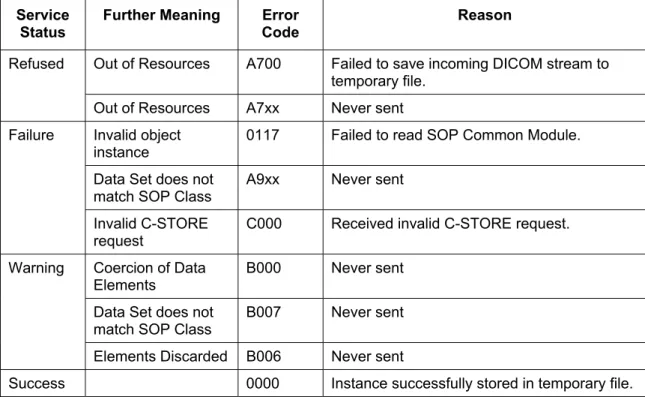
RadOnc Client Temporary Storage SCP will behave as described in the Table below when generating the C-STORE response command message.
Service Status
Further Meaning Error Code
Reason
Out of Resources A700 Failed to save incoming DICOM stream to temporary file.
Refused
Out of Resources A7xx Never sent Invalid object
instance
0117 Failed to read SOP Common Module. Failure
Data Set does not
match SOP Class A9xx Never sent Invalid C-STORE
request C000 Received invalid C-STORE request. Coercion of Data
Elements B000 Never sent
Warning
Data Set does not match SOP Class
B007 Never sent
Elements Discarded B006 Never sent
Success 0000 Instance successfully stored in temporary file.
Table 4-17: Response Status of RadOnc Client Temporary Storage SCP and Receive Storage Request
Note 1 An Error Code of 0000 (Success) does not mean that the Instance has
successfully been imported to the DB. It only means that it has been received and stored successfully to a temporary file.
4.2.1.3.3.4 SOP Specific Conformance for RT Image Storage 4.2.1.3.3.4.1 Data Handling
See section 4.2.3.4.1.4.1.
4.2.1.3.3.4.2 Import Preconditions
If an RT Image references an RT Plan, this RT Plan must already be available on the DB or be retrieved during the same import session, otherwise connection between RT Image and RT Plan will not be preserved.
4.2.1.3.3.5 SOP Specific Conformance for certain Image Storage SOP Classes
See section 4.2.3.4.1.5.
4.2.1.3.3.6 SOP Specific Conformance for RT Structure Set Storage 4.2.1.3.3.6.1 Data Handling
4.2.1.3.3.6.2 Import Preconditions
To be able to import an RT Structure Set to the DB the images referenced in Contour Image Sequence (3006,0016) must already be available on the DB or be retrieved during the same import session.
4.2.1.3.3.7 SOP Specific Conformance for RT Dose Storage
See section 4.2.3.4.1.7.
4.2.1.3.3.8 SOP Specific Conformance for RT Plan Storage
See section 4.2.3.4.1.8.
4.2.1.3.3.9 SOP Specific Conformance for RT Beams Treatment Record Storage and RT Ion Beams Treatment Record Storage
See section 4.2.3.4.1.9. 4.2.1.3.4 Activity – Print Images
4.2.1.3.4.1 Description and Sequencing of Activities
The user selects any number of images to be sent to a hardcopy device. On the RadOnc print client the user may select between different image layouts, scaling and additional information to be printed together with the selected images. Structures and additional information like measurements, labels, etc. will always be burned in. Finally the RadOnc Client will compose one single image for every page to be printed and send this image to the hardcopy device.
RadOnc Print SCU
Printer
2. N-CREATE (Film Session)
3. N-CREATE (Film Box) 1. Open Association
7. N-EVENT-REPORT (Printer) 5a. A-ACTION (Film Box)
8b. N-DELETE (Film Session)
9. Release Association 8a. N-DELETE (Film Box) 5b. N-ACTION (Film Session)
6. Print Sheets 4. N-Set (Image Box)
Figure 4-4: Sequencing of Activities – RadOnc Client Print Images
A possible sequence of interactions between RadOnc Client Print SCU and a remote Query/Retrieve Server (e.g. retrieving SOP Instances of a patient) is illustrated in Figure 4-4:
1. The RadOnc Client Print SCU opens a connection with the Printer.
2. N-CREATE on the Film Session SOP Class creates a Film Session.
3. N-CREATE on the Film Box SOP Class creates a Film Box linked to the Film Session. A single Image Box will be created as the result of this operation.
4. N-SET on the Image Box SOP Class transfers the contents of the film sheet to the printer.
5. If ‘Collate’ option is not selected then 5a will be executed else 5b.
a. N-ACTION on the Film Box SOP Class instructs the printer to print the Film Box. b. N-ACTION on the Film Session SOP Class instructs the printer to print the Film Box.
6. The printer prints the requested number of sheets.
7. The Printer asynchronously reports its status via N-EVENT-REPORT notification (Printer SOP Class). The printer can send this message at any time. RadOnc Client Print SCU does not require the N-EVENT-REPORT to be sent. RadOnc Client Print SCU is capable of receiving an N-EVENT-REPORT notification at any time during an Association. If the Printer reports a status of Warning or Failure, the user is informed.
8. If ‘Collate’ option is not selected then 8a will be executed else 8b.
a. N-DELETE on the Film Box SOP Class deletes the complete Film Box SOP Instance hierarchy.
b. N-DELETE on the Film Session SOP Class deletes the complete Film Session SOP Instance hierarchy.
9. RadOnc Client Print SCU closes the Association to the Printer.
4.2.1.3.4.2 Proposed Presentation Contexts
RadOnc Client Print SCU is capable of proposing the Presentation Contexts shown in the following table.
Presentation Context Table
Abstract Syntax Transfer Syntax Role Ext.
Neg.
Name UID Name UID
Basic Grayscale Print Management Meta SOP Class
1.2.840.10008.5.1.1.9 DICOM Implicit VR Little Endian 1.2.840.10008.1.2 SCU None
Table 4-18: Proposed Presentation Contexts for RadOnc Client Print SCU Application Entity
4.2.1.3.4.3 SOP Specific Conformance for Printer SOP Class
RadOnc Client Print SCU supports the following DIMSE operations and notifications for the Printer SOP Class:
• N-EVENT-REPORT
Details of the supported attributes and status handling behavior are defined in the following subsections.
4.2.1.3.4.3.1 Printer SOP Class Notifications (N-EVENT-REPORT)
RadOnc Client Print SCU is capable of receiving an N-EVENT-REPORT request at any time during an Association.
The behavior when receiving Event Types within an N-EVENT-REPORT is summarized in the following table.
Event Type Name
Event Type
ID
Attribute Name Tag Behavior
Normal 1 Message is ignored.
Printer Status (2110,0010) Warning 2
Printer Status Info (2110,0020)
A warning message is displayed to the user containing a human-readable interpretation of Printer Status and Printer Status Info
Printer Name (2110,0020) Printer Status (2110,0010) Failure 3
Printer Status Info (2110,0020)
An error message is displayed to the user containing a human-readable interpretation of Printer Status and Printer Status Info
Printer Name (2110,0020)
Table 4-19: Printer SOP Class N-EVENT-REPORT Behavior
The N-EVENT-REPORT response will always return a Service Status of SUCCESS with Error Code 0000.
4.2.1.3.4.4 SOP Specific Conformance for Basic Film Session SOP Class
RadOnc Client Print SCU supports the following DIMSE operations and notifications for the Basic Film Session SOP Class:
• N-CREATE • N-DELETE • N-ACTION
Details of the supported attributes and status handling behavior are defined in the following subsections.
4.2.1.3.4.4.1 Basic Film Session SOP Class Operations (N-CREATE)
The Attributes supplied in an N-CREATE request are listed in the following table.
Attribute Name Tag VR Value Presence
of Value Source
Number of Copies (2000,0010) IS Unrestricted ALWAYS User Medium Type (2000,0030) CS BLUE FILM, CLEAR FILM
or PAPER ALWAYS User
Table 4-20: Basic Film Session SOP Class N-CREATE Request Attributes
The behavior of RadOnc Client Print SCU when encountering status codes in an N-CREATE response is summarized in the following table.
Service
Status Further Meaning Error Code Behavior
Success Success 0000 The SCP has completed the operation successfully.
* * Any other
status code.
The reason for failure is displayed and the user can choose to retry.
Table 4-21: Basic Film Session SOP Class N-CREATE Response Status Handling Behavior
4.2.1.3.4.4.2 Basic Film Session SOP Class Operations (N-DELETE)
The behavior of RadOnc Client Print SCU when encountering status codes in an N-DELETE response is summarized in the following table.
Service
Status Further Meaning Error Code Behavior
Success Success 0000 The SCP has completed the operation successfully.
* * Any other
status code.
Will be ignored.
Table 4-22: Basic Film Session SOP Class N-DELETE Response Status Handling Behavior
4.2.1.3.4.4.3 Basic Film Session SOP Class Operations (N-ACTION)
An N-ACTION request with Action Type ID 1 is issued to instruct the Print SCP to print the contents of the Film Session. The Action Reply argument in an N-ACTION response is not evaluated.
The behavior of RadOnc Client Print SCU when encountering status codes in an N-ACTION response is summarized in the following table.
Service
Status Further Meaning Error Code Behavior
Success Success 0000 The SCP has completed the operation successfully.
* * Any other
status code.
The reason for failure is displayed and the user can choose to retry.
Table 4-23: Basic Film Session SOP Class N-ACTION Response Status Handling Behavior
4.2.1.3.4.5 SOP Specific Conformance for Basic Film Box SOP Class
Basic Film Box SOP Class: • N-CREATE
• N-DELETE • N-ACTION
Details of the supported attributes and status handling behavior are defined in the following subsections.
4.2.1.3.4.5.1 Basic Film Box SOP Class Operations (N-CREATE)
The Attributes supplied in an N-CREATE request are listed in the following table.
Attribute Name Tag VR Value Presence
of Value Source
Image Display Format
(2010,0010) ST STANDARD, ROW, COL, SLIDE, SUPERSLICE or CUSTOM
ALWAYS User
Referenced Film
Session Sequence (2010,0500) SQ Reference to parent Basic Film Session ALWAYS Auto >Referenced SOP
Class UID (0008,1150) UI ALWAYS Auto
>Referenced SOP Instance UID
(0008,1155) UI ALWAYS Auto
Film Orientation (2010,0040) CS PORTRAIT or
LANDSCAPE ALWAYS User
Film Size ID (2010,0050) CS 8INX10IN, 8_5INX11IN, 10INX12IN, 10INX14IN, 11INX14IN, 11INX17IN, 14INX14IN, 14INX17IN, 24CMX24CM,
24CMX30CM, A4 or A3
ALWAYS User
Magnification Type (2010,0060) CS NONE ALWAYS User
Min Density (2010,0120) US 23 ... 300 ANAP User
Max Density (2010,0130) US 23 ... 300 ANAP User
Configuration
Information (2010,0150) ST ANAP User
Smoothing Type (2010,0080) CS ANAP User
Table 4-24: Basic Film Box Session SOP Class N-CREATE Request Attributes
The behavior of RadOnc Client Print SCU when encountering status codes in an N-CREATE response is summarized in the following table.
Service
Status Further Meaning Error Code Behavior
Success Success 0000 The SCP has completed the operation successfully.
* * Any other
status code.
The reason for failure is displayed and the user can choose to retry.
Table 4-25: Basic Film Box SOP Class N-CREATE Response Status Handling Behavior
4.2.1.3.4.5.2 Basic Film Box SOP Class Operations (N-DELETE)
The behavior of RadOnc Client Print SCU when encountering status codes in an N-DELETE response is summarized in the following table.
Service
Status Further Meaning Error Code Behavior
Success Success 0000 The SCP has completed the operation successfully.
* * Any other
status code.
Will be ignored.
Table 4-26: Basic Film Box SOP Class N-DELETE Response Status Handling Behavior
4.2.1.3.4.5.3 Basic Film Box SOP Class Operations (N-ACTION)
An N-ACTION request with Action Type ID 1 is issued to instruct the Print SCP to print the contents of the Film Session. The Action Reply argument in an N-ACTION response is not evaluated.
The behavior of RadOnc Client Print SCU when encountering status codes in an N-ACTION response is summarized in the following table.
Service Status
Further Meaning Error Code
Behavior
Success Success 0000 The SCP has completed the operation successfully.
* * Any other
status code.
The reason for failure is displayed and the user can choose to retry.
Table 4-27: Basic Film Box SOP Class N-ACTION Response Status Handling Behavior
4.2.1.3.4.6 SOP Specific Conformance for Basic Grayscale Image Box SOP Class
RadOnc Client Print SCU supports the following DIMSE operations and notifications for the Basic Image Box SOP Class:
Details of the supported attributes and status handling behavior are defined in the following subsections.
4.2.1.3.4.7 Basic Grayscale Image Box SOP Class (N-SET)
The Attributes supplied in an N-CREATE request are listed in the following table.
Attribute Name Tag VR Value Presence
of Value Source
Image Position (2020,0010) US 1 ALWAYS Auto
Basic Grayscale Image Sequence
(2020,0110) SQ ALWAYS User
>Samples Per Pixel (0028,0002) US 1 ALWAYS Auto
>Photometric
Interpretation (0028,0004) CS MONOCHROME2 ALWAYS Auto
>Rows (0028,0010) US ALWAYS Auto
>Columns (0028,0011) US ALWAYS Auto
>Pixel Aspect Ratio (0028,0034) IS ANAP Auto
>Bits Allocated (0028,0100) US 8 or 12 ALWAYS User >Bits Stored (0028,0101) US 8 or 16 ALWAYS Auto >High Bit (0028,0102) US 11 or 15 ALWAYS Auto >Pixel
Representation (0028,0103) US 0000H (unsigned integer) ALWAYS Auto >Pixel Data (7FE0,0010) OW
or OB
ALWAYS Auto
Smoothing Type (2010,0080) CS ANAP User
Min Density (2010,0120) US 23 .. 300 ANAP User
Max Density (2010,0130) US 23 .. 300 ANAP User
Configuration
Information (2010,0150) ST ANAP User
Table 4-28: Basic Grayscale Image Box SOP Class N-SET Request Attributes
The behavior of RadOnc Client Print SCU when encountering status codes in an N-SET response is summarized in the following table.
Service