School of Information Science
(IS 2935 Introduction to Computer Security, 2003)
Firewall Configuration
Part I: Objective
The goal of this lab is to allow students to exploit an active attack on the network and implement the firewall to preve nt this kind of attack. Also, the basic firewall functions will be performed.
Part II: Equipment List
Systems : - 1 PC running Linux OS with a server function (Plum)
- 1 PC running Linux OS with a client and an attacker functions (Periwinkle)
- 1 PC running Windows with a console function - 1 Lucent Firewall IRX Router
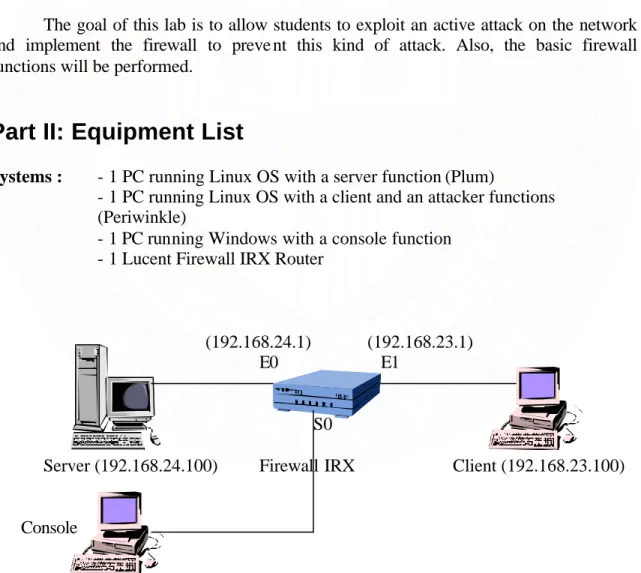
(192.168.24.1) (192.168.23.1)
E0 E1
S0
Server (192.168.24.100) Firewall IRX Client (192.168.23.100)
Console
Figure 1 : Firewall lab configuration
Part III: Introduction and Background
How do you secure the valuable information within your company’s Intranet while allowing your employees to have access to the outside information they need? Also, your DSL connection brings more bandwidth to your house but the 24 x 7 connection can leave you vulnerable to malicious hackers. The solution to both of these problems is found in a firewall. Firewalls protect a computer or entire network by limiting what information can get into or leave the network. The role of the firewall in a network is becoming greater as malicious hackers find new exploits for systems.
Firewalls are either hardware or software, in this lab we will be dealing with a hardware solution from Lucent Technologies. A hardware firewall is a standalone system that is placed between the internal (protected) network and the Internet. The network administrator sets the firewall’s attributes to correspond with the desired security features. Security can be set to allow almost all traffic into and out of the network, or set to block all incoming and most outgoing information. The job of the network administrator is to find the correct balance.
In this lab, you will know how to set-up the firewall for different purposes and also know one type of the active attack to a server and measure the performance of the system.
Part IV: Procedure
1. Set up the lab configuration
1.1 Configuring the console computer:
1. Connect the black wire from the firewall to the console computer. (Please check the connection.)
Note: You need to have a null modem to connect the console computer to the console port of the firewall.
2. Open “terminal” program in “Accessories” (MS Windows for Workgroup.)
3. Click at “File” and choose “Open.”
4. Find the terminal file name “firewall.trm” and open it.
Note: If the “firewall.trm” file is not found, try to open a new connection and go to set up communication and set as following:
9600/8/1/No parity/ (Xon/Xoff) in COM1
5. When we connect to the console of the firewall you will see PortMaster Console login:
Note: You may need to press “Enter” to see the console prompt. 6. To log- in, use username “!root” with no password.
PortMaster Console login: !root To log out use:
Command > exit
7. Type in as follow: Command > show all
Check the configuration on the firewall with the figure 1. If it is not correct, type in as follow:
Command > set telnet 0
Command > set ether0 address 192.168.24.1 Command > set ether0 netmask 255.255.255.0 Command > set ether0 routing on
Command > set ether1 address 192.168.23.1 Command > set ether1 netmask 255.255.255.0 Command > set ether1 routing on
Command > save all
Command > delete filter ether1.in Command > set ether1 ifilter Command > show all
Command > quit
Note: Make sure that there is no filter file using in both Ethernet ports by using: Command > show ether0
Command > show ether1
1.2 Configuring the client computer:
1. Open the client computer and log- in: Login : firewall
Password : goodman
2. Performance Measurement
2.1 Attack the server without firewall:
This part of the lab will simulate a denial of service attack, which is one of the well-known attacks in computer systems today. By sending a lot of packets to a server and make it to response, this attack can impair the server capability such that it cannot response at all and other services from the server will be denial. However, this type of
attack requires a lot of computers and we cannot do it in this lab. We can only see the performance degradation from a small versio n of this attack as follows.
2.1.1 Configuring the client computer:
1. Open 6 terminals on the client and resize them within one window and you can see all the terminals
Note: At the first terminal, we use it as an FTP client in order to download a file from the server. In contrast to other five terminals, we use it as an attacker using PING command.
2. Type in as follow for all 5 terminals: $ ping 192.168.24.100
Check if the ping packets get through the firewall. Note : Use Ctrl-C to quit this program.
3. In the last terminal, open an FTP connection to the server by: $ ftp 192.168.24.100
username : firewall password : goodguy
4. After log- in to the FTP server, use command as follow: ftp> binary
ftp> get firewall.doc
5. Record the total time of transmission (repeat 3 times) Repetition Time (sec.)
1 2 3
AVERAGE TIME : __________________________ FILE SIZE : __________________Bytes
6. Using the following command to quit the FTP connection: ftp> bye
7. Quit all the other terminals.
2.2 Attack the server with firewall:
1. Log- in or continue the session
2. Type in as follow:
> add filter ether1.in
> set filter ether1.in 1 permit tcp 192.168.23.100/32 > set ether1 ifilter ether1.in
> save all
2.2.2 Configuring the client computer: 1. Follow the previous steps (2.1.1)
2. Record the total time of transmission (repeat 3 times) Repetition Time (sec.)
1 2 3
AVERAGE TIME : __________________________
3. How to block IP addresses
3.1 Configuring the console computer:
1. Log- in or continue the session
2. Type in as follow:
> delete filter ether1.in > add filter ether1.in
> set filter ether1.in 1 deny 192.168.23.100/32 > set ether1 ifilter ether1.in
> save all
3.2 At the client computer:
1. Check the following task if you can do or not (Yes or No) a. Open the FTP connection __________ b. Open the telnet connection __________
c. PING to the server __________
Note: To open the telnet connection use : $ telnet 192.168.24.100
Question:
1. If we have more computers in the 192.168.23.x subnet, can the ftp, telnet and ping messages get through the firewall?
4. How to block all TCP Traffic from outside network
4.1 Configuring the console computer:
1. Log- in or continue the session
2. Type in as follow:
>delete filter ether1.in >add filter ether1.in
>set filter ether1.in 1 deny tcp established >set filter ether1.in 2 permit icmp
>set ether1 ifilter ether1.in >save all
4.2 At the client computer:
Check the following task if you can do or not (Yes or No)
a. Open the FTP connection __________ b. Open the telnet connection __________
c. PING to the server __________
rver: plum àteletftp
For client : periwinkle à bob
Note : More information about the Lucent Firewall IRX Router go to :