Implementation of
School Educational
Services under NOFN
Pilot
Table of Contents
1. Introduction ... 4
2. List of Schools ... 6
3. Application Modules Implemented ... 8
4. Planning ... 9 4.1. Data Collection... 9 4.2. Data Set Up ... 10 4.3. Training ... 10 4.4. Handholding ... 11 4.5. Running Smoothly ... 11 5. Timelines ... 11
6. Application Screens – Buzzyears ... 13
7. Dashboard - Buzzyears ... 19
8. Application Screens – ATSI ... 23
9. Dashboard – ATSI ... 29
10. Learnings and Suggestions... 39
1.
Introduction
As part of the DPR engagement, it was decided to conduct the Proof of Concept (PoC) of a few of the services proposed under the MMP at the school level under the NOFN pilot. A total of 28 government and government-aided schools in Arian block under Ajmer District (Rajasthan) that were earlier provided connectivity under ERNET project were selected for the PoC.
Objectives of the Proof of Concept
1. Demonstrate the feasibility of implementation of the services (at least limited functions) proposed as part of the School Education MMP in these selected schools
2. Demonstrate the potential utility of such services to the end stakeholders 3. Understand the challenges in implementation of above services (training
requirements, user adoption, perception of utility to end stakeholders, infrastructural constraints, ..)
Due to the limited scope and duration of the NOFN pilot, evaluating the impact of the implementation on the envisaged MMP objectives is not an objective of this PoC. The scope of the PoC was restricted to implementation of limited functions (as described below) of the School Management Information System:
1. Track progress on lesson plans
2. Capture student and teacher attendance 3. Capture student assessment results
4. Send SMS alerts to parents / guardians for students’ missing classes 5. Publish academic calendar, class/section timetable, and teacher schedule 6. Generate the following (indicative) reports
a. Compare performance of similar schools performing in an area
b. Compare performance of students in specific classes, subjects across the pilot block
c. Track student performance across all assessments
d. Compare performance of students visavis assessments and class/course performance
e. Student and teacher attendance report. f. Track attendance of a student
g. Where are students excelling?
h. Where do students need improvement?
i. How can we group students with similar needs and tailor instruction to meet these needs?
j. What subject areas/content/standards are being learned well?
k. What subject areas/content/standards are students not performing well on?
l. Are there differences or achievement gaps between key populations (economically disadvantaged, gender, and so on)?
m. How is the student/class/school/district progressing over time?
n. Gives insight to teachers’ strengths and areas they could use improvement
o. Identify teachers who are in need of training
p. Identify training needs of teachers
While ideally, it is required to run the PoC for one entire academic year, since the academic year has already started, PoC will be run till the end of the current academic year. For the transaction data generated so far (e.g., student records, attendance, progress on lesson plans, assessments,…) the data was captured in the system prior to the start of the PoC implementation.
Buzzyears Education Pvt. Ltd. and ATSI Technology Solution Pvt. Ltd. that have school information systems developed and implemented in government / private schools have come forward to take up the PoC on a no-cost-no-commitment basis. Of the 28 schools, 14 each have been allocated to Buzzyears and ATSI. The scope of the pilot implementation agency included:
1. Localization (including language) and configuration of the application / content as appropriate for the District
2. Initial Data Entry (indicative list below)
a. Configure School Profile, Teacher Profile, and Student Profile
b. Configure School calendar, classes, sections, timetable, teacher scheduling
c. Configure Lesson Plans for the identified subjects and teachers d. Configure any other data as required to run the pilot
3. Initial training of end users
4. Onsite handholding support for a period of 3 months 5. Offsite support for the remainder of the academic year 6. Hosted Applications
7. Regular reporting of the usage statistics and any reported issues 8. Purge the entire data (master and transactional) at the end of the pilot
2.
List of Schools
Buzzyears:SI
No Address Location Block
Connecting BTS/POP Locations
1 GOVT.Sec.school Jherota Arain Baroda
2 GOVT.Sec.school Godhiyana Arain Baroda
3 GOVT.Sec.school tazpura Arain Nagola
4 GOVT.Sec.school mandavariya Arain Kada
5 GOVT.Sec.school Katsura Arain Kada
6 GOVT.Sec.school Dhuolpuriya Arain Kada
7 GOVT.Sec.school Bhogaded Arain Urseva
8 GOVT.Sec.school Gagunda Arain Urseva
9 Sarswati Bal Sec School Ariae Arain Kada
10 GOVT.Sec.school Sandoliya Arain Kada
11 GOVT.Sec.school Devpuri Arain Kada
12
Ranabai Children Acad Primary
Sanskrit School Arain Arain Kada
13
Vandana Primary Sanskrit School
Akodia Akodia Arain Kada
ATSI Sl No
Address Location Block Connecting BTS/POP
Locations
1 Rajkiya Parveshika Sanskirit Vidhalaya
Baroda Arain Borada
2 Children Primraj Sanshthan Baroda Arai/Arain Kada/Molkiya
3 GOVT.Sec.school Manhorapur
a
Arain Baroda
4 GOVT.Sec.school harpura Arain Baroda
5 Amrit wadi Sanskritik School Sayar Arain Baroda
6 GOVT.Sec.school Fathegarh Arain Baroda
7 GOVT.Sec.school Kashir Arain Baroda
8 GOVT.Sec.school Rampali Arain Molkiya
9 GOVT.Sec.school JaliyaIII Arain Nagola
10 Ugmarao memorial Sishahad Santhan
Surajpura sarwad
Arain Borada
11 GOVT.Sec.school khiriya Arain Borada
12 GOVT.Girls Sec.school Ba Sanpla Arain Nagola
13 GOVT.Sec.school Hingonia Arain Baroda
3.
Application Modules Implemented
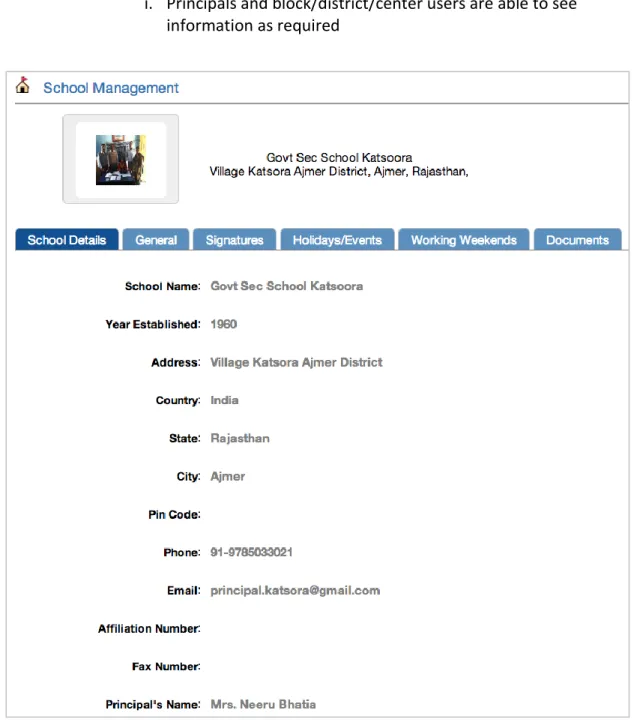
School ManagementThe details of the school may be recorded on the platform for the higher official to access any detail of the school from anywhere. This application will give the student strength, area of the school, staff strength, photographs and a brief description of the school.
Student Management
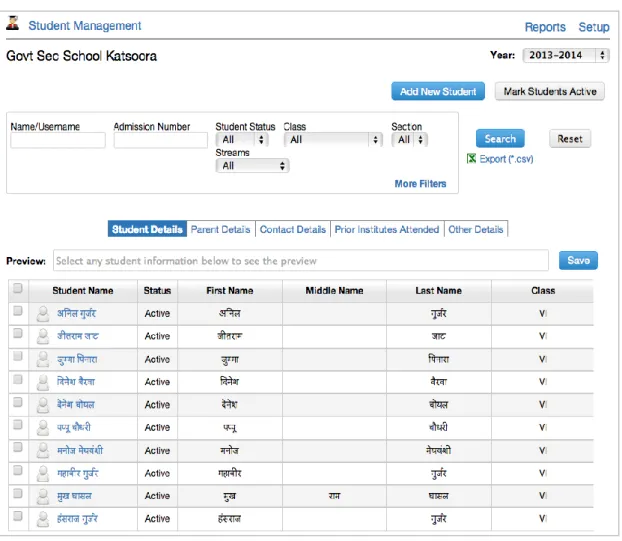
The Student Management application helps to maintain all student records for a student such as student profile, parent profile, sibling details, attendance, heath, marksheets, scholarships etc. It also provides customized reports to enable administrators to access any information they manage and track for students. Employee Information
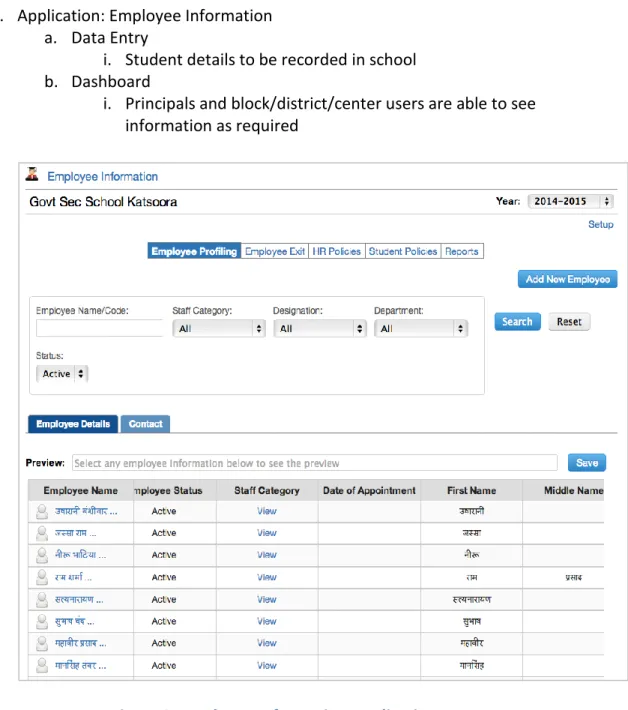
This application helps manage school staff details. Beyond this it provides numerous reports for schools to be able to obtain information in the form they desire.
Student Attendance
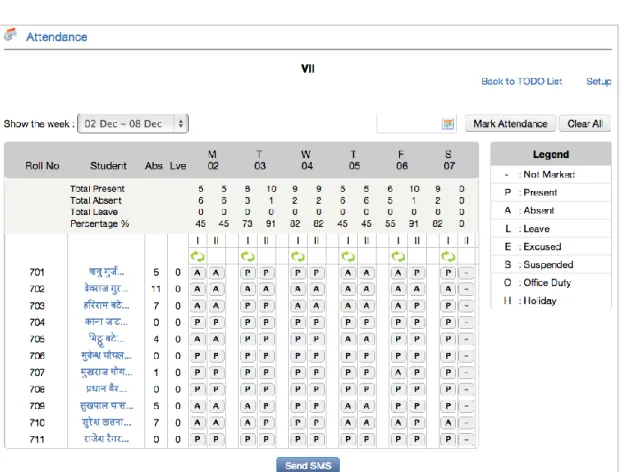
Daily student attendance can be recorded and an sms can be sent to parents in case their ward is missing from school.
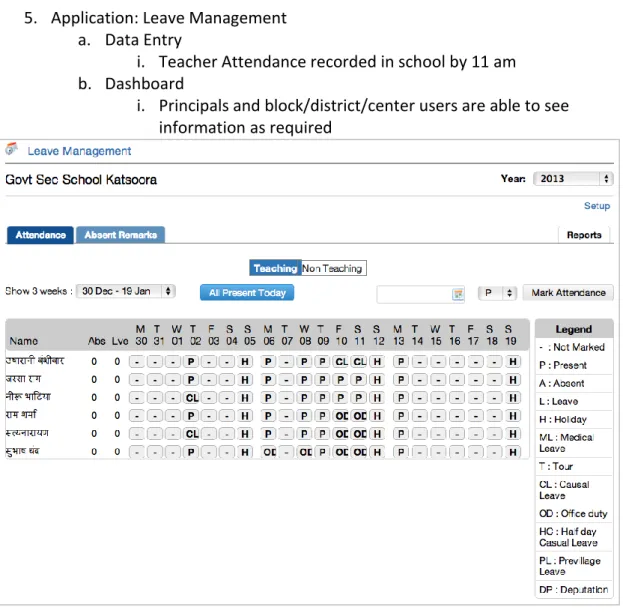
Leave Management
Daily staff attendance can be recorded which can also be extacted in report form and is visible on central dashboards real time.
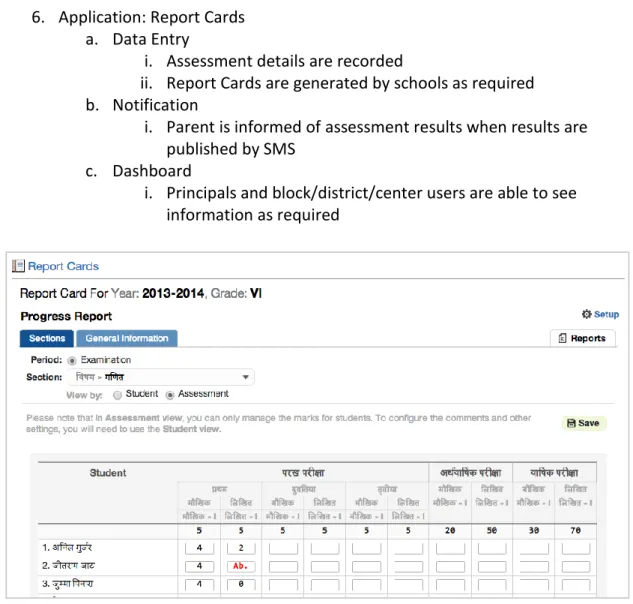
Report Cards
Teachers can use the web interface to record grades for students. When the teacher is ready, these grades can be published from the grade book resulting in progress reports being made available to parents and students.
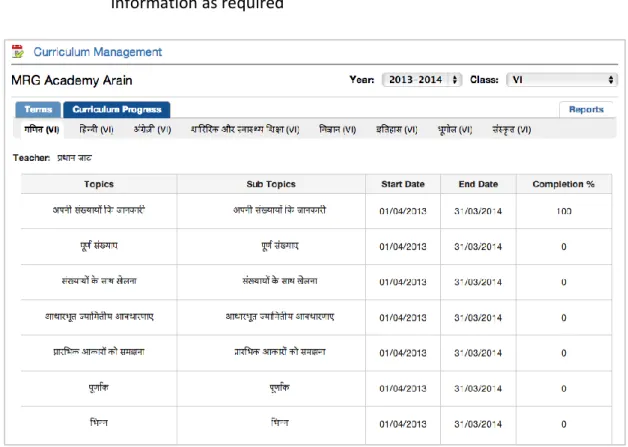
Curriculum Tracking
Curriculum and lesson plans can be fed into the system and regularly monitored to check if the teacher is giving the required number of tests and is up to speed with syllabus and curriculum.
4.
Planning
The execution of the project is based on onsite-offshore model. Following are the key highlight of the execution model –
a. Cloud Enabled Solution is deployed on internet cloud and accessed through internet from the schools
b. The technical software maintenance team is located offsite c. Support resources have been stationed onsite.
d. Initial Data loading though was originally planned for schools to undertake, was taken up by the support team to overcome slow progress
e. Support resources have been visiting the schools for training and hand holding support at least once a week per school
The project was divided into the following phases
• Data Collection: Initial Data for various applications to be collected by visiting schools. This data was present mostly on paper.
• Data Digitization: The collected data was converted to digital format preserving the language of data.
• Data Setup: Data to be setup for various applications to be working for schools as expected. The digital data was loaded into applications.
• Training: To conduct training in schools for the IT teacher / resource and the principal.
• Hand holding: To provide close hand holding support for the school to be able to use applications on a daily basis and perform routine tasks.
• Running smoothly: School to be able to use the applications on their own and ask for help in special cases.
4.1.
Data Collection
Initial Data for various applications was collected by visiting schools.
• The data in most of the schools was in registers and schools were understaffed to find the time to digitize the data.
• The team went to each school and collected data from their paper records and typed it into the applications to convert it into digital format as required for applications.
• For schools that had data in Hindi, it is represented in Hindi in the applications too.
• For sending SMS’s to parents, schools were not maintaining records of cell phone numbers of parents. The schools were requested for this data and they provided this after obtaining it from parents.
• For curriculum tracking, schools didn’t have a detailed lesson plan or scheme for delivering curriculum in classes. The curriculum for all subjects in all classes was identified as lessons to be taught in subjects and the same was then uploaded on to the Curriculum Management application.
• Curriculum tracking for these schools is setup to track which chapters are being taught in which classes and in which subjects on which days and by whom.
• Government school teachers maintain a daily diary in which they record the lessons that they taught on that day. Private schools did not follow any daily curriculum-recording plan. Henceforth both Govt. as well as private schools will be recording this in the applications.
• To the schools that were not maintaining diaries, we provided registers to their teachers so this information could be maintained on a daily basis from which the IT person could transfer to the application.
4.2.
Data Set Up
Data was setup for various applications to be working for schools as expected.
4.3.
Training
Training was divided into two locations for 3 days each.
• MRG Academy Arain
• Govt. Secondary School Bhogadeet
During the training, the following modules were covered
o Using Internet o Email o Skype o School Management o Student Management o Employee Information o Student Attendance o Leave Management o Report Cards o Curriculum Tracking
4.4.
Handholding
For ease of use and for the discipline of daily use of all applications, schools needed close hand holding and guidance for a period of 2 months or more.
For this, a team of 3 people supports 14 schools by living in a location within the block. This team provides everyday support to schools and addresses any issues that they may have in using the applications on a daily basis. This team speaks to the schools on daily basis and visits them twice a week.
4.5.
Running Smoothly
The handholding phase is planned to continue till it is seen that the applications are running smoothly in the schools on a regular basis. All schools will also be able to generate report cards through the report card application.
5.
Timelines
Various phases of this project were conducted with respect to the following timelines,
Buzzyears:
S. No Phase Start Date End Date 1 Data Collection 14 Oct 2013 17 Oct 2013
2 Data Setup 18 Oct 2013 23 Oct 2013
3 Training 23 Oct 2013 28 Oct 2013
4 Holidays 28 Oct 2013 10 Nov 2013
6.
Application Screens – Buzzyears
The project plan above was designed to achieve the following goals in applications listed below,
1. Application: School Management a. Data Entry
i. School information set up b. Dashboard
i. Principals and block/district/center users are able to see information as required
2. Application: Employee Information a. Data Entry
i. Student details to be recorded in school b. Dashboard
i. Principals and block/district/center users are able to see information as required
3. Application: Student Management a. Data Entry
i. Student details to be recorded in school b. Dashboard
i. Principals and block/district/center users are able to see information as required
4. Application: Student Attendance a. Data Entry
i. Student Attendance recorded in school b. Notification
i. Parents are informed when child is absent by 11 am by SMS c. Dashboard
i. Principals and block/district/center users are able to see information as required
Figure 4: Student Attendance Application
5. Application: Leave Management a. Data Entry
i. Teacher Attendance recorded in school by 11 am b. Dashboard
i. Principals and block/district/center users are able to see information as required
6. Application: Report Cards a. Data Entry
i. Assessment details are recorded
ii. Report Cards are generated by schools as required b. Notification
i. Parent is informed of assessment results when results are published by SMS
c. Dashboard
i. Principals and block/district/center users are able to see information as required
7. Application: Curriculum Management a. Data Entry
i. Curriculum taught to be recorded on a daily basis b. Dashboard
i. Principals and block/district/center users are able to see information as required
Figure 8: Curriculum Management Application
7.
Dashboard - Buzzyears
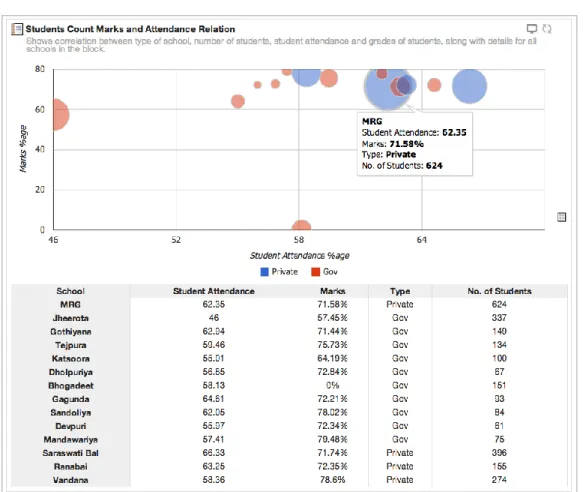
A dashboard is "an easy to read, often single page, real-time user interface, showing a graphical representation of the current status (snapshot) and historical trends of an organization’s key performance indicators to enable instantaneous and informed decisions to be made at a glance.
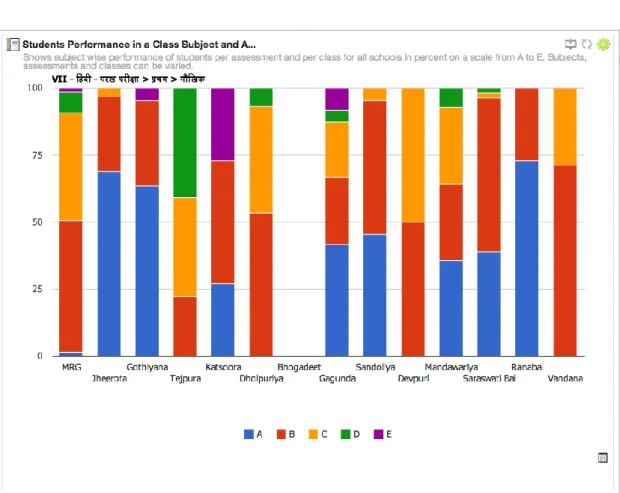
It allows management and organisation users to monitor their school performances such as student strength, HR dashboard, student attendance, teacher’s attendance and students academic performance at a glance.
The dashboard has two sections,
1. Block Level Charts : This dashboard will allow user to select a block and then they will be shown charts for schools in that block in a comparitive report. 2. School Level Charts : This dashboard will allow user to select one school in a
block and see charts for it in an informative report.
Included below are snap shots of some of the graphical represenation of reports that are visible to the administrators on their Dashboards for easy access and analysis of data. The reports backing these widgets have been defined as per the reports shortlisted in the Scope.
Figure 10: Student Teacher Ratio Widget from Dashboard
9.
Dashboard – ATSI
The following are a few dashboards generated in the ATSI solution:
Teacher Pupil ratio
Purpose – The purpose of this report is to capture the Teacher student ratio of the schools. Ratio is the function of (Total Number of Students / Total Number of teachers). Lower the ratio, better the teaching quality.
Computer Student ratio
Purpose – The purpose of this report is to identity the most recent student computer ratio. Ratio is the function of (number of students / number of computers). Lower ratio is desired.
Designation wise Staff Distribution
Subject Teacher Deficits -
Purpose – The “Subject - Teacher Gap” dashboard represents the number of the subject teacher deficits against the requirement.
Administrative Dashboards
This section of the report captures various dashboards pertaining to the administrative functioning of the schools at individual and cumulative levels. Infrastructure dashboards capture the analysis of the following areas -
Enrollment – Class wise
Enrollment - Gender wise
Student Attendance – Class wise
Enrollment – Class wise
Purpose – The purpose of the dashboard is to depict the Computer literacy of the teachers. Literacy ratio = (Number of Computer literate teachers) / (Total number of teachers). Desired ratio is 1. Higher the ratio better.
Enrollment - Gender wise
Staff Attendance for Dec 2013
1. So far, only one person per academy has been trained into the use of
software. Going forward we should strive to train all the teaching staff to be able to use the software and to access online content.
2. Teacher training to be reoriented towards use of improved methods of teaching using technology. Refresher courses to be conducted for teachers on regular intervals.
3. Electricity to be made available in all the schools to ensure efficient and uninterrupted use of technology.
4. Improve the supply of Internet to increase efficiency. It is still intermittent and cannot be accessed on a regular basis.
5. Sufficient number of computers in the lab so that teachers can enter their marks on regular basis and generate digital report cards.
6. Senior students to be encouraged to use the Internet to access content during school hours.
7. Lab/library should be open to students even after school hours for them to get the required information from the net.
8. Integrate the platform to provide academic content. This will enable us to scale up to distributing digital and relevant content to the schools. State can record lectures of the better teachers in the State and make them available to other schools through Web Conferencing.
9. Introduce web conferencing as a pilot in the schools. This will help us relay information / telecast to multiple schools at the same time at marginal costs as compared to VSAT.
10.One data card per school to be given in the safe keeping of the Principal so that emergencies can be handled.
11.There is no UDC/LDC/Office Assistance for some of the schools. Some of the operational data entry (e.g., Staff Attendance etc) should be undertaken by UDC/LDC/Office Assistance. Support team and teachers are doing it currently. But this can be the process moving ahead as this is not expected from
teaching staffs and may impact on the motivation.
12.Lessons Plans should be made compulsory to be fed into the software. 13.It will be good to know the reports that the administrators would like to
11.
Conclusion
While non-availability of computer-literate teachers, lack of UDC/LDC/Office Assistance for some of the schools for carrying out operational data entry (e.g., Staff Attendance etc), connectivity and power were the challenges on the ground, the introduction of applications in schools has resulted in bringing about a change in an old administrative process to a new one. Teachers and school administrators have enthusiastically adopted the new system as it helped them to make their operation processes more efficient and smooth and gave them access to their data at a click. The PoC has successfully demonstrated the feasibility of implementation of the services proposed as part of the School Education MMP and the potential utility of such services to the end stakeholders.