Guide
SAP
®
Adaptive Server
®
Copyright © 2014 by SAP AG or an SAP affiliate company. All rights reserved.
No part of this publication may be reproduced or transmitted in any form or for any purpose without the express permission of SAP AG. The information contained herein may be changed without prior notice.
Some software products marketed by SAP AG and its distributors contain proprietary software components of other software vendors. National product specifications may vary.
These materials are provided by SAP AG and its affiliated companies ("SAP Group") for informational purposes only, without representation or warranty of any kind, and SAP Group shall not be liable for errors or omissions with respect to the materials. The only warranties for SAP Group products and services are those that are set forth in the express warranty statements accompanying such products and services, if any. Nothing herein should be construed as constituting an additional warranty.
SAP and other SAP products and services mentioned herein as well as their respective logos are trademarks or registered trademarks of SAP AG in Germany and other countries. Please see http://www.sap.com/corporate-en/legal/copyright/ index.epx#trademark for additional trademark information and notices.
CHAPTER 1: Introduction to Component Integration
Services ...1
CHAPTER 2: Component Integration Services
Concepts ...3
Proxy Tables ...5
Using the create table Command ...5
Using the create existing table Command ...5
Datatype Conversions ...7
Using the create proxy_table Command ...7
Remote Procedures as Proxy Tables ...9
Server Limits ...12
Cascading Proxy Tables ...14
Proxy Databases ...15
User Proxy Databases ...15
User Proxy Database Schema Synchronization
...16
System Proxy Databases ...17
System Proxy Database Creation ...18
Schema Synchronization When Current
Database Has a System Proxy Database ...18
Stored Procedure Execution Within a System
Proxy Database ...19
File System Access ...19
Directory Access ...19
Recursion Through Subordinate Directories ...22
File Access ...22
Remote Servers ...24
Connecting to Remote Servers Without the Interfaces
File ...26
LDAP Directory Services ...26
Secure Communication with SSL ...27
Using Trusted Roots Files ...27
Secure Communication Using Kerberos ...27
Configuring Kerberos security services ...28
Configuring the Remote SAP ASE Kerberos
Principal Name ...29
Configuring Component Integration Services
Remote Procedure Calls ...29
Security Issues ...30
Using Encrypted Columns in CIS ...30
Remote Server Logins ...31
Connecting to Backup Server and XP Server ...31
Mapping External Logins ...31
Configuring Failover for Remote Server Connections
...33
Remote Server Capabilities ...33
Query Processing ...34
RPC handling and Component Integration Services ...37
Site Handler and Outbound RPCs ...37
Configuring Component Integration Services for
Outbound RPCs ...38
Text Parameters for RPCs ...39
Text Parameter Support for XJS/390 ...40
Distributed Transaction Management ...41
DTM-Enabled Servers ...42
Pre-DTM servers ...42
strict DTM enforcement ...43
Enable Component Integration Services ...43
Transactional RPCs ...43
Restrictions on Transaction Management ...44
SAP ASE to SAP ASE update statistics ...44
Java in the Database ...45
Constraints on Java Class Columns ...46
Java Abstract Datatypes (ADTs) ...46
Java Class Definitions ...47
Datatypes ...47
Unicode support ... 47
Datatype Conversions ...49
text and image Datatypes ...49
Limits of @@textsize ...50
Odd Bytes Padded ...50
Converting text and image Datatypes ...50
Pattern Matching with text and unitext Data ... 50
Entering text and image Values ...51
readtext using bytes ...51
Restriction for text, image, and unitext with bulk
copy ...51
Considerations for Using text, unitext, and image
data with Server Classes ...51
Configuration and Tuning ...53
Using sp_configure ...53
sysconfigures Table ...55
Changing the Configuration Parameters ...55
Using Global Variables to Determine Status ...55
CHAPTER 3: CIS Support for HANA Server ...57
Configuring CIS for HANA ...57
Creating SAP HANA as an ODBC Data Source on
Windows ...57
Adding SAP HANA to the SAP ASE Interfaces File ... 57
Configuring the PCI Bridge and PCA/ODBC ...58
Adding Server Class HANAODBC ...60
Datatype Mapping Between SAP ASE and HANA ...60
CHAPTER 4: SQL Reference ...67
dbcc Commands ...67
dbcc Options ...67
Trace Flags ...68
Functions ...69
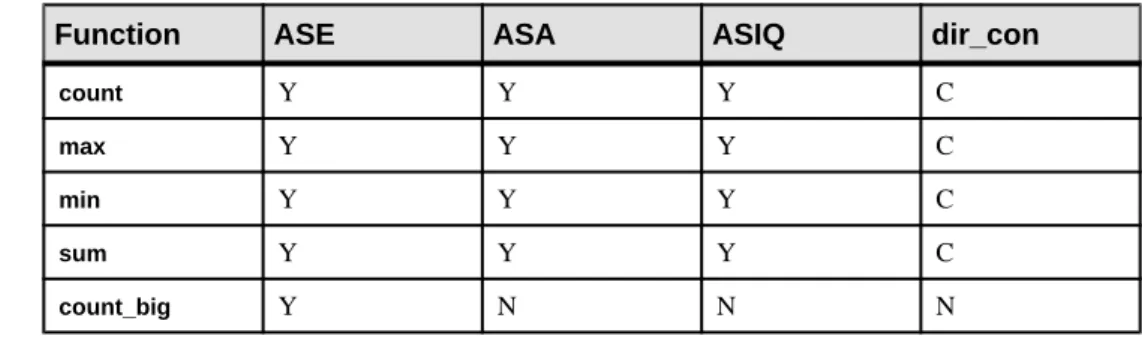
Aggregate Functions ...69
Datatype Conversion Functions ...70
Date Functions ...70
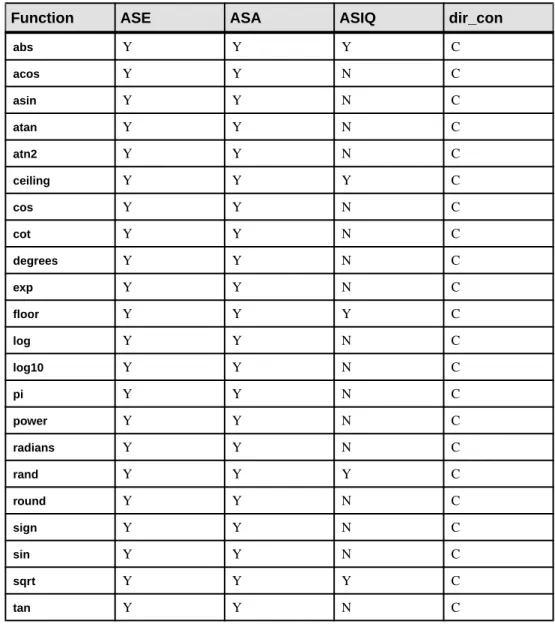
Mathematical Functions ...71
Security Functions ...72
String Functions ...72
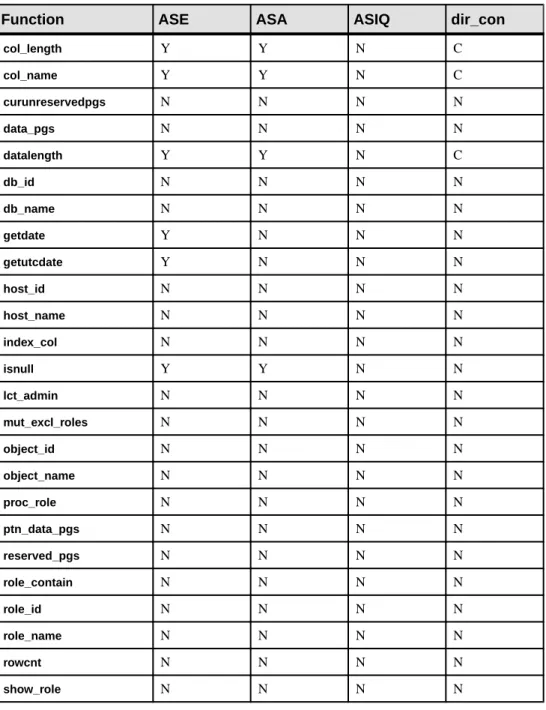
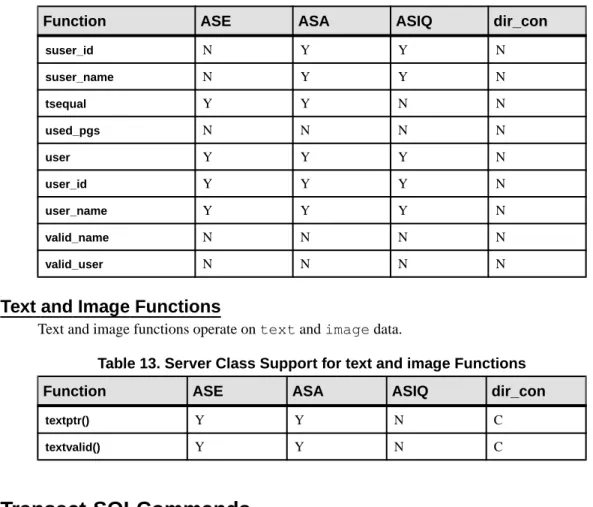
System Functions ...73
Text and Image Functions ...74
Transact-SQLCommands ...74
alter table ...75
case ...77
connect to...disconnect ...78
create existing table ...79
create index ...87
create table ...87
delete ...89
drop index ...90
fetch ...91
insert ...91
readtext ...92
select ...93
truncate table ...95
update ...95
update statistics ...96
writetext ...97
Passthrough Mode ...98
The connect to Command ...98
The sp_passthru System Procedure ...100
The sp_remotesql System Procedure ... 101
Quoted Identifier Support ...101
Delimited Identifier Support ...102
auto identity Option ...102
Triggers ...102
CHAPTER 5: Tutorial ...103
Adding a Remote Server ...103
Creating Server Entries in System Tables ... 103
Adding an Alternate Login and Password ...104
Verifying Connectivity ... 104
Performing a Join Between Two Remote Tables ...105
CHAPTER 6: Troubleshooting ...107
Problems Accessing Component Integration Services
...107
Problems Using Component Integration Services ...108
Unable to Access Remote Server ...108
Unable to Access Remote Objects ... 109
Problem Retrieving Data from Remote Objects ...110
Integration Services
Component Integration Services extends SAP® Adaptive Server® Enterprise capabilities and provides enhanced interoperability.
It also provides location transparency and functional compensation.
Location transparency means that Component Integration Services allows SAP® ASE to present a uniform view of enterprise data to client applications. Enterprise-wide data from heterogeneous sources can be accessed as if it were local.
Functional compensation allows Component Integration Services to emulate all features of Transact-SQL, and interact with a data source only when actual data is needed. With this capability, the full range and power of Transact-SQL can be applied to any data source, whether or not the data source provides support for a particular feature of Transact-SQL. Examples of this capability are built-in functions and Java functions. Component Integration Services allows statements to use these functions even though the data on which these functions may operate is derived from external sources that cannot support the functions. Component Integration Services, together with SQL Anywhere, SAP IQ and various DirectConnect interfaces, extends the reach of SAP ASE by enabling transparent access to database management systems anywhere in the enterprise. This transparent, extended reach of SAP ASE makes it easy for Enterprise Portal components to:
• Access data from anywhere, and present it as dynamic content to Web pages • Execute transactions that span heterogeneous boundaries
• View an entire enterprise through a single view provided by the global metadata stored in the SAP ASE/Component Integration Services system catalogs
Component Integration Services allows users to access both SAP® and non-SAP databases on different servers. These external data sources include host data files, tables, views, and RPCs (remote procedure calls) in database systems such as SAP ASE and Oracle.
Using Component Integration Services, you can:
• Access tables in remote servers as if the tables were local.
• Perform joins between tables in multiple remote, heterogeneous servers. For example, it is possible to join tables between an Oracle database management system (DBMS) and an SAP ASE, and between tables in multiple servers.
• Transfer the contents of one table into a new table on any supported remote server by means of a select into statement.
• Access native remote server capabilities using the Component Integration Services passthrough mode.
Component Integration Services can be used by anyone who needs to access multiple data sources or legacy data. It can also be used by anyone who needs to migrate data from one server to another.
A single server is often used to access data on multiple external servers. Component Integration Services manages the data regardless of the location of the external servers. Data management is transparent to the client application.
Component Integration Services, in combination with EnterpriseConnect™ and MainframeConnect™, provides transparent access to a wide variety of data sources, including:
• Oracle • Informix
• Microsoft SQL Server
• SAP Adaptive Server Enterprise
• SQL Anywhere
• SAP IQ
• Mainframe data, including:
• ADABAS
• IDMS
• IMS
• VSAM
To start Component Integration Services:
• Install DirectConnect server(s) or gateways for the external data sources you choose to access (for example, Oracle, Informix, Microsoft SQL Server).
• Configure the server to access remote objects. See also
Concepts
Component Integration Services presents tables to a client application as if all the data in the tables were stored locally. Remote tables are mapped to local proxy tables which hold metadata. The ability to access remote (or external) tables as if they were local is a hallmark of Component Integration Services..
Remote tables are mapped to local proxy tables which hold metadata. Internally, when a query involving remote tables is executed, the storage location is determined, and the remote location is accessed so that data can be retrieved.
To achieve location transparency, tables must first be mapped to their corresponding external locations.
Access Methods
Access methods form the interface between the server and an external object. The access method used to retrieve remote data is determined by two attributes of the external object: • The server class associated with the remote object. For each server class, there are separate
access methods that handle all interaction between SAP ASE and remote servers of the same class and object type.
• The object type Server Classes
A server class must be assigned to each server when it is added using sp_addserver. Server classes determine the access method used to interact with the remote server.
The server classes are:
• ASEnterprise – used if the server is SAP ASE. This is the default server class.
• ASAnywhere – used if the server is SQL Anywhere version 6.0 or later. This server class should be used for SAP IQ versions earlier than SAP IQ 12.5.
• ASIQ – used if the server is SAP IQ version 12.5 and later. • local – the local server. There can be only one.
• direct_connect – indicates that the server is an Open Server™ application that conforms to the interface requirements of a DirectConnect™ server. For access to Microsoft SQL Server, DB2, Oracle, or Informix, you must use a DirectConnect server.
• sds – indicates that the server conforms to the interface requirements of a Specialty Data Store.
• RPCServer – indicates that a server can only handle RPCs. It does not accept SQL statements, transaction control statements, or anything else.
Object Types
The server presents a number of object types to client applications as if they were local tables. Supported object types are:
• table – the object in a remote server of any class is a relational table. This is the default type.
• view – the object in a remote server of any class is a view. Component Integration Services treats views as if they were local tables without any indexes.
• remote procedure – the object in a remote server of any class is a remote procedure. Component Integration Services treats the result set from the remote procedure as a read-only table.
• file – the object is an individual file within a file system. • directory – the object is a file system directory. Interface to Remote Servers
The interface between the server and remote servers is handled by the Open Client software, Client-Library™.
The Client-Library features that are used to implement the interface are dependent upon the class of server with which Component Integration Services is interacting.
For example, if the server class is direct_connect, a number of features such as cursor and dynamic requests are used.
Before the server can interact with a remote server, you must configure the following: • Remote server addition to directory services
• Remote server definition • Remote server login information • Remote object definition
Before accessing remote tables with Component Integration Services, you must either have access to LDAP directory services, or an interfaces file (sql.ini file on Windows platforms).
Remote servers are defined by means of the stored procedure sp_addserver. This procedure is documented in the Reference Manual.
Once you have configured the remote server, you must provide login information. By default, Component Integraiton Services uses the names and passwords of SAP ASE clients whenever it connects to a remote server on behalf of those clients. However, this default can be overridden using sp_addexternlogin, which allows a system administrator to define the name and password for each user who connects to a remote server.
Using connect to server_name, you can verify that the server configuration is correct. This command establishes a passthrough mode connection to the remote server. Passthrough mode allows clients to communicate with remote servers in native syntax. This passthrough mode remains in effect until you issue a disconnect command.
Once you have configured a remote server, you cannot access objects in that remote server as tables until a mapping between them and a local object (proxy table) has been established. You can create new tables on remote servers, and you can define the schema for an existing object in a remote server. The procedures for both are similar.
See also
• Connection Management on page 25 • Chapter 5, Tutorial on page 103
Proxy Tables
A proxy table is a local table containing metadata which points to a remote object, and are the key to location transparency.
The remote table is mapped to the proxy table to make it appear as if it were a local table. See also
• Chapter 4, SQL Reference on page 67
Using the create table Command
The create table command creates a proxy table and a remote table at the same time. Use this syntax:
create table table_name (column_list) [ [ external {table | file}] at “pathname” ]]
The remote location is specified with the at pathname clause. create table allows external object type table and file. The datatype of each column is passed to the remote server without conversion.
Using the create existing table Command
The create existing table command allows the definition of existing tables (proxy tables). The syntax for this option is similar to the create table command:
create existing table table_name (column_list) [[external {table | procedure | file}] at pathname]
The action taken by the server when it receives this command is quite different from the action it takes when it receives the create table command, however. A new table is not created at the remote location; instead, the table mapping is checked, and the existence of the underlying
object is verified. If the object does not exist (either host data file or remote server object), the command is rejected with an error message.
If the object does exist, its attributes are obtained and used to update system tables
sysobjects, syscolumns, and sysindexes. • The nature of the existing object is determined.
• For remote server objects (other than RPCs), column attributes found for the table or view are compared with those defined in the column_list. Column names must match (case sensitive), column types and lengths must match, or at least be convertible, and the NULL attributes of the columns must match.
• Index information from the host data file or remote server table is extracted and used to create rows for the system table sysindexes. This defines indexes and keys in server terms and enables the query optimizer to consider any indexes that may exist on this table. After successfully defining an existing table, issue an update statistics command for the table.This allows the query optimizer to make intelligent choices regarding index selection and join order.
1. Define a server named big_server. Its server class is ASEnterprise, and its name in the
interfaces file is big_server:
exec sp_addserver big_server, ASEnterprise, big_server
2. Define a remote login alias. This step is optional if the username and password are the
same on both servers. User “sa” is known to remote server big_server as user “sa,” password “timothy”:
exec sp_addexternlogin big_server, sa, sa, timothy
3. Define the remote authors table:
create existing table authors (
au_id varchar(11) not null, au_lname varchar(40) not null, au_fname varchar(20) not null, phone char(12) not null, address varchar(40) null, city varchar(20) null, state char(2) null, country varchar(12) null, postalcode char(10) null )
EXTERNAL TABLE at "big_server.pubs2.dbo.authors"
4. Update statistics on tables to ensure reasonable choices by the query optimizer:
update statistics authors
5. Execute a query to test the configuration:
Datatype Conversions
When you use the create table or create existing table commands, you must specify all datatypes, using recognized SAP ASE datatypes.
If the remote server tables reside on a class of server that is heterogeneous, the datatypes of the remote table are converted into the specified SAP ASE types automatically when the data is retrieved. If the conversion cannot be made, the create table or create existing table
commands do not allow the table to be created or defined.
Using the create proxy_table Command
Using the create proxy_table command does not require a column list: Component Integration Services derives the column list from the metadata it obtains from the remote table.
If the object does exist, create proxy_table updates sysobjects, syscolumns, and
sysindexes.
You can add an optional clause to the create existing table statement to indicate the remote object is actually a stored (or other) procedure instead of a table. Without this clause, the remote object is assumed to be a table or view:
create existing table t1 (
column_1 int, column_2 int )
EXTERNAL PROCEDURE AT "big_server.mydb.dbo.p1"
If the remote object is type procedure, several processing differences occur: • No indexes are created for objects of this type.
• You must provide a column list that matches the description of the remote procedure’s result set. No verification of the list’s accuracy is provided.
• You can use column names beginning with underscore (‘_’) to specify columns that are not part of the remote procedure’s result set. These columns are referred to as parameter columns. For example:
create existing table t1 ( a int, b int, c int, _p1 int null, _p2 int null ) external procedure at “big_server.sybsystemprocs.dbo.myproc” select a, b, c from t1 where _p1 = 10 and _p2 = 20
• In this example, the parameter columns _p1 and _p2 are not expected in the result set, but can be referenced in the query. Component Integration Services passes the search arguments to the remote procedure via parameters, using the names @p1 and @p2. • If a parameter column is included in the select list, its value is equivalent to the values
specified for it in the where clause, if it was passed to the remote procedure as a parameter. If the parameter column did not appear in the where clause, or was not able to be passed to the remote procedure as a parameter, but was included in the select list, its value would be NULL.
• A parameter column can be passed to the remote procedure as a parameter if it is what the SAP ASE query processor considers to be a searchable argumen. It is generally a searchable argument if it is not included in any “or” predicates. For example, the following query would prevent the parameter columns from being used as parameters.
select a, b, c from t1 where _p1 = 10 OR _p2 = 20
• Rules exist for the definition of parameter columns in the create existing table statement: • Parameter columns must allow NULL.
• Parameter columns cannot precede normal, result columns (they must appear at the end of the column list).
Allowing the definition of remote procedures as local tables allows Component
Integration Services to treat the result set of a remote procedure as a “virtual table,” which can be sorted, joined with other tables, or inserted into another table via insert/select
syntax. However, virtual tables are considered read-only:
• You cannot issue a delete, update, or insert command against a table of type procedure;
• You cannot issue a create index, truncate table, or alter table command against virtual tables.
If an object of the type procedure has been defined within the server, a query is not issued to the remote server on which the object resides. Instead, Component Integration Services issues an RPC and treats the results from the RPC as a read-only table.
When the following query is issued, Component Integration Services sends the RPC named myproc to server big_server. Row results are treated like the results from any other table; they can be sorted, joined with other tables, grouped, inserted into another table, and so forth:
create existing table rtable ( col1 int, col2 datetime, col3 varchar(30) )
external procedure at “big_server...myproc “ select * from rtable
RPC parameters should represent arguments that restrict the result set. If the RPC is issued without parameters, the entire result set of the object is returned. If the RPC is issued with parameters, each parameter further limits the result set. For example, the following results in a single parameter, named @col1, that is sent along with the RPC. Its value is 10:
select * from rtable where col1 = 10
Component Integration Services attempts to pass as many of the search arguments as possible to the remote server, but depending on the SQL statement being executed, Component Integration Services might perform the result set calculation itself. Each parameter represents a search for an exact match, for example, the = operator.
The following rules define the parameters sent to the RPC. If an RPC is used as a Component Integration Services object, you should keep these rules in mind during development. • Component Integration Services sends = operators in the where clause as parameters. For
example, this query results in Component Integration Services sending two parameters:
select * from rpc1 where a = 3 and b = 2
Parameter a has a value of 3 and parameter b has a value of 2. The RPC is expected to return only result rows in which column a has a value of 3 and column b has a value of 2.
• Component Integration Services does not send any parameters for a where clause, or portion of a where clause, if there is not an exact search condition. For example:
select * from rpc1 where a = 3 or b = 2
Component Integration Services does not send parameters for a or b because of the or
clause.
Another example:
select * from rpc1 where a = 2 and b < 3
Component Integration Services sends parameters for a and b, and filters rows containing b with values smaller than 3.
Remote Procedures as Proxy Tables
You can add an optional clause to the create existing table statement to indicate the remote object is actually a stored (or other) procedure instead of a table.
Without this clause, the remote object is assumed to be a table or view:
create existing table t1 (
column_1 int, column_2 int )
EXTERNAL PROCEDURE AT "big_server.mydb.dbo.p1"
If the remote object is type procedure, several processing differences occur: • No indexes are created for objects of this type.
• You must provide a column list that matches the description of the remote procedure’s result set. No verification of the list’s accuracy is provided.
• You can use column names beginning with underscore (‘_’) to specify columns that are not part of the remote procedure’s result set. These columns are referred to as parameter columns. For example:
create existing table t1 ( a int, b int, c int, _p1 int null, _p2 int null ) external procedure at “big_server.sybsystemprocs.dbo.myproc” select a, b, c from t1 where _p1 = 10 and _p2 = 20
• In this example, the parameter columns _p1 and _p2 are not expected in the result set, but can be referenced in the query. Component Integration Services passes the search arguments to the remote procedure via parameters, using the names @p1 and @p2. • If a parameter column is included in the select list, its value is equivalent to the values
specified for it in the where clause, if it was passed to the remote procedure as a parameter. If the parameter column did not appear in the where clause, or was not able to be passed to the remote procedure as a parameter, but was included in the select list, its value would be NULL.
• A parameter column can be passed to the remote procedure as a parameter if it is what the SAP ASE query processor considers to be a searchable argumen. It is generally a searchable argument if it is not included in any “or” predicates. For example, the following query would prevent the parameter columns from being used as parameters.
select a, b, c from t1 where _p1 = 10 OR _p2 = 20
• Rules exist for the definition of parameter columns in the create existing table statement: • Parameter columns must allow NULL.
• Parameter columns cannot precede normal, result columns (they must appear at the end of the column list).
Allowing the definition of remote procedures as local tables allows Component
Integration Services to treat the result set of a remote procedure as a “virtual table,” which can be sorted, joined with other tables, or inserted into another table via insert/select
syntax. However, virtual tables are considered read-only:
• You cannot issue a delete, update, or insert command against a table of type procedure;
• You cannot issue a create index, truncate table, or alter table command against virtual tables.
If an object of the type procedure has been defined within the server, a query is not issued to the remote server on which the object resides. Instead, Component Integration Services issues an RPC and treats the results from the RPC as a read-only table.
When the following query is issued, Component Integration Services sends the RPC named myproc to server big_server. Row results are treated like the results from any other table; they can be sorted, joined with other tables, grouped, inserted into another table, and so forth:
create existing table rtable ( col1 int, col2 datetime, col3 varchar(30) )
external procedure at “big_server...myproc “ select * from rtable
RPC parameters should represent arguments that restrict the result set. If the RPC is issued without parameters, the entire result set of the object is returned. If the RPC is issued with parameters, each parameter further limits the result set. For example, the following results in a single parameter, named @col1, that is sent along with the RPC. Its value is 10:
select * from rtable where col1 = 10
Component Integration Services attempts to pass as many of the search arguments as possible to the remote server, but depending on the SQL statement being executed, Component Integration Services might perform the result set calculation itself. Each parameter represents a search for an exact match, for example, the = operator.
The following rules define the parameters sent to the RPC. If an RPC is used as a Component Integration Services object, you should keep these rules in mind during development. • Component Integration Services sends = operators in the where clause as parameters. For
example, this query results in Component Integration Services sending two parameters:
select * from rpc1 where a = 3 and b = 2
Parameter a has a value of 3 and parameter b has a value of 2. The RPC is expected to return only result rows in which column a has a value of 3 and column b has a value of 2.
• Component Integration Services does not send any parameters for a where clause, or portion of a where clause, if there is not an exact search condition. For example:
select * from rpc1 where a = 3 or b = 2
Component Integration Services does not send parameters for a or b because of the or
clause.
Another example:
select * from rpc1 where a = 2 and b < 3
Component Integration Services sends parameters for a and b, and filters rows containing b with values smaller than 3.
Server Limits
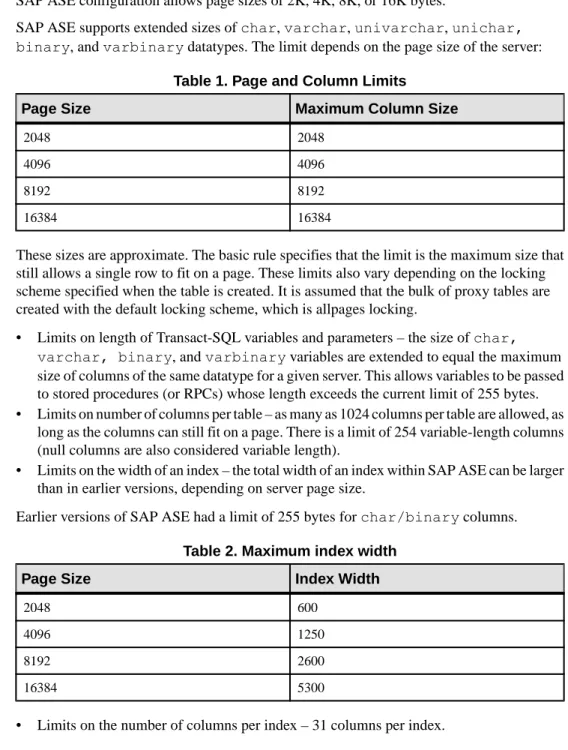
SAP ASE configuration allows page sizes of 2K, 4K, 8K, or 16K bytes.
SAP ASE supports extended sizes of char, varchar, univarchar, unichar, binary, and varbinary datatypes. The limit depends on the page size of the server:
Table 1. Page and Column Limits
Page Size Maximum Column Size
2048 2048
4096 4096
8192 8192
16384 16384
These sizes are approximate. The basic rule specifies that the limit is the maximum size that still allows a single row to fit on a page. These limits also vary depending on the locking scheme specified when the table is created. It is assumed that the bulk of proxy tables are created with the default locking scheme, which is allpages locking.
• Limits on length of Transact-SQL variables and parameters – the size of char,
varchar, binary, and varbinary variables are extended to equal the maximum size of columns of the same datatype for a given server. This allows variables to be passed to stored procedures (or RPCs) whose length exceeds the current limit of 255 bytes. • Limits on number of columns per table – as many as 1024 columns per table are allowed, as
long as the columns can still fit on a page. There is a limit of 254 variable-length columns (null columns are also considered variable length).
• Limits on the width of an index – the total width of an index within SAP ASE can be larger than in earlier versions, depending on server page size.
Earlier versions of SAP ASE had a limit of 255 bytes for char/binary columns. Table 2. Maximum index width
Page Size Index Width
2048 600
4096 1250
8192 2600
16384 5300
• Table names, column names and index names can be up to 255 bytes. • Identifier names can now be up to 255 bytes.
create new proxy table Limits
the create table command allows columns of datatype char, varchar, binary, and
varbinary to be specified with extended lengths, as described above. These datatypes and lengths are forwarded to the remote server on which the table is to be created.
create existing proxy table Limits
the create existing table command also allows columns to be specified with a length of greater than 255 bytes. This allows Component Integration Services to treat columns in remote databases as char, varchar, binary, or varbinary that previously had to be treated as
text or image columns.
There is still an opportunity for column size mismatch errors. For example, in the case where the remote database contains a table with a column length of 5000 bytes, and the SAP ASE processing create existing table supports columns only up to 1900 bytes, a size mismatch error occurs. In this case, it is necessary to respecify the column as a text or image column. When the proxy table column size exceeds that of the corresponding column in the remote table, a size mismatch error is detected and the command is aborted.
alter table Limits
If alter table operates on a proxy table, it is first processed locally, then forwarded to the remote server for execution. If the remote execution fails, the local changes are backed out and the command is aborted.
The remote server must process the command appropriately, or raise an error. If an error is produced, the Component Integration Services side of the command is aborted and rolled back.
select, insert, delete, update Limits
Component Integration Services handles large column values when proxy tables are involved in data manipulation language (DML) operations. Component Integration Services handles DML using one of several strategies:
• Tabular data stream (TDS)™ language commands – if the entire SQL statement can be forwarded to a remote server, then Component Integration Services does so using TDS Language commands generated by CT-Library ct_command (CS_LANG_CMD). The text of the language buffer may contain data for long char or binary values that exceeds 255 bytes, and remote servers must handle parsing of these command buffers. • TDS dynamic commands – if Component Integration Services cannot forward the entire
SQL statement to a remote server (for example, Component Integration Services is forced to provide functional compensation for the statement), then an insert, update, or delete
CT-Library function ct_dynamic (CS_PREPARE_CMD, CS_EXECUTE_CMD, CS_DEALLOC_CMD).
The parameters for the dynamic command may be CS_LONGCHAR_TYPE or CS_LONGBINARY_TYPE.
• TDS cursor commands – CT-Library cursor operations can be used to handle proxy table operations for select, update, and delete if functional compensation has to be performed. For example, if you are updating a proxy table and there are multiple tables in the from
clause, Component Integration Services may have to fetch rows from multiple data sources, and for each qualifying row, apply the update to the target table. In this case, Component Integration Services uses ct_cursor ({CS_DECLARE_CMD,
CS_OPEN_CMD, CS_CURSOR_UPDATE_CMD, CS_CLOSE_CMD, CS_DEALLOC_CMD}).
After a cursor is prepared, parameters are specified. These parameters may include those of type CS_LONGCHAR or CS_LONGBINARY.
• Bulk insert commands – when performing a select/into operation, if the target server supports the bulk interface (only true of remote SAP ASE servers and DirectConnect for Oracle), then the remote server must be prepared to handle char and binary values greater than 255 (via CS_LONGCHAR, CS_LONGBINARY values).
Columns from remote servers may be returned to Component Integration Services as type CS_LONGCHAR_TYPE or CS_LONGBINARY_TYPE.
Columns from remote servers may be returned to Component Integration Services as type CS_LONGCHAR_TYPE or CS_LONGBINARY_TYPE.
RPC Handling
RPCs sent to remote servers can contain parameters of types CS_LONGCHAR and CS_LONGBINARY. The Component Integration Services command cis_rpc_handling
supports these types.
Sending long parameters to SAP ASE servers older than version 12.5 is not allowed, as earlier versions of SAP ASE do not support CS_LONGCHAR or CS_LONGBINARY data. Component Integration Services examines TDS capabilities for the remote server prior to sending the RPC, and if the remote server cannot accept these datatypes, an error results. sp_tables
The SQL Anywhere or ASIQ stored procedure sp_tables only returns user tables.
Cascading Proxy Tables
SAP ASE allows cascading proxy table configurations between any number of instances of Component Integration Services.
There are conditions where this can cause problems, such as circular references, or
transactions in which the second proxy table references a local table on the same server as the first proxy table. In this case, application deadlocks can result that are not detected by Component Integration Services. You must configure your systems to avoid these potential pitfalls.
Proxy Databases
There are two types of proxy databases: user and system.
User Proxy Databases
When a user proxy database is created, metadata for the proxy tables is imported
automatically from the remote location that contains the actual tables. This metadata is then used to create proxy tables within the proxy database.
To create a proxy database, use:
create database <dbname> [create database options]
[with default_location = ’pathname’] [for proxy_update]]
The use of the clause with default_location allows you to specify the storage location of any new tables, and the location from which metadata may be imported for automatic proxy table creation if the for proxy_update clause is also specified. for proxy_update establishes the database as a proxy database; with default_location defines the location from which proxy tables are imported. Without for proxy_update, the behavior of with default_location is the same as that provided by sp_defaultloc — a default storage location is established for new and existing table creation, but automatic import of proxy table definitions does not take place during the processing of the create database command.
The value of path name is a string identifier in the following format:
servername.dbname.owner.
• servername – required field; represents the name of the server that owns the objects to be referenced by proxy tables. Must exist in master.dbo.sysservers.srvname. • dbname – optional. The name of the database within servername which contains objects to
be referenced by proxy tables
• owner – optional. The name of the owner of objects to be referenced by proxy tables. This may be restrictive, so that if more than one user owns objects in dbname, specifying the owner selects only those objects owned by that user. Do not create proxy tables for objects owned by other users.
If for proxy_update is specified with no default_location, an error is reported. When a proxy database is created (using the for proxy_update option), Component Integration Services functions are called upon to:
• Provide an estimate of the database size required to contain all proxy tables representing the actual tables/views found in the primary server’s database. This estimate is provided in terms of the number of database pages needed to contain all proxy tables and indexes. This size is used if no size is specified, and no database devices are specified.
Note: If the database is created with specific size specifications [on device_name = nn], or if a device name is specified with no size [on device_name], then the size requirements for the proxy database are not estimated; it is assumed in this case that the user or data base administrator wants to override the default size calculated for the proxy database. If you are importing metadata from another SAP ASE, remote database users are imported before proxy tables are created. Each imported database user must have a corresponding system user name in syslogins.
• Create all proxy tables representing the actual tables/views found in the companion server’s database. Proxy tables are not created for system tables.
• Grant all permissions on proxy tables to “public.” • Add the “guest” user to the proxy database.
• Import database users from remote site (if SAP ASE). • Grant create table permission to “public.”
• Set the database status to indicate that this database is a user proxy database. This is done by setting a status field in master.dbo.sysdatabases.status3 (0x0001, DBT3_USER_PROXYDB).
After the database has been created, it contains a proxy table for each table or view found in the default location. The behavior for a user proxy database is identical to prior database behavior. Users can create additional objects, such as procedure, views, rules, defaults, and so on, and both DDL and DML statements that operate on proxy tables behave as documented in this book.
The only exception to this is the alter database command. The syntax and capabilities of this command are described in the next section.
User Proxy Database Schema Synchronization
At times, it may be necessary for a database administrator to force resynchronization of the proxy tables contained within the proxy database.
This can be done using the alter database command:
alter database <dbname>
[alter database options] [for proxy_update]
If the for proxy_update clause is entered with no other options, the size of the database is not extended; instead, the proxy tables, if any, are dropped from the proxy database and re-created from the metadata obtained from the pathname specified during create database ... with default_location = ’pathname’.
If create database is used with other options to extend the size of the database, the proxy table synchronization is performed after the size extensions are made.
The purpose of this alter database extension is to provide a DBA with an easy-to-use, single-step operation with which to obtain an accurate and up-to-date proxy representation of all tables at a single remote site.
This resynchronization is supported for all external data sources, and not just the primary server in a HA-cluster environment. Also, a database need not have been created with the for proxy_update clause. If a default storage location has been specified, either through the
create database command or using sp_defaultloc, the metadata within the database can be synchronized with the metadata at the remote storage location.
Certain behavior is implied by the use of create/alter database to specify a proxy database: • Modification to the default location specified with the create database command is not
allowed using alter database.
• Local tables cannot be created in the proxy database. create table commands result in the creation of proxy tables, and the actual table is created at the default location.
• The default location of the table may be specified in the create table command, using the
at ’pathname’ syntax. If the path name differs from the default location, then the alter database command will not synchronize the metadata for this table.
• To change the default location, drop the database, then re-create it with a new path name specified in the default_location = ’pathname’ clause. If the location is changed using
sp_defaultloc, then the new location is used to provide metadata synchronization, and proxy tables that were created with the prior location not be synchronized, and may be dropped and replaced if the name conflicts with that of tables at the new location.
System Proxy Databases
System proxy databases behave like user proxy databases, with some notable enhancements and exceptions. System proxy databases are only used in a high availability configuration. System proxy databases allow customer-written applications to run on either node in a high-availability cluster. This does not imply “single-system image” capability; rather, it suggests an environment in which most user-written applications can execute on either node in the cluster. This means that both databases and user-created objects should be visible to both nodes.
A system proxy database has the same name as the database in the primary node it references, and contains handling for the user-defined objects that are necessary to support the
application. Proxy tables are created for each user table and view found in the primary database, and stored procedures are converted to RPCs and forwarded to the node referenced by the proxy database.
Certain commands, when executed within a system proxy database, are rejected with an error: • create procedure and drop procedure
• create view and drop view
• create trigger and drop trigger
• create rule and drop rule
• create default and drop default
The error generated in these cases is: Msg 12818, Severity 16: Cannot create
System Proxy Database Creation
A system proxy database is created automatically under the specific circumstances. Including:
• The HA cluster is being configured through the use of the stored procedure sp_companion ServerName, ’configure’, with_proxydb.
In this case, a system proxy database is created for each user database found in server indicated by ServerName.
• A create database command is issued in a server whose HA state is one of MODE_APNC, MODE_SNC, or MODE_ASNC.
When the creation of the system proxy database is complete, Component Integration Services functions are called upon to:
• grant create table to public – this allows table creation on the primary server to result in proxy table creation in the system proxy database.
Schema Synchronization When Current Database Has a System Proxy Database
In an high availability (HA) cluster, some of the changes to a primary server’s database must be forwarded to the companion server to keep both servers synchronized.
Several DDL commands, when executed within a database that has a system proxy database, cause notification of the companion server and result in automatic synchronization of the resulting changes:
• create table and drop table – local operation executes, resulting in the local table being created or dropped. The command is then forwarded to the companion server, for execution in the system proxy database, so that a proxy table can be created or dropped • create index and drop index – local operation executes, resulting in an index being created
or dropped. The server owning the system proxy database is then notified, and the proxy table is dropped and re-created, allowing the change to the index to be represented within the proxy table.
• create view and drop view – the local operation succeeds, resulting in the local view being created or dropped. The server owning the system proxy database is then notified, and a proxy table is either created or dropped.
If these commands are executed within the system proxy database, similar behavior occurs: • create table and drop table – local proxy table is created or dropped. The command is then forwarded to the primary server, so that a local table referenced by the proxy table can be created or dropped.
• create index and drop index – local operation on the proxy table executes, resulting in an index being created or dropped. The server owning the primary database is then notified, and an index is either created or dropped on the local table referenced by the proxy table
• create view and drop view – not allowed within a system proxy database. Stored Procedure Execution Within a System Proxy Database
If a system stored procedure request is encountered when the current database is a system proxy database, Component Integration Services attempts to locate the stored procedure first in the local sybsystemprocs database, and execute it.
If it is not found in sybsystemprocs, Component Integration Services searches the
master database. If the procedure is not a system stored procedure, or if it is but cannot be found locally, the stored procedure request is converted to an RPC and transmitted to the server referenced by the system proxy databases default location.
File System Access
SAP ASE provides access to the file system through the SQL language. With file system access, you can create proxy tables that are mapped to file system directories, or to individual files.
Note: Directories and files mapped to proxy tables now have a file path limit of 255 bytes.
Only SAP ASE users with system administrator (sa) or System Security Officer (sso) roles are allowed to create proxy tables that are mapped to files or directories
This requirement addresses the concerns over the security aspects of accessing file system data from within the SAP ASE server process (which may have root permission as it runs).
Directory Access
Proxy tables can be created to reference file system directories. The syntax is:
create proxy_table <table_name>
external directory at "directory pathname[;R]"
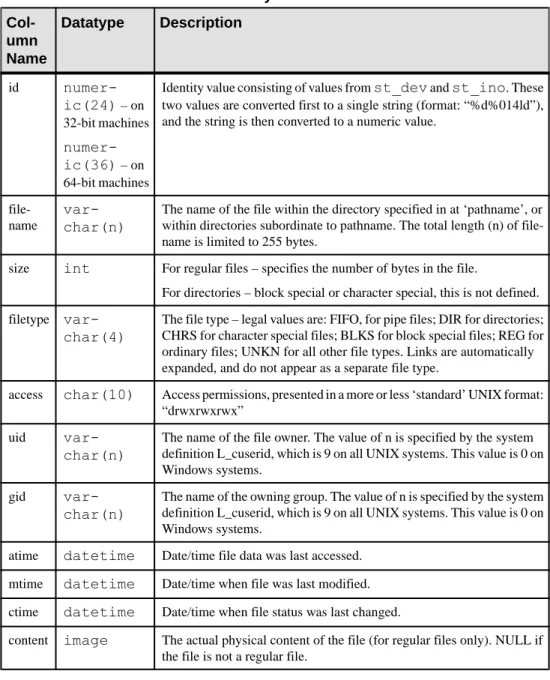
The directory path name must reference a file system directory visible to and searchable by the SAP ASE process. A proxy table that maps column names to attributes of files that exist within the directory is created. If the ‘;R’ (indicating “recursion”) extension is added to the end of the path name, Component Integration Services includes entries in all subordinate directories. This table describes the proxy table columns that are created when this command successfully completes:
Table 3. Proxy table columns Col-umn Name Datatype Description id numer-ic(24) – on 32-bit machines numer-ic(36) – on 64-bit machines
Identity value consisting of values from st_dev and st_ino. These two values are converted first to a single string (format: “%d%014ld”), and the string is then converted to a numeric value.
file-name
var-char(n)
The name of the file within the directory specified in at ‘pathname’, or within directories subordinate to pathname. The total length (n) of file-name is limited to 255 bytes.
size int For regular files – specifies the number of bytes in the file.
For directories – block special or character special, this is not defined. filetype
var-char(4)
The file type – legal values are: FIFO, for pipe files; DIR for directories; CHRS for character special files; BLKS for block special files; REG for ordinary files; UNKN for all other file types. Links are automatically expanded, and do not appear as a separate file type.
access char(10) Access permissions, presented in a more or less ‘standard’ UNIX format: “drwxrwxrwx”
uid
var-char(n)
The name of the file owner. The value of n is specified by the system definition L_cuserid, which is 9 on all UNIX systems. This value is 0 on Windows systems.
gid
var-char(n)
The name of the owning group. The value of n is specified by the system definition L_cuserid, which is 9 on all UNIX systems. This value is 0 on Windows systems.
atime datetime Date/time file data was last accessed. mtime datetime Date/time when file was last modified. ctime datetime Date/time when file status was last changed.
content image The actual physical content of the file (for regular files only). NULL if the file is not a regular file.
A proxy table that maps to a file system directory can support the following SQL commands: • select – file attributes and content can be obtained from the proxy table using the select command. Built-in functions that are designed to handle text values are fully supported for the content column, (for example, textptr, textvalid, patindex, pattern).
• insert – new files or directories can be created using the insert command. The only columns that have meaning are filename, filetype, and content. The rest of the columns should be left out of the insert statement, and are ignored if they are located. The
content column is ignored if file type is DIR, which indicates that a new directory is to be created.
To create a new directory, enter:
insert D1 (filename, filetype) values ("newdir", "DIR")
To create a new file, enter:
insert D1 (filename, content) values ("newdir/newfile", "This is an example.")
• delete – files or directories may be removed by the use of the delete command. A directory can be removed only if it is empty. For example:
/* delete the files only */
delete D1 where filename = 'newdir/newfile' /* deletes the directory (if empty) */
delete D1 where filetype = 'DIR' and filename = 'newdir'
• update – only the name of a file may be changed using the update command.
Note: Some file systems implement update as a deletion followed by the creation of a new directory entry; therefore the same filename could be updated multiple times if the update is not restricted. SAP recommends that you qualify the update to specific files by having the filename included in the where clause of the update. For example, this statement could cause multiple updates:
update t1 set filename=filename + 'old' where filetype = 'REG'
The problem would be avoided by adding a clause such as "and filename like "%.c"
• readtext – the contents of a file may be retrieved using the readtext command. • writetext – the contents of a file may be modified using the writetext command. No other SQL commands operate on proxy tables.
Regular file content is available only if the SAP ASE process has sufficient privileges to access and read the file, and if the file type indicates an “ordinary” file. In all other cases, the content column is NULL. For example:
select filename, size, content from directory_table
where filename like ‘%.html’
returns the name, size and content of regular files with a suffix of “.html,” if the SAP ASE process has access privileges to the file. Otherwise, the content column will be NULL.
create proxy_table fails if the path name referenced by directory path name is not a directory, or is not searchable by the SAP ASE process.
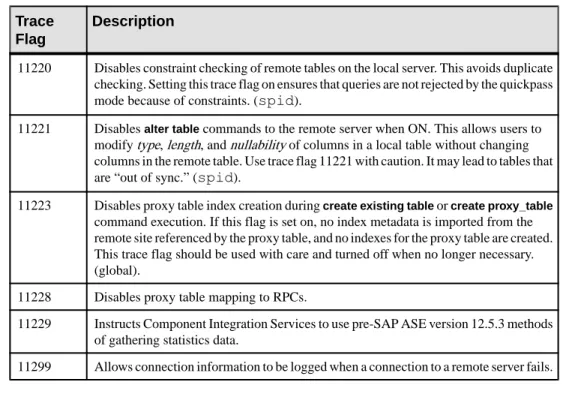
If trace flag 11206 is turned on, messages are written to the error log that contain information about the contents of the directories and the query processing steps needed to obtain that information.
Recursion Through Subordinate Directories
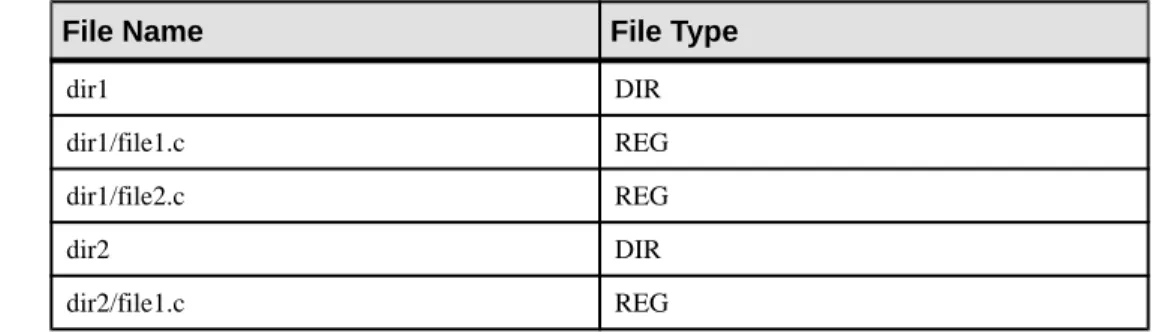
If the path name specified in the create proxy_table statement contains the ;R extension, Component Integration Services traverses all directories subordinate to the path name, and returns information for the contents of each subordinate directory.
When this is done, the file name returned by a query contains the complete name of the file relative to the path name. In other words, all subordinate directory names appear in the file name. For example, if path name specifies “/work;R”:
create proxy_table d1 external directory at "/work;R" select filename, filetype from d1
Table 4. Values for files
File Name File Type
dir1 DIR dir1/file1.c REG dir1/file2.c REG dir2 DIR dir2/file1.c REG
File Access
Another class of proxy tables allowed in SAP ASE enables SQL access to individual files within a file system.
The syntax is:
create proxy_table <table_name> external file at " pathname"
When this command is used, a proxy table with one column (named “record”, type
varchar(255)) is created. It is assumed in this case that the contents of the file are readable characters, and that individual records within the file are separated by the newline (\n) character.
You can also specify your own column names and datatypes, using the create [existing] table
command:
create existing table fname ( column1 int null,
column2 datetime null, column3 varchar(1024) null
etc. etc.
) external file at "pathname" [column delimiter “<string>”]
Columns may be any datatype except text, image, or a Java ADT. The use of the existing
keyword is optional, and has no effect on the processing of the statement. If the file referenced by path name does not exist, it is created. If it does exist, its contents are not overwritten. There is no difference in behavior between the create table and create existing table commands. When a proxy table is mapped to a file, these assumptions about the file and its contents are made:
• The file is not a directory, block special, or character special file.
• The SAP ASE process has at least read access to the file. If the file is to be created, the server process must have write access to the directory in which the file is to be created. • The contents of an existing file are in human-readable form.
• Records within the file are delimited by a newline character. • The maximum supported record size is 32767 bytes.
• Individual columns, except for the last one, are delimited by the column delimiter string, which can be up to 16 bytes long; the default is a single tab character.
• There is a correspondence between delimited values within each record of the file and the columns within the proxy table.
With proxy tables mapped to files, you can:
• Back up database tables to the file system using either select/into or insert/select. When an insert statement is processed, each column is converted to characters in the default character set of the server. The results of the conversion are buffered, and all columns (except the last) are delimited by a single tab. The last column is terminated by a newline character. The buffer is then written to the file, representing a single row of data. • Provide a SQL alternative to using bcp in and bcp out. The use of a select/into statement
can easily back up a table to a file, or copy a file’s contents into a table.
• Query file content with the select statement, qualifying rows as needed with search arguments or functions. For example, you can read the individual records within the SAP ASE error log file:
create proxy_table errorlog
external file at "/usr/big_server/ASE15_0/install/ errorlog"
select record from errorlog where record like "%server%"
This query returns all rows from the file that match the like pattern. If the rows are longer than 255 bytes, they are truncated. You can specify longer rows by entering:
create existing table errorlog (
record varchar(512) null )
In this case, records up to 512 bytes in length are returned. Since the proxy table contains only one column, the actual length of each column is determined by the presence of a newline character.
Only the select, insert, and truncate table statements are supported for file access. update and
delete result in errors if the file proxy is the target of these commands.
When inserting values into a file, all datatypes are first converted to char values and then delimited by the column delimiter.
Warning! truncate table sets the file size to 0.
Trace flag 11206 is used to log messages to the error log. These messages contain information about the stages of query processing that are involved with file access.
Remote Servers
Use sp_addserver to add entries to the sysservers table for the local server and for each remote server that is to be called.
The syntax is:
sp_addserver server_name [, server_class [, network_name]]
where:
• server_name – is a unique name used to identify the server.
• server_class – is the type of server. The supported server classes with the types of servers that are in each class are described in the following sections. The default is server class
ASEnterprise.
Note: Component Integration Services does not support server class db2.
• network_name – is the server name in the interfaces file. This name may be the same as server_name, or it may differ. The network_name is sometimes referred to as the physical name. The default is the same name as server_name.
Note: You need the same sort order and case sensitivity between servers.
The server classes are:
• ASEnterprise – SAP ASE uses server class ASEnterprise. When Component Integration Services first establishes a connection to a server in this class, Component Integration Services determines the SAP ASE version and establishes server capabilities based on the version found.
• ASAnywhere – a server with server class ASAnywhere is an instance of SQL Anywhere. The version must be SQL Anywhere 9.0 or later.
• ASIQ – a server with server class ASIQ is SAP IQ version 12.5 or later
• direct_connect – server with server class direct_connect is an Open Server-based application that conforms to the direct_connect interface specification
Open Server-based applications using server class direct_connect are the preferred means of accessing all external, non-SAP data sources.
SAP ASE with Component Integration Services enables interacts with clients and Open Server-based applications. For example, a client application interacts with CIS on SAP ASE, which interacts through the network to a DirectConnect, such as Oracle or Informix. The DirectConnect can also have direct access to the client application, and the client application to the DirectConnect.
• sds – server with server class sds conforms to the interface requirements of a Specialty Data Store™ as described in the Adaptive Server Specialty Data Store Developer’s Kit manual. A Specialty Data Store is an Open Server application you design to interface with SAP ASE.
• RPCServer – a server configured with RPCServer is not capable of handling anything other than RPCs. Servers in this class cannot participate in distributed transactions, and Component Integration Services does not attempt to send SQL statements to a server configured with this class.
To send RPCs to Backup Server or to XP Server, the sp_serveroptionnegotiated logins and server logins must be enabled.
Typically, servers in this class are customer-written Open Server applications intended to either perform a customized operation, or to make data available to an SAP ASE application that is generated as a result of one or more RPCs. The only Open Server event handlers required for this type of application are:
• SRV_CONNECT – handle and authenticate a login request from CIS or client application.
• SRV_DISCONNECT – handle disconnect request from CIS or client application. • SRV_ATTENTION – handle CANCEL request from CIS or client application. • SRV_RPC – handle RPC from CIS. The handling of the RPC may produce a result set,
which CIS will forward to the ASE client on whose behalf CIS forwarded the RPC. Using this server class, it is possible to write an Open Server application that supports CIS proxy tables that map to RPC's:
create existing table myRPCtable (
<column description(s) )
external procedure at 'myRpcServerName...rpcname'
Connection Management
When connecting to a remote server on behalf of a client, Component Integration Services uses Client-Library functions.
Once the first connection to a remote server is established for a given client, that connection remains open until the client disconnects from Component Integration Services.
Note: When a connection uses Component Integration Services features for the first time, it
becomes affiliated with one SAP ASE engine. The PSS flag POMNI_AFFINITY_SET is set and is not cleared automatically.
Connecting to Remote Servers Without the Interfaces File
You can establish a connection to remote servers without using corresponding entries in directory services ldap or interfaces files.
This is accomplished through Component Integration Services’s use of the CT-Library connection property CS_SERVERADDR, which allows a server to be specified in the form:
"hostname.domain.com:99999" "hostname:99999"
"255.255.255.255:99999"
where 99999 is the port number, and hostname is expressed as a simple name, an IP address, or a complete domain name.
Enter names in this format using sp_addserver with the net name argument:
sp_addserver S1, ASEnterprise, "myhost.big_server.com:11222"
or:
sp_addserver S1, ASEnterprise, "192.123.321.101:11222"
There are some limitations to this usage of net names: • SAP ASE site handler does not recognize this syntax. • Replication Agent threads do not recognize this syntax.
If this syntax is used, CT-Library does not attempt to look up connection information from directory services, whether an interfaces file or LDAP server is configured.
If SSL is configured and you have a pointer to the SSL section in the server docs, you can use the optional SSL syntax:
"hostname.domain.com:99999:SSL" "hostname:99999:SSL"
"255.255.255.255.99999:SSL"
For more information about configuring SAP ASE for SSL, see Security Administration Guide > Confidentiality of Data.
LDAP Directory Services
You can use the LDAP directory services instead of the interfaces file in both the client and the server.
SAP ASE supports LDAP services for obtaining server information, and so does Component Integration Services. When a connection to a remote server is attempted, Component Integration Services instructs Open Client software to reference either the interfaces file or an LDAP server unless the net name argument to sp_addserver contains a colon ( : ).
Component Integration Services uses LDAP services only when the configuration file (libtcl.cfg) specifies it. libtcl.cfg can be found at $SYBASE/$SYBASE_OCS/
config/libtcl.cfg or $SYBASE/$SYBASE_OCS/config/libtcl64.cfg for 64-bit applications.
Note: When an LDAP server is specified in libtcl.cfg, server information becomes accessible from the LDAP server only and SAP ASE and Component Integration Services ignore any (traditional) interfaces file.
Secure Communication with SSL
Using SSL, you can establish secure connections from Component Integration Services to any number of remote servers that support the SSL protocol (SAP ASE and some
DirectConnects).
Component Integration Services handles SSL connections as follows:
• The location of the trusted roots file is established. If the current server is SSL-enabled, then all outbound Component Integration Services connections will use the same trusted roots file as SAP ASE.
• If the current server is SSL-enabled, then a connection property is established to define the Open Client callback that will be used to respond to a challenge from a remote SSL-enabled server. If the current server is not SSL-SSL-enabled, then the callback used fails any connection to a remote SSL-enabled server.
Using Trusted Roots Files
The trusted roots file contains certificates for other servers that the local server treats as trusted when properly added to the system.
• If $SYBASE_CERT is defined, a trusted roots file is accessible by the local server (SAP ASE) in:
$SYBASE_CERT/trusted.txt
Otherwise it is here on UNIX platforms:
$SYBASE/$SYBASE_ASE/certificates/servername.txt
And here on Windows platforms:
%SYBASE%\%SYBASE_ASE%\certificates\servername.txt
where servername is the name of the current SAP ASE. • On UNIX platforms:
Secure Communication Using Kerberos
Kerberos network-based authentication is a single sign on feature which allows Kerberos clients authenticated with Kerberos system, to be able to connect to any application that supports Kerberos authentication. With one centralized password stored, you need not specify a password to connect to an application that supports Kerberos.
Kerberos version 5, the version supported by SAP ASE, also provides a feature called credential delegation or ticket forwarding, which allows a Kerberos client to delegate the