BATMAN Adv. Mesh network emulator
Jos´e Daniel Britos1, Silvia Arias1, Nicol´as Ech´aniz3, Guido Iribarren3, Lucas Aimaretto1, Gisela Hirschfeld2
1
Laboratorio de Redes y Comunicaciones (LaRyC) Facultad de Ciencias Exactas, F´ısicas y Naturales, Universidad Nacional de C´ordoba Av. V´elez Sarsfield 1611
-Ciudad Universitaria - CP: X5016GCA C´ordoba. 2
Departamento Universitario de Inform´atica, Universidad Nacional de C´ordoba, Valpara´ıso s/n - Ciudad Universitaria - CP: X5016GCA
3
Asociaci´on Civil AlterMundi, Jos´e de la Quintana, C´ordoba.
Resumen We introduce a new network emulator environment, develo-ped by our research group, called the BAMNE. Our emulator is designed specifically to allow working with BATMAN Adv. mesh protocols. This mesh network emulator facilitates doing tests with BATMAN Adv. pro-tocol and evaluate and debug mesh networks. The emulated wireless equipment runs in virtual machines using VirtualBox, and the wireless links are simulated with Vde-switch. Vde-switch allows simulating impe-diments in the link transmission like loss of bits, packet loss, delay. To construct the emulation environment, python language was used.
1.
Introduction
The purpose of this network emulator is to test, evaluate and debug mesh network protocols like the BATMAN Adv. protocol. This network emulator is a front end for VirtualBox OpenWrt machines connected through a Vde-switch and Wirefilter, emulating a wireless link. This is able to emulate delays, noise factors, channel bandwidth and packet loss on virtual wireless channel. The front end is written in python with “pygtk” graphics user interface (GUI). The python program doesn’t introduce latency overhead in emulation because the only pur-pose of this python software is to set up the emulation environment, parameters and monitor the OpenWrt machines with Simple Network Management Proto-col (SNMP), showing in the main screen transmitted packets for each interface, and originators details for BATMAN Adv. protocol. The Vde-switches have tap interfaces connected with the host machine, this allows to monitor the packet traffic with the Wireshark program [13]. Theeth0 interface of the OpenWrt ma-chines are connected to the host via the Vboxnet interface of the host, in this way it is possible to access the OpenWrt console for management purpose. This paper is structured as follows: we start in Section 2 with a background on the BATMAN Adv. protocols. Section 3 describes the architecture of the emulation system. This is followed by Section 4 which describes the use of the emulator. Finally conclusions are drawn in Section 5.
2.
BATMAN Adv.
BATMAN Adv. [12] is a proactive routing protocol for Wireless Mesh Net-works (WMNs). It uses a distance-vector approach and a routing metric which in-corporates the reliability of the radio links. Despite being developed and publicly available since 2006, BATMAN, especially its newer BATMAN Adv. variant, has received sparse attention in the scientific community. BATMAN is a simple and robust algorithm for establishing multi-hop routes in ad-hoc networks. As ex-plained by Johnson, D., et al. [15] BATMAN does not maintain tables with full routes to the destination, instead each node along the route only maintains the information about the next link through which the node can find the best route. The objective is to maximize the probability of delivering a message. BATMAN does not check the quality of each link, it checks its existence. The protocol does these checks by periodically broadcastinghello packets to its neighbours, these packets are known as originator messages (OGM). Broadcasting is when a single source sends messages to all available nodes in the broadcast domain/network. This is in contrast to unicast where a node sends messages to one specific node in the network. The structure of the OGM packet periodically sent is presented here:
Originator address
Sending node address: This is changed by receiving nodes and then the packet is re-broadcasted
Unique sequence number: The sequence number is used to check the concu-rrency of the message
Bidirectional link flag: Used when the OGM packet received is its own and the sender is someone else
Time to live (TTL)
When a node receives an OGM packet there are two possibilities: either the originator is, or is not already in its routing table. If the originator is not in the routing table, then a new entry is made for it and the sender node is added as a one hop neighbour to it and its count incremented. If the originator is al-ready in the routing table but the sender is new, the sender is added as a one hop neighbour to the originator and count incremented. If the originator is in the routing table and the sender is not new, the sender’s count is incremented. The count is the amount of received OGMs packets of an originator through a specific one hop neighbour. The links are compared in terms of the number of originator messages that have been received within the current sliding window; this value is called the transmission quality (TQ) and is the routing metric used by BATMAN. The sliding window is a fixed value that defines a range of the unique sequence numbers seen in each OGM packet sent by a node [11]. BAT-MAN advanced (BATBAT-MAN Adv.) [2] only uses the MAC address for addressing it neighbours. The result of working in layer 2 is that BATMAN Adv. is able to emulate an Ethernet bridge, so that all nodes appear to be connected by a direct link. This causes all protocols above layer two be unaware of multi hop links. BATMAN’s routing technique causes low processing and traffic cost. This
makes it an attractive option for use on devices with scarce resources. In this work we focus on BATMAN Adv. routers that have small processors such as the MP.
3.
Architecture
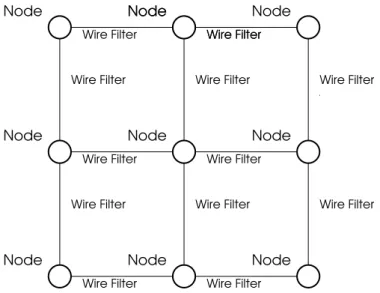
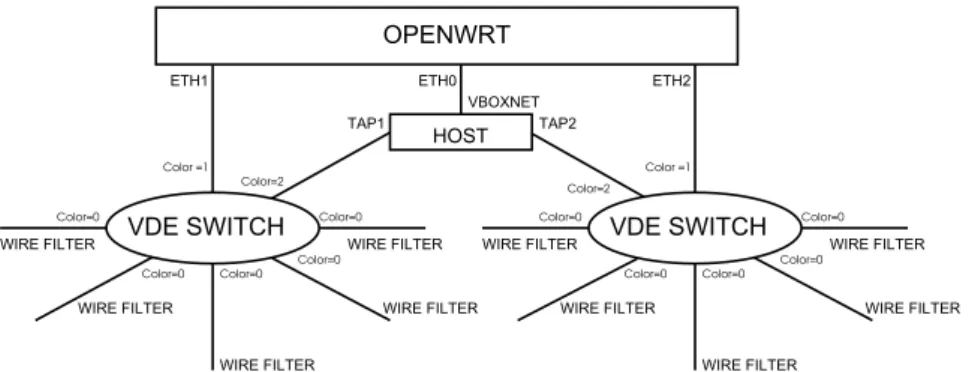
The emulator architecture is basically composed of two elements: Nodes (OpenWrt) and Links (Wirefilter) [3] as shown in the figure 1. Each node is composed as shown in figure 2, a complex diagram that has the following ele-ments:
OpenWrt, trunk version for x86 with minimal modifications (see below) VirtualBox (unmodified), the version must support Vde-switch [5].
Vde switch must be able to run two instances, in order to support 2.4 GHz and 5.0 GHz networks interface. Thus, Vde-switch is patched withcolourful, see below [14]. Node Wire Filter Node Node Node Node Node Node Wire Filter Wire Filter Wire Filter Wire Filter Wire Filter Wire Filter Wire Filter Wire Filter Node Wire Filter Node Node Wire Filter Wire Filter Wire Filter
Figura 1.Network architecture
3.1. OpenWrt
A standard OpenWrt can be downloaded and configured for X86 [1]. On-ce that the virtual machine is running some packages must be downloaded (ip, snmpd, tcpdump, netcat, kmod-batman-adv, batctl). For an automatic configu-ration of the network interfaces and devices, a boot script must be used, such as the following script (saved as/files/etc/rc.local) in your OpenWrt.
Color =1 Color=0 Color=0 Color=0 Color=0 Color=0 Color =1 Color=2 Color=0 Color=0 Color=0 Color=0 Color=0 Color=2 OPENWRT ETH0 VBOXNET ETH2 TAP2 TAP1 HOST ETH1
VDE SWITCH VDE SWITCH
WIRE FILTER WIRE FILTER WIRE FILTER WIRE FILTER WIRE FILTER WIRE FILTER WIRE FILTER WIRE FILTER WIRE FILTER WIRE FILTER
Figura 2.Node Diagram
#!/bin/sh
# pass IP config trough ethernet mac address
RED=$(ifconfig eth1 | sed ’1,1!d’ | sed ’s/.*HWaddr //’| sed ’s/.\{11\}://’| sed ’s/.\{5\}$//’)
NUM=$(ifconfig eth1 | sed ’1,1!d’ | sed ’s/.*HWaddr //’| sed ’s/.*://’| sed ’s/[\n\ ].*//’)
ip link delete eth0
ip addr add 192.168.100.$NUM/24 dev eth0 ip link set dev eth1 mtu 1532 up
ip link set dev eth2 mtu 1532 up batctl -m bat0 interface add eth1 batctl -m bat0 interface add eth2
ip addr add 192.168.$RED.$NUM/24 dev bat0
ip link set dev bat0 address 90:$NUM:$NUM:$NUM:$NUM:$NUM ip link set dev bat0 up
batctl -m bat0 originators
In VirtualBox it is difficult to learn the IP address for the interfaces of the virtual machines; this is solved by setting the MAC address in VirtualBox and in the
“rc.local” script read the MAC address to set an according IP address for the
interfaces.
3.2. SNMPD
After the “SNMP” is installed in the OpenWrt machine, we proceed to setup the MIB for BATMAN Adv.. To add custom records to the BATMAN Adv. MIB a series of shell scripts are run and return their output tostdout, which is captured by SNMP [6]. To request originators table the next script was made: Script namebatctl o.sh(for originator list)
#!/bin/sh
BAT=$(batctl o | sed -n ’s/^\(..:..:..:..:..:..\).*/\1/p’) echo $BAT
Then add entries for the SNMPD configuration file/etc/snmp/snmpd.conf using theuci command in a terminal.
uci add snmpd exec
uci set snmpd.@exec[-1].name=.1.3.6.1.4.1.32.1.1 uci set snmpd.@exec[-1].prog=batctlo
uci set snmpd.@exec[-1].args=/batctl_o.sh uci commit snmpd
/etc/init.d/snmpd restart
And append the following line to the file/etc/snmp/snmp.conf
exec .1.3.6.1.4.1.32.1.1 batctl_o /batctl_o.sh
From the host the snmp can be tested with the followings command.
$ snmpget -v 1 -c public 192.168.100.11 iso.3.6.1.4.1.32.1.1.101 .1iso.3.6.1.4.1.32.1.1.101.1 = STRING: "80:03:00:00:07:41 80:03: 00:00:07:31 80:02:00:00:07:31 80:02:00:00:07:21 80:03:00:00:07:21"
We repeat the same for the next SNMP commands.
In the GitHub(https://github.com/dbritos/Network-mesh-emulator/blob/
mas-ter/openwrt.ova) repository there is a fully configured virtual machine.
Down-load openwrt.ova in VirtualBox go to:
File menu -> Import Appliance
3.3. Ip assignations in OpenWrt
For assigning the IP address to the VM, first a MAC address is assigned to the VM. Each VM has three interfaces: nic1, nic2 and nic3. This interfaces in OpenWrt appear aseth0,eth1 andeth2.
nic1 (eth0) mac 80:01:00:00:07 + nodenumber(nn)
nic2 (eth1) mac 80:02:00:00:07 + nodenumber(nn) the 2 for 2.4GHz) nic3 (eth2) mac 80:05:00:00:07 + nodenumber(nn) the 5 for 5.0GHz)
For configuring the VM with this MAC address the following commands are used:
VBoxManage modifyvm openwrtnn --nic1 generic --nicgenericdrv1 VDE --nicproperty1 network=/tmp/c24GHznn[2] --macaddress1 8001000007nn VBoxManage modifyvm openwrtnn --nic2 generic --nicgenericdrv2 VDE --nicproperty2 network=/tmp/c24GHznn[2] --macaddress2 8001000007nn VBoxManage modifyvm openwrtnn --nic3 generic --nicgenericdrv3 VDE --nicproperty3 network=/tmp/c24GHznn[2] --macaddress3 8001000007nn
Where:nnis the Node number.
The script in OpenWrt in /etc/rc.local reads the MAC address of the interface
eth1 and configures the IP of the interfaces:
IP Address eth0 = 192.168.100.nn IP Address bat0 = 192.168.7.nn MAC Address bat0 = 90:nn:nn:nn:nn:nn
Whit this convention of IP Address and MAC address it’s easy to follow the packets trough the nodes. With theeth0 interface it’s possible to access the nodes via ssh to the IP address 192.168.100.nn. The host has the vboxnet0 interface with the IP address 192.168.100.1. Each Vde-switch has a tap interface, and through “Wireshark” we can sniff the packets that traverse the Vde-switch.
3.4. VirtualBox
The VirtualBox version must by 4.3 or higher [4]. To verify VDE-Switch support, go to the Network configuration window, select Attached to: ”Generic Driver”, and then verify in the Name: box that VDE is listed. In VirtualBox it is difficult to learn the IP address for the interfaces of the virtual machines; this is solved by setting the MAC address in VirtualBox and in the “rc.local” script read the MAC address to set an according IP address for the interfaces.
3.5. Vde-switch
The main advantage of Vde-switch [8,14] over UML switch is that any clients can be attached to this virtual switch: VirtualBox, UML, tap interfaces, virtual interconnections, and not just UML instances. If the Vde-switches were just connected with Wirefilter [10] “patch cables” without modification, we would end up creating a single broadcast domain and unwanted switch loops: The goal is to allow the packets to travel only from one host to it’s neighborhood, not farther. To accomplish this, the Vde-switch needs to be modified to have “coloured” ports. The idea is that each port has a “colour” (an integer number) and packets are only passed from ports to others with different colours. Packets are dropped on outgoing ports if it has the same colour (same number) as the incoming port. In this concept, the host port can have colour 1, the TAP port colour 2, while the interconnection ports have colour 0. In this way, packets can only travel from the host to (all of) the interconnection ports, or from one interconnection port to the host port. However packets can not travel between the interconnection ports, thus only allowing “one hop” connections and avoiding switch loops and shared broadcast domains. The concept is illustrated in figure 2.
The patch against vde2-2.3.2 (current latest stable version) to add this colour patch can be found here:
(http://www.open-mesh.org/attachments/download/152/vde2-2.3.2_ colour.patch).
The patched vde-switch can be download from here:
(https://github.com/dbritos/Network-mesh-emulator/blob/master/ vde2-2.3.2-patch.tar).
3.6. Wirefilter
The Wirefilter program [7] is a tool where it’s possible to simulate various link defects and limits as example: packet loss, burst loss, delay, duplicates, band-width, Interface speed, Channel capacity, Noise (damage to packets) and MTU However as the links are only set up bidirectional, interferences can unfor-tunately not be simulated with this system. For advanced testing it might be necessary to apply the aforementioned link defects to some packets only, whereas other packets are able to traverse the emulated environment unharmed. Once you applied the “ethertype” patch you can specify an ethertype which Wire-filter will simply forward. To apply a packet loss of 50 % to all packets except BATMAN adv packets, run:
wirefilter --ether 0x4305 -l 50
This patch also allows to filter BATMAN Adv. packet types. To apply a packet loss of 50 % to all packets except BATMAN Adv. ICMP packets, run:
wirefilter --ether 0x4305:02 -l 50
You can specify up to 10 packet types (separated by colon). The patch against vde2-2.3.1 (current latest stable version) can be found here:
http://www.open-mesh.org/attachments/download/106
4.
Using BAMNE
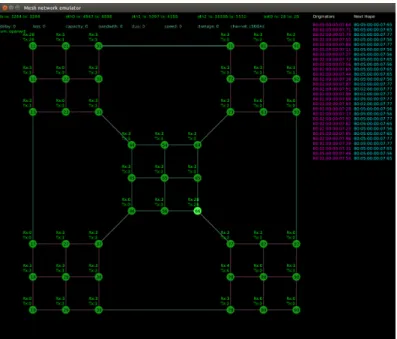
In this section, we present a simple example of using BAMNE to create a topology of five groups of nine nodes each. This example of BAMNE emulation is shown in figure 3, and discussed in detail. In this emulation, there are 45 nodes running BATMAN Adv. protocol in a computer with an Intel i7 CPU and 16GB
of RAM.
The software have two modes of operation, when we run the program it begins in edition mode. In this mode we can build the network topology. To switch to emulation mode, in the main menu we can choose “RUN” mode and the emulation runs until we choose “STOP” from main menu to finish the emulation. In Execution mode we can’t create nodes, but we can destroy nodes or links to see how the BATMAN protocol reacts to the case of nodes or links failures. The information shown in the main window is the following: In the first line of the screen we can see the transmitted and received packets of each interfaces of the highlighted node: lo,eth0,eth1, eth2 andbat0 interface. The second and third
Figura 3.Emulator screen
line shows the properties of the links wire filter, packets loss, channel capacity, damage packets, delay, bandwidth of the channel, duplicate packets and channel frequency for each frequency 2,4 and 5GHz respectively . Above each node it’s shown the number of transmitted and received packets. Inside the green circle of each node is shown the node number. The links between nodes in red are 2,4GHz links and the links in green are in 5GHz.
In the top right of the screen there are the originators and next hop list for the node number of the highlighted node, 66 in this example.
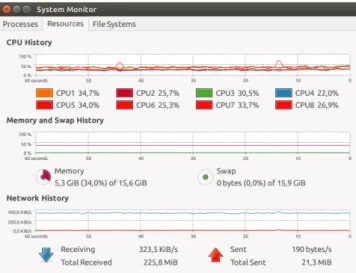
When the virtual machine of the OpenWrt is created, a console of this machine appears in the main window. From there, a run test can be started, for example in the figure 4 the console of VM node 66 is making a ping to VM node number 71, with five hops the delay is acceptable, below 150ms and the jitter is below 30msshowing that the network can support VoIP as the values fall well within the boundaries recommended by the ITU-Recommendation G. 114 [9]. In the figure 5 is shown the CPU and memory usage for 45 nodes running all together, in this chart it is possible to see that the CPU usage is less than 35 % and the memory usage is less than a 35 % of 16GB.
5.
Conclusions
In this paper we propose an emulator for BATMAN Adv. protocol, with the capacity to evaluate the performance and the convergence in building the next
Figura 4.Delay with ping
hop table of the protocol for many topology of the network. One of the improve-ments introduced by this emulator is the graphical interface allowing easy and fast deployment of network topology and interact with that, building and des-troying links or changing their properties with rapid movements of the mouse and see the results in graphical form.The program fulfilled the expectations pro-posals, it can emulate various impediments on the transmissions links such as lost packets, delay, bandwidth, showing good performance with up to 90 nodes running on an Intel i7 processor with 16 GBs. of RAM. The principal goal to add to this program is to show graphically the trace route at level two of the OSI model.
Referencias
1. Batman-adv-openwrt-config - batman-adv - Open Mesh,http://www.open-mesh. org/projects/batman-adv/wiki/Batman-adv-openwrt-config
2. Doc-overview - batman-adv - Open Mesh,http://www.open-mesh.org/projects/ batman-adv/wiki/Doc-overview
3. Emulation - Open-mesh - Open Mesh, http://www.open-mesh.org/projects/ open-mesh/wiki/Emulation
4. OpenWrt in VirtualBox [OpenWrt Wiki],http://wiki.openwrt.org/doc/howto/ virtualbox
5. Oracle VM VirtualBox,https://www.virtualbox.org/
6. SNMPD [OpenWrt Wiki],http://wiki.openwrt.org/doc/howto/snmp.server
7. Ubuntu Manpage: wirefilter - Wire packet filter for Virtual Distributed Ethernet,
http://manpages.ubuntu.com/manpages/natty/man1/wirefilter.1.html
8. VDE - Virtualsquare,http://wiki.virtualsquare.org/wiki/index.php/VDE
9. ITU T.: One-way transmission time. recommendation G.114 (Feb 1996)
10. Caini, C., Firrincieli, R., Davoli, R., Lacamera, D.: Virtual Integrated TCP Testbed (VITT). In: Proceedings of the 4th International Conference on Testbeds and Re-search Infrastructures for the Development of Networks & Communities. pp. 36:1– 36:6. TridentCom ’08, ICST (Institute for Computer Sciences, Social-Informatics and Telecommunications Engineering), ICST, Brussels, Belgium, Belgium (2008),
http://dl.acm.org/citation.cfm?id=1390576.1390620
11. Cerda-Alabern, L., Neumann, A., Escrich, P.: Experimental Evaluation of a Wi-reless Community Mesh Network. In: Proceedings of the 16th ACM Interna-tional Conference on Modeling, Analysis & Simulation of Wireless and Mobi-le Systems. pp. 23–30. MSWiM ’13, ACM, New York, NY, USA (2013), http: //doi.acm.org/10.1145/2507924.2507960
12. Chissungo, E., Blake, E., Le, H.: Investigation into Batman-adv Protocol Perfor-mance in an Indoor Mesh Potato Testbed. In: 2011 Third International Conference on Intelligent Networking and Collaborative Systems (INCoS). pp. 8–13 (Nov 2011) 13. Combs, G., et al.: Wireshark-network protocol analyzer. Version 0.99 5 (2008) 14. Davoli, R.: VDE: Virtual distributed Ethernet. In: First International Conference
on Testbeds and Research Infrastructures for the Development of Networks and Communities, 2005. Tridentcom 2005. pp. 213–220 (Feb 2005)
15. Johnson, D., Ntlatlapa, N., Aichele, C.: Simple pragmatic approach to mesh rou-ting using BATMAN (Oct 2008), http://researchspace.csir.co.za/dspace/ handle/10204/3035