The virtual desktop
Options and challenges in selecting a secure desktop
infrastructure based on virtualization
Sébastien Durand and William Pase
The scientific or technical validity of this Contract Report is entirely the responsibility of the contractor and the contents do not necessarily have the approval or endorsement of Defence R&D Canada.
Defence R&D Canada – Ottawa
Contract Report
DRDC Ottawa CR 2011-135
October 2011
The virtual desktop
Options and challenges in selecting a secure desktop infrastructure
based on virtualization
Sébastien Durand
Bell Business Markets, Bell Canada William Pase
Armacode Incorporated
Prepared By:
Bell Business Markets, Bell Canada 160 Elgin Street, 17th Floor
Ottawa, ON, K2P 2C4 Armacode Incorporated 252 -99 Fifth Avenue Ottawa, ON, K1S 5P5
Project Manager: Darcy Simmelink (613) 998-1451 Contract Number: W7714-08FE01
Contract Scientific Authority: Kathryn Perrett (613) 993-5132
The scientific or technical validity of this Contract Report is entirely the responsibility of the contractor and the contents do not necessarily have the approval or endorsement of Defence R&D Canada.
Defence R&D Canada – Ottawa
Contract Report
DRDC Ottawa CR 2011-135
October 2011
Scientific Authority
Original signed by Kathryn Perrett
Kathryn Perrett
Defence Scientist, NIO Section
Approved by
Original signed by Julie Lefebvre
Julie Lefebvre
Head, NIO Section
Approved for release by
Original signed by Chris McMillan
Chris McMillan
Head, Document Review Panel
© Her Majesty the Queen in Right of Canada, as represented by the Minister of National Defence, 2011 © Sa Majesté la Reine (en droit du Canada), telle que représentée par le ministre de la Défense nationale,
DRDC Ottawa CR 2011-135 i
Abstract
……..
Desktop virtualization technology can help to address the requirements for secure
information sharing within DND. This report provides guidance for the selection and
implementation of a secure desktop infrastructure based on virtualization. It includes an
overview of desktop virtualization, including an in-depth examination of two alternative
architectures: Local Host Virtual Desktop (LHVD) and Server-Based Virtual Desktop
(SBVD). SBVD places the user’s desktop environment in the data centre, whereas LHVD
places it on the endpoint itself. Desktop virtualization implementation considerations and
potential security concerns are discussed, and an outline of some of the current
state-of-the-art virtualization products is also provided.
Résumé
…...
La technologie de virtualisation du poste de travail peut contribuer à combler les besoins
de partage de l’information sécuritaire au sein du MDN. Le présent rapport donne les
directives à suivre pour la sélection et la mise en œuvre d’une infrastructure de poste de
travail sécurisée, basée sur la virtualisation. Il englobe un aperçu de la virtualisation d’un
poste de travail, y compris un examen approfondi de deux architectures différentes : le
poste de travail virtuel sur serveur local (PDVSL) et le poste de travail virtuel basé sur un
serveur (PTVBS). Le PTVBS place l’environnement de l’ordinateur d’un utilisateur dans
un centre de données, alors que le PDVSL le place sur le terminal lui-même. Le rapport
aborde les considérations relatives à la mise en œuvre de la virtualisation du poste de
travail ainsi que les préoccupations de sécurité potentielles, et il donne un résumé de
certains des produits actuels de virtualisation à la fine pointe de la technologie.
ii DRDC Ottawa CR 2011-135
This page intentionally left blank.
DRDC Ottawa CR 2011-135 iii
Executive summary
DND Virtual Desktop
Sébastien Durand; William Pase; DRDC Ottawa CR 2011-135 Defence R&D Canada – Ottawa; October 2011.
Currently, the Department of National Defence (DND) lacks the ability to implement Multi-Level Security (MLS) and Multi-Caveat Separation (MCS) for securely handling and exchanging electronic information at multiple caveats and security levels. Furthermore, it is currently not possible to exchange relevant data between DND organizations and select Joint, Interagency, Multinational and Public (JIMP) partners in a seamless, automated manner. As a result, there exists a serious shortfall in the ability to ensure that decision makers at all levels have access to a Command and Control (C2) system that fully characterizes the battle space by exploiting all information sources, enabling information superiority and effective command and control. In order to rectify the information sharing deficiencies identified, DND is looking to deliver a capability that allows users to securely access, share, simultaneously view, and process
data/information across security classifications from a single user interface. In order to achieve this capability, DND would need to leverage desktop virtualization technology. This report provides guidance for the selection and implementation of a secure desktop infrastructure based on virtualization. The focus and motivation throughout the report is the DND use case for a desktop computer, namely:
A DND user wishes to access Secret material while concurrently conducting normal
(unclassified) business on his desktop computer. The use case includes two different working environments on the desktop computer:
1. A Secret environment that is securely isolated from other users, unclassified data, and insecure applications and/or resources; and
2. A traditional desktop computing environment running typical applications such as email, chat, web browsing, etc.
Any virtualization solution developed for this environment will require that separation be maintained between the two environments to avoid unauthorized data leakage, while simultaneously providing a rich and familiar user experience.
This report includes an overview of desktop virtualization, including an in-depth examination of two alternative architectures: Local Host Virtual Desktop (LHVD) and Server-Based Virtual Desktop (SBVD). SBVD places the user’s desktop environment in the data centre, whereas LHVD places it on the endpoint itself.
The presentation of desktop virtualization in this report is divided into the following main topics: x Desktop Virtualization: examines a number of concepts of importance to desktop
virtualization, including benefits and security concerns, and introduces the LHVD and SBVD architecture options;
x Local Host Virtual Desktop: describes LHVD and examines options, secure implementation, management, benefits, and issues;
iv DRDC Ottawa CR 2011-135 x Server-Based Virtual Desktop: describes SBVD and examines options, secure
implementation, management, benefits, and issues;
x Considerations: addresses other desktop virtualization considerations including data centres, bandwidth, and non-technical considerations; and
x Virtualization Products: discusses some of the current state-of-the-art virtualization products available.
While both approaches have their advantages and disadvantages, SBVD demonstrates some distinct benefits over LHVD. For example, SBVD environments are easier to update and provision since they run in the data centre. Furthermore, desktop environments of different security levels can be hosted on physically distinct hardware (within the data centre), while still accommodating a single endpoint for access to those environments. On the other hand, LHVD may provide a more suitable solution for users with insufficient or unreliable network
communication infrastructure.
Since specific DND requirements were not available, it is not possible to provide detailed recommendations for the selection and implementation of a desktop virtualization solution. However, desktop virtualization technology can clearly help to address the needs for secure information sharing within DND.
DRDC Ottawa CR 2011-135 v
Sommaire
...
DND Virtual Desktop
Sébastien Durand; William Pase; DRDC Ottawa CR 2011-135 R & D pour la défense Canada – Ottawa; octobre 2011.
Le ministère de la Défense nationale (MDN) n’a pas la capacité de mettre en ouvre un système à sécurité multiniveau et à séparation par multiples restrictions pour le traitement et l’échange sécuritaires de renseignements électroniques à de multiples niveaux de restrictions et de sécurité. En outre, il est actuellement impossible d’échanger des données pertinentes entre les
organisations du MDN et différents partenaires IIMP (interarmées, interorganisationnel,
multinational et public) d’une façon transparente et automatisée. Ainsi, la capacité de veiller à ce que les décideurs à tous les niveaux aient accès à un système de commandement et de contrôle (C2) qui soit vraiment caractéristique de l’espace de combat fait cruellement défaut. En exploitant toutes les sources d’information, ce système octroie la supériorité de l’information et permet d’exercer un commandement et un contrôle efficaces.
Afin de remédier à ces lacunes en matière d’échange de renseignements, le MDN envisage de produire une capacité permettant aux utilisateurs de consulter, d’échanger, d’afficher
simultanément et de traiter des données/informations de diverses classifications de sécurité à partir d’une interface utilisateur unique. À cet effet, le MDN aurait besoin de miser sur la technologie de virtualisation du poste de travail. Le présent rapport donne les directives à suivre pour la sélection et la mise en œuvre d’une infrastructure de poste de travail sécurisée, basée sur la virtualisation. Le rapport porte entièrement sur le cas d’utilisation du MDN pour un ordinateur de bureau, conformément à ce qui suit :
Un utilisateur du MDN a besoin d’accéder à du matériel Secret tout en menant parallèlement des activités normales (sans classification) sur son ordinateur de bureau. Le cas d’utilisation
comprend deux environnements distincts de travail sur l’ordinateur de bureau :
1.
Un environnement Secret qui est isolé de façon sécuritaire des autres utilisateurs,
des données non classifiées et des applications et/ou des ressources non
sécuritaires;
2.
Un environnement informatique traditionnel avec un ordinateur de bureau utilisant
des applications typiques telles que le courrier électronique, le clavardage, la
navigation Internet, etc.
Toute solution de virtualisation développée pour cet environnement nécessitera que l’on
maintienne cette séparation entre les deux environnements afin d’éviter des fuites de données non autorisées, tout en permettant simultanément à l’utilisateur d’avoir une expérience riche et familière.
Le rapport englobe un aperçu de la virtualisation d’un poste de travail, y compris un examen approfondi de deux architectures différentes : le poste de travail virtuel sur serveur local (PTVSL) et le poste de travail virtuel basé sur un serveur (PTVBS). Le PTVBS place l’environnement de l’ordinateur d’un utilisateur dans un centre de données, alors que le PTVSL le place sur le terminal lui-même.
vi DRDC Ottawa CR 2011-135 Dans ce rapport, la présentation de la virtualisation du poste de travail porte sur les principaux thèmes suivants :
x
Virtualisation du poste de travail : cette section examine un certain nombre de concepts importants pour la virtualisation du poste de travail, y compris les avantages et lespréoccupations en matière de sécurité, et elle présente les options d’architecture à PTVSL et à PTVBS;
x
Poste de travail virtuel sur le serveur local : cette section décrit le PTVSL et examine les options, la mise en œuvre sécuritaire, la gestion les avantages et les problèmes connexes;x
Poste de travail virtuel basé sur un serveur : cette section décrit le PTVBS et examine les options, la mise en œuvre sécuritaire, la gestion les avantages et les problèmes connexes;x
Considérations : cette section traite d’autres considérations relatives à la virtualisation du poste de travail, y compris les centres de données, la bande passante et des considérations non techniques;x
Produits de virtualisation : cette section passe en revue certains des produits actuels de virtualisation à la fine pointe de la technologie.Bien que les deux solutions aient chacun des avantages et des désavantages, le PTVBS présente des avantages particuliers par rapport au PTVSL. Ainsi, les environnements du PTVBS sont plus faciles à mettre à jour et à entretenir, car ils sont exécutés dans le centre de données. De plus, les environnements du poste de travail de niveaux de sécurité différents peuvent être situés sur des matériels différents (dans le centre de données), tout en prenant en charge un terminal unique pour l’accès à ces environnements. Par ailleurs, le PTVSL peut offrir une solution plus appropriée pour les utilisateurs ayant une infrastructure de mise en réseau et de communication insuffisante ou non fiable.
Étant donné que les exigences particulières du MDN n’étaient pas disponibles, il n’est pas possible de formuler des recommandations détaillées pour la sélection et la mise en œuvre d’une solution de virtualisation du poste de travail. Cependant, il est clair que la technologie de
virtualisation du poste de travail peut contribuer à combler les besoins de partage de l’information sécuritaire au sein du MDN.
DRDC Ottawa CR 2011-135 vii
Table of contents
Abstract …….. ... i
Résumé …... ... i
Executive summary ... iii
Sommaire ... v
Table of contents ... vii
List of figures ... ix 1 Introduction... 1 1.1 Background ... 1 1.2 Purpose ... 1 1.3 Assumptions ... 1 1.4 Document Structure... 1 2 Desktop Virtualization ... 3 2.1 Virtualization Concepts ... 4 2.1.1 Virtual Machine ... 4 2.1.2 Hypervisor ... 4 2.1.3 Virtual Networking ... 6 2.1.3.1 Bridge Networking... 7 2.1.3.2 NAT Networking ... 7 2.1.3.3 Host-only Networking ... 7 2.2 Virtualization Benefits... 8 2.3 Security Objectives... 9 2.3.1 Data Security ... 10 2.3.2 Authentication... 10 2.3.3 Isolation ... 10 2.4 Security Concerns... 11
2.4.1 Inadequate Isolation of Environments ... 11
2.4.2 Inadequate Separation of Resources ... 11
2.4.3 Bugs or Vulnerabilities ... 12
2.4.4 Improper Configuration of Endpoints... 13
2.4.5 Loss or Theft of the Endpoint ... 13
2.4.6 Failures in Network Security ... 13
2.5 Options ... 13
3 Local Host Virtual Desktop (LHVD) ... 14
3.1 Options ... 14
3.2 Secure Implementation ... 15
3.2.1 Bare-metal Virtualization ... 15
viii DRDC Ottawa CR 2011-135
3.2.3 Locked Full Screen Mode... 16
3.2.4 Network Restrictions ... 16
3.2.5 Policy Restrictions ... 16
3.2.6 Secure Network Configuration ... 17
3.3 Management ... 18
3.4 Benefits... 19
3.5 Issues ... 20
3.6 Assessment ... 21
4 Server-Based Virtual Desktop (SBVD) ... 22
4.1 Options ... 23 4.2 Secure Implementation ... 24 4.3 Management ... 26 4.4 Benefits... 26 4.5 Issues ... 26 4.6 Assessment ... 27 5 Considerations ... 29
5.1 Data Centre Topologies ... 29
5.2 Bandwidth Considerations... 31
6 Virtualization Products ... 33
6.1 Virtualization Vendors and Solutions... 33
6.1.1 VMware ... 34 6.1.2 Citrix ... 35 6.1.3 Oracle... 35 6.1.4 Microsoft ... 36 6.1.5 Red Hat ... 37 6.1.6 Virtual Computer ... 37
6.1.7 Custom Virtualization Products... 38
6.2 SBVD Complexity... 38
7 Conclusion ... 41
8 References... 42
DRDC Ottawa CR 2011-135 ix
List of figures
Figure 1: Bare-metal virtualization ... 5
Figure 2: Hosted virtualization ... 6
Figure 3: Types of virtual networking... 7
Figure 4: Secure network configuration ... 18
Figure 5: Virtual image management and deployment... 19
Figure 6: Server-Based Virtual Desktop (SBVD) ... 23
Figure 7: Offline desktop synchronization ... 24
Figure 8: Centralized virtual desktop environment ... 29
Figure 9: Divided data centre topology ... 30
x DRDC Ottawa CR 2011-135
This page intentionally left blank.
DRDC Ottawa CR 2011-135 1
1 Introduction
1.1 Background
1Currently, the Department of National Defence (DND) lacks the ability to implement Multi-Level Security (MLS) (UNCLASSIFIED to TOP SECRET) and Multi-Caveat Separation (MCS) (e.g., CEO, CANUS, CANUKUS, CANAUSUKUS et al.) for securely handling and exchanging electronic information at multiple caveats and security levels. Furthermore, it is currently not possible to exchange relevant data between DND organizations and select Joint, Interagency, Multinational and Public (JIMP) partners in a seamless, automated manner, apart from very basic classified email with attachment capability. As a result, there exists a serious shortfall in the ability to ensure that decision makers at all levels have access to a Command and Control (C2) system that fully characterizes the battle space by exploiting all information sources, enabling information superiority and effective command and control over assigned forces.
In order to rectify the information sharing deficiencies identified, DND is looking to deliver a capability that allows users to access, share, simultaneously view, and process data/information across security classifications from a single user interface using a single logon. In order to achieve this capability, DND will need to leverage desktop virtualization.
1.2 Purpose
The report will provide guidance for the implementation of a secure desktop infrastructure based on virtualization. The report will include an overview of desktop virtualization, including an in-depth examination of two alternative architectures: Local Host Virtual Desktop (LHVD) and Server-Based Virtual Desktop (SBVD). A brief discussion of some of the current state-of-the-art virtualization products will also be provided.
1.3 Assumptions
This report assumes that the reader has a basic understanding of virtualization.
1.4 Document
Structure
This document consists of the following sections:
x Section 1 – Introduction: provides a general introduction to the document;
x Section 2 – Desktop Virtualization: examines a number of concepts of importance to desktop virtualization;
x Section 3 – Local Host Virtual Desktop: introduces LHVD and examines options, secure implementation, management, benefits, and issues;
x Section 4 – Server-Based Virtual Desktop: introduces SBVD and examines options, secure implementation, management, benefits, and issues;
2 DRDC Ottawa CR 2011-135 x Section 5 – Considerations: addresses other desktop virtualization considerations including
data centres, bandwidth and non-technical considerations;
x Section 6 – Virtualization Products: discusses some of the current virtualization products available;
x Section 7 – Conclusions & Recommendations: summarizes the conclusions and assessments derived from the development of this report, and provides a recommended path forward; x Section 8 – Abbreviations and Acronyms: provides the long form for all of the acronyms
used throughout the report; and
x Section 9 – References: identifies the reference material that was used in the development of this report.
DRDC Ottawa CR 2011-135 3
2 Desktop
Virtualization
This section of the report will examine desktop virtualization, and in particular how it can be utilized to address the use case outlined below. Specifically, this section will address the following aspects of desktop virtualization:
x Virtualization Concepts; x Virtualization Benefits; x Security Objectives; x Security Concerns; and x Options.
Note – DND Desktop Use Case
In this use case, a DND user wishes to access Secret material while concurrently conducting normal (unclassified) business on his desktop computer. The use case includes two different working environments on the desktop computer:
1. A Secret environment that is securely isolated from other users, unclassified data, and insecure applications and/or resources; and
2. A traditional desktop computing environment running typical applications such as email, chat, web browsing, etc.
Any virtualization solution developed for this environment will require that separation be maintained between the two environments to avoid unauthorized data leakage, while simultaneously providing a rich and familiar user experience.
4 DRDC Ottawa CR 2011-135
2.1 Virtualization
Concepts
Desktop virtualization, regardless of the type, leverages full virtualization. Full virtualization completely abstracts the guest operating system and applications from the underlying hardware. Neither the guest operating system nor the applications are aware that they are running in a virtualized environment. Full virtualization consists of the following components, which will be discussed in this section of the report:
x Virtual Machine (VM); x Hypervisor; and x Virtual Networking.
2.1.1 Virtual
Machine
A VM is an instance of an application or operating system (OS) that is created within another environment, and is thereby abstracted from the physical platform on which it is running. Multiple VMs can be used to provide isolated working environments on a desktop computer or a server.
2.1.2 Hypervisor
The hypervisor, also known as the Virtual Machine Monitor (VMM), is responsible for dynamically sharing system memory and Central Processing Unit (CPU) resources between multiple VMs and their host environment. Access to hardware resources and inter-VM
communication is also typically mediated by the hypervisor and/or a privileged virtual domain, depending on the implementation. Hypervisors are typically classified as one of the following:
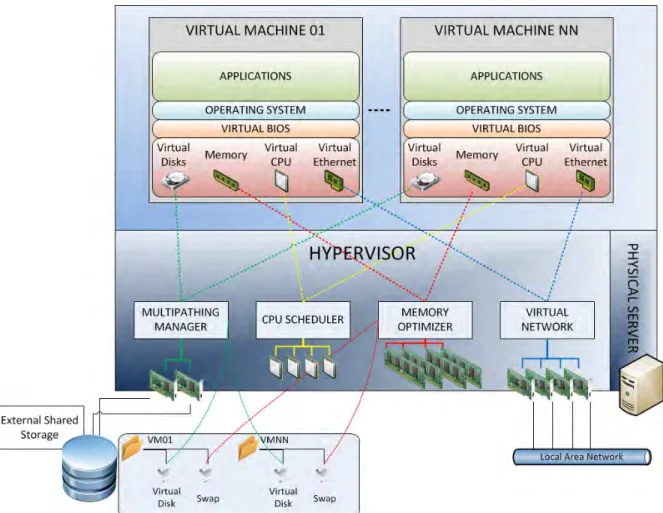
x Bare-metal Hypervisor - Bare-metal virtualization consists of a hypervisor that is installed and loaded directly on the hardware platform. The hypervisor is then responsible for loading and running guest VMs. Bare-metal virtualization is illustrated in Figure 1. The hypervisor provides virtual instances of devices including the CPU and memory, which are mapped to corresponding physical devices. This is illustrated in the diagram by the coloured lines; and x Hosted Hypervisor - Hosted virtualization, on the other hand, is installed on an OS that itself
runs on the physical platform. The platform first loads the OS, then the hypervisor, and finally the VMs. The hypervisor runs as an application inside the OS. The system hardware components are managed by the OS; shown by the coloured lines. Hosted virtualization is illustrated in Figure 2.
The differences between the two types have been described in detail in Virtualization Architectures Research Report [Reference 2], but there are two important points worth mentioning:
x The use of bare-metal hypervisors requires placing trust in the hypervisor, while the use of hosted virtualization requires that both the host OS and the hypervisor be trusted. In
DRDC Ottawa CR 2011-135 5 practice, this implies that the potential attack surface of a bare-metal system is smaller than that of a hosted solution; and
x Until recently, the majority of virtualized servers used bare-metal hypervisors, while desktops relied on hosted virtualization. Only within the last year or so have client bare-metal hypervisors been released as commercial products.
6 DRDC Ottawa CR 2011-135
Figure 2: Hosted virtualization
2.1.3 Virtual
Networking
Virtualization software will create a virtual bridge between the physical Ethernet adapter and a virtual switch to provide network access for the virtual guest. A virtual switch will act as a physical switch by allowing the virtual guest’s virtual adapter to connect itself on an available virtual port. Typically, three network configurations are available for providing virtual guest network access. These configurations are as follows, and are illustrated in Figure 3:
x Bridge Networking;
x Network Address Translation (NAT) Networking; and x Host-only Networking.
DRDC Ottawa CR 2011-135 7
Figure 3: Types of virtual networking
2.1.3.1 Bridge Networking
Bridged networking connects a VM to a network by using the host computer’s network adapter. This is often the easiest way to provide a VM with network access if the host computer is already connected to a network. The virtual network adapter in the VM connects to the physical network adapter in the host computer, allowing it to connect to the host computer network. The VM has its own Internet Protocol (IP) address on the network and therefore appears as any other computer on the network.
2.1.3.2 NAT Networking
NAT (Network Address Translation) configures a VM to share the IP and Media Access Control (MAC) addresses of the host. The VM and the host share a single network identity that is not visible outside the network. NAT uses the host computer’s network connection to give the VM access to the Internet or another Transmission Control Protocol (TCP)/IP network. The VM appears to be connected behind a router supplying NAT; it has access to the network, but is protected from access by other systems.
With NAT networking, all of the virtual guest network traffic passes through the host network layer. In this configuration, the security software installed on the host OS can be used to monitor and block the virtual guest traffic.
2.1.3.3 Host-only Networking
Host-only networking creates a network that is completely contained within the host computer. Host-only networking provides a network connection between the VM and the host computer, using a virtual network adapter that is visible only to the host operating system. This approach can be useful for establishing an isolated virtual network. A VM with host-only networking can access the host and possibly others guests, but has no direct access to the network, nor can it be accessed directly from other systems on the external network.
8 DRDC Ottawa CR 2011-135 A host-only network creates an isolated network connection between the host machine and the virtual instances. On the host OS, packet leakage can be avoided by enabling packet filtering and specifying that host-only network packets should not be sent outside the host computer, which ensures no IP packets sent from a VM leak onto the physical network. On the virtual guest operating system, packet leakage can occur only if packet forwarding is enabled. A policy or a start-up script must be configured to disable and lock packet forwarding services.
2.2 Virtualization
Benefits
Given the size of the virtualization market, and the rate at which the market continues to increase, there are obvious benefits to the use of virtualization. This section outlines some of these benefits, with particular emphasis on those relevant to desktop virtualization. Specifically, the benefits of desktop virtualization include the following:
x Desktop Consolidation – In a traditional system-high environment, a separate physical desktop system is required for accessing each security domain. Consequently, a user with access to multiple security domains must have an equivalent number of systems with which to access these domains. While some savings can be accrued by sharing a single keyboard, monitor and mouse amongst these systems, separate physical desktop systems are still required. Desktop virtualization provides an opportunity to consolidate these systems on a single physical desktop system that can be used to access multiple security domains. Obviously, consolidation will result in significant savings in terms of space, energy consumption and capital costs;
x Increased Mobility – Desktop virtualization facilitates the ease with which users can access their workspace from different locations within the organization. This is due to the fact that the user’s workspace is encapsulated in a VM that can be carried on a portable media device, executed remotely, or even transferred over the network;
x Security2 - Virtualization allows disparate systems to run on the same platform without fear that one VM will detrimentally affect the operation of the other VMs. This ability to effectively isolate VMs can allow for the deployment of VMs of different security levels on a single hardware platform. Virtualization has the potential to improve the security of an endpoint in the following ways:
By providing separation between multiple VMs used for trusted versus untrusted applications, or for business versus personal tasks;
By enforcing the isolation between information residing in different security or trust domains;
By placing the burden of security on the hypervisor rather than on the (possibly untrusted) guest OS and third-party applications;
By assuming control over network security, disk encryption, and authentication processes, and by handling these according to established security policy, independent of any enforcement that may provided by the guest OS; and
2 It should be noted that virtualization will not improve computer security over and above the physical separation in use today. The
DRDC Ottawa CR 2011-135 9
By optionally providing valuable services, such as secure start-up procedures and remote attestation (based on Trusted Computing [Reference 3]), which may not be adequately provided by the guest OS.
Furthermore, existing virtualization solutions can provide other security features and benefits, including the following:
Secure and controlled distribution of user environments;
Limited lifetime of user environments (including forced expiration);
Reset and rollback of user environments to pre-established secure states;
Strong authentication restrictions;
Encryption for VMs and data;
Granular access-control policies for devices; and
Restrictions on networking access.
Virtualization on the server end also has benefits, whether or not the desktop utilizes any virtualization solution. These additional benefits include:
x High Availability – Minimizes the amount of downtime for the system; x Load Balancing – Maximises performance by distributing the workload;
x Live Migration – Running VMs can be moved between servers without interruption; and x VM Snapshots – The state of a VM can be captured or restored rapidly for easy backup and
disaster recovery.
2.3 Security
Objectives
The ultimate goal for a virtual desktop environment is for the virtualization layer to assume responsibility for client security. The hypervisor becomes the trusted system, and potential vulnerabilities in a guest VM's OS or applications are effectively mitigated so that they cannot affect other guest VMs, the host system, or other machines on the network.
In order to achieve this, the desktop virtualization solution must be capable of addressing a number of security objectives. However, it should be noted that there is a balancing act between security and usability. Locking down a user's desktop working environment to the point where it is unusable is not an effective solution.
This section will examine the following security objectives: x Security of data at rest and in transit;
x Authentication of both users and devices; and x Isolation of virtual environments.
10 DRDC Ottawa CR 2011-135
2.3.1 Data
Security
Sensitive data must be appropriately secured, whether in a traditional environment or in a virtualized environment. This includes maintaining the configuration and integrity of the data. Furthermore, security is applicable to both data at rest and data in transit. Data at rest deals with an endpoint or storage device that contains sensitive data stored locally. There must be assurances that the stored data cannot be compromised if the endpoint were lost, stolen or otherwise
compromised. This can be accomplished by encrypting the data or by ensuring its destruction if accessed by a device other than the endpoint, or by an unauthorized user. Data in transit deals with data that is being transmitted to or from the endpoint. The concern here is that an attacker may attempt to intercept this data while it is transit. Encryption of the communication channel (e.g., using SSL/TLS) can mitigate this threat.
2.3.2 Authentication
Authentication considerations include concern for both authentication of users and for the endpoint itself. User authentication considerations for the virtualized desktop, which are no different than for a standard desktop, include such things as Single Sign-On (SSO), multifactor authentication, etc.
The authenticity and integrity of the endpoint itself is accomplished using attestation over a secure connection protocol. Attestation is provided by the Trusted Platform Module (TPM)
[Reference 3 & 4] which can be used to provide assurance that the endpoint is correctly configured at boot time and at network connection time. Attestation is described in additional detail in Virtualization Architectures Research Report [Reference 2].
2.3.3 Isolation
The desktop will be used to access disparate security domains. Consequently, isolation of the respective security domains is critical. Unauthorized data transfer may occur between the security domains if isolation in not sufficient, thereby potentially compromising data (high to low) or introducing malicious code (usually low to high).
The traditional solution for ensuring isolation is to run disparate security domains on separate hardware, thus using physical separation to enforce domain separation. This approach is taken since standard operating systems are considered insufficient to guarantee domain separation in security critical deployments. Virtualization provides an alternative by shifting the problem of domain separation to the hypervisor. It can effectively provide a software alternative to physical separation. In a virtualized environment, multiple domains are contained within their own VM, analogous to containment in separate hardware machines.
This approach makes the assumption that the hypervisor can be trusted to maintain separation. It is worth noting that no software solution, including virtualization, can achieve the guaranteed separation provided by physical isolation. At best it can provide an acceptable level of separation without the high cost and inconvenience of utilizing physically separate systems.
DRDC Ottawa CR 2011-135 11
2.4 Security
Concerns
There are a number of security concerns that must be considered when contemplating desktop virtualization. These security concerns include the potential exposure of sensitive data due to factors such as:
x Inadequate isolation of user environments;
x Inadequate separation between user data on physical system resources (e.g., network devices or shared storage);
x Bugs or vulnerabilities in the virtualization layer itself, in third-party device drivers, or applications running with system-level privileges;
x Improperly configured, poorly maintained, or compromised endpoints; x Loss or theft of an endpoint system (desktop or laptop); and
x Failures in networking services to provide adequate security for server-client interactions or remote access.
2.4.1
Inadequate Isolation of Environments
A single endpoint may be used for access to, and the processing of, information from different security domains. The security domains must remain isolated, as it would be a violation of the security policy if this isolation is not appropriately maintained.
Any solution proposed for a DND user endpoint must provide the required isolation of information. Proposal considerations must therefore include what assurances there are that isolation is maintained, and what safeguards are available to detect and report any violations that might occur in spite of the protection provided.
Most desktop virtualization solutions also provide for interaction between the guest VMs and the host OS. Permitting such interaction can undermine the isolation that is otherwise assumed. It is important to ensure the isolation between the host and the guest is properly configured such that any permitted interactions do not violate the intended security policy of the endpoint.
Consequently, features such as shared folders, cut-and-paste, and drag-and-drop functionality between VMs would likely violate the security policy, and as a result will need to be disabled. Alternatively, policy-based controls could be put in place to regulate these features.
As an example, the Qubes operating system [Reference 5] has very recently introduced secure cut-and-paste and drag-and-drop between VMs under user control and discretion. It is likely that similar support for these features under strict policy-based access control of information sharing will be developed in future systems.
2.4.2
Inadequate Separation of Resources
An essential service that hypervisors provide is their ability to share physical system resources between VMs. Risk is incurred due to the fact that user data from the different VMs, each
12 DRDC Ottawa CR 2011-135 representing a different security domain, is being transmitted, processed and stored on these shared resources. The hypervisor must be trusted to ensure that this information is effectively isolated.
The resources that are shared between the host and the guest VMs include:
x Storage – The physical hard drive contains the virtual storage that comprises the VMs. The hypervisor has access to the disk and is responsible for restricting each guest to its own virtual disk. Failure to do so means that one guest VM may be able to access another guest VM’s virtual disk;
x Random Access Memory (RAM) – The hypervisor allocates RAM to each of the VMs from the available physical memory. Guest VMs should not be able to access another guest VM’s memory. Furthermore, there is the potential that memory subsequently released from a VM does not get properly erased (overwritten with random data or zeros), and may contain residual data from another security domain;
x Output devices – Each guest VM is able to send information to various output devices such as a video monitor or printer. VMs must be configured so that they can only access specific output devices. Furthermore, VMs should be prevented from reading any RAM that might be part of the device and has been allocated to another VM. For example, a VM might be able to read video RAM or some printer state information belonging to another VM;
x Input devices – VMs must interact with input devices such as keyboards and mice. It is important that input be directed to the correct VM, and that input information from one VM is not accessible by another VM;
x Network devices – The network connections available to the host OS may be shared with the guest VMs. Guests must be strictly limited to the networking they are permitted according to the security policy of the endpoint, and there must not be any interaction between VMs via the network device. This includes the ability to access a shared state, which could be used for the transfer of information between VMs; and
x Removable devices – Removable devices, including Universal Serial Bus (USB) devices and Compact Disc Read Only Memory (CDROMs), may be shared between VMs. As with other shared resources, it is essential that there is no information leakage between VMs resulting from the use of removable devices.
2.4.3
Bugs or Vulnerabilities
The security of the endpoint can be undermined by bugs or vulnerabilities in the virtualization layer. Since the hypervisor is being trusted to maintain isolation, such bugs can be disastrous. A second issue is the use of third-party device drivers or applications running with system-level privileges. The use of such software, in so far as it may also have bugs or vulnerabilities, adds a potential attack vector to the overall solution.
DRDC Ottawa CR 2011-135 13
2.4.4
Improper Configuration of Endpoints
Improperly configured, poorly maintained, or compromised endpoints all violate the security policy and can result in the compromise of sensitive data. Fortunately, this problem can be addressed in much the same way as for traditional environments. This includes the following:
x Configuration – VMs can be centrally built as standard images prior to deployment to the endpoint. Different images can be built to address disparate use cases, ensuring that each user receives only the capabilities and features they require;
x Maintenance – Similarly, VMs can be centrally maintained and updated. Whenever a virtual image is updated, it can be deployed to all of the users of that image; and
x Protection – VMs need the same protection as non-virtualized images. Consequently, firewalls and virus scanners must be included in the design.
2.4.5
Loss or Theft of the Endpoint
Loss or theft of an endpoint system is a very real risk, especially when the endpoint is a laptop or other mobile device. Any data stored on the device may be accessed, and if not adequately protected, can potentially be compromised. Furthermore, a device with network access adds a potential risk to data stored on the network. These types of threats are generally dealt with through the use of authentication, access control, and encryption.
2.4.6
Failures in Network Security
The endpoint is a networked device, and as such network security must also be addressed. Since the endpoint will be communicating with servers via the network, data in transit must be
adequately protected to avoid data compromise or leakage between security domains. Similarly, VMs may be deployed and maintained via the network, and so these communications are also potentially vulnerable. These types of threats can be addressed though authentication and encryption of network traffic. Furthermore, the compromise of endpoints may be mitigated through the use of security safeguards such as virus scanners and system integrity tools.
2.5 Options
The purpose of a virtualized DND endpoint solution is to address the use case outlined in Section 2.0. In addition, the solution must satisfy the security objectives discussed in Section 2.3 while mitigating the security concerns highlighted in Section 2.4.
There are two possible approaches to desktop virtualization: Local Host Virtual Desktop (LHVD) and Server-Based Virtual Desktop (SBVD). These will be discussed in detail in Sections 3 and 4, respectively.
14 DRDC Ottawa CR 2011-135
3
Local Host Virtual Desktop (LHVD)
LHVD provides desktop virtualization using full virtualization on the desktop system. As discussed in Section 2.1.2, this can be provided using a bare-metal hypervisor or a hosted hypervisor. These two approaches are illustrated in Figure 1 & 2, respectively.
This section will examine the following aspects of LHVD: x Options; x Secure Implementation; x Management; x Benefits; x Issues; and x Assessment.
3.1 Options
There are a number of ways in which LHVD can be used to address the use case outlined in Section 2:
x Option 1: Client Bare-metal Hypervisor hosting two VMs – In this approach, a bare-metal hypervisor hosts two VMs, one for each security domain. The bare-metal hypervisor is responsible for ensuring the appropriate level of separation/isolation between the two VMs; x Option 2: Client Operating System with Hypervisor hosting two VMs – This approach is
identical to Option 1 except that the bare-metal hypervisor has been replaced with a hosted hypervisor. While the security of the virtualization layer may be somewhat reduced, the usability of the overall solution is likely to be enhanced; and
x Option 3: Secret Client Operating System with Hypervisor hosting one VM (Unclassified) – This approach is similar to Option 2 in that it leverages hosted virtualization. However, in this case the host operating system is the Secret environment and the Unclassified environment is hosted in a VM. The hypervisor application is responsible for providing an appropriate level of separation/isolation between the VM and the host operating system.
Note – Unclassified Client Operating System with Hypervisor hosting one VM (Secret) This is not a viable option due to the fact that the hypervisor hosted in the unclassified
environment would have complete access to the Secret environment hosted in the VM. This could potentially result in unauthorized information flow from the high (Secret) to the low
DRDC Ottawa CR 2011-135 15
3.2 Secure
Implementation
Depending on the LHVD option selected, a number of additional steps can be taken to secure the implementation. These include the following:
x Bare-metal Virtualization; x Virtual Image Protection; x Locked Full Screen Mode; x Network Restrictions; x Policy Restrictions; and x Secure Network Configuration.
3.2.1 Bare-metal
Virtualization
Bare-metal hypervisors have been around for a number of years in the server environment. However, client-side bare-metal hypervisors have only recently made an appearance due to the challenges faced in developing them. The client environment is considered more challenging due to the number and variety of components with which the hypervisor must interact, such as networking components, graphics hardware, peripherals, etc. While the use of a bare-metal hypervisor for LHVD is desirable in order to improve the overall security of the solution, DND must ensure that the usability of the solution is not detrimentally affected.
3.2.2 Virtual
Image
Protection
Virtual images are susceptible to compromise when being transported (e.g., a lost portable media device) or even at rest (e.g., a stolen laptop). However, a number of steps can be taken to secure the image. These include the following:
x Strong Authentication – The virtual image should require a strongly authenticated user to activate it, thus preventing it from being activated by just anyone. The authentication process can be a simple password required at the instance launch, or a stronger method such as an Active Directory authentication;
x Activation Protection – A script facility incorporated into the virtualization software package can help to increase the security around the virtual instance activation. The activation of the instance can then be dependent on the success of the script. For example, a script can check some parameters on the host system before allowing virtual image activation. The script can perform a simple check on some system variables or associate a virtual instance with a host device by checking the Ethernet MAC address and the processor Universally Unique IDentifier (UUID);
x Full Encryption – To prevent tampering, it is desirable to encrypt the entire distribution package including the configuration and policy file. By encrypting the configuration, the policy file, and the virtual drive, the policy files and the configuration files cannot be tampered with and the virtual disk file cannot be associated with another configuration or policy file; and
16 DRDC Ottawa CR 2011-135 x Integrity Checking – All the resource files included and deployed by the distribution
package should be digitally signed in order to prevent file tampering. The virtualization software must provide signature checking at each virtual guest start-up and must block the activation process if a file does not present a valid signature.
3.2.3
Locked Full Screen Mode
Locked full-screen mode should be used to protect information and applications running in guest VMs; this is accomplished by locking access to the host OS when a guest VM is activated. If more than one virtual instance runs simultaneously, a switch mechanism (generally a hot-key) must be provided to the users so that they can effectively switch between VMs. This technique can be used to protect sensitive data present on the virtual guest from features such as print screen, screen capture tools, and screen recording software running on the host or another guest VM.
3.2.4 Network
Restrictions
When the host connects to a network, a policy is checked to confirm that the host is allowed to connect. If the connection is permitted, the policy then applies a set of prescribed access rules for the connection. These rules determine what access is permitted by the host and VMs. For
example, if an endpoint is connected to a Secret network, the network policy may permit the host to connect, and it may permit a Secret guest VM to connect, but it will not permit an Unclassified guest VM to connect.
3.2.5 Policy
Restrictions
The policy setting must allow granular restrictions on the virtual image. It is important to have the ability to restrict not only the connecting devices but the types of devices as well. For example, while a USB smart card reader may be permitted, USB storage devices may be blocked. The policy must be sufficiently flexible to provide rules based on specific models of devices.
Details of the policy restrictions that can be placed on virtual images are product specific. As an example, the policies provided by Virtual Computer’s NxTop product [Section 6.1.5] are fairly typical:
x Expiration – An image can be set to expire so it can no longer be used; x USB filter – Allows limiting the use of USB devices with the virtual image; x Backup – Defines the backup policy, i.e. the frequency and retention;
x Lockout – Defines how often an image must contact the server before it is disabled; x OS profile – Sets rules for the image for various OS and application settings; and x Engine – Configuration settings for the hypervisor on the client machine.
Policies are defined by an administrator using an application for that purpose, i.e., NxTop Center. The user of the image has limited control over the virtual image, as defined by the policy.
DRDC Ottawa CR 2011-135 17 image. For example, the user may or may not have administrator rights to the image (as defined by the OS), or may have limited network access (as defined by firewalls).
When an image is restricted to specific work related tasks, it may still be desirable to provide access to non-work related tasks; this can be accomplished by providing additional virtual images. For example, there might be separate images for work and non-work, where the former is tightly controlled by policy and the latter gives the user greater control, and the hypervisor would maintain separation between the virtual images. In this scenario, it is as if the user has two separate machines: one for work and one for non-work tasks.
The DND use case [Section 2.0] could be managed similarly, with separate virtual machines for Secret and Unclassified work, where the Secret VM has a more restrictive policy than the Unclassified VM.
3.2.6
Secure Network Configuration
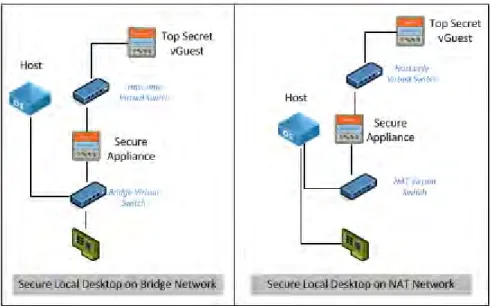
A combination of two virtual guests can be used in order to improve virtual network security. The first virtual guest can be a security appliance (firewall, Intrusion Detection System (IDS), etc.) with two network interfaces. One network interface would be connected to the bridge network, and another one to an isolated virtual switch. The second virtual guest can be set up with only one network interface on the isolated virtual switch.
With this type of configuration, all virtual guest network communications must transit the security appliance. Such a configuration will permit monitoring of network traffic between the virtual guest and the outside network. This configuration also allows all direct network traffic on the host OS to be blocked, and forces the network traffic on the host OS to pass through the security appliance.
Figure 4 shows the interconnection for a security appliance protecting a guest OS in either a bridged network or a NAT network configuration. In the case of a bridged network, the appliance is in direct contact with the network and must provide all of the required protection between the guest and the network.
In the case of a NAT network, the appliance (and thus the guest) is behind a virtual NAT device, which provides isolation from the network. This reduces the requirements on the security appliance since it is no longer in direct contact with the network and is already protected from external threats. There is no restriction on outgoing traffic, however, and the security appliance must still provide such protection as required along with any protection not offered by NAT.
18 DRDC Ottawa CR 2011-135
Figure 4: Secure network configuration
3.3 Management
VMs used within LHVD can be managed locally. This approach tends to be cumbersome and places an unrealistic management burden on the organization. Fortunately, some products offer centralized management and deployment tools for local desktop implementation.
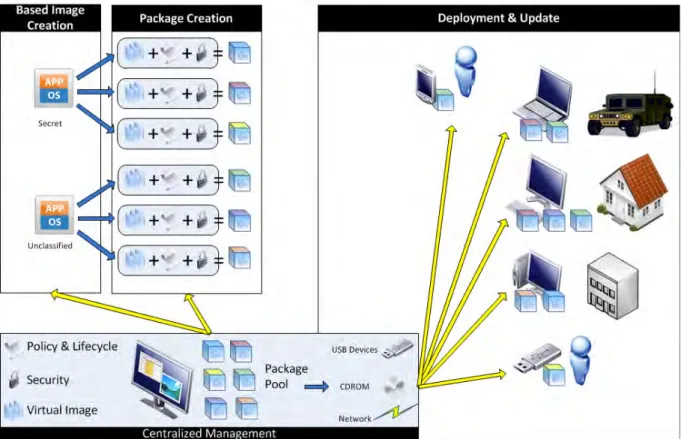
Figure 5 illustrates the centralized management and ensuing deployment of virtual images for a LHVD endpoint solution. The images are assembled centrally using base images and are then appropriately secured for distribution. The VM images can be distributed using portable media devices, such as a USB device or a Digital Video Disc (DVD), or via the network.
The centralized management controls the creation and deployment of images. Standard virtual images containing an OS and applications are created, for example for Secret and Unclassified domains. These images can then be deployed or updated at the endpoints, whether by network or USB devices. As new endpoints are required, they can be created from the pool of standard images for rapid deployment.
At a minimum, the package deployment should be protected by a password to prohibit
uncontrolled instance installation. Furthermore, the centralized management tool should provide an update feature in order to permit the modification of the policy for all of the instances already deployed. The update management tool must be sufficiently granular to permit the update of a single instance, a pool of instances, or all of the instances.
It is important to have the option of setting a lifetime for the distribution package and for the virtual instance deployed on a host device. The distribution package must expire after a defined time in order to prevent an old package deployment. If a user tries to deploy a previous version of
DRDC Ottawa CR 2011-135 19 a virtual instance with an old base image, the expiration date will block the attempt and will ensure that only the more recent virtual image with all of the latest security updates is deployed. In addition, the virtual image must have the ability to expire after a number of days or on a specific date. This allows virtual image distribution to temporary users and ensures that the virtual image is not available after the authorized period of time has elapsed.
Figure 5: Virtual image management and deployment
3.4 Benefits
There are a number of benefits to using LHVD for desktop virtualization, including the following: x Mobility – Virtualization fully isolates the virtual instance from the hardware.
Consequently, it gives the user considerable flexibility on which devices are used to run the virtual instance without any consideration for the operating system present on the host computer. The virtual desktop can be carried on a portable media device, and will provide users with their own desktop environment from anywhere;
20 DRDC Ottawa CR 2011-135 x Offline Support & Reduced Network Bandwidth Requirements – One of the major benefits
of a local virtual desktop is its capability to run locally, devoid of any network connectivity. This grants the user access to their production desktop environment even when no network access is available, or when the network access available does not satisfy the bandwidth required to work remotely with a centralized solution; and
x 3D Graphic Support – Virtual desktop solutions are able to provide a 3D graphic experience within the virtual session, just as with a traditional desktop environment.
3.5 Issues
The decision to deploy a LHVD endpoint solution raises a number of issues:
x Increased Hardware Requirements – A LHVD endpoint solution has greater hardware requirements than a non-virtualized endpoint. First, the hardware must be sufficiently powerful to deal with the additional overhead of running a guest OS on a hypervisor. Second, the hardware must be supported by the hypervisor software. Traditionally, bare-metal hypervisors have only supported a finite number of hardware platforms;
x Backup Considerations – In a LHVD solution, the virtual image typically resides on the user’s computer. The same backup strategy and complexity exist in this case as for a traditional desktop environment. Consequently, the backup of this type of data requires sufficient network bandwidth and relatively complex management tools to accomplish; x Print Screen and Screen Capture Tools – To bypass some security restrictions, a user can
easily open a sensitive document in the virtual guest, and create a screen capture of the virtual guest window from the host OS. This screen capture can then be saved on the local drive, on a mobile device, or sent by unsecure email, etc.;
x Security Software – Security software (including anti-virus) installed on the host OS can only protect the virtualization software, not the VMs themselves; this is due to the fact that the virtual disks are not accessible to the security software for scanning. Consequently, the installation of security software is also required on the virtual guest operating system to protect it and the applications that it hosts. While this is good security practice, it is also inconvenient and may require multiple or site licences;
x Shared Folder – The shared folder feature provides an internal network connection between the host operating system and the virtual guest. The virtual guest presents one or more folders on the host OS as a network drive. The host and virtual guest create a trusted network connection between them that does not require any authentication process. This permits a user to work inside a virtual guest and save a document on the host OS directly. This type of interaction can be disabled using policy; and
x USB Devices - USB devices are very difficult to restrict and consequently represent a significant security concern. The majority of policy tools provide the option to enable or disable access from the virtual guest to the USB devices connected to the host system. However, the difficulty arises when it comes to differentiating between USB devices and applying the appropriate policy. For example, use of a 3G modem or fingerprint reader may be required, but a camera may be disallowed. USB keyboards and mice can present an especially high security risk since they give complete control over the endpoint, but could be rogue devices masquerading as legitimate input devices.
DRDC Ottawa CR 2011-135 21
3.6 Assessment
LHVD leverages full virtualization on the user desktop to provide a virtual desktop capability. While the Unclassified virtual image likely constitutes a higher vulnerability risk, it can be effectively isolated from the Secret environment through the hypervisor. Ideally, a hardened microkernel (bare-metal hypervisor) would be used in order to minimize the likelihood of vulnerabilities in the virtualization layer. A hardened system has increased security due to additional restrictions, and the removal of unnecessary services, when compared to a default configuration.
However, security still needs to be balanced with usability. Consequently, the bare-metal client hypervisors currently available on the market may not provide sufficient support for client environments, and specifically client hardware. In this case, a hosted virtualization solution may be the only viable option. However, effort must be made to select a product in which the
hypervisor is embedded in a kernel that can be locked down securely, rather than a hypervisor that runs on a bloated commercial operating system.
The products for LHVD are changing rapidly, so this assessment will need to be revised at such a time that a specific solution proposal is requested. The available products continue to add support for a greater variety of systems, devices, and software.
22 DRDC Ottawa CR 2011-135
4
Server-Based Virtual Desktop (SBVD)
SBVD, also commonly referred to as Virtual Desktop Infrastructure (VDI), provides a virtual desktop capability by employing full virtualization in the server environment. Guest VMs run on a server in a data centre and the user accesses them from a standard desktop or thin client. A remote control protocol is used to convey keyboard strokes and mouse movements from the user desktop to the VM and display information in the reverse direction. In certain architectures a connection broker is used to broker the connection, thereby ensuring that the user is connected to the appropriate VM.
Figure 6 illustrates a data centre with a virtual machine pool (running on a hypervisor cluster), Active Directory for policy objects, and storage of user and VM data. Access to the data centre controlled by routers and firewalls, and further limited by secure access (such as a VPN). The data centre can be accessed by local users, remote users, and remote offices, using a variety of network connections.
This section will examine the following aspects of SBVD: x Options; x Secure Implementation; x Management; x Benefits; x Issues; and x Assessment.
DRDC Ottawa CR 2011-135 23
Figure 6: Server-Based Virtual Desktop (SBVD)
4.1 Options
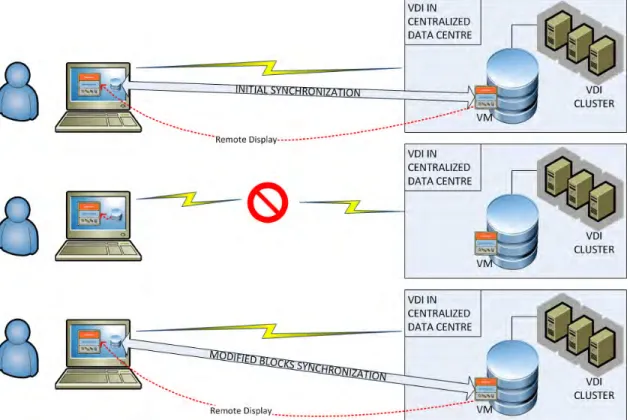
Some SBVD solutions support an offline mode that provides users with access to the desktop even when no network access is available, or where the network access parameters don’t comply with the minimal bandwidth requirements needed to establish a stable connection with the remote desktop. An initial synchronization between the user’s system and the virtual desktop image hosted in the data centre is required in order to accomplish this. The synchronization will create an encrypted copy of the virtual desktop on the user's hard drive.
The offline feature enables end users to “check out” personalized virtual desktops running on the virtual desktop infrastructure to a system for use offline, and then “check back in” to the same desktop running in their virtual desktop infrastructure environment. Only the modified blocks on the local copy are synchronized when the user checks their virtual desktop back in. The users’ modified data are replicated in the data centre, and any virtual image updates will be applied to the local copy.
This process is shown in Figure 7. An initial synchronization copies the virtual image to the endpoint. The user then utilizes the VM while disconnected from the data centre. Finally, when the user reconnects to the data centre, the changes to the virtual image are copied from the endpoint to the data centre.
24 DRDC Ottawa CR 2011-135 The SBVD management console automatically encrypts the entire virtual desktop files on the local device. The virtual image is stamped with a lifetime when the user checks it out. The virtual image will be locked at the end of the grace period if the user has not checked it back in. This ensures the integrity of the virtual desktop image (updated for software, security patches, policies, anti-virus etc.). Each time the user synchronizes with the data centre, a new expiration date is applied to the local copy.
Figure 7: Offline desktop synchronization
4.2 Secure
Implementation
A number of additional steps can be taken to secure SBVD implementations. These include the following:
x Security Appliance – A security appliance is a virtual instance present on the hypervisor that leverages a specific Application Programming Interface (API) to communicate directly to the hypervisor. This appliance will use the API to communicate and protect the hypervisor itself. At the same time, the virtual appliance will use the API to monitor, quarantine, or block all guest VM network traffic. The communication between the security appliance and the virtual desktops occurs through a local agent. It is important in a virtual desktop environment to protect all of the virtual images from threats, not just the virtual instances
DRDC Ottawa CR 2011-135 25 that are active at a given point in time. Many virtual instances, such as templates or the master base image, are inactive and are therefore not regularly scanned. Consequently, they can present a security risk when activated. This security appliance safeguard should be implemented in the virtual data centre to ensure the integrity and protection of all virtual instances present in the virtual desktop environment;
x Communication Bridge – Even if the virtual desktop is not locally installed on the user's desktop, and even if it only receives the display contents (i.e., pixel data) from the remote desktop, a communication bridge can still be initiated and that would present a security risk. When a remote virtual desktop wants to communicate with a local device connected on the user's host desktop, it creates a communication pipe between the virtual desktop and the host operating system. Threat agents can try to access the virtual desktop content through this bridge between the two systems. The Information Technology (IT) administration team can prevent this type of vulnerability by setting up policies in the virtual environment to forbid this type of communication between the host and the virtual instance. However, in some cases, it may be necessary to allow this type of link between the two systems. For example, for authenticating a user through a local smart card reader or for allowing the user to print documents present in the virtual instance on a local printer. In these cases, it is extremely important to be able to trust the host operating system with which this bridge is established, and to have the ability to lock it as required;
x Firewalls – Virtual desktop security is based on multiple levels of firewall and security barriers. The first level is the hypervisor integrated firewall. This regulates the inbound and outbound traffic directly addressing the hypervisor. For a more granular inbound and outbound traffic authorization, a virtual firewall can be installed and configured on each virtual desktop. This allows the creation of a case-by-case configuration, but increases the complexity from a management and support perspective. Firewall and packet filtering can be implemented to define and protect a specific network zone inside the virtual network. These appliances will define a network zone and will provide basic firewalling of traffic between VMs by zones, allowing connections to be filtered and grouped based on the source IP address, destination IP address, source port, destination port, and/or protocol.
x A perimeter virtual appliance can be deployed on the virtual network in order to provide a secure virtual environment. This type of appliance will act as a gateway for all the traffic between the virtual network and the physical network. It can include the same type of features and protection of perimeter security appliances commonly present in a data centre. Outside the virtual network managed by the hypervisor, the current data centre secure network infrastructure will act as another shield to protect the virtual desktop and its associated data; and
x Internal Network Traffic – One particularity of the virtual network managed by the hypervisor is the ability for the VMs to communicate through the virtual network without being exposed to physical network security safeguards. The network packets transit directly from one virtual instance to another on the same host through the virtual network. This process increases the communication speed within the virtual environment but can compromise network security unless this type of communication is explicitly monitored.