IMPROVING MOBILE MOOC LEARNING VIA IMPLICIT PHYSIOLOGICAL SIGNAL SENSING
by Xiang Xiao
Bachelor of Engineering, Wuhan University, 2010
Submitted to the Graduate Faculty of
the Kenneth P. Dietrich School of Arts and Sciences in partial fulfillment of the requirements for the degree of Doctor of Philosophy
University of Pittsburgh 2017
UNIVERSITY OF PITTSBURGH
KENNETH P. DIETRICH SCHOOL OF ARTS AND SCIENCES, DEPARTMENT OF COMPUTER SCIENCE
This dissertation was presented by
Xiang Xiao
It was defended on September 26, 2016
and approved by
Dr. Jingtao Wang, Department of Computer Science, University of Pittsburgh Dr. Milos Hauskrecht, Department of Computer Science, University of Pittsburgh
Dr. Adam J. Lee, Department of Computer Science, University of Pittsburgh Dr. Peter Brusilovsky, School of Information Science, University of Pittsburgh Dissertation Advisor: Dr. Jingtao Wang, Department of Computer Science, University of
Copyright © by Xiang Xiao 2017
Massive Open Online Courses (MOOCs) are becoming a promising solution for delivering high-quality education on a large scale at low cost in recent years. Despite the great potential, today’s MOOCs also suffer from challenges such as low student engagement, lack of personalization, and most importantly, lack of direct, immediate feedback channels from students to instructors. This dissertation explores the use of physiological signals implicitly collected via a "sensorless" approach as a rich feedback channel to understand, model, and improve learning in mobile MOOC contexts.
I first demonstrate AttentiveLearner, a mobile MOOC system which captures learners' physiological signals implicitly during learning on unmodified mobile phones. AttentiveLearner uses on-lens finger gestures for video control and monitors learners’ photoplethysmography (PPG) signals based on the fingertip transparency change captured by the back camera. Through series of usability studies and follow-up analyses, I show that the tangible video control interface of AttentiveLearner is intuitive to use and easy to operate, and the PPG signals implicitly captured by AttentiveLearner can be used to infer both learners’ cognitive states (boredom and confusion levels) and divided attention (multitasking and external auditory distractions).
Building on top of AttentiveLearner, I design, implement, and evaluate a novel intervention technology, Context and Cognitive State triggered Feed-Forward (C2F2), which infers and responds to learners’ boredom and disengagement events in real time via a
IMPROVING MOBILE MOOC LEARNING VIA IMPLICIT PHYSIOLOGICAL SIGNAL SENSING
Xiang Xiao, Ph.D. University of Pittsburgh, 2017
combination of PPG-based cognitive state inference and learning topic importance monitoring. C2F2 proactively reminds a student of important upcoming content (feed-forward interventions) when disengagement is detected. A 48-participant user study shows that C2F2 on average improves learning gains by 20.2% compared with a non-interactive baseline system and is especially effective for bottom performers (improving their learning gains by 41.6%).
Finally, to gain a holistic understanding of the dynamics of MOOC learning, I investigate the temporal dynamics of affective states of MOOC learners in a 22-participant study. Through both a quantitative analysis of the temporal transitions of affective states and a qualitative analysis of subjective feedback, I investigate differences between mobile MOOC learning and complex learning activities in terms of affect dynamics, and discuss pedagogical implications in detail.
TABLE OF CONTENTS 1.0 INTRODUCTION ... 1 1.1 ATTENTIVELEARNER ... 3 1.2 RESEARCH OVERVIEW ... 5 1.3 STATEMENT ... 6 1.4 HYPOTHESES ... 7 1.5 CONTRIBUTIONS ... 8 1.6 OUTLINE ... 11 2.0 BACKGROUND ... 13
2.1 TECHNOLOGIES FOR IMPROVING MOOCS ... 13
2.2 AFFECTIVE-COGNITIVE STATE AND LEARNING ... 17
2.3 DETECTING AND RESPONDING TO AFFECTIVE-COGNITIVE STATE IN EDUCATION ... 17
3.0 LENSGESTURE AND THE TANGIBLE VIDEO CONTROL CHANNEL... 20
3.1 LENSGESTURE ... 21
3.1.1 The LensGesture Taxonomy ... 22
3.1.2 The LensGesture Algorithm ... 23
3.1.3 The LensGesture Applications... 30
3.1.5 Evaluation ... 31
3.1.5.1 Experiment Design ... 32
3.1.5.2 Participants and Apparatus ... 34
3.1.5.3 Evaluation Results... 34
3.1.6 Summary ... 38
3.2 OPTIMIZING LENSGESTURE FOR TANGIBLE VIDEO CONTROL... 38
3.3 USABILITY ... 41
3.3.1 Speed ... 41
3.3.2 Comfort ... 42
3.3.3 Lens Damage ... 43
3.3.4 Battery Life ... 44
4.0 LIVEPULSE AND THE IMPLICIT PPG SENSING MODULE ... 46
4.1 LIVEPULSE ... 46
4.1.1 Algorithm Design ... 47
4.1.2 Evaluation ... 51
4.1.3 Application... 53
4.2 IMPLICIT PPG SENSING IN ATTENTIVELEARNER ... 54
4.3 USABILITY OF ATTENTIVELEARNER ... 55
4.3.1 Experiment Design ... 55
4.3.2 Participants and Apparatus ... 56
4.3.3 Results ... 57
4.3.3.1 Subjective Feedback ... 57
4.3.4 Summary ... 60
5.0 IMPLICIT COGNITIVE STATE INFERENCE: HEART RATE AS FINE-GRAINED FEEDBACK FOR MOOC LEARNING... 61
5.1 BACKGROUND ... 61
5.2 DATA COLLECTION AND FEATURE EXTRACTION ... 62
5.3 RESULTS ... 64
5.4 EXTREME EVENTS AND AGGREGATED EVENTS... 66
5.5 INFRASTRUCTURE OF ATTENTIVELEARNER ... 68
6.0 IMPLICIT COGNITIVE STATE INFERENCE: UNDERSTANDING AND DETECTING DIVIDED ATTENTION IN MOBILE MOOC LEARNING ... 71
6.1 BACKGROUND ... 72
6.2 USER STUDY ... 73
6.2.1 Task ... 73
6.2.2 Participants and Apparatus ... 74
6.2.3 Procedure ... 75
6.3 EFFECT OF DIVIDED ATTENTION ON LEARNING ... 76
6.3.1 Subjective Feedback ... 76
6.3.2 Effect of Divided Attention on Learning Performance ... 77
6.4 DIVIDED ATTENTION DETECTION ... 78
6.4.1 User-Dependent Classification ... 79
6.4.2 User-Independent Classification... 81
7.0 ADAPTIVE INTERVENTIONS TO IMPROVE LEARNER ENGAGEMENT AND PERFORMANCE ... 85 7.1 BACKGROUND ... 86 7.2 DESIGN OF C2F2 ... 87 7.2.1 The C2F2 Intervention ... 87 7.2.2 Disengagement Detection ... 89
7.2.3 Feed-Forward Reminder Design ... 90
7.3 EVALUATION ... 91
7.3.1 Experiment Design ... 91
7.3.2 Procedure ... 94
7.3.3 Participants and Apparatus ... 95
7.4 RESULTS ... 96
7.4.1 Signal Quality ... 96
7.4.2 Feed-Forward Accuracy ... 97
7.4.3 Learning Performance... 98
7.4.4 Subjective Feedback ... 101
7.5 COMPARISON WITH EEG ... 103
7.6 DISCUSSIONS ... 105
8.0 DYNAMICS OF AFFECTIVE STATES DURING MOOC LEARNING ... 107
8.1 BACKGROUND AND MOTIVATION ... 107
8.2 MOOCS VS. COMPLEX LEARNING ... 110
8.3 HYPOTHESES ... 111
8.4.1 Participants ... 114
8.4.2 Materials and Equipment... 115
8.4.3 Procedure ... 116
8.5 RESULTS ... 119
8.5.1 Affect Distribution ... 119
8.5.2 Subjective Feedback of the Origins of Affective States ... 120
8.5.3 Dynamics of Affective States ... 120
8.5.3.1 Engagement ... 123 8.5.3.2 Boredom ... 124 8.5.3.3 Confusion ... 125 8.5.3.4 Curiosity ... 126 8.5.3.5 Frustration ... 127 8.5.3.6 Neutral... 127 8.5.3.7 Discussions ... 128
8.6 FACTORS INFLUENCING LEARNER AFFECT ... 129
8.7 IMPLICATIONS ... 131
8.7.1 Providing materials with the right difficulty level ... 131
8.7.2 Distinguishing the types of boredom detected ... 132
8.7.3 Addressing learners’ confusion state ... 133
8.7.4 Curiosity leading to better engagement ... 134
8.8 PPG SIGNALS AND MOMENT-TO-MOMENT AFFECTIVE STATES 135 8.8.1 Signal Quality ... 135
8.9 DISCUSSIONS AND SUMMARY ... 141 9.0 CONCLUSIONS ... 143 9.1 CONTRIBUTIONS ... 143 9.2 FUTURE WORK ... 146 APPENDIX A ... 149 APPENDIX B ... 152 APPENDIX C ... 157 BIBLIOGRAPHY ... 160
LIST OF TABLES
Table 1. Existing techniques for improving MOOCs. ... 13 Table 2. Battery life in video playback ... 45 Table 3. Descriptions of the heart rate and HRV features extracted in the study ... 63 Table 4. The performance of the classifiers for boredom prediction and confusion prediction. .. 65 Table 5. The performance of the user independent models for divided attention detection. ... 82 Table 6. Major differences between complex learning and MOOC learning. ... 111 Table 7. The number and percentage of each affective state collected in the study. ... 119 Table 8. Linear regression analysis of the proportional occurrence of each affective state and the six factors. ... 130 Table 9. The performance of different moment-to-moment affective state prediction tasks. .... 140 Table 10. The causal attributions of affective states in MOOC learning ... 149 Table 11. A summary of all user studies presented in this dissertation ... 157
LIST OF FIGURES
Figure 1. The video play interface of AttentiveLearner. ... 3
Figure 2. Main components of this research. ... 6
Figure 3. AttentiveLearner uses the back camera as both a tangible video control channel and an implicit heart rate sensing channel in MOOC learning. ... 20
Figure 4. LensGesture in use for menu navigation. ... 22
Figure 5. The LensGestures Taxonomy. ... 23
Figure 6. Sample images of Static LensGesture. ... 24
Figure 7. The full-covering LensGesture classification. ... 25
Figure 8. Extracting local features for the partial-covering LensGestures. ... 26
Figure 9. Classification accuracies of partial-covering classifiers. ... 26
Figure 10. The difference between image sequences captured by LensGesture (up) and TinyMotion (down) in the same scene... 27
Figure 11. The plot of the distant changes in both x and y directions for 20 image samples of a Dynamic LensGesture. ... 29
Figure 12. Sample LensGesture applications. From left to right, top to bottom - LensLock, LensCapture, LensMenu, LensQWERTY, LensAlbum, and LensMap. ... 30
Figure 14. Average response time of Static and Dynamic LensGestures with one standard
deviation error bars. ... 34
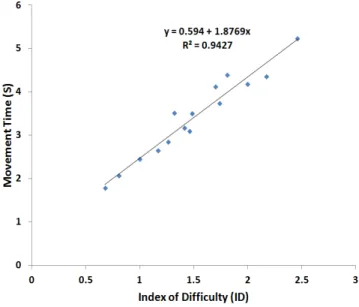
Figure 15. Scatter-plot of the Movement Time (MT) vs. the Fitts’ Law Index of Difficulty (ID) for the overall target acquisition task controlled by Dynamic LensGestures. ... 35
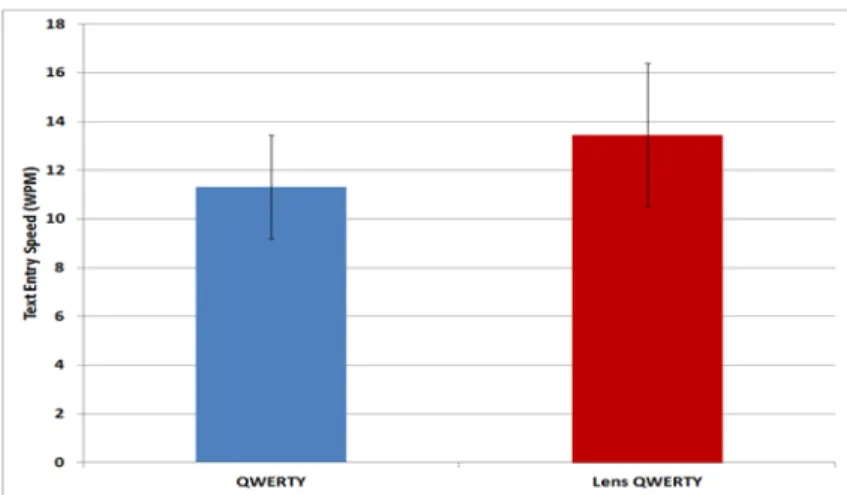
Figure 16. Text entry speed from the experiment with one standard deviation error bars. ... 37
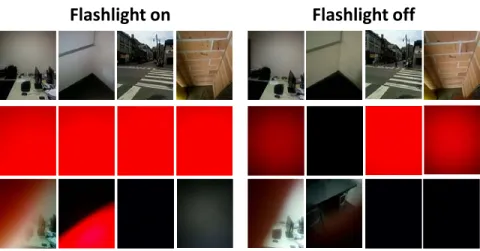
Figure 17. Samples images collected during the study. ... 39
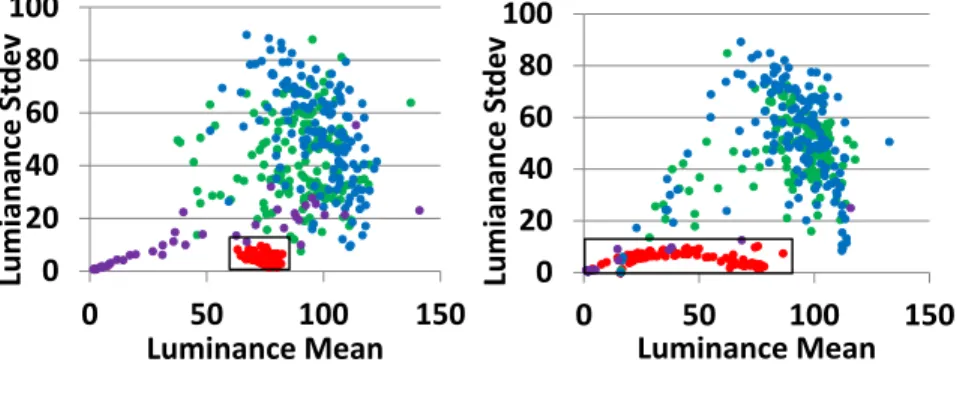
Figure 18. Global mean vs. standard deviation of pixels in sample images. ... 40
Figure 19. Participants’ average response time using the TouchWidget vs. LensGesture to control video play ... 41
Figure 20. Users cover the lens using various hand postures (back camera is in the top right corner). ... 43
Figure 21. Major steps of the LivePulse algorithm... 48
Figure 22. Calculating heart rate. ... 51
Figure 23. Comparison between LivePulse and pulse oximeter. ... 51
Figure 24. Real-time heart rate measurement via LivePulse Games (left: City Defender, right: Gold Miner). ... 53
Figure 25. Some participants in my experiment using AttentiveLearner to learn video lectures. 56 Figure 26. Subjective ratings of AttentiveLearner ... 57
Figure 27. Top: Screenshots of AttentiveLearner in the experiment. Bottom: PPG signal at the time of the screenshot. Left: high-quality PPG, right: low-quality PPG. ... 58
Figure 28. PPG signals of six participants while watching the first video clip. ... 59
Figure 29. Feature Extraction from the PPG signal in each section of a video session... 63
Figure 31. Predication accuracy when using local mean-HR (left) and local AVNN (right) as
markers of "extreme personal learning events". ... 67
Figure 32. Histograms of “Confusing” topics of video clip 2. ... 68
Figure 33. The infrastructure of AttentiveLearner. ... 69
Figure 34. AttentiveLearner detects external distractions (colleagues discuss in the background) during mobile MOOC learning. ... 71
Figure 35. Some participants in the user study. The laptop on the left was used to play stimulus sound. ... 75
Figure 36. Participants’ quiz performance by conditions. ... 77
Figure 37. Accuracies for detecting divided attention. a: FA and EDA only; b: FA and IDA; c: FA, EDA, and IDA; d: all four conditions. ... 79
Figure 38. The proposed system detects disengagement by analyzing implicitly captured PPG signals. ... 85
Figure 39. The working mechanism of C2F2. ... 87
Figure 40. The feed-forward reminder presented to users. ... 90
Figure 41. Sample participants in my experiments. Participants also wore an EEG headset during learning. ... 96
Figure 42. Recall rate and learning gains of different conditions. ... 100
Figure 43. Model of affect dynamics in complex learning [33] ... 108
Figure 44. Some participants in my study. ... 114
Figure 45. The interface participants used to report their affective states at each affect judgement point ... 117
Figure 46. Likelihoods that each of states immediately follows (a) Engagement, (b) Boredom, (c) Confusion, (d) Curious, (e) Frustration, (f) Neutral. ... 122 Figure 47. Quality illustration of the PPG signals from six participants while they were watching the third video clip. ... 136 Figure 48. Heart rate variability spectrogram (normalized amplitude) of five participants (S6, S8, S9, S12, S17) when they were in a neutral/engagement state (top row) and when they were in a deep confusion state (bottom row). ... 137 Figure 49. Extracting features for each affect judgment point. ... 137
PREFACE
I would like to express my sincere thanks to my advisor, Dr. Jingtao Wang, for the support, guidance, and encouragement throughout these years. For me, he not only taught me research methods and skills, but also taught me the correct attitude I should have towards research, work, and life. I remembered when I first started as a PhD student, I made many “rookie” mistakes. Jingtao remained very patient with me, spent hours talking with me about his experience, and offered a lot of valuable guidance. His mentoring is greatly valued and I could not have accomplished this dissertation without his dedication.
I would like to thank my PhD committee: Dr. Peter Brusilovsky, Dr. Milos Hauskrecht, and Dr. Adam J. Lee, for their time spent on reviewing thesis draft and attending my meetings. Their advices helped me improve my research and present it the best way I can.
I would like to thank my labmates and collaborators in the MIPS research group at Pitt: Xiangmin Fan, Phuong Pham, Lanfei Shi, Teng Han, Yuxin Liu, Wei Guo, Carrie Demmans Epp, Andrew Head, and others. They have provided me valuable feedbacks and constructive suggestions regarding my projects, papers, and presentations. I also want to thank them for their company throughout these years. They made this experience much more fun and enjoyable.
I would like to thank all my friends in the USA and China, for their company and help. They gave me a lot of support and encouragement when I had doubt about myself. I also want to
thank the people who actively participated in my user studies and offered me valuable feedbacks. Without their participation, none of the studies in this dissertation would be possible.
I am deeply grateful to Xiaoyu Xiao, a special “mentor” of mine, who gave me many valuable suggestions of how to deal with life’s challenges and remain calm and patient.
I would like to express my utmost thanks to my parents. They let me follow my desire to come to the US and chase my dream. I could never have done it without them. Their belief in me is my biggest motivation to succeed.
1.0 INTRODUCTION
With the increasing ubiquity of Internet access, Massive Open Online Courses (MOOCs) are experiencing rapid growth. MOOCs are becoming a common form of online course delivery with more than 35 million registered students by December 2015 [109]. Although polarized opinions still persist, many experts believe that MOOCs and flipped courses, when properly designed and executed, could serve as an excellent complement to traditional education by delivering high-quality education on a large scale at a lower cost [46]. MOOCs allow learners “to control where, what, how and with whom they learn” [68]. Researchers also found MOOCs could help students develop new skills such as autonomous learning, and improve the visibility of universities and courses [62].
In current MOOCs, the courses are mostly organized as sequences of pre-recorded lecture videos, split into 3-15 minute pieces for better engagement [51]. Such small video clips are easy to consume on mobile devices during learners' fragmented time. Indeed, major MOOC providers, such as Coursera, edX, and Udacity, have released their mobile apps to support “learning on the go”. Compared with traditional MOOCs, mobile MOOCs provide unique advantages such as “ubiquitous, respond to urgent learning need, and flexibility of location and time to learn” [129].
Despite the great potential, MOOCs today still have much room for improvement. Studies on MOOCs have shown problems such as low completion rate (10% in [46], 7% in [87]), high in-session distractions [94], and lack of interactions among students and instructors [48,
116]. I summarize three essential challenges for MOOCs. First, learners are more likely to become disengaged and “mind wander” in MOOC contexts than in classrooms [46, 100]. This is because of external distractions in the non-classroom environment and a lack of sustained motivation when studying alone with technology. Second, there is a lack of personalization for individual learners. Given the large pool of students, it is hard for MOOC instructors to cater instructions and learning materials for individual learner’s need and learning process. Third, the current design of MOOCs is primarily unidirectional, i.e., from instructors to students. There is a lack of direct, immediate feedback channels from students to instructors. Unlike in traditional classrooms, MOOC instructors no longer have access to important cues, such as facial expressions, raised hands, or oral questions to infer students’ mental and learning state. Although questionnaires, post-lecture reflections [45, 48], and browser log analysis (including both activities in learning sessions [66] and follow-up discussion forums [136, 137]) can be used to infer the quality of learning, such post-hoc analysis techniques are usually coarse-grained, highly delayed, and indirect measurements of the actual learning process.
To directly measure learners’ actual learning process, researchers have explored using physiological signals to infer learners’ cognitive and affective states in educational systems. AutoTutor [36, 55], Wayang intelligent tutor [128], GazeTutor [42] and Artful [116], are a few notable examples. These systems collect physiological signals, such as heart rates [52, 55, 59], facial features [36, 61, 128], galvanic skin responses (GSR) [13, 17, 52, 55, 59] and Electroencephalography (EEG) [52, 59, 116], and use machine learning algorithms to predict students’ affective and cognitive states (e.g., attention, mind wandering, and confusion, etc.) during learning. Although these systems have been shown to successfully detect and respond to learners’ affective and cognitive states, most of them require dedicated sensors, such as cameras
[36, 128], eye trackers [42], and EEG headsets [116] for signal collection. The cost, availability, and portability of such equipment have prevented the wide adoption of such systems beyond lab settings.
1.1 ATTENTIVELEARNER
Camera View Widget
AttentiveWidget
PPG Signal Indicator
Figure 1. The video play interface of AttentiveLearner.
This video play interface is similar to that of a mobile video player, with additional widgets for visualizing the camera preview window, the attention indicator and the PPG preview window. The camera preview window shows a live video stream from the back camera. The AttentiveWidget shows the learner’s instant heart rate as well as the
covering state of the lens. The PPG indicator shows the real-time waveform of the learner’s PPG signals.
Motivated by previous research which use physiological signals to understand and enhance learning in computer-based educational systems, I develop AttentiveLearner (Figure 1), a mobile learning system which captures and uses learners’ physiological signals implicitly to improve mobile MOOC learning without leveraging any dedicated sensors. AttentiveLearner uses on-lens finger gestures to control the MOOC video playback (i.e., covering and holding the back camera
lens to play a lecture video, uncovering the lens to pause the video). Moreover, it monitors learners’ photoplethysmography (PPG) signals implicitly based on the fingertip transparency changes captured by the back camera on unmodified mobile phones. Compared with previous cognitive-aware educational systems which utilize dedicated devices to track physiological signals, AttentiveLearner uses the built-in camera of mobile phones to monitor physiological signals. More importantly, in addition to traditional activity logs, questionnaires, and quiz performance, AttentiveLearner provides an informative and orthogonal feedback channel for MOOC instructors.
I use the term “implicit physiological signal sensing” to describe AttentiveLearner to differentiate between the usage scenario of AttentiveLearner and traditional methods when tracking physiological signals. The “implicitness” of AttentiveLearner has two aspects: Implicit Hardware and Implicit Software. Implicit Hardware means that AttentiveLearner does not require users to purchase and mount extra sensing equipment to collect physiological signals. Implicit Software suggests that users do not need to “explicitly” launch monitoring apps and spend an uninterrupted amount of time in data collection. Instead, extraction of PPG signals has been integrated into the process of video control, thus AttentiveLearner can infer learners’ physiological signals as a side effect while they are watching the lecture videos.
By predicting learners’ cognitive and affective states (e.g., attention, “mind wandering” events, or confusion) using the PPG signals implicitly captured by the built-in camera of unmodified mobile phones, AttentiveLearner has the potential to address the three MOOC challenges mentioned earlier by: 1) adaptive interventions (e.g., integrated exercises, feed-forward reminders) when “mind wandering” events or learner disengagement are detected, thus making the learning process more attentive and enjoyable; 2) providing learners with
personalized learning materials and instructional paradigms (e.g., adjusting material difficulty, switching learning tasks, etc.) based on their real-time cognitive state inference; and 3) providing instructors with fine-grained, real-time feedback on learners' actual cognitive states synchronized with the learning materials, thus facilitate bi-directional learning.
1.2 RESEARCH OVERVIEW
In this dissertation, I systematically explore this “sensorless” approach adopted by AttentiveLearner (Figure 1) which implicitly captures learners’ physiological signals and infers their cognitive states during mobile MOOC learning. Figure 2 shows the three major components of AttentiveLearner: 1) a tangible video control channel (Chapter 3); 2) an implicit PPG sensing module (Chapter 4); and 3) cognitive state inference algorithms (Chapter 5, 6). These three components together allow instructors to gain a deeper understanding of MOOC learners’ cognitive and affective states, making AttentiveLearner a rich, fine-grained feedback channel from learners to instructors.
Moreover, AttentiveLearner can benefit learners by providing personalized and adaptive learning interventions based on the detected cognitive states. To justify this assumption, I designed and implemented a novel intervention technology, context and cognitive state triggered adaptive feed-forward (C2F2), within AttentiveLearner. This technology uses cognitive state triggered proactive reminders (feed-forward) as an intervention to recognize and alleviate disengagement in mobile MOOC learning. C2F2 shows the feasibility and effectiveness of using PPG signals implicitly recorded by mobile cameras to improve mobile MOOC learning (Chapter 7).
Tangible Video Control Implicit PPG Sensing Cognitive State Inference AttentiveLearner Learners Instructors Personalized learning Rich feedback channel
Understanding and Improving MOOC Learning
Dynamics of Moment-to-Moment Affective States Context and Cognitive
State Triggered Feedforward (C2F2)
Figure 2. Main components of this research.
Moreover, I investigated the dynamics of learners’ moment-to-moment affective state transitions during mobile MOOC learning (Chapter 8). I extended the model of affect dynamics in complex learning environments [33] to MOOC contexts. This research promotes a better understanding of the dynamic learning process and provides important pedagogical implications of how and when to regulate the learners’ affective states in MOOC contexts.
1.3 STATEMENT
By proposing a “sensorless” approach to collect photoplethysmography (PPG) signals implicitly from users on unmodified mobile devices, this dissertation explores novel technologies to monitor learners’ cognitive and affective states, and provide cognitive state triggered adaptive interventions, which can effectively improve learning in mobile MOOC contexts.
1.4 HYPOTHESES
To support this thesis, I generate a list of hypotheses grouped by the different components presented in Figure 2:
A. The tangible video control channel:
A1. The AttentiveLearner tangible video control channel is accurate and responsive enough to support smooth user interactions.
A2. The tangible video control channel is user-friendly. This requires that it is easy to operate and comfortable to use for the learners. The battery life should also be enough to support most learners’ daily MOOC learning requirement.
B. The implicit PPG sensing module:
B1. With only the built-in camera of commodity mobile phones, I can collect high quality PPG signals (comparable to signals collected by a standard pulse oximeter) from the user. With the PPG signals captured by the camera, I can accurately measure the user’s heart rates.
B2. I can collect reliable, high quality PPG signals during actual mobile MOOC learning sessions with the implicit PPG sensing module enabled by the built-in camera.
C1. Using the PPG signals captured by AttentiveLearner to predict learners’ cognitive states, such as boredom and confusion during learning, I can achieve comparable predication performance as existing systems [32, 55] which rely on dedicated physiological sensors to predict cognitive and affective states.
D. Context and cognitive state triggered feed-forward:
D1. Cognitive-aware interactive systems built on top of AttentiveLearner will benefit learners and improve their learning outcomes by providing in-situ adaptation and feedback.
D2. Providing adaptive cognitive state triggered proactive reminders before important topics (i.e., C2F2) during mobile MOOC learning will improve learning performance.
E. Dynamics of moment-to-moment affective states in MOOC contexts:
E1. The dynamics of moment-to-moment affective states in MOOCs is different from that in complex learning [33] due to the different characteristics of these two learning contexts.
E2. Using the PPG signals captured by AttentiveLearner to predict the fine-grained moment-to-moment affect dynamics in mobile MOOC learning, I can achieve significantly better performance than a random classifier (Kappa = 0), suggesting the feasibility of using AttentiveLearner to detect moment-to-moment affect dynamics in MOOC contexts.
1.5 CONTRIBUTIONS
To summarize, this research has three major contributions:
• It promotes a better understanding of MOOC learners by providing instructors with a direct feedback channel of learners’ actual learning states, specifically their cognitive and affective states. On the contrary, current feedback mechanisms in MOOCs (e.g., questionnaires,
post-lecture discussions and reflections, browser-log analysis, etc.) are mostly used to infer the quality of learning, and cannot provide direct, fine-grained information of learners’ actual learning states during each learning session.
• It presents AttentiveLearner, a cognitive-aware mobile learning system, as well as C2F2, an intelligent intervention technique. Through a 48-participant user study, this dissertation shows that the cognitive-aware interactive system can effectively improve learners’ performance in mobile MOOC learning.
• It provides valuable insights and pedagogical implications from the PPG signal analysis and the investigation of affect dynamics. These insights and implications could help instructors improve the design of MOOC courses.
Because of this research, I also developed the following algorithms, techniques, or systems working on the Android platform:
• LensGesture [133]: a mobile interaction technique that augments mobile interactions via finger gestures (e.g., covering the lens fully or partially, swiping across the lens) on the back camera of mobile devices. I implemented the recognition algorithms for different types of LensGestures as well as multiple LensGesture applications (Chapter 3.1.3) which demonstrate various usage scenarios of LensGesture as a new input channel. The source code of these applications can be downloaded from http://mips.lrdc.pitt.edu/lensgesture.
• LivePulse [53]: A commodity-camera-based photoplethysmography (PPG) sensing and heuristic-based heart rate measurement algorithm working on unmodified smartphones. I have developed both a mobile application running LivePulse algorithm to measure heart rate in real-time and a PC application for debugging the LivePulse algorithm. Both are open source software released under BSD license and the implementation can be downloaded from
http://mips.lrdc.pitt.edu/bayesheart. In order to make the heart rate monitoring task more engaging, my colleagues in the University of Pittsburgh and I have also designed serious mobile games (LivePulse Games) that leverage the LivePulse algorithm and integrate heart beat measurement implicitly in the game play [53]. The implementation of LivePulse Games can be downloaded from http://mips.lrdc.pitt.edu/livepulsegames/.
• AttentiveLearner [130, 134]: a mobile MOOC application which collects and analyzes learners’ PPG signals to infer their cognitive states while they watch lecture videos. I developed the AttentiveLearner mobile client based on the open source edX Android application (https://github.com/edx/edx-app-android). Similar to existing MOOC mobile clients by Coursera, edX, and Udacity, the AttentiveLearner mobile application allows learners to browse, stream, and watch lecture videos on their mobile phones. Moreover, I integrated the tangible video control channel (Chapter 3) and implicit PPG sensing module (Chapter 4) in the mobile client. The AttentiveLearner mobile client should be available for everyone to download at http://www.attentivelearner.com in the near future.
• C2F2 [131]: an adaptive intervention technique which monitors learners’ engagement while they watch lecture videos and adaptively reminds learners of important upcoming content when they are disengaged. I implemented the C2F2 technique and integrated it into the AttentiveLearner mobile client. AttentiveLearner loads a pre-built engagement prediction classifier (Chapter 7.3.1), uses it to predict learners’ engagement states after they watch each topic, and triggers C2F2 when the conditions are met. The AttentiveLearner mobile client with C2F2 adaptive intervention should be available to download at http://www.attentivelearner.com in the near future.
1.6 OUTLINE
Chapter 2 presents relevant technologies for improving MOOCs, provides a background on the role of affective-cognitive states in learning, and introduces related work on using physiological signals to detect and react to students’ affective-cognitive states in educational systems.
Chapter 3 and Chapter 4 focus on the two enabling technologies of AttentiveLearner. Chapter 3 presents LensGesture [133], a general interaction technique which leverages on-lens finger gestures to interact with mobile devices. I optimize LensGesture specifically for the tangible video control channel of AttentiveLearner. Through off-line benchmarking and an 18-subject user study, I verified that the tangible video control channel was both accurate and responsive (Hypothesis A.1). Chapter 4 demonstrates LivePulse, a real-time heart rate measurement algorithm based on commodity-camera-based photoplethysmography (PPG) sensing. LivePulse enables the implicit PPG sensing module of AttentiveLearner on unmodified smartphones. I conducted a 12-participant study to test the accuracy and reliability of LivePulse, which proved Hypothesis B.1. Furthermore, through another 18-participant user study and follow-up analyses, I showed that the tangible video control interface in AttentiveLearner was intuitive, and comfortable to use (Hypothesis A.2). AttentiveLearner could also collect reliable PPG signals during actual MOOC learning sessions (Hypothesis B.2).
Chapter 5 and Chapter 6 focus on cognitive state inference via implicit PPG sensing on unmodified mobile phones [130, 132, 134]. Chapter 5 presents an 18-participant study which demonstrates the feasibility of detecting boring and confusing topics in MOOC videos for individual learners, while Chapter 6 investigates the impact and detection of divided attention in the context of mobile MOOC learning through a second 18-participant study. These two chapters support Hypothesis C.1.
Chapter 7 proposes an intervention technology which builds upon AttentiveLearner. This new technology, Context and Cognitive State triggered Feed-Forward (C2F2), proactively reminds a learner of important upcoming content (the feed-forward intervention) when disengagement is detected. A 48-participant user study was performed, and I found that C2F2 yielded superior learning performance compared with a standard non-interactive learning system [131]. This result verified Hypothesis D.2. The effectiveness of C2F2 also validated Hypothesis D.1, showing the feasibility and efficacy of building end-to-end, affect-aware mobile MOOC systems on top of AttentiveLearner.
Chapter 8 presents a 22-participant study to understand the dynamic transitions of affective states during a MOOC learning session. I show that MOOC learning has a different model of affect dynamics from complex learning (Hypothesis E.1). Also, I demonstrate the feasibility of using implicit PPG sensing to detect moment-to-moment affective states (Hypothesis E.2).
Chapter 9 summarizes the contributions of this dissertation and presents a discussion of future work.
2.0 BACKGROUND
2.1 TECHNOLOGIES FOR IMPROVING MOOCS
The passive, asynchronous, distributed viewing experiences of MOOCs present unique challenges to quality education. To address these challenges, researchers have proposed many new techniques, which can be grouped into three categories based on the goal of the technique (Table 1).
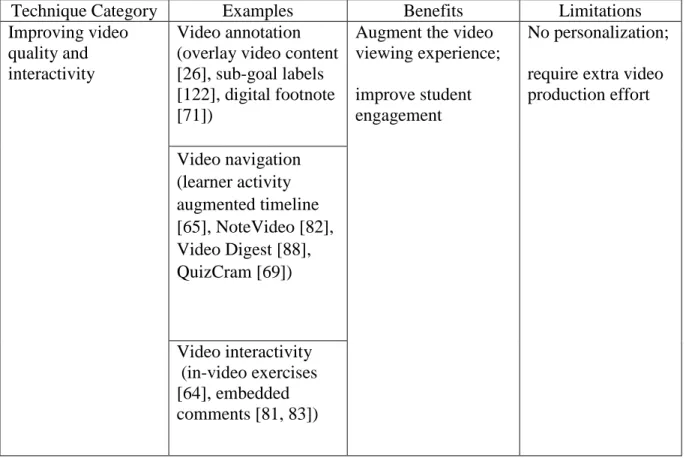
Table 1. Existing techniques for improving MOOCs.
Technique Category Examples Benefits Limitations
Improving video quality and interactivity
Video annotation (overlay video content [26], sub-goal labels [122], digital footnote [71])
Augment the video viewing experience; improve student engagement
No personalization; require extra video production effort Video navigation (learner activity augmented timeline [65], NoteVideo [82], Video Digest [88], QuizCram [69]) Video interactivity (in-video exercises [64], embedded comments [81, 83])
Enhancing communication Asynchronous communication (discussion forums [4, 20]; post-lecture reflections [45, 47, 48]) Promote social interactions and create a feeling of community;
generate feedback for instructors;
promote in-depth and thoughtful discussion and reflections Passive student “lurkers” do not participate in the activities (low forum participation rate in MOOC [16]); asynchronous methods lack immediate feedback; synchronous methods may not allow deep reflections Synchronous communication (chat systems [21]) Hybrid (time-anchored commenting [72]) Post-hoc clickstream and major video event analysis
Activities within learning sessions (video event analysis [51, 66, 67])
Reveal insightful information to understand MOOC learners
Log analysis reveal learners' actions rather than actual cognitive states in learning. Activities in the follow-up discussion forums ([136, 137]) and exercises Activities in the “course-level” ([22, 123])
The first group of techniques aims to enhance learner engagement by improving the quality and interactivity of MOOC videos. Researchers have used video annotations to augment interactions with the video [26, 122] and enhance the video viewing experience [71]. Furthermore, various navigation controls have been proposed to help users browse and skim videos [65, 69, 82, 88]. For example, Kim et al. [65] designed a learner activity augmented
timeline to facilitate video navigation. The timeline visualizes learner interaction peaks based on historical interactions and enables non-linear scrubbing through friction. Kovacs [69] proposes the QuizCram interface which enables question-directed video viewing. Users navigate through the video segments by answering questions. Moreover, there are techniques which add interactive elements in the video, such as interactive exercises [64] and embedded comment threads/assessment [81, 83]. For example, L.IVE by Monserrat et al. [81] provides in-situ learning, discussion, and assessment via an interactive overlay directly on top of the lecture video. RIMES [64] supports interactive, multimedia responses (handwriting, audio, and video) in lecture videos. However, one problem of these interaction techniques is a lack of personalization for individual learners. Some techniques (e.g., video annotation, interactive exercises, etc.) also require extra video production effort.
The second group of techniques aims to promote communications among students and instructors in the system. These include asynchronous communication techniques, such as discussion forums [4, 20] and post-lecture reflections [45, 48]; synchronous communication techniques, such as chat-room systems [21]; and hybrid techniques combining elements of both synchronous and asynchronous communication, such as time-anchored commenting [72]. These techniques can either promote student-student interactions [21, 72], or support student-instructor feedback [45, 48]. For example, Glassman and colleagues [48] invented the Muddy Card technique to allow students to indicate confusing concepts (muddy points) on the corresponding lecture slide. Such a technique provides a way for students to efficiently and specifically express their confusion to instructors. However, most of these interactive techniques rely heavily on learners’ active participation while prior research indicated low participation rates of activities or class discussions in MOOC contexts [16].
The third group of techniques is post-hoc analysis of clickstream data and major video interaction events. Researchers have analyzed both activities within the learning session (e.g., click-level interactions [51, 66, 118], visual attention [67], and exercise events [73]), activities in the follow-up discussion forums [136, 137], and “course-level” activities and events [22, 123]. For example, Kim et al. [66] applied temporal pattern analysis techniques on video play activities and found that students tended to selectively pick parts of the video to watch and 61% of the interaction peaks involved a visual transition that proceeds or after the peak. Yang et al. [137] used learners’ discussion forum behavior and clickstream data to identify posts that express confusion. These analyses can reveal insightful information about MOOC learning, such as the correlation of video production and student engagement [51, 67], and factors that contribute to course dropout [51, 136, 137]. Although server-side activity logs are easy to collect and can reveal insightful information, mouse clicks and keystrokes are relatively sparse in a single learning session. More importantly, they reveal learners' actions rather than actual cognitive states in learning. There is still little direct measurement of learners’ actual learning process in MOOCs.
This dissertation explores the continual collection and use of spontaneous PPG signals and heart rate as a fine-grained feedback channel in MOOC learning. Such physiological signals correlate directly with learners' physiological states and cognitive states [96] and can complement today's log analysis techniques.
2.2 AFFECTIVE-COGNITIVE STATE AND LEARNING
It has been widely acknowledged that cognition, motivation, and emotion are the key components of learning [2, 55, 128]. Previous studies have shown that learners experience a rich diversity of learning-centered affective states, including Engagement/Flow, Boredom, Confusion,
Curiosity, Happiness, and Frustration in the process of learning [2, 7, 29]. Affective-cognitive states are highly relevant and influential to both the processes and outcomes of learning. Experimental mood studies have found that affect influences a broad variety of cognitive process that contributes to learning, such as perception, attention, cognitive-problem solving, decision making, and memory processes [90]. Positive affect (e.g., flow and confusion) could promote rational processing of information and induce relational processing [92], while negative affect (e.g., Boredom and Frustration) “produce task-irrelative thinking, thus reducing cognitive resources available for task purposes, and undermine students’ intrinsic motivation” [90]. For example, Boredom, a commonly observed affective state during learning, could disengage learners from educational activities and seriously decrease learners’ abilities to acquire knowledge [119]. Boredom was also found to be an antecedent to gaming the educational system [7] and negatively correlated with learning performance [7, 33].
2.3 DETECTING AND RESPONDING TO AFFECTIVE-COGNITIVE STATE IN EDUCATION
Because of the important correlation between affective-cognitive states and learning, researchers have built various learning environments which detect and respond to learners’ affective and
cognitive states [23, 36, 42, 43, 58, 98, 102, 115, 116, 128, 140]. These systems collect physiological signals, such as heart rates [52, 55, 59, 127], galvanic skin responses (GSR) [12, 127, 128], facial expressions [61, 128, 135], eye gazes [12, 42, 58, 98], and EEG signals [98, 115, 116, 127, 140], etc., and use machine learning algorithms to predict students’ affective and cognitive states (e.g., attention, boredom, confusion, mind wandering, etc.) while they are interacting with the system. These affect-sensitive systems then dynamically respond to the sensed affective and cognitive states using pedagogical strategies, such as direct feedback [34, 35, 42], pedagogical agent [6, 128, 135], and adaptive activities [116].
AutoTutor [35, 36, 55] is a pioneer in detecting and adapting to learners' affect from multi-channel physiological signals in an intelligent tutoring system. The authors used supervised machine learning algorithms to achieve satisfactory performance on affect classification (Kappa = 0.35 for predicting valence, Kappa = 0.23 for predicting arousal). A set of production rules were designed to dynamically map students’ cognitive and affective states with appropriate tutor actions. Through an 84 participant between-subject study, the authors found the affect-sensitive AutoTutor more effective for low-domain knowledge students. Low domain knowledge students learned significantly more from the affect-sensitive AutoTutor (54.9% learning gains) than the regular tutor (38.2% learning gains); while the students with more knowledge didn’t benefit from the affect-sensitive AutoTutor (19.8% learning gains vs. 37% learning gains).
To predict students’ affective states, the Wayang intelligent tutor [6, 128] used four types of sensor data: facial expressions, seat pressure, mouse pressure and GSR. Empirical studies showed that the animated affect-aware agents improved average learning gains by 12% after
only two classes and had benefits such as improving learners’ self-concept and making them more engaged.
Gaze Tutor [42] monitors a student’s gaze patterns to identify when the student is disengaged or zoning out. The tutor attempts to re-engage the student with direct gaze-reactive statements. A 48 participant evaluation study showed that students provided more accurate responses to deep reasoning questions when they interacted with the gaze-reactive tutor (31.3% learning gains) than the non-reactive tutor (0% learning gains). Furthermore, the gaze-reactive statement associated with a significant improvement for students with high aptitude, while not as effective for students with average aptitude.
Szafir et al. [116] developed an adaptive-review technology which monitored learners' attention using their EEG signals and adaptively provided reviews on topics with low-attention levels. Results of a 48-participant user study showed that the adaptive review technology significantly increased learning gains compared with the no review baseline (57.35% vs. 39.71%), while no difference were found in learning between the adaptive and full conditions (57.35% vs. 58.33%).
One common problem with most of these systems [36, 42, 116, 128] is the requirement of dedicated sensors, such as cameras, chest bands or EEG headsets to collect physiological signals. The cost, availability, and portability of such equipment have prevented the wide adoption of such systems beyond lab settings. A “sensorless” approach to collect physiological signals is necessary in order to make the cognitive-aware learning systems widely adopted beyond lab settings.
3.0 LENSGESTURE AND THE TANGIBLE VIDEO CONTROL CHANNEL
Figure 3. AttentiveLearner uses the back camera as both a tangible video control channel and an implicit heart rate sensing channel in MOOC learning.
In AttentiveLearner, on-lens finger gestures are used as an intuitive control mechanism for video playback (Figure 3). A learner plays the instructional video by covering and holding the back camera lens with her fingertip, pausing the video by uncovering the lens. Such a tangible video control mechanism has two advantages when compared with traditional touchscreen widgets: 1) the "cover-and-hold-to- play" mechanism enables more flexible video control; 2) this approach allows the implicit extraction of PPG signals via commodity-camera-based photoplethysmography (PPG) [53] in MOOC learning.
To implement the tangible video control interface, I begin with a more general question, that is, “can we use finger gestures on the back camera lens to support general mobile
interactions?” I did a systematic exploration of the design space of on-lens finger gestures and proposed a general interaction technique, LensGesture, which leverages finger gestures on the back camera lens to support mobile interactions. In this section, I first describe the design, implementation, and evaluation of LensGesture. Then, I optimize and evaluate LensGesture specifically for controlling video playback in the context of AttentiveLearner. Implementation of LensGesture can be downloaded from http://mips.lrdc.pitt.edu/lensgesture. The contents of this chapter can be found in the published papers [130] and [133].
3.1 LENSGESTURE
LensGesture is initially motivated by the challenges faced by one-handed mobile interaction. When a user interacts with her phone with one hand, the user's thumb, which is neither accurate nor dexterous, becomes the only channel of input for mobile devices, leading to the notorious "fat finger problem" [10, 138], the “occlusion problem” [10, 124], and the "reachability problem” [126]. In contrast, the more responsive, precise index finger remains idle on the back of mobile devices throughout the interactions. Because of this, many compelling techniques for mobile devices, such as multi-touch, became challenging to perform in such a "situational impairment" [107] setting.
Many new techniques have been proposed to address these challenges, from adding new hardware and new input modality [10, 113, 124, 125], to changing the default behavior of applications for certain tasks [138]. Due to challenges in backward software compatibility, availability of new sensors, and social acceptability [99], most of the solutions are not immediately accessible to users of existing mobile devices.
Figure 4. LensGesture in use for menu navigation.
Motivated by these challenges, I propose LensGesture (Figure 4), a mobile interaction technique which provides a new input channel via finger gestures on the back camera of mobile devices.
3.1.1 The LensGesture Taxonomy
I propose two groups of interaction techniques, Static LensGesture and Dynamic LensGesture, for finger initiated direct touch interactions with mobile cameras (Figure 5).
Static LensGesture (Figure 5, top row) is performed by covering the camera lens either fully or partially. Supported gestures include covering the camera lens in full (i.e., full covering gesture) and covering the camera lens partially (e.g., partially covering the left, right, and bottom region of the lens1). Static LensGesture converts the built-in camera into a multi-state push
1 According to informal tests, I found the top-covering gesture both hard to perform and hard to distinguish (when compared with left-covering gestures, Figure 6, third row, first and last images). So I intentionally removed the top-covering gesture as a supported Static LensGesture. Please also note that the definition of “top”, “left”, “right” and “bottom” depends on the holding position (e.g., portrait mode or landscape mode) of the phone.
button set. Interestingly, the edge/bezel of the camera optical assembly can provide natural tactile feedback to the user’s index finger when performing static gestures.
Figure 5. The LensGestures Taxonomy.
Top: Static LensGestures; Bottom: Dynamic LensGestures.
A user can also perform a Dynamic LensGesture (Figure 5, bottom row) by swiping her finger horizontally (left and right) or vertically (up and down) across the camera lens. Dynamic LensGestures convert the back camera into a four-way, analog pointing device based on relative movement sensing.
3.1.2 The LensGesture Algorithm
I designed a set of three algorithms to detect full coverage, partial coverage and dynamic swiping of fingers on the lens. Depending on usage scenarios, these three algorithms can be cascaded together to support all or part of the LensGesture set. In all LensGesture detection algorithms, the camera is set in preview mode, capturing 144x176 pixel color images at a rate of 30 frames per second. I disable the automatic focus function and the automatic white balance function to avoid interference with the algorithms.
Figure 6. Sample images of Static LensGesture.
First row: no gesture. Second row: full covering gestures. Third row: partial-covering gestures. Left to right: left-covering, right-left-covering, bottom-left-covering, and top-covering (not supported).
Static LensGesture - Full covering: The full covering gesture (Figure 6, second row) can be detected quickly and reliably via a linear classification model on the global mean and standard deviation of all the pixels in an incoming image frame in the 8-bit grayscale space. The intuition behind the underlining detection algorithm is that when a user covers the camera’s lens completely, the average illumination of images drops, while the illumination among pixels in the image will become homogeneous (i.e., smaller standard deviations).
Figure 7 shows a scatter plot of global mean vs. global standard deviation of 791 test images (131 contained no LensGesture; 127 contained full-covering gestures; 533 contained
partial covering gestures). I collected test images from 9 subjects and in four different environments: 1) indoor bright lighting, 2) indoor poor lighting, 3) outdoor direct sunshine, and 4) outdoor in the shadow. All the subjects in the data collection stage were undergraduate and graduate students at the University of Pittsburgh, recruited through school mailing lists. The number of samples in each environment condition is evenly distributed. When I choose mean <=
100, stdev <=30 as the linear decision boundaries for detecting full-covering gestures (highlighted in Figure 7), I can achieve an accuracy of 97.9%, at a speed of 2.7ms per estimate. While more advanced detection algorithms could improve the accuracy, an accuracy of 97.9% is sufficient in interactive applicants where users can adapt their behaviors via real-time feedback.
Figure 7. The full-covering LensGesture classification.
Global mean vs. standard deviation of all the pixels in images with (full-covering: red dots, partial covering: green dots) and without (blue dots) Static LensGestures. Each dot represents one sample image.
Static LensGesture - Partial covering: To detect partial covering gestures in real time, I designed three serial cascaded binary kNN (k=5) classifiers to detect left, covering-bottom, and covering-right gestures. After deciding that the current frame does not contain a full covering gesture, the image will be fed to the covering-left, the covering-bottom, and the covering-right classifier one after the other. If a partial covering gesture is detected, the algorithm will stop immediately, if not, the result will be forwarded to the next binary classifier. If no partial-covering gesture is detected, the image will be labeled as “no gesture”. I adopted this cascading approach and the kNN classifier primarily for speed concerns.
Figure 8. Extracting local features for the partial-covering LensGestures.
From left to right, extracting local features from Region L (covering-left classifier), Region B (covering-bottom classifier), and Region R (covering-right classifier).
The features I used in the kNN classifiers include both global features (mean, standard deviation, maximal and minimal illuminations in the image histogram) and local features (same features in a local bounding box, defined in Figure 8). There are two parameters (w, l) that control the size and location of the local bounding boxes. The (w, l) values (unit=pixels) should be converted to a relative ratio when used in different preview resolutions.
Figure 9. Classification accuracies of partial-covering classifiers. Left to right: covering-left, covering-bottom, covering-right.
I use the data set described in the previous section, and ten-fold classification to determine the optimal values (w and l) for each classifier (Figure 9). As shown in Figure 9, I
found that for the covering-left classifier, w = 24, l = 40 will give us the highest binary classification accuracy at 98.9%. For the cover-bottom classifier, w = 4, l = 0, gives the highest accuracy at 97.1%, for the covering-right classifier, w = 4, l = 100, gives the highest accuracy at 95.9%. The overall accuracy of the cascaded classification is 93.2%. The speed for detecting partial covering ranges from 16 – 42 ms.
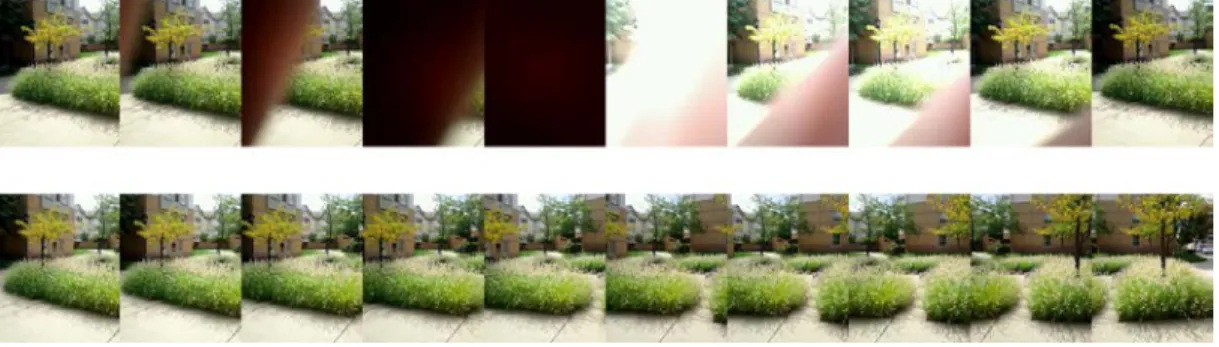
Figure 10. The difference between image sequences captured by LensGesture (up) and TinyMotion (down) in the same scene.
Dynamic LensGesture: The Dynamic LensGesture algorithm is based on the TinyMotion algorithm [121] with minor changes and additional post-processing heuristics. TinyMotion [121] detects the movement of a cell phone in real time by analyzing image sequences captured by its built-in camera. The TinyMotion algorithm detects motion by calculating the block shifting distance between two temporally adjacent frames. It applies a Full-search Block Matching algorithm (FBMA) [5] to compare the pixel blocks shifted in the current frame with corresponding pixels in the previous frame. A motion vector is calculated to
represent the relative distance changes in the x and y directions from the previous frame. The
source code of TinyMotion can be downloaded at
Canny in [121], TinyMotion users discovered that it was possible to put one’s other hand in front of the mobile camera and control motion sensing games by moving that hand (Dynamic LensGestures) rather than moving the mobile phone (TinyMotion). However, as shown in Figure 10, the fundamental causes of image change are quite different in TinyMotion and LensGesture. In TinyMotion (Figure 10, bottom row), the algorithm detects the background shifting caused by lateral movement of mobile devices. When performing Dynamic LensGestures (Figure 10, top row), the background keeps almost still while the fingertip moves across the lens. Another important observation is that in Dynamic LensGesture, a user’s finger will completely cover the lens in one or two frames, making brute force motion estimation results noisy. Therefore, I need to modify the TinyMotion algorithm in order to detect Dynamic LensGestures.
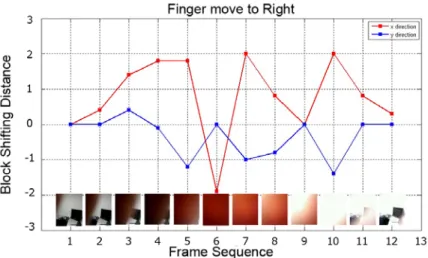
Figure 11 shows the relative movements from the TinyMotion algorithm, as well as the actual images captured when a left-to-right Dynamic LensGesture was performed. In Figure 11, I see that although the TinyMotion algorithm successfully captured the strong movements in the x-axis (frames 3, 4, 5, 7, 8, 10, 11), estimations became less reliable (frame 6) when a major portion of the lens was covered. To address this issue, I use a variable weight-moving window to process the raw output from the TinyMotion algorithm. I give the output of the current frame a low weight when a full covering action is detected. The Dynamic LensGesture detection algorithm works as follows: After the algorithm first detects a relative movement in consecutive image frames captured by the camera, it calculates and accumulates the weighted relative movements in the x and y axes on the following image frames until no movement is detected, meaning that the Dynamic Gesture has been completed. The algorithm then determines the direction of the Dynamic Gesture based on which direction has the overall largest relative movement.
Figure 11. The plot of the distant changes in both x and y directions for 20 image samples of a Dynamic LensGesture.
I collected 957 sets of Dynamic LensGesture sample from 12 subjects (241 move-to-right
gesture samples, 240 move-to-left gesture samples, 238 move-up gesture samples, and 238 move-down gesture samples). The subjects were asked to hold the mobile phone with either their left hand or right hand, and make each type of Dynamic Gestures on the back camera lens for 20 times while the camera captured the image frames at 30Hz. All subjects were undergraduate or graduate students at the University of Pittsburgh, recruited through school mailing lists. Two
move-up gesture samples and move-down gesture samples were removed due to the poor image quality. There were more than 30000 images in this data set. For each Dynamic LensGesture, depending on the finger movement speed, 10-20 consecutive images were usually captured. I achieve an accuracy of 91.3% for detecting Dynamic LensGestures on this dataset, at a speed of 3.9 ms per estimate. I looked deeper into the misclassified sample sequences and found that most errors were caused by the confusion between the swiping down and the swiping left gestures. Most of the misclassified sequences looked confusing even to human eyes because the actual swiping actions were diagonal rather than vertical or horizontal. I attribute this issue to the
relative positioning of the finger and the lens, as well as the lack of visual feedback during data collection.
3.1.3 The LensGesture Applications
Figure 12. Sample LensGesture applications. From left to right, top to bottom - LensLock, LensCapture, LensMenu, LensQWERTY, LensAlbum, and LensMap.
To explore the efficacy of LensGesture as a new input channel, I wrote six applications (LensLock, LensCapture, LensMenu, LensQWERTY, LensAlbum, and LensMap). All these prototypes can be operated by Static or Dynamic LensGestures (Figure 12). All but one application (LensQWERTY) can be operated with one hand.
LensLock leverages the Static LensGesture and converts the camera into a "clutch" for automatic view orientation changes. When a user covers the lens, LensLock locks the screen at the current landscape/portrait format until the user's finger releases from the lens. LensLock can achieve the same "pivot-to-lock" technique proposed by Hinckley [54] without using the thumb finger to touch the front screen, which may lead to unexpected state changes.
LensQWERTY uses Static LensGesture to control the SHIFT state of a traditional on screen QWERTY keyboard. The user can use the hand holding the phone to toggle the SHIFT state when the other index finger is being used for typing.
LensAlbum and LensMap are two applications that leverage Dynamic LensGestures for one-handed photo album/map navigation. These two application shows that LensGesture can alleviate “fat finger problem” and the “occlusion problem” by avoiding direct thumb interaction on the touch screen. The LensMenu also illustrates a feasible solution to the "reachability problem" via a supplemental back-of-device input channel enabled by LensGestures.
3.1.4 Implementation
I implemented LensGesture on a Google Nexus S smartphone. I wrote the LensGesture algorithms and all the LensGesture applications in Java. The LensGesture algorithm can be implemented in C/C++ and compiled to native code via Android NDK if higher performance is
needed. Source code of LensGesture can be downloaded from
http://mips.lrdc.pitt.edu/lensgesture.
3.1.5 Evaluation
Although the results of our LensGesture algorithm on pre-collected data sets were very encouraging, a formal study was necessary to understand the capabilities and limitations of LensGesture as a new input channel.
3.1.5.1 Experiment Design
The whole study took less than one hour, and each participant was compensated with a $10 gift card after completing all tasks. The study consisted of six parts:
Overview. I first gave participants a brief introduction to the LensGesture project. I explained each task to them, and answered their questions.
Reproducing LensGestures. This session was designed to test whether users could learn and comfortably use the LensGestures I designed, and how accurate/responsive the gesture detection algorithm was in a real-world setting. A symbol representing either a Static LensGesture or a Dynamic LensGesture was shown on the screen (Figure 13, (1) (2)). Participants were required to perform the corresponding LensGesture with their index fingers as fast and as accurately as possible. The application would still move to the next stimulus if a user could not perform the expected gesture within the timeout threshold (5 seconds). A user completed 20 trials for each supported gesture. The order of the gestures was randomized.
Figure 13. Screen shots of applications in the user study.
Target Acquisition/Pointing. The goal of this session was to quantify the human performance of using LensGesture to perform target acquisition tasks. For each trial, participants
needed to use Dynamic LensGestures to drive an on-screen cursor from its initial position to the target (Figure 13, (3)). After the cursor hit the target, participants were required to tap the screen to complete the trial. Regardless of whether participants hit the target or not, the target acquisition screen disappeared and an information screen indicating the number of remaining trials in the current block would show up. I encouraged participants to hit the target as fast as possible and as accurately as possible. Each participant completed 160 randomized trials.
Text Input. In this task, I compared the performance of standard Android virtual keyboard with the LensQWERTY keyboard (Figure 13, (4)).
Each participant entered 13 short phrases in each condition. The 13 test sentences were: “Hello”, “USA”, “World”, “Today”, “John Smith”, “Green Rd”, “North BLVD”, “Lomas De Zamora”, “The Great Wall”, “John H. Bush”, “Sun MicroSystem”, “Mon Tue Wed Thu”, and “An Instant In The Wind”. These test sentences were intended to maximize the usage of LensGesture based shifting feature and simulate commonly used words in a mobile environment (person names, place names, etc.).
Other Applications. In this session, Participants were presented with five LensGesture applications I created (LensLock, LensCapture, LensMenu, LensAlbum, and LensMap, Figure 12). After a brief demonstration session, I encouraged the participants to play with these applications as long as they wanted.
Collect Qualitative Feedback. After a participant completed all tasks, I asked him or her to complete a questionnaire (B.1). I also asked the participant to comment on each task, and describe one’s general feeling towards LensGesture.
3.1.5.2 Participants and Apparatus
16 subjects (4 females) between 22 and 30 years of age participated in our study. 15 of the participants owned a smartphone. The user study was conducted in a lab with abundant light. All of the participants completed all tasks.
Our experiments were completed on a Google Nexus S smartphone with a 480 x 800 pixel display, a 1GHz ARM Cortex-A8 processor, running Android 4.0.3. It has a built-in 5.0 mega-pixel back camera located at the upper right region.
3.1.5.3 Evaluation Results
Reproducing LensGestures
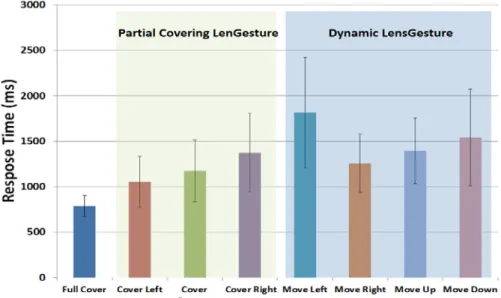
Figure 14. Average response time of Static and Dynamic LensGestures with one standard deviation error bars.
As shown in Figure 14, the time needed to perform a static gesture varied on gesture type. Repeated measure variance analysis showed significant difference due to gesture type: F(7, 120) = 9.7, p < .0001. Fisher’s post hoc tests showed that the response time of full-occlusion gesture
(787 ms) was significantly shorter than any of the partial occlusion gestures (left = 1054 ms, p < 0.01; right = 1374 ms, p < 0.0001; bottom= 1175 ms, p < 0.0001) and dynamic gestures. The left partial occlusion gesture is significantly faster than right partial occlusion, p < 0.01, the speed differences between other partial occlusion gestures are not significant. For Dynamic Gestures, the move-right gesture (1258.6 ms) was significantly faster than move-left (1815.2 ms, p < 0.01) and move-down (1540.6 ms, p < 0.05) gestures, but there was no significant time difference between move-right and move-up (1395.7 ms, p= 0.15). The move-up gesture was also significantly faster than move-left (p < 0.01). The differences in detection time of Dynamic LensGestures might be caused by the location of the camera. The camera was located on the upper right region of the experiment device, making it easier to make the right and move-up gesture.
Target Acquisition/Pointing
Figure 15. Scatter-plot of the Movement Time (MT) vs. the Fitts’ Law Index of Difficulty (ID) for the overall target acquisition task controlled by Dynamic LensGestures.