A Collaborative Science Portal for High
Performance Computing
Master of Science, Systems Science Project Report
submitted to
Department of Computer Science, Louisiana State University
Xiaoxi Xu
∗April 09, 2007
∗
Abstract
Recently-developed Grid technology promises new capabilities of on-demand high per-formance computing (HPC) with distributed machines, with simulations coupled to large-scale data devices across high speed networks. However, these technologies are still com-plex and hard to use for researchers from fields other than computer science. Portlet-based portal technology provides an approach for organizations or communities to integrate a large variety of resources, services, applications, and data for private, public, and commer-cial entities. Users can access a portal through a consistent and customizable web interface through any web browsers running on the Internet, without the need to download or install specialized software.
This report describes an effort to leverage Grid computing with portal technology to de-liver an collaborative high performance computing portal for researchers from diversified disciplines to access their integrated resources, services, and data. I designed and devel-oped a number of Grid-enabled portlets to reduce the complexity of grid computing for end users and enable advanced application scenarios for several nationally funded projects at the Center for Computation & Technology at Louisiana State University, including En-LIGHTened Computing, SCOOP, UCoMS and LPFS. The capabilities of the portlets span from resource co-scheduling, querying and retrieving files from data archives to storm sim-ulation monitoring.
Abstract ii
An exploration towards integrating different domains portals into a united institute por-tal is also addressed in this report. Four major problems that are unique to the integration portal and associated with the layout, portlet dependency, social needs and security are identified, described and resolved .
Acknowledgements
I am grateful to my parents for everything they did for me to reach this point. I would like to thank my advisor Dr. Gabrielle Allen for giving me the opportunity to work on an array of CCT principal projects and for her guidance and suggestions along the way. I also sincerely thank my other committee members, Dr. Jianhua Chen and Dr. Kevin McCarter for accepting my invitation to be in my Master’s defense committee and their fully support. Sweet thanks go to my beloved Chongjie, you are always there for me and keep me happy all the time. Special thanks go to Ian kelley for his prompt help and constant guidance on the portal development. Also, sincere thanks to Dr. Jon MacLaren for his all-along guid-ance, help and supervision on my work at CCT spanning from the EnLIGHTened project to the SCOOP Project. I am thankful to Oliver Wehrens, who friendly offered me direct help on a number of issues involving GridSphere. A work like this can only be done within a strong collaboration and I was lucky to work closely together with many talented people. I explicitly want to mention Archit Kulshrestha for his help on setting up the LDAP authen-tication module, Dayong Huang and Shree Balasubramanian for their underlying service my portlets were built upon. I want to acknowledge LSU and CCT for providing me with the entire infrastructure needed to implement this project.
This work was supported by the SURA Coastal Ocean Observing and Prediction (SCOOP)
Acknowledgements iv
Program, an initiative of the Southeastern Universities Research Association (SURA). Fund-ing support for SCOOP has been provided by the Office of Naval Research, Award #N00014-04-1-0721 and by the National Oceanic and Atmospheric Administration’s NOAA Ocean Service, Award #NA04NOS4730254. Additional support was provided by the Center for Computation&Technology at Louisiana State University.
Table of Contents
1 Introduction 1
1.1 Contributions . . . 3
1.2 Outline . . . 4
2 Motivation 5 3 Grid Portal Development 8 3.1 Gridsphere Framework Overview . . . 9
3.2 GridPortlets . . . 9
4 Portals & Portlets for CCT Projects 11 4.1 Resource Co-scheduling . . . 11
4.1.1 Design . . . 12
4.1.2 Implementation . . . 13
4.2 SCOOP . . . 17
4.2.1 Archive Portlet & Filenaming Convention Portlet . . . 18
4.2.2 WaveWatch3 Monitoring Portlet . . . 21
4.3 UCoMS & Numerical Relativity . . . 23
4.4 LPFS . . . 26
5 An Integrated Portal for High Performance Computing 29 5.1 Science Drive for An Integrated Portal . . . 29
5.2 Design . . . 30
5.3 Implementation . . . 33
5.3.1 Challenging Issues . . . 33
5.3.2 Solution . . . 36
TABLE OF CONTENTS vi
List of Figures
4.1 The architecture of the co-scheduling portlet showing interaction with un-derlying HARC services . . . 13 4.2 The co-scheduling portlet showing how to set up compute resource
require-ments including machine name, processors, memory etc. . . 14 4.3 The co-scheduling portlet showing how to set up network resource
require-ments . . . 14 4.4 The co-scheduling portlet showing a default query result, where a user can
further specify different desired start time and end time for each reservation 15 4.5 The co-scheduling portlet showing an aligned query result, where a user
can further specify a united desired start time and end time for all reservations 16 4.6 The co-scheduling portlet showing a reservation history records of a user . . 17 4.7 The data portlet on the SCOOP portal showing the query result set of
at-mospheric forcing with type NAM-NCEP . . . 19 4.8 The data portlet on the SCOOP portal showing the meta information for a
particular queried file including data class, data type, catalog ID etc. . . 19 4.9 The parser portlet on the SCOOP portal showing how to query file meta
information using a logic file name . . . 20 4.10 The WW3 monitoring portlet showing a list of jobs being monitored for
storm 12 . . . 21 4.11 The WW3 monitoring portlet showing the detailed information of one job . 22 4.12 The ensemble selector portlet showing how to select ensembles based on
options including track, model, forcing etc. . . 23 4.13 The advanced resource selection portlet showing how to select ensembles
based on advanced options including job manager, wallclock, hotstart etc. . 24
LIST OF FIGURES viii
4.14 The UCoMS archive portlet showing how to set up requirements including user name, host name, dates etc to query against the RLS archive . . . 25 4.15 The NumRel archive portlet showing how to set up query requirements and
the query result set based on the requirements specified . . . 25 4.16 The LPFS portlet showing the storm information including alert level,
lo-cation etc. and simulation status and outputs . . . 27 5.1 The architecture of the CCT integration portal showing interaction among
portlets, portal services, and Grid Middleware . . . 31 5.2 The home page of CCT integrated portal showing the integration of HPC,
SCOOP, UCoMS, LPFS portals into one united institute portal . . . 32 5.3 The screenshot showing the problematic tabbed-pane layout of the
integra-tion portal . . . 34 5.4 The screenshot showing the well-organized tabbed-pane layout of the
inte-gration portal . . . 34 5.5 The screenshot showing the duplicate credential portlets on the integration
portal . . . 34 5.6 The screenshot showing the resulting layout of the integration portal after
Chapter 1
Introduction
In the information era, the demand for high performance computing (HPC) is ever grow-ing. In the academic world, more and more scientific fields have demonstrated the need for large-scale high performance computing, such as black hole simulations in physics, hurri-cane simulations in oceanography and coastal sciences, reservoir simulations in petroleum engineering, and gene data analysis in bioinformatics. In industry, speed-to-market is an essential component in getting, and staying, ahead of the competition. High performance computing can help solve highly complex problems, perform business critical analysis, or run computationally intensive workloads all faster and more efficiently than ever before. However, lowering the barrier of entry for access to HPC and mass data collections is still a technical and sociological challenge: the cost on purchasing and maintaining supercom-puters and clusters is prohibitive; resources and services are complex and distributed; high performance computing environments change frequently; and more importantly, users of-ten lack the specialized expertise to deal with the complex HPC environments.
Recently-developed Grid technology (1) promises the capability of making large dis-tributed resources such as large data archives, large computers, coupled by high speed
2
networks easily available for science. Grid technology makes use of the unused resources (CPU cycles and/or disk storage) of large numbers of disparate computers, including desk-top computers, workstations, clusters, and supercomputers treated as a virtual cluster em-bedded in a distributed telecommunications infrastructure. Grid computing’s focus on the ability to support computation across administrative domains enables resource virtualiza-tion and service (resource) sharing and lowers computavirtualiza-tion cost and complexity.
Portlet-based portal technology provides an approach for organizations or communities to integrate a large variety of resources, services, applications, and tools for private, public, and commercial entities. Users can access those integrated systems through a consistent and customizable web interface through any web browsers running on the Internet, without the need to download or install specialized software or worry about setting up networks, firewalls, and port policies. Portal technology can provide a single entry for users to man-age all applications and data and improve a user’s work efficiency. For example, a black hole researcher can easily manage simulations and their results via a well-designed port-let without logging onto several different machines. In addition, a portals’ web interface carries advantages over traditional command tools. For example, web interface frees users from remembering a lot of commands and their argument formats, and it also can easily provide more active context information or hints than command-line tools for users to do desired actions.
The Center for Computation & Technology at Louisiana State University is an in-terdisciplinary research center aiming to advance computational sciences, their enabling technologies, and many other disciplines. A number of research projects, such as SURA Coastal Ocean Observing and Prediction Program (SCOOP) (2), Ubiquitous Computing and Monitoring System for Discovery and Management of Energy Resources (UCoMS) (3), EnLIGHTened Computing (17), Numerical Relativity (NumRel) (4) and the Lake
Pontchar-1.1. Contributions 3
train Forecasting System (LPFS) (5), have a very high demand on HPC. This report de-scribes an effort to leverage Grid computing with portal technology to deliver an collab-orative high performance computing portal for researchers from diversified disciplines to access integrated resources, services, and data. In the rest of this chapter, I summarize my work on this effort and present the outline of this report.
1.1
Contributions
As a graduate research assistant at CCT, I worked on several projects, including EnLIGHT-ened Computing, SCOOP, UCoMS, NumRel, LPFS. I designed and built Grid-enabled portlets and science portals for these projects to reduce the complexity of grid computing for end users and enable advanced application scenarios. The resource co-scheduling port-let I developed for the EnLIGHTened Computing project enables users to simultaneously co-allocate multiple computation and network resources for high performance computing applications. I extended the functionality of the SCOOP portal to allow users to better ac-cess ocean data and monitor their job runs. I generalized the data archive tool from the SCOOP portal and extended it to serve UCoMS and NumRel to provide researchers in these projects with a better tool to manage and analyze their mass simulation results. I also attempted to develop a real-time monitoring tool for the LPFS simulations which may help with planning flood gate closures of Lake Pontchartrain. The development and deployment of these portlets and portals also illustrate how portal technologies can complement Grid middleware to provide a community with an easy-to-use collaborative infrastructure that is tailored to their particular needs and has the ability to incrementally introduce and test new capabilities and services.
1.2. Outline 4
single collaborative science portal and employed portlet group settings to provide a role-based access control for users from different fields and projects. The resulting work saved computational resources and human resources for CCT, eased the portal maintenance and extension for portal administrators, and relieve end users from managing multiple accounts on different portals.
My work benefits greatly from a friendly and productive cooperation with other mem-bers in the SCOOP team and Portal group at the Center for Computation & Technology, without whom, this work would not be accomplished.
1.2
Outline
The rest of this report is organized as follows. Chapter 2 discusses the motivation of this work on Grid portals. Chapter 3 introduces the Grid portal toolkits used in this work. Chapter 4 elaborates my effort in detail on each project at CCT and how they may help researchers in their daily work. Chapter 5 describes the motivation to integrate portals and how to set up role-based access control for users from different projects. Finally, Chapter 6 presents the conclusions of this work.
Chapter 2
Motivation
“Computational Science is now indispensable to the solution of complex problems in every sector, from traditional science and engineering domains to such key areas as national security, public health, and economic innovation. Advances in computing and connectivity make it possible to develop computational models and capture and analyze unprecedented amounts of experimental and observational data to address problems previously deemed intractable or beyond imagination.”
– President’s Information Technology Advisory Committee 2005
In 2003, Louisiana State University established the Center for Computation & Tech-nology (CCT) with funding from the Governor’s Information TechTech-nology Initiative. The goal for the CCT is to create an innovative and interdisciplinary research environment, exploring, investigating, and constructing systems integrating advanced computation, data, networks, and novel devices to solve complex large-scale problems in science, engineering, humanities, and business.
Currently, the CCT has 32 faculty, 46 graduate students, and 25 undergraduate students from 12 departments, including Computer Science, Electrical Engineering, Mathematics,
6
Physics, Oceanography & Coastal Science, Petroleum Engineering, Music, Mechanical En-gineering, Mass Communication, Finance, Accounting, Information Systems & Decision Sciences. As a result, collaborations within and beyond CCT have led to many interdisci-plinary research projects. Those research projects share a common characteristic, demand-ing high performance computdemand-ing and mass data storage. For example, in the Numerical Relativity project, solving Einstein’s equations can take two weeks to run on hundreds of processors; in the UCoMS project, a reservoir simulation with a small number of factors also takes about two or three weeks to run on hundreds of processors; in the SCOOP project, the ocean sensors and coastal simulations generates about 1 Terabyte data each month.
The CCT and LSU’s Information Technology Services (ITS) have joined together and united their computing resources and human resources to create a premium high perfor-mance computing environment that advances interdisciplinary research as well as research within individual disciplines, and supports users with the best possible infrastructure to carry out their research.
How to make best use of the computing resources to meet the demands of researchers is still a challenging problem from the perspective of technology. One possible approach is to employ Grid Computing technology which enables distributed heterogeneous resources to be aggregated to provide seamless computational capabilities to the user. An important fea-ture of Grid technology is to allow for sharing of computing resources, expertise, software, and data across multiple institutions which is critical for the multi-institution collaborative projects, such as SCOOP and UCoMS. The CCT has already started to build the necessary Grid infrastructures for those projects by integrating multiple Grid middleware packages to provide a holistic approach to collaborative problem solving.
As mentioned above, many research projects in the CCT are interdisciplinary. As a result, many researchers from other fields may not have a strong computer science
back-7
ground. Also, although Grid technologies have evolved over time, they are still complex and difficult to use. Grid portals have come to be recognized as a useful tool to enable the work of researchers and engineers without burdening them with the low-level details of underlying technologies. Web portal technology provides an easy way to integrate ap-plications and content and provides groups of users with a single entry point to interact with their applications, data, colleagues and services, all the while maintaining a uniform interface; Also, web portal technology provides groups of users with an easy-to-use and customized visual interface. Moreover, it is a way to introduce new technologies.
This work explores how portal technologies can complement Grid middleware to pro-vide researchers from fields other than Computer Science with an easy-to-use collaborative infrastructure that is tailored to their particular needs and has the ability to incrementally in-troduce and test new capabilities and services. Work in developing Grid portals for several projects at CCT will be described in detail in chapter 4.
Chapter 3
Grid Portal Development
Grid portal toolkits are increasingly being adopted as a means to speed application develop-ment since they can provide much of the high-level functionality that is needed to manage the multi-institutional and multi-virtual organization issues that arise when designing and maintaining a production portal. There are a number of portal frameworks including IBM WebSphere, BEA WebLogic, uPortal and GridSphere (6), and Grid portal toolkits includ-ing GridPortlets (7) , GridPort (8), OGCE (9), and Java COG (10). A comparative analysis of GridPortlets and OGCE (11) by a former portal developer at CCT in his paper “Grid Portal Solutions: A Comparison of GridPortlets and OGCE”, gave us an insight into both the advantages and disadvantages of GridPortlets and OGCE. Being advised that the use of a mature portal framework and a well-designed Grid portal toolkit was necessary to be able to focus on the business logic of the current use-case scenarios, and taking into account that most of ongoing projects are at the early stage, still evolving and yet mature, we regard that GridSphere’s highly straightforward extensibility fits our needs. Also, GridPorlets can abstract the details of underlying Grid technologies and offer a uniform high-level service API enabling developers to easily create customizable Grid portal applications which fit
3.1. Gridsphere Framework Overview 9
our needs precisely. Therefore, we chose GridSphere and GridPortlets as our main toolkits to speed up the process of developing and deploying application portals.
3.1
Gridsphere Framework Overview
GridSphere is a free, open-source portal framework originally developed by the European GridLab project (12) which focused on developing Grid application tools and middleware. The GridSphere portal framework provides a standards based portal for the easy devel-opment of modular web components, called portlets. Portlets are defined by a standard API and provide a model for developing new portal components that can be shared and exchanged by various portlet containers. GridSphere provides a portlet container, a collec-tion of core portlets (for portlet management, user management, layout management, and role-based access control) and an advanced user interface library that makes developing new portlets easier for application developers. Its portlet-based architecture offers flexi-bility and extensiflexi-bility for portal development and facilitates software component sharing and code reuse. GridSphere is compliant with the JSR-168 portlet specification (13) which allows portlets to be developed independently of a specific portal framework. GridSphere’s portlet service model provides developers with a way to encapsulate reusable business logic into services that may be shared between many portlets.
3.2
GridPortlets
The advantages of using GridSphere come not only from its core functionalities, but also from its accompanying Grid portal toolkitGridPortlets. GridPortlets abstracts the details of underlying Grid technologies and offers a consistent and uniform high-level service API,
3.2. GridPortlets 10
enabling developers to easily create custom Grid portal web-applications.The GridPortlets services provide functionalities for managing proxy credentials, resources, jobs, and remote files, and supports persisting information about credentials, resources, and jobs submitted by users. GridPortlet service API currently supports Globus Toolkit (14) (15). In addi-tion, GridPortlets delivers five well-designed, easy-to-use portlets, which include: resource registry, resource browser, credential management, job submission, and file management:
• Resource Registry Portlet — Administrators can manage the set of resources their
Grid portal makes available to its users.
• Resource Browser Portlet — Users can browse the resources to which they have
access, including the services, job queues, and accounts that are available on remote computers.
• Credential Retrieval Portlet — Users can retrieve credentials from a MyProxy (16) server and gain single sign-on access to both the portal and Grid resources.
• Job Submission Portlet — Users can submit and manage jobs on their resources
using Globus.
• File Browser Portlet — Users can browse and manage physical files on Grid
re-sources. Logical files registered with a logical file service can be accessed if a service is available.
Chapter 4
Portals & Portlets for CCT Projects
There are several ongoing projects at CCT, including EnLIGHTened Computing, SCOOP, LPFS, Numerical Relativity, and UCoMS, for which an array of portlets were under devel-opment, such as resource co-scheduling,querying and retrieving files from data archives, and storm simulation monitoring. This chapter will focus on the author’s contribution to each project.
4.1
Resource Co-scheduling
As Grid technology advances, more and more distributed high performance computing ap-plications are designed to execute on “computational Grids”. Often, many of these applica-tions need the ability to allocate multiple resources (processors, memory, storage, network bandwidth) simultaneously. Assuring predictable resources for applications running on the Grid is a critical factor for the success of the Grid. Supported by the NSF EnLIGHT-ened Computing project (17), the Highly-Available Resource Co-allocator (HARC) (18), a resource co-scheduling framework supporting advance reservations, was designed and
4.1. Resource Co-scheduling 12
plemented at the CCT. To facilitate the usage of HARC services, a Co-scheduling portlet was developed based on the GridSphere framework.
4.1.1
Design
The goal of the co-scheduling portlet is to allow users to manage their resource reservations via an easy-to-use interface. The portlet is intended to meet the following requirements:
• The portlet must be JSR-168 compliant so that it can be deployed in the most widely-used portal frameworks, such as GridSphere, UPortal, WebSphere, etc.
• The portlet must allow a user to set up a complex reservation query, which may
contain many resource requirements with different types, i.e. computational require-ments (processors, memory, storage) and network requirerequire-ments.
• A user can freely add, update, delete requirements of a reservation query and preview the resource availability for each requirement before making a reservation.
• The portlet should list all possible resource timetables for each requirement in a reservation query to allow a user to choose a desirable time to use resources.
• A user can keep track of all reservations he/she made and cancel reservations.
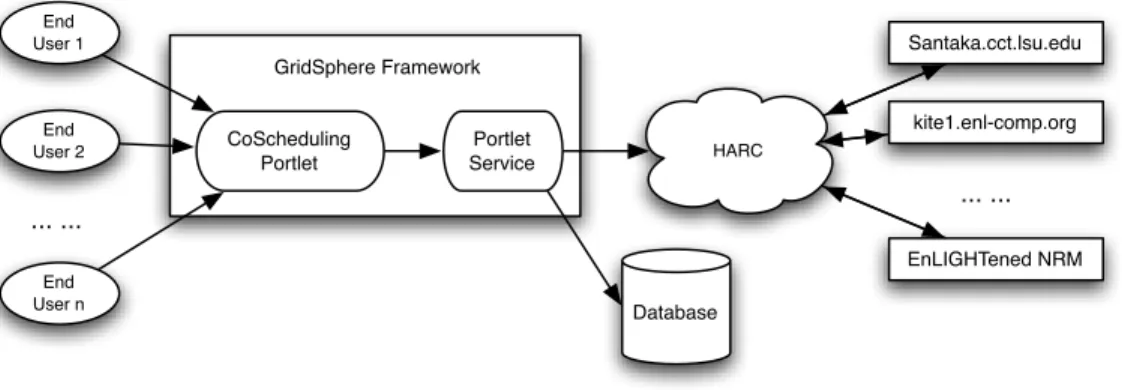
Figure 4.1 shows the architecture of the co-scheduling portlet is based on the Grid-Sphere framework. To simplify the development and improve code reuse, the “whole” scheduling portlet is separated into two components: the scheduling portlet and co-scheduling portlet service. The co-co-scheduling portlet handles the requests from end users, calls the portlet service to fulfill those request, and generate result pages to end users. The coscheduling portlet service communicates directly with the HARC, which manages
4.1. Resource Co-scheduling 13 HARC Santaka.cct.lsu.edu kite1.enl-comp.org EnLIGHTened NRM ... ... End User 1 End User 2 End User n ... ... Portlet Service CoScheduling Portlet GridSphere Framework Database
Figure 4.1: The architecture of the co-scheduling portlet showing interaction with underly-ing HARC services
a bunch of computational resources and network resources to allow users to make reser-vations. It builds HARC queries from user-specified reservation requirements for resource timetables, makes a reservation based on timetables a user chooses, and cancels tions. The portlet service also contains a persistence layer using Hibernate to store reserva-tions for each portal user and allow them to keep track of reservareserva-tions.
4.1.2
Implementation
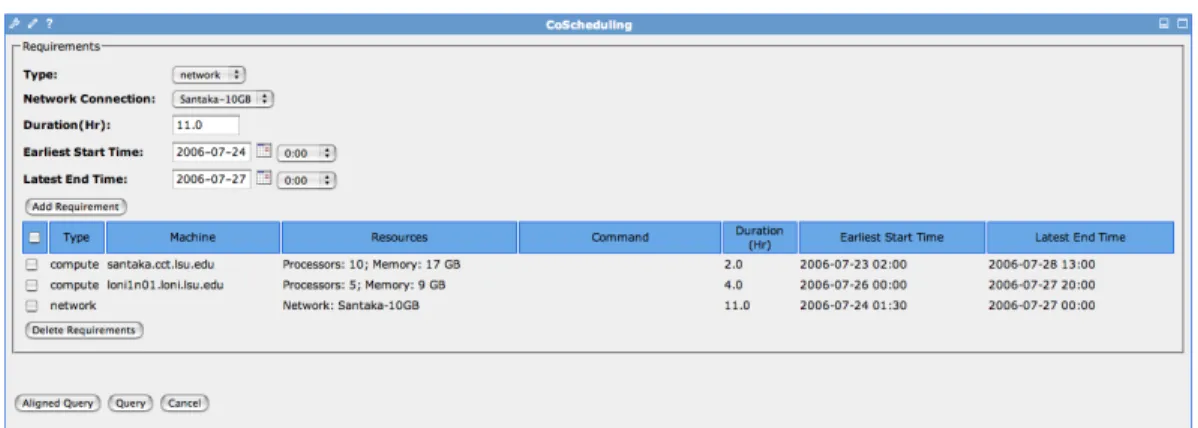
As can be seen from Figure 4.2 and Figure 4.3 when creating a reservation query, users can specify requirements either for compute resources such as which machine does the job could be run on, how many processors and how much memory would be utilized to per-form the science task, or a network resource, where a network connection can be chosen. At this stage, the user can also set up the time slot, during which they would expect to employ aforementioned resources. Since we use the advance co-scheduling mechanism, taking uncertainty into account, the portlet provides users with two mechanisms to specify their time information. On the one hand, a user can only specify the time duration on the portlet but leave earliest start time and latest end time blank. In such a case, the portlet will
4.1. Resource Co-scheduling 14
Figure 4.2: The co-scheduling portlet showing how to set up compute resource require-ments including machine name, processors, memory etc.
4.1. Resource Co-scheduling 15
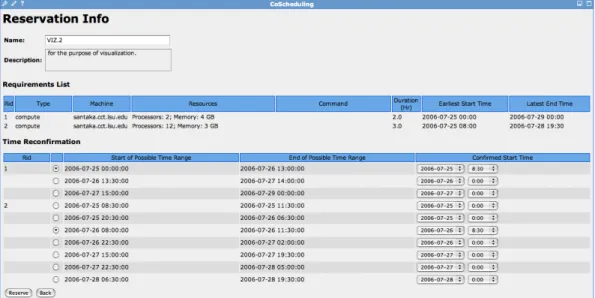
Figure 4.4: The co-scheduling portlet showing a default query result, where a user can further specify different desired start time and end time for each reservation
by default query the timetable in the next 8 hours to find if there is any time slot available meeting the requirements for the resources. On the other hand, users can narrow their query conditions by specifying the earliest possible start time and the latest end time.Under this circumstances, the portlet will query against the timetable to look for the time slot meet-ing the duration requirement as well as within the time stamp between the user suggested started time and end time.
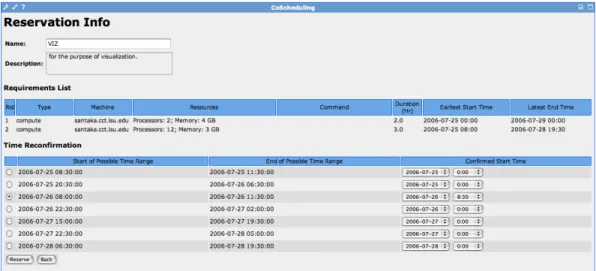
Moreover, we currently offer two modes of query to make the best use of resources. Under the circumstances that a user hopes to find a common timetable for all the resources, the aligned query would be suggested. Otherwise, user would query out separate time table for each resource specified. Figure 4.4 and Figure 4.5 respectively show result pages for these two types of reservation queries.
Since not all the queries would be responded with an available timetable, a user can try to reset up another possible start/end time to refire another query upon the resources interested. If one or more timetable could be found for the queried resources, then at the
4.1. Resource Co-scheduling 16
Figure 4.5: The co-scheduling portlet showing an aligned query result, where a user can further specify a united desired start time and end time for all reservations
next stage, a user will be able to choose one favorite time slot made as start of possible time range and end of possible time range either for each resource (if query is used), or for all resourced( if aligned query is used). Finally, the underlying co-scheduler will try to make the reservation upon the users’ confirmation.
Once the adapter successfully makes the reservation, users will see the status on the portlet. However, some exceptions (i.e. two users request the same resource for an over-lapping period) may occur, due to which a reservation for the resources may finally fail to be made. If this is the case, the portlet will report the failure to the user so users can re-schedule again.
Furthmore, as shown in Figure 4.6, a user can check out his/her reservation history on the portlet which shows the reservation name and description that the user specified at the time making the reservation. Also, the last modified time can be seen as well. Another column shows the status which can be inactive, active, finished or unreserved. Taking into account that sometimes users may hope to cancel a previously scheduled reservation which is especially true in a workflow scenario, where if task A was not finished in time, a
4.2. SCOOP 17
Figure 4.6: The co-scheduling portlet showing a reservation history records of a user subsequent event B has to be delayed, as a result, this reservations may be rescheduled. As long as an reservation is not completed, no matter whether its status is reserved or active, the reservation can be unreserved.
4.2
SCOOP
The Southeastern Coastal Ocean Observing and Prediction (SCOOP) Program is an on-going collaboration between the modeling research community and operational agencies, such as the National Oceanic and Atmospheric Administration (NOAA). SCOOP, spon-sored by the Office of Naval Research (ONR) and NOAA’s Coastal Services Center, is a multi-institution collaboration which is working towards an integrated and coordinated coastal ocean observing and prediction system, leveraging emerging regional efforts and cutting-edge Grid technologies. It aims to integrate distributed real-time ocean observing stations and regional coastal modeling entities, to run ensembles of numerical hydrody-namic models for the prediction, verification and visualization of critical storm surge and wave behaviour during severe storms and hurricanes.
To support this, a portal (19) was built for the SCOOP project at CCT, which provides a number of functionalities to users. Later on, we also deployed our CCT SCOOP portal
4.2. SCOOP 18
to machines at University of Alabama at Huntsville (UAH). The SCOOP portal at CCT provides user with interfaces to run and track popular coastal modeling simulations, such as ADCIRC, on the SCOOPGrid resources. The CCT designed and built a general archive ROAR (20) of data for use by the SCOOP Partners. This archive stores atmospheric model outputs (wind data), results generated by the hydrodynamic models which use the atmo-spheric model outputs for input (wave/surge data), and observational data to be used for verification of model results (sensor data). The archive is based on around a 5TB local storage area, plus a 7TB allocation of off-site storage at SDSC’s DataCentral. The portal provides an easy-to-use interface to query the archive for files, which can then be down-loaded using either http or GridFTP (21), to the user’s desktop, or directly to a remote location (GridFTP only).
4.2.1
Archive Portlet & Filenaming Convention Portlet
Currently, there are three basic types of data, with which SCOOP is dealing: atmo-spheric data, simulated wave/surge data, and other observed data to verify the model accu-racy. Different classes of data files are associated with different sets of metadata attributes, and have differing query interfaces. The archive portlet at SCOOP Portal gathers meta-data information from user requests and retrieves a list of logical file names which have matching metadata from the archive portal service. At the moment, SCOOP does not have an advanced metadata service, the logical file name specified in queries is generated from metadata information contained in the SCOOP file-naming convention. All files in the archive can be classified as belonging to one Catalog ID. The Catalog is a service run at UAH which provides users with a way to locate files in the SCOOP archive. To classify the
4.2. SCOOP 19
Figure 4.7: The data portlet on the SCOOP portal showing the query result set of atmo-spheric forcing with type NAM-NCEP
Figure 4.8: The data portlet on the SCOOP portal showing the meta information for a particular queried file including data class, data type, catalog ID etc.
4.2. SCOOP 20
Figure 4.9: The parser portlet on the SCOOP portal showing how to query file meta infor-mation using a logic file name
file into a catalog ID, we need to match the file name against a series of regular expressions. Since the logical file name on the query result page does not explicitly display the meta in-formation including Data Class, Data Type, Institution, Data Format, and CatalogID etc, we decided to construct a parser portlet to show th file meta information for the ease of research. Two implementations of the SCOOP file-naming convention were performed on the portal interface. On the one hand, after querying out the result, by clicking the logi-cal file name, a user will be led to the page showing the specific metadata information, as shown in Figure 4.7. This was accomplished by using the SCOOP file-naming convention documents to map the physical file name with the generated logical name and parse into different fields of metadata information. On the other hand, a separate parser portlet was developed as well for the use of filenaming convention. As shown in Figure 4.9 this portlet would be used generally to check out the meta data information without any query if a logical file name is at hand.
4.2. SCOOP 21
Figure 4.10: The WW3 monitoring portlet showing a list of jobs being monitored for storm 12
4.2.2
WaveWatch3 Monitoring Portlet
Part of the SCOOP project’s work involves the regular execution of atmospheric (e.g. WindGen) and hydrodynamic (e.g. ADCIRC, WaveWatch3) coastal modeling codes, for various geographical regions. These modeling codes consume powerful computational re-sources and data storage and take a long time to finish. Monitoring the status of each execution becomes important, because it can help researchers or engineers to detect errors and bugs in the execution far earlier before it runs to the end. As a result, it saves time for researchers and computational resources for the organization.
As shown in Figure 4.10, the WaveWatch3 Monitoring portlet displays information about the WaveWatch3 operational code we were running for the SCOOP 2006 storm sea-son. The WAN analytical winds are used as input for WaveWatch3 simulations. This interface gives us debug information, status and monitoring information for each ensemble run. However, the current implementation only displays historical information for SCOOP 2006 storm simulations. Once the underlying framework is accomplished, the portal inter-face will be able to connecting to real-time simulation information.
4.2. SCOOP 22
4.3. UCoMS & Numerical Relativity 23
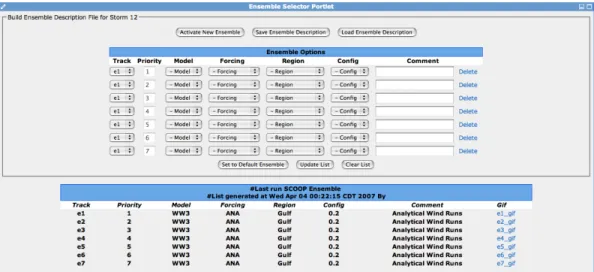
Figure 4.12: The ensemble selector portlet showing how to select ensembles based on options including track, model, forcing etc.
Currently, another two portlet interfaces for ensemble selection shown in Figure??and advanced resource selection shown in Figure 4.13 are being developed for the CCT SCOOP portal.
4.3
UCoMS & Numerical Relativity
The UCoMS project (3), sponsored by the Department of Energy and the Louisiana Board of Regents, is researching and developing new Grid computing and sensor network tech-nologies for the management of energy resources. Reservoir simulations are widely used to predict and optimize the production of oil and gas reservoirs, analyzing a myriad of uncer-tainties in the geophysical structure of the reservoir as well as operational factors such as well location. A number of reservoir simulations are involved in a typical uncertainty anal-ysis. The result dataset of a single simulation depends on the configuration of the simulator, whose average size reaches up to 50 Megabytes or so. Massive simulations lead to storage needs which cannot be easily accommodated with a typical storage resource. A similar
4.3. UCoMS & Numerical Relativity 24
Figure 4.13: The advanced resource selection portlet showing how to select ensembles based on advanced options including job manager, wallclock, hotstart etc.
scenario happens in the Numerical Relativity group at CCT, where mass data are generated from simulations, e.g. two orbiting black holes. To facilitate future comparison and anal-ysis on results from different runs, we developed and deployed a data archive system for each project to store simulation results. Numerical relativity is the oldest application area of Cactus project (22), for which an array of cactus portlets were developed by Ian Kelley. These two archive systems used similar Grid services (e.g. GridFtp, RLS (23)) and Grid environment and functioned similarly to the SCOOP archive, except that they used different sets of meta data. The archives are implemented with a client-server model. The archive clients are deployed on the computational resources, where simulations run. Once a simulation is finished, its results are pushed to an archive server asynchronously using a transmission protocol of choice with a set of meta data.
As shown in Figure 4.14 and Figure 4.15, portlets are developed and deployed to access archive systems so that research scientists are free from the traditional command line to check out the simulation history records, and can easily set up query conditions via
Web-4.3. UCoMS & Numerical Relativity 25
Figure 4.14: The UCoMS archive portlet showing how to set up requirements including user name, host name, dates etc to query against the RLS archive
Figure 4.15: The NumRel archive portlet showing how to set up query requirements and the query result set based on the requirements specified
4.4. LPFS 26
based interface, for example, by user name, host name, file name, or by date, or even by such finer conditions as algorithm, simulator etc. Furthermore, wildcard characters can be utilized to accommodate unknown metadata or to select a range of files.
For example, via the archive portlet in the UCoMS ResGrid portal, a petroleum engineer may want to query the archive system about a run conducted within the last 30 days. The user specifies a date range in the portal and submits the query to the portal server. The portal queries the archive system, and returns all the data set entries corresponding to that time frame. If this user is interested only in which algorithm the results are generated by, he/she can restrict the searching criteria to a particular simulation algorithm. The end result would then show all the simulation results from the specified algorithm which occurred within the last 30 days.
4.4
LPFS
The Lake Pontchartrain Forecasting System (LPFS) is a collaboration which joins CCT with the Institute for Marine Sciences at UNC and the US Army Corps of Engineers using the computational resources of the Louisiana Optical Network Initiative (LONI) (24). The primary objective of this project is to create an automated wind speed and water level forecast system for Lake Pontchartrain on distributed LONI resources and help the Corp of Engineers to determine when to initiate canal gate closures. The general procedure is to create an ensemble of multiple ADCIRC storm surge simulations based on the consensus storm forecast from the National Hurricane Center and perturbations to this forecast. Winds are generated using a synthetic wind model that has been coded as an ADCIRC subroutine to maximize execution speed. Initial outputs are water level and wind speed time series plots along the southern shore of Lake Pontchartrain near the mouths of the drainage canals.
4.4. LPFS 27
Figure 4.16: The LPFS portlet showing the storm information including alert level, location etc. and simulation status and outputs
4.4. LPFS 28
The LPFS framework creates an ensemble of multiple ADCIRC storm surge simula-tions for each storm. Figure 4.16 shows a portlet developed for the LPFS project. This portlet provides an interface to access the storm information, e.g. alert level (yellow, or-ange, or red) and location, and keep track of ADCIRC storm surge simulations for the storm, e.g. its running status and outputs.
Chapter 5
An Integrated Portal for High
Performance Computing
5.1
Science Drive for An Integrated Portal
Science portals now exist at CCT for a broad range of science collaborations, includ-ing efforts in oceanography and coastal sciences (SURA SCOOP), petroleum engineer-ing (UCoMS), numerical relativity (Cactus), and LPFS at the Louisiana State University’s Center for Computation & Technology. The close collaborations among research scientists across the center motivated an investigation of the integration of all CCT principal portals into one single highly collaborative portal.
From the user perspective, the integration portal relieves them from maintaining a dif-ferent account on each portal, and provides them the flexibility to customize their personal portal of research interest across projects. From the institution perspective, the integration portal could cut the cost of purchasing additional machines and human resources to main-tain those portals and machines. From the portal developer and administrator perspective,
5.2. Design 30
the integration portal provides them the possibility of centralized management of all in-stitutional portals under one GridSphere framework, and greatly ease their work on portal maintenance. For example, they only need regularly upgrade one GridSphere framework, intead of upgrading different Gridsphere framework for different science portals on diff er-ent machines. A similar situation happens for deploying or upgrading generic portlets that can be used by different projects. In the integration portal, all portlets and their services are deployed in one GridSphere framework which allows developers to reuse portal services between different projects and develop portlets and services to utilize or manage data across different projects. For example, notification services in Cactus projects can be reused in the SCOOP project.
5.2
Design
A collaborative science portal for high performance computing shown by Figure 5.2 was developed at CCT to meet the needs across disciplines. The components of such a col-laborative portal come from a number of active major projects at CCT, each of which has demonstrated its unique features and functionalities in its particular area.
Figure 5.1 shows the architecture of CCT integration portal based on the GridSphere framework. Users from each project are restricted to access portlets for just that project in addition to common portlets, such as generic Grid portlets (Credential Retrieval, File Browser, etc) and Resource Co-scheduling portlet. A user, who is a member of multiple projects can subscribe to all portlets from those projects.
Portlets from each project usually use portal services from that project for application-specific functionality and business logic. They can also use portal services from other projects. For example, the credential portlet calls the credential service to retrieve proxy
5.2. Design 31
Figure 5.1: The architecture of the CCT integration portal showing interaction among portlets, portal services, and Grid Middleware
5.2. Design 32
Figure 5.2: The home page of CCT integrated portal showing the integration of HPC, SCOOP, UCoMS, LPFS portals into one united institute portal
credentials from a MyProxy server, and later a job submission portlet can get the retrieved credentials to authenticate with Grid resources. Since most portlets in the Gridsphere do not directly interact with each other, they can communicate via the service layer.
Portal services themselves can use or extend services built into the GridSphere frame-work, other portal services, as well as some third-party packages. For example, the UCoMS portal services use the GridPortlets portal services to interact with Grid resources, such as submitting jobs and managing remote files. The integration portal facilitates the interaction between portal services. As most projects’ portal services utilize the GridPortlets services, we only need deploy one copy in the integration portal. This portlet-based, service-oriented architecture greatly speeds up portal development and deployment, and exhibits high ex-tensibility.
5.3. Implementation 33
5.3
Implementation
5.3.1
Challenging Issues
Just as developing other portals, we first developed a prototype collaborative portal using Gridsphere2.1. We deployed each single project to the integration portal, and generated the collaborative home page by differentiating tabs to show homepages of component portals. However, this initial integration exposed the following problems:
• Layout issue: Portlets from different component portals sharing common names have tab conflict.
• Portlets dependency issue: Portlets with the same functionalities from different com-ponent portals such as credential management and job submission have duplications.
• Social issue: Login problems with users having different account name/password on different component portals.
• Security issue: Portlet visibility among portal users from different projects.
Layout Issue
In GridSphere, the portlets layout in the portal uses a nested tabbed pane approach. A tabbed pane can contain a list of tabs, and a tab can contain a tabbed pane. After we initially deployed all the CCT major portals into the integration science portal, the tabbed pane on the integration portal can be seen on Figure 5.3. In a portal language, the layout of the integration portal includes a tabbed pane that contains tabs such as Welcome, Data, Models etc, and the data tab contains a lower level of tabbed pane which includes tabs Archive, Parser and Files. Some problems were identified with this initial integration. For
5.3. Implementation 34
Figure 5.3: The screenshot showing the problematic tabbed-pane layout of the integration portal
Figure 5.4: The screenshot showing the well-organized tabbed-pane layout of the integra-tion portal
example, lower level portlets such as Data portlet and Models that belong to a higher level SCOOP project spread out at the same level with UCoMS portlet, which is another higher level project. Also, sometimes, portlets from different component portals sharing common names have tab conflict. For example, both the SCOOP portal and UCoMS portal have the simulation portlet.
Portlets Dependency Issue
In the integration portal, all portlets and their services are deployed in one GridSphere framework which allows developers to reuse portal services between different projects and develop portlets and services to utilize or manage data across different projects. Portlets with same functionalities from different component portals such as credential manage-ment and job submission may have duplications. Figure 5.5 shows the duplicate credential portlets on the integration portal.
Figure 5.5: The screenshot showing the duplicate credential portlets on the integration portal
5.3. Implementation 35
Figure 5.6: The screenshot showing the resulting layout of the integration portal after ex-tracting shared portlets among component portals
Social Issue
On the one hand, at the Center for Computation & Technology, research scientists from different domains more often than not have close collaborative opportunities. Most of the faculties and students are actively involved in a number of projects, for example research scientists in data management may be interested in building data archive systems for a wide range of applications, such as data archive for storing and retrieving result datasets from large-scale reservoir simulations, similar data archive serving the same purpose for black hole simulations. Before we implemented the idea of integrating all CCT major portals into one collaborative portal, researchers may need to request an account at each portal, and to test and compare history record at different places. On the other hand, for a user across serveral projects, it may have different accounts on different component portals, which are hard to maintain.
Security Issue
In addition to the social issue, the security issue is also complicated. When the user logs on the integration portal, how does the portal recognize its identity and roles in different projects and them grant them the appropriate priviledges in the integration portal? For ex-ample, a user can only access portlets from projects he/she works on. The project manager may access some administration portlets that ordinary team members can’t access. All such issues should be addressed in the integration portal.
5.3. Implementation 36
5.3.2
Solution
Later on, we developed a development version of the integrated portal to resolve above issues. To resolve the conflict tab issue, first, we re-organized the layout by employing sep-arate tabs to differentiate different projects. We grouped portlets belong to each component portals in one group so researchers from different projects can customize personal portals by subscribing groups of research interest. Figure 5.4 shows the current tabbed-pane layout of the integration portal. Since some of the component portals have portlets with common functionalities, such as credential management and job submission which are dependencies upon Gridportlets, we decided to extract those shared portlet and created a separate tab as shown by Figure 5.6 .
Authentication: GridSphere Password & LDAP modules
As far as the login problems concerned, on the one hand, to free CCT researchers from the procedure of applying accounts on different component portal if they do not already have one, or memorizing the locations and account name/password for different component portals, we decided to use CCT unique internal LDAP account as authentication. On the other hand, researchers outside CCT can apply portal account on the portal homepage as usual.
GridSphere supports authentication via one or more configurable modules. Taking into account of user convenience across the center, in the collaborative portal, a LDAP authen-tication module is configured in conjunction with the default Gridsphere account/password module. Since both the Gridsphere Password and LDAP Authentication modules are con-figured, Gridsphere will try them all in configured priority order until one succeeds. The de-fault configuration includes a login portlet with a form for username/password entry. This
5.3. Implementation 37
form data is submitted to an authentication servlet which in turn engages an authentication service. The authentication service is responsible for performing the actual authentication, looking up user attributes via a directory service such as LDAP and setting up the user context and layout based upon the authenticated identity. At the first time a user logs on the portal, the portal will automatically import its account information except the password from the LDAP database to the Gridsphere database. As a result, the login portlet at the collaborative portal allows a CCT user to log onto the portal using its CCT LDAP account. We have enhanced the portal to automatically get the more user information from LDAP and populate the portal database, such as its full name, email address, etc.
Authorization: Role Based Access Control
In addition to authentication, authorization is another challenging issue the collaborative science portal brought up. Some portlets in a particular component portal may be only accessible to the users from this project. For example, people outside SCOOP project may be granted the access to SCOOP archive portlet, but can not be granted the access to SCOOP ensembles portlet to perform job submission. The goals of authorization are to restrict system access to those users or entities which actually need it. In addition to preventing unwelcome system usage, authorization is also used to limit the possible actions that are allowed by a properly authenticated user. Typically, this means following the of least privilege: a user should only be granted the lowest authorization level needed to carry out the desired action.
In GridSphere, a role-based access control mechanism is taken in use, in which users are assigned roles and these roles are used as the unit of authorization. Currently, users can be assigned to one of four role categories: Guest, User, Administrator, and Super-user, with increasing access levels. Each portlet is associated with a required role to restrict users
5.3. Implementation 38
access to it. For example, users with Guest role and User role can not access the portlet with a Administrator role. The problem is that those four roles in GridSphere are fixed and we can not create new roles with different privileges. In practice, most users are with a User role. As a result, we can not provide a finer access control to portlets by using the built-in role-based access control mechanism.
To solve this problem, the author exploited another concept in GridSphere, portlet group. To ease the portlet subscription, GridSphere supplies portlet group management. Each portlet in GridSphere can be assigned to one or more groups and each group can have its own settings. Utilizing those settings, the author implemented a form of fine role-based access control to portlets. Granting users access to portlet groups is primarily done through a Group Manager Portlet that only the portal administrators have access to. Each port-let group can be designated as: public, private, and hidden. Anyone can add themselves to a public group by subscribing the group on the portal, while private groups require an approval. Administrator approves membership requests by email. A hidden group is not displayed to users. Only the portal administrator may add a user to a hidden group as necessary.
Chapter 6
Conclusion
High performance computing applications are common in many scientific fields. Grid tech-nology is intended to lower the barrier for access to HPC and bring it to the mass. How-ever, Grid computing is still complex and hard to use for researchers from fields other than Computer Science. This report describes an array of Grid-enabled portlets for resource allocating, data management, resource monitoring at LSU’s Center for Computation & Technology. Some of these portlets are being used by researchers from different fields, and their web-based interfaces have thus far been well received. In some sense, this work shows that combining Grid technology and portal technology may be an approach to bring HPC to the general computational science community.
The other piece of work discussed in this report explores the integration of all CCT science portals for principal active projects. This involves challenge in resolving login problems with users having different account name/password on different component por-tals, and portlets visibility problems among users from different projects. This integration is inspired by the science drive in such a collaborative research environment as CCT. Most projects at CCT require HPC and share computer resources and infrastructures. For
40
ple, these projects are using or will use the Louisiana Optical Network Initiative (LONI), which is a fiber optics network that connects supercomputers at Louisiana’s research uni-versities, allowing computation speeds over 1000 times the rate previously possible, and transforming the research capability of Louisiana’s educational institutions. The integra-tion portal can provide a centralized environment to manage LONI resources and ease different projects to share the utilization of LONI resources. From the user perspective, the integration portal not only relieves them from maintaining a different account on each por-tal, and provides them the flexibility to customize their personal portals of research interest, but also bring them the convenience that they only have to go to one place to access all their projects. At the same time the integration portal also provides a mechanism to introduce new tools for users. From the institution perspective, an integration portal will cut the cost of purchasing additional machines and human resources to maintain those portals and machines. From the portal developer and administrator perspective, the integration portal provides them the possibility of centralized management of all institutional portals under one GridSphere framework, and ease them from regularly upgrading different GridSphere frameworks for different science portals on different machines.
Usually, one organization often has one major portal for user to access, however, for such a collaborative environment as CCT, a number of projects are funded and actively running, different portals for different projects are in need for researchers from different field. The integration of science portals for a number of ongoing projects at CCT is the first exploration across the institution. Four major problems associated with the layout, portlets dependency, social needs and security that are unique to the integration portal were iden-tified and resolved. Since the last two issues are in large authentication and authorization issues, the author exploited the concepts and features provided by GridSphere and resolved the login problems by utilizing LDAP module in conjunction with GridSphere password
41
authentication module. On the regard of authentication, the author also utilized the role-based access control feature from GridSphere to efficiently manage the portlet visibility, and restrict system access to those users or entities which actually need it.
Most of the work described here is based on the GridSphere framework which provides well-designed and powerful APIs and a rich User Interface tag library, both of which ease application portal development. However, several issues may need attentions: firstly, the portlet access control is still weak and not easy to configure, partly because GridSphere only provides fixed four roles and does not allow to create roles with different fine privi-leges. Secondly, upgrading GridSphere is still not easy and may have some problems for some older versions, especially during the GridSphere database upgrade. It will be help-ful if GridSphere provides a script to ease the upgrade process. Also, our investigation of integrating a number of project portals into a united institute portal triggers another ex-pectation from GridSphere. It will be helpful if GridSphere can provide an access control or management mechanism for developers so that even under the circumstance that a por-tal developer commits bad codes to its own project porpor-tal, other porpor-tal or portletls on the integration portal will not be wholly collapsed.
BIBLIOGRAPHY 42
Bibliography
[1] I. Foster, C. Kesselman, S. Tuecke. “The Anatomy of the Grid: Enabling Scalable Virtual Organizations”.International J. Supercomputer Applications, 15(3), 2001. [2] SURA Coastal Ocean Observing Program (SCOOP). February 20, 2007,
http://scoop.sura.org/.
[3] The UCoMS Project Home Page. February, 2007,http://www.ucoms.org/. [4] The AEI NumRel Project Home Page. March, 2007,
http://www.cct.lsu.edu/about/focus/numerical/index.php/
[5] The LPFS Project Home Page. March, 2007,
http://www.cct.lsu.edu/projects/LPFS/
[6] J. Novotny, M. Russell, and O. Wehrens. “GridSphere: A Portal Framework for Build-ing Collaborations”, inProceedings of 1st International Workshop on Middleware for Grid Computing, Rio de Janeiro, 2003.
[7] Michael Russell, Jason Novotny, Oliver Wehrens. “The Grid Portlets Web Application: A Grid Portal Framework”. March 2007.
http://www.GridSphere.org/gridsphere/html/publications/GridPortlets.pdf
[8] M. Dahan, M. Thomas, E. Roberts, A. Seth, T. Urban, D. Walling, J.R. Boisseau. “Grid Portal Toolkit 3.0 (GridPort)”, inProceedings. 13th IEEE International Sym-posium on High performance Distributed Computing, 4-6, pp.272 - 273, June 2004 [9] Open Grid Computing Environments Collaboratory.http://www.ogce.org/, cited
BIBLIOGRAPHY 43
[10] Gregor von Laszewski, Ian Foster, Jarek Gawor, and Peter Lane. “A Java Commodity Grid Kit”, in Concurrency and Computation: Practice and Experience, vol. 13, no. 8-9, pp. 643-662, 2001
[11] Chongjie Zhang, Ian Kelley, Gabrielle Allen. “Grid Portal Solutions: A Comparison of GridPortlets and OGCE”, to appear in the special issue GCE05 of Concurrency
and Computation: Practice and Experience, 2006.
[12] GridLab: A Grid Application Toolkit and Testbed Project Home Page. March, 2007.
http://www.gridlab.org.
[13] The Java Community Process. “JSR 168: Portlet Specification v1.0”. 2003.
http://www.jcp.org/en/jsr/detail?id=168.
[14] The Globus Alliance Home Page. February 20, 2007,http://www.globus.org. [15] I. Foster. “Globus Toolkit Version 4: Software for Service-Oriented Systems.IFIP
In-ternational Conference on Network and Parallel Computing, Springer-Verlag LNCS
3779, pp 2-13, 2005.
[16] J. Basney, M. Humphrey, and V. Welch. “The MyProxy Online Credential Reposi-tory”. InSoftware: Practice and Experience, 2005
[17] The Enlightened Project Home Page, March 2007,
http://www.enlightenedcomputing.org.
[18] Jon MacLaren and Mark Mc Keown. March, 2007,
BIBLIOGRAPHY 44
[19] Chongjie Zhang, Chirag Dekate, Gabrielle Allen, Ian Kelley and Jon MacLaren, An Application Portal for Collaborative Coastal Modeling,Concurrency Computat.: Pract. Exper., 18, Pages 1-11, (2006)
[20] J. MacLaren et al.. “Shelter from the Storm: Building a Safe Archive in a Hostile World”, to appear inProceedings of the The Second International Workshop on Grid Computing and its Application to Data Analysis (GADA’05), 2005.
[21] W. Allcock, Editor, “GridFTP: Protocol Extensions to FTP for the Grid”, Global Grid Forum Draft Standard (April 2003),
http://www-isd.fnal.gov/gridftp-wg/draft/GridFTPRev2.pdf.
[22] The Cactus Project Home Page. March, 2007,
http://www.cct.lsu.edu/projects/CactusCode/.
[23] Ann L. Chervenak, Naveen Palavalli, Shishir Bharathi, Carl Kesselman, Robert Schwartzkopf. “Performance and Scalability of a Replica Location Service,” in
13th IEEE International Symposium on High Performance Distributed Computing (HPDC-13 ’04), vol. 00, pp. 182-191, 2004.