856 | P a g e
NFS AND SSH
From a Linux Cluster Point of View
Akshat Bansal
1, Amitabh Tiwari
2, Jay Sheth
31,2,3
Department of Computer Engineering, Fr.C.R.I.T, Vashi, University of Mumbai, (India)
ABSTRACT
Network File System (NFS) developed in 1984 is a distributed file system allowing a user on a client to access files
over a network as it would have done in case of its local memory. Secure Shell (SSH) is a cryptographic network
protocol for securing data communication. It establishes a secure channel over an insecure network in a
client-server architecture, connecting an SSH client application with a SSH client-server. Common applications include
remote command-line login, remote command execution.NFS and SSH play a key role in the setting up of a Linux
cluster. The cluster can also be set up using NIS server and creating the same user on every node. Here we use
demonstrate and analyse the NFS and SSH in order to set up a Linux cluster on Ubuntu (14.04 LTS).
Index Terms: Client server architecture, NFS, Linux cluster, SSH.
I
INTRODUCTION
Setting up a Linux cluster follows a typical client server architecture with server containing the required shared files
using NFS. MPI (Message Passing Interface) provides a mechanism through which user level processes
communicate with each other. Now communication involves invoking the right process securely. For authentication
SSH is used. SSH involves a typical public and private key authentication. Thus for communicating with n nodes 2n
keys are required. SSH generates keys as an ordered pair of public and private key. Considering this ordered pair as
a key we require n keys.
NFS is both a specification and implementation of a software system for accessing remote files across LANs (or even
WANs). NFS is an example of client-server network file system[1]. SSH is a cryptographic network protocol for
securing data communication. It establishes a secure channel over an insecure network in a client-server architecture,
connecting an SSH client application with a SSH server. Common applications include remote command-line login,
remote command execution, but any network service can be secured with SSH.
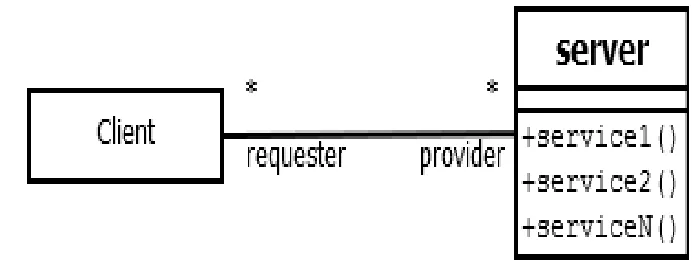
857 | P a g e In this architectural model a subsystem, the server, provides services to other subsystems called the clients, which are
responsible for interacting with the clients. In case of a cluster the request for a service is usually done via a remote
procedure call mechanism. The control flow in the clients and the server is independent except for the
synchronization to manage requests or receive calls.
Fig 1. Client/Server architectural style
The client server architectural style is a specialization of repository in which the central server is managed by a
process. It is possible that in this architecture that there are multiple servers serving multiple clients and multiple
clients requesting from multiple servers [2].
III NFS (NETWORK FILE SYSTEM)
NFS views a set of interconnected workstations as a set of independent machines each having its own set of
independent file systems. The main aim of NFS is to allow some degree of sharing among these file systems. Sharing
is permitted between any two machines and this affects only the client machine and no other machines. In a typical
cluster there exists one server on which a directory is shared between all the workstations. Then from any
workstation the required program can be executed just by specifying the number of processors available.
The NFS specification distinguishes between the services provided by a mount mechanism and the remote-file access
service. Thus there are two protocols: mount protocol and NFS protocol.
3.1. The Mount Protocol
The mount protocol initially establishes the initial logical connection between a server and a client. Here a server
process is present on each machine outside the kernel performing the protocol functions. This includes the name of
the remote directory and the name of the server storing it. The server maintains an export file that specifies the local
file system that it exports for mounting. In Ubuntu this file is fstab located in /etc/fstab. These can be edited only
858 | P a g e
3.2. The NFS Protocol
This protocol contains a set of RPCs for remote file operations which include:
1. Searching for a file within a directory.
2. Reading a set of directory entries.
3. Manipulating links and directories.
4. Accessing file attributes.
5. Reading and writing of files.
Some other features are:
1. Stateless servers.
2. File operations must be idempotent.
3. Server crash invisible to client
4. Performance upgrades by using disk cache of each processor.
However maintaining a list of clients does violate the statelessness of a server. But this list is not essential for correct
operation of the client or the server. Thus it need not be restored after as server crash. It might also contain
inconsistent data. Thus it is treated only as a hint.
3.3. Remote operations
There exists a one-to-one correspondence between regular UNIX system calls for file operations and the NFS
protocol RPCs. Thus a remote file operation can be translated directly to the corresponding RPC. No direct
correspondence exists between a remote operation and an RPC. Instead file blocks and file attributes are cached
locally. These form the two caches. When a file is opened, the kernel checks with the remote server to determine
whether to fetch or revalidate the cached attributes. By default cached attributes are discarded after 60 seconds.
3.4. Implementation in the Operating System
NFS is integrated into the OS using VFS (Virtual File System). The following illustrates a typical operation on an
already open remote file is handled: The client initiates the system call with a regular system call. The OS maps this
to a VFS operation on the appropriate node. The VFS identifies file to be on a remote node and invokes appropriate
NFS procedure. An RPC call on the VFS of the remote system finds it to be local and invokes the appropriate file
operation [2].
3.5. Setting up a NFS server and client.
Step 1: Install NFS
Server : sudo apt-get install nfs-server
859 | P a g e Step 2: Sharing master folder
Server : sudo mkdir/share
where, share = Name of the shared folder.
Then share the contents of this folder located on the server node to all the other nodes. In order to this we edit the
/etc/exports file on the master node to contain the additional line
/share *(rw,sync)
Then the nfs service is restarted on the master node to parse the configuration once again using the command:
sudo service nfs-kernel-server restart
Step 3: Mounting master in nodes
In /etc/fstab/ of all the clients we write:
master:/share share nfs
where,
master = Name of the master node
share = Name of the shared file
The above steps are sufficient for NFS to be set up on client server architecture. But in case of setting up a cluster, a
user must be created on all machines having the same name and same user id, and then on each machine the
ownership of the „share‟ file is given to the user created above. [3]
860 | P a g e
IV OPEN SSH
OpenSSH is a suite of network-level security tools based on the SSH protocol which help to secure network
communications via the encryption of network traffic over multiple authentication methods and by providing secure
tunneling capabilities.Secure Shell (SSH) is a cryptographic network protocol for securing data communication. It
establishes a secure channel over an insecure network in a client-server architecture, connecting an SSH client
application with an SSH server. Common applications include remote command-line login, remote command
execution, but any network service can be secured with SSH.
Now from the cluster point of view: Setting up a cluster involves first creating a shared directory through which the
files can be shared, then for process to process delivery OpenMPI. OpenMPI requires password less SSH to be
implemented. The main purpose of implementing password-less SSH is to permit remote login. A remote node A can
login virtually from to another node B and vice versa. Here we explain the mechanism through which we
implemented the password-less SSH.
4.1. Installing OpenSSH
While doing this make sure that the OpenSSH server is installed only on the server. Here we have a user shared
among all the nodes connected in a cluster. For our ease we have used static IP addresses. The command below is
executed on the server after logging on the shared user from the server.
Server : sudo apt-get install openssh-server
4.2. Generating Key and fingerprints
Once the OpenSSH server is installed then, the next step is to generate the key that will be used for authentication.
The following command is used for generating the key. Here we generate an RSA key pair. The command creates
one private and one public key.
Server : ssh-keygen -t rsa
Now we add this key to authorized keys. In order to do this we use the following commands:
Server : cd .ssh
Server :.ssh$ cat id_pub.rsa >> authorized_keys
4.3. Testing SSH run
In order to test SSH run use the following command. First run the command at the server and then at the client.
Server : ssh client-name host-name
where
client-name is the name of the client machine
861 | P a g e Here while first executing the above command we were prompted whether to set up a fingerprint and add the client
permanently to the list of authorized users for the server. Here we answered yes. After successful creation of
fingerprint the client is added to the list of authorized user for the server.
The above process has to be repeated for all the client machines that you want to connect to the server. Thus for „n‟ clients there are „n‟ distinct fingerprints.
4.4. Try remote logging in
Now try the following command from server/client
Server : ssh client-name
Client : ssh host-name
In both of the cases, remote login works.
4.5. Fingerprinting
Here we explain some part of fingerprinting needed for the above procedure. Fingerprinting is basically creation of a
fingerprint for the client that can be used for authentication by the client. Fingerprint is basically a hash value created
at the server side and transmitted by the server to the client. Now we have generated an RSA key pair at the server
side, now we hash this value on the basis of session and various other parameters and this is then sent and stored at
the client side. In order to check the fingerprint created for a client the following command is used.
Client : ssh-keygen –l –f/etc/ssh/ssh_host_rsa_key
Fig 3. Fingerprinting for authentication
V CONCLUSION
The basics needed for setting up the cluster are studied and implemented in Ubuntu 14.04LTS. The flow of data
from a cluster can be seen as master to process, then process to process delivery which uses OpenMPI and
authentication using password-less SSH. Then the data is processed at the client and then client sends the data back
to the server in a similar fashion. From NFS point of view, NFS is integrated in the operating system using the VFS.
862 | P a g e
REFERENCES
[1]. Abraham Silberschatz, Peter B. Galvin, Greg Gagne, “Implementing File Systems,” in Operating System
Concepts theirPublished Book, 8th edition, Greater Noida, Country India: (Magic International) Wiley, 2010.
[2]. RFC 1813 NFS Version 3 Protocol Specification.