Mastering AWS Development
Develop and migrate your enterprise application to the
Amazon Web Services platform
Uchit Vyas
BIRMINGHAM - MUMBAI
Copyright © 2015 Packt Publishing
All rights reserved. No part of this book may be reproduced, stored in a retrieval system, or transmitted in any form or by any means, without the prior written permission of the publisher, except in the case of brief quotations embedded in critical articles or reviews.
Every effort has been made in the preparation of this book to ensure the accuracy of the information presented. However, the information contained in this book is sold without warranty, either express or implied. Neither the author nor Packt Publishing, and its dealers and distributors will be held liable for any damages caused or alleged to be caused directly or indirectly by this book.
Packt Publishing has endeavored to provide trademark information about all of the companies and products mentioned in this book by the appropriate use of capitals. However, Packt Publishing cannot guarantee the accuracy of this information.
First published: June 2015
Production reference: 1240615
Published by Packt Publishing Ltd. Livery Place
35 Livery Street
Birmingham B3 2PB, UK. ISBN 978-1-78217-363-2
www.packtpub.com
Credits
Author Uchit Vyas Reviewers Goldin Evgeny Naoya Hashimoto Dr. Ketan ParmarCommissioning Editor Kunal Parikh
Acquisition Editor Meeta Rajani
About the Author
Uchit Vyas
is an IT industry veteran, a Cloud technologist at heart, and a hands-on Cloud automation lead at Opex Software, for Cloud automation and DevOps. He is responsible for the delivery of solutions, services, and product development. He explores new open source technologies and defines architecture, roadmaps, and best practices for enterprises. He has consulted and provided training on various tools and technologies, including Cloud computing, Big Data, Hadoop, ESB, infrastructure automation (Chef/Puppet/Ansible), Java-based portals, and CMS technologies to corporations around the world.He has completed his engineering in computer science from Gujarat University. He worked as a senior associate at Infosys Limited in the Education and Research Team, during which time he worked on Big Data analytics, Cloud security, and virtualization.
He has also published books on Mule ESB, AWS Development Essentials, and AWS DynamoDB and continues to write books on open source technologies.
He hosts a blog named Cloud Magic World, where he posts tips and events about open source technologies mostly related to Cloud on cloudbyuchit.blogspot.com. His Twitter handle is @uchit_vyas.
I dedicate this book to my family and friends. A special thanks to my loving parents, Hamendra and Shreya Vyas whose words of encouragement and push for tenacity always provided the necessary inspiration. I dedicate this book to my wife Riddhi Vyas who never left my side during the whole writing process and is very special to me. I also dedicate this book to my manager and friend Dr. Manoj Manuja who has supported me throughout the process and given so much encouragement. I will always appreciate all that he has done, especially for helping me to develop my technical skills. And last but not the least, I would like to thank to my best friend and colleague Prabhakaran for being there for me throughout the book program.
About the Reviewers
Goldin Evgeny
is a Ruby, Groovy, and Scala software developer who turned into an automation and release engineer to introduce order where chaos usually reigns. On an average day, all things cloud, automation, and continuous delivery get his immediate attention. Back at home, he's a father to his 2-year-old son, dreaming of a day when a proper tech talk can happen between the two. When he gets any spare time, he enjoys exploring the subjects of functional programming, Web performance, and TCP/IP networking. He's an open-source developer, speaker, and passionate advocate when it comes to tools and techniques making for smooth and painless release processes.Naoya Hashimoto
has been working on system designing, implementing, and system maintenance as an infrastructure engineer at Data Center, Management Service Provider, and Housing/Hosting Service Provider for years. After meeting public Cloud services a few years ago, his career, interests, and motives began to face toward public Cloud, including private and hybrid; services related to Cloud computing such as network, storage, orchestration, job automation, and monitoring; and open source software as well. He has worked on Mastering AWS Development, Building Networks and Servers Using Beaglebone, PostgreSQL Cookbook, Icinga Network Monitoring, and Building a Home Security System with BeagleBone all by Packt Publishing.Thanks to Packt Publishing for giving me the opportunity to review this book and thanks to the author and coordinator for their contributions to this book. I did enjoy reviewing this book and studying AWS further because I got the opportunity to examine several AWS services that I've never used through this review. I hope this book will be your first step to AWS!
years. He has worked in various technologies in Java and explored all three areas of Java (SE, ME & EE). He has provided a lot of solutions on StackOverflow and has contributed to various blogs and sites. He is passionate about Java, Android, grid computing, user interface, open-source, and Cloud computing. He has been an eminent speaker for tools and technologies related to Java Enterprise and Android Mobile. He is the leader and founder of JUGAhmedabad (Java User Group Ahmedabad).
www.PacktPub.com
Support files, eBooks, discount offers, and more
For support files and downloads related to your book, please visit www.PacktPub.com.
Did you know that Packt offers eBook versions of every book published, with PDF and ePub files available? You can upgrade to the eBook version at www.PacktPub. com and as a print book customer, you are entitled to a discount on the eBook copy. Get in touch with us at [email protected] for more details.
At www.PacktPub.com, you can also read a collection of free technical articles, sign up for a range of free newsletters and receive exclusive discounts and offers on Packt books and eBooks.
TM
https://www2.packtpub.com/books/subscription/packtlib
Do you need instant solutions to your IT questions? PacktLib is Packt's online digital book library. Here, you can search, access, and read Packt's entire library of books.
Why subscribe?
• Fully searchable across every book published by Packt • Copy and paste, print, and bookmark content
• On demand and accessible via a web browser
Free access for Packt account holders
If you have an account with Packt at www.PacktPub.com, you can use this to access PacktLib today and view 9 entirely free books. Simply use your login credentials for immediate access.
[ i ]
Table of Contents
Preface vii
Chapter 1: Architecting in the Cloud
1
AWS services 2
The AWS global infrastructure 3
Regions and Availability Zones 6
What are AWS regions? 7
What are AWS Availability Zones? 9
How to use AWS AZs 10
AWS EC2 and IAM 11
The AWS EC2 functionality 11
Instance types and pricing 12
Selecting an instance type 12
AWS EC2 instance numbers and pricing 17
Billing and pricing 17
Ephemeral versus persistent storage 18
What is ephemeral storage? 18
How to use persistent storage with your instance 24
Scalability, elasticity, and bootstrapping 26
Bootstrap your instances 27
Black belt booting 28
Identity and Access Management 28
Accessing IAM 29
Authentication and authorization 31 Summary 34
[ ii ]
Chapter 2: Elastic and Fault-tolerant Infrastructure
35
The AWS Elastic infrastructure by Auto Scaling 36
Working with Auto Scaling 37
Ways to access the Auto Scaling service 37 Installing and configuring Auto Scaling 38
Installing Auto Scaling prerequisites 38
Working with Auto Scaling using the CLI 42
Getting started with Auto Scaling using AWS Management Console 45
Summary 57
Chapter 3: Storage Lifecycle Management
59
Data storage scaling 59
AWS DynamoDB 60
DynamoDB data types 61
Creating the first SDK project 65
Java SDK operations 70
The DynamoDB local 76
AWS Simple Storage Service (S3) 79
Amazon CloudFront 85
Creating Amazon CloudFront Distribution 86
Amazon RDS management with CLI 91
Authorizing network access 94
Summary 96
Chapter 4: Web Application and Batch Processing Architecture
97
Alarms with Amazon CloudWatch 98
Creating an EC2 instance 101
Batch processing flow 104
Creating an IAM role 105
Creating SQS tasks 107
Creating S3 bucket 108
Launching worker nodes 109
Dispatching work and viewing results 115
Monitoring the cluster 116
Amazon CloudFormation 117
Where should I start on AWS? 122
Case study 122
LAMP on your Amazon EC2 122
Prerequisites 122 Installing and starting the LAMP server 123
File permissions 124
Testing the LAMP web server 124
Summary 125
[ iii ]
Chapter 5: High Availability, Disaster Recovery,
and Amazon VPC
127
Disaster recovery circumstances with AWS 128
Recovery time objective and recovery point objective 128
Backup and restore 129
Pilot light recovery in AWS 130
Warm standby solution 132
Multisite solution 135
Replication of data 137
Architecting with Amazon VPC 139
Launching an instance in the VPC 143
Creating a private subnet 148
Spinning a database instance in the private subnet 148
Creating a Remote Access Software VPN to your VPC 151
Launching an OpenVPN instance 151
Downloading the OpenVPN client 154
Configuring the OpenVPN server 155
Summary 156
Chapter 6: Tools for AWS and Setup Guidelines
157
Working with AWS SDKs and IDE toolkits 158 Working with tools and code libraries 176
Creating an SDK project 177
Java SDK operations 180
DynamoDB Local 185
Command-line interface 187
Summary 191
Chapter 7: Interacting with AWS Using API
193
REST-based APIs 194
Authenticating requests using REST APIs 194
Getting started with API tools 196
Installing API tools 197
Running your first instance 198
Example of EC2 API 198
Data format for DynamoDB 199
HTTP requests 200
Request header 202
Request body 203
Response header 203
[ iv ]
Operations in DynamoDB 204
CreateTable 205 PutItem 205 UpdateItem 206 GetItem 207 Query 208 Scan 209 DeleteItem 210 DescribeTable 210 UpdateTable 211 DeleteTable 212 ListTables 212 BatchGetItem 212 BatchWriteItem 214 Summary 215
Chapter 8: Amazon Beanstalk, CloudTrail, and
Data Warehouse Services
217
Application deployment using AWS Elastic Beanstalk 217
Getting started with Amazon Redshift 227
Configuration options 228
Cluster configurations 230
Interacting with AWS Trail 232
Features and benefits 232
Case study: migrating applications to the Cloud 238 Summary 241
Chapter 9: Bootstrapping and Auto-configuration
243
Black belt booting 244
Bootstrapping instances with AWS CloudFormation 250 Bootstrapping Amazon instances using Chef 252
Continuous integration and deployment 263
Automation with Amazon SWF 265
The workflow execution of Amazon SWF 266
Working with AWS OpsWorks 275
Creating an OpsWorks stack 277
Creating the Rails App Server layer 278
Creating the database layer 279
Adding instances 280
Summary 286
[ v ]
Chapter 10: AWS Billing and Amazon CDN Service
287
Programmatic AWS billing 287
Turning on detailed billing reports 288
Select the detailed billing reports you want to receive 289
Referencing your detailed billing report data 290
Cost allocation reporting 290
Cost control architectures 292
Controlling access to your billing report files 292
CDN service from AWS – CloudFront 293
How CloudFront works 293
Getting started with CloudFront 297
Streaming 307
Summary 307
Chapter 11: Analyzing Big Data with AWS
309
Introducing Big Data and Hadoop 310
Introducing Amazon Elastic MapReduce 310
Provisioning a Hadoop cluster on EMR 311
Hive structural design 323
Metastore 323 Compiler 324
The execution engine 324
Supporting apparatuses 324
Data types 325
Data model 326
Indexing on Hive tables 328
Amazon Kinesis 330
Kinesis terminology 330
Streams 330
Data records 330
Producers 330 Consumers 331 Shards 331
Partition keys 331
Amazon Kinesis Client Library 331
Summary 335
Chapter 12: Miscellaneous Features, AWS Security,
and Troubleshooting
337
Amazon CloudSearch 337
Creating and configuring a search domain 338
Uploading and indexing the data for search 342
Searching your Amazon CloudSearch domain 344
[ vi ]
Amazon Mechanical Turk 347
AWS Security best practices 350
Understanding AWS Secure Global Infrastructure 351
Regions, Availability Zones, and service endpoints 353
Managing keys in the Cloud 353
Managing patches 354
Mitigating compromise and abuse 354
The Trusted Advisor tool 354
Troubleshooting practices 355
Ephemeral disk corruption 355
DNS concerns 356
Resizing or emptying disks 356
Host dispute 356
Security group misconfiguration 356
Summary 357
Chapter 13: Building Applications and AWS Best Practices
359
Application impression 359
Tool mixture 360
Development phase 360
Conventions 361 Handlers 361
Starting with EduCloud 362
Handling instance entreaty 365
Instance entreaty sanction 367
Rejecting an instance entreaty 372
Using RDS and Elastic Beanstalk 374
The application of superlative AWS exercises 375
Best practices with AWS 375
Summary 382
Index 383
[ vii ]
Preface
Mastering AWS Development is a single place in which you can find solutions for all of your issues with Amazon Web Services. This book will explain how to begin and manage different services using the AWS SDKs and APIs as well as the AWS Management Console, a browser-based graphical user interface to interact with the services. It will include a significant number of examples and use cases that can be used by anyone, from an intermediate to an expert. Using the examples in this book, users can perform advanced-level programming and gain the advantages of AWS services in their SDLC at significantly lower costs on AWS.
What this book covers
Chapter 1, Architecting in the Cloud, covers the AWS development platform and its access and how to manage the identity for applications. Later, users will be able to state elasticity, scalability, and bootstrapping functionality using code.
Chapter 2, Elastic and Fault-tolerant Infrastructure, discusses how to create
scalable infrastructure using EC2, EBS, and an Elastic Load Balancer and, as per the requirement from web traffic, how to scale it efficiently. Users will also learn what Auto Scaling is and launch the configuration with EC2 instances and load balancers.
Chapter 3, Storage Lifecycle Management, discusses how to manage the entire life cycle of storage of AWS using different services such as RDS, S3, and Redshift programmatically.
Chapter 4, Web Application and Batch Processing Architecture, covers how to design and develop web applications and their required infrastructure. Users will also learn an alarm mechanism and how to create an environment for a batch processing system on AWS.
[ viii ]
Chapter 5, High Availability, Disaster Recovery, and Amazon VPC, discusses how to create highly available infrastructure for applications and what the vital steps and logic are that should be implemented as a disaster recovery plan. Later, users will also discover how to create Virtual Private Cloud on the AWS Management Console and CLI.
Chapter 6, Tools for AWS and Setup Guidelines, covers how to set up and use the AWS code library. Users will also get practical setup instructions for SDKs and IDE toolkits, which can be used during programming with AWS services. Chapter 7, Interacting with AWS Using API, provides hands-on knowledge about APIs and how to connect AWS services through REST-based APIs. Also, users will learn how to authenticate and serve a request of/from API calls.
Chapter 8, Amazon Beanstalk, CloudTrail, and Data Warehouse Services, discusses how to migrate and host an existing/new app on AWS and how to identify appropriate services for the app. You will find out how to use the Elastic Beanstalk container service, AWS trail, CloudFormation, and how to do Auto Scaling based upon the requirements from end user traffic.
Chapter 9, Bootstrapping and Auto-configuration, covers how to bootstrap AWS EC2 instances with pre-configuration commands for the environment setup and how to use Chef for automation and deployment using code. Users will also learn how the AWS CloudFormation service can work seamlessly with an application and how the SWF and OpsWorks service can be used with the AWS infrastructure.
Chapter10, AWS Billing and Amazon CDN Service, discusses how to do programming for AWS billing, which can be accessed from an application and how to do cost allocation reporting. Users will also learn cost control architecture designs to cut down the cost.
Chapter 11, Analyzing Big Data with AWS, provides brief practical knowledge about big data and Apache Hadoop on AWS Cloud. Users will also learn how to use the EMR and Kinesis services with Big Data analytics and for Hadoop solutions. Chapter 12, Miscellaneous Features, AWS Security and Troubleshooting, discusses advanced services administration and programming with CloudSearch and
Mechanical Turk. Also, users will discover what kind of security AWS provides and how to use those security features at the infrastructure and application level. At the end of this chapter, users will learn some best troubleshooting practices.
[ ix ]
Chapter 13, Building Applications and AWS Best Practices, covers the tools/apps that are available to use with AWS for smooth development/migration and deployment. Later in this chapter, users will also learn integration techniques.
Chapter 14, Third-party Apps and Tools Integration with AWS, is an online chapter which can be found at https://www.packtpub.com/sites/default/files/ downloads/Chapter14.pdf.
What you need for this book
To start using this book, you need the following software/applications to be installed on your system:
• An AWS account • Java 1.6 or higher • Eclipse (Juno or Kepler) • The AWS SDK
• AWS CLI tools • MySQL Workbench
Who this book is for
This book is ideal for programmers, developers, and architects who want to move their existing infrastructure to the AWS Cloud and start using AWS services in all the application tiers using services such as compute, storage, database, queuing, messaging, or mailing in an application, and finally, hosting this application in AWS too. Readers should have a basic knowledge and understanding of Java programs and AWS essentials.
Conventions
In this book, you will find a number of styles of text that distinguish between different kinds of information. Here are some examples of these styles, and an explanation of their meaning.
Code words in text, database table names, folder names, filenames, file extensions, pathnames, dummy URLs, user input, and Twitter handles are shown as follows: "We can include other contexts through the use of the include directive."
[ x ] A block of code is set as follows:
[default]
exten => s,1,Dial(Zap/1|30) exten => s,2,Voicemail(u100) exten => s,102,Voicemail(b100) exten => i,1,Voicemail(s0)
When we wish to draw your attention to a particular part of a code block, the relevant lines or items are set in bold:
[default]
exten => s,1,Dial(Zap/1|30) exten => s,2,Voicemail(u100)
exten => s,102,Voicemail(b100)
exten => i,1,Voicemail(s0)
Any command-line input or output is written as follows:
# cp /usr/src/asterisk-addons/configs/cdr_mysql.conf.sample /etc/asterisk/cdr_mysql.conf
New terms and important words are shown in bold. Words that you see on the screen, in menus or dialog boxes for example, appear in the text like this: "clicking the Next button moves you to the next screen".
Warnings or important notes appear in a box like this.
Tips and tricks appear like this.
Reader feedback
Feedback from our readers is always welcome. Let us know what you think about this book—what you liked or may have disliked. Reader feedback is important for us to develop titles that you really get the most out of.
To send us general feedback, simply send an e-mail to [email protected], and mention the book title via the subject of your message.
If there is a topic that you have expertise in and you are interested in either writing or contributing to a book, see our author guide on www.packtpub.com/authors.
[ xi ]
Customer support
Now that you are the proud owner of a Packt book, we have a number of things to help you to get the most from your purchase.
Downloading the example code
You can download the example code files for all Packt books you have purchased from your account at http://www.packtpub.com. If you purchased this book elsewhere, you can visit http://www.packtpub.com/support and register to have the files e-mailed directly to you.
Downloading the color images of this book
We also provide you a PDF file that has color images of the screenshots/diagrams used in this book. The color images will help you better understand the changes in the output. You can download this file from: https://www.packtpub.com/sites/ default/files/downloads/3632EN_ImageBundle.pdf.
Errata
Although we have taken every care to ensure the accuracy of our content, mistakes do happen. If you find a mistake in one of our books—maybe a mistake in the text or the code—we would be grateful if you would report this to us. By doing so, you can save other readers from frustration and help us improve subsequent versions of this book. If you find any errata, please report them by visiting http://www.packtpub. com/submit-errata, selecting your book, clicking on the errata submission form link, and entering the details of your errata. Once your errata are verified, your submission will be accepted and the errata will be uploaded on our website, or added to any list of existing errata, under the Errata section of that title. Any existing errata can be viewed by selecting your title from http://www.packtpub.com/support.
Piracy
Piracy of copyright material on the Internet is an ongoing problem across all media. At Packt, we take the protection of our copyright and licenses very seriously. If you come across any illegal copies of our works, in any form, on the Internet, please provide us with the location address or website name immediately so that we can pursue a remedy.
[ xii ]
Please contact us at [email protected] with a link to the suspected pirated material.
We appreciate your help in protecting our authors, and our ability to bring you valuable content.
Questions
You can contact us at [email protected] if you are having a problem with any aspect of the book, and we will do our best to address it.
[ 1 ]
Architecting in the Cloud
For many years, application/system analysts and software architects have surveyed and analyzed several important concepts, best practices, and tools to build highly-scalable and fault-tolerant applications or infrastructures. In today's "era of Big Data", these concepts or best practices may be more relevant due to "Big Bang" data, non-predictable web traffic patterns, and the demand for reduced response time. This chapter will introduce, reinforce, and reiterate some of these traditional approaches, and how they can be involved in the context of Amazon Web Services (AWS). We will also discuss some basic concepts of the AWS terminology, which will be helpful in starting to architect with AWS.In this chapter, we will cover the following points: • An overview of AWS services
• The AWS global infrastructure • Regions and Availability Zones
• An overview of AWS EC2, IAM, and EBS • Scalability, elasticity, and bootstrapping • Authentication and authorization Let's start by introducing AWS services.
[ 2 ]
AWS services
The AWS Cloud provides a highly-scalable and fault-tolerant infrastructure on which to deploy web-based solutions, with minimal cost and administration, and more flexibility than your in-house infrastructure or datacenter capabilities:
AWS offers a very good number of infrastructure services. The previous fundamental diagram shows you the AWS terminologies and how AWS services can interact with each other and your web-based apps, to provide solutions to build, maintain, and deploy your applications, needs, a wide range of various technological services which will help you to deploy and manage your applications. Clients and customers always ask: what demonstrates a fully managed and flexible technical infrastructure platform? To start from scratch, you can search for the AWS platform, which delivers an industry-leading infrastructure platform with all the required features that Cloud brings. Also, AWS provides knowledge about how AWS satisfies custom requirements and why users might need each service capability provided by AWS.
[ 3 ]
AWS started contributing to their highly available infrastructure platform in 2006, based on the pay-as-you-go model. After that, whatever they have garnered as services and customers till now is remarkable because they have thousands and thousands of customers across 191 countries who use AWS platform services for their initiatives, and the number is increasing in the AWS customer bucket. AWS provided around 160 features and services in 2012 and around 280 in 2013. In 2014, the number is increasing further.
The AWS global infrastructure
At present, AWS supports nine regions all over the world, which are the East Coast of the U.S., the West Coast of the U.S., Europe, Tokyo, Singapore, Sydney, Brazil, 26 redundant Availability Zones, and 56 Amazon CloudFront points-of-presence, and this number is increasing with time.
It is very crucial and important to have an option to place apps as close as possible to your customers and end users when you create and deploy apps, by ensuring the best possible lowest latency and user expected features and experience for performance. For this, AWS provides regions worldwide. Specific regions are as follows:
• US East (Northern Virginia) region • US West (Oregon) region
• US West (Northern California) region • EU (Ireland) region
• Asia Pacific (Singapore) region • Asia Pacific (Sydney) region • Asia Pacific (Tokyo) region • South America (Sao Paulo) region • US GovCloud
[ 4 ]
Apart from infrastructure-level highlights, AWS have plenty of managed services, which can be the cream of the AWS candy bar! The managed services bucket has the following services:
• Security: For every organization, security is a very vital element. For that, AWS has several remarkable security features, which distinguish it from other Cloud provides. At the moment, I am just underlining the security features at a very high level but we will discuss all the features of AWS security in Chapter 12, Miscellaneous Features, AWS Security and Troubleshooting. The security features of AWS are as follows:
° Certifications and accreditations ° Identity and Access Management
• Global infrastructure: AWS provides a fully-functional, flexible technology infrastructure platform worldwide with managed services with certain characteristics, for example:
° Multiple global locations for deployment ° Low-latency CDN service
° Reliable, low-latency DNS service
• Compute: AWS offers a huge range of various Cloud-based core
computing services, including a variety of compute instances, which can be automatically scaled to justify the needs of your users and application; a fully managed elastic load balancing service; and more fully managed desktop resources on the pathway of AWS Cloud. Some of the common characteristics of computer services include the following:
° Broad choice of resizable compute instances ° Flexible pricing opportunities
° Great discounts for compute resources are always on ° Lower hourly rates for elastic workloads
° Wide-range of networking configuration selections ° A widespread choice of operating systems
° Virtual desktops
° One can save as one grows, with the tiered pricing model
[ 5 ]
• Storage: AWS offers low cost with high durability and availability with their storage services. The pay-as-you-go pricing model with no commitment provides more flexibility and agility in services and processes for storage with a highly secure environment. AWS provides storage solutions and services for backup, archive, disaster recovery, and many more. They also support block, file, and object kind of storages with highly available and flexible infrastructures. A few major characteristics of storage are the following:
° Cost-effective, high-scale storage varieties ° Data protection and data management ° Storage gateway
° Choice of instance storage options
• Content delivery and networking: AWS offers a wide set of networking services, which enable us to create a logical isolated network that network architects define and, creates a private network connection to the AWS infrastructure, with fault-tolerant, scalable and highly available DNS services. It also provides delivery services to your end users for content by very low latency and with high data transfer speed with the AWS CDN service. A few major characteristics of content delivery and networking include the following:
° Application and media files delivery ° Software and large file distribution ° Private content
° Device detection
• Databases: AWS offers fully managed, distributed relational, and NoSQL types of database services. Moreover, database services are capable of in-memory caching, sharing, and scaling with/without data warehouse solutions. A few major characteristics for databases include the following:
° RDS
° SimpleDB and DynamoDB ° Redshift
° ElastiCache
[ 6 ]
• Application services: AWS provides a variety of managed application services with low cost application streaming and queuing, transcoding, push notifications, searching, and so on. A few major services for databases include the following:
° AppStream ° CloudSearch ° Elastic Transcoder ° SWF, SES, SNS, SQS
• Deployment & management: AWS offers the management of credentials to explore AWS services such as monitor services, application services, and updating stacks of AWS resources. They also have deployment and security services alongside the AWS API activity. A few major characteristics of deployment and management services include the following:
° IAM
° CloudWatch ° Elastic Beanstalk ° CloudFormation ° Data pipeline
° OpsWorks
° CloudHSM
° Cloud Trail
Additionally, there are a couple more additional important services from AWS such as support, integration with the existing infrastructure, Big Data, and ecosystem, which put them on the top of other infrastructure providers. As a Cloud architect, it is necessary to learn Cloud service offerings and their all-important functionalities. Let's look at AWS start up fundamentals and core technical concepts.
Regions and Availability Zones
AWS is a wide-ranging Cloud service provider, which empowers enterprises to start all phases of their business, ranging from small enterprise portals to large transactional data projects, and from mobile applications to gaming.
Failure can happen at any point in time and can affect the availability of instances, which reside in the same geographical locations. Although rare, if you are hosting your application in the same geographical location, you may experience this kind of failure, and your whole environment may be down at some point in time.
[ 7 ]
What are AWS regions?
AWS EC2 can be hosted in different locations worldwide. These multiple locations are created as regions. Amazon EC2 offers you the flexibility and ability to use resources, such as instances and databases, in multiple regions or geographical locations. However, resources won't be replicated specifically across multiple regions until and unless you do it externally.
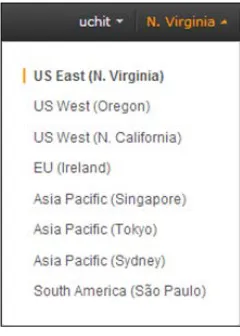
In the following screenshot, you can see the eight currently available regions now over the globe, which can accessible from anywhere. However, as per geographical conditions, the pricing is different for particular regions among various services. AWS services are also subject to this, AWS regions as well AWS services are not supported in each and every region. To check whether a service is available in a specific region, you can go to http://aws.amazon.com/about-aws/ globalinfrastructure/regional-product-services/. There is one more region called "GovCloud", which is for the U.S. citizens only. So, apart from U.S. citizens, nobody else can access that region.
Each AWS region is intended to be completely insulated from other AWS regions by geographical location. So this will achieve the high availability and stability with fault-tolerance. In most appropriate situations, it is good to deploy your apps as close as possible to your end users. For example, if the majority of your users are from the UK, it would be best to go with the EU (Ireland) region because it is the nearest one. Other points you need to consider when choosing the regions are legal clauses and costs.
[ 8 ]
All major AWS services (with the exception of CloudFront and Route 53) allow you to choose a region that you would like to work with. The default region will be N. Virginia. You can select the region by using the drop-down menu, as shown in the following screenshot:
After launching the resources, one can only view those resources tied to specified regions over the globe. As regions are totally insulated from other regions, resources won't replicate automatically between multiple regions.
While working with an instance using the command-line interface (CLI) or API actions, you have to declare the regional endpoint and, if you are launching an instance, you have to select an Amazon Machine Image (AMI), which resides in the same region. If your AMI is in another region, you have to first copy that AMI to your existing working region to launch it. For the AWS EC2 endpoint, please refer to the following table:
Region name Endpoint
US East (Northern Virginia) ec2.us-east-1.amazonaws.com
US West (Oregon) ec2.us-west-2.amazonaws.com
US West (Northern California) ec2.us-west-1.amazonaws.com
EU (Ireland) ec2.eu-west-1.amazonaws.com
Asia Pacific (Singapore) ec2.ap-southeast-1.amazonaws.com
Asia Pacific (Sydney) ec2.ap-southeast-2.amazonaws.com
Asia Pacific (Tokyo) ec2.ap-northeast-1.amazonaws.com
South America (Sao Paulo) ec2.sa-east-1.amazonaws.com
Table 1.0 – AWS EC2 region wise endpoints
[ 9 ]
You can copy both types of AMI, AWS EBS-backed AMIs and instance-store-backed AMIs. You can copy AMIs into multiple regions whenever you want them. You can also copy an AMI into the same region for custom use. However, each AMI has a unique AMI ID, so if you copy an AMI from one region to another, it will work as a new AMI with a new unique ID. If you are communicating between multiple regions, it will be over the Internet. That's why administrators or developers have to be careful about the communication channel, and they need to use proper encryption methods to protect their data. Data transfer charges will be applicable on both ends, sending the data from an instance and receiving it at the instance end.
What are AWS Availability Zones?
With AWS EC2, you can place instances in several geographically distinct locations. Locations are combinations of regions and Availability Zones (AZ). AWS EC2 Availability Zone locations can be within regions that are designed to be isolated from other zones' failures. You can get some very good advantages such as low latency and cheap network connectivity while using EC2 Availability Zones within the same region.
The biggest advantage of, deploying your apps across multiple AZs make your architecture ready and fault-tolerant for unexpected outages. So if a breakdown occurs in a single Availability Zone and you deployed your app in multiple AZs, your app will remain accessible from different AZs. At the time of writing this chapter, there are a total of 25 AZs that exist all over the globe.
[ 10 ]
Availability Zone count can vary with time in regions because with time it increases based on the demand and infrastructure.
How to use AWS AZs
Every AZ will be running on its own infrastructure environment, with self-governing cooling, network with security, and power. AZs are not affected by common
failures such as generators or cooling equipment failure. The great advantage of AZs is that they are physically separated so that disasters such as fire, floods, and tornadoes won't affect more than one AZ. Every AZ may have a single or multiple data centers internally as per the infrastructure availability. Each AWS Account has independently mapped AZs, which can vary between different accounts. To map an IP address with AZs, you can use the Elastic IP addresses.
To check AZ statistics with regions, you can sign in to the AWS Management Console and go to the EC2 console. In EC2, the navigation bar will show you the regions and from those regions, you can check the associated Availability Zones when an instance or Amazon Elastic Block Storage (Amazon EBS) volume is going to be launched. If you don't specify the AZ at the time of the instance launching, it will take the default AZ based on the available capacity and system health. To select and get optimal output from the AZs, you can consider the following architecture points as per the requirement. Though you can change your architectural design at any time, based on the traffic and user's behavior on the Cloud, you need to focus on the price, consistency, site downtime, and performance. The following architecture use cases may be the most suitable for you:
• Simple failover: The most reasonable failover preference contains a running deployment of your application in a primary AZ. Backup deployment is arranged for launch in a different AZ, in a situation where the primary zone fails. The expected downtime is nearly 8-10 minutes after launching the backup deployment.
• Intermediary failover: A slightly diversified deployment is set up across two AZs; this works best for production deployments that cannot afford a 10-minute downtime.
• Advanced failover: This is the best choice for a deployment strategy that needs reliability with around 99-100 percent uptime. However, of course, this is the most costly of the three. This give you a continuously running site not withstanding a deleted instance and no reaction for your application infrastructure.
[ 11 ]
In this section, you will learn some of the business and technical specifications of AWS services, such as EC2, IAM, and the architectural terms of Amazon regarding infrastructures. Let's start with the core services of AWS: Elastic Compute Cloud (EC2) and Identity & Access Management (IAM).
AWS EC2 and IAM
Amazon EC2 is a web service (launched in 2006) that helps virtual machines run on host applications or databases. In other words, it provides a resizable compute capacity in the AWS Cloud. You can group your OS, application software, and its associated configuration settings with EC2 AMIs. An AWS user can boot AMIs to launch virtual machines. In AWS terms, it is called an "instance". A user can create, configure, launch, and delete the EC2 instances as per requirements. You can use AMIs to launch a number of virtual instances and also decommission them using web service calls to scale your environment as per your requirements.
The AWS EC2 functionality
AWS EC2 generates a fully virtualized environment, which allows you to use a web-based interface to start instances with different types of operating system and, built-in application packages with custom permissions. You can run n number of instances from the same AMI as required.
[ 12 ] To work with AWS EC2, you have to:
1. Choose a pre-configured template called AMI to run and make it available for use. Another option is to manually create your own custom AMIs to have your required applications and configurations.
2. Create a new or configure an existing default security group and network accessible protocols to reach your instance from the backend as well as from the frontend.
3. Select your instance type and size based on the requirement. 4. Select your instance location, addition storage, plus the Elastic IP
requirement.
5. Pay only for what you use per hour.
Instance types and pricing
AWS EC2 instances are the basic building blocks required for your computing requirements on the AWS Cloud platform. Also, as it's a core component of any customer infrastructure, AWS provides a variety of instance types. Instance types comprise various combinations of memory, CPU, storage, and network capabilities, and so will give the freedom to AWS users to select the appropriate mix of resources for their web-based solutions.
Selecting an instance type
For an easier understanding of instance types and based on real-time cases,
AWS has grouped together instances into families based on final application usages. The following information guide will help you to think about the instance type that would be best suited as per your requirements.
[ 13 ]
AWS EC2 instances can be differentiated via three purchasing models: • On-demand instance
• Reserved instance • Spot instance
At the beginning of Cloud technology, it was first defined by its properties of elasticity and supply of infrastructure with whatever configuration the consumer needs and whenever he needs. This was the primary logic behind on-demand instances.
You don't need to pay any up-front cost, but only charges per hour plus how long you are going to run the AWS instance for. This purchasing model is very flexible, but it is also the most expensive one. If somebody requires dynamic throughput, the on-demand instance type can be the best choice for them.
If you know the exact duration for the instance to become available on AWS, accurate usage as per the instance types, and the geographical location of instances from where you can serve the content with low latency to your end users, you can go with reserved instances:
[ 14 ]
Reserved instances always start as on-demand instances but the only difference is the billing method. You have to pay a one-time fee to cut down the per hour charges at runtime. If you are going to use AWS EC2 instances all the time like 365x24x7, you will realize a drastic price reduction in billing.
The reserved instances are classified based on their utilization, for example, light utilization, medium utilization, and heavy utilization. The basic difference between these three types is their upfront cost and per hour billing. If you select a heavy utilization type, per the hour charges will be much less but the upfront cost will be higher than the light and medium utilization types.
After purchasing the reserved instance, you cannot change the platform, AZ, instance type, term period, and offering type.
Again, if you are going for light utilization, you have to pay a smaller upfront cost but the per hour charge will be increased compared to high utilization and medium utilization. The best use case is to run light and medium utilization type instances for those who often need to run a particular instance type, but not all the time.
However, after offering resources to end users over the globe, AWS has unused infrastructure in their datacenters. So AWS has decided to rent this infrastructure by bidding it. A user will come and bid for the instance, and they will get the instance resource as long as their bid is higher than the others:
[ 15 ]
In other words, in Spot instances, you can specify the maximum price based on the per hour charge you'll pay and if there is space, you will get the instance. At any point in time, if you are outbid, your instance will be snatched away from you without any prior notice. That means you can utilize these kinds of resources to finish the process when it's most economical. Spot instances can be best suited to web applications or web servers, where if one or more instances shuts down, the process won't be affected.
The Spot instances console is the same as an on demand console except the configuration step in which a user will define the bid price.
Whenever you are going to launch an instance in any region and whatever the instance type you selecting, determine the hardware of the server/instance, which will be used in your virtual infrastructure. Each and every instance type has different RAM, CPU power, and storage capacities. Among these instance types, you have to choose the most suitable instance type on which you can start hosting your software or applications. AWS EC2 gives you consistent CPU power, regardless of its whole underlying hardware infrastructure/datacenter.
AWS EC2 reserves some of the resources from its pool for the host computer, such as the CPU, memory, and some instance storage for an appropriate instance. AWS EC2 will share the remaining resources of the existing host computer, such as network and disk, among other instances. So, if any instance on a host computer tries to utilize the capacity of shared resources, each instance will receive an equal part of those shared resources. And if the resource performance and usage is under-utilized, an instance can acquire a larger share of those shared resources as it can in that period of time.
In AWS EC2, each instance will provide you with higher performance or lower performance based on that instance type and shared resource. Let's take an example. Say you select a high I/O instance type, which has a higher allocation of the shared pool of resources. Allocating a higher set of shared resources will also vary the I/O results of the instance type. For a general application that has a normal load, moderate I/O performance is sufficient. However, applications such as market trading will require a higher or more consistent I/O performance by considering an instance type that has a higher I/O performance output.
[ 16 ]
Available instance types
AWS has divided the instances based on common usage patterns, configuration families, and its configuration properties, as shown in the following image:
You can find out more about common instance categories at http://aws.amazon. com/ec2/instance-types/
Popular use cases for instance categories
The various instance categories are as follows:• General purpose instance: Data processing, small size databases, enterprise applications/portals like SAP, SharePoint, and so on.
• Compute-optimized instances: Batch processing, websites that have very high traffic, GNOME analysis, ads and media serving, computational fluid serving, and video encoding.
• GPU instances: Application/software and 2D/3D application streaming, rendering and engineering design, and so on.
• Memory-optimized: Applications with larger deployment and analysis such as SAP, GNOME assemble analysis, distributed memory caches, and so on. • Storage-optimized: Scale out transactional databases, data warehousing,
and Hadoop.
• t1.micro instances: Low traffic sites, getting hands on with AWS EC2 or for some free tier stuff.
[ 17 ]
AWS EC2 instance numbers and pricing
In general, you are limited to run a total of 20 on-demand or reserved instances and can request 100 Spot instances per region. If you are a new customer, the instance limit can be lower than the limit described. Certain instance types are more specific with numbers per region and can vary based upon the account and production instance request form. You can find more details regarding limits at the following URL:
http://aws.amazon.com/ec2/faqs/#How_many_instances_can_I_run_in_ Amazon_EC2
Billing and pricing
On AWS, you will be charged for what you use and there are no minimum charges; in other words, they follow the pay-as-you-go model. Charges will be based on per hour usage of an instance type. Partial or semi partial instance hours consumed will be counted as full hours. For example, if you are using an instance for 55 minutes, you will be charged for 60 minutes. There is no data transfer charges between two Amazon services within the same region, for example, if you are transferring some data from AWS EC2 US West to AWS RDS US West. Charges are exclusive of applicable taxes and duties, including VAT and applicable sales tax in monthly billing.
AWS services, data transferred between multiple regions, and the usage of other AWS resources will be billed separately to AWS EC2. Billing originates when Amazon EC2 initiates the boot sequence of an AMI instance. The billing cycle stops when the instance terminates, which could ensue through a web services command, by running shutdown -h or due to instance failure. To count the cost before
initiating the new AWS resources you can check the estimate monthly billing at http://aws.amazon.com/calculator.
[ 18 ]
The calculator page will look like the following screenshot:
Calculator page
On the calculator, you can estimate your monthly billing based on your approximate services-based usage.
Ephemeral versus persistent storage
You learned about the EC2 instance and instance types, we saw the instance storage option in the previous table. Starting from the m1.small type, you can identify that the extra storage will be added to that instance automatically without attaching the storage externally. It can be more noticeable in larger or bigger instances such as m1.medium and so on, where you will get a large disk in the /mnt directory of your Linux system. And guess what? It's absolutely free for you! You won't get charged for using it to read or write.
What is ephemeral storage?
Ephemeral disk will be a temporary storage option that will be added automatically to your instance, and it depends on your instance type. The ephemeral disk size of an instance store ranges from 150 GB to 48 TB, and varies by a particular instance type. The bigger your instance, the bigger the ephemeral storage disk you will be assigned. For certain instance types, such as c1.medium and m1.small, they practice instance storage repeatedly as SWAP as they have a restricted quantity of memory, whereas several are generally structured and mounted at the /mnt directory.
[ 19 ]
The ephemeral storage in an instance, is a temporary storage in nature, one should not depend on these disks to keep long-term production data or even other important data that you would not like to misplace when an instance stop happens, for example, stopping and starting an instance, failure of the underlying hardware of EC2, or terminating an instance. Because of these problems, you should keep in mind that EBS/S3 or any other insistent storage will be the best solution. Let's take an example of losing ephemeral disk data while starting and stopping an instance. The following steps test this operation practically:
1. Launch an instance that has an ephemeral disk:
2. Log in with an instance and go to the /mnt or /media directory after checking the ephemeral storage using the following command. We get the following output:
# df -h
[ 20 ]
3. Create any directory or file in the /media directory, as shown in the following screenshot:
4. Now stop the instance and start it again. After starting the instance, check the /media directory for your content. You won't be able to see your content as we performed the stop and start operation with an instance:
[ 21 ]
5. Now, let's check by rebooting the system after we have created some content in the /media/ephemeral10 directory:
6. Reboot your instance:
[ 22 ]
7. After the reboot process, check your content:
EC2 instances that use Amazon EBS for the root device do not, by default, have an instance store accessible at boot time. Also, you can't assign instance store volumes after you've launched an instance. Therefore, if you want your Amazon EBS-backed instance to use instance store volumes, you must postulate them using a block device mapping when you create your AMI or launch your instance. The block device mapping entries are /dev/sdb=ephemeral0 and /dev/sdc=ephemeral1. The following URL shows a list of ephemeral storage sizes with respect to the instance type of EC2:
http://aws.amazon.com/ec2/instance-types/
There are lots of theories around instances backed with EBS or instance storages concerning performance, costs, and so on. Therefore, I'd say the choice of which one to use rests on the user. Normally, you can find the subsequent facts:
1. An instance with ephemeral storage is faster than EBS for modest statistics which persistent is not.
2. You can't stop an instance in order to pay less for it; nevertheless, if you do, you will simply lose everything. So you have to create backup strategies. 3. You can't advance instance, that is you can't upgrade directly or scale
vertically. So you will have to make an AMI and launch a bigger instance from the console.
[ 23 ]
And of course, there are numerous workarounds for this, but truly I would like to say that you should use these types of storages only when your application is currently designed to not store anything locally. One more thing, ensure that you have an EBS volume attached to your instance, which in turn will serve as backup or to store sensitive data that can be lost.
EBS is a persistent storage given by AWS. All data stored in persistent storage is presented after an instance is shut down and can function dynamically on device level. When you create and start an instance, the root device volume grips the image used to boot the instance. You can choose one option from the AMIs based on the Amazon EC2 instance store and the AMIs backed by Amazon EBS. Experts recommend that you use the AMIs backed by Amazon EBS because they launch faster and use persistent storage.
For example, you can detach an EBS volume from one instance and attach it to another instance. However, an EBS cannot be attached to more than one instance at the same time but multiple EBS can be assigned to one EC2 instance, and they can then be lined and/or emulated into a larger volume using Redundant Array of Independent Disks (RAID).
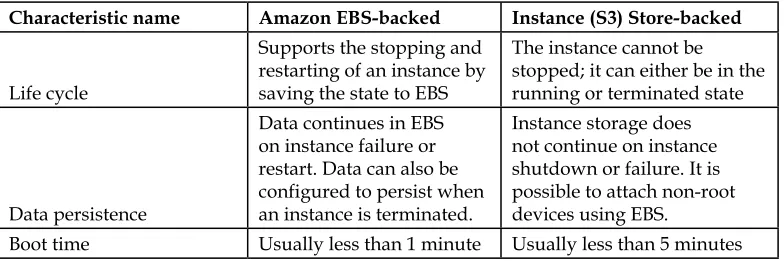
These two AMIs based on type reveal numerous differences, for example, in their life cycle, boot time and data persistence characteristics:
Characteristic name Amazon EBS-backed Instance (S3) Store-backed
Life cycle
Supports the stopping and restarting of an instance by saving the state to EBS
The instance cannot be stopped; it can either be in the running or terminated state
Data persistence
Data continues in EBS on instance failure or restart. Data can also be configured to persist when an instance is terminated.
Instance storage does not continue on instance shutdown or failure. It is possible to attach non-root devices using EBS.
Boot time Usually less than 1 minute Usually less than 5 minutes Table 1.3 – EBS-backed and instance store-backed comparison
[ 24 ]
How to use persistent storage with your
instance
EBS is a mountable storage service; it can be mounted as a device (such as plug-and-play) to an EC2 instance.
Let's take an example to attach EBS (persistent storage) to your instance using the following steps:
1. Go to the Amazon EC2 console, on the left-hand side of the navigation pane, you will find the Elastic Block Store section:
2. Click on Volumes in the navigation pane. The console displays a list of the current volumes:
[ 25 ]
3. Select a volume and click on Attach Volume. Select an appropriate instance from the drop-down box. Only the instances in the same AZ as the volume will be displayed:
4. Fill the necessary details and click on the Attach button to attach the volume to the instance. The volume and instance must be in the same AZ.
Instances with Windows OS will use either Red Hat or Citrix paravirtual
(PV) drivers. If you have a Windows instance with Citrix PV drivers, you can attach up to a total of 25 EBS volumes; however, Windows instances with Red Hat PV drivers are limited to 16 volumes only.
The following diagram summarizes the lifecycles of both persistent and non-persistent storages with S3 and EBS-backed EC2 instances:
[ 26 ]
EBS-backed EC2 instances present a new stopped state, which is not available in the backed-by-instance store as of now. It is essential to keep in mind that while an instance is in a stopped state, you will not experience any EC2 running charges except EBS storage charges, which are related to your instance:
The other benefit of S3-backed instances is that a stopped instance can be started another time while preserving its core state.
Scalability, elasticity, and bootstrapping
Generally, each and every Cloud is designed to gain infinite scalability. Even though the Cloud is scalable, you cannot take advantage of the scalability if your infrastructure is not scalable at any point. You have to conclude your components, which requires scalability, and you have to find those parts in which on-demand scaling won't work for your business. You have to design your application in order to get maximum output to capture the market and leverage the scalable infrastructure of the Cloud.
The characteristics of a proper scalable application are as follows: • Growing capitals result in a comparative upsurge in the recital
of performance
• A scalable service is accomplished because of conduct heterogeneity • A climbable service is operationally effective
• An ascendable service is robust
• In general, a scalable service should get more budget with respect to actual one when it is required
[ 27 ]
These are characteristics that must be converted into an intrinsic part of the business application and if the architecture design is built with the preceding characteristics, then both the architecture and infrastructure will work in an organized manner to give you the scalability you are looking for.
As the provisioning time and upfront venture to obtain new capitals was too high, software architects never invested time and resources in augmenting
hardware exploitation. It was tolerable if the hardware on which the apps run was underutilized. The concept of "elasticity" inside a design went unnoticed as the idea of having new capitals in transcripts was not conceivable.
Cloud modernizes the progression of obtaining the essential capitals; there is no requirement lengthier than to place preparations ahead of time and grip the unexploited hardware incarcerated. Instead, Cloud architects can demand whether they want mere proceedings before obtaining resources, captivating the benefit of the huge scale and rapid response time of the Cloud. The vice versa is relevant to reduce the unwanted resources when you don't need them.
Elasticity is one of the essential properties of Cloud computing in today's fast-paced demand-growing world. It is the power to scale computing capitals up and down in a straightforward manner and with nominal chafing. It is important to comprehend that elasticity will eventually initiate maximum of the paybacks of the Cloud. As a Cloud engineer, you need to adopt the concept of elasticity and implement it in your application architecture in order to get the best value from the Cloud and its services.
Bootstrap your instances
Design your instance deployment and let your instances ask you difficult questions about their existence during the boot, such as "Why am I created and what will be my role?"; each and every instance should have a specific part to play in the infrastructure and deployment environment such as database servers, replica servers, web servers, cache servers, and so on. So put your instances in a specific category with a specific role.
These role features can be passed to an instance when you boot or spin the instances from an AMI at runtime on air. At the time of booting the instance, we will
download and configure the scripts and codes necessary as per the role requirement and work automatically as defined in the scripts.
The following are the advantages of bootstrapping your instances:
• Reconstruct the (development, test, and production) environment with little snaps and nominal struggle
• The preceding instances govern your abstract Cloud-based capitals
[ 28 ]
• Condense human-induced deployment mistakes
• Generates a self-healing and self-discoverable working environment, which can be more robust to hardware failure
Black belt booting
There are numerous cutting-edge methods that compromise supplementary power and flexibility when booting Linux. For example, some officialdoms preserve a sequence of the standard instances, and modify the ideas upon promotion, at the time of deployment. Communal practices include:
• Spontaneously checking for modernizers upon every boot.
• Staring at a well-known position, such as in an S3 (Simple Storage Service) bucket, for data or a script to direct the instance, which packages to load. • Gives access of the user data to the instance to achieve each of the preceding
goals, or perhaps, as an alternative to the other approaches.
Identity and Access Management
AWS has a shared security section that consist of AWS IAM. AWS IAM allows for the creation of distinct users or groups, granulated authorizations, and even precise services. Agreements can be set for any AWS service, including Amazon EC2, and letting fashionable security credentials that avoid basic users from salvaging statistics not related to their access. You can also use Identity and Access Management (IAM) to achieve security credentials such as access keys, passwords, and multi-factor authentication devices centrally. Active instantaneously, the IAM is a generally available service among other AWS services no; this means it doesn't depend on a region or Availability Zones!
IAM includes the following features:
• Complete control of users, groups, and security credentials • Control of access based on user role, and security tokens • Control over shared AWS resources
• Authorizations based on organizational groups and users • Centralized networking controls
[ 29 ]
Accessing IAM
You can work with AWS Identity and Access Management (AWS IAM) by using the following methods:
• Using the AWS Management Console • Using the AWS command-line interface • Using the AWS API
Using any of the preceding access methods, one can accomplish IAM capitals, by: • Creating users/groups and assigning permissions to them
• Creating security credentials (roles and policies) for your users • Assigning passwords to your users and restricting them for
particular services
Here, to get familiar with AWS IAM and its usage, we will follow the first method for an overview and later in this book, we will look into IAM using CLI with other services. Let's start with a detailed overview of the IAM console:
[ 30 ]
When a user signs in to their AWS account, they sign in via an IAM-enabled user sign-in page. For their accessibility, this sign-in page routes a cookie to evoke the user's position so that the next time a user serves to the AWS Management Console at the next login or visits the same page, the AWS Management Console calls the IAM-enabled user sign-in page automatically. This left-hand side navigation tab allows you to create and manage IAM users, groups of IAM users, their permissions, and their security credentials separately, along with other services:
You can select a policy template, which is predefined in the IAM service, or build your own custom policies using AWS Policy Generator. The permission wizard includes a specific template for every service that currently supports IAM to make it easy for you to get started and define policies:
[ 31 ]
The preceding features described represent my first overview-based steps toward our long-term goals to learn about IAM and its best use cases in further chapters. However, we have a long journey ahead of us and I am looking for additional integrations, data access methods, and product based scenarios with AWS IAM.
Authentication and authorization
One of the characteristics that made me focus on AWS was my knowledge that the Cloud can be pleasant and logical in which you can figure security solutions. Two imperative ideologies are essential to confirm that the correct people are undertaking the right things in every information system. These are as follows:
• Authentication: This is how you demonstrate your uniqueness. The
computer won't accept your identity until you exhibit an acquaintance of an identity that the computer can then validate. Typically, it's your username and password; it could also be the private key (secret key and access key) associated with a digital certificate (here, X.509 in AWS). Authentication classifications never send secrets over the wire; in its place, enigmas are used to compute a difficult-to-reverse message. Since apparently only you know your secret, your claim is valid in any system.
• Authorization: This is what we're permitted to look after once the Cloud grants you access to services. Unfortunately, individuals aren't actually good at keeping secrets and often divulge secrets when they get an opportunity. The following figure shows the authorization services provided by AWS:
[ 32 ]
The Multi-factor authentication (MFA) device in AWS alleviates this base problem by demanding additional proof of the problem. Authentication factors come in many varieties:
• Something you know: A password, passphrase, key, pin, and response to a challenge.
• Something you have: A token, smartcard, mobile phone, passport, and wristband.
• Something you are or do: A meddle-resistant and theft-resistant biometric individual.
On AWS, for authentication, you can use two factor authentication devices: one for connection and the other for the retrieval of data. You can use secret keys, access keys, and X.509 certificates for authentication. You can find these under the AWS Management Console/Security Credentials option as described in the preceding screenshot. They also provide MFA, which can be used for two-factor authentication. The following screenshot is for the MFA device. There are two types of MFA devices: Virtual MFA and Hardware MFA.
[ 33 ]
At the following URL, you can purchase your MFA device if you want: http://onlinenoram.gemalto.com/
There are two types of MFA devices available on this site, which differ in
characteristics and pricing. As per your requirement, you can buy them and secure your AWS environment using two-factor authentication.