OHJ-1860: Software systems seminar:
Used tools and mechanisms in
Open Source projects
Heikki Orsila
<[email protected]>
2007-03-07
Documen-1
Outline
• Present some common tools and mechanisms used in developing Open
Source projects
• Focuses on GNU/Linux and UNIX-like operating systems, other
oper-ating systems are ignored
• Focuses on C language tools, since C is the dominant language used in
Open Source operating systems
• Presents only Open Source tools
• The purpose is to only present most popular tools and most common
mechanisms in development
• This document was created from following information sources:
– Freshmeat: http://freahmeat.net is an excellent source for finding UNIX programs by category, see http://freshmeat.net/browse/18/
– Wikipedia
• Topics of this presentation are:
– Section 2: Compilers
– Section 3: Interpreted languages
– Section 4: Source code tools
– Section 5: Debugging tools
– Section 6: Documentation tools
– Section 7: Version control tools
– Section 8: Text editors
– Section 9: Building tools
– Section 10: Integrated development environments (IDEs)
– Section 11: Reverse engineering tools
– Section 12: Compression, cryptography and packaging tools
– Section 13: Network tools
2
Compilers
• A compiler is the main tool for programming
• A compiler translates source code into executable format, possibly
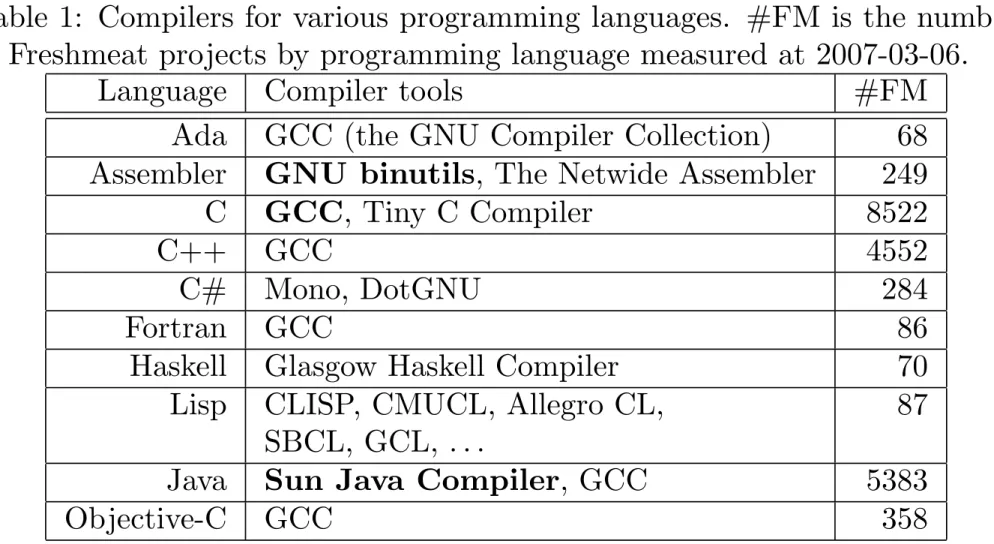
Table 1: Compilers for various programming languages. #FM is the number of Freshmeat projects by programming language measured at 2007-03-06.
Language Compiler tools #FM Ada GCC (the GNU Compiler Collection) 68 Assembler GNU binutils, The Netwide Assembler 249 C GCC, Tiny C Compiler 8522
C++ GCC 4552
C# Mono, DotGNU 284
Fortran GCC 86
Haskell Glasgow Haskell Compiler 70 Lisp CLISP, CMUCL, Allegro CL, 87
SBCL, GCL, . . .
Java Sun Java Compiler, GCC 5383
3
Interpreted languages
• Interpreted languages are not compiled and they are not executed
di-rectly: Source code is executed with interpreters
• Pros and cons vary between interpreted languages
+ Cheap and fast to install many scripts + Easy customization
+ Easy integration of system parts (e.g. by using shell scripts) + Rapid prototyping
- Possibly consume lots of memory - Probably slow
- Possibly harder to verify for correctness due to dynamic typing and behavior
- Possibly hard to integrate with compiled languages
• Successful interpreted languages begin with letter P :-) See the next
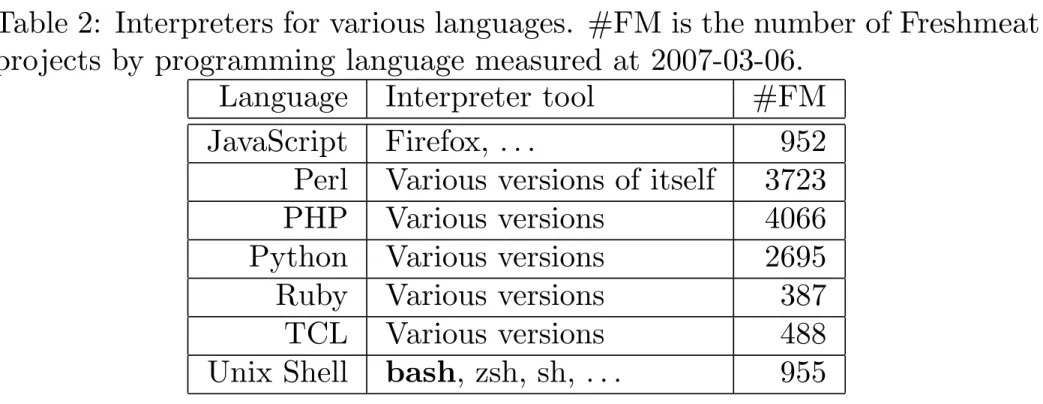
Table 2: Interpreters for various languages. #FM is the number of Freshmeat projects by programming language measured at 2007-03-06.
Language Interpreter tool #FM JavaScript Firefox, . . . 952 Perl Various versions of itself 3723 PHP Various versions 4066 Python Various versions 2695 Ruby Various versions 387 TCL Various versions 488 Unix Shell bash, zsh, sh, . . . 955
4
Source code tools
Source code tools are used to automatically process source code:
• Automatic code analysis and inspection ; Correct human errors by
using automation
• Avoid manual work by using automation • Some tools search for patterns
• Some tools search for potential bugs
• Existing Open Source code base and version control repositories are good
material for pattern matching and bug hunt heuristics. Thousands of bugs have been found by scanning tons of open code.
4.1
Analysis and inspection
• cscope searches for items and patterns from source code (e.g. which
• grep and other standard UNIX tools (grep finds text with regular
ex-pressions)
• Splint is a tool that heuristically searches for suspicious and non-portable
constructs from C source code
• Many text editors can visualise syntax that helps understanding source
code, see Section 8
4.2
Source code cleanup tools
Source code styling is a sensitive subject, often causing serious disagreements between parties :-) As a partial solution to the problem, various tools have been created for automatic styling:
4.3
Patching
• diff/patch tools are used to serialise changes in source tree into a
human-readable short text format. Most version control tools can produce diff/patch change files.
> diff -u hw.c hw2.c --- hw.c 2007-03-06 15:59:18.000000000 +0200 +++ hw2.c 2007-03-06 15:59:12.000000000 +0200 @@ -2,6 +2,6 @@ int main(void) { - printf("hello word\n"); + printf("hello world\n"); return 0; }
5
Debugging tools
“Regression testing”? What’s that? If it compiles, it is good, if it boots up it is perfect. - Linus Torvalds, 1998-04-08
Debugging has at least 2 functions:
• Help locate bugs that can be observed
• Reverse engineering systems (to gain compatibility, defeat protection
systems, acquire information, . . . ) There are several kinds of debuggers:
• Application debuggers (normal) • Application monitors
• Kernel debuggers (special)
Some common debugging tools:
• GDB: The GNU Project Debugger
• Data Display Debugger is a graphical front-end for GDB
• Strace is a program that allows logging system calls of other programs
(system call parameters and results)
• Valgrind finds memory usage errors from programs by running
6
Documentation tools
Some common formats and/or methods used to document software:
• DocBook is a markup language for technical documentation. The
Doc-Book format is presentation-neutral, and thus, there are tools to generate html, pdf, etc from documentation.
• Doxygen is a format that is used to annotate source code from which
documentation can be generated. APIs are often documented with doxy-gen.
• Javadoc is a source code annotation format for Java, similar to Doxygen • LATEX is a popular tool for structured documents that have easily
read-able layout and style
• man, a command line help tool that is the de-facto documentation format
for UNIX commands and system calls. For example, man pages are the authoritative source of information for the OpenBSD.
• Texinfo - The GNU documentation system is a command line help tool
(info) that is mostly used by the GNU project only
• Web sites
• A Wikipedia-style web site for collaborative documenting. Provides
7
Version control tools
Version control tools are very important for Open Source projects since:
• Basic requirement: easy method to compare different versions of the
program (or any other data)
• Basic requirement: Easy method to synchronize changes among many
developers
• Developers are distributed over the globe ; need access to source code
over untrusted networks (SSH, https)
• Developers are often untrusted people ; need administrable access to
source code: read-only and write access classes for users
• There are many contributors • Frequent changes
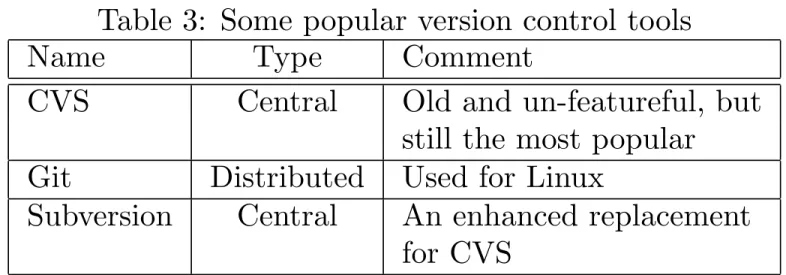
Table 3: Some popular version control tools Name Type Comment
CVS Central Old and un-featureful, but still the most popular
Git Distributed Used for Linux
Subversion Central An enhanced replacement for CVS
– Each developer has a complete (personal) version tree
– Developers pull changes from each other
– Can be located anywhere (no central repository needed)
For specific information on version control tools, see
8
Text editors
An infinite number of monkeys typing into GNU emacs would never make a good program. - Linus Torvalds
Text editors often have one or more of following properties:
• Easy multi-file editing of text (not all editors support multi-file editing) • Searching and replacing items
• Visualise syntax of some programming languages to ease readability
– Does limited syntax checking ; some errors are caught before com-pilation
• Helpers for common programming tasks (version control interface,
de-bugger interaction, documentation browsing, making coffee :-)
• Often work on a text terminal so that it can be operated remotely with
little bandwidth and sufficiently high latency
• Often have small memory and disk footprint ; works on small systems
• Often very short startup time because the program is run frequently • Often a cause for holy wars, but without any doubt my $EDITOR is the
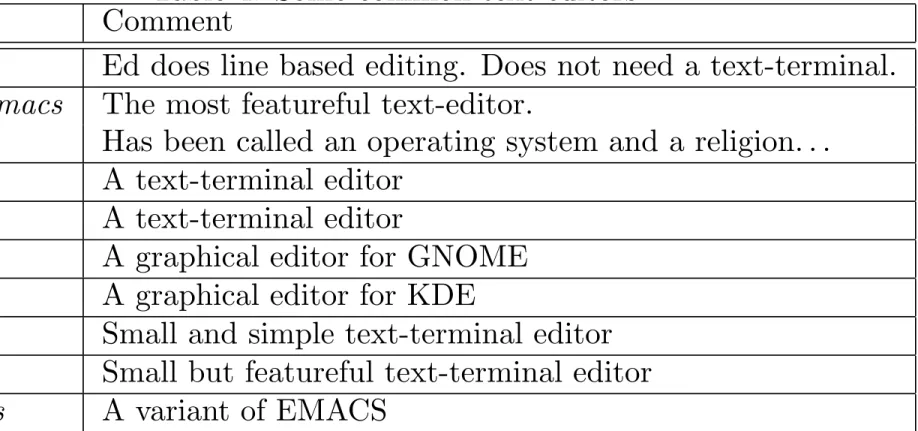
Table 4: Some common text editors Name Comment
Ed Ed does line based editing. Does not need a text-terminal.
GNU Emacs The most featureful text-editor.
Has been called an operating system and a religion. . .
JED A text-terminal editor
JOE A text-terminal editor
gedit A graphical editor for GNOME
Kate A graphical editor for KDE
Nano Small and simple text-terminal editor
Vi(m) Small but featureful text-terminal editor
9
Building tools
Build tools can have several properties and functions:
• Configure the program
– Choose compilation options for some target environment
– Set behavioral defaults for program
– Check that system has necessary components and properties for compilation
– Often generates Makefiles and header files for the compilation phase
• Prepare executable code using specific compilers and tools
– Compile only source modules that are needed
– Compile items in correct order (following build dependency graph)
– Avoid re-compiling by determining which source modules have changed since last compilation
– Support parallel builds for multiprocessor systems (make -j2)
– Support distributed (parallel) builds (e.g. distcc)
– Is not limited to code compilation, also generic shell scripts and transformation utilities may be run during “compilation” (e.g. code generation tool is run in the beginning of compilation, and then the generated code is compiled)
• Install the program
– May have to execute arbitrary shell commands to do administrative tasks (e.g. create a new group or user)
– Files are usually copied to destination with install (1) command. Install sets file permissions, owner and group correctly for the given system.
• The whole build process must be something that can be automated ;
easy building and testing of new releases Several tools exist:
• Make is the de-facto building tool for Open Source projects
– Make can not determine any project dependencies so the program-mer must do it by using other tools or by giving them manually
– Make uses a “Makefile” format
– There are several implementations of make, but in the GNU/Linux world GNU make is used exclusively
– GNU make extends the traditional Makefile format. This has caused incompatibilities with other systems.
• pkg-config is a tool which is used to determine which libraries and
soft-ware components are installed on the system. Libraries usually install a “pkg-config file” so that configuration systems can find the library and its headers by using the pkg-config tool.
• GNU Autotools is a set of shell scripts and M4 macros to generate
portable configure scripts
– Generates an sh shell script called configure that can be executed to configure the project for compilation
– The standard way to compile and install programs using GNU au-totools is:
> ./configure > make
(if successful, then:) > sudo make install
• CMake is a configuration tool that generates Makefiles (or similar).
• Apache Ant is a build tool that is mostly used for Java projects
• Kconfig is a configuration and build tool developed for and used by the
10
Integrated development environments (IDEs)
Properties and functions of IDEs:
• Integrate the whole development process under a single tool: Editing,
building, debugging, testing, releasing, version control, documentation . . .
• Very often graphical tools (e.g. Eclipse)
• Sometimes integrated debugging environment • Sometimes integrated GUI development
• Some IDEs are build tool or language dependent (e.g. Eclipse is for Java
• Eclipse for Java
• GNU Emacs for almost all common programming languages • KDevelop for many common programming languages
11
Reverse engineering tools
Reverse engineering is important for producing compatible Open Source sys-tems. Reverse engineering tools include:
• Data inspection tools
– Hex dumping tools (od, xxd, . . . )
– Hex editors, pick your $FAVOURITE
– Disassemblers
∗ Non-interactive disassemblers: e.g. objdump from GNU
binu-tils
∗ Interactive disassemblers allowing symbolic name annotation
– Kernel tools to sniff and record I/O register reads and writes (many drivers for OSS kernels have been created this way)
– Network monitoring tools to capture network traffic of a propri-etary program (Windows network protocols were partly reverse en-gineered by this method (Samba project))
∗ Wireshark (former ethereal) is the most widely used network
12
Compression, cryptography and packaging
tools
The purpose of compression is to save disk space and network bandwidth. The most common tools used on UNIX-like systems are
• gzip (.gz) • bzip2 (.bz2) • zip
Compression tools are separate to packaging tools:
• tar is the de-facto standard on UNIX for packaging multiple files into a
Cryptography tools are used to verify and sign released tar balls, version control change sets etc.
• md5sum/sha1sum are used to verify files data content by using a
cryp-tographic one-way hash function
> md5sum tools.tex
4cde4d1ab320619e5725bb19d4482470 tools.tex
# Find duplicate files under file system hierarchy:
> find /x -type f -print0 |xargs -0 md5sum |sort |uniq -w32 -D • GNU Privacy Guard / OpenSSL are used to verify origin of files by using
13
Network tools
There are several network tools that are mainly used for following purposes:
• Authentication (and transport)
– OpenSSH for accessing remote systems in secure fashion
∗ Many version control and other systems use ssh for remote
access
∗ Development and/or execution may happen on a remote system • Data transfer tools
# Test my new server program at port 1234 on local interface # by feeding it a raw data file over TCP connection
> cat my_data_file |nc 127.0.0.1 1234 # Copy files to remote host to port 5678
> tar cv /files* |nc my.address.invalid 5678
– rsync for distributing lots of files efficiently
∗ Transfers only new and changed files
∗ Supports partially changed files so that only changed sub-blocks
are transfered
∗ Uses SSH for transport by default
– sshfs is a user-mountable file system that runs on top of SSH/sftp (no admin privileges required due to FUSE)
– Version control tools can be used for downloading (some of them use SSH and/or rsync)
14
Emulators
Emulators have at least following purposes:
• Running untrusted systems on top of trusted systems
– No matter if the untrusted system tries to break security policies, it can not do so without approval of the the emulator
• Virtualisation (e.g. run OS A on top of OS B)
• Provide a compatibility layer (e.g. run “applications” of OS A on top of
OS B)
• Developing software (and hardware) for hardware that is not available
– Full system state visibility: for example, without an emulator it is either impossible or very hard to know what was the exact cycle counter register value when a specific instruction was executed
– Authentic timing behavior: the debugger does not affect timing of the application (cycle counters)
∗ Accurate performance profiling possible
∗ All race conditions that can happen on a real system should
also happen under the emulator (sometimes race conditions are “obscured” by the debugger)
– Authentic run time environment because the emulated application can not know it is being emulated
There are several operating system or full system emulators available:
• Bochs is an emulator of x86/AMD64 systems
• DOSBox/DOSEMU are used to run (legacy) MS-DOS programs
• QEMU is an emulator running on multiple platforms that emulates
• Many emulators for old computer systems (e.g. UAE for Amiga
com-puters)
There are some OS virtualisation systems available:
• KVM is an OS virtualisation system that depends on recent processor
extensions on x86/amd64; can potentially run any operating system on top of Linux
• UML, the User-mode Linux, allows running Linuxes inside Linux. Child
Linuxes are visible as processes under the master Linux.
• Xen allows running OSes an top of a hypervisor. The virtualised
operat-ing system must be ported for the hypervisor so that when ever the child OS would access some privileged system state it must do it through the hypervisor.