Towards Network-level Efficiency for
Cloud Storage Services
Zhenhua Li
Tsinghua University Peking University [email protected]Cheng Jin
University of Minnesota Twin Cities [email protected]Tianyin Xu
University of California San Diego [email protected]Christo Wilson
Northeastern University Boston, MA, US [email protected]Yao Liu
State University of New York Binghamton University [email protected]
Linsong Cheng
Tsinghua University Beijing, China [email protected]Yunhao Liu
Tsinghua University Beijing, China [email protected]Yafei Dai
Peking University Beijing, China [email protected]Zhi-Li Zhang
University of Minnesota Twin Cities [email protected]ABSTRACT
Cloud storage services such as Dropbox, Google Drive, and Mi-crosoft OneDrive provide users with a convenient and reliable way to store and share data from anywhere, on any device, and at any time. The cornerstone of these services is thedata synchronization
(sync) operation whichautomaticallymaps the changes in users’ local filesystems to the cloud via a series of network communica-tions in atimelymanner. If not designed properly, however, the tremendous amount of data sync traffic can potentially cause (fi-nancial) pains to both service providers and users.
This paper addresses a simple yet critical question: Is the cur-rent data sync traffic of cloud storage services efficiently used?
We first define a novel metric namedTUEto quantify theTraffic
UsageEfficiencyof data synchronization. Based on both real-world traces and comprehensive experiments, we study and characterize theTUE of six widely used cloud storage services. Our results demonstrate that a considerable portion of the data sync traffic is in a sense wasteful, and can be effectively avoided or significant-ly reduced via carefulsignificant-ly designed data sync mechanisms. All in all, our study ofTUEof cloud storage services not only provides guidance for service providers to develop more efficient, traffic-economic services, but also helps users pick appropriate services that best fit their needs and budgets.
Categories and Subject Descriptors
C.2.4 [Computer-communication Networks]: Distributed Sys-tems—Distributed applications; D.4.3 [Operating Systems]: File Systems Management—Distributed file systems
Permission to make digital or hard copies of all or part of this work for personal or classroom use is granted without fee provided that copies are not made or distributed for profit or commercial advantage and that copies bear this notice and the full cita-tion on the first page. Copyrights for components of this work owned by others than ACM must be honored. Abstracting with credit is permitted. To copy otherwise, or re-publish, to post on servers or to redistribute to lists, requires prior specific permission and/or a fee. Request permissions from [email protected].
IMC’14,November 5–7, 2014, Vancouver, BC, Canada. Copyright 2014 ACM 978-1-4503-3213-2/14/11 ...$15.00. http://dx.doi.org/10.1145/2663716.2663747.
General Terms
Design, Experimentation, Measurement, Performance
Keywords
Cloud storage service; network-level efficiency; data synchroniza-tion; traffic usage efficiency
1.
INTRODUCTION
Cloud storage services such as Dropbox, Google Drive, and Mi-crosoft OneDrive (renamed from SkyDrive since Feb. 2014) pro-vide users with a convenient and reliable way to store and share data from anywhere, on any device, and at any time. The users’ da-ta (e.g.,documents, photos, and music) stored in cloud storage are
automaticallysynchronized across all the designated devices (e.g.,
PCs, tablets, and smartphones) connected to the cloud in atimely
manner. With multiplicity of devices – especially mobile devices – that users possess today, such “anywhere, anytime” features sig-nificantly simplify data management and consistency maintenance, and thus provide an ideal tool for data sharing and collaboration.
In a few short years, cloud storage services have reached phe-nomenal levels of success, with the user base growing rapidly. For example, Microsoft OneDrive claims that over 200 million cus-tomers have stored more than 14 PB of data using their service [9], while Dropbox has claimed more than 100 million users who store or update1 billionfiles every day [6]. Despite the late entry into this market (in Apr. 2012), Google Drive obtained 10 million users just in its first two months [7].
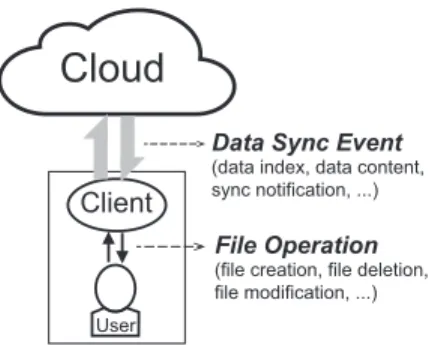
The key operation of cloud storage services isdata synchroniza-tion(sync) which automatically maps the changes in users’ local filesystems to the cloud via a series of network communications. Figure 1 demonstrates the general data sync principle. In a cloud storage service, the user usually needs to assign a designated lo-cal folder (lo-called a “sync folder”) in which every file operation is noticed and synchronized to the cloud by the client software de-veloped by the service provider. Synchronizing a file involves a sequence of data sync events, such as transferring the data index, data content, sync notification, sync status/statistics, and sync ac-knowledgement. Naturally, each data sync event incurs network traffic. In this paper, this traffic is referred to asdata sync traffic.
Client
User
Data Sync Event (data index, data content, sync notification, ...)
File Operation (file creation, file deletion, file modification, ...)
Cloud
Figure 1: Data synchronization principle.
If not designed properly, the amount of data sync traffic can potentially cause (financial) pains to both providers and users of cloud storage services. From the providers’ perspective, the aggre-gate sync traffic from all users is enormous (given the huge number of files uploaded and modified each day!). This imposes a heavy burden in terms of infrastructure support and monetary costs (e.g.,
as payments to ISPs or cloud infrastructure providers). To get a quantitative understanding, we analyze a recent large-scale Drop-box trace [12] collected at the ISP level [25]. The analysis reveals: (1) The sync traffic contributes to more than 90% of the total ser-vice traffic. Note that the total serser-vice traffic is equivalent to one third of the traffic consumed by YouTube [25]; (2) Data synchro-nization of a file (sometimes a batch of files) generates 2.8 MB of
inbound(client to cloud) traffic and 5.18 MB ofoutbound(cloud to client) traffic on average. According to the Amazon S3 pricing policy [1] (Dropbox stores all the data content in S3 and S3 only charges for outbound traffic), the Dropbox traffic would consume nearly$0.05/GB×5.18 MB×1 billion= $260,000 every day1. These costs grow even further when we consider thatallcloud stor-age service providers must bear similar costs, not just Dropbox [4]. Data sync traffic can also bring considerable (and unexpected) fi-nancial costs to end users, despite that basic cloud storage services are generally free. News media has reported about user complaints of unexpected, additional charges from ISPs, typically from mobile users with limited data usage caps [8, 2]. As a consequence, some users have warned: “Keep a close eye on your data usage if you have a mobile cloud storage app.” In addition, some cloud stor-age applications (e.g.,large data backup [3]) are also impaired by the bandwidth constraints between the user clients and the cloud. This limitation is regarded as the “dirty secrets” of cloud storage services [5]. Hence users likewise would also benefit from more efficient sync traffic usage.
This paper addresses a simple yet critical question:Is the current data sync traffic of cloud storage services efficiently used?Our goal is to quantify and optimize theefficiencyof data sync traffic usage,
i.e.,the pivotal network-level efficiency for cloud storage services. Without impairing user experience, providers would like to limit data sync traffic as much as possible to reduce operational costs. On the other side, users also desire more efficient traffic usage, which can save money and result in better quality of experience. Although several studies have measured cloud storage services [30, 33, 25, 20, 24, 36, 32, 48], none have addressed the issue of sync traffic efficiency using real-world, large-scale data from multiple cloud storage services.
1
We assume that there is no special pricing contract between Drop-box and Amazon S3, so our calculation of the traffic costs may involve potential overestimation.
To answer the question thoroughly, we first define a novel metric namedTUEto quantify theTrafficUsageEfficiencyof data syn-chronization. Borrowing a term similar toPUE(i.e.,thePower Us-age Effectiveness= IT equipment powerTotal facility power [14], a widely adopted metric for evaluating the cloud computing energy efficiency), we define
TUE=Total data sync traffic
Data update size . (1)
When a file is updated (e.g.,created, modified, or deleted) at the us-er side, thedata update sizedenotes the size of altered bits relative to the cloud-stored file2. From the users’ point of view, the data up-date size is an intuitive and natural signifier about how much traffic
shouldbe consumed. Compared with the absolute value of sync traffic (used in previous studies),TUEbetter reveals the essential traffic harnessing capability of cloud storage services.
In order to gain a practical and in-depth understanding ofTUE, we collect a real-world user trace and conduct comprehensive bench-mark experiments of six widely used cloud storage services, in-cluding Google Drive, OneDrive, Dropbox, Box, Ubuntu One, and SugarSync. We examine keyimpact factorsanddesign choicesthat are common across all of these services.Impact factorsinclude file size, file operation, data update size, network environment, hard-ware configuration, access method, and so on. Here the “access method” refers to PC client software, web browsers, and mobile apps.Design choices(of data sync mechanisms) include data sync granularity, data compression level, data deduplication granularity, and sync deferment (for improved batching).
By analyzing these factors and choices, we are able to thoroughly unravel theTUErelated characteristics, design tradeoffs, and opti-mization opportunities of these state-of-the-art cloud storage ser-vices. The major findings in this paper and their implications are summarized as follows:
• The majority (77%) of files in our collected trace are smal-l in size (smal-less than 100 KB). Nearsmal-ly two-thirds (66%) of these small files can be logically combined into larger files forbatched data sync(BDS) in order to reduce sync traffic. However, only Dropbox and Ubuntu One have partially im-plemented BDS so far.
• The majority (84%) of files are modified by users at least once. Unfortunately, most of today’s cloud storage services are built on top ofRESTful infrastructure (e.g., Amazon S3, Microsoft Azure, and OpenStack Swift) that typically only support data access operations at thefull-filelevel [26, 17]. For these services, enabling the efficientincremental data sync(IDS) mechanism requires an extra mid-layer for trans-formingMODIFYintoGET+PUT+DELETEfile operations. Given that file modifications frequently happen, implement-ing IDS is worthwhile for improved network-level efficiency. • 52% of files can be effectively compressed and 18% of files can be deduplicated. Nevertheless, Google Drive, OneDrive, Box, and SugarSync never compress or deduplicate data. Even for Dropbox and Ubuntu One, the effect of compression and deduplication is largely influenced by the access method. • Implementing compression and block-level deduplication
to-gether is technically challenging. Based on our trace analy-sis, we suggest providers to implement compression and full-file deduplication because the combination of these two tech-niques is sufficient to provide efficient usage of sync traffic. 2If data compression is utilized by the cloud storage service, the
• Frequent modifications to a file often lead to largeTUE. For instance, for 8.5% of Dropbox users, more than 10% of their sync traffic is caused by frequent modifications [36]. Some services deal with this issue by batching file updates using a fixed sync deferment. However, fixed sync deferments are inefficient in some scenarios. We propose anadaptive sync defer(ASD) mechanism to overcome this limitation.
• In the presence of frequent file modifications, surprisingly, users with relatively “poor” hardware or Internet access save on sync traffic, because their file updates are naturally batched. In a nutshell, our research findings demonstrate that for today’s cloud storage services, a considerable portion of the data sync traf-fic is in a sense wasteful, and can be effectively avoided or signif-icantly reduced through carefully designed data sync mechanisms. In other words, there is plenty of space for optimizing the network-level efficiency of these services. Our study ofTUEprovides guid-ance in two folds: (1) help service providers develop more efficient, traffic-economic cloud storage services; and (2) help end users se-lect appropriate services that best fit their needs and budgets. Roadmap. In the remainder of the paper, we first describe the common design framework of cloud storage services in§2, and then introduce our research methodology in§3. Next, we present research results and findings, broken down logically into three ar-eas: simple file operations (§4), compression and deduplication (§ 5), and frequent file modifications (§ 6). Finally, we discuss the tradeoffs for cloud storage system design in§7, review related work in§8, and conclude the paper with future work in§9.
2.
COMMON DESIGN FRAMEWORK OF
CLOUD STORAGE SERVICES
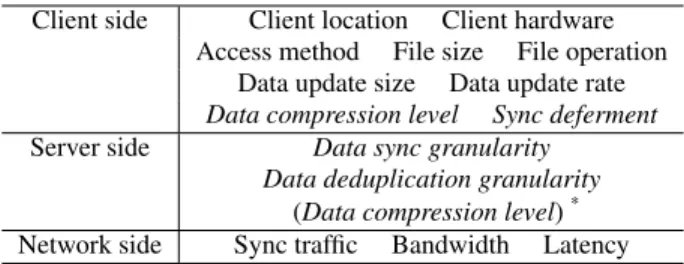
From the perspective of sync traffic usage, the common design framework of cloud storage services involves a number ofimpact factorsanddesign choices, which can be on the client side, serv-er (cloud) side, or network side. Theimpact factorsrefer to those (objective) factors such as the client location, hardware, file size, data update size, network environment, and so on that must be ac-counted for in the design and usage of cloud storage services. The
design choices(of data sync mechanisms) refer to those ( subjec-tive) design decisions which the system designers make, such as the data sync granularity, data compression level, data deduplica-tion granularity, and so forth.
Both the impact factors and design choices may influence the data syncTUE. To avoid being trapped by trivial or elusive issues, we select key impact factors and design choices according to the following two rules:
• Rule 1: The impact factors should be relatively constant or stable, so that our research results can be easily repeated.
• Rule 2: The design choices should be measurable and ser-vice/implementation independent, so as to make our research methodology widely applicable.
FollowingRule 1, we do not study impact factors such as sync delay3, cloud server location, etc. For example, we observe that uploading a 1-MB JPEG photo to Google Drive may incur an elu-sive sync delay varying between several seconds and several min-utes (under different network environments). Instead, we choose to study thesync traffic, which is almost invariable in all cases. 3
Sync delaymeasures how long the user client synchronizes a file to the cloud.
Table 1: Key impact factors anddesign choices. Client side Client location Client hardware
Access method File size File operation Data update size Data update rate
Data compression level Sync deferment
Server side Data sync granularity
Data deduplication granularity
(Data compression level)* Network side Sync traffic Bandwidth Latency
*
Note: The server-side data compression level may be differ-ent from the clidiffer-ent-side data compression level.
Besides, we observe that the cloud server location serving a given file is not constant. This is because a cloud storage service usual-ly hosts a user’s files across multiple geographicalusual-ly dispersed data centers, and it often migrates or copies a file from one cloud serv-er to anothserv-er. Instead, we record thebandwidthanddelaybetween the client and the cloud, as they can be reproduced using client-side methods (introduced in§3.2).
FollowingRule 2, we do not consider design choices such as the metadata structures, file segmentation and replication on the cloud side, because they require specific knowledge of the back-end cloud implementation. For example, the metadata structure (including the list of the user’s files, their attributes, and indices to where the files can be found inside the cloud) cannot be extracted from the net-work communication packets, because almost all the commercial cloud storage services have encrypted their application-layer data in certain (unknown) ways.
In the end, ten key impact factors and four design choices are selected, as listed in Table 1. Some of them are self-explanatory or have been explained before. Below we further explain a few:
• File operationincludes file creation, file deletion, file modi-fication, and frequent file modifications.
• Data update ratedenotes how often a file operation happens. • Sync deferment. When frequent file modifications happen, some cloud storage servicesintentionallydefer the sync pro-cess for a certain period of time for batching file updates. • Data sync granularity. A file operation is synchronized to
the cloud either in afull-filegranularity or in an incremen-tal,chunk-levelgranularity. When the former is adopted, the whole updated file is delivered to the cloud; when the lat-ter is adopted, only those file chunks that contain allat-tered bits (relative to the file stored in the cloud) are delivered. • Data deduplication granularitydenotes theunitat which
da-ta fingerprints are computed and compared to avoid deliver-ing duplicate data units to the cloud. The unit can be either a full file or a file block. Note that data deduplication can be performed across different files owned by different users. • Bandwidthis defined as the peak upload rate between the
client and the cloud server. We measure it by uploading a large file to the cloud and meanwhile recording the network traffic with theWiresharknetwork protocol analyzer [18]. • Latencyis defined as the round trip time (RT T) between the
client and the cloud. We measure it by using the standard Pingcommand.
Table 2: Number of users and files recorded in our collected cloud storage trace.
Google Drive OneDrive Dropbox Box Ubuntu One SugarSync
Number of users 33 24 55 13 13 15
Number of files 32677 17903 106493 19995 27281 18283
Table 3: File attributes recorded in our collected trace. User name File name MD5 Original file size Compressed file size Creation time Last modification time
Full-file MD5 128 KB/256 KB/512 KB/1 MB/2 MB/4 MB/ 8 MB/16 MB block-level MD5 hash codes
0.82 0.84 0.86 0.88 0.9 0.92 0.94 0.96 0.98 1 0 20 40 60 80 100 CDF File Size (MB) Compressed Original
Figure 2: CDF (cumulative distribution function) of 1) original file size and 2) compressed file size, corresponding to our col-lected trace. For original files, the maximum size is 2.0 GB, the average size is 962 KB, and the median size is 7.5 KB. For com-pressed files, the maximum size is 1.97 GB, the average size is 732 KB, and the median size is 3.2 KB. Clearly, the tracked files can be effectively compressed on the whole, and the majority of them are small in size.
3.
METHODOLOGY
This section describes our methodology for studying theTUE
of cloud storage services. First, we introduce a real-world cloud storage trace collected to characterize the key impact factors. Next, we design a variety of benchmark experiments to uncover the key design choices of data sync mechanisms. Last but not the least, we provide an overview of the research results.
3.1
Real-world Cloud Storage Trace
Our measurement study takes advantage of a real-world user trace of cloud storage services. It is collected in several univer-sities and companies in the US and China from Jul. 2013 to Mar. 2014, including 153 long-term users with 222,632 files inside their sync folders. Refer to Table 2 for the per service statistics. This trace is used to characterize the key impact factors with regard to the six widely used services. It is also used to guide the design of benchmark experiments and enable further macro-level analysis (in particular, theTUErelated optimization opportunities of cloud storage services).
This cloud storage trace records detailed information of every tracked file in multiple aspects. Table 3 lists the concrete file at-tributes recorded. Figure 2 depicts the distributions of original file size and compressed file size corresponding to the trace. We have made this trace publicly available to benefit other researchers. It can be downloaded via the following link:
http://www.greenorbs.org/people/lzh/public/traces.zip .
3.2
Benchmark Experiments
To obtain an in-depth understanding ofTUEand the key design choices of data sync mechanisms, we design a variety of bench-marks for performing comprehensive controlled experiments. The benchmarks span multiple commercial cloud storage services, in-volving diverse client machines locating at distinct locations and network environments.
Cloud storage services. Among today’s dozens of commer-cial cloud storage services, our research focuses on the following six mainstream services: Google Drive, OneDrive, Dropbox, Box, Ubuntu One, and SugarSync, as they are either the most popular (in terms of user base) or the most representative (in terms of da-ta sync mechanism). Other cloud storage services are also briefly discussed when necessary.
Client locations. Since the above cloud storage services are main-ly deployed in the US, we select two distinct locations to perfor-m each experiperfor-ment: MN (i.e.,Minnesota, US) and BJ (i.e., Bei-jing, China). In a coarse-grainedmanner, MN represents a lo-cation close to the cloud: the bandwidth is nearly 20 Mbps and the latency ∈ (42,77) msec, while BJ represents a location re-mote from the cloud: the bandwidth is nearly 1.6 Mbps the latency ∈(200,480)msec.
Controlled bandwidth and latency. To tune the network environ-ment in afine-grainedmanner, we interpose a pair of packet filters in the communication channel between the client and the cloud in MN. These filters enable fine-grained adjustment of the bandwidth (the maximum possible speed is 20 Mbps) and latency in either di-rection. Specifically, the packet filters are interposed by using an intermediate proxy that runs the LinuxNetfilter/Iptablestool, thus behaving like a common software firewall.
Controlled file operations. We synthetically generate almost all kinds of file operations appearing in the literature. Moreover, these operations are applied upon both compressed and compress-ible files. These controlled file operations will be elaborated in§4, §5, and§6.
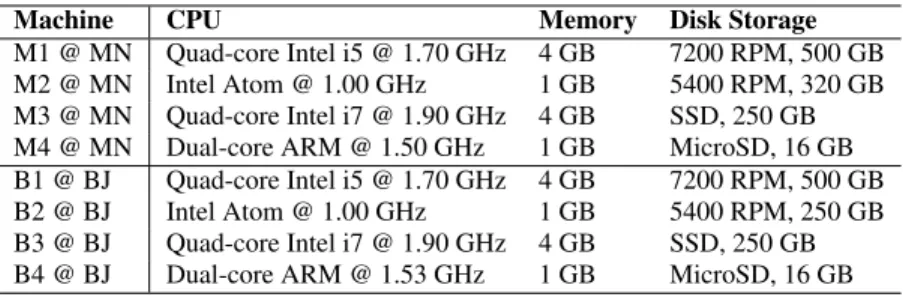
Client machine hardware. A total of eight client machines are employed in the experiments: four in MN (i.e.,M1, M2, M3, and M4) and four in BJ (i.e.,B1, B2, B3, and B4). Their detailed hard-ware information is listed in Table 4. M1/B1 represents a typical client machine at the moment, M2/B2 an outdated machine, M3/B3 an advanced machine with SSD storage, and M4/B4 an Android s-martphone. M1–M3 and B1–B3 are installed with Windows 7-SP1 and the Chrome-30.0 web browser.
Benchmark software and access methods. For each cloud s-torage service, all the experiments regarding M1–M3 and B1–B3 are performed with the latest version (as of Jan. 2014) of the client software on Windows 7. For the M4 and B4 smartphones, we ex-periment with the latest-version Android apps (as of Jan. 2014). The corresponding sync traffic (i.e.,incoming/outgoing packets) are recorded usingWireshark. For the Android smartphones, we route the network traffic through a PC that promiscuously monitors the packets usingWireshark.
Table 4: Hardware information of the experimental client machines.
Machine CPU Memory Disk Storage
M1 @ MN Quad-core Intel i5 @ 1.70 GHz 4 GB 7200 RPM, 500 GB
M2 @ MN Intel Atom @ 1.00 GHz 1 GB 5400 RPM, 320 GB
M3 @ MN Quad-core Intel i7 @ 1.90 GHz 4 GB SSD, 250 GB
M4 @ MN Dual-core ARM @ 1.50 GHz 1 GB MicroSD, 16 GB
B1 @ BJ Quad-core Intel i5 @ 1.70 GHz 4 GB 7200 RPM, 500 GB
B2 @ BJ Intel Atom @ 1.00 GHz 1 GB 5400 RPM, 250 GB
B3 @ BJ Quad-core Intel i7 @ 1.90 GHz 4 GB SSD, 250 GB
B4 @ BJ Dual-core ARM @ 1.53 GHz 1 GB MicroSD, 16 GB
Table 5: Our major findings, their implications, and locations of relevant sections.
Simple File Operations Implications
Section 4.1 (File creation): The majority (77%) of files in our trace are small in size (<100 KB), which may result in poorTUE.
For providers, nearly two thirds (66%) of small files can be logical-ly combined into larger files forbatched data sync(BDS). Howev-er, only Dropbox and Ubuntu One have partially implemented BDS so far.
Section 4.2 (File deletion): Deletion of a file usually incurs
negli-gible sync traffic. For users, no need to worry about the traffic for file deletion.
Section 4.3 (File modification): The majority (84%) of files are modified by users at least once. Most cloud storage services em-ployfull-file sync, while Dropbox and SugarSync utilize incremen-tal data sync(IDS) to save traffic for PC clients (but not for mobile or web-based access methods).
Most of today’s cloud storage services are built on top ofRESTful infrastructure (e.g.,Amazon S3, Microsoft Azure, and OpenStack Swift) that only support data access operations at thefull-file lev-el.TUEcan be significantly improved by implementing IDS with an extra mid-layer that transformsMODIFY into GET+PUT + DELETEfile operations.
Compression and Deduplication Implications
Section 5.1 (Data compression): 52% of files can be effectively compressed. However, Google Drive, OneDrive, Box, and Sug-arSync never compress data, while Dropbox is the only one that compresses data for every access method.
For providers, data compression is able to reduce 24% of the to-tal sync traffic. For users, PC clients are more likely to support compression versus mobile or web-based access methods. Section 5.2 (Data deduplication): Although we observe that 18%
of files can be deduplicated, most cloud storage services do not support data deduplication, especially for the web-based access method.
For providers, implementing compression and block-level dedupli-cation together is technically challenging. Based on the trace anal-ysis, we suggest providers implement compression and full-file d-eduplication since the two techniques work together seamlessly.
Frequent File Modifications Implications
Section 6.1 (Sync deferment): Frequent modifications to a file of-ten lead to largeTUE. Some services deal with this issue by batch-ing file updates usbatch-ing a fixed sync deferment. However, we find that fixed sync deferments are inefficient in some scenarios.
For providers, we demonstrate that anadaptive sync defer(ASD) mechanism that dynamically adjusts the sync deferment is superior to fixed sync deferment.
Section 6.2 (Network and hardware): Suprisingly, we observe that users with relatively low bandwidth, high latency, or slow hardware save on sync traffic, because their file updates are naturally batched together.
For users, in the presence of frequent file modifications, today’s cloud storage services actually bring good news (in terms ofTUE) to those users with relatively “poor” hardware or Internet access.
3.3
Overview of Our Major Findings
Based on the above methodology, we are able to thoroughly un-ravel theTUE relevant characteristics, design tradeoffs, and op-timization opportunities of the six mainstream cloud storage ser-vices. The detailed research results (from simple to complex) will be presented in the following three sections: simple file operations (§4), compression and deduplication (§5), and frequent file modifi-cations (§6). As an overview and a roadmap of our research results, Table 5 summarizes the major findings and their implications.
4.
SIMPLE FILE OPERATIONS
This section presents our major measurement results, findings, and implications on theTUEof simple file operations. For each measurement, we first introduce the experiment process and
result-s, and then unravel several interesting findings and implications. In this section, we do not mention the client locations, network envi-ronments, and hardware configurations, because theTUEof simple file operations is independent to these impact factors.
4.1
File Creation
[Experiment 1]: We first study the simple case of creating a high-ly compressed file ofZbytes inside the sync folder (we will further study the data compression in detail in§5.1). Thereby, calculat-ing the TUE of file creation becomes straightforward (i.e., TUE
= Total sync trafficZbytes ). According to Figure 2, most compressed files are small in size (several KBs), and the maximum compressed file size is below 2.0 GB. Therefore, we experiment with
Table 6: Sync traffic of a (compressed) file creation.
Service PC client sync traffic (Bytes) Web-based sync traffic (Bytes) Mobile app sync traffic (Bytes)
1 1 K 1 M 10 M 1 1 K 1 M 10 M 1 1 K 1 M 10 M Google Drive 9 K 10 K 1.13 M 11.2 M 6 K 7 K 1.06 M 10.6 M 32 K 71 K 1.27 M 11.0 M OneDrive 19 K 20 K 1.14 M 11.4 M 28 K 31 K 1.11 M 11.7 M 29 K 44 K 1.23 M 10.7 M Dropbox 38 K 40 K 1.28 M 12.5 M 31 K 37 K 1.09 M 10.6 M 18 K 32 K 1.08 M 10.9 M Box 55 K 47 K 1.10 M 10.6 M 55 K 58 K 1.10 M 10.5 M 16 K 34 K 1.29 M 10.8 M Ubuntu One 2 K 3 K 1.11 M 11.2 M 37 K 39 K 1.20 M 11.3 M 20 K 24 K 1.08 M 10.9 M SugarSync 9 K 19 K 1.17 M 11.4 M 31 K 32 K 1.10 M 10.7 M 31 K 47 K 1.22 M 10.9 M
Table 7: Total traffic for synchronizing 100 compressed file creations. Each file is 1 KB in size.
Service PC client Web-based Mobile app
Sync traffic (TUE) Sync traffic (TUE) Sync traffic (TUE)
Google Drive 1.1 MB (11) 1.2 MB (12) 5.6 MB (56) OneDrive 1.3 MB (13) 2.2 MB (22) 1.9 MB (19) Dropbox 120 KB (1.2) 600 KB (6.0) 360 KB (3.6) Box 1.2 MB (12) 3.2 MB (32) 3.2 MB (32) Ubuntu One 140 KB (1.4) 500 KB (5.0) 2.5 MB (25) SugarSync 0.9 MB (9) 4.0 MB (40) 1.5 MB (15)
The second goal ofExperiment 1is to get a quantitative un-derstanding of the overhead traffic, asTUE heavily depends on the ratio of the overhead traffic over the total sync traffic. Syn-chronizing a file to the cloud always involves a certain amount of overhead traffic, which arises from TCP/HTTP(S) connection setup and maintenance, metadata delivery, etc. Specifically, the overhead traffic is equal to the total sync traffic excluding the payload traffic for delivering the file content, so inExperiment 1,
Overhead traffic≈Total sync traffic -Zbytes.
Table 6 lists the results ofExperiment 1regarding the six con-cerned cloud storage services. We vary the file size from 1 B to 1 GB, but for brevity only list four typical sizes: 1 B, 1 KB, 1 MB, and 10 MB. The table records the sync traffic generated by the three typical service access methods: PC client, web (browser) based, and mobile app. In general, from Table 6 we have the following finding and implication:
• TUEfor synchronizing a (compressed) file creation mainly depends on the file size. Asmallfile results in bigTUEup to 40000, while abigfile incurs smallTUEapproaching 1.0. Therefore, for providers, a number of small files can be log-ically combined into a moderate-sizefile forbatched data sync(BDS) to save traffic, in particular the overhead traffic.
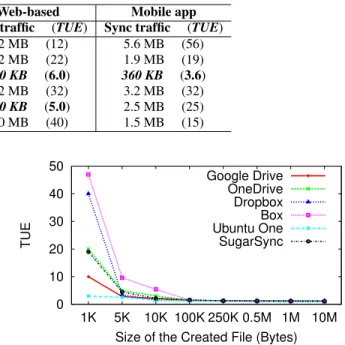
This finding poses a key question:What is a small size and what is a moderate size?By plotting theTUE vs.File Size relationship (for PC clients) in Figure 3, we get an intuitive conclusion that a moderate size should be at least 100 KB and had better exceed 1 MB, in order to achieve smallTUE– at most 1.5 and had better stay below 1.2. Here we only draw the curve for PC clients since the corresponding curves for web-based and mobile apps are similar.
As a consequence, small size is regarded as less than 100 KB, which together with Figure 2 reveals that the majority (77%) of tracked files are small in size (meanwhile, 81% in terms of com-pressed size). More importantly, by analyzing our collected trace, we find that nearly two-thirds (66%) of these small files can be cre-ated in batches and thus can effectively benefit from BDS. [Experiment 1’]: Given that the BDS mechanism can effectively optimizeTUE, a new question comes out: Is BDS adopted by the
0 10 20 30 40 50 1K 5K 10K 100K 250K 0.5M 1M 10M TUE
Size of the Created File (Bytes) Google Drive OneDrive Dropbox Box Ubuntu One SugarSync
Figure 3:TUE vs.Size of the created file.
six mainstream cloud storage services?To get the answer, we first generate 100 (distinct) highly compressed files, and then move all of them into the sync folder in a batch. Each file is 1 KB in size, soTUE= Total sync traffic100KB . If BDS is adopted, the total sync traffic should be around 100 KB andTUEshould be close to 1.0.
The results ofExperiment 1’listed in Table 7 reveal that Drop-box and Ubuntu One have adopted BDS for PC clients. Further, it is possible that Dropbox has adopted BDS for web-based and mo-bile access methods, because the corresponding sync traffic (600 KB and 360 KB) is within an order of magnitude of the data up-date size (100 KB). Also, Ubuntu One may have used BDS in its web-based data synchronization, since the sync traffic (500 KB) lies between 600 KB and 360 KB. On the contrary, Google Drive, OneDrive, Box, and SugarSync have not adopted BDS yet.
4.2
File Deletion
[Experiment 2] : Each file created inExperiment 1is deleted after it is completely synchronized to the cloud, so as to acquire the sync traffic information of a file deletion.
TheExperiment 2results indicate that deletion of a file usual-ly generates negligible (<100 KB) sync traffic, regardless of the cloud storage service, file size, or access method. The reason is s-traightforward: when a filefis deleted in the user’s local sync
0 0.2 0.4 0.6 0.8 1 1.2 1K 10K 100K 1M Sync Traffic (MB)
Size of the Modified File (Bytes) (a) PC client Google Drive OneDrive Dropbox Box Ubuntu One SugarSync 0 0.2 0.4 0.6 0.8 1 1.2 1K 10K 100K 1M Sync Traffic (MB)
Size of the Modified File (Bytes)
(b) Web-based Google Drive OneDrive Dropbox Box Ubuntu One SugarSync 0 0.2 0.4 0.6 0.8 1 1.2 1K 10K 100K 1M Sync Traffic (MB)
Size of the Modified File (Bytes) (c) Mobile app Google Drive OneDrive Dropbox Box Ubuntu One SugarSync
Figure 4: Sync traffic of a random byte modification, corresponding to the three typical service access methods: (a) PC client, (b) Web-based, and (c) Mobile app. By comparing the three subfigures, we discover that only the PC clients of Dropbox and SugarSync utilize theincremental data sync(IDS) mechanism for improved network-level efficiency.
er, the user client just notifies the cloud to change some attributes of
frather than remove the content off. In fact, such “fake deletion” also facilitates users’ data recovery, such as the version rollback of a file. Naturally, we get the following implication:
• Cloud storage service users do not need to worry about the sync traffic when deleting a file.
4.3
File Modification and Sync Granularity
[Experiment 3]: The analysis of our collected cloud storage trace reveals that the majority (84%) of files are modified by users at least once. That is to say, file modifications are frequently made by cloud storage users. This subsection studies a simple case of file modification,i.e.,modifying a random byte in a compressed file of
Zbytes inside the sync folder. In this case,TUE= Total sync traffic1Byte . Similar as§4.1, we experiment with
Z∈ {1,1K,10K,100K,1M,10M,100M,1G} and plot the sync traffic of four typical sizes:Z=1 K, 10 K, 100 K, and 1 M in Figure 4.
Figure 4 shows that today’s cloud storage services generally u-tilize two kinds of data sync granularity: 1) full-file and 2) chunk-level. Accordingly, their data sync mechanisms are classified into
full-file syncandincremental syncas follows:
• Full-file sync. Google Drive is an example to use the full-file sync mechanism. When a random byte is modified in a
Z-byte compressed file, the resulting sync traffic is almost the same as that of creating a newZ-byte compressed file. In other words, Google Drive deals with each file modifi-cation by simply uploading the full content of the modified file to the cloud and then deleting the old file. Consequent-ly, Google Drive is more suitable for hosting media files (like photos, music, and videos) which are rarely modified by users. The full-file sync mechanism is also employed by OneDrive, Box, Ubuntu One, Amazon Cloud Drive, and some popular cloud storage services in China like Kuaipan, Kanbox, Baidu CloudDisk, and 115 CloudDisk.
• Incremental sync(ordelta sync). Dropbox (PC client) is an example to use the incremental data sync (IDS) mecha-nism. When a random byte modification happens, the result-ing sync traffic stays around 50 KB, regardless of the size of the modified file. According to the working principle of the incremental sync algorithm:rsync[16], once a random byte is changed in a filef, in most cases the whole data chunk that contains this byte must be delivered for synchronizing
f. Therefore, the sync granularity (i.e.,the chunk sizeC) can be approximately estimated as
C≈Total sync traffic−Overhead traffic.
From theExperiment 1results, we understand that the overhead traffic of synchronizing a one-byte file with the Dropbox PC client is nearly 40 KB. Therefore, the data sync granularity of Dropbox PC client is estimated as: C ≈ 50KB−40KB= 10KB. This is further validated by the recommended default chunk size (i.e.,
from 700 B to 16 KB) in the originalrsyncimplementation [15]. Moreover, we find that SugarSync, IDriveSync, and 360 CloudDisk also utilize the IDS mechanism for their PC clients.
On the contrary, as depicted in Figure 4 (b) and 4 (c), web-based apps and mobile apps for all the six services still use the full-file sync mechanism, probably because IDS is hard to implement in JavaScript (for web-based apps) or due to energy concerns (for mo-bile apps). Specifically, JavaScript is the most widely used script language for the development of web-based apps (including cloud storage apps). Nevertheless, for security concerns, JavaScript is unable to directly invoke file-level system calls/APIs like open,
close,read,write,stat,rsync, andgzip[11]. Instead,
JavaScrip-t can only access users’ local files in an indirecJavaScrip-t and consJavaScrip-trained manner, which is of less efficiency in terms of implementing IDS.
In summary, we have the following finding about simple file modification and the data sync granularity:
• When a file modification is synchronized to the cloud,TUE
is mostly affected by the data sync granularity which varies significantly among different cloud storage services. Most services simply use full-file sync, but some services (like Dropbox and SugarSync) utilize IDS to achieve improved network-level efficiency for PC clients.
Conflicts between IDS andRESTful infrastructure. Although enabling the IDS mechanism can help service providers reduce the data sync traffic, implementing IDS is not an easy job in practice. Most of today’s cloud storage services (e.g.,OneDrive, Dropbox, and Ubuntu One) are built on top ofRESTful infrastructure (e.g.,
Amazon S3, Microsoft Azure, and OpenStack Swift). For simplify-ing both the providers’ implementation complexities and the devel-opers’ programming complexities,RESTful infrastructure typically only supports data access operations at thefull-filelevel, likePUT (upload a new file),GET(download a whole file),DELETE(delete a whole file), and so forth. Note that thePUT,GET, andDELETE operations may have aliases in otherRESTful infrastructure.
Thus, enabling IDS usually requires an extra mid-layer for trans-formingMODIFYintoGET+PUT+DELETEfile operations in an
efficientmanner (like what Dropbox has done [25, 36])4. Since file modifications frequently happen, implementing such a mid-layer is worthwhile for improved network-level efficiency.
4An alternative to enable IDS is to store every chunk of a file as a separate data object. When a file is modified, the modified chunks are deleted with the new chunks being stored as new objects; also, file metadata has to be updated (as what is used in Cumulus [43]).
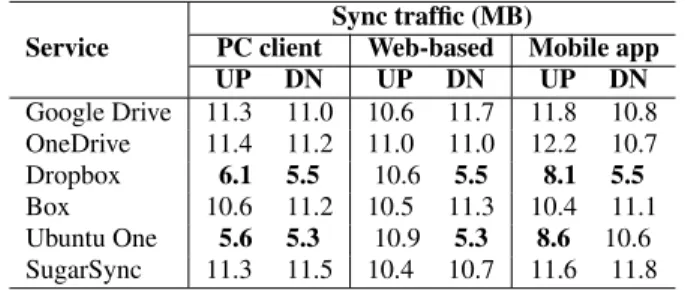
Table 8: Sync traffic of a 10-MB text file creation. UP: The user uploads the file to the cloud. DN: The user downloads the file from the cloud.
Service
Sync traffic (MB)
PC client Web-based Mobile app
UP DN UP DN UP DN Google Drive 11.3 11.0 10.6 11.7 11.8 10.8 OneDrive 11.4 11.2 11.0 11.0 12.2 10.7 Dropbox 6.1 5.5 10.6 5.5 8.1 5.5 Box 10.6 11.2 10.5 11.3 10.4 11.1 Ubuntu One 5.6 5.3 10.9 5.3 8.6 10.6 SugarSync 11.3 11.5 10.4 10.7 11.6 11.8
5.
COMPRESSION AND DEDUPLICATION
In a real-world storage system, compression and deduplication are the two most commonly used techniques for saving space and traffic. This section makes a detailed study of cloud storage com-pression and deduplication, from both the system designers’ and users’ perspectives.
5.1
Data Compression Level
[Experiment 4]: To study whether data updates are compressed before they are synchronized to the cloud, we create anX-byte tex-t file inside tex-the sync folder. As a small file is hard tex-to compress, we experiment withX =1 M, 10 M, 100 M, and 1 G. Each tex-t file is filled witex-th random English words. If datex-ta compression is actually used, the resulting sync traffic should be much less than the original file size. Furthermore, after each text file is complete-ly synchronized, we download it from the cloud with a PC client, a web browser, and a mobile app, respectively, so as to examine whether the cloud delivers data updates in a compressed form.
As a typical case, theExperiment 4results corresponding to a 10-MB text file are listed in Table 8. First, in the file upload (UP) phase, among the six mainstream cloud storage services, on-ly Dropbox and Ubuntu One compress data with PC clients and mobile apps. No service ever compresses data with web browser-s. Further, we observe that the 10-MB text file can be compressed to nearly 4.5 MB using the highest-levelWinZipcompression on our desktop. Thus, for Dropbox and Ubuntu One, the compression level with PC clients seems moderate, while the compression level with mobile apps is quite low. The motivation of such a difference is intuitive: to reduce the battery consumption of mobile devices caused by the computation-intensive data compressions.
Next, in the file download (DN) phase, only Dropbox and Ubun-tu One compress data with PC clients and web browsers, and the compression level is higher than that in the file upload phase. For mobile apps, only Dropbox compresses data.
By analyzing our collected cloud storage trace, we find that 52% of files can beeffectively compressed. Here “effectively compressed” implies thatCompressed file sizeOriginal file size <90%when the highest-levelWinZip compression is applied. As a result, the totalcompression ratio
(= Size of data before compressionSize of data after compression) regarding all the files recorded in the trace reaches 1.31. In other words, data compression is able to re-duce 24% of the data sync traffic (compared with no compression). These observations lead to the following findings and implications: • Data compression provides obvious benefits by reducing the sync traffic, but is not supported by every cloud storage ser-vice. Google Drive, OneDrive, Box, and SugarSync never
Algorithm 1:Iterative Self Duplication Algorithm
1: Set the lower bound:L= 0bytes, and the upper bound:U= +∞ bytes. Guess a deduplication block size:B1;
2: Step 1:
3: Generate a new compressed filef1ofB1bytes;
4: Uploadf1to the cloud. Whenf1is completely synchronized to the cloud, record the total sync traffic:T r1;
5: Step 2:
6: Generate another filef2by appendingf1to itself, that isf2=f1+ f1(the so-called “self duplication”);
7: Uploadf2to the cloud. Whenf2is completely synchronized to the cloud, record the total sync traffic:T r2;
8: Step 3:
9: ifT r2T r1andT r2is small (≈tens of KBs)then 10: B1is actually the deduplication block size (B); 11: exit;
12: elsethere are two cases
13: case 1:T r2<2B1andT r2is not small (implying that B1> B)then
14: SetB1as the upper bound:U←B1, and decrease the guessing value ofB1:B1←L+U
2 ;
15: case 2:T r2>2B1(implying thatB1< B)then 16: SetB1as the lower bound:L←B1, and increase the
guessing value ofB1:B1←L+U
2 ;
17: goto Step 1;
compress data, while Dropbox is the only service that com-presses data for every access method.
• Web browser typicallydoes notcompress a file when upload-ing it to the cloud storage, probably also due to the limitation-s of JavaScript or other web-balimitation-sed limitation-script languagelimitation-s (refer to §4.3). Besides, using a mobile app is usually not as efficient as using a PC client.
5.2
Data Deduplication Granularity
[Experiment 5] : Data deduplication is another potential method to reduce data sync traffic, with the intuition that users often upload duplicated files with similar content. Inferring the deduplication granularity of a cloud storage service requires some efforts, espe-cially when the deduplication block sizeB (bytes) is not a power of two (i.e.,B 6= 2n, wherenis a positive integer)5. To measure the deduplication granularity, we design and implement Algorith-m 1 (naAlgorith-med the “Iterative Self Duplication AlgorithAlgorith-m”). It infers the deduplication granularity by iteratively duplicating and upload-ing one or multiple synthetic file(s) and meanwhile analyzupload-ing the incurred data sync traffic. It is easy to prove that the iteration pro-cedure can finish inO(log(B))rounds.
First, we study inter-file data deduplication with respect to an identical user account. By applyingExperiment 5to the six main-stream cloud storage services, we figure out their data deduplica-tion granularity in Table 9 (the 2nd column). In this table, “Full file” (only for Ubuntu One) means that data deduplication only hap-pens at the full-file level, “4 MB” (only for Dropbox) indicates that the deduplication block sizeB= 4MB, and “No” shows that there is no deduplication performed. Note that block-level deduplication naturally implies full-file deduplication, butnotvice versa.
Second, we study cross-user data deduplication. For each cloud storage service, we first upload a file f to the cloud, and then
5
The deduplication block sizeB(bytes) is traditionally a power of two [39], but we still have to thoughtfully consider the exception whenB6= 2n.
Table 9: Data deduplication granularity. We do not list the web-based case because the web-based file synchronization typ-icallydoes notapply data deduplication.
Service Same user Cross users
PC client&Mobile app PC client&Mobile app
Google Drive No No
OneDrive No No
Dropbox 4 MB No
Box No No
Ubuntu One Full file Full file
SugarSync No No 1.1 1.12 1.14 1.16 1.18 1.2 1.22 1.24 Deduplication Ratio Block Size 128 KB 256 KB 512 KB 1 MB 2 MB 4 MB 8 MB 16 MB Full file
Figure 5:Deduplication ratio(cross-user)vs. Block size. Here the deduplication ratio= Size of data before deduplicationSize of data after deduplication.
use another user account to uploadf to the cloud again. In this case, the sync traffic should be trivial if full-file deduplication is performed across users. If the cross-user full-file deduplication is confirmed,Experiment 5is run again to figure out the accurate cross-user deduplication granularity; otherwise, we can conclude that there is no cross-user data deduplication at all. The results are also shown in Table 9 (the 3rd column). Obviously, only Dropbox employs a different cross-user data deduplication granularity from the identical-user case.
From the above measurements, we get the following findings and implications:
• A cloud storage service usually adopts the same data dedu-plication granularity for PC clients and mobile apps, while the web-based data synchronization typicallydoes notapply data deduplication.
• By analyzing our collected trace, we find that cross-user data (block) duplication pervasively exists: even the full-file level
duplication ratio(= Size of duplicate filesSize of all files ) reaches 18.8%. How-ever, most cloud storage services do not support cross-user deduplication (perhaps for privacy and security concerns) or block-level deduplication at the moment, thus losing consid-erable opportunities for optimizingTUE.
Further, we compare the two types of deduplication granularity to answer a question: Is the block-level deduplication much bet-ter (i.e., has a much larger deduplication ratio) than the full-file deduplication?Since the computation complexity of block-level d-eduplication is much higher than that of full-file dd-eduplication, the answer could help decide whether or not the block-level dedupli-cation is worthwhile. Note that when referring to the “file blocks”, we are dividing files to blocksin a simple and natural way, that is to say, by starting from the head of a file with a fixed block size. So clearly, we are not dividing files to blocks in the best possible manner [19, 39] which is much more complicated and computation intensive.
As our collected trace contains both the full-file hash codes and the block-level (128 KB – 16 MB blocks) hash codes of each tracked file (refer to§3.1, Table 3), we perform the trace-driven simulation to figure out the (cross-user) deduplication ratio when each dedupli-cation granularity is adopted. The simulation results demonstrate that the block-level deduplication usually exhibitstrivial superior-ityto the full-file deduplication, as shown in Figure 5. Therefore, we have the following implication:
• For providers, in terms of deduplication granularity, support-ing full-file deduplication is basically sufficient.
Conflicts between compression and block-level deduplication. Although data deduplication can reduce the sync traffic, we notice that it has a potential performance conflict with data compression. Implementing block-level deduplication and compression together is technically challenging.
For cloud storage service providers, though storing and deliver-ing data in its compressed form can effectively save storage space and sync traffic, it may significantly increase the (computation and I/O) complexity of block-level deduplication. Specifically, after a file (f) is delivered to the cloud storage in its compressed form (f0),
f0must be first uncompressed to calculate each block’s fingerprint, so as to enable block-level deduplication. Then, the uncompressed file must be deleted from disk. Furthermore, the above operations must be re-executed (in part) as long as one block offis modified. It is basically unwise for a service provider to shift these operations to its user clients, unless the service provider does not care about user experience.
In this subsection we have known that block-level deduplica-tion exhibits trivial superiority to full-file deduplicadeduplica-tion. Mean-while, full-file deduplication is not challenged by data compres-sion, because full-file deduplication can be directly performed on compressed files. Therefore, we suggest that providers implement full-file deduplication and compression since these two techniques work together seamlessly.
6.
FREQUENT FILE MODIFICATIONS
In addition to backing up and retrieving files, cloud storage ser-vices are also widely used for collaboration, such as collaborative document editing, team project building, and database hosting. All the above mentioned advanced functions involve a special kind of file operations:frequent modificationsto a file.
In§4 and§5, we have studied various simple file operations that are each performed at once. On the contrary, frequent modifi-cations imply that a file is modified in a frequent and incremental manner. Thus, they exhibit diverse data update patterns in terms of data updatesizeandrate. The large-scale trace collected by Dra-goet al. [12] reveals that for 8.5% of Dropbox users, more than 10% of their sync traffic is caused by frequent modifications [36]. Further, frequent modifications may well incur abundant overhead traffic that far exceeds the amount of useful data update traffic sen-t by sen-the user cliensen-t over sen-time, which is referred sen-to as sen-thetraffic overuse problem[36]. Besides, in this section we will elaborate on client locations, network environments, and hardware configu-rations, because theTUEof frequent file modifications is largely influenced by these factors.
6.1
Sync Deferment
[Experiment 6]: To experiment with frequent file modifications, we append X random kilobytes to an empty file inside the sync folder everyXseconds, until the total appended bytes reach a cer-tain sizeC(typicallyC= 1MB). This is denoted as the “XKB/X
0 50 100 150 200 250 1 2 3 4 5 6 7 8 9 10 TUE X KB/X sec appending
(a) Google Drive
0 10 20 30 40 50 5 10 15 20 TUE X KB/X sec appending (b) OneDrive 0 20 40 60 80 100 120 140 1 2 3 4 5 6 7 8 9 10 TUE X KB/X sec appending (c) Ubuntu One 0 10 20 30 40 50 60 70 80 1 2 3 4 5 6 7 8 9 10 TUE X KB/X sec appending (d) Box 0 5 10 15 20 25 30 1 2 3 4 5 6 7 8 9 10 TUE X KB/X sec appending (e) Dropbox 0 5 10 15 20 25 30 35 1 2 3 4 5 6 7 8 9 10 TUE X KB/X sec appending (f) SugarSync
Figure 6:TUEof the six cloud storage services in response to controlled frequent file modifications. Note that the subfigures have distinct Y-axes, and the (b) OneDrive subfigure has a different X-axis.
sec” appending experiment. We use random bytes since they are difficult to compress, thus preventing file compression from influ-encing our measurements ofTUE.
Our goal is three folds by doing this experiment: 1) We observe and understand the sync traffic andTUE in response to frequent modifications; 2) We aim to discover whether the cloud storage service has used thesync defermentin order to avoid or mitigate the traffic overuse problem; and 3) If the sync deferment is adopted, we want to measure how long the sync deferment is.
All the experiments in this section are performed using M1 @ MN (refer to Table 4) with 20 Mbps of bandwidth, and the latency (between M1 and each cloud) is between 42 msec and 77 msec. In terms of service access method, we only examine the PC client, because almost all the frequent modifications are generated from PC clients in practice6. Experiments with other benchmarks will be presented in§6.2.
First, to investigate the impact of frequent file modifications on
TUE, we examine the cases forX∈ {1,2,· · ·,19,20}. As depict-ed in Figure 6, the six mainstream cloud storage services exhibit diverse and interesting phenomena:
• Frequent modifications to a file often lead to largeTUE(the aforementioned “traffic overuse problem”). As for the six mainstream services, the maximumTUEcan reach 260, 51, 144, 75, 32, and 33, respectively.
• We observe (except in the sync defer cases: Figure 6 (a), 6 (b), and 6 (f)) thatTUEgenerally decreases as the modifi-cation frequency (= 1024
X ) decreases. The reason is straight-forward: though the total data update size is alwaysC = 1 MB, a lower data update frequency implies fewer data sync events, and thus the overhead traffic is reduced.
A natural question is: Why are the maximumTUE values of Google Drive (260), OneDrive (51), Ubuntu One (144), and Box (75) much larger than those of Dropbox (32) and SugarSync (33)?
The answer can be found from their data sync granularity (refer to§4.3): Google Drive, OneDrive, Ubuntu One, and Box employ
full-file sync, while Dropbox and SugarSync employ block-level 6
The UIs (user interfaces) of web browser and mobile apps for cloud storage services are usually not fit for performing frequent modifications to a file.
incremental syncwhich significantly improves the network-level traffic efficiency.
On the other hand, there do exist a few cases (in Figure 6 (a), 6 (b), and 6 (f)) whereTUEis close to 1.0. According to our ob-servations, (a) Google Drive, (b) OneDrive, and (f) SugarSync deal with the traffic overuse problem by batching file updates using a
fixedsync deferment:Tseconds (which cannot be re-configured by users). Figure 6 (a), 6 (b), and 6 (f) indicate thatTGoogleDrive ∈
(3,5)sec,TSugarSync ∈ (4,6)sec, andTOneDrive ∈ (10,11)
sec. Moreover, to figure out a more accurate value ofT, we fur-ther tuneX from integers to floats. For example, we experiment withX = 3.1,3.2,· · ·,4.9forTGoogleDrive, and then find that
TGoogleDrive ≈4.2sec. Similarly, we find thatTSugarSync ≈6
sec andTOneDrive≈10.5sec.
One may have the following question:Is it possible that the de-ferred data synchronization of (a) Google Drive, (b) OneDrive, and (f) SugarSync is triggered by abyte counteror anupdate counter
rather than thetime threshold(T)? In other words, the three con-cerned services may trigger the data synchronization once the num-ber of uncommitted bytes or updates exceeds a certain value. This question can be addressed in two cases:
• Case 1: If the data synchronization is triggered by abyte counter, the resultingTUEwould be close to 1.0 according to our previous study on the byte-counter based “efficien-t ba“efficien-tched synchroniza“efficien-tion” (UDS) [36]. This is clearly no“efficien-t true as illustrated by Figure 6 (a), 6 (b), and 6 (f).
• Case 2: If the data synchronization is triggered by anupdate counter, the resultingTUEin Figure 6 (a), 6 (b), and 6 (f) wouldlinearlydecrease as the modification period (X sec) increases. Obviously, this is not true, either.
Therefore, we conclude that the deferred data synchronization is not triggered by a byte counter or an update counter.
Unfortunately, fixed sync deferments are limited in terms of us-age scenarios. As shown in Figures 6 (a), 6 (b), and 6 (f), the traffic overuse problem still occurs whenX > T.
To overcome the limitation of fixed sync deferments, we propose anadaptive sync defer(ASD) mechanism. ASD adaptively tunes its sync deferment (Ti) to follow the latest (say, thei-th) data up-date. In other words, when data updates happen more frequently,
0 10 20 30 40 50 5 10 15 20 TUE X KB/X sec appending (a) OneDrive @ MN @ BJ 0 10 20 30 40 50 60 70 80 1 2 3 4 5 6 7 8 9 10 TUE X KB/X sec appending (b) Box @ MN @ BJ 0 5 10 15 20 25 30 1 2 3 4 5 6 7 8 9 10 TUE X KB/X sec appending (c) Dropbox @ MN @ BJ
Figure 7:TUEof (a) OneDrive, (b) Box, and (c) Dropbox on handling the “XKB/Xsec” appending experiment, in Minnesota (MN) and Beijing (BJ), respectively.
20 22 24 26 28 30 32 34 36 0 5 10 15 20 TUE Bandwidth (Mbps)
(a)
Dropbox 5 10 15 20 25 30 0 200 400 600 800 1000 TUE Latency (msec)(b)
Dropbox 0 5 10 15 20 25 30 35 40 45 1 2 3 4 5 6 7 8 9 10 TUE X KB/X sec appending(c)
Dropbox-MN-M3 Dropbox-MN-M1 Dropbox-MN-M2Figure 8:TUEof Dropbox on handling the (a) “1 KB/sec” appending experiment with variable bandwidths, (b) “1 KB/sec” appending experiment with variable latencies, and (c) “XKB/Xsec” appending experiment with distinct hardware configurations.
longer. In either case,Titends to be slightly longer than the lat-est inter-update time, so that frequent modifications can be proper-ly batched for synchronization (without harming user experience). Specifically,Tican be adapted in such an iterative manner:
Ti= min ( Ti−1
2 +
∆ti
2 +, Tmax) (2)
where∆tiis the inter-update time between the(i-1)-th and thei-th data updates, and∈ (0,1.0)is a small constant that guarantees
Ti to be slightly longer than∆ti in a small number of iteration rounds. Tmax is also a constant representing the upper bound of Ti, as a too largeTiwill harm user experience by bringing about intolerably long sync delay.
If Google Drive would utilize ASD on handling the “XKB/X
sec” (X > TGoogleDrive) appending experiments, the resulting
TUEwill be close to 1.0 rather than the original 260 (X= 5), 100 (X = 6), 83 (X = 7), and so forth. The situation is similar for OneDrive and SugarSync. More detailed performance evaluation of ASD can be found in our previous work [37].
6.2
Impact of Network and Hardware
In this subsection, we first study the impact of network and hard-ware onTUE, and then explore why they impactTUE.
[Experiment 7, Network environment]: To study the impact of network environment (including both bandwidth and latency) on
TUE, we conduct the following two batches of experiments. The first batch of experiments are performed on B1 @ BJ. It represents a relatively poor network environment: low bandwidth (nearly 1.6 Mbps) and long latency (between 200 msec and 480 m-sec) relative to the cloud, because the six mainstream cloud storage services are mainly deployed in US. After repeatingExperiments 1 – 6in this network environment, we compare the results with the corresponding results by using M1 @ MN with abundant band-width (nearly 20 Mbps) and short latency (between 42 msec and 77 msec), which represents a good network environment.
The second batch of experiments are performed by using M1 @ MN with controlled bandwidth (between 1.6 Mbps and 20 Mbp-s) and latency (between 40 msec and 1000 msec), so that we are
able to get fine-grained results about how the network environment impactsTUE.
From the two batches of experiments, we mainly get the follow-ing findfollow-ings and implications:
• TUEof a simple file operation is usually not affected by net-work environment.
• However, in the case of frequent file modifications, a user client with relatively low bandwidth or long latency can save more sync traffic.
Specifically, for the first batch of experiments, we plot theTUE
of (a) OneDrive, (b) Box, and (c) Dropbox on handling the “X
KB/Xsec” appending experiment in Minnesota and Beijing in Fig-ure 7 (a), 7 (b), and 7 (c), respectively. The situation of Google Drive and SugarSync is similar to Figure 7 (a), and the situation of Ubuntu One looks like Figure 7 (b). In each subfigure, the two curves (“@ MN”vs. “@ BJ”) clearly illustrate that poor network environment leads to smallerTUE, especially when the modifica-tion period (Xsec) is short (excluding the sync defer cases).
For the second batch of experiments, as a typical example, we plot theTUEof Dropbox on handling the “1 KB/sec” appending experiment with variable bandwidths and latencies in Figure 8 (a) and Figure 8 (b), respectively. In Figure 8 (a), the latency is fixed to around 50 msec and the bandwidth is tuned from 1.6 Mbps to 20 Mbps. In Figure 8 (b), the bandwidth is fixed to around 20 Mbps and the latency is tuned from 40 msec to 1000 msec. Obviously, higher bandwidth or shorter latency leads to larger TUE.
[Experiment 7’, Hardware configuration] : Next, we examine the impact of hardware configuration onTUEby repeating Experi-ments 1 – 6with distinct client machines: M1 (a typical machine), M2 (an outdated machine), and M3 (an advanced machine). Their detailed hardware information is listed in Table 4. All the experi-ments are performed in Minnesota with abundant bandwidth (near-ly 20 Mbps) and short latency (between 42 msec and 77 msec).
Through theExperiment 7’results, we observe thatTUEof a simple file operation generally has no relation with hardware
con-figuration, butTUEof frequent file modifications is actually affect-ed by hardware configuration. As a typical example, in Figure 8 (c) we plot theTUEof Dropbox on handling the “X KB/X sec” appending experiment with M1, M2, and M3. The three curves clearly demonstrate that slower hardware incurs less sync traffic. Why do network environment and hardware configuration im-pactTUE? To explore the reason why network environment and hardware configuration impactTUE, we analyze the communica-tion packets of data synchronizacommunica-tion, in particular the TCP data flows. The analysis reveals that in the presence of frequent modifi-cations to a file, the user client doesnotalways synchronize every file modification to the cloudseparately. Instead, the user client often batches multiple file modifications for data synchronization. Specifically, a new file modification (or a sequence of new file mod-ifications) is synchronized to the cloud when at least the following two conditions are both satisfied:
• Condition 1: The previous file modification (or the previ-ous batch of file modifications) has been completely synchro-nized to the cloud.
• Condition 2:The client machine has finished calculating the latest metatata of the modified file.
As to Condition 1, when the network environment is relatively poor, synchronizing the previous file modification (or the previous batch of file modifications) takes more time, so the client needs to wait for a longer period of time to synchronize the new file modi-fication. As to Condition 2, when the client runs on top of slower hardware, calculating the latest metatata (which is computation-intensive) also requires a longer period of time. Because the failure of either condition will cause the new file modification (or the se-quence of new file modifications) to be naturally batched, poor net-work environment or poor hardware increases the probability that a file modification gets batched, and thereby optimizes theTUE.
Finally, combining all the findings in this subsection, we get the following implication:
• In the case of frequent file modifications, today’s cloud stor-age services actually bring good news (in terms ofTUE) to those users with relatively poor hardware or Internet access.
7.
DISCUSSION
While this paper mainly focuses on thetraffic costsof cloud stor-age services, we keep in mind that the total costs of running a cloud storage service also involves thecomputation costs,storage costs,
operation costs, and so forth. Therefore, we would like to fur-ther study and understand the traffic usage from an insider’s point of view. In particular, we want to quantify thetradeoff between
TUEand other system metrics. For example, regarding data sync granularity, incremental synchronization is a double-edge sword: It effectively saves traffic and storage compared with full-file syn-chronization, but it also puts more computational burden on both service providers and end users. Likewise, determining the best data compression level to achieve a good balance between traffic, storage, and computation deserves further research efforts.
Specifically, studying the aforementioned system tradeoffs would require at least the following three-fold information from cloud s-torage providers:
• The user device composition(i.e.,the percentages of PCs, tablets, and smartphones) is the most important information
required. For PCs, it is generally fine to sacrifice computa-tion, storage, and/or network-level efficiency for better ser-vice quality (e.g.,faster synchronization of file operations). For example, PC clients usually maintain a local sync fold-er that stores a copy for almost evfold-ery synchronized file at the cloud side. On the other hand, smartphones are sensitive to computation cost, storage space, and sometimes network overhead (in 2G/3G/4G modes). Accordingly, mobile apps usually maintain a small-size local folder that caches only a few most recently accessed files.
• The logical interfaces of the storage infrastructuredecides the implementation difficulty and working efficiency of ID-S (incremental data sync) for file modifications. The logical interfaces mainly include theRESTful(full-file level) inter-faces, file-level interinter-faces, and block-level interfaces. For ex-ample, Microsoft Azure, Amazon S3, and OpenStack Swift provideRESTfulinterfaces, and thus implementing IDS on top of them is not an easy job. On the contrary, implement-ing IDS on top of a NFS-based infrastructure (with file-level interfaces) is quite straightforward. In addition, as GFS and HDFS provide seemingly file-level interfaces based on block-level infrastructure, the corresponding implementation diffi-culty and working efficiency of IDS lie between those with RESTfuland file-level interfaces. Finally, the logical stor-age interfaces also impact the working efficiency of BDS (batched data sync) for small files.
• The physical devices of the storage infrastructurehave non-negligible influence on the working efficiency and imple-mentation (monetary) costs of a cloud storage service. Obvi-ously, a single SSD is faster while much more expensive than a single HDD, but up to now it is still not clear which is the most cost-effective among an SSD cluster, an HDD cluster, a hybrid SSD+HDD cluster, or even a tape-based cluster [41]. Moreover, the performance ofthe filesystemcan affect the working efficiency of a cloud storage service. For instance, OpenStack Swift works better with XFS than EXT3/EXT4, as pointed out by the official OpenStack development doc-ument [13]. In addition, even those seemingly independen-t infrasindependen-trucindependen-ture componenindependen-ts may share deep, hidden depen-dencies that lead to unexpectedcorrelated failures, thus un-dermining the redundancy efforts and working efficiencies of cloud storage services [46, 47].
We hope cloud storage service providers to release their propri-etary traces to promote future research in this field.
8.
RELATED WORK
As cloud storage services are becoming more pervasive and chang-ing the way people store and share data, a number of research ef-forts have been made in academia, including the design and im-plementation of the service infrastructure [22, 43, 44, 31], integra-tion services with various features and funcintegra-tionalities [29, 28, 23, 42, 36, 35, 34], performance measurement [33, 25, 24, 20, 45], as well as privacy and security issues [40, 21, 38, 27, 32]. While the previous work covers the data sync mechanism as one of the key operations and the resulting traffic usage, none of them tries to un-derstand theefficiencyof the traffic usagecomprehensively. Due to the system complexity and implementation difference, one can hardly form a general and unified view of the traffic usage efficien-cy, not to mention the further improvement.
Our work is different from and complementary to previous s-tudies by quantifying and optimizing traffic usage efficiency, the
pivotal network-level efficiency for cloud storage services. Based on the measurements and analysis of six state-of-the-art cloud stor-age services, we unravel the key impact factors and design choices that may significantly affect the traffic usage efficiency. Most im-portantly, we provide guidance and implications for both service providers and end users to economize their sync traffic usage.
Dropbox is one of the earliest and most popular cloud storage services, and its data sync mechanism has been studied in depth in [25, 36]. Through an ISP-level large-scale measurement, Dra-goet al.first uncover the performance bottlenecks of Dropbox due to both the system architecture and the data sync mechanism [25]. They suggest a bundling sync scheme with delayed sync ACK to improve the sync performance of Dropbox. In addition, Liet al.
identify a pathological issue that may lead to the “traffic overuse problem” in Dropbox by uploading a large amount of unnecessary (overhead) traffic [36]. They propose an efficient batched sync al-gorithm (named UDS) to address this issue. Complementary to these studies, our results are not limited to Dropbox. Instead, we unravel the general factors that may significantly affect the data sync traffic. In consequence, our results are more general and appli-cable for designing network-level efficient cloud storage services, rather than improving one particular service.
Some measurement studies have partially covered the traffic us-age of cloud storus-age services. Huet al.examine “the good, the bad and the ugly” of four cloud storage services by comparing their traf-fic usage, delay time, and CPU usage of uploading new files [30]. They observe that the sync traffic usage varies substantially with factors such as file size, data compressibility, and data duplication levels. Dragoet al.further compare the system capabilities of five cloud storage services, and find that each service has limitations with regard to data synchronization [24]. Both of these two studies confirm the importance of sync traffic usage, and the possibility of further optimizing the sync traffic usage.
In this paper, we zoom into the problem towards a comprehen-sive understanding of traffic usage efficiency. Different from the simplified benchmarks used in the above mentioned studies [36, 30, 24], we consider the diversity of access methods, client locations, hardware configurations, and network conditions to match the real-world usage. Indeed, we discover that these factors lead to different traffic usage patterns, some of which are even not expected. Last but not the least, different from previous studies that never consider mobile usage, one of our focus is the mobile usage of sync traffic – mobile users are those who mostly suffer from traffic overuse.
9.
CONCLUSION AND FUTURE WORK
The tremendous increase in data sync traffic has brought growing pains to today’s cloud storage services, in terms of both infrastruc-ture support and monetary costs. Driven by this problem, this paper quantifies and analyzes the data sync traffic usage efficiency (TUE) of six widely used cloud storage services, using a real-world trace and comprehensive experiments. Our results and findings confirm that much of the data sync traffic is unnecessary and can be avoided or mitigated by careful design of data sync mechanisms. In other words, there is enormous space for optimizing the network-level efficiency of existing cloud storage services. We sincerely hope that our work can inspire the cloud storage designers to enhance their system and software, and meanwhile guide the users to pick appropriate services.
In Jun. 2014, Apple Inc. announced its cloud storage service, iCloud Drive, in its annual WWDC conference. iCloud Drive is planned as an important component of iCloud, the popular cloud service provided by Apple that has amassed over 300 million user-s. Therefore, in the near future, iCloud Drive may be ranked higher
than several cloud storage services studied in this paper (e.g., Drop-box and Box). To our knowledge, multiple groups of researchers (including us) have been anxious to investigate the network-level efficiency of iCloud Drive, in the hopes of harvesting novel and interesting discoveries. Unfortunately, up to now (Aug. 2014), the iCloud Drive service is still unavailable to common users [10]. In general, we believe that the network-level efficiency of iCloud Drive would be a promising research topic, as iCloud Drive lives in a unique and clos