Spring Data MongoDB - Reference Documentation
Mark Pollack, Thomas Risberg, Oliver Gierke, Costin Leau, Jon Brisbin
Copyright © 2011
Copies of this document may be made for your own use and for distribution to others, provided that you do not charge any fee for such copies and further provided that each copy contains this Copyright Notice, whether
Preface ... iv
I. Introduction ... 1
1. Why Spring Data - Document? ... 2
2. Requirements ... 3
3. Additional Help Resources ... 4
3.1. Support ... 4 3.1.1. Community Forum ... 4 3.1.2. Professional Support ... 4 3.2. Following Development ... 4 4. Repositories ... 5 4.1. Introduction ... 5 4.2. Core concepts ... 5 4.3. Query methods ... 6
4.3.1. Defining repository interfaces ... 7
4.3.2. Defining query methods ... 7
4.3.3. Creating repository instances ... 9
4.4. Custom implementations ... 11
4.4.1. Adding behaviour to single repositories ... 11
4.4.2. Adding custom behaviour to all repositories ... 12
II. Reference Documentation ... 15
5. MongoDB support ... 16
5.1. Getting Started ... 16
5.1.1. Required Jars ... 18
5.1.2. Migrating from M2 to M3 ... 19
5.2. Examples Repository ... 19
5.3. Connecting to MongoDB with Spring ... 19
5.3.1. Registering a Mongo instance using Java based metadata ... 20
5.3.2. Registering a Mongo instance using XML based metadata ... 21
5.3.3. The MongoDbFactory interface ... 22
5.3.4. Registering a MongoDbFactory instance using Java based metadata ... 22
5.3.5. Registering a MongoDbFactory instance using XML based metadata ... 23
5.4. Introduction to MongoTemplate ... 24
5.4.1. Instantiating MongoTemplate ... 25
5.5. Saving, Updating, and Removing Documents ... 26
5.5.1. How the '_id' field is handled in the mapping layer ... 28
5.5.2. Methods for saving and inserting documents ... 28
5.5.3. Updating documents in a collection ... 30
5.5.4. Methods for removing documents ... 31
5.6. Querying Documents ... 31
5.6.1. Querying documents in a collection ... 32
5.6.2. Methods for querying for documents ... 34
5.6.3. GeoSpatial Queries ... 34
5.7. Map-Reduce ... 36
5.7.1. Example Usage ... 36
5.8. Overriding default mapping with custom converters ... 38
5.8.1. Saving using a registered Spring Converter ... 38
5.8.2. Reading using a Spring Converter ... 38
5.8.3. Registering Spring Converters with the MongoConverter ... 38
5.9. Index and Collection managment ... 39
5.9.1. Methods for creating an Index ... 39
5.9.2. Methods for working with a Collection ... 39
5.10.1. Methods for executing commands ... 40 5.11. Lifecycle Events ... 40 5.. Exception Translation ... 41 5.13. Execution Callback ... 41 6. Mongo repositories ... 43 6.1. Introduction ... 43 6.2. Usage ... 43 6.3. Query methods ... 44
6.3.1. Geo-spatial repository queries ... 45
6.3.2. Mongo JSON based query methods and field restriction ... 46
6.3.3. Type-safe Query methods ... 46
7. Mapping ... 48
7.1. Convention based Mapping ... 48
7.1.1. How the '_id' field is handled in the mapping layer ... 48
7.2. Mapping Configuration ... 49
7.3. Metadata based Mapping ... 51
7.3.1. Mapping annotation overview ... 51
7.3.2. Compound Indexes ... 53
7.3.3. Using DBRefs ... 53
7.3.4. Mapping Framework Events ... 54
7.3.5. Overriding Mapping with explicit Converters ... 54
8. Cross Store support ... 56
8.1. Cross Store Configuration ... 56
8.2. Writing the Cross Store Application ... 58
9. Logging support ... 60
9.1. MongoDB Log4j Configuration ... 60
10. JMX support ... 61
10.1. MongoDB JMX Configuration ... 61
III. Appendix ... 63
A. Namespace reference ... 64
A.1. The<repositories />element ... 64
A.2. The<repository />element ... 64
Preface
The Spring Data MongoDB project applies core Spring concepts to the development of solutions using the MongoDB document style data store. We provide a "template" as a high-level abstraction for storing and querying documents. You will notice similarities to the JDBC support in the Spring Framework.
Part I. Introduction
This document is the reference guide for Spring Data - Document Support. It explains Document module concepts and semantics and the syntax for various stores namespaces.
This section provides some basic introduction to Spring and Document database. The rest of the document refers only to Spring Data Document features and assumes the user is familiar with document databases such as MongoDB and CouchDB as well as Spring concepts.
1. Knowing Spring
Spring Data uses Spring framework'score functionality, such as the IoCcontainer, type conv ersion system, expression language, JMX integration, and portable DAO exception hierarchy. While it is not important to know the Spring APIs, understanding the concepts behind them is. At a minimum, the idea behind IoC should be familiar for whatever IoC container you choose to use.
The core functionality of the MongoDB and CouchDB support can be used directly, with no need to invoke the IoC services of the Spring Container. This is much likeJdbcTemplatewhich can be used 'standalone' without
any other services of the Spring container. To leverage all the features of Spring Data document, such as the repository support, you will need to configure some parts of the library using Spring.
To learn more about Spring, you can refer to the comprehensive (and sometimes disarming) documentation that explains in detail the Spring Framework. There are a lot of articles, blog entries and books on the matter - take a look at the Spring frameworkhome pagefor more information.
2. Knowing NoSQL and Document databases
NoSQL stores have taken the storage world by storm. It is a vast domain with a plethora of solutions, terms and patterns (to make things worth even the term itself has multiplemeanings). While some of the principles are common, it is crucial that the user is familiar to some degree with the stores supported by DATADOC. The best way to get acquainted to this solutions is to read their documentation and follow their examples - it usually doesn't take more then 5-10 minutes to go through them and if you are coming from an RDMBS-only background many times these exercises can be an eye opener.
The jumping off ground for learning about MongoDB is www.mongodb.org. Here is a list of other useful resources.
• Theonline shell provides a convenient way to interact with a MongoDB instance in combination with the onlinetutorial.
• MongoDBJava Language Center • Severalbooksavailable for purchase
Chapter 1. Why Spring Data - Document?
The Spring Framework is the leading full-stack Java/JEE application framework. It provides a lightweight container and a non-invasive programming model enabled by the use of dependency injection, AOP, and portable service abstractions.
NoSQL storages provide an alternative to classical RDBMS for horizontal scalability and speed. In terms of implementation, Document stores represent one of the most popular types of stores in the NoSQL space. The document database supported by Spring Data are MongoDB and CouchDB, though just MongoDB integration has been released to date.
The goal of the Spring Data Document (or DATADOC) framework is to provide an extension to the Spring programming model that supports writing applications that use Document databases. The Spring framework has always promoted a POJO programming model with a strong emphasis on portability and productivity. These values are caried over into Spring Data Document.
Notable features that are used in Spring Data Document from the Spring framework are the Features that particular, features from the Spring framework that are used are the Conversion Service, JMX Exporters, portable Data Access Exception hierarchy, Spring Expression Language, and Java based IoC container configuration. The programming model follows the familiar Spring 'template' style, so if you are familar with Spring template classes such as JdbcTemplate, JmsTemplate, RestTemplate, you will feel right at home. For example, MongoTemplate removes much of the boilerplate code you would have to write when using the MongoDB driver to save POJOs as well as a rich java based query interface to retrieve POJOs. The programming model also offers a new Repository approach in which the Spring container will provide an implementation of a Repository based soley off an interface definition which can also include custom finder methods.
Chapter 2. Requirements
Spring Data Document 1.x binaries requires JDK level 6.0 and above, andSpring Framework3.0.x and above. In terms of document stores, MongoDB preferably version 1.6.5 or later or CouchDB 1.0.1 or later are required.
Chapter 3. Additional Help Resources
Learning a new framework is not always straight forward. In this section, we try to provide what we think is an easy to follow guide for starting with Spring Data Document module. However, if you encounter issues or you are just looking for an advice, feel free to use one of the links below:
3.1. Support
There are a few support options available:
3.1.1. Community Forum
The Spring Dataforumis a message board for all Spring Data (not just Document) users to share information and help each other. Note that registration is needed only for posting.
3.1.2. Professional Support
Professional, from-the-source support, with guaranteed response time, is available from SpringSource, the company behind Spring Data and Spring.
3.2. Following Development
For information on the Spring Data Mongo source code repository, nightly builds and snapshot artifacts please see theSpring Data Mongo homepage.
You can help make Spring Data best serve the needs of the Spring community by interacting with developers through the Spring Community forums. To follow developer activity look for the mailing list information on the Spring Data Mongo homepage.
If you encounter a bug or want to suggest an improvement, please create a ticket on the Spring Data issue tracker.
To stay up to date with the latest news and announcements in the Spring eco system, subscribe to the Spring CommunityPortal.
Chapter 4. Repositories
4.1. Introduction
Implementing a data access layer of an application has been cumbersome for quite a while. Too much boilerplate code had to be written. Domain classes were anemic and not designed in a real object oriented or domain driven manner.
Using both of these technologies makes developers life a lot easier regarding rich domain model's persistence. Nevertheless the amount of boilerplate code to implement repositories especially is still quite high. So the goal of the repository abstraction of Spring Data is to reduce the effort to implement data access layers for various persistence stores significantly.
The following chapters will introduce the core concepts and interfaces of Spring Data repositories.
4.2. Core concepts
The central interface in Spring Data repository abstraction is Repository (probably not that much of a
surprise). It is typeable to the domain class to manage as well as the id type of the domain class. This interface mainly acts as marker interface to capture the types to deal with and help us when discovering interfaces that extend this one. Beyond that there'sCrudRepositorywhich provides some sophisticated functionality around
CRUD for the entity being managed.
Example 4.1. Repository interface
public interface CrudRepository<T, ID extends Serializable>
extends Repository<T, ID> {
❶ T save(T entity); ❷ T findOne(ID primaryKey); ❸ Iterable<T> findAll(); Long count(); ❹ void delete(T entity);
❺ boolean exists(ID primaryKey);
❻
// … more functionality omitted.
}
❶ Saves the given entity.
❷ Returns the entity identified by the given id.
❸ Returns all entities.
❹ Returns the number of entities.
❺ Deletes the given entity.
❻ Returns whether an entity with the given id exists.
Usually we will have persistence technology specific sub-interfaces to include additional technology specific methods. We will now ship implementations for a variety of Spring Data modules that implement this interface.
On top of the CrudRepository there is a PagingAndSortingRepository abstraction that adds additional
methods to ease paginated access to entities:
Example 4.2. PagingAndSortingRepository
public interface PagingAndSortingRepository<T, ID extends Serializable> extends CrudRepository<T, ID> { Iterable<T> findAll(Sort sort);
Page<T> findAll(Pageable pageable); }
Accessing the second page ofUserby a page size of 20 you could simply do something like this:
PagingAndSortingRepository<User, Long> repository = // … get access to a bean Page<User> users = repository.findAll(new PageRequest(1, 20);
4.3. Query methods
Next to standard CRUD functionality repositories are usually queries on the underlying datastore. With Spring Data declaring those queries becomes a four-step process:
1. Declare an interface extendingRepositoryor one of its sub-interfaces and type it to the domain class it shall
handle.
public interface PersonRepository extends Repository<User, Long> { … }
2. Declare query methods on the interface.
List<Person> findByLastname(String lastname);
3. Setup Spring to create proxy instances for those interfaces.
<?xml version="1.0" encoding="UTF-8"?>
<beans:beans xmlns:beans="http://www.springframework.org/schema/beans" xmlns:xsi="http://www.w3.org/2001/XMLSchema-instance" xmlns="http://www.springframework.org/schema/data/jpa xsi:schemaLocation="http://www.springframework.org/schema/beans http://www.springframework.org/schema/beans/spring-beans.xsd http://www.springframework.org/schema/data/jpa http://www.springframework.org/schema/data/jpa/spring-jpa.xsd"> <repositories base-package="com.acme.repositories" />
</beans>
4. Get the repository instance injected and use it.
public class SomeClient { @Autowired
private PersonRepository repository;
public void doSomething() {
List<Person> persons = repository.findByLastname("Matthews"); }
At this stage we barely scratched the surface of what's possible with the repositories but the general approach should be clear. Let's go through each of these steps and figure out details and various options that you have at each stage.
4.3.1. Defining repository interfaces
As a very first step you define a domain class specific repository interface. It's got to extendRepositoryand be
typed to the domain class and an ID type. If you want to expose CRUD methods for that domain type, extend
CrudRepositoryinstead ofRepository.
4.3.1.1. Fine tuning repository definition
Usually you will have your repository interface extend Repository, CrudRepository or PagingAndSortingRepository. If you don't like extending Spring Data interfaces at all you can also annotate
your repository interface with@RepositoryDefinition. ExtendingCrudRepositorywill expose a complete set
of methods to manipulate your entities. If you would rather be selective about the methods being exposed, simply copy the ones you want to expose fromCrudRepositoryinto your domain repository.
Example 4.3. Selectively exposing CRUD methods
interface MyBaseRepository<T, ID extends Serializable> extends Repository<T, ID> { T findOne(ID id);
T save(T entity); }
interface UserRepository extends MyBaseRepository<User, Long> { User findByEmailAddress(EmailAddress emailAddress);
}
In the first step we define a common base interface for all our domain repositories and exposefindOne(…) as
well as save(…).These methods will be routed into the base repository implementation of the store of your
choice because they are matching the method signatures inCrudRepository. So ourUserRepositorywill now
be able to save users, find single ones by id as well as triggering a query to findUsers by their email address.
4.3.2. Defining query methods
4.3.2.1. Query lookup strategiesThe next thing we have to discuss is the definition of query methods. There are two main ways that the repository proxy is able to come up with the store specific query from the method name. The first option is to derive the query from the method name directly, the second is using some kind of additionally created query. What detailed options are available pretty much depends on the actual store, however, there's got to be some algorithm that decides what actual query is created.
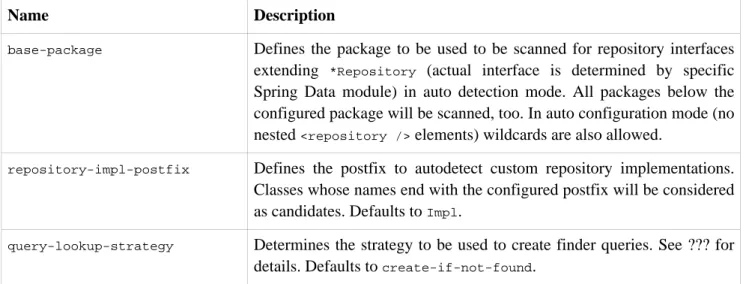
There are three strategies available for the repository infrastructure to resolve the query. The strategy to be used can be configured at the namespace through thequery-lookup-strategy attribute. However, It might be the
case that some of the strategies are not supported for specific datastores. Here are your options:
CREATE
This strategy will try to construct a store specific query from the query method's name. The general approach is Repositories
to remove a given set of well-known prefixes from the method name and parse the rest of the method. Read more about query construction in Section 4.3.2.2, “Query creation”.
USE_DECLARED_QUERY
This strategy tries to find a declared query which will be used for execution first. The query could be defined by an annotation somewhere or declared by other means. Please consult the documentation of the specific store to find out what options are available for that store. If the repository infrastructure does not find a declared query for the method at bootstrap time it will fail.
CREATE_IF_NOT_FOUND (default)
This strategy is actually a combination of CREATEand USE_DECLARED_QUERY. It will try to lookup a declared
query first but create a custom method name based query if no declared query was found. This is the default lookup strategy and thus will be used if you don't configure anything explicitly. It allows quick query definition by method names but also custom tuning of these queries by introducing declared queries as needed.
4.3.2.2. Query creation
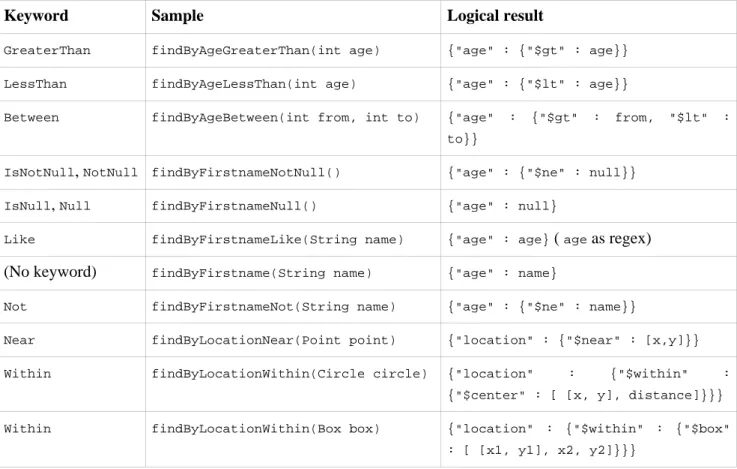
The query builder mechanism built into Spring Data repository infrastructure is useful to build constraining queries over entities of the repository. We will strip the prefixesfindBy,find,readBy,read,getByas well as getfrom the method and start parsing the rest of it. At a very basic level you can define conditions on entity
properties and concatenate them withANDandOR.
Example 4.4. Query creation from method names
public interface PersonRepository extends Repository<User, Long> {
List<Person> findByEmailAddressAndLastname(EmailAddress emailAddress, String lastname); }
The actual result of parsing that method will of course depend on the persistence store we create the query for, however, there are some general things to notice. The expressions are usually property traversals combined with operators that can be concatenated. As you can see in the example you can combine property expressions with And and Or. Beyond that you also get support for various operators likeBetween,LessThan,GreaterThan, Like for the property expressions. As the operators supported can vary from datastore to datastore please
consult the according part of the reference documentation.
4.3.2.2.1. Property expressions
Property expressions can just refer to a direct property of the managed entity (as you just saw in the example above). On query creation time we already make sure that the parsed property is at a property of the managed domain class. However, you can also define constraints by traversing nested properties. AssumePersons have Addresses withZipCodes. In that case a method name of
List<Person> findByAddressZipCode(ZipCode zipCode);
will create the property traversal x.address.zipCode. The resolution algorithm starts with interpreting the
entire part (AddressZipCode) as property and checks the domain class for a property with that name
(uncapitalized). If it succeeds it just uses that. If not it starts splitting up the source at the camel case parts from the right side into a head and a tail and tries to find the according property, e.g.AddressZip andCode. If we
find a property with that head we take the tail and continue building the tree down from there. As in our case the first split does not match we move the split point to the left (Address,ZipCode).
Although this should work for most cases, there might be cases where the algorithm could select the wrong property. Suppose ourPersonclass has an addressZipproperty as well. Then our algorithm would match in
the first split round already and essentially choose the wrong property and finally fail (as the type of
addressZipprobably has no code property). To resolve this ambiguity you can use_inside your method name
to manually define traversal points. So our method name would end up like so:
List<Person> findByAddress_ZipCode(ZipCode zipCode);
4.3.2.3. Special parameter handling
To hand parameters to your query you simply define method parameters as already seen in the examples above. Besides that we will recognizes certain specific types to apply pagination and sorting to your queries dynamically.
Example 4.5. Using Pageable and Sort in query methods
Page<User> findByLastname(String lastname, Pageable pageable); List<User> findByLastname(String lastname, Sort sort);
List<User> findByLastname(String lastname, Pageable pageable);
The first method allows you to pass a Pageable instance to the query method to dynamically add paging to
your statically defined query. Sorting options are handed via the Pageable instance too. If you only need
sorting, simply add aSortparameter to your method. As you also can see, simply returning aListis possible
as well. We will then not retrieve the additional metadata required to build the actualPageinstance but rather
simply restrict the query to lookup only the given range of entities.
Note
To find out how many pages you get for a query entirely we have to trigger an additional count query. This will be derived from the query you actually trigger by default.
4.3.3. Creating repository instances
So now the question is how to create instances and bean definitions for the repository interfaces defined.
4.3.3.1. Spring
The easiest way to do so is by using the Spring namespace that is shipped with each Spring Data module that supports the repository mechanism. Each of those includes a repositories element that allows you to simply define a base package that Spring will scan for you.
<?xml version="1.0" encoding="UTF-8"?>
<beans:beans xmlns:beans="http://www.springframework.org/schema/beans" xmlns:xsi="http://www.w3.org/2001/XMLSchema-instance" xmlns="http://www.springframework.org/schema/data/jpa xsi:schemaLocation="http://www.springframework.org/schema/beans http://www.springframework.org/schema/beans/spring-beans.xsd http://www.springframework.org/schema/data/jpa Repositories
<repositories base-package="com.acme.repositories" /> </beans:beans>
In this case we instruct Spring to scan com.acme.repositories and all its sub packages for interfaces extending
Repository or one of its sub-interfaces. For each interface found it will register the persistence technology
specific FactoryBean to create the according proxies that handle invocations of the query methods. Each of
these beans will be registered under a bean name that is derived from the interface name, so an interface of
UserRepository would be registered under userRepository. The base-package attribute allows the use of
wildcards, so that you can have a pattern of scanned packages.
Using filters
By default we will pick up every interface extending the persistence technology specific Repository
sub-interface located underneath the configured base package and create a bean instance for it. However, you might want finer grained control over which interfaces bean instances get created for. To do this we support the use of<include-filter />and<exclude-filter />elements inside <repositories />. The semantics are
exactly equivalent to the elements in Spring's context namespace. For details see Spring reference documentationon these elements.
E.g. to exclude certain interfaces from instantiation as repository, you could use the following configuration:
Example 4.6. Using exclude-filter element
<repositories base-package="com.acme.repositories">
<context:exclude-filter type="regex" expression=".*SomeRepository" /> </repositories>
This would exclude all interfaces ending inSomeRepositoryfrom being instantiated.
Manual configuration
If you'd rather like to manually define which repository instances to create you can do this with nested
<repository />elements.
<repositories base-package="com.acme.repositories"> <repository id="userRepository" />
</repositories>
4.3.3.2. Standalone usage
You can also use the repository infrastructure outside of a Spring container usage. You will still need to have some of the Spring libraries on your classpath but you can generally setup repositories programmatically as well. The Spring Data modules providing repository support ship a persistence technology specific
RepositoryFactorythat can be used as follows:
Example 4.7. Standalone usage of repository factory
RepositoryFactorySupport factory = … // Instantiate factory here
UserRepository repository = factory.getRepository(UserRepository.class);
4.4. Custom implementations
4.4.1. Adding behaviour to single repositories
Often it is necessary to provide a custom implementation for a few repository methods. Spring Data repositories easily allow you to provide custom repository code and integrate it with generic CRUD abstraction and query method functionality. To enrich a repository with custom functionality you have to define an interface and an implementation for that functionality first and let the repository interface you provided so far extend that custom interface.
Example 4.8. Interface for custom repository functionality
interface UserRepositoryCustom {
public void someCustomMethod(User user); }
Example 4.9. Implementation of custom repository functionality
class UserRepositoryImpl implements UserRepositoryCustom {
public void someCustomMethod(User user) {
// Your custom implementation
} }
Note that the implementation itself does not depend on Spring Data and can be a regular Spring bean. So you can use standard dependency injection behaviour to inject references to other beans, take part in aspects and so on.
Example 4.10. Changes to the your basic repository interface
public interface UserRepository extends CrudRepository<User, Long>, UserRepositoryCustom {
// Declare query methods here
}
Let your standard repository interface extend the custom one. This makes CRUD and custom functionality available to clients.
Configuration
If you use namespace configuration the repository infrastructure tries to autodetect custom implementations by looking up classes in the package we found a repository using the naming conventions appending the namespace element's attributerepository-impl-postfixto the classname. This suffix defaults toImpl.
Example 4.11. Configuration example
<repositories base-package="com.acme.repository"> <repository id="userRepository" />
</repositories>
<repositories base-package="com.acme.repository" repository-impl-postfix="FooBar"> <repository id="userRepository" />
</repositories>
The first configuration example will try to lookup a classcom.acme.repository.UserRepositoryImplto act as
custom repository implementation, where the second example will try to lookup
com.acme.repository.UserRepositoryFooBar.
Manual wiring
The approach above works perfectly well if your custom implementation uses annotation based configuration and autowiring entirely as it will be treated as any other Spring bean. If your custom implementation bean needs some special wiring you simply declare the bean and name it after the conventions just described. We will then pick up the custom bean by name rather than creating an instance.
Example 4.12. Manual wiring of custom implementations (I)
<repositories base-package="com.acme.repository"> <repository id="userRepository" />
</repositories>
<beans:bean id="userRepositoryImpl" class="…"> <!-- further configuration -->
</beans:bean>
This also works if you use automatic repository lookup without defining single<repository />elements.
In case you are not in control of the implementation bean name (e.g. if you wrap a generic repository facade around an existing repository implementation) you can explicitly tell the<repository />element which bean
to use as custom implementation by using therepository-impl-refattribute.
Example 4.13. Manual wiring of custom implementations (II)
<repositories base-package="com.acme.repository">
<repository id="userRepository" repository-impl-ref="customRepositoryImplementation" /> </repositories>
<bean id="customRepositoryImplementation" class="…"> <!-- further configuration -->
</bean>
4.4.2. Adding custom behaviour to all repositories
In other cases you might want to add a single method to all of your repository interfaces. So the approach just shown is not feasible. The first step to achieve this is adding and intermediate interface to declare the shared behaviour
Example 4.14. An interface declaring custom shared behaviour
public interface MyRepository<T, ID extends Serializable>
extends JpaRepository<T, ID> {
void sharedCustomMethod(ID id); }
Now your individual repository interfaces will extend this intermediate interface to include the functionality declared. The second step is to create an implementation of this interface that extends the persistence technology specific repository base class which will act as custom base class for the repository proxies then.
Note
If you're using automatic repository interface detection using the Spring namespace using the interface just as is will cause Spring to create an instance ofMyRepository. This is of course not
desired as it just acts as intermediary betweenRepositoryand the actual repository interfaces you
want to define for each entity. To exclude an interface extending Repository from being
instantiated as repository instance annotate it with@NoRepositoryBean.
Example 4.15. Custom repository base class
public class MyRepositoryImpl<T, ID extends Serializable>
extends SimpleJpaRepository<T, ID> implements MyRepository<T, ID> {
public void sharedCustomMethod(ID id) {
// implementation goes here
} }
The last step to get this implementation used as base class for Spring Data repositories is replacing the standard
RepositoryFactoryBeanwith a custom one using a custom RepositoryFactorythat in turn creates instances
of yourMyRepositoryImplclass.
Example 4.16. Custom repository factory bean
public class MyRepositoryFactoryBean<T extends JpaRepository<?, ?>
extends JpaRepositoryFactoryBean<T> {
protected RepositoryFactorySupport getRepositoryFactory(…) {
return new MyRepositoryFactory(…); }
private static class MyRepositoryFactory extends JpaRepositoryFactory{
public MyRepositoryImpl getTargetRepository(…) {
return new MyRepositoryImpl(…); }
public Class<? extends RepositorySupport> getRepositoryClass() {
return MyRepositoryImpl.class; }
} }
Finally you can either declare beans of the custom factory directly or use the factory-classattribute of the
Spring namespace to tell the repository infrastructure to use your custom factory implementation.
Example 4.17. Using the custom factory with the namespace
<repositories base-package="com.acme.repository" factory-class="com.acme.MyRepositoryFactoryBean" />
Part II. Reference Documentation
Document Structure
This part of the reference documentation explains the core functionality offered by Spring Data Document. Chapter 5, MongoDB support introduces the MongoDB module feature set.
Chapter 5. MongoDB support
The MongoDB support contains a wide range of features which are summarized below.
• Spring configuration support using Java based @Configuration classes or an XML namespace for a Mongo driver instance and replica sets
• MongoTemplate helper class that increases productivity performing common Mongo operations. Includes integrated object mapping between documents and POJOs.
• Exception translation into Spring's portable Data Access Exception hierarchy • Feature Rich Object Mapping integrated with Spring's Conversion Service
• Annotation based mapping metadata but extensible to support other metadata formats • Persistence and mapping lifecycle events
• Java based Query, Criteria, and Update DSLs
• Automatic implementatin of Repository interfaces including support for custom finder methods. • QueryDSL integration to support type-safe queries.
• Cross-store persistance - support for JPA Entities with fields transparently persisted/retrieved using MongoDB
• Log4j log appender • GeoSpatial integration
For most tasks you will find yourself usingMongoTemplateor the Repository support that both leverage the rich
mapping functionality. MongoTemplate is the place to look for accessing functionality such as incrementing counters or ad-hoc CRUD operations. MongoTemplate also provides callback methods so that it is easy for you to get a hold of the low level API artifacts such asorg.mongo.DBto communicate directly with MongoDB. The
goal with naming conventions on various API artifacts is to copy those in the base MongoDB Java driver so you can easily map your existing knowledge onto the Spring APIs.
5.1. Getting Started
Spring MongoDB support requires MongoDB 1.4 or higher and Java SE 5 or higher. The latest production release (2.0.x as of this writing) is recommended. An easy way to bootstrap setting up a working environment is to create a Spring based project inSTS.
First you need to set up a running Mongodb server. Refer to theMongodb Quick Start guidefor an explanation on how to startup a Mongo instance. Once installed starting Mongo is typically a matter of executing the following command:MONGO_HOME/bin/mongod
To create a Spring project in STS go to File -> New -> Spring Template Project -> Simple Spring Utility Project --> press Yes when prompted. Then enter a project and a package name such as org.spring.mongodb.example.
<dependencies>
<!-- other dependency elements omitted --> <dependency>
<groupId>org.springframework.data</groupId> <artifactId>spring-data-mongodb</artifactId> <version>1.0.0.M5</version>
</dependency> </dependencies>
Also change the version of Spring in the pom.xml to be
<spring.framework.version>3.0.6.RELEASE</spring.framework.version>
You will also need to add the location of the Spring Milestone repository for maven to your pom.xml which is at the same level of your <dependencies/> element
<repositories> <repository>
<id>spring-milestone</id>
<name>Spring Maven MILESTONE Repository</name>
<url>http://maven.springframework.org/milestone</url> </repository>
</repositories>
The repository is alsobrowseable here.
You may also want to set the logging level to DEBUG to see some additional information, edit the log4j.properties file to have
log4j.category.org.springframework.data.document.mongodb=DEBUG
log4j.appender.stdout.layout.ConversionPattern=%d{ABSOLUTE} %5p %40.40c:%4L - %m%n
Create a simple Person class to persist
package org.spring.mongodb.example;
public class Person {
private String id;
private String name;
private int age;
public Person(String name, int age) {
this.name = name;
this.age = age; }
public String getId() {
return id; }
public String getName() {
return name; }
public int getAge() {
return age; }
@Override
public String toString() {
return "Person [id=" + id + ", name=" + name + ", age=" + age + "]"; }
}
And a main application to run
package org.spring.mongodb.example;
import static org.springframework.data.mongodb.core.query.Criteria.where;
import org.apache.commons.logging.Log; import org.apache.commons.logging.LogFactory; import org.springframework.data.mongodb.core.MongoOperations; import org.springframework.data.mongodb.core.MongoTemplate; import org.springframework.data.mongodb.core.query.Query; import com.mongodb.Mongo;
public class MongoApp {
private static final Log log = LogFactory.getLog(MongoApp.class);
public static void main(String[] args) throws Exception {
MongoOperations mongoOps = new MongoTemplate(new Mongo(), "database"); mongoOps.insert(new Person("Joe", 34));
log.info(mongoOps.findOne(new Query(where("name").is("Joe")), Person.class)); mongoOps.dropCollection("person");
} }
This will produce the following output
10:01:32,062 DEBUG apping.MongoPersistentEntityIndexCreator: 80 - Analyzing class class org.spring.example.Person for index information. 10:01:32,265 DEBUG work.data.mongodb.core.MongoTemplate: 631 - insert DBObject containing fields: [_class, age, name] in collection: Person 10:01:32,765 DEBUG work.data.mongodb.core.MongoTemplate:1243 - findOne using query: { "name" : "Joe"} in db.collection: database.Person 10:01:32,953 INFO org.spring.mongodb.example.MongoApp: 25 - Person [id=4ddbba3c0be56b7e1b210166, name=Joe, age=34]
10:01:32,984 DEBUG work.data.mongodb.core.MongoTemplate: 375 - Dropped collection [database.person]
Even in this simple example, there are few things to take notice of
• You can instantiate the central helper class of Spring Mongo, MongoTemplate, using the standard
com.mongodb.Mongoobject and the name of the database to use.
• The mapper works against standard POJO objects without the need for any additional metadata (though you can optionally provide that information. Seehere.).
• Conventions are used for handling the id field, converting it to be a ObjectId when stored in the database. • Mapping conventions can use field access. Notice the Person class has only getters.
• If the constructor argument names match the field names of the stored document, they will be used to instantiate the object
5.1.1. Required Jars
The following jars are required to use Spring Data Mongo
• spring-data-mongodb-1.0.0.M4.jar • spring-data-commons-1.2.0.M1.jar
In addition to the above listed Spring Data jars you need to provide the following dependencies: MongoDB support
• aopalliance-1.0.0.jar • commons-logging-1.1.1.jar • mongo-java-driver-2.5.3.jar • spring-aop-3.0.6.RELEASE.jar • spring-asm-3.0.6.RELEASE.jar • spring-beans-3.0.7.RELEASE.jar • spring-context-3.0.6.RELEASE.jar • spring-core-3.0.6.RELEASE.jar • spring-expression-3.0.6.RELEASE.jar
5.1.2. Migrating from M2 to M3
There were several API changes introduced in the M3 release. To upgrade from M2 to M3 you will need to make. For a full listing of API changes please refer to thisJDiff Report.
The major changes are with respect to MongoTemplate
• Constructors have changed on MongoTemplate. MongoTemplate(Mongo, String, String) and MongoTemplate(Mongo, String, String, MongoConverter) were removed. MongoTemplate(Mongo, String, UserCredentials), MongoTemplate(MongoDbFactory), MongoTemplate(MongoDbFactory, MongoConverter)were added. These changes will also effect usage of wiring upMongoTemplatein <bean/>
XML defintions.
• MongoTemplateno longer takes a default collection name. The collection name is now either specified when
the method is invoked or inferred from the Java class, either the class name or via mapping metadata. • Reordered parameters in someMongoTemplatemethods to make signatures more consistent across the board.
• Removed MongoTemplate methods that use MongoReader and MongoWriter. As an alternative register a
Spring converter with the MappingMongoConverter. Seeherefor details. • AddedfindByIdmethods toMongoTemplate.
5.2. Examples Repository
There is angithub repository with several examplesthat you can download and play around with to get a feel for how the library works.
5.3. Connecting to MongoDB with Spring
One of the first tasks when using MongoDB and Spring is to create acom.mongodb.Mongoobject using the IoC
container. There are two main ways to do this, either using Java based bean metadata or XML based bean metadata. These are discussed in the following sections.
Note
For those not familiar with how to configure the Spring container using Java based bean metadata instead of XML based metadata see the high level introduction in the reference docshereas well as the detailed documentationhere.
5.3.1. Registering a Mongo instance using Java based metadata
An example of using Java based bean metadata to register an instance of acom.mongodb.Mongois shown below
Example 5.1. Registering a com.mongodb.Mongo object using Java based bean metadata
@Configuration
public class AppConfig {
/*
* Use the standard Mongo driver API to create a com.mongodb.Mongo instance. */
public @Bean Mongo mongo() throws UnknownHostException {
return new Mongo("localhost"); }
}
This approach allows you to use the standardcom.mongodb.MongoAPI that you may already be used to using
but also pollutes the code with the UnknownHostException checked exception. The use of the checked exception is not desirable as Java based bean metadata uses methods as a means to set object dependencies, making the calling code cluttered.
An alternative is to register an instance of com.mongodb.Mongo instance with the container using Spring's MongoFactoryBean. As compared to instantiating a com.mongodb.Mongo instance directly, the FactoryBean
approach does not throw a checked exception and has the added advantage of also providing the container with an ExceptionTranslator implementation that translates Mongo exceptions to exceptions in Spring's portable
DataAccessException hierarchy for data access classes annoated with the @Repository annotation. This
hierarchy and use of@Repositoryis described inSpring's DAO support features.
An example of a Java based bean metadata that supports exception translation on @Repository annotated
classes is shown below:
Example 5.2. Registering a com.mongodb.Mongo object using Spring's MongoFactoryBean and enabling Spring's exception translation support
@Configuration
public class AppConfig {
/*
* Factory bean that creates the com.mongodb.Mongo instance */
public @Bean MongoFactoryBean mongo() {
MongoFactoryBean mongo = new MongoFactoryBean(); mongo.setHost("localhost");
return mongo; }
}
To access thecom.mongodb.Mongoobject created by theMongoFactoryBean in other@Configuration or your
own classes, use a "private @Autowired Mongo mongo;" field.
5.3.2. Registering a Mongo instance using XML based metadata
While you can use Spring's traditional <beans/> XML namespace to register an instance of com.mongodb.Mongo with the container, the XML can be quite verbose as it is general purpose. XML
namespaces are a better alternative to configuring commonly used objects such as the Mongo instance. The mongo namespace alows you to create a Mongo instance server location, replica-sets, and options.
To use the Mongo namespace elements you will need to reference the Mongo schema:
Example 5.3. XML schema to configure MongoDB
<?xml version="1.0" encoding="UTF-8"?> <beans xmlns="http://www.springframework.org/schema/beans" xmlns:xsi="http://www.w3.org/2001/XMLSchema-instance" xmlns:context="http://www.springframework.org/schema/context" xmlns:mongo="http://www.springframework.org/schema/data/mongo" xsi:schemaLocation= "http://www.springframework.org/schema/context http://www.springframework.org/schema/context/spring-context-3.0.xsd http://www.springframework.org/schema/data/mongo http://www.springframework.org/schema/data/mongo/spring-mongo-1.0.xsd http://www.springframework.org/schema/beans http://www.springframework.org/schema/beans/spring-beans-3.0.xsd"> <!-- Default bean name is 'mongo' -->
<mongo:mongo host="localhost" port="27017"/> </beans>
A more advanced configuration with MongoOptions is shown below (note these are not recommended values)
Example 5.4. XML schema to configure a com.mongodb.Mongo object with MongoOptions
<beans>
<mongo:mongo host="localhost" port="27017"> <mongo:options connections-per-host="8" threads-allowed-to-block-for-connection-multiplier="4" connect-timeout="1000" max-wait-time="1500}" auto-connect-retry="true" socket-keep-alive="true" socket-timeout="1500" slave-ok="true" write-number="1" write-timeout="0" write-fsync="true"/> </mongo:mongo/> </beans>
A configuration using replica sets is shown below.
Example 5.5. XML schema to configure com.mongodb.Mongo object with Replica Sets
<mongo:mongo id="replicaSetMongo" replica-set="127.0.0.1:27017,localhost:27018"/>
5.3.3. The MongoDbFactory interface
While com.mongodb.Mongo is the entry point to the MongoDB driver API, connecting to a specific MongoDB database instance requires additional information such as the database name and an optional username and password. With that information you can obtain a com.mongodb.DB object and access all the functionality of a
specific MongoDB database instance. Spring provides the
org.springframework.data.mongodb.core.MongoDbFactoryinterface shown below to bootstrap connectivity
to the database.
public interface MongoDbFactory {
DB getDb() throws DataAccessException;
DB getDb(String dbName) throws DataAccessException; }
The following sections show how you can use the contiainer with either Java or the XML based metadata to configure an instance of the MongoDbFactory interface. In turn, you can use the MongoDbFactory instance to
configure MongoTemplate.
The class org.springframework.data.mongodb.core.SimpleMongoDbFactory provides implements the
MongoDbFactory interface and is created with a standardcom.mongodb.Mongoinstance, the database name and
an optionalorg.springframework.data.authentication.UserCredentialsconstructor argument.
Instead of using the IoC container to create an instance of MongoTemplate, you can just use them in standard Java code as shown below.
public class MongoApp {
private static final Log log = LogFactory.getLog(MongoApp.class);
public static void main(String[] args) throws Exception {
MongoOperations mongoOps = new MongoTemplate(new SimpleMongoDbFactory(new Mongo(), "database")); mongoOps.insert(new Person("Joe", 34));
log.info(mongoOps.findOne(new Query(where("name").is("Joe")), Person.class)); mongoOps.dropCollection("person");
} }
The code in bold highlights the use of SimpleMongoDbFactory and is the only difference between the listing shown in thegetting started section.
5.3.4. Registering a MongoDbFactory instance using Java based metadata
To register a MongoDbFactory instance with the container, you write code much like what was highlighted in the previous code listing. A simple example is shown below
@Configuration
public class MongoConfiguration {
public @Bean MongoDbFactory mongoDbFactory() throws Exception {
return new SimpleMongoDbFactory(new Mongo(), "database"); }
}
To define the username and password create an instance of
org.springframework.data.authentication.UserCredentials and pass it into the constructor as shown
below. This listing also shows using MongoDbFactory register an instance of MongoTemplate with the
container.
@Configuration
public class MongoConfiguration {
public @Bean MongoDbFactory mongoDbFactory() throws Exception {
UserCredentials userCredentials = new UserCredentials("joe", "secret");
return new SimpleMongoDbFactory(new Mongo(), "database", userCredentials); }
public @Bean MongoTemplate mongoTemplate() throws Exception {
return new MongoTemplate(mongoDbFactory()); }
}
5.3.5. Registering a MongoDbFactory instance using XML based metadata
The mongo namespace provides a convient way to create a SimpleMongoDbFactory as compared to using
the<beans/>namespace. Simple usage is shown below
<mongo:db-factory dbname="database">
In the above example acom.mongodb.Mongo instance is created using the default host and port number. The SimpleMongoDbFactory registered with the container is identified by the id 'mongoDbFactory' unless a value
for the id attribute is specified.
You can also provide the host and port for the underlying com.mongodb.Mongo instance as shown below, in addition to username and password for the database.
<mongo:db-factory id="anotherMongoDbFactory" host="localhost" port="27017" dbname="database" username="joe" password="secret"/>
If you need to configure additional options on the com.mongodb.Mongo instance that is used to create a SimpleMongoDbFactory you can refer to an existing bean using the mongo-ref attribute as shown below. To
show another common usage pattern, this listing show the use of a property placeholder to parameterise the configuration and creatingMongoTemplate.
<context:property-placeholder location="classpath:/com/myapp/mongodb/config/mongo.properties"/> <mongo:mongo host="${mongo.host}" port="${mongo.port}">
<mongo:options connections-per-host="${mongo.connectionsPerHost}" threads-allowed-to-block-for-connection-multiplier="${mongo.threadsAllowedToBlockForConnectionMultiplier}" connect-timeout="${mongo.connectTimeout}" max-wait-time="${mongo.maxWaitTime}" auto-connect-retry="${mongo.autoConnectRetry}" socket-keep-alive="${mongo.socketKeepAlive}" socket-timeout="${mongo.socketTimeout}" MongoDB support
write-number="1" write-timeout="0" write-fsync="true"/> </mongo:mongo>
<mongo:db-factory dbname="database" mongo-ref="mongo"/>
<bean id="anotherMongoTemplate" class="org.springframework.data.mongodb.core.MongoTemplate"> <constructor-arg name="mongoDbFactory" ref="mongoDbFactory"/>
</bean>
5.4. Introduction to MongoTemplate
The class MongoTemplate, located in the package org.springframework.data.document.mongodb, is the
central class of the Spring's MongoDB support providng a rich feature set to interact with the database. The template offers convenience operations to create, update, delete and query for MongoDB documents and provides a mapping between your domain objects and MongoDB documents.
Note
Once configured,MongoTemplateis thread-safe and can be reused across multiple instances.
The mapping between Mongo documents and domain classes is done by delegating to an implementation of the interface MongoConverter. Spring provides two implementations, SimpleMappingConverter and MongoMappingConverter, but you can also write your own converter. Please refer to the section on
MongoCoverters for more detailed information.
TheMongoTemplate class implements the interfaceMongoOperations. In as much as possible, the methods on MongoOperationsare named after methods available on the MongoDB driverCollectionobject as as to make
the API familiar to existing MongoDB developers who are used to the driver API. For example, you will find methods such as "find", "findAndModify", "findOne", "insert", "remove", "save", "update" and "updateMulti". The design goal was to make it as easy as possible to transition between the use of the base MongoDB driver and MongoOperations. A major difference in between the two APIs is that MongOperations can be passed
domain objects instead of DBObject and there are fluent APIs for Query, Criteria, and Update operations
instead of populating aDBObjectto specify the parameters for those operatiosn.
Note
The preferred way to reference the operations on MongoTemplate instance is via its interface MongoOperations.
The default converter implementation used by MongoTemplate is MongoMappingConverter. While the MongoMappingConvertercan make use of additional metadata to specify the mapping of objects to documents
it is also capable of converting objects that contain no additonal metadata by using some conventions for the mapping of IDs and collection names. These conventions as well as the use of mapping annotations is explained in theMapping chapter.
Note
In the M2 releaseSimpleMappingConverter, was the default and this class is now deprecated as its
functionality has been subsumed by the MongoMappingConverter. MongoDB support
Another central feature of MongoTemplate is exception translation of exceptions thrown in the Mongo Java driver into Spring's portable Data Access Exception hierarchy. Refer to the section onexception translationfor more information.
While there are many convenience methods onMongoTemplateto help you easily perform common tasks if you
should need to access the Mongo driver API directly to access functionality not explicitly exposed by the MongoTemplate you can use one of several Execute callback methods to access underlying driver APIs. The execute callbacks will give you a reference to either acom.mongodb.Collectionor a com.mongodb.DBobject.
Please see the sectionExecution Callbacksfor more information.
Now let's look at a examples of how to work with theMongoTemplatein the context of the Spring container.
5.4.1. Instantiating MongoTemplate
You can use Java to create and register an instance of MongoTemplate as shown below.
Example 5.6. Registering a com.mongodb.Mongo object and enabling Spring's exception translation support
@Configuration
public class AppConfig {
public @Bean Mongo mongo() throws Exception {
return new Mongo("localhost"); }
public @Bean MongoTemplate mongoTemplate() throws Exception {
return new MongoTemplate(mongo(), "mydatabase"); }
}
There are several overloaded constructors of MongoTemplate. These are
• MongoTemplate(Mongo mongo, String databaseName)- takes the com.mongodb.Mongo object and the
default database name to operate against.
• MongoTemplate(Mongo mongo, String databaseName, UserCredentials userCredentials) - adds the
username and password for authenticating with the database.
• MongoTemplate(MongoDbFactory mongoDbFactory) - takes a MongoDbFactory object that encapsulated
the com.mongodb.Mongo object, database name, and username and password.
• MongoTemplate (MongoDbFactory mongoDbFactory, MongoConverter mongoConverter) - adds a
MongoConverter to use for mapping.
You can also configure a MongoTemplate using Spring's XML <beans/> schema.
<mongo:mongo host="localhost" port="27017"/>
<bean id="mongoTemplate" class="org.springframework.data.mongodb.core.MongoTemplate"> <constructor-arg ref="mongo"/>
<constructor-arg name="databaseName" value="geospatial"/> </bean>
Other optional properties that you might like to set when creating a MongoTemplate are the default WriteResultCheckingPolicy,WriteConcern, andSlaveOkwrite option.
Note
The preferred way to reference the operations on MongoTemplate instance is via its interface MongoOperations.
5.4.1.1. WriteResultChecking Policy
When in development it is very handy to either log or throw an exception if thecom.mongodb.WriteResult
returned from any MongoDB operation contains an error. It is quite common to forget to do this during development and then end up with an application that looks like it runs successfully but in fact the database was not modified according to your expectations. Set MongoTemplate's WriteResultChecking property to an enum with the following values, LOG, EXCEPTION, or NONE to either log the error, throw and exception or do nothing. The default is to use aWriteResultCheckingvalue of NONE.
5.4.1.2. WriteConcern
You can set thecom.mongodb.WriteConcernproperty that theMongoTemplatewill use for write operations if it
has not yet been specified via the driver at a higher level such as com.mongodb.Mongo. If MongoTemplate's
WriteConcern property is not set it will default to the one set in the MongoDB driver's DB or Collection
setting.
Note
Setting the WriteConcern to different values when saving an object will be provided in a future
release. This will most likely be handled using mapping metadata provided either in the form of annotations on the domain object or by an external fluent DSL.
5.5. Saving, Updating, and Removing Documents
MongoTemplateprovides a simple way for you to save, update, and delete your domain objects and map those
objects to documents stored in MongoDB. Given a simple class such as Person
public class Person {
private String id;
private String name;
private int age;
public Person(String name, int age) {
this.name = name;
this.age = age; }
public String getId() {
return id; }
public String getName() {
return name; }
public int getAge() {
return age; }
@Override
public String toString() {
return "Person [id=" + id + ", name=" + name + ", age=" + age + "]"; }
}
You can save, update and delete the object as shown below.
Note
MongoOperationsis the interface thatMongoTemplateimplements.
package org.spring.example;
import static org.springframework.data.mongodb.core.query.Criteria.where;
import static org.springframework.data.mongodb.core.query.Update.update;
import static org.springframework.data.mongodb.core.query.Query.query;
import java.util.List; import org.apache.commons.logging.Log; import org.apache.commons.logging.LogFactory; import org.springframework.data.mongodb.core.MongoOperations; import org.springframework.data.mongodb.core.MongoTemplate; import org.springframework.data.mongodb.core.SimpleMongoDbFactory; import com.mongodb.Mongo;
public class MongoApp {
private static final Log log = LogFactory.getLog(MongoApp.class);
public static void main(String[] args) throws Exception {
MongoOperations mongoOps = new MongoTemplate(new SimpleMongoDbFactory(new Mongo(), "database")); Person p = new Person("Joe", 34);
// Insert is used to initially store the object into the database.
mongoOps.insert(p); log.info("Insert: " + p);
// Find
p = mongoOps.findById(p.getId(), Person.class); log.info("Found: " + p);
// Update
mongoOps.updateFirst(query(where("name").is("Joe")), update("age", 35), Person.class); p = mongoOps.findOne(query(where("name").is("Joe")), Person.class);
log.info("Updated: " + p);
// Delete
mongoOps.remove(p);
// Check that deletion worked
List<Person> people = mongoOps.findAll(Person.class); log.info("Number of people = : " + people.size());
mongoOps.dropCollection(Person.class); }
}
This would produce the following log output (including debug messages fromMongoTemplateitself)
DEBUG apping.MongoPersistentEntityIndexCreator: 80 - Analyzing class class org.spring.example.Person for index information. DEBUG work.data.mongodb.core.MongoTemplate: 632 - insert DBObject containing fields: [_class, age, name] in collection: person INFO org.spring.example.MongoApp: 30 - Insert: Person [id=4ddc6e784ce5b1eba3ceaf5c, name=Joe, age=34]
DEBUG work.data.mongodb.core.MongoTemplate:1246 - findOne using query: { "_id" : { "$oid" : "4ddc6e784ce5b1eba3ceaf5c"}} in db.collection: database.person
DEBUG work.data.mongodb.core.MongoTemplate: 778 - calling update using query: { "name" : "Joe"} and update: { "$set" : { "age" : 35}} in collection: person DEBUG work.data.mongodb.core.MongoTemplate:1246 - findOne using query: { "name" : "Joe"} in db.collection: database.person
INFO org.spring.example.MongoApp: 39 - Updated: Person [id=4ddc6e784ce5b1eba3ceaf5c, name=Joe, age=35]
DEBUG work.data.mongodb.core.MongoTemplate: 823 - remove using query: { "id" : "4ddc6e784ce5b1eba3ceaf5c"} in collection: person INFO org.spring.example.MongoApp: 46 - Number of people = : 0
DEBUG work.data.mongodb.core.MongoTemplate: 376 - Dropped collection [database.person]
There was implicit conversion using the MongoConverter between a String and ObjectId as stored in the database and recognizing a convention of the property "Id" name.
Note
This example is meant to show the use of save, update and remove operations on MongoTemplate and not to show complex mapping functionality
The query stynax used in the example is explained in more detail in the sectionQuerying Documents.
5.5.1. How the '_id' field is handled in the mapping layer
Mongo requires that you have an '_id' field for all documents. If you don't provide one the driver will assign a ObjectId with a generated value. When using theMongoMappingConverter there are certain rules that govern
how properties from the Java class is mapped to this '_id' field.
The following outlines what property will be mapped to the '_id' document field:
• A property or field annotated with@Id(org.springframework.data.annotation.Id) will be mapped to the
'_id' field.
• A property or field without an annotation but namedidwill be mapped to the '_id' field.
The following outlines what type conversion, if any, will be done on the property mapped to the _id document field when using theMappingMongoConverter, the default forMongoTemplate.
• An id property or field declared as a String in the Java class will be converted to and stored as an ObjectId if possible using a Spring Converter<String, ObjectId>. Valid conversion rules are delegated to the Mongo Java driver. If it cannot be converted to an ObjectId, then the value will be stored as a string in the database. • An id property or field declared as BigInteger in the Java class will be converted to and stored as an ObjectId
using a Spring Converter<BigInteger, ObjectId>.
If no field or property specified above is present in the Java class then an implicit '_id' file will be generated by the driver but not mapped to a property or field of the Java class.
When querying and updating MongoTemplate will use the converter to handle conversions of the Query and Updateobjects that correspond to the above rules for saving documents so field names and types used in your
queries will be able to match what is in your domain classes.
5.5.2. Methods for saving and inserting documents
There are several convenient methods onMongoTemplatefor saving and inserting your objects. To have more
fine grained control over the conversion process you can register Spring converters with the MongoDB support
MappingMongoConverter, for example Converter<Person, DBObject> and Converter<DBObject, Person>.
Note
The difference between insert and save operations is that a save operation will perform an insert if the object is not already present.
The simple case of using the save operation is to save a POJO. In this case the collection name will be determined by name (not fully qualfied) of the class. You may also call the save operation with a specific collection name. The collection to store the object can be overriden using mapping metadata.
When inserting or saving, if the Id property is not set, the assumption is that its value will be autogenerated by the database. As such, for autogeneration of an ObjectId to succeed the type of the Id property/field in your class must be either aString,ObjectId, orBigInteger.
Here is a basic example of using the save operation and retrieving its contents.
Example 5.7. Inserting and retrieving documents using the MongoTemplate
import static org.springframework.data.mongodb.core.query.Criteria.where;
import static org.springframework.data.mongodb.core.query.Criteria.query; ...
Person p = new Person("Bob", 33); mongoTemplate.insert(p);
Person qp = mongoTemplate.findOne(query(where("age").is(33)), Person.class);
The insert/save operations available to you are listed below.
• voidsave(Object objectToSave) Save the object to the default collection.
• voidsave(Object objectToSave, String collectionName) Save the object to the specified collection.
A similar set of insert operations is listed below
• voidinsert(Object objectToSave) Insert the object to the default collection.
• voidinsert(Object objectToSave, String collectionName) Insert the object to the specified collection.
5.5.2.1. Which collection will my documents be saved into?
There are two ways to manage the collection name that is used for operating on the documents. The default collection name that is used is the class name changed to start with a lower-case letter. So acom.test.Person
class would be stored in the "person" collection. You can customize this by providing a different collection name using the @Document annotation. You can also override the collection name by providing your own collection name as the last parameter for the selected MongoTemplate method calls.
5.5.2.2. Inserting or saving individual objects
The MongoDB driver supports inserting a collection of documents in one operation. The methods in the MongoOperations interface that support this functionality are listed below
• insert Insert an object. If there is an existing document with the same id then an error is generated.
• insertAll Takes aCollection of objects as the first parameter. This method ispects each object and inserts it
to the appropriate collection based on the rules specified above.
• save Save the object ovewriting any object that might exist with the same id.
5.5.2.3. Inserting several objects in a batch
The MongoDB driver supports inserting a collection of documents in one operation. The methods in the MongoOperations interface that support this functionality are listed below
• insert methods that take a Collection as the first argument.This inserts a list of objects in a single
batch write to the database.
5.5.3. Updating documents in a collection
For updates we can elect to update the first document found usingMongoOperation's methodupdateFirst or
we can update all documents that were found to match the query using the methodupdateMulti. Here is an
example of an update of all SAVINGS accounts where we are adding a one time $50.00 bonus to the balance using the$incoperator.
Example 5.8. Updating documents using the MongoTemplate
import static org.springframework.data.mongodb.core.query.Criteria.where;
import static org.springframework.data.mongodb.core.query.Query;
import static org.springframework.data.mongodb.core.query.Update; ...
WriteResult wr = mongoTemplate.updateMulti(new Query(where("accounts.accountType").is(Account.Type.SAVINGS)),
new Update().inc("accounts.$.balance", 50.00), Account.class);
In addition to theQuerydiscussed above we provide the update definition using anUpdateobject. TheUpdate
class has methods that match the update modifiers available for MongoDB.
As you can see most methods return theUpdateobject to provide a fluent style for the API.
5.5.3.1. Methods for executing updates for documents
• updateFirst Updates the first document that matches the query document criteria with the provided updated document.
• updateMulti Updates all objects that match the query document criteria with the provided updated MongoDB support
document.
5.5.3.2. Methods for the Update class
The Update class can be used with a little 'syntax sugar' as its methods are meant to be chained together and you can kickstart the creation of a new Update instance via the static method public static Update update(String key, Object value)and using static imports.
Here is a listing of methods on the Update class
• UpdateaddToSet(String key, Object value) Update using the$addToSetupdate modifier
• Updateinc(String key, Number inc) Update using the$incupdate modifier
• Updatepop(String key, Update.Position pos) Update using the$popupdate modifier
• Updatepull(String key, Object value) Update using the$pullupdate modifier
• UpdatepullAll(String key, Object[] values) Update using the$pullAllupdate modifier
• Updatepush(String key, Object value) Update using the$pushupdate modifier
• UpdatepushAll(String key, Object[] values) Update using the$pushAllupdate modifier
• Updaterename(String oldName, String newName) Update using the$renameupdate modifier
• Updateset(String key, Object value) Update using the$setupdate modifier
• Updateunset(String key)Update using the$unsetupdate modifier
5.5.4. Methods for removing documents
You can use several overloaded methods to remove an object from the database.
• remove Remove the given document based on one of the following: a specific object instance, a query document criteria combined with a class or a query document criteria combined with a specific collection name.
5.6. Querying Documents
You can express your queries using theQueryandCriteriaclasses which have method names that mirror the
native MongoDB operator names such as lt, lte, is, and others. The Query and Criteria classes follow a
fluent API style so that you can easily chain together multiple method criteria and queries while having easy to understand code. Static imports in Java are used to help remove the need to see the 'new' keyword for creating Query and Criteria instances so as to improve readability.
GeoSpatial queries are also supported and are described more in the sectionGeoSpatial Queries. MongoDB support
Map-Reduce operations are also supported and are described more in the sectionMap-Reduce.
5.6.1. Querying documents in a collection
We saw how to retrieve a single document using the findOne and findById met