Power Management for Networked Computers:
A Review of Utility Incentive Programs
J. Michael Walker, Beacon Consultants Network Inc.
ABSTRACT
Computer power management features — standard in Windows and Macintosh operating systems — place monitors and computers (CPU, hard drive, etc.) into low-power “sleep modes” after a period of inactivity. Simply touching the mouse or keyboard “wakes” the computer and monitor in seconds. While monitors are often configured to sleep, unfortunately fewer than 10% of US-based computers are configured to take full advantage of these energy-saving features.1
There are many ways to activate sleep features across entire networks of computers, including free solutions that utilize open source software and/or network tools that most organizations already have at their disposal. Alternatively, a number of commercial software packages offer more feature-rich solutions for a fee, and may deliver more energy savings. Either way, organizations are saving up to $50 per computer annually — and sometimes even more — by activating and managing computer sleep settings.
There is newfound interest in computer power management among electric utility customers and energy efficiency program managers. However, there is also growing appreciation for some of the technical challenges associated with activating sleep settings, ensuring that they do not interfere with the distribution of administrative software updates, and verifying that computers are indeed entering the intended sleep modes. While many solutions exist, these technical challenges nevertheless serve as a barrier to action in many organizations, whose information technology departments are often short on time and resources. Consequently, leading utility/energy efficiency programs have begun to offer rebates and other incentives to organizations for activating and managing computer power management features.
This paper reviews rebate and incentive programs currently offered by utilities for activating power management features on computer networks. It explores the rationale behind program requirements, and provides a high-level assessment of their impact. Finally, it offers suggestions for utilities and regulators considering similar programs.
Introduction
A recent survey of hundreds of professionals found that their desktops remain powered on during 43% of total non-work hours, including evenings and weekends — meaning that computers are operating yet unused for more than 55 hours a week. This equates to an unnecessary, additional electricity cost of more than $73 per desktop annually (Business Wire 2008).
Worse, each respondent’s computer was almost certainly equipped with power management settings — energy-saving features that went unused. Computer power management features — standard in Windows and Macintosh operating systems — automatically place
1 EPA estimate extrapolated from a 2003 report by Lawrence Berkeley National Laboratory, which found that 6% of PCs were configured for power management (LBNL 2004.)
monitors and computers (CPU, hard drive, etc.) into low-power “sleep modes” after a period of inactivity. Simply touching the mouse or keyboard “wakes” the computer and monitor in seconds.
While monitors are often configured to sleep, fewer than 10% of US-based computers are configured to take advantage of these energy-saving features (specifically, system standby or hibernate). From a national perspective, this represents an enormous opportunity. If just half of all computers in the US were power managed, it would save approximately 15 million megawatt hours, enough electricity to light 8 million homes. It would also prevent six million tons of greenhouse gas (CO2) emissions, roughly equivalent to removing a million cars from the road.
Two main technical challenges help explain why something that can save up to $50 per computer annually — sometimes even more — is so often overlooked:
1. Activating sleep settings on computers network may require the deployment of logon scripts or 3rd party software. (While it is possible to manually activate PC sleep settings in Windows “Control Panel,” doing so is impractical in organizations with a substantial number of computers, or where users may disable the settings.)
2. Ensuring that sleeping computers can still receive administrative software updates (such as Windows security patches and antivirus definitions) may require IT staff to modify how they perform “patch management.”
Fortunately, there are many ways to activate sleep features across entire networks of computers, including free solutions. There are also a number of ways to make sure that sleep settings do not interfere with the distribution of administrative software updates. Nevertheless, information technology departments are often short on time and resources, and they rarely have direct incentives to implement energy-saving policies.
Recognizing the opportunity, leading utility/energy efficiency programs have begun to offer rebates and other incentives to organizations for activating and managing computer power management features.
This paper reviews small but growing rebate and incentive programs currently offered by utilities for activating power management features on computer networks. It explores the rationale behind program requirements, and provides a high-level assessment of their impact. Finally, it offers suggestions for utilities, energy efficiency organizations, and regulators considering similar programs.
Who’s Offering Incentives?
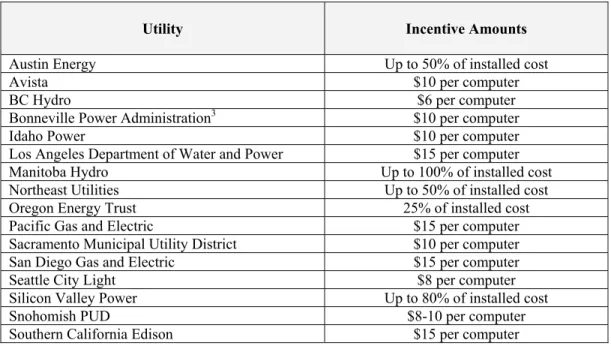
Southern California Edison (SCE) began offering its customers a $15 per computer incentive for the deployment of power management software in 2006. Since that time, SCE has been joined by a number of utilities offering incentives; see Table 1 below.
Table 1: Utilities Offering Incentives for Power Management of Networked Computers2
Utility Incentive Amounts
Austin Energy Up to 50% of installed cost
Avista $10 per computer
BC Hydro $6 per computer
Bonneville Power Administration3 $10 per computer
Idaho Power $10 per computer
Los Angeles Department of Water and Power $15 per computer Manitoba Hydro Up to 100% of installed cost Northeast Utilities Up to 50% of installed cost Oregon Energy Trust 25% of installed cost
Pacific Gas and Electric $15 per computer
Sacramento Municipal Utility District $10 per computer San Diego Gas and Electric $15 per computer Seattle City Light $8 per computer Silicon Valley Power Up to 80% of installed cost
Snohomish PUD $8-10 per computer
Southern California Edison $15 per computer
In addition, a number of utilities offer incentives under the umbrella of custom incentive programs for commercial and industrial customers. These utilities include:
• Connecticut Light and Power
• Hawaii Electric Company
• New York Power Authority
• NSTAR
• PacifiCorp
• Puget Sound Energy
• The United Illuminating Company
• Xcel Energy
Lastly, a number of regional energy efficiency programs offer rebates and other incentives for organizations located in their city, state, or region, including:
• Association of Bay Area Governments Energy Watch Program4
• New York State Energy Research & Development Authority (NYSERDA)
• Oregon Department of Energy
• San Francisco Energy Watch5
• Wisconsin Focus on Energy
2 As of February 28, 2009. This list may not be comprehensive. 3 This incentive is available to over 130 utilities in the Pacific Northwest.
4 The Association of Bay Area Governments Energy Watch Program is funded by the Pacific Gas and Electric Company.
Energy Savings
Obviously utilities and other organizations offer incentives for power managing networked computers because the energy savings is substantial. Like other energy efficiency initiatives (lighting retrofits, for instance), observed savings is a function of the technology deployed, user behavior, and persistence.
Technology
Computer power consumption can vary widely depending on a number of factors, including form factor, (desktops consume more than notebooks), component hardware, and even the software workload. While a typical desktop computer (excluding the monitor) might consume about 60-85 watts6 of power while idle, software that demands substantial activity from the CPU may cause power consumption to spike periodically to 160 or more watts. Add a high-end graphics card and don’t be surprised to see power consumption jump to 200+ watts. By contrast, a typical notebook (including display) may consume only 15-25 watts while idle.
Based on a survey by Lawrence Berkeley National Labs (Robertson, et al. 2004) and conversations with dozens of enterprise IT managers, EPA estimates that 70-80% of monitors used in the United States are currently configured to sleep when inactive. Where monitors are not already configured for sleep, computer power management will save an additional 75 watts of power for a typical CRT monitor, and about 30 watts for a typical LCD monitor. This is because system standby and hibernate put both the computer itself and the attached monitor(s) into low power sleep modes.
It is easy to manually activate computer power management features on individual machines. On computers running Windows operating systems, for example, one opens the “Power Options” dialogue box located in the Windows “Control Panel,” and then sets the computer to enter either system standby or hibernate mode after a period of inactivity.7 (For a discussion regarding the differences between these two sleep modes, see Question #8 under “Frequently Asked Questions” at www.energystar.gov/index.cfm? c=power_mgt.pr_power_mgt_faq. In terms of energy savings, they are virtually the same.) ENERGY STAR recommends setting computers to enter system standby or hibernate after 30 to 60 minutes of inactivity. To save even more, ENERGY STAR recommends setting monitors to enter sleep mode after 5 to 20 minutes of inactivity. The lower the setting, the more energy you save (ENERGY STAR 2009.)
Manually activating these settings on individual computers becomes problematic in large organizations for two main reasons:
1. It’s prohibitively labor-intensive for IT staff to visit each computer in the organization to make the setting change. (Because end-users could inadvertently change other settings in the control panel — with potentially negative consequences for the health of their
computer — they may not have permission to make configuration changes themselves.)
6Based on calculations made using the ENERGY STAR Computer Power Management Savings Calculator at http://www.energystar.gov/ia/products/power_mgt/LowCarbonITSavingsCalc.xls
7 For detailed instructions on how to activate computer power management settings on individual computers, see the US EPA ENERGY STAR website: www.energystar.gov/index.cfm?c=power_mgt.pr_power_mgt_users
2. Special care must be taken to ensure that sleep settings do not interfere with the distribution of administrative software updates (such as Windows security patches and antivirus definitions). Without proper configuration, sleeping computers many not be able receive these important periodic software updates.
Fortunately there are many ways to activate sleep settings across entire networks of computers, including a number of “free” solutions, and a number of commercial software packages. Commercial software packages typically offer more feature-rich solutions, including the ability to produce reports that estimate energy savings, but they involve fees.
User Behavior
One way to think about computer power management features is that they act like occupancy sensors for workstations. When a user is busy on his or her computer, the computer and monitor (and hopefully the lights in the office) remain on. When the user leaves his or her computer unattended, it automatically drops into a low-power sleep mode after a pre-set period of inactivity. (Say 15 minutes, for instance.)
Where end-users conscientiously turn off their computers at night, energy savings from computer power management is relatively small, because workstations only have an opportunity to drop into sleep mode during the workday (e.g., during lunch, meetings, etc.). However, available data and anecdotal evidence suggests that the majority of computer users in the United States leave their machines powered on overnight. A multi-facility survey published by LBNL in 2004 found that 60% of PCs were left running after hours, and the percentage of machines using some level of power management technology was only 6% (Roberson, et al. 2004). Even in organizations with clearly communicated policies “requiring” users to turn off their PCs at night, IT managers typically estimate compliance at only 70-90%.8
Our frequent conversations with enterprise IT managers suggest that this problem has actually grown worse since 2004. IT managers commonly require end-users to leave PCs powered-on after hours so they can access machines remotely for software updates and security patching. In a recent survey of hundreds of professionals (mostly in North America), 24% of respondents admitted that they keep their workstations powered on 100% of the time (Business Wire 2008.) Under these conditions, a standard desktop set to automatically enter system standby after 30 minutes and a 17” CRT monitor set to enter sleep after 15 minutes will save over 1100 kWh per year.9 However, if that same system is manually powered off every evening by the end user, sleep settings save a much more modest 89 kWh per year.
Persistence
Computer users may have permission — depending on how their machine is configured — to change default power management settings. In some situations this permission is desirable: users may need to temporarily defeat sleep settings during a live computer demo or presentation, for instance. Over time, however, this could result in energy savings degradation, as users
8 Based on numerous interviews conducted by the author with enterprise IT managers regarding their computer power management implementations.
9 Based on calculations made using the ENERGY STAR Computer Power Management Savings Calculator, available online at http://www.energystar.gov/ia/products/power_mgt/LowCarbonITSavingsCalc.xls.
disable their computers’ power management settings and either forget to reapply them or chose not to do so. To ensure ongoing energy savings, computer power management settings can be configured to revert back to defaults upon each login, or permission to change default settings can simply be denied altogether to the majority of end users, or granted only to a select few on a case-by-case basis.
Fortunately most power management solutions make it possible for IT administrators to centrally control sleep settings on networked computers. While administrators might allow some user preference changes, control over (and responsibility for) computer power management is ultimately theirs. Coupled with server-level reporting features (built into many software solutions), most IT administrators have the measurement and verification tools necessary to easily and accurately assess user compliance with power management policies. Some utilities, including SCE and Avista, address concerns about persistence with a spot-check “inspection” 2-3 years following implementation, or they request a report (run from a central server) showing the number of computers configured to automatically enter sleep mode.
Estimated Savings: 200 kWh/year per Computer — Or More
Energy savings estimates for computer power management features vary widely, due to the factors summarized above. However, inexpensive plug-in power meters such as the “Watts Up Pro” have made it very easy for organizations to collect data on actual energy savings. The City of Miami, for example, believes it will save about 1000 kWh per PC annually with its recent computer power management initiative, a figure it arrived at by metering computers and monitors in active and sleep modes, and multiplying by the average number of hours machines spend in these modes.
Utilities, including Pacific Gas and Electric (PG&E), Reliant Energy, and SCE tend to assume a far more conservative 200 kWh annual savings per PC. This figure is based on a 2002 Northwest Energy Efficiency Alliance Study of Verdiem’s Surveyor power management software for PC networks (Northwest Energy Efficiency Alliance 2002). In a PC-intensive organization, this typically represents a 3-6% annual reduction in total electricity consumption, saving an average of $20-$60 per PC annually.
Most of the program managers interviewed for this paper believed that the 200 kWh savings estimate was at the low end of the average savings spectrum. In the 7 years since the Northwest Energy Efficiency Alliance Study, computer processors speeds have increased by roughly 400%; not surprisingly, power consumption has increased as well (Schuknecht 2008). A similar study of Verdiem’s Surveyor conducted by Southern California Edison in 2005 put average PC energy savings at 330 kWh per year, and software vendor 1e currently claims 395 kWh savings per PC annually for machines that are often left on evenings and weekends.10
The majority of commercial computer power management solutions have reporting capabilities that provide estimates of energy savings, based on an actual tally of the number of hours that computers spend in specific power states. Free savings estimates are also available via a number of online calculators, such as the one offered by ENERGY STAR at
www.energystar.gov/lowcarbonit.
10 Based on calculations made using the 1E Online Energy Savings Calculator, available online at www.1e.com/energycampaign/Calculation.aspx#.
Utility Incentive Programs
Why Pay Incentives?With the average project payback at less than one year, utilities, efficiency organizations, and regulators may want to know why incentives are necessary in the first place. Managers of existing programs cite two primary reasons.
In many nonprofits and cash-strapped public sector organizations, the modest up-front investment in management software (which can be free but is typically $3-15 per computer) is simply too great, no matter what the ultimate return. Without utility incentives to help defray the initial cost of implementation, many school districts, for instance, would not be able to afford power management solutions.
In other organizations the answer has to do with who bears the costs of a computer power management project (e.g., the IT department), versus who reaps the benefits (e.g., the facility department). Activating computer power management settings can be technically challenging in an enterprise environment, and it demands an investment in IT staff time, regardless of the cost of the software solution they deploy. Before they can implement any changes, IT staff must research, evaluate, and test software and configuration changes necessary to deploy computer power management. When test-bed computers fail to enter sleep mode properly — and occasionally they do — or when old legacy software fails to behave when machines enter sleep mode, IT staff must ascertain the causes and deploy fixes such as software driver updates, hardware configuration changes, and sometimes even BIOS updates for all similarly-configured machines within their organization.
While these labor costs are relatively low compared to other enterprise IT initiatives — rarely more than 100 person-hours for even the largest organizations — project benefits (lower utility bills) accrue to another department entirely, such as facilities.11 Layer on the cost of software licenses for systems management software that allows IT staff to centrally control computer power settings, and the project looks costly from the narrow perspective of an IT manager who has never paid — and may never even see — the electricity bill. The outcome of this dynamic is reflected in the low utilization of computer power management features nationally: inaction. This decision-making dynamic is so pervasive that it presents a problem even in organizations with energy efficiency and environmental stewardship as core missions.
For these reasons, program managers say that incentive payments have been a necessary catalyst, not just for cash-starved school districts and nonprofits, but for profit-seeking corporations as well.
Program Requirements
For customers to be eligible for incentives, most utilities require that they deploy a commercial software solution that can centrally manage the power settings of networked computers — and produce energy savings reports. An exception to this rule is the Association of Bay Area Governments’ (ABAG) Energy Watch Program, which permits its local government members to activate computer power management features using any method, including “free” solutions such as those listed by ENERGY STAR at www.energystar.gov/index.cfm?
11 Based on numerous interviews conducted by the author with enterprise IT managers regarding their computer power management implementations.
c=power_mgt.pr_power_mgt_implementation_res. The Energy Watch program (which is funded by PG&E) requires some sort of documentation demonstrating that a solution has been implemented, and that computer power management settings have been applied to certain computers, but the documentation need not be in the form of a report generated by the software solution itself. Since most free solutions do not have built-in reporting capabilities, this allows organizations to access rebates no matter how they deploy computer power management settings.
Other typical program requirements may include:
• Pre and post implementation reporting of energy used by controlled computers;
• Report verifying the number of computers controlled, or, when requested, utility access to the site for verification of software installation and/or the number of PCs involved;
• Minimum average savings (for example, Avista requires at least 120 kWh annual savings per participating PC)
• Must be able to be reset end-user over-rides of power management settings (for example, at a minimum of every 24 hours)
• Network power management software must remain in operation for a minimum of two or three years
Some utilities pay incentives only for desktops that are power managed, and not for notebook computers. While it is true that notebook computers consume less power than desktop models, power managing notebook computers still results in average annual savings of approximately 50 kWh.12
Incentive Amounts
Incentive payments range from about $5 to $15 per power-managed computer. As one would expect, utilities and energy efficiency organizations in areas with low energy costs — such as Seattle City Lights, BC Hydro, Snohomish Public Utility District, and the Oregon Energy Trust — tend to offer rebates at the lower end of this range. (See Table 1.) California utilities tend to offer $10-15 rebates, reflecting the higher cost of power there.
Promotion
Most utilities interviewed for this paper include computer power management incentives in the basket of energy efficiency measures that their field account managers offer commercial customers. In a few cases, account managers actively promote the rebate program to schools, hospitals, and computer-intensive businesses through customer presentations, their website, and mailings.
In some service areas, vendors of the commercial software packages that provide computer power management functionality have been valuable partners in educating both utility account managers and their customers about the benefits of computer power management. Vendors have conducted presentations and software demonstrations for both field account
12 Based on calculations made using the ENERGY STAR Computer Power Management Savings Calculator, available online at http://www.energystar.gov/ia/products/power_mgt/LowCarbonITSavingsCalc.xls.
managers and customers. For a list of commercial software packages and vendors, see
www.energystar.gov/index.cfm?c=power_mgt.pr_power_mgt_comm_packages.
Customer Interest and Participation
Until last year, utilities reported only modest interest among their customers in rebates for power management. One exception was SCE, which has had 26 customers take them up on the computer power management rebate since the program’s inception, resulting in substantial energy savings on 50,000 computers.
In late 2008, however, most program managers interviewed for this paper reported a major surge in customer interest. PG&E debuted their rebate program in 2008, and had already paid for projects covering 35,642 computers by the end of the year. Furthermore, they received a total of 350 rebate applications, with the majority coming in after Labor Day. Most believe this trend will continue. Looking ahead in a recent conference presentation, BC Hydro called 2009 “The Year PC Power Management Came of Age.”
Program Evaluation
To date, no utility has performed a formal program evaluation, as computer power management incentives are still fairly new and the energy savings continue to accrue over three or more years.
Initial indications, however, are positive. Avista reported that their first implementation was a major disappointment in terms of observed energy savings — only about 85 kWh per PC thanks to the customer’s use of LCD monitors and to end-users who were already diligent about turning off their PCs at night. Nevertheless, it was still considered a success based on an assessment of costs versus benefits. With 2,400 computers configured for sleep, Avista anticipates 204,000 kWh annual savings, or 612,000 kWh over 3 years at one customer site. At $10 per PC, the rebate cost the utility $24,000. In effect, Avista paid just slightly over 3.9 cents per kWh for the reduced demand.
More typical (perhaps a bit conservative) savings of 200 kWh per computer (600 kWh over three years) yields a cost of only 1.67 cents per kWh saved, assuming a $10 rebate. As one utility program manager stated, “Bottom line: it’s cost effective. Certainly in the same range as incentives for lighting, controls and sensors, and in many cases, better.”
Free-Ridership
In the world of utility energy efficiency programs, a free-rider is someone who would install an energy efficiency measure without any program incentives because of the return on investment of the measure, but receives a financial incentive or rebate anyway. As with almost any energy efficiency program, this is a possible concern. However, since computer power management solutions have been readily available for a number of years, most organizations that might be persuaded to act based on the return on investment alone may have already done so.
Program managers interviewed for this paper believed that the free-ridership problem could be adequately mitigated by simply not awarding rebates retroactively for computer power management initiatives that pre-date the incentive program.
Conclusions and Suggestions
Every utility manager interviewed for this paper said that they intended to continue their incentive program for computer power management. Citing customer interest at an all-time high, a coming-of-age for software management tools with robust reporting capabilities, and a strong cost/benefit equation, most anticipate customer uptake — and energy savings — to grow.
As with any program, however, challenges exist. Computer power management implementations have long lead-times, and while customer energy managers are often effective project champions, IT managers can easily thwart worthwhile projects by citing real or imagined technical concerns. Savings persistence can also be a problem, particularly when customers upgrade their computers and/or operating systems.
In the end, however, these challenges underscore the need for incentives, and for the sharing of information among utility program managers regarding what works and what doesn’t. Towards that end, utility program managers have offered the following tips for their counterparts who are considering launching an incentive program for the power management of networked computers.
• Clearly communicate your rebate requirements to both customers and software vendors, because granting exceptions at some point down the road can make the program difficult to administer. Consider, for example:
o Which software solutions qualify? o Will notebook computers qualify?
o How will you verify savings claims? Reports? Audits?
• Require an itemized vendor invoice showing the total number of computers (or software licenses) included in the initiative.
• Don’t overpay. Some software solutions may be one small part of a larger “software suite” that delivers a wide range of IT management functionality. Make sure you are only rebating the cost of the computer power management functionality/module.
• You may have to decide whether your rebate will cover software maintenance fees, which provide customers with access to upgrades and technical support. In some cases this small additional fee may help ensure savings persistence.
• Require some future evidence of savings persistence. For sites that deploy commercial software solutions, ask for a server-generated savings report. Or conduct spot-checks on a sampling of computers to verify that they are still configured for sleep two years after implementation.
• Make it clear that rebates won’t be awarded retroactively for computer power management initiatives that pre-date your program.
• Leverage the resources of ENERGY STAR and approved software vendors to educate your customers. Ask for help with presentations, demonstrations, etc.
References
Business Wire. November 10, 2008. Survey Identifies Desktop Workstations as a Power Drain.
www.thefreelibrary.com/Survey+Identifies+Desktop+Workstations+as+a+Power+Drain. -a0188719919.
ENERGY STAR Program, US EPA. 2009. General Technical Overview of Power Management. www.energystar.gov/index.cfm?c=power_mgt.pr_power_management. Washington, DC: US Environmental Protection Agency.
Heins, Stephen. November 10, 2008. Energy Efficiency and the Specter of Free-Ridership.
www.renewwisconsin.org/Energy%20Efficiency%20-%20The%20Specter%20of%20Freeridership%20%20Steve%20Heins.doc. Manitowoc, WI: Orion Energy Systems.
Northwest Energy Efficiency Alliance. 2002. Surveyor Network Energy Manager.
www.nwalliance.org/ourwork/projectsummary.aspx?ID=65. Portland, OR: Northwest Energy Efficiency Alliance.
Roberson, Webber, McWhinney, Brown, Pinckard, and Busch. January 2004. After-hours Power Status of Office Equipment and Inventory of Miscellaneous Plug-Load Equipment.
http://enduse.lbl.gov/Info/LBNL-53729.pdf. Berkeley, CA: Lawrence Berkeley National Laboratory.
Schuknecht, Lyle. May 16, 2008. CPU Trends. http://techtalk.pcpitstop.com/research-charts-cpu/. Iowa, USA: PC Pitstop.