Designing Multi-touch Tabletop Interaction
Techniques to Support Co-located
Group Information Management
By
Mohammed Ali Ditta
Submitted in fulfilment of the requirements for the degree of Magister Scientiae to be awarded at the
Nelson Mandela Metropolitan University
December 2013
Supervisor: Prof JL Wesson Co-Supervisor: Dr NLO Cowley
i
Declaration
I, Mohammed Ali Ditta (s208047126), hereby declare that the dissertation titled, “Designing Multi-touch Tabletop Interaction Techniques to Support Co-located Group Information Management”, for the degree of Magister Scientiae is my own work and that it has not previously been submitted for assessment to another University or for another qualification.
……….. ………..
ii
Acknowledgements
The author wishes to thank the following people and organisations for their support in the completion of this project.
God Almighty – By his will, I was able to get to where I am today.
My father and late mother, you two are my role models. All my success is due to the way you have taught and raised me. I love you both!
My supervisors, Prof Janet Wesson and Dr Lester Cowley. The support, motivation and encouragement that both of you gave me was critical for the completion of my studies. I could not have asked for better supervisors.
My beloved wife and son, Maryam (gol-gapshan) and Mohammed Ibrahim (Shezadan Warrior). Your support through the fun and stressful times has not gone unappreciated. I will continue to strive to do the best for you and our son.
My fellow Masters students J. Kennedy, J. Swanepoel, G. Twigg, S. Barlow, T. Tlebere and the rest of the COD:MW3 team. My two years of Masters would not have been quite as exciting without all of you.
All the staff who I can call friends after the many years I spent at Nelson Mandela Metropolitan University (NMMU). Each of you has helped me in many ways.
Special thanks to Jean Rademakers for all your technical help and for keeping my ports open!
The Telkom Centre of Excellence for financial support and provision of equipment.
The National Research Foundation for financial support.
The NMMU Research Capacity Development for their financial support
All the participants who participated in the user studies.
S. Beets for technical checking.
My brothers and sisters Aamina, Asma, Yasser, Hajira, Salman and Waleed for your emotional support and advice. You’re all are the best!
iii
Summary
Co-located group information management (GIM) is a form of groupware with the aim of enabling users to collaboratively find, store, maintain, organise and share personal and/or group information in support of a group activity. Existing systems aimed at partially supporting GIM activities have been implemented on single user devices. These systems make use of asynchronous communication that may hinder collaboration by misinterpretation, information leaks, etc. Few systems exist, with limited functionality, that support co-located GIM. Multi-touch tabletop interaction has given rise to a new approach for supporting Computer Supported Cooperative Work (CSCW). Multi-touch tabletops allow multiple users to naturally interact with a computer device using a shared display and gesture interaction. The tabletop environment also enables users to sit in a natural environment and synchronously communicate without bulky desktops or laptops. Multi-touch tabletops provide the hardware necessary to support co-located GIM.
Existing multi-touch interaction techniques were analysed and proved insufficient to support the advanced functional requirements of GIM. The goal of this research was therefore to support co-located GIM by designing new multi-touch tabletop interaction techniques. An architecture was proposed to support co-located GIM with new multi-touch interaction techniques. A software prototype was developed based on the proposed architecture to facilitate the main activities of GIM and to collaboratively compile documents. The prototype was named CollaGIM (Colla – collaborative, GIM – group information management). CollaGIM supports the main activities of GIM using natural gesture interaction on a multi-touch tabletop.
An evaluation of the software was conducted by means of a user study where 15 teams of two people participated. High task success rates and user satisfaction results were achieved, which showed that CollaGIM was capable of supporting co-located GIM using the new multi-touch tabletop interaction techniques. CollaGIM also positively supported collaboration between users.
Keywords: Computer-supported collaborative work (CSCW), compound gestures, Group Information Management (GIM), multi-touch tabletop, interaction techniques, natural interaction, Personal Information Management (PIM).
iv
Table of Contents
Chapter 1: Introduction ... 1 1.1 Background ... 1 1.2 Problem Statement ... 3 1.3 Thesis Statement ... 3 1.4 Research Questions ... 3 1.5 Research Objectives ... 41.6 Scope and Constraints ... 4
1.7 Ethical Considerations and Resources ... 5
1.8 Research Design ... 5 1.8.1 Research Philosophy ... 5 1.8.2 Research Approach ... 6 1.8.3 Research Strategy ... 6 1.8.4 Research Methodology ... 7 1.9 Structure of Dissertation ... 7 1.9.1 Chapter 1: Introduction ... 7
1.9.2 Chapter 2: Personal and Group Information Management ... 8
1.9.3 Chapter 3: Multi-touch Interaction ... 8
1.9.4 Chapter 4: Design and Implementation ... 9
1.9.5 Chapter 5: Evaluation ... 9
1.9.6 Chapter 6: Conclusion and Recommendations ... 10
Chapter 2: Group Information Management ... 11
2.1 Introduction ... 11
2.2 Overview ... 11
2.2.1 Groupware and Computer Supported Cooperative Work (CSCW) ... 11
2.2.2 Personal Information Management ... 12
2.2.3 Group Information Management ... 13
2.2.3.1 Group Information Storage ... 15
2.2.3.2 Group Information Retrieval ... 15
2.2.3.3 Group Information Organisation ... 15
v
2.2.3.5 Group Information Sharing ... 16
2.3 Example Application Domains ... 16
2.4 Features of GIM ... 17
2.5 Motivation and Requirements of GIM ... 20
2.5.1 Motivation for GIM ... 21
2.5.2 Functional Requirements of GIM ... 22
2.5.3 Non-functional requirements of GIM ... 24
2.6 Tools Supporting GIM ... 25
2.6.1 Focus – A Collaborative PIM Prototype ... 25
2.6.2 Chandler ... 27
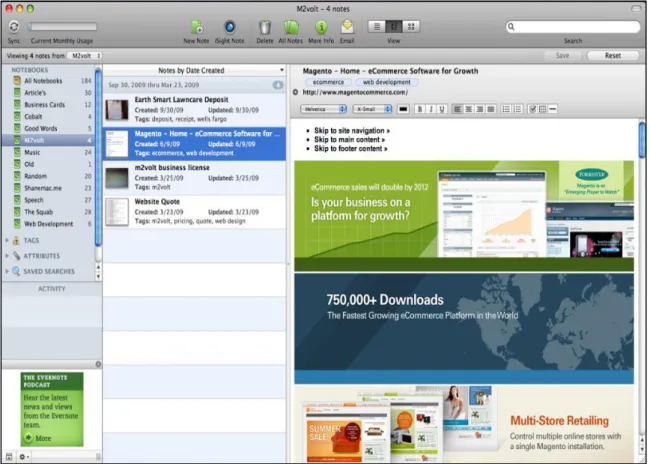
2.6.3 Evernote ... 28
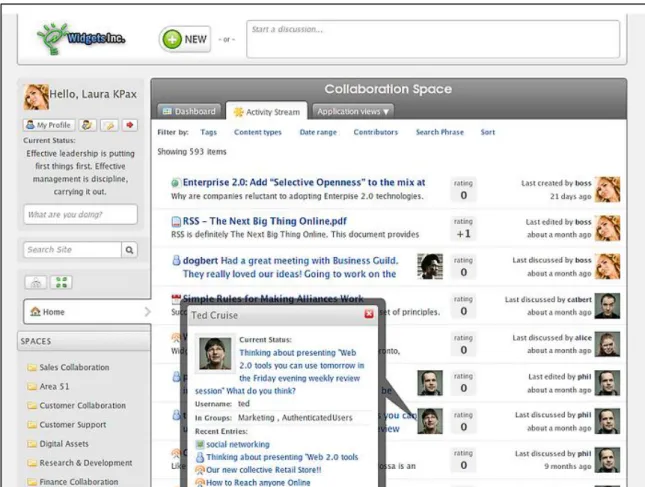
2.6.4 Cyn.in ... 29
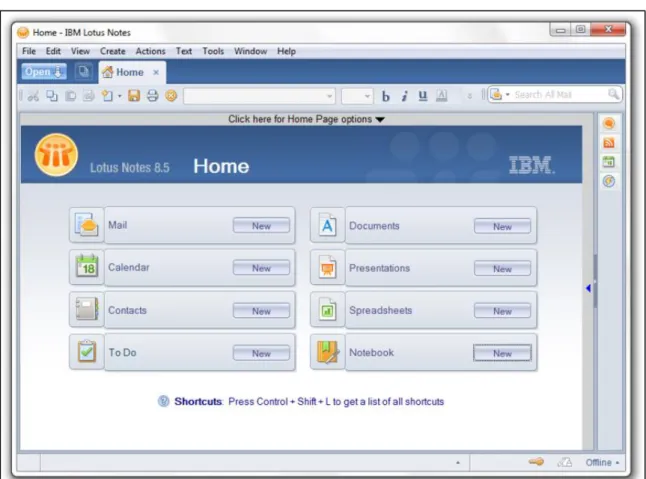
2.6.5 International Business Machines (IBM) Lotus Notes ... 30
2.7 Comparison of Existing Systems ... 31
2.9 Conclusion ... 34
Chapter 3: Multi-touch Interaction ... 36
3.1 Introduction ... 36
3.2 Multi-touch Technology ... 36
3.2.1 Background ... 36
3.2.2 Advantages and Limitations ... 37
3.2.3 Multi-touch Devices ... 38
3.3 Advantages of Multi-touch Interactive Tabletops ... 39
3.4 Multi-touch Interaction Technique ... 41
3.5 Applications using Multi-touch Interaction Techniques ... 43
3.5.1 Existing Applications ... 43
3.5.1.1 Collabee (Multi-touch Collaborative Diagramming Tool) ... 43
3.5.1.2 Co-IMBRA (Collaborative Information Manipulation, Browsing, Retrieval and Annotation) ... 44
3.5.1.3 MTM-Tool (Multi-touch Modelling Tool) ... 44
3.5.2 Comparison of Existing Applications ... 45
3.5.2.1 User Interface (UI) ... 45
vi
3.5.2.3 Controls ... 46
3.5.2.4 Information Input ... 48
3.5.2.5 User Identification ... 48
3.5.3 Advantages and Limitations Experienced ... 48
3.6 Potential for Co-located GIM ... 49
3.7 Mapping of GIM Tasks to Multi-touch Interaction Techniques ... 50
3.8 Conclusion ... 52
Chapter 4: Design and Implementation... 55
4.1 Introduction ... 55
4.2 Application Domain ... 55
4.3 Design ... 56
4.3.1 Data Design ... 56
4.3.2 User Interface Design ... 60
4.3.2.1 Workspace and Main Widget ... 60
4.3.2.2 Login Pad ... 61
4.3.2.3 Dashboard (Personal Information Space) and On-screen Keyboard .... 62
4.3.2.4 Information Control ... 67
4.3.2.5 Workspace Sorter ... 69
4.3.2.6 Collaborative Document Builder ... 70
4.3.2.7 Other Controls ... 73
4.3.3 Architecture ... 75
4.3.3.1 Architecture Process Flow ... 75
4.4 Implementation ... 77
4.4.1 Implementation Tools ... 77
4.4.1.1 Hardware ... 77
4.4.1.2 Integrated Development Environment (IDE) ... 78
4.4.1.3 Surface 2.0 SDK ... 78
4.4.1.4 Graphical User Interface Design ... 78
4.4.1.5 Programming Development Language ... 78
4.4.1.6 Thripple ... 79
vii
4.4.2.1 Allow for the provision of access to a user’s personal information space
... 79
4.4.2.2 Allow for communication between group members ... 79
4.4.2.3 Allow for the workload to be divided and delegated to group members ... 80
4.4.2.4 Keep a history of delegated tasks ... 80
4.4.2.5 Keep a history of communication ... 80
4.4.2.6 All for the information to be re-found and easily reusable ... 80
4.4.2.7 Store documents and information in a user’s personal information space ... 81
4.4.2.8 Allow for searching by querying and filtering the personal information space ... 81
4.4.2.9 Allow for the search results or shared information to be visualised ... 81
4.4.2.10 Allow for collaborative navigation through search results ... 81
4.4.2.11 Allow for the information files to be opened from the personal information space ... 82
4.4.2.12 Allow for manipulation of the search results or shared information .. 82
4.4.2.13 Allow for editing and updating all information ... 82
4.4.2.14 Allow for the workspace to be organised in an effective manner ... 82
4.4.2.15 Allow for a classification mechanism to help organise a user’s personal information space ... 83
4.4.2.16 Allow for sorting of a user’s personal information space ... 83
4.4.2.17 Allow for information on the workspace and personal information space to be easily shared and allow for a sharing mechanism to be used to transfer information into a user’s personal information space ... 83
4.4.2.18 Allow for a collaborative artefact to be created and shared amongst the user’s ... 83 4.5 Discussion ... 84 4.6 Conclusion ... 86 Chapter 5: Evaluation ... 88 5.1 Introduction ... 88 5.2 Evaluation Techniques ... 88 5.3 Evaluation Objectives ... 90
viii
5.4 Evaluation Design ... 90
5.4.1 Data Collection Methods ... 90
5.4.2 Metrics ... 91
5.4.3 Location and Instruments ... 91
5.4.4 Task Plan ... 92
5.4.5 Questionnaires ... 92
5.4.6 Statistics ... 93
5.5 Participants and Selection Criteria ... 93
5.6 Evaluation Procedure ... 93
5.7 Results and Analysis ... 94
5.7.1 Demographics ... 94
5.7.1.1 Participant Demographics ... 94
5.7.1.2 Team Demographics ... 95
5.7.2 Performance Results ... 98
5.7.3 Satisfaction Results ... 99
5.7.4 Qualitative Feedback, Observations and Implications ... 108
5.7.4.1 Questionnaire Feedback ... 109
5.7.4.2 Observations ... 114
5.8 Conclusion ... 116
Chapter 6: Conclusions and Recommendations ... 118
6.1 Introduction ... 118
6.2 Achievements of Research Objectives ... 118
6.3 Research Contributions ... 123
6.3.1 Theoretical Contributions ... 124
6.3.2 Practical Contributions ... 124
6.4 Limitations and Problems Encountered ... 125
6.5 Future Research ... 126
REFERENCES ... 128
Appendix A: User Study Written Information Provided ... 134
Appendix B: Verbal Information Provided ... 138
Appendix C: Participant Consent Form ... 140
Appendix D: Pre-test Questionnaire ... 142
ix
x
List of Figures
Figure 2-1: People using Focus to Collaboratively Access and Organise Personal
Information (Collins and Kay, 2008) ... 26
Figure 2-2: The Focus interface showing a collection of e-mails, photos, documents and stored web-pages, which have been rearranged by users after two focus item selections (Collins and Kay, 2008) ... 26
Figure 2-3: Snapshot of Chandler Dashboard (Chandler, 2013) ... 28
Figure 2-4: Screenshot from Evernote Software (Evernote-Corporation, 2013) ... 29
Figure 2-5: Screenshot of Cyn.in Dashboard (Cynapse, 2013) ... 30
Figure 2-6: Screenshot of IBM Lotus Notes (IBM, 2013) ... 31
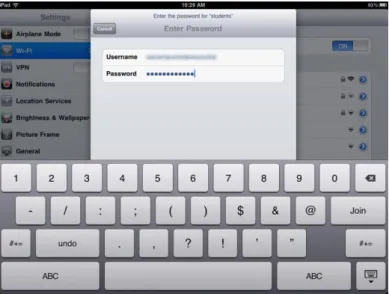
Figure 3-1: iPad UI showing virtual keyboard for text input ... 38
Figure 3-2: A Typical Meeting Around an Interactive Tabletop (Chowdhry, 2011) .. 39
Figure 3-3: A Derived Generic Multi-touch Interaction Technique ... 43
Figure 4-1: Main Widget on CollaGIM Workspace ... 61
Figure 4-2: Screenshot of a User Selecting a Colour Identifier on the Login Pad ... 62
Figure 4-3: Full View of a User’s Dashboard ... 62
Figure 4-4: Components of Dashboard Control ... 65
Figure 4-5: Dashboard with Keyboard control opened ... 66
Figure 4-6: Different Information Controls ... 67
Figure 4-7: Process of Drag and Drop to Share ... 69
Figure 4-8: Workspace Sorter and Sort Result ... 69
Figure 4-9: Initial Collaborative Document Builder design ... 71
Figure 4-10: Collaborative Document Builder Illustrating the Process of Adding Information to the Document ... 72
Figure 4-11: Recently Used Control ... 73
Figure 4-12: System Log of CollaGIM ... 74
Figure 4-13: Task List Control of CollaGIM ... 74
Figure 4-14: Proposed Architecture for GIM Applications using Multi-touch Interaction Techniques ... 76
Figure 5-1: Participant Biographical Results - Part 1 (n=30) ... 96
Figure 5-2: Participant Biographical Results - Part 2 (n=30) ... 97
Figure 5-3: Team Biographical Results (n=15) ... 97
Figure 5-4: Total Success of each Team per Task (%) (n=15) ... 99
Figure 5-5: Overview of User Satisfaction Results (n=30) ... 101
Figure 5-6: Mean 7-point Likert Scale Rating for Section A - Cognitive Load (n=30) ... 102
Figure 5-7: Mean 7-point Likert Scale Rating for Section B - Overall Satisfaction (n=30) ... 104
xi
xii
List of Tables
Table 1-1: Research Methods used to Answer Secondary Research Questions. ... 8
Table 2-1: Classification of Groupware Systems by Location and Time (Hansen & Järvelin 2005) ... 12
Table 2-2: Most Widespread File Sharing Methods, n=69 (Whalen & Toms, 2008) . 14 Table 2-3: Drawbacks of File Sharing Methods (Whalen & Toms, 2008) ... 14
Table 2-4: GIM Model Illustrating Issues Faced and Possible Features to Address the Issue (Erickson, 2006) ... 18
Table 2-5: Derived Requirements of a GIM System ... 23
Table 2-6: Primary Goals for Successful Collaborative Systems (Shah, 2010) ... 25
Table 2-7: Comparison of GIM system by Groupware Classification ... 32
Table 2-8: Mapping of GIM requirements to functionality of Focus ... 33
Table 3-1: Visual Representation of Different Types of Gestures ((Hinrichs, 2011)) 42 Table 3-2: Comparison of Co-IMBRA with MTM-Tool ... 47
Table 3-3: Existing Multi-touch Interaction Techniques ... 50
Table 3-4: Typical Tasks of GIM Mapped to Interaction Techniques ... 51
Table 4-1: Controls of CollaGIM mapped to Tasks Supported ... 58
Table 4-2: Key Data Fields mapped to Controls ... 59
Table 4-3: Typical GIM Tasks mapped to New and Modified Interaction Techniques ... 85
Table 5-1: Interpretation of Internal Consistency using Cronbach's Alpha (Kline, 1999) ... 100
Table 5-2: Cronbach's Alpha Results for Each Section (n=30) ... 100
Table 5-3: Positive Themes Identified from Participant Feedback ... 110
xiii
List of Abbreviations
Abbreviation Full Form
3D Three Dimensional
API Application Programming Interface
CDB Collaborative Document Builder
CIF Common-Industry Format
CL Control Layer
CoE Centre of Excellence
Co-IMBRA Collaborative Information Manipulation, Browsing, Retrieval, and Annotation
CollaGIM Collaborative Group Information Management (prototype) CSCW Computer Supported Cooperative Work
GIM Group Information Management
HTML Hypertext Markup Language
IBM International Business Machines IDE Integrated Development Environment
MB Megabyte
ML Model Layer
MT-CollabUML Multi-touch Collaborative UML MTM-Tool Multi-touch Modelling Tool
MVC Model-View-Control
NMMU Nelson Mandela Metropolitan University
OSK On-screen Keyboard
PC Personal Computer
PDF Portable Document Format
PI Personal Information
PIM Personal Information Management
QUIS Questionnaire for User Interface Satisfaction
SDK Software Development Kit
UI User Interface
UML Unified Modelling Language
URI Universal Resource Identifier
USB Universal Serial Bus
WPF Windows Presentation Foundation
XML eXtended Mark-up Language
Chapter 1:
Introduction
1.1 Background
People are dealing with personal data on various platforms and devices on a daily basis. Cellular phones, tablet computers, notebooks, desktops and other devices all contain personal information about their users. Maintaining a central location for the management and retrieval of personal files and information is becoming increasingly difficult due to information fragmentation. Information fragmentation occurs when there is a need to access and manage related information in separate physical locations with little support from the tools that individuals use (Collins and Kay, 2008). Information fragmentation is the result of an individual’s information being stored on different devices using different storage and organisation methods. Personal Information Management (PIM) is the process of managing personal information by implementing the activities of keeping, finding, organising and maintaining (Kljun, 2012). Emails, contacts, messages, media, and calendar information are some of the types of personal information that people may carry on their personal devices. In recent years, there has been an increase in interest in PIM due to the emergence of new technologies which have resulted in greater information fragmentation. Information fragmentation has caused increased complexity in managing an individual’s personal information. Effective measures to manage information fragmentation are considered a key goal of PIM.
Group Information Management (GIM) extends the functionality of PIM to support information sharing among group members. GIM is the process of managing personal information in group contexts by supporting the four activities of PIM (keeping, finding, organising and maintaining) as well as the aspect of sharing information. The activities of GIM are used to support group tasks, such as collaborative document creation. Erickson (2006) views GIM as PIM in more public domains. An individual may keep, find, organise and maintain information to increase productivity on a daily basis, but these PIM activities are quite often embedded in group or organisational contexts (Lutters, Ackerman & Zhou, 2007), with sharing playing an important part (Erickson, 2006). As soon as personal information is shared, the information becomes
2
group information. The study of GIM focuses on the interaction between personal information and group contexts.
GIM can occur in a co-located environment, where group members are in the same room, or close to each other. It is possible for GIM to take place in a synchronous (at the same time) or asynchronous manner. Individuals belonging to a group in a synchronous, co-located environment may refer either to hard copies of documents or to shared electronic copies. Although desktop computers can be used by groups participating in GIM, desktop computers do not effectively support collaboration because they were designed for single user, single input environments (Sams, Wesson and Vogts, 2011).
A study by Whalen and Toms (2008) identified the most widespread file sharing methods such as email attachments, physical device transfers (universal serial bus) and network file sharing etc. These file sharing methods were found to have specific advantages and limitations. Three key limitations are the lack of collaboration support, the inability to share and the inconvenience of sharing multiple files, and access control or security features. The sharing methods all take place in an asynchronous communication environment. Asynchronous communication is prone to several problems such as misinterpretation, missing data or information due to file corruption and reduced work quality (Weng and Gennari, 2004). Current GIM systems employ asynchronous communication mechanisms, which implies that current GIM systems have several shortcomings.
Innovations in multi-touch technology have given rise to new ways of interaction on multi-touch user interfaces. Multi-user, multi-touch user interfaces allow multiple users to collaboratively manipulate graphical visualisations with more than one pointing device or finger simultaneously per user on different types of surfaces and devices. A team can work together around a tabletop display, facing each other, rather than looking at a screen. A table setting encourages collaboration and coordination among groups of people (Hunter & Maes, 2008). A horizontal interactive surface is appropriate for activities involving collaboration, but with the emphasis on natural interaction, innovative software interface design is required in order to explore various solutions (Apted and Kay, 2006). Multi-touch user interfaces provide a medium for
3
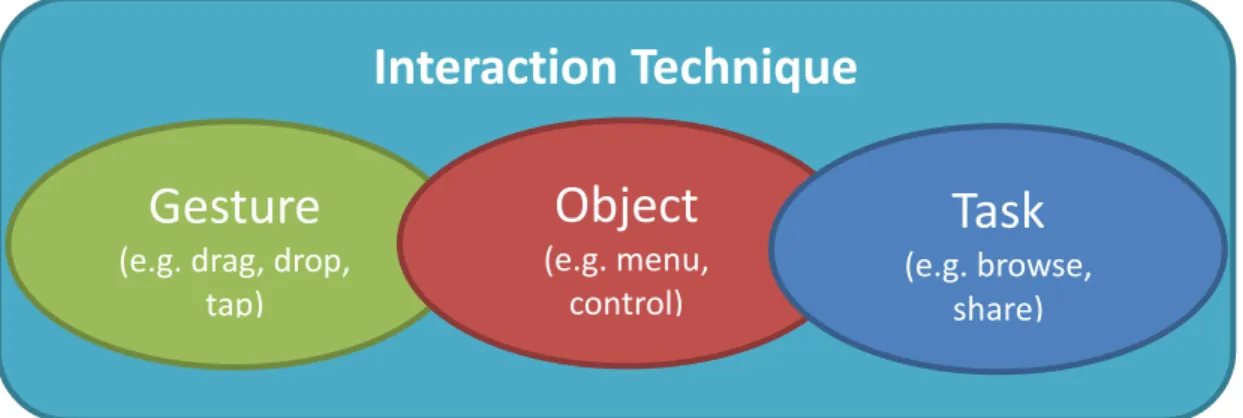
new, intuitive interaction techniques because of the move away from single user input devices and systems. Multi-touch user interfaces allow for multiple simultaneous inputs from different users and objects. An interaction technique is a combination of hardware and software elements that enable a user to interact with a computer. Multi-touch tabletops provide support for multi-Multi-touch gesture interaction. There are, however, currently no interaction techniques that specifically support GIM on a tabletop.
There has been limited research in the field of co-located GIM and more research is needed to investigate collaborative GIM in a co-located environment (Collins and Kay, 2008). A tabletop environment offers a medium for natural interaction techniques in a co-located environment. The tabletop environment also inherently supports collaboration among team members using the device.
1.2 Problem Statement
The problem statement for this research is:
GIM is currently not effectively supported by co-located, multi-touch interaction techniques on a tabletop.
1.3 Thesis Statement
The thesis statement for this research is:
Co-located, multi-touch interaction techniques can be designed to effectively support GIM on a tabletop.
1.4 Research Questions
The main research question for this research is:
How can co-located, multi-touch interaction techniques be designed to effectively support GIM on a tabletop?
4
The secondary research questions for the main research question are:
1. What are the shortcomings of existing GIM tools?
2. What co-located, multi-touch interaction techniques need to be designed to effectively support GIM on a tabletop?
3. How can a prototype supporting co-located, multi-touch, interaction techniques be implemented to address the shortcomings of existing GIM tools?
4. What are the benefits of using co-located, multi-touch, interaction techniques to support GIM on a tabletop?
5. What additional research should be undertaken to improve multi-touch interaction techniques for GIM?
1.5 Research Objectives
The main research objective of this research is:
To investigate how to design co-located, multi-touch interaction techniques to effectively support GIM on a tabletop.
The secondary research objectives derived from the secondary research questions are:
1. To identify the shortcomings of existing GIM tools.
2. To determine what co-located, multi-touch interaction techniques need to be designed to effectively support GIM on a tabletop.
3. To design and develop a GIM prototype using co-located, multi-touch interaction techniques to address the shortcomings of existing GIM tools. 4. To evaluate the benefits of using co-located, multi-touch, interaction techniques
to support GIM on a tabletop.
5. To make recommendations for additional research to improve the proposed multi-touch interaction techniques for GIM.
1.6 Scope and Constraints
The scope of this research is limited to collaboration in a synchronous, co-located environment. Multi-touch tabletop technologies and techniques will be used as the only
5
form of input technique. No other source of input technologies such as physical keyboard, mouse, facial recognition, motion sensing, or voice recognition will be used in this research. Limited co-located, multi-touch interaction techniques have been used to support some basic functionalities of a GIM system; these existing interaction techniques will be modified and applied to the GIM domain (Collins and Kay, 2008). This research will also investigate the development of new interaction techniques that can improve the efficiency and effectiveness of GIM in a co-located environment.
1.7 Ethical Considerations and Resources
This research project involves a user study in which participants will be required to interact with the prototype and complete a post-task questionnaire. Ethical clearance was required for the user study and was obtained from the Nelson Mandela Metropolitan University’s (NMMU) Human Ethics Research Committee (REC-H No: H13-SCI-CS-002).
1.8 Research Design
An appropriate research philosophy, research approach and research strategy are required for research. A research methodology will be identified and used throughout the duration of this research. The research scope and limitations, as well as the ethical considerations and resources will be discussed and a brief overview of how each research question will be answered is presented in Table 1-1.
1.8.1 Research Philosophy
A research philosophy refers to the systematic search for existence, knowledge, values, reason, mind and language. This type of research requires an open mind in order to discover beneficial findings to the world body of knowledge. A positivist approach is when a study is carried out in a manner where the researcher views everything from an objective point of view without interfering with any phenomena being studied (Levin, 1988). A positivist approach will be followed to demonstrate how co-located, multi-user, multi-touch interaction techniques can be designed to effectively support collaborative GIM on a tabletop.
6 1.8.2 Research Approach
The need to identify an appropriate research approach is important. The research approach needs to be selected in combination with the research philosophy to support the methodological process. Choosing the appropriate research approach can lead to improved research efficiency.
In combination with the research philosophy identified in Section 1.8.1, a deductive research approach will be employed (Schadewitz and Jachna, 2007). This approach will allow the research to establish a hypothesis (thesis statement) by using theory, conduct an observation to gather data and information (questionnaires, interviews, user studies), and finally confirm the hypothesis. Qualitative data will be analysed using thematic analysis whereby the results will be divided into positive and negative themes, rated and then interpreted.
A deductive approach will support determining how co-located, user, multi-touch, interaction techniques can be designed to effectively support collaborative GIM on a tabletop.
1.8.3 Research Strategy
Two types of strategies will be used during this research: prototyping and the experimental strategy. Prototyping will be used to develop a software prototype using the multi-touch tabletop. The prototype will implement a co-located group information tool, using multi-touch interaction techniques, so that multiple people can effectively manage group information. This prototype will be used during experimentation. The experiments will be conducted to obtain data and to evaluate the data to see if co-located multi-touch tabletop interaction techniques can be designed to effectively support collaborative GIM. The experimental process will comprise user studies in which users will be immersed in a particular situation and required to perform certain activities in order to determine the effectiveness of incorporating co-located, multi-touch, interaction techniques with GIM on an interactive tabletop.
7 1.8.4 Research Methodology
A literature study will be the main methodology used to define the requirements of the co-located GIM application. The literature study will help identify issues with existing tools that can be addressed using co-located, multi-touch, interaction techniques, any positive aspects that should be included in the prototype and the positive aspects that a multi-touch interactive tabletop can provide to the way GIM can be supported. Quantitative data, through questionnaires and logging, will be collected and analysed using the prototype and will be used to determine the effectiveness of using co-located, multi-touch, interaction techniques to support GIM on a tabletop. An empirical evaluation will be used to obtain results by allowing the participants in the user study to complete questionnaires relating to the prototype. Qualitative data will also be obtained from observations and interviews. Table 1-1 illustrates the secondary research questions and the research methods which will be used to answer these questions.
1.9 Structure of Dissertation
This dissertation will follow the research design identified in Section 1.8. The structure of the dissertation presented below is in accordance with the research methods and research questions presented in Table 1-1.
1.9.1 Chapter 1: Introduction
Chapter 1 serves as an introductory chapter to the research to be conducted. The goal of this chapter is to review existing research into the context of collaborative PIM and GIM, by providing a brief background of the study and the reasons for the research. This chapter presents the problem domain, the problem statement and the thesis statement, which proposes a possible solution to the problem identified in the problem statement. The research design is discussed, together with the project objectives and scope, in order to create a clear direction for the research.
8
Table 1-1: Research Methods used to Answer Secondary Research Questions.
Research Questions Research Method
1 What are the shortcomings of existing collaborative PIM and GIM tools?
Literature Review, Analysis
2 What co-located, multi-touch interaction techniques need to be designed to effectively support GIM on a tabletop?
Literature Review, Analysis and Synthesis
3 How can co-located, multi-touch, interaction techniques be designed and implemented to address the shortcomings of existing collaborative GIM tools?
Modelling, Prototyping
4 What are the benefits of using co-located, multi-touch, interaction techniques to support GIM on a tabletop?
Experiments (user studies), Evaluation
5. What research should be undertaken to improve multi-touch interaction techniques for GIM?
Critical reflection
1.9.2 Chapter 2: Personal and Group Information Management
Chapter 2 will discuss collaborative PIM and GIM using a large, multi-touch surface in further detail. Little research has been conducted on co-located GIM tools and the definition of GIM will be investigated in terms of its simplest components – keeping, finding, organising, maintaining and sharing of information in support of a task. This is due to the fact that few co-located systems have been implemented that are aimed at addressing only certain aspects of GIM and not all of the aspects (keeping, finding, maintaining, organising and sharing). Research will be conducted into these components, which will then be analysed to understand the particular features and contributions to GIM. This chapter will provide a clear understanding of the application domain. This chapter will answer the first research question of identifying the shortcomings of existing GIM tools by means of a literature study.
1.9.3 Chapter 3: Multi-touch Interaction
Chapter 3 will focus on the use of large, multi-touch tabletop (interactive tabletop) technologies. A literature study of the advantages and disadvantages of interactive
9
tabletops will be conducted to identify how interactive tabletops can possibly support GIM. An investigation into how collaboration is enhanced using an interactive tabletop will be conducted. Finally the advantages, disadvantages and collaborative features of large, multi-touch tabletops will be discussed in relation to the shortcomings of existing GIM tools. An understanding into what multi-touch interaction techniques are and which techniques are currently supported will be discussed. The interaction techniques will be mapped to the functional requirements of a co-located GIM tool to identify which co-located, multi-user, multi-touch, interaction techniques need be designed to address the shortcomings of GIM tools. This chapter will answer the second research question by identifying what co-located, multi-touch interaction techniques need to be designed to effectively support GIM on a tabletop.
1.9.4 Chapter 4: Design and Implementation
Chapter 4 will discuss the design and implementation for the proposed co-located, multi-user, multi-touch interaction techniques of a GIM tool. This will be achieved by considering what type of personal information can be shared and communicated in a public domain and how the personal information will be shared among a group using a multi-touch tabletop. The software requirements of multi-touch tabletops will also be analysed. This chapter will also investigate how multi-touch tabletop interaction techniques can be designed to support a GIM system. Various user interface designs will be suggested to achieve maximum usability from the system. Chapter 4 will answer the third research question of how multi-touch interaction techniques could be designed and implemented to address the shortcomings of existing GIM tools.
1.9.5 Chapter 5: Evaluation
An empirical evaluation will be conducted to determine how effectively multi-touch tabletops can support GIM in a located environment. The benefits of using co-located multi-user, multi-touch and interaction techniques to support GIM will be identified and discussed. This will be the focus of Chapter 5, where user evaluations will be conducted in the form of user studies with the prototype and questionnaires will be used to collect quantitative and qualitative data. Chapter 5 will answer the fourth
10
research question of identifying the benefits of using co-located, multi-touch interaction techniques to support GIM on a tabletop.
1.9.6 Chapter 6: Conclusion and Recommendations
Chapter 6 will conclude the research by summarising the findings identified from the study. The question of whether using co-located, multi-user, multi-touch interaction techniques on a tabletop can effectively support GIM will be answered. The chapter will conclude by discussing the achievements of the research, and providing suggestions for future research. Chapter 6 will answer the fifth research question by discussing what research should be undertaken to improve multi-touch interaction techniques for GIM.
Chapter 2:
Group Information Management
2.1 Introduction
This chapter answers the first research question by identifying the shortcomings of existing Group Information management systems (GIM). This chapter defines GIM and examines the components that comprise GIM. An investigation into the typical tasks of GIM will be carried out, which will help establish the objectives and requirements of GIM. An examination of existing tools and techniques supporting GIM is conducted and the shortcomings of the existing tools and techniques identified. Lastly, a conclusion on the findings of this chapter is presented.
2.2 Overview
This section will discuss the main research focus terms and concepts relating to collaborative work and GIM. The discussion will include the concepts of groupware and Computer Supported Cooperative work (CSCW), GIM and the main components of GIM.
2.2.1 Groupware and Computer Supported Cooperative Work (CSCW)
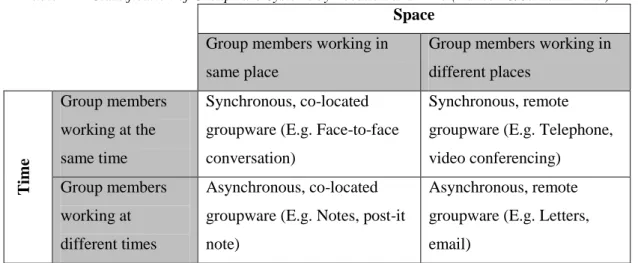
Groupware is software and hardware that is designed to specifically support group work activities. Groupware is not merely a tool used to support communication between users, but a tool that can be used to support one or more group tasks. Groupware can be classified by means of a time-space matrix; time – when group members are working; and space – where the group members are working (Hansen and Järvelin, 2005). The classification of groupware is illustrated in Table 2-1 by means of time and space.
CSCW is the study of the use of computer technology to enable collaboration. Koch and Gross (2006) explains CSCW as a generic term, which combines the understanding of the way people work in groups with the enabling technologies of computer networking and associated hardware, software, services and techniques. This definition shows that CSCW involves an actual study and investigation, whereas groupware is a classification of software programs that support CSCW.
12
Table 2-1: Classification of Groupware Systems by Location and Time (Hansen & Järvelin 2005)
Space Group members working in same place
Group members working in different places T im e Group members working at the same time Synchronous, co-located groupware (E.g. Face-to-face conversation)
Synchronous, remote groupware (E.g. Telephone, video conferencing)
Group members working at different times
Asynchronous, co-located groupware (E.g. Notes, post-it note)
Asynchronous, remote groupware (E.g. Letters, email)
2.2.2 Personal Information Management
People have always had to manage their personal information. Before the age of computers, paper documents were normally filed away in a particular order, photographs were placed in photo albums, and important dates were noted in paper calendars or diaries. The need for PIM has always existed and the same can be said of GIM. Individuals working in a team have to work on their individual tasks and then come together to collectively summarise the outcome of each of their tasks. Since the dawn of computers, new devices and software have continuously been used to improve the manner in which people conduct personal and information management. The invention of digital diaries allowed people to store contact details; computer programs such as Microsoft Outlook allow people to send email messages and attachments to others and manage all their calendar events. SharePoint servers were created to allow groups of varying sizes to manage and organise various types of shared documents.
Smart phones, tablet computers, notebooks, and other devices have made handling personal information much easier. However because each technology is manufactured by different companies and has its own operating system, the different devices that people own may not be able to share information with each other because of (for example) different file formats. Keeping a central location format management and retrieval of personal files and information has become increasingly difficult because of information fragmentation (Collins and Kay, 2008).
13
This brings us to the definition of PIM, which is the practice and study of the activities people perform on a daily basis. These activities include keeping, finding, organising and maintaining information (Kljun, 2012). An important goal in the study of PIM is to address the problem of information fragmentation making a person's personal information available at the right time, in the right place, in the right format.
There are various types of personal information in the field of PIM. Research in PIM and GIM has focused on the managing and/or sharing of emails, web pages, links (uniform resource identifiers -URIs), media (photographs), calendar data, attachments, references, and other general files (.pdf, word, excel, etc.) (Fourie, 2012; Jones, Whittaker & Anderson, 2010; Kljun, 2012).
The activities of PIM form part of the basic activities of GIM. GIM is discussed in further detail in Section 2.2.3.
2.2.3 Group Information Management
GIM builds upon PIM where individuals will continue to find, keep, organise and manage their personal information, but may eventually have to bring that information, or a subset of it, into a public space (Erickson, 2006). Once personal information has been shared, it becomes group information, since it is no longer solely restricted to particular individuals. The key aspect of GIM is the sharing of information between groups of users. Information sharing, or file sharing, is the process of making specific file(s) accessible to a specified entity or group, governing certain rights (read/write) over the file(s) (Whalen and Toms, 2008). Whalen and Toms (2008) stated that managing shared access to files can become a complex task in a sense that sufficient access is required to allow collaboration, but at the same time, too much access may cause unwanted exposure of the shared information. Any issues with the file sharing mechanism decrease security and hinder collaboration among the group (Whalen and Toms, 2008). Sharing by means of attachments in emails and the use of physical devices to transfer information were the two most commonly used sharing methods identified in the study by Whalen and Toms. A list of the most common file sharing methods is shown in Table 2-2.
14
Table 2-2: Most Widespread File Sharing Methods, n=69 (Whalen & Toms, 2008)
Most Commonly-used Sharing Method % of People that used this Method
Email attachments 99%
Physical devices (e.g. universal serial bus stick - USB)
97%
Network file share 81%
Instant messenger 77%
Web server 71%
Peer-to-peer program (e.g. KaZaa) 70%
File copy protocol 67%
iTunes, proprietary systems, other (e.g. cables) 17% or less
All of the above file sharing methods either utilise asynchronous communication, or have no form of communication medium at all. This poses various implications for the quality of collaboration that can take place between teams. Asynchronous communication can lead to information leaks and reduce the quality of work produced. Collaboration efforts may be unsuccessful because individuals are not able to effectively communicate their ideas (Weng and Gennari, 2004). Whalen and Toms (2008) also identify the drawbacks or negative features of these file-sharing methods. A limitation of using emails to share information was that the total attachments of an email could not exceed 10 megabytes. Other limitations of the sharing methods included the loss of access to information, little or no information security and the lack of collaborative support. The list of disadvantages is illustrated in Table 2-3.
Table 2-3: Drawbacks of File Sharing Methods (Whalen & Toms, 2008) Negative Features (Drawbacks & Limitations)
Limits on file size or file space
Lack of access control or security features Inconvenient for multiple files
Cannot reach all recipients (e.g., across organizational boundaries) Need specialized application (e.g., file copy software)
Poorly suited to collaboration Slow
15
2.2.3.1 Group Information Storage
Group information storage refers to the techniques and hardware used to store group information. Group information storage can become complex, especially when there are no standard procedures for storing information. Individuals working in a group, store their personal information in their own customised fashion. If individuals in a group store group information in their own way, it will be very difficult for individuals viewing shared data to find and understand the information. The hardware used by a group needs to be negotiated as well. The group information needs to be made accessible to all group members at any time. Therefore, the manner in which group information is stored needs to be standardised (i.e. what hardware or software is used to store the information, what naming conventions and what formats are used).
2.2.3.2 Group Information Retrieval
Group information retrieval refers to the techniques used to retrieve information from a particular source or various sources. Information retrieval is a process that involves searching documents for information and extracting it. Group information retrieval would be a similar process except for it taking place in a group, and identifying what information will be relevant to other group members. Collaborative systems have been developed in which groups can collaboratively retrieve information.
2.2.3.3 Group Information Organisation
Group information organisation refers to the process in which stored data is organised to allow for efficient information retrieval. The different ways of organising data range from a simple naming convention, to metadata or tagging systems. Collaborative systems have been developed in which groups can collaboratively organise information.
2.2.3.4 Group Information Maintenance
Group information maintenance refers to the process in which group members carry out maintenance on stored information to identify which information is relevant and which is no longer relevant. Typical tasks of maintaining information may include searching, viewing, editing and deleting information.
16
2.2.3.5 Group Information Sharing
Group information sharing refers to the process of identifying information that appears relevant to another group member, or to the entire group, and sharing it in such a manner that allows easy access to the group or particular members. Typical tasks of sharing include searching for the information, selecting, and sharing the information over a known medium.
2.3 Example Application Domains
Erickson (2006) describes the typical applications of GIM. Such applications include the use of emails, web pages and wikis. Any group that engages in group activities and interacts with the internet through emails, web pages and wikis are in fact directly, or indirectly, performing some form of group information management. An example Erickson (2006) provides is that of an online calendaring system, where users may coordinate and schedule meetings within the group.
More recent examples of where GIM is used are in the field of social networking. Users of social networks are able to create personal profiles and share links to different sources of information. The privacy of shared information may also be controlled by restricting access and granting privileges to intended members. Erickson (2006) found GIM useful in the medical field where patient medical records are compiled from information obtained from several entities and devices, and are accessed by entities from different institutions for purposes ranging from healthcare coordination to medical insurance billing. Kljun (2012) investigated collaborative practices within personal information spaces with six PhD students specialising in different fields. These fields were identified as possible application domains for GIM and included the fields of languages, environmental studies, statistical studies, sociology and computer studies.
Military institutions, which rely on critical understanding between colleagues, need to ensure that the correct information is retrieved and shared amongst each other. Foster (2006) found that within military teams, team goals were supported by dense social networks and a shared situational awareness, which support regular, duplex information flow between members.
17
Foster’s findings show that a variety of application domains exist that practice certain aspects of collaborative work and GIM. An academic institute practices collaboration and GIM on a daily basis amongst students and lecturers. The tasks carried out within an academic institution often result in collaborative documents being produced. This research project is being conducted at the Nelson Mandela Metropolitan University (NMMU) and will therefore be the chosen domain of this research. The output of a collaborative document is regarded as a typical task supported by GIM activities.
2.4 Features of GIM
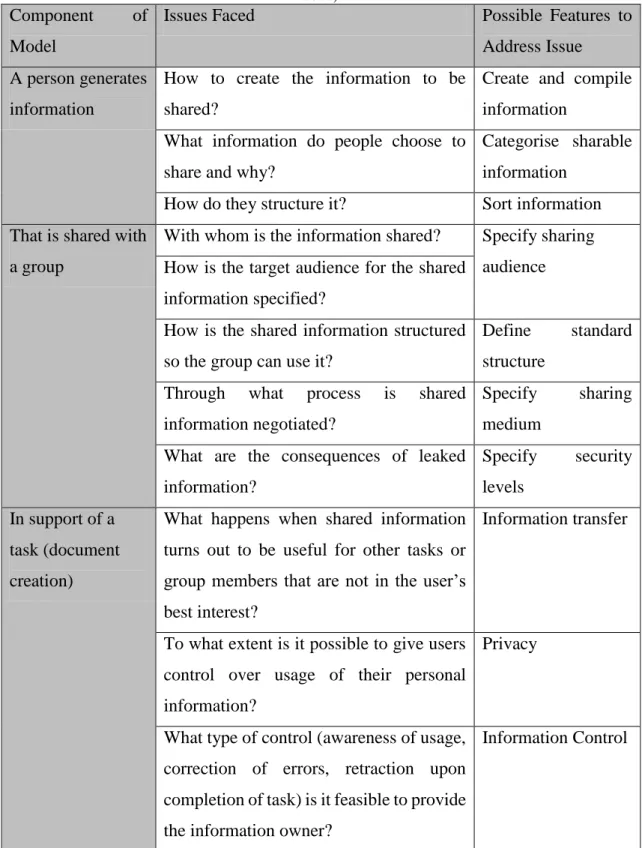
Erickson (2006) established a simple GIM model that can be used to highlight certain features and issues that face GIM. Erickson describes the model of GIM as when a person generates information that is shared with a group in support of a task (Erickson, 2006). Table 2-4 takes Erickson’s model and breaks it into three parts, where certain issues are highlighted, and what features should be included to address the issues.
Studies have shown that in order for GIM systems to be effective, the systems need to cater for certain requirements, both software and hardware. Group information may need to be classified to allow for efficient retrieval. This is a possible software requirement to allow information to be classified. Information can be classified by using standardised naming conventions, or tagging systems. A naming convention could be that of “Group_information_XY.docx”, where XY would be a specific version of the group information (Voit, Andrews and Slany, 2009).
Tagging could be an effective way to classify information. Tagging is accomplished by adding a few descriptive keywords, or tags, to a piece of information. Tagged information could easily be found by searching for a particular tag. An issue arises when users over tag. Over-tagging occurs when users use different words or tags to describe the same characteristic (Voit et al., 2009).
18
Table 2-4: GIM Model Illustrating Issues Faced and Possible Features to Address the Issue (Erickson, 2006)
Component of Model
Issues Faced Possible Features to
Address Issue A person generates
information
How to create the information to be shared?
Create and compile information
What information do people choose to share and why?
Categorise sharable information
How do they structure it? Sort information That is shared with
a group
With whom is the information shared? Specify sharing audience How is the target audience for the shared
information specified?
How is the shared information structured so the group can use it?
Define standard structure
Through what process is shared information negotiated?
Specify sharing medium
What are the consequences of leaked information? Specify security levels In support of a task (document creation)
What happens when shared information turns out to be useful for other tasks or group members that are not in the user’s best interest?
Information transfer
To what extent is it possible to give users control over usage of their personal information?
Privacy
What type of control (awareness of usage, correction of errors, retraction upon completion of task) is it feasible to provide the information owner?
Information Control
Faceted classification could be used to address the shortfall in normal tagging systems. Similar to tagging systems, faceted classification uses words to classify information. However, instead of allowing the users to use their own words or tags as in tagging systems,
19
faceted classification makes use of a predefined set of words that are available for use in each set of facets to describe the information (Voit et al., 2009).
Other research shows that users of a particular system tend to categorise information using location-based spatial layouts (Barreau and Nardi, 1995). An example is when users of an operating system group icons on a desktop to allow for quick access to the information and also to reduce memory overload. The benefit of using location-based spatial layout can be limited due to the screen resolution of the display. This requirement may be fulfilled by using the appropriate hardware (i.e. a larger display). The larger the display, the more spatial categories can be created.
Systems should be compatible with current user habits in such a way that it does not require the users to have to relearn an entire systems methodology. A tool, which only covers a certain set of applications, may fail to satisfy the majority of the user population (Gemmell, Bell and Lueder, 2006), because of unnecessary limitations. Different file browsers (Chau, Myers and Faulring, 2008; Marsden and Cairns, 2003) and other systems sometimes require a complicated user interface which plays an important part in the acceptance of a system. Existing PIM tools are developed based on a database centric architecture (Gemmell et al., 2006). In most cases, people do not want to have to acquire specialised information storage software. People also want the ability to easily make backups of their information, which can be a lengthy procedure when using a database system. In this case, a GIM system needs to adapt to the user’s needs as much as possible, without the user having to change established habits.
Searching is an important requirement of GIM. Group members may have to search through large repositories for their stored information. Searching is a valuable function, when looking for information when you do not know the storage location. It should also be noted that people tend to remember where a document or piece of information is stored, and in these circumstances, people prefer to browse instead of using the search function. Studies have also shown that people working in a group associate shared files with the member that shared the file, and not the title or content. People tend to remember who actually shared the information (Voit et al., 2009).
20
GIM systems should also not face any unnecessary limitations (Voit et al., 2009). The system should scale well to large amounts of information and not be subject to slow processing and lag. The system should be able to cater to the user’s needs as effectively and efficiently as possible. A GIM system should also be transparent in a sense that the users know where the information is stored, what is happing to the information, how to easily create backups, how to copy and share the files as well as granting sufficient access to their information.
A useful feature for group information maintenance is the ability to assign expiry dates to information. The growing availability of storage at increasingly cheaper rates have led to people keeping information for longer periods of time (Barreau, 2008). The information contained within a document may become less useful as time progresses. The objective for which that information was stored may have passed its useful date, and thus render the information useless. The expiry data feature would allow users to specify an expiry date and once the date passes, that particular piece of information appears in a lower level of a search result, is moved to an archive folder, or is completely removed from storage. This feature helps to maintain the group information and keeps relevant information at the group members’ fingertips.
This section discussed some necessary features for a GIM system to be successful and well utilised. Section 2.5 will clarify the functional and non-functional requirements for GIM, as well as provide a motivation for GIM systems.
2.5 Motivation and Requirements of GIM
This section motivates the need for a system to support GIM. The motivation will also comprise the benefits that GIM systems can provide to a team. Functional and non-functional requirements of a GIM system will then be derived from the possible features of a GIM system identified in Section 2.4.
21 2.5.1 Motivation for GIM
A key aspect of GIM is the ability to collaborate within the group. Effective collaboration between group members can increase work efficiency by effectively coordinating activities between group members to ensure that no work performed is redundant between the group members. A study by Shah (2010) identified three major reasons why individuals choose to collaborate:
1. Requirement – If we look at the work environment, quite often teams are formed in which the team is required to deliver one solution or objective. Each member within the team must collaborate with each other to ensure collective success in an effective and efficient manner.
2. Division of labour – A choice may be made by an individual to divide the workload of a particular task to ensure greater productivity. The key reason is synergy, where it is believed that two heads may be better than one. An example of synergy is where 1+1=3, meaning the marginal benefit of adding one more resource is greater and more productive.
3. Diversity of skills – A task given to an individual may be far too complex and require more than one skill set. In this case, the individual may have to collaborate with people with different skill sets and experiences to ensure that an expert opinion is obtained in order to complete the task.
The effectiveness of a GIM system depends on how well a collaboration medium is established. An effective collaborative setting can improve problem solving and motivate people because goals and plans are effectively communicated (Wilson, Hoskin and Nosek, 1993). Peer interaction can motivate the team to tackle problems that may seem unmanageable to an individual and thus lead to a solution of superior quality to that of an individual (Brown and Palincsar, 1989).
GIM can provide a medium for groups to effectively collaborate and share information to ensure greater productivity. It also provides a platform in which group members can have a common place for finding, keeping, maintaining, organising and sharing group information. GIM may also allow group members to effectively delegate tasks to ensure no overlapping occurs. The system may also provide a history of which member is responsible for what task, and also provide a query function to view historical information.
22 2.5.2 Functional Requirements of GIM
The possible features for a GIM system were discussed in Section 2.4. The features, which are based on Erickson’s (2006) GIM model, allowed for six categories of functional requirements to be identified and are summarised in Table 2-5. Each requirement is also mapped to typical tasks that would be involved with fulfilling the GIM requirement. A GIM system would first and foremost require a common information space in which users belonging to the space are able to access a location that has been predefined. The information space could be stored on a local drive (restrictive accessibility), cloud server (increased accessibility), or database. The information space will form the backbone of a GIM system which, if successfully implemented, could make group information readily available.
Communication is an important feature in GIM. A GIM system needs to allow for effective communication medium in which group members can communicate their individual thoughts to other members efficiently and effectively. The medium should limit misinterpretations and errors. Communication is also an important factor when it comes to division of labour. The process of dividing work between group members needs to be performed very carefully to ensure that each group member understands what is required of them. The division can be aided by splitting up tasks, keywords or concepts between group members (Amershi and Morris, 2008).
Collaborative systems are required to support numerous functions that are facilitated by awareness and communication (Morris and Horvitz, 2007). The main benefit of a collaborative system is that group members know what each other is doing to reduce the amount of repeated effort and increase efficiency.
23
Table 2-5: Derived Requirements of a GIM System
Requirement Interaction Task
1.General
1.1 Allow for the provision of shared access to an information space for all users
Allow login/logout functionality.
View and browse information within information space.
1.2 Allow for communication between group members
Face-to-face communication. Store and view communications. 1.3 Allow for the workload to be divided
and delegated to group members
Verbally assign responsibility. Pass information.
1.4 Keep a history of delegated tasks Store tasks.
Allow for tasks to be set as complete or incomplete.
1.5 Keep a history of searches and communication
Store and view logs. Store and view notes. 1.6 Allow for the information to be
re-found and easily reusable
Store recently used files. Re-open recently used files.
2.GIM Aspect - Keeping
2.1 Store documents and information in the shared information space
Save information
3.GIM Aspect – Finding
3.1 Allow for searching by collaboratively querying or filtering the information space
Use of OSK. Select folders.
Use criteria to find information. 3.2 Allow for search results or shared
information to be visualised
View information.
3.3 Allow for collaborative navigation through search results
Browse results.
3.4 Allow for the information files to be opened from the personal information space
Open files.
3.5 Allow for manipulation of the search results or shared information
24
Table 2-5: Derived Requirements of a GIM System (continued)
Requirement Interaction Task
4. GIM Aspect - Maintaining
4.1 Allow for editing and updating all information
Use of on-screen keyboard (OSK) to input text (e.g. annotate).
Modify other values (e.g. ratings).
5. GIM Aspect - Organising
5.1 Allow for the workspace to be organised in an effective manner
Sort workspace based on criteria.
5.2 Allow for a classification mechanism to help organise the information space
Modify values.
5.3 Allow for sorting of the information space
Select sort criteria.
6. GIM Aspect - Sharing
6.1 Allow for information of the information space to be easily shared amongst the users
Visually share information.
6.2 Allow for a sharing mechanism to be used to transfer shared information into a user’s personal information space.
Physically share a copy of information with other users.
6.3 Allow for a collaborative document to be created and shared amongst the users
Create a document by adding, deleting and moving information from other documents.
2.5.3 Non-functional requirements of GIM
The usability requirements of a GIM system will identify important requirements for user satisfaction. Shah (2010) identified three primary goals for the development of a collaborative system. The three goals include simplicity, integration and flexibility. Sams
et al. (2011) employed these three goals in the development of Co-IMBRA, a collaborative information retrieval system, with positive results. Since Co-IMBRA, achieved positive results, it was decided that these three goals would be identified as non-functional
25
requirements for a GIM system. Table 2-6 summarises the primary goals of Shah (2010). These requirements map onto the features that a GIM system should have, as discussed in Section 2.4.
Table 2-6: Primary Goals for Successful Collaborative Systems (Shah, 2010) Non-functional
Requirement
Description
Simplicity Systems should be simple to learn, memorise and interact with. Integration The different elements of a system should be effectively integrated
into a single user interface.
Flexibility Systems should be designed to fit the preferences of the user.
2.6 Tools Supporting GIM
Research has shown that there is a need for co-located GIM systems (Collins and Kay, 2008). Various PIM systems have been developed to help increase an individual’s productivity. GIM systems have been developed, but predominantly for large scale agencies, such as pharmaceutical companies.
This section introduces five existing software tools that either support PIM, GIM, or a component thereof. Section 2.7 analyses the existing software tools that satisfy the location-time requirement of co-located and synchronous communication.
2.6.1 Focus – A Collaborative PIM Prototype
Focus (Collins and Kay, 2008) was developed to present techniques for navigating and sorting multiple sets of personal information - mainly digital files and email - on an interactive tabletop. The tabletop setting was adopted due to particular advantages which were envisioned: workers would be able to share personal information (such as emails) to coordinate activities to ensure effective decision making; work being conducted by a team can be divided amongst team members and can later be combined using an interactive tabletop. The term GIM was not used to describe Focus because the focus of GIM is to share information with groups and institutions, rather than people in a co-located context. Focus is defined as a collaborative personal information management tool (Collins and
26
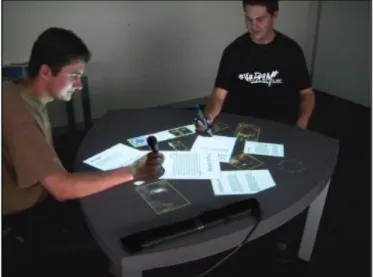
Kay, 2008). Using the classification of groupware discussed in Section 2.3.1, Focus is a synchronous and co-located groupware application. Figure 2-1 shows users interacting with the Focus prototype and Figure 2-2 shows a screenshot of the workspace.
Figure 2-1: People using Focus to Collaboratively Access and Organise Personal Information (Collins and Kay, 2008)
Collins and Kay (2008) agree that there is a lack of research conducted on PIM and GIM using multi-user interactive tabletop displays. They support the need to implement PIM in a co-located tabletop environment in order to assist individuals to share personal information and collaborate in an effective manner.
Figure 2-2: The Focus interface showing a collection of e-mails, photos, documents and stored web-pages, which have been rearranged by users after two focus item selections (Collins and Kay, 2008)
The results of the evaluation of the Focus prototype showed that there is still much work to be done on collaborative PIM on the tabletop. Issues that were highlighted were:
27 1. Personal information privacy:
How will individuals be able to control privacy so that they have complete control over the information accessible on the tabletop, and specify who can access it?
2. Clutter:
Personal information consists of a lot of data, and with tabletops, what you see is what you get. How can clutter be reduced?
3. Overlapping objects:
How to deal with object groupings such that when groups of objects are created they conflict with groupings made for other items, and
4. Storage scheme of the different types of personal information:
Different types of personal information are stored in different ways by different users.
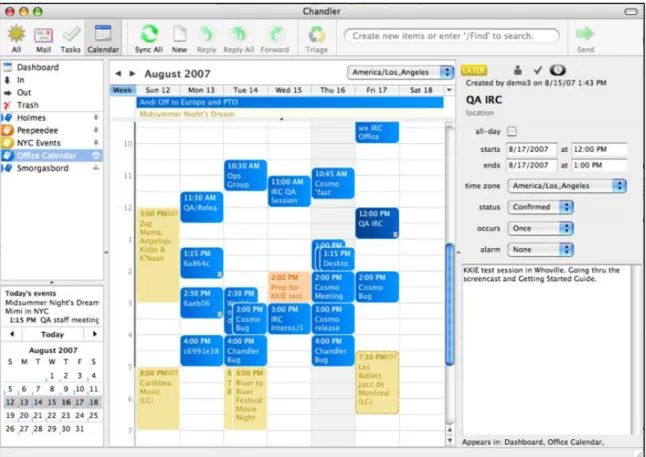
2.6.2 Chandler
Chandler is a PIM software application that is designed for personal and small-group task management (Chandler, 2013). Chandler is a desktop application and limited to one user per application. Chandler aims to create a workflow that is mainly focused on creating a unified representation for the storage of tasks and information so that they can be classified in a homogeneous way, refining that information through an iterative workflow, and allowing easy collaboration on the defined items. Features include flexible organisation whereby information can be organised into multiple contexts, and integrated calendaring where an individual can schedule tasks and set reminders. Chandler also allows for group calendar sharing, collaboration on drafts, maintenance of checklists, and sending and receiving emails with others. Using the classification of groupware discussed in Section 2.3.1, Chandler is an asynchronous, remote located groupware application. Chandler is also a desktop application and was designed for a single user. Chandler is not suitable for GIM in a co-located environment. A screenshot of the Chandler workspace is shown in Figure 2-3.