A USER CENTRIC MODEL FOR ONLINE
IDENTITY AND ACCESS MANAGEMENT
1M. Deas and 2S. Flowerday
Nelson Mandela Metropolitan University University of Fort Hare
Tel: +27(0)43 7047071
P.O. Box 15520, Beacon Bay, East London, 5205
ABSTRACT
The problem today is that users are expected to remember multiple user names and passwords for different domains when accessing the Internet. Identity management solutions seek to solve this problem by creating a digital identity that is exchangeable across organisational boundaries. This is done through the setup of collaboration agreements between multiple domains, thus users can easily switch across domains without having to repeatedly sign-on. However, this technology is accompanied by the threat of user identity and personal information being ‘stolen’. Criminals make use of fake or ‘spoofed’ websites as well as social engineering techniques to gain illegal access to a user’s information. This problem has been catapulted to the fore by the statement that phishing has increased by 8000% over the period January 2005 to September 2006 (APACS, 2007). Thus, the need for user protection from online threats has drastically increased. This paper examines two processes to protect user login information. Firstly, user’s information must be protected at the time of sign-on, and secondly, a
simple method for the identification of the website is required by the user. This paper looks at these processes of identifying and verifying user information followed by how the user can verify the website at sign-on. The roles of identity and access management are defined within the context of single sign-on. Three different models for identity management are analysed, namely the Microsoft .NET Passport, Liberty Alliance Federated Identity for Single Sign-on and the Mozilla TrustBar for website authentication. A new model for the definitive protection of the user in the online environment is proposed based on the evaluation of these three existing models.
KEY WORDS
Identity Management, Authentication Management, Mozilla TrustBar, Liberty Alliance, .NET Passport
A USER CENTRIC MODEL FOR ONLINE
IDENTITY AND ACCESS MANAGEMENT
1 INTRODUCTION
The Internet has played a major role in the way people do business and interact socially. Websites are used to sell goods and services online whilst storing sensitive customer information such as credit card details and identity numbers. This information is regularly stored using simplistic user sign-on tools. The use of this technology creates the challenge of how to ensure that the correct authorised user connects to the appropriate online system.
To ensure users are who they claim to be at the time of sign-on, a more advanced authentication tool than that of a single key authentication password, is required. Through the use of dual key authentication over that of single key passwords, higher levels of trust between the user and the website provider are created. A number of users are still naïve as to the potential dangers of the Internet and are unaware that they may be at risk by using websites with simple security measures for client authentication. The threat exists for criminals to make use of fake or ‘spoofed’ websites and social engineering techniques to gain illegal access to user information and potentially commit identity theft. Although organisations have been set up to standardise the processes of online identity management, none fully protect the user and enforce a dual method of user and website authentication. Because of this the risk still exists that a user’s account information can be accessed illegally. It is therefore important that adequate identity management controls are put in place to secure the online user.
The remainder of this paper is organized as follows: Section 2 presents the role of identity management for businesses as a tool to meet legal requirements for client protection and the benefits of identity management to the business. Section 3 investigates the role of access and authentication management, focusing on user issues and trends relating to online systems usage. Section 4 provides an overview of the identity management models implemented by Microsoft Passport .NET, Liberty
Alliance Federated User Identity and the Mozilla TrustBar. Section 5 provides a critical comparison of the models. However, none of the investigated models focus on the issues of the user and the protection of the user within the online environment. Each model focuses exclusively on the sign-on or website identification processes and lacks a wholesome environment within which the user may interact with. Section 6 proposes a model for user centric online protection. This model is based on the use of dual authentication techniques in the form of user authentication by the system, and system authentication by the user.
2 ROLE OF IDENTITY MANAGEMENT
Through the use of identity management, businesses benefit as they draw from best practices and ensure compliance to regulations. Legal requirements for client protection are implemented to provide a code of “best practice” as noted in COBIT and ITIL (Lewis, 2003). The business is ultimately responsible for the use of identity information and is held accountable should that information be used fraudulently. In making use of the identity management life-cycle, the user’s account is managed from the time of creation to the time when the user permanently leaves the system. This process includes the removal and addition of system rights (De Leeuw, 2004). Through efficient use of an identity management solution, companies realise the following benefits:
1. Better planning, implementation and management of solutions through a complete user based life-cycle of services.
2. Reduction in costs and complexity, while increasing the rate of return on investment made in identity management.
3. Predictable implementation procedures and efficient business operations, thereby ensuring greater system satisfaction for both users and customers.
4. Manages all four main areas of concern for the business (people, process, practice and platform), when implementing identity management in the organisation (Sun Microsystems, n.d.; Gordon, 2004).
Organisations now view identity management solutions as the answer to a number of security challenges. It is also imperative for organisations to consider how they can take full advantage of the benefits and the value of an identity management system within their business (BMC Software, 2006). Furthermore, the use of effective identity management controls will provide the system user with a secure environment within which they can function. The effectiveness of such a process, however, is only as strong as the level to which access and authentication management controls are applied.
3 ACCESS AND AUTHENTICATION MANAGEMENT
In order to manage a business environment in which multiple users require access to systems over large and distributed networks becomes difficult plus it is essential that the business ensures the users connecting to this environment are whom they claim to be. The Internet has the ability to mask an identity, and this process can be used to perpetrate fraud. Therefore, every action performed online is subject to a degree of risk. This lack of trust has spread into the banking sector. In a recent report by the journal, Computer Fraud and Security, it was stated that 52% of respondents were unlikely to sign up to online banking facilities and that 82% of respondents would not respond to any emails from financial firms (Consumers losing trust in online banking: survey, 2007).
In online commerce, customers take on substantial levels of risk when making purchases from an online vendor, because all encounters take place through the vendor website. Customers therefore need to be able to assess the risk involved when purchasing online.
Customers often leave a website when they do not gain a sufficient sense of trust (Chau, Hu, Lee & Au, 2006). Online merchants store large amounts of customer data therefore it is critical for vendors to build strong trusting relationships with their customers. This can be ensured by making use of proper access control procedures to provide minimal risk to the customer. From the perspective of the merchant, there is little concern over the identity of the individual customer, but more concern over their ability to pay for services or goods. If security is breached on the vendor website, it is imperative that accurate logs exist for the auditing of user actions.
The dangers to users in the online environment are summarised as spoofing, phishing and identity theft. By implementing strong controls to ensure that only an authorised user accesses the system, the business risk is
diminished (Rodger, 2004). In order to identify the best methods to protect an online identity from online threats, it is essential to look at international systems for single sign-on (SSO) protection of the user.
4 COMPARISON OF IDENTITY MANAGEMENT SOLUTIONS
The ideal environment for the computer scientist is one in which computer systems know who their users are. The ideology behind this is based on the concept that users should be authenticated as simply as possible. An investigation is performed to determine the best method of implementation, specifically looking at Microsoft’s Passport .NET, Liberty Alliance and Mozilla TrustBar.
4.1 Microsoft Passport .NET
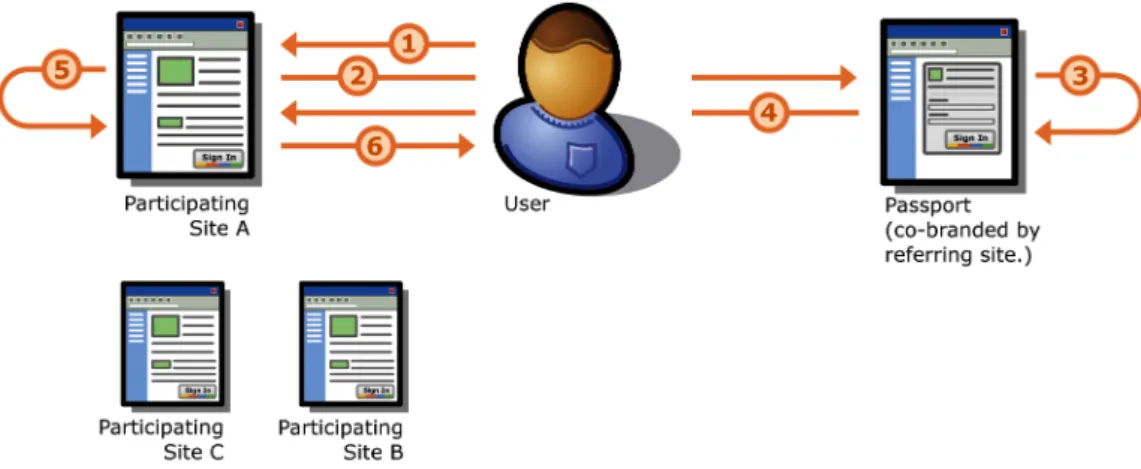
The Passport .NET service makes use of SSO Identity Domain. Microsoft is suited to the process of handling an SSO platform as it already provides a large variety of services online for e-mail, online messaging and search facilities. However, issues regarding user privacy and freedom of movement online could be infringed should a single entity take control of all SSO authentications and the information held therein. The process followed for user authentication through the Passport service is shown in Figure 1.
Figure 1 – The Passport Authentication Process (Microsoft, 2004)
1. User browses to participating site or service (Site A in this example) and clicks ‘Sign In’ button or link.
3. Passport checks if the user has a ‘Ticket Granting Cookie’ (TGC) in their browser’s cookie file meeting the rules of Site A. If one is detected, they skip to step 4 and do not go through the login process. If the TGC has lapsed based on Site A’s time requirements, then the user is redirected to a page asking for their login credentials to be entered correctly in order to proceed.
4. The user is redirected back to Site A with their encrypted authentication ticket and profile information attached.
5. Site A decrypts the authentication ticket and profile information and signs the customer into the website.
6. The user accesses the page, resource or service they requested from Site A.
In concluding Figure 1, no information about a user is shared with Sites B and C unless the user chooses to sign-on to those sites.
A potentially hazardous feature to the user of Passport .NET reported by both Microsoft (2004) and discussed by Kormann and Rubin (2000) is that of the automatic sign-on to Passport. If this option is selected, the username and password of the individual user are stored locally on the individual client’s machine. When an automatic sign-on is selected the user will be signed on to the .NET Passport service without intervention. Disconnecting from the Internet or turning the machine off has no effect on the connection of the user to the service. This option exposes a user’s account to infiltration potentially exposing sensitive information.
Although a user may use their .NET Passport account at multiple sites, the password is only stored in the .NET Passport database and is only shared with the .NET Passport servers that need to make use of it for authentication. The .NET Passport service contains a feature that, should the user make an error in attempting to sign-on, the system automatically blocks access to the user account for a few minutes. This process stops attempts to gain unlawful access to an account using password cracking software.
Overall, the .NET Passport solution provides a relatively simple solution to the problems experienced by users within SSO. Websites affiliated with the .NET Passport program can opt to have the service manage their user base, shifting the responsibility for this process from
themselves to Microsoft. As previously stated, the main drawback to the .NET Passport solution is the problem of having a single entity responsible for and controlling all identity authentication tasks. This, by itself, increases new risks and issues relating to both privacy and security.
4.2 Liberty Alliance Federated User Identity
The Liberty Alliance is an undertaking by a group of organisations and government agencies to provide a set of open technical specifications for the creation of a federated identity solution. When the Liberty Alliance began their operations, the first phase of development involved the setting up of specifications which enabled simplified SSO for end users. This process became Liberty’s Identity Federation Framework (Madsen, 2004).
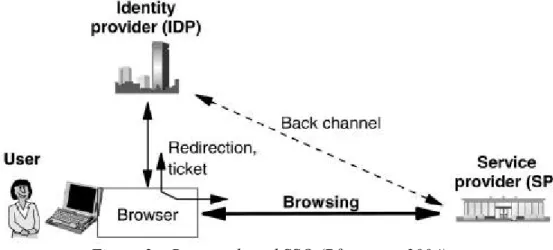
The Liberty specifications for SSO includes an enabler which provides SSO functionality across different enterprise domains and websites. Pfitzmann (2004) describes the process of Liberty’s SSO as follows:
Figure 2 – Browser based SSO (Pfitzmann, 2004)
In Figure 2, a user accesses the service provider whilst browsing online. When submitting a sign-on request, the service provider redirects the browser to the user’s identity provider. The user then logs in using a typical username and password. The identity provider redirects the browser back to the service provider with an additional ticket to handle other services, such as data transfer logistics on other channels.
The benefit of using this form of implementation is that the user is not redirected to a separate login page for authentication purposes. Once the user is authenticated by one service within the ‘circle of trust’, all other websites within that trust domain can verify the user as having been authenticated, eliminating the need for multiple sign-on (Liberty Alliance, 2007).
The Liberty Alliance provides a viable alternative to the solution from the .NET Passport. By having a consortium of companies involved in the setting of standards, a broader level of consensus is achieved and the best solution implemented. Within the realm of SSO the problem however with Liberty Alliance’s solution is the lack of ability to provide a scalable solution for a user to connect to a multitude of websites, because each setup of the federated identity solution exists within separate circles of trust. If a user moves between two different trust circles, they will be required to sign-on with different credentials.
4.3 Mozilla TrustBar
A potential solution for the identification of websites is the use of a plug-in toolbar supplied within Mozilla Firefox browsers. By using this plug-in a user can store images mapped to server certificates. Whenever a server certificate is verified, the mapped image is displayed on the toolbar, while the corresponding page is still being loaded (Jøsang & Pope, 2005). Mozilla TrustBar focuses on how to secure the user whilst authenticating websites. Thus, the user is protected from the threats of phishing and website spoofing. The TrustBar attempts to make users more aware of the security behind the web pages they view.
The overall process of the client user authentication on the server attempts to protect against potential eavesdropping and modification by Man in the Middle (MITM) adversaries. Large numbers of financial and other websites make use of Secure Socket Layer (SSL) to authenticate the user. A number of those sites however only make use of SSL protocols once the user has typed in a username and password and then clicked ‘submit’ (Herzberg, 2005).
This form of implementation has the potential for MITM to redirect the user towards a modified version of the website. Should this occur the user may unknowingly provide login information to a third party. Through the modified page, if the user attempts to login, the user information is sent
back to the MITM. Clearly the traditional approach of signing on does not protect the user from these forms of attack; and the user requires an easier way to verify that he or she is on the intended website.
Herzberg (2005) mentions the ways in which TrustBar provides a solution to the client user problem as follows:
• TrustBar periodically downloads a list of the unprotected websites that are maintained on the Mozilla TrustBar servers. This list stores the unprotected login sites which Mozilla tracks, as well as any alternate login pages for those websites that are protected. This information can be used to redirect the client if an unsafe link is found.
• TrustBar makes allowance for users to assign a logo to websites of their own choosing to visually identify the website. TrustBar tracks changes to websites and displays information in the form of a “Same since” and a date value. After the website changes, a warning is displayed when the page is accessed by the user.
Herzberg and Gbara (2007) provide further uses of the TrustBar for solving the user problem in the following situations:
• In SSL websites, TrustBar shows by default, the name of the organisation that owns the website through the identification of the digital certificate. TrustBar also displays a representation of the logo or the name of the certification authority which issued the certificate.
• TrustBar displays a padlock for all protected websites, and a “No Entry” sign for unprotected websites.
The Mozilla TrustBar’s solution to the user’s web usage condition is novel. The service provides the client with a free-to-use facility that can make the online user feel more secure. Through providing a visual aid to the user showing the current status of the accessed website, the user’s overall experience is improved.
5 COMPARISON OF MODELS
The three reviewed models have different approaches to the handling of identity management. It is not entirely possible to provide a valid
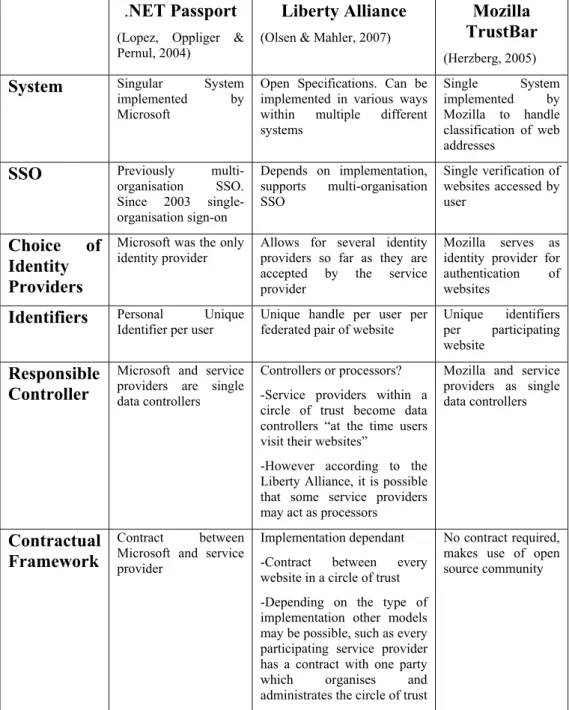
comparison of the .NET Passport system, which was implemented with a singular methodology, to the Liberty Alliance framework. The reason for this is that the latter is not a system, but a set of open technical standards which an organisation can implement. The efficiency of a Liberty Alliance framework implementation is only as strong as the level to which the specifications are applied. Further complicating this analysis is the Mozilla TrustBar. The TrustBar looks at the identity management paradigm from that of the user. TrustBar implements similar steps when performing authentication, but instead of the authentication of the user, the accessed website is authenticated. The consolidated comparisons, where they can be drawn, are shown in Table 1.
Table 1 draws a comparison of the three models into specific sections. The .NET Passport is rooted as a singular entity, which is maintained by Microsoft. All usage of the .NET Passport requires adherence to Microsoft standards by website vendors, stipulated in contracts between Microsoft and these parties. The Liberty Alliance makes use of a set of open specifications that can be implemented in various ways to allow for an SSO environment to be created for users. The SSO facility, however, only applies between websites within the same circle of trust, and should a user move out of the circle, they must resubmit their login credentials. TrustBar takes a different perspective looking at the issue from the user point of view. TrustBar currently works off a single system, which is implemented by Mozilla, handling classification and analysing the security of websites to create a central repository for determining website validity.
The three models analysed provide a significant step towards meeting the overall goal of an integrated system for the protection of the user in the online environment. The following three points summarise and categorise each model:
• Microsoft .NET Passport – provides a solution for broad implementation of identification and verification of users within an SSO environment. It also provides simple integration between vendors, due to a single user identification provider.
Table 1 – Comparison of .NET Passport, Liberty Alliance and Mozilla TrustBar
.NET Passport (Lopez, Oppliger & Pernul, 2004)
Liberty Alliance (Olsen & Mahler, 2007)
Mozilla TrustBar (Herzberg, 2005) System Singular System
implemented by Microsoft
Open Specifications. Can be implemented in various ways within multiple different systems Single System implemented by Mozilla to handle classification of web addresses
SSO Previously multi-organisation SSO. Since 2003 single-organisation sign-on Depends on implementation, supports multi-organisation SSO Single verification of websites accessed by user Choice of Identity Providers
Microsoft was the only
identity provider Allows for several identity providers so far as they are accepted by the service provider
Mozilla serves as identity provider for authentication of websites
Identifiers Personal Unique
Identifier per user Unique handle per user per federated pair of website Unique identifiers per participating website
Responsible Controller
Microsoft and service providers are single data controllers
Controllers or processors? -Service providers within a circle of trust become data controllers “at the time users visit their websites”
-However according to the Liberty Alliance, it is possible that some service providers may act as processors
Mozilla and service providers as single data controllers
Contractual Framework
Contract between Microsoft and service provider
Implementation dependant -Contract between every website in a circle of trust -Depending on the type of implementation other models may be possible, such as every participating service provider has a contract with one party which organises and administrates the circle of trust
No contract required, makes use of open source community
• Liberty Alliance – provides a flexible solution for the website vendor through the use of circles of trust. This is limited to providing SSO on a smaller scale because of the limited size of the circle of trust. Each website within the circle of trust provides its own login forms for the user. With a greater level of trust between the websites involved, the ability to audit user movements within the system is increased.
• Mozilla TrustBar – provides a way to identify the website from the user perspective. This is accomplished by the implementation of an easy to use identification and verification process; the user is alerted to potential threats within the websites they are seeking to access.
6 USER CENTRIC ONLINE IDENTITY & AUTHENTICATION MODEL
Although all three models discussed do provide a useful service, none cover all the needs of the user. Although each model focuses on the sign-on or website identification issues, none focus on the issues of the user or protection of the user within the online environment. The issues that need to be addressed for the protection of users in the online environment can be summarised as follows:
• Scam Protection – Users must be aware of potential scams online. Education is the best prevention (Bradley, 2007).
• Spoofing – Users must be aware of fraudulent sites and the risks that can occur should their information be compromised (Herzberg, 2005).
• Multiple Verification – When making use of multiple websites, each with individual login criteria, a facility to improve the user experience through the use of SSO methodology is required. SSO reduces the potential for interception of client login data, and promotes ease of use online (Lopez, Oppliger & Pernul, 2007).
• Credential Security – User credentials must be securely transmitted when authenticating SSO environments.
Each of the models possesses attributes that address some of these user requirements, but they themselves are insufficient.
6.1 Authentication of IT Systems and Users
Authentication procedures in the online world are more complex than their real world counterparts. Through the use of brute force attacks, security controls can be compromised in a short period of time. The use of social engineering techniques can make the process even simpler. When performing the process of converting an offline system to an online version, technical authentication procedures are adapted to the online capabilities frequently without adopting the necessary security measures (FIDIS, 2006). The authentication of the actual website may be adequate, but if users are unable to establish the trustworthiness of the website they are lured to, this authentication is in vain.
If more controls and checks are enforced along with dual authentication by users and systems, a more secure environment for the online user will be ensured. This process can be performed by the authentication of users by IT systems and the authentication of the accessed IT system by the user.
6.1.1 Authentication of Users by IT Systems
From a technical viewpoint, an identity is nothing more than a digital pseudonym representing an individual. Therefore, measures are required to verify that a digital pseudonym belongs to the appropriate authorised person (FIDIS, 2006).
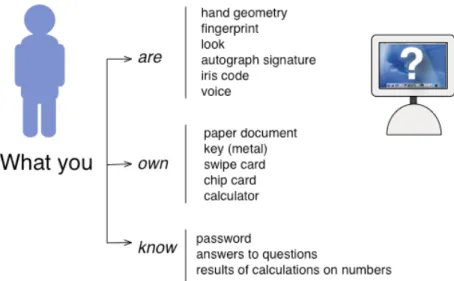
Figure 3 depicts the ways in which an IT system can determine the authenticity of a user. An increase in the number of criteria to be enforced provides for a more comprehensive verification of the user.
Figure 3 - Authentication by an IT System (FIDIS, 2006)
Based on the above figure, IT systems can recognize a user by their attributes through the use of biometric techniques, what they possess, and what they know. The higher the number of controls implemented using these identification criteria, the higher the level of certainty that the user accessing the system is authorised to do so. Consequently the more criteria used for the authentication process, the higher the levels of trust created between the user and the system.
6.1.2 Authentication of an IT System by a Person
User identity theft is often performed through deceiving the user on a spoofed website. A user enters their login information and attempts to connect, thereby sending their identity data to the perpetrator. To curb this problem, users should authenticate an IT system using the criteria described by the Future of Identity in the Information Society (FIDIS, 2006) which are:
• What the IT system is – By looking at the information contained on the website the user can determine its validity. The immediate method of identifying a website is through the assessment of the website URL. If the URL corresponds to that of the users expected website, they should continue by
determining the validity of the website’s digital certificates. In checking the digital certificates the user can determine the validity of the website. This process can be automated through the use of a system such as the Mozilla TrustBar.
• What the IT system knows – Through the registration process the user will set up their initial profile. Some websites may request other personal information relating to the client. The display of this personal information thus verifies the authenticity of a website.
Through the use of both user and system authentication in a dual pronged approach, a user is assured of making use of a valid Internet website.
6.2 A Model for Securing the User’s Online Experience
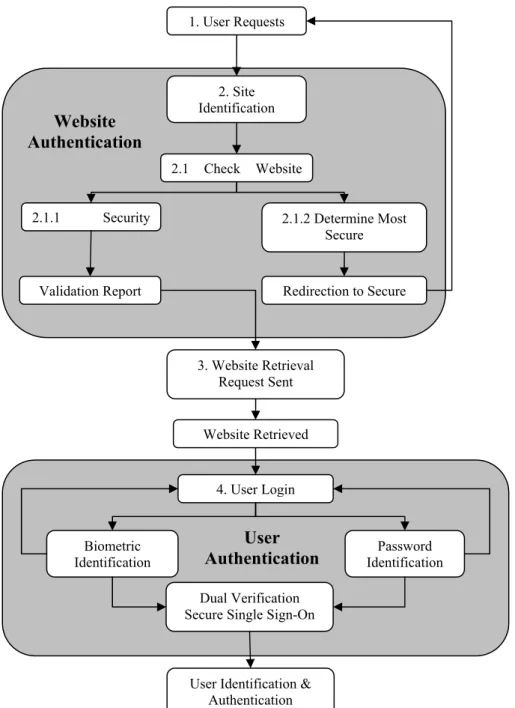
In order to protect the user from threats to their online identity, an approach is required that satisfies both user authentication and website authentication. In Figure 4, a model is proposed which promotes a dual-pronged solution to the protection of user information in the online environment. The model addresses user protection from two angles. The validity of the website is checked and reported to the user. This ensures that the user is attempting to access and authenticate the correct version of the website. Then the process of SSO authentication takes place to allow the user to make use of the benefits of the SSO environment.
Figure 4 – Model for User Centric Online Protection 1. User Requests
2. Site Identification
2.1 Check Website
2.1.1 Security 2.1.2 Determine Most
Secure Validation Report 3. Website Retrieval Request Sent Website Retrieved Redirection to Secure 4. User Login Biometric Identification Password Identification Dual Verification
Secure Single Sign-On
User Identification & Authentication
User Authentication Website
The process in the model is expanded as follows:
1. User Requests Website – The user makes use of their browser and enters the URL of the website they intend to visit. By selecting a URL, the process responsible for authenticating the website is initiated.
2. Site Identification Request – When the user performs a request for the website, a request is sent to a repository responsible for the validation of websites. The information in this repository provides the user with information which validates the security of the website. 2.1 Check Website URL – This is accomplished by using the information stored in the repository. These checks are undertaken in order to determine the level of security within the requested website, such as the use of SSL and digital certificates.
2.1.1 Determine Most Secure Site – A number of websites potentially have web pages, which are often more secure but are not set as the default login page. In these cases the repository determines the most secure website. If a more secure inner link for the same domain is found, the repository sends a redirect response to the browser to redirect to the more secure website. Should this occur, then the process from Step 1 reoccurs.
2.1.2 Site Security Check – Based on the URL the repository performs a search determining the validity of the digital certificates, authority of the certificate issuers, and if the site is flagged by the repository as a spoofed website. As a result, a URL validation report is then sent back to the user’s browser displaying the results and allowing the user the opportunity to validate the website themselves.
3. Website Retrieval Request Sent – When a user’s request for a website is sent, the website is retrieved via HTTP protocols.
4. User Login – Once the page has been loaded with information required for the validation report, the user attempts to login to the SSO website. Incorporated within this process is the use of a biometric input, such as fingerprint identification, along with password identification, which is used to provide a more secure environment. If either of these validation procedures fails, the user is redirected to the initial login page. If the sign-on is successful,
then the user is verified and authenticated within the SSO environment. This process ultimately leads to higher security levels of user identification.
7 CONCLUSION
This paper has discussed the need for a comprehensive model for the protection of users within the online environment. The roles of identity management and the benefits to business were discussed. The role of access and authentication management provided an insight into online user habits with regards to security. The three models .NET Passport, Liberty Alliance Federated Identity and Mozilla TrustBar were examined to determine the processes followed by industry to address identity management. A critical comparison of these models was made which found that none covered all the needs of the user in creating a comprehensive secure environment. A model was then proposed based on the best practices of the industry to promote the use of dual levels of authentication, that is user authentication of the website followed by the website authentication of the user in order to create a secure environment. In using a username and password along with other identification methods, the accuracy of user identification is increased. In addition, the ability of the user to identify the website and verify its authenticity protects the user from the threat of spoofing. This should protect the user from identity theft. An additional benefit of this process is higher levels of trust generated between users and vendors.
8 REFERENCES
APACS (2007) New research reveals that people are still unaware of basic security measures when banking online. Retrieved December 2007 from http://www.apacs.org.uk
BMC Software (2006) Supporting the identity management lifecycle with BMC Identity Management, Technical White Paper. Retrieved July 2007 from http://www.bmc.com
Bradley, T. (2007) Gone Phishing. Retrieved October 2007, from http:/netsecurity.about.com/od/secureyouremail/a/aa061404.htm Chau, P.Y.K., Hu, P.J., Lee, B.L.P. & Au, A.K.K. (2007) Examining customer’s trust in online vendors and their dropout decisions: An empirical study. Electronic Commerce Research and Applications, Vol 6(2), pp 171 – 182
Consumers losing trust in online banking: survey (2007) Computer Fraud
& Security, Vol 2007(2) pp 4
De Leeuw, E. (2004) Risks and threats attached to the application of Biometric technology in National identity management. Retrieved May 2007, from http://secure.gvib.nl/afy_info_ID_1322.htm-ThesisMSIT.zip FIDIS (2006) D5.2b: ID-related crime: Towards a common ground for interdisciplinary research. Retrieved September 2007, from
http://www.fidis.net
Gordon, T. (2004) Quantifiable benefits of implementing identity management systems. Retrieved July 2007, from
http://www.isd.salford.ac.uk
Herzberg, A. (2005) Defending users of unprotected login pages with TrustBar 0.4.9.93. Retrieved September 2007, from http://osdir.com/ Herzberg, A. & Gbara, A. (2007) TrustBar: Protecting (even naïve) Web users from spoofing and phishing attacks. Retrieved June 2007, from http://www.cs.biu.ac.il
Jøsang, A. & Pope, S. (2005) User Centric Identity Management,
Australian Computer Emergency Response Team Asia Pacific Information Technology Security Conference, Royal Pines Resort – Gold Coast,
Australia 22nd-26th May, 2005
Kormann, D.P. & Rubin, A.D. (2000) Risks of the Passport single sign-on protocol. Computer Networks, Vol 33(1-6) pp 51-58
Lewis, J. (2003) Enterprise Identity Management: It’s About the Business. vol.1, 2 July 2003, Burton Group Directory and Security Strategies
Directory and Security Strategies Research Overview. Retrieved November 2007, from www.burtongroup.com
Liberty Alliance (2007) Contractual framework outline for circles of trust. Retrieved July 2007, from http://www.projectliberty.org
Lopez, J., Oppliger, R. & Pernul, G. (2004) Authentication and
authorisation infrastructures (AAIs): a comparative survey. Computers &
Security, Vol 23(7) pp 578 – 590
Madsen, P. (2004) Federated identity and web services. Information
Security Technical Report, Vol 9(3), pp.56-65
Microsoft (2004) .NET Passport Review Guide. Retrieved August 2007, from http://www.microsoft.com
Olsen, T. & Mahler, T. (2007) Risk, responsibility and compliance in ‘Circles of Trust’ – Part I Computer Law & Security Report, Vol 23(5), pp 342 - 351
Pfitzmann, B. (2004) Privacy in enterprise identity federation – policies for Liberty 2 single sign on. Information Security Technical Report, Vol 9(1), pp 45 – 58
Rodger, A. (2004) Access Management the key to compliance. Card
Technology Today, Vol 16(4), pp 11-12
Sun Microsystems (n.d) Identity management services framework. Retrieved July 2007, from http://www.sun.com/service/identity/