*Contact author. This paper was submitted to the Int. Conference on Software Engineering Research and Practice (SERP 2012)
Early Usability Evaluation in Model-Driven
Video Game Development
Adrian Fernandez, Emanuel Montero, Emilio Insfran*, Silvia Abrahão, and José Ángel Carsí ISSI Research Group, Department of Information Systems and Computation
Universitat Politècnica de València, c/ Camino de Vera, s/n 46022 Valencia, Spain {afernandez, emontero, einsfran, sabrahao, pcarsi}@dsic.upv.es
Abstract—Usability is considered a relevant quality factor in
video games. However, usability evaluations are usually performed too late in the game development lifecycle. We present a usability evaluation strategy that can be used in early stages of model-driven video game development approaches. The usability evaluation is based on a Video Game Usability Model, which extends the usability characteristic of the ISO/IEC 25010 (SQuaRE) standard by incorporating measurable attributes and measures related to the video game domain. The traceability established between the models that are produced in a model-driven development process and the corresponding source code allows performing usability evaluations on these models, facilitating the early detection/correction of usability problems that may appear in the final video game application. To show the feasibility of this approach, we have performed an early usability evaluation of a video game for the XBOX360 platform.
Keywords: Video Game, Usability Model, Usability Evaluation, Model-Driven Video Game Development.
I. INTRODUCTION
The video game development industry is a strong economic sector that deals with the development of highly interactive software, i.e., video games, for a wide variety of technology platforms such as PCs, consoles, Web browsers, and mobile devices. The interaction between the game and the players is a critical factor in the success of a video game.
Usability and playability are considered to be the most important quality factors of video games [15]. Usability is defined as the degree to which the video game can be understood, learned, used and is attractive to the user, when used under specified conditions [11]. Playability is defined as a collection of criteria with which to evaluate a product’s gameplay or interaction [12]. Playability is often evaluated by using early prototypes and iterative cycles of playtesting during the entire video game development cycle. However, the evaluation of usability is deferred to late stages in the game development cycle, thus signifying that usability problems from early stages may be propagated to late stages of the development, and consequently making their detection and correction a very expensive task.
Traditional video game development approaches do not take full advantage of a usability evaluation of the game design artifacts that are produced during the early stages of the development. These intermediate artifacts (e.g., screen mock-ups or screen flow diagrams) are used to guide game
developers but not to perform usability evaluations. Moreover, since the traceability between these intermediate artifacts and the final video game is not well-defined, performing usability evaluations by considering these artifacts as input can be a difficult task. This problem may be alleviated by using a model-driven development approach due to its intrinsic traceability mechanisms that are established by the transformation processes. Platform-independent models (PIM) such as screen flow diagrams may be transformed into platform-specific models (PSM) that contain specific implementation details of the underlying technology platform. These platform-specific models may then be used to generate the source code of the video game (Code Model – CM), thus preserving the traceability among platform-independent, platform-specific and source code artifacts.
A model-driven video game development approach therefore provides a suitable context for rapid iteration early in the development cycle. Platform-independent (or platform-specific) models can be evaluated during the early stages of video game development to identify and correct some of the usability problems prior to the generation of the source code of the final video game application. We are aware that not all the usability problems can be detected based on the evaluation of models since they are limited by their own expressiveness and, most important, they may not predict the user behavior and preferences. However, studies such as the one by Hwang and Salvendy [10] claims that usability inspections, applying well-known usability principles on software artifacts, would be capable to find around 80% of usability problems. In addition, as suggested by previous studies [4], the use of inspection methods for detecting usability problems in product design (models in our context) can be complemented with other evaluations performed with end-users before releasing a video game to the public.
In this paper, we present a usability evaluation strategy that can be used in early stages of model-driven video game development. This strategy is based on a Video Game Usability Model which decomposes the usability characteristic proposed in the ISO/IEC 25010 (SQuaRE) standard [11] with new usability attributes for the video game domain. These attributes are quantified through their association with generic measures that can be operationalized by establishing a mapping between their generic definition and the specific modeling primitives of the software artifacts to be evaluated. This allows our Video Game Usability Model to be used not
only in model-driven video game development processes but also in any other video game development process (e.g., traditional, agile).
This paper is organized as follows. Section 2 discusses usability evaluation techniques for video game development. Section 3 describes the Video Game Usability Model. Section 4 proposes a strategy to apply this model for performing early usability evaluations in model-driven video game development. Section 5 presents a case study to illustrate the approach. Finally, Section 6 presents our conclusions and further work.
II. RELATED WORK
The state of the art for game development in software engineering has been recently summarized in a systematic literature review [3]. The results of this review show a significant lack of studies in the key dimensions of video game quality: playability and usability. However, some efforts have been made to integrate current usability evaluation techniques into the game development industry and game research, and a brief review of current game usability techniques has been provided in [15]. Usability evaluation techniques can principally be classified into two groups: empirical techniques and inspection techniques.
Empirical techniques are based on capturing and analyzing usage data from real players. Some representative examples are think-aloud techniques and focus group techniques [8]. In think-aloud techniques, the player sits down to play the video game and narrates his experiences while a user experience evaluator sits nearby listening and taking notes. In focus group techniques, game developers gather a small group of potential game players together to discuss their opinions of the design of the interface, along with the game mechanics and story.
Inspection techniques, which have emerged as an alternative to empirical methods, are performed by expert evaluators or game designers and are based on reviewing the usability aspects of software artifacts (which are commonly game user interfaces) with regard to their conformance with a set of guidelines. The most representative example is heuristic evaluation, which is a common inspection method for evaluating the usability of video game interfaces in both early and functional game prototypes. Examples of heuristic evaluation techniques were presented in the work of Federoff [6] and Pinelle et al [17], in which a set of guidelines for creating a good game were defined, based on the experience of a game development case study, and PC game reviews, respectively.
In this paper, we focus on usability inspection techniques since they do not involve the players’ participation and can be employed during the early stages of the game development process. In addition, current approaches that are based on heuristic evaluations are too generic and dependent on the evaluator expertise, and in most cases, result solely in a plain checklist of desired features with no specific guidelines on how they can be applied. In order to minimize, at least to some
extent, the degree of subjectivity that appears in the majority of inspection methods for video games, we propose a usability inspection technique based on the use of a Video Game Usability Model in a model-driven development context. In this way, we provide specific video game attributes and measures that can be quantified automatically by means of model-transformations. Model-driven development provides a suitable context for early usability evaluations since traceability between high-level software artifacts (models) and source code is maintained throughout the development process [1]. The evaluation of these high-level artifacts during the early stages of development is a means to detect and correct problems that may appear in the final software product.
Finally, approaches based on usability models have been successfully employed as inspection techniques with which to evaluate software artifacts in other domains, such as model-driven software development [2] and model-model-driven Web development [7]. However, as far as we know, no usability model has been applied to model-driven video game development.
III. DEFINING THE VIDEO GAME USABILITY MODEL
Since the usability concept has not been homogeneously defined in the literature, we use the ISO/IEC 25010 (SQuaRE) standard [11] as the basis for defining our Video Game Usability Model. In the SQuaRE standard the usability of a software product can be decomposed into the following sub-characteristics: Appropriateness Recognisability, which refers to how the software product enables users to recognize whether the software is appropriate for their needs; Learnability, which refers to how the software product enables users to learn its application; Ease of Use, which refers to how the software product makes it easy for users to operate and control it; Helpfulness, which refers to how the software product provides help when users need assistance; Technical Accessibility, which refers to how the software product provides help when users need assistance; and Attractiveness, which refers to how appealing the software product is to the user.
However, these sub-characteristics are too abstract to be directly measured in a video game development context. We therefore propose the decomposition of these sub-characteristics into more representative and measurable attributes of video games, and the subsequent decomposition of each one of these attributes into specific measures, which can be calculated depending on the characteristics of the artifact to be evaluated.
A. Usability Attributes for Video Game Usability
The decomposition of the sub-characteristics into attributes is presented as follows, and is summarized in the second column of Table I. These attributes have been defined by considering and adapting both the knowledge gained from other domains such as Web development [5],[7], and the underlying usability principles from game development knowledge [13],[16].
The attributes defined for the sub-characteristics are: Appropriateness Recognisability contains all the
attributes of the video game that ease the understanding of the game. This sub-characteristic is decomposed into the following attributes: Visibility, which focuses on visual recognisability, and legibility by measuring the ease of perception of the game’s graphic information; Interface Simplicity and Control Simplicity, which evaluate the complexity of the graphical user interface and the game controls, respectively; and Consistency, which focuses on the degree of similitude and coherence between the elements of the video game.
Learnability contains the attributes of the video game
that allow players to learn how to play the game. This sub-characteristic is decomposed into the following attributes: Feedback support, which focuses on the game capability to provide information about the current state of the game and its players; and Tutorial Support, which verifies whether the game offers a tutorial to teach the players how to play it.
Ease of Use contains all the attributes of the video
game that facilitate players’ control and operation, both inside and outside gameplay. This sub-characteristic is decomposed into the following attributes: Control Consistency, which refers to the degree of semantic similitude of the players’ actions with regard to the game controls (i.e., mapping similar concepts onto the same control element to facilitate learning); Internal Navigational Simplicity, which refers to how to navigate between the menu options of a single screen; and External Navigational Simplicity, which concerns how to navigate between game screens.
Helpfulness contains all the attributes of the video
game that provide help when the players need it. Most video games lack a help option, and players must rely solely on eventual hints and goals. This sub-characteristic is decomposed into the following attributes: Hint Support, which refers to the game’s capability to provide useful hints with which to guide the players; and Goal Support, which refers to the video game’s capability to provide clear goals for the players to pursue.
Technical Accessibility contains all the attributes that
allow physically impaired users to play the video game. This sub-characteristic is decomposed into the following attributes: Subtitle Support, which refers to the game’s capability to provide adequate subtitles for hearing impaired players; and Magnifier Support, which concerns the game’s capability to provide adequate sized subtitles for visually impaired players. Attractiveness contains all the attributes that make a
video game more appealing to the players. This sub-characteristic is decomposed into the following attributes: Customization, which refers to how players
can alter the game’s graphical user interface and controls to fit their preferences; and Wait Reduction, which refers to the degree of inactive waiting the players are forced to undergo.
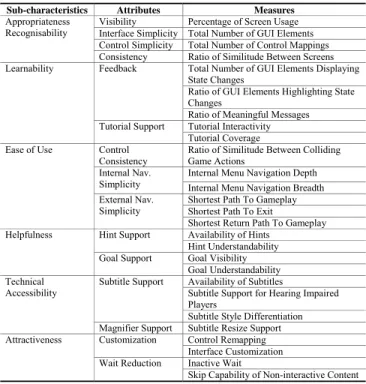
TABLEI.DECOMPOSITION OF THE SQUARE INTO MEASURABLE ATTRIBUTES AND GENERIC MEASURES
Sub-characteristics Attributes Measures
Appropriateness
Recognisability Visibility Interface Simplicity Total Number of GUI Elements Percentage of Screen Usage Control Simplicity Total Number of Control Mappings Consistency Ratio of Similitude Between Screens Learnability Feedback Total Number of GUI Elements Displaying
State Changes
Ratio of GUI Elements Highlighting State Changes
Ratio of Meaningful Messages Tutorial Support Tutorial Interactivity
Tutorial Coverage Ease of Use Control
Consistency Ratio of Similitude Between Colliding Game Actions Internal Nav.
Simplicity Internal Menu Navigation Depth Internal Menu Navigation Breadth External Nav.
Simplicity Shortest Path To Gameplay Shortest Path To Exit Shortest Return Path To Gameplay Helpfulness Hint Support Availability of Hints
Hint Understandability Goal Support Goal Visibility
Goal Understandability Technical
Accessibility Subtitle Support Availability of Subtitles Subtitle Support for Hearing Impaired Players
Subtitle Style Differentiation Magnifier Support Subtitle Resize Support Attractiveness Customization Control Remapping
Interface Customization Wait Reduction Inactive Wait
Skip Capability of Non-interactive Content B. Generic Measures for Video Game Usability
Once the measurable usability attributes have been identified, generic measures are then associated with these attributes in order to quantify them. The measures are generic in order to ensure that they can be operationalized in different software artifacts (from different abstraction levels) from different video game development methods. The values obtained from the measures will allow us to determine the degree to which these attributes help to achieve a usable video game.
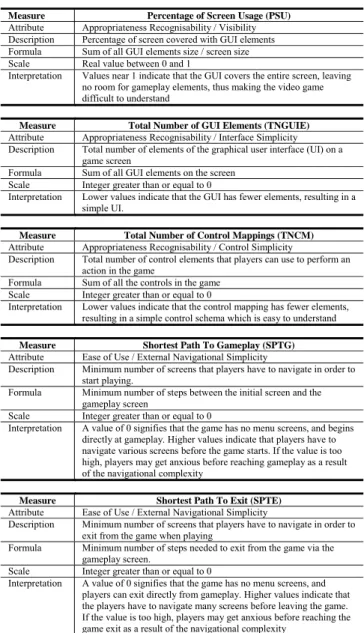
Due to space constraints, a subset of the proposed measures from the Video Game Usability Model is presented in the third column of Table I. Then, some of these measures are described in more detail in Table II.
IV. APPLYING THE VIDEO GAME USABILITY MODEL
In order to apply the Video Game Usability Model to a specific video game development, we propose a usability evaluation strategy. A typical video game development process consists in the following activities: requirements specification, game design, implementation, and playtesting, along with the usability evaluation.
The usability evaluation is conducted by applying the following three steps:
TABLEII.SUBSET OF PROPOSED MEASURES FROM THE VIDEO GAME
USABILITY MODEL
Measure Percentage of Screen Usage (PSU)
Attribute Appropriateness Recognisability / Visibility Description Percentage of screen covered with GUI elements Formula Sum of all GUI elements size / screen size Scale Real value between 0 and 1
Interpretation Values near 1 indicate that the GUI covers the entire screen, leaving no room for gameplay elements, thus making the video game difficult to understand
Measure Total Number of GUI Elements (TNGUIE)
Attribute Appropriateness Recognisability / Interface Simplicity Description Total number of elements of the graphical user interface (UI) on a
game screen
Formula Sum of all GUI elements on the screen Scale Integer greater than or equal to 0
Interpretation Lower values indicate that the GUI has fewer elements, resulting in a simple UI.
Measure Total Number of Control Mappings (TNCM) Attribute Appropriateness Recognisability / Control Simplicity
Description Total number of control elements that players can use to perform an action in the game
Formula Sum of all the controls in the game Scale Integer greater than or equal to 0
Interpretation Lower values indicate that the control mapping has fewer elements, resulting in a simple control schema which is easy to understand
Measure Shortest Path To Gameplay (SPTG)
Attribute Ease of Use / External Navigational Simplicity
Description Minimum number of screens that players have to navigate in order to start playing.
Formula Minimum number of steps between the initial screen and the gameplay screen
Scale Integer greater than or equal to 0
Interpretation A value of 0 signifies that the game has no menu screens, and begins directly at gameplay. Higher values indicate that players have to navigate various screens before the game starts. If the value is too high, players may get anxious before reaching gameplay as a result of the navigational complexity
Measure Shortest Path To Exit (SPTE)
Attribute Ease of Use / External Navigational Simplicity
Description Minimum number of screens that players have to navigate in order to exit from the game when playing
Formula Minimum number of steps needed to exit from the game via the gameplay screen.
Scale Integer greater than or equal to 0
Interpretation A value of 0 signifies that the game has no menu screens, and players can exit directly from gameplay. Higher values indicate that the players have to navigate many screens before leaving the game. If the value is too high, players may get anxious before reaching the game exit as a result of the navigational complexity
1. The establishment of evaluation requirements. All the
factors that will condition the evaluation of the game are determined in this phase. Evaluation profiles are chosen in order to specify which game development method is employed, which type of video game is developed, what the target technological platform is, and at which target players the game is aimed. Given a specific game development method, software artifacts (models) and attributes from the Video Game Usability Model are selected to perform early usability evaluations. The measures associated with the selected attributes are operationalized to provide both an instantiation of the generic formula for a specific software artifact (model) and thresholds for the measure values in accordance with the specific evaluation profile.
2. Early usability evaluation. In this phase, each selected
video game software artifact (model) is evaluated with a set of measures. Each measure returns a numeric value within a specific threshold that indicates whether there is a usability issue in the video game. A usability report is consequently generated which details both the usability problem and suggestions to solve it.
3. Usability evaluation in-use. Even when early usability
evaluation is performed on the video game software artifacts (models), the game may also need further usability in-use evaluation in a specific context with players. This usability-centered playtesting is well documented in the video game bibliography [8]. Since this paper focuses on early usability and model-driven development, usability in-use evaluation is not within the scope of this work.
After usability evaluations, game developers should perform refinements to solve the usability problems. Early usability issues detected in the game design phase can be directly refined in the game design stage. Usability in-use issues, however, may need refinements in all the phases of game development. In some cases, when the game meets all the evaluation requirements but the players are still not experiencing good usability, usability evaluation forces a re-check of the evaluation requirements, thus re-establishing the thresholds for the measures. In all cases, the game must be re-evaluated to verify whether the changes have solved the usability problems detected. This means that both game development and evaluation are iterative processes.
V. CASE STUDY
In order to show the feasibility of our approach, the Video Game Usability Model was applied to a specific example - a 2D fighting game for the XBOX 360, which is similar to the commercial Capcom’s Street Fighter IV™ for the same platform. The example game was designed by following a specific model-driven video game development methodology. Section 5.A provides an overview of this specific video game development methodology. Section 5.B describes the activities concerned in the establishment of the usability evaluation requirements. Finally, Section 5.C shows how the operationalized measures were applied in order to perform an early evaluation of the selected artifacts.
A. Model-Driven Video Game Development
Model-driven video game development [14] is a game development methodology that focuses on defining platform-independent models which provide a precise high-level specification of the gameplay, control, and graphical user interface of the video game under development.
In this paper we focus only on the platform-independent models that offer the most suitable modeling primitives for usability evaluation. These platform-independent models are described as follows:
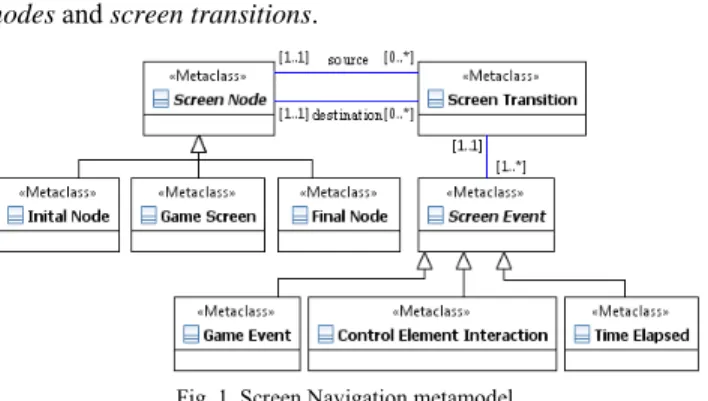
Screen Navigation Diagram. Video games display visual
information on different game screens through which players can navigate. Fig. 1 shows the screen navigation metamodel. A screen navigation diagram can be specified by using screen nodes and screen transitions.
Fig. 1. Screen Navigation metamodel
A game screen represents a game state in the screen navigation. Two special screen nodes denote the initial and final states that define the screens on which a video game starts and ends. Screen transitions represent a change of state in the screen navigation, i.e., moving from one screen to another. Screen transitions are triggered by screen events such as control interactions, time, or rule executions.
Screen Layout Diagram. When the flow of screens is
clearly defined in a screen navigation diagram, each game screen GUI should be further specified by using a screen layout diagram. Fig. 2 shows the screen layout metamodel.
A screen layout diagram can be specified by different GUI display primitives that can be positioned and sized on the screen. These primitives provide a visual representation of a game attribute which is previously defined in the gameplay perspective. There are four types of GUI display primitives: numeric containers and textual containers which represent information as plain numbers or text, image containers which represent information using 2D images or animations, and progress containers which represent the progress of information as a relative percentage of a colored bar or a succession of small icons.
Fig. 2. Screen Layout metamodel
Control Mapping Diagram. A game control mapping
defines how players interact with controller devices in order to communicate with the game. Fig. 3 shows the control mapping metamodel. A controller is a device that players use to communicate with the game. Controllers are made up of smaller control elements such as keys, buttons, joysticks and
triggers that players use to communicate atomic game interactions. Control element interactions such as pressing or releasing a button, moving a joystick, or pulling a trigger, activate the specific action rules of a player’s character.
A control mapping diagram specifies which control elements and interactions are associated with gameplay actions.
Fig. 3. Control Mapping metamodel
B. Establishment of the usability evaluation requirements The evaluation profile of the example 2D fighting game used in the case study is as follows:
Game development method: the application is designed by using the model-driven development method discussed in Section 5. The main software artifacts (models) involved in the early usability evaluation are the screen navigation diagram, the screen layout diagram and the control mapping diagram.
Type of video game: the example game belongs to the 2D fighting genre.
Target technological platform: the example game is developed for the XBOX 360 video game console. Target audience: the example game, like most 2D
fighting games, is targeted at a hardcore audience of players who have a great deal of previous experience in games of the same genre, and who thus know and expect certain common genre conventions.
For the sake of simplicity, only two usability sub-characteristics of the Video Game Usability Model were evaluated in the selected models: Appropriateness Recognisability and Ease of Use.
The selected attributes for the case study were Visibility, Interface Simplicity, Control Simplicity and External Navigation Simplicity, whose associated measures are shown in Table I.
The operationalizations of the aforementioned measures are presented in Table III. Note that all the measure thresholds defined in the operationalizations are defined in accordance with specific information from the evaluation profile of the example game used in the case study.
TABLEIII.OPERATIONALIZED MEASURES FOR THE CASE STUDY Measure Percentage of Screen Usage (PSU)
Attribute Appropriateness Recognisability / Visibility Artifact Screen Layout Diagram (PIM)
Operatio-
nalization Each display primitive of the Screen Layout Diagram has attributes for its width and height. The screen metaclass also has attributes for its width and height. Both the primitive display size and the screen size can be defined as the product of their width and height
Formula PSU = (∑ display primitives width x height) / (screen width x height) Thresholds The XBOX 360 is typically played on a high-resolution TV, which
benefits visibility. Hardcore players are also well trained in the specific genre conventions of 2D fighting games, thus minimizing the space needed to convey the game’s visual information.
Critical Usability Problem: [PSU > 0.5] Low Usability Problem: [0.1 < PSU ≤ 0.2] Medium Usability Problem: [0.2 < PSU ≤ 0.5] No Usability Problem: [PSU ≤ 0.1] Measure Total Number of GUI Elements (TNGUIE) Attribute Appropriateness Recognisability / Interface Simplicity Artifact Screen Layout Diagram (PIM)
Operatio-
nalization Each display primitive of the Screen Layout Diagram is a GUI of the screen Formula TNGUIE = Sum of all display primitives of the Screen Layout Diagram Thresholds Hardcore players are experienced in the genre conventions of 2D fighting
games and therefore expect their typical interface layout, with a number of GUI elements between 3 and 10.
Critical Usability Problem: [TNGUIE > 10] Low Usability Problem: [3 < TNGUIE ≤ 5] Medium Usability Problem: [5 < TNGUIE ≤ 10] No Usability Problem: [0 ≤ TNGUIE ≤ 3] Measure Total Number of Control Mappings (TNCM) Attribute Appropriateness Recognisability / Control Simplicity Artifact Control Mapping Diagram (PIM)
Operatio-
nalization Each control element of the Control Mapping Diagram is associated with a control interaction primitive and, with an action rule primitive Formula TNCM = Sum of all control elements associated with an action rule. Thresholds The XBOX 360 offers many buttons, triggers and joysticks. Hardcore
players are experienced in the complex control interactions required by the 2D fighting genre.
Critical Usability Problem: [TNCM > 12] Low Usability Problem: [8 < TNCM ≤ 10] Medium Usability Problem: [10 < TNCM ≤ 12] No Usability Problem: [0 ≤ TNCM ≤ 8] Measure Shortest Path To Gameplay (SPTG) Attribute Ease of Use / External Navigational Simplicity Artifact Screen Navigation Diagram (PIM)
Operatio-
nalization Each screen primitive of the Screen Navigation Diagram can be associated with a game screen Formula SPTG = Minimum number of transitions between the initial screen node
and the gameplay screen node
Thresholds Hardcore players typically value direct gameplay over cumbersome menu interfaces.
Medium Usability Problem: [SPTG > 3] No Usability Problem: [0 ≤ SPTG ≤ 3] Measure Shortest Path To Exit (SPTE)
Attribute Ease of Use / External Navigational Simplicity Artifact Screen Navigation Diagram (PIM)
Operatio-
nalization Each screen primitive of the Screen Navigation Diagram can be associated with a game screen. Formula SPTE = minimum number of transitions between the gameplay screen
node and the final screen node.
Thresholds The XBOX 360 offers a built-in interface to exit from the game at any moment. Hardcore players value immediateness of menu interfaces. Medium Usability Problem: [SPTE > 2]
No Usability Problem: [0 ≤ SPTE ≤ 2] Measure Shortest Return Path To Gameplay (SRPTG) Attribute Ease of Use / External Navigational Simplicity Artifact Screen Navigation Diagram (PIM)
Operatio-
nalization Each screen primitive of the Screen Navigation Diagram can be associated with a game screen. Formula SRPTG = minimum number of transitions between the game over screen
node and the gameplay screen node.
Thresholds Hardcore players value immediateness of menu interfaces. Medium Usability Problem: [SRPTG > 2] No Usability Problem: [0 ≤ SRPTG ≤ 2]
C. Early usability evaluation of software artifacts
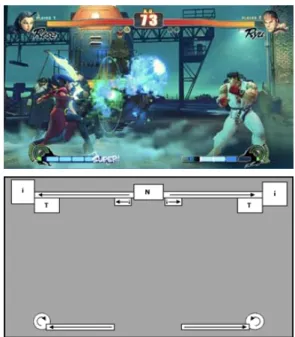
With regard to the Screen Layout Diagram (see Fig. 4), we apply the two specific measures shown for this artifact in Table III in order to evaluate the Visibility and Interface Simplicity attributes of the video game.
By applying formula of the Percentage of Screen Usage we obtain PSU = 0.09 (by dividing the sum of
the size of all the display primitives by the screen size). This indicates that there is no usability problem related to the Visibility attribute since PSU is in the threshold [PSU ≤ 0.1]. By applying the formula of Total Number of GUI Elements we obtain TNGUIE = 13
(by counting all the display primitives in the diagram), which leads to a critical usability problem related to the Interface Simplicity attribute since the value obtained is [TNGUIE > 10]. Table IV shows the usability report associated to this usability problem (UP001).
Fig. 4. Street Fighter IV screenshot and its Screen Layout Diagram TABLEIV.USABILITY REPORT FOR USABILITY PROBLEM UP001
ID UP001
Description There are too many GUI Elements on the same game screen. Affected attribute Appropriateness Recognisability / Interface Simplicity Severity level Critical [TNGUIE=13 > 10]
Artifact evaluated Screen Layout Diagram Problem source Screen Layout Diagram
Recommendations Collapse GUI elements that render the same information, such as the image and the text container that portray the fighter portrait and name
With regard to the Control Mapping Diagram, we can apply a measure from Table III in order to evaluate the Control Simplicity attribute of the video game:
By applying the formula of Total Number of Control Mappings we obtain TNCM = 7 (by counting all the
6 x 1-Dimensional control element). This signifies that there is no usability problem related to the Control Simplicity attribute since the value obtained is in the threshold [0 ≤ TNCM ≤ 8]. The game uses a small set of controls for the basic game actions.
Fig. 5 Street Fighter IV Screen Flow Diagram
With regard to the Screen Flow Diagram (see Fig. 5), we can apply three specific measures from Table III in order to evaluate the External Navigation Simplicity attribute belonging to the video game’s Ease of Use sub-characteristic:
By applying the formula of Shortest Path To Gameplay we obtain SPTG = 4 (by counting the
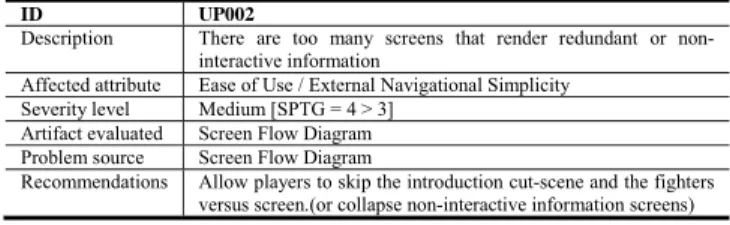
minimum number of screen transitions between the intro and gameplay screens), which leads to a medium usability problem related to the External Navigation Simplicity attribute, since the value obtained is in the threshold [SPTG > 3]. Table V presents the usability report associated with this usability problem (UP002). By applying the formula of Shortest Path To Exit we
obtain SPTE = 0, since there is no final screen node. This value shows that there is no usability problem. Most XBOX 360 games use the built-in console interface rather than an in-game option to exit from the game. This measure ensures that the XBOX 360 interface shortcut to exit from the game enhances videogame usability.
By applying the formula of Shortest Return Path To Gameplay we obtain SRPTG = 4 (by counting the
screen transitions from gameplay, result, and vs screens), which leads to a medium usability problem related to the External Navigation Simplicity, since the value obtained is in the threshold [SRPTG > 2]. Table VI presents the usability report associated with this usability problem (UP003).
TABLEV.USABILITY REPORT FOR USABILITY PROBLEM UP002
ID UP002
Description There are too many screens that render redundant or non-interactive information
Affected attribute Ease of Use / External Navigational Simplicity Severity level Medium [SPTG = 4 > 3]
Artifact evaluated Screen Flow Diagram Problem source Screen Flow Diagram
Recommendations Allow players to skip the introduction cut-scene and the fighters versus screen.(or collapse non-interactive information screens)
After applying the measures, we can conclude with regard to the Appropriateness Recognisability sub-characteristic that the video game has poor Interface Simplicity but very good Visibility and Control Simplicity, i.e., the game has a complex interface but effectively manages to keep gameplay visible and the control schema simple. With regard to the Ease of Use sub-characteristic, we can conclude that the video game has poor External Navigational Simplicity, i.e., the game has a complex flow of screens which makes it difficult to start and restart the game.
TABLEVI.USABILITY REPORT FOR USABILITY PROBLEM UP003
ID UP003
Description Need to navigate through several screens to restart the game Affected attribute Ease of Use / External Navigational Simplicity
Severity level Medium [SRPTG = 4 > 2] Artifact evaluated Screen Flow Diagram Problem source Screen Flow Diagram
Recommendations Add a shortcut (e.g., retry) from the game-over screen to the gameplay screen
VI. CONCLUSIONS AND FURTHER WORK
This paper presented a usability evaluation strategy that can be used in early stages of model-driven video game development. The strategy relies on a Video Game Usability Model that has been developed specifically for the video game domain. This model is aligned with the SQuaRE standard and allows the evaluation and improvement of the usability of video games developed according to a model-driven development process. Thus, our strategy does not only allow to perform usability evaluations when the video game is completed, but also in early stages of its development. Usability is therefore considered throughout the entire game development, thus enabling a more usable video game to be developed and thereby reducing the maintenance effort.
The inherent features of model-driven development provide a suitable context in which to perform usability evaluations since usability problems that may appear in the final application can be detected and corrected at the model level. Model-driven development also allows automating common usability evaluation tasks that have been traditionally performed by hand (e.g., generating usability reports). Although the proposed usability model has been operationalized to a specific video game development method, it can also be applied to other methods by specifying the relationships between the generic measures from the usability model and the modeling primitives of the different software artifacts of the selected game development method. Finally, it is worth mentioning that the proposed usability model can be used to discover deficiencies and/or limitations in the expressiveness of the model primitives to support certain usability attributes.
Future work include the application of the strategy to industrial case studies and the definition of aggregation mechanisms for combining the values obtained from individual measures into usability indicators. We also plan to
empirically validate the completeness and effectiveness of the proposed usability evaluation strategy (and the video game usability model) by means of controlled experiments in which the results of the evaluations obtained at the model level will be compared to the ones obtained when players interact with the generated video game application.
ACKNOWLEDGMENTS
This research work is funded by the MULTIPLE project (MICINN TIN2009-13838), the FPU program (AP2007-03731) from the Spanish Ministry of Science and Innovation, and the FPI program (199880998) from the UPV.
REFERENCES
[1] Abrahão S., Iborra E., Vanderdonckt J.: Usability Evaluation of
User Interfaces Generated with a Model- Driven Architecture Tool. Maturing Usability: Quality in Software, Interaction and Value, Springer, pp. 3-32 (2007)
[2] Abrahão S., Insfran E.: Early Usability Evaluation in
Model-Driven Architecture Environments. In: 6th IEEE International Conference on Quality Software (QSIC’06), Beijing, China. IEEE Computer Society, pp. 287-294 (2006)
[3] Ampatzoglou A., Stamelos I.: Software engineering research for
computer games: A systematic review. In: Information and Software Technology, Volume 52, Issue 9, pp. 888-901 (2010)
[4] Andre T.S, Hartson H.R, Williges R.C.: Determining the
effectiveness of the usability problem inspector: a theory-based model and tool for finding usability problems. Human Factors 45(3): 455-82 (2003)
[5] Calero C., Ruiz J., Piattini M.: Classifying Web Metrics Using
the Web Quality Model. Emerald Group Publishing Limited. Vol. 29, Issue 3, pp. 227-248 (2005)
[6] Federoff M.: Heuristics and Usability Guidelines for the
Creation and Evaluation of Fun in Video Games. Indiana University Master of Science Thesis (2002)
[7] Fernandez A., Insfran E., Abrahão S.: Integrating a Usability
Model into a Model-Driven Web Development Process. 10th
International Conference on Web Information Systems Engineering (WISE 2009), pp. 497-510, Springer-Verlag (2009)
[8] Greenwood-Ericksen A., Preisz E., Stafford S.: Usability
Breakthroughs: Four Techniques To Improve Your Game. In:
Gamasutra (2010), http://www.gamasutra.com/view/feature/6130/usability_breakthr
oughs_four_.php.
[9] Hall A., Chapman R.: Correctness by construction: Developing
a commercial secure system. IEEE Software, 19(1), 18–25 (2002)
[10]Hwang W., Salvendy G.: Number of people required for
usability evaluation: the 10±2 rule. In Communications of the ACM 53(5), 130-133 (2010)
[11]ISO/IEC: ISO/IEC 25010 Systems and software engineering --
Systems and software Quality Requirements and Evaluation (SQuaRE) -- System and software quality models (2011)
[12]Järvinen A., Heliö S. Mäyrä F.: Communication and Community
in Digital Entertainment Services. Prestudy Research Report, Hypermedia Laboratory, University of Tampere, Tampere (2002), http://tampub.uta.fi/tup/951-44-5432-4.pdf.
[13]Microsoft: Best Practices for Indie Games 3.1,
http://create.msdn.com/en-US/education/catalog/article/bestpractices_31.
[14]Montero E., Carsí J.A.: A Platform-Independent Model for
Videogame Gameplay Specification. In: Digital Games Research Association Conference (DiGRA’09), London, UK (2009), http://www.digra.org/dl/db/09287.28003.pdf.
[15]Nacke L.: From Playability to a Hierarchical Game Usability
Model. In: FuturePlay at Game Developers Conference Canada, Vancouver, Canada (2009)
[16]Nokia: Top Ten Usability Guidelines for Mobile Games. In:
Design and User Experience Library v2.0, http://library.forum.nokia.com/topic/Design_and_User_Experie nce_Library/ top10_usability.pdf
[17]Pinelle D., Wong N., Stach T.: Heuristic Evaluation for Games:
Usability Principles for Video Game Design. In: Proceedings of the Special Interest Group in Computer Human Interaction (SIGCHI’08), ACM, pp. 1453–1462 (2008)