Haystack: A Customizable General-Purpose Information
Management Tool for End Users of Semistructured Data
David R. Karger
∗Karun Bakshi
David Huynh
Dennis Quan
†Vineet Sinha
MIT Computer Science and AI Lab 32 Vassar St.
Cambridge, MA 02139 USA
{karger,kbakshi,dfhuynh,vineet}@mit.edu, [email protected]
Abstract
We posit that a semistructured data model offers the right balance of rich structure and flexible (or lack of) schema allowing naive end users to record information in whatever form makes it easy for them to manage. We de-scribe our Haystack system, which exposes the richness and flexibility of the data model while offering the user natural, traditional interfaces that shield them from the specifics of schemas, tuples, and database queries. We outline re-search challenges that remain to be addressed.
1
Introduction
The Haystack project is driven by the idea that every individual works with information in his or her own way. All have different needs and preferences regarding • which information objects need to be stored,
viewed, and retrieved;
• whatrelationships or attributesare worth storing and recording to help find information later; • how those relationship or attributes should be
pre-sented andmanipulated when inspecting objects and navigating the information space;
• how information should be gathered intocoherent workspaces in order to complete a given task.
∗Research supported by the Packard Foundation, The
MIT-NTT Alliance, MIT Project Oxygen, and the HP-MIT Alliance
† IBM T.J. Watson Research Center, 1 Rogers St.,
Cam-bridge, MA 02139
Permission to copy without fee all or part of this material is granted provided that the copies are not made or distributed for direct commercial advantage, the VLDB copyright notice and the title of the publication and its date appear, and notice is given that copying is by permission of the Very Large Data Base Endowment. To copy otherwise, or to republish, requires a fee and/or special permission from the Endowment.
Proceedings of the 2003 CIDR Conference
At present, it is usually left to developers to make such decisions and hard-code them into applications: choos-ing a particular class of objects that will be managed by the application, deciding on what schemata those objects meet, developing particular displays of those information objects, and gathering them together into a particular workspace. We posit that no developer can predict all the ways a user will want to record, view, annotate, and manipulate information, and that as a result the hard-coded information designs inter-fere with users’ ability to make the most effective use of their information.
Haystack aims to give end users significant control over all of the facets mentioned above. Haystack stores (by reference) arbitrary objects of interest to the user. It records arbitrary properties of and relationships be-tween the stored information. Its user interface flexes to present and to support manipulation of whatever objects and properties are stored, in a meaningful fash-ion.
To give users flexibility in what they store and re-trieve, Haystack coins a uniform resource identifier (URI) to name anything of interest—a digital docu-ment, a physical docudocu-ment, a person, a task, a com-mand or menu operation, or an idea. Once named, the object can be annotated, related to other objects, viewed, and retrieved.
To support retrieval, Haystack lets a user record ar-bitrary (predefined or user-defined)properties to cap-ture any attributes of or relationships between infor-mation that the user considers important. The prop-erties serve as useful query arguments, as facets for metadata-based browsing, or as relational links to sup-port the associative browsing typical of the World Wide Web.
Haystack’s user interface is designed to flex with the information space: instead of using predefined, hard-coded layouts of information, Haystack inter-prets “view prescriptions” that describe how different types of information should be presented—for
exam-ple, which properties matter, and how they should be (recursively) presented. The view prescriptions are themselves customizable data in the system, so they can be imported or modified by a user to handle new types of information, new properties of that informa-tion, or new ways of looking at old information. A similar type of view prescription approach is used to describe workspaces for a particular user task. In a related vein, operations that manipulate the data are reified into data that can similarly be modified by the user to customize the way they manipulate informa-tion.
In this paper we summarize the primary goals and insights of the Haystack project, contextualizing vari-ous prior publications on the project, and discuss var-ious database-oriented open problems our approach poses.
2
A Tour of Haystack
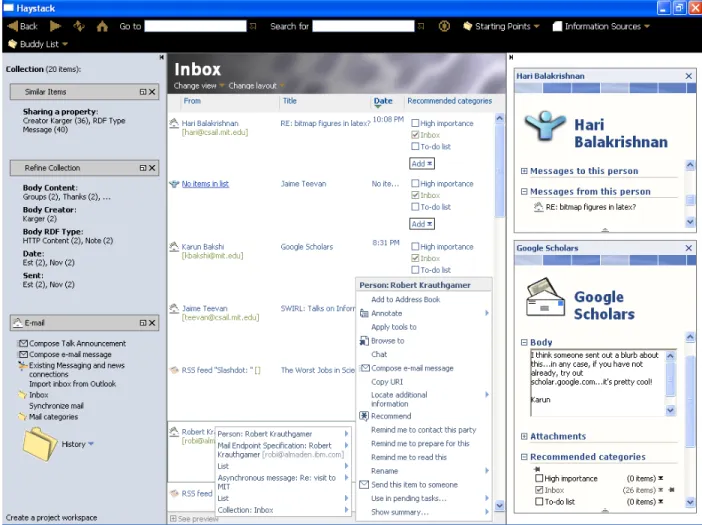
To lay the groundwork for our exploration of Haystack’s design, we begin with a brief description of an end-user’s view of Haystack. In Figure 1, we see a screen shot of Haystack as it might be used to man-age an individual’s incoming messman-ages. As is typical of an email application, Haystack shows the user’s in-box in the primary browsing pane. The layout is tabu-lar, with columns listing the sender, subject, and body among other things. Less usual is the fourth “Recom-mended categories” column which we will discuss later. The collection includes a “preview” pane for viewing selected items; it is currently collapsed. On the right hand side of the screen is a “holding area” for arbitrary items; it currently contains an email message (about Google Scholars) and a person (Hari Balakrishnan). Various aspects of the message are shown, including the body, attachments (currently collapsed) and rec-ommended categories. Attributes displayed about the person include messages to and from them; others such as address and phone number are scrolled out of view. The bottom of the left panel shows that the “Email” task is currently active, and lists various relevant ac-tivities (composing a message) and items (the inbox) that the user might wish to invoke or visit while per-forming this task, as well as a history of items that the user previously accessed while performing this task (expanded in Figure 2). The tasks can be invoked, and items visited, by clicking on them.
Indeed, the user can click on any item on the screen in order to browse to a view of that item—the individ-ual messages, the various individindivid-uals named as senders and such, or the Inbox (already being visited). Sim-ilarly, the user can right click on any visible item in order to invoke a context menu of operations that can be applied to that object. The user has right-clicked on one of the people listed as a message sender; a menu (and sub-menu) has opened up listing operations that might be invoked on that person, such as sending him
an email message, initiating a chat, or entering him in the address book.
Finally, the user can drag one item onto another in order to “bind” those two items in an item-specific way—for example, dragging an item onto a collec-tion places the item into the colleccollec-tion, while drag-ging an item into a dialog box argument (see Figure 2) field binds that argument to the dragged item. These three operations—click to browse, right click for con-text menus, and drag and drop—are pervasive. They can be invoked at any time upon any visible object in a uniform fashion.
Unlike in a typical email client, some of the items in the inbox are not email messages. There are stories from RSS feeds, and even a person—perhaps placed there as a reminder that the user needs to meet with them. The RSS message has a sender and a date, but the person does not. This is characteristic of Haystack: rather than being inextricably bound to an “email reader application”, the inbox is a collection like all other Haystack collections, distinguished only as the collection into which the user has specified incoming email (and news) be placed. It is displayed using the same collection view as all other collections. Any items can be placed in the collection, and will be properly displayed when the inbox is being viewed.
Also showed in the left pane is a “browsing advi-sor” that suggests various “similar items” to those in the collection—such as items created by Karger, or of type message—and ways to “refine the collection” being viewed—for example, limiting to emails whose body contains certain words, or that were sent at a certain time.
3
Motivation
Haystack aims to improve end-users’ ability to store, examine, manipulate, and findtheir information. We emphasize “their” because every individual’s informa-tion and informainforma-tion needs are different. As we dis-cussed in the introduction, today’s information man-agement applications are designed to capture the in-formation that developers consider important, and present it in ways that those developers consider in-formative. But no developer can predict all the ways that users might wish to work with their information. For example, consider that at present many people make use of an email-reading client, a music manage-ment tool, a photo album, a calendar, and an address book. The email client and address book may be some-what linked, but the other applications manage their own “data fiefdoms.” Now consider the plight of an entertainment reporter following the music industry. They exchange email with musicians, schedule inter-views with them, attend scheduled concerts where they play certain songs, and write reviews and interviews. It seems likely that such a user would want to
Figure 1: Haystack viewing a user’s Inbox collection. A person and an email message are displayed to the right. The user has right clicked on the person “Robert Krauthgamer” to open a context menu of person-relevant operations.
• Associate email about a certain interview with the interview article they are writing;
• Link musicians to concerts they played, songs they performed, and photographs they are in;
• “Caption” photographs of musicians with the song being performed in the photo;
• Place songs or albums in a calendar according to release date;
and so on. While each item of interest is managed by some application, none is aware of the other item types. The applications’ internal models are not ex-pressive enough to refer to the other item types (ex-cept possibly through English-language “comments”) and their user interfaces do not display the linkages that interest the user. The best the reporter can hope for is to open all four relevant applications simulta-neously, at which point the information they actually care about is lost in a clutter of other information less relevant to their particular task.
Closer to home, consider a user who would like to record papers written by each of their colleagues in their address book, or a user who would like to start sorting and displaying emails according to the date by which they must be dealt with instead of the ar-rival date. In a sense, they wish to draw functionality simultaneously from their email programs and calen-dars, neither of which is equipped for the entire task.
4
The Data Model
One might argue that the problem could be solved by storing all the user’s information in a single database, instead of in the various application specific file struc-tures currently used. And indeed this is an impor-tant step in the right direction. A single database would allow the desired cross-domain relationships to be represented in the data model. But this step does not address the question of how those relationships could be shown to or manipulated by the user. It is a truism that typical users cannot be expected to write
database queries, much less manipulate the database schemata if they wish to define new relations.
Nonetheless, a database is the right first step, and Haystack takes it. In Haystack, all information is rep-resented in the Web Consortium’s Resource Descrip-tion Framework (RDF) standard [MM03]. The RDF model is a semantic network—a graph in which the nodes denote the information items to be managed and the edge are labeled with property names to represent the relations we would like to record. Each node is re-ferred to as aresource. The tail of the an edge is known as the subject of the relationship, the head as the ob-ject, the edge itself (which names a particularproperty) as apredicate, and the (subject,predicate,object) triple as a statement. A statement can only directly repre-sent abinaryrelation, not one involving more than two entities. However, the majority of relations we have encountered are binary, and higher-arity relationships can generally be represented by reifying the relation-ship (creating a new resource to represent a partic-ular relationship tuple, and using binary connections from the tuple to the entities that participate in the relationship), so this binary restriction has not been a burden.
4.1 Why RDF?
One might question the choice of RDF as opposed to either XML or a traditional table-per-property rela-tional database representation. In many ways, this question is unimportant. All three representations have equal expressive power. It is true that un-like traditional databases, RDF can be used with-out any schemata. However, DAML [CvHH+01] and
OWL [MvH03] can be used to impose schemata on an RDF model if we so choose. RDF has a standard repre-sentation in XML (RDF-XML) and can also be stored in a traditional database (with one table of triples, or with one binary table per named property). Of course, the choice of representation might have tremendous consequences for the performance of the system as it answers a variety of querier. However, the naive user will likely neither know nor care which representation lies under the covers of the user interface.
Nonetheless, a few features of RDF led us to se-lect it. The lack of (enforced) schemata is an appeal-ing feature we will discuss below. The use of URIs (uniform resource identifiers) for all information ob-jects provides a useful location-independent naming scheme. Also appealing is the fact that RDF places all information objects on a level playing field: each is named by a URI and can become the subject or ob-ject of arbitrary assertions. This contrasts (positively) with XML’s hierarchical representation of information objects, in which the root object is “special” and re-lated objects are nested deep inside a particular root object. RDF is more in keeping with our belief that the information designer cannot predict which
infor-mation objects will be of greatest interest to a given user. Shades of this same argument appear in Codd’s paper [Cod70], where he argues that a hierarchical representation of information that is not fundamen-tally hierarchical introduces an undesirable data de-pendence that can trip up database users. A similar argument can be made regarding a relational database. Defining a database table with many columns suggests that those fields should be considered in aggregate, but different users may be interested only in some of those fields. We could offer to project onto a subset of columns, but RDF surrenders from the start to the idea that each individual column may be interesting in its own right and deserve its own table, avoiding the whole question of how to project.
The most important driver in our adoption of RDF is its structural similarity to the World Wide Web. The power of the web comes from its links, which let users navigate from page to related page. As we ar-gued in a recent study [TAAK04], corroborating much prior evidence, human beings seek information by ori-enteering. Rather than carefully formulating a query that precisely defines the a desired information target, users often prefer to start from a familiar location, or a vague search, and “home in” on the desired informa-tion through a series of associative steps. In RDF, the statements connecting subject and object form natural associative links along which a user can orienteer from subject to object. As the reader may suspect, the var-ious attributes displayed for each item in Figure 1 are often just other information objects related by some predicates to the displayed object. Haystack’s user in-terface lets the user click on any of those information objects in order to browse to them, providing support for this essential orienteering activity.
As will become clear when we discuss the user in-terface, RDF’s single notion of “predicate” is exposed to the end user in a number of different ways. “Prop-erties” or “attributes” of a given object and “relation-ships” between pairs of objects are all represented by predicates in the data model.
4.2 Importing Data
Though RDF is appealing, most data is presently not in that form. Haystack generates RDF data by ap-plying a collection of extractors to traditionally for-matted data. At present we can incorporate directory hierarchies, documents in various formats, music and ID3 tags, email (through an IMAP or POP3 interface), Bibtex files, LDAP data, photographs, RSS feeds, and instant messages. Each is incorporated by an appro-priate parser that is triggered when information of the given type is absorbed into the system.
Another outstanding source of semistructured data is the web itself. Many web sites use templating en-gines to produce HTML representations of informa-tion stored in back-end databases. We have studied
machine-learning techniques to automatically extract such information from the web pages back into struc-tured form in RDF [Hog04, HK04]. In our approach, the user “demonstrates” the extraction process on a single item by highlighting it and labeling its parts; the system then attempts to induce the (tree-shaped) structure of HTML tags and data elements that repre-sent the object on the page. If successful, it can notice that structure on future pages and automatically per-form the same extraction. Of course, Haystack does not care about where its RDF comes from, so other extraction methods [MMK99] can easily be incorpo-rated.
5
Viewing Information
Given the representational power of the data model, the next question is how it should be presented to users so that they can effectively perceive and manipulate the stored information. Simply modifying traditional applications to run atop the unified data model would leave users as constrained as before by the developers’ sense of what information should be presented in what contexts. Instead, we must make it simple for the user interface to flex according to the data it is called upon to display. We achieve this goal through a recursive rendering architecture in which essentially each object is asked to render itself and recursively makes the same request of other objects to which it is related [HKQ02, QK03].
5.1 Views
Most elementary information management applica-tions present a hierarchical display of information on the screen. To display a particular object in a certain region of the screen, they subdivide that object’s re-gion into (typically rectangular) subrere-gions, and use those subregions to display various attributes of the given object and to display other objects to which the object is related. Thus, a typical email application will present an email message by creating a region show-ing the sender, another region showshow-ing the subject, another region showing the body, and so on. The mes-sage might itself be in a subregion as part of a larger display of, say, a collection of messages, using distinct columns to present each message’s (relationship to a) sender, subject, and date. A calendar view displays in each day a list of appointments, and an address book has a standard format for displaying an individual by listing properties such as name, address, phone num-ber, and notes in some nicely formatted layout. The address itself may be a complex object with different sub-properties such as street, city, and country that need to be laid out.
When applications are targeted at specific domains, they can assume a great deal about what is being dis-played in their subregions. The sender of an email address will be a person; they will have a name and
address that can be shown in the sender region of the display. An address-book entry will describe a per-son who has an address. In Haystack we do not wish to make such assumptions: our Inbox above contains RSS stories, which perhaps do not have the same sort of sender as an email message. But we can still ap-ply the recursive display principle. We can construct a view of any object X by (i) decide which proper-ties ofX and relationships to other objects need to be shown, (ii) requesting recursive rendering of views of the objects required byX , and (iii) laying out those recursively rendered views in a way that indicatesX’s relation to the viewed objects. As a concrete example, when rendering a mail message we might consider it important to render the sender; we do so by asking recursively for a view of the sender and then laying out that view of the sender somewhere in the view of the mail message. The recursive call, in rendering the sender, may recursively ask for a rendering of the sender’s address for incorporation in the sender view. The key benefit of this recursive approach is that the root view only needs to know about the root object it is responsible for displaying, and not about any of the related objects that end up inside that display. Incorporating RSS feeds into the inbox did not require a wholesale rewrite of a mail application; it simply required the definition of a view for individual RSS messages. Once that view was defined, it could be invoked at need by the collection view showing the inbox.
5.2 View Prescriptions
Formally, views are defined byview prescriptions that are themselves data in the model. A view prescription is a collection of RDF statements describing how a dis-play region should be divided up and which constants (e.g. labels) and related objects should be shown in each subdivision. It also describes graphical wid-gets such as scrollbars and text boxes that should be wrapped around or embedded in the display.
When a view prescription is invoked, it will require some context in order to render properly. Most obvi-ously, we need to know how much space the rendered object should occupy. It is often useful to pass other state, such as current colors and font sizes, down from the parent view in order to get a consistent presen-tation. This is done by dynamic scoping—the view has access to an environment of variables set by the ancestral view prescriptions in the recursive render-ing process. It can examine those variables, as well as modify them for its children.
The key task of Haystack’s interface layer is to de-cide which view prescription should be used to render an information object. At present, we take a very sim-plistic approach: we select based on thetypeof object being displayed and the size of the area in which it will be shown. Each view prescriptions specifies (with
more RDF statements) the types and sizes for which it is appropriate; when a rendering request is dele-gated, Haystack uses a database query to determine an appropriate prescription to apply. Type and size are the most obvious attributes affecting the choice of prescription; an open research question of great inter-est is to expand the vocabulary (schema) for discussing which views are appropriate in which contexts.
When matching against type, Haystack uses a type-hierarchy on information objects and selects a view appropriate to the most specific possible type. The type hierarchy lets us define relatively general pur-pose views, increasing the consistency of the user inter-face and reducing the number of distinct prescriptions needed. For example, RSS postings, email messages, and instant messages are all taken to be subtypes of a general “message” type for which we can expect a sender, subject, and body [QBK03]. Thus, a single view prescription applies to all three types. To ensure that all information objects can be displayed in some way, Haystack includes “last resort” views that are al-ways applicable. The “small” last-resort view simply displays the URI of the information object, while the “large” view displays a tabular list of all the object’s properties and values (rendered recursively).
One might argue that our view architecture is re-markably impoverished, offering only rectangular hi-erarchical decompositions and delegation based on object type and size. While agreeing that this is in impoverished architecture, we assert that it cap-tures much of the presentational power of current (equally impoverished) information management ap-plication displays, and hold up Figure 1, which looks like a typical mail client, as evidence. While matching the presentational capabilities of existing applications, our delegation architecture enables the easy incorpo-ration of new data types and cross-domain linkage of information.
One key improvement relative to existing applica-tions is that views can be invoked anywhere. The right panel of Figure 1 holds a “clipboard” of sorts, into which any information object can be dragged for display. Thus information about the individual “Hari Balakrishnan” can be inspected without launching an entire address book application; similarly, the email about “Google Scholars” can remain in view even if we choose to navigate away from our inbox and stop “doing email”.
5.3 Lenses
While it may suffice to display a list of attributes of a given object, the attributes often group naturally to characterize certain “aspects” of the information being presented. Such a grouping in Haystack is effecting by defining alens. Lenses add another layer of indirection to the presentation of information. Like views, lenses are described in the data model as being appropriate to
a certain type of object. The person and mail message in the right pane of Figure 1 are being displayed in a
lens view. This lens view is applicable to all object types. It simply identifiesall the applicable lenses for the given type, and displays each of them. Each lens has a title describing the aspect it is showing.
Unlike recursively rendered views, these lenses are “reified” in that the user can address each one, choos-ing to expand or collapse it (with the small plus/minus sign adjacent to the lens name). The choice is stateful: the user’s choice of which lenses to show is remembered each time the lens view is applied for that type of in-formation object. This provides a certain level of view customization. Furthermore, many of our lenses are simple “property set lenses”—they are described sim-ply by a list of which properties of the object they will show, and those properties are shown in a list. Users can easily modify these lenses by adding properties to or removing them from the list. Thus, if a user chooses to define a brand new property in their data model, it is straightforward for them to adapt the user interface to present that property to them.
Lenses can also be context sensitive. For exam-ple, the “recommended categories” lens shown for the Google Scholars email message is present only when the user is performing the “organizing information” task. More generally we envision that many lenses will be present only when certain tasks are being per-formed. For example, a “help” lens could aggregate useful help information about any object, but should be visible only when the user is actually seeking help. Users can further customize their views of informa-tion by manipulating lenses. For example, the fourth “recommended categories” column in the view of the inbox was created by dragging the “recommended cat-egories” lens from the Google Scholars view onto the header of the Inbox collection. This would be a useful action if the user wanted to quickly skim and organize their email based on the headers, without inspecting the details of each. In general, any lens can be placed in a column of this collection view, allowing the user to construct a kind of “information spreadsheet” showing whichever aspects the user cares to observe about the objects in the collection.
5.4 Collections
Our view architecture also makes it straightforward to offer multiple views of the same information object, allowing the user to choose an appropriate view based on their task. The center pane of Figure 1 offers a “change view” drop down menu. From this menu, the user can select any view annotated as appropriate for the object being displayed. This is particularly impor-tant for collections, which are perhaps the central non-primitive data type in Haystack. Since collections are used for so many different purposes, many views exist for them. The figure shows the standard row-layout
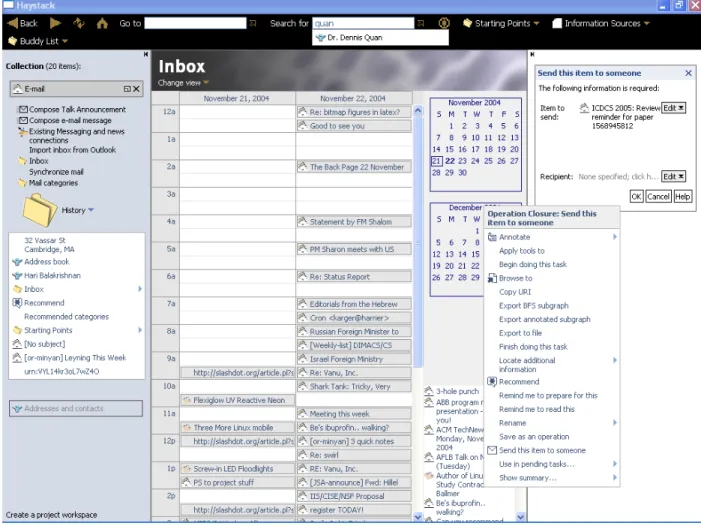
for a collection, but also available are a calendar view (in which each item of the collection is displayed ac-cording to its date—this view is applied to the inbox in Figure 2), a graphical view (in which objects are shown as small tiles, and arrows linking the tiles are used to indicate specific chosen relationships between them), and the “last-resort” view showing all proper-ties of the collection. Each view may be appropriate at a different time. The standard view is effective for traditional email reading. The graphical view can be used to examine the threading structure of a lengthy conversation. And the calendar view (currently incom-pletely implemented) could be applied by the user to rearrange email according to its due date instead of its arrival time.
Yet another collection view is the menu. When a collection is playing the role of a menu, a left click drops down a “menu view” of the collection, which allows quick selection of a member of the collection. Implementing menus this way gives users the power to customize their interfaces: by adding to and removing from the collection, users modify the menu. Users can similarly customize the pinned-in-placetask menus in the left pane (such as the Email task menu displayed in Figure 1) in order to make new task-specific operations and items available.
A particularly noteworthy collection view is the “check-box view” being exhibited in the bottom right of the display. This forms a somewhat inverted view of collections, in that it shows which of the collections the Google Scholars email is in. Checking and unchecking a box will add or remove the item from the given col-lection. Of course, the collection itself is live—items can be placed in the collection by dragging them onto the collection name, and the collection can be browsed to by a click. But in a past study [QBHK03], we demonstrated that presenting the collections to users as checkable “categories” made a big difference in the way they were used. Many email users are reluctant to categorize email away into folders, fearing that any email so categorized will be lost and forgotten from their inboxes. Many mail tools allow a user to copy
and email message into a folder and leave a copy be-hind in the inbox, but apparently users find this too heavyweight an activity. Checkboxes, on the other hand, feel like a way of annotating the message, rather than a putting away, and therefore encourage multiple categorization. In our study, users given the option to categorize with checkboxes made use of it, and found that it improved their ability to retrieve the informa-tion later. In the underlying data model, of course, the checkboxes are collections like all others that can be browsed to for closer inspection (indeed, the inbox itself is one of the checkable categories).
5.5 Creating New Views
We continue to explore ways to let users customize their information presentation. We have created a “view builder” tool that lets users design new views for given information types [Bak04]. The users use menus and dragging to specify a particular layout of screen real estate, and specify which properties of the viewed object should be displayed in each region and what kind of view should be used to display them. The rep-resentation of view prescriptions as data, rather than as code that is invoked with arbitrary effects, makes this kind of view definition feasible—it involves sim-ple manipulation of the view data. This work is still in its early stages; the system certainly has the view-construction power we want, we continue to seek the most intuitive interfaces exposing that power to users. The current scheme requires users to talk explicitly about properties, types, and views, which may be be-yond the capabilities of many users. Ultimately, we aim for users to edit the views “in place”, manipu-lating the presentation of the information by dragging appropriate view elements from place to place. Such design “by example” is likely to be within the capabil-ities of more users.
At a higher level, the same view construction framework can be used to design entire workspaces— collections of information objects laid out and pre-sented in a specific way, to support the performance of a particular task. As an example, a user working on a paper about a particular research project may wish to gather and lay out the relevant research data, use-ful citations and documents, spell checking function-ality, and mail-sending operations to their coauthors (cf. Section 6 on customizing operations).
Even with ideals tools, many users will likely be too lazy to design new views and workspaces. How-ever, the description of views as data means that, like other data, views can be sought out from elsewhere and incorporated into the system. We imagine various power users placing view prescriptions in RDF on web sites where other users can find an incorporate them, much the way individuals currently define “skins” for applications such as MP3 players.
6
Manipulation
Besides viewing information, users need to be able to manipulate it. Most of Haystack’s views offer on-the-spot editing of the information they present, as a way to change specific statements about an object. More generally Haystack offers a general framework for definingoperations that can be applied to modify information objects in arbitrary ways. Most opera-tions are invoked by context menus that can be ac-cessed by right clicking on objects. Particularly com-mon operations are supported by a natural drag and drop metaphor.
6.1 Operations
The basic manipulation primitive in Haystack is the
operation. Operations are arbitrary functions that have been reified and exposed to the user. Each func-tion takes some number of arguments. When the op-eration is invoked, the system goes about collecting its arguments. If the operation takes only one argument and the operation is invoked in a context menu, the argument is presumed to be the object being clicked. If more than one argument is needed, a dialog box is opened in the clipboard, and the user can use all of Haystack’s navigation tools to seek and find the argu-ments they wish to give to the operation before invok-ing it. Like other data, operations can be customized by the user. In particular the user can copy an op-eration, fill in some of its arguments, and “curry” the result as a new, more specialized operation [QHKM03]. For example, a user may take the standard “email an object” operation and curry it into a “mail this to my boss” operation. Since the curried operation takes only one argument (the object to send), it can be in-voked in a right-click context menu with no need for any dialog box.
6.2 Invoking Operations
Context menus provide a standard way to access all the operations germane to a given object. Statements in the data model declare which operations are ap-plicable to which types of objects; a right click leads to a database query that creates the collection of op-erations (and other items) that apply to the clicked object.
Drag and drop provides a way for a user to asso-ciate two information objects by dragging one onto the other. Dragging onto a collection has the obvi-ous semantics of placing the object in the collection. Dragging onto a particular property displayed in a lens has the effect of setting the dragged object as a value for that property with respect to the object the lens is showing. Dragging into a dialog box argument assigns the dragged item as an argument to the operation be-ing invoked. More generally, a view can specify the operation that should be invoked when a specific type of object is dragged into the view.
Like views, operations offer an opportunity for arbi-trary, fine-grained extensions of Haystack. Operations are defined in RDF, so can be created and offered up by power users for download by any individuals who find them useful. Some operations may simply be carefully curried operations; others may include newly crafted database queries, or even arbitrary code.
6.3 Example
Figure 2 shows what happens after a user invokes the “send this item” operation on a particular object. A
dialog box in the right pane gathers the necessary ar-guments, including the object to send (already filled in) and the person to whom it should be sent. To fill in that person, we show how the user might drop down the email-specific history in the left pane, listing items recently used in while handling email. Since the desired recipient is not present, the user can perform a search in the search box in the top navigation bar. The (single) result matching this search appears in a drop-down menu. From there it can be dragged and dropped onto the dialog box in order to indicate that it is the intended recipient. If the user has cause to be-lieve that they will need to send this particular item to other individuals, they can drop a context menu from the dialog box (shown) and select “save this as an op-eration” to create a new operation for which the item to send is prespecified, and only the intended recipient needs to be filled in.
7
Search
Beyond reading and writing information, search is perhaps the key activity in information management. Haystack offers a number of search tools in the sys-tem. We aim to make search both pervasive and lightweight—rather than dropping what they are do-ing and initiatdo-ing a search, we want users to think of search as a no-overhead activity that is performed as part of regular navigation activity.
As we argued above,orienteeringis a natural search mode. Should a plausible starting point be visible, we expect users to “hyperlink” their way from object to object, homing in on the one they are seeking. By plac-ing user-definable task-specific collections of informa-tion in the left panel, we aim to maximize the chances that the user will find a good jumping-off point for their search.
At times, of course, no such point is clearly visi-ble. A simple scheme to fall back on at that point is text search. Information objects are often associated with memorable text, such as a title, a body, an an-notation. Haystack’s upper navigation bar includes a “search box” into which an arbitrary textual query can be entered. The results of this search are a collection. The collection is presented in the “drop down menu” view of a collection, which optimizes for rapid selec-tion of an item in the common case where the search is successful. However, the collection of results can also be “navigated to” to provide the starting point for a more complex search.
We also offer a general purpose “find” interface that lets people design a database query against the RDF model. At present it is limited to expressing con-straints that specific predicates must take on certain values. We have invested relatively little effort in this interface, because we see the need to express a query in this way as a sign of failure of the more lightweight nav-igation tools. Instead of a generic query interface, we
Figure 2: Invoking “send this item to someone” in Haystack. The Inbox collection is displayed in the calendar view. We show three distinct open menus, though in actual use only one would remain open at a time.
expect that specific useful queries will likely be pack-aged up by developers as operations (discussed above) that use domain-specific dialogs to capture the infor-mation necessary to formulate the query.
7.1 Fuzzy Browsing
Much research has been done in the database commu-nity on search. Some [BMP01] have even looked for ways to offer ranked or approximate matching, avoid-ing the off-puttavoid-ing “all or nothavoid-ing” effect of boolean database queries. However, as we argued above, atten-tion needs to be given toorienteering, which manifests in search as an iterative process of query specification, inspection of the results, and refinement of the query. Yee et al [YSLH03] have explored faceted metadata browsing as a way to let users orienteer through data by choosing to restrict on certain attributes of the in-formation.
In Haystack, we are exploring ways to bring ori-enteering tools from the text-search domain to the database domain [Sin03, SK04]. We propose to think of a resource’s attributes and values (predicates and
objects) as features of that resource that can be used for search and similarity estimation, much as the words in a document are used in text search. Put an-other way, we can think of associating to each item a “virtual document” containing “words” such as “au-thor:yc1yb87Karger” and “Send-Date:012937” (note that URIs are kept in the terms in order to differenti-ate values that are lexicographically identical but se-mantically distinct). We can apply all the well-studied techniques of fuzzy text search to those virtual docu-ments.
For example, given any item, we can define “simi-lar items” to be those which share many of the same attribute values. These may well be worth display-ing when we are lookdisplay-ing at an item, as they will likely assist orienteering by the user. Text search re-search suggests various term weighting approaches to decide which attributes are “important” in deciding similarity—for example, extremely common attributes should likely be ignored. When it comes to the com-mon search process of issuing queries, browsing the results, and modifying the query, the text search
com-munity has also developed various query refinement
andrelevance feedback techniques that can be used to suggest next steps. It is just such suggestions that are presented in the left pane of Figure 1.
8
Discussion
Having presented the Haystack system, we now turn to a discussion of some of our design choices and of some of the open questions that we continue to examine. 8.1 Why a Database
Our discussion of Haystack may lead one to ask why we use a database or structured model at all. The user sees almost no sign of the underlying database: tuples are never shown, and database querying is deprecated. One might think, given our focus on link traversal, we would be better off simply storing user information as HTML in some kind of “personal web.”
On the contrary, we argue that the structured data model is absolutely critical to the design of a person-alizable information management system. Much of the data users work with clearly is structured, rely-ing heavily on properties and relationships to other items. Unlike the web, in which each link must be manually labeled with a textual description of its role, a structured model gives a concise way to indicate that role played by a certain class of links. Our view-rendering architecture can make use of that structure to render information objects in a variety of informa-tive ways. And the representation of links in machine-readable form means that, even if complex database queries are beyond the capabilities of end users to con-struct, power users can package up complex database queries (as operations) and information presentations (as views and lenses) that can then be incorporated by typical users to increase the capabilities of their system. Even more generally, the structure available in the model makes it possible to write various au-tonomous agents that can import and manipulate data on behalf of the end user.
8.2 The Role of Schemata
While we rely heavily on a structured database, the same is not obviously true of schemata. We allow the user to to relate arbitrary objects in schema-violating fashion—the author of a document can be a piece of furniture, and the delivery date a person. And we allow users to craft arbitrary new relations to connect objects, without providing any schematic descriptions. 8.2.1 On not using schemata
On the whole, we believe this schema-light approach is necessary in an personal information management system. Given schemata, we must choose whether to enforce them or not. As with developers design-ing applications, we will invariably find users wantdesign-ing
to record information that will violate our schemata. At that point, we must choose whether to enforce our schemata and forbid users from recording information they consider important, or we must choose to vio-late our schemas. Although the latter choice makes it challenging for us to architect our system, the former defeats the fundamental goal: to let users record infor-mation they need. Mangrove [HED+03] takes a similar
tack, arguing that in practice schema will need to be crafted to fit existing data, rather than the reverse.
Of course, one might argue that the user does not know best. Perhaps enforcement can be couched as an educational experience that teaches the user how they ought to be structuring their information. We suspect, however, that users are too set in their ways for such an approach to work. Even if an interface can steer users torecordinformation the “right” way, we expect users returning to seek that information will look for it the “wrong” way that they original envisioned, and be unable to find it because it was recorded “right.” We need to record information the way we expect users to seek it, even if we expect them to seek it incorrectly. 8.2.2 On using schemata
Although we do not envision enforcing schemas, they nonetheless pervade Haystack’s. For the sake of consistency, we do attempt to “suggest” appropriate schemata for information. We expect that the “preex-isting conditions” established by the large number of schemata initially distributed with Haystack will lead to users having similar-in-the-large knowledge repre-sentations, so that standard views, queries, and oper-ations work with them.
Schemata play a particularly important role in the design of views. In particular, we make heavy use of “type” assertions to decide on appropriate views and operations; a user with a highly-nonstandard type sys-tem will also need a highly nonstandard interface to work with it. The choice of which attributes to display in the view of an object of a given type is schematic—it expresses an expectation that those attributes will typ-ically be available, and that other attributes will not (or will not be important). Users, when they modify views, are in a sense modifying the schemas associ-ated with those types. A key difference, however, is that the schematic constraints suggested by views are “soft.” While a view implies that certain attributes are expected, the lack of one simply results in no in-formation being displayed. We can see this in Fig-ure 1: while the inbox display suggests the need for a sender and date associated with each object, a person can be included in the collection, with the only con-sequence being some blank fields. Equally important is the fact that multiple views mean that, in a sense, different schemata can be imposed on the same object at different times, depending on the task the user is undertaking.
Although we do not enforce schema, our user inter-face’s manipulation primitives often make very strong suggestions. Schematic annotations about whether a given property is single-valued or multi-valued affect the behavior of drag and drop: dropping on a single-valued field replaces the value of the property while dropping on a multi-valued field incorporates an addi-tional value for the property. Again, these suggestions are not rigidly enforced: with sufficient effort, a user can add a second value to a schematically-single-valued attribute. At that point, views which assume single-valuedness may end up displaying only one of the two assigned values nondeterministically. Of course, there is always the opportunity for the user to modify the view to repair this flaw. And database queries, that address the data without the constraints imposed by views, can make full use of the multiple values.
Underlying our use of schemas is the general re-search question of how to make use of database schemata that are “usually true.” We have already discussed ways that usually-true schemata can assist the design of information views. At the programmer level, schemata let the developer write clearer code, as they can avoid complex case analyses for dealing with data. As a simple example, knowing that a given property is always present means one can skip the code needed to deal with its absence. An intriguing ques-tion is to what extent usually-true schemata can be used to maintain clear code. At present, Haystack op-erations are filled with various blocks of code dealing with schema exceptions—for example, an operation that sorts on dates needs to explicitly check whether each date is actually of type date. In other cases, op-erations fail silently when they encounter unexpected exceptions (arguably this is reasonable behavior, ef-fectively refusing to apply the operation to schema-violating data). One might hope instead to write code in which all schema violations are caught implicitly and branched of to some kind of exception handling block. But this begs the question of describing that ex-ception handling code, and in particular giving clean descriptions of the ways the schema can be violated and the desired defaults to apply when they are. 8.3 Haystack Limitations
Our use of Haystack has highlighted assorted limita-tions and flaws in the design. One significant one is “UI ambiguity”. Given that every object on the screen is alive, it is sometimes difficult for the user interface to guess which object a user is addressing with a given click. Any point on the screen is generally contained in several nestings of hierarchically displayed objects, and when the user clicks it is unclear which level of the nesting they are addressing. For context menus, we resolve this problem by giving the author access to menus forall the objects nested at the click point—as can be seen in Figure 1, the context menu offers
ac-cess to operations on the email sender, on the email message of which that sender is a part, and on the in-box of which the email message is a part. When the user drags and drops an object, we make the heuristic decision to address the “most specific” (lowest in the hierarchy) objects at the click and drop points. This is often correct, but sometimes leads to difficulties. For example, in order to drop an item into a display of a collection, one must carefully seek out a portion of the collection display that isnot owned by any recursively rendered member of the collection. Much research re-mains to be done on the best way to disambiguate UI actions.
The power we give users over the data model can also be damaging. Haystack does not offer users much protection to users as they perform operations that could destroy their data. Beyond the users’ own data, since the entire interface is described as data, users can easily corrupt their interfaces in ways that make them impossible to use. For example, users can dissociate views from the data-types they present, and suddenly find themselves unable to view information.
The proper solution to this problem is to develop effective access control (particularly write-control) methods on the data. We have not addresses this crit-ical issue, and pose it as an open problem below.
9
Other Applications
In this section, we speculate on some other roles for the architecture we have created: to let users consumer the semistructured data being produced by the Semantic Web effort [BLHL01], and to let individual users con-tribute to that effort by sharing or publishing some of their own semistructured information.
9.1 The Semantic Web
Whether or not one accepts the need for a seman-tic network on each user’s desktop, semanseman-tic networks seem destined to play a critical role in information dis-semination as the so called Semantic Web [BLHL01] evolves. The web is an extremely rich source of mation, but its HTML documents present that infor-mation in “human readable” form—i.e., one in which the semantics of the documents are decoded by hu-man beings based on their understanding of huhu-man language. Such documents cannot be easily digested by automated agents attempting to extract and ex-ploit information on behalf of users. Thus, momentum is building behind an effort to present information on the web in RDF and XML, forms more amenable to automated use.
One might think that the richer semantics offered by the Semantic Web versus the traditional web could also increase human users’ ability retrieve information from it. But at present the opposite is true, because no good interfaces exist for the Semantic Web. On
the Semantic Web, data and services are exposed in a semantics-rich machine-readable fashion, but user in-terfaces for examining that data, when they exist at all, are usually created from centralized assemblies of data and services. For example, with a semantic portal (e.g., SEAL [SMS+01] or Semantic Search [GMM03],
search being a kind of portal), database administrators aggregate semantically-classified information together on a centralized server for dissemination to Web users. A major motivation for adopting this approach is that it preserves access through a highly ubiquitous client, namely the Web browser. At the same time, the prob-lem of how to reassemble a point-and-click user inter-face only needs to be addressed for metadata that con-forms to a constrained set of schemata known ahead of time (and when those schemata are modified only the server needs to be updated).
These portal-based approaches re-encounter the same problems that we raised in regard to traditional applications. The design of any one portal has in mind a fixed ontology; arbitrary information arriving from other parts of the Semantic Web cannot be automati-cally incorporated into views generated by the portal. If some schema is augmented, no portal will be able to present information from the augmented schema until the portal developer modifies his or her display system. Thus, portals take us back to the balkanized informa-tion structures we tried to remove with a semantic network model.
On the other hand, if the user’s client software could perform this data aggregation and user interface con-struction on a per-user basis, then we could restore a user’s ability to freely navigate over information and services on the Semantic Web. Our view architec-ture offers just such an opportunity to integrate data at the client end [QK04]. Separate pieces of infor-mation about a single resource that used to require navigation through several different Web sites can be merged together onto one screen, and this merging can occur without specialized portal sites or coordination between Web sites/databases. Furthermore, services applicable to some piece of information need not be packaged into the Web page containing that informa-tion, nor must information be copied and pasted across Web sites to access services; semantic matching of re-sources to services (operations) that can consume them can be done by the client and exposed in the form of menus. By crafting and distributing views and opera-tions, users can create and publish new ways of looking at existing information without modifying the original information source.
9.2 Collaboration and Content Creation Our discussion so far has focused on one user’s in-teraction with their own information (and then the Semantic Web). But we believe that our system can enhance the recording of knowledge by individuals for
communal use, as well as the search for and use of that knowledge by broader communities.
One of the tremendous benefits of the World Wide Web is that it dramatically lowered the bar for indi-viduals wishing to share their own knowledge with a broader community. It became possible for any indi-vidual, without sophisticated tool support, to record information that could then be located and accessed by others. If the same were done on the Semantic Web, then information recorded by users can be much richer, making it more useful to other individuals (and automated agents) than plain HTML.
Unfortunately, the state of the art tools for author-ing Semantic Web information are graph editors that directly expose the information objects as nodes and properties as arcs connecting those nodes [EFS+99,
Pie]. Such tools require a far more sophisticated user than do the simple HTML editors that let naive users publish their knowledge to the World Wide Web.
Haystack makes it easy for users to author struc-tured information, which is already represented in the Semantic Web’s native RDF format. This lowers the bar for a user who decides to expose some of their “internal use” information to the world at large. Tra-ditionally, someone who read a document and anno-tated it for their own use would have to do substantial work to convert those annotations (and possibly the document) to HTML to be pushed on the web. With a semantic network representation, the document and annotations are already in the right form for publica-tion onto the Semantic Web, and the user only needs to decide who should have access to them.
Of course, the access-control problem is a difficult one, made harder by the fine granularity of the data model. We need a simple interface letting user’s spec-ify which properties and relationships on which objects should be visible to which people.
On the opposite side, when information is being gathered from numerous sources, an individual must start making trust decisions. Again, interfaces must be developed to let a user specify which Semantic Web assertions they wish to incorporate as “truth” in their own semantic networks.
Another significant issue that must be tackled when users collaborate is the problem of divergent schemata. If each use is allowed to modify their information rep-resentation at will, then it is unlikely that these repre-sentations will align when data is exchanged. We hope that this problem can be ameliorated by sharing view prescriptions and operations along with data.
A piece of related work that we should men-tion here is the REVERE system, and in particu-lar the MANGROVE project [HED+03]. REVERE
shares many of Haystack’s goals and methods. Like Haystack, REVERE aims to colonize a useful point somewhere between structured and unstructured infor-mation. Haystack focuses on helping each individual
manage their own information better. For REVERE, in contrast, collaboration is a primary goal. Thus, is-sues of schema alignment that can pushed to the future for Haystack become primary drivers for the design of REVERE.
10
Open Questions
In this section, we outline some of the database-oriented open questions that we have so far not yet addressed.
10.1 Database Performance
Haystack rests on a database, but the way it uses that database is not typical. Almost all the queries issued by Haystack are “trivial” inquiries about the proper-ties hanging off a given objects, but the queries are numerous. For example, rendering a Haystack dis-play may involve thousands of database queries. We determined early on that straightforward use of stan-dard databases was not possible—for example, just the cost of marshaling queries across the process bound-ary to the database meant that refreshing the screen took several seconds, which is intolerable for a user interface. We wrote a special purpose process, in-memory database which, after sufficient tuning, offered the performance needed to make Haystack real-time responsive. But in doing so, we sacrificed scalability. We do not expect that a typical user’s data will fit in RAM. An open problem is to devise a database and proper caching techniques that will give us the perfor-mance we need without sacrificing scalability.
One obvious question is whether our failure to scale arises from our choice of RDF over a traditional multi-column relational model. This may indeed be the case, but it would be very unfortunate if pursuit of perfor-mance forced us away from the model that we argued above is the most natural one for an end user to work with.
Should we apply Haystack to browsing data dis-tributed on the Semantic Web and and among individ-ual users, all our performance challenges clearly am-plify even further.
10.2 Access Control
As discussed above, we need access control mechanisms—one the one hand, to protect indi-vidual users from making destructive modifications to their own data, and on the other to help users decide how they wish to share their semistructured information with other individuals.
Traditional user environments have offered protec-tion and access control on a “file” and “directory” level that has generally sufficed. Users can take the time to mark each file that should be read-only. System files get stored in inaccessible locations so that the system
cannot be corrupted by inexperienced users’ manipu-lations of those files. But in Haystack, objects that are traditionally maintained monolithically have been bro-ken down into graphs of primitive elements and rela-tions connecting them. It is no longer clear where one object ends and the next begins. This makes it chal-lenging to decide what access controls and protections should apply to each tuple in the information space. Representation is not particularly difficult, as permis-sions can be describe with additional tuples. But what user interfaces can let a user easily specify the per-missions on individual tuples? Similarly, our use of a declarative language for describing user interfaces has blurred the boundary between the user’s own, manip-ulable data and system files. How can we give users the power to customize their systems while protect-ing them from the potentially disastrous consequences of customizing their systems into incomprehensibility? One might attempt to restrict certain “system level predicates,” such as the predicates binding data types to views, to read-only status. But there will surely be cases in which the user needs to override such protec-tions. Is it possible to steer their overrides so that they do not have damaging consequences?
In a similar vein, we expect users may want to export some of their semistructured information into other forms—for example, to send graph fragments to a friend by email, to “reformat” data for consumption by other programs, or to publish certain information for consumption by the public. Again, all of this is relatively easy to do when information is stored at file granularity. But when object boundaries are bare, how can a user express arbitrary tuple subsets for export and achieve an adequate level of confidence that they are not, for example, accidentally publishing certain information they would prefer to keep private? 10.3 Materialization of Objects
Haystack’s user interface often implies the existence of objects that are not actually reified in the database. An object’s context menu is constructed by a database query after a right click. When a document is laid out, the user might naturally consider the “collection of au-thors,” though no such collection actually exists (each person is directly linked to the document by an author statement). This will pose a problem should the user wish to manipulate the materialized collection—for ex-ample, dragging an additional operation into the con-text menu, or dragging the collection of authors into another collection. In both of the given cases, there are natural interpretations: in the first, the added opera-tion should be labeled as germane to the given type, while in the second, each author should individually be added to the collection. But these interpretations are made on a case by case basis. Is there a general way to offer correct simulation to arbitrary material-ized objects?
Queries in Haystack are used to materialize a col-lection containing the results of the query. If we wish to maintain that collection over time, but update it as new relevant items arrive, how should we cope with the user’s attempt to manually place additional items in the collection, or remove items matching the query? Are they modifying the query? Or should we main-tain the collection in some “half static, half dynamic” state?
10.4 Programming for Dynamic Information The data stored in Haystack tends to mutate. Nu-merous agents, such as those which incorporate infor-mation from the world at large (e.g., regularly fetch-ing email from an IMAP server) cause unpredictable changes in the content of the system—changes that need to be reflected in the display. Algorithmically, it is natural to assume some sort of event driven model, in which all tuples that influence the display are watched, and in which changes to those tuples trigger changes in the displayed information. Unfortunately, event-driven systems are difficult to program. It is much more natural for a developer to think of the data to be displayed as static, and to describe procedurally how to display that fixed data. What is needed, then, is some framework by which the developer’s procedural description of display rendering can automatically be transformed into an event-driven model that properly updates the display based on changes to the underly-ing data.
10.5 Ontology Development
Haystack has proposed to move toward declarative specification of information that has traditionally been embedded, and thus hidden, within application pro-grams. We need to develop proper schemata for such specifications. As we have built Haystack we have re-vised our schemata on the fly to offer the vocabulary we need at the moment, but this is a problem that should be addressed from first principles. In partic-ular, we need to design schemata for describing the way information is presented (what properties are im-portant, which go together, how much relative atten-tion each should get) and the operaatten-tions that apply to that information (what parameters are required and optional, what other tools can be used to help the user determine values for the parameters, and so on). Another ontology is needed to describe tasks a user might perform, the information and operations rele-vant to those tasks, and the proper ways to display information in the context of performing those tasks.
11
Conclusion
The Haystack framework demonstrates some of the benefits of managing user information uniformly in a semistructured data model. Its separation of data and
presentation lets us knock down the barriers to infor-mation manipulation imposed by the current applica-tion model. Moving to the new model, however, im-poses requirements on the database and user interface layers that current research has not addressed. It is our hope that the application of ideas from the database community will help achieve the full potential of the semistructured data approach.
References
[Bak04] Karun Bakshi. Tools for end-user creation and customization of interfaces for infor-mation management tasks. Master’s the-sis, Massachusetts Institute of Technol-ogy, June 2004.
[BLHL01] Tim Berners-Lee, James Hendler, and Ora Lasilla. The semantic web. Scientific American, May 2001.
[BMP01] P. Bosc, A. Motro, and G. Pasi. Report on the fourth international conference on flexible query answering systems. SIG-MOD Record, 30(1), 2001.
[Cod70] E. F. Codd. A relational model of data for large shared data banks. CACM, 13(6):377–387, 1970.
[CvHH+01] Dan Connolly, Frank van Harmelen, Ian Horrocks, Deborah L. McGuin-ness, Peter F. Patel-Schneider, and
Lynn Andrea Stein. Daml+oil
(march 2001) reference description. http://www.w3.org/TR/daml+oil-reference, 2001.
[EFS+99] H. Eriksson, R. Fergerson, Y. Shahar, ,
and M. Musen. Automatic generation of ontology editors. In Proceedings of the 12th Banff Knowledge Acquisition Work-shop, 1999.
[GMM03] R. Guha, R. McCool, and E. Miller. Se-mantic search. In Proceedings of the World Wide Web Conference, 2003. [HED+03] Alon Halevy, Oren Etzioni, Anhai Doan,
Zack Ives, Jayant Madhavan, Luke Mc-Dowell, and Igor Tatarinov. Crossing the structure chasm. In Proceedings of the First Biennial Conference on Innovative Data Systems Research (CIDR), 2003. [HK04] Andrew Hogue and David Karger.
Wrap-per induction for end-user semantic con-tent development. InInteraction and De-sign for the Semantic Web Workshop at the 13th annual World Wide Web
[HKQ02] David Huynh, David Karger, and Dennis Quan. Haystack: A platform for creat-ing, organizcreat-ing, and visualizing informa-tion using rdf. In Semantic Web Work-shop at WWW2002, Hawaii, May 2002. [Hog04] Andrew Hogue. Tree pattern inference
and matching for wrapper induction on the world wide web. Master’s thesis, M.I.T., May 2004.
[MM03] Frank Manola and Eric Miller. Rdf primer. http://www.w3.org/TR/rdf-primer/, 2003.
[MMK99] I. Muslea, S. Minton, and C. Knoblock. A hierarchical approach to wrapper induc-tion. InProceedings of the Third Interna-tional Conference on Autonomous Agents (Agents ’99), 1999.
[MvH03] Deborah L. McGuinness and Frank van Harmelen. Owl web ontology language overview. http://www.w3.org/TR/owl-features/, 2003.
[Pie] Emmanuel Pietriga. Isaviz.
http://www.w3.org/2001/11/IsaViz/. [QBHK03] Dennis Quan, Karun Bakshi, David
Huynh, and David R. Karger. User in-terfaces for supporting multiple catego-rization. InINTERACT: 9th IFIP
Inter-national Conference on Human Computer Interaction, Zurich, September 2003. In-ternational Federation for Information Processing.
[QBK03] Dennis Quan, Karun Bakshi, and
David R. Karger. A unified abstraction for messaging on the semantic web. In
Proceedings of the 12th International
World Wide Web Conference, page 231, 2003.
[QHKM03] Dennis Quan, David Huynh, David Karger, and Robert Miller. User interface continuations. In Proceedings of UIST (User Interface Systems and Technolgies, 2003.
[QK03] Dennis Quan and David R. Karger.
Haystack: A platform for authoring end-user semantic web applications. In Pro-ceedings of the International Semantic Web Conference, 2003.
[QK04] Dennis Quan and David R. Karger. How to make a semantic web browser. In Pro-ceedings of the 13th International World
Wide Web Conference, 2004.
[Sin03] Vineet Sinha. Dynamically expoloit-ing available metadata for browsexpoloit-ing and information retrieval. Master’s thesis, M.I.T., September 2003.
[SK04] Vineet Sinha and David R. Karger. Mag-net: Supporting navigation in semistruc-tured data environments. Submitted, 2004.
[SMS+01] N. Stojanovic, A. Maedche, S. Staab,
R. Studer, and Y. Sure. SEAL: a frame-work for developing semantic portals. In Proceedings of the international con-ference on Knowledge capture, October 2001.
[TAAK04] Jaime Teevan, Christine Alvarado, Mark Ackerman, and David R. Karger. The perfect search engine is not enough: A study of orienteering behavior in directed search. In Proceedings of the ACM CHI Conference on Human Factors in Com-puting Systems, 2004. To appear.
[YSLH03] Ping Yee, Kirsten Swearingen, Kevin Li, and Marti Hearst. Faceted metadata for image search and browsing. In Proceed-ings of ACM CHI Conference on Human Factors in Computing, 2003.