2015
Learning to Use, Useful for Learning: A Usability
Study of Google Apps for Education
Maury Elizabeth Brown
Daniel L. Hocutt
University of Richmond
, [email protected]
Follow this and additional works at:
http://scholarship.richmond.edu/spcs-faculty-publications
Part of the
Databases and Information Systems Commons, and the
Education Commons
This Article is brought to you for free and open access by the School of Professional and Continuing Studies at UR Scholarship Repository. It has been accepted for inclusion in School of Professional and Continuing Studies Faculty Publications by an authorized administrator of UR Scholarship Repository. For more information, please [email protected].
Recommended Citation
Brown, Maury Elizabeth, and Daniel L. Hocutt, and Maury Elizabeth Brown. "Learning to Use, Useful for Learning: A Usability Study of Google Apps for Education."Journal of Usability Studies10, no. 4 (2015): 160-81.
Copyright © 2014-2015, User Experience Professionals Association and the authors. Permission to make digital or
Learning: A Usability Study of
Google Apps for Education
Maury Elizabeth Brown
Assistant Professor of English Germanna Community College
2130 Germanna Highway Locust Grove, Virginia United States
Daniel L. Hocutt
Web Manager & Adjunct Professor of Liberal Arts University of Richmond School of Professional & Continuing Studies 28 Westhampton Way University of Richmond, Virginia United States [email protected]
Abstract
Using results from an original survey instrument, this study examined student perceptions of how useful Google Apps for Education (GAFE) was in students' learning of core concepts in a first-year college composition course, how difficult or easy it was for students to interact with GAFE, and how students ranked specific affordances of the technology in terms of its usability and usefulness. Students found GAFE relatively easy to use and appreciated its collaborative affordances. The researchers concluded that GAFE is a useful tool to meet learning objectives in the college composition classroom.
Keywords
Google Apps for Education, cloud-computing, networked learning communities, student motivation, instructional technology, usability testing, first-year composition
Introduction
Google Apps for Education (GAFE) is a suite of cloud-based Google Apps packaged and provided
free of charge to educational institutions.1 For users, Google provides cloud-based server
storage with Google Drive and with email functions through Gmail; Google provides institutions an administrative interface to manage their users’ accounts and connect them with existing campus student information systems (SIS). Institutional users also have access to Google Docs for word processing, Google Sheets for spreadsheet use, Google Slides for creating
presentations, Google Hangouts for real-time video collaboration, and other Google applications. As such, GAFE is a service-oriented architecture (SOA), whereby a third-party delivers “an integrated and orchestrated suite of functions to an end-user” using network-based “loosely and tightly coupled functions, or services” (Vouk, 2008, p. 235). Use of GAFE by the institution’s users is governed by its own terms of service (Google, n.d.c) along with the institution’s individual networking and computing use policies and procedures. GAFE relies on each institution’s account administrators to set up accounts for student-users using institutional account credentials, in our case the @institution.edu email address. This method of account
creation ensures FERPA2 compliance and protects data shared on Google servers through
Google Apps following applicable institutional and federal standards and guidelines. Users login to Google Apps for Education through either the main Google Accounts page
(https://myaccount.google.com) or the institution’s single sign-on (SSO) portal, if implemented. The goal of GAFE login is to ensure a transparent login experience to access what are visually branded as the institution’s Google Apps.
The Google Apps for Education website touts the benefits and security of GAFE to student and administrative users and identifies several composing and collaborative uses that GAFE affords students and teachers, claiming that it is “an ideal environment for learning in the 21st century” (Google, n.d.a). Vouk (2008) has reiterated that “[t]he most important Cloud entity, and the principal quality driver and constraining influence is, of course, the user” (p. 238). ISO has defined usability specifically in term of the user as “the extent to which a product can be used by specified users to achieve specified goals with effectiveness, efficiency, and satisfaction in a specified context of use” (International Standards, Usability definitions, para 2, n.d.). Effective products are designed with user requirements and the end-user in mind, but usability testing determines whether the designers’ intentions are met when actual users interact with the interface. Faculty members using digital technology to teach writing and communication should be concerned less with how well GAFE complies with established principles and standards of the computer software industry, or even industry opinion about GAFE’s suitability as a tool for
composing. Of primary concern should be how usable and useful students found the experience
of using GAFE in the context of composing.
Both usability testing and the Google Apps tools and interface were originally designed for use in industry; conducting usability testing in the college composition classroom required
remediating both the methodology and the technology to the education environment, as was modeled by Miller-Cochran and Rodrigo (2006) in their usability study of an online course. Through concurrent and retrospective probing, as well as a mixed-methods survey administered at the end of the semester, the authors sought to test the benefits of GAFE as claimed by Google and to determine the usefulness and usability of the interface in heterogeneous first year composition (FYC) classes at two open-access higher education institutions. More directly, the goal of this usability testing was to determine whether the technology facilitated composing and student learning in FYC.
1 Although Google introduced Google Classroom in 2014, that product is designed as a
productivity tool for teachers “to help them save time, keep classes organized and improve communication with students” (Google, n.d.b). Google Classroom functions as an interface overlaid on top of GAFE; the primary functionality and interaction for students is with GAFE itself.
Literature Review
As Jameson (2013) has noted, “Heuristic testing concerns what experts think; usability testing concerns what users do” (p. 398). Although heuristic testing is certainly valuable, it does not measure how users interact with an object of study; usability testing, on the other hand, explores how real people actually use something for a particular purpose (Barnum, 2011). Nielsen (1993), Nielsen and Mack (1994), Rubin, Chisnell and Spool (2008), Mayhew (1999), Dumas and Redish (1999), Rogers, Sharp and Preece (2011), and Goodman, Kuniavsky and Moed (2012) have established principles of usability testing that have become standard in the engineering as well as the computer and software design industries. After the proliferation of the World Wide Web in the 1990s, these principles were used to determine how people read, navigated, and used web pages (Garrett, 2010; Krug, 2014). However, usability testing and user-centered design are being increasingly applied to other industries and situations, including the way health care workers use electronic health records (Lowry et al., 2012), the way students read electronic textbooks (Lim, Song and Lee, 2012), or the way children collaborate on wikis (Hadjerrouit, 2012). Miller-Cochran and Rodrigo (2006) used usability testing to determine how well students could navigate their online composition courses, and Panthee (2014) conducted a usability study of the common learning management system (LMS) Blackboard to determine how well it worked in fostering student agency and invention in the writing process. Jameson (2013) advocated usability testing in the business communication classroom as a way to enhance learning and build empathy for user experiences. Tang, Winoto and Leung (2014) used usability testing to determine whether groupware truly fostered the collaborative learning environment designers intended. None of these studies or scholars have examined GAFE specifically, nor the use of cloud-computing in the composition classroom. Miller-Cochran and Rodrigo (2010) noted that design must “anticipat[e] users’ needs and expectations” (p. 1), and Eyman (2009) stated that usability must always be “coupled” with design (p. 223). Discussions and descriptions of online and digital writing pedagogies, including Brabazon (2002), Cook (2005), the Conference on College Composition and Communication (2013), and DePew (2015), have reminded teachers that the pedagogy and not the technology should drive the tool’s implementation. Faculty are not in the position to redesign the
technological tool as the result of usability testing, although they can customize the tool’s use in the classroom and submit feedback to the software designers. More importantly, faculty have the ability to design how the technology is introduced, implemented, modified, made available, and interwoven into the skills, tasks, and objectives of the composition classroom. Usability measures user’s interactions in a specific context; in the case of this site and object of study, GAFE’s usability and usefulness must be measured against how well it enabled composing, not how well students interacted with the technology in more general ways.
Methods
The following sections describe the mixed-methods design of the study, define the participants as a non-probability volunteer sample, identify the independent variable as GAFE, and detail the IRB-approved procedures of the study.
Study Design
Throughout the semester, faculty members as participant-observers used a modified form of concurrent probing (CP) to question students as they worked on tasks during face-to-face instruction. Instructors moved about the classroom as students worked individually or in groups, monitoring their progress on the tasks and asking follow-up questions of student-users as they experienced difficulties using GAFE. Because the primary usability testing method was retrospective with the survey at the close of the semester, the authors were less concerned with strict user experience measurements or interrupting or interfering with a user during their interaction with GAFE. The results of CP activities during face-to-face instruction informed the question development for the mixed-methods survey.
At the close of the semester, the authors used retrospective probing (RP) to ask questions about students’ thoughts, attitudes, and actions using GAFE in the course and for composing. This was primarily accomplished via the survey described below. While students did not watch a video replay of themselves using the interface, they could return to their compiled portfolio within GAFE to recall specific interactions over the course of the semester.
This study was a cross-sectional, mixed-methods, non-experimental design. The independent variable was the GAFE interface, particularly Drive and Docs. The continuous dependent variables were the students’ use patterns and their perceptions of GAFE’s usefulness and ease of use. Categorical dependent variables included participant demographics and their device and browser use. Although qualitative data were collected via open response questions, only the closed response quantitative questions are presented here.
The questionnaire collected information about behavior, preferences, and facts. Bounded continuous and dichotomous responses were primarily used. Neither questions nor responses were randomized, and bounded questions were presented as a continuum from least to greatest. The survey instrument is described in greater detail in the following Materials subsection, and a copy is included in the Appendix.
Participants
Participants were selected using non-probability volunteer sampling from among the students enrolled in and attending the authors’ composition courses in Spring 2014. One author used
GAFE for two sections of College Composition I (one held in the computer classroom, another
held in a traditional classroom) and one section of College Composition II in a computer
classroom at a mid-size community college serving a diverse rural, urban, and suburban
commuter population. The other author used GAFE for one section of Critical Research and
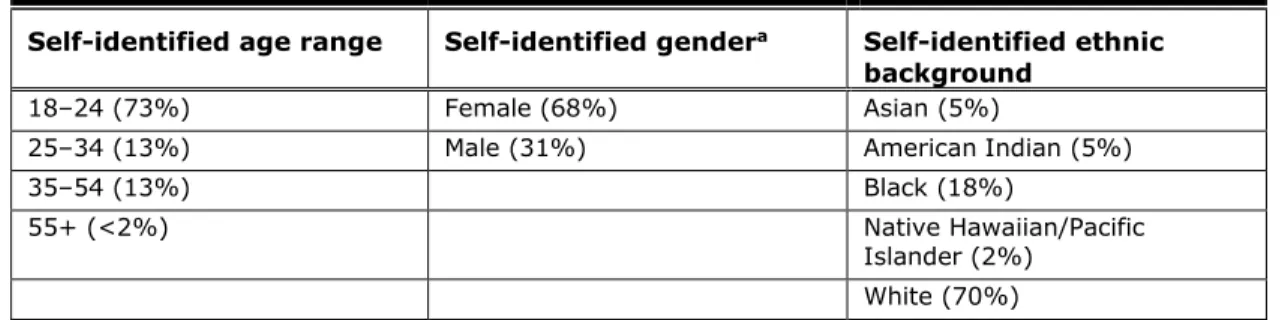
Writing I in the continuing studies school of a small liberal arts college. The first author’s classes consisted of 66 students at two campuses. The second author’s class consisted of 14 students attending weekly evening classes on the main campus. Of these 80 students, 54 responded to the survey, a 68% response rate. Demographic characteristics of the combined participant population appear Table 1. We used the standard US Census codes to determine student demographic characteristics.
Table 1. Participant Demographic Characteristics
Self-identified age range Self-identified gendera Self-identified ethnic
background
18–24 (73%) Female (68%) Asian (5%)
25–34 (13%) Male (31%) American Indian (5%)
35–54 (13%) Black (18%)
55+ (<2%) Native Hawaiian/Pacific
Islander (2%) White (70%)
a Not all participants identified gender in their responses.
The 68% overall response rate provided us with a relatively large sample size in comparison to many usability studies. It is important to keep in mind that, although the results probably generalize to the population of FYC students at these universities, there might be important differences between the students who volunteered to complete the survey and those who declined.
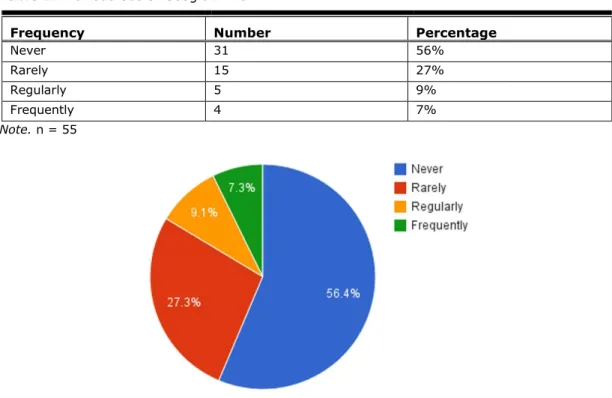
The majority of participants (83%) reported they had never or rarely used Google Drive applications, and only nine respondents indicated they used Google Drive regularly or frequently, as indicated in Table 2 and Figure 1.
Table 2. Previous Use of Google Drive
Frequency Number Percentage
Never 31 56%
Rarely 15 27%
Regularly 5 9%
Frequently 4 7%
Note. n = 55
Figure 1. Previous use of Google Drive, n = 55.
Materials
The independent variable in this study was Google Apps for Education.3 In GAFE applications
like Drive and Docs, files can be shared with the public, with members of the institution, or with specific individuals with an email address using the “Share” button (always located in the upper right of each application). Google Drive enables customized group and individual sharing and permissions at the folder and file levels, so entire folders of Google Drive (and other files within a folder) can either inherit parent folder permissions or have custom permissions set.
Sharing a Google Doc means that those given appropriate permissions may access and edit the file simultaneously, an affordance that is not shared by other word processors. Microsoft Word, for example, can share files and track changes, but only a single user may access the file at a given time. Google Docs tracks every change made by every user, and every change can be undone by rolling the file back to any previous version. The document is saved automatically after every change as long as stable Internet access is available, so there is little concern about losing data as a result of unsaved changes.
Sharing folders and files supports the creation of a composing community focused on a common subject or object of inquiry. The teacher can create the collaborative environment using shared folders and a scaffolded writing assignment that requires file sharing among groups and associated feedback on written work. Once shared with appropriate permissions (the authors
3 The authors acknowledge that the independent variable could not be fully controlled. As an
SOA, GAFE’s interface differs slightly depending on platform, browser, and user customization, including acceptance of new updates. While a single platform, browser, and configuration was modeled during face-to-face instruction, the authors could not control how users interacted with GAFE outside of class. Indeed, this flexibility is one of GAFE’s affordances. The authors asked survey questions to determine which browser and platform students used in an attempt to provide some controls.
generally required sharing with editing permissions to enable collaboration), students and instructors alike were able to easily insert comments and make suggestions.
The comments feature in Google Docs affordsrich commentary from students and teachers
alike throughout the composing process, from low-stakes feedback in invention, drafting, peer
review, and revision, to formal assessment from the instructor. Comments enablemulti-way
conversations that empower students to respond to peer and teacher feedback. Google Docs
supportsunlimited commentary on highlighted text passages, and comments can be threaded
to at least one level in subsequent responses. Comments can also be marked as resolved, an action that clears the on-screen comment thread but saves the entire comment text for access as needed. Users can respond to comments asynchronously or in real time during a composing session. In addition, synchronous in-document chat is available, meaning users can “text” one another as they work together on a document. The combination of collaborative tools makes
Google Docs and Google Drive versatile applications forgroup composing activities in
synchronous and asynchronous contexts.
Following Miller-Cochran and Rodrigo’s heuristic (2006, p. 102), we determined tasks based on the following categories:
tasks users would need to be able to do to use GAFE in any context (i.e., login,
determine an appropriate app based on need, access various apps, create and name files, organize files)
tasks users must repeatedly do in this specific context (i.e., share a file and/or folder,
upload files, add, read, reply to, and resolve comments, access revision history, work synchronously and asynchronously in shared documents, use word processing affordances of Google Docs to compose and format, use editing/suggesting to make revisions)
tasks student-users have had trouble with in the past, based on instructor observation
and experience (i.e., saving files in the correct places, locating files, exporting files to other formats)
The following attributes of GAFE, or tasks performed by users, were assessed on the survey:
Account setup
Login process
Visual interface/visceral design/look and feel
Text styling
Icons
Adding comments
Reading comments
Sharing files or folders
Collaborating with others
Revision history
Cloud-based access and storage
Synchronous chat
Platform
Browser
Location of use
Familiarity with the interface prior to exposure
The survey instrument was an original design constructed as a Google form within the GAFE interface. Google Forms was chosen as the survey container because it is free, easy to use and share, because all participants already had Google Apps accounts, and because it has the ability to export results into more robust data analysis software. The survey consisted of 28 questions, in four sections: Access and Use, Function and Utility, Effectiveness, and Attitudes. Survey questions were designed to obtain data related to the five factors of usability and used the standard Likert and Likert-type scales to measure attitudes and values along the
negative-positive dimension. As advocated by DeVellis (2012), questions regarding preference should use an even number of options on the Likert and Likert-type scales. There is still considerable debate about whether an odd-number or even-number of responses is more effective, but in order to avoid confusion about the midpoint option’s meaning, the tendency to over-choose the midpoint rather than thinking critically, and data tending to merge toward the mean, we used a 4-point scale for the section on function and utility. However, when asking participants about how their expectations matched their experience of using Google Drive, a 5-point scale gave
students a midpoint value—matched my expectations—that fell directly between the better than
expected or worse than expected values.
Procedure
After the study was approved by the Institutional Review Board, the survey was administered to participants online and shared as a general (non-personalized) URL via email message to individual students’ institutional email accounts. Google forms offer no method for tracking whether a recipient has completed the survey. As a result, each researcher sent a follow-up email message to all potential participants one week after the initial message to the same students, asking them to consider completing the survey if they had not yet done so. Students were given a choice of when to take the survey; their participation was unmonitored and researchers did not interact with participants as they completed it. One week following the reminder email message to students, the authors closed the survey to additional results. Participants provided consent by reviewing and approving the consent statement online, which enabled them to complete the survey. Because the authors also served in a position of authority as teachers, participants were invited to participate in the study after all assignments had been submitted. Students received no benefit for completing the survey.
The authors collected real-time and reflective use information throughout the semester, but made no attempt to connect data collected via these methods with survey data. This usability test sought to generate generalizable data on overall usability for the tasks of composing rather than real-time data on the ease of use of a particular interface or activity in GAFE. Although the authors collected qualitative data from participants using open-ended questions in the survey, the survey’s usability questions were quantitative and sought to address use of specific aspects of GAFE for composing practices. Aside from the consent statement, no survey question was
required. As a result, n values sometimes fluctuated from question to question.
The survey did not require or allow personally identifying information to be included, other than demographic information as noted in the previous Participants section. Aside from the survey responses, the only additional data collected and recorded during the survey was a completion timestamp, recorded in the form m/d/yyyy hh:mm:ss. Although no personally identifying information was collected, the survey results are considered confidential, but not anonymous, because the field of possible participants was known to the researchers. To the best of the researchers’ knowledge, the confidential results are not re-identifiable, and no attempts have been made to correlate responses to individual students. Reported data are aggregated so that no specific individual can be inferred in the results.
Individual records were downloaded from Google Forms and stored in Google Sheets
(spreadsheet) in a limited-access Google Drive folder physically housed on a Google server and
accessible only by the researchers. String fields were converted to numeric fields (Strongly
Disagree = 1, Disagree = 2, Agree = 3, Strongly Agree = 4) before importing. For yes/no questions, an answer of yes was assigned a value of 1 and no was assigned a value of 0. All variables were assigned names related to the question and the aligned construct in order to facilitate analysis and aggregation. Data were analyzed using descriptive statistics, including percentages, means, standard deviation, and frequencies. Data were visualized using charts and graphs functionality within Google Sheets.
Results
In an effort to address the usability of GAFE as a tool for collaborative composing, the following sections discuss the tools used to access GAFE, the location of GAFE use, the browsers used to access GAFE, the students’ perceptions of Google Drive’s interface, and the ranking of the most and least useful functions.
Tools Used to Access GAFE
Students identified platforms they used to access GAFE. Researcher objectives were to
differentiate between networked computer access and networked smartphone or tablet access, to evaluate multiple platform usability as a cloud-based (rather than locally installed)
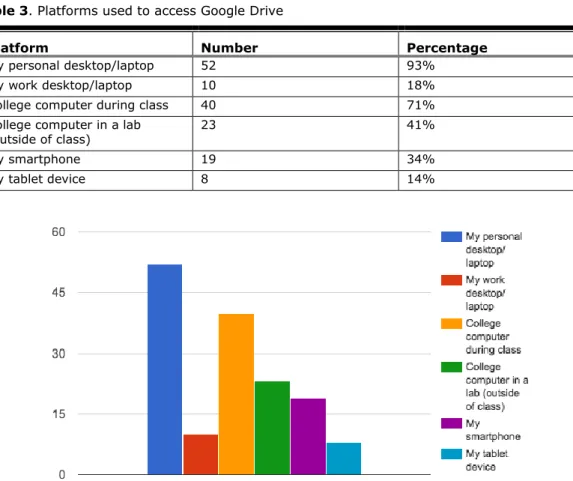
application, and to specify the ownership of the devices in order to roughly determine their access to technology. Students could select any platform(s) that applied. As results in Table 3 and Figure 2 suggest, most students accessed GAFE using a personal computer and/or a school-owned computer. Laptop and desktop computers were combined as a single platform to
represent the closing gap between desktop and laptop costs, numbers, and experiences, and to differentiate the “computer” experience of Google Drive from the mobile experience
(represented here by smartphone and tablet device). Although 93% of students accessed Google Drive from a personal laptop or desktop, other platforms received high percentages (see Table 3 and Figure 2). Because respondents could select all options that applied, the data demonstrated that students accessed Google Drive from multiple platforms during the study, even though they may have preferred one platform over another.
Table 3. Platforms used to access Google Drive
Platform Number Percentage
My personal desktop/laptop 52 93%
My work desktop/laptop 10 18%
College computer during class 40 71%
College computer in a lab
(outside of class) 23 41%
My smartphone 19 34%
My tablet device 8 14%
Figure 2. Platforms used to access Google Drive.
Location of GAFE Use
To assess access as well as usage preferences, students were asked to choose all locations where they used GAFE. As the data in Table 4 and Figure 3 demonstrated, students regularly accessed Google Drive at home—a likely sign of reliable Internet access.
Table 4. Locations Where Google Drive Was Accessed
Location Number Percentage
Home 55 98%
Work 10 18%
Campus classroom 48 86%
Campus elsewhere 16 29%
Other 2 4%
Figure 3. Locations where Google Drive was accessed.
Browsers Used to Access GAFE
Students identified the browser they used to access GAFE, a choice that may impact the
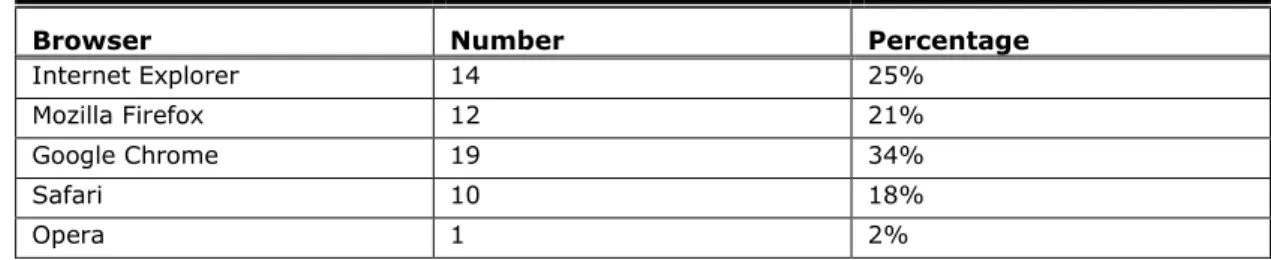
product’s usability. Google’s own browser, Chrome, is “designed from the ground up to optimize the Google Apps for Education suite of products” and Google recommends using Internet Explorer for running “legacy apps” (Google, n.d.a). Data in Table 5 and Figure 4 showed fairly even distribution among student browser preferences to access GAFE, with Chrome garnering the most uses, possibly as a result of one of the authors modeling its use.
Table 5. Browsers Used to Access Google Drive by Number and Percentage
Browser Number Percentage
Internet Explorer 14 25%
Mozilla Firefox 12 21%
Google Chrome 19 34%
Safari 10 18%
Figure 4. Browsers used to access Google Drive.
Student Perceptions of Google Drive’s Interface
According to Don Norman (2005, 2013), good design requires that attributes and features are visible, that the relationship between function and control is perceived and exploited, and that constraints are used intelligently so that they do not detract from the experience. High usability correlates to a feeling of effortless ability to discern and enact the right action at the right time. Students were asked to evaluate the ease of use of specific GAFE features and functions (see
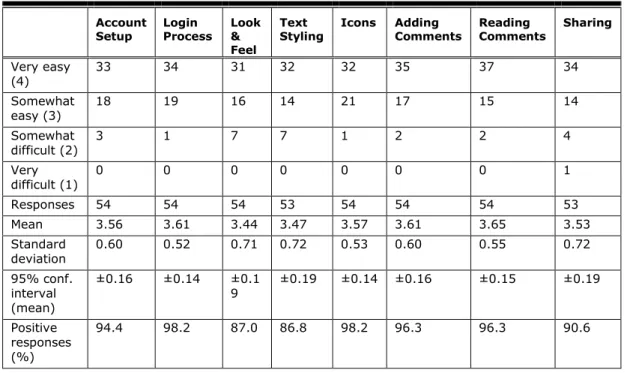
Table 6 and Figure 5). The question employed a 4-point Likert scale using values of Very easy
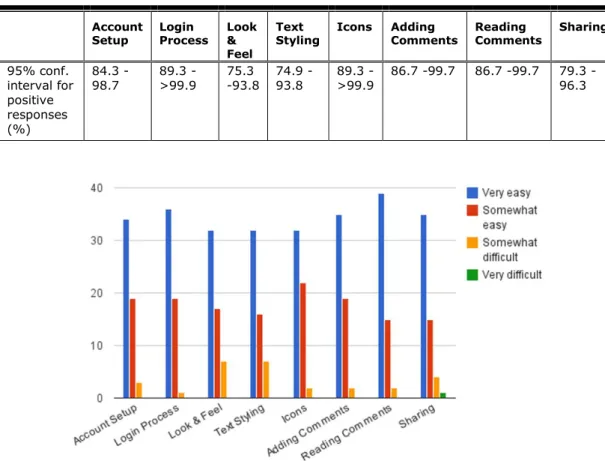
(4), Somewhat easy (3), Somewhat difficult (2), and Very difficult (1). The relatively low 95% confidence interval (no greater than ±0.19) of the means suggested students found easy to use specific GAFE features, while the calculated 95% confidence interval suggested that at least 75% of the population represented by the sample would find the GAFE tasks easy to learn, remember, and understand (see Table 6).
Table 6. Ease of Use of Specific Google Drive Features and Functions
Account
Setup Login Process Look & Feel
Text
Styling Icons Adding Comments Reading Comments Sharing
Very easy (4) 33 34 31 32 32 35 37 34 Somewhat easy (3) 18 19 16 14 21 17 15 14 Somewhat difficult (2) 3 1 7 7 1 2 2 4 Very difficult (1) 0 0 0 0 0 0 0 1 Responses 54 54 54 53 54 54 54 53 Mean 3.56 3.61 3.44 3.47 3.57 3.61 3.65 3.53 Standard deviation 0.60 0.52 0.71 0.72 0.53 0.60 0.55 0.72 95% conf. interval (mean) ±0.16 ±0.14 ±0.1 9 ±0.19 ±0.14 ±0.16 ±0.15 ±0.19 Positive responses (%) 94.4 98.2 87.0 86.8 98.2 96.3 96.3 90.6
Account
Setup Login Process Look & Feel
Text
Styling Icons Adding Comments Reading Comments Sharing
95% conf. interval for positive responses (%) 84.3 - 98.7 89.3 ->99.9 75.3 -93.8 74.9 -93.8 89.3 ->99.9 86.7 -99.7 86.7 -99.7 79.3 -96.3
Figure 5. Ease of use of specific Google Drive features and functions.
Given the large number of first-time Google Drive users (see Table 1), students identified fewer issues with usability than might be expected; Norman (2005) correlated a positive feeling or affect toward a design with one’s ability to use it. Students’ perception of the usability of the interface was likely influenced by the similar design to other software. This familiarity likely led to students’ improved perceptions of the tool’s ease of learning, task efficiency, ease of
remembering, understandability, and ultimately, their subjective satisfaction—the five factors of usability.
Student Perceptions of Usefulness of Specific Features
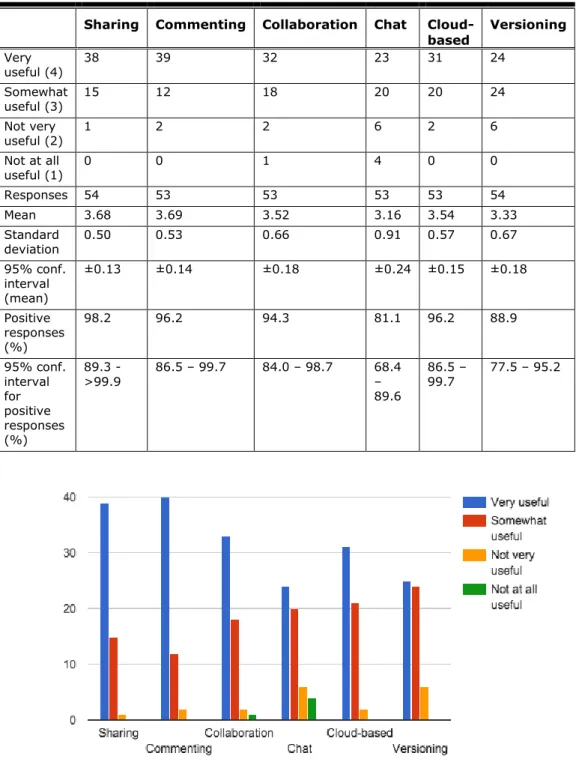
We asked students to evaluate the usefulness of specific features of Google Drive, using a Likert scale from Very Useful (4) to Not At All Useful (1). The mean of each set of responses on the 4-point Likert scale reflects an overall sense of usefulness for specific affordances of Google
Drive, with all means scoring above 3 (Somewhat Useful or Very Useful) on the scale. Even the
tool perceived to be least useful, Chat (mean = 3.16, n = 53), received overall support, with its lower ranking likely correlating to the fact that the chat affordance is only available
synchronously, versus other features that are available at any time. Collaboration, Document Sharing, and Commenting received the highest scores for usefulness. Collaboration developed as a response to increasing comfort with document sharing and comment throughout the semester, which may explain why these three features received the highest satisfaction scores (Table 7 and Figure 6).
Table 7. Usefulness of Specific Google Drive Features
Sharing Commenting Collaboration Chat Cloud-based Versioning Very useful (4) 38 39 32 23 31 24 Somewhat useful (3) 15 12 18 20 20 24 Not very useful (2) 1 2 2 6 2 6 Not at all useful (1) 0 0 1 4 0 0 Responses 54 53 53 53 53 54 Mean 3.68 3.69 3.52 3.16 3.54 3.33 Standard deviation 0.50 0.53 0.66 0.91 0.57 0.67 95% conf. interval (mean) ±0.13 ±0.14 ±0.18 ±0.24 ±0.15 ±0.18 Positive responses (%) 98.2 96.2 94.3 81.1 96.2 88.9 95% conf. interval for positive responses (%) 89.3 - >99.9 86.5 – 99.7 84.0 – 98.7 68.4 – 89.6 86.5 – 99.7 77.5 – 95.2
Figure 6. Usefulness of specific Google Drive features.
Ranking Most and Least Useful Functions
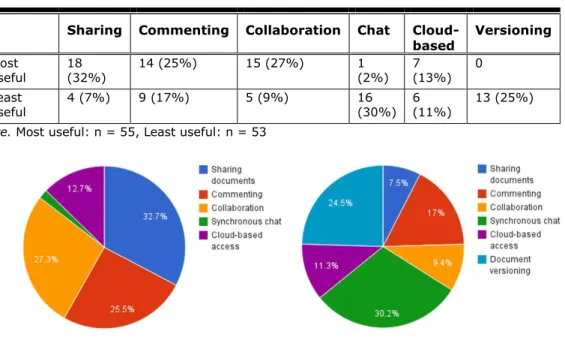
We asked students to compare functions and rank them relative to one another using the values Most Useful or Least Useful. Asking the question this way teased out clearer attitudes toward more and less useful functions of Google Drive. The researchers focused on the three most useful and three least useful features as ranked by the participants. The full results (Figure 7)
showed that, compared to other features, Sharing Documents, Collaboration, and Commenting were the three most useful features, while Synchronous Chat, Cloud-based, and Document Versions were considered the least useful functions of Google Drive. Table 8 isolates and highlights the percentage of most useful (Sharing, Commenting, and Collaborating) and least useful (Chat, Cloud-based, and Versioning) features as ranked by the participants. These results likely reflect the way we used Google Drive in our classes—we stressed and reinforced the value of collaborating in Google Docs (in particular among Google Drive apps) and de-emphasized the use of synchronous chat.
Table 8. Most and Least Useful Functions of Google Drive
Sharing Commenting Collaboration Chat
Cloud-based Versioning
Most
useful 18 (32%) 14 (25%) 15 (27%) 1 (2%) 7 (13%) 0
Least
useful 4 (7%) 9 (17%) 5 (9%) 16 (30%) 6 (11%) 13 (25%)
Note. Most useful: n = 55, Least useful: n = 53
Figure 7. Most useful (left) and least useful (right) functions of Google Drive.
Recommendations
As a commercial product, Google continually (and often without fanfare or advance notice) updates its products based on available data and feedback. This reality yields several recommendations:
Results indicate that students generally found GAFE usable, useful, and easy-to-learn.
While care should be taken to model and introduce new technology in the classroom, faculty can have a reasonable expectation that the vast majority of users will find little difficulty accessing and mastering GAFE.
Composition teachers in higher education settings should consider using GAFE in their
composition classrooms to implement pedagogies that help students become better writers, more aware of rhetorical situations and their social characteristics.
Given the increasing institutional demands for IT infrastructure, the security, reliability,
and utility of GAFE should be considered favorable by higher education administrators seeking to provide tools for faculty and students.
Researchers should collaborate to develop additional GAFE usability testing protocols for
instructional use, including composition contexts, and seek to publish results of usability test results in journals and avenues easily accessible to educational scholars and practitioners.
Educators and researchers should seek avenues to have their voices heard by Google,
to influence future development of Google Apps for Education to take into consideration students and instructors as primary users among professional and personal users.
Google should seek to be more transparent with users—administrators, faculty, and students—in its plans for current and future development of GAFE applications and interfaces.
Conclusion
In this study, the primary investigators were two faculty members seeking to test the usability of Google Apps for Education for teaching composition to heterogeneous populations of students at their local institutions. The objective of the study was not simply to evaluate whether GAFE met the functionality and ease of use claims described in Google’s marketing copy, but to determine the usability of the tool as an effective cloud-based suite of applications within multiple composition classrooms, and potentially within the broader context of composition pedagogy. The objective of usability testing is to evaluate the object as it is actually used by the intended audience, which in the case of GAFE is students. Although Google likely conducted professional usability testing of GAFE, the results of this study go further in demonstrating how students evaluated the usefulness and usability of the interface as used over time in an educational setting and integrated into course instructional design. The study followed
suggestions made by Eyman (2009) and Miller-Cochran and Rodrigo (2006, 2010) that faculty must anticipate user needs and expectations as an integral part of design, which the authors demonstrate to include the instructional design of the technology-in-use.
After using a combination of CP and CTA usability methods to inform the RP survey design, a mixed-method instrument given at the close of the semester assessed usability by asking participants to evaluate their use of GAFE for classroom composing assignments. Quantitative questions focused on ease of use and perceived usefulness of specific functions and features of the interface for composing practices. The data collected on ease of use, usefulness, and most and least useful functions and features demonstrate that the vast majority of participants found GAFE features at least somewhat easy and somewhat useful for assigned composing practices. Few participants found one or more GAFE features least useful relative to other functions for composing assignments. The data collected on browsers, platforms, and locations of use and access to GAFE features suggest that GAFE is largely accessible and at last somewhat usable on multiple browsers and platforms, regardless of location, assuming stable Internet access is available.
Overall, the results of the study demonstrate the Google Apps for Education is relatively easy to use for most users, even those unfamiliar with Google Docs or other Google Apps. Usability of the tool for composing may result in what Norman (2005) described as “positive affect [that] arouses curiosity, engages creativity, and makes the brain into an effective learning organism” (p. 26). The sharing and collaboration capabilities and affordances of GAFE enable participants to improve their composing skills. As a result of these findings, we consider GAFE a useful and user-friendly tool available for teachers with experience using Google Drive applications, such as the authors of this study. Though the user interface and ease of use of specific features is
considered useful and usable, this study did not assess how faculty members found GAFE in
terms of its usability and usefulness. Scholars caution that instructors require training in
implementing a technology in the composition classroom in order to ensure it does not drive the pedagogy and is aligned with learning outcomes and best practices (DePew, Spangler, & Spiegel, 2014) This conclusion in particular demonstrates the need for local training
opportunities for teachers to introduce relatively new technologies like GAFE as useful tools for improving existing or emerging pedagogies. Students attempting to use GAFE in the classroom who are taught by instructors unfamiliar or uncomfortable with GAFE affordances and
constraints would probably have their perceptions of the technology’s usefulness and usability affected.
Ubiquitous broadband connectivity has not yet adequately extended beyond urban and suburban centers to encourage implementation of GAFE in all locales. Accessibility, while impressively widespread, remains problematic for those using screen reading devices and other tools for accessibility, an aspect of the tool we did not directly test, but the limitations of which we’ve experienced firsthand.
Limitations
The following is a list of limitations that occurred in this study:
Although the participant population consists of multiple sections of composition courses
on several campuses, the overall sample size is small, limiting the generalizability of the data.
Although open access institutions have heterogeneous populations that created
different user groups, greater attention to controlled user groups based on categories would improve comparative analysis, which was not conducted with this study.
Users were not differentiated by school, so a comparison of contexts could not be
conducted.
This study does not take into account differences in pedagogical style or instructional
delivery, which may have affected students’ perceptions of GAFE.
Opportunities for Future Research
A usability study comparing use of GAFE from various browsers and devices would be very useful. In particular, certain affordances are unavailable on the mobile interface (smartphones and tablets). Factors such as operating system, browser, screen size, and typing with texting vs. QWERTY methods would be useful differentiating factors to compare in terms of usability. Additional studies should seek to test the usability of GAFE among differently abled users, including deaf and hard-of-hearing users and blind or visually impaired users.
The decision to use Google Docs in the classroom should support the learning outcomes of the course. For writing teachers, those outcomes include creating communities of inquiry that integrate cognitive, social, and teaching presence (Garrison & Vaughan, 2007); providing low-stakes student-centered composing opportunities and engaging student and instructor feedback (Warnock, 2009); reinforcing “critical and liberatory pedagogies” (Reilly & Williams, 2006, p. 59); and teaching and exemplifying meta cognitive reflection on the technologies themselves as applied rhetoric (DePew, 2015). Google Docs and Google Drive, as applications in Google Apps for Education, support these outcomes. More research specifically about how cloud-computing and GAFE affect composition and rhetoric theory and pedagogy is needed.
Tips for Usability Practitioners
Usability practitioners can use the following tips while conducting a similar study:
Recognize that students will access the technology anytime, anyplace. This has
implications for instructor availability and inconsistent design or functionality across platforms.
Understand that Google may elect to make changes to the features and visual design of
GAFE at any time. Google may also change its Terms of Service at any time. These have implications on use and usability, as well as the results of cross-sectional and longitudinal research studies.
Be prepared for differences in GAFE usability based on the tools participants use to
access it. This includes changes based on web browser, browser version, device, operating system, Internet speed, and GAFE version. While this can be mitigated in a controlled testing environment, it does not then replicate the actual usability of the tool as accessed by users.
Limit the number of affordances evaluated in a single question. As Table 6
demonstrates, results from testing a large number of affordances in a single question can be unwieldy for reporting purposes.
Acknowledgements
Thanks to our students, who joined us in experimenting with GAFE in the composition classroom and chose to take our survey and provide data for our study. Thanks to our respective
institutional review boards for providing valuable assistance and to our institutions that supported our research. Thanks for Dr. Daniel Richards for sponsoring our submission. And thanks to Dr. Joyce Neff, Dr. Shelley Rodrigo, Dr. Julia Romberger, Dr. Richards (again), and Dr. Kevin DePew, whose classes at Old Dominion University, along with critical commentary and
direction, encouraged our own collaboration using Google Drive. This research was funded, in part, by a Paul Lee Professional Development Grant from the Virginia Community College System.
References
Barnum, C. M. (2011). Usability testing and research. New York, NY: Morgan Kaufmann.
Brabazon, T. (2002). Digital hemlock: Internet education and the poisoning of teaching.
Kennington, NSW: University of New South Wales Press.
Conference on College Composition and Communication (CCCC). (2013, March). A position statement of principles and example effective practices for online writing instruction (OWI). National Council of Teachers of English. Retrieved from
http://www.ncte.org/cccc/resources/positions/owiprinciples
Cook, K. C. (2005). An argument for pedagogy-driven online education. In K. C. Cook & K.
Grant-Davie (Eds.), Online education: Global questions, local answers (pp. 49–66).
Farmingdale, NY: Baywood Publishers. Baywood’s Technical Communications Series. DePew, K. E. (2015). Preparing for the rhetoricity of OWI. In B. L. Hewett & K. E. DePew (Eds.),
Foundational practices of online writing instruction (pp. 439–467). Anderson, SC: Parlor Press.
DePew, K. E., Spangler, S., & Spiegel, C. L. (2014). Getting past our assumptions about Web 2.0 and community building: How to design research-based literacy pedagogy. In M. Limbu
& B. Gurung (Eds.), Emerging pedagogies in the networked knowledge society: Practices
integrating social media and globalization (pp. 120–143). Hershey, PA: IGI Global.
DeVellis, R. F. (2012). Scale development: Theory and application (3rd ed.). Los Angeles, CA:
Sage Publications, Inc.
Dumas, J. S., & Redish, J. C. (1999). A practical guide to usability testing. Wilmington, NC: Intellect, Ltd.
Eyman, D. (2010). Methodology and design practice for writing process and pedagogies. In S. Miller-Cochran & R. L. Rodrigo (Eds.), Rhetorically Rethinking Usability: Theories, practices and methodologies (pp. 213–228). Cresskill, NJ: Hampton Press.
Garrett, J. J. (2010). The elements of user experience: User-centered design for the web and
beyond (2nd ed.). Berkeley, CA: New Riders.
Garrison, D. R., & Vaughan, N. D. (2007). Blended learning in higher education: Framework,
principles, and guidelines. San Francisco, CA: Jossey-Bass.
Goodman, E., Kuniavsky, M., & Moed, A. (2012). Observing the user experience: A
practitioner’s guide to user research (2nd ed.). Waltham, MA: Morgan Kaufmann. Google. (n.d.a). Benefits. Google Apps for Education. Retrieved January 24, 2015, from
https://www.google.com/work/apps/education/
Google. (n.d.b). Features of Chrome for Education. Retrieved January 27, 2015, from
http://www.google.com/intl/en/chrome/education/browser/features.html
Google. (n.d.c). Google apps for education (online) agreement. Google Apps. Retrieved January
24, 2015, from http://www.google.com/apps/intl/en/terms/education_terms.html
Hadjerrouit, S. (2012). Investigating technical and pedagogical usability issues of collaborative
learning with wikis. Informatics in Education, 11(1), 45–64. Retrieved from
http://www.mii.lt/informatics_in_education/pdf/INFE200.pdf
International Standards for HCI and usability. (n.d.). Retrieved January 25, 2015, from
Jameson, D. A. (2013). New options for usability testing projects in business communication
courses. Business Communication Quarterly, 76(4), 397–411.
doi: 10.1177/1080569913493460
Krug, S. (2014). Don’t make me think, revisited: A common sense approach to web usability
(3rd ed.). Berkeley, CA: New Riders.
Lim, C., Song, H.-D., & Lee, Y. (2012). Improving the usability of the user interface for a digital
textbook platform for elementary-school students. Educational Technology, Research and
Development, 60(1), 159–173. http://dx.doi.org/10.1007/s11423-011-9222-5 Lowry, S. Z., Quinn, M. T., Ramaiah, M., Schumacher, R. M., Patterson, E. S., North, R., &
Abbott, P. (2012). Technical evaluation, testing, and validation of the usability of electronic health records. Washington, DC: U.S. National Institute of Standards and Technology.
Mayhew, D. J. (1999). The usability engineering lifecycle: A practitioner’s handbook for user
interface design. San Francisco, CA: Morgan Kaufmann.
Miller-Cochran, S. K., & Rodrigo, R. L. (2006). Determining effective distance learning designs
through usability testing. Computers and Composition, 23(1), 91–107.
http://dx.doi.org/10.1016/j.compcom.2005.12.002
Miller-Cochran, S. K., & Rodrigo, R. L. (2010). Introduction. In Rhetorically rethinking usability: Theories, practices and methodologies (pp. 1–8). Cresskill, NJ: Hampton Press.
Nielsen, J. (1993). Usability engineering. San Diego, CA: Morgan Kauffmann.
Nielsen, J, & Mack, R. L. (Eds.). (1994). Usability inspection methods. New York, NY: John Wiley & Sons, Inc.
Norman, D. (2005). Emotional design: Why we love (or hate) everyday things. New York, NY:
Basic Books.
Norman, D. (2013). The design of everyday things: Revised and expanded edition. New York,
NY: Basic Books.
Panthee, R. K. (2014). Re/Designing online platforms by citizen designers and its contribution to
the digital writing and research. In M. Limbu & B. Gurung (Eds.), Emerging pedagogies in
the networked knowledge society: Practices integrating social media and globalization.
Hershey, PA: IGI Global. Retrieved from
http://www.igi-global.com/chapter/redesigning- online-platforms-by-citizen-designers-and-its-contribution-to-the-digital-writing-and-research/96068
Reilly, C. A., & Williams, J. J. (2006). The price of free software: Labor, ethics, and context in
distance education. Computers and Composition, 23(1), 68–90.
http://dx.doi.org/10.1016/j.compcom.2005.12.001
Rogers, Y., Sharp, H., & Preece, J. (2011). Interaction design: Beyond human - computer
interaction (3rd ed.). Chichester, West Sussex, UK: Wiley.
Rubin, J., Chisnell, D., & Spool, J. (2008). Handbook of usability testing: How to plan, design, and conduct effective tests (2nd ed.). Indianapolis, IN: Wiley.
Tang, T. Y., Winoto, P., & Leung, H. (2014). A usability study of an educational groupware
system: Supporting awareness for collaboration. Journal of Educational Computing
Research, 50(3), 379–402. Available at http://dx.doi.org/10.2190/ec.50.3.e
Vouk, M. A. (2008). Cloud computing; Issues, research and implementations. In 30th
International Conference on Information Technology Interfaces, 2008. ITI 2008 (pp. 31–
40). Available at http://ieeexplore.ieee.org/xpl/articleDetails.jsp?arnumber=4588381
Warnock, S. (2009). Teaching writing online: How & why. Urbana, IL: National Council of Teachers of English.
About the Authors
Maury Elizabeth Brown
Ms. Brown is an assistant professor of English at Germanna Community College in Locust Grove, Virginia and a PhD student in English at Old Dominion University. She researches multimodal composition, digital and video rhetorics, new media, business,
professional and technical writing, and games in education and culture.
Daniel L. Hocutt
Mr. Hocutt is a web manager and adjunct professor of liberal arts at the University of
Richmond School of Professional and
Continuing Studies and a PhD student in English at Old Dominion University. He researches the intersection of technology and rhetoric along with new media, technical and professional
communication, and tricksters.
Appendix: Survey Instrument
Part One: Informed Consent
Consent Form for Attitudes about Google Drive Use in the Composition Classroom Study
This survey assesses your attitudes toward using Google Drive for composition and collaboration in this course this semester. The survey results will be used to understand how students use Google Drive applications for composition and to predict how local classroom use might apply in global composing environments. Completing the survey should take about 15 minutes.
You are not at risk of harm by participating in this study. You will not receive any direct benefits from participating. Survey participation does not affect your grade in this course.
Principal Investigators
Daniel Hocutt, [email protected], University of Richmond
Maury Brown, [email protected], Germanna Community College
Your consent to participate in this survey is voluntary. You may choose to withdraw at any time without penalty, and you may choose not to answer any questions without penalty. We do hope that you will answer honestly and carefully, in order to assist us in improving this course in the future.
Survey results will be used in conference presentations and academic publications.
Your survey responses are confidential. We will not publish your name in any research findings or results. Your identity will be shared only between the principal investigators.
Questions about this survey may be directed to the principal investigators or to the chair of the University of Richmond Institutional Research Board at [email protected] or (804) 484-1565.
Statement of Consent (Required)
This study has been described to me, and I understand that my participation is voluntary and that I may discontinue my participation at any time without penalty.
I understand that my responses will be treated confidentially and used for research that includes conference presentations and/or academic publications.
I understand that if I have questions, I may pose them to Daniel Hocutt or Maury Brown, principal investigators.
I have read and understand the statements written above. By clicking “Yes” and taking this online survey, I am providing my consent to participate, and attesting that I am over 18 years of age.
Yes >>> CONTINUE
No
Part Two: Survey
Unless otherwise specified, questions in this survey are about your experience using Google Drive applications during the course this semester. All questions are optional.
Select any of the following platforms you used to access Google Drive (select all that apply):
My personal desktop/laptop
My work desktop/laptop
College computer during class
College computer in a lab (outside of class)
My smartphone
My tablet device
Home
Work
Campus classroom
Campus elsewhere
Other (TEXT ENTRY)
If you used a smartphone or tablet as your primary device, indicate how you entered text (select all that apply):
I typed on the touch screen
I used a Bluetooth keyboard
I used a voice recording app
Select the primary browser you used to access Google Drive (select one):
Internet Explorer Mozilla Firefox Google Chrome Safari Opera Other
Select the primary tool you used for drafting compositions (select one):
Word processor application (e.g., Microsoft® Word®, OpenOffice.org®)
Google Document
Paper and pen/pencil
Audio or video recorder
Other
Prior to this class, how often had you used Google Drive? (select one)
Never
Rarely
Regularly
Frequently
Below are some of the functions of Google Drive. Please rank these functions with 1 being the most useful and 6 being the least useful
__ Ability to share documents with others
__ Ability to comment on others’ documents (and receive comments from others) __ Ability to create a document collaboratively with others
__ Ability to chat on screen with others while working on the document __ Ability to access documents from any device connected to the internet __ Ability to return to an earlier version of the document
On a scale of 1 to 4, evaluate the following aspects of your use of Google Drive for class purposes. Use the following values for your scale.
1 = Very easy 2 = Somewhat easy 3 = Somewhat difficult 4 = Very difficult
__ Google Account setup
__ Login process (either college single sign-on or Google Account)
__ Styling a document (font, type size, line spacing, etc.) __ Icons for folders, documents, tools, and functions __ Adding comments in another’s document
__ Reading comments posted to your own document __ Sharing a document with another user or the instructor
On a scale from 1 to 5, evaluate how using Google Drive affected your expectations about the following classroom activities and functions. Use these values for your scale.
1 = Better than expected
2 = Somewhat better than expected 3 = Match my expectations
4 = Somewhat worse than expected 5 = Worse than expected
For example, using Google Drive made in-class activities and assignments [value 1-5 here]. __ In-class activities and assignments
__ The relationship of the instructor with students __ Your relationship with your classmates
__ Your role as a student
__ Your writing or composing process __ The grading process
__ Your understanding of a draft
__ Your definition of a composition or paper __ Peer review
__ Collaboration as a composing tool
Will you continue using Google Docs after leaving this class?
Yes, definitely
Probably
Maybe
No
What factor or factors affected your decision? (TEXT ENTRY)
Has using Google Drive in the class affected your attitude toward “cloud computing” (saving, accessing, and sharing files and folders online, not on/from your own hard drive)?
Yes
No
What factor or factors informed your response? (TEXT ENTRY)
What would you consider the most important benefit of using Google Drive in a composition
class? (Select only one)
Free word processing (or other) applications
24/7 access with networked device
Collaborative tools (comments, versioning, in-app chat)
Connection to college networking account
Document/folder sharing
What factor or factors contributed to this selection? (TEXT ENTRY) How would you rate your experience using Google Docs this semester?
Good
Average
Bad
Very bad
What factor or factors contributed to this rating? (TEXT ENTRY)
What did you like about using Google Drive in the classroom this semester? (TEXT ENTRY)
What did you dislike about using Google Drive this semester? (TEXT ENTRY)
How did you feel knowing that others in the class could read your papers? (TEXT ENTRY)
What was the easiest part of using Google Drive? (TEXT ENTRY)
What was the most difficult or most confusing part of using Google Drive? (TEXT ENTRY)
Part Three: Demographics
The following information is optional, but providing responses will help us to understand if your experience is shared by others.
Your age:
18-24
25-34
35-54
55+
Prefer not to say
Your gender:
Male
Female
Prefer not to say
Your race or ethnicity: 1. Are you Hispanic or Latino?
Yes
No
2. Regardless of your answer to the prior question, please select one or more from the following ethnicities that best describe you:
American Indian or Alaska Native
Asian
Black or African American
Native Hawaiian or Other Pacific Islander
White
Thank you for your participation. Your responses are appreciated and valued. SUBMIT