Effects of Head-Mounted and Scene-Oriented Video
Systems on Remote Collaboration on Physical Tasks
Susan R. Fussell, Leslie D. Setlock, Robert E. Kraut
Human Computer Interaction Institute
Carnegie Mellon University
5000 Forbes Avenue
Pittsburgh, PA 15213 USA
+1 412-268-4003
[email protected]
ABSTRACTThis study assessed the value of two video configurations—a head-mounted camera with eye tracking capability and a scene camera providing a view of the work environment—on remote collaboration on physical (3D) tasks. Pairs of participants performed five robot construction tasks in five media conditions: side-by-side, audio-only, head-mounted camera, scene camera, and scene plus head cameras. Task completion times were shortest in the side-by-side condition, and shorter with the scene camera than in the audio-only condition. Participants rated their work quality highest when side-by-side, intermediate with the scene camera, and worst in the audio-only and head-camera conditions. Similarly, helpers’ self-rated ability to assist workers and pairs’ communication efficiency were highest in the side-by-side condition, but significantly higher with the scene camera than in the audio-only condition. The results demonstrate the value of a shared view of the work environment for remote collaboration on physical tasks.
Keywords
Computer-supported collaborative work, video mediated communication, video conferencing, conversational analysis, empirical studies, situation awareness
INTRODUCTION
In this paper, we consider the ways that participants use visual information to help coordinate their activities when performing collaborative physical tasks—tasks in which two or more individuals work together to perform actions on concrete objects in the three-dimensional world. For example, an expert might guide a worker's performance of emergency repairs to an aircraft or a medical team might work together to save a patient's life. Because expertise is increasingly distributed across space, there is growing demand for technologies to allow remote collaboration on physical tasks.
In the remainder of this paper, we first describe the theoretical framework guiding our work, then we describe a laboratory study comparing collaboration on a physical task using two video configurations—a head-mounted camera with eye tracking capability and a scene camera providing a view of the work environment—to side-by-side and audio-only collaboration. We conclude with a discussion of the implications of our findings for the design of systems to provide shared visual space at a distance.
Collaborative Physical Tasks
Observational studies of physical collaboration show that people's speech and actions are intricately related to the position and dynamics of objects, other people, and ongoing activities in the environment [e.g., 7, 10, 21]. Conversations during collaborative physical tasks include identification of target objects, descriptions of actions to be performed on those targets, and confirmation that actions have been performed successfully. During the course of the task, the objects may undergo changes in state as people perform actions upon them (e.g., a piece of complex equipment may undergo repair) or as the result of outside forces (e.g., a patient might start hemorrhaging).
Collaborative physical tasks vary along a number of dimensions, including number of participants, temporal dynamics, and the like. The task on which we focus here, a construction task, falls within a general class of “mentoring” collaborative physical tasks, in which one person directly manipulates objects with the guidance of one or more experts. In our task, one person—the “worker”— builds a large toy robot. A second person—the “helper”—provides guidance to the worker during the task but does not actually manipulate objects, tools or parts. The relationship between helper and worker is thus similar to a teacher guiding a student’s lab project or a head resident instructing new doctors on how to treat a patient. The collaborative construction task requires extensive coordination between helper and worker: Helpers must determine what assistance is needed and when, how to phase their messages such that the worker understands them, and whether the message has been understood as intended. That is, assistance must be coordinated with the worker’s actions and current task status.
Helpers can use two mechanisms to coordinate their assistance with the workers’ need for help: situation
Permission to make digital or hard copies of all or part of this work for personal or classroom use is granted without fee provided that copies are not made or distributed for profit or commercial advantage and that copies bear this notice and the full citation on the first page. To copy otherwise, or republish, to post on servers or to redistribute to lists, requires prior specific permission and/or a fee.
CHI2003,April 5–10, 2003, Ft. Lauderdale, Florida, USA.
awareness and conversational grounding. By situation awareness we mean an ongoing awareness of what the
worker is doing, the status of the task, and the environment [5, 6]. For example, a helper might use his/her awareness of the state of the robot being constructed to determine that a worker has completed one step of the instructions and is now ready for the next step.
By conversational grounding we mean the ways in which
communicators work together to ensure messages are understood as intended—that is, how they establish common ground. Common ground refers to mutual
knowledge and beliefs shared by conversational partners [1, 3, 4]. Contributions to conversations build on previously established common ground. New contributions are presented and then grounded through an acceptance phase. In some cases, messages may be grounded immediately by an acknowledgement (e.g., “uh huh,” “ok”). In other cases, questions, repairs, and clarifications may be required before grounding is complete [12]. Grounding refers to the
interactive process by which communicators exchange evidence about what they understand over the course of a conversation, as they accrue common ground [2].
Clark and Marshall [3] identified three sources for common ground: First, people share common ground based on common group membership [e.g., 11]. Second, people build common ground over the course of an interaction on the basis of linguistic co-presence—because they are privy
to the same utterances. Finally, people share common ground due to physical co-presence—by inhabiting the
same setting [3]. Physical co-presence provides multiple resources for awareness and conversational grounding, one of the most important of which is shared visual space.
Shared Visual Space
When they are physically co-present—located at the same place at the same time—collaborators share a rich visual space. They can monitor one another’s facial expressions and actions, and jointly observe task objects and the environment. This shared visual space can facilitate both situation awareness and conversational grounding [e.g., 5].
For example, a helper can identify the right time to provide the next instruction by observing that the worker has completed the previous step. Helper and workers can also use pointing gestures and deictic expressions (e.g., "that one?") to refer to task objects efficiently.
Sources of visual information. Physical co-presence
provides a number of more-or-less independent sources of visual information, which vary in terms of their importance for maintaining awareness and grounding conversation. A challenge, both for theoretical development and technology design, is to understand how people use specific types of visual information for specific collaborative purposes. The approach we take to this challenge is a decompositional one, in which we strive to specify the components of physical collaboration which rely on visual information, to identify the types of visual cues each of these components requires, and to understand how specific technologies provide or fail to provide these visual cues [15].
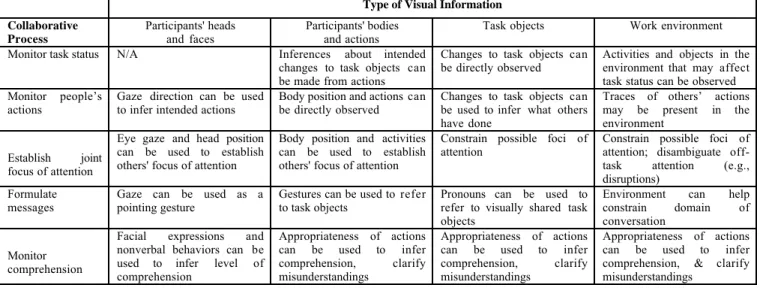
In Figure 1, we consider four sources of visual information—participants' heads and faces, participants' bodies and actions, focal task objects, and work environment—in terms of their benefits for five key aspects of awareness and grounding: monitoring task status, monitoring people’s actions, identifying what one's partner is attending to, formulating messages, and monitoring partners’ comprehension. When people work side-by-side, they have all four sources of visual information readily available. To assess others’ focus of attention, they can monitor facial expressions and body orientations. Facial expressions and visible actions vis-à-vis the task provide evidence of whether someone understands an instruction. Knowledge of the physical environment constrains what objects are likely to be talked about, making both production and comprehension of reference easier. Participants can point and use deictic expressions to refer efficiently to objects. If, however, participants have to work together at a distance, they must communicate through some type of telecommunications, which limits the type of visual information that can be shared. Next, we consider the effects of technology on shared visual space.
Type of Visual Information Collaborative Process Participants' heads and faces Participants' bodies and actions
Task objects Work environment
Monitor task status N/A Inferences about intended changes to task objects can be made from actions
Changes to task objects can
be directly observed Activities and objects in theenvironment that may affect task status can be observed Monitor people’s
actions Gaze direction can be usedto infer intended actions Body position and actions canbe directly observed Changes to task objects canbe used to infer what others have done
Traces of others’ actions may be present in the environment
Establish joint focus of attention
Eye gaze and head position can be used to establish others' focus of attention
Body position and activities can be used to establish others' focus of attention
Constrain possible foci of
attention Constrain possible foci ofattention; disambiguate off-task attention (e.g., disruptions)
Formulate messages
Gaze can be used as a pointing gesture
Gestures can be used to refer to task objects
Pronouns can be used to refer to visually shared task objects
Environment can help constrain domain of conversation
Monitor comprehension
Facial expressions and nonverbal behaviors can be used to infer level of comprehension
Appropriateness of actions can be used to infer comprehension, clarify misunderstandings
Appropriateness of actions can be used to infer comprehension, clarify misunderstandings
Appropriateness of actions can be used to infer comprehension, & clarify misunderstandings
Effects of Media on Shared Visual Space
Although it might be helpful for remote collaborators if a video system were to make all sources of visual information available, bandwidth limitations make such a system unfeasible. One approach to this problem, suggested by Gaver et al. [9], is to provide multiple video feeds and allow participants to switch between them as they choose. Such an approach is problematic in that equipment requirements may be impractically high. In addition, Gaver et al. found that the ability to switch between video feeds made it difficult for participants to identify which parts of the visual field were shared. An alternative approach is to determine the key visual information used in collaborative physical tasks and to design or implement technologies to provide this information to remote collaborators. As Clark and Brennan [2] discussed, specific features or “affordances” of communications media can affect the ease and methods by which conversationalists maintain task awareness and achieve common ground. Here, we focus our discussion on the types of visual information alternative video systems make available.
Currently, the majority of video systems provide only a subset of the visual cues available when people are co-present. Most systems train their camera on the people in a meeting and provide views of facial expressions and, in some cases, upper body movements. These “talking heads” systems provide almost no support for situational awareness and limited support for conversational grounding.
Different camera arrangements can be used to provide the other types of visual information listed in Figure 1. For example, views of task objects can be presented from stationary cameras focused upon the task. Stationary cameras at different distances and with different fields of view can provide visual information on the wider task environment. Head-mounted cameras can show a detailed view of the objects and scene as viewed by the person wearing the camera, and have the additional benefit of being useful in mobile contexts such as emergency medicine or remote repair.
Choices among video configurations impact awareness and grounding, and, as a result, affect task performance. In the extreme, for example, when one person is giving another instructions over the telephone, no shared visual information is available and participants must rely exclusively on language to maintain awareness and ground utterances. As a result, they are likely to be far more explicit in their descriptions of the objects they are working on, the instructions they are giving, the state of the task, and their own level of understanding than if they were side-by-side. Even with this more explicit language, groups perform more poorly on referential communication tasks if they do not have shared views of the work area. Because “talking heads” video systems provide little visual cues to task objects and work environment, these systems are unlikely to reduce the need for explicitness found in audio-only systems.
Video systems that provide views of the work area are likely to be more useful in supporting awareness and grounding during collaborative physical tasks. Recent research has shown that sharing a 2D visual space improves instruction in computer-based tasks [13, 16]. Other research has suggested the value of workspace-oriented video systems for 3D tasks [e.g., 18, 20] These studies suggest the importance of shared views of the workspace for remote collaboration on physical tasks. Kraut and colleagues [8, 14, 17] investigated the value of a head-mounted video conferencing system on communication and performance in a collaborative bicycle repair task. They found that the system did not improve performance over an audio-only link, but that the presence of visual information shaped how people talked about the task. They concluded that people tried to make use of the shared visual space afforded by the technology but that they had difficulties doing so, due to reasons such as small view of worker’s hands, camera slippage, and a limited view of the surrounding work area.
The Current Study
In the current study, we build on the findings by Kraut et al. by comparing the value, alone and in combination, of two different video systems: (a) a head-mounted video system with additional eye-tracking capability and (b) a scene camera that provides a wider view of the work area. The eye-tracking system was added to the head-mounted camera to provide remote helpers with detailed information about workers’ foci of attention.
Figure 2 shows how these media configurations match up to the sources of visual information outlined in Figure 1. The head-mounted camera provides a close-up view of the worker’s hands and his/her focus of attention, partial views of task objects and work environment (when these are in the worker's field of view), but no view of the worker’s head or face. The scene camera shows wider but less detailed views of task objects and work environment but no view of the worker’s head or face. These two systems are compared, alone and in combination, to two control conditions: an audio-only condition in which helpers can not see the work area and a side-by-side condition in which helpers and workers share full visual copresence.
Three sets of hypotheses are examined: task performance, quality of assistance, and communication efficiency.
Task performance. We hypothesized that both the
head-camera with eye tracking system and the scene head-camera system would improve performance over an audio-only link, because the visual cues provided by the systems improve situational awareness and conversational grounding. In addition, we hypothesized that the combined scene plus head-mounted camera system would improve performance over either camera alone, because each provides a complementary set of visual cues. However, because all three video configurations provide less visual information than actual physical co-presence, we hypothesized that pairs working side-by-side would out-perform all other conditions.
Type of Visual Information Medium Participants' heads
and faces
Participants' bodies and actions
Task objects Work environment
Audio-only No No No No
Head-mounted
camera No Yes, close-up of hand actions Yes, close-up of objects of attention focal Only when it is the focus ofattention Scene camera No Yes, from a distance Yes, from a distance Yes
Side-by-side Yes Yes Yes Yes
Figure 2. Types of visual information provided by four media conditions Quality of assistance. We anticipated that helpers would
rate their ability to time and phrase their assistance highest when working side-by-side (full visual information), lowest when using an audio-only link (no visual information), and intermediate when using the scene or head-mounted camera systems (partial visual information). We hypothesized that helpers would rate their assistance higher with the combined scene plus head-mounted camera system than with either camera alone.
Communication. Because the quality of assistance should
impact the total number of words required to ground utterances, we anticipated that communication would be most efficient in the side-by-side condition (best quality of assistance), intermediate in the video conditions (intermediate quality of assistance), and least efficient in the audio-only condition (lowest quality of assistance).
METHOD Design
Thirty-eight pairs of participants performed five robot construction tasks. One participant, the “worker”, performed the tasks with the assistance of his/her partner, the “helper”. Pairs performed one task in each of five media conditions:
Side-by-side: Helper and worker worked together in the
same room.
Head-camera with eye tracking: The helper was seated at a
computer in an adjacent room; the worker wore a head-mounted camera that sent a video feed of where he/she was looking to the helper’s PC.
Scene camera: A camera was located to the back left of the
worker, showing a view of the work space and worker’s hands. The output was displayed on the Helper’s PC
Scene camera + head camera: Output from both cameras
was displayed on the Helper’s PC.
Audio-only. The Helper was connected to worker by high
quality audio link.
Tasks and media conditions were counterbalanced over participants. In all video conditions, the worker could see the helper’s face and a small part of his/her upper body through a small camera mounted on the helper’s PC.
Equipment
Head-mounted camera. An ISCAN head-mounted camera
with eye-tracking functionality was used to transmit what workers were viewing to their remote partners (Figure 3). The head-worn camera was mounted on an adjustable headband. The ISCAN system also included a Pentium 3
IBM-compatible computer with a 16 inch monitor and three 9 inch monitors used to calibrate the eye tracker.
Figure 3. Worker wearing head-mounted camera
Helper camera. A small Zenith ViewAllPC camera (model
DVC1) was positioned above the helper’s computer screen, showing his/her head and upper body.
Worker monitor. A 27 inch television monitor was
positioned 26 inches directly in front of the worker’s work space. The monitor showed a view of the output from the camera focused on the helper.
Helper PC: In the remote conditions, helpers were provided
with an IBM-compatible computer with a 16 inch monitor. The manual was displayed on the left side, and three 3 X 4 inch windows to display output from the head-camera, scene camera, and helper camera appeared on the right (Figure 4). In conditions in which a camera was not used, the window was blacked out.
Figure 4. Helper monitor with online manual (left) and
views from scene camera (top right) and head-mounted camera (center right).
Worker PC. An IBM-compatible Pentium 3 computer was
provided for workers to complete online surveys.
Scene camera. A Sony Handycam Hi 8 camera (model
CCD-TRV99) was used for the scene camera. It was positioned 5 feet behind and to the right of the worker, and showed a view of the worker’s hands, the robot parts, and the part of the robot being completed.
Video recording. An AverMedia AverKey 300 Gold was
used to merge the video feeds on the Helper’s PC. The output was sent to a Panasonic DV-VCR (Model No: AG-2000P) for recording.
Audio recording. Two Samson MR1 microreceivers
received audio between the two rooms. Wireless Samson Beltpack Transmitters (TX-3) were used to transmit audio. The audio feeds were input into the DV recorder.
M a t e r i a l s
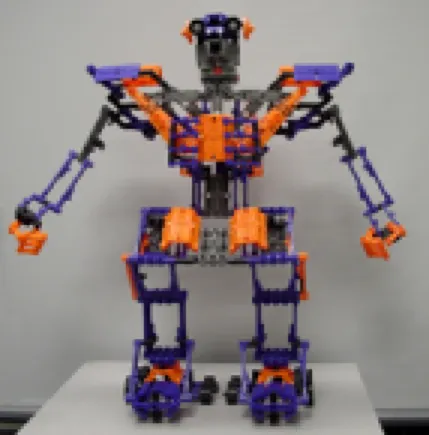
Tasks. The Robotix Vox Centurion robot kit was used as
the basis for the tasks (Figure 5). We devised five subtasks of similar difficulty, each of approximately 15 steps and 10 minutes long. Each task resulted in the completion of one part of the robot: the right ankle, left foot, right arm, left arm, and head.
Figure 5. The robot used for the experimental subtasks. Online manual. An online instruction manual was created
in PowerPoint using pictures from the Robotix manual. A set of bullet items outlined the steps to be completed. A printed version was used in the side-by-side condition.
Online Surveys. Three sets of online surveys were created
and then implemented in html and Microsoft Access for online presentation and automatic response recording.
• Pretest. A brief pre-test survey collected basic
demographic information (e.g., gender, age).
• Post-task. A post-task survey asked questions about
the success of each task collaboration (e.g., “I am confident we completed this task correctly”). Responses were made on a 5 point scale ranging from 1 (strongly disagree) to 5 (strongly agree). The survey also included questions tailored specifically for the participant’s role. Helpers indicated agreement with statements such as “I could tell when my partner needed assistance.” These questions were rephrased for workers (e.g., “My partner could tell when I needed his or her assistance”). Helpers also rated the extent to which they relied on different
resources (the manual, previous experience doing the task, ability to see what partner was doing, and partner’s requests for help) as they assisted their partner, on a scale of 1 (not at all) to 5 (extensively).
• Final Questionnaire. Two final questionnaires were
created, one for each experimental role. The helper survey included questions about the success of the collaboration (e.g., “my partner and I worked well together on these tasks) and importance of visual information (e.g., “It was important to me to be able to see what my partner was doing). Helpers also rated the similarity between each technology and face-to-face communication, and rated the usefulness of specific features of the technology. Ratings were made on 5-point scales. The Worker version included questions about the overall success of the collaboration.
Participants and Procedure
Workers and helpers were given an overview of their roles in the experiment—to build the robot and to instruct, respectively—and completed consent forms and pretests. They were then shown the robot and the communications technologies they would be using. The Helper was further instructed on use of the online manual.
Next, the experimenter helped the worker put on the head-mounted camera and calibrated the eye-tracking software. To ensure their experiences were consistent, workers wore the head-mounted camera in all conditions.
Pairs exchanged small talk to familiarize themselves with the equipment and then began their series of five trials. Participants were told what view(s) would be available to the helper prior to each trial. Upon completion of the task, or after a ten minute period, the work was halted and participants completed post-task questionnaires. They then moved on to the next task. After all five tasks were done, they completed the final questionnaire.
Conversational Analysis
Audio tapes were extracted from the DV recordings and transcribed, using CLAN format [19]. CLAN was used to calculate the number of turns each partner took during each session and the mean number of words per turn.
R E S U L T S
We present the results in three parts: First we examine the effects of communication media on task performance; then, we examine the post-task and final questionnaire results; finally, we examine communication efficiency.
Performance
Figure 6 shows task completion times across the five media conditions. Consistent with previous studies [8, 14] performance was fastest in the side-by-side condition, in which participants share full visual copresence. Performance with the scene camera was faster than with audio-only, but performance with the head-camera was not.
Completion times were analyzed in a Trial by Task by Media Condition repeated measures ANOVA. Results indicated a borderline significant main effect for Trial (F [4, 91] = 2.32, p = .06), and significant main effects for Task
(F {4, 91] = 4.19, p < .004), and Media Condition (F [4, 91] = 8.10, p < .0001) but no interactions.
Post hoc tests indicated that performance in the side-by-side condition was significantly faster than all other conditions (all p < .0001). In addition, performance with the scene camera was significantly faster than with the audio link (p = .02). Performance with the scene camera was slightly but nonsignificantly faster than with the head-mounted camera, which did not differ significantly from the audio-only condition. Surprisingly, performance with both cameras together was not as good as performance with the scene camera alone, and did not differ significantly from performance in the audio-only condition.
0 1 2 3 4 5 6 7 8 9 10
Audio Only Head Camera Scene Camera Head and Scene Cameras Side-by-Side
Completion Time (minutes)
Figure 6. Completion times by media condition (mins.). Questionnaire Data
After each task, participants rated aspects of their collaboration, including the success of the collaboration and the adequacy of the technology. The pattern of results was very similar across all survey measures. Here we present the results for pairs’ ratings of how well they worked together, helper ratings of the quality of their assistance, and the post-experimental questionnaire data.
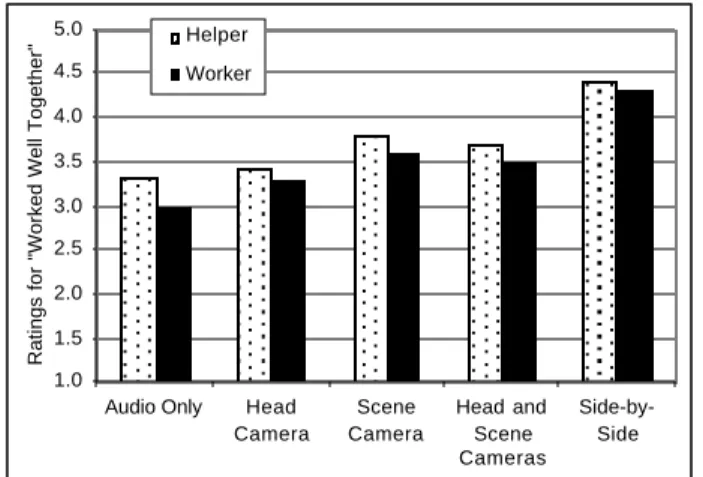
Working together. Pairs indicated they worked best in the
side-by-side condition and worst in the audio-only
1.0 1.5 2.0 2.5 3.0 3.5 4.0 4.5 5.0
Audio Only Head
Camera Scene Camera Head and Scene Cameras Side-by-Side
Ratings for "Worked Well Together"
Helper Worker
Figure 7. Ratings of whether the pair worked well together
by experimental role and media condition (1 = strongly disagree; 5 = strongly agree).
condition (Figure 7). For Helpers, there was a significant effect of condition (F [4, 85] = 2.93, p < .05). Post-hoc tests indicated that performance in the side-by-side was rated better than all other conditions (all p ≤ .005), and that performance in the scene and scene+head camera conditions was rated significantly better than performance in the audio-only condition or head-camera conditions (all p < .05). Worker ratings were slightly lower than helper ratings but showed the same pattern of results.
Tailoring help to worker needs. Helpers indicated that they
knew when to help workers most in the side-by-side condition, much of the time in the scene camera condition, and somewhat less in the audio-only and head-camera conditions (M = 3.46, 3.48, 4.15, 4.00, 4.73 for audio-only, head-camera, scene camera, head+scene cameras, and side-by-side conditions, respectively). A repeated measures ANOVA showed a significant effect of media condition (F [4, 85] = 8.35, p < .0001), but no other main effects or interactions. Post hoc tests indicated that helpers rated their ability to help higher in the side by side than in all other conditions (all p < .001). They also rated their ability to help in the scene and scene+head conditions higher than in the audio-only and head camera conditions (all p ≤ .01).
Use of Visual Cues. Helpers’ reported reliance on visual
cues (1 = not at all; 5 = extensively) to help them determine when and how to help likewise differed by media condition (M = 1.35, 2.81, 3.94, 3.80, and 4.91 for the audio-only, head-camera, scene camera, head+scene cameras, and side-by-side conditions, respectively). A repeated measures ANOVA indicated a borderline significant effect of Task (F [4, 85] = 2.39, p = .06) and a significant effect of Condition (F [4, 85] = 32.07, p < .0001). Post-hoc tests indicated that helpers rated their use of visual cues significantly higher in the side-by-side condition than in all other conditions (all p ≤ .001), and significantly lower in the audio-only condition than all other conditions (all p ≤ 0001). Use of visual cues with the scene and scene+head cameras was rated significantly higher than with the head-mounted camera (p < .001).
Final Questionnaire. The final questionnaire asked helpers
to rate each technology in comparison with working side-by-side (1 = very different; 5 = very similar). Conditions that included the scene camera were rated closer to side-by-side than the other two conditions (M = 1.76, 2.42, 3.35, and 3.66 for the audio-only, head-mounted camera, scene camera, and scene+head camera conditions, respectively.
Efficiency of Communication
Figure 9 shows the mean number of words per task by experimental role and media condition. Helpers did at least two-thirds of the talking in all conditions. The amount of helper talk differed significantly as a function of task (F [4, 52] = 2.52, p = .05) and media condition (F [4, 52] = 5.74, p < .001). Helpers used significantly fewer words in the side-by-side condition (p < .001). There was also a borderline significant difference (p = .09) between the scene camera and audio-only conditions.
0 100 200 300 400 500 600 700 800 900
Audio Only Head Camera Scene Camera Head and Scene Cameras Side-by-Side
Mean number of words per task
Helper Worker
Figure 9. Mean number of words per trial by experimental
role and media condition.
The amount of worker talk differed significantly as a function of Trial (F [4, 53] = 2.71, p < .05) and media condition (F [4, 53] = 10.35, p < .0001). Workers used significantly more words in the audio-only condition than in all other conditions (p = .02 for comparison with head-mounted camera, and 0001 for all other comparisons), significantly less words in the side-by-side condition than in all other conditions (all p ≤ .005), and significantly less words with the scene and scene+head cameras than with the head-mounted camera (both p < .005).
D I S C U S S I O N
Our results clearly demonstrate the value of shared visual space for collaboration on physical tasks. As in previous studies [8, 17], pairs worked best when they were side-by-side: they performed the task faster, rated their interactions as better, and communicated most efficiently. Pairs worked least well in the audio-only condition.
One can provide some of the benefits of shared visual space through technology. A scene-oriented camera showing a wide-angle view of the workspace provided significant benefit over audio-only communications. However, contrary to our expectations, a head-mounted camera with eye-tracking capabilities provided little benefit.
Moreover, the combination of head-mounted camera and scene camera did not enhance pairs’ effectiveness over the scene camera alone and in fact led to longer performance times than the scene camera alone. Helpers in the combined camera condition may have spent time looking at the head-camera that could have been spent looking at the more valuable scene-camera. Alternatively, they may have had difficulties deciding how to distribute their attention between the two cameras. The presentation of both cameras at the same time may also have been confusing to workers, who did not know which one the helper was looking at [9]. At the least, these results caution against strategies to create shared visual space through multiple video feeds.
Our findings highlight some of the difficulties of developing video systems to deliver theoretically important visual cues. Although our theoretical analysis suggests that visual cues to workers’ focus of attention and task activities is important (Figures 1 & 2), delivering these cues through
head-worn video cameras has not been successful to date. In earlier studies [8, 17], cameras often slipped on the workers’ heads, so that they were not pointing at the right place. In the current study, the calibration of the eye-tracker slipped over time. This suggests that head-mounted camera systems of the type we have studied may not yet be robust enough for actual field applications.
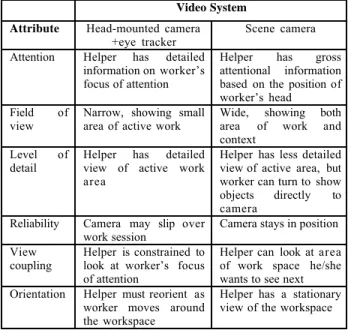
There may be other subtle costs to our head-mounted camera system as well, summarized in Figure 10. With a head-mounted camera, the helper is constrained to look at the same area as the worker, whereas with the scene camera, the helper’s view is not coupled with that of the worker. The value of being able to direct one’s focus of attention within the work area may outweigh the limitations of a less detailed view. In addition, the head-mounted camera is constantly moving, requiring the helper to realign the view with his/her model of the task. This may require cognitive processing that detracts from providing assistance.
Video System Attribute Head-mounted camera
+eye tracker
Scene camera
Attention Helper has detailed information on worker’s focus of attention
Helper has gross attentional information based on the position of worker’s head Field of
view
Narrow, showing small area of active work
Wide, showing both area of work and context
Level of detail
Helper has detailed view of active work area
Helper has less detailed view of active area, but worker can turn to show objects directly to camera
Reliability Camera may slip over work session
Camera stays in position
View
coupling Helper is constrained tolook at worker’s focus of attention
Helper can look at area of work space he/she wants to see next Orientation Helper must reorient as
worker moves around the workspace
Helper has a stationary view of the workspace
Figure 10. Features of the head-mounted and scene-oriented
video systems.
At the same time, our method of implementing the scene camera in this study may have enhanced its effectiveness. Although scene cameras do not necessarily provide any information on the worker’s focus of attention, the position of our camera (to the back right of the worker) allowed helpers to infer the worker’s general focus of attention by the angle of the back of his/her head. This gross level of attentional information may have been sufficient for the helpers’ purposes.
The scene camera did not give as detailed information about the active work area as did the head-mounted one. The relatively large and brightly colored pieces used in the robot construction task may have rendered this level of detail unnecessary. In addition, participants used the scene camera creatively to enhance shared visual space. For example, workers sometimes turned towards the camera to provide helpers a close up view of what they were doing.
In summary, although theoretical considerations suggest that both a head-mounted camera and a scene camera would provide valuable visual information for remote collaboration on physical tasks, details of the implementations and participants’ work-arounds to overcome some limitations suggests that providing remote helpers with a wide-angle, static view of the workspace will be most valuable. For mobile settings, in which static cameras may not be suited (e.g., emergency telemedicine or remote repair), head-mounted camera technology will require further development in order to minimize the problems we have identified.
ACKNOWLEDGEMENTS
This study was conducted with support from the National Science Foundation Grants #9980013 and #0208903. We thank Terry Chan, Sheel Mohnot, Phillip Odenz, Elizabeth Parker, Salma Ting, and Kristin Weinziert for running participants and preparing transcripts, Nasri Haijj for implementing the online surveys, and Tom Pope for technical assistance. We also thank Susan E. Brennan, Darren Gergle, Jane Siegel, Jie Yang and several anonymour reviewers for their valuable comments.
R E F E R E N C E S
1. Clark, H. H. (1996). Using language. Cambridge, UK:
Cambridge University Press.
2. Clark, H. H. & Brennan, S. E. (1991). Grounding in communication. In L. B. Resnick, R. M. Levine, & S. D. Teasley (Eds.). Perspectives on socially shared cognition (pp. 127-149). Washington, DC: APA
3. Clark, H. H. & Marshall, C. E. (1981). Definite reference and mutual knowledge. In A. K. Joshi, B. L. Webber & I. A. Sag (Eds.), Elements of discourse understanding (pp. 10-63). Cambridge: Cambridge
University Press.
4. Clark, H. & Wilkes-Gibbs, D. (1986). Referring as a collaborative process. Cognition, 22, 1-39
5. Daly-Jones, O., Monk, A. & Watts, L. (1998). Some advantages of video conferencing over high-quality audio conferencing: fluency and awareness of attentional focus. International Journal of Human-Computer Studies,49, 21-58.
6. Endsley, M. (1995). Toward a theory of situation awareness in dynamic systems. Human Factors, 37,
32-64.
7. Ford, C. E. (1999). Collaborative construction of task activity: Coordinating multiple resources in a high school physics lab. Research on Language and Social Interaction, 32, , 369-408.
8. Fussell, S. R., Kraut, R. E., & Siegel, J. (2000). Coordination of communication: Effects of shared
visual context on collaborative work. Proceedings of CSCW 2000 (pp. 21-30). NY: ACM Press.
9. Gaver, W., Sellen, A., Heath, C., & Luff, P. One is not enough: Multiple views in a media space. Interchi '93 (335-341). NY: ACM Press.
10.Goodwin, C. (1996). Professional vision. American Anthropologist, 96, 606-633.
11.Isaacs, E., & Clark, H. H. (1987). References in conversation between experts and novices. J. of Experimental Psychology: General, 116, 26-37.
12.Jefferson, G. (1972). Side sequences. In D. Sudnow (Ed.)Studies in social interaction (pp. 294-338). NY:
Free Press.
13.Karsenty, L. (1999). Cooperative work and shared visual context: An empirical study of comprehension problems in side-by-side and remote help dialogues.
Human-Computer Interaction, 14, 283-315.
14.Kraut, R. E., Fussell, S. R., & Siegel, J. (in press). Visual information as a conversational resource in collaborative physical tasks. Human-Computer Interaction.
15.Kraut, R. E., Fussell, S. R., Brennan, S., & Siegel, J. (2002). A framework for understanding effects of proximity on collaboration: Implications for technologies to support remote collaborative work. P. Hinds & S. Kiesler (Eds.), Technology and Distributed Work. Cambridge, MA: MIT Press.
16.Kraut, R. E., Gergle, D., & Fussell, S. R. (2002). The use of visual information in shared visual spaces: Informing the development of virtual co-presence.
Proceedings of CSCW 2002.
17.Kraut, R. E., Miller, M. D., & Siegel, J. (1996) Collaboration in performance of physical tasks: Effects on outcomes and communication, Proceedings of CSCW’96 (57-66). NY: ACM Press.
18.Kuzuoka, H. (1992). Spatial workspace collaboration: A Sharedview video support system for remote collaboration capability. Proceedings of CHI'92
(533-540). NY: ACM Press.
19.MacWhinney, B. (1995). The CHILDES Project: Tools for Analyzing Talk. Second edition. Hillsdale, NJ: Erlbaum. http://childes.psy.cmu.edu/
20.Nardi, B., Schwarz, H., Kuchinsky, A., Leichner, R., Whittaker, S. & Sclabassi, R. (1993). Turning away from talking heads: The use of video-as-data in neurosurgery. Proceedings of Interchi '93 (327-334).
NY: ACM Press.
21.Tang, J. C. (1991). Findings from observational studies of collaborative work. International Journal of Man-Machine Studies, 34, 143-160.