LSC
REGISTRATION & STUDENT RESOURCES
Spring/Summer 2015
LoneStar.edu
GET YOUR
BEST START
At Lone Star College, we want you to getyour BEST START every semester. We want
you to earn your associate degree, workforce certificate or transfer to a four-year university. Whatever your goals are, we’re here to help you succeed. For a list of resources to help you get on the path to success, visit LoneStar.edu/beststart.
Set
a goal
for what you want to accomplish
Make
a plan
to reach your goal
Get
connected
with advisors, faculty and student organizations
Stay
involved
with student life, classes and activities
11
22
33
44
LSC Success: Learn, Succeed, Complete is the Lone Star College success and completion plan. It is our commitment to the success of every student. LSC Success includes the system wide Best Start program, which focuses all students and employees on four key actions required to achieve success: set a goal, make a plan, get connected and stay involved. The Best Start program is also a specialized student success course designed to enhance academic success for First-Time-in-College Students. This student success course serves as the QEP (Quality Enhancement Program) of the Lone Star College SACS (Southern Association of Colleges and Schools) accreditation process. The LSC Success plan also provides student
support via mandatory new student orientation, required academic plans, declared Lone Star College System – (USPS 023-512) (Volume 10, Number 1 - November 2014) is published six times per year by the staff
CONTENTS
5 New Students 6 Transfer students 7 International students 7 Non-credit students (continuing education) 8 Accessing myLoneStar—your online student account
9 Student email Register for class Get your Best Start Student Resources New students start here 2 LSC locations map 4 Quick Links 11 Degrees & Certificates
12 Programs of Study 36 Tuition & Financial Aid
38 Requirements & Important info
42 LSC campuses
52 LSC Calendar & Important Dates
53 LSC Contacts
18 Search for classes through the main website 24 Search for classes
in myLoneStar 26 Enroll 27 Tips & Tools
—options for course planning and class registration 10 Set a Goal
—pick your program and view programs of study 16 Make a Plan
—plan your classes 21 Get Connected
—advice on connecting with advisors, faculty and career services 22 Stay Involved
—info on student life and activities, and tips on being a successful student
Lone Star College ID#
______________________________________________________
myLoneStar User Name
______________________________________________________
Security question+answer (or hint)
______________________________________________________ College Advisor ______________________________________________________ Advisor’s email ______________________________________________________
Quick Links
Student Services Student Services LoneStar.edu/students Admissions LoneStar.edu/admissions Advising resources LoneStar.edu/advising Programs of Study LoneStar.edu/programs-classes Campus Safety LoneStar.edu/campus-safety Student Life LoneStar.edu/student-activities Financial AidTypes of Financial Aid
LoneStar.edu/financial-aid-types Financial Aid
LoneStar.edu/FA Make a payment LoneStar.edu/payment Student Consumer Info LoneStar.edu/consumer-safety Class Search
LoneStar.edu/class-search Course Catalog
LoneStar.edu/lscs-catalog Academic Transfer info
LoneStar.edu/transfer-resources Forwarding Student email LoneStar.edu/email Career Exploration Career Planning LoneStar.edu/career-services Career Coach LoneStar.edu/career-resources Occupational Outlook Handbook www.bls.gov/oco
Career One Stop www.careeronestop.org My Plan
www.myplan.com
Admissions
Lone Star College is an open-enrollment institution. Most students are accepted once they have completed the admission process.
Enroll
To be enrolled in a course and receive credit for coursework, students must register, sign up, and pay for the class.
Credit Courses
Students receive credit towards their degree through credit courses. Credit is based on the number of hours spent per week in a course, which is generally 3 hours.
FYI
HELPFUL TERMS
New student checklist
FTIC Students
start here
First time in college?
Register and pay for classes.
Meet with an advisor to review your program of study, class selections and class schedule before registering for classes. You can complete class registration with an advisor or an online advisor. See page 10 and 16 for directions on:
• selecting a program of study
• selecting your classes and planning your class schedule
• how to search and register for the right classes
More information can also be found at LoneStar.edu/registration. See directions on how to pay for classes at
LoneStar.edu/payment.
Collect class and campus
essentials.
• Textbooks and supplies can be purchased at a campus bookstore or online. See page 20 or visit LoneStar.edu/bookstore for info on how to find the syllabi and textbooks required for each class.
• Your myLoneStar College ID/library card is used to check out and request books, videos and library services, and learning center resources. Please go to your campus library or visit
LoneStar.edu/library/services-students for more information. Your photo ID card also serves as your primary form of identification on campus.
• Parking Permit sticker. All vehicles on campus are required to have a current parking permit sticker each academic year. Visit LoneStar.edu/parking for more info.
Go to class!
Campus locations and contact info can be found on the inside covers of this guide, on pages 42–49, and online at
LoneStar.edu/locations.
Apply for admission.
Complete the admissions application online at
LoneStar.edu/admissions-application, or meet with an advisor at a campus for assistance.
• Allow about 20–30 minutes to complete the application. • After completing your online application you will receive your
Lone Star College student credentials, and an email to the personal email address you provided in the application with:
y your student ID number
y your LSC student email address.
y your LSC user name to access the password-protected myLoneStar student portal (see page 8 for more information about accessing myLoneStar)
Complete pre-assessment activity.
Must be completed before attending orientation. All students requiring the TSI Asssessment must complete a Pre-Assessment Activity.
Complete placement testing.
Must be completed before attending orientation. Visit LoneStar.edu/placement-testing-info
for details on placement tests, testing centers, scheduling and test prep.
• All new students must complete assessment testing to be accurately placed in college level courses. Prepare for the test—it counts!—use test prep resources. • SAT and ACT test scores may exempt you from taking
additional placement tests. Talk to an advisor about submitting your SAT, ACT, high school transcripts or other documents.
• Your SAT or ACT scores may also qualify you for The Honors College. See your advisor for details and eligibility requirements.
Satisfy bacterial meningitis
vaccination requirement.
Must be completed before you can register for classes. Visit LoneStar.edu/meningitis for more info or to see if you are exempt.
Complete new student orientation.
Must be completed before you can register for classes. Visit LoneStar.edu/orientation for more info.
22
33
44
11
55
6
6
77
8
8
Do you need financial aid? It takes time to process financial aid documents, so apply early! See page 37 for more information and requirements for financial aid, or visit LoneStar.edu/financial-aid.
4. Meet with an advisor.
When transferring courses between colleges and universities, it is important for students to know which classes will transfer into their particular degree program. Academic Advisors have resources, transfer tools, and knowledge available to assist you in determining which courses will transfer to your college or university.
5. Register and pay for classes.
Once you have been advised and cleared to register, you can register for courses using myLoneStar. See page 16 for directions on how to use your program of study to plan your class schedule, search and register for the right classes.
6. Collect class and campus
essentials.
• Textbooks and supplies can be purchased at a campus bookstore or online. See page 20 or visit LoneStar.edu/bookstore for info on how to find the syllabi and textbooks required for each class.
• Your myLoneStar College ID/library card is used to check out and request books, videos and library services, and learning center resources. Please go to your campus library or visit LoneStar.edu/library/services-students for more information. Your photo ID card also serves as your primary form of identification on campus.
• Parking Permit sticker. All vehicles on campus are required to have a current parking permit sticker each academic year. Visit LoneStar.edu/parking for more info.
1. Apply for admission.
Visit LoneStar.edu/admissions and follow all of the instructions on this page. You can access other web links and details from this page including financial aid application documents.
2. Submit transcripts.
Transfer students are unable to register online for classes if transcripts are needed for placement or prerequisite purposes and have not been received and evaluated.
y Transfer students can hand deliver transcripts and register in person with an advisor at each campus admissions/advising office.
y Transcripts can be sent electronically from institutions or mailed to:
Student Records
Lone Star College System 5000 Research Forest Dr. The Woodlands, TX 77381
y Transcript evaluation can take up to four weeks, or longer during the 2–3 weeks prior to the start of each semester.
3. Placement testing.
Unless you meet certain exemptions, you will need to submit placement test scores such as ACT, SAT, TAKS, THEA, ASSET, ACCUPLACER, or COMPASS scores. If you do not have placement tests, you may be required to complete assessment testing.
Transfer Students
Transfer students are new to
Lone Star College but have
college level credits from
another college or university.
Veterans
Veterans Affairs Center and Veterans Academic Advisors: The mission of the Veterans Affairs Center is to provide veterans and their family members with assistance in achieving their educational goals. If you are a veteran or a dependent of a veteran, the Veterans Affairs office is here to serve you. Please contact Veterans Affairs at [email protected] or call (281) 290-2900. Students using GI Bill benefits must meet with their Campus Veteran Academic Advisor prior to enrolling in classes to ensure eligibililty requirements. To find the VA Advisor at your campus please see LoneStar.edu/veterans-affairs.
Students with Disabilities
Support services for students with disabilities are provided on an individual basis, upon the student’s request, which can be made through the office of counseling services. For more information, go to
LoneStar.edu/disability-services.
FYI
SPECIALIZED STUDENT SERVICES
If you have previously enrolled to take Continuing Education (CE) courses but have never taken college credit courses, you must first apply as a new [credit] student to take credit classes. Turn to page “New student checklist” on page 5 and proceed as a new student. If you have college credits from another college or university, proceed as a transfer student (page 6).
If you are interested in taking CE courses or would like more information, please visit LoneStar.edu/CE. Lone Star College hosts more than 2,100 students from 108 countries at our six campuses. If you’re an international student interested in attending Lone Star College, contact one of our International Student Advisors before applying, for transfer and enrollment requirements.
Enrollment involves three processes: admission, advising and course registration. The following documents are required for admission: online general admissions application, F-1 Visa, international student application, evidence of financial support, proof of Meningitis vaccination (if applicable) and proof of English proficiency. Go to LoneStar.edu/new-international-students for complete information and contacts.
international Students
Non
-
credit Students
Start here.
Transfer anywhere.
For more information about transferring to a university, visit LoneStar.edu/transfer-university
or see page 48.
years at any university
College degrees for less
years at Lone Star College
You now have access to all the tools and services you need to find classes, register, and keep you connected and on your path to success!
After you submit the admissions application, you’ll receive your username, student ID and student email address to use to access campus computers and myLoneStar. You’ll then be able to set your password and use your myLoneStar account. myLoneStar is an easy-to-use student portal containing all the Lone Star College services you use most.
To get to myLoneStar, click myLoneStar
from the Lone Star College System home page,
LoneStar.edu, or go to my.LoneStar.edu, and log in.
my
l
one
s
tar
If you have any holds on your account, you will see this image when
on the myLoneStar homepage. You must take care of anything outstanding before enrolling.
All official communication from Lone Star College will be sent to your my.LoneStar.edu email address.
See the following page on how to forward your email to another address, and how to access your student email account in myLoneStar.
In myLoneStar (see previous page to get to myLoneStar), click Student Email in the sidebar.
Accessing student email
Forwarding emails to a
personal email account
A new window will pop up with your student email account. As long as you remember your myLoneStar log-in information, you have access to this account from any computer with Internet access.
In the top right corner of your email window, click the gear (tools) symbol > Options
On the next screen in the left sidebar, click Forwarding.
Click Start Forwarding and enter the email address where you want to forward your
student email and click Save. You can always change this address or Stop Forwarding
Set a goal
for what you want to accomplish
Before you make a plan, you have to figure out what you want to do. Are you a new student or already on a path? If you’ve already started your path, revisiting your goals can help secure your plans of succeeding. If you’re a new student, it’s important to learn about all the options available to you at Lone Star College. To help with setting a goal, check out our programs of study on pages 12–15, or talk to an advisor.
You can also go to LoneStar.edu/programs-classes to see what Lone Star College has to offer. When you’ve decided, use the drop down menu to select your major/program of study.
11
are key to your success in selecting a program of study, planning your classes and staying on track to complete your goal. Plan to spend time with your advisor outside of heavy registration
time periods to take advantage of the wealth of knowledge and advice they can provide. They can also help fast-track your registration process. If you’re unsure of your major, counselors and the career services office are also available to assist.
Pick your
program!
College Majors
Your college major is your academic program of study. Visit
www.mymajors.com for more information about college majors.
Academic Transfer Degrees
It is important to research transfer requirements to the university you plan to attend. To learn more about degree plan and transfer information to Texas universities, visit
LoneStar.edu/transfer-resources. Most universities will
accept up to 66 college credits; however, university transfer requirements do not always fit with LSC associate degree plans. Ultimately, the university you plan to transfer to will make the final decision on the transferability of your classes. Be sure to discuss your specific transfer requirements with an academic advisor, as well as with an advisor at the university you plan to attend. You can also visit the Texas Common Course Number System website to determine what classes will transfer from LSC to the university you plan to transfer to at www.tccns.org.
Degree & Certificate Options
Choose the career path that will help you reach your goals for the future.
A.A.
Associate of Arts
Prepares you to transfer to a Texas public university or college as a junior with the intention of declaring a major in the liberal or fine arts (English; History, others).
• Includes general education core courses common to Texas four-year universities also called “the basics” or “core requirements.”
A.A.–F.O.S.
Associate of Arts–Field of Study
Prepares you to transfer to a Texas public university or college as a junior with transferability of courses chosen for a specific major (Criminal Justice; Speech; Music; Business, and others).
A.A.T.
Associate of Arts in Teaching
Prepares you to transfer to a Texas public university as a junior with a specific teaching major: Early Childhood through Grade 6 Generalist.
A.S.
Associate of Science
Prepares you to transfer to a Texas public university or college as a junior with the intention of majoring in the sciences (Math, Engineering, Biology Social/Behavioral Science, and others)
• Includes general education core courses common to Texas four-year universities also called “the basics” or “core requirements.”
A.A.S.
Associate of Applied Science
A degree program for the student seeking technical career skills for work in a specific career.
• Includes about 18 hours of general education core courses. • Generally designed not to transfer, but can be transferred into
BAAS degree programs.
CERTIFICATES
Prepares you to enter a specialized career field or upgrade your skills for job advancement. Most certificate awards are structured to allow you to move on to a higher level certificate or associate of applied science degree.Marketable Skills Award Prepares you to enter a high-demand career field with minimal training.
First & Second Level Prepares you for entry in a career field requiring up to 2 years of training.
Enhanced Skills Certificate Pursued simultaneously with an AAS, prepares you for a career field with more specialized training.
Advanced Technical
Certificate Pursued after the completion of a related bachelor’s or associates degree, prepares you for a specialized career field. For more information on degrees, certificates, and requirements, visit LoneStar.edu/degrees-certificates
AND OR
PROGRAMS OF STUDY
CREDIT AND NON-CREDIT
(As of 11.6.14)CF K M NH T UP OL
Do you plan to transfer to a 4-year institution?
Academic Transfer Degrees and Certificates
Associate of Arts (AA) Degree ★ ★ ★ ★ ★ ★ ★
Business AA Degree ★ ★ ★ ★ ★ ★ ★
Computer Science AA Degree ★ ★ ★ ★
Criminal Justice AA Degree ★ ★ ★ ★ ★ ★ ★
Music AA Degree ★ ★ ★ ★ ★
Speech Communication AA Degree ★ ★ ★ ★ ★ ★ ★
International Studies AA Degree ★ ★ ★ ★ ★ ★
Associate of Science (AS) Degree ★ ★ ★ ★ ★ ★ ★
Biology AS Degree ★ ★ ★ ★ ★ ★ ✩
Biomedical Engineering AS Degree (pending THECB approval) ★ ★ ★ ★ ★
Civil Engineering AS Degree (pending THECB approval) ★ ★ ★ ★ ★
Electrical Engineering AS Degree (pending THECB approval) ★ ★ ★ ★ ★
Industrial Engineering AS Degree (pending THECB approval) ★ ★ ★ ★ ★
Mechanical Engineering AS Degree ★ ★ ★ ★ ★
Associate of Arts in Teaching ★ ★ ★ ★ ★ ★ ★
Do you plan to directly enter the workforce?
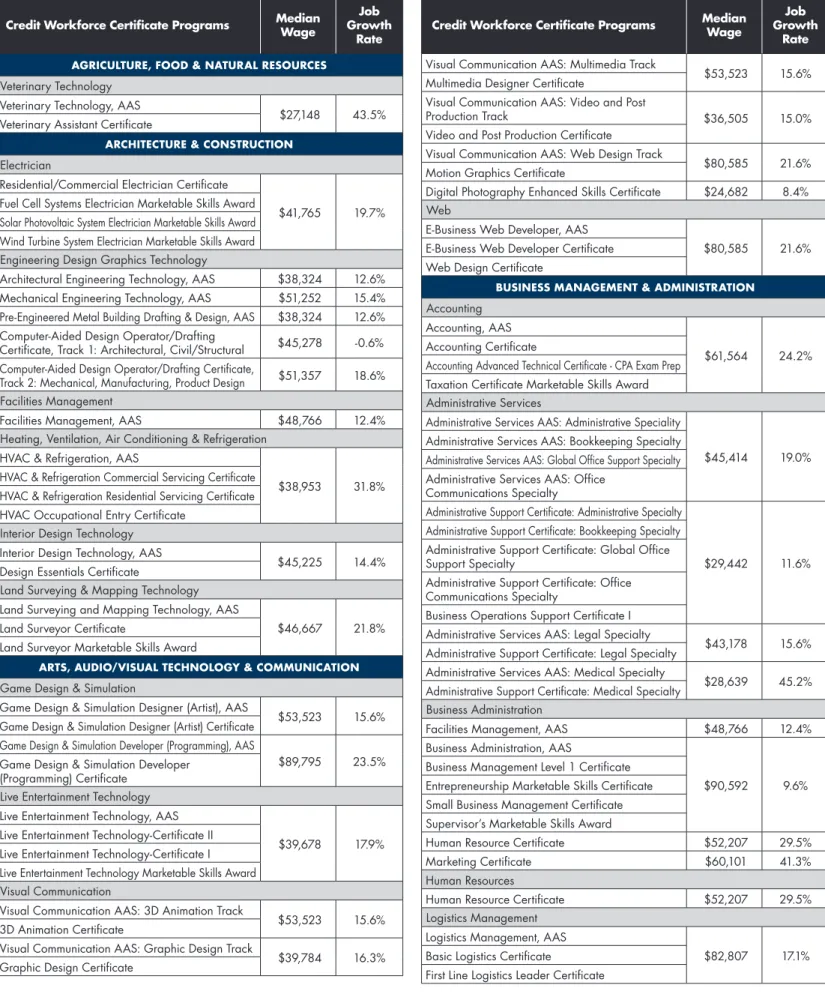
Associate of Applied Science (AAS) Degrees and Workforce Certificates Agriculture, Food & Natural Resources Cluster
Veterinary Technology
Veterinary Technology AAS Degree ★
Veterinary Assistant Certificate ★ ✩
Architecture & Construction Cluster
Electrical Technology
Electrical Technology AAS Degree ★
Electrical Technology Certificate II ★
Electrical Technology Certificate I ★
Fuel Cell Systems Electrician Marketable Skills Award ★
Solar Photovoltaic System Electrician Marketable Skills Award ★
Wind Turbine System Electrician Marketable Skills Award ★ Engineering Design Graphics Technology
Architectural Engineering Technology AAS Degree ★ ✩ ✩ ★
Mechanical Engineering Technology AAS Degree ★ ✩ ✩ ★
Pre-Engineered Metal Building Drafting & Design AAS Degree ★ ★
Computer-Aided Design Operator/Drafting Certificate,
Architectural, Civil/Structural Discipline ★ ★ Computer-Aided Design Operator/Drafting Certificate,
Mechanical, Manufacturing, Product Design Discipline ★ ★
• AutoCAD Draftsman Certificate ★ ★ ★ ★ ★ ★
• SolidWorks Designer Certificate ★ ★
CF K M NH T UP OL
Heating, Ventilation, Air Conditioning (HVAC) & Refrigeration
HVAC & Refrigeration AAS Degree ★
HVAC & Refrigeration Commercial Servicing Certificate ★
HVAC & Refrigeration Residential Servicing Certificate ★
HVAC Occupational Entry Certificate ★ ★ Interior Design Technology
Interior Design Technology AAS Degree ★ ✩
Design Essentials Certificate ★ ✩
Land Surveying & Mapping Technology
Land Surveying & Mapping Technology AAS Degree ★
Land Surveyor Certificate ★
Land Surveyor Marketable Skills Award ★
Arts, Audio/Visual Technology & Communication Cluster
Game Design & Simulation
Game Design & Simulation Designer (Artist) AAS Degree ★ ✩
Game Design & Simulation Designer (Artist) Certificate ✩ ★ ✩ ✩ ★
Game Design & Simulation Developer (Programming) AAS Degree ★ ✩
Game Design & Simulation Developer (Programming) Certificate ✩ ★ ✩ ✩ ★ Live Entertainment Technology
Live Entertainment Technology AAS Degree ★
Live Entertainment Technology Certificate II ★
Live Entertainment Technology Certificate I ★
Live Entertainment Technology Marketable Skills Award ★
Live Entertainment Technology Video AAS Degree ★
Live Entertainment Technology Video Certificate II ★
Live Entertainment Technology Video Certificate I ★
Live Entertainment Technology Video Marketable Skills Award ★ Visual Communication
Visual Communication AAS Degree: 3D Animation Track ✩ ✩ ✩ ★ ✩
3D Animation Certificate ✩ ✩ ✩ ★ ✩ ✩
Visual Communication AAS Degree: Graphic Design Track ★ ★ ✩ ★ ✩ ✩
Graphic Design Certificate ★ ★ ✩ ★ ✩ ✩
Visual Communication AAS Degree: Multimedia Track ★ ★ ✩ ★ ✩
Multimedia Designer Certificate ★ ★ ✩ ★ ✩ ✩
Visual Communication AAS Degree: Video & Post Production Track ★ ★ ✩ ★ ✩
Video & Post Production Certificate ★ ★ ✩ ★ ✩ ✩
Digital Photography Enhanced Skills Certificate ★ ★ ★
Motion Graphics Certificate ★ ★ ✩ ★ ✩
Web
Visual Communication AAS Degree: Web Design Track ✩ ✩ ✩ ★ ✩
Web Design Certificate ✩ ✩ ✩ ★ ✩ ★
• Web Designer Certificate ★
• Web Developer Certificate ★
CF: LSC-CyFair K: LSC-Kingwood M: LSC-Montgomery NH: LSC-North Harris T: LSC-Tomball UP: LSC-University Park OL: LSC-Online Learning | ★ Total Academic Transfer Certification or Degree Offered ✩ Some Courses Offered • Non-Credit
LSC Credit and Non-Credit Programs of Study are organized according to nationally recognized career clusters. Each career cluster represents a broad industry and group of occupations that require common knowledge and skills, followed by the LSC Programs of Study offered in each cluster. Each LSC Program of Study degree or certification plan details a recommended sequence of coursework based on a student’s interest and career goal. Specific Credit and Non-Credit Program of Study degree plans are available at LoneStar.edu/programs-classes. Credit Programs of Study are designed for students that want to join the workforce and also provide transfer credits to four-year universities for students planning to continue their education to obtain a bachelor’s degree. Non-credit programs of study are designed for students that want to obtain career training for immediate employment and generally do not include transferable college credits. Non-credit programs are designated with a red dot (•).
PROGRAMS OF STUDY
CREDIT AND NON-CREDIT
(As of 11.6.14)CF K M NH T UP OL Business Management & Administration Cluster
Accounting
Accounting AAS Degree ★ ✩ ★ ★ ★ ★ ★
Accounting Certificate ★ ✩ ★ ★ ★ ★ ★
Accounting Advanced Technical Certificate - CPA Exam Prep ★ ✩ ★ ★ ★ ★ ★
Taxation Certificate Marketable Skills Award ★ ✩ ★ ★ ★ ✩ ✩
• Accounting Assistant Certificate ★ ★ ★ ★ ★ ★
• Payroll Professional Certificate ★
Administrative Services
Administrative Services AAS Degree: Administrative Speciality ✩ ★ ✩ ★ ✩ ★
Administrative Support Certificate: Administrative Specialty ✩ ★ ✩ ★ ✩ ★
Administrative Services AAS Degree: Bookkeeping Specialty ✩ ★ ✩ ★ ✩ ★
Administrative Support Certificate: Bookkeeping Specialty ✩ ★ ✩ ★ ✩ ★
Administrative Services AAS Degree: Medical Specialty ✩ ★ ✩ ★ ✩ ★
Administrative Support Certificate: Medical Specialty ✩ ★ ✩ ★ ★ ★
Administrative Services AAS Degree: Global Office Support Specialty ✩ ★ ✩ ★ ✩ ★
Administrative Support Certificate: Global Office Support Specialty ✩ ★ ✩ ★ ✩ ★
Administrative Services AAS Degree: Office Communications Specialty ✩ ★ ✩ ★ ✩ ★
Administrative Support Certificate: Office Communications Specialty ✩ ★ ✩ ★ ✩ ★
Business Operations Support Certificate I ✩ ★ ✩ ★ ★ ★ Business Administration
Business Administration AAS Degree: Business Management Specialization ★ ★ ★ ★ ★ ★ ★
Business Administration Certificate II:
Business Management Specialization ★ ★ ★ ★ ★ ★ ★ Business Administration AAS Degree: Human Resource Specialization ★ ★ ★ ★ ★ ★ ★
Business Administration Certificate II:
Human Resource Specialization ★ ★ ★ ★ ★ ★ ★ Business Administration AAS Degree: Marketing Specialization ★ ★ ★ ★ ★ ★ ★
Business Administration Certificate II:
Marketing Specialization ★ ★ ★ ★ ★ ★ ★
Business Operations Certificate I ★ ★ ★ ★ ★ ★ ★
• Project Management Certification ★ ★
• Supervisor I Certificate ★ ★ ★
• Supervisor II Certificate ★ ★ ★
Logistics Management
Logistics Management AAS Degree ★ ✩
First Line Logistics Leader Certificate ★ ✩
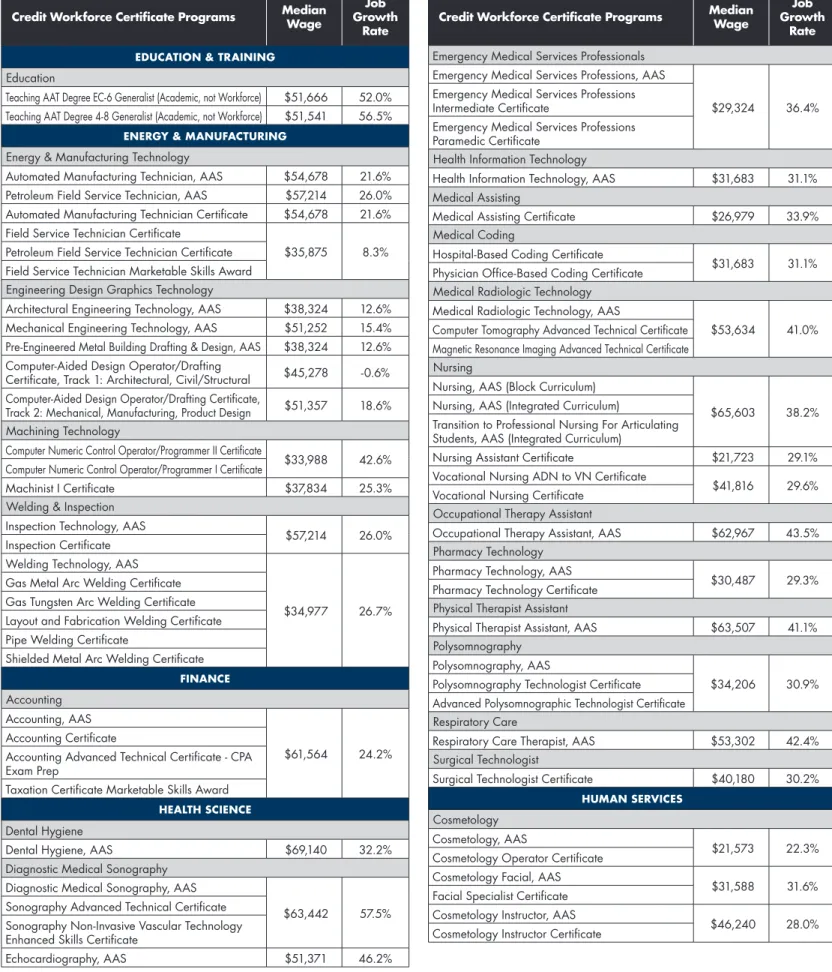
Education & Training Cluster
Education
Associate of Arts in Teaching ★ ★ ★ ★ ★ ★ ★
• Substitute Teacher ★ ★
• Texas Teacher Certification: Clinical Teaching Track ✩ ✩ ✩ ✩ ✩
• Texas Teacher Certification: Internship Track ✩ ✩ ✩ ✩ ✩
CF K M NH T UP OL Energy & Manufacturing Cluster
Energy & Manufacturing Technology
Automated Manufacturing Technology AAS Degree ★
Automated Manufacturing Technology Certificate ★
Industrial Diesel Technology AAS Degree ★
Industrial Diesel Technology Level II Certificate ★
Industrial Diesel Technology Level I Certificate ★
Petroleum Field Service Technology AAS Degree ★
Petroleum Field Service Technology Certificate ★
Field Service Technology Certificate ★ ★ ★
Field Service Technology Marketable Skills Award ★ ★ ★
Petroleum Data Technology AAS Degree ★
Petroleum Data Technology Certificate ★ ★
• Electronic Assembler Certificate ★
• Engineering Technician Certificate ★ ★ ★ Engineering Design Graphics Technology
Architectural Engineering Technology AAS Degree ★ ✩ ✩ ★
Mechanical Engineering Technology AAS Degree ★ ✩ ✩ ★
Pre-Engineered Metal Building Drafting & Design AAS Degree ★ ★
Computer-Aided Design Operator/Drafting Certificate,
Architectural, Civil/Structural Discipline ★ ★ Computer-Aided Design Operator/Drafting Certificate,
Mechanical, Manufacturing, Product Design Discipline ★ ★
• AutoCAD Draftsman Certificate ★ ★ ★ ★ ★ ★
• SolidWorks Designer Certificate ★ ★
Machining Technology
Machining Technology AAS Degree ★ ★
Computer Numeric Control Operator/Programmer II Certificate ★ ★
Computer Numeric Control Operator/Programmer I Certificate ★ ★
Machinist I Certificate ★ ★ ★
• Machinist Certificate ★ ★
• Machine Tool (CNC) Operator Certificate ★ ★ Oil & Gas Drilling
• Floor-Hand Roustabout Certificate ★
• Motor-Hand Certificate ★
Welding & Inspection
Inspection Technology AAS Degree ★
Inspection Certificate ★
Welding Technology AAS Degree ★ ★
Gas Metal Arc Welding Certificate ★ ★
Gas Tungsten Arc Welding Certificate ★ ★
Layout & Fabrication Welding Certificate ★ ★
Pipe Welding Certificate ★ ★
Shielded Metal Arc Welding Certificate ★ ★
• Gas Metal Arc Welder (GMAW) Certificate ★ ★
• Gas Tungsten Arc Welder (GTAW) Certificate ★ ★
• Pipe Welder Certificate ★ ★
• Shielded Metal Arc Welder (SMAW) Certificate ★ ★
PROGRAMS OF STUDY
CREDIT AND NON-CREDIT
(As of 11.6.14)CF K M NH T UP OL Finance Cluster
Accounting
Accounting AAS Degree ★ ✩ ★ ★ ★ ★ ★
Accounting Certificate ★ ✩ ★ ★ ★ ★ ★
Accounting Advanced Technical Certificate - CPA Exam Prep ★ ✩ ★ ★ ★ ✩ ★
Taxation Certificate Marketable Skills Award ★ ✩ ★ ★ ★ ✩ ✩
• Accounting Assistant Certificate ★ ★ ★ ★ ★ ★
• Payroll Professional Certificate ★
Government & Public Administration Cluster
No programs offered. Individual classes available.
Health Science Cluster
Dental Hygiene
Dental Hygiene AAS Degree ★
• Dental Assistant Certificate ★ Diagnostic Medical Sonography
Diagnostic Medical Sonography AAS Degree ★
Sonography Advanced Technical Certificate ★
Sonography Non-Invasive Vascular Technology
Enhanced Skills Certificate ★ Echocardiography AAS Degree ★ Electrocardiography
• Electrocardiography Monitoring Technician Certificate ★ ★
• Electrocardiography Technician Certificate ★ ★ Emergency Medical Services Professionals
Emergency Medical Services Professions AAS Degree ★ ✩ ★
Emergency Medical Services Professions Paramedic Certificate ★ ✩ ★
Emergency Medical Services Professions Intermediate Certificate ★ ✩ ★ ★
• Emergency Medical Technician (EMT): Basic Certificate ★ ★ Health Information Technology
Health Information Technology AAS Degree ★ ✩
Coding Certificate ★ ✩
Massage Therapy
Massage Therapy Certificate (effective SP/15 pending THECB approval) ★ Medical Assisting
Medical Assisting Certificate ★ ★
Medical Radiologic Technology
Medical Radiologic Technology AAS Degree ★ ★
Magnetic Resonance Imaging Advanced Technical Certificate ★
Computed Tomography Advanced Technical Certificate ★ Nursing
Nursing AAS Degree (Block Curriculum) ★
Nursing AAS Degree (Integrated Curriculum) ★ ★ ★ ★ ✩
Transition to Professional Nursing For Articulating Students AAS Degree
(Integrated Curriculum) ★ ★ ★ ★ ✩
Vocational Nursing ADN to VN Certificate ★ ✩
Vocational Nursing Certificate ★ ★ ★ ★ ✩
Nursing Assistant Certificate ★ ★ ★ ★ ✩
• Nurse Aide (CNA) Certificate ★ ★ ★ ★ ★
• Patient Care Technician Certificate ✩ ★ ★ ★ ★ Occupational Therapy
Occupational Therapy Assistant AAS Degree ★ ★
CF K M NH T UP OL
Personal Trainer
• Personal Trainer Certificate ★ ★ ★ Pharmacy Technology
Pharmacy Technology AAS Degree ★ ✩
Pharmacy Technology Certificate ★ ★
Phlebotomist
• Phlebotomist Certificate ★ ★ ★ ★
Physical Therapy
Physical Therapist Assistant AAS Degree ★ Polysomnography
Polysomnography AAS Degree ★
Advanced Polysomnographic Technologist Certificate ★
Polysomnographic Technologist Certificate ★ Respiratory Care
Respiratory Care Therapist AAS Degree ★ Surgical Technology
Surgical Technology AAS Degree
(effective Fall 2015, pending THECB approval) ★
Surgical Technology Certificate (until fall 2015) ★
HospitalityCluster
• Floral Designer Certificate ★
• Wedding Planner Certification ★
Human Services Cluster
Cosmetology
Cosmetology AAS Degree ★ ★
Cosmetology Operator Certificate ★ ★
Cosmetology Facial AAS Degree ★ ★
Facial Specialist Certificate ★ ★
Cosmetology Instructor AAS Degree ★ ★
Cosmetology Instructor Certificate ★ ★ Human Services
Human Services AAS Degree: General Human Services Track ★ ✩
Human Services Certificate ★ ✩
Human Services AAS Degree: Substance Abuse Counseling Track ★ ✩
Basic Chemical Dependency Counselor Certificate ★ ✩ Interpreter Training Technology
Interpreter Training Technology AAS Degree ★ ★
ASL Communications Skills Certificate ★ ★
Information Technology Cluster
Computer Applications
Microsoft Office Specialist Certificate ★ ★ ★ ★ ★ ★
PC Support Specialist Certificate ★ ★ ★ ★ ★ ✩
• Microsoft Office Software Applications Certificate ✩ ★ ★ ✩ ★ ★ ✩
• Oracle Certification ★
Computer Programming
Programming Specialist AAS Degree ★ ★ ★ ★ ★ ★
Programming Specialist Certificate ★ ★ ★ ★ ★ ★
C++ Programming Enhanced Skills Certificate ★ ★ ★ ★ ★
Visual Basic Enhanced Skills Certificate ★ ★ ★ ★ ★ Computer Engineering
Computer Engineering Technology AAS Degree ★ ✩ ✩
PROGRAMS OF STUDY
CREDIT AND NON-CREDIT
(As of 11.6.14)CF K M NH T UP OL
Geographic Information Systems
Geographic Information Systems AAS Degree ★ ✩ ✩
Geographic Information Systems Analyst Certificate ★ ✩ ✩
Geographic Information Systems Technician Certificate ★ ✩ ✩
Geographic Information Systems Marketable Skills Award ★ ✩
Integrated Technology
Converged Technology Advanced Technical Certificate ★
Network & Computer System Administrator AAS Degree ★ ★ ★ ★ ★ ✩
Network & Computer System Administrator Certificate ★ ★ ★ ★ ★ ✩
Networking: Cisco & Microsoft
Computer Networking Cisco AAS Degree ★ ★ ✩ ★ ★ ✩
Network Engineering Certificate: CCNP
(Cisco Certified Network Professional) ★ ★ ✩ ★ ★ Network Administration Certificate: CCNA
(Cisco Certified Network Associate) ★ ★ ✩ ★ ★ Computer Networking Microsoft AAS Degree ★ ★ ✩ ★ ★ ✩
Network Engineering Certificate: MS Level II ★ ★ ✩ ★ ★ ✩
Network Administration Certificate: MS Level I ★ ★ ✩ ★ ★ ✩ • CCNA (Cisco Certified Network Associate) Certificate ★ ★ ★ ★
PC Helpdesk
• A+ Certification ★ ★
• Computer Support Technician Certificate ★ ★
Web
Visual Communication AAS: Web Design Track ✩ ✩ ✩ ★ ✩
Web Design Certificate ✩ ✩ ✩ ★ ✩ ★
• Web Designer Certificate ★ • Web Developer Certificate ★ Law, Public Safety, Corrections & Security Cluster
Emergency Medical Services Professionals
Emergency Medical Services Professions AAS Degree ★ ✩ ★
Emergency Medical Services Professions Paramedic Certificate ★ ✩ ★
Emergency Medical Services Professions Intermediate Certificate ★ ✩ ★ ★ • Emergency Medical Technician (EMT): Basic Certificate ★ ★
Fire Science Technology
Fire Science Technology AAS Degree ★ ★
Basic Structural Firefighter Certificate ★ ★ ★
Paralegal Studies
Paralegal Studies AAS Degree ★ ✩
Paralegal Studies Advanced Technical Certificate ★ ✩
Public Safety
•Basic Peace Officer ★
Marketing Cluster
Business Administration AAS Degree: Marketing Specialization ★ ★ ★ ★ ★ ★ ★
Business Administration Certificate II:
Marketing Specialization ★ ★ ★ ★ ★ ★ ★
CF K M NH T UP OL Science, Technology, Engineering & Mathematics Cluster
Biotechnology
Biotechnology AAS Degree ✩ ★ ✩ ✩
Biotechnology Advanced Technical Certificate ★
Computer Engineering
Computer Engineering Technology AAS Degree ★ ✩ ✩
Energy & Manufacturing Technology
Automated Manufacturing Technology AAS Degree ★
Automated Manufacturing Technology Certificate ★
Petroleum Field Service Technology AAS Degree ★
Petroleum Field Service Technology Certificate ★
Field Service Technology Certificate ★ ★ ★
Field Service Technology Marketable Skills Award ★ ★ ★ • Electronic Assembler Certificate ★ • Engineering Technician Certificate ★ ★ ★
Engineering Design Graphics Technology
Architectural Engineering Technology AAS Degree ★ ✩ ✩ ★
Mechanical Engineering Technology AAS Degree ★ ✩ ✩ ★
Pre-Engineered Metal Building Drafting & Design AAS Degree ★ ★
Computer-Aided Design Operator/Drafting Certificate,
Architectural, Civil/Structural Discipline ★ ★ Computer-Aided Design Operator/Drafting Certificate,
Mechanical, Manufacturing, Product Design Discipline ★ ★
Transportation, Distribution & Logistics Cluster
Automotive Technology
Automotive Technology AAS Degree ★
Chassis & Electrical Technician Certificate ★
Power Train & Driveability Technician Certificate ★
General Service Technician Certificate ★ ★ • Automotive Technician Certificate ★ ★ • Diesel Truck Maintenance Technician Certificate ★ • Professional Truck Driver Certificate ★
Logistics Management
Logistics Management AAS Degree ★ ✩
First Line Logistics Leader Certificate ★ ✩
• Certified Logistics Associate ★
• Certified Logistics Technician ★ Industry Certification & Exam Prep Cluster
• A+ Certification ★ ★
• Certified Logistics Associate ★
• Certified Logistics Technician ★ • Electrician - Journeyman: Exam Review Certificate ★ • Electrician - Master: Exam Review Certificate ★
• Oracle Certification ★
• Project Management Certification ★ ★ • Wedding Planner Certification ★ • Welding Inspector Exam Prep Certificate ★ ★
Make a plan
to reach your goal
After you’ve selected your program of study (page 10), you will see a list of classes in the sequence you might take them. See sample below.
Search for classes two ways:
COURSE
NUMBERING
SYSTEM
First Digit 0= Developmental Course 1= Freshman Course 2= Sophomore Course Second Digit1= 1 Credit Hour Course 2= 2 Credit Hour Course 3= 3 Credit Hour Course 4= 4 Credit Hour Course
Ex. ENGL 1301
First digit is one, second digit is three. ENGL 1301 is a freshman course and a 3 credit hour course.
FYI
22
Through the main website
This is a great way to explore and research options before heading into myLoneStar. It is accessed through LoneStar.edu and allows you to search and view classes offered per semester—you cannot save classes or register using this method. See page 18 for a walk-through.
Through
myLoneStar
You must use myLoneStar to register and pay for classes. The myLoneStar search page 24 is the same as through the main website, but you can also add classes to your planner to save for later, or add to your shopping cart for registration.
Using your advisement report in myLoneStar can also help you register. See page 27 in Tips & Tools for more info.
–oR–
SAM
PLE
Print your course list to help you register for classes.
Plan Successfully
Overloading work/school hours is the #1 reason students do poorly, have to drop their classes and lose their money, or find themselves on academic probation or suspension.
Credit Hour Guidelines*
Full-Time ... 12–18 credit hours 3/4 Time ... 9–11 credit hours Half-Time... 6–8 credit hours Student Loan Minimum ... 6 credit hours Maximum Load** ... 18 credit hours
*Credit hours, credits, hours and units have the same meaning.
**Permission to enroll in an academic overload is granted by the vice president of instruction. See an advisor for additional information.
Course Load Guidelines
Study at least two hours for every one hour spent in the classroom. For example, if you are enrolled in 12 credit hours of classes, you would need to schedule 2 hours per credit hour to study, or 24 ad-ditional hours to study each week. This equals 36 hours per week scheduled for school commitments!
If you are working and going to school, please note the following guidelines for the maximum number of work hours according to course load:
SCHOOL...WORK 6 credit hours... 40 hours 9 credit hours... 30 hours 12 credit hours ... 20 hours 14-15 credit hours ... 10 hours or less
Three-peat Rule
If you attempt a course more than twice, a higher tuition rate is charged for most credit courses, starting on your third attempt.
Excessive Credit Hours
Acquiring more than 30 credits in excess of your bachelor’s degree requirement may result in a higher tuition rate being charged by your university.
Six-Drop Rule
• You will be limited to 6 dropped courses while attending Texas public colleges or universities.
• Your drop record will follow you when transferring.
• If you still choose to drop a class, be specific in stating your reason for withdrawing.
Things to keep in mind when
making your schedule...
Withdrawing from
classes
Before withdrawing from classes
• Talk to your instructor. Ask for recommendations on how to improve your grade.
• Talk to your advisor. Why do you feel you need to drop the class?
• Seek out the tutoring services at any campus Learning Center. • Check with the financial aid
department to determine if withdrawal will adversely affect your financial aid.
• Check the tuition refund chart in the class schedule. Realize that you may not receive any refund. • Make your final decision before the last day to withdraw (look for the date on the academic calendar on page 52).
• Students must see an advisor to drop. Students cannot drop a class online once it has started.
If you still want to withdraw from a class, ask yourself how it would affect:
• Your ability to graduate on time • Your status for health or
automobile insurance • Your continued eligibility for
financial aid
• Your ability to register for the class the following semester • Your transfer to a university • Your tuition—if the next time you
register for this course will be your third attempt (withdrawing counts as an attempt). See “Three-peat Rule.”
Search through the
main website
Use drop down boxes to select your search criteria for
term (semester), campus,
mode of instruction, etc.
If you have specific requirements or preferences, you can narrow down your search by a number of other factors. Click search once you’ve chosen all your preferred criteria.
Registering late? Choose “Late Start” for your session. Using your program class,
enter the course subject and number, or you can search by course subject by selecting select subject.
SPECIAL ACADEMIC
PROGRAMS
Honors
Honors credit is earned through special contracts for courses with faculty members who are committed to an open-ended approach to learning.
Service Learning
Service Learning is a teaching method which combines community service with academic instruction as it focuses on critical, reflective thinking and civic responsibility. Service Learning programs involve students in organized community service that addresses local needs, while developing their academic skills, sense of civic responsibility, and commitment to the community.
To search through the main site, go to LoneStar.edu/search-for-classes.
On-campus. Attend class in a classroom setting.
Online. Complete classes in a virtual setting. Not recommended for first-time college students.
Hybrid. Combined on-campus and online instruction.
MODE OF
INSTRUCTION
(class formats) After you choose your campus, choose a location, or you’ll seeresults for all locations.
Choose CREDIT for Course Career
If you get more than 50 results, you will see this message. Click OK to continue or Cancel to edit or narrow your search.
Search results show up to three sections per page. To view all the sections, click View All Sections.
Once you have searched for classes, you will see search results like the example.
Prerequisite
A prerequisite is a course that you must pass before enrolling in a more advanced course.
Corequisite
A corequisite is a course that you must enroll in at the same time as, or prior to, enrolling in a desired course.
Courses following prerequisites
Students enrolled in a prerequisite course CAN enroll for the next course during open registration. Enrolling in consecutive prerequisite courses during consecutive summer mini-mesters will require advisor approval.
Pre- and corequisites are listed under Enrollment Information in the “Course Detail” (page 34).
FYI
COURSE TERMS
READING THE COURSE
DESCRIPTION
Reading the course description is an important part of the registration process. Please note—the course # and class # are two different things.
Class
#
Subject and
course #
Click for textbook info and costClick to see
prerequisites
This is the
lab portion of
the class
See class expectations Meeting timesDouble check
location
Classes begin
and end
Subject Course # Class # Location Time Days Hours
Ex. MATH 2415 11726 LSC-North Harris 12:30–2:45 TuTh 4
1 2 3 4 5 6 7 8 Total Hours
REGISTRATION
WORKSHEET
This worksheet can help you plan your classes, times, and locations. If you’re unsure how many classes to take, review the guidelines on page 17. After you’ve completed the worksheet, you can use it to register two ways:
Search in myLoneStar.
Searches the same way you would through the main website. Your search results look the same, except you’re able to select, save and register for classes. Go to page 24.
Quick enroll. This is the fastest way to register—just be sure to have the class numbers handy. Go to page 29.
Save courses you’re unable to take this semester and assign them to a future one using My Planner
inside myLoneStar. See page 31 for more info.
Get connected
with advisors, faculty and student organizations
The advising process is an integral part of your academic success. Academic advisors are available to assist you with a variety of academic services including admissions, testing, advising, registration, referral of campus and community resources, add/drop/withdrawal process, transfer planning, and graduation processes. Check out our advising resources at LoneStar.edu/advising and don’t hesitate to contact us if you need additional assistance. We’re here to help you!
Advisors
Academic advisors are available on a walk-in basis. Advisors provide a full array of services ranging from college admissions to financial aid, and advising and registration. Students may wish to see an advisor to discuss topics such as:
• Academic degree and transfer planning
• Information about programs offered at Lone Star College • Assistance with course selection
• Schedule changes and withdrawals • Graduation requirements
• College placement tests
Faculty
Connecting with your professors is a simple way to stay on track. Contact them early in the semester to establish a connection. Make a note of their office hours and email address, and ask questions if you’re in doubt about class topics or assignments. Staying in touch with your professors provides added support in achieving class goals and overall student success. Lone Star College instructors want students to excel; do your part by connecting with them.
Career Services
Check out the LSC Career Services department for a variety of career exploration, planning and search opportunities. Connect with these services early to take advantage of valuable resources to make your path to success deliberate.
33
Career Counseling: Assistance with career exploration assessments; personality and interest assessments; selecting a major; career planning; job search coaching; interview preparation; résumé preparation.
Career Resource Library: Career fields and majors; agencies and organizations; career planning information; résumé and cover letter guides; and resources for special populations.
Employment Resources: Résumé and interviewing seminars; résumé critiques; job search coaching; and job postings on system databases.
Career Placement Center: The LSC Career Placement Center works with regional and local employers to develop competitive job and internship opportunities for LSC students and graduates. The center also coordinates regular career fairs for all students several times each year to connect students with direct job opportunities, and works to increase the number of employers and variety of industries recruiting LSC students.
Visit LoneStar.edu/career-services for more information.
The Office of Student Life offers a variety of ways for you to get involved with your campus, other students and your community. Student life provides leadership development, social opportunities, volunteerism and academic success.
Stay involved
with student life, classes and activities
Research shows that students who are actively involved with clubs and student organizations are more likely to complete their goals. Surrounding yourself with people who have the same goals will keep you focused on the same outcome!
44
Other student activity opportunities
If you want to work more closely with a campus, become a Student Ambassador and represent the college at official functions. Opportunities for service include participating in college night, serving as hosts/greeters for official college functions, conducting tours for visitors, and assisting with open week activities each semester.
Lone Star College also offers:
• Clubs and organizations • Leadership training • Intramurals and club sports • Arts and theatre
For more information on student activities and how you can get involved, visit LoneStar.edu/student-activities.
What We Do
• Enhance the overall educational experience of students through development of, exposure to, and participation in educational, social, cultural, intellectual, and recreational activities.
• In a nutshell, the ultimate goal of student life is to enhance the student experience and promote student success.
What We Offer
• Student leadership programming
• Student learning opportunities (extracurricular learning)
• Student life programming • Student mentoring programs
• Fiscal responsibilities of Student Activity Funds • Student Ambassadors
Get Involved
• Join an existing organization. • Start your own organization.
• Participate in leadership opportunities. • Come to an event.
• Getting involved is a great way to have fun, build up your resume/transcript, and meet others outside of the classroom.
Stay Informed
• For the latest information, visit LoneStar.edu/Student-Activities.
SPECIAL
ACADEMIC PROGRAMS
Learning Communities
Learning communities offer students an innovative and exciting way to learn through the integration of two courses from different disciplines which are taught separately, but focus on a common theme or question. Classes are offered at no extra cost.
Study Abroad
LSC offers study abroad
opportunities to students who are interested in studying in different countries around the globe. Countries LSC has previously visited include Sri Lanka, Italy and China. Student scholarship opportunities are available.
FYI
As a good student, it’s your responsibility to:
• Go to class. Attendance counts!
• Join learning communities and study groups. • Take advantage of free tutoring and use the library. • Stay in touch with your professors and advisors. • Ask for help when you need assistance. • Participate in student activities.
SUCCESS
Tune in!
P Pay attention P Take notes P Ask questions P ParticipateBring it!
P Complete homeworkP Read before class
P Bring text and supplies
Show up!
P Attend all classes P Arrive on time P Talk to your instructor
about absences
Stay
involved...
and you’ll be on the
road to success.
Search in myLoneStar
Log into myLoneStar (page 8).
TIP
Another helpful tool to efficiently search for classes and register is your advisement report (page 27). Your advisement report shows all of the course options and requirements needed to complete your specific degree. It also shows how the courses you have taken count toward your degree.If you want to take a class, click select class.
Double check that the class fits your schedule and click
NEXT.
The class has been added to your shopping cart!
Once you have all your classes added to your shopping cart, click Enroll. Search for classes the same as you would using the main website search. For screen shots and steps, see page 18.
Your Name
Your Name Your Name
When you’re ready to “check out,” click Proceed to Step 2 of 3.
Under the Enroll tab you’ll see your semester shopping cart.
Review your classes for accuracy and when you’re ready to enroll, click Finish Enrolling.
Congratulations—you’ve enrolled! Review your class schedule, note the payment deadline and prepare before they begin. Go to pages 21 and 22 to get connected and stay involved, and continue on your path to success!
Helpful solutions for beginner and seasoned myLoneStar users.
ADVISEMENT REPORT • QUICK ENROLL • MY PLANNER
TIPS + TOOLS
27 29 31
Using your
advisement report
Make sure you’re on the
Student tab, then click Enrollment in the sidebar, and then Student Center.
Click My Academics.
TIPS + TOOLS
Click View my advisement report. Your advisement report shows all of the course options and requirements needed to complete your degree. It also shows how the courses you have taken count toward your degree.
Next, select the course under
Description for the first class you want to take (ex. Dev Reading I), to view the locations where it’s offered.
Skip to page 33.
Your Name Your Name
TIPS + TOOLS
Quick enroll
In the Student tab on the myLoneStar homepage, click Student Center.
Click Enroll.
Enter your class number (ex. 1686) and click enter. The class detail will show up on the next page. If you know the class numbers of all the classes you want to take, this is the fastest way to register.
Your
TIPS + TOOLS
Click NEXT.
The class has been added to your shopping cart. Repeat this process until all the classes you want to take have been added.
Review the class details.
Your Name Your Name
Quick enroll
Ready to enroll?
TIPS + TOOLS
Log in to myLoneStar (page 8). Click on the Student
tab, then Student Center.
The Student Center shows your current status as a student. Use this to view and manage your classes, finances, personal information, etc.
Under Academics, click
Plan.
Using My Planner in
myLoneStar
My Planner helps you plot the course of your program of study by organizing all the courses you need to take into sequential order by semester. This tool can help streamline the registration process each semester.
TIPS + TOOLS
Next, select the course under
Description for the first class you want to take (ex. Dev Reading II), to view the locations where it’s offered.
Your Name
Under “Plan > my planner,” click
Plan By My Requirements. To add classes to My Planner by browsing the course catalog, see page 35.
Using My Planner in myLoneStar
This lists
courses needed
according to your
program of
study.
TIPS + TOOLS
Select the campus where you plan to take the course, and click Add To Planner. Repeat this process with each class until you have all the classes you want added to your planner.
Continued from previous or page 28.
Click my planner, select the class(es) you want to organize into semesters, the semester you want to take them in, and move. (Repeat this until you have all your courses organized by semester.)
Your Name
Your Name
Organize your planner
TIPS + TOOLS
Click the course description of the class you want to take.
The “Course Detail” will pop up, and you can view the details, enrollment information and description. To select the class, click view class sections.
The course sections will show below. Make sure the correct term is shown. Click the
select button to add the class to your shopping cart. Repeat this process until you have all the classes you want added.
Your Name
Click the class link to view class details.
The course has been moved to the desired semester! When you’re ready to enroll, return to your planner.
Using My Planner in myLoneStar
Ready to enroll?
TIPS + TOOLS
You should know or have a list of what courses you need to take before using this method.
See page 16 to print a course list, or browse classes and use the registration worksheet on page 20 as a guide.
With your list in hand, start with the first class you want to add: 1. Click the first letter of the
course subject.
2. Find your 4-5 letter subject abbreviation and click to expand.
3. Check the box of the course you want.
4. Click Add To Planner. Repeat these steps for every class you want to add to your planner.
Browse the course catalog
Complete the steps
under “Organize your
Planner,” starting on
page 33.
Under “Plan > my planner,” click
Browse Course Catalog.
Your Name
Using My Planner in myLoneStar
1
2
3
Texas Tech
Source: Net Cost Calculator Resident Tution and Fees, based on 12 hours/semester
Attending LSC is an affordable option for most students. Compared with other state institutions, attending LSC can save you thousands per semester.
THE NUMBERS SAY IT ALL...
Lone Star College $752 $3,742 UT-Austin $4,719 Texas A&M $4,193 University of Houston $3,413 $2,852 Sam Houston State
TUITION & FEES
Credit
Hours Resident of District Texas ResidentOut-of-District International or Out-of-State
1 $92 $162 $250 2 $152 $292 $322 3 $212 $422 $467 4 $272 $552 $612 5 $332 $682 $757 6 $392 $812 $902 7 $452 $942 $1,047 8 $512 $1,072 $1,192 9 $572 $1,202 $1,337 10 $632 $1,332 $1,482 11 $692 $1,462 $1,627 12 $752 $1,592 $1,772 13 $812 $1,722 $1,917 14 $872 $1,852 $2,062 15 $932 $1,982 $2,207
Tuition
Attending LSC is an affordable option for most students. Our tuition rates are based on residency and you can get an estimate of your costs by using the chart to the right. If you need help footing the bill, financial aid is available to most students. Go to
myLoneStar to make a payment or to set up a payment plan.
Note: Includes tuition at the rate of $42 per credit hour, a $9 per credit hour technology fee, a $2 per credit hour student activity fee, a $7 per credit hour general use fee, a non-refundable registration fee of $12, and an infrastructure fee of $20. Additional differential fees per hour vary by program; go to LoneStar.edu/tuition for more information.
tuition & financial aid
Paying for classes
See ”Payment & Withdrawal Information” on page 38 or visit LoneStar.edu/payment
SATISFACTORY
ACADEMIC PROGRESS
All students must meet
Satisfactory Academic Progress (SAP) requirements to receive financial aid at LSC. Federal regulations require all financial aid recipients to maintain SAP in a course of study leading toward a college degree, certificate, or educational objective. Students will be denied financial aid for failure to meet SAP requirements.
How to meet SAP and keep your financial aid:
• Keep a 2.0 GPA. • Complete 67% of
attempted hours.
• Declare and complete on time (see maximum time frame).
For more information, go to
LoneStar.edu/SAP.
TYPES OF
FINANCIAL AID
• Scholarships • Grants • Loans • Work study • Veterans affairs • Book advances• Exemptions, waivers, and prepaid tuition plans For more information, go to
LoneStar.edu/financial-aid-types.
Financial Aid
To apply for financial aid, you must complete LSC’s three-step process.
Step 1
• Submit a FAFSA (Free Application for Federal Student Aid) through the U.S. Department of Education:
fafsa.ed.gov. If this is your first time completing a FAFSA, start by getting your PIN at www.pin.ed.gov.
• You must also complete all LSC applications and admissions requirements. Lone Star College will only process financial aid applications after a student has successfully completed our admissions application.
The Lone Star College school code is required for the FAFSA and LSC financial aid applications:011145
For financial Aid purposes the Award year begins on July 1 and ends June 30. Therefore students are awarded financial Aid for the Fall, Spring and Summer terms in that order. Each January students should fill out a new FAFSA for the next fall semester.
If you have any questions, please contact the Financial Aid Office at 281.290.2700 or visit LoneStar.edu/FA for more information.
Step 2
• Submit additional documentation as soon as possible (if requested). Missing information will delay the process. • You will be notified of any requirements via your LSC email
address. See page 9 for student email information.
Step 3
• It takes approximately three weeks to process financial aid applications. Once you have been awarded, you can view your financial aid package in myLoneStar. Students must complete a Master Promissory Note (MPN) and Loan Entrance Counseling to receive Stafford Loans. If accepting student loans by award letter, you must complete MPN and LEC before funds can be requested and released to you.
LSC school code