Multics
SUBJECT
MULTICS
C USER'S GUIDE
Description of the Multics Implementation of the C Programming Language
SPECIAL INSTRUCTIONS
This publication supersedes the previous edition of the manua~ Order No. HH07 -00, dated January 1987. See the Preface for a description of changed information.
SOFTWARE SUPPORTED
Multics software release 12.1.
ORDER NUMBER
HH07-01 November 1987
PREFACE
This manual describes the C programming language as
implemented under Multics. The language is described by noting variations from a baseline version of C. The reader is assumed to be familiar with C. This manual is not a language
specification, nor is it intended as a tutorial document.
Braces { J in this manual are used to enclose information from which the user must make a choice.
The following conventions are used to indicate the relative levels of topic headings used in this manual:
Level
1 (highest)
2
3
4
Format
ALL CAPITAL LETTERS, UNDERLINED Initial Capital Letters, Underlined ALL CAPITAL LETTERS, NOT UNDERLINED
Initial Capital Letters, Not Underlined
SIGNIFICANT CHANGES IN HH07-01
Appendix B, "C Environment Support Commands" is new and the following RUN-TIME ROUTINES (Section 4) are either new or
updated. The unmarked items are "new" and the updates are noted as "update."
access getcwd srand
abort getenv stat
alarm getgid strtok
asctime n a + l n n ; n '.:i .... ... ""'.:i ... strtol
clock getopt strtod
ctime (update) getpid swab
drand48 getuid sys_ errlist
execl gmtime sys_nerr
execle ioctl times
execv link tzset
execve localtime ulimit
execlp perror utirne
fentl rand varargs
fstat sleep vprintf
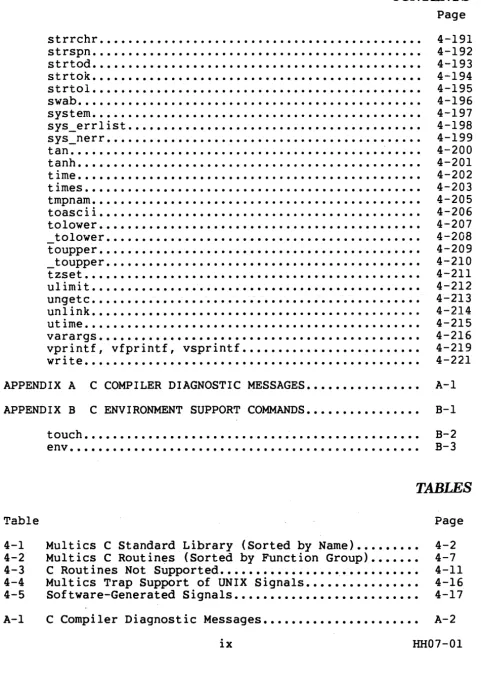
CONTENTS
SECTION 1 I NTRODUCT I ON •••
. .
.
.
.
. . .
.
.
.
. . . .
.
. .
. . . .
.
.
.
.
.
.
.
.
.
Definition of Baseline C ••Contents of This Manual •••
.
.
.
. .
.
.
. .
.
. . .
.
.
. .
.
.
.
.
.
SECTION 2 IMPLEMENTATION OF THE C LANGUAGE..
...
.
.
. .
...
...
Lexical Conventions [2] ••••• Hardware Characteristics ••
What's in a Name? •..••••••
.
.
.
.
.
. . . .
.
. .
.
Conversions •••••••••••••••Characters and Integers ••• Float and Double ••••
Additive Operators.
Shi ft Operators ••• A_ • • • • •
.
.
.
.
Declarations... ••••••• • •••••• Structure and Union Declarations ••••••• Types Revisited ..•••••••••••••••
Structures and Unions ••••••••• Explicit Pointer Conversions. C Program Portability •••
Size of Data Types ••••
Structures and Unions ••••••
.
.
.
.
. .
.
. . .
. .
.
. .
.
.
.
. .
.
. . .
.
.
. . .
.
.
.
.
.
. .
Bit Fields •••••••••••••
Pointers •••••••••••••••••••••
.
.
.
....
_. The Null Pointer Value..
. . .
.
.
. . .
.
.
.
.
System Calls and the .Runtime Library..
.
.
. . . .
.
.
.
.
.
.
.
.
.
.
. . .
..
SECTION 3 INVOKING THE C COMPILER •••••
.
.
.
.
.
.
. .
.
. . .
. .
.
. . .
.
Page 1-1 1-1 1-2 2-1 2-1 2-1 2-2 2-2 2-2 2-3 2-3 2-3 2-3 2-3 2-3 2-3 2-3 2-4 2-4 2-5 2-5 2-5 2-7 2-7 3-1
I
I
I
I
I
I
I
CONTENTS
SECTION 4 THE C STANDARD LIBRARY.
·
.
. . .
.
.
.
. .
. .
.
. .
.
.
.
. .
.
. . . .
C Support of Multics File Types. Subroutines and Libraries.
Traps and Signals •••••••.••••• Error Returns ...•.•.•.•...•••. Reporting Errors Via errno •• UNIX Errors ••.••
Run-Time Routines •• abort. abs ...• access ••. acOs •.•••• alarm.
.
.
.
·
.
.
· .
.
. .
.
. .
. .
asctime •••.•••••••asin ••
· . . .
.
.
.
.
.
.
atan ••..••••.atan2.
atof ••••.
· . .
.
atoi ••.
.
.
·
.
.
·
.
.
.
·
.
· .
.
.
.
· . .
. .
.
. .
.
·
.
.
. . .
· .
.
.
·
.
. . .
.
.
...
·
. .
.
. . .
.
.
.
. .
. . .
. .
·
.
.
.
·
.
.
.
.
. .
. .
.
·
.
.
.
.
·
. .
. .
. .
.
. .
.
. . . .
·
.
.
. . .
. . .
. .
.
. . .
.
.
.
. . .
·
. .
. .
.
·
. .
.
.
.
.
.
.
.
. .
.
.
...
atol .•••calloc ••
·
.
. .
.
.
.
. . ·
. . .
.
.
. .
. .
ceil ••••clearerr •• clock.
·
.
.
.
·
.
.
. . .
.
.
.
. .
. .
.
.
. .
.
.
.
.
· . .
.
.
close •••••
· .
.
. .
.
.
.
.
·
.
.
. .
·
.
.
.
·
.
.
. .
.
.
. .
· . .
.
.
·
.
.
cos •••••• cosh •• create ctime •.••drand48 ••
.
. .
.
.
. .
.
.
. . .
ecvt •• errno. execl.·
.
.
execle ••••••. execlp. execv ••• execve •• execvp •• exit •• exp ••..
.
.
...
·
.
.
. .
.
.
·
.
.
. .
.
.
.
.
.
.
.
.
.
·
.
.
· . .
·
.
·
.
. . .
.
. .
.
.
.
·
.
.
fabs.
·
.
. . .
. .
. . . . ....
fclose •••••••fcntl •••••
·
..
ferror. ff lush •• fgetc •• fgets •••••••••••• fileno. floor. fmod •••
.
.
. .
.
.
. .
.
.
.
fopen. fprintf. fputc. fputs •• fread •• free ••• freopen •• frexp •• fscanf..
.
.
fstat ••••••••• fwri te •••gcvt ••• getc ••• getchar ••••••••••. getcwd. getenv •• getgid. getlogin. getopt. getpid. gets ••• getuid. getw ••• . gmt ime.
hypot ... ioctl ••• isalnurn •• isalpha. isascii ••
isatty ••••
.
.
iscntrl •••••••••
·
.
. .
....
• •
isdig it •• is1owet. isprint.
....
·
.
.
.
.
.
. .
..
·
.
CONTENTS
Page. . .
. .
.
.
.
.
.
..
.'
.
. ... .
.
.
.
. .
.
.
.
.
.
.
.
. . . .
.
. .
. .
.
.
. .
.
. .
.
.
. .
. ...
'.
.
.
.
.
.
.
.
. . . .
.
.
.
. .
.
. .
.
.
'.
.
.
.
.
....
.
. .
. .
. . . .
.
.
. .
. . .
.
.
.
.
...
.
. . .
.
.
.
.
.
.
ispunct •• isspace ••• isupper ••••isxdigit ••
...
.
.
.
4-72 4-73 4-74 4-75 4-76 4-77 4-78 4-79 4-80 4-85 4-86 4-87 4-88 4-89 4-91 4-92 4-96 4-98 4-99 4-100 4-101 4--102 4-103 4-104 4-105 4-106 4-109 4-110 4-111 4-112 4-113 4-115 4-116 4-122 4-123 4-124 4-125 4-126 4-127 4-128 4-129 4-130 4-131 4-132 4-133 4-134 4-135
kill ••• ~
.
.
.
. .
.
.
.
Idexp •.• ~ •••••
. ..
-...
vii HH07'-Ol
I
I
I
I
I
I
I
I
I
CONTENTS
Page1 ink •••.••. localtirne.
log .••••
. .
. .
.
.
.
.
.
. · .
.
.
.
..
10glO ••• longjmp.
malloc ••
·
. . .
.
. .
.
.
memccpy.memchr •• memcmp ••
memcpy •••••••••••.
. .
memset ••mktemp ••• modf.
• • • • • • • • • e
open ••••••••.••••••
perror.. • ••••••• pow .•••• printf •••••••• putc ••• putchar. puts •.•••••• putw ••
·
. .
.
.
·
..
· . .
. .
.
·
.
. .
.
.
.
. . .
.
.
.
.
.
.
.
. .
.
·
. .
.
. .
. . .
. .
.
.
.
.
. .
·
..
· .
·
.
. .
.
. . . .
· ...
.
.
.
·
.
·
.
.
.
·
...
rand •• read •• realloc. sbrk •.•·
.
. .
. .
.
.
.
.
.
.
.
.
.
.
·
.
.
.
.
.
.
.
scanf •• setbuf .... setjmp •• signal •• sin .•••• sinh •••· .
.
sleep •••••••• sprintf •• sqrt •••• srand •••sseanf ••
·
..
. .
.
.
·
..
·
... .
.
.
.
.
...
·
.
.
.
.
· .
.
· ... .
·
.
.
.
. .
.
. .
.
. .
·
.
.
.
. .
.
. . .
·
... .
...
·
..
·
...
.
.
.
. .
. .
·
. . .
.
.
· ....
· ...
·
. .
·
.
.
. .
.
·
.
.
.
.
.
.
·
. .
.
. .
·
.
.
·
.
. .
· .
· ...
.
·
. . .
.
. . . .
.
.
.
. . .
.
.
.
.
. .
.
· ..
·
.
·
.
.
. ·
.
·
.
.
.
. . · ....
...
. ....
·
... .
.
.
. .
·
.
·
.
. .
.
.
.
.
...
stat .... streat. strchr •• strcmp •• strcpy. strespn. strlen ••• strncat.strnemp.
·
. .
.
·
...
·
.
.
. . .
·
.
.
. .
.
.
. .
.
.
. .
.
.
.
. ..
strrchr. strspn. strtod •. strtok •. strtol. swab •.. system •• sys_errlist. sys_nerr. tan .•
tanh.
....
.
..
time .• times ••••• tmpnam. toascii •• tolower. _tolower. toupper ••.
. .
.
.
.
·
.
.
.
.
.
.
.
·
....
.
. .
.
.
.
.
.
.
.
.
.
CONTENTS
Page...
.
.
. .
_toupper. tzset ••. ulimit ••..•••• ungetc •• unlink •.. . .
.
. .
. ·
... .
.
.
.
.
.
. .
.
.
. .
4-191 4-192 4-193 4-194 4-195 4-196 4-197 4-198 4-199 4-200 4-201 4-202 4-203 4-205 4-206 4-207 4-208 4-209 4-210 4-211 4-212 4-213 4-214 4-215 4-216 4-219 4-221ut ime .. varargs. vprintf, write •••
. . . ·
·
.
.
. .
.
.
.
.
.
.
.
...
. .
.
.
.
.
..
vfprintf, vsprintf.
.
.
. . .
.
. . . .
.
. . .
. .
.
. ... .
. ... .
.
.
.
.
. .
.
. .
.
. ..
.
.
.
.
. .
.
APPENDIX A C COMPILER DIAGNOSTIC MESSAGES.
. .
.
.
.
.
.
.
.
.
.
.
.
.
.
A-IAPPENDIX B C ENVIRONMENT SUPPORT COMM.AN"DS. • • • • • • • • • • • • • • • B-1
Table 4-1 4-2 4-3 4-4 4-5 A-I touch ••
env •••
.
. .
· .
. . .
. .
. . .
.
.
Multics C Standard Library (Sorted by Name) ••• Multics C Routines (Sorted by Function Group) C Routines Not Supported •••••••••••••••••• Multics Trap Support of UNIX Signals.
Software-Generated Signals •••••••••••••
[image:10.620.73.555.90.768.2].
.
. .
.
B-3 B-2TABLES
....
Page 4-2 4-7 4-11 4-16 4-17C Compiler Diagnostic Messages.
. .
.
.
.
. .
. .
.
. .
.
. . .
. . .
A-2ix HH07-01
Section
1
INTRODUCTION
C is a general-purpose, low-level programming language. It was developed under a UNIX* operating system but is now available for use with a number of computers and operating systems.
This manual describes the C programming language as
implemented on Multics release 12.1. The language is described by noting variations from a baseline version of C.
The reader is assumed to be familiar with C and Multics. This manual is not a complete reference document, nor is it
intended as a tutorial document.
DEFINITION OF BASELINEC
The version of C used in this manual as the baseline for comparison is described in:
UNIX System V Release 2.0 Programming Guide Published by AT&T April 1984
The phrase baseline C refers to that version of C. You are assumed to have a copy of the UNIX operating system book on hand when you refer to this manual.
*UNIX is a registered Trademark of AT&T.
CONTENTS OF THIS MANUAL
The rest of this manual is organized as follows:
Section 2 notes variations in the Multics implementation of the C language.
Section 3 describes the command available for invoking the C compiler under the Multics environment.
Section 4 lists the C standard library of run-time routines.
Appendix A lists the C compiler diagnostic messages.
Appendix B lists the C environment support commands.
Section
2
IMPLEMENTATION OF
THE
C
LA.¥GUAGE
This section lists variations from the baseline C as described in the UNIX System Programming Guide (refer to . Section 1).
This section conLalns only statements of variations. If a feature is not described in this section, it is fully supported by the C compiler, and behaves exactly. the same as in baseline C.
LEXICAL CONVENTIONS [2}
The following variations on baseline C lexical conventions exist in Multics C.
Hardware Characteristics
The size of C data types are:
Data Type Size (bits)
char 9
unsigned char 9
int 36
unsigned int 36
short 36
long 72
unsigned long 72
float 36
double 72
I
WHAT'S IN A NAME?
The C compiler supports all arithmetic types. C data types are described below.
A character variable (char) is a one-byte, signed binary integer consisting of eight significant bits and a high-order sign bit. It is always byte-aligned. Use the signed character data type for integer data with a domain of -512 to 511 (at most).
An unsigned character variable (unsigned char) is a one-byte, unsigned binary integer consisting of nine significant bits. It
is never negative and always byte-aligned.
An integer variable (int) is a four-byte, signed binary integer consisting of 35 significant bits and a high-order sign bit. It is always word-aligned. This is the default data type for any variable.
An unsigned integer variable (unsigned int) is a four-byte, unsigned binary integer consisting of 36 significant bits. It is never negative and always word-aligned.
A long variable (long) is an eight-byte, signed binary
integer consisting of 71 significant bits and a high-order sign bit. It is always double-word aligned.
An unsigned long variable (unsigned long) is an eight-byte unsigned binary integer consisting of 72 significant bits. It is always positive and always double-word aligned.
A floating-point variable (float) is a four-byte,
word-aligned, signed real number. It can contain a value in the approximate range 1.0E-38 to 1.OE+38, with up to seven digits of precision.
A double-precision variable (double) is an eight-byte,
double-word-aligned, signed real number. It can contain a value in the approximate range 1.0E-38 to 1.OE+38, with up to 16 digits of precision.
CONVERSIONS
The following variations on baseline C operand conversion exist in Multics C.
Characters and Integers
Float and Double
The C compiler converts a double-precision variable to a floating-point variable by truncation.
Additive Operators
When adding or subtracting from pointers, be careful not to exceed segment bounds. When subtracting two pointers, the data being pointed to should be in the same segment or the result may be meaningless.
Shift Operators
When a right shift is performed on a signed quantity, the sign is propagated. For instance, in the expression EI»E2, where El is a signed quantity, the vacated bit positions are filled by a copy of the sign bit.
When a right shift is performed on an unsigned quantity, vacated bit positions are filled with zeros.
DECLARATIONS
The Multics implementation of C does not use register variables.
All "static" functions must be declared before their first use.
Structure and Union Declarations
The C compiler only recognizes integer fields. The compiler does not initialize structure~ containing bit fields. The
compiler assigns bit fields left to right within the word.
TYPES REVISITED
The following variations on baseline C types exist in Multics C.
Structures and Unions
Multics C does not allow the passing of structures or unions to or from functions.
Explicit Pointer Conversions
A pointer-to-Iongor a long-to-pointer conversion simply moves data between the two variables. A pointer-to-int
conversion moves only the low-order bits of the pointer.
C PROGRAM PORTABILITY
There is no guarantee that a program written in C on one system will port easily to another system. Even when the
programmer has been careful to write the program with portability in mind, problems may be caused by differences in the
target-machine hardware or differences between the source and the target compiler.
The following is a discussion of the possible problems that may occur when porting C applications to Multics. It is assumed
that most of the programs that are to be ported will have been written under a UNIX operating system on the VAX* or PDP** series machines.
Size of Data Types
A program may need to know the size of a particular data type. If this is hardcoded into the program, the code will not be portable if the data type sizes between the two machines differ. For example, a program may use the maximum size of an
int in an expression as follows:
#define MAXINT 32767
1*
largest int on a machine with a 16 bit int */.
if (y
==
MAXINT)This code could cause incorrect results on Multics. Multics has a 36-bit integer so the value of MAXINT is not the maximum
integer size on the Multics hardware. The following code would correct the situation:
#define MAXINT «int) «(unsigned) - 1) » 1»
The following examples illustrate nonportable and portable ways of coding word definitions:
Nonportable Example:
#define wo~ 4
1*
hardcoded number of h¥tes in an integer*/ Portable Example:#define wo~ sizeof{int)
Structures and Unions
Structures or unions cannot be passed to functions, nor can functions return either type.
Bit Fields
Multics bit fields may not be any data type other than
integers or unsigned integers. However, various other compilers allow bit fields to be other than the integers or unsigned
integers. This may cause portability problems.
The order in which the bits are put into memory may cause problems. The Kernighan and Ritchie C specification does not
indicate the order in memory of bits in a bit f_ield.
These problems would become apparent when using masks and unions to test bits, since the bits may not be where the tests think they are. The following is an example of the type of code that may cause problems when ported to Multics:
union {
struct {
struct {
} extract;
int num: 4; int total: 6;
int pad~ 6;
} stl;
int word; } st2;
In the above example, st2 is used to extract information from stl. The order of bits laid down in bit field determines the value of extract.st.word.
Pointers
One of the most common causes of nonportable code is the casting of pointers to integers. In most machines, pointers and
integers are the same size. The programmer can then easily put pointers into integers with no loss of data. This is very common when returning pointers from functions.
Tpe return value of a function is by default an integer. Since in most machines pointers and integers are the same size,
it is quite easy to return a pointer from a function using the default return size of integer. This does not work on Multics because pointers are larger than integers.
To fix the problem, the Multics C programmer must define these functions as returning a long or a pointer. While
returning a pointer in a long is allowed, it is not recommended.
The following code samples illustrate nonportable and portable cases of returning a pointer as an integer.
Nonportable Example:
my_func( ) {
int *p;
if (same_test) return (p);
}
Portable Example:
int *my_func() {
int *p;
return (p); }
1*
function returns an int as default */1*
a pointer to an int*1
1*
returns a poitner in an integer *//* function· returns a pointer to an int */
/* a pointer to an int */
/* returns a pointer in a pointer location */
The following example shows a nonportable case of an integer holding a pointer, followed by a portable fix for Multics:
Nonportable Example:
int i; struct {
t = &qbert;
i
=
t;i += 5;
char y[10]; int p;
} qbert, *t;
Portable Example:
char *Pi
p
=
&qbert.y[O];p += 5;
/* t points to structure */ /* assign pointer to integer */
/* point to y[5] */
/* point to start of y */ /* point to y[5] */
On Multics, you get no automatic initialization, therefore a pointer must be explicitly initialized to NULL before it is
used. The following examples illustrate nonportable and portable cases of this:
Nonportable Example:
int *y[lO]i
if (y[3]
==
N[lLL) ••••••••• i Portable Example:int *y[lO]
= {
NULL, NULL, •••• Ji1*
no guarantee that y[3] has */ i* been ass igned to NULL * //* explicitly initialize array of pointers to NULL */
The Null Pointer Value
In most implementations the null pointer value NULL is defined to be the int value O. It is not uncommon to see NULL used as a substitute for O. On Multics the pointer value NULL is not 0, but -Ill.
The following two examples show implementations in which NULL is 0, which could cause portability problems:
Example 1:
int Pi
if (p
==
NULL ) •••..•Example 2:
int *t[lO]i
t[NULL]
=
Oi/* use NULL as substitute for zero */
/* NULL used as subscript zero */
System Calls and the Runtime Library
Most of the commonly available portable programs have been developed on UNIX operating systems, and as such may have calls to system routines or runtime routines that are either not
available on Multics or that have been implemented differently (see the documentation of these routines ahead). If this is the case it can be dealt with by creating the routine, removing the call, or writing a stub.
Section
3
INVOKING THE
CCOMP.~RR
This section describes the syntax of the cc command that invokes the Multics C compiler.
cc
cc is the Multics C compiler. It accepts as input C source programs and/or assembled or compiled programs creating one of various output file types.
SYNTAX:
cc filenamel, ... , filenamen {-control_args}
ARGUMENTS:
filename
Any file name with a suffix of .c is taken as a C source file and is compiled. Any file name suffixed with .alm is passed to aIm. Any file name suffixed with .cpp is passed to the compiler. All other file names are given as input to the Linkage Editor.
CONTROL ARGUMENTS:
-brief, -bf
suppresses printing of messages stating the current pass being performed (default).
-definition args, -def args
Specifies define names to be defined or undefined in the preprocessor. Where args is a list of define names
separated by COITWiaS with no spaces in the following form:
The first arg specifies that n is to be defined as 1 in the same way as \define n would define n to 1. The second arg specifies that x is to be given a definition of 2, and the last arg specifies that y is to be
undefined in the preprocessor.
-include paths, -incl paths
-library paths, -lb paths
Specifies the pathnames of library directories, archjves, or object files the user wishes the linkage editor to use when resolving external references. All arguments up to the next control argument are treated as include library pathnames.
-long, -lg
Specifies that a message should be printed specIlylng the completion of each pass of the compiler for each
specified file name.
-optimize, -ot
Runs all compiled files through the optimizer (not implemented) .
-output_file pathname, -of pathname
Forces the output to be placed in the file defined by pathname.
-profile, -pf
Generates profile information (not implemented).
-stop_after pass, -spaf pass
Specifies to cc to stop after the specified pass of the compiler. Valid values for pass are:
preprocessor, pp
c
aIm
Generates a .cpp file which is the output from the preprocessor.
Generates a .alm file which is an aIm source file outputted from the C compiler.
Generates a .cob file which is the intermediate executable file generated from the assembler. This file is to be used as input to the Linkage Editor.
-table, -tb
Specifies that the compiler should generate symbol table information. At the moment this generates a listing via the Linkage Editor.
Section
4
THE
C
STANDARD
LTBRARY
This section lists the standard functions and subroutines
p~ovided with the Multics C compiler.
The routines provided with the C compiler attempt to present C programs with the same interface they would enjoy under a UNIX operating system. However, due to the inherent differences in the two operating systems, some routines are altered, have restrictions not found on UNIX operating systems, or are not supported at all. For instance, routines that involve pathnames adhere to Multics pathname conventions, not UNIX operating
systems pathname conventions; the process management and "super user" functions are not available. Also excluded are these functions:
• Data base
• Multiplexed file
• Multiprecision integer arithmetic • Plotter I/O
• Packet driver
• Interprocess communication • Semaphore
• Archive • X.2S.
I
I
I
I
I
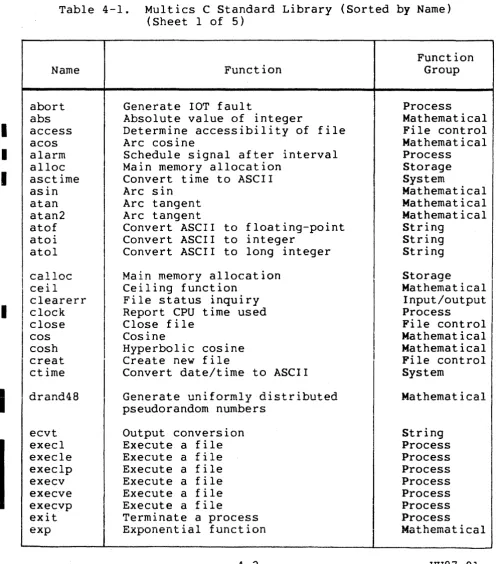
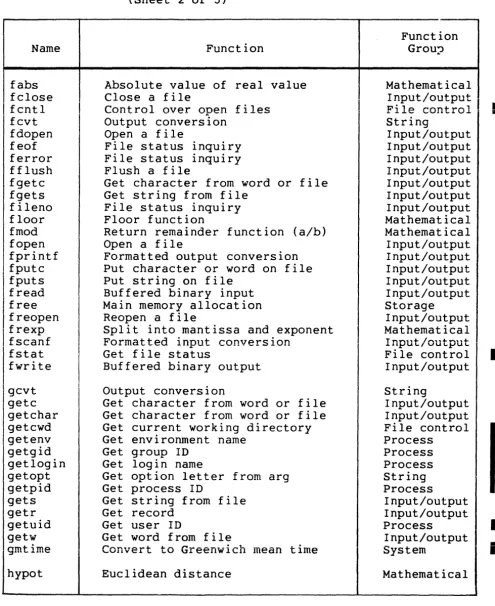
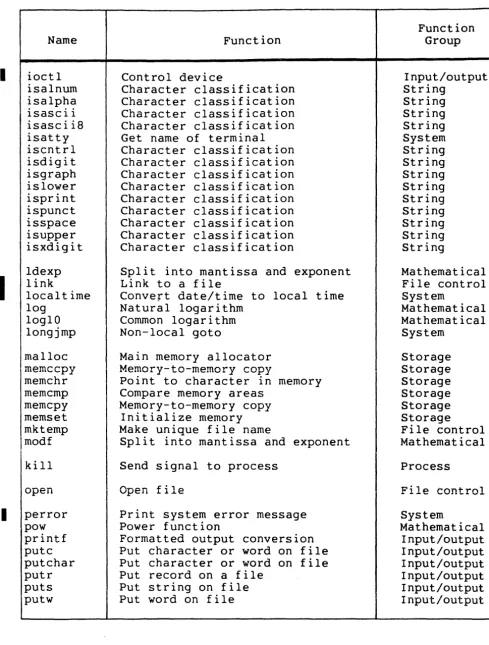
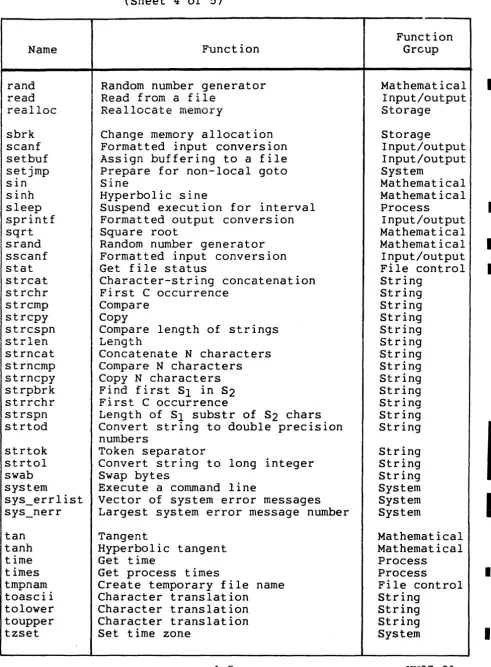
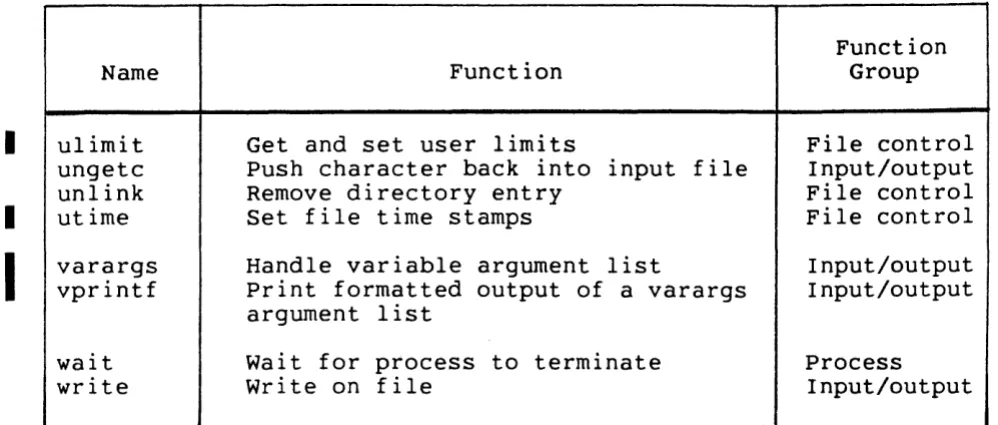
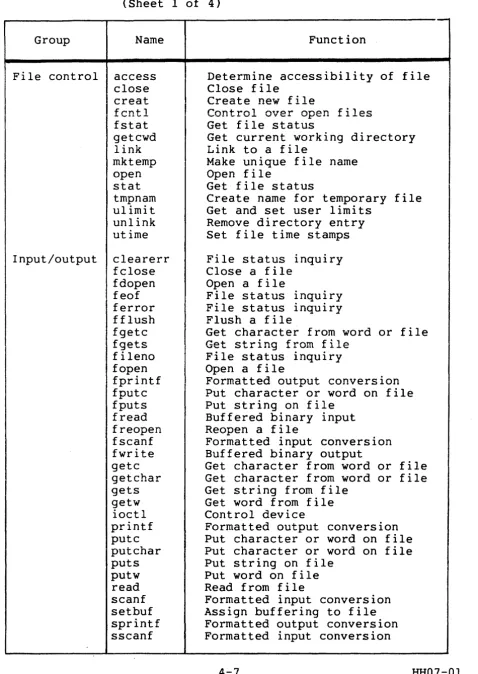
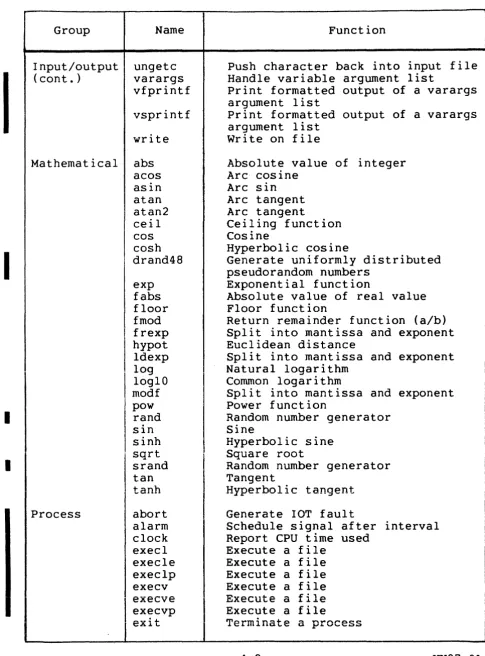
Table 4-1 lists C system functions and subroutines, sorted by name; Table 4-2 lists the same functions sorted by function
group. Table 4-3 lists commonly used UNIX operating system
functions (taken from System V UNIX) not supported under Multics C.
I
The Multics standard C include directories are located in >S13p>c_compiler>include.
Table 4-1. Multics C Standard Library (Sorted by Name) (Sheet 1 of 5)
Name abort abs access acos alarm alloc asctime asin atan atan2 atof atoi atol calloc ceil clearerr clock close cos cosh creat ctime drand48 ecvt execl execle execlp execv execve Function
Generate lOT fault
Absolute value of integer
Determine accessibility of file Arc cosine
Schedule signal after interval Main memory allocation
Convert time to ASCI I Arc sin
Arc tangent Arc tangent
Convert ASCII to floating-point Convert ASCII to integer
Convert ASCII to long integer
Main memory allocation Ceiling function
File status inquiry Report CPU time used Close file
Cosine
Hyperbolic cosine Create new file
Convert date/time to ASCI I
Generate uniformly distributed
pseudorandom numbers
Output conversion Execute a file Execute a file Execute a file Execute a file Execute a file
Function Group
Process
Mathematical File control Mathematical Process Storage System Mathematical Mathematical Mathematical String String String Storage Mathematical Input/output Process
I
File control Mathematical Mathematical I File control
[image:27.615.51.548.151.715.2]Table 4-1. Multics C Standard Library (Sorted by Name) (Sheet 2 of 5)
Name
fabs fclose
I
f cnt Ifcvt fdopen feof ferror fflush fgetc fgets fileno floor fmod fopen fprintf fputc fputs fread free freopen frexp fscanf fstat fwrite gcvt getc get char getcwd getenv getgid getlogin getopt getpid gets getr getuid getw gmtime hypot Function
Absolute value of real value Close a file
Control over open files Output conversion
Open a file
File status inquiry File status inquiry Flush a file
Get character from word or file Get string from file
File status inquiry Floor function
Return remainder function (a/b) Open a file
Formatted output conversion Put character or word on file Put string on file
Buffered binary input Main memory allocation Reopen a file
Split into mantissa and exponent Formatted input conversion
Get file status
Buffered binary output
Output conversion
Get character from word or file Get character from word or file Get current working directory Get environment name
Get group ID Get login name
Get option letter from arg Get process ID
Get string from file Get record
Get user ID
Get word from file
Convert to Greenwich mean time
Euclidean distance
4-3
Function Grou,
Mathematical
I ~put/output
I •
Flle control • String Input/output Input/output Input/output Input/output Input/output Input/output Input/output Mathematical Mathematical Input/output Input/output Input/output Input/output Input/output Storage Input/output Mathematical Input/output File control
I
Input/outputString
[image:28.620.71.567.61.668.2]Table 4-1. Multics C Standard Library (Sorted by Name) (Sheet 3 of 5)
I
I
Name ioctl isalnum isalpha isascii isascii8 isatty iscntrl isdigit isgraph islower isprint ispunct isspace isupper isxdigit ldexp link localtime log 10glO longjmp malloc memccpy memchr memcmp memcpy memset mktemp modf kill openI
perror pow printf putc putchar putr puts FunctionControl device
Character classification Character classification Character classification Character classification Get name of terminal Character classification Character classification Character classification Character classification Character classification Character classification Character classification Character classification Character classification
Split into mantissa and exponent Link to a file
Convert date/time to local time Natural logarithm
Common logarithm Non-local goto
Main memory allocator Memory-to-memory copy
Point to character in memory Compare memory areas
Memory-to-memory copy Initialize memory Make unique file name
Split into mantissa and exponent
Send signal to process
Open file
Print system error message Power function
Formatted output conversion Put character or word on file Put character or word on file Put record on a file
Put string on file
Function Group Input/output String String String String System String String String String String String String String String Mathematical File control System Mathematical Mathematical System Storage Storage Storage Storage Storage Storage File control Mathematical
Process
File control
[image:29.618.60.549.61.706.2]Table 4-1. Multics C Standard Library (Sorted by Name) (Sheet 4 of 5)
Name
rand read
I
reallocsbrk scanf setbuf setjmp sin sinh sleep sprintf sqrt srand sscanf stat strcat strchr strcmp strcpy strcspn strncat strncmp strncpy strpbrk strrchr strspn strtod strtok strtol swab system sys_errlist sys_nerr tan tanh time times tmpnam toascii tolower toupper tzset Function
Random number generator
I
Read from a file Reallocate memoryChange memory allocation Formatted input conversion Assign buffering to a file Prepare for non-local goto Sine
Hyperbolic sine
Suspend execution for interval Formatted output conversion Square root
Random number generator Formatted input conversion Get file status
Character-string concatenation First C occurrence
Compare Copy
Compare length of strings Length
Concatenate N characters Compare N characters Copy N characters Find first Sl in S2 First C occurrence
Length of Sl substr of S2 chars Convert string to double precision numbers
Token separator
Convert string to long integer Swap bytes
Execute a command line
Vector of system error messages Largest system error message number
Tangent
Hyperbolic tangent Get time
Get process times
Create temporary file name Character translation Character translation Character translation Set time zone
4-5 Function Grcup Mathematical Input/output Storage Storage Input/output Input/output System Mathematical Mathematical Process Input/output Mathematical Mathematical Input/output File control String String String String String String String String String String String String String String String String System System System Mathematical Mathematical Process Process
[image:30.617.76.568.64.731.2]I
I
I
Table 4-1. Multics C Standard Library (Sorted by Name) (Sheet 5 of 5)
Function
Name Function Group
ulimit Get and set user limits File control
ungetc Push character back into input file Input/output
unlink Remove directory entry File control
utime Set file time stamps File control
varargs Handle variable argument list Input/output
vprintf Print formatted output of a varargs Input/output
argument list
wait wait for process to terminate Process
[image:31.613.50.549.60.272.2]Table 4-2. Multics C Routines (Sorted by Function Group) (Sheet 1 of 4)
Group Name
File control access close creat fcntl fstat getcwd link mktemp open stat tmpnam ul imi t unlink utime
Input/output clearerr fclose fdopen feof ferror fflush fgetc fnc+-c
..
~""" .... ...,fileno fopen fprintf fputc fputs fread freopen fscanf fwrite getc get char gets getw ioctl printf putc putchar puts putw read scanf setbuf sprintf sscanf Function
Determine accessibility of file Close file
Create new file
Control over open files Get file status
Get current working directory Link to a file
Make unique file name Open file
Get file status
Create name for temporary file Get and set user limits
Remove directory entry Set file time stamps
File status inquiry Close a file
Open a file
File status inquiry File status inquiry Flush a file
Get character from word or file Get string from file
File status inquiry Open a file
Formatted output conversion Put character or word on file Put string on file
Buffered binary input Reopen a file
Formatted input conversion Buffered binary output
Get character from word or file Get character from word or file Get string from file
Get word from file Control device
Formatted output conversion Put character or word on file Put character or word on file Put string on file
Put word on file Read from file
Formatted input conversion Assign buffering to file Formatted output conversion Formatted input conversion
4-7 HH07-0l
[image:32.617.81.560.58.733.2]I
I
I
I
Table 4-2. Multics C Routines (Sorted by Function Group) (Sheet 2 of 4)
Group Input/output (cont.) Mathematical Process Name ungetc varargs vfprintf vsprintf write abs acos asin atan atan2 ceil cos cosh drand48 exp fabs floor fmod frexp hypot ldexp log 10glO modf pow rand sin sinh sqrt srand tan tanh abort alarm clock execl execle execlp execv Function
Push character back into input file Handle variable argument list
Print formatted output of a varargs argument list
Print formatted output of a varargs argument list
Write on file
Absolute value of integer Arc cosine
Arc sin Arc tangent Arc tangent
Ceiling function Cosine
Hyperbolic cosine
Generate uniformly distributed pseudorandom numbers
Exponential function
Absolute value of real value Floor function
Return remainder function (a/b) Split into mantissa and exponent Euclidean distance
Split into mantissa and exponent Natural logarithm
Common logarithm
Split into mantissa and exponent Power function
Random number generator Sine
Hyperbolic sine Square root
Random number generator Tangent
Hyperbolic tangent
Generate lOT fault
Schedule signal after interval Report CPU time used
[image:33.615.48.534.57.713.2]I
Table 4-2. MOD 400 C Routines (Sorted by Function Group) (Sheet 3 of 4)
Group Process (cont.)
I
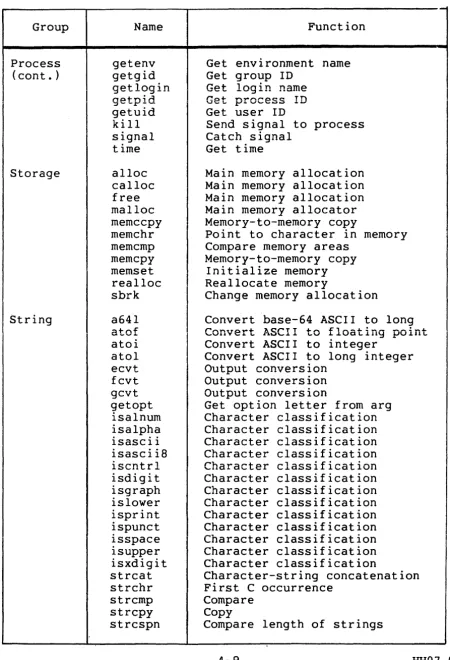
Storage String Name getenv getgid getloginno T"\;A
":j .... tr-.:. ... getuid kill signal time alloc calloc free malloc memccpy memchr memcmp memcpy memset realloc sbrk a641 atef atoi atol ecvt fcvt gcvt getopt isalnum isalpha isascii isascii8 iscntrl isdigit isgraph islower isprint ispunct isspace isupper isxdigit strcat strchr strcmp strcpy strcspn Function
Get environment name Get group ID
Get login name
r!.~~ ~,...~ Tn
..:i_I.. p~v~ess .;.;
Get user ID
Send signal to process Catch signal
Get time
Main memory allocation Main memory allocation Main memory allocation Main memory allocator Memory-to-memory copy
Point to character in memory Compare memory areas
Memory-to-memory copy Initialize memory Reallocate memory
Change memory allocation
Convert base-64 ASCII to long Convert ASCII to floating point Convert ASCII to integer
Convert ASCII to long integer Output conversion
Output conversion Output conversion
Get option letter from arg Character classification Character classification Character classification Character classification Character classification Character classification Character classification Character classification Character classification Character classification Character classification Character classification Character classification
Character-string concatenation First C occurrence
Compare Copy
Compare length of strings
I
4-9 HH07-01
I
I
[image:34.617.79.529.72.731.2]I
I
I
I
I
Table 4-2. MOD 400 C Routines (Sorted by Function Group) (Sheet 4 of 4)
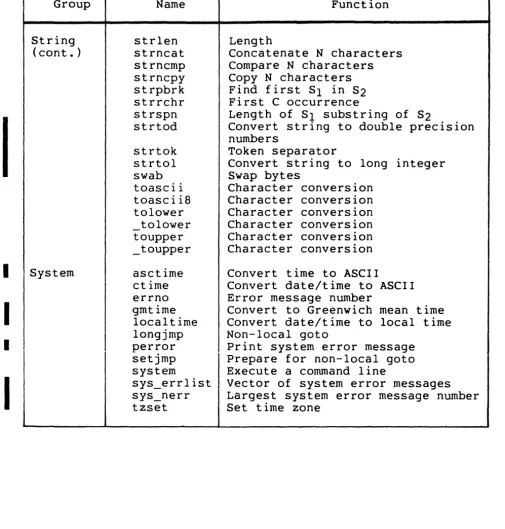
Group String (cont.) System Name strlen strncat strncmp strncpy strpbrk strrchr strspn strtod strtok strtol swab toascii toascii8 tolower _tolower toupper _toupper asctime ctime errno gmtime localtime longjmp perror setjmp system sys_errlist sys_nerr tzset Function Length
Concatenate N characters Compare N characters Copy N characters Find first Sl in S2 First C occurrence
Length of Sl substring of S2
Convert string to double precision numbers
Token separator
Convert string to long integer Swap bytes
Character conversion Character conversion Character conversion Character conversion Character conversion Character conversion
Convert time to ASCII
Convert date/time to ASCII Error message number
Convert to Greenwich mean time Convert date/time to local time Non-local goto
Print system error message Prepare for non-local goto Execute a command line
[image:35.620.54.559.81.609.2]Table 4-3. C Routines Not Supported (Sheet I of 4)
Name Function
a641 Convert base-64 ASCII to long
assert Program verification
brk bsearch chdir chmod chown chroot ctermid crypt cuserid dbminit delete dial dup
Change memory allocation
I
Binary searchChange working directory Change mode of file
Change owner
Change root directory Get terminal ID
DES encryption Get user ID
Data base subroutine Data base subroutine Dial external line
Duplicate open file descriptor
DES encryption encrypt edata end endgrent endpwent equal_name erf
End of program initialized data location End of program data location
erfc errno etext
fetch find file firstkey fork fseek ftell ftw
Close group file Close password file Equal-names convention
Return error function of arg Return l-erf(x)
Error message number
End of program code location
Data base subroutine Find a file
Data base subroutine Spawn a new process Reposition a file Reposition a file File tree walk
[image:36.613.113.530.53.590.2]Table 4-3. Name gamma getdir getegid geteuid getgrent getgrgid getgrnam getpass getpgrp getppid getpwent getpwnam getpwuid getptcb gettcb gsignal hcreate hdestroy hsearch jO jl jn 13tol 164a 19div 19mul 19rem logname lsearch Iseek lto13 matherr mcl mknod monitor mount mpx et al
C Routines Not Supported (Sheet 2 of 4)
Function
Log absolute value gamma function Get pathname of system directory Get effective group ID
Get effective user ID Get group file entry Get group file entry Get group file entry Read password
Get process group Get parent process ID Get passwork record entry
Get password record by login name Get password record by user ID Get parent TCB
Get TCB Get signal
Create heap Destroy heap Search heap
Initialize memory
Bessel function· Bessel function Bessel function
Convert 3-byte integer to long
Convert long to base-64 ASCII string
Long divide Long Multiply Long remainder Login name of user Linear search
Change file currency
Convert long integer to 3-byte
Math routine error handler Execute Multics macrocall Make node (directory or file) Prepare execution profile Mount volume
[image:37.612.89.513.42.712.2]Table 4-3. Name pause pclose pipe plock pOpen posr profil pthto6 ptrace putpwentry qsort regcmp regx runl runlp runv runvp
same file send-sig setgid setgrent s~tkey setpgrp setprint setpwent setuid sgetl sig signal smopen smread smwrit sputl
star check star_match star name stime store stty synch
C Routines Not Supported (Sheet 3 of 4)
Function
Stop until signal Close a pipe
Interprocess communication
I
~~~~e~s p~~~k
to/from processPosition file record pointer Execution profile
Convert UNIX pathname to Multics Trace a process
Write password entry
Quicker sort
Compile regular expression Execute regular expression Create new process
Create new process Create new process Create new process
Compare pathnames
Send signal to process Set group ID
Rewind group file DES encryption Set process group
Set print attribute of stream Rewind password file
Set user ID
Get long numeric Signal
Catch signal
Open for block read/write Read block
Write block
Put long numeric Validate star name
Validate and match star name List star name matches
Set time
Data base subroutine
Set terminal characteristics Update superblock
[image:38.615.107.519.48.663.2]Table 4-3. C Routines Not Supported (Sheet 4 of 4) Name tdelete tell tmpfile tmpnam tsearch ttyname twalk tzname ucf_defc ucf defr ucf-finish ucf-init uldTv ulrem umemchr umemcmp umemcpy umemset unmount yO yl yn Function
Delete tree
Change file currency Create temporary file Temporary name
Search tree
Get name of terminal Walk tree
Get time zone
Create file Create file Create file Create file
Long unsigned divide Long unsigned remainder
Point to character in memory Compare memory areas
Memory-to-memory copy Initialize memory Dismount volume
Bessel function Bessel function Bessel function
C SUPPORT OF MULTICS FILE TYPES
C supports sequential files with most functions.
The creat function creates a sequential file. Sequential processing of pre-existing string-relative files will be
[image:39.617.106.460.52.417.2]SUBROUTINES AND LIBRARIES
C subroutines and libraries include input/output and
mathematical functions. While these functions are not directly callable from C, you can use these functions with include
statements of the form:
# include <stdio.h>
# include <math.h>
Functions in the math library may return conventional values
o
or HUGE (largest size precision floating number) when the function is undefined for the given arguments or when the valueis not representable. In these cases, the external variable errno is set to the value EDOM or ERANGE.
The descriptions of some functions refer to the null pointer (NULL). This value will not match that of any legitimate
pointer, so many functions that return pointers return it, for example, to indicate an error. NULL is defined in <stdio.h> as (void*)Oi you can include your own definition if you are not using <stdio.h>.
The standard I/O package consists of the stdio.h header file and a set of functions. The inline macrocalls getc and putc handle characters quickly. The macrocalls getchar, putchar, and the higher level routines fgetc, fgets, fprintf, fputc, fputs, fread, fscanf, fwrite, gets, getw, printf, puts, putw, and scanf all use getc and putc; they can be freely intermixed.
A file with associated buffering is declared to be a pointer to a defined type FILE. The fopen function creates certain
descriptive data for a file and returns a pointer to designate the file in all further transactions. Normally, there are three open files with constant pointers declared in the "include" file and associated with the standard open files:
stdin stdout stderr
Standard input file (Multics user_input) Standard output file (Multics user_output) Standard error file (Multics error_output).
An integer constant EOF (-1) is returned when a function encounters the end of a file or an error (see the individual descriptions for details).
Any application that uses this package must include the header file of pertinent macrocall definitio~s, as follows:
# include <stdio.h>
The functions and constants mentioned in the input/output
functions are declared in that "include" file and need no further declaration. The constants and the following "functions" are macrocalls (redeclaration of these names is perilous):
•
clearerr•
feof•
fileno•
getc•
getchar•
putc•
putchar. TRAPS AND SIGNALSGenerally, Multics traps are mapped to their UNIX operating system equivalents, to provide an emulation of a UNIX operating system environment. After catching a signal in a UNIX operating system, a program can continue as if the signal had not been sent merely by returning from the signal catcher (as opposed to
calling exit).
Multics traps will be mapped into UNIX operating system
signals as described in Table 4-4. This table shows the Multics conditions available to the C user and their corresponding UNIX operating system signal value.
Table 4-4. Multics Trap Support of
UNIX Operating System Signals
Multics Condition
sus
program_interrupt quit
illegal_opcode, illegal_modifier mmel
overflow, underflow io_error
out_of_bounds
command_error, active_function_error alrm
UNIX Operating System Signal
SIGHUP SIGINT SIGQUIT SIGILL SIGTRAP SIGFPE SIGBUS SIGSEGV SIGSYS SIGALRM
[image:41.620.98.525.368.609.2]Table 4-5 lists software-generated signals. Note that "pid~
is the process ID.
Table 4-5. Software-Generated Signals
C Calling Sequence Meaning
I
kill (pid; 0) Test signal; always ignoredI
kill (pid, SIGHUP) 1 Hangup kill (pid, SIGINT) 2 Interrupt kill (pid, SIGQUIT) 3 Quit
kill (pid, SIGILL) 4 Invalid instruction kill (pid, SIGTRAP) 5 Trace trap
kill (pid, SIGIOT) 6 IOTinstructiona kill (pid, SIGEMT) 7 EMT instructiona
kill (pid, SIGFPE) 8 Floating-point exception kill (pid, SIGKILL) 9 Kill
kill (pid, SIGBUS) 10 Megabus error
kill (pid, SIGSEGV) 11 Segmentation violation kill (pid, SIGSYS) 12 Bad argument to function
kill (pid, SIGPIPE) 13 Write to pipe having no readers kill (pid, SIGALRM) 14 Alarm clock
alarm (delta) 14 Alarm clock (after delta secs) kill (pid, SIGTERM) 15 Terminate
kill (pid, SIGUSRI) 16 User-defined signal 1
kill (pid, SIGUSR2) 17 User-defined signal 2
kill (pid, SIGCLD) 18 Death of a child kill (pid, SIGPWR) 19 Power-fail restart
aOn some processors
In a UNIX operating system, the interrupt and quit signals are sent to every process in the process group that is not
ignoring the signal. Processes created to run a command in the background (asynchronously) are created with these signals being
ignored. Processes created to run a command in the foreground (synchronously) are created with default handling of these signals unless otherwise specified via the trap command. All other processes inherit the handling of these (and all other) signals from their parent.
On Multics, signals will be trapped and handled by' each
execution unit. If no signal mechanism exists at the current execution, the Multics default error handler will be invoked.
(See the Multics Programmer's Refe·rence Manual for a description of this handler.)
[image:42.615.77.531.91.485.2]ERROR RETURNS
Most functions have one or more error returns. An error condition is indicated by an otherwise impossible returned value. This is almost always -1: the individual descriptions specify the details.
Reporting Errors Via errno
A UNIX operating system error number is returned in the external integer variable errno. The variable errno is not
cleared on successful calls, so it should be tested only after an error has been indicated.
UNIX Operating System Errors
All of the possible error numbers are not listed in each
function description because many errors are possible for most of the calls. The following is a complete list of the error
numbers, manifest constants, and names as defined in <error.h>.
1 EPERM Not owner.
In a UNIX operating system, this error typically indicates an attempt to modify a file in some way forbidden except to its
owner or super-user.
2 ENOENT No such file or directory.
This error occurs when a file name is specified and the file should exist but does not, or when one of the directories in a pathname does not exist.
3 ESRCH No such process.
No process can be found corresponding to that specified by the process ID in kill.
4 EINTR Interrupted process.
An asynchronous signal (such as interrupt or quit), which the user has elected to catch, has occurred during a function. If execution is resumed after processing the signal, it appears as
if the interrupted function returned this error condition. This is a UNIX operating system error only: it never occurs in
Multics.
5 EIO I/O error.
6 ENXIO No such device or address.
In a UNIX operating system, this occurs when I/O on a special file refers to a device that does not exist, or is beyond th~
limits of the device. It may also occur when, for example, a tape drive is not online or no disk pack is loaded on a driv~.
7 E2BIG Argument list too long.
An argument list longer than 5120 characters is presented to a member of the exec family.
8 ENOEXEC Exec format error.
In a UNIX operating system, this occurs when a request is made to execute a file that, although it has the appropriate access, does not start with a valid magic number. This is a UNIX operating system error only; it never occurs in Multics.
9 EBADF Bad file number.
A file descriptor refers to no open file, a read request is made to a file that is open only for writing, or a write request
is made to a file that is only open for reading.
10 ECHILD No children.
A wait was executed by a process that has no existing child processes; or by a process already waiting for all its childre~.
11 EAGAIN No more processes.
A fork failed because you are not allowed to create any more processes.
12 ENOMEM Not enough memory.
During an exec, sbrk, or other function, a program asks for more space than Multics can supply. This is not a temporary condition; the maximum space is a system parameter.
13 EACCES Permission denied.
An attempt has been made to access a file to which you have insufficient access.
14 EFAULT Bad address.
On Multics this error is performed by a fault and is not available to the user.
15 ENOTBLK Block device required.
In a UNIX operating system this occurs when a nonblock file is mentioned where a block device is required: for example, in mount.
16 EBUSY Mount device is busy.
In a UNIX operating system this occurs when an attempt is made to mount a device that is already mounted, or an attempt is made to demount a device on which there is an active file (open
file or current directory). It also occurs if an attempt is made to enable accounting when it is already enabled.
17 EEXIST File already exists.
An existing file is mentioned in an inappropriate context: for example, link.
18 EXDEV Cross-device link.
In a UNIX operating system this occurs when a link to a file on another device is attempted.
19 ENODEV No such device.
An attempt has been made to apply an inappropriate function to a device: for example, read a write-only device.
20 ENOTDIR Not a directory.
A file is specified where a directory is required, for example in a path prefix or as an argument to chdir.
21 EISDIR Is a directory.
An attempt has been made to write on a directory.
22 EINVAL Invalid argument.
Some invalid argument has occurred; for example, mentioning an undefined signal in signal, or kill. This error is also set
by the mathematical functions.
23 ENFILE File table overflow.
The system table of open files is full, and temporarily no more opens can be accepted.
25 ENOTTY Not a typewriter.
The device is not a terminal.
26 ETXTBSY Text file busy.
In a UNIX operating system this occurs when an attempt has been made to execute a pure procedure program that is currently open for writing (or reading), or an attempt has been made to open for writing a pure procedure program that is being executed.
27 EFBIG File too large.
In a UNIX operating system this occurs when the size of a file exceeds the maximum file size or ULIMIT.
28 ENOSPC No space left on ·device.
During a write to an ordinary file, there is no free space left on the device.
29 ESPIPE Illegal seek.
In a UNIX operating system this occurs when an lseek has been issued to a pipe.
30 EROFS Read-only file system.
An attempt was made to modify a file or directory on a device mounted read-only; that is, with the write-protect switch set.
31 EMLINK Too many links.
In a UNIX operating system this occurs on an attempt to make more than the maximum number of links (1000) to a file.
32 EPIPE Broken pipe.
In a UNIX operating system this occurs when a write has been attempted on a pipe for which there is no process to read the data. This condition normally generates a signal; the error is returned if the signal is ignored.
33 EDOM Math argument not in function's domain.
The argument of a function in the math package is out of the domain of the function.
34 ERANGE Math function's result too large.
The value of a function in the math package is not representable within machine precision.
35 ENOMSG No message of desired type.
An attempt was made to receive a message of a type that does not exist on the specified queue. This is a UNIX operating
system error only; it never occurs in Multics.
36 EIDRM Identifier removed.
This error is returned to processes that resume execution due to the removal of an identifier from the file system's name
space. This is a UNIX operating system error only; it never occurs in Multics.
RUN-TIME ROUTINES
The rest of this section describes the run-time routines (either functions or macrocalls) available under Multics C. The descriptions are arranged alphabetically by routine name. Refer
abort
abort
Terminate a C program.
SYNTAX:
int abort ( )
ARGUMENTS:
None.
DESCRIPTION:
The abort function causes an lOT signal to be sent to its own process. The default signal catcher causes program
termination.
It is possible for abort to return control if SIGIOT is
caught or ignored. In this case, the value returned is that of the kill function.