Virtual Showroom Using Augmented Reality
Amit Pitambare1, Shubham Somani2, Chaitanya Sable3, Kunal Shelke4#1,2,3,4
NBN Sinhgad School Of Engineering, Ambegaon (Bk), Pune-411041, India
Abstract - In general, technology can benefit people's lives. For example, during the past 20 years, with the development of computer and Internet technology, e-commerce and online shopping have rapidly progressed, due to the convenience that they provide consumers. E-commerce websites, such as Amazon.com, Dell.com, and eBay.com, have become an integral part of many shoppers’ lives. However, according to most shoppers’ experiences, e-commerce and online shopping are still not able to fully replace onsite shopping, especially for products like clothing, shoes, jewellery, and furniture. For many such products, onsite shopping has many distinct advantages over online shopping. One of the main advantages of onsite shopping is that it usually provides more direct interaction with the actual product. In contrast, conventional online shopping websites often cannot provide enough information about a product for the customer to make an informed decision before checkout. Onsite shoppers frequently engage in some sort of interaction with their potential purchase to discover the scent, texture, appearance, and/or sound characteristics of a product before buying it. Such experience is often impossible with current online purchases. However, technology is progressing. In particular, Augmented Reality (AR), an emerging Human-Computer Interaction technology, which aims to mix or overlap computer generated 2D or 3D virtual objects and other feedback with real world scenes, shows great potential for enhancing e-commerce systems. Unlike VR, which replaces the physical world, AR enhances physical reality by integrating virtual objects into the physical world. The virtual object becomes, in a sense, an equal part of the natural environment. This paper presents a new type of commerce system, AR e-commerce, which visually brings virtual products into real physical environments for user interaction. The new approach gives customers a chance to “try" a product at home or in another use environment. The paper presents development of a prototype AR e-commerce system and a user study of the developed prototype. Experiment results and data both validate the new AR commerce system and provide suggestions for improvement. Overall results of the study show that the AR e-commerce system can help customers make better purchasing decisions.
Index Terms—3D motion tracking, Augmented Reality, Hand Gestures
I. INTRODUCTION
The growth in technology is proving beneficial to the world. With the advancements of computer and Internet technology, e-commerce and online shopping have rapidly progressed, due to the convenience that they provide consumers. Most people have their opinion that, e-commerce and online shopping cannot provide the complete description, especially for products like clothing, shoes, jewelry, furniture, etc. For many such products, onsite shopping has many distinct advantages over online shopping. Augmented Reality (AR), an upcoming Human-Computer Interaction technology, that aims to combine the computer generated 2D or 3D virtual objects with real world pictures, has enhanced the shopping experience over internet. Compared to Virtual Reality, that changes the real world, AR replaces physical reality by combining virtual objects into physical world. Augmented Reality visually puts virtual products into real physical environments for user interaction. This trending approach provides customers with a chance to “try" a product at home or in another use environment. The combination of augmented reality with hand gesture had made the system work in a more interactive way. Operating the product involves rotation (left, right), navigation over the product by using the hand gesture of the customer .The customer can view the product from all the directions according to the choice made. This will reduce the efforts of the customer to use the keyboard operations thus making the advertisement of the product in a more interactive way.
II. PROPOSEDSYSTEM
The proposed System will provide the user with ability to virtually try various products in the user environment. The user will be provided with the ability to explore the products and its details with the help of gestures. By providing the various modes of interaction to the users the user interface of the system is made very simple and interactive.
In general the customer shopping will be divided into three main tasks:
A. Searching and exploring various products from the database.
B. Interacting with user interface such as to try various sizes of an product through gestures.
C. Gathering the product information such as price details to buy the product.
recognized through webcam and the function associated with that gesture is selected.
III. SYSTEMARCHITECTURE
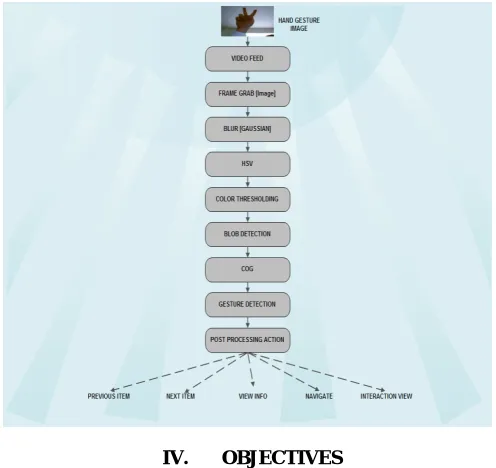
We propose a system that includes hand detection and recognition and the data is retrieved from the database as highlighted in Figure 1. Each user can easily use system, control the system, view the previous and next Product and obtains all information regarding that product using Augmented reality based gesture recognition. At First user access Application GUI, the webcam will start the process of Hand detection and Recognition. User just need to use gesture to access the system within the Application GUI, and when user performs gesture to choose the different options, the system acquires the information from database. After accessing all information from the database, the required information is visible on the screen or the display..
The hand gesture movement is captured by Webcam as video feed. From the video feed, frames are captured and sent for processing. In processing all captured images are blurred for better detection and then these images are converted into HSV colour model for obtaining accurate colour. Next, thresholding for converting image into binary form (Black and white image) and the blob detection from images are carried out. From these blobs, gesture is recognized. The last step is pre-processing for recognizing gestures and then information regarding to product which user demands is made available to the user.
IV. OBJECTIVES
[image:3.612.182.430.443.677.2]A. Blur an Image
When Web camera grabs images of user , all images get blurred to reduce sharpening effects. By reducing sharpening effects we get more accurate detection. We split all RGB value separately and Calculate the RGB average of surrounding pixels and assign this average value to it. Repeat this above step for each pixel and finally we get blurred images of Hand Gestures. The flow steps of blurring an image are as follows.
Step 1: Traverse through entire input image array. Step 2: Read each single pixel colour value (24-bit).
Step 3: Split the colour value into individual R, G and B 8-bit values.
Step 4: Calculate the RGB average of all surrounding pixels and assign this average value to it. Step 5: Repeat the above step for each pixel.
Step 6: Store the new value at same location in output image.
B. RGB to HSV (Greyscale) Conversion
After blurring the images, all blurred images are converted into HSV (Hue, Saturation, Value) model. HSV is stronger model than RGB because it offers a more intuitive representation of the relationship between colours. HSV selects more specific colour. In HSV model value of ‘H’ and ‘S’ remain constant if the value of ‘V’ changes. So we get True colour value. The flow steps for conversion of RGB to greyscale image are as follows:
Step 1: Traverse through entire input image array. Step 2: Read individual pixel colour value (24-bit).
Step 3: Split the colour value into individual R, G and B components. Step 4: Split the colour value into individual R, G and B 8- bit values.
Step 5: Calculate the greyscale component (8-bit) for given R, G and B pixels using a conversion formula. Step 6: Compose a 24-bit pixel value from 8-bit greyscale value.
Step 7:Store the new value at same location in output.
C. Colour Thresholding
Thresholding is the simplest method of image segmentation. From a greyscale image, thresholding can be used to create binary images i.e. image with only black or white colours. It is usually used for feature extraction where required features of image are converted to white and everything else to black. (or vice-versa).
The flow steps for greyscale image thresholding are as follows : Step 1: Traverse through entire input image array.
Step 2: Read individual pixel colour value (24-bit) and convert it into greyscale.
Step 3: Calculate the binary output pixel value (black or white) based on current threshold. Step 4: Store the new value at same location in output image.
D. Edge detection
After getting 1 bit black and white binary image. We get white blob or black regions (blob), we will detect these regions. Detecting these blobs by starting from the first line of the image and finding groups of one or more white (or black) pixels. This Group of one or more white pixels are called as line blobs. Find X, Y co-ordinates of each these blob . Repeat this sequence for next line. While you are collecting the line blobs, check whether the line blobs that were checked before this current line and see if these blobs overlap each other. If so, you merge these line blobs by using their X and Y co-ordinates to one blob it will treat as a whole blob. Repeat this for every line and you have a collection of blobs.
E. Gesture Detection
The gesture-detection module tracks the moving hand features by using Image Subtraction, which the difference in images thereby identifies the motion, and determine which option button is selected. Then according to gesture associated response is generated, which then communicates with the Augmented Reality based application GUI.
V. RESULTS
The first research question in the questionnaire was designed to capture overall feelings about the products in different types of e-commerce systems. Different results achieved after the development of virtual showroom are as follows:-
A. Visualized Information Provided
The questionnaire consisted of the question about visual information provided and according to the results, the users were easily able to get the information about the product. The information basically consisted of colour of product (clothes), size of the product etc. The users were also satisfied by the view of the product provided.
B. Ease of Use
According to the feedback received, the users were easily able to use the system. The users comments included “If the designer could use a small device (like a cell phone) to replace the laptop, it would be more convenient for customers.”
User’s comments also included “It was user friendly”, “It was very easy” etc. The snapshot of the system when the users were operating the product is as follows:-
Snapshot 1
Above snapshot shows user adjusting product with the help of different hand gesture buttons.
S Snapshot 2 Above snapshot shows user virtually experiencing product.
C. User Confidence level for Decision
product. It helped the user to decide about whether or not to purchase the product. Users got confidence about buying particular product as they experienced that product virtually.
D. Gesture Control
The most important feature which helps the user to control or operate was the Gesture control. According to the feedback received from the questionnaire it had comments stating that the product was much more user friendly in handling and the feature of gesture control made it more better experience. The user’s also stated that they were able to easily operate the gestures of the product from long distance.
E. Background Constraint
The feedback received from the user’s stated that the product was bit unstable due to unclear background i.e when the user was accessing the product in the crowded place. The reason behind this was the accurate edge detection used in the system.
VI. CONCLUSION AND FUTURE SCOPE
Traditional e-commerce systems have reached a limitation that needs to be overcome, because they do not provide enough direct information for online shoppers, especially when they are shopping for products like furniture, clothing, shoes, jewellery, and other decorative products. In this study, we developed an AR e-commerce system. This system provides a user friendly interface which would interactively receive information and perform actions by hand gestures. At this particular time Our system is built on a standalone system but the system can be built on a client server architecture. As a future work we can enhance the speed of interaction as well as we can develop it for online shopping websites.
REFERENCES
[1] Jinwook Shim, Minje Kong, Yoonsik Yang,Jonghoon Seo, Tack-Don Han, Member, IEEE Yonsei University, Seoul, Republic of Korea “Interactive Features Based Augmented Reality Authoring Tool” 2014 IEEE International Conference on Consumer Electronics (ICCE).
[2] Ankita Saxena, Deepak Kumar Jain, Ananya Singhal Central Electronics Engineering Research Institute, Pilani 333031, Rajasthan “Hand Gesture Recognition using an Android Device” 2014 Fourth International Conference on Communication Systems and Network Technologies.
[3] Jens Lambrecht1 and Jorg Kruger “Spatial Programming for Industrial Robots based on Gestures and Augmented Reality”,2012.
[4] Yuzhu Lu and Shana Smith (2008). Augmented Reality E-Commerce: How the Technology Benefits People's Lives, Human Computer Interaction, Ioannis Pavlidis (Ed.), ISBN: 978-953-7619-19-0, InTech, Available from: