--..-
~- - - -
- - -
-
-
--
- .---IBM
S/390®
Integrated Server 3006
- - - - -
_~_- -
- ---
1' _User's Guide and Reference
--...-
-- -- -- --
- -
-- -- --
-
- .---IBM
S/390® Integrated Server 3006
- - - - -
----_. -
-
-
-
---User's Guide and Reference
ModelBOl
Notel ---~
Before using this information and the product it supports, be sure to read the general information under "Notices" on page xiii.
First Edition (November 1998)
This edition, GC38-0403-00, applies to the IBM System/390® Integrated Server version 3.0 and licensed internal code version 2.10 and to all subsequent releases of this product until otherwise indicated in new editions or Technical Newsletters.
Changes are made periodically to the information herein; any such changes will be reported in subsequent revisions or Technical Newsletters.
Publications are not stocked at the address given below. U.S. customers can order publications by calling the IBM Software Manufacturing Solutions at 1-800-879-2755. Outside the U.S., customers should contact the IBM branch office serving their locality.
A form for readers' comments is provided at the back of this publication. If the form has been removed, address your comments to:
International Business Machines Corporation Information Development
Department C9MG 1701 North Street
Endicott, NY 13760-9987 USA
When you send information to IBM, you grant IBM a nonexclusive right to use or distribute the information in any way it believes appropriate without incurring any obligation to you.
© Copyright International Business Machines Corporation 1998. All rights reserved.
Contents
Notices xiii Trademarks xiii
Statement of Limited Warranty xiv
IBM Agreement for Licensed Internal Code xvii
Preface xix
Who This Book Is For xix How This Book Is Organized xix
Chapter 1. Introduction to the IBM 5/390 Integrated Server 1 P/390 Solutions 1
Development Workbench 1 Distributed Server 2 Entry S/390 Server 3 System Overview 4
S/390 Integrated Server Hardware Structure 5 The System/390 Microprocessor Complex 5 The I/O and Service Processor (IOSP) 6 S/390 Integrated Server Software Structure 7
S/390 Operating Systems 7 OS/2 Operating System 7 OS/2 Problems 8
P/390 I/O Subsystem 8 Connectivity 9
Commands and Utilities 11 Commands 11
Utilities 12
VSE/ESA Utilities 12
Chapter 2. P/390 110 Subsystem 15 Overview 15
P/390 Device Driver 15 10CBs 16
S/390 Channel Emulator 16 I/O Device Mapping 16 I/O Data Flow Example 17
Device Managers 17
Device Type Codes Summary 18
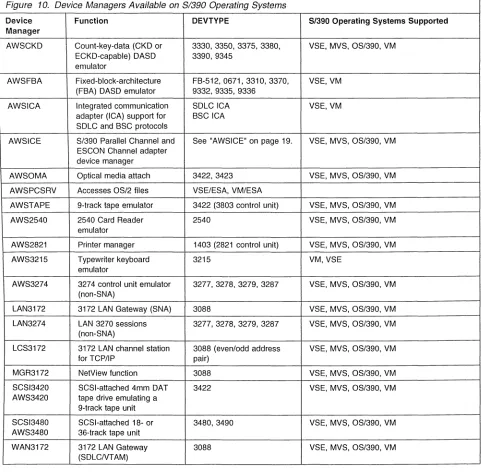
AWSCKD: CKD/ECKD-Capable DASD Emulator 18 AWSFBA: FBA DASD Emulator 19
AWSICA: Integrated Communication Adapter (WAC Adapter) Support 19 AWSICE: S/390 Parallel Channel and ESCON Channel Adapter Device
Manager 19
AWSOMA: Optical Media Emulator 20
AWSPCSRV: Support for Communication with OS/2 20 AWSTAPE: 9-Track Tape Emulator 20
AWS2540: Card Reader Emulator 21 AWS2821: Printer Manager 21
AWS3215: Typewriter Keyboard Emulator 21
AWS3274: 3274 Control Unit Emulator 21 LAN3172: 3172 LAN Gateway 21
LAN3274: LAN 3270 Sessions 22
LCS3172: 3172 LAN Channel Station for TCP/IP support 22 MGR3172: Support for NetView 22
SCSI3420 and AWS3420: SCSlfTape Support 22 SCSI3480 and AWS3480: SCSlfTape Support 22 WAN3172: SDLC Support for VTAM 23
DASD/Disk Storage 23 RAID 23
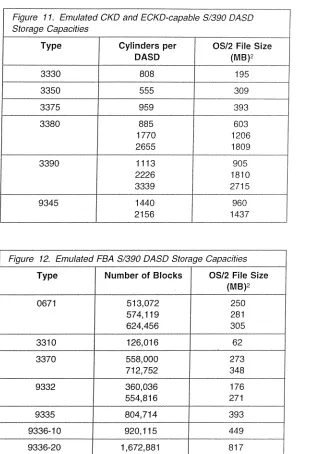
Capacities for Emulated DASD 24 Performance Considerations 26
Processor Performance 26 I/O Performance 26
10SP Activity 26 P/390 I/O Activity 26 LAN Performance 27
I/O Channel Performance 27
Chapter 3. Installing P/390 Hardware and Software 29 Installing the Preconfigured S/390 Operating System 29
IPUng the S/390 Preconfigured System 29 Completing the Installation 30
Customizing the S/390 Operating Systems 30 Installing Optional Program Products 30
Chapter 4. Installing a Non-Preconfigured Operating System 31 Method 1: Migrating an S/390 Operating System from Another System 32 Method 2: Installing Using IBM Software Deliverables 33
Installing OS/390 and MVS/ESA 33
Using the Preconfigured System as the Driving System 34 Using Another Driving System 34
Installing VSE/ESA 37
Installing Optional Products for VSE/ESA 39 Configuring VSE/ESA 40
Installing VM/ESA 40
Installing P/390 CMS Utilities 43
Method 3: Copying from Another S/390 Integrated Server, PC Server System/390, or R/390 45
Chapter 5. Operating the P/390 47
Starting and Stopping the P/390 48 Starting the P/390 48
Shutting Down the P/390 50 Shutting Down VM/ESA 50 Shutting Down VSE/ESA 50
Shutting Down MVS/ESA or OS/390 51
Operating the 3172 SNA Communications Monitor 51 Understanding the Status Monitor 51
Navigating through the Status Monitor 51
Using Traces, Dumps, and Diagnostic Information 52 Collecting Trace Data 52
Collecting Diagnostic Information 52 Viewing Overall Network Status 53
Viewing Detailed LAN Adapter and SDLC Line Data 54 Viewing Link Station Details (LAN and SDLC) 55 Viewing Subchannel Details 56
Setting the Refresh Rate 57
Chapter 6. Configurator Overview 59
System Files Needed to Run the P/390 Configurator 59 Configurator Conventions 62
Starting the Configurator 62
Structure of the P/390 Configurator 65
P/390 Configurator Menus 68
Update System Devices Menu (All Modes) 69 Menu Elements 69
Function Keys 71
Device Manager Parameter Menu (All Modes) 73 Menu Elements 73
Function Keys 74
Select Userid Menu (VM only) 75 Menu Elements 75
Function Keys 76
User Function Selection Menu (VM only) 78 Menu Elements 78
Function Keys 79
Update User Environment Menu (VM only) 80 Menu Elements 80
Function Keys 82
Update User Minidisks Menu (VM only) 83 Menu Elements 84
Function Keys 86
Update User Links Menu (VM only) 87 Menu Elements 87
Function Keys 88
Update System Environment Menu 89 Menu Elements 89
Function Keys 91
Chapter 7. Configurator Tasks 93
Starting the Configurator 94
Changing the P/390 Configurator Password 96 Customizing P/390 System Parameters 96 Creating VM User IDs on Your P/390 System 98
Logging On to a New P/390 VM User ID 101 Copying User IDs 102
Adding System Directory Profiles 104 Changing the Name of a P/390 User ID 105 Deleting P/390 User IDs 106
Editing the P/390 User Environment 107 Creating New P/390 Minidisks 108 Allocating Minidisk Files 110
Adding Minidisk Entries for Existing Files 112 Automatic Search for Existing Minidisk Files 113 Deleting a P/390 Minidisk 114
Moving a P/390 Minidisk 116
Changing the Size of P/390 Minidisks 118
Modifying P/390 User Minidisk Links 121 Allocating New Devices 122
Adding Non-DASD Devices 122
Adding Direct Access Storage Devices (DASD) 125
Adding DASD Device Records Without Allocating a File 128 Allocating an OS/2 File for an Existing DASD Entry 130 Deleting 1/0 Devices 131
Moving 1/0 Devices 133
Changing the Real Address of a Non-DASD Device 133 Changing the Real Address of a DASD Device 134 Changing the OS/2 Drive Letter of a DASD File 136 Changing OS/2 Drive Letters Using the Configurator 136 Changing OS/2 Drive Letters with RDEVMAP.CMD 137 Hiding 1/0 Devices 137
Allocating CP System Volumes in VM Mode 139 The PAGING Volume 140
The TDISKS Volume 141 The SPOOLS Volume 141
Creating Multiple Minidisk Volumes 143
Chapter 8. Configuring the 3172 SOLC Gateway 147 Overview 147
How to Configure for 3172 SDLC Gateway 149 Planning Your Network 149
Configuring VT AM on the Host 149 XCA Major Node Definition 149 Switched Major Node Definition 150
Installing the 3172 SDLC Gateway Program 150 Configure the Host Channels and Subchannels 150 Configuring SDLC Ports 150
Examples of 3172 SDLC Gateway Configurations 155
Example A. Configuring P/390 Subchannels E40 and E41 156
Example B. Configuring Leased SDLC Subarea Connection to NCP 157 Example C. Configuring Leased SDLC Connection to Another 3172 159 Example D. Configuring Leased SDLC Multipoint Connection 161 Example E. Configuring Switched SDLC Connection for Dial-In 164
Chapter 9. Using the P/390 Manual Operations Session 167 Entering the Manual Operations Session 167
The Manual Operations Window Format 168 Manual Operations Session Options 168 Editing Registers 171
Editing Main Storage (Real and Virtual) 172 Editing Real Storage 172
Editing Virtual Storage 172 Instruction Step Function 173 Address Stop Function 173
Chapter 10. Exploiting the S/390 Integrated Server with VSE/ESA 175 Using the Emulated Card Reader Support 175
Setup 175
ASCII-to-EBCDIC Translation 176 Input File Processing Sequence 176 Saving "Old" Card Decks 176
Using the Emulated 3420/3422 Tape Drive Support 177 Setup 177
Operation 177
Mounting Tapes and Disks 178
Using the AWSMOUNT Command in OS/2 178 Using the TMOUNT Command in VSE/ESA 178 Using the 1403 Line Printer Support 179
Setup 179 Operation 179
Using Client Support on the LAN 179
Setup of TCP/IP Telnet (TN3270) Sessions 180 Setup of VTAM SNA 3270 Sessions 180
Using the Emulated Optical-Media-Attach Support 181 Using the PCOPY Utility 182
Automating VSE/ESA IPL at OS/2 Startup 182 Automating the Shutdown of VSE/ESA 182
Chapter 11. Exploiting the S/390 Integrated Server with MVS/ESA and as/3g0 183
Using the Emulated Card Reader Support 183 Setup 183
ASCII-to-EBCDIC Translation 184 Input File Processing Sequence 184 Saving "Old" Card Decks 184
Using the Emulated 3420/3422 Tape Drive Support 184 Setup 184
Operation 185 Mounting Tapes 185
Using the AWSMOUNT Command in OS/2 185 Using the Emulated Optical-Media-Attach Support 186 Using the 1403 Line Printer Support 187
Setup 187
Using Client 3274 Support on the LAN 187 Setup of TCP/IP Telnet (TN3270) Sessions 187 Setup VT AM SNA 3270 Sessions 187
Setup of S/390 TCP/IP sessions 190
Chapter 12. Exploiting the S/390 Integrated Server with VMlESA 191 Using the Emulated Card Reader Support 191
Setup 191
ASCII-to-EBCDIC Translation 192 Spooling Card Reader Operation 192 Input File Processing Sequence 193 Saving "Old" Card Decks 193
Using the Emulated 3420/3422 Tape Drive Support 193 Setup 193
Operation 194
Mounting Tapes and DASD 194
Using the AWSMOUNT Command in OS/2 194 Using the MOUNT Command in CMS 195 Using CMS PIPELINE Support 195
OS2FILE 196
Using the 1403 Line Printer Support 196 Setup 196
Using Client Support on the LAN 196
Setup of TCP/IP Telnet (TN3270) Sessions 197 Setup of VTAM SNA 3270 Sessions 197
Using the Emulated Optical-Media-Attach Support 197
Chapter 13. CMS Commands 199 MOUNT CMS Command 200
Syntax 200
Required Parameters 200 Optional Parameters 201 Example 201
Return Codes and Error Messages 201 Errors from Tape Commands 201 NEWDIR CMS Command 203
Syntax 203
OS2 CMS Command 204 Syntax 204
Required Parameters 204 Optional Parameters 204 Examples 205
PCOPY CMS Command 206 Syntax 206
Required Parameters 206 Optional Parameters 207 Record Format 208
IMPORT: OS/2 to CMS 208 EXPORT CMS to OS/2 209 Examples 209
Wildcards 210
PCOPY Usage Notes 210
Return Codes and Error Messages 210 PIPE OS2 CMS Command 213
Syntax 213 Operands 213 Streams Used 213 Usage Notes 214 Examples 214 Example 2 214 Return Codes 215
PIPE OS2FILE CMS Command 217 Syntax 217
Operands 217 Streams Used 218 Usage Notes 218 Example 1 218 Example 2 218 Return Codes 219
Chapter 14. OS/2 Utilities 221 ALC.EXE OS/2 Utility 222
Syntax 222
Required Parameters 222 Optional Parameters 222 Examples 222
AWSCFG.CMD OS/2 Utility 223 Syntax 223
Optional Parameters 223 AWSEND.CMD OS/2 Utility 224
Syntax 224
Optional Parameters 224 AWSMOUNT.EXE OS/2 Utility 225
Syntax 225
Required Parameter 225 Optional Parameters 225 Example 225
AWSPROF.EXE OS/2 Utility 226 Syntax 226
Required Parameters 226 AWSSTART.EXE OS/2 Utility 227
Syntax 227
Optional Parameters 227 AWSSTAT.EXE OS/2 Utility 228
Syntax 228
Optional Parameters 228 Example 228
Return Codes 228 CKDALC.EXE OS/2 Utility 229
Syntax 229
Required Parameters 229 Optional Parameters 229 Example 229
DEV2NAME.CMD OS/2 Utility 230 Explanation of Tags 230 Syntax 231
Required Parameters 231 AWSICE OS/2 Utilities 232
Example 232 IPL.CMD OS/2 Utility 233
Syntax 233
Optional Parameters 233 Example 234
L TRENAME.EXE OS/2 Utility 235 Syntax 235
Optional Parameters 235 RDEVMAP.CMD OS/2 Utility 236
Syntax 236
Optional Parameters 236 SENDLOG.CMD OS/2 Utility 237
Syntax 237
Optional Parameters 237
Chapter 15. Modifying CP and CMS (VM/ESA Only) 239 Considerations for Modifying CMS 239
Considerations for Modifying CP 239
Building VM/ESA on the S/390 Integrated Server 240 Tailoring the CP Configuration Files 240
Directory Considerations 240 Updating the MAINT User ID 241
Defining Real Device Addresses 241
Adding User IDs and Allocating Minidisks 241 Directory Profiles 241
SYSTEM CON FIG File Considerations 241 System_Residence 242
CP _Owned 242
Usee Volume_Include 244 Timezone_Definition 244 CP _Access 244
Operator_Consoles 244 Rdevice 244
CP Command Class Overrides 245 OPERATOR's Profile 245
P/390 S-Disk Additional Files 246 S-Disk Files 246
OPERATOR's 191 Disk Files 246 Modifying CP 246
Build a New CP Nucleus 246 Make a Backup Copy of CP 247 Bring Up VM/ESA on the P/390 247 Activate the New CP Nucleus 247 Shutdown and IPL the new CP 248 Test the New System 249
Chapter 16. Performance Hints and Tips 251 OS/2 CONFIG.SYS Tuning 251
MAXWAIT 251
PRIORITY _DISK_IO 251 OS/2 HPFS Cache 251
Warp Server (Base) System HPFS Cache Size 251 /CRECL on IFS HPFS Cache 252
LAZY Writes 252
OS/2 FAT Cache 252 LAZY Writes 252 DASD Device Drivers 253
Functional Differences 253
Chapter 17. How the P/390 Supports the S/370 and S/390 Architecture 255 Compatibility 255
Operator-Information 255
Model-Specific Implementation 256 Supported Facilities 256
S/370 Facilities 256 ESA/390 Facilities 258
Unsupported ESA/390 Functions 259
Appendix A. Documentation and Related IBM Manuals 261 S/390 Integrated Server Booklets and Manuals 261
OS/2 Manuals 261 VM/ESA Manuals 261 VSE/ESA Manuals 261 MVS Manuals 261 OS/390 Manuals 262
Soft copy 262
List of Abbreviations 263
Index 265
Notices
Trademarks
© Copyright IBM Corp. 1998
References in this publication to IBM products, programs or seNices do not imply that IBM intends to make these available in all countries in which IBM operates. Any reference to an IBM product, program, or service is not intended to state or imply that only IBM's product, program, or service may be used. Any functionally equivalent product, program, or service that does not infringe any of IBM's intellectual property rights may be used instead of the IBM product, program, or seNice. Evaluation and verification of operation in conjunction with other products, except those expressly designated by IBM, is the user's responsibility.
IBM may have patents or pending patent applications covering subject matter in this document. The furnishing of this document does not give you any license to these patents. You can send license inquiries, in writing, to the IBM Director of licensing, IBM Corporation, 500 Columbus Avenue, Thornwood, NY, 10594 USA.
Licenses of this program who wish to have information about it for the purpose of enabling: (i) the exchange of information between independently created programs and other programs (including this one) and (ii) the mutual use of the information which has been exchanged, should contact:
IBM Corporation Mail Station P300 522 South Road
Poughkeepsie, NY 12601-5400 USA
Attention: Information Request
Such information may be available, subject to appropriate terms and conditions, including in some cases, payment of a fee.
The following terms are trademarks of International Business Machines Corporation in the United States and/or other countries:
IBM
Advanced Peer-to-Peer Networking APPN
CICS
Common User Access OB2
Enterprise Systems Architecture/390 ESAl390 ES/9000 IBMLink LPOA NetView OS/390
Presentation Manager RISC System/6000 S/390 Streamer System/370 ACFIVTAM AIX BookManager CICSIVSE CUA ECKO eNetwork ESCON GOOM IMS MVS/ESA OS/2
Personal System/2
VM/ESA VTAM
The following terms are trademarks of other companies;
VSE/ESA
• Windows is a trademark of Microsoft Corporation in the United States and/or other countries.
• Pentium is a trademark of Intel Corporation in the United States and/or other countires.
Statement of Limited Warranty
The warranties provided by IBM in this Statement of Limited Warranty apply only to Machines you originally purchase for your use, and not for resale, from IBM or an IBM authorized reseller. The term "Machine" means an IBM machine, its features, conversions, upgrades, elements, or accessories, or any combination of them. Machines are subject to these terms only if purchased in the United States or Puerto Rico, or Canada, and located in the country of purchase. If you have any questions, contact IBM or your reseller.
Machine: System/390 Integrated Server
Warranty Period*: 1 year
*Elements and accessories are warranted for three months. Contact your place of purchase for warranty service information.
Production Status
Each Machine is manufactured from new parts, or new and serviceable used parts (which perform like new parts). In some cases, the Machine may not be new and may have been previously installed. Regardless of the Machine's production status, IBM's warranty terms apply.
The IBM Warranty
IBM warrants that each Machine 1) is free from defects in materials and workmanship and 2) conforms to IBM's Official Published Specifications. IBM calculates the expiration of the warranty period from the Machine's Date of
Installation. The date on your receipt is the Date of Installation, unless IBM or your reseller informs you otherwise.
During the warranty period, IBM or your reseller will provide warranty service under the type of service designated for the Machine and will manage and install
engineering changes that apply to the Machine. IBM or your reseller will specify the type of service.
For a feature, conversion, or upgrade, IBM or your reseller may require that the Machine on which it is installed be 1) the designated, serial-numbered Machine and 2) at an engineering-change level compatible with the feature, conversion, or
upgrade. Some of these transactions (called "Net-Priced" transactions) may include additional parts and associated replacement parts that are provided on an
exchange basis. All removed parts become the property of IBM and must be returned to IBM.
Replacement parts assume the remaining warranty of the parts they replace.
If a Machine does not function as warranted during the warranty period, IBM or your reseller will repair or replace it (with a Machine that is at least functionally equivalent) without charge. If IBM or your reseller is unable to do so, you may return it to your place of purchase and your money will be refunded.
If you transfer a Machine to another user, warranty service is available to that user for the remainder of the warranty period. You should give your proof of purchase and this Statement to that user.
Warranty Service
To obtain warranty service for the Machine, you should contact your reseller or call IBM. In the United States, call IBM at 1-800-IBM-SERV (426-7378). In Canada, call IBM at 1-800-465-6666. You may be required to present proof of purchase.
Depending on the Machine, the service may be 1) a "Repair" service at your location (called "On-site") or at one of IBM's or a reseller's service locations (called "Carry-in") or 2) an "Exchange" service, either On-site or Carry-in.
When a type of service involves the exchange of a Machine or part, the item IBM or your reseller replaces becomes its property and the replacement becomes yours. The replacement may not be new, but will be in good working order and at least functionally equivalent to the item replaced.
It is your responsibility to:
1. obtain authorization from the owner (for example, your lessor) to have IBM or your reseller service a Machine that you do not own;
2. where applicable, before service is provided
-a. follow the problem determination, problem analysis, and service request procedures that IBM or your reseller provide,
b. secure all programs, data, and funds contained in a Machine, c. inform IBM or your reseller of changes in a Machine's location, and d. for a Machine with exchange service, remove all features, parts, options,
alterations, and attachments not under warranty service. Also, the Machine must be free of any legal obligations or restrictions that prevent its
exchange; and
3. be responsible for loss of, or damage to, a Machine in transit when you are responsible for the transportation charges.
Extent of Warranty
IBM does not warrant uninterrupted or error-free operation of a Machine.
Misuse, accident, modification, unsuitable physical or operating environment, improper maintenance by you, or failure caused by a product for which IBM is not responsible may void the warranties.
THESE WARRANTIES REPLACE ALL OTHER WARRANTIES, EXPRESS OR IMPLIED, INCLUDING, BUT NOT LIMITED TO, THE IMPLIED WARRANTIES OF MERCHANTABILITY AND FITNESS FOR A PARTICULAR PURPOSE.
HOWEVER, SOME LAWS DO NOT ALLOW THE EXCLUSION OF IMPLIED
WARRANTIES. IF THESE LAWS APPLY, THEN ALL EXPRESS AND IMPLIED WARRANTIES ARE LIMITED IN DURATION TO THE WARRANTY PERIOD. NO WARRANTIES APPLY AFTER THAT PERIOD.
In Canada, warranties include both warranties and conditions.
Some jurisdictions do not allow limitations on how long an implied warranty lasts, so the above limitation may not apply to you.
Limitation of Liability
Circumstances may arise where, because of a default on IBM's part (including fundamental breach) or other liability (including negligence and misrepresentation), you are entitled to recover damages from IBM. In each such instance, regardless of the basis on which you are entitled to claim damages, IBM is liable only for:
1. bodily injury (including death), and damage to real property and tangible personal property; and
2. the amount of any other actual loss or damage, up to the greater of $100,000 or the charge for the Machine that is the subject of the claim.
Under no circumstances is IBM liable for any of the following:
1. third-party claims against you for losses or damages (other than those under the first item listed above);
2. loss of, or damage to, your records or data; or
3. economic consequential damages (including lost profits or savings) or incidental damages, even if IBM is informed of their possibility.
Some jurisdictions do not allow the exclusion or limitation of incidental or
consequential damages, so the above limitation or exclusion may not apply to you.
This warranty gives you specific legal rights and you may also have other rights which vary from jurisdiction to jurisdiction.
IBM Agreement for Licensed Internal Code
2125-4144-0311/95
© Copyright IBM Corp. 1998
You accept the terms of this Agreement by your initial use of a machine that contains IBM Licensed Internal Code (called "Code").
These terms apply to Code used by certain machines IBM or your reseller specifies (called "Specific Machines"). International Business Machines Corporation or one of its subsidiaries ("IBM") owns copyrights in Code. IBM owns all copies of Code, including all copies made from them.
If you are the rightful possessor of a Specific Machine, IBM grants you a license to use the Code (or any replacement IBM provides) on, or in conjunction with, only the Specific Machine for which the Code is provided. IBM licenses the Code to only one rightful possessor at a time.
Under each license, IBM authorizes you to do only the following:
1. execute the Code to enable the Specific Machine to function according to its Official Published Specifications (called "Specifications");
2. make a backup or archival copy of the Code (unless IBM makes one available for your use), provided you reproduce the copyright notice and any other legend of ownership on the copy. You may use the copy only to replace the original, when necessary; and
3. execute and display the Code as necessary to maintain the Specific Machine.
You agree to acquire any replacement for, or additional copy of, Code directly from IBM in accordance with IBM's standard policies and practices. You also agree to use that Code under these terms.
You may transfer possession of the Code to another party only with the transfer of the Specific Machine. If you do so, you must 1) destroy all your copies of the Code that were not provided by IBM, 2) either give the other party all your IBM-provided copies of the Code or destroy them, and 3) notify the other party of these terms. IBM licenses the other party when it accepts these terms. These terms apply to all Code you acquire from any source.
Your license terminates when you no longer rightfully possess the Specific Machine.
Actions You May Not Take
You agree to use the Code only as authorized above. You may not do, for example, any of the following:
1. otherwise copy, display, transfer, adapt, modify, or distribute the Code (electronically or otherwise), except as IBM may authorize in the Specific Machine's Specifications or in writing to you;
2. reverse assemble, reverse compile, or otherwise translate the Code unless expressly permitted by applicable law without the possibility of contractual waiver;
3. sublicense or assign the license for the Code; or
4. lease the Code or any copy of it.
Preface
This book describes how to install, generate, and modify S/390 operating systems on the IBM S/390 Integrated Server Model B01. This includes information on:
• The IBM S/390 Integrated Server, its hardware and software components, and connectivity options
• Installing IBM S/390 Integrated Server programs and S/390 operating systems
• How to operate and configure the system to create and maintain S/390 operating systems
• How to use tools provided by the IBM S/390 Integrated Server to solve problems
• How to improve the operation and performance of the IBM S/390 Integrated Server, by using commands and utilities provided with the product
Who This Book Is For
This book is intended for a system programmer responsible for installing and maintaining S/390 operating systems on the IBM S/390 Integrated Server. A general understanding of System/390® data processing and teleprocessing techniques is assumed. In particular, you must have a good understanding of the S/390 operating system, and a general knowledge of a S/390 Server. You should also have a good understanding of the OS/2® operating system.
How This Book Is Organized
© Copyright IBM Corp. 1998
This book contains the following chapters and appendixes:
• Chapter 1, "Introduction to the IBM S/390 Integrated Server" on page 1 tells about the benefits of the IBM S/390 Integrated Server and provides an overview of its hardware and software components.
• Chapter 2, "P/390 I/O Subsystem" on page 15 provides information to help you decide which options you want to use when installing and configuring the system.
• Chapter 3, "Installing P/390 Hardware and Software" on page 29 contains procedures to help you customize the IBM S/390 Integrated Server for the S/390 environment.
• Chapter 4, "Installing a Non-Preconfigured Operating System" on page 31 provides guidance when installing the S/390 operating system and associated products.
• Chapter 5, "Operating the P/390" on page 47 describes how to use the tools for operating the IBM S/390 Integrated Server.
• Chapter 6, "Configurator Overview" on page 59 contains an overview of the Configurator which you will use to configure the IBM S/390 Integrated Server.
• Chapter 7, "Configurator Tasks" on page 93 gives step-by-step instructions on how to use the Configurator to complete certain tasks.
• Chapter 8, "Configuring the 3172 SDLC Gateway" on page 147 tells how to configure the IBM S/390 Integrated Server for the 3172 SDLC Gateway (MVS/ESA and OS/390 only) function.
• Chapter 9, "Using the P/390 Manual Operations Session" on page 167 describes the S/390 manual operations session, including editing registers, editing main storage, and generating hardware requests.
• Chapter 10, "Exploiting the S/390 Integrated Server with VSE/ESA" on
page 175, Chapter 11, "Exploiting the S/390 Integrated Server with MVS/ESA and OS/390" on page 183, and Chapter 12, "Exploiting the S/390 Integrated Server with VM/ESA" on page 191 give suggestions on using S/390 operating systems and IBM S/390 Integrated Server combination.
• Chapter 13, "CMS Commands" on page 199 describes the CMS commands that are shipped with the IBM S/390 Integrated Server.
• Chapter 14, "OS/2 Utilities" on page 221 describes the OS/2 utilities that come with the IBM S/390 Integrated Server.
• Chapter 15, "Modifying CP and CMS (VM/ESA Only)" on page 239 describes information you should consider before you modify CP for use on the S/390 Integrated Server.
• Chapter 16, "Performance Hints and Tips" on page 251 contains performance and tuning hints that were gathered during laboratory experiences.
• Chapter 17, "How the P/390 Supports the S/370 and S/390 Architecture" on page 255 identifies S/370 TM and ESA/390·M facilities that are supported and
unsupported by the P/390.
Introduction to the
S/390Integrated Server
Chapter 1. Introduction to the IBM 5/390 Integrated Server
The IBM S/390 Integrated Server Model B01 brings together two powerful technologies:
• Compact, high-performance, low-cost peripheral component interconnect (PCI) servers with their broad range of user-friendly interfaces and applications, and
• Enterprise System Architecture/390®-based operating systems with their rich tradition of applications and functions supporting interactive and commercial processing.
P/390 Solutions
The S/390 Integrated Server offers unique and cost-effective computing solutions with the latest technology to customers who require ESA/390 architecture on a workstation or on a server in a Local Area Network (LAN) environment. The software provided with the S/390 Integrated Server offers new solutions to customers, for example:
• A development workbench • A distributed server
• An entry System/390 server
The following section describes sample environments in which the S/390 Integrated Server can support your business or enterprise. The scenarios are only intended to outline the possibilities. They should not be used as a guide to establish a specific environment.
Development Workbench
© Copyright IBM Corp. 1998
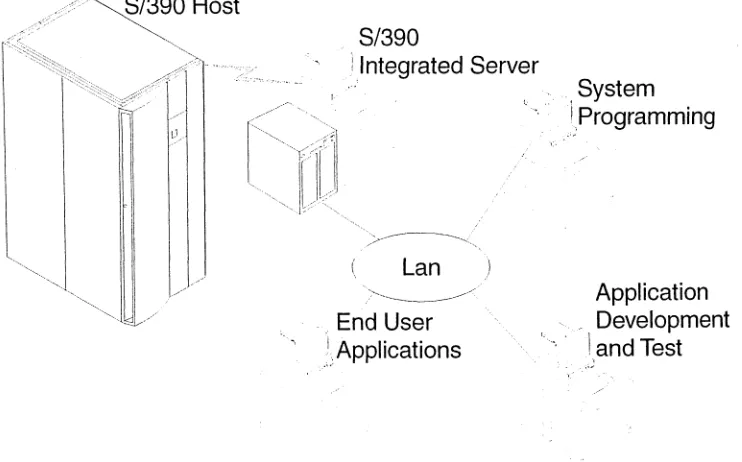
Using the S/390 Integrated Server as a development workbench, it can serve as a dedicated platform for developing, testing, and maintaining mainframe applications, using the same tools as the host. Therefore, the availability of the host production system is increased, dependencies on the host are eliminated, and risks to the production system are reduced, resulting in higher productivity. Figure 1 on page 2 shows an enterprise organized this way.
Application and system development performed on a S/390 Integrated Server on the LAN increases the availability of the host system. Developers can continue to move applications, data, and system changes between the mainframe and the S/390 Integrated Server on the LAN. Commands and utilities supplied with the S/390 Integrated Server software can aid in using the S/390 Integrated Server facilities.
As applications are developed, client workstations that access the host across the LAN for production applications can access this end-user test machine to validate the applications before they are moved to the mainframe. These applications are uploaded to the host system through the connectivity facilities provided by the S/390 Integrated Server and the S/390 operating systems that run on it.
With the host mainframe connected to the LAN with devices such as the 3172 controller or an integrated mainframe LAN adapter, full SNA connectivity is available between the mainframe and the LAN-attached devices to support these
Introduction to the
S/390
Integrated Server
types of environments. S/390 Integrated Servers can communicate peer-to-peer across the LAN with the mainframe and with each other. Workstations can communicate with S/390 Integrated Servers on the LAN, with the mainframe, or both.
S/390
ilntegrated Server
,.
' .. ~~,
"OQ
...
>---<~.(
Lan
)
' .. >
....
---~'./
'., End User
I,
Applications
[image:23.672.182.553.152.383.2]... ;.'
Figure 1. S/390 Integrated Server as a Development Workbench
Distributed Server
. '. System
1,Programming
Application
Development
I,and Test
:,;"
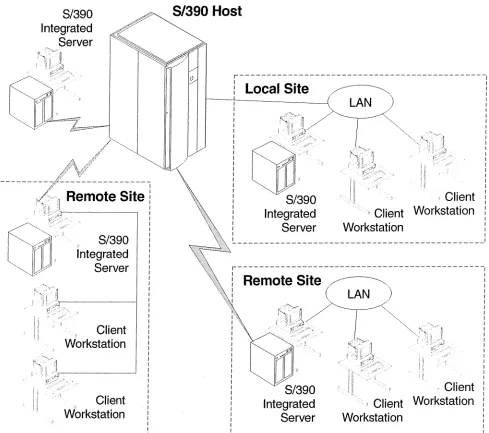
The S/390 Integrated Server can participate in multiple local and remote enterprises. Figure 2 on page 3 shows an example of this.
Remote Server: If you have a business or enterprise that needs total systems management of multiple remote systems, the S/390 Integrated Server provides a distributed platform that is capable of running ESA/390 applications. Remote locations can run their businesses autonomously while receiving consistent
S/390
Integrated
Server
S/390
Host
Introduction to the
S/390Integrated Server
r---,
/
/
/;1\
4l
v!---Z,'
-~~::l(R~~~~;~sit~-,!
, 'il'II' i' ,
: !'L,::;,~ , '
Local Site
Integrated
Server
LAN
I';
"
I
~
.fll
"
Client
, ... ~"
.~Client Workstation
Workstation
,
,
,
,
,
,
,
,
,
,
,
,
,
,
,
,
,
,
,
,
,
,
I,
,
,
,
,
,
r
~o,c<
inte§;;
I
---,
,
'
,
'
,
'
,
'
,
,
'
'
,
, I'"'
V'" ,
, II '1, '
!
I
Ii,Client!
,
Workstation'
, I
,
'
,
'
,
'
,
'
,
'
,
'
' I
'
, i i ,
, " 'I'!
Client'
" : , 1 , ' :
,
Workstation'
, ' , i
,
,
:L _ _ _ _ _ _ _ _ _ _ _ _ _ _ _ _ _ _ _ _ _ _ _ _ _ _ _ J
r---,
!
Remote Site
~
!
i
(
LAN
'
,
,
,
,
,
,
,
,
,
,
,
,
,
,
,
,
,
,
,
,
,
~.'
"S/390
Integrated
Server
[image:24.672.86.575.76.509.2]~---,
Figure 2. 51390 Integrated Server in Distributed Environments
Entry
5/390
Server
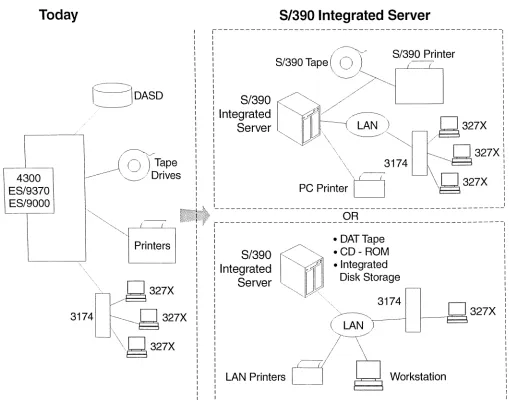
The S/390 Integrated Server can run as an entry System/390 server, replacing S/370 mainframe systems that are outdated. Figure 3 on page 4 shows an example of how this would be done. Substantial savings can be demonstrated in lower maintenance costs on both the processor and DASD, lower energy costs, lower connectivity costs, and environmental savings. You have the flexibility of configuring the S/390 Integrated Server as a stand-alone system or integrating it into a LAN environment. You can also attach selected tape drives, printers, and communication controllers to the S/390 Integrated Server by using the S/390 Parallel Channel adapter, or utilize the ESCON® feature of the S/390 Serial Channel adapter to connect to new devices and to those you were unable to connect to in the past.
Introduction to the
S/390Integrated Server
Today
4300
ES/9370
ES/9000
By replacing existing S/370 and S/390 operating systems with the S/390 Integrated Server, you can use the latest technology, including S/390 ESA software, and retain the same skills. The S/390 software provides complete year 2000 support.
S/390
Integrated Server
,---1
1 1
(
/~)'
S/390
PrinterSl390Tape
~S
Int':~;~ ~j///~
1Server
ljJlJJ\---('~~
/g
327Xi
\ 3174
Il
::=
g
327Xi
PC
printe~
((I
L\g
327Xi
1 1
t-JDASD
~,
( (.J )
Tape ---\,_/ Drives1 1
1
~~
1 1
1
. : : • OAT Tape :
"~, ~
1If+
~=======================9=~===========================1
Printers
: :
1 1
S/390,
~
•
CD ROM-
1
:
'---~
i i
Integrated~~000'"
·
I~tegrated
i
" " ' L f ] \ ,
327X:
I Server " .... ,,-... ,Y",~ Disk Storage : ::
.
3174
:
3174
,~327X
/~
327X :
\ ( LAN ,
"g327X
LAN Printers Workstation
~---Figure 3. SI390 Integrated Server as an Entry Server
System Overview
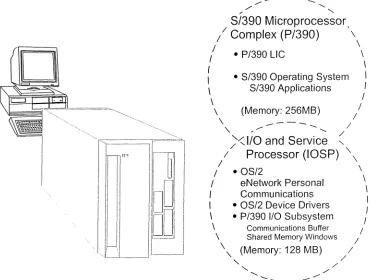
The S/390 Integrated Server is a dual-processor system with a high-performance Pentium@ II processor as part of the I/O and Service Processor (IOSP). This 10SP provides an execution environment for the programs that provide the S/390 I/O emUlation. An enhanced S/390 Microprocessor Complex (P/390) provides the S/390 ESA instruction set and runs the VM/ESA®, VSE/ESA ™ , and OS/390® operating systems unmodified. Most S/390 applications run unmodified on the S/390 Integrated Server. (Throughout this book, the System/390 Microprocessor Complex will be referred to as the P/390.)
[image:25.672.95.604.113.513.2]Introduction to the
S/390Integrated Server
---...
. / ...
. , , /
"-S/390 Microprocessor
/ Complex
(P/390)
\
I \
I • P/390 LlC \
I \
I • S/390 Operating System I \ S/390 Applications I
\ I
\ (Memory: 256MB) I
\
---
//
'\
.
. / ... /)<
1/0 and Service
"-/
Processor (IOSP) '\
/ \
I • OS/2 \
I eNetwork Personal \
I Communications \
I • OS/2 Device Drivers I \ • P/390 I/O Subsystem I
\ Communications Buffer I I
\ Shared Memory Windows /
\'\ (Memory: 128 MB) /
"
"
/ [image:26.672.199.571.77.357.2]/ ... . / /
---~
Figure 4. S/390 Integrated Server System Overview
S/390 Integrated Server Hardware Structure
There are two processor parts in the S/390 Integrated Server system:
• The System/390 Microprocessor Complex or P/390 card • The 1/0 and Service Processor (IOSP)
This section describes these main components.
The System/3g0 Microprocessor Complex
The S/390 Microprocessor Complex or P/390 card, is presently supported in the S/390 Integrated Server Model B01. It has the following features:
• S/390 microprocessor • 256MB ECC memory • 64-bit internal data flow • Integrated floating point unit • Support for S/390 ESA architecture • Sends 1/0 requests to the IOSP • Uses one PCI slot
The P/390 provides the functions of an S/390 processor and is best understood when you look at its main parts.
• The P/390 licensed internal code is responsible for processor communication with the 10SP and for implementation of the ESA/390 architecture on the S/390 Integrated Server. This code is supplied with the S/390 Integrated Server Program and is installed on the integrated server's hard disk. It is loaded from the hard disk when an IPL command is executed.
Introduction to the S/390 Integrated Server
• The P/390, with the aid of the licensed internal code, can run the VM/ESA, VSE/ESA, and OS/390 operating systems along with their applications. The System/390 Microprocessor Complex is implemented via a single 300,000 gate CMOS VLSI module. The P/390 supports the standard ESA/390 instruction set and facilities described in the ESAl390 Principles of Operations. In addition, the S/390 Integrated Server can operate in S/370 mode. In S/370 mode, the standard S/370 instruction set and facilities, as described in the IBM
System/370B' Principles of Operation, are supported. Additional facilities
provided by the S/390 Integrated Server are described in Appendix A, "Documentation and Related IBM Manuals" on page 261.
The P/390 takes advantage of the I/O capabilities of the 10SP to support S/390 I/O operations rather than having its own separate I/O capabilities. It works in tandem with the I/O and Service Processor (IOSP) to provide a base for running the device managers, which in turn provide the S/390 device emulation.
• Real memory for the P/390 consists of 256MB ECC memory. This memory is
part of the P/390 and is completely separate from the 10SP memory that comes with the S/390 Integrated Server. It is dedicated to the P/390, and it is only used to support execution of the S/390 operating system and its programs.
The I/O and Service Processor (IOSP)
The I/O and Service Processor (IOSP) is available in the S/390 Integrated Server Model B01. The P/390 takes advantage of the I/O capabilities of the 10SP to support S/390 I/O operations rather than having its own separate I/O capabilities. It utilizes an S/390 I/O subsystem implemented through device emulation software, device drivers, and S/390 Integrated Server devices controlled by the 10SP to service its I/O requests.
The following features are standard on the S/390 Integrated Server Model B01:
• Single Board Computer (SBC) with an on-board high performance 333MHz Intel Pentium II processor-L 1 cache 32KB and L2 cache 512KB
• IBM System/390 Microprocessor Complex (P/390) with 256MB ECC memory • S/390 Parallel Channel and ESCON Channel adapters
• Internal Serial Storage Architecture (SSA) RAID-5 DASD controller • Sixteen hot-swap DASD bays
• Expansion slots:
- sixteen Peripheral Component Interconnect (PCI) I/O slots, and - three Industry Standard Architecture (ISA) slots
• Accelerated Graphics Port (AGP) On Board Video with 2 MB memory • Integrated 10/1 OOMbps PCI Ethernet controller
• 4mm DDS/3 digital audio tape (DAT) provided for S/390 software installation and service
• Two high-speed serial ports and one parallel port • Enhanced 101-keyboard
Introduction to the
S/390Integrated Server
5/390
Integrated Server Software Structure
Figure 4 on page 5 shows the major software components that run on the processor:
• S/390 operating system
• OS/2 operating system, for S/390 Integrated Server support • P/390 I/O subsystem
You should already be familiar with the software structure of an S/390 processor running VM/ESA, VSE/ESA, MVS/ESA "', or OS/390. If not, see the manuals listed in Appendix A, "Documentation and Related IBM Manuals" on page 261. The new piece in the picture for a system running S/390 software is the I/O and Service Processor (IOSP) and the programs running on it. A description of each of these software components follows.
5/390
Operating Systems
Here are the S/390 operating systems that are supported on the S/390 Integrated Server:
• VM/ESA (currently marketed releases) • VSE/ESA (currently marketed releases) • MVS/ESA (currently marketed releases) • OS/390 (currently marketed releases)
The S/390 operating systems are distributed on any currently supported tape, including the 4mm digital audio tape (OAT). In addition, the S/390 preconfigured systems are distributed on CD-ROMs. The installation of the preconfigured system has been simplified; and it will be preinstalled so that the S/390 Integrated Server is ready to run when it arrives. Additional CD-ROMs also contain VM/ESA, VSE/ESA, MVS/ESA, and OS/390 publications in softcopy format for use with BookManager® Read licensed products or library readers supplied on the CD-ROM.
To find out the current release level for the operating system that is supported, contact your IBM marketing representative, or IBM authorized dealer, or call aOO-IBM-CALL in the U.S. and Canada. In some situations, you may be able to migrate older releases of S/370 or S/390 operating systems to a later release.
05/2
Operating System
The following programs are required and come preloaded on the S/390 Integrated Server:
• IBM OS/2 Warp Server
• IBM eNetwork'" Personal Communications for OS/2
The S/390 Integrated Server uses OS/2 facilities to control parts of the 10SP system, including standard I/O devices, such as the display, keyboard, mouse, disks, and printer. The multitasking capabilities of OS/2 allow concurrent execution of OS/2 applications and the device managers and programs that support the P/390. Installation and operation of the S/390 environment are also integrated into the OS/2 environment.
OS/2 must be properly installed on the S/390 Integrated Server before the P/390 programs can be installed, because the installation steps use standard OS/2 commands to copy the P/390 support programs to OS/2 formatted disks. This use of unaltered BIOS and OS/2 is an advantage for installation, backup, recovery, and
Introduction to the St390 Integrated Server
debugging. No special tools are required to manipulate the S/390 Server disks, which contain standard OS/2 files representing both the P/390 programs and the S/390 disk volumes.
IBM Multi-Protocol Transport Services (MPTS) is required on the S/390 Integrated Server for MPTS connections. MPTS function is provided by OS/2 Warp. These and other S/390 Integrated Server connectivity options are described further in Chapter 2, "P/390 I/O Subsystem" on page 15.
3270 emulation sessions are used on the S/390 Integrated Server to access the ESA/390 operating system. These sessions are displayed in OS/2 windows, as are other functions related to the S/390 environment, such as the S/390 CPU activity window shown in Figure 15 on page 49. Some of the S/390 Integrated Server programs use the Presentation Manager® interface to display screens that support the S/390 environment. Online help is also available.
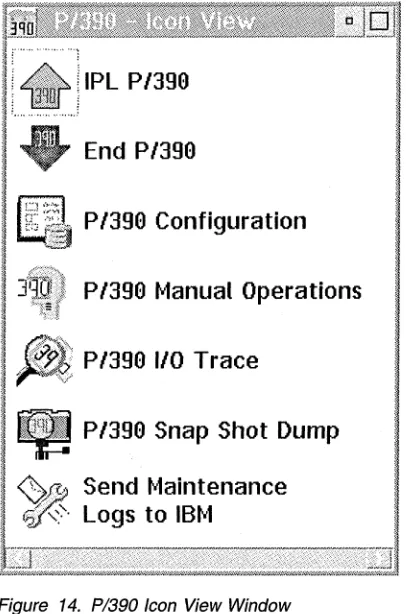
P/390 icons are provided for easy access to the functions that are used to operate and support the S/390 environment. Figure 14 on page 47 shows the icon folder that is displayed when the P/390 icon is selected from the OS/2 desktop.
The IPL P/390 icon can be included in the OS/2 startup folder to automate the startup of the S/390 operating system when the S/390 Integrated Server is turned on.
OS/2 Problems
The S/390 Integrated Server I/O subsystem is based on a customized OS/2. If any programs are added to the OS/2 that are not part of the Integrated Server product, these applications can affect both the performance and reliability of your S/390 110.
If you have added new applications and then experience any problems, first stop running the applications while the P/390 is IPLed, to see if the problems cease. If the problems persist, then try un installing the applications. If you still have
problems, then contact your IBM Business Partner; your C: drive may have to be formatted and reloaded.
Note: The following programs are
not
part of the S/390 Integrated Server product and shouldnever
be loaded or run:• Netfinity
• OS/2 LAN Server • HPFS386
P/390 I/O Subsystem
The S/390 Integrated Server 10SP provides the 110 support for the P/390 in place of System/390 channel hardware. All of the standard S/370 and S/390 I/O devices are emulated by device drivers, device managers, and utilities that come with the P/390 programs and by S/390 Integrated Server devices that are standard features of the system or are added through installation of additional device adapters. The P/390 110 subsystem consists of:
• P/390 device driver • 110 control blocks (IOCBs) • S/390 channel emulator
• Device manager emulators for S/390 I/O devices
Connectivity
Introduction to the
S/390Integrated Server
These components are described in detail in Chapter 2, "P/390 I/O Subsystem" on page 15.
There are many ways to provide connectivity to the S/390 operating systems running on the S/390 Integrated Server. With appropriate software installed, the S/390 Integrated Server can operate using IBM Systems Network Architecture (SNA), IBM non-SNA networks and some non-IBM networks. The device
managers identified in this section are described in detail in Chapter 2, "P/390 I/O Subsystem" on page 15.
51390 Integrated Server
LCS3172 (TCPIIP) LAN3172 (SNAlVTAM) LAN3274 (TN3270)
I
_L ..
SNAlVTAM--'
---_
.. / - -'- TCPIIP
->" S:.:N~WV~r.~:4:::M~_--(~ TokenRing or Ethernet LAN ,
-'-/ 3174-63R ' _________ , - _ - - - /
/ II
;1
'. '" '"
TN3270CTC
SNAlVTAM SNAlVTAM SNAlVTAM TCPIIP/ TCPIIP . TCP/IP
'--.._/. Boundary
. Node , >-, / Converter I ' , /
/ \ - / / ~
:' ' ri:::I
/
. /37x5,3172, 3174,ICA
11
. Workstation
fiJ
. Workstation
6
Workstation
m
.5/390 Integrated Server
m
SDLC/' BSC
/
PC ServerSystem/390
!J
[image:30.672.183.551.231.575.2]5/390 Host
Figure 5. The S/390 Integrated Server in a Local Area Network
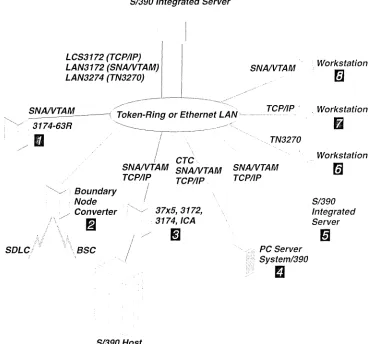
Figure 5 shows the possibilities of using a token-ring or an Ethernet LAN using P/390-provided device managers LCS3172, LAN3172, and LAN3274.
• 3270-type terminals and printers can gain connectivity through a LAN-attached 3174 display controller Dusing SNANTAM®.
• A LAN-attached boundary node converter
fJ
using SNANT AM can be used to provide connectivity for SDLC- and BSC-attached devices.• LAN-attached S/390 host mainframes
II
can establish connectivity to the S/390 operating systems using either SNANTAM or TCP/IP. A S/390 hostIntroduction to the
S/390
Integrated Server
connection to the LAN would be through a 37X5, 3172, 3174 controller or an integrated communication adapter (ICA).
• The S/390 operating system on the S/390 Integrated Server can communicate across
D
the LAN peer-to-peer to a PC Server System/390 orD
another S/390 Integrated Server as if they were connected using a 3172-001 controller. Either SNANTAM or TCP/IP can be used.• Workstations using the TN3270 protocol
D
for transmitting 3270 data streams over TCP/IP Telnet can communicate with the S/390 operating system using non-SNA DFT 3270 emulation sessions.• TCP/IP clients
D
connected to the LAN can access the S/390 operating system running on the S/390 Integrated Server.• OS/2, Windows®, and DOS client workstations
m
on the LAN cancommunicate with S/390 Integrated Server from 3270 emulation sessions using SNA 3270 protocol.
S/390 Integrated Server
S/390 Parallel or ESCON Channel
3174
m
i
: ~
I AWSICE
,/ 3745
m
, / 3745
m
S/390 Host
AWSICA (ICA SOLC/SSC)
I
T
'II
I
WAN3172 (XCA SOLC)' , I , )~
~
~~f!.SC
'I;
, ,
:! '
3174
rn
--"
~
'
SOLC SSCS/390 Printer
m
'I
Integrated Serverm
PC Server
"~ System/390
~
~ ~
~u
[image:31.672.112.575.71.677.2] [image:31.672.182.561.293.627.2]S/390Host
Figure 6. The S/390 Integrated Server with Communication Lines
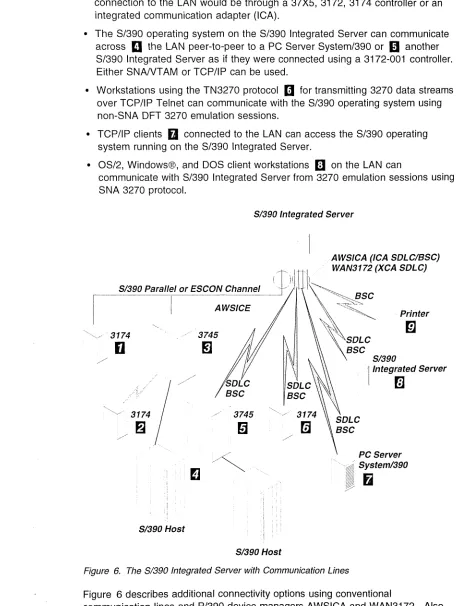
Figure 6 describes additional connectivity options using conventional
communication lines and P/390 device managers AWSICA and WAN3172. Also provided is an attachment capability using the S/390 Parallel Channel (with the S/370 OEMI interface specification) and/or ESCON Channel. The AWSICE device manager supports this capability.
hitroduction to the S/390 Integrated Server
• 3174 display controllers
0
can be connected to a S/390 Parallel Channel or ESCON Channel through an ESCON director, thus providing local attachment for 3270-type terminals and printers.• Applications requiring an expanded communication capability can attach a 3745 communication controller
II
to a S/390 Parallel Channel or ESCON Channel through an ESCON director. The 3745 can provide alternate connections to the S/390 hostII
or 3174 display controllerfJ
as well as increased communication capabilities.• Remote 3270-type terminals and printers can be attached using a 3174 display control unit
II
with a directly-connected communication link.• A remote peer-to-peer PC Server System/390
II
or S/390 Integrated Server connection1m
can be established using a directly connected communication link and either SOLC or SSC protocols.• Remote printers
m
can be attached using SSC protocols.Commands and Utilities
Commands
Several commands and utility programs are used with the S/390 Integrated Server in addition to those provided by the OS/2 and S/390 operating systems. These are useful when operating P/390 functions on the S/390 Integrated Server.
CMS commands that come with the S/390 Integrated Server complement those provided by the VM/ESA operating system. CMS users can invoke these commands from VM sessions running on the S/390 Integrated Server to access host VM data and OS/2 files and to interact with the OS/2 environment. These are included with the VM/ESA preconfigured system.
Figure 7 lists the commands and their functions:
Figure 7. Commands and their functions
Command Function
MOUNT Associate an OS/2 file specification with an S/390 Integrated Server emulated tape drive
NEWDIR Import the current VM user directory from OS/2 and make it active in VM
OS2 Execute an OS/2 command from a S/390 Integrated
Server virtual machine
PCOpy Copy (import/export) files between OS/2 and VM
PIPE OS2 Use the OS2FILE stage command in a pipeline running under CMS to read or write an OS/2 file
PIPE OS2FILE Read or write OS/2 files from CMS pipelines
See Chapter 13, "CMS Commands" on page 199 for additional information about these commands.
Introduction to the
S/390Integrated Server
Utilities
Several OS/2 and P/390 utilities are supplied with the P/390 programs to help control and operate the S/390 Integrated Server. The interactive functions invoked by the P/390 icons use some of these utilities to perform their tasks. Because the utilities are OS/2 programs, they can be invoked from an OS/2 command prompt to accomplish these and other tasks without using one of the S/390 Integrated Server interactive interfaces.
See Chapter 14, "OS/2 Utilities" on page 221 for additional information about these utilities.
Figure 8 lists the utilities and their functions:
Figure 8. Utilities and their functions
Utility Function
ALC.EXE Allocates files as DASD, display volume information, and
CKDALC.EXE change volume labels
AWSCFG.CMD Invokes the P/390 Configurator
AWSEND.CMD Stops the P/390 I/O subsystem
AWSMOUNT.EXE Changes the FBA DASD or emulated tape configuration dynamically
AWSPROF.EXE Records the name and location of the DEVMAP to use as the default for the Configurator and IPL
AWSSTART.EXE Starts P/390 device managers
AWSSTAT.EXE Displays or changes the status of the P/390 I/O subsystem and device managers
DEV2NAME.CMD Creates an ASCII file from a DEVMAP file
ICEDEV Stand-alone scan of the S/390 Parallel Channel and/or ESCON Channel for devices
ICEINIT Initializes and loads the ARTIC960, S/390 Parallel Channel, and/or ESCON Channel
ICEMAP Displays the devices claimed by AWSICE and their settings
ICETRACE Gets an internal S/390 Parallel Channel and/or ESCON Channel trace dump
IPL.CMD Starts the P/390 I/O subsystem and IPL the P/390
L TRENAME.EXE Renames the title bar of a Personal Communications 3270 session
RDEVMAP.CMD Reconfigures directory and path names in a DEVMAP
SENDLOG.CMD Transmits logs and traces to IBM via the Internet for problem analysis
VSE/ESA Utilities
Samples of two utilities are provided on an as-is basis in the latest releases of VSE/ESA in ICCF Library 59.
peopy
Introduction to the
S/390Integrated Server
preconfigured CD-ROM. The source of this program is contained in VSE/ESA ICCF Library 59 (TMOUNT). See "Using the TMOUNT Command in VSE/ESA" on page 178 for more information on using this function.
Is a sample program to allow file transfers between OS/2 and VSE/ESA. The source for the sample program can be found in VSE/ESA ICCF Library 59 (PCOP*).
Introduction to the
S/390Integrated Server
P/390 I/O Subsystem
Chapter 2. P/390 110 Subsystem
Overview
Before installing the S/390 operating system, you need to understand the P/390 I/O subsystem and its options. This section will help you decide in advance which options you want to choose. This will make the actual installation go faster and more smoothly.
The S/390 Integrated Server is a combination of the System/390 and I/O and Service Processor (IOSP) architectures that provide access and use of both in a single package. While the S/390 instructions execute natively on a dedicated CMOS chip on the P/390, as shown in Figure 9, the execution of the S/390's I/O is handled by device managers, device drivers, and S/390 channel emulation. The S/390 design in the S/390 Integrated Server is unique when compared to other S/390 processors. In this implementation, S/390 devices are either
channel-attached (via the ESCON or S/390 Parallel Channels), or emulated on OS/2 devices in a manner that is transparent to the S/390. DASD devices can be attached via the S/390 Serial Channel Adapter or emulated using 18GB HDDs in a manner that is transparent to the S/390 operating system or application.
D E V
I
C
E S
1/0
and Service Processor (IOSP)eNetwork Personal Communications
---1
S/390 Channel Emulator
P/390 Device Driver
1
S/390
MicroprocessorComplex
(P/390)
P/390 LlC
S/390 Operating System
S/390 Applications
Figure 9. 8/390 I/O handled by 08/2 Device Managers/Drivers
P/390 Device Driver
© Copyright IBM Corp. 1998
This device driver provides the interface between the P/390 and the OS/2 application programs that perform channel and device emUlation.
Some of the functions it performs include:
• Starting and stopping the P/390 • Initial program load (IPL) of the P/390 • Handling of interrupts from the P/390 • Issuing interrupts to the P/390
• Loading the P/390 licensed internal code from an OS/2 file.
P/390
I/O Subsystem
10CSs
It is written as a standard OS/2 device driver.
An I/O Control Block (IOCB) is created for each emulated device at initialization time. It contains all the status needed to describe the state of the device from the channel's point of view. The 10CB includes:
• CCW (channel command word) • I/O count
• A pointer to the I/O buffer for the current operation • Status and internal control indicators
The 10CB is the basis for all I/O activity to and from a device.
S/390
Channel Emulator
This program is supplied as an OS/2 application. It performs the S/390 channel emulation and interfaces between the device manager emulators and the P/390 device driver. It is invoked by the device driver when an I/O request is issued by the S/390 processor and passes control to the appropriate OS/2 device managers to perform the I/O operation. It is given control by the device manager when the S/390 I/O request completes, and passes control to the device driver to issue an I/O interrupt to the P/390 to signal completion and provide status.
A communications buffer and shared memory windows are used for communication between the P/390 and the 10SP. The communications buffer resides in the OS/2 physical address space. It provides a communication area between the P/390 and the software running on the 10SP. It is used to pass control information between the two systems for I/O operations and for other S/390 control functions such as start, stop, and IPL of the P/390.
There are 31 shared memory windows, each 128KB in size. One window is always reserved for control functions such as the communications buffer. The 31 shared windows are allocated in 4MB of OS/2 address space above the 16MB line. The shared memory windows are used mainly to transfer data between the P/390 and the 10SP for I/O operations.
1/0
Device Mapping
The S/390 Integrated Server can emulate S/390 I/O because it maps S/390 hardware devices to OS/2 resources. Device mapping is the process of relating S/390 device addresses to the OS/2 device managers that will emulate it. For example, an S/390 DASD address is mapped to an OS/2 file.
The P/390 I/O subsystem uses resources available on your S/390 Integrated Server to emulate the devices available on larger S/390 systems. The following table shows some of the device mapping that is used to achieve this emulation:
Host System/390 Device S/390 Server Equivalent Device
3270 Information Oisplay Personal Communications emulated sessions
FBA, CKO, ECKO"'-capable OASO OS/2 file
3215 OS/2 Presentation Manager session
P/390
I/O Subsystem
Host System/390 .Device 5/390 Server Equivalent Device
2540 card reader OS/2 file
1403 printer OS/2 print spooler
3422 Tape Drive OS/2 file
Special (VM) Import/export PC data
ICA SDLC/SSC connection
3172 LAN VT AM connection
3172 LAN TCP/IP connection
3420/3480 Tape Drive OAT (digital audio tape)
Device mapping is performed by a supplied utility program called the PI390
Configura tor. The Configurator is menu-driven. Changes to system configuration are easily made by changing the values in data menus. The Configurator also provides menus to simplify creation and maintenance of VM user IDs and minidisks.
1/0
Data Flow Example
The following example of reading a 3380 DASD device summarizes how the S/390 1/0 subsystem emulates 1/0 operations on the S/390 Integrated Server:
1. The S/390 operating system does an SSCH (start subchannel) to real device 120.
2. The P/390 licensed internal code passes all 1/0 instructions to the P/390 1/0 subsystem running on the 10SP.
3. The S/390 channel emulator executes the S/390 channel program and passes the request to the device manager that has claimed that range of devices in DEVMAP. In this example, it would be a CKD device manager.
4. The CKD device manager gets the request for device 120. It looks in the DEVMAP entry for device 120 to find out the OS/2 file name for the 3380 device 120. The device map points to an OS/2 file that emulates the S/390 disk drive; for example, D:\OS390\OS390R.120 for an OS/390 system.