2016 6th International Conference on Information Technology for Manufacturing Systems (ITMS 2016) ISBN: 978-1-60595-353-3
1 INTRODUCTION
The Energy shortage is a common problem in the development of all countries in the world, and energy has become a key factor restricting the development of our country. Reasonable utilization of natural gas has important significance to the energy structure of our country, the construction of ecological city, the optimization of human living space and the establishment of harmonious environment between human and nature. At present, our country is actively developing LNG technology, so the construction technology of LNG storage tanks is extremely critical.
LNG storage tank construction includes project decision-making, design, construction and final acceptance, and so on. In the design stage, it is very important to calculate the project cost and make the decision for the project design and management. Since 21th Century, the quotation software has developed rapidly. However, this software are not suitable for EPC quotation, the application of the existing Petrochemical quote software still cannot achieve LNG storage tank EPC quotes very well. According to the special construction process and the characteristics of EPC quotation, the corresponding software is designed and developed to realize fast and accurate EPC quotation of LNG tank, which can improve the working efficiency, save the cost and improve the efficiency.
2 DATABASE DESIGN
2.1 Database system design
Using C/S architecture, the system database set up server client system, and the entire client's request is done on the server, setting different access permissions, system administrators and offer personnel involving different query, insert, update and delete permissions.
2.2 Database table
Database can be roughly divided into two categories: basic database and project database. Basic database includes user information, main material library and company quota price library, a total of 3 data table; Project database includes the project basic information database, design fees 1, design fees 2, main material costs, equipment costs, procurement costs summary, pile foundation engineering, civil engineering, installation engineering, inner tank cold insulation engineering, outer tank cold insulation engineering, construction costs summary, other expenses and EPC summary, a total of 14 data table.
According to the actual project requirements, corresponding column names and data types are set up. The primary keys for each table are set firstly, and the foreign keys are set according to the entity relationship between each table, ensuring the consistency of the data. The system involves query, insert, update, delete and other basic operations to each data table.
LNG Storage Tank EPC Quotation System Development Based on
VB.Net and SQL Server 2008R2
Wenduo He, Qing Zhang, Yuwei Zhou, Siming Cheng
College of Mechanical Engineering, Tianjin University, Tianjin, China
2.3 Database configuration
Through the ADO the system is linked to the database, taking this computer HWD for example, firstly to change the configuration file in the connection string, the following is the system's app.config configuration file connection string connectionStrings configuration section:
<connectionStrings>
<add name="Storage tank EPC quotation software.My.MySettings. Storage tank EPC quotation software.ConnectionString"
connectionString="Data
Source=HWD;Initial Catalog= Storage tank EPC quotation database;Integrated Security=True"
providerName="System.Data.SqlClient" /> </connectionStrings>
Then, by declaring the System.Data.SqlClient and the System.Configuration namespace in the program segment, you can access the database by defining the database connection object SqlConnection, which can be used to access the EPC quota database.
3 FUNCTION MODULE AND INTERFACE DESIGN
3.1 System login
The system read the user name, password, and access information from the user information table, compared to the edit box to check the information. The data query statement is as follows:
"select * from User information where user name =@name and password =@password and right =@right";
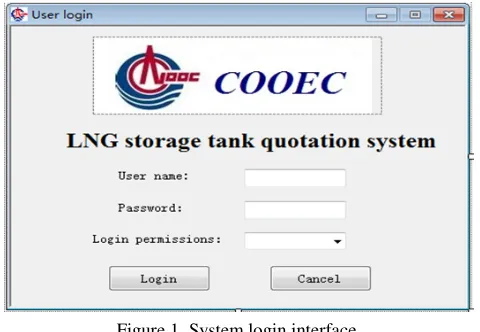
[image:2.612.316.555.194.330.2]Login interface is designed with VS2010 controls, and the effect is shown in the figure below.
Figure 1. System login interface. 3.2 Main interface (parent window)
After the success of the login, the user can enter the system main interface, which is shown in figure 2. The IsMdiContainer attribute value of main interface is set to true, playing the role of main container,
[image:2.612.57.297.513.679.2]which can be called the MDI parent form. Main interface mainly includes the menu bar, tool bar, status bar, and the child window display area. Menu bar contains regular menu bars such as file, edit, view and tools, and also has estimation, budget, EPC, import and export, maintenance and other special menu editor bar; Toolbar includes system toolbar, edit toolbar, engineering tools, tables, operating tools, the form navigation toolbar and commonly used tool bar; The status bar mainly indicates the current user information, project information, and real time and date; Child form display area is used to display the EPC child form.
Figure 2. Main interface. 3.3 EPC quota interface
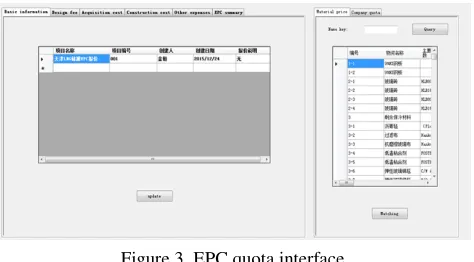
EPC offer interface is the core of the system. Users can enter this interface through EPC menu bar, and they can choose whether creating a new blank project or a project on the basis of the existing data templates, in addition, users can continue the unfinished project.
The EPC quota interface is designed simply and easily, which is divided into two parts: project data operation and basic data query, as shown in Figure 3 below.
According to the characteristics of the EPC contractor engineering quotation, project data operations mainly includes the accounting of the design, procurement and construction, finally the EPC summary as well. Here is the example of the main material fee table of procurement fee, and the design process is as follows:
1) Using VS2010 datagridview control to display the required data information:
First query the main material library table under the particular project name, and the database query statement is as follows:
"select number, name, main parameters, unit, quantity, unit price, unit price, unit price, total dollar, total RMB, folding RMB, import equipment value added tax, acquisition range, quotation strategy, professional, remark from main material fee where project name =@xmmc";
“Dim ds As Data.DataSet = mysql.Getzcf(Projectname)
[image:3.612.59.296.80.211.2]DataGridView4.DataSource = ds.Tables("zcf")”;
Figure 3. EPC quota interface.
2) Insert data into the main material fee table: Users input relevant information in the datagridview, and then click on the "insert a new row" button to input the data into database, the implementation method is as follows: First obtain information of main material fee through the query statement "select top 0 * from main material fee "; And then put the query information into a predefined DataSet object; Getting the input information from Datagridview, the resulting data is written to the DataRow of DataTable; Finally update the data stored in the Dataset to the main material cost database through sqlAdapter.Update command.
3) Update and delete the data of main material fee:
Update and delete operation of the main material fee is basically the same as insert. The only difference is that according to the different functional requirements the implementation statement of the data transfer from the Datagridview to the Dataset is different. The following is the corresponding VB.net program statements:
“’Insert
Dim nr As Data.DataRow = ds.Tables(0).NewRow
nr("number") = bh nr("name") = mch ......
nr("project name") = xmmc ds.Tables(0).Rows.Add(nr); ‘Update
For i = 0 To ds.Tables(0).Rows.Count - 1
If ds.Tables(0).Rows(i)("number") = bh And ds.Tables(0).Rows(i)("project name") = xmmc Then
ds.Tables(0).Rows(i)("name") = mch ds.Tables(0).Rows(i)("main parameter") = zycs
......
ds.Tables(0).Rows(i)("remarks") = bz Exit For
End If Next
‘Delete
For i = 0 To ds.Tables(0).Rows.Count - 1
If ds.Tables(0).Rows(i)("number") = bh Then
ds.Tables(0).Rows(i).Delete() End If
Next”;
4) The classification summary of main material fee:
When main material cost accounting, the material items and quantity is determined firstly according to the project construction material list, and then by querying main material prices library to get the corresponding price information, finally through the "total" button to achieve the aggregate as well as the monetary unit conversion of main material cost.
Because the users use the Datagridview control to interact with main material cost data tables, they can directly amount on the cells of the Datagridview control through the "update" button. "Classification summary" button sums the main material fee in accordance with the subject material storage tank, cold insulation, piping, electrical, instrumentation communications, civil engineering and welding. Querying the main material cost data table can directly obtain the corresponding total cost, the database statements are as follows:
"select sum (folding RMB) from main material fee where major =@zy and the project name=@xmmc and qotation strategy ='domestic' and acquisition range =@cbfw";
The underlying database query operation is mainly used for user queries about material price and quota base in the process of project bidding. The following is SQL queries statement according to the main material name keyword query main material price.
"select number, material name, main specification parameters, purchase quantity, unit, contract price of foreign currency, contract price of RMB, unit price of foreign currency, unit price of RMB, purchase mode, exchange rate, manufacturer, remark from main material price where material name like '%' + @name + '%' ";
In addition, the system especially develops the function of automatic matching for the main material price library, so the users can finish the matching operation accurately and fast, greatly reducing the workload of the artificial lookup. The following SQL statement is querying main material price according to the name and parameter:
"select unit price of RMB from main material price where material name =@mch and main specification parameters =@zycs";
3.4 Database maintenance
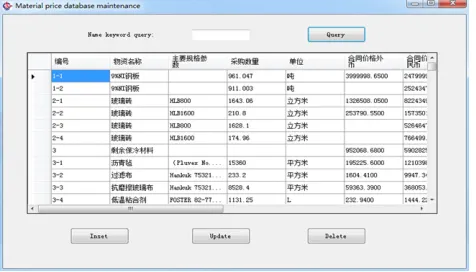
database, including query, insert, update and delete about main material form and company library table.
[image:4.612.315.556.103.250.2]With the main material price library as an example, the following paragraph introduces the method of realizing the function module: Firstly get data form the main material price through the query statement "select top 0 * from main material price "; And then will put the query information into a predefined DataSet object; Get the input and select information from the Datagridview, and then the corresponding insert, update, delete operation is done; Finally update the data stored in the Dataset to the main material cost database through sqlAdapter.Update command. The following figure is the main material price data maintenance interface.
Figure 4. Database maintenance interface. 3.5 Import and export Excel table
Realization of interaction between the quotation system and Excel spreadsheets is critical. Not only can it directly import construction material to reduce offer staff workload, but also output the project quotation results to Excel spreadsheet for the later improving and processing.
1) Import Excel:
BY clicking the “open the Excel file” button, offer staff can select the needed Excel file, and then the data information will be displayed in the Datagridview; Choose the corresponding database and click the "import database" button, the data written into the database from the Datagridview. The following statement is the connection from Excel to Datagridview:
"Dim strConn As String = "Provider=Microsoft.Ace.OLEDB.12.0;Data
Source='" & FileName & "';Extended Properties=Excel 12.0;"
Dim da As New
[image:4.612.59.297.235.371.2]OleDb.OleDbDataAdapter("SELECT * FROM [Sheet1$A:F]", strConn)
da.Fill(myDataset, "excel")
Me.DataGridView1.DataSource =
myDataset.Tables("excel")"; 2) Export Excel:
Export Excel interface is shown in figure 5. Firstly choose the export data table; and then click
the "ok" button; finally select the storage location and name of sheet table in the pop-up window; the export operation of data is complete in the end. Excel export statement is as follows:
"Call LeadToExcel (EPCmain.DataGridView1) ";
Figure 5. Excel export interface.
4 CONCLUSION
The system is running normally since the software complete. The system has high pertinence and is very easy to operate. By using the quota system, the working efficiency is greatly improved, and the system has won the acceptance of the quota staff.
5 ACKNOWLEDGEMENTS
The authors wish to acknowledge the Key Laboratory of Mechanism Theory, Equipment Design of Ministry of Education, Tianjin hydraulic cylinder Engineering Center and the financial support by the Innovation and development of regional marine economy demonstration projects including Deep-sea oil and gas fields to build large structures critical equipment industry (No. CXSF2014-01), offshore oil and gas construction of large modules and complete sets of non-skid equipment industry engineering (No. CXSF2014-13).
REFERENCES
[1]Jian-jun L. Construction of the LNG storage tank technology [J]. Journal of welding technology, 2006, 35 (4): 54-56.
[2]Bao-sheng Y, Jian-gang Y, n Z H, et al. Quick quote system for bridge crane based on internet [J]. Computer Integrated Manufacturing Systems, 2004.
[3]Hjorteset K, Wernli M, LaNier M W, et al. Development of large-scale precast, prestressed concrete liquefied natural gas storage tanks[J]. PCI Journal, 2013, 55(9):40-54. [4]Gao-shang S. LNG storage tank fast modeling and its
[5]Bing W, Xue-dong C, Guo-ping W. Large new progress of low temperature LNG storage tank design and construction technology [J]. Journal of natural gas industry, 2010, 30 (5): 108-112.
[6]Ya-xiong P. Design and implementation of engineering cost software [D]. Fudan University, 2008.