Kit Contents 1
Storage Device
Use the software on the USB storage device supplied in this kit to convert an SSG 300M-series or SSG 500M-series security device to a J-series services router by changing the operating system (OS) from ScreenOS software to JUNOS software.
This document contains the following sections:
February 2009 Part No. 530-022963-01 Revision 02 Kit Contents ... 1 Introduction... 2
Connecting the USB Storage Device... 3
Temporarily Converting the Security Device into a J-series Services Router... 4
Reversing the Temporary Conversion... 4
Permanently Converting the Security Device into a J-series Services Router... 5
Conversion Mappings for SSG 300M-series and SSG 500M-series Security Devices and J-series Services Routers ... 6
Kit Contents
This kit contains the parts described in Table 1:
Table 1: Kit Contents
Quantity Description
1 USB storage device containing JUNOS software 1 J-series services router front panel overlay 1 Conversion instructions (this document) 1 Read This First document
2 Introduction
Introduction
The JUNOS software supplied on the USB storage device in this kit lets you convert the devices shown in Table 2.
The instructions in this document describe how to:
Connect the USB storage device to the SSG 300M-series or SSG 500M-series device
Temporarily convert the SSG 300M-series or SSG 500M-series device into a J-series services router for evaluation
Revert the temporarily converted J-series services router back into an SSG 300M-series or SSG 500M-series device
Permanently convert the SSG 300M-series or SSG 500M-series device into a J-series services router
See “Conversion Mappings for SSG 300M-series and SSG 500M-series
Security Devices and J-series Services Routers” on page 6 for a list of the results of converting SSG 300M-series and SSG 500M-series security devices to J-series services routers.
Table 2: Device Conversions
From To
SSG 320M J2320 SSG 350M J2350 SSG 520M J4350 SSG 550M J6350
NOTE: The SSG 300M-series or SSG 500M-series device must be running ScreenOS version 6.1 or later in order for you to perform the conversion described in this document. If your device is running an earlier ScreenOS version, you must first upgrade it to ScreenOS 6.1 or later.
NOTE: One important aspect of converting an SSG 300M-series or SSG 500M-series device into a J-series services router that this document does not address is migrating the device configuration from ScreenOS format to JUNOS format. For information about migrating and loading the configuration file, refer to the JUNOS Software Migration Guide at http://www.juniper.net/techpubs/software/junos-es.
Connecting the USB Storage Device 3 If you need assistance while performing the conversion, you must have an active
Juniper Networks service contract to open a case with Juniper Networks Customer Service.
Connecting the USB Storage Device
To connect the USB storage device to an SSG 300M-series or SSG 500M-series device:
1. Locate the USB port on the front panel of the device. See Figure 1 for the location of the USB ports for SSG 300M-series and SSG 500M-series security devices.
Figure 1: Location of USB Ports for SSG 300M-series and SSG 500M-series Devices
2. Insert the connector on the USB storage device into either of the USB ports on the security device.
WARNING: Failure to register your new hardware configuration affects your access profile for http://www.juniper.net/customers/support/. Your current access profile is based on your initial product registration. Not registering the new hardware configuration affects your access to Customer Support Center (CSC) tools, software downloads, and hardware replacement entitlement. Any hardware Return Material Authorization (RMA) replacement also defaults to the original hardware
configuration.
You can register the new hardware configuration only once. Make sure that you have thoroughly tested the final OS conversion and want to make it permanent before you register the new hardware configuration.
POWER CONSOLE RESET CONFIG POWERSTATUS ALARMHA CO NFIG AUX 1 3 2 USB 1 SLOT NUMBER USB 0 10/100/1000
0/00/1LINK TX/RX0/2LINK TX/RX0/3LINK TX/RXLINK TX/RX g004100 SSG 320 USB ports POWER CONSOLE RESET CONFIG POWERSTATUS ALARMHA CONFIG AUX 1 2 4 5 3 USB 1 SLOT NUMBER USB 0 10/100/1000
0/00/1LINK TX/RX0/2LINK TX/RX0/3LINK TX/RXLINK TX/RX SSG 350 USB ports USB ports SSG 320M SSG 350M SSG 520M and SSG 550M
4 Temporarily Converting the Security Device into a J-series Services Router
Temporarily Converting the Security Device into a J-series Services Router
After inserting the USB flash drive into the USB port on the front of the security device, you can temporarily convert the device into a J-series services router by booting the device from the JUNOS software on the USB flash drive. Use the temporarily converted router to evaluate JUNOS software and ensure that it will work effectively in your network. We do not recommend that you operate from the USB flash drive for more than a total of 5 days of use. You must leave the USB flash drive attached for the duration of the temporary conversion.To temporarily convert the security device into a J-series services router:
1. Establish a CLI session with the device. You can use the console or Telnet/SSH.
2. Execute the following ScreenOS commands:
set boot junos usb save
reset
The device resets and then loads the JUNOS software on the USB flash drive attached to the USB port. When the device restarts, it functions as a J-series services router. The router starts in factory default configuration, with the factory default IP address. In order to use the router, you must configure it either by using the console port or via the JWEB interface.
Reversing the Temporary Conversion
You can revert the temporarily converted router back into a security device at any time. To revert the device:
1. In operational mode for the JUNOS CLI, enter the following command:
user@host> request system reboot
The device starts from the internal compact flash, restoring ScreenOS as the operating system for the device and restoring the original ScreenOS
configuration file.
2. After the device has finished rebooting, remove the USB storage device from the USB port.
3. Using the ScreenOS CLI, use the set boot screenos command to return the device to FIPS-compliant mode and disable the booting of any USB storage devices:
device-> set boot screenos
Permanently Converting the Security Device into a J-series Services Router 5
Permanently Converting the Security Device into a J-series Services Router
After temporarily converting the device into a J-series services router, you can operate the device as a services router for the duration of the evaluation. We do not recommend that you operate from the USB flash drive for more than a total of 5 days of use. When you are satisfied with the operation of the device, you can permanently convert it.To permanently convert the security device into a J-series services router:
1. Enter the request system snapshot operational command:
user@host> request system snapshot as-primary partition media compact-flash
The router creates a copy of the current running JUNOS software, including the configuration file, in the internal compact flash memory. This operation deletes all ScreenOS software and configuration information from the compact flash memory.
2. Reboot the router:
user@host> request system reboot
The router starts JUNOS software from the internal compact flash card.
3. After the router has finished rebooting, remove the USB storage drive from the USB port.
Completion of Steps 4 and 5 is optional and does not affect the registration of your new hardware configuration.
4. (Optional) Peel off the SSG overlay from the front of the chassis.
5. (Optional) Peel the backing from the self-adhesive J-series overlay provided with your OS conversion kit. Apply the overlay to the front of the chassis. Starting on the left side, line up the cutouts on the overlay with the ports and LEDs on the chassis.
6. Contact Juniper Networks Customer Service to register your new hardware configuration. See the Read This First document included in the conversion kit for instructions on registering the converted services router.
CAUTION: Do not convert the device permanently until you are certain that you want to use the device as a J-series services router. Once you permanently convert the device, you can only convert it back into a security device by removing it from the rack, opening the chassis, and replacing the internal compact flash card with one ordered from Juniper Networks.
6 Conversion Mappings for SSG 300M-series and SSG 500M-series Security Devices and J-series Services Routers
Conversion Mappings for SSG 300M-series and SSG 500M-series
Security Devices and J-series Services Routers
Table 3 lists the results of converting SSG 300M-series security devices to J-series services routers.
Table 3: SSG 300M-series Security Device and J-series Services Router Conversion Mappings
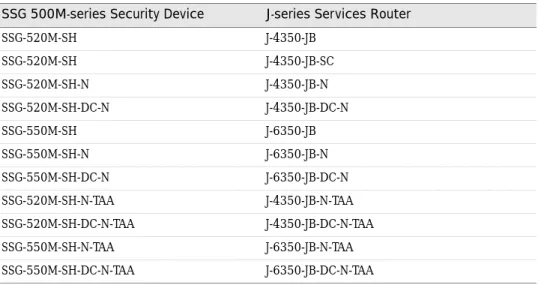
Table 4 lists the results of converting SSG 500M-series security devices to J-series services routers.
Table 4: SSG 500M-series Security Device and J-series Services Router Conversion Mappings
SSG 300M-series Security Device J-series Services Router
SSG-320M-SB J2320-JB-SC SSG-320M-SH J2320-JH SSG-350M-SB J2350-JB-SC SSG-350M-SH J2350-JH
SSG 500M-series Security Device J-series Services Router
SSG-520M-SH J-4350-JB SSG-520M-SH J-4350-JB-SC SSG-520M-SH-N J-4350-JB-N SSG-520M-SH-DC-N J-4350-JB-DC-N SSG-550M-SH J-6350-JB SSG-550M-SH-N J-6350-JB-N SSG-550M-SH-DC-N J-6350-JB-DC-N SSG-520M-SH-N-TAA J-4350-JB-N-TAA SSG-520M-SH-DC-N-TAA J-4350-JB-DC-N-TAA SSG-550M-SH-N-TAA J-6350-JB-N-TAA SSG-550M-SH-DC-N-TAA J-6350-JB-DC-N-TAA
Copyright © 2009, Juniper Networks, Inc. All rights reserved.
Juniper Networks, the Juniper Networks logo, JUNOS, NetScreen, ScreenOS, and Steel-Belted Radius are registered trademarks of Juniper Networks, Inc. in the United States and other countries. JUNOSe is a trademark of Juniper Networks, Inc. All other trademarks, service marks, registered trademarks, or registered service marks are the property of their respective owners.
Juniper Networks assumes no responsibility for any inaccuracies in this document. Juniper Networks reserves the right to change, modify, transfer, or otherwise revise this publication without notice.
Products made or sold by Juniper Networks or components thereof might be covered by one or more of the following patents that are owned by or licensed to Juniper Networks: U.S. Patent Nos. 5,473,599, 5,905,725, 5,909,440, 6,192,051, 6,333,650, 6,359,479, 6,406,312, 6,429,706, 6,459,579, 6,493,347, 6,538,518, 6,538,899, 6,552,918, 6,567,902, 6,578,186, and 6,590,785.