Security and Azure SQL Database
Technical white paperAuthors: Joseph D'Antoni (Denny Cherry & Associates Consulting), Stacia Varga (Data Inspirations) Technical reviewers: Raul Garcia, Joachim Hammer, Tommy Mullaney, Ronit Reger, Jack Richins, Jakub Szymaszek, Mirek Sztanjo, Tomer Weisberg, Tara Shankar Jana, DP security PG, Darmadi Komo, Bill Ramos (Indigo Slate)
Published: October 2015
Applies to: Microsoft Azure SQL Database
Summary: This paper details the security and data management features found in Microsoft Azure SQL Database. It first describes the security foundation provided by Microsoft Azure and then explains the techniques and features used to manage data access in SQL Database; to log and monitor database activity; to protect data at rest and in transit; and to build secure applications. By understanding and using these features correctly, you can remain confident that your data in the cloud is protected.
Copyright
The information contained in this document represents the current view of Microsoft Corporation on the issues discussed as of the date of publication. Because Microsoft must respond to changing market conditions, it should not be interpreted to be a commitment on the part of Microsoft, and Microsoft cannot guarantee the accuracy of any information presented after the date of publication.
This white paper is for informational purposes only. MICROSOFT MAKES NO WARRANTIES, EXPRESS, IMPLIED, OR STATUTORY, AS TO THE INFORMATION IN THIS DOCUMENT.
Complying with all applicable copyright laws is the responsibility of the user. Without limiting the rights under copyright, no part of this document may be reproduced, stored in, or introduced into a retrieval system, or transmitted in any form or by any means (electronic, mechanical, photocopying, recording, or otherwise), or for any purpose, without the express written permission of Microsoft Corporation.
Microsoft may have patents, patent applications, trademarks, copyrights, or other intellectual property rights covering subject matter in this document. Except as expressly provided in any written license agreement from Microsoft, the furnishing of this document does not give you any license to these patents, trademarks, copyrights, or other intellectual property.
© 2015 Microsoft Corporation. All rights reserved.
Microsoft, Active Directory, Microsoft Azure, Excel, SharePoint, SQL Server, Windows, and Windows Server are trademarks of the Microsoft group of companies.
Contents
Introduction ... 4
Security in Azure ... 4
Data access ... 5
SQL Database security model ... 5
Firewall administration ... 5
Configuring authentication ... 6
SQL Authentication ... 6
Azure Active Directory Authentication ... 6
Best Practices ... 7
Managing Permissions... 7
Server-level roles ... 7
Database-level roles ... 7
Logging and monitoring ... 8
Introducing SQL Database auditing ... 8
Getting started with auditing ... 8
Working with auditing data ... 9
Data protection ... 10
Transparent Data Encryption ... 10
Always Encrypted ... 11
Encrypting data in transit ... 12
Row-Level Security in SQL Database ... 13
Introducing Row-Level Security ... 13
Implementing Row-Level Security ... 13
Dynamic Data Masking ... 13
Introduction
Cloud computing requires new security paradigms that are unfamiliar to many application users, database administrators, and programmers. Consequently, some organizations are hesitant to implement a cloud infrastructure for data management due to perceived security risks. However, much of this concern can be alleviated through a better understanding of the security features built into Microsoft Azure and Microsoft Azure SQL Database.
Azure provides extremely robust security protection at the physical, logical, and data layers of its services and applications, making Azure datacenters among the most secure facilities of their kind in the world. A new authentication mechanism based on Azure Active Directory allows users to connect to Azure SQL DB through identities in Azure AD for managed and federated domains. Administrators can manage the identities of database users and other Microsoft services in one central location. Azure’s central ID management provides a single place to manage SQL Database users and groups and simplifies permission management.
Likewise, Azure SQL Database includes multiple layers of security, with role-based logical data protection and auditing to monitor the security of your data. With new encryption technologies that allow you to encrypt data both at rest and in transit, SQL Database also enables dynamic data masking to restrict access to sensitive data. In addition, you can easily implement Row-Level Security for added data protection. Early versions of SQL Database placed databases across shared, multitenant SQL instances. Now, SQL Database V12 allocates a dedicated SQL instance for your databases to deliver more predictable performance and better isolation from other tenants.
Security in Azure
Azure security begins with a trustworthy technology foundation: Its software and infrastructure are designed from the ground up to be secure and resilient to attack, while its datacenters are extremely safe and regularly audited to ensure ongoing regulatory compliance.
Security is a top concern when managing databases, and it has always been a priority for Azure SQL Database. Your databases can be tightly secured to satisfy most regulatory or security requirements, including HIPAA, ISO 27001/27002, and PCI DSS Level 1, among others. A current list of security
compliance certifications is available at the Microsoft Azure Trust Center site. You also can choose to place your databases in specific Azure datacenters based on regulatory requirements.
While Azure provides a secure platform for your data, you can still take steps to ensure application security. In this paper, you will learn about techniques and features that allow you to control access to your database, encrypt sensitive data, and limit data visibility to the users who need it. Having a good understanding of your application’s security needs will help you choose the right combination of features to implement in your database.
Data access
Data protection begins with controlling access to your data. The datacenter hosting your data manages physical access, while you can configure a firewall to manage security at the network layer. You also control access by configuring logins for authentication and defining permissions for server and database roles.
SQL Database security model
The security model of SQL Database rests solidly on the foundation of the Azure security model. Azure has been implemented as a trustworthy technology infrastructure, with software designed from the ground up to be resilient to attack. Microsoft uses an “assume breach” strategy that combines built-in analytics and a comprehensive methodology to detect and respond to malicious behavior within Azure. When you create a new SQL Database, you choose the datacenter in which your database and any other assets are stored. Microsoft has explicit policies in place to govern the operation of Microsoft’s data centers incl. who has access to what assets and under which circumstances. The processes and controls that govern access are maintained and regularly verified by accredited external audit firms.
Firewall administration
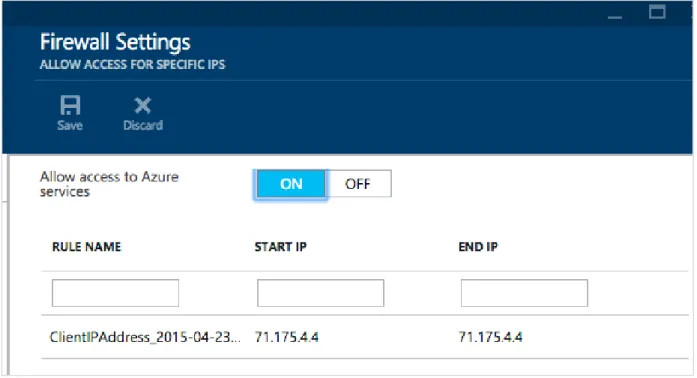
SQL Database includes a firewall to block access to unauthorized connections. After creating your SQL Database, you can use the Azure Management Portal to specify which IP addresses can connect to your database, as shown in Figure 1. You can then define more granular IP addresses by referencing the range of addresses available from specific datacenters.
You also have the option to select a checkbox on the Firewall Settings page to permit other Azure services in ANY (yours or your opponent) subscription. However, enabling this permission is not recommended as it opens your database to all Azure services. Instead, the best practice is to open your database only to the specific IP addresses that require access. You can define firewall rules at the server level, or define rules for each database individually. If you use SQL Database to host data for a software-as-a-service (SaaS) application, you should implement firewall rules at the database level.
Figure 1. Configuring a firewall in Azure SQL Database
In addition, you can programmatically manage firewall settings with T-SQL, REST API, or Microsoft Azure PowerShell. By using software-defined networking, you can fully automate your application deployment and quickly add new IP addresses. For a full list of commands and options, refer to the SQL Database Firewall Documentation.
Configuring authentication
SQL Database supports two types of authentication, SQL Authentication and Azure Active Directory Authentication (Azure AD Authentication).
SQL Authentication
With SQL Authentication, when you create a SQL Database, you also create a login that is the server-level principal account for your SQL Database server. The login is analogous to the SA login for on-premises SQL Server. This principal account manages all server- and database-level security and allows the creation of other accounts to manage logins and databases in SQL Database.
Azure Active Directory Authentication
Azure AD authentication uses identities managed by Azure Active Directory and is supported for managed and integrated domains. To use Azure AD authentication, you must create a second server-level principal account called “Azure AD Admin” to administer Azure AD users and groups. This admin can also perform all operations the regular (SQL) SA can.
With Azure AD authentication, Azure SQL Database extends existing authentication mechanism allowing Azure AD users to login to the database using three methods:
o Works for Azure AD managed and federated domains
o The easiest way to adopt Azure AD Authentication in existing applications Integrated Windows Authentication
o Works for Azure AD federated domains and clients on domain-joined machines o Eliminates storing password and enables single sign-on
Token-based authentication (will be released later during public preview) o Gives application full control over access token acquisition o Enables authentication using certificates
For more information see Connecting to SQL Database By Using Azure Active Directory Authentication.
Best Practices
As a best practice your users and application should use separate accounts to authenticate. In this way you can limit the permissions granted to users and applications and reduce the risks of malicious activity; this is especially critical in case your application code is vulnerable to a SQL injection attack. SQL Database v12 allows you to establish contained database users. Instead of creating a server login for a user and granting permissions to a specific database, you can create a contained database user to isolate the user or app account to a single database. That way, you can move a database between servers and consolidate the user identity and permissions within the individual database. When a contained database user
connects to the database, the connection string must include the database name. Contained database users offer better performance than logins, because they authenticate directly to the database instead of making an extra network hop to the master database. In general, you should use contained database users rather than logins with SQL Database due to their performance and portability advantages.
Managing Permissions
Server-level roles
While you can use the server-level principal account to manage server-level security, you also have the option to assign logins to other SQL Database security roles. Simply use the loginmanager role to grant permission to create logins (similar to the securityadmin role in an on-premises instance of SQL Server). The dbmanager role is used to create databases in the server and is comparable to the dbcreator role in on-premises SQL Server (using the databasemanager role to grant permission to create a database). Because these roles are powerful, you should assign them only to a limited set of administrative personnel and not generically to user accounts.
You can also create these roles within the master database. The roles will scope to the server, so a user with permissions in the master database also has access to data in any SQL Database on that server through server-scoped dynamic management views (DMVs).
for all databases. For more information about role-based security best practices, visit Server and Database Roles in SQL Server.
Logging and monitoring
Auditing database activity is another security requirement for many organizations. SQL Database includes a highly configurable auditing engine to capture database activity.
Introducing SQL Database auditing
SQL Database auditing is available in all service tiers. This security feature tracks and writes events to an audit log in Azure storage. Auditing is useful in satisfying regulatory requirements and also helping you understand database activity by highlighting data anomalies or security concerns. By implementing the auditing feature in SQL Database, you can retain your audit trail over time, as well as analyze reports showing database activity of success or failure conditions for the following predefined events:
Plain SQL
Parameterized SQL Stored procedure Logins
Transaction management
For more information about database activities and logged events, see Audit Log Format Reference.
Getting started with auditing
In the Azure Management Portal, shown in Figure 2, you can configure auditing at the server level. In that case, all databases inherit the same audit settings. As an alternative, you can configure audit policies for each SQL Database individually. Note, for downlevel clients, be sure to go to the Azure Management Portal to configure a security-enabled connection string to your SQL Database.
Figure 2. Configuring auditing in the Azure Management Portal
Working with auditing data
Auditing data is available in the Azure Management Portal in a dashboard format for quick consumption, as shown in Figure 3. The portal includes an option to download the auditing data as an Excel workbook that contains a comprehensive set of predefined reports to display your database activity. Optionally, you can use the Microsoft Power BI service to connect directly to your auditing logs, as described in this MSDN blog post. You can then configure your data retention period in the portal when you enable auditing.
Figure 3. Accessing audit Information in the Azure Management Portal
Data protection
Azure SQL Database offers a variety of advanced feataures and capabilities to protect customer data including encryption, row-level security and dynamic data masking. We will now look at each feature in more detail.
Transparent Data Encryption
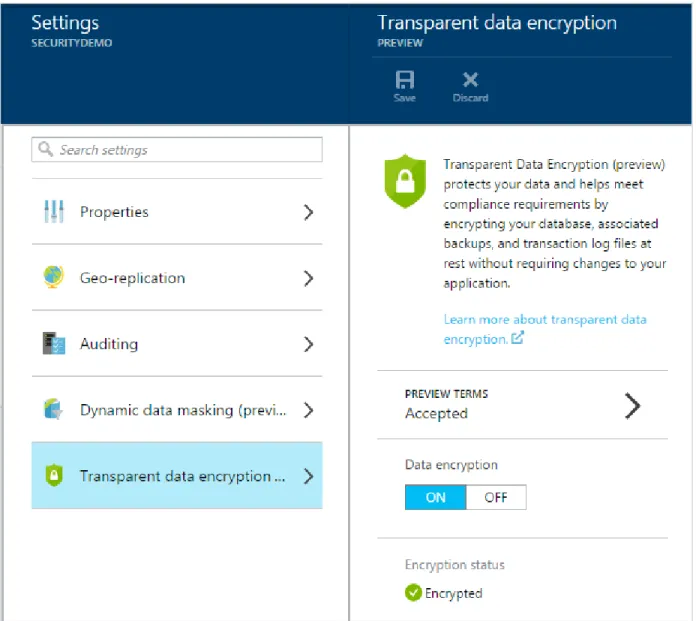
Transparent Data Encryption (TDE) has been an on-premises SQL Server option since SQL Server 2008, available exclusively for data at rest. That is, your data files and backups are encrypted, while data tables are not directly encrypted. Specifically, if a user has given permissions to a database with TDE enabled, the user can see all data. Instead, TDE protects both of the physical data files and transaction log files. If these are moved to another server, they cannot be opened and viewed on that server. Prior to the introduction of stand alone database backup encryption in SQL Server 2014, TDE was the only option for natively encrypting database backups. SQL Database TDE works similarly, but the configuration in SQL Database is much simpler than it is in on-premises SQL Server. To enable TDE, click the Data Encryption On button in the Database Settings menu in the Azure Management Portal, as shown in Figure 4.
Transparent Data Encryption (TDE) for Azure SQL Database is built on top of the same data transparency feature that has been running reliably on SQL Server since 2008. Updates have been made to this core technology that will be available on Azure SQL Database, including support for Intel AES-NI hardware acceleration of encryption. This will reduce the CPU overhead caused by turning on TDE.
Figure 4. Enabling Transparent Data Encryption (TDE) in the Azure Management Portal
Always Encrypted
At times you may need stronger security than encrypting data at rest. For example, you might need to store Social Security Numbers or other personally identifiable information which must be protected at all times even when in memory during query processing or while in transit acorss the network. One recent change to SQL Database is the inclusion of a new feature called Always Encrypted, which introduces a set of client libraries to allow operations on encrypted data transparently inside of an application. With the
The key is always under control of the client and application, and is never on the server. Neither server nor database administrators can recover data in plain text.
Encrypted columns of data are never sent to the server as plain text. Limited query operations on encrypted data are possible.
With Always Encrypted, data stays encrypted whether at rest or in motion. The encryption key remains inside the application in a trusted environment, thereby reducing the surface area for attack and simplifying implementation. To learn more about and get a first hand introduction of how to protect sensitive data with Always Encrypted refer to the Always Encrypted blog.
Encrypting data in transit
SQL Database connections are encrypted using TLS/SSL for the Tabular Data Stream (TDS) transfer of data. In fact, v12 now supports the strongest version of Transport Layer Security (TLS) 1.2 when
connecting with the latest versions of the ADO.Net (4.6), JDBC (4.2) or ODBC [??]. Support for ODBC on Linux, PHP, and node.js is coming soon.
For Azure SQL Database Microsoft provides a valid certificate for the TLS connection. For increased security and to eliminate the possibility of “man-in-the-middle” attacks, do the following for each of the different drivers:
Setting Encrypt=True will assure the client is using a connection that is encrypted. Setting
TrustServerCertificate=False ensures that the client will verify the certificate before accepting the connection.
Row-level Security in SQL Database
Another common security requirement for multitenant databases is Row-Level Security (RLS). This feature prevents users from accessing all rows in a table. In previous versions of SQL Database, RLS was possible only by implementing extensive custom coding or application logic. In SQL Database, RLS moves the restriction logic into the database tier, thus restricting access to specific rows regardless of the requesting tier or application.
Introducing Row-Level Security
Row-Level Security (RLS) restricts access to rows, using a security predicate that is defined as an inline table-valued function (TVF). You create a security policy to enforce this function. RLS supports two types of security predicates:
Filter predicates transparently filter the rows available to read operations (SELECT, UPDATE, and DELETE).
Block predicates explicitly block write operations (AFTER INSERT, AFTER UPDATE, BEFORE UPDATE, and BEFORE DELETE) that violate the predicate.
RLS is useful in the following scenarios:
Sales representatives are allowed to see data related only to their own accounts.
Bank employees can view financial data within their own organization or based on an assigned role.
Each tenant in a multitenant application can access only their own data.
Implementing Row-Level Security
In practical terms, RLS filter predicates act as a hidden WHERE clause when a user executes a query. As a result, a simple condition such as WHERE ClientID = 1, or a more complex predicate, can be enforced. Block predicates are similar to check constraints or triggers and can prevent users from inserting, updating, or deleting data that doesn’t satisfy certain conditions. For performance reasons, design RLS predicate functions according to best practices:
Avoid recursion in security predicate functions. Avoid excessive table joins in predicate functions.
Furthermore, because the RLS predicate function is similar to an additional WHERE clause in your query, design your indexing strategy accordingly to mitigate the performance impact. For more information, including code samples and other RLS limitations, refer to the Books Online page for RLS.
application changes, while also enabling visibility of a portion of the data. The underlying data in the database remains intact (data is obfuscated dynamically), and it is applied based on user privilege. DDM requires the following components:
Privileged SQL users: These SQL users always have access to unmasked data.
Masking function: This set of methods controls access to data for different scenarios. Masking rules: This set of rules defines the fields to mask and the masking function.
Important: Dynamic Data Masking does not protect against brute force attacks of the data from a malicious administrator.
To implement DDM, you need to open the Dynamic Data Masking setings for your database in the Azure Management Portal, as shown in Figure 5. Here you can add masking rules to apply to your data. For example, you can select an existing masking field format for credit card numbers, Social Security Numbers, or email, among others, or you can create a custom format.
You can make use of Masking Recommendations to easily discover potentially sensitive fields in your database that you would like to mask. Adding masking rules from this list of recommendations is as easy as clicking on ‘add’ for each relevant mask and saving the DDM settings.
Figure 5. Setting up Dynamic Data Masking (DDM) in the Azure Management Portal
Conclusion
SQL Database is a robust database platform, with a full range of security features that meet many organizational and regulatory compliance requirements. You can easily protect data by controlling the physical access to your data, and using a variety of options for data security at the file-, column-, or row-level with Transparent Data Encryption, Cell-Level Encryption, or Row-Level Security. Always Encrypted also enables operations against encrypted data, simplifying the process of application updates. In turn, access to auditing logs of SQL Database activity provides you with the information you need, allowing you to know how and when data is accessed. When used properly all of these features provide state-of-the art defense in depth protection for your data. However, none of them compensate for building a
fundamentally secure application. This means you must limit access to only the people or applications that need access to your data, and enforce the principle of least privileges within your database.
For more details, check out the latest features of Azure SQL Database at https://azure.microsoft.com/en-us/documentation/articles/sql-database-security/ and visit the security blog at