WIZ-Embedded WebServer
User’s Manual
(Ver. 1.0)
©2007 WIZnet Inc. All Rights Reserved.
2
Document History Information
Revision Data Description
3
WIZnet’s Online Technical Support
If you have something to ask about WIZnet Products, Write down your question on Q&A Board in WIZnet website (www.wiznet.co.kr). WIZnet Engineer will give an answer as soon as possible.
4
Table of Contents
1. Introduction ... 7
1.1. Main Function ...7
1.2. Specification ...8
1.3. Contents (WIZ-Embedded WebServer) ...8
2. Block Diagram ... 9
3. WIZ-Embedded WebServer Base Board ... 11
4. Getting Started ... 16
4.1. Configuration Tool ... 16
4.1.1. Basic Configuration ... 16
4.1.2. Firmware Upload ... 17
4.1.3. Webpage Upload ... 19
4.1.4. Use of Rom File Maker rev3.0 ... 20
4.2. Operation Test ... 22
4.2.1. Hardware Interface ... 22
4.2.2. Testing the Function of Web Server ... 23
5. Programmer’s Guide ... 26
5.1. Memory Map ... 26
5.2. WIZ-Embedded WebServer Firmware... 26
5.3. Compile ... 28
5.4. Downloading ... 28
6. WIZ-Embedded WebServer Hardware Specification ... 31
6.1. Parameters ... 31
6.2. Specification ... 31
6.3. Board Dimensions and Pin Assignment ... 31
6.3.1. Pin Assignment ... 31
6.3.2. Size ... 32
6.3.3. Connector Specification ... 33
5
Tables
Table 1. WIZ-Embedded WebServer Specification ...8
Table 2. Contents of WIZ-Embedded WebServer ...9
Table 3. WIZ-Embedded WebServer PIN MAP ... 12
Table 4. Expansion Connector ... 15
Table 5. WIZ-Embedded WebServer Testing Environment ... 22
Table 6. WIZ-Embedded WebServer Main Source ... 27
6
Figures
Figure 1. Block Diagram ... 10
Figure 2. WIZ-Embedded WebServer Base Board Layout ... 11
Figure 3. AVR JTAG Connector... 12
Figure 4. AVR ISP Connector ... 12
Figure 5. WIZ-Embedded WebServer PIN MAP ... 12
Figure 6. WIZ-Embedded WebServer LED ... 13
Figure 7. WIZ-Embedded WebServer Switch ... 13
Figure 8. WIZ-Embedded WebServer 16x2 LCD ... 14
Figure 9. WIZ-Embedded WebServer VR ... 14
Figure 10. WIZ-Embedded WebServer Temperature Sensor ... 15
Figure 11. Configuration Tool ... 16
Figure 12. Board Search Window ... 18
Figure 13. Open dialog box for uploading ... 19
Figure 14. Firmware uploading window ... 19
Figure 15. Complete Uploading ... 19
Figure 16. Flash Rom Image File ... 20
Figure 17. ROM File Maker ... 21
Figure 18. ROM Image File Make ... 21
Figure 19. WIZ-Embedded WebServer External Interface ... 22
Figure 20. WIZ-Embedded WebServer index page ... 23
Figure 21. WIZ-Embedded WebServer Digital Output Page ... 24
Figure 22. WIZ-Embedded WebServer Digital Input Page ... 24
Figure 23. WIZ-Embedded WebServer Analog Input Page ... 25
Figure 24. WIZ-Embedded WebServer Memory Map ... 26
Figure 25. AVR Studio ... 28
Figure 26. ATmega128 ISP ... 29
Figure 27. WIZ-Embedded WebServer Boot Loader Program ... 30
Figure 28. WIZ-Embedded WebServer Pin Map ... 31
Figure 29. WIZ-Embedded WebServer Module Dimension ... 32
Figure 30. WIZ-Embedded WebServer Base Board Size ... 33
Figure 31. RJ-45 PIN Assignment ... 33
Figure 32. RJ-45 PIN Assignment ... 34
7
1. Introduction
WIZ-Embedded WebServer provides the tiny web server operating on low-speed MCU. It controls digital output or monitors digital and analogue input through web browser. The webpage is stored in the serial flash memory of the board, and can be updated through network.
1.1.
Main Function
Operates as HTTP Server
Guarantee system stability and reliability by using W5300, the hardwired chip Provides Configuration Tool Program for easy control and confiuration Supports 10/100 Mbps Ethernet
8
1.2.
Specification
ITEM Description
MCU
ATmega128
(having internal 128K Flash, 4K SRAM, 4K EEPROM, external 32K SRAM, 512K Serial Flash)
Protocols
TCP/IP - W5300 (Ethernet MAC & PHY Embedded) UDP – Configuration
HTTP Server DHCP
Network Interface 10/100 Mbps Auto-sensing, RJ-45 Connector
Input Voltage DC 5V
Power Consumption Under 180mA
Temperature 0°C ~ 80°C (Operation), -40°C ~ 85°C (Storage)
Humidity 10 ~ 90%
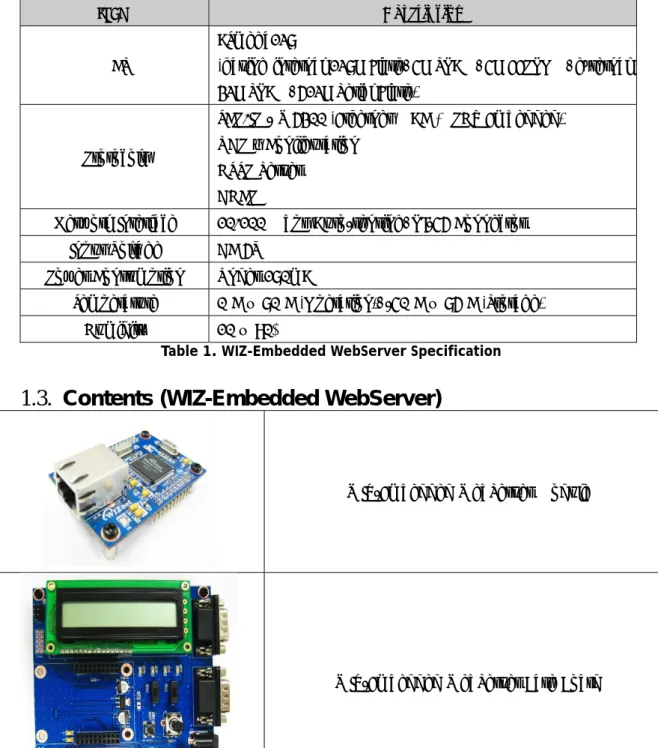
Table 1. WIZ-Embedded WebServer Specification
1.3.
Contents (WIZ-Embedded WebServer)
WIZ-Embedded WebServer Module
9
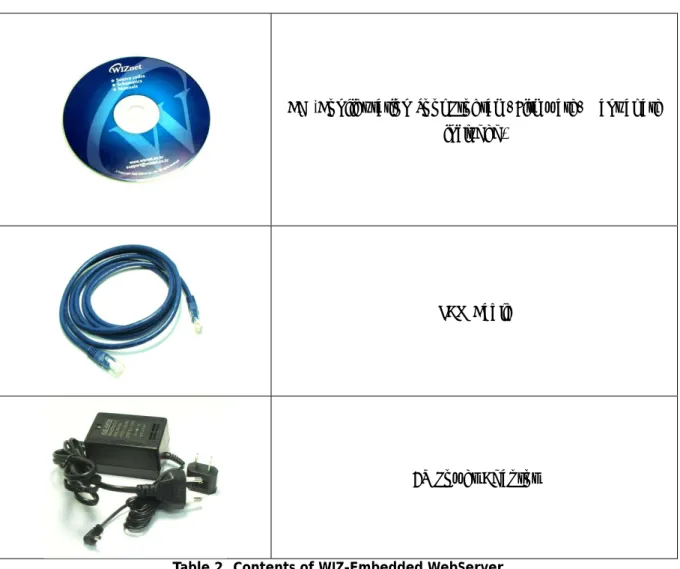
CD (Configuration Tool Program, Firmware, Manual are included)
LAN Cable
5V Power Adaptor
Table 2. Contents of WIZ-Embedded WebServer ☞ If any missing item is found, contact to the shop you purchased.
10
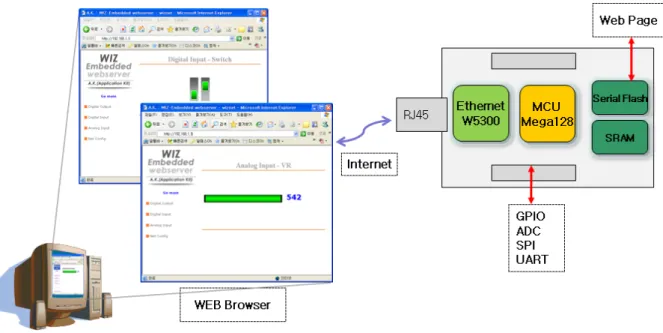
Figure 1. Block Diagram
The main MCU of WIZ-Embedded WebServer is 8 bit AVR (ATmega128). The Ethernet is processed by W5300, the hardwired TCP/IP chip. When connected to the IP address of the board at the web browser, the webpage in the serial flash memory is transmitted and displayed. Each webpage enables control of digital input & output, analogue input and network configuration on the web.
11
3. WIZ-Embedded WebServer Base Board
WIZ-Embedded WebServer module can be tested by using base board.
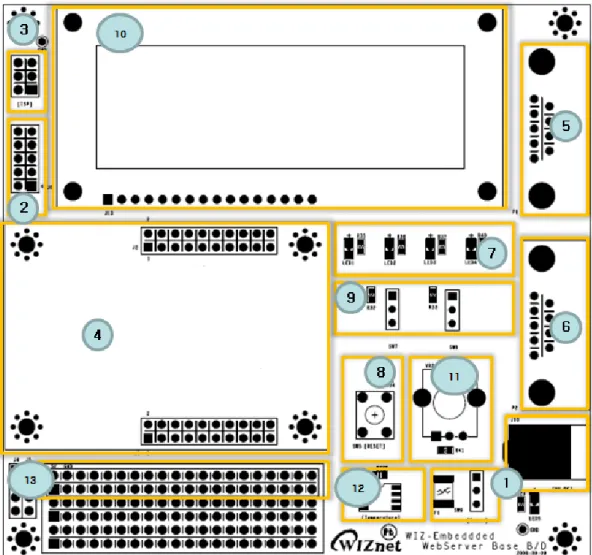
Figure 2. WIZ-Embedded WebServer Base Board Layout
① Power
The power can be controlled by using power switch after connecting the DC 5V (500mA) adaptor.
12
Figure 3. AVR JTAG Connector ③ ATmega128 ISP Connector
Figure 4. AVR ISP Connector ④ WIZ-Embedded WebServer Module Connector
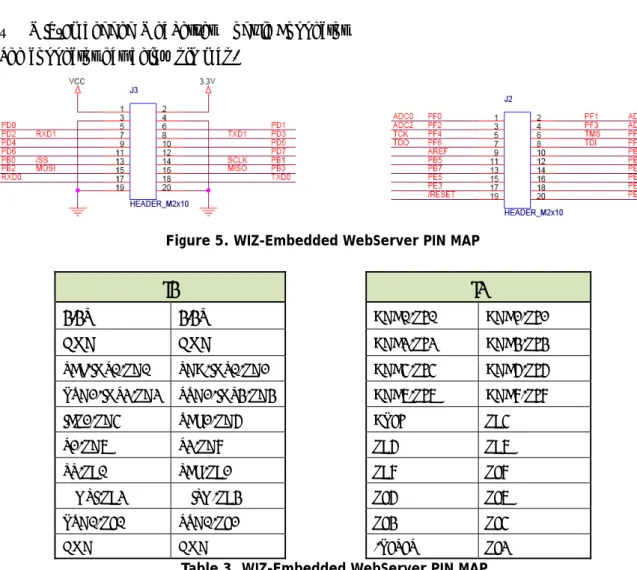
The connector has below pin map.
Figure 5. WIZ-Embedded WebServer PIN MAP
J3 J2
3.3V 3.3V ADC0/PF0 ADC1/PF1
GND GND ADC2/PF2 ADC3/PF3
SCL/INT0/PD0 SDA/INT0/PD1 ADC4/PF4 ADC5/PF5 RXD1/INT2/PD2 TXD1/INT3/PD3 ADC6/PF6 ADC7/PF7
ICP1/PD4 XCK1/PD5 AREF PB4
T1/PD6 T2/PD7 PB5 PB6
SS/PB0 SCK/PB1 PB7 PE7
MOSI/PB2 MISO/PB3 PE5 PE6
RXD0/PE0 TXD0/PE1 PE3 PE4
GND GND /RESET PE2
13
⑤ Serial Connector(UART0)
The debugging information is transmitted through Serial connector when proceeding development.
⑥ Serial Connector(UART1)
The debugging information is transmitted through Serial connector when proceeding development.
⑦ LED
4 LEDs are installed in the WebServer Base Board, and connected to PORTB.4~7. .
Figure 6. WIZ-Embedded WebServer LED ⑧ System Reset Switch
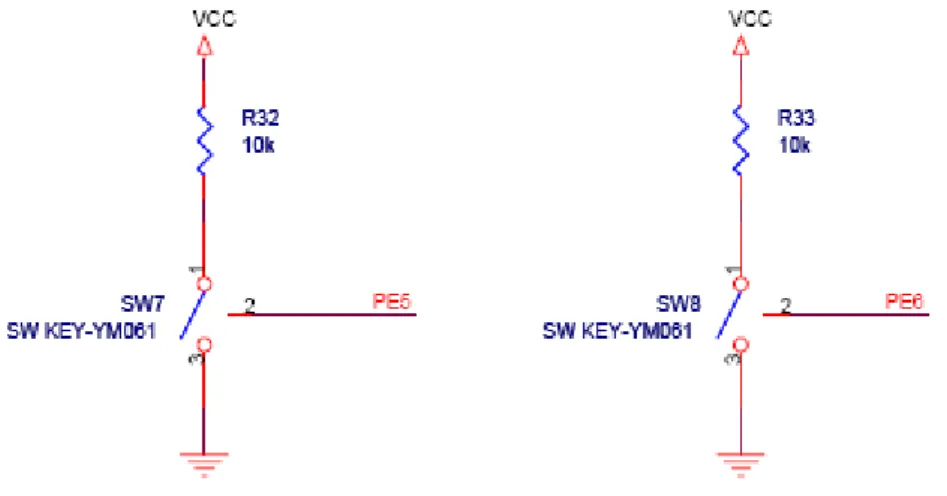
⑨ Switch
Switch is connected to PORTE.5~6. It is the slide switch.
Figure 7. WIZ-Embedded WebServer Switch ⑩ 16X2 character LCD
14
PORTE.
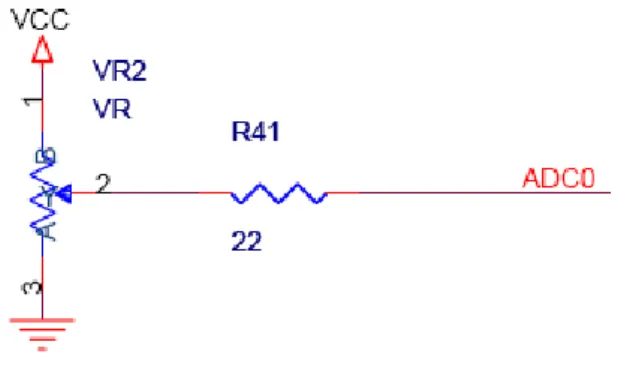
Figure 8. WIZ-Embedded WebServer 16x2 LCD ⑪ Variable Resistor
In order to test the analog data easily, you can use variable resistor and get the input value of analog variable. Variable resistor is connected to ADC0 channel.
Figure 9. WIZ-Embedded WebServer VR ⑫ Digital Temperature Sensor
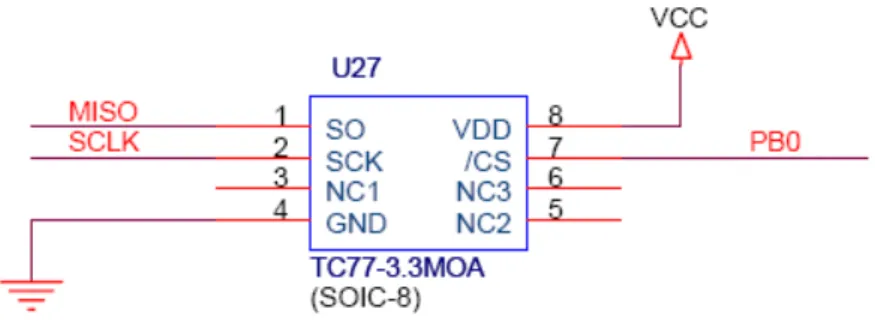
Microchip’s TC77 having 12bit resolutions is used for temperature sensor. Temperature sensor can be controlled by SPI and selected through PB0.
15
Figure 10. WIZ-Embedded WebServer Temperature Sensor ⑬ Extension Connector
It is the connector (J12) to extend to GPIO and the function pins of ATmega128
NO FUNCTION NO FUNCTION
1 NC 2 5V
3 NC 4 GND
5 SCL/INT0/PD0 6 ADC0/PF0
7 SDA/INT0/PD1 8 ADC1/PF1
9 RXD1/INT2/PD2 10 ADC2/PF2
11 TXD1/INT3/PD3 12 ADC3/PF3
13 ICP1/PD4 14 ADC4/PF4
15 XCK1/PD5 16 ADC5/PF5
17 T1/PD6 18 ADC6/PF6
19 T2/PD7 20 ADC7/PF7
21 SS/PB0 22 AREF
23 SCK/PB1 24 PE7
25 MOSI/PB2 26 PB6
27 MISO/PB3 28 PE5
29 PB4 30 PE4
31 PB5 32 PE3
33 PB6 34 PE2
35 PB7 36 /RESET
37 PE1/TXD0 38 NC
39 PE0/RXD0 40 NC
4. Ge
4.1
4
ⓐ Versi
ⓑ Boa displaye
ⓒ Loca
ⓓ Subn
ⓔ Gate
ⓕ Web WIZ-Em ⓖ Enab
etting Sta
.
Config
4.1.1. Basic
ion : It displa
ard List : If “ ed in the Boa
l IP/Port : IP
net : Subnet
eway : WIZ-E
Page Uploa bedded We
ble DHCP M
arted
guration T
c Configura
ays Firmware “Search” but ard List.P Address of
Mask of WI
Embedded W
ad : It is po bServer. For
ode : It is t
Tool
ation
Figure 1 e version.
tton is clicke
WIZ-Embed
IZ-Embedded
WebServer의
ossible to up the detail, r
the option f
1. Configura
ed, all MAC
dded WebSe
d WebServe
Gateway Ad
pload ROM refer to “4.1.
for DHCP m
ation Tool
address of
erver
er
ddress
Image file t .3. Webpage
ode. Select
WIZ-Embed
to the intern e Upload”.
a MAC Add
dded WebSe
nal flash me
dress to be
erver are
emory of
used for
17
‘Enable DHCP mode’ at the ‘board list’. If you click “Setting” button, the board acquires IP and Subnet Mask by using DHCP. (By acquiring IP address from DHCP server, it can take some time) After acquiring network information from DHCP, re-booting is processed. If you click “Search” button again, you can check changed values. If you click MAC Address on the ‘Board list’, IP Address, Subnet Mask and Gateway information are displayed. If network information is not acquired due to any problem, IP, Subnet and Gateway Address are initialized to 0.0.0.0.
ⓗ Search : “Search” function is used for searching module on the same LAN. If all the modules on the same subnet are searched by using UDP broadcast, their MAC addresses are displayed on the “Board List”.
ⓘ Setting
This function is used for changing the configuration values of WIZ-Embedded WebServer. After changing any configuration value, “Setting” button should be clicked for applying the value. With this, the values can be saved in the EEPROM and maintained even after shutting down the power of module.
The process is as below.
① Select a MAC address at the “Board list”. The configuration values of selected module are displayed in each field.
② Change the value of each field.
③ If you click “Setting” button, the configuration is completed.
④ The module is initialized with the changed configuration. (automatically re-booted) ⑤ In order to check changed value, search the module with “Search” button.
ⓙ Upload
Firmware is uploaded through network.
Firmware upload process is described in detail at the “4.1.2 Firmware Upload” ☞ The initialization takes about 20~30 seconds after uploading the firmware. ⓚ Exit : It closes Configuration tool program.
4.1.2. Firmware Upload
① Execute “WIZ-Embedded WebServer ConfigTool.exe” and click ‘Search’ button.
② If the module is correctly connected to the network, its MAC address is displayed on the ‘Board list’.
③ Se
☞ Be netwo appro
④ As
elect the boa
efore upload ork commu opriate for n
s below dial
ard at the ‘B
ding throug unication. B network com
og box is sh
Figure 12. Board list’ an
gh Ethernet By using P mmunicatio
hown, select
Board Sear nd click ‘Uplo
t, the netwo PING test, on.
the Binary f
rch Window oad’ button.
ork informa it is possib
file and click
ation should ble to che
k ‘OPEN’ but
d be set for eck if the
tton.
r correct value is
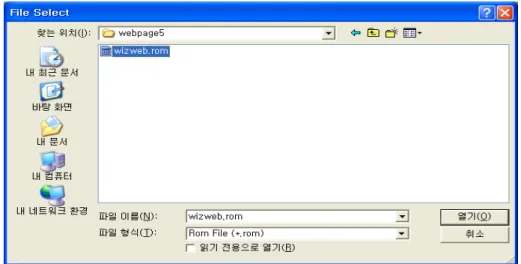
19
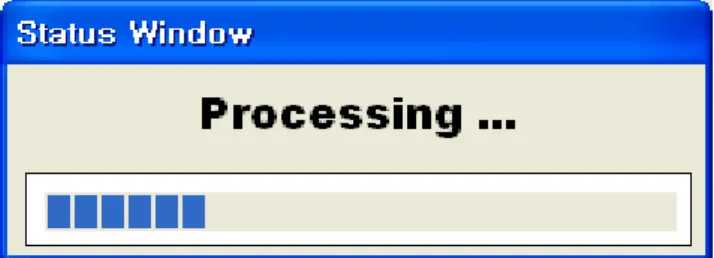
Figure 13. Open dialog box for uploading ☞ Be sure to use the firmware only for WIZ-Embedded WebServer. ⑤ You can see below status window showing ‘Processing’.
Figure 14. Firmware uploading window
⑥ If the file is uploaded, ‘Complete Uploading’ message is displayed.
Figure 15. Complete Uploading
4.1.3. Webpage Upload
① Execute “WIZ-Embedded WebServer ConfigTool.exe” and click ‘Search’ button.
20
‘Board list’.
③ Select the board at the ‘Board list’ and click ‘web page Upload’ button.
☞ Before uploading through Ethernet, the network information should be set for correct network communication. By using PING test, it is possible to check if the value is appropriate for network communication.
④ As below dialog box is shown, select the Flash Rom File System (*.rom) file and click ‘OPEN’ button.
Figure 16. Flash Rom Image File
☞ The Flash Rom File System should be created by using “Rom File Maker Tool rev3.0”. For the detail, refer to “4.1.4. Use of Rom File Maker rev3.0”
⑤ If the file is uploaded, ‘Complete Uploading’ message is displayed.
4.1.4. Use of Rom File Maker rev3.0
Rom File Maker rev3.0 is the tool for creating ROM Image which enables the webpage to be stored in the Flash memory.
Select the webpage by using ‘Add Files’ button.
☞ There is limitation of file number in selecting at a time. (Normally, max 15 files can be selected simultaneously). If there are more files, use “Add Files” button for the several times.
Select ‘RRom Image File’ option.
Figure If you click
Figure 18.
17. ROM Fil ‘Make Imag
. ROM Image
e Maker e’ button, ‘*
e File Make
.rom’ file can be createdd.
22
4.2.
Operation Test
In this chapter, we will show how WIZ-Embedded WebServer operates through a sample testing. The hardware and software requirements for testing is as below.
PC WIZ-Embedded WebServer
Hardware
1) LAN Port 1) WIZ-Embedded WebServer Board
2) LAN Cable
3) DC5V Power Adaptor
Software
1) Configuration Tool Program 2) Web Browser
Table 5. WIZ-Embedded WebServer Testing Environment
4.2.1. Hardware Interface
Figure 19. WIZ-Embedded WebServer External Interface Hardware installation process is as below.
STEP 1: By using RJ45 Ethernet cable, connect the board to the network.
Serial Cable
LAN Cable
23
STEP 2: Connect 5V DC adaptor to WIZ-Embedded Webserver board.4.2.2. Testing the Function of Web Server
STEP1: Supply the power to WIZ-Embedded WebServer board. STEP2: Configure the board by using Configuration Tool.STEP3:Execute the web browser and input the IP address of the WIZ-Embedded board to access the webpage.
STEP4: If connection is appropriately processed, ‘index.html’ page is displayed on the web browser.
Figure 20. WIZ-Embedded WebServer index page
STEP5: Click ‘Digital Ouput’ menu at the web browser, and control the LED and LCD installed on the WIZ-Embedded WebServer Base Board.
24
Figure 21. WIZ-Embedded WebServer Digital Output Page
STEP6: Click ‘Digital Input’ menu, and check the status of switch installed on the WIZ-Embedded WebServer Base Board. Switch status is updated every one second.
25
STEP7: Click ‘Analog Input’ menu and check the voltage level according to Variable Resistor(VR) which is installed on the WIZ-Embedded WebServer Base Board. The VR is updated every one second.Figure 23. WIZ-Embedded WebServer Analog Input Page
STEP8: Click “ Temperature Read” menu and check current temperature by using the temperature
5. Pr
5.1
The me 64Kbyte 4Kbyte Below fi
5.2
The firm ProcessW the web related cITEM(F main
rogramm
.
Memor
emory map e data memo
EEPROM is b
igure shows
.
WIZ-Em
mware perfor WebServer() b page in t
configuratio
Folder name)
mer’s Gui
ry Map
of WIZ-Emb ory. The dat built in AVR.
the system
Figure 2
mbedded
rms ProcessW operates a the Flash m n. ProcessDh
) F
main.c config_ta dhcp_tas
de
bedded We ta memory i Environmen
memory ma
24. WIZ-Emb
d WebS
WebServer, P s webserver emory, and hcp() functio
ile
W ask.c
sk.c
bServer is c is composed nt variables
ap of the tes
bedded Web
Server F
ProcessDhcp r. It processe
sends it. P on does DHC
WIZ-Embedd Net Configu DHCP Client
composed o d of internal
of the board
st board.
bServer Mem
Firmware
p and Proces es HTTP pro ProcessConfi CP related fu
F ded WebSer uration Task
t Manageme
of 128Kbyte SRAM and d are saved i
mory Map
e
ssConfig in t otocol from g() function unctions.
Function rver F/W ma
ent
code mem W5300. In in this EEPRO
the main() Fu web brows n processes
ain()
mory and addition, OM.
unction er, reads
network
27
iinchip iinchip_conf.h System Dependant Definition of W5300
w5300.c w5300 I/O Function
socket.c w5300 Socket API
inet
dhcp.c Processing DHCP Client Protocol httpd.c Processing HTTP Protocol
mcu
delay.c Processing the delay of ATmega128 serial.c UART related Function
timer.c Timer interrupt Process Function types.h AVR Data Type & Global Definition
util
sockutil.c Socket related Utility Function
util.c Utility Function
evb config.c Function to configure network related information
dataflash.c Function to process Serial Flash
evb.c Function to control devices on the board such as LED, Switch & LCD
lcd.c Function to process LCD
spi.c Function to process SPI
romfile.c Function to process ROM File System Table 6. WIZ-Embedded WebServer Main Source
28
5.3.
Compile
The sources mentioned in the Chapter 5.2, are compiled by aligning in the SRC. The firmware compile can be performed by using WINAVR and AVRSTUDIO.
Install the WINAVR and AVRSTUDIO in the PC. For the easy working, open the firmware project file "~/main/ex03_webserver/wiz-web.aps” through AVRSTUDIO project file.
Check compile setting of Configuration option of ‘Project’ menu. For the setting method, refer to ‘AVR Studio User Guide’.
The firmware provided by WIZnet is based on AVR-GCC 3.4.6. In another version, the operation can be abnormal.
Figure 25. AVR Studio
When compile is completed, hex file is created in the folder that user defined before. This file is programmed to ATmega128.
5.4.
Downloading
29
1) Connect the AVRISP cable to J9 of the Base Board. 2) Connect the power adaptor and turn on the switch. 3) Execute AVRStudio.exe
4) Select Atmega128 at the Device section 5) Select HEX file at the FLASH section 6) Click Program button.
For more detail, refer to ‘AVR Tool Guide.pdf’.
Figure 26. ATmega128 ISP
In order to update the firmware through network, the bootloader should be programmed first. Bootloader is written to be input at 0x1E000. For the re-programming the firmware file, remove the Atmega128 and program the ‘Boot.hex’ file. At this time, do not check the option of “Erase Device Before Programming” for not removing the bootloader.
30
31
6. WIZ-Embedded WebServer Hardware Specification
6.1.
Parameters
Power 5V DC, 3.3V
Dimension 60 x 42 x 14 (L x W x H) Temperature Operating : 0 ~ 80 ℃
Ethernet 10/100 Base-T Ethernet (Auto detection)
6.2.
Specification
MCU ATmega128
FLASH 128KByte (MCU Internal) + 512Kbyte(External Serial Flash) SRAM 4KByte (MCU Internal) + 32Kbyte (External)
EEPROM 4KByte (MCU Internal)
6.3.
Board Dimensions and Pin Assignment
6.3.1. Pin Assignment
Figure 28. WIZ-Embedded WebServer Pin Map
J3 J2
3.3V 3.3V ADC0/PF0 ADC1/PF1
GND GND ADC2/PF2 ADC3/PF3
SCL/INT0/PD0 SDA/INT0/PD1 ADC4/PF4 ADC5/PF5
RXD1/INT2/PD2 TXD1/INT3/PD3 ADC6/PF6 ADC7/PF7
ICP1/PD4 XCK1/PD5 AREF PB4
T1/PD6 T2/PD7 PB5 PB6
SS/PB0 SCK/PB1 PB7 PE7
MOSI/PB2 MISO/PB3 PE5 PE6
RXD0/PE0 TXD0/PE1 PE3 PE4
GND GND /RESET PE2
32
6.3.2. Size
33
Figure 30. WIZ-Embedded WebServer Base Board Size
6.3.3. Connector Specification
RJ45 : Ethernet Port Pinouts
34
Pin Signal
1 TX+
2 TX-
3 RX+
6 RX-
Figure 32. RJ-45 PIN Assignment
RS-232
6 7 8 9
2
1 3 4 5
Pin Number Signal Description
1 NC Not Connected
2 RxD Receive Data
3 TxD Transmit Data
4 NC Not Connected
5 GND Ground
6 NC Not Connected
7 NC Not Connected
8 NC Not Connected
9 NC Not Connected
35
7. Warranty
WIZnet Co., Ltd offers the following limited warranties applicable only to the original purchaser. This offer is non-transferable.
WIZnet warrants our products and its parts against defects in materials and workmanship under normal use for period of standard ONE(1) YEAR for the WIZ-Embedded WebServer board and labor warranty after the date of original retail purchase. During this period, WIZnet will repair or replace a defective products or part free of charge.
Warranty Conditions:
The warranty applies only to products distributed by WIZnet or our official distributors.
1. The warranty applies only to defects in material or workmanship as mentioned above in 7. Warranty.
2. The warranty applies only to defects which occur during normal use and does not extend to damage to products or parts which results from alternation, repair, modification, faulty installation or service by anyone other than someone authorized by WIZnet Inc. ; damage to products or parts caused by accident, abuse, or misuse, poor maintenance, mishandling, misapplication, or used in violation of instructions furnished by us ; damage occurring in shipment or any damage caused by an act of God, such as lightening or line surge.
Procedure for Obtaining Warranty Service
1. Contact an authorized distributors or dealer of WIZnet Inc. for obtaining an RMA (Return Merchandise Authorization) request form within the applicable warranty period.
2. Send the products to the distributors or dealers together with the completed RMA request form. All products returned for warranty must be carefully repackaged in the original packing materials.