Intel
®
RAID Controller Command Line
Tool 2 User Guide
Disclaimer
Information in this document is provided in connection with Intel® products. No license, express or implied, by estoppel or
otherwise, to any intellectual property rights is granted by this document. Except as provided in Intel’s Terms and Conditions of Sale for such products, Intel assumes no liability whatsoever, and Intel disclaims any express or implied warranty, relating to sale and/or use of Intel products including liability or warranties relating to fitness for a particular purpose, merchantability, or infringement of any patent, copyright or other intellectual property right. Intel products are not designed, intended or authorized for use in any medical, life saving, or life sustaining applications or for any other application in which the failure of the Intel product could create a situation where personal injury or death may occur. Intel may make changes to
specifications and product descriptions at any time, without notice.
This document and the software described in it are furnished under license and may only be used or copied in accordance with the terms of the license. The information in this manual is furnished for informational use only, is subject to change without notice, and should not be construed as a commitment by Intel Corporation. Intel Corporation assumes no responsibility or liability for any errors or inaccuracies that may appear in this document or any software that may be provided in association with this document.
Except as permitted by such license, no part of this document may be reproduced, stored in a retrieval system, or transmitted in any form or by any means without the express written consent of Intel Corporation.
Intel, Intel Pentium, and Intel Xeon are trademarks or registered trademarks of Intel Corporation or its subsidiaries in the United States and other countries.
* Other names and brands may be claimed as the property of others. Copyright © 2008-2009 Intel Corporation. All Rights Reserved
Preface
The Intel® RAID Controller Command Line Tool 2 utility is provided for DOS*, Linux*, or Microsoft Windows* to configure and view a RAID controller, physical and logical drives, initialize and perform consistency checks, and view the battery back-up status and event logs. This utility is for SAS Software Stack products, including the Intel® RAID Controllers SRCSAS18E, SRCSAS144E, SROMBSAS18E, SRCSASJV, SRCSASRB, SRCSATAWB, SROMBSASFC, SROMBSASMP2, SROMBSASMR, SRCSASPH16I, SRCSASBB8I,
SRCSASLS4I, RS2BL080, RS2BL080DE, RS2BL040, RS2PI008DE and RS2PI008, and onboard ICHx/ESB2 and 106x controllers under ESRTII mode (Linux* or Microsoft Windows* only). Note: Previous Software Stack 2 SCSI/SATA controllers should use the Intel® RAID Controller Command Line Tool, not the Intel® RAID Controller Command Line Tool 2.
Syntax Notes
Most Intel® RAID Controller Command Line Tool 2 commands include a parameter that defines the RAID controllers or drives to be affected by the command. The following syntax is used in in this guide to refer to parameter choices that you must make when issuing commands:
a[controller] or l[drive] means the following choices are available:
-a[controller] or –l[drive]: Issue the command for one RAID controller or drive where [controller] or [drive] is replaced by the number of the RAID controller or drive
-a0,1,2 or -l0,1,2: Issue the command for two or more RAID controllers or drives where 0,1,2 are the RAID controllers or drives on which to issue the command
-aALL or -LALL: Issue the command for all RAID controllers or drives
{ } The parameter is optional
| indicates a choice between parameters. See the list of parameters to determine the appropriate selection
Silent (no messages)
The AppLogFile filename command saves the command log into specified file
The Nolog command disables the option to save the command log
Manual Organization
Chapter 1 provides a list of commands by function. The command syntax is not complete in this chapter. When you find the command you need to use, see the alphabetical list of commands in Chapter 2 for the correct syntax.
Preface
iv
Contents
Contents
1
Command List by Function ...7
2
Alphabetical List of Commands ... 10
? ... 10 AdpAllInfo ... 10 AdpAutoRbld ... 10 AdpBatTest ... 11 AdpBbuCmd ... 11 AdpBIOS ... 12 AdpBootDrive ... 12 AdpCacheFlush... 13 AdpCount ... 13 AdpDiag ... 14 AdpEventLog... 14 AdpFacDefSet ... 15 AdpFwFlash ... 15 AdpGetConnectorMode ... 16 AdpGetProp ... 16 AdpGetTime ... 18 AdpM0Flash ... 18 AdpPR ... 18 AdpPRSetDelay ... 19 AdpSetConnectorMode ... 20 AdpSetProp ... 20 AdpSetSASA ... 22 AdpSetTime ... 22 AdpSetVerify ... 23 AdpShutDown ... 23 CfgClr ... 23 CfgDsply... 24 CfgEachDskRAID0 ... 24 CfgForeign ... 25 CfgFreeSpaceinfo ... 26 CfgLDAdd... 26 CfgLdDel ... 27 CfgRestore ... 27 CfgSave ... 28 CfgSpanAdd ... 28 EncInfo ... 29 FwTermLog ... 29 h, -help ... 30 LDBI 30 LDCC ... 31 LDGetNum ... 32
Contents vi LDGetProp ... 32 LDInfo... 33 LDInit ... 33 LdPDInfo ... 34 LDRecon ... 34 LDSetProp... 35 PdFwDownload ... 36 PDClear... 36 PDGetMissing ... 37 PDGetNum ... 37 PDHSP ... 37 PDInfo ... 38 PDList... 39 PDLocate ... 39 PDMakeGood ... 39 PDMarkMissing ... 40 PDOffline ... 40 PDOnline ... 41 PDPrpRmv ... 41 PDRbld ... 42 PDReplaceMissing ... 42 PhyErrorCounters ... 43 PhyInfo ... 43 v ... 43
1 Command List by Function
The commands displayed in this chapter do not include the command line with parameters. Use this chapter to determine the command you need to use, and then refer to the alphabetical list of
commands in Chapter 2 for the correct parameters.
Notes:
Only some commands and partial parameters are available on Intel® Embedded Server RAID Technology II (ESB2, 1064E). For example, for both Set/Get Adapter Properties, only the RR, Bgi CCRate, and Coercion are supported. The only disk enclosure supported is Enclosure 0 (E0).
If User Account Control (UAC) is enabled on Vista, you cannot communicate with the RAID controller.
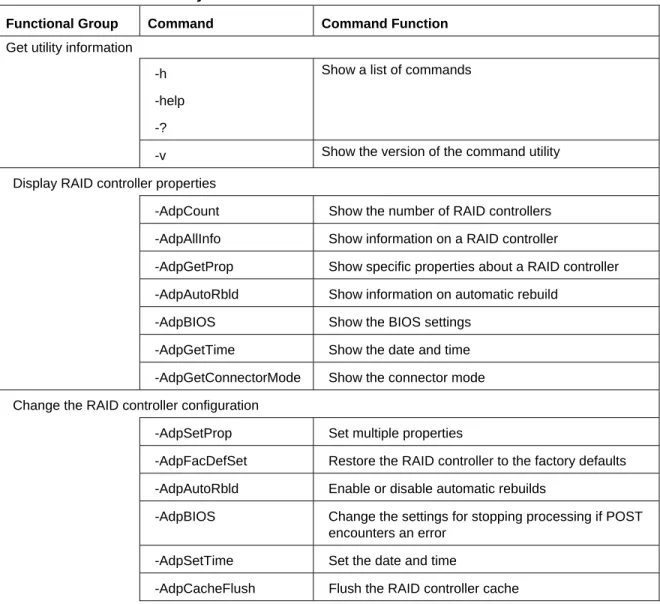
Table 1. Command List by Function
Functional Group Command Command Function
Get utility information
-h -help
-?
Show a list of commands
-v Show the version of the command utility
Display RAID controller properties
-AdpCount Show the number of RAID controllers -AdpAllInfo Show information on a RAID controller
-AdpGetProp Show specific properties about a RAID controller -AdpAutoRbld Show information on automatic rebuild
-AdpBIOS Show the BIOS settings -AdpGetTime Show the date and time -AdpGetConnectorMode Show the connector mode Change the RAID controller configuration
-AdpSetProp Set multiple properties
-AdpFacDefSet Restore the RAID controller to the factory defaults -AdpAutoRbld Enable or disable automatic rebuilds
-AdpBIOS Change the settings for stopping processing if POST encounters an error
-AdpSetTime Set the date and time
Functional Group Command Command Function
-AdpFWFlash Flash the RAID controller firmware -AdpM0Flash Perform a special firmware flash -AdpSetVerify Check against a file
-AdpSetConnectorMode Set the connector mode -AdpShutDown Shut down the RAID controller -AdpSetSASA Sets the controllers SAS address
-AdpPRSetDelay Sets the time between Patrol Read iterations -PhyInfo Show the PHY information
Display physical drive properties
-PDGetNum Show the number of physical drives -PDList List the physical drives
-PDInfo Show information about a specific drive -PDGetMissing List missing drives
Force the state of physical drives
-PdFwDownload Flashes the firmware with the file specified -PDOnline Force a drive to go online
-PDOffline Force a drive to go offline -PDLocate Start or stop identifiying a drive
-PDMakeGood Force a physical drive to the state of Good -PDMarkMissing Mark a physical drive to the state of Missing -PDReplaceMissing Mark physical drive as a replacement
-PDPrpRmv Set a physical drive to be removed or undo the removal setting
-PDClear Clear a physical drive -PDHSP Configure a hot-spare drive Display logical drive properties
-CfgDsply Show the logical drive configuration -CfgFreeSpaceInfo Show the free space on a logical drive -LDInfo Show array information
-AdpBootDrive Show the boot array
-LDPDInfo Show the physical drives in an array -LDGetNum Show the number of arrays
Functional Group Command Command Function Configure logical drives
-CfgLdAdd Configure a RAID 0 or RAID 1 array -CfgEachDskRAID0 Configure RAID 0 drives
-CfgSpanAdd Configure a span to create a RAID 10 array
-CfgLdDel Delete an array
-LDRecon Reconstruct an array
-LDSetProp Set the properties for an array -AdpBootDrive Set a boot array
Load, save, or clear a configuration from a file or from another drive -CfgClr Clear a configuration -CfgSave Save a configuration to a file -CfgRestore Restore a configuration -CfgForeign Clear an imported configuration Start or stop a rebuild, consistency check, or initialization
-PDRbld Start, stop, or show the rebuild progress -PDReplace Replace a missing drive
-LDInit Start, stop, or show the progress of an array initialization
-LDCC Start, stop, or show the progress of a consistency check
-LDBI Start, stop, or show the progress of a background initialization
-AdpPR Start, stop, or show the progress of a patrol read -AdpPRSetDelay Set the delay for a patrol read
Control the event log
-FwTermLog Clear or show the online firmware log -PhyErrorCounters Show the error counter per PHY -AdpEventLog Clear or show an event log View or control the battery or enclosure
-AdpBbuCmd Show or configure the battery backup -AdpBatTest Test the battery backup
-EncInfo Show enclosure information by RAID controller -AdpDiag Show RAID controller diagnostics
2 Alphabetical List of Commands
?
Description
Shows the list of available commands
Syntax
CmdTool2 -?Parameters
NoneExample
CmdTool2 –?AdpAllInfo
Description
Displays cluster state, BIOS, alarm, firmware version, BIOS version, battery charge counter value, ebuild rate, bus number/device number, present RAM, memory size, serial number of the board, and SAS address.
Syntax
CmdTool2 -AdpAllInfo –a[controller]
Parameters
–a[controller]: The RAID controller affected by the command
Example
CmdTool2 –AdpAllInfo –a1
AdpAutoRbld
Description
Enable or disable auto rebuild if hot spare is enabled. This command also determines whether drive insertion will cause an autostart rebuild.
Syntax
CmdTool2 -AdpAutoRbld –Enbl | -Dsbl | -Dsply -a[controller]
Parameters
–a[controller]: The RAID controller affected by the command
-Enbl: Enable auto rebuilds
-Dsbl: Disable auto rebuilds
-Dsply: Display the current setting
Example
CmdTool2 -AdpAutoRbld –Enbl –a1 CmdTool2 -AdpAutoRbld -Dsbl –a1,2
AdpBatTest
Description
This command tests the battery back up device and is only valid if a battery back-up unit is installed.
Syntax
CmdTool2 -AdpBatTest -a[controller]
Parameters
–a[controller]: The RAID controller affected by the command
Example
CmdTool2 -AdpBatTest -aALL
AdpBbuCmd
Description
Displays complete information about the BBU,
Syntax
Parameters
–a[controller]: The RAID controller affected by the command
Example
CmdTool2 -AdpBbuCmd –a1
AdpBIOS
Description
Enables, disables, or displays the BIOS status on the selected RAID controller.
Syntax
CmdTool2 -AdpBIOS –Enbl | -Dsbl | -Dsply | SOE | BE -a[controller]
Parameters
–a[controller]: The RAID controller affected by the command
-Enbl: Enable the BIOS on the RAID controller
-Dsbl: Disable the BIOS on the RAID controller
-Dsply: Display the BIOS settings on the RAID controller
-SOE: Stops POST on BIOS errors
-BE: Bypasses BIOS errors during POST
Example
CmdTool2 -AdpBIOS –Enbl –a1
AdpBootDrive
Description
Set or Display Bootable Virtual Drive ID
Syntax
CmdTool2 -AdpBootDrive {-Set –LDID} | -Get -a[controller]
Parameters
-Set: Optional parameter. Set a specified LD as boot drive
–LDID: Optional parameter. Logical Drive ID
-Get: Display the current bootable Logical Drive ID
Example
CmdTool2 -AdpBootDrive -Set –LDID -a[controller] CmdTool2 -AdpBootDrive -Get -a[controller]
AdpCacheFlush
Description
Flush the RAID controller cache.
Syntax
CmdTool2 -AdpCacheFlush –a[controller]
Parameters
–a[controller]: The RAID controller affected by the command
Example
CmdTool2 -AdpCacheFlush –a1
AdpCount
Description
Display the number of RAID controllers.
Syntax
CmdTool2 –AdpCountParameters
NoneExample
CmdTool2 –AdpCountAdpDiag
Description
Run diagnostics on a RAID controller.
Syntax
CmdTool2 -AdpDiag [val] –a[controller]
Parameters
–a[controller]: The RAID controller affected by the command
-val: Time in seconds
Example
CmdTool2 -AdpDiag –aALL
AdpEventLog
Description
Shows and clears the Event Log. The Event Log is a volatile list of 100 events. When the maximum of 100 events is reached, the oldest events are deleted as new events are added.
Syntax
CmdTool2-AdpEventLog –a[controller] Clear | GetEventinfo | GetEvents | GetSinceShutdown | GetSinceReboot | IncludeDeleted | GetLatest[number] -f [filename] –a[controller]
Parameters
–a[controller]: The RAID controller affected by the command
–Clear: Clear the event log
-GetEventInfo: Displays overall event information
-GetEvents: Provides a list of events
-GetSinceShutdown: Provides a list of events that have occurred since the last time the system was shut down
-GetSinceReboot: Provides a list of events that have occurred since the last time the system was rebooted
-GetLatest [number]: Provides the most recent number of events, determined by the specified number
–f [filename]: Get events from the specified file
Example
CmdTool2 -AdpEventLog Clear –a1
CmdTool2 -AdpEventLog GetSinceShutdown –a1,2
CmdTool2 -AdpEventLog GetLatest 25 -f RAIDEvents.log –aALL
AdpFacDefSet
Description
Set to Factory Defaults. They are not visible if the RAID controller is already configured.
Syntax
CmdTool2 -AdpFacDefSet –a[controller]
Parameters
–a[controller]: The RAID controller affected by the command
Example
CmdTool2 -AdpFacDefSet –a1
AdpFwFlash
Description
Flashes a firmware file onto the RAID controller. Use this command with care.
Syntax
CmdTool2 -AdpFwFlash -f [filename] {-NoSigChk} {-NoVerChk} -a[controller]
Parameters
–a[controller]: The RAID controller affected by the command
-NoSigChk: Do not check the firmware’s signature
-NoVerChk: Do not check the firmware file version
Example
CmdTool2 -AdpFwFlash -f FlashUpdt –a1
AdpGetConnectorMode
Description
Show the connector mode.
Syntax
CmdTool2 -AdpGetConnectorMode -Connector** -a[controller]
Parameters
–a[controller]: The RAID controller affected by the command
-Connector**: Specified connecotr ID
Example
CmdTool2 –AdpGetConnectorMode –ConnectorAll –a0
AdpGetProp
Description
Display the properties of a RAID controller.
Syntax
CmdTool2 –AdpGetProp -[parameter(s)] -a[controller]
Parameters
–a[controller]: The RAID controller affected by the command
-[parameter(s)]: See the following list of allowed parameters
-CacheFlushInterval: Show the cash flush interval
-RebuildRate: Show the rebuild rate
-PatrolReadRate: Show the patrol read rate
-BgiRate: Show the background initialization rate
-ReconRate: Show the reconstruction rate
-SpinupDriveCount: Show the pinup drive count
-SpinupDelay: Show the spinup delay time
-CoercionMode: Show the coercion mode
-PredFailPollInterval: Show the interval used to poll for predicting failure
-EccBucketSize: Show the ECC bucket size
-EccBucketLeakRate: Show the ECC bucket leak rate
-EccBucketCount: Show the number of ECC buckets
-ClusterEnable: Show if Cluster is supported
-BatWarnDsbl: Show if the battery warning is disabled
-AlarmDsply: Show the Alarm setting
-SMARTCpyBkEnbl: Show if copyback operation on SMART is enabled.
-AutoDetectBackPlaneDsbl: Detect automatically backplane if the backplane is enabled.
-CopyBackDsbl: Show if the copyback operation is enabled.
-LoadBalanceMode: Show if the load balancing modeis enabled.
-NCQDsply: Show if the native command queueing is enabled.
-SSDSMARTCpyBkEnbl: Show if copyback operation on SMART errors on a SSD is enabled.
-MaintainPdFailHistoryEnbl: Show if maintenance of the history of a failed drive is enabled.
-EnblSpinDownUnConfigDrvs: Show if spindown of unconfigured drives is enabled.
-EnblSSDPatrolRead: Show if the patrol read operation (media scan) on a SSD is enabled.
-AutoEnhancedDsply: Show if the automatic enhanced import of foreign drives is enabled.
-UseFDEOnlyEncrypt: Show encryption on FDE drives.
-EccBucketCount: Count of single-bit ECC errors currently in the bucket.
Example
CmdTool2 –AdpGetProp –RebuildRate -PatrolReadRate –a1
AdpGetTime
Description
Display the date and time on a RAID controller.
Syntax
CmdTool2 -AdpGetTime –a[controller]
Parameters
–a[controller]: The RAID controller affected by the command
Example
CmdTool2 -AdpGetTime –a1,2
AdpM0Flash
Description
Flash the RAID controller in M0 state
Syntax
CmdTool2 -AdpM0Flash –f [filename]
Parameters
NoneExample
CmdTool2 -AdpM0Flash –f filename
AdpPR
Description
Start, stop, or show the progress of a patrol read.
Syntax
CmdTool2 -AdpPR –Dsbl | -EnblAuto | -EnblMan | -Start | -Stop | -Info |SSDPatrolReadEnbl | SSDPatrolReadDsbl | {-SetStartTime yyyymmdd hh} |
maxConcurrentPD –a[controller]
Parameters
–Dsbl: Disable patrol reads
-EnblAuto: Enable automatic patrol reads
-EnblMan: Enable manual patrol reads
-Start: Start a patrol read
-Stop: Stop a patrol read
-Info: See information about a patrol read
-SSDPatrolReadEnbl: Enable the patrol read operation (media scan) on a SSD.
-SSDPatrolReadDsbl: Disable the patrol read operation (media scan) on a SSD.
-SetStartTime yyyymmdd hh: Set the start time for the patrol read
-maxConcurrentPD: Sets the maximum number of concurrent drives.
Example
CmdTool2 -AdpPR –Dsbl –a1
AdpPRSetDelay
Description
Set patrol read delay interval.
Syntax
CmdTool2 –AdpPRSetDelay –val –a[conrtoller]
Parameters
–a[controller]: The RAID controller affected by the command
-val: Time of delay in hours
Example
AdpSetConnectorMode
Description
Choose to use the internal or external connector on a RAID controller.
Syntax
CmdTool2 -AdpSetConnectorMode –Internal | -External –Connector** -a[controller]
Parameters
–a[controller]: The RAID controller affected by the command
–Internal: Use the internal connector on the RAID controller
-External: Use the external connector on the RAID controller
-Connector**: Specified connecotr ID
Example
CmdTool2 -AdpSetConnectorMode –Internal –Connector0,1 –a1
AdpSetProp
Description
Show RAID controller properties.
Syntax
CmdTool2 -AdpSetProp –[parameter(s)] –val -a[controller]
Parameters
–a[controller]: The RAID controller affected by the command
–val: Percent of CPU usage between 0 and 100
-[parameter(s)]: See the following list of allowed parameters:
-CacheFlushInterval: Show the cache flush interval
-RebuildRate: Show the rebuild rate
-PatrolReadRate: Show the patrol read rate
-CCRate: Show the check consistency rate
-ReconRate: Show the recon rate
-SpinupDriveCount: Show the spinup drive count
-SpinupDelay: Show the spinup delay
-CoercionMode: Show the coercion mode. 0 = none, 1 = 128 Mb , 2 = 1 Gb
-ClusterEnable: Show if clustering is enabled
-PredFailPollInterval: Show the predictive fail poll interval
-EccBucketLeakRate: Show the ECC bucket leak rate
-AlarmEnbl: Enable the alarm
-AlarmDsbl: Disable the alarm
-AlarmSilence: Silence the alarm
-AutoDetectBackPlaneDsbl -val:
val - 0=Enable Auto Detect of SGPIO and i2c SEP.
1=Disable Auto Detect of SGPIO.
2=Disable Auto Detect of i2c SEP.
3=Disable Auto Detect of SGPIO and i2c SEP.
-SMARTCpyBkEnbl: Enable copyback operation on SMART.
-AutoDetectBackPlaneDsbl: Detect automatically the backplane
-CopyBackDsbl: Disable or enable the copyback operation.
-LoadBalanceMode: Disable or enable the load balancing mode.
-NCQEnbl: Enable the native command queueing.
-NCQDsbl: Disable the native command queueing.
-SSDSMARTCpyBkEnbl: Enable copyback operation on SMART errors on a SSD.
-MaintainPdFailHistoryEnbl: Enable maintenance of the history of a failed drive.
-EnblSpinDownUnConfigDrvs: Enable spindown of unconfigured drives.
-EnblSSDPatrolRead: Enable the patrol read operation (media scan) on a SSD.
drives.
-AutoEnhancedImportDsbl: Disable the automatic enhanced import of foreign drives.
-UseFDEOnlyEncrypt: Use encryption on FDE drives only
Example
CmdTool2 -AdpSetProp –AlarmEnbl –a1
CmdTool2 -AdpSetProp –ReconRate -AlarmSilence –a1
AdpSetSASA
Description
Sets the controllers SAS address.
Syntax
Cmdtool2 –AdpSetSASA str[0-64] –a[controller]
Parameters
–a[controller]: The RAID controller affected by the command
This string must be a 64-digit hexadecimal number.
Example
cmdTool2 –AdpSetSASA str0 –a1
AdpSetTime
Description
Set the date and time on a RAID controller.
Syntax
CmdTool2 -AdpSetTime [yyyymmdd] [hh:mm:ss] –a[controller]
Parameters
–a[controller]: The RAID controller affected by the command
[yyyymmdd]: The date to set
Example
CmdTool2 -AdpSetTime 20071230 24:00:00 –a1
AdpSetVerify
Description
Verify a RAID controller’s configuration against a file.
Syntax
CmdTool2 -AdpSetVerify -f [filename] -a[controller]
Parameters
–a[controller]: The RAID controller affected by the command
-f [filename]: Verify the RAID configuration against the contents defined in [filename]
Example
CmdTool2 -AdpSetVerify -f RAIDConfig –a1
AdpShutDown
Description
Shut down the RAID controller.
Syntax
CmdTool2 -AdpShutDown -a[controller]
Parameters
–a[controller]: The RAID controller affected by the command
Example
CmdTool2 -AdpShutDown –a1
CfgClr
Description
Syntax
CmdTool2 -CfgClr -a[controller]
Parameters
–a[controller]: The RAID controller affected by the command
Example
CmdTool2 -CfgClr –a1
CfgDsply
Description
Display the RAID controller configuration and the remaining unconfigured space.
Syntax
CmdTool2 -CfgDsply -a[controller]
Parameters
–a[controller]: The RAID controller affected by the command
Example
CmdTool2 -CfgDsply –a1
CfgEachDskRAID0
Description
Configure every physical drive in an Unconfigured-Good state as RAID 0 on the RAID controller. Set the array properties.
Note: You cannot span RAID 0 across a single drive.
Syntax
CmdTool2 -CfgEachDskRAID0 -a[controller] {WT | WB} {NORA | RA | ADRA} {Direct | Cached} {-strpszM}
Parameters
–a[controller]: The RAID controller affected by the command
WB: Optional parameter to define the write back setting
NORA: Optional parameter to define no read ahead
RA: Optional parament to define read ahead
ADRA: Optional parameter to define adptive read ahead
Direct: Optional parameter to define direct I/O
Cached: Optional parameter to define cached I/O
-strpszM: Optional parameter to set the stripe size. The default is 64 kb.
Example
CmdTool2 -CfgEachDskRAID0 –a1 WT RA -Cached
CfgForeign
Description
Displays, imports, or clears a foreign configuration.
Syntax
CmdTool2 -CfgForeign –Scan | [-SecurityKey password] | -Dsply [x] | -Preview [x] | -Import [x] | -Clear [x] -a[controller]
Parameters
–a[controller]: The RAID controller affected by the command (default is all)
-SecurityKey: Lock and unlock access to the secure user data.
-Disply (x) –a[controller]: Displays the foreign configuration
-Import (x) –a[controller]: Imports the foreign configuration.
-Preview (x) –a[controller]: Provides a preview of the imported foreign configuration
-Scan –a[controller]: Scans and displays available foreign configuration
x is the index of for.configs. Optional parament (set to all by default)
Example
CfgFreeSpaceinfo
Description
Shows the number of disk groups, spans in each disk group, free space slots in each disk group, the start block, and the size (in blocks and mb) of each free space slot.
Syntax
CmdTool2 -CfgFreeSpaceinfo -a[controller]
Parameters
–a[controller]: The RAID controller affected by the command
Example
CmdTool2 -CfgFreeSpaceinfo –a1
CfgLDAdd
Description
Configure RAID and determine the attributes of the RAID array.
Syntax
CmdTool2 -CfgLDAdd -Rx[E0:Sn] [WB|WT] [NORA|RA|ADRA] [Direct|Cached] [CachedBadBBU | NOCachedBadBBU ] [ -szXXXXXXXX [-szYYYYYYYY [...]]] [-strpszM] [-Hsp[E5:S5,...]] [–afterLdX] | -Force [FDE|CtrlBased]
Parameters
–Rx[E0:Sn]: RAID level 0, 1, 5 or 6 and physical device enclosure/slot numbers for an array
–WT(Write through), WB(Write back)e
–NORA(No read ahead), RA(Read ahead), ADRA(Adaptive read ahead):
Selects read policy.
–Direct,Cached: Selects cache policy
–CachedBadBBU|NoCachedBadBBU: Specifies whether to use write cache when the BBU is bad
-strpszM: Optional parameter to set the stripe size (default is 64 kb)
–szXXXX: The size of the logical drive using regular numbers, in MB (the actual size of the logical drive may be smaller as physical drive blocks must be aligned to stripe size; the free space in the array can be used to create a configuration)
-AfterLdX: Optional parameter. The slot to use (default is the first slot)
–ForceeSpecifies the drive coercion is used to make the capacity of the drives compatible.
Example
CmdTool2 –CfgLDAdd –R5[E0:S0, E0:S1, E0:S2] –sz10240
CfgLdDel
Description
Delete logical drives from a RAID controller.
Syntax
CmdTool2 -CfgLdDel -l[drive] -a[controller]
Parameters
–a[controller]: The RAID controller affected by the command
-l[drive]: The drive(s) affected by the command
Example
CmdTool2 -CfgLdDel –l2 –a1
CfgRestore
Description
Restore configuration data from a file. The restored data includes all read and write RAID controller and logical drive properties, and the RAID configuration, including hot spares. This command requires identical physical drive device IDs.
Syntax
CmdTool2 -CfgRestore –f [filename] –a[controller]
Parameters
–a[controller]: The RAID controller affected by the command
Example
CmdTool2 -CfgRestore –f RAIDCOnfig –a1
CfgSave
Description
Saves the configuration and properties structure for each RAID controller(s) to a binary file.
Syntax
CmdTool2 -CfgSave -f [filename] –a[controller]
Parameters
–a[controller]: The RAID controller affected by the command
-f [filename]: The binary file in which the RAID configuration is to be saved
Example
CmdTool2 -CfgSave -f RAIDConfig –a1
CfgSpanAdd
Description
Creates a RAID level 10, 50 or 60 (spanned) from the specified arrays listed as Arrayn[E0:Sn,...]. The First array is 0. This option requires that at least two arrays are created with the same quantity of physical drives.
Then set values for write thru, write back, or read-ahead, and direct or cached. The parameters must be entered in the order shown.
Syntax
CmdTool2 -CfgSpanAdd -r10 | -r50 | -r60 –Array0[E0:Sn] –Array1[E0:Sn] [...] [{WT | WB}] [{NORA | RA | ADRA}] [{Direct | Cached}] [{-strpszM}] –a[controller]
Parameters
–a[controller]: The RAID controller affected by the command
-r10: To create RAID 10 array
-r50: To create RAID 50 array
–Array0[E0:S0, E1:S1]: Uing the specifid enclosure ID and slot ID drives to create Array0
–Array1[E0:Sn] [...]: Uing the specifid enclosure ID and slot ID drives to create Array1
-WT: Set the array to write-through
-WB: Set the array to write-back
-RA: Set the array to read-ahead
-NORA: Set the array to no read-ahead
-ADRA: Otional parameter to define adptive read ahead
-Direct: Otional parameter to define direct I/O
-Cached: Otional parameter to define cached I/O
-strpszM: Optional parameter to set the stripe size (only 64 Kbyte is supported)
Example
CmdTool2 -CfgSpanAdd -r10 –Array0[E0:S0, E0:S1] –Array1[E0:S2, E0:S3] –a0
EncInfo
Description
Show enclosure information for the RAID controller(s) specified.
Syntax
CmdTool2 -EncInfo -a[controller]
Parameters
–a[controller]: The RAID controller affected by the command
Example
CmdTool2 -EncInfo -aALL
FwTermLog
Description
Syntax
CmdTool2 -FwTermLog -Bbuoff|-BbuoffTemp|-Bbuon|-BbuGet|-Dsply|-Clear a[controller]
Parameters
-Bbuoff: Turn off BBU for the RAID firmware level term log protection
-BbuoffTemp: Turn off BBU temporary
-Bbuon: Turn on BBU for RAID firmware level term log protection -BbuGet: Displays the BBU setting for RAID firmware level term log protection
-Dsply: Displays the RAID firmware level term log -Clear: Clears RAID firmware level term log
Example
CmdTool2 –FwTermLog –Dsply –a0
h, -help
Description
Displays a list of available commands.
Syntax
CmdTool2 -h, -helpParameters
NoneExample
CmdTool2 –h CmdTool2 -helpLDBI
Description
Syntax
CmdTool2 –LDBI -Enbl | -Dsbl | -ProgDsply | -ShowProg | -GetSetting -l[drive] -a[controller]
Parameters
–a[controller]: The RAID controller affected by the command
-l[drive]: The drive(s) affected by the command
-Enbl: Enables background initialization
-Dsbl: Disables the background initialization
-ProgDsply: View ongoing background initialization until all background initialization processes are completed or until the user presses a key to exit
-ShowProg: Displays the current progress value.
-GetSetting: Displays the background initialization status (enabled or disabled)
Example
CmdTool2 –LDBI –ProgDsply –l2 –a1
LDCC
Description
Starts or stops the consistency check per array for each RAID controller.
Syntax
CmdTool2 -LDCC -Start | -Abort | -ShowProg | -ProgDsply -l[drive] -a[controller]
Parameters
–a[controller]: The RAID controller affected by the command
-l[drive]: The drive(s) affected by the command
-Start: Starts a consistency check on the logical drive(s), and then displays the progress/time left
-Abort: Aborts a consistency check on the logical drive(s)
-ShowProg: Displays a snapshot of an ongoing consistency check
-ProgDsply: Displays progress until at least one consistency check is completed or until a key is pressed
Example
CmdTool2 -LDCC -ProgDsply –l2 –a1
LDGetNum
Description
Show the quantity of Logical Drives.
Syntax
CmdTool2 -LDGetNum –a[controller]
Parameters
–a[controller]: The RAID controller affected by the command
Example
CmdTool2 -LDGetNum –a1
LDGetProp
Description
Displays Virtural Drive Cache and Access Parameters
Syntax
CmdTool2 -LDGetProp -Cache | -Access | -Name | -DskCache –l[drive] –a[controller]
Parameters
-DskCache: Display the physical disk cache policy
-l[drive]: The drive(s) affected by the command
-Cache: Display the cache properties
-Access: Display the access mode
-Name: Display the name of the cache
-DskCache: Display the physical disk cache policy
Example
LDInfo
Description
Show the name, RAID level, RAID level qualifier, size in MB, state, stripe size, number of drives, and span depth. Display the progress, initialization, BGI, and consistency check.
Syntax
CmdTool2 -LDInfo –l[drive] -a[controller]
Parameters
–a[controller]: The RAID controller affected by the command
-l[drive]: The drive(s) affected by the command
Example
CmdTool2 -LDInfo –l2 –a1
LDInit
Description
Start, stop, or show the progress of an array initialization.
Syntax
CmdTool2 -LDInit {–Start [Fast|Full]} | -Abort | -ShowProg | -ProgDsply -l[drive] -a[controller]
Parameters
–a[controller]: The RAID controller affected by the command
-Start [-full]: Writes 0s, optional progress display (fast init displays the first 100 Mbs, and full initializes the entire logical drive)
-Abort: Aborts the ongoing initialization
-ShowProg: Displays the snapshot of the ongoing initialization
-ProgDsply: Displays initialization progress until at least one is completed or a key is pressed
-l[drive]: The drive(s) affected by the command
Example
LdPDInfo
Description
Display the virtual driver and the driver information.
Syntax
CmdTool2 -LdPDInfo -a[controller]
Parameters
–a[controller]: The RAID controller affected by the command
Example
CmdTool2 -LdPDInfo –a1
LDRecon
Description
Starts the reconstruction of an array by adding or removing drives.
Syntax
CmdTool2 -LDRecon {-Start -rX [{-Add | -Rmv} -Physdrv[E0:S0,...]]} | -ShowProg | -ProgDsply –L[drive] -a[controller]
Parameters
–a[controller]: The RAID controller affected by the command
-Start: Start the reconstruction
-rX: Set the reconstruction RAID level
-Add: Add a drive
-Rmv: Remove a drive
-Physdrv[E0:S0,...]: The drive to add or remove
-ShowProg: Displays a snapshot of the ongoing reconstruction
-ProgDsply: Displays the reconstruction progress until completion or until a key is pressed
Example
CmdTool2 –LDRecon –Start –r5 –Add –Physdrv[E0:S4] –l0 –a0
LDSetProp
Description
Sets array attributes including the array name and access parameters.
Syntax
CmdTool2 -LDSetProp {-Name [ArrayName]} | -RW | RO | Blocked |
WT | WB | RA | NORA | ADRA | Cached|Direct | -EnDskCache|DisDskCache |
CachedBadBBU|NoCachedBadBBU -L[drive] -a[controller]
Parameters
-Name [ArrayName]: Name the array with a defined name [ArrayName]
-RW: Set the array to read-write
-RO: Set the array to read-only
-Blocked: Blocked array access
-WT: Set the array to write-through
-WB: Set the array to write-back
-RA: Set the array to read-ahead
-NORA: Set the array to no read-ahead
-ADRA: Set the array to adaptive read ahead
-Cached, Direct: Selects cache policy
-CachedBadBBU|NoCachedBadBBUe
-EnDskCache, DisDskCache: Enables and disables drive cache
Example
PdFwDownload
Description
Flashes the firmware with the file specified.
Syntax
cmdTool2 –PdFwDownload PhysDrv[E0:S0,E1:S1,...] f <filename> -a[controller]
Parameters
–a[controller]: The RAID controller affected by the command
-PhysDrv[E0:S0,E1:S1,...]: The physical drive(s) affected
Example
cmdTool2 –PdFwDownload –physDrv[E1:S1] –a1
PDClear
Description
Driver initialization
Syntax
CmdTool2 -PDClear –Start | -Stop | -ShowProg | -ProgDsply -PhysDrv [E0:S0,E1:S1,...] -a[controller]
Parameters
–a[controller]: The RAID controller affected by the command
–Start: Start initialization on the selected drive
-Stop: Stop initialization on the selected drive
-ShowProg: Displays a snapshot of the ongoing initialization process
-Physdrv[E0:S0,...]: The physical drive(s) affected
-ProgDsply: Displays the initialization progress until completion or until a key is pressed
Example
PDGetMissing
Description
Display Drives in Missing Status.
Syntax
CmdTool2 -PDGetMissing -a[controller]
Parameters
–a[controller]: The RAID controller affected by the command
Example
CmdTool2 -PDGetMissing –a1
PDGetNum
Description
Lists the number of physical drives either attached directly to the RAID controller or in enclosures attached to the RAID controller.
Syntax
CmdTool2 -PDGetNum –a[controller]
Parameters
–a[controller]: The RAID controller affected by the command
Example
CmdTool2 -PDGetNum –a1
PDHSP
Description
Converts a physical drive into a global or dedicated hot spare in the listed array or removes the hot spare. Make sure the capacity of the hot-spare drive is equal to or larger than the capacity of the disks in the array and that it is the same type of drive (SAS or SATA).
Syntax
CmdTool2 -PDHSP {-Set [-Dedicated [-ArrayN | -Array0,1,2...]] [-EnclAffinity] [-nonRevertible]} | -Rmv -PhysDrv[E0:S0,E1:S1,...] –a[controller]
Parameters
–a[controller]: The RAID controller affected by the command
-Dedicated: Set the spare to a specified array
-ArrayN: Specified array by the array ID
-EnclAffinity: Set the spare for a specific enclosure’s array
-nonRevertible: Put the spare in non-revertible mode
-Rmv: Changes the physical drive state to ready (removes the hot spare)
-PhysDrv[E0:S0,E1:S1,...]: The physical drive(s) affected
Example
CmdTool2 –PDHSP –Set –PhysDrv[E0:S0] –a0
PDInfo
Description
Shows the drive size, type, serial number, and firmware version for the physical drives connected to the enclosure and RAID controller.
Syntax
CmdTool2 -PDInfo -PhysDrv[E0:S0,E1:S1,...] -a[controller]
Parameters
–a[controller]: The RAID controller affected by the command
-PhysDrv[E0:S0,E1:S1,...]: The physical drive(s) affected
Example
PDList
Description
Displays the size, type, serial number, and firmware version for all physical drives attached to a RAID controller.
Syntax
CmdTool2 -PDList –a[controller]
Parameters
–a[controller]: The RAID controller affected by the command
Example
CmdTool2 -PDList –a1
PDLocate
Description
Starts and stops flashing the disk activity LED for a drive.
Syntax
CmdTool2 -PDLocate {-start | -stop} -physdrv[E0:S0,E1:S1,...] -a[controller]
Parameters
–a[controller]: The RAID controller affected by the command
-start: Start flashing the LED
-stop: Stop flashing the LED
-physdrv[E0:S0,E1:S1,...]: The drive for the affected LED
Example
CmdTool2 –PDLocate –start –phjysdrv[E0:S0] –a0
PDMakeGood
Syntax
CmdTool2 -PDMakeGood -PhysDrv[E0:Sn....] | [-Force] -a[controller]
Parameters
–a[controller]: The RAID controller affected by the command
-PhysDrv[E0:Sn...]: The physical drive(s) affected
-Force: Force the drive to the Unconfigured Good state
Example
CmdTool2 –PDMakeGood –PhysDrv[E0:S0] –a0
PDMarkMissing
Description
Mark the selected physical drive as missing.
Syntax
CmdTool2 -PDMarkMissing -physdrv[E0:S0,E1:S1,...] -a[controller]
Parameters
–a[controller]: The RAID controller affected by the command
-physdrv[E0:S0,E1:S1,...]: The physical drive(s) affected
Example
CmdTool2 –PDMarkMissing –physdrv[E0:S0] –a0
PDOffline
Description
The state of the physical drive is changed from online to offline. When the drive is offline, it is not available to the RAID controller.
Syntax
CmdTool2 -PDOffline -PhysDrv[E0:S....] -a[controller]
Parameters
-PhysDrv[E0:S....]: The physical drive(s) affected
Example
CmdTool2 –PDOffline –PhysDrv[E0:S0] –a0
PDOnline
Description
The state of the physical drive is changed from offline to online. An online drive is defined as one that is working normally and is a part of a configured logical Drive.
Syntax
CmdTool2 -PDOnline -PhysDrv[E0:Sn....] -a[controller]
Parameters
–a[controller]: The RAID controller affected by the command
-PhysDrv[E0:Sn....]: The physical drive(s) affected
Example
CmdTool2 –PDOnline –PhysDrv[E0:S0] –a0
PDPrpRmv
Description
Prepare an unconfigured physical drive(s) for removal. The drive is spun down and the drive state is set to unaffiliated, which marks it as offline even though it is not a part of the configuration.
Syntax
CmdTool2 -PDPrpRmv [-Undo] –PhysDrv[E0:Sn....] -a[controller]
Parameters
–a[controller]: The RAID controller affected by the command
[-Undo]: Marks a drive as unconfigured-good
–PhysDrv[E0:Sn....]: The physical drive(s) affected
Example
PDRbld
Description
Start, stop, or display the progress of a physical disk rebuild. The command begins immediately if not in DOS. The drive affected must be part of an array and have sufficient capacity.
Syntax
CmdTool2 PDRbld –Start | Stop | ShowProg | ProgDsply –PhysDrv [E0:Sn....] -a[controller]
Parameters
–a[controller]: The RAID controller affected by the command
–Start: Start the physical disk rebuild
-Stop: Stop the physical disk rebuild
-ShowProg: Displays a snapshot of the ongoing rebuild
-ProgDsply: Displays the rebuild progress until completion or until a key is pressed
Example
CmdTool2 –PDRbld -Start –PhysDrv[E0:S0] –a0
PDReplaceMissing
Description
Replaces the configured physical drive, and then starts an automatic rebuild. The specified array, index and row must be a missing drive.
Syntax
CmdTool2 -PDReplaceMissing –PhysDrv[E0:Sn] –ArrayX –RowY -a[controller]
Parameters
–a[controller]: The RAID controller affected by the command
–PhysDrv[E0:Sn]: The physical drive(s) affected
–Array[X]: Specifies the array ID
Example
CmdTool2 –PDReplaceMissing –PhysDrv[E0:S0] –Array0 –Row1 –a0
PhyErrorCounters
Description
Displays the error counter for each PHY.
Syntax
CmdTool2 -PhyErrorCounters -a[controller]
Parameters
–a[controller]: The RAID controller affected by the command
Example
CmdTool2 -PhyErrorCounters –a0
PhyInfo
Description
Displays information about the PHY of the specified port ID.
Syntax
CmdTool2 -PhyInfo -phyM -a[controller]
Parameters
–a[controller]: The RAID controller affected by the command
-phyM: Specifies the PHY ID
Example
CmdTool2 -PhyInfo -phyM –a1