VCE Word Template Table of Contents
VBLOCK
TM
SOLUTION FOR SAP APPLICATION
HIGH AVAILABILITY (HA)
January 2012
Contents
Executive Summary ... 4
Business Case ... 4
Solution ... 4
Objectives ... 4
Benefits ... 5
Audience... 5
Technology Overview ... 6
Vblock™ Infrastructure Platforms ... 6
SAP ... 6
VMware HA ... 7
Symantec ApplicationHA ... 7
Solution Architecture ... 8
Overview... 8
Architecture Diagram ... 9
ApplicationHA Installation in the Architecture ...10
Hardware Components ...11
Software Components ...12
Storage and Layout ...12
Disk/File systems Layout ...13
Validation ...14
Introduction ...14
Use Cases ...14
Scenarios...15
Validation Results ...16
Scenario 1 - During a hardware failure, test the abilities of VMware HA to migrate a VM from
the failed ESXi server to the other available ESXi in the cluster and of ApplicationHA to start
the SAP and Oracle instances. ...16
Validation Results ...16
Validation Steps...16
Scenario 2 - Test the operational ability of ApplicationHA from the vCenter ...21
Stage 1: Verify application status and then stop the application. ...21
Stage 2: Start the SAP application. ...25
Scenario 3 – Use ApplicationHA to restart a failed SAP instance ...27
Validation Results ...27
Validation Steps...27
Scenario 4 – Use ApplicationHA to restart a failed Oracle database instance ...30
Validation Results ...30
Validation Steps...30
Scenario 5 – ApplicationHA will restart the VM when the application restart attempts have
reached the allowable maximum ...32
Validation Results ...32
Validation Steps...32
Conclusion ...38
Next Steps ...38
Executive Summary
Business Case
Events such as the global economic crisis, virtualization, and cloud computing have fundamentally changed the way in which IT projects are evaluated. No longer can IT just rely on building a business case purely on cost savings. Mission critical applications such as SAP are under greater scrutiny in terms of demonstrating tangible business value after implementation. This phenomenon provides a quandary for system integrators, lead architects, and general managers of applications on how to plan, design, and implement business continuity.
Discover ways to focus on value over price with VCE, the Virtual Computing Environment Company. VCE’s Vblock™ Solution for SAP Application High Availability (HA) combines industry-leading compute, network, storage, virtualization, and management technologies into prepackaged units of infrastructure enabling you to accelerate value add by focusing on business outcomes such HA capabilities and organizational efficiency rather than just products.
Solution
Vblock™ Infrastructure Platforms deliver leading edge technology, while minimizing SAP operational and deployment risk. Vblock platforms include built-in HA capabilities, such as Cisco’s Unified Computing System (UCS) service platform to restore any failed blade, and VMware HA to
automatically restart a virtual machine (VM) on other production servers with spare capacity in case of ESX or ESXi host failover. This project utilizes the infrastructure HA capabilities in an SAP application environment. This solution involves running VMware HA, as well as introducing Symantec
ApplicationHA, on Vblock Series 700 model MX.
Symantec ApplicationHA provides monitoring capabilities for applications running inside the virtual machines hosted on ESX or ESXi hosts managed by a VMware vCenter Server. Symantec
ApplicationHA adds a layer of application awareness to the core high availability functionality offered by VMware virtualization technology. Symantec ApplicationHA is based on Veritas™ Cluster Server (VCS) and internally uses similar concepts such as agents, resources, and service groups.
The solution decreases the number of manual actions that SAP administrators and IT operations must perform for their organization to maintain a high degree of operational excellence as required by SAP best practices.
Described in this paper are the solution’s overall configuration and SAP system refresh processes on Vblock 700 MXplatform.
Objectives
The objective of this project is to validate the following use cases in a real-life scenario on a Vblock 700 MX, and it is valid for all Vblock platforms:
1. Demonstrate deployment and enablement of SAP application high availability in a virtualized environment.
2. Utilize VMware HA with SAP to provide easy-to-use and cost-effective high availability for SAP. 3. Validate HA for mission critical SAP applications such as ERP, CRM, SCM, SRM, Enterprise
Portal, Process Integration, BW, etc.
4. Show the overall cost saving due to server cost reduction to provide HA since no cluster needs to be setup.
Benefits
Only VCE can deliver an innovative solution that is: Seamless
A completely integrated IT offering with end-to-end vendor accountability
Regularly delivered and vendor controlled updates
Powerful
Full visibility and control over the SAP applications with the ability to start, stop, and monitor applications running inside virtual machines
Specialized Application Maintenance mode, in which ApplicationHA allows you to intentionally take an SAP application out of its purview for maintenance or troubleshooting
Painless
Out of the box integration with VMware HA and VMware vCenter Server
A standardized way to manage SAP applications using a single interface that is integrated with VMware vSphere Client
Audience
This paper is intended for system administrators, network administrators, and architects, as well as technical engineering staff, IT managers, IT planners and other IT professionals who are evaluating, acquiring, managing, operating, or deploying SAP in a virtualized data center environment. All Vblock platform existing and potential customers with a current or future SAP implementation will also benefit from the information in this paper.
Technology Overview
The solution uses the following hardware and software components and technologies: Vblock Infrastructure Platforms
SAP VMware HA
Symantec ApplicationHA
Vblock
™
Infrastructure Platforms
Vblock platforms are enterprise-class and service provider-class IT infrastructure units that are pre-engineered, tested, and validated with pre-defined performance, capacity, and availability service levels. The standardized converged infrastructure of the Vblock platform is a foundational building block for cloud computing that helps customers realize the benefits of applications running in a virtualized environment.
Vblock platforms are characterized by:
Repeatable units of construction based on matched performance, operational characteristics, and discrete requirements of power, space, and cooling
Repeatable design patterns that facilitate rapid deployment, integration, and scalability
An architecture that can be scaled for the highest efficiencies in virtualization and workload mobility
An extensible management and orchestration model based on industry-standard tools, APIs, and methods
A design that contains, manages, and mitigates failure scenarios in hardware and software environments
Note: Refer to the VblockTM Infrastructure Platform Architecture Overview for detailed information about the Vblock platform architecture. Use the link provided in the References section of this paper.
Deploying SAP applications on the Vblock platform creates minimum risk, as Vblock platforms have the following features:
Production-ready, pre-engineered, integrated and tested units of virtualized infrastructure
Best-of-breed virtualization, network, compute, storage, security, and management products
SLA driven, providing predictable performance capabilities and operational characteristics
SAP
SAP NetWeaver ERP Central Component (ECC) 6.0 was used to validate the solution. The SAP ERP application is integrated enterprise resource planning (ERP) software. It targets business software requirements of midsize and large organizations in most industries and sectors. ECC 6.0 allows for
open communication within and between all company functions, as well as with other businesses outside the firewall, due to its Services Oriented Architecture (SOA).
VMware HA
VMware HA provides easy-to-use and cost-effective high availability for applications running in virtual machines. In the event of physical server failure, affected virtual machines are automatically restarted on other production servers with spare capacity. In the case of operating system failure, VMware HA restarts the affected virtual machine on the same physical server.
Symantec ApplicationHA
Symantec ApplicationHA provides monitoring capabilities for applications running inside virtual machines hosted on ESX or ESXi hosts managed by a VMware vCenter Server. Symantec
ApplicationHA adds a layer of application awareness to the core high availability functionality offered by VMware virtualization technology. It integrates with VMware HA via VMware Application
Awareness API to restart the virtual machine if application restarts do not succeed. Symantec ApplicationHA is based on Veritas™ Cluster Server (VCS) and internally uses similar concepts such as agents, resources, and service groups.
Solution Architecture
Overview
This paper presents the methodology to install, configure, operate, and test a High Availability Solution for SAP systems using Symantec ApplicationHA. In this project Symantec ApplicationHA is installed on SAP systems using the following option:
Central System: Both SAP Central Instance and Database Instance run on the same host/VM. The operating system used is RHEL 5.5 and the database used is Oracle 10.2. Since it is a central system, both SAP central instance and Oracle database instance are installed on the same host/virtual machine.
Two other options exist for installing Symantec ApplicationHA on SAP systems, but these are out of scope for this paper:
Distributed System: SAP Central instance and Database instance run on separate hosts/Virtual Machines.
High-availability System: Central Instance, Database instance, and additional instances that are required for a high-availability system such as Central Services instance for ABAP (ASCS Instance) and Enqueue Replication Server instance (ERS Instance) for ASCS Instance, run on separate hosts/Virtual Machines.
Architecture Diagram
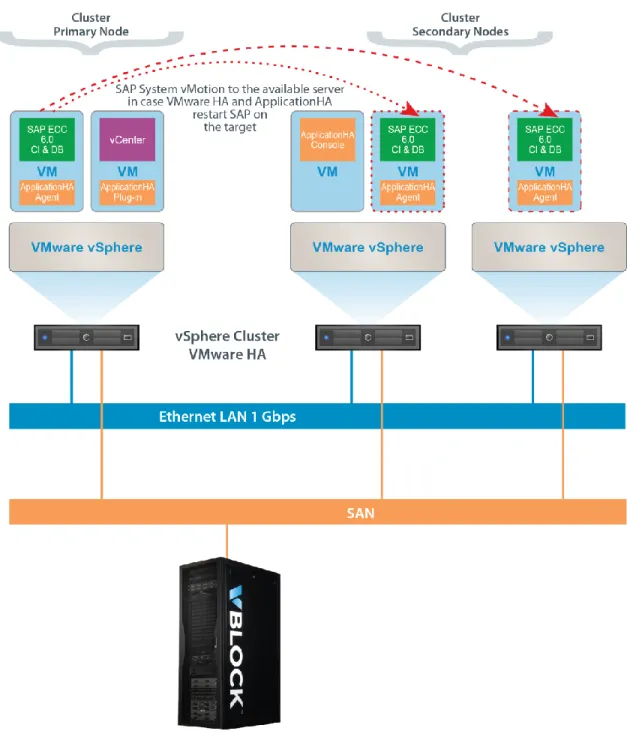
A VMware cluster should have two or more ESXi servers in it to turn on the HA feature. For this solution, three Virtual machines which are hosted on three Cisco UCS Servers and EMC Storage Array are used. In this solution, SAP operation and application monitoring by Symantec ApplicationHA is demonstrated.
As shown in the architecture diagram, Figure 1:
1. SAP Central system is installed on one Virtual machine, which has RHEL 5.5 as the operating system.
2. Symantec ApplicationHA Console is installed on one Virtual Machine, which has Windows 2008 R2 as operating system.
3. VMware vCenter is installed on one Virtual machine, which has windows 2008 R2 as the
operating system. The Symantec ApplicationHA plug-in is installed on this machine. See Figure 3. 4. The VMware cluster is created with three ESXi servers.
5. The VMware HA is turned-on for the VMware cluster.
Refer to the vSphere administrator guide for detailed information on how to do steps 4 & 5. The Symantec ApplicationHA agents for SAP and Oracle are installed on the Virtual Machine on which the SAP Central system (Central instance and database instance) is running.
ApplicationHA Installation in the Architecture
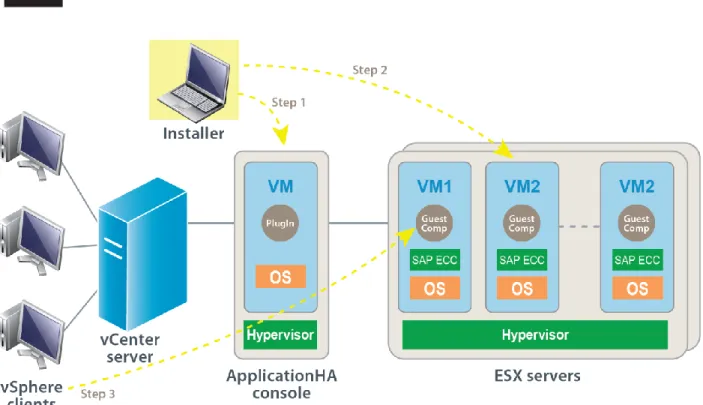
Figure 3 shows an overview of the ApplicationHA installation. The ApplicationHA installation is a three-step process:
1. Install ApplicationHA Console and configure the vCenter plug-in on the vCenter Server. Application HA Console:
- integrates with vSphere Client, which integrates with Symantec ApplicationHA View - has vCenter privileges to provide discretionary access control (DAC)
- offers single sign-on to virtual machines under ApplicationHA control - can be installed on a virtual machine or a physical machine
2. Install the ApplicationHA guest components inside each VM where application monitoring will be enabled. The guest component includes Heartbeat components integrated with VMware HA, as well as components for monitoring application status.
3. Configure application monitoring from the vCenter GUI. Refer to the product information for installation details.
Figure 3. ApplicationHA installed in the architecture
Hardware Components
The following table describes the hardware resources used in testing this solution.
Category Components
Compute Cisco Unified Computing System (UCS):
4 x UCS 5108 Chassis
3 x UCS blade B200 Series M2 blades
- Each blade: 8 x CPU core and 96GB memory
2 x 6140XP Fabric-Interconnects Network 2 x Nexus 7010 Ethernet Switch
2 x Cisco MDS 9506 FC Switch Storage EMC Symmetrix VMAX with 2-Engines
Software Components
The following table lists the software resources used in testing this solution.
Name and version Configuration
VMware vSphere 4.1 According to vCard
VMware vSphere 4.1 Managing all the VMware VMs VMware View Client 4.5 VDI client
Oracle Enterprise Server 10.2.0.4 Installed with SAP installation
Microsoft Windows 2008 Symantec ApplicationHA Console + vCenter Red Hat Enterprise Linux Configured according to SAP documentation
EMC SMC Standard
SAP ERP 6.0 IDES Install on VM with Central system option
Symantec ApplicationHA 5.1 SP2 for Linux Configure ApplicationHA agent on the SAP ERP VM Symantec ApplicationHA 5.1 SP2 for Windows Configure ApplicationHA Console
Symantec ApplicationHA Licenses For ApplicationHA Console and agent Ethernet IP Addresses Based on availability
Storage and Layout
Storage on the Vblock 700 MX is provided by the Symmetrix VMAX Series architecture featuring the scalable Virtual Matrix interconnect design. The Virtual Matrix is redundant and dual active, and supports all Global Memory references, messaging, and management operations including internal discovery and initialization, path management, load balancing, failover, and fault isolation within the array. The Symmetrix VMAX array contains from one to eight VMAX Engines. Each VMAX Engine contains two integrated directors. Each director has two connections to the VMAX Matrix Interface Board Enclosure (MIBE) through the System Interface Board (SIB) ports. Since every director has two separate physical paths to every other director through the Virtual Matrix, this is a highly available interconnect with no single point of failure.
This design eliminates the need for separate interconnects for data, control, messaging,
environmental, and system test. A single highly available interconnect suffices for all communications between the directors, which reduces complexity.
The Symmetrix VMAX design is based on an individual Symmetrix VMAX engine with redundant CPU, memory, and connectivity on two directors for fault tolerance. Symmetrix VMAX engines connect to and scale out linearly through the Virtual Matrix Architecture, which allows resources to be shared within and across VMAX Engines.
Note: Refer to the VblockTM Infrastructure Platform Architecture Overview for detailed information on the Vblock platform architecture. Use the link provided in the References section of this paper.
Disk/File systems Layout
The following table provides the storage configuration details for this solution: Size (GB) RAID Type VMAX VP Pool
Purpose Disk Type to
Host
Disk Type on VMAX
20 5 N/A ESXi boot/OS physical Thick
20 5 N/A ESXi boot/OS physical Thick
20 5 N/A ESXi boot/OS physical Thick
1024 5 sap_R5 VM boot/OS/Bin, etc. vmdk Thin VM boot/OS/Bin, etc. vmdk Thin VM boot/OS/Bin, etc. vmdk Thin 512 5 sap_R5 VM boot/OS/Bin, etc. vmdk Thin
Validation
Introduction
Testing is performed to validate the SAP HA use cases. Each testing scenario is explained, followed by test results and conclusions.
Use Cases
The overall test objectives are stated in the following use cases:
1. Demonstrate a simple method to deploy and enable SAP application high availability in a virtualized environment.
2. Utilize Symantec ApplicationHA to enhance VMware HA to provide easy-to-use and cost-effective high availability for SAP.
The combination of VMware HA and other high availability features of Vblock 700 MX platforms enables SAP organizations with a powerful and yet cost-effective high availability solution to increase application uptime by minimizing unplanned downtime and service interruption while eliminating the need for dedicated or standby hardware or additional installation software. This improves business continuity without increasing TCO.
Scenarios
Scenario Expected Result
1. During a hardware failure, test the ability of VMware HA to migrate a VM from the failed ESXi server to another available ESXi in the cluster, and the ability of
ApplicationHA to start the SAP and Oracle instances.
The test demonstrates the ability of VMware HA to migrate a VM from the failed ESXi server to another available ESXi in the cluster, and the ability of ApplicationHA to start the SAP and Oracle instances.
2. Test the operational ability of starting and stopping SAP using ApplicationHA from vCenter.
The test demonstrates the operational ability of the ApplicationHA in the vCenter to start and stop the SAP application.
3. Restart a failed SAP instance using ApplicationHA.
The test demonstrates high availability for SAP applications. In case of an application failure, one can maintain availability by using ApplicationHA to restart a failed SAP
application instance. 4. Restart a failed Oracle database
instance using ApplicationHA.
The test demonstrates high availability for Oracle applications. In case of an application failure, maintain availability by using
ApplicationHA to restart a failed Oracle database instance.
5. Using ApplicationHA, restart the VM when the application restart attempts have reached the configured maximum.
The test demonstrates a restart by
ApplicationHA of the Virtual Machine and the SAP application.
Validation Results
Scenario 1 - During a hardware failure, test the abilities of VMware HA
to migrate a VM from the failed ESXi server to the other available ESXi
in the cluster and of ApplicationHA to start the SAP and Oracle
instances.
The test is performed to demonstrate high availability is provided by VMware HA and ApplicationHA during a hardware failure.
Validation Results
The test results confirm that during a hardware failure VMware HA and ApplicationHA maintain high availability.
Validation Steps
1. Navigate to SAP HA Summary Tab. Verify SAP system’s host current status: It is hosted on the ESXi server: hugo222.mordor.vce.
2. Right click on the SAP_Source listing and select Settings to open the SAP HA Settings window. Verify the VMware HA status on the cluster: the HA feature is turned on. Click OK.
3. Navigate to the Cisco UCS Manager to verify the ESXi Server Status.
4. Click Service Profile to verify the ESXi server profile on which SAP systems’ VM host is running.
5. Click the Shutdown Server link in the service profile window (shown above), to simulate the hardware failure.
6. Confirm the shutdown by clicking OK in the confirmation window.
7. The server starts the shutdown process. Click OK.
8. When the server fails, verify that the SAP system’s VM host migrated to the available ESXi server in the cluster.
9. Verify that the VM’s operating system is started and comes up on the new ESXi.
10. Verify that when the guest OS is up, then ApplicationHA starts the Oracle and SAP processes as per the dependency list.
11. Visually confirm that the SAP application, along with all its processes, is available again on the new ESXi host.
These steps show that during a hardware failure high availability is successfully maintained by VMware HA and ApplicationHA.
Scenario 2 - Test the operational ability of ApplicationHA from the
vCenter
The test is performed to demonstrate the operational ability of the ApplicationHA in the vCenterto start and stop the SAP application.
Validation Results
Validation testing confirms that ApplicationHA in the vCenter can be used to start and stop the SAP application.
Validation Steps
This scenario involves two stages:
Stage 1: Verify application status and then stop the application. Stage 2: Start the SAP application.
Stage 1: Verify application status and then stop the application.
1. In the vCenter-vSphere Client, access SAP HA.
2. Click the ApplicationHA tab in the vCenter data center folder and verify the application status is Online.
3. In the Cluster, click the ApplicationHA tab to verify the SAP application is Online and is running in the SAP_Source VM.
4. Navigate to the SAP_Source listing and click the ApplicationHA tab. Choose the Component List tab and verify that both SAP and Oracle processes are running.
6. From the ApplicationHA tab in the vCenter, click Stop Application.
7. A confirmation window opens. Click OK.
8. View the Component List and Log to verify the components of the SAP applications are stopped and the SAP and Oracle processes are removed from the RHEL Host.
9. The SAP and Oracle instances are stopped and can be viewed in the ApplicationHA tab.
Stage 2: Start the SAP application.
1. Navigate to the ApplicationHA tab and click Start Application.
3. View the logs to verify the status of the SAP and Oracle processes on the RHEL host.
Scenario 3 – Use ApplicationHA to restart a failed SAP instance
The test is performed to demonstrate high availability. In case of an application failure, maintain availability by using ApplicationHA to restart a failed SAP application instance.Validation Results
The test results show that using ApplicationHA, you can successfully restart a failed SAP application.
Validation Steps
1. Go to the Shell window and display the running processes.
2. The SAP instance failure scenario is simulated by terminating the SAP message server process. The message server process ID is 26944. Navigate to the Shell window and provide the
3. Verify that the application is no longer available in the SAP GUI. Click Yes to read the detailed error description.
4. From vCenter, navigate to the ApplicationHA tab. You can verify that the SAP application Status now shows “Faulted” and the ApplicationHA is starting the SAP instance.
5. In the ApplicationHA tab, verify that the Status is changed to “Online”, indicating that the application was successfully restarted.
6. On the RHEL Host, verify that the SAP Message Server process is active with a new process ID: in this case the ID is 29690.
Scenario 4 – Use ApplicationHA to restart a failed Oracle database
instance
The test is performed to demonstrate high availability. In case of an application failure, one can maintain availability by using ApplicationHA to restart a failed Oracle database instance.
Scenario 3 is similar to Scenario 2, but tests high availability for the Oracle database instance rather than the SAP application instance.
Validation Results
The test results show that high availability is provided. Using ApplicationHA, you can successfully restart a failed Oracle database application.
Validation Steps
The following steps show how the test was performed.
1. Stop the running Oracle database instance by killing the process in the message server.
2. The message server process ID is 28794. Navigate to the shell window and provide the command “kill -9 28794”. The message server process is no longer there.
3. Navigate to the ApplicationHA tab. You can visually verify that Oracle database is shown as “Not accessible”. ApplicationHA now restarts the Oracle database instance.
4. Verify that ApplicationHA has successfully started the Oracle instance and the status is changed to “Accessible”.
5. On the RHEL Host, the Oracle pmon Server process is active with a new process ID.
Scenario 5 – ApplicationHA will restart the VM when the application
restart attempts have reached the allowable maximum
The test demonstrates a restart of the Virtual Machine and SAP application by ApplicationHA
Validation Results
The test results show that a restart of the VM and SAP application is provided. Using ApplicationHA, you can successfully restart a VM after maximum restart attempts have been made.
Validation Steps
1. Navigate to the ApplicationHA Settings window.
In the Settings list, you can see that App.RestartAttempts is a configurable parameter. Click OK.
2. Kill the SAP message server process several times to cause the ApplicationHA restart attempts to be maximized.
5. ApplicationHA sends a signal to VMware to gracefully restart the Virtual Machine. a. The screen shows that the system is going down.
c. Verify the system is restarting.
7. Verify that ApplicationHA has started the SAP and Oracle instances, followed by the VM reboot.
This confirms that ApplicationHA successfully restarts a VM after maximum restart attempts have been made.
Conclusion
The Vblock™ Solution for SAP Application High Availability enables IT organizations to maintain high availability of SAP applications, providing business continuity. It decreases the number of manual actions that SAP administrators and IT operations must perform in their organization to maintain a high degree of operational excellence as required by SAP best practices. This solution demonstrates high availability and organizational efficiency without increasing Total Cost of Ownership (TCO). The validations performed for the Vblock Solution for SAP Application High Availability demonstrate the following results:
Confirmation of the ApplicationHA operational ability in the vCenter to start and stop the SAP application.
Demonstrated high availability for SAP applications. In case of an application failure, one can maintain availability by using ApplicationHA to restart a failed SAP application instance.
Demonstrated high availability for Oracle applications. During an application failure, high availability is maintained by using ApplicationHA to restart a failed Oracle database instance.
Demonstrated restart of the Virtual Machine and SAP Application by ApplicationHA that
successfully restarted the VM when the application restart attempts have reached the allowable maximum.
Demonstrated high availability provided by VMware HA and ApplicationHA during a hardware failure. Confirmed ability of VMware HA to migrate a VM from the failed ESXi server to the other available ESXi in the cluster, and confirmed ability of ApplicationHA to start the SAP and Oracle instances.
Validate HA for mission critical SAP applications such as ERP, CRM, SCM, SRM, Enterprise Portal, Process Integration. These business modules are included in the SAP ECC that was in the validation architecture. The modules are installed in the NetWeaver stack that is part of ECC.
Demonstrated implementation of VMware HA and ApplicationHA on Vblock platforms, results in reduction in number of physical servers, licensing, setup, training, and management, overall reducing TCO while improving availability and business continuity.
Next Steps
References
VCE
Vblock™ Infrastructure Platform Architecture Overview
For additional VCE Vblock platform papers for SAP, see vce.com/solutions. Select SAP in the Applications search box.
SYMANTEC
Symantec ApplicationHA information
Symantec Connect
SAP
To read the SAP documentation on SAP Service Marketplace, see the links below.
Note: To access this documentation SAP requires that you have registered and have a user id and password. Contact SAP to set up your user id.
SAP Installation Guides: service.sap.com/instguides --> Installation & Upgrade Guides (left hand side menu) --> SAP Business Suite Applications --> SAP ERP 6.0
ABOUT VCE
VCE, the Virtual Computing Environment Company formed by Cisco and EMC with investments from VMware and Intel, accelerates the adoption of converged infrastructure and cloud-based computing models that dramatically reduce the cost of IT while improving time to market for our customers. VCE, through the Vblock platform, delivers the industry's first completely integrated IT offering with end-to-end vendor accountability. VCE's prepackaged solutions are available through an extensive partner network, and cover horizontal applications, vertical industry offerings, and application development environments, allowing customers to focus on business innovation instead of integrating, validating and managing IT infrastructure.
For more information, go to www.vce.com.
THE INFORMATION IN THIS PUBLICATION IS PROVIDED "AS IS." VCE MAKES NO REPRESENTATIONS OR WARRANTIES OF ANY KIND WITH RESPECT TO THE INFORMATION IN THIS PUBLICATION, AND SPECIFICALLY DISCLAIMS IMPLIED WARRANTIES OR MERCHANTABILITY OR FITNESS FOR A PARTICULAR PURPOSE.
Copyright © 2012 VCE Company, LLC. All rights reserved. Vblock and the VCE logo are registered trademarks or trademarks of VCE Company, LLC. and/or its affiliates in the United States or other countries. All other trademarks used herein are the property of their respective owners.